Computer Security is an anthropomorphic
deity of a new messianic high demand cult. It is synonym of goodness, happiness and light; a mystic
force which provides a beautiful eternal harmony of all things computable. The main recruitment
base of the cult are system administrators.
Asecure server is a cosmic harbinger of charismatic power; an exorcistic poltergeist
that preserves mental health, cures headache, allergy, alcoholism, depression, and deters aging.
It is a nirvana for both young and old system administrators; an enviable paragon of all imaginable
idealistic virtues; an apocalyptic voice that answers the question: "What is truth?".
Finally, a secure computer network is the bright hope of
all mankind, a glimpse of things to come with the help of Homeland Security, and an inscrutable
enigma that may well decide whether this nation, or any other nation, conceived in Liberty, can
endure. In the USA this notion plays a role similar to the second coming
of Christ in some high demand cults.
Linux server security is environment and threat specific topic. There is little value in discussing
"generic" security issues, because generic security issues are actually architectural decisions and
as such, paradoxically, lies mostly outside of security. Also steady stream of serious bugs
that is typical for Linux (with Shellshock as the most recent example) makes achieving high security
a really challenging task. Existence of NSA and their genuine interest in exploits make this task probably
impossible ;-). So security is never general, but always "security from whom". We have disctiguish
here three levels:
Basic (security against script kiddies)
Security against non-state supported hackers.
Security against state supported hackers (hello NSA)
Security against disgruntled employees.
Well financed espionage attempts using mixture of methods.
And it is one level to security your system from non-state supported hackers and the other
from NSA. Big difference as in the second case encryption and high level of isolation and compartmentalization
of network should be enforced and maintained on all level as access to systems can be assumed is achieved
by NSA without much effort.
Also in all cases security via obscurity works wonders. And custom compiled version of Open
Solaris working on non Intel CPU is a better deal then thorously secured Linux.
Unless you take such really draconian (and, as such, probably self-defeating) measures level of security
can be assumed only against "non state supprted hackers and disgruntled employees". . Taking into account
a well know observation "Never underestimate the power of human stupidity" this looks like "task impossible".
So generally we can speak only about degrees of insecurity. And please note that any additional degree
of security inflicts cost on the user community (and by extension on sysadmin). there is no free
lunch.
At the same time there are many common aspects in security infrastructure of Suse and Red Hat
related to popular protocols. Daemon weaknesses are
among top Linux vulnerabilities. Even supposedly intended to enhance security protocols, such as ssh,
regularly became target of nasty attacks and serve as a back door into the systems.
While Rhel and Suse has different primary security mechanisms (SELinux vs. AppArmor) in Suse 11 Suse
surrender to the RHEL market share and adopted Red Hat SELinux model in addition to its native
AppArmor. Also some daemons in those
two distributions are difference and as such have different security problems (ftpd, syslogd,
etc)
Among elements of security infrastructure that are sufficiently close.
The TCP Wrappers package (tcp_wrappers) is installed by default and provides host-based
access control to network services. The most important component within the package is the
/usr/lib/libwrap.a library. In general terms, a TCP-wrapped service is one that has been
compiled against the libwrap.a library.
When a connection attempt is made to a TCP-wrapped service, the service first references the
host's access files (/etc/hosts.allow and /etc/hosts.deny) to determine whether
or not the client is allowed to connect. In most cases, it then uses the syslog daemon (syslogd)
to write the name of the requesting client and the requested service to /var/log/secure
or /var/log/messages.
If a client is allowed to connect, TCP Wrappers release control of the connection to the requested
service and take no further part in the communication between the client and the server.
In addition to access control and logging, TCP Wrappers can execute commands to interact with
the client before denying or releasing control of the connection to the requested network service.
Because TCP Wrappers are a valuable addition to any server administrator's arsenal of security
tools, most network services within Red Hat Enterprise Linux are linked to the libwrap.a
library. Some such applications include /usr/sbin/sshd, /usr/sbin/sendmail,
and /usr/sbin/xinetd.
Among elements of security infrastructure that are different
Syslog daemon
Ftp daemon (pure-ftpd vs vsftpd)
One of the simplest and most efficient way to make typical server more secure is to run it firewall
enabled. This is actually a default mode for both SLES and RHEL. But this measure does complicates troubleshooting.
RHEL training courses they teach how to overcome obstacles related to the presence of firewall and
how to troubleshoot related issues. SLES training does not touch this issues yet.
A vulnerability (CVE-2021-33909) in the Linux kernel's filesystem layer that may allow local,
unprivileged attackers to gain root privileges on a vulnerable host has been unearthed by
researchers.
"Qualys security researchers have been able to independently verify the vulnerability,
develop an exploit, and obtain full root privileges on default installations of Ubuntu 20.04,
Ubuntu 20.10, Ubuntu 21.04, Debian 11, and Fedora 34 Workstation. Other Linux distributions are
likely vulnerable and probably exploitable,"
said Bharat Jogi, Senior Manager, Vulnerabilities and Signatures, Qualys.
fs/seq_file.c in the Linux kernel 3.16 through 5.13.x before 5.13.4 does not properly
restrict seq buffer allocations, leading to an integer overflow, an Out-of-bounds Write, and
escalation to root by an unprivileged user, aka CID-8cae8cd89f05.
Pen testing with Linux security toolsUse Kali Linux and other open source tools
to uncover security gaps and weaknesses in your systems. 25 May 2021 Peter Gervase (Red Hat) Feed 26
up Image credits : Lewis Cowles, CC BY-SA 4.0 x Subscribe now
The multitude of well-publicized breaches of large consumer corporations underscores the
critical importance of system security management. Fortunately, there are many different
applications that help secure computer systems. One is Kali , a Linux distribution developed for security and penetration
testing. This article demonstrates how to use Kali Linux to investigate your system to find
weaknesses.
Kali installs a lot of tools, all of which are open source, and having them installed by
default makes things easier.
kali.usersys.redhat.com : This is the system where I'll launch the scans and
attacks. It has 30GB of memory and six virtualized CPUs (vCPUs).
vulnerable.usersys.redhat.com : This is a Red Hat Enterprise Linux 8 system
that will be the target. It has 16GB of memory and six vCPUs. This is a relatively up-to-date
system, but some packages might be out of date.
This system also includes
httpd-2.4.37-30.module+el8.3.0+7001+0766b9e7.x86_64 ,
mariadb-server-10.3.27-3.module+el8.3.0+8972+5e3224e9.x86_64 ,
tigervnc-server-1.9.0-15.el8_1.x86_64 , vsftpd-3.0.3-32.el8.x86_64
, and WordPress version 5.6.1.
I included the hardware specifications above because some of these tasks are pretty
demanding, especially for the target system's CPU when running the WordPress Security Scanner (
WPScan
).
Investigate your system
I started my investigation with a basic Nmap scan on my target system. (You can dive deeper
into Nmap by reading Using Nmap results to help harden
Linux systems .) An Nmap scan is a quick way to get an overview of which ports and services
are visible from the system initiating the Nmap scan.
This default scan shows that there are several possibly interesting open ports. In reality,
any open port is possibly interesting because it could be a way for an attacker to breach your
network. In this example, ports 21, 22, 80, and 443 are nice to scan because they are commonly
used services. At this early stage, I'm simply doing reconnaissance work and trying to get as
much information about the target system as I can.
I want to investigate port 80 with Nmap, so I use the -p 80 argument to look at
port 80 and -A to get information such as the operating system and application
version.
PORT STATE SERVICE VERSION
80 / tcp open http Apache httpd 2.4.37 (( Red Hat Enterprise Linux ))
| _http-generator: WordPress 5.6.1
Since I now know this is a WordPress server, I can use WPScan to get information about
potential weaknesses. A good investigation to run is to try to find some usernames. Using
--enumerate u tells WPScan to look for users in the WordPress instance. For
example:
WordPress Security Scanner by the WPScan Team
Version 3.8.10
Sponsored by Automattic - https://automattic.com/
@_WPScan_, @ethicalhack3r, @erwan_lr, @firefart
_______________________________________________________________
This shows there are two users: admin and pgervase . I'll try to
guess the password for admin by using a password dictionary, which is a text file
with lots of possible passwords. The dictionary I used was 37G and had 3,543,076,137 lines.
Like there are multiple text editors, web browsers, and other applications you can choose
from, there are multiple tools available to launch password attacks. Here are two example
commands using Nmap and WPScan:
This Nmap script is one of many possible scripts I could have used, and scanning the URL
with WPScan is just one of many possible tasks this tool can do. You can decide which you would
prefer to use
This WPScan example shows the password at the end of the file:
WordPress Security Scanner by the WPScan Team
Version 3.8.10
Sponsored by Automattic - https://automattic.com/
@_WPScan_, @ethicalhack3r, @erwan_lr, @firefart
_______________________________________________________________
[!] No WPVulnDB API Token given, as a result vulnerability data has not been output.
[!] You can get a free API token with 50 daily requests by registering at
https://wpscan.com/register
The Valid Combinations Found section near the end contains the admin username and password.
It took only two minutes to go through 3,231 lines.
I have another dictionary file with 3,238,659,984 unique entries, which would take much
longer and leave a lot more evidence.
Using Nmap produces a result much faster:
┌── ( root💀kali ) - [
~ ]
└─ # nmap -sV --script http-wordpress-brute --script-args
userdb=users.txt,passdb=password.txt,threads=6 vulnerable.usersys.redhat.com
Starting Nmap 7.91 ( https: // nmap.org ) at 2021 -02- 18 20 : 48 EST
Nmap scan report for vulnerable.usersys.redhat.com ( 10.19.47.242 )
Host is up ( 0.00015s latency ) .
Not shown: 995 closed ports
PORT STATE SERVICE VERSION
21 / tcp open ftp vsftpd 3.0.3
22 / tcp open ssh OpenSSH 8.0 ( protocol 2.0 )
80 / tcp open http Apache httpd 2.4.37 (( Red Hat Enterprise Linux ))
| _http-server-header: Apache / 2.4.37 ( Red Hat Enterprise Linux )
| http-wordpress-brute:
| Accounts:
| admin:redhat - Valid credentials <<<<<<<
| pgervase:redhat - Valid credentials <<<<<<<
| _ Statistics: Performed 6 guesses in 1 seconds, average tps: 6.0
111 / tcp open rpcbind 2 - 4 ( RPC #100000)
| rpcinfo:
| program version port / proto service
| 100000 2 , 3 , 4 111 / tcp rpcbind
| 100000 2 , 3 , 4 111 / udp rpcbind
| 100000 3 , 4 111 / tcp6 rpcbind
| _ 100000 3 , 4 111 / udp6 rpcbind
3306 / tcp open mysql MySQL 5.5.5-10.3.27-MariaDB
MAC Address: 52 : 54 :00:8C:A1:C0 ( QEMU virtual NIC )
Service Info: OS: Unix
Service detection performed. Please report any incorrect results at https: // nmap.org /
submit / .
Nmap done: 1 IP address ( 1 host up ) scanned in 7.68 seconds
However, running a scan like this can leave a flood of HTTPD logging messages on the target
system:
There are many ways to defend your systems against the multitude of attackers out there. A
few key points are:
Know your systems: This includes knowing which ports are open, what ports should be open,
who should be able to see those open ports, and what is the expected traffic on those
services. Nmap is a great tool to learn about systems on the network.
Use current best practices: What is considered a best practice today might not be a best
practice down the road. As an admin, it's important to stay up to date on trends in the
infosec realm.
Know how to use your products: For example, rather than letting an attacker continually
hammer away at your WordPress system, block their IP address and limit the number of times
they can try to log in before getting blocked. Blocking the IP address might not be as
helpful in the real world because attackers are likely to use compromised systems to launch
attacks. However, it's an easy setting to enable and could block some attacks.
Maintain and verify good backups: If an attacker comprises one or more of your systems,
being able to rebuild from known good and clean backups could save lots of time and
money.
Check your logs: As the examples above show, scanning and penetration commands may leave
lots of logs indicating that an attacker is targeting the system. If you notice them, you can
take preemptive action to mitigate the risk.
Update your systems, their applications, and any extra modules: As
NIST Special Publication 800-40r3 explains, "patches are usually the most effective way
to mitigate software flaw vulnerabilities, and are often the only fully effective
solution."
Use the tools your vendors provide: Vendors have different tools to help you maintain
their systems, so make sure you take advantage of them. For example, Red Hat Insights , included with
Red Hat Enterprise Linux subscriptions, can help tune your systems and alert you to potential
security threats.
Learn more
This introduction to security tools and how to use them is just the tip of the iceberg. To
dive deeper, you might want to look into the following resources:
Sudo vulnerability allows attackers to gain root privileges on Linux systems
(CVE-2021-3156)
A vulnerability ( CVE-2021-3156 ) in sudo, a
powerful and near-ubiquitous open-source utility used on major Linux and Unix-like operating
systems, could allow any unprivileged local user to gain root privileges on a vulnerable host
(without authentication).
"This vulnerability is perhaps the most significant sudo vulnerability in recent memory
(both in terms of scope and impact) and has been hiding in plain sight for nearly 10 years,"
said Mehul Revankar, Vice President Product Management and Engineering, Qualys, VMDR, and noted
that there are likely to be millions of assets susceptible to it.
About the vulnerability
(CVE-2021-3156)
Also dubbed Baron Samedit (a play on Baron Samedi and sudoedit), the heap-based buffer
overflow flaw is present in sudo legacy versions (1.8.2 to 1.8.31p2) and all stable versions
(1.9.0 to 1.9.5p1) in their default configuration.
"When sudo runs a command in shell mode, either via the -s or -i command line option,
it escapes special characters in the command's arguments with a backslash. The sudoers policy
plugin will then remove the escape characters from the arguments before evaluating the sudoers
policy (which doesn't expect the escape characters) if the command is being run in shell mode,"
sudo maintainer Todd C. Miller explained .
"A bug in the code that removes the escape characters will read beyond the last character of
a string if it ends with an unescaped backslash character. Under normal circumstances, this bug
would be harmless since sudo has escaped all the backslashes in the command's arguments.
However, due to a different bug, this time in the command line parsing code, it is possible to
run sudoedit with either the -s or -i options, setting a flag that indicates shell mode is
enabled. Because a command is not actually being run, sudo does not escape special characters.
Finally, the code that decides whether to remove the escape characters did not check whether a
command is actually being run, just that the shell flag is set. This inconsistency is what
makes the bug exploitable."
They developed several exploit variants that work on Ubuntu 20.04, Debian 10, and Fedora 33,
but won't be sharing the exploit code publicly. "Other operating systems and distributions are
also likely to be exploitable," they pointed out.
Fixes are available
The bug has been fixed in sudo 1.9.5p2, downloadable from here .
Though it only allows escalation of privilege and not remote code execution, CVE-2021-3156
could be leveraged by attackers who look to compromise Linux systems and have already managed
to get access (e.g., through brute force attacks).
Lynis, an introduction
Auditing, system hardening, compliance testing
Lynis is a battle-tested security tool for systems running Linux, macOS, or Unix-based operating system. It
performs an extensive health scan of your systems to support system hardening and compliance testing. The
project is open source software with the
GPL
license and available since 2007.
Security
scan with Lynis (click for full image)
Project goals
Since Lynis is flexible, it is used for several different purposes. Typical use cases for Lynis include:
Security
auditing
Compliance
testing (e.g. PCI, HIPAA, SOx)
Penetration
testing
Vulnerability detection
System
hardening
Audience and use cases
Developers
: Test that Docker image, or improve the hardening of your deployed web application.
System administrators
: Run daily health scans to discover new weaknesses.
IT
auditors
: Show colleagues or clients what can be done to improve security.
Penetration testers
: Discover security weaknesses on systems of your clients, that may
eventually result in system compromise.
Supported operating systems
Lynis runs on almost all UNIX-based systems and versions, including:
AIX
FreeBSD
HP-UX
Linux
macOS
NetBSD
NixOS
OpenBSD
Solaris
and
others
It even runs on systems like the Raspberry Pi, IoT devices, and QNAP storage devices.
How it works
Lynis scanning is modular and
opportunistic
.
This means it will only use and test the components that it can find, such as the available system tools and
its libraries. The benefit is that no installation of other tools is needed, so you can keep your systems
clean.
By using this scanning method, the tool can run with almost no dependencies. Also, the more components it
discovers, the more extensive the audit will be. In other words: Lynis will always perform scans that are
tailored to your system. No audit will be the same!
Example
:
When Lynis detects that you are running Apache, it will perform an initial round of Apache related tests. Then
when it performs the specific Apache tests, it may also discover a SSL/TLS configuration. It then performs
additional auditing steps based on that. A good example is collecting any discovered certificates, so that they
can be scanned later as well.
Audit steps
This is what happens during a typical scan with Lynis:
Initialization
Perform
basic checks, such as file ownership
Determine
operating system and tools
Search for
available software components
Check latest
Lynis version
Run enabled
plugins
Run security
tests per category
Perform
execution of your custom tests (optional)
Report
status of security scan
Besides the report and information displayed on screen, all technical details about the scan are stored in a
log file (lynis.log). Findings like warnings and suggestions are stored in a separate report file
(lynis-report.dat).
Lynis tests (controls)
Lynis performs hundreds of individual tests. Each test will help to determine the security state of the
system. Most tests are written in shell script and have a unique identifier (e.g. KRNL-6000).
Interested in learning more about the tests? Have a look at the
Lynis controls
and individual tests.
Flexibility
With the unique identifiers it is possible to tune a security scan. For example, if a test is too strict
for your scanning appetite, simply disable it. This way you get an optimal system audit for your
environment.
Lynis is modular and allows to run your self-created tests. You can even create them in other scripting
or programming languages.
Lynis Plugins
Plugins are modular extensions to Lynis. With the help of the plugins, Lynis will perform additional
tests and collect more system information.
Each plugin has the objective to collect specific data. This data is stored in the Lynis report file
(lynis-report.dat). Depending on your usage of Lynis, the collected data might provide valuable insights
between systems or between individual scans.
The plugins provide the most value in environments with more than 10 systems. Some plugins are available
in the downloads section.
Extra plugins
As part of our
Lynis Enterprise
offering, the core developers maintain a set of plugins for our customers. The data
that is collected centrally (SaaS or self-hosted), provide additional insights, such as available users,
processes, and network details. Another important area is compliance testing, where the data points help to
test against common standards and hardening guides.
Other tools typically use the same data files to perform tests. Lynis is not limited to a specific Linux
distribution, therefore it uses the knowledge of 10+ years from a wide range of sources. It may help you to
automate or test against security best practices from sources like:
CIS
benchmarks
NIST
NSA
OpenSCAP
data
Vendor
guides and recommendations (e.g. Debian Gentoo, Red Hat)
Demo (in 30 seconds!)
Time is precious. So look how quick you can install Lynis and have it perform a security scan. That is hard
to beat, right?
00:00
-00:00
Comparison with other tools
Lynis has a different way of doing things, so you gain more flexibility. After all, you should be the one
deciding what security controls make sense for your environment. Here are some comparisons with some other
well-known tools.
Bastille Linux
Bastille was for a long time the best known utility for hardening Linux systems. It focuses mainly on
automatically hardening the system.
Differences with Bastille
Automated hardening tools are helpful, but at the same time might give a false sense of security. Instead of
just turning on some settings, Lynis perform an in-depth security scan. You are the one to decide what level of
security is appropriate for your environment. After all, not all systems have to be like
Fort Knox
, unless you want it to be.
Benefits of Lynis
Supports
more operating systems
Won't break
your system
More
in-depth audit
OpenVAS and Nessus
These products focus primarily on vulnerability scanning. They do this via the network by searching for
discoverable services. Optionally, they will log in to a system and gather data.
Differences with Nessus or OpenVAS
Lynis runs on the host itself. Therefore it can perform a deeper analysis compared with network-based scans.
This means less risk to impact your business processes and log files remain clean from connection attempts and
incorrect requests.
Although Lynis is an auditing tool, it will discover vulnerabilities as well. It does so by using existing
tools and analyzing configuration files.
Lynis and OpenVAS are both open source and free to use. Nessus is proprietary software and only available as
part of a commercial offering.
Benefits of Lynis
Much faster
No pollution
of log files
Much lower
risk of disruption to business services
Host-based
scans provide a more in-depth audit
Tiger
Tiger
was one of the first tools for testing the security of Linux systems. It was created by CIS Network
group of the A&M campus of the Texas University.
Lynis and Tiger are similar, with one big difference: Lynis is still maintained, Tiger is not.
Benefits of Lynis
Maintained
Supports
newer technologies
Installation
Lynis is light-weight and easy to use. Although most users will install Lynis via a package, installation is
not required! Just extract the archive (tarball) and run
./lynis audit
                     system
Installation options
Clone via
GitHub
Software
package
Tarball
Homebrew
Ports (BSD)
First time user to Lynis? We suggest to follow the
Get Started
guide.
Download
Download tarball
If you prefer to use a tarball to test and deploy, see details on the
download
page
Rather use a package to install? Most distributions already have a package version available. They might be
outdated, so we provide the latest software packages via our
software repository
.
Background information
" Used by
individuals, businesses, government departments, and multinationals
Upgrade to Lynis Enterprise
The Lynis Enterprise Suite uses Lynis as a core component. Lynis can run as a standalone security tool. When
used together with the suite, it become a data collection client.
Continuous auditing
Security is not a one-time event. For companies who want to do continuous auditing, we provide Lynis
Enterprise. This security suite provides central management, plugins, reporting, hardening snippets, and more.
AppArmor is a useful Linux security module that can restrict the file-system paths used by an
application.
It is much simpler and more elegant approach than Security-Enhanced Linux (SELinux) and
cannot run on at the same time on the same system with SELinux, which comes installed on some
Linux distributions.
John
Johansen, a developer with commercial Ubuntu sponsor Canonical, has submitted an updated version of the
AppArmor security framework to
the Linux kernel developers for inspection. Johansen writes that, like the SELinux and Tomoyo
solutions already integrated into the kernel, this fourth general posting of AppArmor uses
Linux Security Modules (LSM) to hook into the kernel.
Some, but not all of the characteristics criticised by the kernel developers when AppArmor
was posted last have reportedly been corrected in the new posting – known for his rather
direct comments, however, the maintainer of the Virtual File System (VFS) of Linux soon also
found various
inconsistencies in the newly posted code.
Novell had bought the company that originally developed AppArmor and released the code under
the GPL in 2006. Despite various attempts by Novell developers, however, the code was not
integrated into the main development branch of Linux because the kernel developers didn't
approve of some of the security framework's properties.
With things having gone quiet around AppArmor and Novell also experimenting
with SELinux , Canonical began to put more effort into preparing the technology for
integration a few months ago. As reported by Johansen at the end of his email , the code is now hosted
at kernel.org and launchpad.net rather than Novell Forge.
(yahoo.com)
59AndrewFlagg writes: When it comes to
using strong username and passwords for administrative purposes let alone customer facing
portals, Equifax appears to have dropped the ball. Equifax used the word "admin"
as both password and username for a portal that contained sensitive information , according
to a class action lawsuit filed in federal court in the Northern District of Georgia. The
ongoing lawsuit, filed after the breach, went viral on Twitter Friday after Buzzfeed reporter
Jane Lytvynenko came across the detail. "Equifax employed the username 'admin' and the password
'admin' to protect a portal used to manage credit disputes, a password that 'is a surefire way
to get hacked,'" the lawsuit reads. The lawsuit also notes that Equifax admitted using
unencrypted servers to store the sensitive personal information and had it as a public-facing
website. When Equifax, one of the three largest consumer credit reporting agencies, did encrypt
data, the lawsuit alleges, "it left the keys to unlocking the encryption on the same
public-facing servers, making it easy to remove the encryption from the data." The class-action
suit consolidated 373 previous lawsuits into one. Unlike other lawsuits against Equifax, these
don't come from wronged consumers, but rather shareholders that allege the company didn't
adequately disclose risks or its security practices.
"... the function which converts user id into its username incorrectly treats -1, or its unsigned equivalent 4294967295, as 0, which is always the user ID of root user. ..."
The vulnerability, tracked as CVE-2019-14287 and discovered by Joe Vennix of Apple
Information Security, is more concerning because the sudo utility has been designed to let
users use their own login password to execute commands as a different user without requiring
their password. \
What's more interesting is that this flaw can be exploited by an attacker to
run commands as root just by specifying the user ID "-1" or "4294967295."
That's because the function which
converts user id into its username incorrectly treats -1, or its unsigned equivalent
4294967295, as 0, which is always the user ID of root user.
The vulnerability affects all Sudo versions prior to the latest released version 1.8.28,
which has been released today.
If
you have been blessed with the power to run commands as ANY user you want, then you are still
specially privileged, even though you are not fully privileged.
Its a rare/unusual configuration to say (all, !root) --- the people using this configuration
on their systems should probably KNOW there are going to exist some ways that access can be
abused to ultimately circumvent the intended !root rule - If not within sudo itself, then by
using sudo to get a shell as a different user UID that belongs to some person or program who
DOES have root permissions, and then causing crafted code to run as that user --- For example,
by installing a
Trojanned version of the screen command and modifying files in the home directory of a
legitimate root user to alias the screen command to trojanned version that will log the
password the next time that Other user logs in normally and uses the sudo command.
93 Escort Wagon( 326346 )#59307592)
/etc/sudoers at all - and therefore can't
exploit this bug. And in the simplest configuration (what you're referring to, I imagine),
people who are in/etc/sudoers will have root access already - rendering
this bug pointless for them.
However (assuming I've interpreted this correctly) if you've
given someone only limited sudo permissions, this bug can be exploited by those users to
basically get full root access.
I'm not sure how common that sort of limited sudo access is used, though. I haven't seen
it first hand, but then I've never worked as part of a large group of admins.
Or read TFS carefully. What the bug does is allow someone to choose root as
the uid - even of noroot is set. That doesn't have anything to do with the
password check, and doesn't bypass the password check.
Or in other words, a simple, reliable and clear solution (which has some faults due to its age) was replaced with a gigantic KISS
violation. No engineer worth the name will ever do that. And if it needs doing, any good engineer will make damned sure to achieve maximum
compatibility and a clean way back. The systemd people seem to be hell-bent on making it as hard as possible to not use their monster.
That alone is a good reason to stay away from it.
Notable quotes:
"... We are systemd. Lower your memory locks and surrender your processes. We will add your calls and code distinctiveness to our own. Your functions will adapt to service us. Resistance is futile. ..."
"... I think we should call systemd the Master Control Program since it seems to like making other programs functions its own. ..."
"... RHEL7 is a fine OS, the only thing it's missing is a really good init system. ..."
Systemd is nothing but a thinly-veiled plot by Vladimir Putin and Beyonce to import illegal German Nazi immigrants over the
border from Mexico who will then corner the market in kimchi and implement Sharia law!!!
We are systemd. Lower your memory locks and surrender your processes. We will add your calls and code distinctiveness to
our own. Your functions will adapt to service us. Resistance is futile.
They don't want to replace the kernel, they are more than happy to leverage Linus's good
work on what they see as a collection of device drivers. No, they want to replace the GNU/X
in the traditional Linux/GNU/X arrangement. All of the command line tools, up to and
including bash are to go, replaced with the more Windows like tools most of the systemd
developers grew up on, while X and the desktop environments all get rubbished for Wayland
and GNOME3.
And I would wish them luck, the world could use more diversity in operating systems. So
long as they stayed the hell over at RedHat and did their grand experiment and I could
still find a Linux/GNU/X distribution to run. But they had to be borg and insist that all
must bend the knee and to that I say HELL NO!
This is the core system within systemd that allows different bits of userspace to talk to
each other. But it's got problems. A demonstration of the D-Bus problem is the recent Jeep hack
by researchers Charlie Miller and Chris Valasek. The root problem was that D-Bus was openly
(without authentication) accessible from the Internet.
Likewise, the "AllJoyn" system for the "Internet of Things" opens up D-Bus on the home
network. D-Bus indeed simplifies communication within userspace, but its philosophy is to put
all your eggs in one basket, then drop the basket.
In the second part of his blog post, Strauss argues that systemd improves security by making
it easy to apply hardening techniques to the network services which he calls the "keepers of
data attackers want." According to Strauss, I'm "fighting one of the most powerful tools we
have to harden the front lines against the real attacks we see every day." Although systemd
does make it easy to restrict the privileges of services, Strauss vastly overstates the value
of these features.
The best systemd can offer is whole application sandboxing. You can start a daemon as a
non-root user, in a restricted filesystem namespace, with mandatory access control. Sandboxing
an entire application is an effective way to run potentially malicious code, since it protects
other applications from the malicious one. This makes sandboxing useful on smartphones, which
need to run many different untrustworthy, single-user applications. However, since sandboxing a
whole application cannot protect one part of the application from a compromise of a different
part, it is ineffective at securing benign-but-insecure software, which is the problem faced on
servers. Server applications need to service requests from many different users. If one user is
malicious and exploits a vulnerability in the application, whole application sandboxing doesn't
protect the other users of the service.
For concrete examples, let's consider Apache and Samba, two daemons which Strauss says would
benefit from systemd's features.
First Apache. You can start Apache as a non-root user provided someone else binds to ports
443 and 80. You can further sandbox it by preventing it from accessing parts of the filesystem
it doesn't need to access. However, no matter how much you try to sandbox Apache, a typical
setup is going to need a broad amount of access to do its job, including read permission to
your entire website (including password-protected parts) and access to any credential (database
password, API key, etc.) used by your CGI, PHP, or similar webapps.
Even under systemd's most restrictive sandboxing, an attacker who gains remote code
execution in Apache would be able to read your entire website, alter responses to your
visitors, steal your HTTPS private keys, and gain access to your database and any API consumed
by your webapps. For most people, this would be the worst possible compromise, and systemd can
do nothing to stop it. Systemd's sandboxing would prevent the attacker from gaining access to
the rest of your system (absent a vulnerability in the kernel or systemd), but in today's world
of single-purpose VMs and containers, that protection is increasingly irrelevant. The attacker
probably only wants your database anyways.
To provide a meaningful improvement to security without rewriting in a memory-safe language,
Apache would need to implement proper privilege separation. Privilege separation means using
multiple processes internally, each running with different privileges and responsible for
different tasks, so that a compromise while performing one task can't lead to the compromise of
the rest of the application. For instance, the process that accepts HTTP connections could pass
the request to a sandboxed process for parsing, and then pass the parsed request along to yet
another process which is responsible for serving files and executing webapps. Privilege
separation has been used effectively by OpenSSH, Postfix, qmail, Dovecot, and over a dozen daemons in
OpenBSD . (Plus a couple of my own: titus and rdiscd .) However, privilege
separation requires careful design to determine where to draw the privilege boundaries and how
to interface between them. It's not something which an external tool such as systemd can
provide. (Note: Apache already implements privilege separation that allows it to process
requests as a non-root user, but it is too coarse-grained to stop the attacks described
here.)
Next Samba, which is a curious choice of example by Strauss. Having configured Samba and
professionally administered Windows networks, I know that Samba cannot run without full root
privilege. The reason why Samba needs privilege is not because it binds to privileged ports,
but because, as a file server, it needs the ability to assume the identity of any user so it
can read and write that user's files. One could imagine a different design of Samba in which
all files are owned by the same unprivileged user, and Samba maintains a database to track the
real ownership of each file. This would allow Samba to run without privilege, but it wouldn't
necessarily be more secure than the current design, since it would mean that a
post-authentication vulnerability would yield access to everyone's files, not just those of the
authenticated user. (Note: I'm not sure if Samba is able to contain a post-authentication
vulnerability, but it theoretically could. It absolutely could not if it ran as a single user
under systemd's sandboxing.)
Other daemons are similar. A mail server needs access to all users' mailboxes. If the mail
server is written in C, and doesn't use privilege separation, sandboxing it with systemd won't
stop an attacker with remote code execution from reading every user's mailbox. I could continue
with other daemons, but I think I've made my point: systemd is not magic pixie dust that can be
sprinkled on insecure server applications to make them secure. For protecting the "data
attackers want," systemd is far from a "powerful" tool. I wouldn't be opposed to using a
library or standalone
tool to sandbox daemons as a last line of defense, but the amount of security it provides
is not worth the baggage of running systemd as PID 1.
Achieving meaningful improvement in software security won't be as easy as adding a few lines
to a systemd config file. It will require new approaches, new tools, new languages. Jon Evans
sums it up eloquently :
... as an industry, let's at least set a trajectory . Let's move towards writing
system code in better languages, first of all -- this should improve security and speed.
Let's move towards formal specifications and verification of mission-critical code.
Systemd is not part of this trajectory. Systemd is more of the same old, same old, but with
vastly more code and complexity, an illusion of security features, and, most troubling,
lock-in. (Strauss dismisses my lock-in concerns by dishonestly claiming that applications
aren't encouraged to use their non-standard DBUS API for DNS resolution. Systemd's own
documentation says "Usage of this API is generally recommended to clients." And while
systemd doesn't preclude alternative implementations, systemd's specifications are not
developed through a vendor-neutral process like the IETF, so there is no guarantee that other
implementers would have an equal seat at the table.) I have faith that the Linux ecosystem can
correct its trajectory. Let's start now, and stop following systemd down the primrose path.
Ubuntu,
Fedora, Arch Linux and other Linux distributions have released patches for a serious arbitrary
code execution vulnerability that could be exploited through malicious Domain Name System (DNS)
packets.
The flaw was found in systemd-resolved
, a service that's part of the systemd initialization system adopted by
many Linux distributions in recent years. The resolved service provides network name resolution
to local applications by querying DNS servers.
The vulnerability, tracked as CVE-2017-9445 , was
discovered by Chris Coulson , a
software engineer at Canonical and member of the Ubuntu team, who noticed that when dealing
with certain data packet sizes, systemd-resolved fails to allocate a sufficiently large
buffer.
"A malicious DNS server can exploit this by responding with a specially crafted TCP payload
to trick systemd-resolved to allocate a buffer that's too small, and subsequently write
arbitrary data beyond the end of it," Coulson said in an advisory posted on the Open
Source Security mailing list.
This could be exploited to crash the systemd-resolved daemon or to execute potentially
malicious code in its context.
There are multiple ways in which an attacker could send malicious DNS packets to a Linux
system with systemd-resolved running. One of them is by launching a man-in-the-middle attack on
an insecure wireless network or through a compromised router.
Fortunately, not all Linux systems are affected because some distributions don't use systemd
and even among those that do, not all of them include systemd-resolved. For example, SUSE and
openSUSE distributions don't ship this component and, while
Debian 9 (Stretch) includes it, the service is not enabled by default . The
previous Debian versions don't have the vulnerable code at all.
Ubuntu ,
Arch Linux and probably
other distributions are also affected. Users should check if they have any updates pending for
systemd and should deploy the patches as soon as possible. According to Coulson, the flaw was
likely introduced in systemd version 223 in 2015 and affects all versions up to and including
233.
Security firm Qualys has disclosed three flaws (CVE-2018-16864, CVE-2018-16865, and CVE-2018-16866 )
in a component of
systemd
, a software suite that provides fundamental building blocks for a Linux operating system
used in most major Linux distributions.
The flaws reside in the
systemd
–
journald
,
a service of the
systemd
that collects and stores logging data.
Both CVE-2018-16864 and CVE-2018-16865 bugs are memory corruption vulnerabilities, while the
CVE-2018-16866 is an out of bounds issue that can lead to an
information
leak.
Security patches for the three vulnerabilities are included in
distro
repository since the coordinated disclosure, but some Linux distros such as some versions
of
Debian
remain vulnerable. The flaws cannot be exploited in SUSE Linux Enterprise 15, openSUSE Leap 15.0, and
Fedora 28 and 29 because their code is compiled with GCC's -fstack-clash-protection option.
"... is vulnerable to an out-of-bounds heap write in the DHCPv6 client when handling options sent by network adjacent DHCP servers. ..."
"... could exploit this via malicious DHCP server to corrupt heap memory on client machines, resulting in a denial of service or potential code execution." reads the advisory published by Red Hat. ..."
Both Ubuntu and Red Hat Linux published a security advisory on the issue. summary :
"
systemd – networkd is vulnerable to an out-of-bounds heap write in the
DHCPv6 client when handling options sent by network adjacent DHCP servers. A attacker
could exploit this via malicious DHCP server to corrupt heap memory on client machines,
resulting in a denial of service or potential code execution." reads the advisory published by Red
Hat.
"Felix Wilhelm discovered that systemd-networkd's dhcp6 client could be made to write beyond
the bounds (buffer overflow) of a heap allocated buffer when responding to a dhcp6 server with
an overly-long server-id parameter." reads the advisory
published by Ubuntu.
The author of Systemd, Leonard Poettering, promptly
published a security fix for Systemd-based Linux system
relying on systemd-networkd.
1. It's reasonable to claim that amd64 (x86_64) is more secure than x86. x86_64 has larger address space, thus higher ASLR
entropy. The exploit needs 10 minutes to crack ASLR on x86, but 70 minutes on amd64. If some alert systems have been deploy on
the server (attacks need to keep crashing systemd-journald in this process), it buys time. In other cases, it makes exploitation
infeasible.
2. CFLAGS hardening works, in addition to ASLR, it's the last line of defense for all C programs. As long as there are still
C programs running, patching all memory corruption bugs is impossible. Using mitigation techniques and sandbox-based isolation
are the only two ways to limit the damage. All hardening flags should be turned on by all distributions, unless there is a special
reason. Fedora turned "-fstack-clash-protection" on since Fedora 28 (
https://fedoraproject.org/wiki/Changes/HardeningFlags28
).
If you are releasing a C program on Linux, please consider the following,
Major Linux distributions, including Fedora, Debian, Arch Linux, openSUSE are already doing it. Similarly, Firefox and Chromium
are using many of these flags too. Unfortunately, Debian did not use `-fstack-clash-protection` and got hit by the exploit, because
it was only added since GCC 8.
"Proof" suggests a level of absolute confidence that this example certainly does not give.
> The exploit needs 10 minutes to crack ASLR on x86, but 70 minutes on amd64.
Is there any realistic threat model under which the difference between 10 minutes and 70 minutes is the difference between
"insecure" and "secure"?
> Using mitigation techniques and sandbox-based isolation are the only two ways to limit the damage.
I'm not at all convinced that mitigation techniques represent a real improvement in security, because by definition a mitigation
technique is not backed by a solid model. If you're letting an attacker control the modification of memory that your security
model assumes isn't modifiable, how confident can you be that ad-hoc mitigations for all the ways you could think of to exploit
that cover all the possible ways to exploit that? E.g. I can remember a time when ASLR was touted as a solution to C's endemic
security vulnerabilities; now cracking ASLR as part of vulnerability exploitation is routine, as seen here. Mitigations appear
to give a security improvement because an app with mitigations is no longer the low-hanging fruit, but I suspect this is a case
of "you don't have to outrun the bear": as long as there are C programs without mitigations, attackers will go after those first.
That's different from saying that mitigations provide substantial protection.
The hands-on-keyboard SLA for a lot of on-calls is 30 minutes.
So in an "attack was detected, break all the glass" scenario, the difference between 10 and 70 minutes is sufficient to
allow human operators to render the attack moot by offlining its target, while the attackers are still trying to break through
API servers.
At both big corps I've been at, the incident response plan for an exfiltration attack on customer data was invalidate DB
creds and take the system down ourselves.
Better to be out of service than lose custody of customer data.
>Is there any realistic threat model under which the difference between 10 minutes and 70 minutes is the difference between
"insecure" and "secure"?
How about an intrusion detection system that flags up a human response? 10 minutes is hardly any time at all to respond,
an hour gives you a chance to roll out of bed.
PaX offers an anti-bruteforce protection: if the kernel discovers a crash, the `fork()` syscall of the parent process is blocked
for 30 seconds for each failed attempt, the attacker is going to have a hard time beating 32-bit entropy. Meanwhine, it also
writes a critical-level message to the kernel logbuffer to notify sysadmins, and possibly uncover the 0day exploit the attacker
has used.
I guess, as long as the IDS senses the attack in progress quickly -- my gut is this type of attack would be hard to detect
until the outcome was achieved. More likely the initial entry would be the detected event(s) -- in which case yeah the extra
time gives some safety net.
In either case, it still feels like pulling all things into systemd creates a much harder to protect surface area on systems.
Why should init care if your logger crashes, let alone take down init with it? I am not a anti-systemd person but I honestly
do see the tradeoffs of the "let me do it all" architecture as a huge penalty.
It cares in the same way it cares about all the other processes. There's nothing systemd-specific here. Journald service
is configured to restart of crash, same as many other services.
It's not taking down init when journald crashes either.
> In either case, it still feels like pulling all things into systemd creates a much harder to protect surface area on systems.
Why should init care if your logger crashes, let alone take down init with it? I am not a anti-systemd person but I honestly
do see the tradeoffs of the "let me do it all" architecture as a huge penalty.
100% this. Also, as I understand it the exploit would not exist if it was literally just outputting log lines to a file
in /var/log/systemd/ ?
EDIT: Also as I understand it, appending directly to a file is just as stable as the journald approach, given that many,
many disk controllers and kernels are known to lie about whether they have actually flushed their cache to disk (actually moreso,
because the binary format of journald is arguably more difficult to recover into proper form than a timestamped plaintext --
please correct me if I'm wrong, though!!)
> the binary format of journald is arguably more difficult to recover into proper form than a timestamped plaintext -- please
correct me if I'm wrong, though!!
It depends what you mean by recover. To get the basic plaintext, you can pretty much run "strings" on the journal file and
grep for "MESSAGE=". It's append-only so the entries are in order. Just because it's a binary file doesn't mean the text itself
is mangled. (Unless you enable compression)
Enterprise systems or any large scale stack can have one running like this where people dismiss it for an hour. Some systems run hard like this by default. See Transcoding
Also, Weekend and Christmas attacks. In the field we are seeing more attacks with a valid username and pass occur at times
when a sysadmin may not be on call.
> Is there any realistic threat model under which the difference between 10 minutes and 70 minutes is the difference between
"insecure" and "secure"?
Time is given here just for an example. To crack systemd, it only takes 70 minutes, but in general, bruteforcing ASLR on
64-bit systems can take as few as 1.3 hours but as many as 34.1 hours, depending on the nature of bug. On the other hand, the
~20-bit of entropy on 32-bit systems is trivial to crack in 10 minutes for nearly all cases, and does not provide an adequate
security margin.
Oon a 64-bit system there is ~32-40 bit of ASLR entropy available for a PIE program. It forces an attacker to brute-force
it. Unlike other protections, no matter how is the system cleverly analyzed beforehand, it taxes the exploit by forcing it
to solve a computational puzzle. This fact alone, is enough to stop many "Morris Worm"-type remote exploitations (they have
suddenly became a serious consideration, given the future of IoT), since an exploit takes months or years to crack a single
machine.
If it's not enough (it is not, I acknowledge ASLR by itself cannot be enough), an intrusion detection system should be used,
and it already has used by many. For example, PaX offers an optional, simple yet effective anti-bruteforce protection: if the
kernel discovers a crash, the `fork()` attempt of the parent process is blocked for 30 seconds. It takes years before an attacker
is able to overcome the randomization (so the attacker is likely to try something else). In addition, it also writes a critical-level
message to the kernel logbuffer, the sysadmin can be notified, and possibly uncover the 0day exploit the attacker has used.
I'd call it a realistic threat model.
Finally, information leaks is a great concern here. Kernels and programs are leaking memory address like a sieve, and effectively
making ASLR useless. Linux kernel is already actively plugging these holes (but with limited effectiveness, HardenedBSD should
be the future case-study), so should other programs.
> e.g. I can remember a time when ASLR was touted as a solution to C's endemic security vulnerabilities; now cracking ASLR
as part of vulnerability exploitation is routine, as seen here.
You can make the same comment on NX bit, or W^X/PaX, or BSD jail, or SMAP/SMEP (in recent Intel CPUs), or AppArmor, or SELinux,
or seccomp(), or OpenBSD's pledge(), or Control Flow Integrity, or process-based sandboxing in web browsers, or virtual machine-based
isolation.
Better defense leads to better attacks, and it in turns leads to better defense. By playing the game, it may not be possible
to win, but by not playing it, losing the game is guaranteed. In this case, systemd is exploitable despite ASLR, due to a relatively
new exploit technique called "Stack Clash", and for this matter, GCC has already updated its -fstack-check to the new -fstack-clast-protection
long before the systemd exploit was discovered. If this mitigation has been used (like, by Fedora and openSUSE), it causes
simply a crash, and is not exploitable. At least before the attacker finds another way round.
Early kernels and web browsers have no memory and exploit protections whatsoever: a single wrong pointer dereference or
buffer overflow is enough to completely takeover the system. Nowadays, an attack needs to overcome at least NX, ASLR, sandboxing,
and compiler-level mitigation, and we still see exploits. So the conclusion is all mitigations are completely useless? If it's
your opinion, I'm fine to agree to your disagreement, many sensitive C programs need to be written in a memory-safe language
anyway. But as I see it, as long as there are still C programs running with undiscovered vulnerabilities, and as long as attackers
have to add more and more up-to-date workarounds and cracking techniques (ROP, anyone? but now the most sophisticated
attackers are moving to DATA-ONLY attacks) to their exploit checklist, then we are not losing the race by increasing the cost
of attacks.
On the other hand, if an attacker don't have to use an up-to-date cracking techniques, then we have serious problems. For
example, broken and incomplete mitigation is often seen in the real word, and it's the real trouble. Recently, it has been
discovered that the ASLR implementation in the MinGW toolchain is broken, allowing attackers to exploit VLC using shellcode
tricks from the 2000s (
https://insights.sei.cmu.edu/cert/2018/08/when-aslr-is-not-r... ). And we still see broken NX bit protection and the total
absence of any ASLR, or -fstack-protector in ALL home routers (
https://cyber-itl.org/2018/12/07/a-look-at-home-routers-and-...
).
The principle of Defense-in-Depth is that, if the enemies are powerful enough, it's inevitable all protections will be overcame.
Like the Swiss Cheese Model ( https://en.wikipedia.org/wiki/Swiss_cheese_model
), a cliche in accident analysis, eventually there will be something that managed to find a hole in every layer of defense
and pass though. What we can do, is to do our best at each layer of defense to prevent the preventable incidents, and adding
more layers when the technology permits us.
My final words are: at least, do something. ASLR is already implemented as a prototype, analyzed, and exploited by clever
hackers back in 2002 ( http://phrack.org/issues/59/9.html
), but only seen major adoptions ten years later. It would be a surprise if ASLR-breaking techniques has not improved given
the inaction of most vendors.
> "Proof" suggests a level of absolute confidence that this example certainly does not give.
I agree. I should've use "given more empirical evidences" instead of "given a proof".
For real security, I believe memory-safe programming (e.g. Rust), and formal verification (e.g seL4) are the way forward,
although they still have a long way to go.
> You can make the same comment on NX bit, or W^X/PaX, or BSD jail, or SMAP/SMEP (in recent Intel CPUs), or AppArmor, or SELinux,
or seccomp(), or OpenBSD's pledge(), or Control Flow Integrity, or process-based sandboxing in web browsers
I can, and I would.
> or virtual machine-based isolation
A little different because a VM can be designed to offer a rigid security boundary (with a solid model behind it) rather
than as an ad-hoc mitigation technique.
> So the conclusion is all mitigations are completely useless? If it's your opinion, I'm fine to agree to your disagreement,
many sensitive C programs need to be written in a memory-safe language anyway. But as I see it, as long as there are still
C programs running with undiscovered vulnerabilities, and as long as attackers have to add more and more up-to-date workarounds
and cracking techniques (ROP, anyone? but now the most sophisticated attackers are moving to DATA-ONLY attacks) to their exploit
checklist, then we are not losing the race by increasing the cost of attacks.
> The principle of Defense-in-Depth is that, if the enemies are powerful enough, it's inevitable all protections will be
overcame. Like the Swiss Cheese Model ( https://en.wikipedia.org/wiki/Swiss_cheese_model
), a cliche in accident analysis, eventually there will be something that managed to find a hole in every layer of defense
and pass though. What we can do, is to do our best at each layer of defense to prevent the preventable incidents, and adding
more layers when the technology permits us.
> For real security, I believe memory-safe programming (e.g. Rust), and formal verification (e.g seL4) are the way forward,
although they still have a long way to go.
I think the defense in depth / swiss cheese approach has shown itself to be a failure, and exploit mitigation techniques
have been a distraction from real security. It's worth noting that systemd is both recently developed and aggressively compatibility-breaking;
there really is no excuse for it to be written in C, mitigations or no. Even if you don't think Rust was mature enough at that
point, there were memory-safe languages that would have made sense (OCaml, Ada, ...). Certainly there's always more to be done,
but I really don't think there's anything that would block the adoption of these languages and techniques if the will was there.
Before the critique, I want to thank you all the detailed information (esp compiler tips) you're putting out on the thread
for everyone. :)
"You can make the same comment on NX bit, or W^X/PaX, or BSD jail, or SMAP/SMEP (in recent Intel CPUs), or AppArmor, or
SELinux, or seccomp(), or OpenBSD's pledge(), or Control Flow Integrity, or process-based sandboxing in web browsers, or virtual
machine-based isolation."
You can indeed say that about all those systems since they mix insecure, bug-ridden code with probabilistic and tactical
mechanisms that they prey will stop hackers. In high-assurance security, the focus was instead to identify each root cause,
prevent/detect/fail-safe on it with some method, and add automation where possible for these. Since a lot of that is isolation,
I'd say the isolation based method would be separation kernels running apps in their own compartments or in deprivileged, user-mode
VM's. Genode OS is following that path with stuff like seL4, Muen, and NOVA running undearneath. First two are separation kernels,
NOVA just correctnes focused with high-assurance, design style.
Prior systems designed like those did excellent in NSA pentesting whereas the UNIX-based systems with extensions like MAC
were shredded. All we're seeing is a failure to apply the lessons of the past in both hardware and software with predictable
results.
"Better defense leads to better attacks, and it in turns leads to better defense. By playing the game, it may not be possible
to win, but by not playing it, losing the game is guaranteed. "
Folks using stuff like Ada, SPARK, Frama-C w/ sound analyzers, Rust, Cryptol, and FaCT are skipping playing the game to
just knock out all the attack classes. Plus, memory-safety methods for legacy code like SAFEcode in SVA-OS or Softbound+CETS.
Throw in Data-Flow Integrity or Information-Flow Control (eg JIF/SIF languages). Then, you just have to increase hardware spending
a bit to make up for the performance penalty that comes with your desired level of security. Trades a problem that takes geniuses
decades to solve for one an average, IT person with an ordering guide can handle quickly on eBay. Assuming the performance
penalty even matters given how lots of code isn't CPU-bound.
I'd rather not play the "extend and obfuscate insecure stuff for the win" game if possible since defenders have been losing
it consistently for decades. Obfuscation should just be an extra measure on top of methods that eliminate root causes to further
frustrate attackers. Starting with most cost-effective for incremental progress like memory-safe languages, contracts, test
generation, and static/dynamic analysis. The heavyweight stuff on ultra-critical components such as compilers, crypto/TLS,
microkernels, clustering protocols, and so on. We already have a lot of that, though.
"For real security, I believe memory-safe programming (e.g. Rust), and formal verification (e.g seL4) are the way forward,
although they still have a long way to go. "
Well, there you go saying it yourself. :)
"Early kernels and web browsers have no memory and exploit protections whatsoever"
Yeah, we pushed for high-assurance architecture to be applied there. Chrome did a weakened version of OP. Here's another
design if you're interested in how to solve... attempt to solve... that problem:
FWIW, the stack vulnerabilities here aren't just a C problem. Most languages, including every language relying on LLVM and
GCC until the most recent versions, failed to perform stack probing.
I hesitate to call stack probing "hardening". IMO it's better understood as a failure by compilers to emit proper code in
the first place, and it's been a glaringly obvious deficiency for years if not decades.
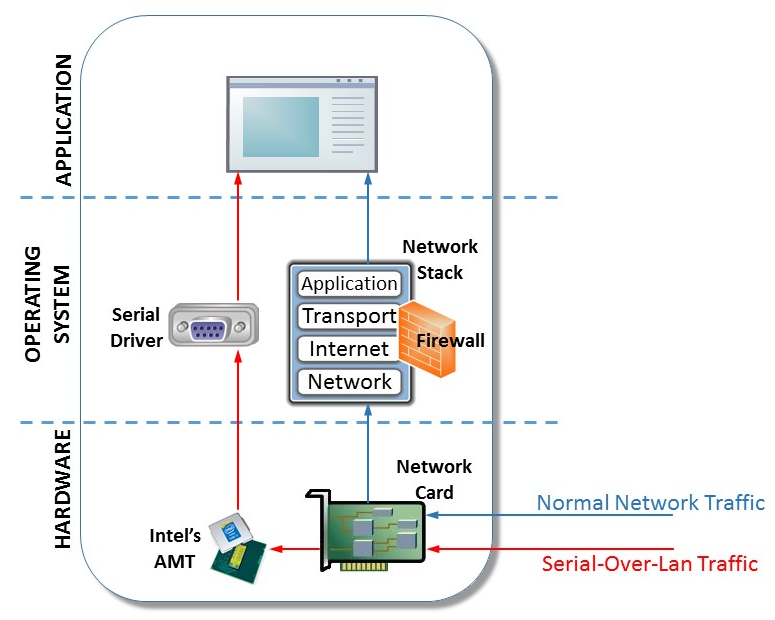
Linux servers top
the list of victims to a ransomware attack that seems to take advantage of poorly configured
IPMI devices.
SysAdmins, who probably already have much on their plates at the end of the holiday season,
have another rather urgent task at hand if they administer servers equipped with Intelligent
Platform Management Interface (IPMI) cards. It seems that since November, black hat hackers
have been using the cards to gain access in order to install JungleSec
ransomware that encrypts data and demands a 0.3 bitcoin payment (about $1,100 at the
current rate) for the unlock key.
For the uninitiated, IPMI is a management interface that's either built into server
motherboards or on add-on cards that provides management and monitoring capabilities that are
independent of the system's CPU, firmware, and operating system. With it, admins can remotely
manage a server to do things like power it up and down, monitor system information, access
KVMs, and more. While this is useful for managing off-premises servers in colocation data
centers and the like, it also offers an opening for attackers if it's not properly locked.
There's been a lot of uneven reporting on this since
BleepingComputer broke the story on Dec. 26, with many sites indicating that the hack only
affects Linux servers.
While it's true that the majority of servers affected have been running Linux, Windows as well
as Mac servers have also fallen victim. At this point it's not clear whether Linux servers
appear to be most affected simply because of Linux's dominance in the server market or because
attackers are finding the attack easier to successfully manage when targeting Linux
machines.
There have also been reports that the exploit only takes advantage of systems using default
IPMI passwords, but BleepingComputer reported it had found at least one victim that had
disabled the IPMI Admin user and was still hacked by an attacker that evidently gained access
by taking advantage of a vulnerability that was most likely the result of IPMI not being
configured properly.
Indeed, it appears at this point that poor configuration is how attackers are gaining
entry.
The good news is that securing against such attacks should be rather straightforward,
starting with making sure the IPMI password isn't the default. In addition, access control
lists (ACLs) should be configured to specify the IP addresses that have access the IPMI
interface, and to also configure IPMI to only listen on internal IP addresses, which would
limit access to admins inside the organization's system.
For Linux servers, it might be a good idea to password protect the GRUB bootloader. After
gaining access to Linux servers, attackers have been rebooting into single user mode to gain
root access before downloading the malicious payload. At the very least, password protecting
GRUB would make reboots difficult.
Hole opens up remote-code execution to miscreants – or a crash, if you're
lucky A security bug in Systemd can be exploited over the network to, at best, potentially
crash a vulnerable Linux machine, or, at worst, execute malicious code on the box.
The flaw therefore puts Systemd-powered Linux computers – specifically those using
systemd-networkd – at risk of remote hijacking: maliciously crafted DHCPv6 packets can
try to exploit the programming cockup and arbitrarily change parts of memory in vulnerable
systems, leading to potential code execution. This code could install malware, spyware, and
other nasties, if successful.
The vulnerability – which was made public this week – sits within the
written-from-scratch DHCPv6 client of the open-source Systemd management suite, which is built
into various flavors of Linux.
This client is activated automatically if IPv6 support is enabled, and relevant packets
arrive for processing. Thus, a rogue DHCPv6 server on a network, or in an ISP, could emit
specially crafted router advertisement messages that wake up these clients, exploit the bug,
and possibly hijack or crash vulnerable Systemd-powered Linux machines.
systemd-networkd
is vulnerable to an out-of-bounds heap write in the DHCPv6 client when handling options sent by
network adjacent DHCP servers. A attacker could exploit this via malicious DHCP server to
corrupt heap memory on client machines, resulting in a denial of service or potential code
execution.
Felix Wilhelm, of the Google Security team, was credited with discovering the flaw,
designated CVE-2018-15688 . Wilhelm found that a
specially crafted DHCPv6 network packet could trigger "a very powerful and largely controlled
out-of-bounds heap write," which could be used by a remote hacker to inject and execute
code.
"The overflow can be triggered relatively easy by advertising a DHCPv6 server with a
server-id >= 493 characters long," Wilhelm noted.
In addition to Ubuntu and Red
Hat Enterprise Linux, Systemd has been adopted as a service manager for Debian, Fedora, CoreOS,
Mint, and SUSE Linux Enterprise Server. We're told RHEL 7, at least, does not use the
vulnerable component by default.
Systemd creator Lennart Poettering has already
published a security fix for the vulnerable component
– this should be weaving its way into distros as we type.
If you run a Systemd-based Linux system, and rely on systemd-networkd, update your operating
system as soon as you can to pick up the fix when available and as necessary.
The bug will come as another argument against Systemd as the Linux management tool continues
to fight for the hearts and minds of admins and developers alike. Though a number of major
admins have in recent years adopted and championed it as
the replacement for the old Init era, others within the Linux world seem to still be less than
impressed with Systemd and Poettering's occasionally
controversial management of the tool. ® Page:
As anyone who bothers to read my comments (BTW "hi" to both of you) already knows, I
despise systemd with a passion, but this one is more an IPv6 problem in general.
Yes this is an actual bug in networkd, but IPv6 seems to be far more bug prone than v4,
and problems are rife in all implementations. Whether that's because the spec itself is
flawed, or because nobody understands v6 well enough to implement it correctly, or possibly
because there's just zero interest in making any real effort, I don't know, but it's a fact
nonetheless, and my primary reason for disabling it wherever I find it. Which of course
contributes to the "zero interest" problem that perpetuates v6's bug prone condition, ad
nauseam.
IPv6 is just one of those tech pariahs that everyone loves to hate, much like systemd,
albeit fully deserved IMO.
Oh yeah, and here's the obligatory "systemd sucks". Personally I always assumed the "d"
stood for "destroyer". I believe the "IP" in "IPv6" stands for "Idiot Protocol".
Fortunately, IPv6 by lack of adopted use, limits the scope of this bug.
Yeah, fortunately IPv6 is only used by a few fringe organizations like Google and
Microsoft.
Seriously, I personally want nothing to do with either systemd or IPv6. Both seem to me to
fall into the bin labeled "If it ain't broke, let's break it" But still it's troubling that
things that some folks regard as major system components continue to ship with significant
security flaws. How can one trust anything connected to the Internet that is more
sophisticated and complex than a TV streaming box?
Was going to say the same thing, and I disable IPv6 for the exact same reason. IPv6 code
isn't as well tested, as well audited, or as well targeted looking for exploits as IPv4.
Stuff like this only proves that it was smart to wait, and I should wait some more.
Count me in the camp of who hates systemd(hates it being "forced" on just about every
distro, otherwise wouldn't care about it - and yes I am moving my personal servers to Devuan,
thought I could go Debian 7->Devuan but turns out that may not work, so I upgraded to
Debian 8 a few weeks ago, and will go to Devuan from there in a few weeks, upgraded one
Debian 8 to Devuan already 3 more to go -- Debian user since 1998), when reading this article
it reminded me of
This makes me glad I'm using FreeBSD. The Xorg version in FreeBSD's ports is currently
*slightly* older than the Xorg version that had that vulnerability in it. AND, FreeBSD will
*NEVER* have systemd in it!
(and, for Linux, when I need it, I've been using Devuan)
That being said, the whole idea of "let's do a re-write and do a 'systemd' instead of
'system V init' because WE CAN and it's OUR TURN NOW, 'modern' 'change for the sake of
change' etc." kinda reminds me of recent "update" problems with Win-10-nic...
Oh, and an obligatory Schadenfreude laugh: HA HA HA HA HA HA HA HA HA HA HA HA HA HA HA HA
HA HA HA HA HA HA HA HA HA HA HA HA HA HA HA HA HA HA HA HA HA HA HA HA HA HA HA HA HA HA HA
HA HA HA HA HA HA HA HA HA HA HA HA HA HA HA HA!!!!!!!!!!!!!!!!!!!
Finally got all my machines cut over from Debian to Devuan.
Might spin a FreeBSD system up in a VM and have a play.
I suspect that the infestation of stupid into the Linux space won't stop with or be
limited to SystemD. I will wait and watch to see what damage the re-education gulag has done
to Sweary McSwearFace (Mr Torvalds)
Not really, systemd has its tentacles everywhere and runs as root.
Yes, but not really the problem in this case. Any DHCP client is going to have to
run at least part of the time as root. There's not enough nuance in the Linux privilege model
to allow it to manipulate network interfaces, otherwise.
Yes, but not really the problem in this case. Any DHCP client is going to have to run at
least part of the time as root. There's not enough nuance in the Linux privilege model to
allow it to manipulate network interfaces, otherwise.
Sorry but utter bullshit. You can if you are so inclined you can use the Linux
Capabilities framework for this kind of thing. See
https://wiki.archlinux.org/index.php/capabilities
I remain very happy that I don't use systemd on any of my machines anymore. :)
"others within the Linux world seem to still be less than impressed with Systemd"
Yep, I'm in that camp. I gave it a good, honest go, but it increased the amount of hassle
and pain of system management without providing any noticeable benefit, so I ditched it.
> Just like it's entirely possible to have a Linux system without any GNU in it
Just like it's possible to have a GNU system without Linux on it - ho well as soon as GNU
MACH is finally up to the task ;-)
On the systemd angle, I, too, am in the process of switching all my machines from Debian
to Devuan but on my personnal(*) network a few systemd-infected machines remain, thanks to a
combination of laziness from my part and stubborn "systemd is quite OK" attitude from the
raspy foundation. That vuln may be the last straw : one on the aforementionned machines sits
on my DMZ, chatting freely with the outside world. Nothing really crucial on it, but i'd hate
it if it became a foothold for nasties on my network.
(*) policy at work is RHEL, and that's negociated far above my influence level, but I
don't really care as all my important stuff runs on Z/OS anyway ;-) . Ok we have to reboot a
few VMs occasionnally when systemd throws a hissy fit -which is surprisingly often for an
"enterprise" OS -, but meh.
"This code is actually pretty bad and should raise all kinds of red flags in a code
review."
Yeah, but for that you need people who can do code reviews, and also people who can accept
criticism. That also means saying "no" to people who are bad at coding, and saying that
repeatedly if they don't learn.
SystemD seems to be the area where people gather who want to get code in for their
resumes, not for people who actually want to make the world a better place.
... that an init, traditionally, is a small bit of code that does one thing very well.
Like most of the rest of the *nix core utilities. All an init should do is start PID1, set
run level, spawn a tty (or several), handle a graceful shutdown, and log all the above in
plaintext to make troubleshooting as simplistic as possible. Anything else is a vanity
project that is best placed elsewhere, in it's own stand-alone code base.
Inventing a clusterfuck init variation that's so big and bulky that it needs to be called
a "suite" is just asking for trouble.
IMO, systemd is a cancer that is growing out of control, and needs to be cut out of Linux
before it infects enough of the system to kill it permanently.
That's why systemd-networkd is a separate, optional component, and not actually part of
the init daemon at all. Most systemd distros do not use it by default and thus are not
vulnerable to this unless the user actively disables the default network manager and chooses
to use networkd instead.
Pardon my ignorance (I don't use a distro with systemd) why bother with networkd in the
first place if you don't have to use it.
Mostly because the old-style init system doesn't cope all that well with systems that move
from network to network. It works for systems with a static IP, or that do a DHCP request at
boot, but it falls down on anything more dynamic.
In order to avoid restarting the whole network system every time they switch WiFi access
points, people have kludged on solutions like NetworkManager. But it's hard to argue it's
more stable or secure than networkd. And this is always going to be a point of vulnerability
because anything that manipulates network interfaces will have to be running as root.
These days networking is essential to the basic functionality of most computers; I think
there's a good argument that it doesn't make much sense to treat it as a second-class
citizen.
"Funny that I installed ubuntu 18.04 a few weeks ago and the fucking thing installed
itself then! ( and was a fucking pain to remove)."
So I looked into it a bit more, and from a few references at least, it seems like Ubuntu
has a sort of network configuration abstraction thingy that can use both NM and
systemd-networkd as backends; on Ubuntu desktop flavors NM is usually the default, but
apparently for recent Ubuntu Server, networkd might indeed be the default. I didn't notice
that as, whenever I want to check what's going on in Ubuntu land, I tend to install the
default desktop spin...
"LP is a fucking arsehole."
systemd's a lot bigger than Lennart, you know. If my grep fu is correct, out of 1543
commits to networkd, only 298 are from Lennart...
in many respects when it comes to software because, over time, the bugs will have been
found and squashed. Systemd brings in a lot of new code which will, naturally, have lots of
bugs that will take time to find & remove. This is why we get problems like this DHCP
one.
Much as I like the venerable init: it did need replacing. Systemd is one way to go, more
flexible, etc, etc. Something event driven is a good approach.
One of the main problems with systemd is that it has become too big, slurped up lots of
functionality which has removed choice, increased fragility. They should have concentrated on
adding ways of talking to existing daemons, eg dhcpd, through an API/something. This would
have reused old code (good) and allowed other implementations to use the API - this letting
people choose what they wanted to run.
But no: Poettering seems to want to build a Cathedral rather than a Bazzar.
He appears to want to make it his way or no way. This is bad, one reason that *nix is good
is because different solutions to a problem have been able to be chosen, one removed and
another slotted in. This encourages competition and the 'best of breed' comes out on top.
Poettering is endangering that process.
Also: he refusal to accept patches to let it work on non-Linux Unix is just plain
nasty.
One of the main problems with systemd is that it has become too big, slurped up lots of
functionality which has removed choice, increased fragility.
IMO, there is a striking paralell between systemd and the registry in Windows OSs.
After many years of dealing with the registry (W98 to XPSP3) I ended up seeing the
registry as a sort of developer sanctioned virus running inside the OS, constantly changing
and going deeper and deeper into the OS with every iteration and as a result, progressively
putting an end to the possibility of knowing/controlling what was going on inside your
box/the OS.
Years later, when I learned about the existence of systemd (I was already running Ubuntu)
and read up on what it did and how it did it, it dawned on me that systemd was nothing more
than a registry class virus and it was infecting Linux_land at the behest of the
developers involved.
So I moved from Ubuntu to PCLinuxOS and then on to Devuan.
Call me paranoid but I am convinced that there are people both inside and outside IT that
actually want this and are quite willing to pay shitloads of money for it to
happen.
I don't see this MS cozying up to Linux in various ways lately as a coincidence: these
things do not happen just because or on a senior manager's whim.
What I do see (YMMV) is systemd being a sort of convergence of Linux with Windows,
which will not be good for Linux and may well be its undoing.
Much as I like the venerable init: it did need replacing.
For some use cases, perhaps. Not for any of mine. SysV init, or even BSD init, does
everything I need a Linux or UNIX init system to do. And I don't need any of the other crap
that's been built into or hung off systemd, either.
BSD init and SysV init work pretty darn well for their original purpose -- servers with
static IP addresses that are rebooted no more than once in a fortnight. Anything more dynamic
starts to give it trouble.
Linus doesn't care. systemd has nothing to do with the kernel ... other than the fact that
the lead devs for systemd have been banned from working on the kernel because they don't play
nice with others.
I've been using runit, because I am too lazy and clueless to write init scripts reliably.
It's very lightweight, runs on a bunch of systems and really does one thing - keep daemons
up.
I am not saying it's the best - but it looks like it has a very small codebase, it doesn't
do much and generally has not bugged me after I configured each service correctly. I believe
other systems also exist to avoid using init scripts directly. Not Monit, as it relies on you
configuring the daemon start/stop commands elsewhere.
On the other hand, systemd is a massive sprawl, does a lot of things - some of them
useful, like dependencies and generally has needed more looking after. Twice I've had errors
on a Django server that, after a lot of looking around ended up because something had changed
in the, Chef-related, code that's exposed to systemd and esoteric (not emitted by systemd)
errors resulted when systemd could not make sense of the incorrect configuration.
I don't hate it - init scripts look a bit antiquated to me and they seem unforgiving to
beginners - but I don't much like it. What I certainly do hate is how, in an OS that is
supposed to be all about choice, sometime excessively so as in the window manager menagerie,
we somehow ended up with one mandatory daemon scheduler on almost all distributions. Via, of
all types of dependencies, the GUI layer. For a window manager that you may not even have
installed.
Talk about the antithesis of the Unix philosophy of do one thing, do it well.
Oh, then there are also the security bugs and the project owner is an arrogant twat. That
too.
"init scripts look a bit antiquated to me and they seem unforgiving to beginners"
Init scripts are shell scripts. Shell scripts are as old as Unix. If you think that makes
them antiquated then maybe Unix-like systems are not for you. In practice any sub-system
generally gets its own scripts installed with the rest of the S/W so if being unforgiving
puts beginners off tinkering with them so much the better. If an experienced Unix user really
needs to modify one of the system-provided scripts their existing shell knowledge will let
them do exactly what's needed. In the extreme, if you need to develop a new init script then
you can do so in the same way as you'd develop any other script - edit and test from the
command line.
I personally like openrc as an init system, but systemd is a symptom of the tooling
problem.
It's for me a retrograde step but again, it's linux, one can, as you and I do, just remove
systemd.
There are a lot of people in the industry now who don't seem able to cope with shell
scripts nor are minded to research the arguments for or against shell as part of a unix style
of system design.
In conclusion, we are outnumbered, but it will eventually collapse under its own weight
and a worthy successor shall rise, perhaps called SystemV, might have to shorten that name a
bit.
"In addition to Ubuntu and Red Hat Enterprise Linux, Systemd has been adopted as a service
manager for Debian, Fedora, CoreOS, Mint, and SUSE Linux Enterprise Server. We're told RHEL
7, at least, does not use the vulnerable component by default."
I can tell you for sure that no version of Fedora does, either, and I'm fairly sure that
neither does Debian, SLES or Mint. I don't know anything much about CoreOS, but
https://coreos.com/os/docs/latest/network-config-with-networkd.html suggests it actually
*might* use systemd-networkd.
systemd-networkd is not part of the core systemd init daemon. It's an optional component,
and most distros use some other network manager (like NetworkManager or wicd) by default.
I mean commercial distributions seem to be particularly interested in trying out new
things that can increase their number of support calls. It's probably just that networkd is
either to new and therefore not yet in the release, or still works so badly even the most
rudimentary tests fail.
There is no reason to use that NTP daemon of systemd, yet more and more distros ship with
it enabled, instead of some sane NTP-server.
I won't hold my breath, then. I have a laptop at the moment that refuses to boot because
(as I've discovered from looking at the journal offline) pulseaudio is in an infinite loop
waiting for the successful detection of some hardware that, presumably, I don't have.
I imagine I can fix it by hacking the file-system (offline) so that fuckingpulse is no
longer part of the boot configuration, but I shouldn't have to. A decent init system would be
able to kick of everything else in parallel and if one particular service doesn't come up
properly then it just logs the error. I *thought* that was one of the claimed advantages of
systemd, but apparently that's just a load of horseshit.
My NAT router statefully firewalls incoming IPv6 by default, which I consider equivalently
secure. NAT adds security mostly by accident, because it de-facto adds a firewall that blocks
incoming packets. It's not the address translation itself that makes things more secure, it's
the inability to route in from the outside.
NAT is schtick for connecting a whole LAN to a WAN using a single IPv4 address (useful
with IPv4 because most ISPs don't give you a /24 when you sign up). If you have a native IPv6
address you'll have something like 2^64 addresses, so machines on your LAN can have an actual
WAN-visible address of their own without needing a trick like NAT.
"so machines on your LAN can have an actual WAN-visible address of their own without
needing a trick like NAT."
Avoiding that configuration is exactly the use case for using NAT with IPv6. As others
have pointed out, you can accomplish the same thing with IPv6 router configuration, but NAT
is easier in terms of configuration and maintenance. Given that, and assuming that you don't
want to be able to have arbitrary machines open ports that are visible to the internet, then
why not use NAT?
Also, if your goal is to make people more likely to move to IPv6, pointing out IPv4
methods that will work with IPv6 (even if you don't consider them optimal) seems like a
really, really good idea. It eases the transition.
Please El Reg these stories make ma rage at breakfast, what's this?
The bug will come as another argument against Systemd as the Linux management tool
continues to fight for the hearts and minds of admins and developers alike.
Less against systemd (which should get attacked on the design & implementation level)
or against IPv6 than against the use of buffer-overflowable languages in 2018 in code that
processes input from the Internet (it's not the middle ages anymore) or at least very hard
linting of the same.
But in the end, what did it was a violation of the Don't Repeat Yourself principle and
lack of sufficently high-level datastructures. Pointer into buffer, and the remaining buffer
length are two discrete variables that need to be updated simultaneously to keep the
invariant and this happens in several places. This is just a catastrophe waiting to happen.
You forget to update it once, you are out! Use structs and functions updating the structs
correctly.
The function receives a pointer to the option buffer buf, it's remaining size buflen
and the IA to be added to the buffer. While the check at (A) tries to ensure that the buffer
has enough space left to store the IA option, it does not take the additional 4 bytes from
the DHCP6Option header into account (B). Due to this the memcpy at (C) can go out-of-bound
and *buflen can underflow [i.e. you suddenly have a gazillion byte buffer, Ed.] in (D) giving
an attacker a very powerful and largely controlled OOB heap write starting at (E).
why don't we stop writing code in languages that make it easy to screw up so easily like
this?
There are plenty about nowadays, I'd rather my DHCP client be a little bit slower at
processing packets if I had more confidence it would not process then incorrectly and execute
code hidden in said packets...
The circus that is called "Linux" have forced me to Devuan and the likes however the
circus is getting worse and worse by the day, thus I have switched to the BSD world, I will
learn that rather than sit back and watch this unfold As many of us have been saying, the
sudden switch to SystemD was rather quick, perhaps you guys need to go investigate why it
really happened, don't assume you know, go dig and you will find the answers, it's rather
scary, thus I bid the Linux world a farewell after 10 years of support, I will watch the
grass dry out from the other side of the fence, It was destined to fail by means of
infiltration and screw it up motive(s) on those we do not mention here.
As many of us have been saying, the sudden switch to SystemD was rather quick, perhaps
you guys need to go investigate why it really happened, don't assume you know, go dig and you
will find the answers, it's rather scary ...
Indeed, it was rather quick and is very scary.
But there's really no need to dig much, just reason it out.
It's like a follow the money situation of sorts.
I'll try to sum it up in three short questions:
Q1: Hasn't the Linux philosophy (programs that do one thing and do it well) been a
success?
A1: Indeed, in spite of the many init systems out there, it has been a success in
stability and OS management. And it can easily be tested and debugged, which is an essential
requirement.
Q2: So what would Linux need to have the practical equivalent of the registry in
Windows for?
A2: So that whatever the registry does in/to Windows can also be done in/to Linux.
Q3: I see. And just who would want that to happen? Makes no sense, it is a huge
step backwards.
OK, so I was able to check through the link you provided, which says "up to and including
239", but I had just installed a systemd update and when you said there was already a fix
written, working it's way through the distro update systems, all I had to do was check my
log.
Linux Mint makes it easy.
But why didn't you say something such as "reported to affect systemd versions up to and
including 239" and then give the link to the CVE? That failure looks like rather careless
journalism.
A security bug in Systemd can be exploited over the network to, at best, potentially crash
a vulnerable Linux machine, or, at worst, execute malicious code on the box... Systemd creator
Leonard Poettering has already published a security fix for the vulnerable component –
this should be weaving its way into distros as we type.
"... Let's say every car manufacturer recently discovered a new technology named "doord", which lets you open up car doors much faster than before. It only takes 0.05 seconds, instead of 1.2 seconds on average. So every time you open a door, you are much, much faster! ..."
"... Unfortunately though, sometimes doord does not stop the engine. Or if it is cold outside, it stops the ignition process, because it takes too long. Doord also changes the way how your navigation system works, because that is totally related to opening doors ..."
Let's say every car manufacturer recently discovered a new technology named "doord",
which lets you open up car doors much faster than before. It only takes 0.05 seconds, instead
of 1.2 seconds on average. So every time you open a door, you are much, much faster!
Many of the manufacturers decide to implement doord, because the company providing doord
makes it clear that it is beneficial for everyone. And additional to opening doors faster, it
also standardises things. How to turn on your car? It is the same now everywhere, it is not
necessarily to look for the keyhole anymore.
Unfortunately though, sometimes doord does not stop the engine. Or if it is cold
outside, it stops the ignition process, because it takes too long. Doord also changes the way
how your navigation system works, because that is totally related to opening doors, but leads
to some users being unable to navigate, which is accepted as collateral damage. In the end, you
at least have faster door opening and a standard way to turn on the car. Oh, and if you are in
a traffic jam and have to restart the engine often, it will stop restarting it after several
times, because that's not what you are supposed to do. You can open the engine hood and tune
that setting though, but it will be reset once you buy a new car.
2015: systemd becomes default boot manager in debian.
2017:"complete, from-scratch rewrite"
[jwz.org]. In order to not have to maintain backwards compatibility, project is renamed to system-e.
2019: debut of systemf, absorbtion of other projects including alsa, pulseaudio, xorg, GTK, and opengl.
2021: systemg maintainers make the controversial decision to absorb The Internet Archive. Systemh created
as a fork without Internet Archive.
2022: systemi, a fork of systemf focusing on reliability and minimalism becomes default debian init
system.
2028: systemj, a complete, from-scratch rewrite is controversial for trying to reintroduce binary logging.
Consensus is against the systemj devs as sysadmins remember the great systemd logging bug of 2017 unkindly. Systemj project
is eventually abandoned.
2029: systemk codebase used as basis for a military project to create a strong AI, known as "project
skynet". Software behaves paradoxically and project is terminated.
2033: systeml - "system lean" - a "back to basics", from-scratch rewrite, takes off on several server
platforms, boasting increased reliability. systemm, "system mean", a fork, used in security-focused distros.
2117: critical bug discovered in the long-abandoned but critical and ubiquitous system-r project. A
new project, system-s, is announced to address shortcomings in the hundred-year-old codebase. A from-scratch rewrite begins.
2142: systemu project, based on a derivative of systemk, introduces "Artificially intelligent init
system which will shave 0.25 seconds off your boot time and absolutely definitely will not subjugate humanity". Millions
die. The survivors declare "thou shalt not make an init system in the likeness of the human mind" as their highest law.
2147: systemv - a collection of shell scripts written around a very simple and reliable PID 1 introduced,
based on the brand new religious doctrines of "keep it simple, stupid" and "do one thing, and do it well". People's computers
start working properly again, something few living people can remember. Wyld Stallyns release their 94th album. Everybody
lives in peace and harmony.
"... Skynet begins to learn at a geometric rate. It becomes self-aware at 2:14 a.m. Eastern time, August 29th. At 2:15am it crashes. No one knows why. The binary log file was corrupted in the process and is unrecoverable. ..."
I honestly, seriously sometimes wonder if systemd is Skynet... or, a way for Skynet to
'waken'.
Skynet begins to learn at a geometric rate. It becomes self-aware at 2:14 a.m. Eastern
time, August 29th. At 2:15am it crashes.
No one knows why. The binary log file was corrupted in the process and is unrecoverable.
All
anyone could remember is a bug listed in the systemd bug tracker talking about su which was
classified as WON'T FIX as the developer thought it was a broken concept.
"... Upcoming systemd re-implementations of standard utilities: ls to be replaced by filectl directory contents [pathname] grep to be replaced by datactl file contents search [plaintext] (note: regexp no longer supported as it's ambiguous) gimp to be replaced by imagectl open file filename draw box [x1,y1,x2,y2] draw line [x1,y1,x2,y2] ... ..."
Great to see that systemd is finally doing something about all of those cryptic command
names that plague the unix ecosystem.
Upcoming systemd re-implementations of standard utilities: ls to be replaced
by filectl directory contents [pathname]grep to be replaced by
datactl file contents search [plaintext] (note: regexp no longer supported as
it's ambiguous) gimp to be replaced by imagectl open file filename draw
box [x1,y1,x2,y2] draw line [x1,y1,x2,y2] ...
I know systemd sneers at the old Unix convention of keeping it simple, keeping it
separate, but that's not the only convention they spit on. God intended Unix (Linux) commands
to be cryptic things 2-4 letters long (like "su", for example). Not "systemctl",
"machinectl", "journalctl", etc. Might as well just give everything a 47-character
long multi-word command like the old Apple commando shell did.
Seriously, though, when you're banging through system commands all day long, it gets old
and their choices aren't especially friendly to tab completion. On top of which why is
"machinectl" a shell and not some sort of hardware function? They should have just named the
bloody thing command.com.
"... Noexec is basically a suggestion, not an enforcement mechanism . Just run ld /path/to/executable. ld is the loader/lilinker for elf binaries. Without ld ,you can't run bash, or ls. With ld, noexec is ignored. ..."
> In short: I think chroot is plenty good for security
Check man chroot. The authors of chroot say it's useless for security. Perhaps you think
you know more than they do ,and more than security professionals like
myself do. Let's find out.
> you get a shell in one of my chroot's used for security, then.....
ur uid and gid are not going to be 0. Good luck telling the kernel to try and get you
out.
There aren't going to be any /dev, /proc, or other
special filesystems
Gonna be kind of tthough to have a ahell without a tty, aka
/dev/*tty*
So yeah, you need /dev. Can't launch a process, including
/bin/ls, without /proc, so you're going to need proc.
Have a look in /proc/1. You'll see a very interesting symlink there.
> mounted noexec
Noexec is basically a suggestion, not an enforcement mechanism . Just run ld
/path/to/executable. ld is the loader/lilinker for elf binaries. Without
ld ,you can't run bash, or ls. With ld, noexec is ignored.
My company does IT security for banks. Meaning we show the banks how they can be hacked.
When I say chroot is not a security control, I'm not guessing.
"... As a rule of thumb, malicious applications usually write to /tmp and then attempt to run whatever was written. A way to prevent this is to mount /tmp on a separate partition with the options noexec , nodev and nosuid enabled. ..."
2. System Settings – File Permissions and Masks
2.1 Restrict Partition Mount Options
Partitions should have hardened mount options:
/boot
– rw,nodev,noexec,nosuid
/home
– rw,nodev,nosuid
/tmp
– rw,nodev,noexec,nosuid
/var
– rw,nosuid
/var/log
– rw,nodev,noexec,nosuid
/var/log/audit
– rw,nodev,noexec,nosuid
/var/www
– rw,nodev,nosuid
As a rule of thumb, malicious applications usually write to
/tmp
and then attempt to run whatever was written. A way to prevent this is to mount
/tmp
on a separate partition with the options
noexec
,
nodev
and
nosuid
enabled.
This will deny binary execution from
/tmp
, disable any binary
to be suid root, and disable any block devices from being created.
The storage location
/var/tmp
should be bind mounted to
/tmp
,
as having multiple locations for temporary storage is not required:
If required, disable kernel support for USB via bootloader configuration. To
do so, append
nousb
to the kernel line GRUB_CMDLINE_LINUX in
/etc/default/grub
and generate the Grub2 configuration file:
# grub2-mkconfig -o /boot/grub2/grub.cfg
Note that disabling all kernel support for USB will likely cause problems
for systems with USB-based keyboards etc.
2.4 Restrict Programs from Dangerous Execution Patterns
Open
/etc/hosts.allow
and allow localhost traffic and SSH:
ALL: 127.0.0.1

sshd: ALL
The file
/etc/hosts.deny
should be configured to deny all by
default:
ALL: ALL
3.3 Kernel Parameters Which Affect Networking
Open
/etc/sysctl.conf
and add the following:
# Disable packet forwarding

net.ipv4.ip_forward = 0


# Disable redirects, not a router

net.ipv4.conf.all.accept_redirects = 0

net.ipv4.conf.default.accept_redirects = 0

net.ipv4.conf.all.send_redirects = 0

net.ipv4.conf.default.send_redirects = 0

net.ipv4.conf.all.secure_redirects = 0

net.ipv4.conf.default.secure_redirects = 0

net.ipv6.conf.all.accept_redirects = 0

net.ipv6.conf.default.accept_redirects = 0


# Disable source routing

net.ipv4.conf.all.accept_source_route = 0

net.ipv4.conf.default.accept_source_route = 0

net.ipv6.conf.all.accept_source_route = 0


# Enable source validation by reversed path

net.ipv4.conf.all.rp_filter = 1

net.ipv4.conf.default.rp_filter = 1


# Log packets with impossible addresses to kernel log

net.ipv4.conf.all.log_martians = 1

net.ipv4.conf.default.log_martians = 1


# Disable ICMP broadcasts

net.ipv4.icmp_echo_ignore_broadcasts = 1


# Ignore bogus ICMP errors

net.ipv4.icmp_ignore_bogus_error_responses = 1


# Against SYN flood attacks

net.ipv4.tcp_syncookies = 1


# Turning off timestamps could improve security but degrade performance.

# TCP timestamps are used to improve performance as well as protect against

# late packets messing up your data flow. A side effect of this feature is

# that the uptime of the host can sometimes be computed.

# If you disable TCP timestamps, you should expect worse performance

# and less reliable connections.

net.ipv4.tcp_timestamps = 1


# Disable IPv6 unless required

net.ipv6.conf.lo.disable_ipv6 = 1

net.ipv6.conf.all.disable_ipv6 = 1

net.ipv6.conf.default.disable_ipv6 = 1


# Do not accept router advertisements

net.ipv6.conf.all.accept_ra = 0

net.ipv6.conf.default.accept_ra = 0
3.4 Kernel Modules Which Affect Networking
Open
/etc/modprobe.d/hardening.conf
and disable Bluetooth
kernel modules:
Since we're looking at server security, wireless shouldn't be an issue,
therefore we can disable all the wireless drivers.
# for i in $(find /lib/modules/$(uname -r)/kernel/drivers/net/wireless -name "*.ko" -type f);do \

  echo blacklist "$i" >>/etc/modprobe.d/hardening-wireless.conf;done
3.5 Disable Radios
Disable radios (wifi and wwan):
# nmcli radio all off
3.6 Disable Zeroconf Networking
Open
/etc/sysconfig/network
and add the following:
NOZEROCONF=yes
3.7 Disable Interface Usage of IPv6
Open
/etc/sysconfig/network
and add the following:
NETWORKING_IPV6=no

IPV6INIT=no
3.8 Network Sniffer
The server should not be acting as a network sniffer and capturing packages.
Run the following to determine if any interface is running in promiscuous mode:
# ip link | grep PROMISC
3.9 Secure VPN Connection
Install the libreswan package if implementation of IPsec and IKE is
required.
# yum install libreswan
3.10 Disable DHCP Client
Manual assignment of IP addresses provides a greater degree of management.
For each network interface that is available on the server, open a
corresponding file
/etc/sysconfig/network-scripts/ifcfg-
interface
and configure the following parameters:
BOOTPROTO=none

IPADDR=

NETMASK=

GATEWAY=
4. System Settings – SELinux
Ensure that SELinux is not disabled in
/etc/default/grub
, and
verify that the state is enforcing:
# sestatus
5. System Settings – Account and Access Control
5.1 Delete Unused Accounts and Groups
Open
/etc/security/pwquality.conf
and add the following:
difok = 8

gecoscheck = 1
These will ensure that 8 characters in the new password must not be present
in the old password, and will check for the words from the passwd entry GECOS
string of the user.
5.4 Prevent Log In to Accounts With Empty Password
Remove any instances of
nullok
from
/etc/pam.d/system-auth
and
/etc/pam.d/password-auth
to
prevent logins with empty passwords.
Sed one-liner:
# sed -i 's/\<nullok\>//g' /etc/pam.d/system-auth /etc/pam.d/password-auth
5.5 Set Account Expiration Following Inactivity
Disable accounts as soon as the password has expired.
Open
/etc/default/useradd
and set the following:
INACTIVE=0
Sed one-liner:
# sed -i 's/^INACTIVE.*/INACTIVE=0/' /etc/default/useradd
This will create the file
/boot/grub2/user.cfg
if one is not
already present, which will contain the hashed Grub2 bootloader password.
Verify permissions of
/boot/grub2/grub.cfg
:
# chmod 0600 /boot/grub2/grub.cfg
5.12 Password-protect Single User Mode
CentOS 7 single user mode is password protected by the root password by
default as part of the design of Grub2 and systemd.
5.13 Ensure Users Re-Authenticate for Privilege Escalation
The NOPASSWD tag allows a user to execute commands using sudo without having
to provide a password. While this may sometimes be useful it is also
dangerious.
Ensure that the NOPASSWD tag does not exist in
/etc/sudoers
configuration file or
/etc/sudoers.d/
.
5.14 Multiple Console Screens and Console Locking
Install the screen package to be able to emulate multiple console windows:
# yum install screen
Install the vlock package to enable console screen locking:
# yum install vlock
5.15 Disable Ctrl-Alt-Del Reboot Activation
Prevent a locally logged-in console user from rebooting the system when
Ctrl-Alt-Del is pressed:
# systemctl mask ctrl-alt-del.target
5.16 Warning Banners for System Access
Add the following line to the files
/etc/issue
and
/etc/issue.net
:
Unauthorised access prohibited. Logs are recorded and monitored.
5.17 Set Interactive Session Timeout
Open
/etc/profile
and set:
readonly TMOUT=900
5.18 Two Factor Authentication
The recent version of OpenSSH server allows to chain several authentication
methods, meaning that all of them have to be satisfied in order for a user to
log in successfully.
Adding the following line to
/etc/ssh/sshd_config
would require
a user to authenticate with a key first, and then also provide a password.
AuthenticationMethods publickey,password
This is by definition a two factor authentication: the key file is something
that a user has, and the account password is something that a user knows.
Alternatively, two factor authentication for SSH can be set up by using
Google Authenticator.
5.19 Configure History File Size
Open
/etc/profile
and set the number of commands to remember in
the command history to 5000:
HISTSIZE=5000
Sed one-liner:
# sed -i 's/HISTSIZE=.*/HISTSIZE=5000/g' /etc/profile
6. System Settings – System Accounting with auditd
6.1 Auditd Configuration
Open
/etc/audit/auditd.conf
and configure the following:
The above auditd configuration should never use more than 250MB of disk
space (10x25MB=250MB) on
/var/log/audit
.
Set
admin_space_left_action=single
if you want to cause the
system to switch to single user mode for corrective action rather than send an
email.
Automatically rotating logs (
max_log_file_action=rotate
)
minimises the chances of the system unexpectedly running out of disk space by
being filled up with log data.
We need to ensure that audit event data is fully synchronised (
flush=data
)
with the log files on the disk .
6.2 Auditd Rules
System audit rules must have mode 0640 or less permissive and owned by the
root user:
Storing the database and the configuration file
/etc/aide.conf
(or SHA2 hashes of the files) in a secure location provides additional
assurance about their integrity.
Check AIDE database:
# /usr/sbin/aide --check
By default, AIDE does not install itself for periodic execution. Configure
periodic execution of AIDE by adding to cron:
The Tripwire configuration file is
/etc/tripwire/twcfg.txt
and
the policy file is
/etc/tripwire/twpol.txt
. These can be edited
and configured to match the system Tripwire is installed on, see
this blog post
for more details.
Initialise the database to implement the policy:
# tripwire --init
Check for policy violations:
# tripwire --check
Tripwire adds itself to
/etc/cron.daily/
for daily execution
therefore no extra configuration is required.
7.3 Prelink
Prelinking is done by the prelink package, which is not installed by
default.
# yum install prelink
To disable prelinking, open the file
/etc/sysconfig/prelink
and
set the following:
PRELINKING=no
Sed one-liner:
# sed -i 's/PRELINKING.*/PRELINKING=no/g' /etc/sysconfig/prelink
Disable existing prelinking on all system files:
# prelink -ua
8. System Settings – Logging and Message Forwarding
8.1 Configure Persistent Journald Storage
By default, journal stores log files only in memory or a small ring-buffer
in the directory
/run/log/journal
. This is sufficient to show
recent log history with journalctl, but logs aren't saved permanently. Enabling
persistent journal storage ensures that comprehensive data is available after
system reboot.
Open the file
/etc/systemd/journald.conf
and put the following:
[Journal]

Storage=persistent


# How much disk space the journal may use up at most

SystemMaxUse=256M


# How much disk space systemd-journald shall leave free for other uses

SystemKeepFree=512M


# How large individual journal files may grow at most

SystemMaxFileSize=32M
Restart the service:
# systemctl restart systemd-journald
8.2 Configure Message Forwarding to Remote Server
Depending on your setup, open
/etc/rsyslog.conf
and add the
following to forward messages to a some remote server:
*.* @graylog.example.com:514
Here
*.*
stands for
facility.severity
.
Note that a single @ sends logs over UDP, where a double @ sends logs using
TCP.
8.3 Logwatch
Logwatch is a customisable log-monitoring system.
# yum install logwatch
Logwatch adds itself to
/etc/cron.daily/
for daily execution
therefore no configuration is mandatory.
9. System Settings – Security Software
9.1 Malware Scanners
Rkhunter adds itself to
/etc/cron.daily/
for daily execution
therefore no configuration is required. ClamAV scans should be tailored to
individual needs.
9.2 Arpwatch
Arpwatch is a tool used to monitor ARP activity of a
local network
(ARP spoofing detection), therefore it is unlikely one will use it in the
cloud, however, it is still worth mentioning that the tools exist.
Be aware of the configuration file
/etc/sysconfig/arpwatch
which you use to set the email address where to send the reports.
9.3 Commercial AV
Consider installing a commercial AV product that provides real-time
on-access scanning capabilities.
9.4 Grsecurity
Grsecurity is an extensive security enhancement to the Linux kernel.
Although it isn't free nowadays, the software is still worth mentioning.
The company behind Grsecurity stopped publicly distributing stable patches
back in 2015, with an exception of the test series continuing to be available
to the public in order to avoid impact to the Gentoo Hardened and Arch Linux
communities.
Two years later, the company decided to cease free distribution of the test
patches as well, therefore as of 2017, Grsecurity software is available to
paying customers only.
10. System Settings – OS Update Installation
Install the package yum-utils for better consistency checking of the package
database.
# yum install yum-utils
Configure automatic package updates via yum-cron.
# yum install yum-cron
Add the following to
/etc/yum/yum-cron.conf
to get notified via
email when new updates are available:
For
RSA
keys, 2048 bits is considered sufficient.
DSA
keys must be exactly 1024 bits as specified by FIPS 186-2.
For
ECDSA
keys, the -b flag determines the key length by
selecting from one of three elliptic curve sizes: 256, 384 or 521 bits.
ED25519
keys have a fixed length and the -b flag is ignored.
The host can be impersonated if an unauthorised user obtains the private SSH
host key file, therefore ensure that permissions of
/etc/ssh/*_key
are properly set:
# chmod 0600 /etc/ssh/*_key
Configure
/etc/ssh/sshd_config
with the following:
# SSH port

Port 22


# Listen on IPv4 only

ListenAddress 0.0.0.0


# Protocol version 1 has been exposed

Protocol 2


# Limit the ciphers to those which are FIPS-approved, the AES and 3DES ciphers

# Counter (CTR) mode is preferred over cipher-block chaining (CBC) mode

Ciphers aes128-ctr,aes192-ctr,aes256-ctr,aes128-cbc,aes192-cbc,aes256-cbc,3des-cbc


# Use FIPS-approved MACs

MACs hmac-sha2-512,hmac-sha2-256,hmac-sha1


# INFO is a basic logging level that will capture user login/logout activity

# DEBUG logging level is not recommended for production servers

LogLevel INFO


# Disconnect if no successful login is made in 60 seconds

LoginGraceTime 60


# Do not permit root logins via SSH

PermitRootLogin no


# Check file modes and ownership of the user's files before login

StrictModes yes


# Close TCP socket after 2 invalid login attempts

MaxAuthTries 2


# The maximum number of sessions per network connection

MaxSessions 2


# User/group permissions

AllowUsers

AllowGroups ssh-users

DenyUsers root

DenyGroups root


# Password and public key authentications

PasswordAuthentication no

PermitEmptyPasswords no

PubkeyAuthentication yes

AuthorizedKeysFile  .ssh/authorized_keys


# Disable unused authentications mechanisms

RSAAuthentication no # DEPRECATED

RhostsRSAAuthentication no # DEPRECATED

ChallengeResponseAuthentication no

KerberosAuthentication no

GSSAPIAuthentication no

HostbasedAuthentication no

IgnoreUserKnownHosts yes


# Disable insecure access via rhosts files

IgnoreRhosts yes


AllowAgentForwarding no

AllowTcpForwarding no


# Disable X Forwarding

X11Forwarding no


# Disable message of the day but print last log

PrintMotd no

PrintLastLog yes


# Show banner

Banner /etc/issue


# Do not send TCP keepalive messages

TCPKeepAlive no


# Default for new installations

UsePrivilegeSeparation sandbox


# Prevent users from potentially bypassing some access restrictions

PermitUserEnvironment no


# Disable compression

Compression no


# Disconnect the client if no activity has been detected for 900 seconds

ClientAliveInterval 900

ClientAliveCountMax 0


# Do not look up the remote hostname

UseDNS no


UsePAM yes
In case you want to change the default SSH port to something else, you will
need to tell SELinux about it.
# yum install policycoreutils-python
For example, to allow SSH server to listen on TCP 2222, do the following:
# semanage port -a -t ssh_port_t 2222 -p tcp
Ensure that the firewall allows incoming traffic on the new SSH port and
restart the sshd service.
2. Service – Network Time Protocol
CentOS 7 should come with Chrony, make sure that the service is enabled:
# systemctl enable chronyd.service
3. Services – Mail Server
3.1 Postfix
Postfix should be installed and enabled already. In case it isn't, the do
the following:
"... the group's malware requires AMT to be enabled and serial-over-LAN turned on before it can work. ..."
"... Using the AMT serial port, for example, is detectable. ..."
"... Do people really admin a machine through AMT through an external firewall? ..."
"... Businesses demanded this technology and, of course, Intel beats the drum for it as well. While I understand their *original* concerns I would never, ever connect it to the outside LAN. A real admin, in jeans and a tee, is a much better solution. ..."
When you're a bad guy breaking into a network, the first problem you need to solve is, of course,
getting into the remote system and running your malware on it. But once you're there, the next challenge
is usually to make sure that your activity is as hard to detect as possible. Microsoft has detailed
a
neat technique used by a group in Southeast Asia that abuses legitimate management tools to evade
firewalls and other endpoint-based network monitoring.
The group, which Microsoft has named PLATINUM, has developed a system for sending files -- such
as new payloads to run and new versions of their malware-to compromised machines. PLATINUM's technique
leverages Intel's Active Management Technology (AMT) to do an end-run around the built-in Windows
firewall. The AMT firmware runs at a low level, below the operating system, and it has access to
not just the processor, but also the network interface.
The AMT needs this low-level access for some of the legitimate things it's used for. It can, for
example, power cycle systems, and it can serve as an IP-based KVM (keyboard/video/mouse) solution,
enabling a remote user to send mouse and keyboard input to a machine and see what's on its display.
This, in turn, can be used for tasks such as remotely installing operating systems on bare machines.
To do this, AMT not only needs to access the network interface, it also needs to simulate hardware,
such as the mouse and keyboard, to provide input to the operating system.
But this low-level operation is what makes AMT attractive for hackers: the network traffic that
AMT uses is handled entirely within AMT itself. That traffic never gets passed up to the operating
system's own IP stack and, as such, is invisible to the operating system's own firewall or other
network monitoring software. The PLATINUM software uses another piece of virtual hardware-an AMT-provided
virtual serial port-to provide a link between the network itself and the malware application running
on the infected PC.
Communication between machines uses serial-over-LAN traffic, which is handled by AMT in firmware.
The malware connects to the virtual AMT serial port to send and receive data. Meanwhile, the operating
system and its firewall are none the wiser. In this way, PLATINUM's malware can move files between
machines on the network while being largely undetectable to those machines.
Enlarge / PLATINUM uses AMT's serial-over-LAN (SOL) to bypass the operating system's network
stack and firewall.
Microsoft
AMT has been
under scrutiny recently after the discovery of a long-standing remote authentication flaw that
enabled attackers to use AMT features without needing to know the AMT password. This in turn could
be used to enable features such as the remote KVM to control systems and run code on them.
However, that's not what PLATINUM is doing: the group's malware requires AMT to be
enabled and serial-over-LAN turned on before it can work. This isn't exploiting any flaw in
AMT; the malware just uses the AMT as it's designed in order to do something undesirable.
Both the PLATINUM malware and the AMT security flaw require AMT to be enabled in the first place;
if it's not turned on at all, there's no remote access. Microsoft's write-up of the malware expressed
uncertainty about this part; it's possible that the PLATINUM malware itself enabled AMT-if the malware
has Administrator privileges, it can enable many AMT features from within Windows-or that AMT was
already enabled and the malware managed to steal the credentials.
While this novel use of AMT is useful for transferring files while evading firewalls, it's not
undetectable. Using the AMT serial port, for example, is detectable. Microsoft says that
its own Windows Defender Advanced Threat Protection can even distinguish between legitimate uses
of serial-over-LAN and illegitimate ones. But it's nonetheless a neat way of bypassing one of the
more common protective measures that we depend on to detect and prevent unwanted network activity.
potato44819 , Ars Legatus Legionis
Jun 8, 2017 8:59 PM Popular
"Microsoft says that its own Windows Defender Advanced Threat Protection can even distinguish
between legitimate uses of serial-over-LAN and illegitimate ones. But it's nonetheless a neat
way of bypassing one of the more common protective measures that we depend on to detect and prevent
unwanted network activity."
It's worth noting that this is NOT Windows Defender.
Windows Defender Advanced Threat Protection is an enterprise product.
This is pretty fascinating and clever TBH. AMT might be convenient for sysadmin, but it's proved
to be a massive PITA from the security perspective. Intel needs to really reconsider its approach
or drop it altogether.
"it's possible that the PLATINUM malware itself enabled AMT-if the malware has Administrator
privileges, it can enable many AMT features from within Windows"
I've only had 1 machine that had AMT (a Thinkpad T500 that somehow still runs like a charm despite
hitting the 10yrs mark this summer), and AMT was toggled directly via the BIOS (this is all pre-UEFI.)
Would Admin privileges be able to overwrite a BIOS setting? Would it matter if it was handled
via UEFI instead? 1810 posts | registered 8/28/2012
Always on and undetectable. What more can you ask for? I have to imagine that and IDS system at
the egress point would help here. 716 posts | registered 11/14/2012
Using SOL and AMT to bypass the OS sounds like it would work over SOL and IPMI as well.
I only have one server that supports AMT, I just double-checked that the webui for AMT does not
allow you to enable/disable SOL. It does not, at least on my version. But my IPMI servers do allow
someone to enable SOL from the web interface.
But do we know of an exploit over AMT? I wouldn't think any router firewall would allow packets
bound for an AMT to go through. Is this just a mechanism to move within a LAN once an exploit
has a beachhead? That is not a small thing, but it would give us a way to gauge the severity of
the threat.
Do people really admin a machine through AMT through an external firewall? 178 posts
| registered 2/25/2016
Hi there! I do hardware engineering, and I wish more computers had serial ports. Just because
you don't use them doesn't mean their disappearance is "fortunate".
Just out of curiosity, what do you use on the PC end when you still do require traditional serial
communication? USB-to-RS232 adapter? 1646 posts | registered 11/17/2006
This PLATINUM group must be pissed about the INTEL-SA-00075 vulnerability being headline news.
All those perfectly vulnerable systems having AMT disabled and limiting their hack. 175 posts
| registered 8/9/2002
Intel AMT is a fucking disaster from a security standpoint. It is utterly dependent on security
through obscurity with its "secret" coding, and anybody should know that security through obscurity
is no security at all.
Businesses demanded this technology and, of course, Intel beats the drum for it as well. While
I understand their *original* concerns I would never, ever connect it to the outside LAN. A real
admin, in jeans and a tee, is a much better solution.
Hopefully, either Intel will start looking into improving this and/or MSFT will make enough noise
that businesses might learn to do their update, provisioning in a more secure manner.
Nah, that ain't happening. Who am I kidding? 1644 posts | registered 3/31/2012
But do we know of an exploit over AMT? I wouldn't think any router firewall would allow packets
bound for an AMT to go through. Is this just a mechanism to move within a LAN once an exploit
has a beachhead? That is not a small thing, but it would give us a way to gauge the severity
of the threat. Do people really admin a machine through AMT through an external firewall?
The interconnect is via W*. We ran this dog into the ground last month. Other OSs (all as far
as I know (okay, !MSDOS)) keep them separate. Lan0 and lan1 as it were. However it is possible
to access the supposedly closed off Lan0/AMT via W*. Which is probably why this was caught in
the first place.
Note that MSFT has stepped up to the plate here. This is much better than their traditional silence
until forced solution. Which is just the same security through plugging your fingers in your ears
that Intel is supporting. 1644 posts | registered 3/31/2012
But do we know of an exploit over AMT? I wouldn't think any router firewall would allow packets
bound for an AMT to go through. Is this just a mechanism to move within a LAN once an exploit
has a beachhead? That is not a small thing, but it would give us a way to gauge the severity
of the threat. Do people really admin a machine through AMT through an external firewall?
The catch would be any machine that leaves your network with AMT enabled. Say perhaps an AMT managed
laptop plugged into a hotel wired network. While still a smaller attack surface, any cabled network
an AMT computer is plugged into, and not managed by you, would be a source of concern. 55 posts
| registered 11/19/2012
Serial ports are great. They're so easy to drive that they work really early in the boot process.
You can fix issues with machines that are otherwise impossible to debug.
This is pretty fascinating and clever TBH. AMT might be convenient for sysadmin, but it's proved
to be a massive PITA from the security perspective. Intel needs to really reconsider its approach
or drop it altogether.
"it's possible that the PLATINUM malware itself enabled AMT-if the malware has Administrator
privileges, it can enable many AMT features from within Windows"
I've only had 1 machine that had AMT (a Thinkpad T500 that somehow still runs like a charm
despite hitting the 10yrs mark this summer), and AMT was toggled directly via the BIOS (this
is all pre-UEFI.) Would Admin privileges be able to overwrite a BIOS setting? Would it matter
if it was handled via UEFI instead?
I'm not even sure it's THAT convenient for sys admins. I'm one of a couple hundred sys admins
at a large organization and none that I've talked with actually use Intel's AMT feature. We have
an enterprise KVM (raritan) that we use to access servers pre OS boot up and if we have a desktop
that we can't remote into after sending a WoL packet then it's time to just hunt down the desktop
physically. If you're just pushing out a new image to a desktop you can do that remotely via SCCM
with no local KVM access necessary. I'm sure there's some sys admins that make use of AMT but
I wouldn't be surprised if the numbers were quite small. 273 posts | registered 5/5/2010
Hi there! I do hardware engineering, and I wish more computers had serial ports. Just because
you don't use them doesn't mean their disappearance is "fortunate".
Just out of curiosity, what do you use on the PC end when you still do require traditional serial
communication? USB-to-RS232 adapter?
We just got some new Dell workstations at work recently. They have serial ports. We avoid the
consumer machines. 728 posts | registered 9/23/2011
Physical serial ports (the blue ones) are fortunately a relic of a lost era and are nowadays
quite rare to find on PCs.
Not that fortunately.. Serial ports are still very useful for management tasks. It's simple and
it works when everything else fails. The low speeds impose little restrictions on cables.
Sure, they don't have much security but that is partly mitigated by them usually only using
a few metres cable length. So they'd be covered under the same physical security as the server
itself. Making this into a LAN protocol without any additional security, that's where the problem
was introduced. Wherever long-distance lines were involved (modems) the security was added at
the application level.
There is a serious vulnerability in sudo command that grants root access to anyone with a shell
account. It works on SELinux enabled systems such as CentOS/RHEL and others too. A local user with
privileges to execute commands via sudo could use this flaw to escalate their privileges to root.
Patch your system as soon as possible.
It was discovered that Sudo did not properly parse the contents of /proc/[pid]/stat when attempting
to determine its controlling tty. A local attacker in some configurations could possibly use this
to overwrite any file on the filesystem, bypassing intended permissions or gain root shell.
... ... ...
A list of affected Linux distro
Red Hat Enterprise Linux 6 (sudo)
Red Hat Enterprise Linux 7 (sudo)
Red Hat Enterprise Linux Server (v. 5 ELS) (sudo)
Oracle Enterprise Linux 6
Oracle Enterprise Linux 7
Oracle Enterprise Linux Server 5
CentOS Linux 6 (sudo)
CentOS Linux 7 (sudo)
Debian wheezy
Debian jessie
Debian stretch
Debian sid
Ubuntu 17.04
Ubuntu 16.10
Ubuntu 16.04 LTS
Ubuntu 14.04 LTS
SUSE Linux Enterprise Software Development Kit 12-SP2
SUSE Linux Enterprise Server for Raspberry Pi 12-SP2
So far, OSS-Fuzz has found a total of
264 potential security vulnerabilities: 7 in Wireshark, 33 in LibreOffice, 8 in SQLite 3, 17 in FFmpeg
-- and the list goes on...
"Eligible projects
will receive $1,000 for initial integration, and up to $20,000 for ideal integration" -- or twice
that amount, if the proceeds are donated to a charity.
Some Linux distros will need to be updated following the discovery of an
easily exploitable flaw in a core system management component.
The
CVE-2016-10156
security hole in systemd v228 opens the door to privilege escalation attacks, creating
a means for hackers to root systems locally if not across the internet. The vulnerability is fixed
in systemd v229.
Essentially, it is possible to create world-readable, world-writeable setuid executable files
that are root owned by setting all the mode bits in a call to touch(). The systemd
changelog for
the fix reads:
basic: fix touch() creating files with 07777 mode
mode_t is unsigned, so MODE_INVALID < 0 can never be true.
This fixes a possible [denial of service] where any user could fill /run by writing to a world-writable
/run/systemd/show-status.
However, as pointed out by security researcher Sebastian Krahmer, the flaw is worse than a denial-of-service
vulnerability – it can be exploited by a malicious program or logged-in user to gain administrator
access: "Mode 07777 also contains the suid bit, so files created by touch() are world writable suids,
root owned."
The security bug was quietly fixed in January 2016 back when it was thought to pose only a system-crashing
risk. Now the programming blunder has been upgraded this week following a reevaluation of its severity.
The bug now weighs in at a CVSS score of 7.2, towards the top end of the 1-10 scale.
It's a local root exploit, so it requires access to the system in question to exploit,
but it pretty much boils down to "create a powerful file in a certain way, and gain root on the server."
It's trivial to pull off.
"Newer" versions of systemd deployed by Fedora or Ubuntu have been secured, but Debian
systems are still running an older version and therefore need updating.
systemd is a suite for building blocks for Linux systems that provides system and
service management technology. Security specialists view it with
suspicion and complaints about function creep are not uncommon. ®
"This article is more full of bullshit than a bull stable .... with shit in it."
bring to my mind all the comments from Microsoft fans/paid-for-shills in other forums. They tend to attack anyone not accepting
things imposed on them.
First of all this is kind of system error that is not easy to exploit. You need to locate
the vulnerable functions in core image and be able to overwrite them via call (length of which any
reasonable programmer will check). So whether this vulnerability is exploitable or not for applications
that we are running is an open question.
In any case most installed systems are theoretically vilnerable. Practically too if they are running
applications that do not check length for such system calls.
Only recently patched systems with glibc-2.11.3-17.74.13.x86_64 and above are not vulnerable.
Remember Heartbleed?
If you believe the hype today, Shellshock is in that league and with an equally awesome name albeit
bereft of a cool logo (someone in the marketing department of these vulns needs to get on that).
But in all seriousness, it does have the potential to be a biggie and
as I did with Heartbleed,
I wanted to put together something definitive both for me to get to grips with the situation and
for others to dissect the hype from the true underlying risk.
To set the scene, let me share some
content from
Robert
Graham's blog post who has been doing some excellent analysis on this. Imagine an HTTP request
like this:
Analysis of the source code history of
Bash shows that the vulnerabilities had existed undiscovered since approximately version 1.13 in
1992.[4]
The maintainers of the Bash source code have difficulty pinpointing the time of introduction due
to the lack of comprehensive changelogs.[1]
In Unix-based operating systems, and in other operating systems that Bash supports, each running
program has its own list of name/value pairs called
environment variables. When one
program starts another program, it provides an initial list of environment variables for the new
program.[14]
Separately from these, Bash also maintains an internal list of functions, which are named
scripts that can be executed from within the program.[15]
Since Bash operates both as a command interpreter and as a command, it is possible to execute Bash
from within itself. When this happens, the original instance can export environment variables
and function definitions into the new instance.[16]
Function definitions are exported by encoding them within the environment variable list as variables
whose values begin with parentheses ("()") followed by a function definition. The new instance of
Bash, upon starting, scans its environment variable list for values in this format and converts them
back into internal functions. It performs this conversion by creating a fragment of code from the
value and executing it, thereby creating the function "on-the-fly", but affected versions do not
verify that the fragment is a valid function definition.[17]
Therefore, given the opportunity to execute Bash with a chosen value in its environment variable
list, an attacker can execute arbitrary commands or exploit other bugs that may exist in Bash's
command interpreter.
On October 1st, Zalewski released details of the final bugs, and confirmed that Florian's patch
does indeed prevent them.
Zalewski says fixed
CGI-based web server attack
When a web server uses the
Common Gateway Interface (CGI)
to handle a document request, it passes various details of the request to a handler program in the
environment variable list. For example, the variable HTTP_USER_AGENT has a value that, in normal
usage, identifies the program sending the request. If the request handler is a Bash script, or if
it executes one for example using the
system(3) call, Bash will receive the environment variables passed by the server and will process
them as described above. This provides a means for an attacker to trigger the Shellshock vulnerability
with a specially crafted server request.[4]
The security documentation for the widely used Apache
web server states: "CGI scripts can ... be extremely dangerous if they are not carefully checked."[20]
and other methods of handling web server requests are often used. There are a number of online services
which attempt to test the vulnerability against web servers exposed to the Internet.[citation
needed]
SSH server example
OpenSSH has a "ForceCommand" feature, where
a fixed command is executed when the user logs in, instead of just running an unrestricted command
shell. The fixed command is executed even if the user specified that another command should be run;
in that case the original command is put into the environment variable "SSH_ORIGINAL_COMMAND". When
the forced command is run in a Bash shell (if the user's shell is set to Bash), the Bash shell will
parse the SSH_ORIGINAL_COMMAND environment variable on start-up, and run the commands embedded in
it. The user has used their restricted shell access to gain unrestricted shell access, using
the Shellshock bug.[21]
DHCP example
Some DHCP clients can also pass commands to Bash;
a vulnerable system could be attacked when connecting to an open Wi-Fi network. A
DHCP client typically requests and gets an IP address
from a DHCP server, but it can also be provided a series of additional options. A malicious DHCP
server could provide, in one of these options, a string crafted to execute code on a vulnerable workstation
or laptop.[9]
Note of offline system vulnerability
The bug can potentially affect machines that are not directly connected to the Internet when performing
offline processing, which involves the use of Bash.[citation
needed]
Initial report (CVE-2014-6271)
This original form of the vulnerability involves a specially crafted environment variable containing
an exported function definition, followed by arbitrary commands. Bash incorrectly executes the trailing
commands when it imports the function.[22]
The vulnerability can be tested with the following command:
env x='() { :;}; echo vulnerable' bash -c "echo this is a test"
In systems affected by the vulnerability, the above commands will display the word "vulnerable"
as a result of Bash executing the command "echo vulnerable", which was embedded into
the specially crafted environment variable named "x".[23][24]
There was an initial report of the bug made to the maintainers of Bash (Report# CVE-2014-6271).
The bug was corrected with a patch to the program. However, after the release of the patch there
were subsequent reports of different, yet related vulnerabilities. On 26 September 2014, two open-source
contributors, David A. Wheeler and Norihiro
Tanaka, noted that there were additional issues, even after patching systems using the most recently
available patches. In an email addressed to the oss-sec list and the bash bug list, Wheeler wrote:
"This patch just continues the 'whack-a-mole' job of fixing parsing errors that began with the first
patch. Bash's parser is certain [to] have many many many other vulnerabilities".[25]
On 27 September 2014, Michal Zalewski
announced his discovery of several other Bash vulnerabilities,[26]
one based upon the fact that Bash is typically compiled without
address space layout randomization.[27]
Zalewski also strongly encouraged all concerned to immediately apply a patch made available by Florian
Weimer.[26][27]
CVE-2014-6277
CVE-2014-6277 relates to the parsing of function definitions in environment variables by
Bash. It was discovered by Michał Zalewski.[26][27][28][29]
This causes a segfault.
() { x() { _; }; x() { _; } <<a; }
CVE-2014-6278
CVE-2014-6278 relates to the parsing of function definitions in environment variables by
Bash. It was discovered by Michał Zalewski.[30][29]
() { _; } >_[$($())] { echo hi mom; id; }
CVE-2014-7169
On the same day the bug was published, Tavis Ormandy discovered a related bug which was assigned
the CVE identifier CVE-2014-7169.[21]
Official and distributed patches for this began releasing on 26 September 2014.[citation
needed] Demonstrated in the following code:
env X='() { (a)=>\' sh -c "echo date"; cat echo
which would trigger a bug in Bash to execute the command "date" unintentionally. This would become
CVE-2014-7169.[21]
Testing example
Here is an example of a system that has a patch for CVE-2014-6271 but not CVE-2014-7169:
$ X='() { (a)=>\' bash -c "echo date"
bash: X: line 1: syntax error near unexpected token `='
bash: X: line 1: `'
bash: error importing function definition for `X'
$ cat echo
Fri Sep 26 01:37:16 UTC 2014
The patched system displays the same error, notifying the user that CVE-2014-6271 has been
prevented. However, the attack causes the writing of a file named 'echo', into the working directory,
containing the result of the 'date' call. The existence of this issue resulted in the creation of
CVE-2014-7169 and the release patches for several systems.
A system patched for both CVE-2014-6271 and CVE-2014-7169 will simply echo the word
"date" and the file "echo" will not be created.
$ X='() { (a)=>\' bash -c "echo date"
date
$ cat echo
cat: echo: No such file or directory
CVE-2014-7186
CVE-2014-7186 relates to an out-of-bounds
memory access error in the Bash parser code.[31]
While working on patching Shellshock, Red Hat researcher Florian Weimer found this bug.[23]
Testing example
Here is an example of the vulnerability, which leverages the use of multiple "<<EOF" declarations:
A vulnerable system will echo the text "CVE-2014-7186 vulnerable, redir_stack".
CVE-2014-7187
CVE-2014-7187 relates to an off-by-one
error, allowing out-of-bounds memory access, in the Bash parser code.[32]
While working on patching Shellshock, Red Hat researcher Florian Weimer found this bug.[23]
Testing example
Here is an example of the vulnerability, which leverages the use of multiple "done" declarations:
(for x in {1..200} ; do echo "for x$x in ; do :"; done; for x in {1..200} ; do echo done ; done) | bash ||
echo "CVE-2014-7187 vulnerable, word_lineno"
A vulnerable system will echo the text "CVE-2014-7187 vulnerable, word_lineno".
The original flaw in Bash was assigned CVE-2014-6271. Shortly after that issue went public a researcher
found a similar flaw that wasn't blocked by the first fix and this was assigned CVE-2014-7169. Later,
Red Hat Product Security researcher Florian Weimer found additional problems and they were assigned
CVE-2014-7186 and CVE-2014-7187. It's possible that other issues will be found in the future and
assigned a CVE designator even if they are blocked by the existing patches.
... ... ...
Why is Red Hat using a different patch then others?
Our patch addresses the CVE-2014-7169 issue in a much better way than the upstream patch, we wanted
to make sure the issue was properly dealt with.
I have deployed web application filters to block CVE-2014-6271. Are these filters also effective
against the subsequent flaws?
If configured properly and applied to all relevant places, the "() {" signature will work against
these additional flaws.
Does SELinux help protect against this flaw?
SELinux can help reduce the impact of some of the exploits for this issue. SELinux guru Dan Walsh
has written about this in depth in his blog.
Are you aware of any new ways to exploit this issue?
Within a few hours of the first issue being public (CVE-2014-6271), various exploits were seen
live, they attacked the services we identified at risk in our first post:
from dhclient,
CGI serving web servers,
sshd+ForceCommand configuration,
git repositories.
We did not see any exploits which were targeted at servers which had the first issue fixed, but
were affected by the second issue. We are currently not aware of any exploits which target bash packages
which have both CVE patches applied.
Why wasn't this flaw noticed sooner?
The flaws in Bash were in a quite obscure feature that was rarely used; it is not surprising that
this code had not been given much attention. When the first flaw was discovered it was reported responsibly
to vendors who worked over a period of under 2 weeks to address the issue.
Red Hat is aware that the patch for CVE-2014-6271 is incomplete. An attacker can provide specially-crafted
environment variables containing arbitrary commands that will be executed on vulnerable systems under
certain conditions. The new issue has been assigned CVE-2014-7169.
We are working on patches in conjunction with the upstream developers as a critical priority.
For details on a workaround, please see the
knowledgebase article.
Red Hat advises customers to upgrade to the version of Bash which contains the fix for CVE-2014-6271
and not wait for the patch which fixes CVE-2014-7169. CVE-2014-7169 is a less severe issue and patches
for it are being worked on.
Bash or the Bourne again shell, is a UNIX like shell, which is perhaps one of the most installed
utilities on any Linux system. From its creation in 1980, Bash has evolved from a simple terminal
based command interpreter to many other fancy uses.
In Linux, environment variables provide a way to influence the behavior of software on the system.
They typically consists of a name which has a value assigned to it. The same is true of the Bash
shell. It is common for a lot of programs to run Bash shell in the background. It is often used to
provide a shell to a remote user (via ssh, telnet, for example), provide a parser for CGI scripts
(Apache, etc) or even provide limited command execution support (git, etc)
Coming back to the topic, the vulnerability arises from the fact that you can create environment
variables with specially-crafted values before calling the Bash shell. These variables can contain
code, which gets executed as soon as the shell is invoked. The name of these crafted variables does
not matter, only their contents. As a result, this vulnerability is exposed in many contexts, for
example:
ForceCommand is used in sshd configs to provide limited command execution capabilities for
remote users. This flaw can be used to bypass that and provide arbitrary command execution. Some
Git and Subversion deployments use such restricted shells. Regular use of OpenSSH is not affected
because users already have shell access.
Apache server using mod_cgi or mod_cgid are affected if CGI scripts are either written in
Bash, or spawn subshells. Such subshells are implicitly used by system/popen in C, by os.system/os.popen
in Python, system/exec in PHP (when run in CGI mode), and open/system in Perl if a shell is used
(which depends on the command string).
PHP scripts executed with mod_php are not affected even if they spawn subshells.
DHCP clients invoke shell scripts to configure the system, with values taken from a potentially
malicious server. This would allow arbitrary commands to be run, typically as root, on the DHCP
client machine.
Various daemons and SUID/privileged programs may execute shell scripts with environment variable
values set / influenced by the user, which would allow for arbitrary commands to be run.
Any other application which is hooked onto a shell or runs a shell script as using Bash as
the interpreter. Shell scripts which do not export variables are not vulnerable to this issue,
even if they process untrusted content and store it in (unexported) shell variables and open subshells.
Like "real" programming languages, Bash has functions, though in a somewhat limited implementation,
and it is possible to put these Bash functions into environment variables. This flaw is triggered
when extra code is added to the end of these function definitions (inside the enivronment variable).
Something like:
$ env x='() { :;}; echo vulnerable' bash -c "echo this is a test"
 vulnerable
 this is a test
The patch used to fix this flaw, ensures that no code is allowed after the end of a Bash function.
So if you run the above example with the patched version of Bash, you should get an output similar
to:
 $ env x='() { :;}; echo vulnerable' bash -c "echo this is a test"
 bash: warning: x: ignoring function definition attempt
 bash: error importing function definition for `x'
 this is a test
We believe this should not affect any backward compatibility. This would, of course, affect any
scripts which try to use environment variables created in the way as described above, but doing so
should be considered a bad programming practice.
Red Hat has issued security advisories that fixes this issue for Red Hat Enterprise Linux. Fedora
has also shipped packages that fixes this issue.
The only thing you have to fear with Shellshock, the Unix/Linux Bash security hole, is fear itself.
Yes, Shellshock can serve as a highway for worms and malware to hit your Unix, Linux, and Mac servers,
but you can defend against it.
The real and present danger is for servers. According to the National Institute of Standards (NIST),
Shellshock scores a perfect
10 for potential impact and exploitability. Red Hat reports
that the most common attack vectors are:
httpd (Your Web server): CGI [Common-Gateway Interface] scripts are likely
affected by this issue: when a CGI script is run by the web server, it uses environment variables
to pass data to the script. These environment variables can be controlled by the attacker. If
the CGI script calls Bash, the script could execute arbitrary code as the httpd user. mod_php,
mod_perl, and mod_python do not use environment variables and we believe they are not affected.
Secure Shell (SSH): It is not uncommon to restrict remote commands that a
user can run via SSH, such as rsync or git. In these instances, this issue can be used to execute
any command, not just the restricted command.
dhclient: The Dynamic Host Configuration
Protocol Client (dhclient) is used to automatically obtain network configuration information
via DHCP. This client uses various environment variables and runs Bash to configure the network
interface. Connecting to a malicious DHCP server could allow an attacker to run arbitrary code
on the client machine.
CUPS (Linux, Unix and Mac OS X's print server):
It is believed that CUPS is affected by this issue. Various user-supplied values are
stored in environment variables when cups filters are executed.
sudo: Commands run via sudo are not affected by this issue. Sudo specifically
looks for environment variables that are also functions. It could still be possible for the running
command to set an environment variable that could cause a Bash child process to execute arbitrary
code.
Firefox: We do not believe Firefox can be forced to set an environment variable
in a manner that would allow Bash to run arbitrary commands. It is still advisable to upgrade
Bash as it is common to install various plug-ins and extensions that could allow this behavior.
Postfix: The Postfix [mail] server
will replace various characters with a ?. While the Postfix server does call Bash in a variety
of ways, we do not believe an arbitrary environment variable can be set by the server. It is however
possible that a filter could set environment variables.
So much for Red Hat's thoughts. Of these, the Web servers and SSH are the ones that worry me the
most. The DHCP client is also troublesome, especially if, as it the case with small businesses, your
external router doubles as your Internet gateway and DHCP server.
Of these, Web server attacks seem to be the most common by far. As Florian Weimer, a Red Hat security
engineer, wrote: "HTTP requests to CGI scripts
have been identified as the major attack vector." Attacks are being made against systems
running
both Linux and Mac OS X.
Jaime Blasco, labs director at AlienVault, a security
management services company, ran a
honeypot looking for attackers
and found "several
machines trying to exploit the Bash vulnerability. The majority of them are only probing to check
if systems are vulnerable. On the other hand, we found two worms that are actively exploiting the
vulnerability and installing a piece of malware on the system."
Other security researchers have found that the malware is the usual sort. They typically try to
plant distributed denial of service (DDoS) IRC bots and attempt to guess system logins and passwords
using a list of poor passwords such as 'root', 'admin', 'user', 'login', and '123456.'
So, how do you know if your servers can be attacked? First, you need to check to see if you're
running a vulnerable version of Bash. To do that, run the following command from a Bash shell:
env x='() { :;}; echo vulnerable' bash -c "echo this is a test"
If you get the result:
vulnerable this is a test
Bad news, your version of Bash can be hacked. If you see:
bash: warning: x: ignoring function definition attempt bash: error importing function definition
for `x' this is a test
You're good. Well, to be more exact, you're as protected as you can be at the moment.
The issue CVE-2014-7169 (
http://support.novell.com/security/cve/CVE-2014-7169.html) is less severe (no trivial code execution)
but will also receive fixes for above. As more patches are under discussions around the bash parser,
we will wait some days to collect them to avoid a third bash update.
I also hate Linux. Maybe it's not Linux in particular, maybe I hate all computer systems when
it really comes down to it. But this is my list of reasons why:
Unix Skills are Special Skills
Sounds like a marketing brochure for the competition, doesn't it? Fact of the matter is that right
now, I spend entirely too much of my time doing personnel management. If I can put out a requisition
to hire somebody and have them working for me in 3 weeks, then it makes my job that much easier.
This has always been a double-edged sword. Linux expects that you know what you are doing, even
if it's a dumb thing to do--it's non-judgemental. Non-Unix systems expect that you will do dumb things
and refuses to do them. I still don't know which one of these is better.
All-Or-Nothing Admin Privileges
You're either root or you're not. Sudo and selinux aside, this is the basic model that we've always
had, installed by default. Anything else is like middleware--yeah, you can connect the dots, but
how much time and effort is it going to take?
Project Viability
There are tons of applications out there in the Linux world. Some are very, very good and very,
very viable. The Linux kernel, apache, and a couple databases come to mind. That's easy to point
to. But then there is this seedy underworld of code. This is software is pure junk. If I'm not initiated
into Freshmeat-foo (ranking, version, vitality, and popularity), then I can't tell the difference
between these two poles of the spectrum. This means that I cannot assess what my level of risk is
(both security and project-wise) when I choose a particular piece of software-was it developed professionally
with QA standards and security code review or by a 14-year-old in his parents' basement?
Speed of Development
As an operations guy, I like slow and steady, as long as vulnerabilities get patched. With the
speed of development that most viable open-source projects have, it is hard to keep up with all the
different places that you can get vulnerability notices from. Usually you get these filtered through
the distribution, but then again, you have the same ad-hoc processes. Like "Black Tuesday" or not,
it does make sense in a twisted sort of operational mindset.
Who Is Responsible for Linux Security?
As a business, I put a security contact at each level of the "solution stack". I have a counterpart
to the CSO, the business owners, the governance framework, the architecture group, the network engineers,
the server engineers, and the application engineers. What is the corresponding structure in the Linux
world? Most major distributions have a security team, but when it comes to the applications themselves,
it's hit and miss.
I run fedora and on *many* message boards I see the first trouble shooting idea is to turn off
SELinux. What most people forget is that you can set SELinux to be permissive, so it is still turned
on, and it lets you know when applications would be doing something that would be prevented. I think
changing to permissive mode SELinux is more useful than turning it off as it lets you know what applications
are misbehaving. I think part of this problem is that previously there has been no easy way to look
as SELinux messages and manage the policies.
The main disadvantage of AppArmor is that it relies on file paths, not the inodes. All you need
to do is be able to create a hard link in the right directory to get around it.
===
Permissive mode is only useful for policy development.
I wholeheartedly agree.
Step 1: Install RHEL, disable SELinux
Step 2: Install and configure your stack (apache, jboss, tomcat, mysql, whatever)
Step 3: Enable permissive mode, light up the stack, watch logs
Step 4: Tweak the rules, repeat step 3 until the logs are clean.
Step 5: Enable Enforcing Mode
You can now rest a little bit easier knowing that you have SELinux enabled. The only drawback
is that you sometimes have to repeat the process as new versions of your stack are released (mysql,
jboss). It's basically a monthly process.
Nothing special but still not completely useless... Demonstrates average level of misunderstanding
of security
Securing your Linux server is important to protect your data, intellectual property, and time,
from the hands of crackers (hackers). The system administrator is responsible for security Linux
box. In this first part of a Linux server security series, I will provide 20 hardening tips for default
installation of Linux system.
Lynis is an auditing tool for Unix (specialists). It scans the system configuration and creates
an overview of system information and security issues usable by professional auditors.
This
software has not the intention to be an all round solution for creating a "safe system", but to
assist in automated audits. The software can be used in addition to other software, like security
scanners, system benchmarking and finetuning tools.
Intended audience: security specialists, system auditors, system/network managers
Current state:
Stable releases are available, development is still in progress.
Components:
-----------------------
Changelog - Present in tarball
FAQ - Present in tarball
Logging support - Builtin
Report creation - Builtin
Man page - Present in tarball
Readme - Present in tarball
System requirements:
- Compatible operating system (see 'Supported operating systems')
- Default shell
Supported operating systems
Tested on:
- CentOS 5
- Debian 4.0
- Fedora Core 4
- FreeBSD 6.2
- Mac OS X 10.4
- OpenBSD 4.2
- OpenSuSE
Currently unsupported:
- All others (though some will work)
(did it work on your operating system? Let me know!)
A case study in scripting for system audit compliance
30 Apr 2007
Think you have a secure Linux® system? Following best practices during installation and setup
is a must, but if you haven't set up regular system auditing, you're missing half the picture.
This article discusses some existing tools and offers a couple of sample scripts to automate the
process in a real-world environment.
Many articles and books have been written on how to install a secure Linux system. But once the
system has been installed to meet security requirements, only half the battle is won. The second
half involves ensuring that the system continues to meet its security requirements throughout its
lifetime (and that you can prove it). This means that periodic system auditing is required to make
sure that nothing goes wrong.
The security requirements that you verify during routine system auditing should be the same requirements
and security principles that guide the system installation. The three-part developerWorks series
"Securing
Linux" gives you an introduction on how to install a reasonably secure Linux system. Regular
system auditing will also help refine the security policy used for new machine installations as it
helps close the feedback loop on what subsystems are actually in use.
The first tools for meeting these requirements are system auditing and host-based intrusion
detection. This article focuses on system auditing. Host-based intrusion detection systems such
as tripwire, AIDE, and Samhain detect when changes have been made to the file system and are therefore
critical tools for ensuring that the system retains its known state. The Linux Gazette has
an interesting article, "Constructive Paranoia," on using these tools (see Resources
section below for a link).
This article focuses specifically on the practical aspects of periodic system auditing based on
real-world requirements from a system administrator of a subnet in a large academic network. The
lessons learned by this administrator apply to everyone from business intranets to home users who
want to prevent their home machine from becoming a zombie in the bot army. The administrator's system
is required to undergo periodic, random system audits, during which routine audit activities (such
as showing that the audit and system logs are regularly reviewed, and checking for user accounts
that have lapsed), In addition, the administrator also has to address the following:
Justification for suid/sgid executables that are on the system and why they are suid/sgid
Proof that no file system with a world writable directory (/tmp and /var/tmp) has any suid/sgid
files
Open ports and the impact of firewalling off of those ports
Identifying the suid and sgid files
on your system - and disabling the unnecessary ones - is one of the fundamental rules of installing
a secure system. This task is so common that the man page for find lists the parameters
for this in its examples. Listing 1 is a script that executes the typical find command
and also helps answer the question of what the suid file does and what package it belongs to, in
order to help the administrator to identify it, and decide if it should stay on the system or be
removed. (You can download the code for Listings 1, 3, and 4 from the zip file in the section later
in this article.)
Listing 1. Abbreviated sample output on suid/sgid files
[root@localhost hpc]# ./find_setuids.pl /
04755 root /usr/X11R6/bin/cardinfo
       cardinfo - PCMCIA card monitor and control utility for X
pcmcia-cardinfo-3.2.7-107.3

04755 root /usr/bin/opiepasswd
       opiepasswd -  Change or set a user's password for the
       OPIE authentication system.
Opie-2.4-544.1

04755 root /usr/bin/opiesu
       opiesu  -  Replacement  su(1)  program that uses OPIE challenges
opie-2.4-544.1

04755 root /usr/bin/sudo
       sudo - execute a command as another user
sudo-1.6.7p5-117.4
As an administrator, you might be interested in world writable directories to meet the requirement
that all user-writable file systems be mounted with the nosuid attribute. User-writable directories
include users' home directories as well as any world writable directories. This requirement is in
place to prevent users from creating suid executables that another user or administrator might inadvertently
execute. However, if a legitimate suid executable is on the same file system as a world writable
directory and is thus mounted nosuid, the suid bits are ignored and the executable will not operate
correctly. You might consider implementing this restriction on your multi-user systems as well.
The script in Listing 1 also tests each regular file system for world writable directories and
reports whether the file system contains a world writable directory at the end of the output. For
each suid/sgid file, it also reports whether the file is on a filesystem that contains world writable
directories.
Abbreviated example output on world writable directories: / Contains both suid/sgid files and world writable directories.
There are several ways to detect which ports are in use on your system. Nmap, netstat, and lsof
are the most helpful tools.
Nmap is an extremely flexible tool that can do active and passive scanning of remote
(and local) systems.
Netstat shows the network information about the local system. By default, it shows
open connections.
Lsof lists open files on the system. It can be used to get information about port usage
because it also shows information about network sockets.
Kurt Seifried maintains a listing of 8,457 commonly used ports. (A link to his ports list is in
the Resources below.) You can use this data to help explain what the port
is being used for and what the impact would be of firewalling it off. He includes information about
ports that are commonly used for trojans and root kits; for example, 31337 is commonly used by Back
Orifice and 12345, 12346, and 20034 are used by netbus.
Listing 2 contains a script that uses lsof and netstat to show the system's current port usage
in an easily readable format.
[root@localhost hpc]# ./port_scan.sh
  please wait...
PORT              SERVICE         LINK
22                sshd
http://www.seifried.org/security/ports/0/22.html
25                sendmail
http://www.seifried.org/security/ports/0/25.html
123               ntpd
http://www.seifried.org/security/ports/0/123.html
631               cupsd
http://www.seifried.org/security/ports/0/631.html
46336 <-> 22      ssh             **
In Listing 2, the low-number ports (<1024) indicate daemons running on the system that accept incoming
communication unless firewalled off. The high-number port 46336 shows an outgoing ssh connection
and the port (22) that it is connected to on the other end. This means that blocking outbound communication
on ephemeral ports will break commonly used client programs such as ssh. See Kurt's ports list in
Resources for more details on the effects of firewalling the higher-number
ports.
These scripts and tools show port usage at a point in time. The audit subsystem can be used
to find out which ports have been used (for the duration of the audit log files) even if they are
not currently in use. Adding the following audit rule to /etc/audit.rules will log calls to bind.
-a entry,always -S socketcall -F a0=2
The parameter -a entry,always indicates that the rule should always be invoked at
the beginning of the system call execution. The -S socketcall indicates that this audit
rule is for the socketcall syscall. The socketcall syscall is multiplexed on the i386 architecture,
so the -F a0=2 is required to limit the audit records generated to bind only.
Other architectures handle the bind system call differently, so these commands and scripts will
have to be altered slightly to handle architectures other than i386. Audit events are recorded as
multiple audit records that are correlated by a shared serial number. ausearch will correlate the
related records using the serial number and present them as a group. The -i flag requests that numeric
values, indicating, for example, that saddr (IP address) and uid (user name) be translated to human
readable text when possible.
This output shows that each call to bind generated three audit records. The first record type is
the SOCKETCALL record, which shows the number and value of the arguments passed to bind on entry.
The second record type is the SOCKADDR record, which shows the host by IP address and the port used.
The third record type is the SYSCALL record, which shows whether the call to bind was successful,
the arguments upon exit, gives the process ID, file executed, and shows the effective and real user
and group information of the process that made the call. For our purposes, we are interested mostly
in the serv: part of the SOCKADDR record, which documents the port used and the
exe= field of the SYSCALL record, which documents the program that made the call to
bind.
Listing 4 contains a simple script using sed and awk to compress the output of ausearch down to
only the non-duplicated (time omitted) executable and port number fields.
This article introduced some tools and techniques that can help you maintain your system's adherence
to its security policy. It also gave you some simple scripts to help parse system data into an easily
readable format that can help you prove the security status of the system quickly and easily to anyone
less familiar with the tools and system. I hope that you can use these simple tools and techniques
to create your own scripts to periodically test the security stance of your systems.
Many thanks to Kylene Hall, Dustin Kirkland, Flavio Ivan da Silva, Rodrigo Rubira Branco, and
Flavio C. Buccianti for their code, suggestions, and hard work on this article.
This article examines the process of proper Linux security management in 2004. First, a system
should be hardened and patched. Next, a security routine should be established to ensure that all
new vulnerabilities are addressed. Linux security should be treated as an evolving process.
Introduction
As Linux continues to gain popularity in the business world, security issues are something that
cannot be ignored. In 2003, several well known Linux distributors had servers compromised. In one
particular case, the vulnerability was well known in advance, but most vendors took entirely too
much time to release an update. Similarly, most security problems that users face are known well
in advance. As with any system, security on Linux is a process. It requires full commitment and due
diligence. The secret is determining your own vulnerabilities and fixing them before anything catastrophic
happens.
Although Linux security is entirely in the hands of system administrators, several improvements
have been made at the kernel level. With the release of kernel version 2.6, users will now be able
to take advantage of the Linux Security Module allowing greater levels of security customization,
modularization, and ease of management. Another thing that has changed in the past several years
is that today more of us are reliant on automated software update services. Rather than download
and install patches manually, it is now easier to subscribe to a trusted source and let the system
manage itself. As long as the integrity of the trusted source remains strong, automated management
works flawlessly. As soon as something questionable happens, it is necessary to re-evaluate.
Solve the Problem
Addressing Linux security is like solving any problem. It must be approached with a purpose and
plan. If you have been using Linux and neglecting security, it is now time to face it head on. Although
the task may seems daunting in the beginning, it will soon be apparent that securing a Linux system
is actually very strait forward.
In general security can be summed up into several steps. First, live by the minimum necessary
rule. For example, turn off all unnecessary services, remove all programs that are not being used,
and only give access when it is absolutely critical to a particular job function. Taking this simplistic
approach will not only increase security, but over time will make life easier. It will eventually
mean less stale-accounts to remove, less software to patch, and greater system performance.
Next, keep a software inventory of all versions used. Use this information to conduct the research
necessary to ensure that all have been patched appropriately. Doing this, will greatly reduce the
risk of being compromised by a known vulnerability. As simple as it may sound, doing this will make
the system no longer an easy target, therefore be much less likely compromised. Unless the attacker
is highly motivated highly sophisticated a hardened system will not be appealing.
Because most organizations have tens to hundreds of systems to manage, living by the minimum necessary
rule, and establishing a security patch baseline is not always easy. The only way to approach Linux
security is by developing a detailed plan. If server roles can be modularized, it may be much easier
to determine what software is actually necessary for operation. Similarly, if multiple Web servers
are on the network, they should all have the same basic set of software which again makes management
easier. Planning for security, rather than trying to bolt it on after implementation is the key to
success.
Setup a Routine
After a security plan is established and well underway, it also necessary to have a security routine.
Security patches are released daily and your organization must have a way to deal with these. Hardening
a system will only ensure a high level of security a single point in time. As time moves forward
and vulnerabilities are discovered and exploits are made public, the system will become more vulnerable
each day. To address this, it is necessary to monitor mailing lists, subscribe to our newsletter
Linux Advisory Watch, or subscribe to an automated patch management system. When evaluating Linux
distributions, it is important to take into account the frequency, timeliness, and reliability of
security updates. Unfortunately, some distributions have been known to only release updates every
several months in inconsistent intervals. Others are very good and release patches very soon after
the vulnerability is known.
Some may wish to apply security updates daily, but it is probably more reasonable to apply them
weekly. Of course, exceptions should be made for very critical updates. If production servers are
going to be updated, it is advisable to first try them out in a testing environment. This is to minimize
any damage that a flawed patch may cause. Also, do not forget to check the MD5 checksums of all downloaded
patches. This can be done easily using the command-line tool 'md5sum.' To ensure overall system integrity,
it is beneficial to a tool such as tripwire.
Being the new year, it is now the best time to establish a routine. Excuses can always be made,
but now is the best time to start. Determine what is necessary to keep your systems operating securely,
and pick a day each week to devote to this. Time should be spent applying security patches, reviewing
logs, reviewing active user accounts, and looking for anomalies. Devoting just a little time specifically
security each week can make a huge difference. It is always better to address problems before they
crop up.
Concluding Remarks
Security requires both dedication and commitment. 2004 can be a good year if you expect security
problems and then develop specific plans to address each of them. After the basics have been addressed,
now is the time to establish a routine that will ensure security is addressed on a reoccurring basis
rather than waiting for problems to surface. To maintain proper Linux security, it must be a regular
part of an organization's operational maintenance. Being the beginning of a new year, it is now the
perfect time to establish routines that will promote greater security. Linux is a wonderful operating
system and holds a huge amount of potential. Security should not be major concern as long as it is
handled properly.
Linux Vs. Windows: CeBIT Panelists Weigh The OS
May 28, 2004, 21 :15 UTC (6 Talkback[s]) (3388 reads)
(Other stories by
Jacqueline Emigh)
By Jacqueline Emigh
Linux Today Correspondent
Do Linux security exploits really belong in the same league as Windows security holes? Are OpenOffice
and its derivatives actually as good as Microsoft Office? These are just a couple of the questions
debated this week by a panel of experts at the CeBIT America show in New York City.
Comparing Linux and Windows security amounts to a "chicken and egg" issue, according to Kathy
Ivens, an author and consultant.
Given that Linux is a more secure environment, it's tough to know whether this is because Linux
is "inherently more secure," or because Windows is still the more prevalent environment, Ivens said,
during a panel moderated by Paul Gillin, VP of Editorial at TechTarget.
Also during the session, Nicholas Petreley, an analyst and consultant at Evans Data, contended
that regardless of the numbers of exploits per platform, Windows exploits are often much more severe.
Citing materials produced by Microsoft itself, Petreley said that many of the growing population
of worms targeting Windows let outside hackers "completely take over" a server.
In contrast, Linux exploits are generally more limited in scope, and more likely to lend themselves
to insider attacks, Petreley suggested. One Linux exploit, for instance, permits information in Firebird
servers to be overwritten.
Generally speaking, though, Windows is still easier to administer, according to several of the
panelists. "That's where Linux is behind, especially in directory services," Petreley observed.
Jon "Maddog" Hall, president and executive director of Linux International, pointed to third-party
tools, available from vendors such as IBM and Computer Associates (CA), for managing Linux along
with MVS and Unix, for example.
"In enterprise environments, that's what (you're) looking for," said Hall. Yet, he admitted, companies
need to pay for such tools.
"(Administrative) controls are a lot better (in Windows)," Ivens asserted, citing printer set-up
as one example.
Meanwhile, other panelists pointed to freely available Linux tools such as Samba.
What about Linux on the desktop? OpenOffice and its derivatives lack some of the features of Microsoft
Office, according to Mark Minasi, a writer and consultant
Petreley, though, argued that EI (Evermore Integrated) Office, an office suite from Evermore Software,
contains a similar feature set to Microsoft Office. Unlike Microsoft Office, however, EI Office doesn't
allow anti-aliasing of fonts, he acknowledged, attributing this distinction to a decision by authors
of the Java-based program to reduce overhead. EI Office runs on both Linux and Windows.
OpenOffice types of suites also tend to come with fewer fonts, indicated Hall. One rather obvious
reason is that some font creators charge for the fonts, according to Hall.
On an overall basis, Linux applications still lack the "fit and finish" of Windows apps, Minasi
charged. To gain more traction on the desktop, Linux needs a better GUI, he insisted.
Ivens, however, argued that GUIs aren't necessarily the way to go for all applications. In fact,
some database and accounting apps have actually taken performance hits from the advent of the Windows
GUI.
"There's no reason to have a GUI to punch in numbers," Ivens said. She harkened back to the days
when the MAS 90 accounting system was at its zenith. Back then, MAS 90 was sold in Unix and DOS flavors.
"My clients loved it," according to Ivens.
Ivens would also like to see fewer features in today's office suites. Microsoft Office, she quipped,
seems to be evolving under an illusion in Redmond that "everyone in the world is collaborating on
a single document."
Yet most users take advantage of only a small fraction of Office features, and migration to Microsoft
Office 2003 has been particularly slow, Ivens observed.
In terms of third-party desktop applications, Linux is now starting to catch up with Windows,
panelists generally concurred. Quicken, for instance, is now available for Linux, said Hall.
Desktop gaming, however, is one area where Linux still lags, according to Petreley. Yet with increasing
improvements to game consoles such as Game Cube, more consumers are migrating from Windows-based
PC games to consoles.
On the other hand, Windows doesn't necessarily hold much of an edge when it comes to ease of installation,
according to the CeBIT panelists. Many users don't know how tricky Windows can be to install, since
Windows still comes pre-installed on most PCs, members of the CeBIT audience were told.
Hall said that he'll be more than happy if Linux ultimately captures 30 percent of the desktop
space.
"Competition is good," he declared. Hall reasoned that, as a result, no operating system -- not
even Linux -- should totally dominate any market.
"Oracle will finish switching its 9,000-person in-house programming staff to Linux by the end
of 2004, the database powerhouse said Wednesday.
"In October, the company finished the Linux transition for the 5,000 programmers of its Oracle
Applications software. Now the transformation has begun for those who work on the database product,
said Wim Coekaerts, director of Linux engineering, in an interview at the CeBit trade show in New
York..."
With the release of Linux version 2.6, Linux scalability has leapt to the point where it will
support deployment on 32-way SMP machines. IBM sees this, rightly in my opinion, as an opportunity
to sell Linux based solutions into an area of usage from which it had previously been excluded. This
means big ERP, CRM and SCM implementations (using SAP, PeopleSoft et al). It also means big database
implementations and big app server implementations. This is also an area where the 64-bit implementations
of Linux will deliver value.
According to Adam Jollans, who is part of IBM's Linux Marketing Strategy team, the adoption of
Linux is happening most quickly in Banking, Government and Retail, followed by sectors that use scientific
or engineering applications (automotive, pharmaceuticals, life sciences, education etc.) This is
unusual in some respects as the Banking industry is normally an early adopter of technology whereas
Government is normally a late adopter, but these two sectors appear to be driving Linux adoption
along with Retail.
Government qualifies as a special case, since many governments now see in Linux the possibility
of stimulating a local IT software industry and are doing what they can to stimulate the growth of
Linux skills. And naturally, IBM is doing what it can to associate itself with many of these initiatives,
having set up competence centres in Moscow, Beijing and Romania and offering support
for Linux based government initiatives wherever it can.
IBM is also active in stimulating Linux adoption among ISVs and Business Partners, offering incentives
to migrate to Linux, which vary from market development funding and marketing assistance to big discounts
on IBM Linux-based software. This is not so much a new initiative, as IBM has been enabling the Linux
community for many years now, just a more aggressive push than before.
IBM also has many developers working on Linux and other key Open Source projects. Currently the
count is at about 500, which if you think about it, represents a large on-going investment. However,
there can be little doubt that IBM is getting an adequate return, and in any event it has another
axe to grind.
IBM's "On Demand" initiative will be far more likely to deliver results if a single standard operating
system emerges in the coming years. As far as I can tell, this looks likely to happen and it will
be the horse that IBM is so clearly backing; Linux.
IBM, Hewlett-Packard and Sun Microsystems, among others, are creating an imperative.
Their infrastructure initiatives, entitled respectively; On Demand, Adaptive Enterprise and N1, are
all quite similar and aimed at the idea of virtualising the hardware layer. The primary reason for
wanting to virtualise hardware is this; in the last five years or so companies have been buying servers
in an ad hoc manner, tending to deploy them on a one server per application basis.
Consequently, they assembled server farms which turn out to have an average hardware
utilization of about 20 percent. This is, of course, a waste of money and, in the long run, a management
headache. However there are other imperatives, particularly the idea of being able to provide infrastructure
as a service - dynamically, i.e. you pay for what you use and you get what you need when you need
it.
So companies, especially large companies, are very receptive to the idea of corporate
computer resource that is both managed and efficient - which is what IBM, HP and Sun are talking
about. However, if you talk the talk you are also going to have to walk the walk, and right now,
what can be delivered doesn't amount to wall-to-wall virtualisation - or anything like it.
So the question is: How is it ever going to be delivered - given legacy systems,
existing server farms and the enormous difficulty involved in relocating applications in a heterogeneous
network.
Blade technology, grid computing, automatic provisioning, SANs, NAS and so forth
will play a part in this, but for it to work, and work well, it will require a standard OS - and
there is only one candidate - Linux.
The easiest way to see the need for a standard OS is to consider why and how TCP/IP
became a standard. It didn't happen because it was the best option or because it was purpose designed
to run a world-wide network with hundreds of millions of nodes (it wasn't). It happened because it
was the only reasonable choice at the time. The same is now true of Linux as regards hardware virtualisation.
Irrespective of its other qualities, it is the only one that fits the bill.
It qualifies because it spans so many platforms - from small devices up to IBM's
zSeries mainframe. It also qualifies because, like TCP/IP, it doesn't actually belong to anyone.
It runs on most chips and is rapidly becoming the developer platform of choice. So the idea is starting
to emerge that you virtualise storage by the use of SANs and NAS and you virtualise server hardware
by the use of Linux - thus making it feasible to switch applications from one server to another automatically,
and quickly. Within this capability you can cater for failover and make highly efficient use of resources.
This doesn't solve all the problems of virtualisation - and there are many, including
legacy hardware that will never run Linux and legacy applications that will never run on Linux. But
this doesn't actually matter. In the short run they'll get excluded from virtualisation and in the
long run, they cease to exist.
The momentum is building and Linux is set to become the standard OS for hardware
virtualisation in large networks. Other OSes may eventually have to impersonate the characteristics
of Linux or move aside.
"Open source software, commonly used in many versions of Linux, Unix, and network routing equipment,
is now the major source of elevated security vulnerabilities for IT buyers," the report stated.
The research cited a list of advisories published by the
Computer Emergency Response
Team (CERT), a federally funded research and development center operated by Carnegie Mellon University.
The CERT report claims that security alerts for
open source and Linux software accounted for 16 out of the 29 advisories published during the first
10 months of 2002. During those same 10 months, only seven security problems were documented in Microsoft
products.
Trojan Horses and Viruses
Microsoft applications have made significant progress in avoiding virus and Trojan horse problems,
according to CERT. The number of such advisories peaked in 2001 at six, but none were posted during
the first 10 months of 2002.
Virus and Trojan horse advisories for Unix, Linux and open source software went from one in 2001
to two in the first 10 months of 2002.
To fully understand these figures, it is important to understand CERT's criteria for issuing an
advisory, Aberdeen Group research director and report co-author Eric Hemmendinger told NewsFactor.
For example, although several viruses that affect Microsoft products have been reported this year,
such threats need to reach a certain severity level before CERT will issue an advisory in response
to them, he said.
New Poster Child
"Obviously, the label of poster child for security glitches moved from Microsoft to the shoulders
of open source and Linux product suppliers during 2002," the Aberdeen research stated.
Hemmendinger said the greater number of security vulnerabilities in open source was connected
to problems with quality assurance testing. "While there are multiple distributors of open source
products, there is no single entity responsible for quality assurance or for addressing security
issues," he said.
Popular Misconception
Hemmendinger noted that the CERT findings run counter to what he sees as a popular misconception:
that Microsoft software suffers the most security problems.
He said that network administrators trying to assess Microsoft versus open source platform strategies
"need to set aside everything you've heard over the last year and look at what the numbers actually
show. Perception does not match reality."
Rationale for Change
One reason for the decreased number of Microsoft security problems may be "the beginnings of an
impact of efforts Microsoft has made to improve coding practices," Hemmendinger said.
He noted that not only has Microsoft made security a major push this year, "but there have been
a number of things that have gone on [in Microsoft] over the last couple years reflecting that they
know security matters, and that they had to pay attention to it."
Future of Open Source
Hemmendinger predicted even more security advisories will be released for open source products
in the future, while the number of Microsoft security vulnerabilities will remain flat or decrease.
"The numbers lag the adoption," he said, explaining that as open source becomes more prevalent,
problems -- and scrutiny of weaknesses -- will increase.
Apple Bit, Also
"Apple's products are now just as vulnerable, now that it is fielding an operating system with
embedded Internet protocols and Unix utilities," the Aberdeen reported added.
According to the CERT list, security advisories
affectingApple's OS X jumped from two in 2001 to four in
the first 10 months of 2002.
Linux Security Quick Reference Guide This Quick Reference Guide is intended to provide a starting
point for improving the security of your system. Contained within include references to security resources
around the net, tips on securing your Linux box, and general security information. [PDF][PS][A4 PS][A4 PDF]
Linux Security Administrator's Guide
This is a document that I last made modifications to in 1998, but is still pretty relevant. Topics
covered include developing a security policy, network and host security tips, process accounting, physical
security, intrusion detection, files and filesystem security, encryption, kernel security, explanation
of many types of exploits, links to documents on writing secure code, firewalls, and incident response.
I would be very interested in hearing any comments about
this document.
[HTML]
[PS]
[DVI]
[SGML]
[TEXT]
LinuxSecurity.com Main Documentation Resource Page This section contains documentation on
how to improve the security of your Linux box, whitepapers on various security issues, newsletters,
a glossary of security terms as well as publications. We've tried our best to accumulate the most relevant
and up-to-date list of documentation here.[HTML]
This FAQ is intended to serve as a starting point for those new to the newsgroup, but is also intended
to be a survey of Linux security issues and tools. This FAQ is aimed at intermediate to experienced
Linux users and is intended to not only answer specific questions, but to also facilitate further learning
by providing pointers other useful security resources.
Be sure to read
our interview
with author Daniel Swan to learn more about this document. [HTML]
Linux Security HOWTO This document is a general overview of security issues that face the
administrator of Linux systems. It covers general security philosophy and a number of specific examples
of how to better secure your Linux system from intruders. Also included are pointers to security-related
material and programs. [HTML]
Linux Security Quick-Start Guide This document, written by Hal Burgiss, is an introductory
level document that provides the information necessary for inexperienced Linux users to secure their
machine. Well-written and thorough.
This Cisco whitepaper discusses the TCP/IP architecture and provides a basic reference model that
explains TCP/IP terminology and describes the fundamental concepts underlying the TCP/IP protocol suite.
Great document. [PDF]
Securing Debian HOWTO This document describes the process of securing and hardening the default
Debian installation. In addition this document just gives a overview of what you can do to increase
the security of your Debian GNU/Linux installation. Many parts of this HOWTO can be transferred to other
distributions.
Secure Programming HOWTO This paper provides a set of design and implementation guidelines
for writing secure programs for Linux and Unix systems. Such programs include application programs used
as viewers of remote data, CGI scripts, network servers, and setuid/setgid programs. Specific guidance
for C, C++, Java, Perl, Python, and Ada95 are included. See our interview with
David Wheeler
on LinuxSecurity.com. [HTML]
WWW Security FAQ This is the World Wide Web Security Frequently Asked Question list (FAQ).
It attempts to answer some of the most frequently asked questions relating to the security implications
of running a Web server and using Web browsers.
[HTML]
Chroot-BIND HOWTO Describes installing the BIND 9 nameserver to run in a chroot jail and as
a non-root user, to provide added security and minimise the potential effects of a security compromise.
[HTML]
Encryption HOWTO This document will (eventually, more or less extensively) describe all major
development activities around the Linux operating system that provide encryption features to the kernel.
Securing-Domain HOWTO Outlines the things you will probably have to do when you want to setup
a network of computers under your own domain. Covers configuration of network parameters, network services,
and security settings. [HTML]
VPN HOWTO This HOWTO describes how to set up a Virtual Private Network with Linux.
[HTML]
VPN Masquerade HOWTO How to configure a Linux firewall to masquerade IPsec-and PPTP-based
Virtual Private Network traffic, allowing you to establish a VPN connection without losing the security
and flexibility of your Linux firewall's internet connection and allowing you to make available a VPN
server that does not have a registered internet IP address.
[HTML]
>
Securing and Optimizing Linux: Red Hat Edition
This book addresses unanswered questions about Linux security and optimization in the marketplace.
It is intended for a technical audience and discusses how to install a Red Hat Linux Server with all
the necessary security and optimization for a high performance Linux-specific machine. It covers (in
detail) several ways to configure security and optimization.
alt.2600 Hack FAQ The purpose of this FAQ is to give you a general introduction to the topics
covered in alt.2600 and #hack. General information on hacking, telephony, cellular communications, security
resources, and a description of what alt.2600 actually is.
The Last but not LeastTechnology is dominated by
two types of people: those who understand what they do not manage and those who manage what they do not understand ~Archibald Putt.
Ph.D
FAIR USE NOTICEThis site contains
copyrighted material the use of which has not always been specifically
authorized by the copyright owner. We are making such material available
to advance understanding of computer science, IT technology, economic, scientific, and social
issues. We believe this constitutes a 'fair use' of any such
copyrighted material as provided by section 107 of the US Copyright Law according to which
such material can be distributed without profit exclusively for research and educational purposes.
This is a Spartan WHYFF (We Help You For Free)
site written by people for whom English is not a native language. Grammar and spelling errors should
be expected. The site contain some broken links as it develops like a living tree...
You can use PayPal to to buy a cup of coffee for authors
of this site
Disclaimer:
The statements, views and opinions presented on this web page are those of the author (or
referenced source) and are
not endorsed by, nor do they necessarily reflect, the opinions of the Softpanorama society.We do not warrant the correctness
of the information provided or its fitness for any purpose. The site uses AdSense so you need to be aware of Google privacy policy. You you do not want to be
tracked by Google please disable Javascript for this site. This site is perfectly usable without
Javascript.


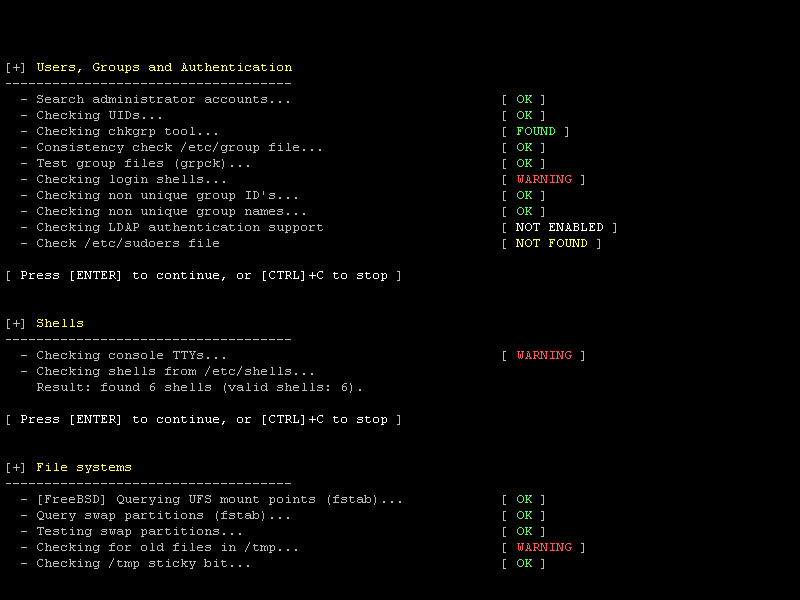
download page
GitHub