|
|
Home | Switchboard | Unix Administration | Red Hat | TCP/IP Networks | Neoliberalism | Toxic Managers |
| (slightly skeptical) Educational society promoting "Back to basics" movement against IT overcomplexity and bastardization of classic Unix | |||||||
|
|
Switchboard | ||||
| Latest | |||||
| Past week | |||||
| Past month | |||||
|
|
Switchboard | ||||
| Latest | |||||
| Past week | |||||
| Past month | |||||
 |
 |
 |
perl.com
The main goal of this article is to discuss in detail about exception handling in Perl and how to implement it using Error.pm. On our way, we'll be touching upon the advantages of using exception-handling over traditional error-handling mechanisms, exception handling with eval {}, problems with eval {} and the functionalities available in Fatal.pm. But by and large, our focus we'll be on using Error.pm for exception handling.
|
|
|
|
|
|
June 3, 2002
About: File::Scan allows users to make multiplataform virus scanners which can detect Windows/DOS/Mac viruses. It include a virus scanner and signatures database.
Changes: This release adds three more new virus signatures: VBS/Chick.bc@M, W32/Navidad.gen@M, and W32/Ska@M.
|
|
|
Programming Language :: Perl
Topic :: Software Development :: LibrariesSyslog2 is a realtime parser and event handler for syslogd. An event is a message from some service. It uses a simple plugin system to add event handlers. Syslog2 is written in Perl. A plugin is simply a Perl script which invokes the "register_handler" or "unregister_handler" subroutines. By default, the package uses the included script "default.pl", which logs all messages from the syslog daemon in sorted order. More scripts are available from the homepage.
dobackup.pl is a flexible Perl script to handle unattended incremental backups of multiple servers. It handles multiple media sets with automatic media preparation and rotation, configurable 'what-to-backup', global per-host exclusion patterns, and user settable 'don't-back-this-up' metafiles. Its design goal is zero-maintenance, nothing to do except change the media when told.
|
|
|
...HTTP is useful in its own right, for example, as a good file-distribution protocol with a number of important advantages over ftp. This article gives an example how to speak HTTP and get understood.
... By definition[1], HTTP is a request/response protocol that exchanges messages in a format similar to that used by Internet mail (MIME). An HTTP transaction is essentially a remote procedure call. It is usually a blocking call, although HTTP/1.1 provides for asynchronous and batch modes. HTTP allows intermediaries (caches, proxies) to cut into the response-reply chain.
An operation to execute remotely is expressed in HTTP as an application of a request method to a resource. Additional parameters, if needed, are communicated via request headers or a request body. The request body may be an arbitrary octet-stream. The HTTP/1.1 standard defines methods GET, HEAD, POST, PUT, DELETE, OPTIONS, TRACE, and CONNECT. A particular server may accept many others. This extensibility is a rather notable feature of HTTP. The parties can use not only custom methods but custom request and reply headers as well. In addition, a client and a server may exchange meta-information via "name=value" attribute pairs of the standard "Content-Type:" header.
Most of the HTTP transactions performed every day are done behind the scenes by browsers, proxies, robots, and servers. Yet the protocol is so simple that one can easily speak it oneself. The only requirement is a language or tool that is able to manipulate text strings and establish TCP connections. Even a simple telnet application may do in a pinch, which is often useful for debugging. Server-side programming is less demanding: a servlet or a scriptlet does not need to bother with the network connectivity, authentication, access restrictions, SSL, and other similar chores. Server modules or FastCGI give a server-side programmer even more tools: load-balancing, persistence, database connectivity, etc. This article demonstrates how to use Perl scripts to speak and respond HTTP directly.
|
|
|
Sept 17, 2001 | O'Reilly
See also Sample Chapter from the book
I am one of those people. I have been an accidental programmer since 1994, when the Perl programming language entered my life. As such, I have a number of confessions to make.Confession #1: I'm woefully undereducated for a role as a programmer.
I took no computer science or programming courses in college. I was a liberal arts major (political science, an oxymoron). Although I enjoyed math during high school, I found the rigors of college-level mathematics daunting, and after satisfying my major's breadth of requirements with a year of calculus I gratefully shunned math thereafter. Likewise, I stayed away from the real sciences, taking a smattering of courses based on personal interests (astronomy and archaeology, mostly), but steering clear of anything too demanding.
After college I worked as a teacher, then a trade-magazine editor, and I would probably still be doing that today except for an obsessive interest in using computer bulletin boards, which led to the Internet, which led to the Web. In my early days of building Web sites I kept hearing about a programming language called Perl. Without any real appreciation of what I was getting myself into, I picked up a copy of the llama book (Learning Perl), and I started reading.
Confession #2: The llama book seriously freaked me out.
Even though I'd heard that it was better for beginners than the other Perl book one could find in those days (the camel book, Programming Perl), I worked my way through the llama's first chapter in a state of mounting panic. The presentation was moving so fast, and this was just the beginning. How was I going to survive the rest of the book?
What I had overlooked was the part where the author, Randal Schwartz, explained that this chapter was an overview of the material presented later on. Whew. When I figured that out I felt much better. Even so, it was tough going. As Randal acknowledged, the book was written for someone who already knew how to program. For an accidental programmer like me, that was a problem. I had to pick up not only the material being presented, but lots of other material that I was assumed to already know.
Confession #3: I have coded in babytalk.
My first substantial Perl script, a Web log analysis program I named webtrax, used 150 lines of index, rindex, and substr invocations to parse its log files. Today, of course, I would just use a one-line regex. That script had poorly chosen variable names, comments that simply restated the accompanying code, and 500 lines without a single subroutine. And, amazingly, it worked. Heaven help the poor person who had to maintain or extend it, but at least in the context of the circumstances for which I created it, it did what I wanted.
I was like a 4-year-old with his first mud pie. I was so proud of that program that I wanted to share it, which leads directly to my next confession.
Confession #4: I have released my babytalk for others to use.
Of all my confessions, this is the one that pains me most. It is one thing to use crude, poorly engineered code for one's own purposes, but inflicting such stuff on others is a much graver sin. Something about the relative ease of using Perl for Web tasks is intoxicating for we accidental programmers. Overflowing with enthusiasm at the magical results we have achieved, and ignorant of how far short of real programming our fumbling first efforts are, we can't stop ourselves from trying to bring the light of our newfound knowledge to those who still labor in darkness.
I wasn't as successful at this as some (thankfully), but I certainly did my share of damage. Besides the webtrax program mentioned above, I released another really awful program, this one called babymail. (As you can see, I also had a thing for too-cute program names.) More about babymail in a moment.
Confession #5: I have used cargo-cult code.
All of us accidental programmers, with our 10,000-monkeys-typing-randomly approach to software engineering, inevitably give rise to some pretty wacky implementations, and once we've hit on something that appears to work, our compulsion for sharing ensures that the wackiness will spread to the far corners of the globe. Since we frequently don't understand exactly how the software flotsam we've inherited actually does what it does, we tend to keep our cargo-cult code intact, right down to the comments. Like medieval monks dutifully transcribing manuscripts, we confine our embellishments to the margins, fearing to alter the Holy Writ itself.
Anyway, I've done my share of that, too. There probably are still scripts of mine on the Web that feature the hand-rolled form decoding I copied from the CGI documentation at hoohoo.ncsa.uiuc.edu in 1994. As long as no one tries to use them to process a form submission containing multi-valued fields, everything will be fine. If anyone does want to process multivalued fields (like checkbox groups or SELECT MULTIPLE lists with more than one item selected), though, things will get ugly, since that code overwrites all but the last such value encountered. I'm not the only one in that boat, either; grepping for the telltale comment, # Un-Webify plus signs and %-encoding, in the shared Web space at one smallish ISP recently, I turned up 121 matches, a tribute to the lingering power of faith in these secular times.
Confession #6: I have rolled my own (lame) solutions, rather than using modules.
Besides being slow to embrace CGI.pm, I undertook, with the aforementioned babymail program, to parse mailbox files by hand, rather than using any of the many superior solutions available from CPAN. That I had no clue what I was doing will be obvious to anyone who actually looks at the program; fortunately, the chances of finding a copy of it are decreasing steadily, as I work to track it down and terminate it wherever it rears its ugly head.
Confession #7: I have programmed Perl without using warnings, or the strict pragma.
I had been writing Perl programs for years before I started routinely taking advantage of warnings and use strict. At this point I'm as committed to them as anyone, and I can't write a 5-line throwaway script without putting them in. But it took me a while to get there. In trying to recall why I resisted such helpful features of the language for so long, I can only think I was frightened by the profusion of warnings generated from some of my favorite cargo-cult code under -w, as I was by the strict documentation's glib discussion of mysterious things like static and lexical variables. It's not that those roadblocks were especially difficult to overcome; it's just that, in the context of all the other things I was having to learn, I couldn't afford (or at least, I didn't think I could afford) any time for the finer points.
Confession #8: I have taken the side of newbies in comp.lang.perl.misc.
By the time I came to Perl I already had many years of experience with online discussion groups, and so I was able to avoid (mostly) raising old-timers' hackles when I first toddled into comp.lang.perl.misc with my babytalk questions. Many others, of course, aren't so fortunate, and over the years I've found myself occasionally weighing in on their behalf when the predictable fireworks erupt over some newcomer's failure to adhere to (insert relevant Usenet social norm here).
I realize that newbies have had a negative effect on Perl's Usenet culture, and sympathize with those who have watched a cherished online resource become steadily degraded. But I identify with those newbies, and don't think it's fair to punish them, at least not in cases where their only crime is ignorance (that, and the fact that they remind the person doing the punishing of the 10,000 newbies who preceded them).
Confession #9: I have been a Perl groupie.
I attended the first Perl conference in 1997, excited about the prospect of actually seeing my heroes, the authors of the O'Reilly books I'd begun obsessively collecting, in person. I arrived early for all the sessions, sat way down front, and hung around on the fringes of the crowd that surrounded the speakers at the breaks. I was mostly silent, listening in on others discussion, too intimidated to open my mouth, though when the crowd thinned I sometimes mustered the courage to awkwardly express my thanks. I waited in line to get Larry's (and Tom's, and Randal's) autographs at the book-signing, gaping like an awestruck teenager, and when the conference was over I returned home, my head swimming with the faces I'd seen and the snippets of conversation I'd overheard.
I repeated that experience at the next Perl conference, and the one after that, and the one after that, as it grew and eventually turned into the O'Reilly Open Source Convention. I lost some of my shyness during that time, coming to see the members of the Perl community more as human beings and less as mythic figures, but I still was groupie enough to burst into my hotel room on the eve of the 2000 Open Source Convention, telling my wife and kids I'd just seen Larry Wall sitting in the lobby downstairs. "What did you say to him?" my daughter asked, to which I had to reply, "Eh? I didn't actually say anything. I, uh, didn't want to bother him."
Confession #10: I have written my own Perl book.
Deciding that it was better to light a candle than curse the darkness, in 1998 I created a novice-level tutorial called The Beginners Guide to CGI Scripting with Perl. The response was gratifying; the site seemed to strike a chord with other accidental programmers, who sent me lots of email asking for more. Emboldened by that, I approached my favorite technical book publisher and pitched them on the idea of a book for accidental programmers, one that explained how to use Perl to create and maintain Web sites. To my surprise, they said yes.
As with my earlier decision to learn Perl, I really had no idea what I was getting myself into. Submitting a book proposal was exciting; having it accepted was really exciting. Actually writing the book (while holding down a day job and helping to raise a family) turned out to be a lot more work than I expected. But now, nearly three years of late nights and weekends later, Perl for Web Site Management is finished.
More than once during the time I was writing it I worried that I might be repeating my earlier sin of publishing bad code for others to use, albeit on a larger scale. Was it hubris for someone like me to even consider writing a book about programming?
I hope not. I'm not the person I was back in the days of webtrax and babymail. I've climbed a fair distance up the Perl learning curve (which in my case has been more like a learning cliff), even if I still gaze up in awe at the heights where the real experts reside. But I'm not so far up that cliff that I don't relate to the problems of those standing perplexed down at its foot, which is why I think a book for accidental programmers, by an accidental programmer, was something worth doing.
In writing the book I've done my best to live up to the example of the most helpful members of the Perl community. It's an example that is reminiscent of Perl itself, the language that doesn't seek to punish accidental programmers for their sins, but simply does its best to help them get their jobs done, using all the diligence, patience, and humility it can bring to the task.
If you're an accidental Perl programmer, or are thinking about becoming one, I hope you'll find my book useful. If you're a more traditional programmer, maybe even one of those who thinks amateurs like me have no business messing around with programming (to say nothing of writing books about programming), I hope you'll forgive me.
|
|
|
I got mail a couple of days ago from Jasmine Merced-Ownby, who runs the Perl Archive web site. Part of the site had been implemented with PHP, and she was getting letters from people who were concerned that this 'made Perl look bad'.
I guess an implicit admission that Perl might not be the very best tool for every possible job could be construed as making Perl look bad, but it seems like an awfully peculiar response, unless you imagine Perl and PHP engaged in a war from which there can be only one victor, and unless you think that if PHP is good for something, anything at all, then Perl must be bad.
I don't recall that Perl has ever been advertised as the One Tool for Every Job. Perl came into a world full of other tools and made a name for itself as a 'glue language' that can help a lot of other tools inter-operate. Perl fills in the spaces between the other tools. That alone is impressive and useful. In the past ten years, more and more, Perl has worked well in place of the other tools; that's even better. But Perl's motto is ``There's More Than One Way To Do It'', and sometimes that means that one of the ways is to use PHP. If PHP comes up a little short for some reason, maybe Perl can fill in the gap. I understand that PHP can call out to a Perl program for help. If that's true, it's not an admission of failure; it's because Rasmus Lerdorf, the author, was smart. Perl can call out to C for help, and that's not an admission of failure either. The best glues can stick to everything.
In my world, PHP can be a good solution, and Perl can be a good solution, because maybe a problem can have more than one good solution. In my world you use what works, and using PHP can't possibly reflect badly on Perl.
A very simple editor for multiple files :-)
$ find . -type f -exec perl -i -pe 's/something/another/g' {} \;
|
|
|
|
|
|
search.cpan.org
About: Spreadsheet::WriteExcel is a Perl module which can be used to create native Excel binary files. Formatted text and numbers can be written to multiple worksheets in a workbook. Formulas and functions are also supported. It is 100% Perl and doesn't require any Windows libraries or a copy of Excel. It will also work on the majority of Unix and Macintosh platforms. Generated files are compatible with Excel 5, 95, 97, 2000 and 2002, and with the Linux/Unix spreadsheet applications OpenOffice and Gnumeric.
Changes: This release includes several minor bugfixes, including a fix to ensure compatibility with Gnumeric. A new method for defining merged ranges has been added.
|
|
|
Dowload script: exp.0.9.1.tgz
Install Instructions: Install.txt
What does it do?
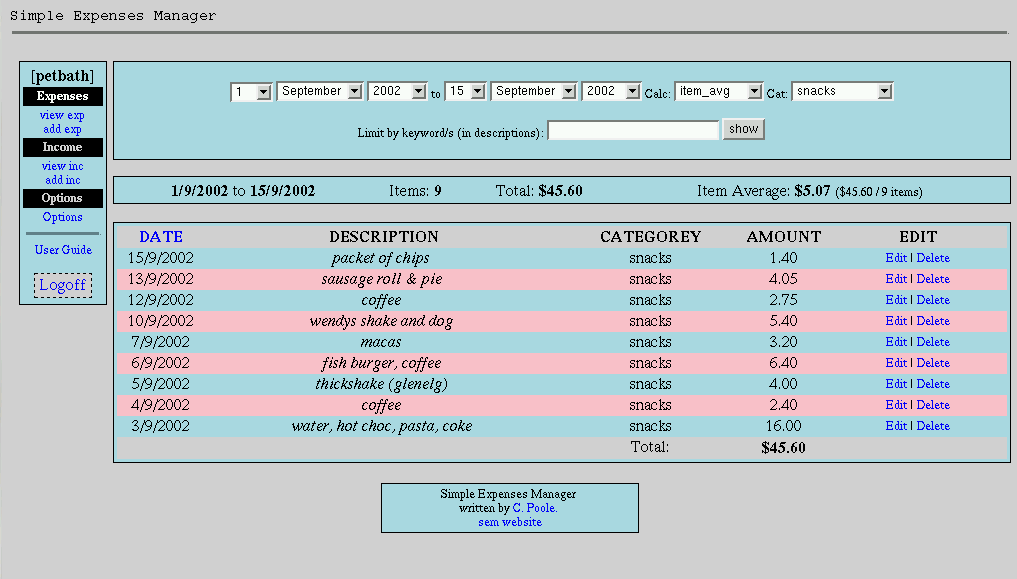
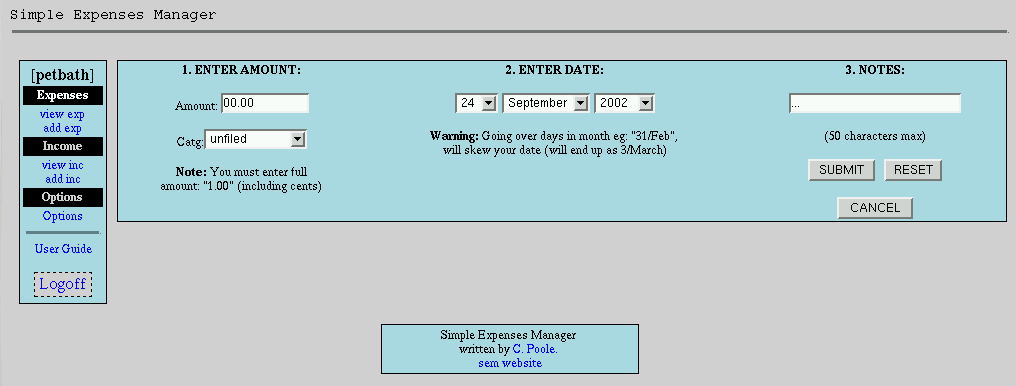
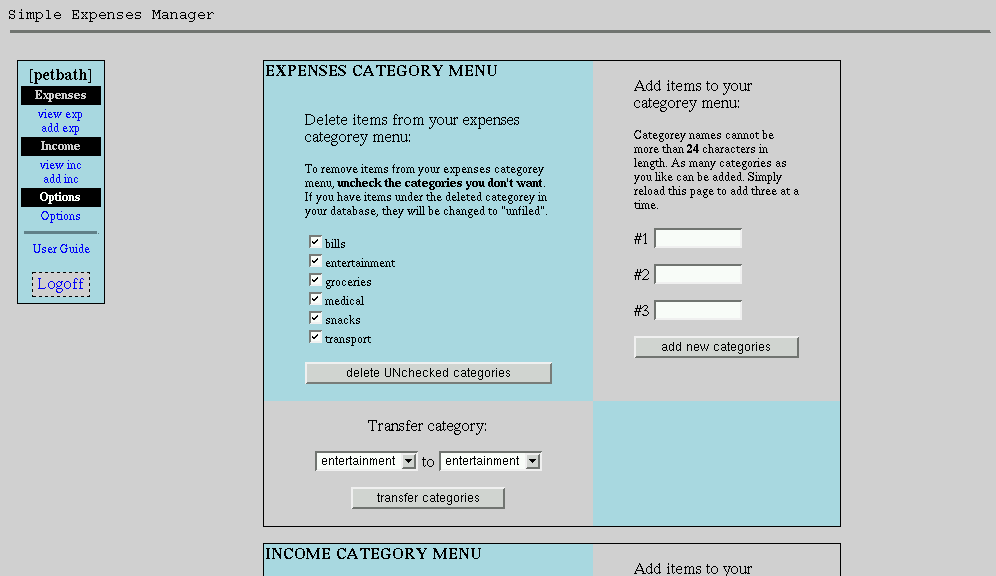
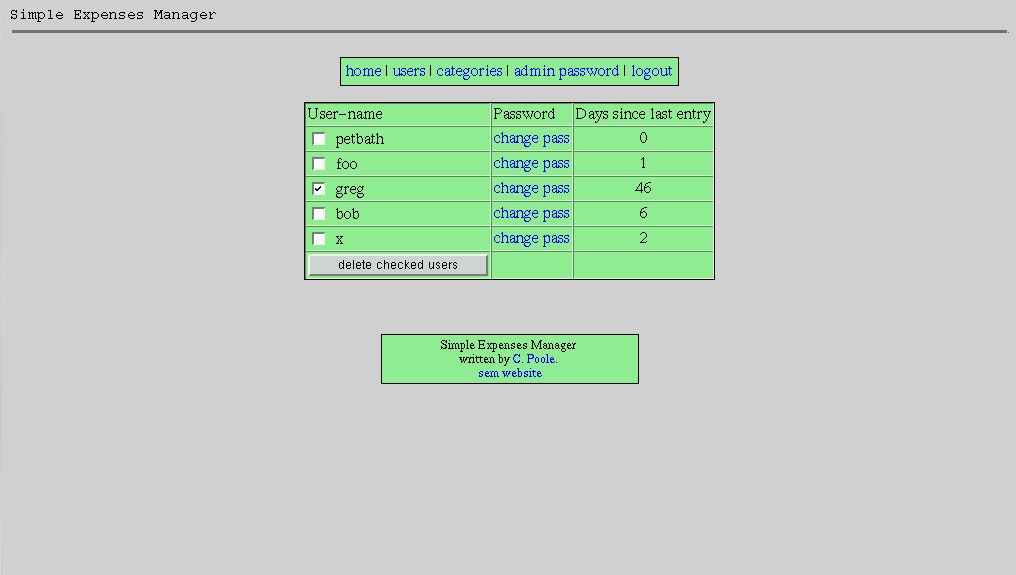
Simple Expenses Manager is a multi-user perl script allowing users to perform no brainer expense management. SEM is by no means intended to be a hardcore accounting package, but is intended for lay folk like myself who go blank even at the mention of 'double entry book-keeping'.It is intended for web administrators who want to offer their users this service, but is useful for anyone who wants to track their expenses, and be able to access it anywhere in the world. It also has an admin script ("exp_admin") for easy management of users and basic preferences.
Screen Shots: (0.8.9)
News:
30/Jan/2003: New release. See changes.11/Dec/2002: Back to the grindstone again! Not many changes in 0.9.0 but I thought I'd better release the minor amount of stuff I've been able to do. Sorry for the break, but moving interstate does tend to interupt your life :)
Changes:
0.9.1
- Interface clean-up, new colour scheme, custom colours soon, fixed attrocious style-sheet usage :)
- fixed the modeless bug in generating the categorey menu
- set_up.pl now searches httpd.conf for user/group settings
- To upgrade replace: exp, sem_guide.html, set_up.pl (optional)
|
|
|
July 16, 2002
Index of -authors-id-H-HD-HDIAS
About: File::Scan allows users to make multiplataform virus scanners which can detect Windows/DOS/Mac viruses. It include a virus scanner and signatures database.
Changes: Two new virus signatures have been added (W32/Duni.worm.b, W32/Plex@MM), and the W32/Frethem.fl@MM signature has been updated.
AutoUpdate is a Perl script which performs a task similar to RedHat's up2date or autorpm. It can be used to automatically download and upgrade rpms from different (s)ftp or http(s) sites. Moreover, it can also be used to keep a server with a customized (RedHat) distribution plus all clients up to date. I have tried to write it in such a way that it is not RedHat specific and hence it should work with any other rpm based distribution as well.
Main features/drawbacks:
- In contradistinction to up2date, it can be used to upgrade both rpms from RedHat and third party rpms. In addition, only the server will download new rpms, the clients get them from the server (saves bandwidth).
- It will try to handle dependencies (see below) and choose the right architecture (if more than one is available).
- Version comparison is only done by looking at the file name and not by looking at the entire rpm header.
- It is designed to run from a cron job and to keep the output to a minimum (so that your root email is not cluttered up with useless information). In particular, there is no interactive mode or any kind of GUI.
The current version is autoupdate-4.3.1-1 and can obtained from the download page.
|
|
|
From the developer: "visiPerl+ is 'The Ultimate Perl IDE'. Complete with Script testing and debugging, visiPerl+ makes your PERL script writing chores a walk in the park. FTP site management, visiPerl+ remembers everything about your script and automates putting it on your site and setting the permissions for it. The Ultimate PERL IDE. Built-in Web Server, Built-in FTP client, Perl Explorer, Multi-Document Editing. Testing and Debugging of scripts. And much, much more. You gotta see it to believe it!"
|
|
|
We are pleased to Offer PST LE for free. This limited edition of Perl Scripting Tool never expires and gives you access to some of Perl Scripting Tool's most powerful features.
|
|
|
Finding CGI Scripts Dave Cross explains what to watch out for when choosing CGI scripts to run on your server, and announces a new best-of-breed project for CGI scripting. [Perl.com]
|
|
|
PAGE is the ideal tool for Rapid Application Development in Perl. It allows you to develop web based or generic Perl applications with very little or no knowledge of the Perl language or other related technologies such as Javascript and HTML. Following are some key features of PAGE:
- Form Builder: Develop Web based Forms (such as Login, Guest Book, Feedback form etc.) in an easy-to-use GUI Interface.
- Form Administration: PAGE will also generate administration tools for maintaining web-based forms for you to maintain and manage these web applications (for example log file maintenance for a Guest Book program).
- Code Generation: Have the CGI program, HTML form as well as Javascript validations for Forms all auto-generate without writing a single line of code!
- Auto Deployment: Deploy your web application online directly from the PAGE software without having to individually FTP and configure each module.
- Easy re-configuration: Save applications as Project files and modify them later to quickly develop multiple applications of similar functionality.
- No Programming Required: Develop web-based order forms and administrative utility for businesses without any programming knowledge. (Only available in Standard and Enterprise Edition)
- Syntax Generator: Avoid all the hassle of writing a Perl programs from ground-up by taking advantage of pre-made function and syntax generator.
- E-commerce Projects: Develop web-based shopping cart and administrative utility for businesses without any programming knowledge. (Only available in Enterprise Edition)
- Database Applications: Develop powerful Database applications in a few button clicks! (Only available in Enterprise Edition)
- Network Solutions: Develop networking solutions in Perl without worrying about low level socket code (pre-generated). (Only available in Standard and Enterprise Edition)
- Useful for both programmers and end-users: Ideal for both web developers not interested in programming detail who can use PAGE's friendly GUI interface, and also for expert programmers who can appreciate PAGE's large number of quick code insert functions to help create generic applications from ground-up.
|
|
|
Perl Builder 2.0d is a complete integrated development environment (IDE) for Perl which runs on Windows 9x/NT/2000/XP or later or Linux.
By bringing editing, testing and debugging features together into a single, intuitive environment, Perl Builder makes it easy to develop sophisticated Perl applications right on your desktop. Perl Builder 2.0 also includes a powerful CGI Wizard so that even non-programmers can easily create scripts.
Version 2.0 is a major upgrade with dozens of new features and refinements based directly on feedback from thousands of version 1.0 users.
Note: Perl Builder has been updated to version 2.0d. This is free download for registered users and includes a number of fixes and also some important new features. Unlike most software companies, which charge for any update with new featuers, we have added dozens of new features to Perl Builder 2.0 since its initial release and made them all available as free downloads!
Perl Builder 2.0 is available in two versions: Standard and Professional. A detailed feature comparison is available here.
Perl Builder 2.0 Standard for Windows
Whether you are a programmer or an HTML author/Website designer without a programming background, Perl Builder 2.0 Standard makes it fast and easy to create and test scripts.
Perl Builder's powerful CGI Wizard lets you design form-handling scripts visually. You can create scripts to handle any HTML form, validate user input, save user data to a file on your website, send multiple automatic emails, and then display personalized HTML output to the user--all without writing code!
The Standard version also includes a programmer's editor integrated with a full-featured visual debugger. You can create, debug and test scripts right on your desktop and see the results in your browser--just as if your script were running on the server.
Perl Builder 2.0 Professional for Windows/Linux
Perl Builder 2.0 Professional includes everything in the Standard version, as well as a number of more advanced features geared toward serious Perl developers who place a high value on their time.
Examples include additional productivity enhancements within the editor, features for easily debugging complex/multi-stage scripts, the ability to open and debug multiple scripts within the IDE, and built-in performance timing tools to help optimize your code. The Professional Version also includes support for the Linux platform.
Perl Builder 2.0 includes a number of features geared specifically toward CGI scripts, but the environment fully supports developing Perl applications for any purpose--including interactive system administration scripts, Perl/TK applications, etc.
If you've used Windows programming tools like Visual Basic, Visual C++ or Delphi, Perl Builder's IDE will be familiar to you. If not, you'll find the the visual environment can give you a dramatic productivity boost!
While Perl Builder runs under Windows 9x/NT/2000/XP or Linux, the scripts you create may be used on any system which supports Perl (Unix, Windows NT, Mac, etc.).
Download a free trial copy today!
|
|
|
Open Perl IDE is an integrated development environment for writing and debugging Perl scripts with any standard perl distribution under Windows 95/98/NT/2000.
This software is written in Delphi 5 Object Pascal and Perl and it is OpenSource, distributed under Mozilla Public Licence 1.1 and hosted by SourceForge. Please visit our project page to get further information.
Now, take a look at some screenshots, read the User Manual to get a more detailed description of Open Perl IDE or download the latest release (Version 1.0).
The new release 1.0 is the first non-beta version of Open Perl IDE and fixes most of the bugs reported for previous releases. However, some of the changes are much more than simple bugfixes:
- Better syntax coloring by using a new highlighter component.
- Important debugger improvements, including better support for huge arrays.
- Previous instance detection on program start.
- Several minor HelpViewer and Configuration enhancements.
For any information, questions, remarks or bug reports, please send a message to Jürgen Güntherodt.
|
|
|
This is a little simple C code browser written in Perl. The primary intention to develop such a program is to learn the language; actually, this is my first Perl program. Meanwhile, I hope this program can help you in some way, if you are using C or Perl. You are encouraged to improve the program in any way you want, but please remember to keep the copyright information. If you can kindly tell me any bug or something about your revised version, I'll appreciate a lot. Thank you for your support.
C-Scope includes three sources files: cscope.pl, parse.pl, misc.pl. To run C-Scope, you should have a Perl interpreter. You can click here to download Perl software. If you are ready, just type "cscope.pl *.c" to start C-Scope. The user interface is kind of menu-driven so I assume you will know what to do next. By default, C-Scope will run vi for editting. Nevertheless, you can modify the code to have your favorite editor.
|
|
|
What hypersrc is and what it is for
hypersrc is a freeware (GPL) GUI program for browsing source code.
It displays a list widget containing sorted source code tags.
A programmer can click any tag to hyperlink to a particular tagged line in a source code file.What hypersrc requires
- A UNIX system with GNU software (GNU make, bison, Perl, etc).
hypersrc is known to compile/run on Linux (Red Hat 6.1) and FreeBSD 4.2.
- GTK+ 1.2.6 (or newer) and GNOME
At least one old GTK+ version (1.2.3) is known to have a bug that causes a segfault when a tag is clicked (see below).
- "Exuberant ctags" 3.2 (or newer) by Darren Hiebert.
You probably already have it.
The ctags package provided by recent Linux distributions is actually Exuberant ctags.
Old Linux distributions only provided GNU ctags which lacks required functionality.Link to Exuberant Ctags webpage (src/RPM).
Link to www.rpmfind.net
Download Exuberant ctags from my FTP site
|
|
|
Perltidy is a Perl script which indents and reformats Perl scripts to make them easier to read. If you write Perl scripts, or spend much time reading them, you will probably find it useful.
Society
Groupthink : Two Party System as Polyarchy : Corruption of Regulators : Bureaucracies : Understanding Micromanagers and Control Freaks : Toxic Managers : Harvard Mafia : Diplomatic Communication : Surviving a Bad Performance Review : Insufficient Retirement Funds as Immanent Problem of Neoliberal Regime : PseudoScience : Who Rules America : Neoliberalism : The Iron Law of Oligarchy : Libertarian Philosophy
Quotes
War and Peace : Skeptical Finance : John Kenneth Galbraith :Talleyrand : Oscar Wilde : Otto Von Bismarck : Keynes : George Carlin : Skeptics : Propaganda : SE quotes : Language Design and Programming Quotes : Random IT-related quotes : Somerset Maugham : Marcus Aurelius : Kurt Vonnegut : Eric Hoffer : Winston Churchill : Napoleon Bonaparte : Ambrose Bierce : Bernard Shaw : Mark Twain Quotes
Bulletin:
Vol 25, No.12 (December, 2013) Rational Fools vs. Efficient Crooks The efficient markets hypothesis : Political Skeptic Bulletin, 2013 : Unemployment Bulletin, 2010 : Vol 23, No.10 (October, 2011) An observation about corporate security departments : Slightly Skeptical Euromaydan Chronicles, June 2014 : Greenspan legacy bulletin, 2008 : Vol 25, No.10 (October, 2013) Cryptolocker Trojan (Win32/Crilock.A) : Vol 25, No.08 (August, 2013) Cloud providers as intelligence collection hubs : Financial Humor Bulletin, 2010 : Inequality Bulletin, 2009 : Financial Humor Bulletin, 2008 : Copyleft Problems Bulletin, 2004 : Financial Humor Bulletin, 2011 : Energy Bulletin, 2010 : Malware Protection Bulletin, 2010 : Vol 26, No.1 (January, 2013) Object-Oriented Cult : Political Skeptic Bulletin, 2011 : Vol 23, No.11 (November, 2011) Softpanorama classification of sysadmin horror stories : Vol 25, No.05 (May, 2013) Corporate bullshit as a communication method : Vol 25, No.06 (June, 2013) A Note on the Relationship of Brooks Law and Conway Law
History:
Fifty glorious years (1950-2000): the triumph of the US computer engineering : Donald Knuth : TAoCP and its Influence of Computer Science : Richard Stallman : Linus Torvalds : Larry Wall : John K. Ousterhout : CTSS : Multix OS Unix History : Unix shell history : VI editor : History of pipes concept : Solaris : MS DOS : Programming Languages History : PL/1 : Simula 67 : C : History of GCC development : Scripting Languages : Perl history : OS History : Mail : DNS : SSH : CPU Instruction Sets : SPARC systems 1987-2006 : Norton Commander : Norton Utilities : Norton Ghost : Frontpage history : Malware Defense History : GNU Screen : OSS early history
Classic books:
The Peter Principle : Parkinson Law : 1984 : The Mythical Man-Month : How to Solve It by George Polya : The Art of Computer Programming : The Elements of Programming Style : The Unix Hater’s Handbook : The Jargon file : The True Believer : Programming Pearls : The Good Soldier Svejk : The Power Elite
Most popular humor pages:
Manifest of the Softpanorama IT Slacker Society : Ten Commandments of the IT Slackers Society : Computer Humor Collection : BSD Logo Story : The Cuckoo's Egg : IT Slang : C++ Humor : ARE YOU A BBS ADDICT? : The Perl Purity Test : Object oriented programmers of all nations : Financial Humor : Financial Humor Bulletin, 2008 : Financial Humor Bulletin, 2010 : The Most Comprehensive Collection of Editor-related Humor : Programming Language Humor : Goldman Sachs related humor : Greenspan humor : C Humor : Scripting Humor : Real Programmers Humor : Web Humor : GPL-related Humor : OFM Humor : Politically Incorrect Humor : IDS Humor : "Linux Sucks" Humor : Russian Musical Humor : Best Russian Programmer Humor : Microsoft plans to buy Catholic Church : Richard Stallman Related Humor : Admin Humor : Perl-related Humor : Linus Torvalds Related humor : PseudoScience Related Humor : Networking Humor : Shell Humor : Financial Humor Bulletin, 2011 : Financial Humor Bulletin, 2012 : Financial Humor Bulletin, 2013 : Java Humor : Software Engineering Humor : Sun Solaris Related Humor : Education Humor : IBM Humor : Assembler-related Humor : VIM Humor : Computer Viruses Humor : Bright tomorrow is rescheduled to a day after tomorrow : Classic Computer Humor
The Last but not Least Technology is dominated by two types of people: those who understand what they do not manage and those who manage what they do not understand ~Archibald Putt. Ph.D
Copyright © 1996-2021 by Softpanorama Society. www.softpanorama.org was initially created as a service to the (now defunct) UN Sustainable Development Networking Programme (SDNP) without any remuneration. This document is an industrial compilation designed and created exclusively for educational use and is distributed under the Softpanorama Content License. Original materials copyright belong to respective owners. Quotes are made for educational purposes only in compliance with the fair use doctrine.
FAIR USE NOTICE This site contains copyrighted material the use of which has not always been specifically authorized by the copyright owner. We are making such material available to advance understanding of computer science, IT technology, economic, scientific, and social issues. We believe this constitutes a 'fair use' of any such copyrighted material as provided by section 107 of the US Copyright Law according to which such material can be distributed without profit exclusively for research and educational purposes.
This is a Spartan WHYFF (We Help You For Free) site written by people for whom English is not a native language. Grammar and spelling errors should be expected. The site contain some broken links as it develops like a living tree...
|
|
You can use PayPal to to buy a cup of coffee for authors of this site |
Disclaimer:
The statements, views and opinions presented on this web page are those of the author (or referenced source) and are not endorsed by, nor do they necessarily reflect, the opinions of the Softpanorama society. We do not warrant the correctness of the information provided or its fitness for any purpose. The site uses AdSense so you need to be aware of Google privacy policy. You you do not want to be tracked by Google please disable Javascript for this site. This site is perfectly usable without Javascript.
Last modified: March, 12, 2019