The utility locate is rather primitive utility which operates with a database of information about filesystem instead of
actual filesystem. Database is updated via cron using the updatedb program
The utility locate is very useful for quick finding of files and directories using basic regular expression. As
such is can simplify and quicken navigation in a complex maze of filesystem directories.
It needs to be installed from GNU findutils. For linux
alternative implementation is
rlocate.
There is also a secure version slocate - Security Enhanced version of the GNU Locate
Locate provides a quick method to search for files
on your system. It uses index database but that means that it depends
of the currency of the database. This is a deficiency: you buy speed at the expense
of currency. The index database makes searching much faster then find. \
-d path
--database=path
Instead of searching the default file name
database, search the file name databases in path, which is a colon-separated
list of database file names. You can also use the environment variable LOCATE_PATH
to set the list of database files to search. The option overrides the environment
variable if both are used.
The file name database format changed starting with GNU find and locate
version 4.0 to allow machines with different byte orderings to share the
databases. This version of locate can automatically recognize and read databases
produced for older versions of GNU locate or Unix versions of locate or
find.
-e
--existing
Only print out such names that currently exist
(instead of such names that existed when the database was created). Note
that this may slow down the program a lot, if there are many matches in
the database.
-i
--ignore-case
Ignore case distinctions in both the pattern
and the file names.
--help
Print a summary of the options to locate and
exit.
--version
Print the version number of locate and exit.
Examples
locate perl -- Locate file
perl in the DB and Print the path.
locate -i perl -- Same search as above,
case insensitive.
locate -q perl -- Run in Quiet Mode.
locate -n 2 perl -- Limit the no. of results shown
to 2 first.
locate -U locater -o locateDB -- Create index DB
starting at locater and store the index file in
locateDB.
In the above example the system would locate perl on the local
machine.
Note: You may need to run the "updatedb" command to update
the database in order to find the file you are searching for. This command should
be ran from cron daily or several times a day.
To search for files by name without having to actually scan the
directories on the disk (which can be slow), you can use the
locate program. For each shell pattern you give it, locate
searches one or more databases of file names and displays the file names
that contain the pattern. See Shell
Pattern Matching, for details about shell patterns.
If a pattern is a plain string—it contains no metacharacters—locate
displays all file names in the database that contain that string. If a
pattern contains metacharacters, locate only displays file
names that match the pattern exactly. As a result, patterns that contain
metacharacters should usually begin with a ‘*’,
and will most often end with one as well. The exceptions are patterns
that are intended to explicitly match the beginning or end of a file
name.
If you only want locate to match against the last
component of the file names (the “base name” of the files) you can use
the ‘--basename’ option. The
opposite behaviour is the default, but can be selected explicitly by
using the option ‘--wholename’.
The command
locate pattern
is almost equivalent to
find directories -name pattern
where directories are the directories for which the file
name databases contain information. The differences are that the
locate information might be out of date, and that locate
handles wildcards in the pattern slightly differently than find
(see Shell Pattern Matching).
The file name databases contain lists of files that were on the
system when the databases were last updated. The system administrator
can choose the file name of the default database, the frequency with
which the databases are updated, and the directories for which they
contain entries.
Here is how to select which file name databases locate
searches. The default is system-dependent. At the time this document was
generated, the default was
/usr/local/var/locatedb.
--database=path
-d path
Instead of searching the default file name database, search the file
name databases in path, which is a colon-separated list
of database file names. You can also use the environment variable
LOCATE_PATH to set the list of database files to
search. The option overrides the environment variable if both are
used.
GNU locate can read file name databases generated by the
slocate package. However, these generally contain a list of
all the files on the system, and so when using this database,
locate will produce output only for files which are accessible to
you. See Invoking locate, for a
description of the ‘--existing’
option which is used to do this.
The updatedb program can also generate database in a
format compatible with slocate. See
Invoking updatedb, for a description of
its ‘--dbformat’ and ‘--output’
options.
Before using the
locate
command you should
check if it is installed in your machine. A
locate
command
comes with GNU findutils or GNU mlocate packages. You can simply run the following command to check if
locate
is
installed or not.
$ which locate
Check
locate Command
If
locate
is not installed by default then
you can run the following commands to install.
Once the installation is completed you need to run the following command to update the
locate
database
to quickly get the file location. That's how your result is faster when you use the
locate
command
to find files in Linux.
$ sudo updatedb
The
mlocate
db file is located at
/var/lib/mlocate/mlocate.db
.
$ ls -l /var/lib/mlocate/mlocate.db
mlocate
database
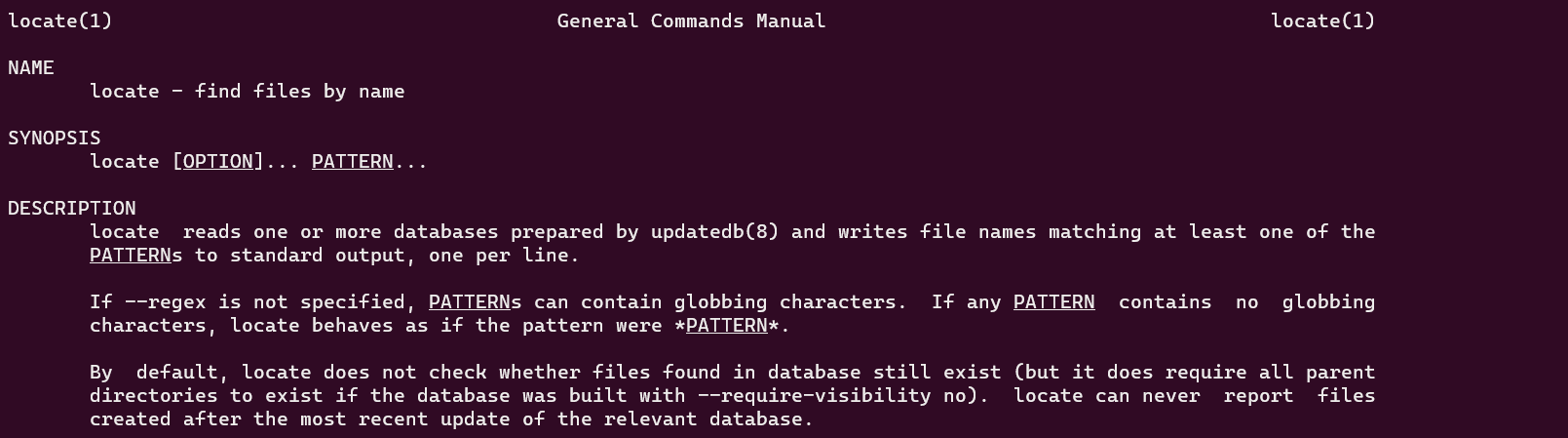
A good place to start and get to know about
locate
command
is using the man page.
$ man locate
locate
command manpage
How to Use locate Command to Find Files Faster in Linux
To search for any files simply pass the file name as an argument to
locate
command.
$ locate .bashrc
Locate
Files in Linux
If you wish to see how many matched items instead of printing the location of the file you can pass the
-c
flag.
$ sudo locate -c .bashrc
Find
File Count Occurrence
By default
locate
command is set to be case
sensitive. You can make the search to be case insensitive by using the
-i
flag.
$ sudo locate -i file1.sh
Find
Files Case Sensitive in Linux
You can limit the search result by using the
-n
flag.
$ sudo locate -n 3 .bashrc
Limit
Search Results
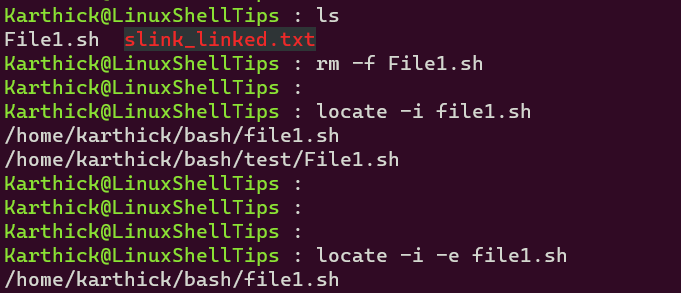
When you
delete
a file
and if you did not update the
mlocate
database
it will still print the deleted file in output. You have two options now either to update
mlocate
db
periodically or use
-e
flag
which will skip the deleted files.
$ locate -i -e file1.sh
Skip
Deleted Files
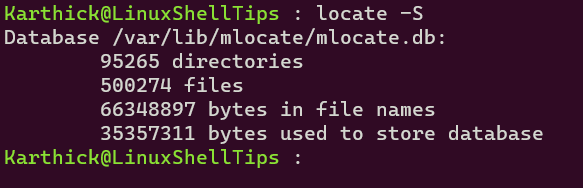
You can check the statistics of the
mlocate
database
by running the following command.
$ locate -S
mlocate
database stats
If your
db
file is in a different location
then you may want to use
-d
flag
followed by
mlocate
db path and filename to
be searched for.
$ locate -d [ DB PATH ] [ FILENAME ]
Sometimes you may encounter an error, you can suppress the error messages by running the command with the
-q
flag.
$ locate -q [ FILENAME ]
That's it for this article. We have shown you all the basic operations you can do with
locate
command.
It will be a handy tool for you when working on the command line.
The locate command also accepts patterns containing globbing characters such as
the wildcard character * . When the pattern contains no globbing characters the
command searches for *PATTERN* , that's why in the previous example all files
containing the search pattern in their names were displayed.
The wildcard is a symbol used to represent zero, one or more characters. For example, to
search for all .md files on the system you would use:
locate *.md
To limit the search results use the -n option followed by the number of results
you want to be displayed. For example, the following command will search for all
.py files and display only 10 results:
locate -n 10 *.py
By default, locate performs case-sensitive searches. The -i (
--ignore-case ) option tels locate to ignore case and run
case-insensitive search.
To display the count of all matching entries, use the -c ( --count
) option. The following command would return the number of all files containing
.bashrc in their names:
locate -c .bashrc
6
By default, locate doesn't check whether the found files still exist on the
file system. If you deleted a file after the latest database update if the file matches the
search pattern it will be included in the search results.
To display only the names of the files that exist at the time locate is run use
the -e ( --existing ) option. For example, the following would return
only the existing .json files:
locate -e *.json
If you need to run a more complex search you can use the -r (
--regexp ) option which allows you to search using a basic regexp instead of
patterns. This option can be specified multiple times.
For example, to search for all .mp4 and .avi files on your system and
ignore case you would run:
Since locate command relies on a database called mlocate . The said database needs to be
updated regularly for the command utility to work
efficiently.
To update the mlocate database, you use a utility called updatedb . It should be noted that
you will need superuser privileges for this to work properly, is it needs to be executed as
root or sudo privileges.
$ sudo updatedb
6. Display Only Files Present in Your System
When you have an updated mlocate database**, locate command still produces results of files
whose physical copies are deleted from your system.
To avoid seeing results of files not present in your machine at the time of punching in the
command, you will need to use the locate-e command. The process searches your system to verify
the existence of the file you're looking for even if it is still present in your mlocate.db
.
$ locate -i -e *text.txt*

/home/tecmint/text.txt
7. Separate Output Entries Without New Line
locate command's default separator is the newline (\\n) character. But if you
prefer to use a different separator like the ASCII NUL , you can do so using the
-0 command line option.
If you're in doubt as to the current status of your mlocate.db , you can easily view the
locate database statistics by using the -S command.
$ locate -S

Database /var/lib/mlocate/mlocate.db:
32,246 directories
4,18,850 files
2,92,36,692 bytes in file names
1,13,64,319 bytes used to store database
9. Suppress Error Messages in Locate
Constantly trying to access your locate database does sometimes yield unnecessary error
messages stating that you do not have the required privileges to have root access to the
mlocate.db , because you're only a normal user and not the required Superuser.
To completely do away with these message, use the -q command.
$ locate "\*.dat" -q*
10. Choose a Different mlocate Location
If you're inputting queries looking for results not present in the default mlocate database
and want answers from a different mlocate.db located somewhere else in your system, you can
point the locate command to a different mlocate database at a different part of your system
with the -d command.
$ locate -d <new db path> <filename>
locate command might seem like one of those utilities that does everything you asked it to
do without much of a hustle but in truth, in order for the process to keep its efficiency, the
mlocate.db needs to be fed with information every now and then. Failure to do so might render
the program a bit useless.
Sun Managers did it again. Answered all three questions correctly in less
than 24 hours!
Kudos to Dr. Peter Watkins ([email protected])
for answering almost immediatly
with the correct answers. I'm going to use his summary (which is brief)
since I could do no better. Peter writes...
>Taking your questions in a completely random order; > > + For Solaris 2.x try the GNU version of 'find'. Currently
> at version 3.8 I think. This has the 'locate' function
> which replicates the fastfind feature. > Try ugle.unit.no:/pub/gnu/find-3.8.tar.gz
Quite so. I grabbed a copy and it's a perfect solution for my solaris
machines that never came with a fast find. Gnu's Great!
> + I suspect that the reason for duplicate names is that
> updatedb is actually a script (try looking at it) which > descends the filesystem structure. Consequently if you > specify / and /fred then fred will get searched twice. > If you look at the updatedb script you will see that > certain directories can be included/excluded there. Try > that instead.
Correct again. I was specifically specifying each partition when in
fact the script is smart enough to assume you want everything minus
a few obvious things that no one would want. This was creating
redundancy which accounts for files being reported twice.
> + Your problem of updatedb not working at all seems a bit
> odd. I suggest you first try; > /usr/lib/find/updatedb / /usr /nat1 /nat2 > by hand without chucking the output. Possibly the 'find'
> command is not where updatedb expects - look at the > updatedb script again.
And so I did. It almost immediatly blew up complaining about a lack
of /tmp space. I cheated by changing the script to use a tmp space
out on a data disk. Now it works like a champ. First time in years!
My thanks to Dr. Peter Watkins as well as the other 9 respondees who
wrote later. Most were not able to answer all three questions but
everyone had something interesting to share with me. To see what...
(or if you're one of the other 9 respondees and want to see your name
in print)... credits and micro-summaries below...
Sometimes you need to find a file that was present in the filesystem for
a long time (for example some unix command). In this case you can use
locate instead of find. Or slocate it, depending
on your distribution. There is just one problem with using locate or slocate,
and that's staying up to date. Here's how they work and how to use them, and
a brief tease on rlocate,their nimble, more timely, heir apparent.
Slocate and locate both do essentially the same thing: search a database
containing the file names and locations on the system for a match and report
all that are found. Both count on another program -- updatedb -- to do the heavy
lifting by creating/maintaining the database to be searched. Slocate provides
greater security by storing the permissions and ownership of each file, and
then only showing the files that the user running the slocate request
has permission to access.
The format of the locate/slocate is simple: locate options
pattern.
If you're only interested in how many times the pattern is found, you can
specify the -c option in your search, like this:
locate -c mono
To search case insensitive use the -i option:
locate -i whereami
Since updatedb normally runs just once a day, sometimes you need to find
a file that has been created since the last update. When that's the case, just
enter the command updatedb as root and let it run. It may take
several minutes to complete, or even longer if you have a large number of files
to be accounted for. To find out how large your database is, enter the
locate -S, like this:
warthawg@linux:~> locate -S
Database/var/lib/locatedb is in the LOCATE02 format.
Locate database size: 3411612 bytes
Filenames: 401444 with a cumulative length of 20196439 bytes
of which 38656 contain whitespace,
0 contain newline characters,
and 43 contain characters with the high bit set.
Compression ratio 83.11%
Having to run the database update program before doing a search in order
to have access to the latest files on your system is far from being an elegant
solution. Some people just don't want to wait. If that describes you, then you
might want to check out a new project called
rlocate
by Rasto Levrinc. It's based on slocate but with nearly real-time search capabilities.
rlocate -- currently available in a beta release -- requires a Linux kernel
at 2.6 or later. It functions as a kernel module which maintain a daily database
containing the files and directories created since the last time updatedb was
run.
When slocate is executed, both the daily database of new files maintained
by the rlocate kernel module and the nightly database of all files are searched.
The result is a search that yields results no more than 2 seconds old.
slocate - Security Enhanced version of the GNU Locate
slocate [-qi] [-d ] [--database=]
slocate [-i] [-r ] [--regexp=]
slocate [-qv] [-o ] [--output=]
slocate [-e ] [-f ] <[-l ] [-c] <[-U
] [-u]>
slocate [-Vh] [--version] [--help]
DESCRIPTION
Secure Locate provides a secure way to index and quickly search for files on your
system. It uses incremental encoding just like GNU locate to compress its database
to make searching faster, but it will also store file permissions and ownership
so that users will not see files they do not have access to.
This manual page documents the GNU version of slocate. slocate Enables
system users to search entire filesystems without displaying unauthorized files.
OPTIONS
-u
Create slocate database starting at path /.
-U dir
Create slocate database starting at path dir.
-e
Exclude directories from the slocate database.
-f
Exclude files on specific file systems from the slocate database.
-c
Parse '/etc/updatedb.conf' when updating the slocate database.
-l
Security level. 0 turns security checks off. This will make searchs faster.
1 turns security checks on. This is the default.
-i
Does a case insensitive search.
-q
Quiet mode. Error messages are suppressed.
-n
Limit the amount of results shown to .
-r
--regexp= Search the database using a basic POSIX regular
expression.
-o
--output= Specifies the database to create.
-d
--database= Specifies the path of databases to search in.
-h
--help Display this help.
-v
--verbose Verbose mode. Display files when creating database.
-V
--version Display version.
EXAMPLES
locate project
Lists all files that contain the string "project". If that command does not work
you will need to run the command:
slocate -u
This command builds the slocate database which will allow you to use the locate
(slocate) command. It may take a few minutes to run.
The Last but not LeastTechnology is dominated by
two types of people: those who understand what they do not manage and those who manage what they do not understand ~Archibald Putt.
Ph.D
FAIR USE NOTICEThis site contains
copyrighted material the use of which has not always been specifically
authorized by the copyright owner. We are making such material available
to advance understanding of computer science, IT technology, economic, scientific, and social
issues. We believe this constitutes a 'fair use' of any such
copyrighted material as provided by section 107 of the US Copyright Law according to which
such material can be distributed without profit exclusively for research and educational purposes.
This is a Spartan WHYFF (We Help You For Free)
site written by people for whom English is not a native language. Grammar and spelling errors should
be expected. The site contain some broken links as it develops like a living tree...
You can use PayPal to to buy a cup of coffee for authors
of this site
Disclaimer:
The statements, views and opinions presented on this web page are those of the author (or
referenced source) and are
not endorsed by, nor do they necessarily reflect, the opinions of the Softpanorama society.We do not warrant the correctness
of the information provided or its fitness for any purpose. The site uses AdSense so you need to be aware of Google privacy policy. You you do not want to be
tracked by Google please disable Javascript for this site. This site is perfectly usable without
Javascript.