|
|
Home | Switchboard | Unix Administration | Red Hat | TCP/IP Networks | Neoliberalism | Toxic Managers |
| (slightly skeptical) Educational society promoting "Back to basics" movement against IT overcomplexity and bastardization of classic Unix | |||||||
|
See also |
Recommended books |
Installation | |||||
| The MySQL Database Installation | MySQL Security | Securing the Initial MySQL Account | Resetting root password on MySQL | Performance Tuning | |||
| Using MySQL with Perl | Apache | PHP | phpMyAdmin |
ACID Installation (includes MySQL) |
Humor | Etc |
|
|
MySql was written by Michael (monty) Widenius and now is owned by Sun. See the CREDITS file in the distribution for more credits for mysql and related things. MySql runs on most Unix based systems including Linux and has support for clients running under both Unix and windows. For a good introduction see MySQL - Wikipedia, the free encyclopedia
|
|
Critics find MySQL's popularity surprising in the light of the existence of other open source database projects with comparable performance and in closer compliance to the SQL standards. MySQL advocates reply that the program serves its purpose for its users, who are willing to accept the program's limitations (which decrease with every major revision) in exchange for speed, simplicity and rapid development. Another, perhaps simpler, explanation for MySQL's popularity is that it is often included as a default component in low-end commercial web hosting plans, so that for application developers (mostly using PHP and Perl) MySQL is the only DBMS choice unless they want to operate their own web hosts.
MySQL installation on Solaris 9 or earlier can be done from precompiled packages or by compiling packages with gcc or Forte 5.0. Forte 5.0 is a better solution: there is at least 4% speed increase on UltraSparc when using Forte 5.0 in 32-bit mode, as compared to using gcc 3.2 with the -mcpu flag.
The Solaris 10 OS has MySQL on Software Supplement disk. Precompiled packages were compiled with Sun Studio.
The "native" MySQL Solaris package provides a maintenance script for starting, stopping and restarting. This script is located in /etc/sfw/mysql and is called mysql.server. The default Solaris 10 installation doesn't reference this script during the traditional start-up process. The system administrator may have copied (or linked) this script into the traditional start-up directories.
It's better to configure MySQL using SMF as recommended in the following tip by William Pool Configuring MySQL to Use With Service Management Facility (SMF).
|
|
Switchboard | ||||
| Latest | |||||
| Past week | |||||
| Past month | |||||
 |
 |
 |
Feb 20, 2017 | www.cyberciti.biz
How to delete or remove a MySQL/MariaDB user account on Linux or Unix by Vivek Gite on February 15, 2017 last updated February 16, 2017 in Linux , MySQL , UNIXI created a MySQL / MariaDB user account using this page . Now, I have deleted my wordpress blog and I want to delete that user account including database too. How do I delete or remove a MySQL or MariaDB user account on Linux or Unix-like system using mysql command line option?
Both MySQL and MariaDB is an open source database management system. In this quick tutorial, you will learn how to delete ore remove user account in MySQL or MariaDB database on Linux or Unix-like system.
Warning : Backup your database before you type any one of the following command.
Step 1 – Steps for removing a MySQL/MariaDB userIf you decided to remove open source application such as WordPress or Drupal you need to remove that user account. You need to remove all permissions/grants, and delete the user from the MySQL table. First, login as mysql root user to the MySQL/MariaDB server using the shell, run:
$ mysql -u root -p mysql
OR
$ mysql -u root -h server-name-here -p mysql
Sample outputs:
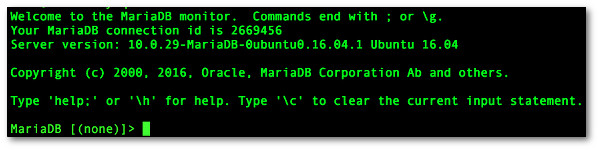
Fig.01: The MySQL/MariaDB shell
Step 2 – List all mysql usersOnce you have a MySQL or MariaDB prompt that looks very similar to fig.01, type the following command at mysql> or mariadb> prompt to see a list of MySQL/MariaDB users:
mariadb> SELECT User,Host FROM mysql.user;
Sample outputs:
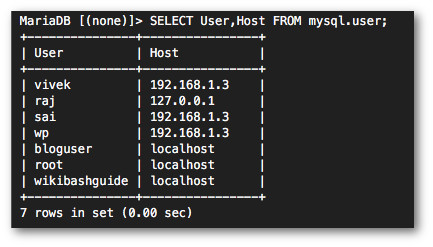
Fig.02: How to see/get a list of MySQL/MariaDB users accounts
Step 3 – List grants for a mysql user
In this above example, I need to delete a mysql user named 'bloguser'@'localhost'.To see what grants bloguser have, enter:
mariadb> SHOW GRANTS FOR 'bloguser'@'localhost';
Sample outputs:

Fig.03: Display user grants
Where,Step 4 – Revoke all grants for a mysql user
- bloguser – Mysql/Maridb user name
- localhost – Mysql/Mariadb host name
- mywpblog – Database name
Type the following sql command:
mariadb> REVOKE ALL PRIVILEGES, GRANT OPTION FROM 'bloguser'@'localhost';
Sample outputs:Query OK, 0 rows affected (0.00 sec)Step 5 – Remove/Delete the user from the user tableType the following sql command:
mariadb> DROP USER 'bloguser'@'localhost';
Sample outputs:Query OK, 0 rows affected (0.00 sec)Step 6 – Delete the databaseType the following command:
mariadb> DROP DATABASE mywpblog;
Sample outputs:Query OK, 0 rows affected (0.00 sec)And there you have it. A MySQL/MariaDB user deleted or removed from the server on Unix or Linux via command line option.
|
|
|
October 28, 2010Although several great GUI-based MySQL clients exist, among them phpMyAdmin and SQLYog, I've always preferred to use the native mysql command-line client. It does take some time to get acquainted with using a command-line interface (CLI), particularly if you don't regularly work with an operating system offering a robust CLI environment. However, after some practice you'll be able to manage users, navigate your databases, and perform other tasks with incredible ease.
In this article I'll introduce you to 10 mysql client tips and tricks that I've accumulated over the years. Whether you adopt one or all I guarantee you'll save a considerable amount of time and effort when using this powerful MySQL interface.
Incidentally, the mysql client is available for all operating systems, Windows included. However, because Windows' native CLI is horrible, consider installing Console, a great alternative solution that offers a great set of features including convenient text selection and multiple tabs.
1. Automate the Login Process
A properly configured MySQL server will require you to authenticate by specifying at minimum a username and password, typically done by passing the username along as an argument to the
mysqlcommand, and then for security purposes entering the password blindly via a subsequent prompt:%>mysql -u root -p Enter password: Welcome to the MySQL monitor. Commands end with ; or g. ...Go through this ritual a few thousand times over the course of a year, and you've just lost several hours of time due to merely logging in. Eliminate this tedious step by creating a file named
.my.cnfand placing it in your home directory. If on Windows, name the filemy.iniand place it in your MySQL installation directory. In this file, add the following information, replacing the placeholders with your login information:[client] host = your_mysql_server user = your_username password = your_passwordBe sure to set this file's permissions appropriately so prying eyes can't access the sensitive data.
2. Automatically Switch to a Database
After logging into the client you'll need to switch to the desired database, typically done using the
usecommand. For instance:mysql>use wjgilmore_dev;If you're working exclusively on a particular project and want to save yourself the hassle of this additional step, identify the database within the configuration file introduced in the previous step by adding the following line within a section named
[client](the same used in the previous section):database = your_database_name3. Send Commands from a Script
When designing a new database I prefer to design the schema and relationships using MySQL Workbench. MySQL Workbench is a particularly powerful application in that you can manage your schemas graphically and then either synchronize the changes with the MySQL server or export the SQL statements to a file, which can subsequently be imported into MySQL.
If you prefer to hand code your schemas, would like to simultaneously create a number of stored procedures, or would like to execute a lengthy join, you can pass the SQL into the mysql client by saving the SQL to a file and then passing the file into the client like this:
%>mysql < schema.sqlOf course, you'll also need to either specify your connection credentials, or have done so within the configuration file introduced in previous tips.
4. Display Results VerticallyEven relatively simple table schemas can consist of so many columns that it's impossible to review their contents in a practical way. For instance, consider the following table, which consists of just 11 columns:
mysql> select * from accounts where username = 'wjgilmore'; +----+-----------+------------------+------------------------------ ----+----------+-----------+------------+-----------+-------------- --------------------+---------------------+---------------------+ | id | username | email | password | zip_code | latitude | longitude | confirmed | recovery | created_on | last_login | +----+-----------+------------------+------------------------------- ---+----------+-----------+------------+-----------+----------------- -----------------+---------------------+---------------------+ | 7 | wjgilmore | [email protected] | 2b877b4b825b48a9a0950dd5bd1f264d | 43201 | 39.984577 | -83.018692 | 1 | 8bnnwtqlt2289q2yp81tuge82fty501h | 2010-09-16 14:48:41 | 2010-10-27 15:49:44 | +----+-----------+------------------+---------------------------------- +----------+-----------+------------+-----------+---------------------- ------------+---------------------+---------------------+Convert this ugly display into a vertically-oriented format using the
Gcommand:5. Enable Tab Completionmysql> select * from accounts where username = 'wjgilmore'G *************************** 1. row *************************** id: 7 username: wjgilmore email: [email protected] password: 2b877b4b825b48a9a0950dd5bd1f264d zip_code: 43201 latitude: 39.984577 longitude: -83.018692 confirmed: 1 recovery: 8bnnwtqlt2289q2yp81tuge82fty501h created_on: 2010-09-16 14:48:41 last_login: 2010-10-27 15:49:44Repeatedly typing, let alone remembering, table and column names can quickly become tedious. Save yourself the hassle and enable tab completion by either passing
--auto-rehashto the mysql client or better yet enabling it within themy.inifile: 6. Change the PromptMore than once I've attempted to view or modify a schema only to be told that the table didn't exist. Sheer panic ensued over the possibility I mistakenly deleted it, until I realized that I was logged into the wrong database server. By modifying the mysql client prompt to reflect the name of the database you're currently using, you can eliminate this confusion entirely. To change your prompt interactively, log in to the mysql client and execute the following command:
mysql>prompt [d]> [dev_wjgilmore_com]>Because you'll probably want the change to be permanent, add the following line to your configuration file:
prompt = [d]>You're not limited to including just the database name. Among other information, you can include the current time and date, hostname, and username. Consult the MySQL manual for more information.
7. Prevent Catastrophes with Safe Updates
In the previous tip I mentioned the panic of suspecting a table has accidentally been deleted. More than one administrator has fallen victim to a similarly serious gaffe, not because of accidentally executing the
DROP TABLEcommand but rather because of the far more insidious omission of aWHEREclause when executing theUPDATEcommand. For instance, suppose you wanted to modify a user's username by executing the following command:mysql>UPDATE users set User = 'wjgilmore' WHERE User = 'wjgilmore-temp';However, in your haste to head out to lunch you enter:
mysql>UPDATE users set User = 'wjgilmore';Naturally, executing the latter command will result in every value in the
userstable'sUsercolumn being set towjgilmore. Avoid such catastrophic errors by adding the following line to your configuration file:safe-updates8. Use the Command Documentation
Many users are aware of the mysql client's built-in documentation, which presents a list of useful commands when
helpis executed:mysql>help ... List of all MySQL commands: Note that all text commands must be first on line and end with ';' ? (?) Synonym for `help'. clear (c) Clear the current input statement. connect (r) Reconnect to the server. Optional arguments are db and host. delimiter (d) Set statement delimiter. ...However, the documentation goes much deeper than this. For instance, if you can't remember what the
DESCRIBEcommand is used for, pass the command name tohelp:mysql>help describe; Name: 'DESCRIBE' Description: Syntax: {DESCRIBE | DESC} tbl_name [col_name | wild] DESCRIBE provides information about the columns in a table. It is a shortcut for SHOW COLUMNS FROM. These statements also display information for views. (See [HELP SHOW COLUMNS].) ...9. Use the Pager
Sometimes you want to peruse a table's rows, but there are too many to view in a single screen. Rather than grapple with using the
LIMITclause, enable the client pager and set it to your system's paging utility:mysql>pager more PAGER set to 'more'To disable the pager, execute the
nopagercommand.10. Dump Output to a File
You'll occasionally need to dump SQL result output to a text file. You could use the
SELECT INTO OUTFILEcommand, or from within the mysql client you can enable theteecommand and assign an output file, causing all subsequent output to be sent to that file:mysql>tee sales_report.txtConclusion
Whether you pick and choose or apply all 10, the tips and tricks introduced in this article will undoubtedly save you a great deal of time, effort, and potentially pain! Do you know of any other MySQL tips and tricks? Tell us about them in the comments!
Jason Gilmore is founder of the publishing and consulting firm WJGilmore.com. He is also the author of several popular books, including "Easy PHP Websites with the Zend Framework", "Easy PayPal with PHP", and "Beginning PHP and MySQL, Fourth Edition". Follow him on Twitter at @wjgilmore.
|
|
|
freshmeat.net
phpMyAdmin is a tool intended to handle the administration of MySQL over the Web. It can create, rename, and drop databases, create/drop/alter tables, delete/edit/add fields, execute any SQL statement, manage keys on fields, create dumps of tables and databases, export/import CSV data, and administrate one single database and multiple MySQL servers.
|
|
|
Now the legitimate owner is Oracle. Sad but true. As the main beneficiary of the sell out to Sun Monty lost any moral right to claim that he wants his product to prosper. All he wanted was money. He got them. Case closed. If company was successful and growing why to sell it to a struggling/dying company like Sun ? Just take it public and enjoy the ride like Google founders did. Also he is somewhat disingenuous in his arguments.
Question: If MySQL was/is the most important/dominant, etc open source database why Monty sold it to Sun for one billion? What about SQLLite as for many Web sites MySQL is too heavyweight, bloated monster. Code is public domain. What about PostgreSQL that in many ways is superior to MySQL (query optimizer works better for complex queries) and has more developer friendly license ? What about Ingres which is former commercial database not any wanna-be? What about Cloudscape, what about FirebirdSQL (former Interbase). Those questions need to be answered before he try to defend all small businesses that use MySQL. May be they made a mistake (and many really did).
I, Michael "Monty" Widenius, the creator of MySQL, is asking you urgently to help save MySQL from Oracle's clutches. Without your immediate help Oracle might get to own MySQL any day now. By writing to the European Commission (EC) you can support this cause and help secure the future development of the product MySQL as an Open Source project.
What this text is about:
- Summary of what is happening
- What Oracle has not promised
- Oracles past behavior with Open Source
- Help spread this information (Jump to 'What I want to ask you to do')
- Example of email to send to the commission (Jump to 'send this to:')I have spent the last 27 years creating and working on MySQL and I hope, together with my team of MySQL core developers, to work on it for many more years.
Oracle is trying to buy Sun, and since Sun bought MySQL last year, Oracle would then own MySQL. With your support, there is a good chance that the EC (from which Oracle needs approval) could prevent this from happening or demand Oracle to change the terms for MySQL or give other guarantees to the users. Without your support, it might not. The EC is our last big hope now because the US government approved the deal while Europe is still worried about the effects.
Instead of just working out this with the EC and agree on appropriate remedies to correct the situation, Oracle has instead contacted hundreds of their big customers and asked them to write to the EC and require unconditional acceptance of the deal. According to what I been told, Oracle has promised to the customers, among other things, that "they will put more money into MySQL development than what Sun did" and that "if they would ever abandon MYSQL, a fork will appear and take care of things".
However just putting money into development is not proof that anything useful will ever be delivered or that MySQL will continue to be a competitive force in the market as it's now.
As I already blogged before, a fork is not enough to keep MySQL alive for all future, if Oracle, as the copyright holder of MySQL, would at any point decide that they should kill MySQL or make parts of MySQL closed source.
Oracle claims that it would take good care of MySQL but let's face the facts: Unlike ten years ago, when MySQL was mostly just used for the web, it has become very functional, scalable and credible. Now it's used in many of the world's largest companies and they use it for an increasing number of purposes. This not only scares but actually hurts Oracle every day. Oracle have to lower prices all the time to compete with MySQL when companies start new projects. Some companies even migrate existing projects from Oracle to MySQL to save money. Of course Oracle has a lot more features, but MySQL can already do a lot of things for which Oracle is often used and helps people save a lot of money. Over time MySQL can do to Oracle what the originally belittled Linux did to commercial Unix (roughly speaking).
So I just don't buy it that Oracle will be a good home for MySQL. A weak MySQL is worth about one billion dollars per year to Oracle, maybe more. A strong MySQL could never generate enough income for Oracle that they would want to cannibalize their real cash cow. I don't think any company has ever done anything like that. That's why the EC is skeptic and formalized its objections about a month ago.
Richard Stallman agrees that it's very important which company owns MySQL, that Oracle should not be allowed to buy it under present terms and that it can't just be taken care of by a community of volunteers. http://keionline.org/ec-mysql
Oracle has NOT promised (as far as I know and certainly not in a legally binding manner):
- To keep (all of) MySQL under an open source license.
- Not to add closed source parts, modules or required tools.
- To keep the code for MySQL enterprise edition and MySQL community edition the same.
- To not raise MySQL license or MySQL support prices.
- To release new MySQL versions in a regular and timely manner. (*)
- To continue with dual licensing and always provide affordable commercial licenses to MySQL to those who needs them (to storage vendors and application vendors) or provide MySQL under a more permissive license
- To develop MySQL as an Open Source project
- To actively work with the community
- Apply submitted patches in a timely manner
- To not discriminate patches that make MySQL compete more with Oracles other products
- To ensure that MySQL is improved also in manners that make it compete even more with Oracles' main offering.From looking at how Oracle handled the InnoDB acquisition, I don't have high hopes that Oracle will do the above right if not required to do so:
For InnoDB:
- Bug fixes where done (but this was done under a contractual obligation)
- New features, like compression that was announced before acquisition, took 3 years to implement
- No time tables or insight into development
- The community where not allowed to participate in development
- Patches from users (like Google) that would have increased performance was not implemented/released until after Oracle announced it was acquiring Sun.
- Oracle started working on InnoDB+, a better 'closed source' version of InnoDB
- In the end Sun had to fork InnoDB, just to be able to improve performance.It's true that development did continue, but this was more to be able to continue using InnoDB as a pressure on MySQL Ab.
Note that Oracle's development on the Linux kernel is not comparable with MySQL, because:
- Oracle is using Linux as the main platform for their primary database product (and thus a better Linux makes Oracles platform better)
- The GPL code in the kernel is not affecting what is running on top on it (because of an exception in Linux).Because we don't have access to a database of MySQL customers and users the only way we can get the word out is to use the MySQL and Open Source community. I would never have resorted to this if Oracle would not have broken the established rules in anticompetitive merger cases and try to influence the EC by actively mobilising the customers.
This is very critical to this AS SOON AS POSSIBLE as EC, depending on what Oracle is doing, needs to make a decision either on Monday (2009-12-14) or within two weeks. Becasue of the strict deadline, every email counts!
What I want to ask you to do (until 2009-12-19):
- Forward this email to everyone that you know is using MySQL or Open Source/free software and to all email list where you know there are people present that use or care about MySQL and open source (please check first that this email hasn't been sent there before)
- Alternatively send emails with information about this and tell them to read http://monty-says.blogspot.com/2009/12/help-saving-mysql.html
- Add links on your web site to http://monty-says.blogspot.com/2009/12/help-saving-mysql.html with the text "We are using MySQL, help save it", for the duration of the next two week.
- Blog about this (feel free to include this text or just link to my blog)
- Call by phone (don't contact by email, this is urgent) your boss or VP and ask him to read this email and send a letter to the EC commission ASAP!
- If you don't have anyone to contact above, send an email to the EC!As we want the EC to get a correct picture of the situation, we want you to first fill in the upper part and then choose one of the proposed texts belowe that best matches your view of the situation. Feel free to supply your own text and additional information if you think this will help the EC to reach a better understanding of how MySQL is used.
Send this to: [email protected]
If you want to keep us updated, send a copy to [email protected]If you have extra time to help, fill in the following, if not, just skip to the main text.
Name:
Title:
Company:
Size of company:
How many MySQL installations:
Total data stored in MySQL (megabyte):
For what type of applications is MySQL used:
Should this email be kept confidential by EC: Yes/NoCopy or use one of the below texts as a base for your answer:
a) I don't trust that Oracle will take good care of MySQL and MySQL should be divested to another company or foundation that have everything to gain by developing and promoting MySQL. One should also in the future be able to combine MySQL with closed source application (either by exceptions, a more permissive license or be able to dual license MySQL under favourable terms)
b) I think that Oracle could be a good steward of MySQL, but I would need EC to have legally binding guarantees from Oracle that:
- All of MySQL will continue to be fully Open Source/free software in the future (no closed source modules).
- Open Source version and dual-licensed version of MySQL should have same source (like today).
- That development will be done in community friendly way.
- The manual should be released under a permissive license (so that one can fork it, the same way one can fork the server)
- That MySQL should be released under a more permissive license to ensure that forks can truly compete with Oracle if Oracle is not a good steward after all.
Alternatively:
- One should be able to always buy low priced commercial licenses for MySQL.
- All of the above should be perpetual and irrevocable.There should also be mechanism so that if Oracle is not doing what is expected of it, forks should be able to compete with Oracle
c) I trust Oracle and I suggest that EC will approve the deal unconditionally.
--------------------
Let us prove to Oracle and EC that the Open Source community is a true force and we take good care of our citizens and we prefer to work with companies that does the same!
The future of MySQL is in your hands!
Thanks for the help!
Michael Widenius
Creator of MySQLUPDATE: Oracle has made some public promises that only fixes this one issue marked with (*).
NOTE: Their promise to storage engines vendors is not future safe as it's a time-limited non-assertion (they promise to not sue for 5 years), but they could still sue one for using a storage engine with old code after the 5 years. They limited the promise to the storage engine API but not to other plugin API:s that almost every pluggable storage engine uses. They clarify this, Oracle should change this to be a license exception for all plugins and it should be valid perpetual with the released code. It's also unclear if this non-assertion is valid if the vendor makes extension to the interfaces (which most storage engines do).
Selected comments
qu1j0t3 said...
- "A strong MySQL could never generate enough income for Oracle that they would want to cannibalize their real cash cow"
Adi said...With all due respect, isn't that exactly what Sun had the courage to do with the Solaris and Java platforms... consistent with the later $1b acquisition of a fully open source database. If owning three huge fully open platforms was not detrimental to Sun, why would owning one highly successful and fully open platform be detrimental to Oracle?
- Sorry to hear that, but I still think we should have a free market.
Monty said...If you want to have a free MySql why have you not stated this in the selling contract with Sun.
If we are worried for MySql, I don't think we need to blame Oracle, but MySQL AB for selling the copyright without taking the required assurance measurements of having a free MySql in the future.
Maybe I'm wrong, but this is how I see these things.
Just my 2 cents.- Answering qu1j0t3:
The difference between Sun and Oracle is that Sun did not have a strong money generating competing product to their open source products that would loose a lot of money because of their open source products.- Oracle has a lot to gain by letting MySQL slowly die. If we can generate a lot of awareness about this, there is a good chance that Oracle will not get MySQL unconditionally, which gives MySQL a much better chance to survive, which is good for everyone that is using MySQL. It will also help keep prices down in the database market, which is good for all Oracle users (but not good for Oracle, the company)
cinqodel said...- #a above makes it seem that _you_ are simply interested in developing closed-sourced extensions for mysql. How exactly does that help the FOSS Community? #FUD #logic-fail
Alex Libman said...- Shame on you for encouraging government intervention in the free market!
Monty said...Good thing I've always preferred PostgreSQL / SQLite, which aren't as restrictively licensed, and made by people who understand that software freedom comes from competition (and, in the case of FLOSS, from forking), not from violent government force!
- To cinqodel:
Monty said...
I personally have no plans or desire to develop any closed source extensions. This should be very clear if you read the hacking business model for Monty Program Ab at http://askmonty.org/wiki/index.php/The_hacking_business_model, including our public promises where we say that everything we at Monty Program Ab produces is open source.The existence of low priced commercial licenses is however essential to a lot of customers and developers in the MySQL ecosystem for them to be able to invent, invest into and use MySQL. Without these, a big part of the development around MySQL disappears and we have harder to compete with the big players in the market. If MySQL can't satisfy all needs that the user has for the database, fewer people will use it!
I am not working on MariaDB/MySQL to make money. I am just trying to save the product that I created so that it can continue to be available and affordable for all!
- To Adi:
- When MySQL was sold to Sun, I had no possibility to affect the contract. However, I was not then concerned about the freedom of MySQL as Sun has every reason in the world to continue to develop as an Open Source project. (No conflict of interest).
- With Oracle this is not true. The EC made a statement of objection because they think that letting Oracle have MySQL would decrease competition in the market (which should lead to higher prices). Oracle is now trying to force the commissions hand by telling customers to contact EC and require them to unconditionally approve of the deal.
I don't think it's right that big companies should be able to buy they way out of competition chargers by mobilizing customers. To counter this, we need to send emails to EC and tell them what the market really believes about the deal!
- It's not a question of what happened in the past. We can still ensure that MySQL will continue to be free if we act fast!
Mike said...- Just a quick question, why did you sell to SUN if the ownership of the company was such an issue? If you wanted to make sure the copyright was protected then there are other ways to do so, like a MySql Foundation.
- December 13, 2009 1:31 PM
fpiat said...
- You sold MySQL (and that's ok). Oracle is free to do what ever they want to do with it, I mean they bought it so they own it, Period.
You were clever and you dual licensed it under open-source license, because you knew it was sensible (thank you).
Anyone had, has and will always have the right to fork the gpl licensed versions.
The E.C. is investigating competition issues, that's a completely different story.
Don't lose credibility by requesting weird things.
Monty said...
- Answering J and fplat
jason said...What I said in my blog is that Oracle is actively contacting their customers to get them to write positive statements about the case to the EC. If we want the EC to get a true picture of things, the MySQL users have to counterbalance this by telling what they think and they have to do this ASAP to be able to influence the decision!
The reason Oracle is contacting their customers in this manner can only be because they are think they are about to loose the case in EC and this is a last attempt from them to manipulate the EC.
If we allow big companies to manipulate the data that EC gets and the EC does bad decisions based of this, we all loose.
- Monty -- should I take your blog post to mean that things went well for Oracle on Friday too?
SNatarajan said...Also - In the comments there are people who said they will switch if Oracle doesnt support MySQl. Doesn't that by itself show there are viable alternatives thus in some way support Oracle' case that if it doesn't invest or kills MySql other programs will rise up to take its place?
Thanks JBM
- Monty - Don't get me wrong. I like MySQL as a product and I run it personally for production use. I don't care for individual ego here. You agreed to sell to Sun a year back and had your payback. I was disappointed then.
- Now, I think, MySQL will be in better hands if it goes to Oracle than stay as a separate company and compete better with MS SQL Server.
- The way I see it - you got your big paycheck when you bailed out of selling MySQL to Sun and you lost the moral right to champion MySQL. Now, you come back again to start you own business and also want to control MySQL after you made money out of it just 12 months before !.
Henri said...- hi,
>>Shame on you for encouraging government intervention in the free market!<<
How wrong is that? Me, as a studied economist and after years of doubting thinking, cannot agree to the above cited notion. A "free market" is nonsense. It is by no means a principal, but the people are. And they govern democratically the market to serve their aims. Such aims are reached mainly by "competition". "Free software" mends competition, mends us.
Governments regulations do quite some harm on markets, agreed, but everything we nowadays take for granted is hold up by government regulations, too. Anti-Trust regulation take a big part of that.
Andrés Monroy-Hernández said...
- I didn't understand why forking is not a more viable option. Can you and everyone else who has worked on MySQL just grab the code and rename it YourSQL and continue working on that?
Monty said...- To Andrés Monroy-Hernández (and everyone else that has asked about forking).
You can fork the GPL code, but not the business around it. This means that a lot of the current users (who brings money to the table) can never use the fork. In addition you can't fork the manual, trademark which makes it very hard for the fork to get to be known and survive. In practice, it's not that hard to slowly kill an infrastructure GPL project like MySQL. I have described this in my previous blog at:
http://monty-says.blogspot.com/2009/10/importance-of-license-model-of-mysql-or.html
antirez said...
- "The existence of low priced commercial licenses is however essential to a lot of customers and developers in the MySQL ecosystem for them to be able to invent, invest into and use MySQL"
So GPL was an error given that alone can't guarantee enough freedom and you have to sell commercial licenses to people (that are, after all, ad-personam BSD licenses).
But this is what allowed MySQL to reach a lot of $$$. It is not possible to have everything at the same time.

logicalguy said...
- MySQL is a great software.I have some questions:
thosteg said...1.Why was MySQL created?(what was the vison).
2.Now that Sun biught it,do we to pay for it?
3. I was disappointed that Sun bought it. Now Oracle will try to integrate it into its database empire. With Oracle tag, meaning a high price eventually. A big monopoly.
4. End of many creative ideas.
iam with MYSQL ,i have used it since 2003.Used it with Java,PHP(of course) and now using it with C#.
- Regarding:
> Shame on you for encouraging government intervention in the free market! <
While Free Market being a good thing in principle, haven't we learnt from the credit crunch where having no safeguards can lead to?
In the case of the credit-crunch, a real "free market" (alias no government intervention) would have meant no bail-out, banks bankrupt - and our companies dead.
- December 13, 2009 8:16 PM
Gabriele Bulfon said...
- Sorry, I do not agree with your point of view.
Sun is going to die if EU does not free Oracle's intentions.
MySql is the last of the issues in this situation, as it is an open source project that will always exist.
We will lose much more if Sun dies without being saved by Oracle. There is much more technology than just MySQL behind Sun. Oracle should not be stopped. This is my opinion.- December 13, 2009 8:17 PM
Monty said...
- To antirez:
In the case of whole-owned product, GPL is a great license in the hand of a company that depends on the success for the product to survive.The same way it's a bad license, for the product and community, in the hands of a company that benefits from killing the product. (GPL will protect the freedom of the original code; It can't not protect the freedom of any new code or ensure that new code is developed)
http://monty-says.blogspot.com/2009/10/importance-of-license-model-of-mysql-or.html
However in the Oracle/Sun case the problem is not the license (as such); The problem is that the company with the biggest revenues in databases tries to buy the company with the biggest number in units and there is competition laws to cover things like this.
The problem just now is that Oracle is instead of working with the EC to find a solution, it's trying to manipulate the EC by mobilising customer, to give MySQL to Oracle without any conditions to ensure that it's kept alive. That is what this is all about and why it's important to act now and write an email to EC!
My main interest is to ensure that MySQL will survive and that should be in everyones else interest too (except maybe Oracles). I, as everyone else who is using MySQL, have the full right to protect their interest in it.
- December 13, 2009 8:27 PM
qu1j0t3 said...- I am not convinced that it is inevitable that Oracle will "let MySQL slowly die". The market has proven that MySQL has an important place. If Oracle abandons MySQL, then a non-Oracle competitor will soon move in.
Even if they let MySQL die on the vine, this should not unduly dismay MySQL and ex-MySQL engineers, as their talents will be specifically needed to build this "next MySQL" (not a fork). Such a product could be drop in compatible and - without being mired in legacy architecture - could be able to deal with contemporary problems in a way that Oracle, SQL Server, and most of the MySQL forks cannot.
Mr Ellison is not stupid; why would he let MySQL die when it is a better response to today's market (and even moreso tomorrow's) than Oracle is? Why is this not a credible reason for the acquisition?
- December 13, 2009 9:10 PM
chunk said...
- Monty,
I love MySQL. I've been using it for years on personal projects. I hope it continues to exist for all to use.
I agree that the government should prevent monopolies and hostile takeovers, but Sun wants the deal. And they own MySQL. Not you, at least, not any more.
If you didn't want MySQL to fall into the wrong hands you shouldn't have sold it in the first place.
If you really care about MySQL's future and the user base you should forget about Oracle, Sun, and MySQL. You should concentrate on MariaDB.
Good luck,
chunk
Mchl said...
- I've sent EC a b) example from Monty's post. I really hope Oracle plays it fair, but also would like to see some precautionary steps taken in case it doesn't.
Some of commenters here say Monty has no right advocating for MySQL since he sold it to Sun (I might be confusing details here). I do not really understand such position, especially when Monty is not opposing the merger (such is my understanding), but rather is concerned by the way Oracle tries to influence EC to take favorable decision.- Setter said...
Everyone has the right to be concerned about such things, and if Monty happens to be the original creator of MySQL, so what?Anyway, I'm hoping for the best, whatever it is.
- Monty, you're saying that forking the code alone cannot fork the business, because it's the brand that matters. Red Hat showed this for Oracle when they just tried to kidnap their code under their own brand. Why don't you just team up with more transparent companies (e.g. Red Hat) and show that you can do it again, even better?
chunk said...
- Monty,
After re-reading your post I don't understand how you demand that Oracle ...
- To keep (all of) MySQL under an open source license
- Not to add closed source parts, modules or required tools.
- To develop MySQL as an Open Source projectMySQL Workbench has 7 features that are only available in the commercial version. Why is that? Doesn't that go against what you want Oracle to do? Or, do you mean the MySQL RDBMS itself and not the support tools?
For instance, it doesn't look like MySQL Enterprise Monitor has an open source counterpart at all. Or are you only talking about the database system itself?
As a part of the letter to the EC you suggest people say, "There should also be mechanism so that if Oracle is not doing what is expected of it, forks should be able to compete with Oracle."
Isn't that what the GPL does? Didn't you already start a fork called MariaDB?
Also,
- To not raise MySQL license or MySQL support pricesFor how long? 1 year? 10 years? Do they get to adjust for inflation? Should they be charging 2009's support rates in 2020?
I don't think that Oracle owning the copyright and trademark to MySQL is a good thing, either. However, what exactly do you propose? Spin it off as a separate company? Who should own that company? What are they allowed to do with it? Who gets to decide?
Again, if you want to specify the conditions of the product use and future you shouldn't have sold it in the first place.
Regards,
chunk
- December 13, 2009 10:51 PM
Cristi said...- I have wrote an email to EC. Though, let's extend a little the problem (I have addressed this in my email as well). What is going to happen with the other stuff:
- Java
- OpenSolaris
- Glassfish
- Netbeans
- MySQL
- VirtualBox
- OpenOfficeWell, I might guess what Oracle thinks:
- let's give Java to Apache as a gift (or?)
- let Glassfish die - we have our own appserver, Weblogic and we can make that the JEE RI.
- let NetBeans die - we have our own free IDE.
- how much money does OpenOffice bring?
- MySQL: hahaha! what a joke! Kill it!
- OpenSolaris + VirtualBox - hmmm... with the hardware that Sun has, we might have some fun with these two...So, I am not a prophet, but I'd dare saying that some projects will die because Oracle will stop investing money in them...
I don't want to judge here their quality or market power but I will say one thing: diversity is the secret ingredient that brings real progress. Promoting the "free-market" as some of the writers here state will lead us to a form of dictatorship: ONLY a few corporates will control everything. Some of you will argue on that - why?
The answer is simple: the rich get richer and the poor get poorer. Corporates will grow stronger and stronger and they will become so powerful not because of their competitiveness but because of their position (you can't yell to a big shark).
Maybe my message sounds a little bit "Che Guevarr-istic" but I think it's time to wake up. "Free-market" means now "dog-eat-dog" and bigger dogs eat the small ones. Finally we will end up with a couple of huge dogs that will eat us all.
I'll conclude by stating that I am proud, as European citizen that EC is analyzing this. I hope that the acquisition will be canceled and that Sun will be sold in pieces to companies really motivated to continue all the mention products.
Cristi

Monty said...
- To Chunk:
My understanding of this is the following: Assuming that EC thinks there is true competition between Oracle and MySQL then, to be able to accept a deal, Oracle needs to suggest remedies to EC so that the competition in the database field after the deal is similar to what is was before the deal.I can of course not demands any prices or conditions from Oracle. In my blog I listed some of the problems that needs to be addressed if Oracle would get to own MySQL (to ensure that competition continues). It's for Oracle and EC to come up with a compromise that they and the market can live with.
About MySQL Workbench 7; I always wanted MySQL AB to only produce Open Source code. I had in my shareholder agreement a clause that ensured that the MySQL server should always be fully open source (no commercial modules) until MySQL AB would be sold. (Note that it's impossible to get an agreement from investors that would protect the code after the company is sold). Unfortunately, the clause was written in such a way that it did not protect other programs (I did not understand this at the time I signed the contract). For a long time I manage to fight off any attempt from the management for closed source programs until they finally went over my head and created some of the new tools as closed source programs. I, and many other developers in MySQL AB, always thought that was a bad idea and we still think that way!
As a separate note, in my new company, Monty Program Ab, we have published clear rules, which the employees decided upon, that makes it practically impossible that this could ever happen again! All code that we write and own will be released as Open Source!
About fork; Yes, Monty Program Ab is actively, together with the community, working on the MariaDB fork. However, as mentioned in my previous blog, under the current conditions this fork is not enough to ensure that MySQL/MariaDB will be kept alive 'forever' and be able to put price constraints on the market, if Oracle would decide that it wants to kill MySQL as an open source project.
- December 14, 2009 1:12 AM
guilt said...
- I support the only cause that all code that revolves around every edition of MySQL and it's utilities must be made free, open and involve the community.
gabar said...For instance, does the 'Enterprise Monitor' software come under code developed by MySQL AB but not released to the public? If so, how are we going to open source that? and How is it any different from proprietary Sun or Oracle forks?
Commercial harnessing and branding should be made only through support and sale deals. The software, however, must be made free.
- Here's what we sent the EC:
We object to Oracle's acquisition of Sun Microsystems unless and until Oracle offers satisfactory guarantees regarding the future of MySQL.
Others have written how MySQL's presence brings competitive pressure to the commercial database marketplace.
There is, in this formulation, a crucial unstated element: to be an effective competing alternative, potential users must make a calculation that their choice will not foreclose to them options for innovation.
Although this conclusion is likely among developers of open source products, and of development-stage work, undertaking and resolving this question is an even more serious concern for the corporate and government development engineer and the like.
For in spite of pricing advantages, individuals recommending MySQL must face the second-guessing of their senior grades and others. Further, they do so in the presence of the dissembling and prevarication of commercial vendors (in campaigns of internal politics they seem unfettered to fund). As professionals having made such recommendations, and having been subjected to this dynamic, we have called upon every aspect of MySQL's certainty, clarity, innovation, and vibrancy.
In that light, Oracle's very lack of clarity about its intention is a sufficient blow to MySQL's power as a competitive counterweight.
This single, seemingly simply dynamic has a cluster of secondary impacts too. None is more dramatic than how such uncertainty can quickly kill open source contribution to a project, for no developer wishes to contribute to a stale, uncertain, or dying project. This would especially be true should the chill wind be blowing from the project's parent.
Oracle would like to claim that those objecting to their unconditioned acquisition of MySQL lack an understanding of open source, or other market dynamics. They must know this is false. On one hand, Oracle wishes to deflect attention away from their own poor history of favoring their own returns over continuity and innovation in development for acquired tools and systems. In that same vein, having refused to provide guarantees, they wish to undercut any analysis based on manifest attributes, such as a study of the two company's portfolios and the markets in which they compete. In such an exercise the value to Oracle of continuity and expansion of much of Sun's portfolio seems clear; of MySQL the greater value is clearly in the opposite.
On the other hand, Oracle wishes to deflect attention from the competitive dynamics by claiming that the large enterprise market is an entirely separate market from that served by MySQL. This claim is belied by the inroads of MySQL, and the bottom-up diffusion of other open source tools, into the enterprise domain. (And is put in doubt by Oracle's own actions, such as its changing to no charge licenses -- but not open source -- for certain of its products and tools only after "free tools have an undeniable momentum"[1]) But on this account the dynamics are even more obvious. One need only look at the impact of Sun's own $1billion acquisition of MySQL. Although Sun brought to the acquisition its credentials as an open source developer, Sun sought to perfect its investment in the $15billion DB market by assuaging large enterprise customers and prospects, by encouraging developers, and by making assurances to the open source community ... soliciting their new and renewed participation. This makes clear how even within the open source community, the Sun acquisition held the potential to quell interest among, both, developers and enterprise users. Sun's behavior provides a pattern for how a company acts when it intends to preserve and extend an asset it considers valuable. In this light Oracle's silence speaks of its anticompetitive intentions.
[1] http://www.oracle.com/technology/products/jdev/htdocs/jdevpricefaq.html
- December 14, 2009 10:43 AM
thorsten said...
- The government should not influence the market on this level and I am pretty sure they will not.
If a product is strong and free enough, it will survive (like GNU/Linux will survive). If not, it will die for good reasons and a new project will take its place. This is the course of the world and this process moves things forward.
Anyway, MySQL is a great piece of software. All my respect to Monty and his courage.- December 14, 2009 12:34 PM
somejan said...
- I'll send the EC a mail.
To all those who say Oracle has legally bought MySQL and can now do whatever they want with it:I'm fully in favor of free markets. But once a market becomes a monopoly or an oligopoly (a market with just a had full of large players), the free market model starts to break down. All economists acknowledge this and that is why there is antitrust/competition law. That is also why the EC and US government must approve mergers/acquisitions of large companies: to ensure they do not gain to much power in the market. In this case there is a real risk that everyone using a database will be off worse from this acquisition.
- December 14, 2009 3:10 PM
Miguel Pérez said...- The anarchocapitalist hypocrites who talk about the free market in a way that makes me think they would be happy to see nervous gas sold at their local supermarket forget a tiny little fact: there's no free market if there's a monopoly.
Nikolaos Dimopoulos said...The free market is exactly the reason why the EC has to stop Oracle: you cannot be free if there's one big major vendor with a ninety-something percent market share in several departments including those as important as the WWW.
They certainly do omit the part that says monopolies go against the free market because they are plutocrats happy to see everything ending up owned by humongous, most often American corporations ruled by share prices that will sit in governments and lobby their way to make more money, even if it costs us child labour or the entire planet.
- It is very disappointing and disheartening to read this blog post.
MySQL has been the choice of many products and applications thus reducing their cost and making them very competitive.
If Oracle starts charging for any part of MySQL, they will be responsible for the 'death' of many small companies operating on a niche market.
It is sad to see that a company with more money (Oracle) is in a position to 'silence' competition (MySQL) by buying them out.
Sad - very sad and disappointing.
Monty said...
- To mga:
Yes, it looks like our initiative have had some effects on Oracle. However, if you look close to what they promises, it's not much (at least for people wanting MySQL to continue being Open Source):- All promises is only for 5 years; After that they are free to kill of MySQL and stop closed storage engines from being used (even with already released code).
- Closed source storage engines can be made without a license, as long as they only uses the 'MySQL storage engine API'; As all commercial storage engines uses more than this, it doesn't really help anyone.
- They promise to put more money into MySQL development, but they don't say if the money will be put into the open or closed version of MySQL. (Guess into which they will put more money...)
- They talk about advisory boards, but Sun/MySQL already have these.To summarise, what Oracle promises is new releases (but not what will be in them), that support continues and that the manual will continue to exist under the same license as now. Better than nothing but not that much.
Note also that what they promise is not legally binding and it would be hard to ensure that they will keep their promises. They only way to ensure that is to ensure that Oracle works with the EC and agrees to clear, well defined remedies that are acceptable. So please continue to send emails to EC!
[Feb 5, 2009] MySQL Founder Monty Widenius On What to Expect Next
Feb. 05, 2010
Oh look, the emperor's monkey isn't wearing anything either. on Feb. 02, 2010
I'm sorry, but enough is enough. So let me get this straight.... you "sold" mysql... then went and got paid to build a sustainable program out of it that you walked away from because you didn't like the way things were going... and now you are creating this perception that Oracle wants to kill MySql, by prognosticating and pushing of public sentiment in such a way so you can take back MySql... to continue to make money from it. So much so the EU dragged their evaluation out, based on much of your lobbying... and the thing dragged on so long with that there were layoffs at Sun, putting thousands of workers globally on the streets... How rich do you need to be, man?
MySQL will HAMMER MICROSOFT SQL SERVER INTO THE GROUND. The product is GOLD... no one is going to disenfranchise the user community, or screw up its base. IMHO Oracle (Larry) wants that hammer in prime condition and ready to drive the nails into the bloated licensing practices of Microsoft, for people who just want to get a little DB...
Have you actually shared any of what you've made, personally, with the "community" that helped build you to that point? I mean, every open source and 3rd party that built themselves around your product, driving MySQL to in that position to where you were able to "cash in"? Of course not...
Give it up, your in it for the money, It's so obvious it hurts... and the community is an effective tool to your means. You want to make a difference, go take that fortune and help 10,000 third world children rise up to the technology age... and build your "next mySQL" godzilla killer with them. This time, DONT SELL IT TO A CORPORATION, and stop your damn whining, because as Chris Rock said: "Sometimes the people with money just need to SHUT THE F*#C& UP".
anonymous user on Feb. 03, 2010
This is all about someone wanting to make money and try and have control, and that someone is not Larry Ellison.
This is not about any GPLs or forks. This is about regrets. One person regrets ceding control, being in the limelight as the creator and now wants it back. And will spread untruths and grand speculation (nothing based on facts) to make others afraid and turn to him for direction, leadership and thus regain control. It will have that appearance, but will be completely meaningless.
mike smith:
Monty is disingenuous.
You don't get to sell your car and then decide how the -3rd- buyer uses it.
You don't get to quit your job and decide how the guy that replaced the guy that replaced you does the job.
If MySQL was sooo important to Monty why did he sell?
Really I wish he would stop getting press about it.
Monthy thanks for creating MySQL, it's a wonderful product, but you left, you quit, you made a ton of money. Now shut up and do something else.
The rest of us will keep going just fine without you.
[Jan 4, 2009] The ongoing MySQL campaign [LWN.net]
BSD license vs. copyright assignment
Posted Jan 3, 2010 5:38 UTC (Sun) by JoeBuck (subscriber, #2330) [Link]
I'm not convinced. After all, the egcs developers successfully forked and then took over gcc development, even though the copyrights were assigned to the FSF the whole time.It certainly made matters delicate, in that relations had to be maintained with the FSF during a very tense time. But a group of people who didn't own the copyright successfully put out releases that became the dominant branch of development for a couple of years.
For that reason, I'm confident that Oracle can't kill MySQL. It's true that Monty can't make money on non-GPL commercial licensing of the code or a derivative of the code, and maybe that's his angle.
The ongoing MySQL campaign
Posted Jan 3, 2010 2:04 UTC (Sun) by sitaram (subscriber, #5959) [Link]
> 3) You seem to belong to the people who more or less think "who cares about proprietary software anyway", which is a valid opinion, but we on theIn my other life, I do care about proprietary software, so that is not a valid interpretation of what I think.
I'm saying that (1) people who have commercial licenses should have factored in that risk [of owner, and therefore terms/cost, changing] when they decided to go for MySQL [I would have...], and (2) please stop pretending this affects OSS users because it doesn't.
> If because of (2) it wouldn't be possible or attractive to use MySQL also for proprietary software, MySQL becomes a less interesting option also for open source software. This is because often organizations want to standardize on as few options as possible, so they would be reluctant to pick an option that even potentially couldn't serve all their needs.
How many organisations do you know that have both proprietary products and open source products? Offhand I can't think of any, and even if you name a few, they're the exception. You don't mount worldwide campaigns to influence the EC on the basis of exceptions and rare cases.
> currently is GPLv2 and therefore incompatible with GPLv3 software and only Sun/Oracle can fix that. In other words Oracle could severely limit MySQL usage also on the open source side.
This is about the only valid point in the whole deal, but I chose to ignore it in all my writing because Monty himself (in http://monty-says.blogspot.com/2009/10/importance-of-lice...) says that "This is a problem, but less severe than the problem of economics." I will continue to ignore it for now, except for saying that if that was *all* the petition had, I'd have been with you.
> But the EU can regulate the merger event, if it thinks that it would be harmful to competition overall.
Again, if you want to play this as "commercial interests currently depending on MySQL will be harmed", fine. But Monty keeps saying "open source is affected", which I certainly do not agree with.
> As for the open question, don't take this as any official response, but the answer has already been given above: 1) The primary concern was always the MySQL customers that use MySQL for proprietary SW, not according to Monty, who has made this out to be a serious problem for open source and that he is trying to save the world for all of *us*.
> which is a significant part of the MySQL universe. (We have them to thank for funding most of the development work that is in MySQL
Circular reasoning, or confusing cause and effect. You used the GPL (and dual licensing) to force most of that revenue generation in the first place. The development model was closer to closed source than open source, so any 3rd party development would naturally gravitate that way. Now it wants to perpetuate itself.
Once again, nothing wrong with that, but please don't keep saying this affects the OSS world. That's the dishonest part, from my p.o.v.
The ongoing MySQL campaign
Posted Jan 3, 2010 6:36 UTC (Sun) by jjs (guest, #10315) [Link]
1. This does NOT affect commercial software. It affects Proprietary software versions of MySQL. Anyone (including Monty) can sell the GPL'd version of MySQL, and provide support. Anyone. This only affects those who want to sell a PROPRIETARY version of MySQL. Any customer of a proprietary version, just like any customer of ANY proprietary software, should have figured that into their decision to buy the software. That's a risk of proprietary software. They are free to change to Open Source, or to change to another database. Yes, it may be hard to move to another database, but that's a risk they should have factored in when they decided to use proprietary software. Companies selling proprietary software go out of business all the time, and their customers have to adapt. Again, this is a RISK of proprietary software, and their customers should have factored that risk into their decisions. If they did not, that is a bad business decision on THEIR part. NOT EU. NOT Oracle. NOT Sun. NOT Monty. NOT the F/LOSS Community.2. Monty sold his right to sell proprietary versions when he sold to Sun. He got considerable money for it.
3. Anyone, including Monty, can choose to bid for MySQL - try and convince Oracle to sell it to him. Instead, Monty wants EU to dictate that Oracle GIVE him the code and right to proprietarize the software, WITHOUT paying for it.
4. Red Hat. IBM. Novell. Zope. Numerous companies have built successful business models around Open Source WITHOUT the dual licensing scheme. Dual Licensing is a business model. It's not the only business model.
5. Monty HAS stated that it's about Open Source. See 1 above - it is NOT about Open Source. It's about Monty wanting to have a proprietary business WITHOUT paying for it. He wants his cake and eat it too. EU should tell him flat out - you want the code, fork over the money. Monty (like every one else, since MySQL is GPLv2) is free to take the current code and support it for money. Whether or not he manages to make money is his problem. NOT Oracle's. NOT Sun's. NOT EU's. NOT US's
The ongoing MySQL campaign
Posted Jan 4, 2010 4:37 UTC (Mon) by jjs (guest, #10315) [Link]
1. How many were moving from Oracle to GPL MySQL? And, since the GPL version is and always will be around, and Monty (and many others can support), why did they stop the migration?2. If they are moving to proprietary MySQL - see my comment. This is a known risk with proprietary software. If they didn't factor in they company could go out of business / discontinue the product, that's their problem for not being good businessmen.
3. How many are in the SW distribution business? If they merely use the software, they can use the GPL version with no restrictions. GPL only affects distribution.
4. They submitted their own papers - that's good, because THEY'RE the ones affected. You and Monty are NOT speaking for them, CANNOT speak for them (because they are NOT your customers).
5. Regarding funding. I know how you used to fund MySQL development. That's not the only model. Many others are funded differently (to include Linux by various entities funding development of a GPL product). Just because something worked in the past is no reason for the government to guarantee to you it will work in the future.
6. Read the top of this article. Monty presents this as an Open Source issue. EVERYTHING you have presented has to do with the proprietary version of MySQL. Nothing against that, but it is NOT an Open Source issue - you are misrepresenting it (or you're not being truthful here), and as such, I will now have to discount EVERYTHING you present (because of your known misrepresentation - if I can't trust your word on one thing, why should I trust it on another thing?).
Again, if you want to sell proprietary products, fine. But, having sold the company, don't expect or demand EU to GIVE you the company/business back for nothing. And don't represent your desire to have a proprietary business as being an "Open Source" issue.
The ongoing MySQL campaign
Posted Jan 4, 2010 7:23 UTC (Mon) by jjs (guest, #10315) [Link]
> But if the vendors of 3rd party proprietary software cannot support MySQL anymore, then the end users cannot really choose MySQL to run it either, even if they of course legally can do what they want with GPL software in-house.
1. So the issue is proprietary MySQL - please admit that, don't frame it as an "Open Source" issue.2. Sure they can choose to run MySQL. They may have to find alternatives to the 3rd party software, but again, they chose to use proprietary software, they took the risk. Of course, the 3rd parties could choose to GPL / Open Source their products and provide support. Just because a business model used to work doesn't mean the government has to guarantee it will always work.
3. Why should Oracle give away the product? Assuming what you say is true (I disagree, but for arguments sake assume you're right), the standard antitrust action would be to sell the product. You're proposing Oracle give it away to (among others) you. Why? Why should they not be forced to sell it? I understand you can't afford it - that's your problem. Others may be able to. It could even be spun out as a new company. The only rationale so far for relicencing in a more lenient manner (BSD/Apache) is so MPAB can get into the old proprietary game at no cost. Why should the EU give you the business? Why should Oracle get no compensation for what they are giving away - esp seeing the compensation Monty got by selling it to Sun.
The ongoing MySQL campaign
Posted Jan 4, 2010 8:22 UTC (Mon) by hingo (subscriber, #14792) [Link]
1. Like I've said, I'm convinced that the threat is against MySQL as a whole.2. Some people seem to think that it will actually be advantageous, if MySQL could only be used by GPL software and it would miraculously force everyone to GPL their software. (For instance, we could have a fully GPL'd telecom software stack!) Unfortunately, I don't think this is realistic. It would be great if it was though! If the world worked this way, we should immediately start by re-licensing all GNU libraries as GPL. See also Richard Stallman on this same topic.
3. Why don't people listen to what I'm saying? We always said that Oracle should sell MySQL to a suitable third party. (press release) Yes, this is the typical action that is taken in these kinds of situations. Since you ask, I could speculate that Oracle could have proposed some kind of license change to the EU, because then they could still keep MySQL. Oracle's problem in selling MySQL to someone else is that removing MySQL as a competitor is more worth to Oracle than what MySQL is worth in itself, so they don't want to sell it away. So if they could get MySQL by liberating the MySQL licensing a little bit, they might be interested, because then they would still take away MySQL/Sun as the competing business. (For instance, PostgreSQL's existence under BSD is not noticeable at all as a competitive threat to Oracle.) For the same reasons, I'm not sure if the EU would then accept such a solution, they would prefer divesting MySQL.
Btw, formally, the EU cannot ask for anything specific. It can only deny the merger as a whole, and it is up to Oracle to propose remedies if needed.
The ongoing MySQL campaign
Posted Jan 4, 2010 9:31 UTC (Mon) by sitaram (subscriber, #5959) [Link]
> But if the vendors of 3rd party proprietary software cannot support MySQL anymore, then the end users cannot really choose MySQL to run it either, even if they of course legally can do what they want with GPL software in-house.I think we lost track of the original point here, which was, loosely, "the same organisation distributing open source as well as proprietary applications". I still don't see that happening.
> And don't worry about Monty, he won't be disturbed by your outrage or disgust - for better or worse.
Why would I worry about Monty? I imagine you need pretty thick skin to mount a campaign based on false premises combined with melodramatics, and to tell an entire community that you're their saviour when it's not at all clear they need one.
My slightly apologetic tone in that post was for you, not for him, in case you were wondering. Thank you for being a reasoned debater.
The ongoing MySQL campaign
Posted Jan 3, 2010 6:36 UTC (Sun) by jjs (guest, #10315) [Link]
1. This does NOT affect commercial software. It affects Proprietary software versions of MySQL. Anyone (including Monty) can sell the GPL'd version of MySQL, and provide support. Anyone. This only affects those who want to sell a PROPRIETARY version of MySQL. Any customer of a proprietary version, just like any customer of ANY proprietary software, should have figured that into their decision to buy the software. That's a risk of proprietary software. They are free to change to Open Source, or to change to another database. Yes, it may be hard to move to another database, but that's a risk they should have factored in when they decided to use proprietary software. Companies selling proprietary software go out of business all the time, and their customers have to adapt. Again, this is a RISK of proprietary software, and their customers should have factored that risk into their decisions. If they did not, that is a bad business decision on THEIR part. NOT EU. NOT Oracle. NOT Sun. NOT Monty. NOT the F/LOSS Community.2. Monty sold his right to sell proprietary versions when he sold to Sun. He got considerable money for it.
3. Anyone, including Monty, can choose to bid for MySQL - try and convince Oracle to sell it to him. Instead, Monty wants EU to dictate that Oracle GIVE him the code and right to proprietarize the software, WITHOUT paying for it.
4. Red Hat. IBM. Novell. Zope. Numerous companies have built successful business models around Open Source WITHOUT the dual licensing scheme. Dual Licensing is a business model. It's not the only business model.
5. Monty HAS stated that it's about Open Source. See 1 above - it is NOT about Open Source. It's about Monty wanting to have a proprietary business WITHOUT paying for it. He wants his cake and eat it too. EU should tell him flat out - you want the code, fork over the money.
Monty (like every one else, since MySQL is GPLv2) is free to take the current code and support it for money. Whether or not he manages to make money is his problem. NOT Oracle's. NOT Sun's. NOT EU's. NOT US's.
The ongoing MySQL campaign
Posted Jan 3, 2010 7:25 UTC (Sun) by jjs (guest, #10315) [Link]
One addition to my comments. You stated
> we on the other hand felt responsible to also speak up for the MySQL customers that are not open source themselvesIf they feel the need to speak up, they can. They are NOT your customers. Sorry, but Monty sold the business. They aren't your customers, and pretending to speak for them is the height of arrogance.
How do you KNOW they aren't migrating? Have you spoken with them? Note I said KNOW, not SUSPECT, not THEORIZE, not ASSUME, not ASSESS. KNOW.
The ongoing MySQL campaign
Posted Jan 3, 2010 20:42 UTC (Sun) by hingo (subscriber, #14792) [Link]
Yes I do know them. I used to sell MySQL around Europe and left a few weeks after the Oracle acquisition. Most of the time I was involved with customers migrating from Oracle to MySQL to save costs. Most of these efforts of course stopped immediately when the acquisition was announced. (Some still make sense to proceed because of MySQL being technically superior for that particular use case.) I have been in touch with some of them during the EU investigation. They have also submitted their own papers to the EU. But since they are also big Oracle customers, they can't really speak about it in public can they? So you don't have to like me for it, but yes, my personal motivation in this is to do a favor to my European MySQL customers.Of course, even if I know many of them, there are even more that I don't know personally, and the EU is aware of them too.
Note: I worked in the telecom industry, so my heavy "Oracle exposure" is probably not representative of the world as a whole. (For instance, Microsoft SQL Server doesn't exist here as this is a Linux/Solaris only world.)
The ongoing MySQL campaign
Posted Jan 4, 2010 4:37 UTC (Mon) by jjs (guest, #10315) [Link]
1. How many were moving from Oracle to GPL MySQL? And, since the GPL version is and always will be around, and Monty (and many others can support), why did they stop the migration?2. If they are moving to proprietary MySQL - see my comment. This is a known risk with proprietary software. If they didn't factor in they company could go out of business / discontinue the product, that's their problem for not being good businessmen.
3. How many are in the SW distribution business? If they merely use the software, they can use the GPL version with no restrictions. GPL only affects distribution.
4. They submitted their own papers - that's good, because THEY'RE the ones affected. You and Monty are NOT speaking for them, CANNOT speak for them (because they are NOT your customers).
5. Regarding funding. I know how you used to fund MySQL development. That's not the only model. Many others are funded differently (to include Linux by various entities funding development of a GPL product). Just because something worked in the past is no reason for the government to guarantee to you it will work in the future.
6. Read the top of this article. Monty presents this as an Open Source issue. EVERYTHING you have presented has to do with the proprietary version of MySQL. Nothing against that, but it is NOT an Open Source issue - you are misrepresenting it (or you're not being truthful here), and as such, I will now have to discount EVERYTHING you present (because of your known misrepresentation - if I can't trust your word on one thing, why should I trust it on another thing?).
Again, if you want to sell proprietary products, fine. But, having sold the company, don't expect or demand EU to GIVE you the company/business back for nothing. And don't represent your desire to have a proprietary business as being an "Open Source" issue.
[Jul 28, 2008] phpMyAdmin 2.11.8 by phpMyAdmin Devel Team
About: phpMyAdmin is a tool intended to handle the administration of MySQL over the Web. It can create, rename, and drop databases, create/drop/alter tables, delete/edit/add fields, execute any SQL statement, manage keys on fields, create dumps of tables and databases, export/import CSV data, and administrate one single database and multiple MySQL servers.
[Jun 26, 2008 ] MySQL Savior 1.0.4 by tek
About: MySQL Savior is a bash script that, after simple configuration, will create local backups of your databases. If configured to do so it can also email your backups to a remote email address or scp them to a remote server. Or it can do all 3.
Changes: This release adds compression of the resulting backup file. It fixes two error messages only seen when run from the command line that were purely cosmetic. It adds a bit more documentation in the README.TXT file, specifically covering how to set up SSH keys for those who want/need/use that functionality.
[Apr 24, 2008] Entrance 1.2.70 by Tod Landis
About: Entrance is a program for browsing MySQL databases. It includes a "match box" search facility that is simlar to the Mac's Spotlight. Entrance can create charts based on query results, and these charts can be zoomed and panned. Entrance also supports an innovative feature called "data painting" that allows users to select and paint data points interactively.
Changes: Entrance now supports "EarthCharts" which plot (lat, long) values stored in MySQL tables on an image of the Earth. An example at http://todlandis.com/ shows how EarthCharts can be used in conjunction with GeoIP data to plot the approximate locations of Web site visitors.
[Mar 18, 2008] QOT 0.0.1 by vkolesnikov
About: QOT (Query analysis and Optimization Tool) is an intelligent assistant for MySQL DBAs and developers.
Changes: This release has query analysis, index generation, and simple rewrites.
[Mar 06, 2008] Open Source Weblog MySQL CEO it's tough for private open source firms
Yesterday I caught up with Marten Mickos, the former CEO of open source database firm MySQL, which was recently acquired by Sun for $1bn. We had a wide-ranging chat about life, the universe and everything open source.
One of the interesting points he made was that it's often tough for smaller, private open source firms like MySQL to be taken seriously by enterprise customers or larger organizations. So much so, that being bought by Sun has already started to boost the firm's revenues.
"As soon as the deal closed we immediately secured a big deal with a major European national police agency," said Mickos, now SVP database products at Sun. "Key to them choosing MySQL was that we are now part of a much larger public corporation. The deal wouldn't have happened when we were private."
Downloads of the firm's free, open source database have accelerated too, from around 50,000 a day before the deal was announced to around 60,000 per day now - 67,000 copies were downloaded on Monday.
But perhaps the bigger question is how many of those downloads get beyond people just 'kicking the tires', and turn into active installations.
"My own estimate is that of those 60,000, around 6,000 are new, active installations," said Mickos. "Even that is a staggering volume."
Seeding the market with a free, open source database is clearly no longer a challenge for the originally Swedish firm. But how many of the 6,000 eventually buy into MySQL Enterprise, with the monitoring tools, support, and subscription that actually lines Sun's pockets?
"I would say the ratio is between one in one hundred and one in one thousand," said Mickos. "If you look at averages you get useless information, because we might get 10 million downloads in China and we know almost none of them will pay anything in the near future. In the web 2.0 space, most will pay. In countries with a high GDP, many will pay, and in those with a low economy absolutely nobody will pay today."
But even for those who use the software but do not pay anything, Mickos argues that the firm still benefits. "We get something before the user starts paying," said Mickos. "We get bug fixes, articles, community input. We have more engineering resource than IBM puts into DB2, even though they have 20 times more resources in-house."
Sun, of course, is hoping that as many customers as possible get their wallets out and pay for the Enterprise edition and its support package. Compared to MySQL's 200 field sales people, Sun has 17,000 at its disposal to sell the open source database.
But as Sun CEO Jonathan Schwartz explained on his blog, there is also the belief that many MySQL punters will also be looking for hardware and services, and he hopes they can be encouraged to choose Sun when that time comes.
But do people downloading MySQL really also procure their hardware in tandem? "When customers come to us for the first time there is no denying they come to us because we're free," said Mickos. "And at that stage they will run it on the cheapest, crappiest hardware they can find because they have no money. There's no business for any hardware firm there; not even Dell would make any money there. But although they start frugal, for many of them they then scale to the next level and that's when they start buying stuff."
Mickos said Sun should be able to sell hardware and services to non-paying customers as they start to scale up their use of the database.
"It's a marathon, not a sprint," he said. "If a 15-year-old downloads MySQL now, when do we get our money? In about 15 years' time when he is head of IT at a company and he loves MySQL. But in many cases it will happen sooner than that."
"In open source we say fail fast, scale fast. Many web 2.0 ideas will fail, but when Google or Facebook [two of MySQL's biggest customers] get it right they suddenly need to scale like crazy," Mickos said. "Open source is the only model where they can scale fast on exactly the same code base; it's the same product. All of the [commercial] database players have free versions, but when you need to scale you need a slightly different version [of the database]."
If waiting up to 15 years to see tangible revenue from these huge numbers of free downloads -- the firm has seen over 10 million downloads of its software so far -- sounds like a message that would have been hard to sell to shareholders had MySQL continued with its planned IPO, instead of being acquired, Mickos is unbowed.
"I would have no problem explaining it to shareholders," he said. "Number one is employees, number two customers, and number three shareholders."
While some observers baulked at the price tag for MySQL of $1bn when its current revenue is a mystery, I believe this was a particularly shrewd move by Sun CEO Schwartz and his team.
In the open source LAMP stack (Linux, Apache, MySQL, PHP/Perl/Python), MySQL is the only element owned by a specific company and for which there are no other realistic open source competitors.
With Sun now pinning its flag to the open source movement (note the open sourcing of Java and Solaris), it is probably the biggest contributor to open source of any commercial vendor, and it has the most to gain from widespread open source adoption as a result.
So while Sun's shareholders may question the logic of spending $1bn on an open source technology, being involved in so many IT projects right from their inception could open doors to Sun that it would not formerly have known existed.
In many cases, as Mickos candidly conceded, it may be up to 15 years before many of the MySQL faithful turn into paying subscribers, or buy into Sun hardware, services or other software. But even if it's a marathon rather than a sprint, the history books are likely to recall that Sun's MySQL purchase was key to its continued relevance in enterprise IT.
I'll be doing some more blogs about my interview with Mickos in coming days so check back from time to time or add my open source blog to your RSS reader if that's something likely to float your boat, so to speak.
[Feb 5, 2008] Entrance a program for browsing MySQL databases
Community edition is free.
Entrance is a program for browsing MySQL databases. It includes a "match box" search facility that is similar to the Mac's Spotlight. Entrance can create charts based on query results, and these charts can be zoomed and panned. Entrance also supports an innovative feature called "data painting" that allows users to select and paint data points interactively.
[Feb 5, 2008] Secrets of the MySQL Client Command Line By W. Jason Gilmore
February 5, 2008 | developer.com... ... ...
Changing the Client Prompt
If I had a dollar for every time I ran show tables just as a reminder of which database was currently selected, I'd be writing this article from an exotic beach locale. The fact is, when regularly jumping among an IDE, shell prompt, and MySQL client prompt it can be very easy to forget your spot. Eliminate this problem in its entirety by changing MySQL's prompt by using the prompt command:
mysql>prompt mysql (\d)>Once executed, the currently selected database will appear in the prompt, like so:
mysql (corporate)>It's also easy to lose track of which database server you're logged in to, not to mention which account you're using. To fix this, modify your prompt using the \u and \h options:
mysql>prompt mysql (\u@\h)>This produces a prompt similar to the following:
mysql ([email protected])>To render the change permanent, add the command to your .my.cnf file like so:
[mysql] prompt=mysql \\d>The database, user, and host options are just a few of many available to you. See the MySQL documentation for more information.
... ... ...
Rendering Query Results in Vertical Format
Easily reviewing SELECT query results in a shell window can be particularly difficult when a table consists of numerous columns. Remedying this inconvenience is easily done by appending the \G switch to the query:
mysql>SELECT * from users WHERE id=1\GExecuting this query with the \G switch attached formats the output like so:
mysql test>select * from users where id=1\G
*************************** 1. row *********
       id: 1
     name: Jason
    email: [email protected]
telephone: (614)999-9999
     city: Columbus
1 row in set (0.00 sec)
Create a CSV File From Query Results
If you're using a database professionally, chances are a colleague has asked you to dump data from the database into an Excel file to perform further analysis. Did you know you can modify a SELECT query to do all of the CSV formatting for you, and place the data in a textfile? All you need to do is identify how the fields and lines should be terminated. For example, to dump a table named users to a CSV file named users.csv, execute this command:
mysql>SELECT * FROM users INTO OUTFILE '/home/jason/users.csv'
   FIELDS TERMINATED BY '\t\' ->LINES TERMINATED BY '\n';
[Jan 24, 2008] Zmanda Recovery Manager for MySQL
A flexible and robust backup and recovery solution for MySQL server.
Zmanda Recovery Manager (ZRM) for MySQL simplifies life of a database administrator who needs an easy to use yet flexible and robust backup and recovery solution for MySQL server. With ZRM for MySQL, you can schedule full and incremental logical or raw backups of your local or remote MySQL database, perform a backup that is the best match for your storage engine and your MySQL configuration, get encrypted and compressed backups, get email notification about the status of your backups (including RSS feeds), monitor and get backup reports, and recover a database easily to any point in time or to any particular transaction.
[Jan 24, 2008] freshmeat.net Project details for MySQL Backup for lazy sysadmins
mysqlblasy is a Perl script for automating MySQL database backups. It uses "mysqldump" for dumping mysql databases to the files sytem. It was written with automated usage in mind. For example, it is silent during operation, and only produces noise on errors/problems. It rotates backups automatically to prevent the backup disk from getting full when the administrator is on vacation (or is lazy).
[Jan 24, 2008] MySQL Backup
"A Perl script to safely backup MySQL databases and tables."
MySQL Backup is a Perl script that uses mysqlshow to grab the database names and "show tables" to grab the table names for a user's account, and then uses mysqldump to save the data in a subdirectory named in the script. It then tars and gzips the files, using the date and time for the file name. It can be run from cron on a daily basis. It removes old files and has an option to email the gzip file to an admin, and/or FTP the file to a remote server. It also has options to use "select data into outfile" or a regular "select" for users who can't use mysqldump. It supports LARGE sets of databases and tables.
[Jan 8, 2008] External Language Stored Procedures for MySQL 1.2761 by Antony T Curtis
About: External Language Stored Procedures for MySQL is a patch for MySQL 6.0 to provide support for stored procedures written in an external languages. Stored procedures are declared in SQL using SQL standards compliant syntax. Additional stored procedure languages are implemented as plug-ins to be installed at run time into the server. Currently, plugins for Java and Perl are implemented, as well as support for declaring XML-RPC requests as stored procedures.
Changes: The build of the psm_perl plugin has been modified so that it will compile with Perl 5.8.8, as shipped with MacOS 10.5 Leopard, which is already built with thread support. The code base has been refreshed with the current MySQL 6.0 repository.
[ Apr 15, 2007] phpMyAdmin 2.10.1-rc1 (Development)
About: phpMyAdmin is a tool written in PHP intended to handle the administration of MySQL over the Web. It can create, rename, and drop databases, create/drop/alter tables, delete/edit/add fields, execute any SQL statement, manage keys on fields, create dumps of tables and databases, export/import CSV data and administrate one single database and multiple MySQL servers.
Linux.com Create a Web-based interface for MySQL databases in a flash with phpMyEdit By: Dmitri Popov
If you've ever worked with MySQL databases, you are probably familiar with phpMyAdmin, a PHP-based tool that allows you to create and manage MySQL databases via a browser. It is an indispensable tool for anyone building a PHP/MySQL-based Web application. But while phpMyAdmin eases the task of creating and managing the back end of your Web application, it is of no help when it comes to designing a Web-based interface. To simplify creating PHP-based front ends, try phpMyEdit, an ingenious piece of software that can generate a functional Web interface in a matter of minutes -- no PHP programming skills required. Although phpMyEdit hides the complexity of generating a PHP-based interface, it still offers an easy-to-use yet powerful mechanism to customize virtually any aspect of the created front end.
MySQL Basic Configuration and Startup for Solaris 10 - Articles and FAQs
Linux-BSD Gangsters - Content - Linux - Guide-how-to - OpenOffice Base And MySQL
Do you have an existing MySQL database with valuable data in it? Would you like to be able to access it with OpenOffice.org 2.0's new Base database application? Well, it's not that hard to do, and Base is a great program. With it you can
(1) create new tables for your data and/or change them as your needs change;
(2) maintain indexes on your database tables to make data access faster and easier;
(3) view the tables in an editing grid and add, change, and delete records;
(4) use the Report Wizard to produce impressive reports from your data; and
(5) use the Form Wizard to create 'instant' database applications.
In addition to all that, you can also perform simple (single column) or complex (multi-column) sorts; (1) view subsets of your data with simple (one-click) or complex (logical query) filters; (2) create powerful queries to show your data in new ways, including summaries and multi-table views; (3) produce reports in a wide variety of formats using the Report AutoPilot. You can read more here.
So, you already have your MySQL database running. How do you get Base to connect to it so you can do all these wonderful things? Well - I will assume you have OpenOffice.org 2.0 installed on your system. If not, do so first using whatever package management system/method you prefer for your linux distro. Once you have OpenOffice.org 2.0 installed and running, you will need to install an ODBC connector so that Base can use it to connect to you MySQL database. You will want to install 'myodbc' on your system.
Once you have 'myodbc' installed, make sure your MySQL server is running on your system. There are two (2) files you must edit to first test the system, and then to get things working in Base. First, edit /etc/odbc.ini. The file is initially empty. Edit it to look like this:
[MySQL-test]
Description = MySQL database test
Driver = MySQL
Server = localhost
Database = test
Port = 3306and save the file. Next, edit /etc/odbcinst.ini. The file is initially empty. Edit it to look like this:
[MySQL]
Description = ODBS for MySQL
Driver = /usr/lib/libmyodbc3.so
FileUsage = 1and save the file.
[Nov 7, 2005] BigAdmin Feature Article Configuring Sun Java System Identity Manager as a Service for the Solaris 10 OS
The integrated MySQL (RDBMS) Solaris package provides a maintenance script for starting, stopping and restarting. This script is located in
/etc/sfw/mysqland is calledmysql.server. The default Solaris 10 installation doesn't reference this script during the traditional start-up process. The system administrator may have copied (or linked) this script into the traditional start-up directories. You will need to remove any MySQL start-up scripts in/etc/rc*.dand/etc/init.d.Use the following commands to check for any existing
mysqlstart-up scripts:# find /etc/rc* /etc/init.d | grep -i mysql /etc/rc0.d/K01mysql /etc/rc1.d/K01mysql /etc/rc2.d/K01mysql /etc/rc3.d/S99mysql /etc/init.d/mysqlIf the above command finds start-up scripts (as shown above), they need to be removed or relocated. Remove the scripts from the
/etc/rc*directories:# rm /etc/rc0.d/K01mysql # rm /etc/rc1.d/K01mysql # rm /etc/rc2.d/K01mysql # rm /etc/rc3.d/S99mysqlRelocate the script in
/etc/init.dto an alternate location:# mv /etc/init.d/mysql /var/tmpCreate SMF
mysqlManifestSMF in the Solaris 10 OS has established a directory structure for storing SMF service manifests. The base directory for SMF manifests is
/var/svc/manifest. For organizational purposes, as root, create a new directory calleddatabaseunder theapplicationdirectory. Create a text file calledmysql.xmland insert the XML manifest that defines the MySQL service (see below). Themysqlmanifest XML file needs to be copied into this directory.# mkdir /var/svc/manifest/application/database # vi mysql.xml (insert the manifest below) # cp mysql.xml /var/svc/manifest/application/databaseThe complete manifest for the
mysqlservice is listed in the following example.<?xml version="1.0"?> <!DOCTYPE service_bundle SYSTEM "/usr/share/lib/xml/dtd/service_bundle.dtd.1"> <!-- Copyright 2005 Sun Microsystems, Inc. All rights reserved. Use is subject to license terms. MySQL.xml : MySQL manifest, Scott Fehrman, Systems Engineer updated: 2005-09-16 --> <service_bundle type='manifest' name='MySQL'> <service name='application/database/mysql' type='service' version='1'> <single_instance /> <dependency name='filesystem' grouping='require_all' restart_on='none' type='service'> <service_fmri value='svc:/system/filesystem/local' /> </dependency> <exec_method type='method' name='start' exec='/etc/sfw/mysql/mysql.server start' timeout_seconds='120' /> <exec_method type='method' name='stop' exec='/etc/sfw/mysql/mysql.server stop' timeout_seconds='120' /> <instance name='default' enabled='false' /> <stability value='Unstable' /> <template> <common_name> <loctext xml:lang='C'>MySQL RDBMS 4.0.15</loctext> </common_name> <documentation> <manpage title='mysql' section='1' manpath='/usr/sfw/share/man' /> </documentation> </template> </service> </service_bundle>Import the Manifest into the Repository
Placing the XML file into the SMF directory does not mean the
mysqlservice is ready for use. The manifest needs to be validated and imported into the Solaris 10 SMF Repository. Validate and import the XML file into the Repository with thesvccfg(Service Configuration) command:# svccfg validate /var/svc/manifest/application/database/mysql.xml # svccfg import /var/svc/manifest/application/database/mysql.xmlCheck the Service
The service will automatically start when the Solaris 10 OS boots if the service is enabled. The XML file contains the line
<instance name='default'
	enabled='false' />
, which means the service will not be enabled when it's imported into the Repository. Check the status of the service with thesvcscommand:Status of the service:
# svcs mysql
STATE         STIME    FMRI
disabled      12:45:34 svc:/application/database/mysql:default
Converting Apache/Tomcat into the
idmgrServiceNotice: The Solaris 10 OS contains two versions of Apache; "apache" and "apache2". The "apache" Solaris package uses legacy start-up and shut-down scripts. This example will convert the "apache" package into a SMF service. The "apache2" Solaris package is already implemented as a SMF service. This example will not involve the "apache2" service.
Remove Legacy Start-Up Process
The integrated Solaris package containing Apache/Tomcat (web server/JSP/Servlet container) has scripts for starting, stopping, and restarting itself. You will need to remove and/or relocate the Apache/Tomcat start-up scripts in
/etc/rc*.dand/etc/init.d.Use the following commands to check for any existing
mysqlstart-up scripts:# find /etc/rc* /etc/init.d | grep -i apache /etc/rc0.d/K16apache /etc/rc1.d/K16apache /etc/rc2.d/K16apache /etc/rc3.d/S50apache /etc/rcS.d/K16apache /etc/init.d/apacheThe scripts in the
/etc/rc*directories need to be deleted:# rm /etc/rc0.d/K16apache # rm /etc/rc1.d/K16apache # rm /etc/rc2.d/K16apache # rm /etc/rc3.d/S50apache # rm /etc/rcS.d/K16apacheThe
idmgrservice will use the script in the/etc/init.ddirectory for starting and stopping the service. Use the following command to move and rename the script:# mv /etc/init.d/apache /etc/apache/apache.shCreate the SMF
idmgrManifestSMF in the Solaris 10 OS has established a directory structure for storing SMF service manifests. The base directory for SMF manifests is
/var/svc/manifest. For organizational purposes, as root, create a new directory calledwebunder theapplicationdirectory. Create a text file calledidmgr.xmland insert the XML manifest that defines the Identity Manager service (see below). Theidmgrmanifest XML file needs to be copied into this directory.# mkdir /var/svc/manifest/application/web # vi idmgr.xml (insert the manifest below) # cp idmgr.xml /var/svc/manifest/application/web The complete manifest for theidmgrservice is listed in the following example.<?xml version="1.0"?> <!DOCTYPE service_bundle SYSTEM "/usr/share/lib/xml/dtd/service_bundle.dtd.1"> <!-- Copyright 2005 Sun Microsystems, Inc. All rights reserved. Use is subject to license terms. IdMgrApache.xml : Identity Mgr manifest, Scott Fehrman, Systems Engineer updated: 2005-09-16 --> <service_bundle type='manifest' name='Identity Manager'> <service name='application/web/idmgr' type='service' version='1'> <single_instance /> <dependency name='mysql' grouping='require_all' restart_on='restart' type='service'> <service_fmri value='svc:/application/database/mysql' /> </dependency> <exec_method type='method' name='start' exec='/etc/apache/apache.sh start' timeout_seconds='120' /> <exec_method type='method' name='stop' exec='/etc/apache/apache.sh stop' timeout_seconds='120' /> <instance name='default' enabled='false' /> <stability value='Unstable' /> <template> <common_name> <loctext xml:lang='C'>SJS Identity Manager 5.0-sp3</loctext> </common_name> <documentation> <manpage title='apache' section='1' manpath='/usr/man' /> </documentation> </template> </service> </service_bundle>Import the Manifest into the Repository
Placing the XML file into the directory does not mean the
idmgrservice is ready for use. The manifest needs to be validated and imported into the Solaris 10 SMF Repository. Validate and import the XML file into the Repository with thesvccfg(Service Configuration) command:# svccfg validate /var/svc/manifest/application/web/idmgr.xml # svccfg import /var/svc/manifest/application/web/idmgr.xmlCheck the Service
The service will automatically start when the Solaris OS boots if the service is enabled. The XML file contains the line
<instance name='default' enabled='false'
	/>
, which means the service will not be enabled when it's imported into the Repository. Check the status of the service with thesvcscommand:Status of the service:
# svcs idmgr
STATE          STIME    FMRI
disabled       14:26:42 svc:/application/web/idmgr:default
List the services that
idmgrdepends upon:# svcs -d idmgr STATE STIME FMRI disabled 12:45:34 svc:/application/database/mysql:default
[Oct 26, 2005] BigAdmin - Submitted Tech Tip Configuring MySQL to Use With Service Management Facility (SMF) by William Pool,
The Solaris 10 OS uses the Service Management Facility (SMF) to handle services. Traditional means like/etc/rc?.dscripts still work, but as a legacy means. (For more information on SMF, see the References section.)To take advantage of the SMF in the Solaris 10 OS using MySQL, follow these steps.
Note: Read the scripts and "change" the path of MySQL or MySQL's data-directory accordingly!
mysqlsolaris
II. Download and install MySQL
There are several ways to install MySQL, including building from source or installing a binary package. These instructions detail installing from binary packages, which we believe is simplest. Adapt these instructions accordingly if you are using a different download method.
- MySQL server: from www.mysql.com/downloads/mysql-4.0.html, skip down to the Solaris section, and click on "Pick a mirror" for the appropriate "standard" distribution for your Solaris box. Download the MySQL server. You should get a file with a name like "mysql-standard-4.0.14-sun-solaris2.8-sparc.tar.gz".
- ODBC driver: from www.mysql.com/downloads/api-myodbc-3.51.html, skip down to the Solaris section, and click on "Pick a mirror" for the appropriate distribution for your Solaris box. Download the ODBC driver. You should get a file with a name like "MyODBC-3.51.06-sun-solaris2.8-sparc.tar.gz".
- Install the server as root. Gunzip and untar the server kit. Follow the instructions in the file INSTALL-BINARY.
- Install the ODBC driver as root. Gunzip and untar the ODBC driver kit. Follow the instructions in the file INSTALL-BINARY.
- Start the server daemon. Make sure it gets started when your box boots. Most MySQL distributions contain a boot-time file, such as /etc/init.d/mysql. Otherwise you can adapt your own to run the MySQL "bin/mysqld_safe" script.
III. Secure MySQL
There is a great deal of literature about how to properly secure MySQL depending on your intended use and circumstances. The MySQL Reference Manual is an excellent place to start.In these instructions, we assume that MySQL should only be accessible from the local host (not by other clients over the network), and the absolute minimum of 'root' level access.
- Always start mysql for local access only. As root, edit the mysql startup file (/etc/init.d/mysql or other), and find the line that actually runs mysqld_safe. Add the "--skip-network" option. The result should look something like:
$bindir/mysqld_safe --datadir=$datadir --pid-file=$pid_file --skip-networking &Stop and restart mysql:
   /etc/init.d/mysql stop
   /etc/init.d/mysql start
- Limit root and non-essential access. Change the default (empty) root password. Delete any non-localhost 'root' users, and any 'blank' users.
mysqladmin -u root password new_password

   mysql -u root --password=new_password
   mysql> use mysql;
   mysql> delete from user where host = '%';
   mysql> delete from user where user = '';
   mysql> delete from db where user = '';
   mysql> select user, host from user;
If you see any 'root' users other than root@localhost, delete them -- e.g.
mysql> delete from user where user = 'root' and host='myhost.com'Flush the privileges, and you're done.
 mysql> flush privileges;
 mysql> quit
IV. Install ODBC Driver Manager
We recommend the "platform independent ODBC" package from www.iodbc.org. Again, we recommend a specific series of instructions, but adapt as appropriate for your server.
- Click on "iODBC Driver Manager" and download the full source archive (e.g. libiodbc-3.0.6.tar.gz).
- Compile and install it:
gunzip libiodbc-3.0.6.tar.gz tar xvf libiodbc-3.0.6.tar cd libiodbc-3.0.6 /configure make make install- Set up the odbc.ini file. Copy the MySQL odbc.ini file from the MyODBC driver kit to /usr/local/etc. (If you already have a /usr/local/etc/odbc.ini file, add the MySQL file contents to your file.)
- Define the environment variables for the ODBC driver manager (either system-wide, or just for the unix 'root' and 'caucus' userids):
export ODBCINI=/usr/local/etc/odbc.ini export ODBCSYSINI=/usr/local/etc- Test it. You should be able to run /usr/local/bin/odbctest, and then respond to the prompt with
DSN=myodbc3;USER=root;PASSWORD=new_passwordand perform simple SQL queries. If you run into problems, consult the text files in the directory where you got the MySQL odbc.ini file for further information.
[Oct 24, 2005] MySQL 5.0 Reference Manual 2.12.3 Solaris Notes
2.12.3.1. Solaris 2.7/2.8 Notes
- 2.12.3.2. Solaris x86 Notes the recommended compiler is gcc 2.95.2 or 3.2. In the MySQL benchmarks, we obtained a 4% speed incrase on UltraSPARC when using Forte 5.0 in 32-bit mode, as compared to using gcc 3.2 with the
-mcpuflag.On Solaris, you may run into trouble even before you get the MySQL distribution unpacked, as the Solaris tar cannot handle long filenames. This means that you may see errors when you try to unpack MySQL.
If this occurs, you must use GNU tar (gtar) to unpack the distribution. You can find a precompiled copy for Solaris at http://dev.mysql.com/downloads/os-solaris.html.
Sun native threads work only on Solaris 2.5 and higher. For Version 2.4 and earlier, MySQL automatically uses MIT-pthreads. See Section 2.8.5, "MIT-pthreads Notes".
If you get the following error from configure, it means that you have something wrong with your compiler installation:
checking for restartable system calls... configure: error can not
run test programs while cross compiling
In this case, you should upgrade your compiler to a newer version. You may also be able to solve this problem by inserting the following row into the
config.cachefile:ac_cv_sys_restartable_syscalls=${ac_cv_sys_restartable_syscalls='no'}If you are using Solaris on a SPARC, the recommended compiler is gcc 2.95.2 or 3.2. You can find this at http://gcc.gnu.org/. Note that egcs 1.1.1 and gcc 2.8.1 do not work reliably on SPARC.
The recommended configure line when using gcc 2.95.2 is:
CC=gcc CFLAGS="-O3" \
CXX=gcc CXXFLAGS="-O3 -felide-constructors -fno-exceptions -fno-rtti" \
./configure --prefix=/usr/local/mysql --with-low-memory \
    --enable-assembler
If you have an UltraSPARC system, you can get 4% better performance by adding
-mcpu=v8 -Wa,-xarch=v8plusato theCFLAGSandCXXFLAGSenvironment variables.If you have Sun's Forte 5.0 (or newer) compiler, you can run configure like this:
CC=cc CFLAGS="-Xa -fast -native -xstrconst -mt" \
CXX=CC CXXFLAGS="-noex -mt" \
./configure --prefix=/usr/local/mysql --enable-assembler
To create a 64-bit binary with Sun's Forte compiler, use the following configuration options:
CC=cc CFLAGS="-Xa -fast -native -xstrconst -mt -xarch=v9" \
CXX=CC CXXFLAGS="-noex -mt -xarch=v9" ASFLAGS="-xarch=v9" \
./configure --prefix=/usr/local/mysql --enable-assembler
To create a 64-bit Solaris binary using gcc, add
-m64toCFLAGSandCXXFLAGSand remove--enable-assemblerfrom the configure line.In the MySQL benchmarks, we obtained a 4% speed incrase on UltraSPARC when using Forte 5.0 in 32-bit mode, as compared to using gcc 3.2 with the
-mcpuflag.If you create a 64-bit mysqld binary, it is 4% slower than the 32-bit binary, but can handle more threads and memory.
When using Solaris 10 for x86_64, you should mount any filesystems on which you intend to store InnoDB files with the
forcedirectiooption. (By default mounting is done without this option.) Failing to do so will cause a significant drop in performance when using the InnoDB storage engine on this platform.If you get a problem with
fdatasyncorsched_yield, you can fix this by addingLIBS=-lrtto the configure lineFor compilers older than WorkShop 5.3, you might have to edit the configure script. Change this line:
#if !defined(__STDC__) || __STDC__ != 1To this:
#if !defined(__STDC__)If you turn on
__STDC__with the-Xcoption, the Sun compiler can't compile with the Solarispthread.hheader file. This is a Sun bug (broken compiler or broken include file).If mysqld issues the following error message when you run it, you have tried to compile MySQL with the Sun compiler without enabling the
-mtmulti-thread option:libc internal error: _rmutex_unlock: rmutex not heldAdd
-mttoCFLAGSandCXXFLAGSand recompile.If you are using the SFW version of gcc (which comes with Solaris 8), you must add
/opt/sfw/libto the environment variableLD_LIBRARY_PATHbefore running configure.If you are using the gcc available from
sunfreeware.com, you may have many problems. To avoid this, you should recompile gcc and GNUbinutilson the machine where you are running them.If you get the following error when compiling MySQL with gcc, it means that your gcc is not configured for your version of Solaris:
shell>gcc -O3 -g -O2 -DDBUG_OFF -o thr_alarm ..../thr_alarm.c: In function `signal_hand': ./thr_alarm.c:556: too many arguments to function `sigwait'The proper thing to do in this case is to get the newest version of gcc and compile it with your current gcc compiler. At least for Solaris 2.5, almost all binary versions of gcc have old, unusable include files that break all programs that use threads, and possibly other programs as well.
Solaris does not provide static versions of all system libraries (
libpthreadsandlibdl), so you cannot compile MySQL with--static. If you try to do so, you get one of the following errors:ld: fatal: library -ldl: not found undefined reference to `dlopen' cannot find -lrtIf you link your own MySQL client programs, you may see the following error at runtime:
ld.so.1: fatal: libmysqlclient.so.#:
open failed: No such file or directory
This problem can be avoided by one of the following methods:
- Link clients with the
-Wl,r/full/path/to/libmysqlclient.soflag rather than with-Lpath).- Copy
libmysqclient.soto/usr/lib.- Add the pathname of the directory where
libmysqlclient.sois located to theLD_RUN_PATHenvironment variable before running your client.If you have problems with configure trying to link with
-lzwhen you don't havezlibinstalled, you have two options:
- If you want to be able to use the compressed communication protocol, you need to get and install
zlibfromftp.gnu.org.- Run configure with the
--with-named-z-libs=nooption when building MySQL.If you are using gcc and have problems with loading user-defined functions (UDFs) into MySQL, try adding
-lgccto the link line for the UDF.If you would like MySQL to start automatically, you can copy
support-files/mysql.serverto/etc/init.dand create a symbolic link to it named/etc/rc3.d/S99mysql.server.If too many processes try to connect very rapidly to mysqld, you should see this error in the MySQL log:
Error in accept: Protocol errorYou might try starting the server with the
--back_log=50option as a workaround for this. (Use-O back_log=50before MySQL 4.)Solaris doesn't support core files for
setuid()applications, so you can't get a core file from mysqld if you are using the--useroption.
[PDF] SNORT-ACID install on Solaris9 ACID installation includes MySQL and Apache installation
freshmeat.net Project details for MySQL
by ctools - Aug 5th 2005 03:11:50
> Can not compile on Solaris. Has anybody succeded ?
I have found the useful mysql manual with Solaris installation notes. Please read the 2.6.3 Solaris Notes item. I hope this manual will help you
MySQL 5.0 Reference Manual 2.12.3.1 Solaris 2.7-2.8 Notes
Posted by [name withheld] on March 17 2004 4:20pm [Delete] [Edit] Using Solaris 9, I installed the gcc compiler available on the Software Companion CD (installed under /opt/sfw). I also set LD_LIBRARY_PATH to /opt/swf/lib, per the installation notes for Solaris.
The compilation phase did not work, producing some error (which I've now lost, but it had to do with processing within the readline subdirectory).
I then downloaded the gcc compiler from www.sunfreeware.com, installed it, and set LD_LIBRARY_PATH to /usr/local/lib.
Configured as follows:
CC=gcc CFLAGS="-O3" \
CXX=gcc CXXFLAGS="-O3 -felide-constructors -fno-exceptions -fno-rtti" \
./configure --prefix=/usr/local/mysql --with-low-memory \
--enable-assemblerMuch better.
Notice that I did not include the -m64 flags in CFLAGS or CXXFLAGS. They may have worked, but I didn't try them.
BTW, I wouldn't need to do this compilation at all if MySQL binary distributions for Solaris came with lib/libmysqlclient.so
Posted by Charles Richmond on November 1 2004 9:29pm [Delete] [Edit] Solaris 8 does have the libmysqlclient .so and .a libs in the binary mysql provided.
# ls lib/mysql/libmysqlclient*
lib/mysql/libmysqlclient.a lib/mysql/libmysqlclient.so.10
lib/mysql/libmysqlclient.la lib/mysql/libmysqlclient.so.10.0.0
lib/mysql/libmysqlclient.so
#
# uname -a
SunOS ck 5.8 Generic_117350-12 sun4u sparc SUNW,UltraAX-i2
#
Posted by Darryl Friesen on November 18 2004 2:29pm [Delete] [Edit] Not true. The binary package I just downloaded did NOT include the .so files:
# pwd
/usr/local/mysql-standard-4.1.7-sun-solaris2.8-sparc# ls lib/libmysqlclient*
lib/libmysqlclient.a lib/libmysqlclient_r.a
dotvoid.com - MySQL 4, Apache 1.3 and PHP 4.3 on Solaris x86
2004-09-02 03:49 by dotvoid
Updated 2005-08-19 07:23 .
Copyright © http://www.dotvoid.comYesterday I decided it was time to get a proper PHP 4 environment configured on my new machine running the x86 version of Solaris 9. I know going outside Windows or Linux with PHP sometimes can be tricky. I haven't used PHP on Solaris since my time at AOL in Dublin three years ago, so I decided to write down exactly how, what and why I did things. I expected it to be a bit simpler then last time as I planned to use Apache rather than IPlanet (or whatever the name is today, it seems to change at least once a week). So my plan was to install a pretty standard LAMP environment. That is without the L ofcourse.
Preparations
The first thing I had to do was to download the different GNU packages needed to compile MySQL, PHP and many other open source projects on Solaris. These packages can all be found on Sunfreeware.com. The packages I installed, by default under /usr/local, were:
gcc
gmake
flex
bison
m4
autoconf
automake
gzip
tar
GNU sed
libiconv
All packages are easy to install using pkgadd. Care needs to be taken to set the system paths correctly after the installation. I used the command crle -u -l /usr/local/lib to add the lib directory to the system defaults. Then I added /usr/local/bin first in my PATH to make sure GNU versions take precedence if there are any conflicts. For example the package m4 could be found on the system already. I also appended /usr/ccs/bin last to the PATH as there are programs there needed for compilation and linking.
MySQL
Having the environment setup as I wanted it I set my eyes on installing MySQL. I couldn't find an official binary package for Solaris 9 x86 so I had to build it myself. I downloaded the source from mysql.com, quickly unpacked it and failed miserably at compiling it.
A quick research using Google gave me the answer. The command mkheaders refused due to paths not being found. So additionally I had to create a softlink as the paths for some reason differed. After creating the symlink I could generate the gcc header files. The exact commands issued are as below.
# ln -s /usr/local/lib/gcc /usr/local/lib/gcc-lib
# cd /usr/local/libexec/gcc/i386-pc-solaris2.9/\
  3.4.1/install-tools
# ./mkheaders
Then I tried compiling MySQL again. This time, everything could be done by the book. For sake of convenience - here's a near copy from the MySQL manual.
# ./configure --prefix=/usr/local/mysql
# make && make install
# cp support-files/my-medium.cnf /etc/my.cnf
# cd /usr/local/mysql # groupadd mysql # useradd -g mysql mysql # chown -R root . # chown -R mysql var # chgrp -R mysql .The only thing left then is to start the MySQL daemon and set the root password.
# bin/mysqld_safe --user=mysql
# bin/mysqladmin -u root password XXXXXX
# bin/mysqladmin -u root -h myhost password XXXXXX
Installing gd
I need gd for, among other things, thumbnail generation. As I wanted to download and compile as little as possible a quick check revealed that freetype, libjpeg, libpng and libiconv already existed in my default Solaris 9 installation. The libraries can be found under the /usr/sfw directory.
I wanted the newest version of gd as GIF support is now added again after being removed for several years due to Unisys suddenly starting do demand licensing fees for their LZW patent a few years ago. So I could not use the slightly older gd available as a package at sunfreeware.
I downloaded version 2.0.28 and tried to compile it. However, I could not get it to compile using the libiconv already installed. Instead I had to download libiconv from sunfreeware and install it under /usr/local. The following configure command was what I ended up with to get gd to compile.
# ./configure \
  --prefix=/usr/local \
  --with-freetype=/usr/sfw \
  --with-png=/usr/sfw \
  --with-jpeg=/usr/sfw \
  --with-libiconv-prefix=/usr/local
After that compiling the package was a breeze.
# make && make installOn to apache
Apache must be the easiest application around to build on different platforms. I have never experienced any problems building a stable apache release on any unix platform. I did once have problems getting it to run on NT 4 when the windows version still was marked unstable. I guess that could be expected though. So creating a standard build of apache is very straight forward.
# ./configure --prefix=/usr/local/apache-1.3.31 \
  --enable-module=so
# make && make install
PHP - finally
Compiling PHP became, as it turned out, a bit tricky becaused of my decision to enable gd support. The reason was that the PHP configure script didn't list libiconv when checking that all the gd functions were correct. The configure script just said "no" to all the gd functions and refused to create the makefiles. After awhile I looked through the generated config.log. This revealed that what really failed was not actually gd. When loading gd to check what functions were available it failed to find symbols from libiconv. This must either be a bug in the configure script or more probable a problem with my Solaris 9 environment and the library paths.
So prior to running the configure script I had to manually amend the configure script and add -liconv in all places where -lgd could be found. That did the trick and the script happily trotted along as it should.
# ./configure \
  --with-apxs=/usr/local/apache-1.3.31/bin/apxs \
  --with-mysql=/usr/local/mysql/ \
  --with-gd=/usr/local \
  --with-freetype-dir=/usr/sfw \
  --enable-gd-native-ttf \
  --with-png-dir=/usr/sfw \
  --with-zlib-dir=/usr/sfw \
  --with-jpeg-dir=/usr/sfw
# make && make installAfter that I added the directives needed in httpd.conf to enable PHP4. Actually I only had to add the second line below as the LoadModule directive was already present.
[Oct 20, 2004] Compiling MySQL on Solaris Machines
MORE RECENT NOTE: This document is no longer relevant when compiling modern versions of MySQL 3.23. Also, the advent of MySQL 4 has done well to take care of almost all compiling concerns on Solaris. Kudos to the MySQL team for a great product and support.
Preface: I have used this technique to compile MySQL on Sparc Solaris machines running 2.4, 2.5.1, 2.6, and 7, as well as Intel Solaris machines running Solaris 8. Make sure you're using at least gcc 2.95.2 (2.95.3 will work, also.)
NOTE: As of a few versions back, none of the cache file editing described within is unnecessary. As of 3.23.something, (including the latest version,) you can just skip to the ./configure section below, and not worry about anything else. Simply put, you only have to worry about the parts below in GREEN
[Oct 20, 2004] Installing MySQL 3.23 - Solaris
The following article provides the steps necessary to successfully install the binary version of MySQL, release 3.23, on Solaris 2.8 and higher. These procedures should work as well on versions of Solaris as early as version 2.6.
I typically install MySQL in /usr/local/mysql as the UNIX root account. I then create a UNIX mysql account that will have access to manage databases.
Once you've installed MySQL, you will need to initialize the grant tables, start the server, and make sure that the server works okay. You may also elect to arrange for the server to be started and stopped automatically when your system starts up and shuts down.
Installing the grant tables is accomplished by running the
mysql_install_dbscript. This creates themysqldatabase which will hold all database privileges, thetestdatabase which you can use to test MySQL, and also privilege entries for the user that runmysql_install_dband arootuser (without any passwords).[12/23/2003] ONLamp.com MySQL Crash Course by John Coggeshall
Welcome to another issue of PHP Foundations. Last time, I wrapped up a discussion of an ongoing topic of security and good practices I've dubbed "PHP Paranoia." Today I will be changing gears yet again and discuss a cornerstone of any sizable web application - a database back end. Specifically, I will be spending the next few columns discussing the MySQL database, starting with today's article, which will serve as a crash course in SQL. For those of you who are familiar with relational databases such as MySQL, today's column may not be necessary for you; it contains no PHP code. Instead, I will introduce the concepts of relational databases and the language used to manipulate the data within them. Those of who haven't been exposed to relational databases, however, read on!
freshmeat.net Project details for FutureSQL Web Database Administration Tool
FutureSQL is a Rapid Application Development web database administration tool written in Perl. FutureSQL allows one to easily setup config files to view, edit, delete and otherwise process records from a MySQL database. It uses a data dictionary, configuration files and html templates, and allows "pre-processing" and "post-processing" on both fields, records and operations. It allows multiple views and operations on a data set, including the use of joined tables for queries and reports. A demo application with most of the features is included.
Recommended Links
MySQL Basic Configuration and Startup for Solaris 10 - Articles and FAQs
- Solaris 10
- mysql-4.0.21 -- precompiled binaries
Installing MySQL 3.23 - Solaris
AMPS - Apache MySQL PHP Solaris 8 Installation
MySQL by T.c.X. DataKonsultAB -- main site(the vendor)
- MySQL AB Sun Solaris Downloads far from being uptodate ;-)
- MD5SUMS (424 bytes, modified: 2002/08/28)
- gcc-2.7.2.3-solaris-2.6-include.tar.gz (196.3K, modified: 1997/12/09)
- gmake-sparc.gz (128.0K, modified: 1997/12/20)
- gtar-i386.gz (192.0K, modified: 1998/01/28)
- gtar-solaris-4.1.4-sparc.gz (156.6K, modified: 1999/01/15)
- gtar-sparc.gz (150.4K, modified: 1997/12/20)
- mysql-3.22.25-latin2-solaris7-x86.pkg.tgz (3.0M, modified: 1999/09/04)
- mysql-3.22.25-solaris7-x86.pkg.tgz (3.0M, modified: 1999/09/04)
Faster ??? mirror: MySQL by T.c.X. DataKonsultAB
freshmeat.net Project details for MySQL
About: MySQL is a widely used and fast SQL database server. It is a client/server implementation that consists of a server daemon (mysqld) and many different client programs/libraries.
Changes: This is the first production level release of the MySQL 5.0 tree. Among the various major new features are Views (both read-only and updatable views), Stored Procedures and Stored Functions (using the SQL:2003 syntax), Triggers (row-level) as well as Server-side cursors (read-only, non-scrolling).
Links -- by the vendor
License
Licensing or When do I have-want to pay for MySQL
- The easiest way to pay for MySQL is to use the license form at TcX's secure server at https://www.tcx.se/license.htmy.
- ...you only have to pay if you are selling MySQL directly, selling a product which includes the MySQL server or installing and maintaining a MySQL server at some client site. You may not include MySQL in a distribution if you charge for some part of the distribution. For internal use, you do not have to pay us if you do not want to.
- There is no restriction in the number of clients that connects to a MySQL server or the number of MySQL servers that runs on one machine!
- You do not need a license to include client code in commercial programs. The client access part of MySQL is in the public domain. The command line client (
mysql) includes parts that are under the GNU Public License (readline).
- We may add some additional functionality in the commercial version. The likely test candidate for this is the ability to create fast compressed read-only databases. The current server includes support to read such databases but not the packing tool used to create them. If we get enough revenue from support, we will probably release this under the same license as the other stuff.
- But if you like MySQL and want to encourage further development you are welcome to purchase a license or support.
- The MySQL server license for Linux
Papers
MySQL Installation and Configuration
- Null and Empty Strings
- MySQL Server Tuning Tips and Tricks
- MySQL Query Optimizations and Schema Design
- MySQL Benchmarking Tools and Utilities
- MySQL Benchmarking Concepts and Strategies
- Take Some Load off MySQL with MemCached
- MySQL Table Prefix Changer Tool in PHP
- Using the SIGNAL Statement for Error Handling
- Error Handling Examples
- Error Handling
- Completing a Search Engine with MySQL and PH...
- Paginating Result Sets for a Search Engine B...
- Building a Search Engine with MySQL and PHP 5
- Using Boolean Operators for Full Text and Bo...
- PHP, MySQL and the PEAR DatabaseCNET Product Awards - Best affordable database MySQL (free for non-profit use)
Developed by the T.c.X in SwedenMySQL users have created Scalable enough applications (there are existing databases with of more than a million rows). Rapidly becoming a must-have on Web hosts everywhere. MySQL can be quickly picked up by anyone with a bit of database experience. Database queries written in SQL (Structured Query Language) can be easily ported to and from other databases. ODBC (Open Database Connectivity) support lets you connect to the database with a variety of database front-end programs, such as Microsoft Access.
If you're looking to connect the database to your Web server, MySQL's slick integration with PHP--a free scripting language--makes writing online database applications almost trivial. Most Web builders will need to use only the half-dozen functions it takes to execute queries, but if you need more access, you'll find advanced functions as well. If you have compiled PHP into the Apache Web server, the system overhead of connecting to MySQL's daemon process is minimal. With this type of support--along with Perl's DBI interface and the multiple language APIs (C/C++, Java, Python, TCL) that MySQL supports--you can integrate this sweet little database into just about any product you might be developing.
For the vast majority of applications and Unix platforms, MySQL is distributed free of charge. An active mailing list provides support for most developers. Commercial support is available starting at $200 per year, which also grants the user access to the Windows 95/NT version of the database.
Linux influx: Turning freeware into bloatware
MS Access to mySql conversion
http://www.buoy.com/mysql/Contrib/exportsql.txt -- " A script that is similar to the "access_to_mysql.txt". Only this one is fully configurable, has better type conversion (including detection of TIMESTAMP fields), gives out warnings and suggestions while converting, quotes *all* special characters on text and binary data, and so on. And it will also convert to mSQL v1 and v2, and is free of charge for anyone.
http://www.cynergi.net/non-secure/exportsql/ -- another one.
Comparison with other databases
Functionality & limitation information for many database servers (crash-me).
An old overview about database benchmarks (Not MySQL releated).
MySQL Feedback -- an interesting selection of users opinions. Among them:
Name: Mike Albanese MyProduct: other MySQL binary
OS: Win 32 - Win 98 Hardware: Pentium II / Dell
Works: Excellent Email: [email protected]
I suffered with getting Personal Oracle client/server running under Win 98 - my pain was real. Got MySQL and MYODBC up in 1 day!! If the db works as good as it installs it'll be great.
Thanks, Mike AlbaneseName: Sergey Kosyakov MyProduct: MySQL source
OS: FreeBSD-3.0 Hardware: AMD-K6-233MMX
Works: Good Email: [email protected]
MySQL is much faster then PostgreSQL. I hope, MySQL will allow SQL functions creation and nested selects. BTW, it is a very good SQL engine!Name: Jamison Stepan MyProduct: MySQL Linux
OS: RedHat5/also AIX 4.2 Hardware: Intel/RS6000
Works: Excellent Email: [email protected]
Using MySQL to run keyword SQL queries off of a Bibliographic database and then serving to the web for a major University. Works great. The database is over 34000 records with some being text abstracts. The SQL queries get to be two to three printed pages long when emulating a keyword search but MySQL handles it wonderfully.Name: Joseph Sloan MyProduct: MySQL source
OS: Red Hat Linux 5.0/2.0.34 Hardware: Pentium Pro 200
Works: Good Email: [email protected]
This is a great web db - very fast, and full of features. It's not Oracle, but I don't need Oracle. BTW 3.21.29 came out significantly faster then 3.21.26 on my benchmarks, congrats for the good coding.
Etc
Society
Groupthink : Two Party System as Polyarchy : Corruption of Regulators : Bureaucracies : Understanding Micromanagers and Control Freaks : Toxic Managers : Harvard Mafia : Diplomatic Communication : Surviving a Bad Performance Review : Insufficient Retirement Funds as Immanent Problem of Neoliberal Regime : PseudoScience : Who Rules America : Neoliberalism : The Iron Law of Oligarchy : Libertarian Philosophy
Quotes
War and Peace : Skeptical Finance : John Kenneth Galbraith :Talleyrand : Oscar Wilde : Otto Von Bismarck : Keynes : George Carlin : Skeptics : Propaganda : SE quotes : Language Design and Programming Quotes : Random IT-related quotes : Somerset Maugham : Marcus Aurelius : Kurt Vonnegut : Eric Hoffer : Winston Churchill : Napoleon Bonaparte : Ambrose Bierce : Bernard Shaw : Mark Twain Quotes
Bulletin:
Vol 25, No.12 (December, 2013) Rational Fools vs. Efficient Crooks The efficient markets hypothesis : Political Skeptic Bulletin, 2013 : Unemployment Bulletin, 2010 : Vol 23, No.10 (October, 2011) An observation about corporate security departments : Slightly Skeptical Euromaydan Chronicles, June 2014 : Greenspan legacy bulletin, 2008 : Vol 25, No.10 (October, 2013) Cryptolocker Trojan (Win32/Crilock.A) : Vol 25, No.08 (August, 2013) Cloud providers as intelligence collection hubs : Financial Humor Bulletin, 2010 : Inequality Bulletin, 2009 : Financial Humor Bulletin, 2008 : Copyleft Problems Bulletin, 2004 : Financial Humor Bulletin, 2011 : Energy Bulletin, 2010 : Malware Protection Bulletin, 2010 : Vol 26, No.1 (January, 2013) Object-Oriented Cult : Political Skeptic Bulletin, 2011 : Vol 23, No.11 (November, 2011) Softpanorama classification of sysadmin horror stories : Vol 25, No.05 (May, 2013) Corporate bullshit as a communication method : Vol 25, No.06 (June, 2013) A Note on the Relationship of Brooks Law and Conway Law
History:
Fifty glorious years (1950-2000): the triumph of the US computer engineering : Donald Knuth : TAoCP and its Influence of Computer Science : Richard Stallman : Linus Torvalds : Larry Wall : John K. Ousterhout : CTSS : Multix OS Unix History : Unix shell history : VI editor : History of pipes concept : Solaris : MS DOS : Programming Languages History : PL/1 : Simula 67 : C : History of GCC development : Scripting Languages : Perl history : OS History : Mail : DNS : SSH : CPU Instruction Sets : SPARC systems 1987-2006 : Norton Commander : Norton Utilities : Norton Ghost : Frontpage history : Malware Defense History : GNU Screen : OSS early history
Classic books:
The Peter Principle : Parkinson Law : 1984 : The Mythical Man-Month : How to Solve It by George Polya : The Art of Computer Programming : The Elements of Programming Style : The Unix Hater’s Handbook : The Jargon file : The True Believer : Programming Pearls : The Good Soldier Svejk : The Power Elite
Most popular humor pages:
Manifest of the Softpanorama IT Slacker Society : Ten Commandments of the IT Slackers Society : Computer Humor Collection : BSD Logo Story : The Cuckoo's Egg : IT Slang : C++ Humor : ARE YOU A BBS ADDICT? : The Perl Purity Test : Object oriented programmers of all nations : Financial Humor : Financial Humor Bulletin, 2008 : Financial Humor Bulletin, 2010 : The Most Comprehensive Collection of Editor-related Humor : Programming Language Humor : Goldman Sachs related humor : Greenspan humor : C Humor : Scripting Humor : Real Programmers Humor : Web Humor : GPL-related Humor : OFM Humor : Politically Incorrect Humor : IDS Humor : "Linux Sucks" Humor : Russian Musical Humor : Best Russian Programmer Humor : Microsoft plans to buy Catholic Church : Richard Stallman Related Humor : Admin Humor : Perl-related Humor : Linus Torvalds Related humor : PseudoScience Related Humor : Networking Humor : Shell Humor : Financial Humor Bulletin, 2011 : Financial Humor Bulletin, 2012 : Financial Humor Bulletin, 2013 : Java Humor : Software Engineering Humor : Sun Solaris Related Humor : Education Humor : IBM Humor : Assembler-related Humor : VIM Humor : Computer Viruses Humor : Bright tomorrow is rescheduled to a day after tomorrow : Classic Computer Humor
The Last but not Least Technology is dominated by two types of people: those who understand what they do not manage and those who manage what they do not understand ~Archibald Putt. Ph.D
Copyright © 1996-2021 by Softpanorama Society. www.softpanorama.org was initially created as a service to the (now defunct) UN Sustainable Development Networking Programme (SDNP) without any remuneration. This document is an industrial compilation designed and created exclusively for educational use and is distributed under the Softpanorama Content License. Original materials copyright belong to respective owners. Quotes are made for educational purposes only in compliance with the fair use doctrine.
FAIR USE NOTICE This site contains copyrighted material the use of which has not always been specifically authorized by the copyright owner. We are making such material available to advance understanding of computer science, IT technology, economic, scientific, and social issues. We believe this constitutes a 'fair use' of any such copyrighted material as provided by section 107 of the US Copyright Law according to which such material can be distributed without profit exclusively for research and educational purposes.
This is a Spartan WHYFF (We Help You For Free) site written by people for whom English is not a native language. Grammar and spelling errors should be expected. The site contain some broken links as it develops like a living tree...

You can use PayPal to to buy a cup of coffee for authors of this site Disclaimer:
The statements, views and opinions presented on this web page are those of the author (or referenced source) and are not endorsed by, nor do they necessarily reflect, the opinions of the Softpanorama society. We do not warrant the correctness of the information provided or its fitness for any purpose. The site uses AdSense so you need to be aware of Google privacy policy. You you do not want to be tracked by Google please disable Javascript for this site. This site is perfectly usable without Javascript.
Last modified: December 26, 2017
