Unix Pipes -- powerful and elegant programming paradigm
| |
There are many people who use UNIX or Linux but who IMHO do not understand UNIX. UNIX is not
just an operating system, it is a way of doing things, and the shell plays a key role by providing the glue that
makes it work. The UNIX methodology relies heavily on reuse of a set of tools rather than on building monolithic
applications. Even perl programmers often miss the point, writing the heart and soul of the application
as perl script without making use of the UNIX toolkit.David Korn(bold italic is mine
-- BNN)
|
Pipeline programming involves applying special style of componentization that allows to break a problem into a
number of small steps, each of which can then be performed by a simple program. We will call this type of componentization
pipethink in which wherever possible, programmer relies on preexisting collection of useful "stages"
implemented by what is called Unix filters. David Korn quote above catches the essence of pipethink -- "reuse
of a set of components rather than on building monolithic applications".
Traditionally, Unix utilities that are used as stages in pipelines are small and perform a single well-defined function.
At the same time they are generalized to allow re-use in different situations. Because they are so small and well-defined,
it is possible to make them very reliable. In other words, Unix filters
are "little gems". Over years Unix accumulated a rich collection of such gems and shell programmers often find
that some of requires text transformations can be written using only filters. Sometimes adding one of two custom stages
typically written in shell, awk or Perl.
The concept of pipes is one of the most important Unix innovation (the other two are probably hierarchical filesystem
and regular expressions) that had found its way to all other operating systems. The concept like many other Unix concepts
originated in Multics, but was not available in Multics shell. Pipes were not present in original Unix. They were added
in 1972, well after the PDP-11 version of the system was in operation almost simultaneously with rewriting Unix kernel in
C.
Let me state it again: pipes is the the most elegant among three most innovative features of UNIX (hierarchical filesystem,
pipes and regular expressions). In The
Creation of the UNIX Operating System /Connecting streams like a garden hose the authors wrote:
Another innovation of UNIX was the development of pipes, which gave programmers the ability to string together a
number of processes for a specific output.
Doug McIlroy, then a department head in the Computing Science Research Center, is credited for the concept of pipes
at Bell Labs, and Thompson gets the credit for actually doing it.
McIlroy had been working on macros in the later 1950s, and was always theorizing to anyone who would listen about
linking macros together to eliminate the need to make a series of discrete commands to obtain an end result.
"If you think about macros," McIlroy explained, "they mainly involve switching data streams. I mean, you're taking
input and you suddenly come to a macro call, and that says, 'Stop taking input from here and go take it from there.'
"Somewhere at that time I talked of a macro as a 'switchyard for data streams,' and there's a paper hanging in Brian
Kernighan's office, which he dredged up from somewhere, where I talked about screwing together streams like a garden
hose. So this idea had been banging around in my head for a long time."
... ... ... ...
While Thompson and Ritchie were at the chalkboard sketching out a file system, McIlroy was at his own chalkboard
trying to sketch out how to connect processes together and to work out a prefix notation language to do it.
It wasn't easy. "It's very easy to say 'cat into grep into...,' or 'who into cat into
grep,'" McIlroy explained. "But there are all these side parameters that these commands have; they just don't
have input and output arguments, but they have all these options."
"Syntactically, it was not clear how to stick the options into this chain of things written in prefix notation,
cat of grep of who [i.e. cat(grep(who))]," he said. "Syntactic blinders: I didn't see how to do
it."
Although stymied, McIlroy didn't drop the idea. "And over a period from 1970 to 1972, I'd from time to time say,
'How about making something like this?', and I'd put up another proposal, another proposal, another proposal. And one
day I came up with a syntax for the shell that went along with the piping, and Ken said, 'I'm going to do it!'"
"He was tired of hearing this stuff," McIlroy explained. "He didn't do exactly what I had proposed for the pipe system
call. He invented a slightly better one that finally got changed once more to what we have today. He did use my clumsy
syntax."
"Thompson saw that file arguments weren't going to fit with this scheme of things and he went in and changed all
those programs in the same night. I don't know how...and the next morning we had this orgy of one-liners."
"He put pipes into UNIX, he put this notation into shell, all in one night,"
McElroy said in wonder.
Next: Creating a programming philosophy
from pipes and a tool box
Here is how Dennis M. Ritchie in his paper
Early Unix history and evolution describes how pipes were introduced in Unix:
One of the most widely admired contributions of Unix to the culture of operating systems and command languages is
the pipe, as used in a pipeline of commands. Of course, the fundamental idea was by no means new; the pipeline
is merely a specific form of coroutine. Even the implementation was not unprecedented, although we didn't know it at
the time; the `communication files' of the Dartmouth Time-Sharing System [10] did very nearly
what Unix pipes do, though they seem not to have been exploited so fully.
Pipes appeared in Unix in 1972, well after the PDP-11 version of the system was in operation, at the suggestion (or
perhaps insistence) of M. D. McIlroy, a long-time advocate of the non-hierarchical control flow that characterizes coroutines.
Some years before pipes were implemented, he suggested that commands should be thought of as binary operators, whose
left and right operand specified the input and output files. Thus a `copy' utility would be commanded by
inputfile copy outputfile
To make a pipeline, command operators could be stacked up. Thus, to sort input, paginate it neatly, and print
the result off-line, one would write
input sort paginate offprint
In today's system, this would correspond to
sort input | pr | opr
The idea, explained one afternoon on a blackboard, intrigued us but failed to ignite any immediate action. There
were several objections to the idea as put: the infix notation seemed too radical (we were too accustomed to typing
`cp x y' to copy x to y); and we were unable to see how to distinguish command parameters from the input
or output files. Also, the one-input one-output model of command execution seemed too confining. What a failure of imagination!
Some time later, thanks to McIlroy's persistence, pipes were finally installed in the operating system (a relatively
simple job), and a new notation was introduced. It used the same characters as for I/O redirection. For example, the
pipeline above might have been written
sort input >pr>opr>
The idea is that following a `>' may be either a file, to specify redirection of output to that file, or a command
into which the output of the preceding command is directed as input. The trailing `>' was needed in the example to specify
that the (nonexistent) output of opr should be directed to the console; otherwise the command opr would
not have been executed at all; instead a file opr would have been created.
The new facility was enthusiastically received, and the term `filter' was soon coined.
Many commands were changed to make them usable in pipelines. For example, no one had imagined that anyone would want
the sort or pr utility to sort or print its standard input if given no explicit arguments.
Soon some problems with the notation became evident. Most annoying was a silly lexical problem: the string after
`>' was delimited by blanks, so, to give a parameter to pr in the example, one had to quote:
sort input >"pr -2">opr>
Second, in attempt to give generality, the pipe notation accepted `<' as an input redirection in a way corresponding
to `>'; this meant that the notation was not unique. One could also write, for example,
opr <pr<"sort input"<
or even
pr <"sort input"< >opr>
The pipe notation using `<' and `>' survived only a couple of months; it was replaced by the present one that uses
a unique operator to separate components of a pipeline. Although the old notation had a certain charm and inner consistency,
the new one is certainly superior. Of course, it too has limitations. It is unabashedly linear, though there are situations
in which multiple redirected inputs and outputs are called for. For example, what is the best way to compare the outputs
of two programs? What is the appropriate notation for invoking a program with two parallel output streams?
I mentioned above in the section on IO redirection that Multics provided a mechanism by which IO streams could be
directed through processing modules on the way to (or from) the device or file serving as source or sink.
Thus it might seem that stream-splicing in Multics was the direct precursor of Unix pipes,
as Multics IO redirection certainly was for its Unix version. In fact I do not think this is true, or
is true only in a weak sense. Not only were coroutines well-known already, but their embodiment as Multics spliceable
IO modules required that the modules be specially coded in such a way that they could be used for no other purpose.
The genius of the Unix pipeline is precisely that it is constructed from the very same commands used constantly in simplex
fashion. The mental leap needed to see this possibility and to invent the notation is large indeed.
If you are not familiar with pipes, however, you should study this feature. Pipes are elegant implementation of
coroutines on OS shell level and as such they allow the output from one program to
be fed as input to another program. Doug McIlroy, the inventor of pipes, is said to point out that both pipes and lazy lists
behave exactly like coroutines. Some other operating systems like MS DOS "fake" pipes by writing all the output of the first
program to a temporary file, and then using that temporary file as input to the second program. That's not the real thing
(suppose the first program produces an enormous amount of output or even does not terminate), but this is not a page where
we discuss operating systems.
The simplest way to get you foot wet in this construct is to use shell language. Among various Unix shells
ksh93 contains the best facilities for using pipes. Bash is weaker and more buggy
but still pretty decent. Perl is rather weak in this respect (for example it's impossible for an internal subroutine in
Perl to produce stream that will be read by another subroutine via pipe, but one can compensate this weakness by using sockets
for the implementation of complex pipe-style processing.
Tools like netcat can connect pipes to TCP/IP sockets
creating computer-to-computer pipes and thus extending the Unix philosophy of "everything is a file" to networked multiple
computers. Pipes also can be used with tools like rsh and
ssh for inter-computer communication.
Historically Modula 2 was the first widely used language that supported coroutines as a programming construct. Among
scripting languages both modern Python and Ruby support pipes. BTW Perl is pretty disappointing in providing pipe-related
functionality. It's really unfortunate, but probably will be partially solved in Perl 6. See
advanced languages for some languages that support coroutines and piping
as a programming concept. To be fair there is a special module
IPC-Run
by Barrie Slaymaker([email protected]). After a user's
spun up on bash/ksh, it provides useful piping constructs, subprocesses, and either expect-like or event loop oriented I/O
capabilities.
Probably everybody knows that how to use simple pipes: to send the output of one program to another, use the | symbol
(known as the pipe symbol) between the two commands as follows:
command1 | command2
For example, if you want to look at a list of your files, but you have too many files to see at once, you can prevent
them from scrolling too quickly by piping the ls command into the more command as shown below:
ls | more
Another example would be to pipe the lpc stat command into the more command as follows:
lpc stat | more
But this is pipes for dummies level -- pipes are much more than that. Essentially pipes are a very powerful programming
paradigm, implementation of coroutines in shell. The term "coroutine"
was originated by Melvin Conway in his seminal 1963 paper.
IMHO it is an extremely elegant concept that can be considered as one of the most important programming paradigms
-- I think that as a paradigm it is more important that that the idea of object oriented programming. In many cases
structuring a program as sequence of coroutines makes it much more simpler that object oriented approach (or more
correctly primitive object oriented approach because a large part of OO blah-blah-blah is just common sense and useful
hierarchical structuring of name space).
Paradoxically, but the most widely used programming language for coroutines programming is ksh.
Learning Korn Shell contains probably the
best explanation of ksh88 coroutines mechanism (ksh93 has better capabilities).
Again I would like to stress that pipes are implementation of coroutines and several languages (Modula, Oberon, Icon)
contain mechanisms for using coroutines. A much underrated feature, coroutines, buys you 80% of what threads give
you with none of the hassle. But threads are better than nothing and it is possible to use threads as a substitute for coroutines,
for example, in Java.
There are also named pipes. A named pipe (also called FIFO) is a special file that acts as a buffer to connect processes
on the same machine. Ordinary pipes also allow processes to communicate, but those processes must have inherited the filehandles
from their parents. To use a named pipe, a process need know only the named pipe's filename. In most cases, processes don't
even need to be aware that they're reading from a pipe. Use named pipes you need first to create one using
mkfifo command:
% mkfifo /path/to/named.pipe
After that you can write to it using one process and read from it using another:
writer:
open(SYSFIFO, "> /mypath/my_named.pipe") or die $!;
while (<SYSFIFO>) {
... ... ...
}
close(SYSFIFO);
reader
open(SYSFIFO, "< /mypath/my_named.pipe") or die $!;
while (<SYSFIFO>) {
   ... ... ...
}
close(SYSFIFO);
The writer to the pipe can be a daemon, for example syslogd. That gives a possibility to process syslog dynamically.
Unfortunately using pipe as a source of input to other program won't always work, because some programs check the size
of the file before trying to read it. Because named pipes appear as special files of zero size on the filesystem, such clients
and servers will not try to open or read from our named pipe, and the trick will fail.
Nikolai Bezroukov
- 20210623 : How to make a pipe loop in bash ( Jun 23, 2021 , stackoverflow.com )
- 20210623 : bash - How can I use a pipe in a while condition- - Ask Ubuntu ( Jun 23, 2021 , askubuntu.com )
- 20210623 : bash - multiple pipes in loop, saving pipeline-result to array - Unix Linux Stack Exchange ( Jun 23, 2021 , unix.stackexchange.com )
- 20210623 : Working with data streams on the Linux command line by David Both ( Oct 30, 2018 , opensource.com )
- 20170928 : What are the advantages of using named pipe over unnamed pipe - Unix & Linux Stack Exchange ( What are the advantages of using named pipe over unnamed pipe - Unix & Linux Stack Exchange, )
- 20170928 : What are the advantages of using named pipe over unnamed pipe - Unix & Linux Stack Exchange ( What are the advantages of using named pipe over unnamed pipe - Unix & Linux Stack Exchange, )
- 20121122 : Nooface TermKit Fuses UNIX Command Line Pipes With Visual Output ( Nooface TermKit Fuses UNIX Command Line Pipes With Visual Output, Nov 22, 2012 )
- 20121121 : Monadic i/o and UNIX shell programming ( Monadic i/o and UNIX shell programming, Nov 21, 2012 )
- 20110726 : ivarch.com Pipe Viewer Online Man Page ( ivarch.com Pipe Viewer Online Man Page, Jul 26, 2011 )
- 20101215 : Pipe Viewer 1.2.0 ( Pipe Viewer 1.2.0, Dec 15, 2010 )
- 20100728 : Bash Co-Processes Linux Journal ( Bash Co-Processes Linux Journal, Jul 28, 2010 )
- 20090406 : Bash Process Substitution Linux Journal by Mitch Frazier ( May 22, 2008 , www.linuxjournal.com )
- 20090405 : Using Named Pipes (FIFOs) with Bash ( Using Named Pipes (FIFOs) with Bash, Apr 5, 2009 )
- 20081209 : Slashdot What Programming Language For Linux Development ( Slashdot What Programming Language For Linux Development, Dec 9, 2008 )
- 20080107 : freshmeat.net Project details for pmr by Heikki Orsila ( freshmeat.net Project details for pmr, Jan 7, 2008 )
- 20080107 : The lost art of named pipes by Tony Mancill ( 04.20.2004 , searchenterpriselinux.techtarget.com )
- 20080107 : Stuck in the Shell: The Limitations of Unix Pipes by David Glasser ( Stuck in the Shell: The Limitations of Unix Pipes by David Glasser, )
- 20020603 : PipeMore by Terry Gliedt ( PipeMore, June 3, 2002 )
- 20020603 : NETPIPES 1 October 28, 1997 ( NETPIPES 1 October 28, 1997, )
- 20020603 : Korn Shell Script Course Notes ( Korn Shell Script Course Notes, )
- 20020603 : Writing agents in sh: conversing through a pipe by Oleg Kiselyov ( Writing agents in sh: conversing through a pipe, )
- 20020310 : Unix pipes ( Unix pipes, Mar 10, 2002 )
- 20020304 : Sather Iters: Object-Oriented Iteration Abstraction ( Sather Iters: Object-Oriented Iteration Abstraction , Mar 04, 2002 )
- 20010515 : coroutines for Ruby ( coroutines for Ruby, May 15 2001 )
- 20010224 : HPUX-DEVTOOLS Named Pipes Vs Sockets ( HPUX-DEVTOOLS Named Pipes Vs Sockets, Feb. 24, 2001 )
- 20001007 : IPC-Run by Barrie Slaymaker([email protected]). ( IPC-Run, Oct. 07, 2000 )
- 20000807 : http://tmtowtdi.perl.org/rfc/27.pod ( http://tmtowtdi.perl.org/rfc/27.pod, Aug 7, 2000 )
- 20000807 : Communications ( Communications, )
- 20000807 : SunWorld: Introduction to pipes, filters, and redirection, Part 1 by Mo Budlong ( SunWorld: Introduction to pipes, filters, and redirection, Part 1, )
- 20000807 : XML.com - Pyxie ( XML.com - Pyxie, )
- 20000807 : Linux Today Overflow 0.1 Released ( Linux Today Overflow 0.1 Released, )
Ask Question Asked 12
years, 9 months ago Active 6
years, 3 months ago Viewed 21k times
https://832dd5f9ff74a6be66c562b9cf145a16.safeframe.googlesyndication.com/safeframe/1-0-38/html/container.html
Report this ad
mweerden ,
22 10
Assume that I have programs P0 , P1 , ... P(n-1)
for some n > 0 . How can I easily redirect the output of program
Pi to program P(i+1 mod n) for all i ( 0 <= i
< n )?
For example, let's say I have a program square , which repeatedly reads a
number and than prints the square of that number, and a program calc , which
sometimes prints a number after which it expects to be able to read the square of it. How do
I connect these programs such that whenever calc prints a number,
square squares it returns it to calc ?
Edit: I should probably clarify what I mean with "easily". The named pipe/fifo solution is
one that indeed works (and I have used in the past), but it actually requires quite a bit of
work to do properly if you compare it with using a bash pipe. (You need to get a not yet
existing filename, make a pipe with that name, run the "pipe loop", clean up the named pipe.)
Imagine you could no longer write prog1 | prog2 and would always have to use
named pipes to connect programs.
I'm looking for something that is almost as easy as writing a "normal" pipe. For instance
something like { prog1 | prog2 } >&0 would be great. bash Share Improve this question
Follow edited Sep 4
'08 at 7:38 asked Sep 2 '08 at 18:40 mweerden 12.5k 4 4 gold badges 28 28
silver badges 31 31 bronze badges
> ,
Add a
comment 7 Answers
Active Oldest Votes
mweerden ,
27
After spending quite some time yesterday trying to redirect stdout to
stdin , I ended up with the following method. It isn't really nice, but I think
I prefer it over the named pipe/fifo solution.
read | { P0 | ... | P(n-1); } >/dev/fd/0
The { ... } >/dev/fd/0 is to redirect stdout to stdin for the pipe
sequence as a whole (i.e. it redirects the output of P(n-1) to the input of P0). Using
>&0 or something similar does not work; this is probably because bash
assumes 0 is read-only while it doesn't mind writing to /dev/fd/0
.
The initial read -pipe is necessary because without it both the input and
output file descriptor are the same pts device (at least on my system) and the redirect has
no effect. (The pts device doesn't work as a pipe; writing to it puts things on your screen.)
By making the input of the { ... } a normal pipe, the redirect has the desired
effect.
To illustrate with my calc / square example:
function calc() {
  # calculate sum of squares of numbers 0,..,10

  sum=0
  for ((i=0; i<10; i++)); do
    echo $i                   # "request" the square of i

    read ii                   # read the square of i
    echo "got $ii" >&2          # debug message

    let sum=$sum+$ii
  done

  echo "sum $sum" >&2           # output result to stderr
}

function square() {
  # square numbers

  read j                         # receive first "request"
  while [ "$j" != "" ]; do
    let jj=$j*$j
    echo "square($j) = $jj" >&2  # debug message

    echo $jj                     # send square

    read j                       # receive next "request"
  done
}

read | { calc | square; } >/dev/fd/0
Running the above code gives the following output:
square(0) = 0
got 0
square(1) = 1
got 1
square(2) = 4
got 4
square(3) = 9
got 9
square(4) = 16
got 16
square(5) = 25
got 25
square(6) = 36
got 36
square(7) = 49
got 49
square(8) = 64
got 64
square(9) = 81
got 81
sum 285
Of course, this method is quite a bit of a hack. Especially the read part has
an undesired side-effect: termination of the "real" pipe loop does not lead to termination of
the whole. I couldn't think of anything better than read as it seems that you
can only determine that the pipe loop has terminated by try to writing write something to it.
Share Improve this answer
Follow answered Sep 4 '08 at 8:22 mweerden 12.5k 4 4 gold badges 28 28
silver badges 31 31 bronze badges
regnarg ,
Nice solution. I had to do something similar using netcat inside a loop and worked around the
'read' side effect by 'closing' its input with an 'echo'. In the end it was something like
this : echo | read | { P0 | ... | P(n-1); } >/dev/fd/0 – Thiago de Arruda Nov 30 '11 at
16:29
Douglas Leeder , 2008-09-02 20:57:53
15
A named pipe might do it:
$ mkfifo outside
$ <outside calc | square >outside &
$ echo "1" >outside ## Trigger the loop to start
Share Improve this answer
Follow answered Sep 2 '08 at 20:57 Douglas Leeder 49.1k 8 8 gold badges 86
86 silver badges 133 133 bronze badges
Douglas Leeder ,
Could you explain the line "<outside calc | square >outside &"? I am unsure about
<outside and >outside. – Léo
Léopold Hertz 준영 May 7 '09 at 18:35
Mark Witczak ,
5
This is a very interesting question. I (vaguely) remember an assignment very similar in
college 17 years ago. We had to create an array of pipes, where our code would get
filehandles for the input/output of each pipe. Then the code would fork and close the unused
filehandles.
I'm thinking you could do something similar with named pipes in bash. Use mknod or mkfifo
to create a set of pipes with unique names you can reference then fork your program.
Share Improve this answer
Follow answered Sep 2 '08 at 19:16 Mark Witczak 1,413 2 2 gold badges
14 14 silver badges 13 13 bronze badges
> ,
Add a
comment
Andreas Florath , 2015-03-14 20:30:14
3
My solutions uses pipexec (Most of the function implementation comes
from your answer):
square.sh
function square() {
  # square numbers

  read j                         # receive first "request"
  while [ "$j" != "" ]; do
    let jj=$j*$j
    echo "square($j) = $jj" >&2  # debug message

    echo $jj                     # send square

    read j                       # receive next "request"
  done
}

square $@
calc.sh
function calc() {
  # calculate sum of squares of numbers 0,..,10

  sum=0
  for ((i=0; i<10; i++)); do
    echo $i                   # "request" the square of i

    read ii                   # read the square of i
    echo "got $ii" >&2          # debug message

    let sum=$sum+$ii
 done

 echo "sum $sum" >&2           # output result to stderr
}

calc $@
The command
pipexec [ CALC /bin/bash calc.sh ] [ SQUARE /bin/bash square.sh ] \
    "{CALC:1>SQUARE:0}" "{SQUARE:1>CALC:0}"
The output (same as in your answer)
square(0) = 0
got 0
square(1) = 1
got 1
square(2) = 4
got 4
square(3) = 9
got 9
square(4) = 16
got 16
square(5) = 25
got 25
square(6) = 36
got 36
square(7) = 49
got 49
square(8) = 64
got 64
square(9) = 81
got 81
sum 285
Comment: pipexec was designed to start processes and build arbitrary pipes in between.
Because bash functions cannot be handled as processes, there is the need to have the
functions in separate files and use a separate bash. Share Improve this answer Follow answered Mar 14
'15 at 20:30 Andreas Florath 3,797 19 19
silver badges 31 31 bronze badges
> ,
Add a
comment
1729 ,
1
Named pipes.
Create a series of fifos, using mkfifo
i.e fifo0, fifo1
Then attach each process in term to the pipes you want:
processn < fifo(n-1) > fifon Share Improve this answer Follow answered Sep 2 '08
at 20:57 1729 4,589 2
2 gold badges 24 24 silver badges 17 17 bronze badges
> ,
Add a
comment
Penz ,
-1
I doubt sh/bash can do it. ZSH would be a better bet, with its MULTIOS and coproc
features. Share Improve this
answer Follow answered Sep 2 '08 at 20:31 Penz 4,680 4 4 gold badges 26 26 silver
badges 26 26 bronze badges
Léo Léopold Hertz 준영 ,
Could you give an example about Zsh? I am interested in it. – Léo
Léopold Hertz 준영 May 7 '09 at 18:36
Fritz G. Mehner ,
-2
A command stack can be composed as string from an array of arbitrary commands and
evaluated with eval. The following example gives the result 65536.
function square ()
{
  read n
  echo $((n*n))
}    # ----------  end of function square  ----------

declare -a  commands=( 'echo 4' 'square' 'square' 'square' )

#-------------------------------------------------------------------------------
#   build the command stack using pipes
#-------------------------------------------------------------------------------
declare     stack=${commands[0]}

for (( COUNTER=1; COUNTER<${#commands[@]}; COUNTER++ )); do
  stack="${stack} | ${commands[${COUNTER}]}"
done

#-------------------------------------------------------------------------------
#   run the command stack
#-------------------------------------------------------------------------------
eval "$stack"
Share Improve this answer
Follow answered Jan 21 '09 at 9:56 Fritz G. Mehner 14.9k 2 2 gold badges 30
30 silver badges 40 40 bronze badges
reinierpost ,
I don't think you're answering the question. – reinierpost Jan 29 '10 at 15:04
Notable quotes:
"... This is not at all what you are looking for. ..."
John1024 , 2016-09-17 06:14:32
10
To get the logic right, just minor changes are required. Use:
while ! df | grep '/toBeMounted'
do
  sleep 2
done
echo -e '\a'Hey, I think you wanted to know that /toBeMounted is available finally.
Discussion
The corresponding code in the question was:
while df | grep -v '/toBeMounted'
The exit code of a pipeline is the exit code of the last command in the pipeline.
grep -v '/toBeMounted' will return true (code=0) if at least one line of input
does not match /toBeMounted . Thus, this tests whether there are other things
mounted besides /toBeMounted . This is not at all what you are looking
for.
To use df and grep to test whether /toBeMounted is
mounted, we need
df | grep '/toBeMounted'
This returns true if /toBeMounted is mounted. What you actually need is the
negation of this: you need a condition that is true if /toBeMounted is not
mounted. To do that, we just need to use negation, denoted by ! :
! df | grep '/toBeMounted'
And, this is what we use in the code above.
Documentation
From the Bash manual :
The return status of a pipeline is the exit status of the last command, unless the
pipefail option is enabled. If pipefail is enabled, the pipeline's return status is the
value of the last (rightmost) command to exit with a non-zero status, or zero if all
commands exit successfully. If the reserved word ! precedes a pipeline, the
exit status of that pipeline is the logical negation of the exit status as described above.
The shell waits for all commands in the pipeline to terminate before returning a value.
Share Improve this
answer Follow edited Sep 17 '16 at 12:29 ilkkachu 1,463
5 5 silver badges 13 13 bronze badges answered Sep 17 '16 at 6:14 John1024 12.6k 38 38 silver badges 47 47
bronze badges
John1024 ,
Yeah it looks like my real problem wasn't the pipe, but not clearly thinking about the
-v on a line by line basis. – dlamblin Sep 17 '16 at 6:47
Sergiy Kolodyazhnyy ,
4
The fact that you're using df with grep tells me that you're
filtering output of df until some device mounts to specific directory, i.e.
whether or not it's on the list.
Instead of filtering the list focus on the directory that you want. Luckly for us, the
utility mountpoint allows us to do exactly that, and allows to deal with exit
status of that command. Consider this:
$ mountpoint  /mnt/HDD/
/mnt/HDD/ is a mountpoint
$ echo $?
0
$ mountpoint  ~
/home/xieerqi is not a mountpoint
$ echo $?
1
Your script thus, can be rewritten as
while ! mountput /toBeMounted > /dev/null
do
   sleep 3
done
echo "Yup, /toBeMounted got mounted!"
Sample run with my own disk:
$ while ! mountpoint /mnt/HDD > /dev/null
> do
>     echo "Waiting"
>     sleep 1
> done && echo "/mnt/HDD is mounted"
Waiting
Waiting
Waiting
Waiting
Waiting
/mnt/HDD is mounted
On a side note, you can fairly easy implement your own version of mountpoint
command, for instance , in python , like i did:
#!/usr/bin/env python3
from os import path
import sys

def main():

    if not sys.argv[1]:
       print('Missing a path')
       sys.exit(1)

    full_path = path.realpath(sys.argv[1])
    with open('/proc/self/mounts') as mounts:
       print
       for line in mounts:
           if full_path in line:
              print(full_path,' is mountpoint')
              sys.exit(0)
    print(full_path,' is not a mountpoint')
    sys.exit(1)

if __name__ == '__main__':
    main()
Sample run:
$ python3 ./is_mountpoint.py /mnt/HDD
/mnt/HDD  is mountpoint
$ python3 ./is_mountpoint.py ~
/home/xieerqi  is not a mountpoint
Share Improve this answer Follow
edited Sep 17 '16 at
9:41 answered Sep 17 '16 at 9:03 Sergiy Kolodyazhnyy 93.4k 18 18 gold
badges 236 236 silver badges 429 429 bronze badges
Sergiy Kolodyazhnyy ,
I was generally unclear on using a pipe in a conditional statement. But the specific case of
checking for a mounted device, mountpoint sounds perfect, thanks. Though
conceptually in this case I could have also just done: while [ ! -d /toBeMounted ]; do
sleep 2; done; echo -e \\aDing the directory is available now. – dlamblin Sep 20 '16 at 0:52
multiple pipes in loop, saving pipeline-result to array Ask Question Asked 2 years, 11 months ago
Active
2 years, 11 months ago Viewed 1k times
https://523467b4f3186a665b8a0c59ce7f89c4.safeframe.googlesyndication.com/safeframe/1-0-38/html/container.html
Report this ad
gugy , 2018-07-25 09:56:33
0
I am trying to do the following (using bash): Search for files that always have the same
name and extract data from these files. I want to store the extracted data in new arrays I am
almost there, I think, see code below.
The files I am searching for all have this format:
 #!/bin/bash
  echo "the concentration of NDPH is 2 mM, which corresponds to 2 molecules in a box of size 12 nm (12 x 12 x 12 nm^3)" > README_test

#find all the README* files and save the paths into an array called files
  files=()
  data1=()
  data2=()
  data3=()

  while IFS=  read -r -d $'\0'; do
files+=("$REPLY")
  #open all the files and extract data from them
  while read -r line
  do
name="$line"
echo "$name" | tr ' ' '\n'|  awk 'f{print;f=0;exit} /of/{f=1}'
echo "$name"
echo "$name" | tr ' ' '\n'|  awk 'f{print;f=0;exit} /of/{f=1}'
data1+=( "$echo "$name" | tr ' ' '\n'|  awk 'f{print;f=0;exit} /of/{f=1}' )" )

# variables are not preserved...
# data2+= echo "$name"  | tr ' ' '\n'|  awk 'f{print;f=0;exit} /is/{f=1}'
echo "$name"  | tr ' ' '\n'|  awk 'f{print;f=0;exit} /size/{f=1}'
# variables are not preserved...
# data3+= echo "$name"  | tr ' ' '\n'|  awk 'f{print;f=0;exit} /size/{f=1}'
  done < "$REPLY"
  done < <(find . -name "README*" -print0)
  echo ${data1[0]}
The issue is that the pipe giving me the exact output I want from the files is "not
working" (variables are not preserved) in the loops. I have no idea how/if I can use process
substitution to get what I want: an array (data1, data2, data3) filled with the output of the
pipes.
UPDATE: SO I was not assigning things to the array correctly (see data1, which is properly
assigning sth now.) But why are
echo ${data1[0]}
and
echo "$name" | tr ' ' '\n'| awk 'f{print;f=0;exit} /of/{f=1}'
not the same?
SOLUTION (as per ilkkachu' s accepted answer):
  #!/bin/bash
  echo "the concentration of NDPH is 2 mM, which corresponds to 2 molecules in a box of size 12 nm (12 x 12 x 12 nm^3)" > README_test
  files=()
  data1=()
  data2=()
  data3=()

  get_some_field() {
 echo "$1" | tr ' ' '\n'|  awk -vkey="$2" 'f{print;f=0;exit} $0 ~ key {f=1}'
  }

  #find all the README* files and save the paths into an array called files
  while IFS=  read -r -d $'\0'; do
files+=("$REPLY")
  #open all the files and extract data from them
  while read -r line
  do
name="$line"
echo "$name"
echo "$name" | tr ' ' '\n'|  awk 'f{print;f=0;exit} /of/{f=1}'
data1+=( "$(get_some_field "$name" of)" )
data2+=( "$(get_some_field "$name" is)" )
data3+=( "$(get_some_field "$name" size)" )

  done < "$REPLY"
 done < <(find . -name "README*" -print0)

  echo ${data1[0]}
  echo ${data2[0]}
  echo ${data3[0]}
bash pipe
process-substitution Share Improve this question Follow
edited Jul 25
'18 at 12:34 asked Jul 25 '18 at 9:56 gugy 133 1 1 silver badge 9 9 bronze
badges
steeldriver ,
data1+= echo... doesn't really do anything to the data1 variable.
Do you mean to use data1+=( "$(echo ... | awk)" ) ? – ilkkachu Jul 25 '18 at 10:20
> ,
2
I'm assuming you want the output of the echo ... | awk stored in a variable,
and in particular, appended to one of the arrays.
First, to capture the output of a command, use "$( cmd... )" (command
substitution). As a trivial example, this prints your hostname:
var=$(uname -n)
echo $var
Second, to append to an array, you need to use the array assignment syntax, with
parenthesis around the right hand side. This would append the value of var to
the array:
array+=( $var )
And third, the expansion of $var and the command substitution
$(...) are subject to word splitting, so you want to use parenthesis around
them. Again a trivial example, this puts the full output of uname -a as a
single element in the array:
array+=( "$(uname -a)" )
Or, in your case, in full:
data1+=( "$(echo "$1" | tr ' ' '\n'| awk 'f{print;f=0;exit} /of/{f=1}')" )
(Note that the quotes inside the command substitution are distinct from the quotes
outside it. The quote before $1 doesn't stop the quoting started
outside $() , unlike what the syntax hilighting on SE seems to imply.)
You could make that slightly simpler to read by putting the pipeline in a function:
get_data1() {
    echo "$name" | tr ' ' '\n'|  awk 'f{print;f=0;exit} /of/{f=1}'
}
...
data1+=( "$(get_data1)" )
Or, as the pipelines seem similar, use the function to avoid repeating the code:
get_some_field() {
    echo "$1" | tr ' ' '\n'|  awk -vkey="$2" 'f{print;f=0;exit} $0 ~ key {f=1}'
}
and then
data1+=( "$(get_some_field "$name" of)" )
data2+=( "$(get_some_field "$name" is)" )
data3+=( "$(get_some_field "$name" size)" )
(If I read your pipeline right, that is, I didn't test the above.)
"... This is the Unix philosophy: Write programs that do one thing and do it well. Write
programs to work together. Write programs to handle text streams, because that is a universal
interface." ..."
Notable quotes:
"... This is the Unix philosophy: Write programs that do one thing and do it well. Write programs to work together. Write programs to handle text streams, because that is a universal interface." ..."
Author's note: Much of the content in this article is excerpted, with some significant
edits to fit the Opensource.com article format, from Chapter 3: Data Streams, of my new book,
The Linux Philosophy
for SysAdmins .
Everything in Linux revolves around streams of data -- particularly text streams. Data
streams are the raw materials upon which the GNU Utilities , the Linux core
utilities, and many other command-line tools perform their work.
As its name implies, a data stream is a stream of data -- especially text data -- being
passed from one file, device, or program to another using STDIO. This chapter introduces the
use of pipes to connect streams of data from one utility program to another using STDIO. You
will learn that the function of these programs is to transform the data in some manner. You
will also learn about the use of redirection to redirect the data to a file.
I use the
term "transform" in conjunction with these programs because the primary task of each is to
transform the incoming data from STDIO in a specific way as intended by the sysadmin and to
send the transformed data to STDOUT for possible use by another transformer program or
redirection to a file.
The standard term, "filters," implies something with which I don't agree. By definition, a
filter is a device or a tool that removes something, such as an air filter removes airborne
contaminants so that the internal combustion engine of your automobile does not grind itself
to death on those particulates. In my high school and college chemistry classes, filter paper
was used to remove particulates from a liquid. The air filter in my home HVAC system removes
particulates that I don't want to breathe.
Although they do sometimes filter out unwanted data from a stream, I much prefer the term
"transformers" because these utilities do so much more. They can add data to a stream, modify
the data in some amazing ways, sort it, rearrange the data in each line, perform operations
based on the contents of the data stream, and so much more. Feel free to use whichever term
you prefer, but I prefer transformers. I expect that I am alone in this.
Data streams can be manipulated by inserting transformers into the stream using pipes.
Each transformer program is used by the sysadmin to perform some operation on the data in the
stream, thus changing its contents in some manner. Redirection can then be used at the end of
the pipeline to direct the data stream to a file. As mentioned, that file could be an actual
data file on the hard drive, or a device file such as a drive partition, a printer, a
terminal, a pseudo-terminal, or any other device connected to a computer.
The ability to manipulate these data streams using these small yet powerful transformer
programs is central to the power of the Linux command-line interface. Many of the core
utilities are transformer programs and use STDIO.
In the Unix and Linux worlds, a stream is a flow of text data that originates at some
source; the stream may flow to one or more programs that transform it in some way, and then
it may be stored in a file or displayed in a terminal session. As a sysadmin, your job is
intimately associated with manipulating the creation and flow of these data streams. In this
post, we will explore data streams -- what they are, how to create them, and a little bit
about how to use them.
Text streams -- a universal interface
The use of Standard Input/Output (STDIO) for program input and output is a key foundation
of the Linux way of doing things. STDIO was first developed for Unix and has found its way
into most other operating systems since then, including DOS, Windows, and Linux.
" This is the Unix philosophy: Write programs that do one thing and do it well.
Write programs to work together. Write programs to handle text streams, because that is a
universal interface."
-- Doug McIlroy, Basics of the Unix Philosophy
STDIO
STDIO was developed by Ken Thompson as a part of the infrastructure required to implement
pipes on early versions of Unix. Programs that implement STDIO use standardized file handles
for input and output rather than files that are stored on a disk or other recording media.
STDIO is best described as a buffered data stream, and its primary function is to stream data
from the output of one program, file, or device to the input of another program, file, or
device.
- There are three STDIO data streams, each of which is automatically opened as a file at
the startup of a program -- well, those programs that use STDIO. Each STDIO data stream is
associated with a file handle, which is just a set of metadata that describes the
attributes of the file. File handles 0, 1, and 2 are explicitly defined by convention and
long practice as STDIN, STDOUT, and STDERR, respectively.
- STDIN, File handle 0 , is standard input which is usually input from the keyboard.
STDIN can be redirected from any file, including device files, instead of the keyboard. It
is not common to need to redirect STDIN, but it can be done.
- STDOUT, File handle 1 , is standard output which sends the data stream to the display
by default. It is common to redirect STDOUT to a file or to pipe it to another program for
further processing.
- STDERR, File handle 2 . The data stream for STDERR is also usually sent to the
display.
If STDOUT is redirected to a file, STDERR continues to be displayed on the screen. This
ensures that when the data stream itself is not displayed on the terminal, that STDERR is,
thus ensuring that the user will see any errors resulting from execution of the program.
STDERR can also be redirected to the same or passed on to the next transformer program in a
pipeline.
STDIO is implemented as a C library, stdio.h , which can be included in the source code of
programs so that it can be compiled into the resulting executable.
Simple streams
You can perform the following experiments safely in the /tmp directory of your Linux host.
As the root user, make /tmp the PWD, create a test directory, and then make the new directory
the PWD.
# cd /tmp ; mkdir test ; cd test
Enter and run the following command line program to create some files with content on the
drive. We use the dmesg command simply to provide data for the files to contain.
The contents don't matter as much as just the fact that each file has some content.
# for I in 0 1 2 3 4 5 6 7 8 9 ; do dmesg > file$I.txt ; done
Verify that there are now at least 10 files in /tmp/ with the names file0.txt through
file9.txt .
# ll
total 1320
-rw-r--r-- 1 root root 131402 Oct 17 15:50 file0.txt
-rw-r--r-- 1 root root 131402 Oct 17 15:50 file1.txt
-rw-r--r-- 1 root root 131402 Oct 17 15:50 file2.txt
-rw-r--r-- 1 root root 131402 Oct 17 15:50 file3.txt
-rw-r--r-- 1 root root 131402 Oct 17 15:50 file4.txt
-rw-r--r-- 1 root root 131402 Oct 17 15:50 file5.txt
-rw-r--r-- 1 root root 131402 Oct 17 15:50 file6.txt
-rw-r--r-- 1 root root 131402 Oct 17 15:50 file7.txt
-rw-r--r-- 1 root root 131402 Oct 17 15:50 file8.txt
-rw-r--r-- 1 root root 131402 Oct 17 15:50 file9.txt
We have generated data streams using the dmesg command, which was redirected
to a series of files. Most of the core utilities use STDIO as their output stream and those
that generate data streams, rather than acting to transform the data stream in some way, can
be used to create the data streams that we will use for our experiments. Data streams can be
as short as one line or even a single character, and as long as needed.
Exploring the
hard drive
It is now time to do a little exploring. In this experiment, we will look at some of the
filesystem structures.
Let's start with something simple. You should be at least somewhat familiar with the
dd command. Officially known as "disk dump," many sysadmins call it "disk
destroyer" for good reason. Many of us have inadvertently destroyed the contents of an entire
hard drive or partition using the dd command. That is why we will hang out in
the /tmp/test directory to perform some of these experiments.
Despite its reputation, dd can be quite useful in exploring various types of
storage media, hard drives, and partitions. We will also use it as a tool to explore other
aspects of Linux.
Log into a terminal session as root if you are not already. We first need to determine the
device special file for your hard drive using the lsblk
command.
[root@studentvm1 test]# lsblk -i
NAME MAJ:MIN RM SIZE RO TYPE MOUNTPOINT
sda 8:0 0 60G 0 disk
|-sda1 8:1 0 1G 0 part /boot
`-sda2 8:2 0 59G 0 part
|-fedora_studentvm1-pool00_tmeta 253:0 0 4M 0 lvm
| `-fedora_studentvm1-pool00-tpool 253:2 0 2G 0 lvm
| |-fedora_studentvm1-root 253:3 0 2G 0 lvm /
| `-fedora_studentvm1-pool00 253:6 0 2G 0 lvm
|-fedora_studentvm1-pool00_tdata 253:1 0 2G 0 lvm
| `-fedora_studentvm1-pool00-tpool 253:2 0 2G 0 lvm
| |-fedora_studentvm1-root 253:3 0 2G 0 lvm /
| `-fedora_studentvm1-pool00 253:6 0 2G 0 lvm
|-fedora_studentvm1-swap 253:4 0 10G 0 lvm [SWAP]
|-fedora_studentvm1-usr 253:5 0 15G 0 lvm /usr
|-fedora_studentvm1-home 253:7 0 2G 0 lvm /home
|-fedora_studentvm1-var 253:8 0 10G 0 lvm /var
`-fedora_studentvm1-tmp 253:9 0 5G 0 lvm /tmp
sr0 11:0 1 1024M 0 rom
We can see from this that there is only one hard drive on this host, that the device
special file associated with it is /dev/sda , and that it has two partitions. The /dev/sda1
partition is the boot partition, and the /dev/sda2 partition contains a volume group on which
the rest of the host's logical volumes have been created.
As root in the terminal session, use the dd command to view the boot record
of the hard drive, assuming it is assigned to the /dev/sda device. The bs=
argument is not what you might think; it simply specifies the block size, and the
count= argument specifies the number of blocks to dump to STDIO. The
if= argument specifies the source of the data stream, in this case, the /dev/sda
device. Notice that we are not looking at the first block of the partition, we are looking at
the very first block of the hard drive.
... ... ...
This prints the text of the boot record, which is the first block on the disk -- any disk.
In this case, there is information about the filesystem and, although it is unreadable
because it is stored in binary format, the partition table. If this were a bootable device,
stage 1 of GRUB or some other boot loader would be located in this sector. The last three
lines contain data about the number of records and bytes processed.
Starting with the beginning of /dev/sda1 , let's look at a few blocks of data at a time to
find what we want. The command is similar to the previous one, except that we have specified
a few more blocks of data to view. You may have to specify fewer blocks if your terminal is
not large enough to display all of the data at one time, or you can pipe the data through the
less utility and use that to page through the data -- either way works. Remember, we are
doing all of this as root user because non-root users do not have the required
permissions.
Enter the same command as you did in the previous experiment, but increase the block count
to be displayed to 100, as shown below, in order to show more data.
.... ... ...
Now try this command. I won't reproduce the entire data stream here because it would take
up huge amounts of space. Use Ctrl-C to break out and stop the stream of data.
[root@studentvm1 test]# dd if=/dev/sda
This command produces a stream of data that is the complete content of the hard drive,
/dev/sda , including the boot record, the partition table, and all of the partitions and
their content. This data could be redirected to a file for use as a complete backup from
which a bare metal recovery can be performed. It could also be sent directly to another hard
drive to clone the first. But do not perform this particular experiment.
[root@studentvm1 test]# dd if=/dev/sda of=/dev/sdx
You can see that the dd command can be very useful for exploring the
structures of various types of filesystems, locating data on a defective storage device, and
much more. It also produces a stream of data on which we can use the transformer utilities in
order to modify or view.
The real point here is that dd , like so many Linux commands, produces a
stream of data as its output. That data stream can be searched and manipulated in many ways
using other tools. It can even be used for ghost-like backups or disk
duplication.
Randomness
It turns out that randomness is a desirable thing in computers -- who knew? There are a
number of reasons that sysadmins might want to generate a stream of random data. A stream of
random data is sometimes useful to overwrite the contents of a complete partition, such as
/dev/sda1 , or even the entire hard drive, as in /dev/sda .
Perform this experiment as a non-root user. Enter this command to print an unending stream
of random data to STDIO.
[student@studentvm1 ~]$ cat /dev/urandom
Use Ctrl-C to break out and stop the stream of data. You may need to use Ctrl-C multiple
times.
Random data is also used as the input seed to programs that generate random passwords and
random data and numbers for use in scientific and statistical calculations. I will cover
randomness and other interesting data sources in a bit more detail in Chapter 24: Everything
is a file.
Pipe dreams
Pipes are critical to our ability to do the amazing things on the command line, so much so
that I think it is important to recognize that they were invented by Douglas McIlroy during
the early days of Unix (thanks, Doug!). The Princeton University website has a fragment of an
interview with McIlroy in
which he discusses the creation of the pipe and the beginnings of the Unix philosophy.
Notice the use of pipes in the simple command-line program shown next, which lists each
logged-in user a single time, no matter how many logins they have active. Perform this
experiment as the student user. Enter the command shown below:
[student@studentvm1 ~]$ w |
tail -n +3 | awk '{print $1}' | sort | uniq
root
student
[student@studentvm1 ~]$
The results from this command produce two lines of data that show that the user's root and
student are both logged in. It does not show how many times each user is logged in. Your
results will almost certainly differ from mine.
Pipes -- represented by the vertical bar ( | ) -- are the syntactical glue, the operator,
that connects these command-line utilities together. Pipes allow the Standard Output from one
command to be "piped," i.e., streamed from Standard Output of one command to the Standard
Input of the next command.
The |& operator can be used to pipe the STDERR along with STDOUT to STDIN of the next
command. This is not always desirable, but it does offer flexibility in the ability to record
the STDERR data stream for the purposes of problem determination.
A string of programs connected with pipes is called a pipeline, and the programs that use
STDIO are referred to officially as filters, but I prefer the term "transformers."
Think about how this program would have to work if we could not pipe the data stream from
one command to the next. The first command would perform its task on the data and then the
output from that command would need to be saved in a file. The next command would have to
read the stream of data from the intermediate file and perform its modification of the data
stream, sending its own output to a new, temporary data file. The third command would have to
take its data from the second temporary data file and perform its own manipulation of the
data stream and then store the resulting data stream in yet another temporary file. At each
step, the data file names would have to be transferred from one command to the next in some
way.
I cannot even stand to think about that because it is so complex. Remember: Simplicity
rocks!
Building pipelines
When I am doing something new, solving a new problem, I usually do not just type in a
complete Bash command pipeline from scratch off the top of my head. I usually start with just
one or two commands in the pipeline and build from there by adding more commands to further
process the data stream. This allows me to view the state of the data stream after each of
the commands in the pipeline and make corrections as they are needed.
It is possible to build up very complex pipelines that can transform the data stream using
many different utilities that work with STDIO.
Redirection
Redirection is the capability to redirect the STDOUT data stream of a program to a file
instead of to the default target of the display. The "greater than" ( > ) character, aka
"gt", is the syntactical symbol for redirection of STDOUT.
Redirecting the STDOUT of a command can be used to create a file containing the results
from that command.
[student@studentvm1 ~]$ df -h > diskusage.txt
There is no output to the terminal from this command unless there is an error. This is
because the STDOUT data stream is redirected to the file and STDERR is still directed to the
STDOUT device, which is the display. You can view the contents of the file you just created
using this next command:
[student@studentvm1 test]# cat diskusage.txt
Filesystem Size Used Avail Use% Mounted on
devtmpfs 2.0G 0 2.0G 0% /dev
tmpfs 2.0G 0 2.0G 0% /dev/shm
tmpfs 2.0G 1.2M 2.0G 1% /run
tmpfs 2.0G 0 2.0G 0% /sys/fs/cgroup
/dev/mapper/fedora_studentvm1-root 2.0G 50M 1.8G 3% /
/dev/mapper/fedora_studentvm1-usr 15G 4.5G 9.5G 33% /usr
/dev/mapper/fedora_studentvm1-var 9.8G 1.1G 8.2G 12% /var
/dev/mapper/fedora_studentvm1-tmp 4.9G 21M 4.6G 1% /tmp
/dev/mapper/fedora_studentvm1-home 2.0G 7.2M 1.8G 1% /home
/dev/sda1 976M 221M 689M 25% /boot
tmpfs 395M 0 395M 0% /run/user/0
tmpfs 395M 12K 395M 1% /run/user/1000
When using the > symbol to redirect the data stream, the specified file is created if
it does not already exist. If it does exist, the contents are overwritten by the data stream
from the command. You can use double greater-than symbols, >>, to append the new data
stream to any existing content in the file.
[student@studentvm1 ~]$ df -h >> diskusage.txt
You can use cat and/or less to view the diskusage.txt file in
order to verify that the new data was appended to the end of the file.
The < (less than) symbol redirects data to the STDIN of the program. You might want to
use this method to input data from a file to STDIN of a command that does not take a filename
as an argument but that does use STDIN. Although input sources can be redirected to STDIN,
such as a file that is used as input to grep, it is generally not necessary as grep also
takes a filename as an argument to specify the input source. Most other commands also take a
filename as an argument for their input source.
Just grep'ing around
The grep command is used to select lines that match a specified pattern from
a stream of data. grep is one of the most commonly used transformer utilities
and can be used in some very creative and interesting ways. The grep command is
one of the few that can correctly be called a filter because it does filter out all the lines
of the data stream that you do not want; it leaves only the lines that you do want in the
remaining data stream.
If the PWD is not the /tmp/test directory, make it so. Let's first create a stream of
random data to store in a file. In this case, we want somewhat less random data that would be
limited to printable characters. A good password generator program can do this. The following
program (you may have to install pwgen if it is not already) creates a file that
contains 50,000 passwords that are 80 characters long using every printable character. Try it
without redirecting to the random.txt file first to see what that looks like, and then do it
once redirecting the output data stream to the file.
$ pwgen -sy 80 50000 > random.txt
Considering that there are so many passwords, it is very likely that some character
strings in them are the same. First, cat the random.txt file, then use the
grep command to locate some short, randomly selected strings from the last ten
passwords on the screen. I saw the word "see" in one of those ten passwords, so my command
looked like this: grep see random.txt , and you can try that, but you should
also pick some strings of your own to check. Short strings of two to four characters work
best.
$ grep see random.txt
R=p)'s/~0}wr~2(OqaL.S7DNyxlmO69`"12u]h@rp[D2%3}1b87+>Vk,;4a0hX]d7see;1%9|wMp6Yl.
bSM_mt_hPy|YZ1<TY/Hu5{g#mQ<u_(@8B5Vt?w%i-&C>NU@[;zV2-see)>(BSK~n5mmb9~h)yx{a&$_e
cjR1QWZwEgl48[3i-(^x9D=v)seeYT2R#M:>wDh?Tn$]HZU7}j!7bIiIr^cI.DI)W0D"'[email protected]
z=tXcjVv^G\nW`,y=bED]d|7%s6iYT^a^Bvsee:v\UmWT02|P|nq%A*;+Ng[$S%*s)-ls"dUfo|0P5+n
Summary
It is the use of pipes and redirection that allows many of the amazing and powerful tasks
that can be performed with data streams on the Linux command line. It is pipes that transport
STDIO data streams from one program or file to another. The ability to pipe streams of data
through one or more transformer programs supports powerful and flexible manipulation of data
in those streams.
Each of the programs in the pipelines demonstrated in the experiments is small, and each
does one thing well. They are also transformers; that is, they take Standard Input, process
it in some way, and then send the result to Standard Output. Implementation of these programs
as transformers to send processed data streams from their own Standard Output to the Standard
Input of the other programs is complementary to, and necessary for, the implementation of
pipes as a Linux tool.
STDIO is nothing more than streams of data. This data can be almost anything from the
output of a command to list the files in a directory, or an unending stream of data from a
special device like /dev/urandom , or even a stream that contains all of the raw data from a
hard drive or a partition.
Any device on a Linux computer can be treated like a data stream. You can use ordinary
tools like dd and cat to dump data from a device into a STDIO data
stream that can be processed using other ordinary Linux tools.
Topics Linux Command
line
David Both is a Linux and Open Source advocate who resides in Raleigh, North
Carolina. He has been in the IT industry for over forty years and taught OS/2 for IBM where
he worked for over 20 years. While at IBM, he wrote the first training course for the
original IBM PC in 1981. He has taught RHCE classes for Red Hat and has worked at MCI
Worldcom, Cisco, and the State of North Carolina. He has been working with Linux and Open
Source Software for almost 20 years. David has written articles for...
Named pipes (fifo) have four three advantages I can think of:
- you don't have to start the reading/writing processes at the same time
- you can have multiple readers/writers which do not need common ancestry
- as a file you can control ownership and permissions
they are bi-directional, unnamed pipes may be unidirectional
*
*) Think of a standard shell | pipeline which is
unidirectional, several shells (ksh, zsh, and bash)
also offer
coprocesses which allow bi-directional communication. POSIX treats
pipes as half-duplex (i.e. each side can only read or write), the pipe()
system call returns two file handles and you may be required to treat one as
read-only and the other as write-only. Some (BSD) systems support read and write
simultaneously (not forbidden by POSIX), on others you would need two pipes, one
for each direction. Check your pipe(), popen() and
possibly popen2() man pages. The undirectionality may not be
dependent on whether the pipe is named or not, though on Linux 2.6 it is
dependent.
(Updated, thanks to feedback from Stephane Chazelas)
So one immediately obvious task you cannot achieve with an unnamed pipe is a
conventional client/server application.
The last (stricken) point above about unidirectional pipes is relevant on Linux,
POSIX (see
popen()) says that a pipe need only be readable or
writeable, on
Linux they are unidirectional. See Understanding The Linux Kernel (3rd Ed.
O'Reilly) for Linux-specific details (p787). Other OS's offer bidirectional (unnamed)
pipes.
As an example, Nagios uses a fifo for its
command file. Various external processes (CGI scripts, external checks,
NRPE etc) write commands/updates to this fifo and these are processed by the persistent
Nagios process.
Named pipes have features not unlike TCP connections, but there are important
differences. Because a fifo has a persistent filesystem name you can write to it even
when there is no reader, admittedly the writes will block (without async or non-blocking
I/O), though you won't loose data if the receiver isn't started (or is being restarted).
For reference, see also
Unix
domain sockets, and the answer to
this
Stackoverflow question which summarises the main
IPC methods, and
this one which talks about popen()
share|improve
this answer
Unnamed or anonymous pipes provide a means of one-to-one, one-way
interprocess communication between different processes that are
related by either a parent-child relationship, or by being children
of a common parent that provides the pipe, such as a shell process.
Because the processes are related, the association of file
descriptors to the pipe can be implicit and does not require an
object with a name that is external to the processes. An unnamed
pipe exists only as long as the processess that use it maintain
open file descriptors to the pipe. When the processes exit and the
OS closes all of the file descriptors associated with the
processes, the unnamed pipe is closed. Named pipes are in fact
FIFO's. These are persistent objects represented by nodes in the
file system. A named pipe provides many-to-many, two-way
communication between one or more processes that are not
necessarily related and do not need to exist at the same time. The
file name of the pipe serves as an address or contract between the
processes for communication. If only one process writes to a named
pipe and one other process reads from the named pipe, then the
named pipe behaves in the same way as an unnamed pipe between the
two related processes.
So the short answer is that you need a named pipe for
communication between unrelated processes that might not exist at
the same time.
|
TermKit is a visual front-end for the UNIX command line. A key attribute of the UNIX command line environment is
the ability to chain multiple programs with pipes, in which the output of one program is fed through a pipe to become
the input for the next program, and the last program in the chain displays the output of the entire sequence - traditionally
as ASCII characters on a terminal (or terminal window). The piping approach is key to UNIX modularity, as it encourages
the development of simple, well-defined programs that work together to solve a more complex problem.
TermKit maintains this modularity, but adds the ability to display the output in a way
that fully exploits the more powerful graphics of modern interfaces. It accomplishes this by
separating the output of programs into two types:
- data output, which is intended for feeding into subsequent programs in the chain, and
- view output, for visually rich display in a browser window.
The result is that programs can display anything representable in a browser,
including HTML5 media. The output is built out of generic widgets (lists,
tables, images, files, progress bars, etc.) (see screen shot).
The goal is to offer a rich enough set for the common data types of Unix, extensible with plug-ins. This
YouTube video shows the interface in
action with a mix of commands that produce both simple text-based output and richer visual displays.
The TermKit code is based on
Node.js, Socket.IO,
jQuery and WebKit. It currently runs only on Mac and Windows, but 90% of the
prototype functions work in any WebKit-based browser.
This is an essay inspired by Philip Wadler's paper "How to Declare an Imperative" [Wadler97].
We will show uncanny similarities between monadic i/o in Haskell, and UNIX filter compositions based on pipes and redirections.
UNIX pipes (treated semantically as writing to temporary files) are quite similar to monads. Furthermore, at the level
of UNIX programming, all i/o can be regarded monadic.
pv allows a user to see the progress of data through a pipeline, by giving information such as time elapsed,
percentage completed (with progress bar), current throughput rate, total data transferred, and ETA.
To use it, insert it in a pipeline between two processes, with the appropriate options. Its standard input will be
passed through to its standard output and progress will be shown on standard error.
pv will copy each supplied FILE in turn to standard output (- means standard input), or if no
FILEs are specified just standard input is copied. This is the same behaviour as cat(1).
A simple example to watch how quickly a file is transferred using nc(1):
- pv file | nc -w 1 somewhere.com 3000
A similar example, transferring a file from another process and passing the expected size to pv:
- cat file | pv -s 12345 | nc -w 1 somewhere.com 3000
A more complicated example using numeric output to feed into the dialog(1) program for a full-screen progress
display:
- (tar cf - . \
| pv -n -s $(du -sb . | awk '{print $1}') \
| gzip -9 > out.tgz) 2>&1 \
| dialog --gauge 'Progress' 7 70
Frequent use of this third form is not recommended as it may cause the programmer to overheat.
pv (Pipe Viewer) is a terminal-based tool for monitoring the progress of data through a pipeline. It can be inserted
into any normal pipeline between two processes to give a visual indication of how quickly... data is passing through,
how long it has taken, how near to completion it is, and an estimate of how long it will be until completion.
One of the new features in bash 4.0 is the coproc statement. The coproc statement allows you to
create a co-process that is connected to the invoking shell via two pipes: one to send input to the co-process and one
to get output from the co-process.
The first use that I found for this I discovered while trying to do logging and using
exec redirections. The goal was to allow
you to optionally start writing all of a script's output to a log file once the script had already begun (e.g. due to
a --log command line option).
The main problem with logging output after the script has already started is that the script may have been invoked
with the output already redirected (to a file or to a pipe). If we change where the output goes when the output has
already been redirected then we will not be executing the command as intended by the user.
The previous attempt ended up using
named pipes:
#!/bin/bash

echo hello

if test -t 1; then
    # Stdout is a terminal.
    exec >log
else
    # Stdout is not a terminal.
    npipe=/tmp/$$.tmp
    trap "rm -f $npipe" EXIT
    mknod $npipe p
    tee <$npipe log &
    exec 1>&-
    exec 1>$npipe
fi

echo goodbye
From the previous article:
Here, if the script's stdout is not connected to the terminal, we create a named pipe (a pipe that exists in the
file-system) using mknod and setup a trap to delete it on exit. Then we start tee in the background reading from
the named pipe and writing to the log file. Remember that tee is also writing anything that it reads on its stdin
to its stdout. Also remember that tee's stdout is also the same as the script's stdout (our main script, the one
that invokes tee) so the output from tee's stdout is going to go wherever our stdout is currently going (i.e. to
the user's redirection or pipeline that was specified on the command line). So at this point we have tee's output
going where it needs to go: into the redirection/pipeline specified by the user.
We can do the same thing using a co-process:
echo hello

if test -t 1; then
    # Stdout is a terminal.
    exec >log
else
    # Stdout is not a terminal.
    exec 7>&1
    coproc tee log 1>&7
    #echo Stdout of coproc: ${COPROC[0]} >&2
    #echo Stdin of coproc: ${COPROC[1]} >&2
    #ls -la /proc/$$/fd
    exec 7>&-
    exec 7>&${COPROC[1]}-
    exec 1>&7-
    eval "exec ${COPROC[0]}>&-"
    #ls -la /proc/$$/fd
fi
echo goodbye
echo error >&2
In the case that our standard output is going to the terminal then we just use exec to redirect our output to the
desired log file, as before. If our output is not going to the terminal then we use coproc to run tee as a
co-process and redirect our output to tee's input and redirect tee's output to where our output was originally going.
Running tee using the coproc statement is essentially the same as running tee in the background (e.g. tee log
&), the main difference is that bash runs tee with both its input and output connected to pipes. Bash puts the
file descriptors for those pipes into an array named COPROC (by default):
- COPROC[0] is the file descriptor for a pipe that is connected to the standard output of the co-process
- COPROC[1] is connected to the standard input of the co-process.
Note that these pipes are created before any redirections are done in the command.
Focusing on the part where the original script's output is not connected to the terminal. The following line duplicates
our standard output on file descriptor 7.
exec 7>&1
Then we start tee with its output redirected to file descriptor 7.
coproc tee log 1>&7
So tee will now write whatever it reads on its standard input to the file named log and to file descriptor
7, which is our original standard out.
Now we close file descriptor 7 with (remember that tee still has the "file" that's open on 7 opened as its standard
output) with:
exec 7>&-
Since we've closed 7 we can reuse it, so we move the pipe that's connected to tee's input to 7 with:
exec 7>&${COPROC[1]}-
Then we move our standard output to the pipe that's connected to tee's standard input (our file descriptor 7) via:
exec 1>&7-
And finally, we close the pipe connected to tee's output, since we don't have any need for it, with:
eval "exec ${COPROC[0]}>&-"
The eval here is required here because otherwise bash thinks the value of ${COPROC[0]} is a command
name. On the other hand, it's not required in the statement above (exec 7>&${COPROC[1]}-), because in that
one bash can recognize that "7" is the start of a file descriptor action and not a command.
Also note the commented command:
#ls -la /proc/$$/fd
This is useful for seeing the files that are open by the current process.
We now have achieved the desired effect: our standard output is going into tee. Tee is "logging" it to our log file
and writing it to the pipe or file that our output was originally going to.
As of yet I haven't come up with any other uses for co-processes, at least ones that aren't contrived. See the bash
man page for more about co-processes.
May 22, 2008 | www.linuxjournal.com
In addition to the fairly common forms of input/output redirection
the shell recognizes something called process substitution. Although not documented as a form of input/output
redirection, its syntax and its effects are similar.
The syntax for process substitution is:
  <(list)
or
  >(list)
where each list is a command or a pipeline of commands. The effect of process substitution is to make each
list act like a file. This is done by giving the list a name in the file system and then substituting that
name in the command line. The list is given a name either by connecting the list to named pipe or by using a file in
/dev/fd (if supported by the O/S). By doing this, the command simply sees a file name and is unaware that its
reading from or writing to a command pipeline.
To substitute a command pipeline for an input file the syntax is:
command ... <(list) ...
To substitute a command pipeline for an output file the syntax is:
command ... >(list) ...
At first process substitution may seem rather pointless, for example you might imagine something simple like:
uniq <(sort a)
to sort a file and then find the unique lines in it, but this is more commonly (and more conveniently) written as:
sort a | uniq
The power of process substitution comes when you have multiple command pipelines that you want to connect to a single
command.
For example, given the two files:
  # cat a
  e
  d
  c
  b
  a
  # cat b
  g
  f
  e
  d
  c
  b
To view the lines unique to each of these two unsorted files you might do something like this:
  # sort a | uniq >tmp1
  # sort b | uniq >tmp2
  # comm -3 tmp1 tmp2
  a
        f
        g
  # rm tmp1 tmp2
With process substitution we can do all this with one line:
  # comm -3 <(sort a | uniq) <(sort b | uniq)
  a
        f
        g
Depending on your shell settings you may get an error message similar to:
syntax error near unexpected token `('
when you try to use process substitution, particularly if you try to use it within a shell script. Process substitution
is not a POSIX compliant feature and so it may have to be enabled via:
set +o posix
Be careful not to try something like:
  if [[ $use_process_substitution -eq 1 ]]; then
    set +o posix
    comm -3 <(sort a | uniq) <(sort b | uniq)
  fi
The command set +o posix enables not only the execution of process substitution but the recognition of the
syntax. So, in the example above the shell tries to parse the process substitution syntax before the "set" command is
executed and therefore still sees the process substitution syntax as illegal.
Of course, note that all shells may not support process substitution, these examples will work with bash.
by dkf (304284) <[email protected]>
on Saturday December 06, @07:08PM (#26016101)
Homepage
C/C++ are the languages you'd want to go for. They can do *everything*, have great support, are fast etc.
Let's be honest here. C and C++ are very fast indeed if you use them well (very little can touch them; most other
languages are actually implemented in terms of them) but they're also very easy to use really badly. They're
genuine professional power tools: they'll do what you ask them to really quickly, even if that is just to spin on the
spot chopping peoples' legs off. Care required!
If you use a higher-level language (I prefer Tcl, but you might prefer Python, Perl, Ruby, Lua, Rexx, awk, bash,
etc. - the list is huge) then you probably won't go as fast. But unless you're very good at C/C++ you'll go acceptably
fast at a much earlier calendar date. It's just easier for most people to be productive in higher-level languages. Well,
unless you're doing something where you have to be incredibly close to the metal like a device driver, but even then
it's best to keep the amount of low-level code small and to try to get to use high-level things as soon as you can.
One technique that is used quite a bit, especially by really experienced developers, is to split the program up into
components that are then glued together. You can then write the components in a low-level language if necessary, but
use the far superior gluing capabilities of a high-level language effectively. I know many people are very productive
doing this.
pmr is a command line filter that displays the data bandwidth and total number of bytes passing through a pipe.
About: pmr is a command line filter that displays the data bandwidth and total number of bytes passing through a
pipe. It can also limit the rate of data going through the pipe and compute an MD5 checksum of the stream for verifying
data integrity on unreliable networks.
It has following features:
Measure data rate on the command line. pmr reads data from standard input and copies it to standard output.
Limit data rate to a specified speed (e.g. 100 KiB/s useful for slow internet connections)
Example: copy files to another host with at most 100 KiB/s speed
tar cv *files* |pmr -l 100KiB |nc -q0 host port
Compute an md5sum of the stream (useful for verifying integrity of network transfers)
Example: copy files to another host and verify checksums on both sides
Sender: tar cv *files* | pmr -m | nc -q0 host port
Receiver: nc -l -p port | pmr -m | tar xv
Calculate time estimate of the copied data when the stream size is known
Example: copy files to another host and calculate an estimated time of completion
tar cv *files* |pmr -s 1GiB |nc -q0 host port
Changes: The man page was missing in release 1.00, and now it is back.
04.20.2004 | searchenterpriselinux.techtarget.com
A "named pipe" -- also known as a FIFO (First In, First Out) or just fifo -- is an inter-process communication mechanism
that makes use of the filesystem to allow two processes to communicate with each other. In particular, it allows one
of these to open one end of the pipe as a reader, and the other to open it as a writer. Let's take a look at the FIFO
and how you can use it.
First, here's a real-life example of a named pipe at work. In this instance, you run a shell command like: "ls -al
| grep myfile" In that example, the "ls" program is writing to the pipe, and "grep" is reading from it. Well, a named
pipe is exactly that, but the processes don't have to be running under the same shell, nor are they restricted to writing
to STDOUT and reading from STDIN. Instead, they reference the named pipe via the filesystem.
In the filesystem, it looks like a file of length 0 with a "p" designation for the file type. Example:
tony@hesse:/tmp$ ls -l pdffifo

prw-r--r--    1 tony     tony            0 2004-01-11 17:32 pdffifo
Note that the file never grows; it's not actually a file but simply an abstraction of one type of IPC (Inter-Process
Communication) provided by the kernel. As long as the named pipe is accessible, in terms of permissions, to the processes
that would like to make use of it, they can read and write from it without having to worry about every using physical
disk space or paying any I/O subsystem overhead.
At first glance, the utility of a named pipe is perhaps not immediately obvious, so I've come armed with more examples.
Here's a sample dilemma about dealing with the receipts generated by Web transactions. My browser of choice, Mozilla
Firebird, gives me the option of either printing a page to a printer, or writing it as a Postscript file to a directory.
I don't want a hardcopy, as it wastes paper, and I'll just have to file it somewhere. (If I wanted to kill a tree, I
wouldn't be doing my transactions on the Web!) Also, I don't like the PostScript files, because they're large and because
operating systems that don't have a copy of Ghostscript installed can't view them very easily.
Instead, I want to store the page as a PDF file. This is easily accomplished with the command-line utility "ps2pdf",
but I'm too lazy to write the file out as PostScript, open a shell, convert the file and then delete the PostScript
file. That's no problem because the browser knows how to open a file and write to it. And, ps2pdf knows how to read
from STDIN to produce PDF output.
So, in its simplest incarnation:
mkfifo /tmp/pdffifo

ps2pdf - ~/receipts/webprint.pdf </tmp/pdffifo
When I tell my browser to print the PS output to /tmp/pdffifo, the result is PDF output in ~/receipts/webprint.pdf.
This is fine, but it's a "one-shot," meaning that you have to set it up each time you want to print. That's because
ps2pdf exits after processing one file. For a slightly more general solution, see listing 1 at the end of this tip.
Admittedly, there are other ways to solve that Web print problem. For example, I could let the browser write the
PS file and then have a daemon sweep through the directory once a day and convert everything. Unfortunately, then I'd
have to wait for my PDF files, and you wouldn't have seen an example of named pipes in action.
A very pragmatic use for these rascals is made in mp3burn (http://sourceforge.net/projects/mp3burn/),
a utility written in Perl that is used to burn MP3 tracks onto audio CDs. It takes advantage of named pipes by using
them as the conduit between the MP3 decoders (or player) and the cdrecord, which expects WAV audio files turn to the
CD. Those WAV files, which can be 700MB or so, never have to be written anywhere to the filesystem. Your system has
to be fast enough to decode the MP3 to WAV and run your CD burner. But you're not paying the overhead of writing to
and from the hard drive, and you don't have to worry about having almost a GB of available free space to do the burn.
Finally, there is an entire class of applications for system administrators who need to write compressed logfiles
in real-time from programs that don't have compression support built-in. Even when you do have the source, do you want
to spend all day re-inventing the wheel?
Listing 1
#!/usr/bin/perl
#
# webprint_pdf.pl
######################################################

while (1 == 1) {
    open(FIFO, "</tmp/pdffifo")|| die ("unable to open /tmp/pdffifo");
    open(PDF, "|ps2pdf − /tmp/outfile.$$");
    while(<FIFO>) {
        print PDF $_;
    }
    close(FIFO);
    close(PDF);
    rename("/tmp/outfile.$$", "/tmp/webprint_" . localtime() . ".pdf");
}
Tony Mancill is the author of "Linux Routers: A Primer for Network Administrators" from Prentice Hall PTR. He can
be reached at [email protected].
Taking the a Unix guru's "|" key is as crippling as taking away a Windows user's mouse. At the Unix shell, piping
is the fundamental form of program combination: pipes connect the standard output and standard input of many small tools
together in a virtual "pipeline" to solve problems much more sophisticated than any of the individual programs can deal
with. In theory, stringing together command-line programs is only one use of the underlying Unix pipe system call, which
simply creates one file descriptor to write data to and another to read it back; these descriptors can be shared with
subprocesses spawned with fork. One might think that this very generic system call, which was essentially the only form
of inter-process communication in early Unix, could be used in many ways, of which the original "connect processes linearly"
is just one example. Unfortunately, pipes have several limitations, such as unidirectionality and a common-ancestor
requirement, which prevent pipes from being more generally useful. In practice, the limitations of a "pipe" system call
designed for command-line pipelines restrict its use as a general-purpose tool.
Unix pipes are inherently unidirectional channels from one process to another process, and cannot be easily turned
into bidirectional or multicast channels. This restriction is exactly what is needed for a shell pipeline, but it makes
pipes useless for more complex inter-process communication. The pipe system call creates a single "read end" and a single
"write end". Bidirectional communication can be simulated by creating a pair of pipes, but inconsistent buffering between
the pair of pipes can often lead to deadlock, especially if the programmer only has control of the program on one end
of the pipe. Programmers can attempt to use pipes as a multicast channel by sharing one read end between many child
processes, but because all of the processes share a single descriptor, an extra buffering layer is needed in order for
the children to all independently read the message. A manually maintained collection of many pipes is required for pipe-based
multicast, and programming that takes much more effort.
Pipes can only be shared between processes with a common ancestor which anticipated the need for the pipe. This is
no problem for a shell, which sees a list of programs and can set up all of their pipes at once. But this restriction
prevents many useful forms of inter-process communication from being layered on top of pipes. Essentially, pipes are
a form of combination, but not of abstraction - there is no way for a process to name a pipe that it (or an ancestor)
did not directly create via pipe. Pipes cannot be used for clients to connect to long-running services. Processes cannot
even open additional pipes to other processes that they already have a pipe to.
These limitations are not merely theoretical - they can be seen in practice by the fact that no major form of inter-process
communication later developed in Unix is layered on top of pipe. After all, the usual way to respond to the concern
that a feature of a system is too simple is to add a higher-level layer on top; for example, the fact that Unix pipes
send raw, uninterpreted binary data and not high-level data structures can be fixed by wrapping pipes with functions
which marshal your structures before putting them through the pipe. But the restriction of pipes to premeditated unidirectional
communication between two processes cannot be fixed in this way. Several forms of inter-process communication, such
as sockets, named pipes, and shared memory, have been created for Unix to overcome the drawbacks of pipes. None of them
have been implemented as layers over pipes; all of them have required the creation of new primitive operations. In fact,
the reverse is true - pipes could theoretically be implemented as a layer around sockets, which have grown up to be
the backbone of the internet. But poor old pipes are still limited to solving the same problems in 2006 that they were
in 1978.
About: PipeMore is a utility to be used as the last of a series of piped commands (like 'more'). It displays
STDIN data in a scrolled window where it can be searched or saved, and thereby avoids filling your xterm with temporary
output.
Homepage:
http://pipemore.sourceforge.net/
Tar/GZ:
[..]nloads.sourceforge.net/pipemore/pipemore-1.0.tar.gz?download
CVS tree (cvsweb):
http://cvs.sourceforge.net/cgi-bin/viewcvs.cgi/pipemore/
NETPIPES 1 October 28, 1997 netpipes
– a package to manipulate BSD TCP/IP stream sockets
version 4.2
SYNOPSIS
faucet port (--in|--out|--err|--fd
n)+ [--once] [--verbose] [--quiet] [--unix] [--foreignhost addr] [--foreignport
port] [--localhost addr] [--serial] [--daemon] [--shutdown (r|w) ] [--pidfile
filename] [--noreuseaddr] [--backlog n] [-[i][o][e][#3[,4[,5...]]][v][1][q][u][d][s]]
[-p foreign-port] [-h foreign-host] [-H local-host] command args
hose hostname port (--in|--out|--err|--fd
n|--slave) [--verbose] [--unix] [--localport port] [--localhost
addr] [--retry n] [--delay n] [--shutdown [r|w][a] ] [--noreuseaddr] [-[i][o][e][#3[,4[,5...]]][s][v][u]]
[-p local-port] [-h local-host] command args
encapsulate --fd n [ --verbose
] [ --subproc [ --infd n[=sid] ] [ --outfd n[=sid] ]
[ --duplex n[=sid] ] [ --Duplex n[=sid] ] [ --DUPLEX
n[=sid] ] [ --prefer-local ] [ --prefer-remote ] [ --local-only ] [ --remote-only
] ] [ --client ] [ --server ] -[#n][v][s[in][on][dn][ion][oin][l][r][L][R]]
command args ...
ssl-auth --fd n ( --server |
--client ) [ --cert file ] [ --key file ] [ --verbose ] [ --verify
n ] [ --CApath path/ ] [ --CAfile file ] [ --cipher cipher-list ] [
--criteria criteria-expr ] [ --subproc [ --infd n ] [ --outfd n ] ]
[ -[#n][v][s[in][on]] ]
sockdown [fd [how] ]
getpeername [ -verbose ] [ -sock ] [
fd ]
getsockname [ -verbose ] [ -peer ] [
fd ]
timelimit [ -v ] [ -nokill ] time
command args
exec_with_piped is a tool that turns any UNIX-interactive application into a server, which runs as a single
background process accepting sequences of commands from a number of clients (applications or scripts). One example of
a UNIX-interactive application is telnet: this makes it possible to script remote daemons.
Executing a shell command feeding from a named FIFO pipe is trivial, except for one pitfall, as an article
"Scripting daemons through pipes; e.g.: newsreader in sh? (yes!)" explains. The article also shows off a few sh-agents
talking (and talking back) to daemons and other UNIX-interactive programs.
VersionThe current version is 1.4, Nov 14, 1997.
References
pipe_scripting.shar [10K]
that contains
exec_with_piped.c, the scripting tool itself nntp_scripting.sh, a shell news agent -- an example of using exec_with_piped
to script a remote NNTP daemon (accessed via telnet)
"Scripting daemons through pipes; e.g.: newsreader
in sh? (yes!)" [plain text file]
a USENET article explaining the technique, posted on comp.unix.programmer, comp.unix.admin, comp.unix.internals,
comp.unix.shell newsgroups on Jan 24, 1996.
"The most primitive and nearly universal
database interface",
exec_with_piped as a database "bridge" that lets applications or scripts access an SQL server without
ODBC drivers, Embedded SQL, etc.
Examples of scripts that use pipes. Most examples are pretty trivial.
Sather iters are a powerful new way to encapsulate iteration. We argue that such iteration abstractions belong in
a class' interface on an equal footing with its routines. Sather iters were derived from CLU iterators but are much
more flexible and better suited for object-oriented programming. We motivate and describe the construct along with several
simple examples. We compare it with iteration based on CLU iterators, cursors, riders, streams, series, generators,
coroutines, blocks, closures, and lambda expressions. Finally, we describe how to implement them in terms of coroutines
and then show how to transform this implementation into efficient code.
I found the answer to my question in one paper:
Implementation and measurements of efficient communication facilities for distributed database systems
Bhargava, B.; Mafla, E.; Riedl, J.; Sauder, B. Data Engineering, 1989. Proceedings. Fifth International Conference on
,1989 Page(s): 200 -207
Here are the sample times as per this paper for different message sizes in msec.
for 10
bytes 1000 bytes
Sockets
4.3 9.6
Named Pipes 2.3
3.9
Message Queues 2.0 2.9
So message queues are the best to implement Inter process communications with in a system
thanks,
Srinivas
[Oct. 07, 2000] A special module
IPC-Run
by Barrie Slaymaker([email protected]).
After a user's spun up on bash/ksh, it provides useful piping constructs, subprocesses, and either expect-like or
event loop oriented I/O capabilities.
A proposal for Pipes in Perl 6. First I would like to state that this is an excellent and timely proposal. Of course
with Perl, the lexical sugar is one of the most difficult parts. Here it might be that we need to adopt a trigram symbol
like <|> for pipes :-). But the main thing in the proposal was done right. I agree that "Inside a coroutine, the meanings
of "<>" and the default file descriptor for print, printf, etc. are overloaded. ". That's fundamentally right approach.
But one of the most important thing is to preserve symmetry between i/o and pipes as long as this is possible. That means
that you should be able to open coroutine as file:
open (SYSCO, >coroutine);
print SYSCO, $record1;
co coroutine {
$record=<>;
... ...
}
Syntactically coroutine name is a bareword so it should be OK in open statement.
The second thing is the ability to feed coroutine in a simplified manner. One of
the most important special cases is feeding it from the loop:
for .... {
} <|> stage1 <|> stage2 # here the value of $_ should be piped on each iteration
The third important special case feeding lists into pipe. That can be achieved by special built-in function pipefeed
pipefeed(@array) <|> co1 <|> co2;
or
pipefeed ('mn','ts','wn',...) <|> co1 <|> co2;
The possibilities to split a pipe on two subpipes are also very important (see
VM/CMS pipes). Streams A and B should be defined in co1. For example
co1 <|>(:::A,:::B)
A::: co2 <|>
B::: co3 <|> ...
As for selling IMHO the key question is probably competition. Introduction of
pipes can help to differentiate the language from PHP at least temporarily :-).
It also might simplify the language in several aspects. For example coroutine can be a natural base of exception
handling like in PL/1. Currently Perl is weak in this respect.
Actually one flavor of Python already has this capabilities.
Communications Patch-free User-level
Link-time intercepting of system calls and interposing on library functions
Contents
1.Introduction
2.Statement of the Problem
3.Solutions
1.Linux 2.x and GNU ld
2.HP-UX 10.x and a native ld
3.Solaris 2.6 and a native ld
4.FreeBSD 3.2 and a GNU ld
4.Application: Extended File Names and Virtual File Systems
"Redirection allows a user to redirect output that would normally go to the screen and instead send
it to a file or another process. Input that normally comes from the keyboard can be redirected to come from a file or
another process."
PYX is based on a concept from the SGML world known as ESIS. ESIS was popularized by
James Clark's SGML parsers. (Clarks' first parser was sgmls,
a C-based parser built on top of the arcsgml parser developed by Dr. Charles Goldfarb, the inventor of SGML.
Then came the hugely popular nsgmls, which
was a completely new SGML parsing application implemented in C++.)
The PYX notation facilitates a useful XML processing paradigm that presents an alternative to SAX
or DOM based API programming of XML documents. PYX is particularly useful for pipeline processing, in which the output
of one application becomes the input to another application. We will see an example of this later on.
similar to National Instruments' "G" language used in their LabView product?
We are proud to announce the first release of the
Overflow project, version 0.1.
Overflow is a free (GPL) "data flow oriented" development environment which allows users to build programs by visually
connecting simple building blocks. Though it is primarily designed as a research tool, it can also be used for real-time
data processing. This first release includes 5 toolboxes: signal processing, image processing, speech recognition, vector
quantization and neural networks.
The visual interface is written for GNOME, but there is also a command-line tool that doesn't use
GNOME. Because of the modular design, we hope to have a KDE version in the future. Screenshots can be found
here.
Softpanorama Recommended
Unix Pipes --
small introduction (for dummies level)
NACSE - UNIX TOOLS AND TIPS
Input-Output Redirection and
Pipes from A Quick Guide
for UNIX and the Department Computing Facilities
Advanced UNIX
pipe - PC Webopaedia Definition and Links
Computer Guide for MTS
Network Access with GAWK
UNIX File System by Michael Lemmon University
of Notre Dame
Unix Programming Frequently Asked Questions
- Table of Contents
2. General File handling (including
pipes and sockets)
Linux Interprocess Communications
NMRPipe.html -- NMRPipe: a multidimensional
spectral processing system based on UNIX pipes
Simula 67 was the first language that implement coroutines as language constructs. Algol 68 and Modula-2 followed the
suit. Actually Modula-2 is a really impressive and under appreciated language for system programming. Here is explanatiuon
of this concept from
OOSC 2 28.9 EXAMPLES
Coroutines emulate concurrency on a sequential computer. They provide a form of functional program
unit ("functional" as opposed to "object-oriented") that, although similar to the traditional notion of routine, provides
a more symmetric form of communication. With a routine call, there is a master and a slave: the caller starts a routine,
waits for its termination, and picks up where it left; the routine, however, always starts from the beginning. The caller
calls; the routine returns. With coroutines, the relationship is between peers: coroutine a gets
stuck in its work and calls coroutine b for help; b restarts where it last left, and continues until it
is its turn to get stuck or it has proceeded as far as needed for the moment; then a picks up its computation.
Instead of separate call and return mechanisms, there is a single operation, resume c, meaning: restart
coroutine c where it was last interrupted; I will wait until someone e
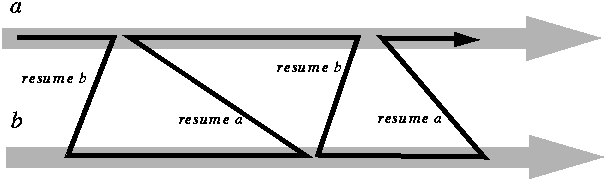
This is all strictly sequential and meant to be executed on a single process (task) of a single computer.
But the ideas are clearly drawn from concurrent computation; in fact, an operating system that provide such schemes
as time-sharing, multitasking (as in Unix) and multithreading, mentioned at the beginning of this chapter as providing
the appearance of concurrency on a single computer, will internally implement them through a coroutine-like mechanism.
Coroutines may be viewed as a boundary case of concurrency: the poor man's substitute to concurrent computation when
only one thread of control is available. It is always a good idea to check that a general-purpose mechanism degrades gracefully
to boundary cases; so let us see how we can represent coroutines. The following two classes will achieve this goal.
REFERENCE MATERIAL
- Tremblay & Sorenson, "The Theory and Practice of Compiler Writing", McGraw Hill, 1985.
- Aho, Sethi and Ullman, "Compilers Principles, Techniques and Tools", Addison Wesley, 1987.
- Pratt, "Programming Languages", Prentice Hall, 1984.
- Sethi, "Programming Languages Concepts and Constructs", Addison- Wesley, 1989.
Coroutines in Modula-2
Famous Dotzel paper:
Coroutines in BETA
Ice 9 - Coroutines Using Runqs
Coroutines and stack overflow
testing
The MT Icon Interpreter
The Aesop
System A Tutorial
Java Pipes -- not that impresssive
TaskMaster -- see descripting and pointers
to Fabrik
Continuations And Stackless Python
3.1 Coroutines in
Display PostScript
An Introduction to Scheme
and its Implementation - call-with-current-continuation
CPS 206 Advanced Programming Languages Fall,
1999 Text: Finkel: Advanced Programming Language Design
Chapter 2 CONTROL STRUCTURES
(#3 2 lectures, skip 4)
1. Exception Handling
2. Coroutines
Coroutines in Simula
Coroutines in CLU
Embedding CLU Iterators in C
Coroutines in Icon
3. Continuations: Io
4. Power Loops
5. Final Comments
C Coroutines
CORO(2)                    C Coroutines                   CORO(2)

NAME
       co_create, co_call, co_resume, co_delete, co_exit_to,
       co_exit - C coroutine management


SYNOPSIS
       #include <coro.h>

       extern struct coroutine *co_current;
       extern struct coroutine co_main[];

       struct coroutine *co_create(void *func, void *stack, int stacksize);
       void co_delete(struct coroutine *co);
       void *co_call(struct coroutine *co, void *data);
       void *co_resume(void *data);
       void *co_exit_to(struct coroutine *co, void *data);
       void *co_exit(void *data);
DESCRIPTION
       The coro library implements the low level functionality
       for coroutines.  For a definition of the term coroutine
       see The Art of Computer Programming by Donald E. Knuth.
       In short, you may think of coroutines as a very simple
       cooperative multitasking environment where the switch from
       one task to another is done explicitly by a function call.
       And, coroutines are fast.  Switching from one coroutine to
       another takes only a couple of assembler instructions more
       than a normal function call.

       This document defines an API for the low level handling of
       coroutines i.e. creating and deleting coroutines and
       switching between them.  Higher level functionality
       (scheduler, etc.) is not covered here.
Pipe Tutorial Intro by Faith Fishman
Advanced UNIX Programming -- lecture notes by
Michael D. Lemmon
Interprocess Communications in UNIX
-- book
Beej's Guide to Unix IPC
Named Pipes
FMTEYEWTK about Perl IPC
Unix Communication
Facilities done by: Gerhard Müller ([email protected],de)
Supervisor: Dr. N.A. Speirs ([email protected]) 2nd April
1996
CTC Tutorial on Pipes
6.2 Half-duplex
UNIX Pipes
Books
CMS-TSO Pipelines Runtime Library Distribution
This Web page serves as a distribution point for files pertaining to CMS/TSO Pipelines.
The files marked as "packed" should be downloaded in binary mode, reblocked to 1024-byte, fixed-length records (e.g.,
using an "fblock 1024" stage), and then unpacked using an "unpack" stage. The BOOK files should be downloaded in binary
mode and reblocked using an "fblock 4096" stage.
The files in VMARC format should be downloaded in binary mode, reblocked using an "fblock 80" stage, and then unpacked
using the VMARC command.
The files in LISTING format have ASA carriage control ("FORTRAN carriage control"). On CMS they should be printed
with the "CC" option; on most unix systems they can be printed with "lpr -f".
The GNU C Library
- Signal Handling
An illustrated explanation of pipes
IBM CMS Pipelines on VM
CMS Pipelines is a programmer productivity tool for simple creation of powerful, reusable REXX and Assembler programs
and Common Gateway Interface (CGI) scripts for Web servers. [More...]
Society
Groupthink :
Two Party System
as Polyarchy :
Corruption of Regulators :
Bureaucracies :
Understanding Micromanagers
and Control Freaks : Toxic Managers :
Harvard Mafia :
Diplomatic Communication
: Surviving a Bad Performance
Review : Insufficient Retirement Funds as
Immanent Problem of Neoliberal Regime : PseudoScience :
Who Rules America :
Neoliberalism
: The Iron
Law of Oligarchy :
Libertarian Philosophy
Quotes
War and Peace
: Skeptical
Finance : John
Kenneth Galbraith :Talleyrand :
Oscar Wilde :
Otto Von Bismarck :
Keynes :
George Carlin :
Skeptics :
Propaganda : SE
quotes : Language Design and Programming Quotes :
Random IT-related quotes :
Somerset Maugham :
Marcus Aurelius :
Kurt Vonnegut :
Eric Hoffer :
Winston Churchill :
Napoleon Bonaparte :
Ambrose Bierce :
Bernard Shaw :
Mark Twain Quotes
Bulletin:
Vol 25, No.12 (December, 2013) Rational Fools vs. Efficient Crooks The efficient
markets hypothesis :
Political Skeptic Bulletin, 2013 :
Unemployment Bulletin, 2010 :
Vol 23, No.10
(October, 2011) An observation about corporate security departments :
Slightly Skeptical Euromaydan Chronicles, June 2014 :
Greenspan legacy bulletin, 2008 :
Vol 25, No.10 (October, 2013) Cryptolocker Trojan
(Win32/Crilock.A) :
Vol 25, No.08 (August, 2013) Cloud providers
as intelligence collection hubs :
Financial Humor Bulletin, 2010 :
Inequality Bulletin, 2009 :
Financial Humor Bulletin, 2008 :
Copyleft Problems
Bulletin, 2004 :
Financial Humor Bulletin, 2011 :
Energy Bulletin, 2010 :
Malware Protection Bulletin, 2010 : Vol 26,
No.1 (January, 2013) Object-Oriented Cult :
Political Skeptic Bulletin, 2011 :
Vol 23, No.11 (November, 2011) Softpanorama classification
of sysadmin horror stories : Vol 25, No.05
(May, 2013) Corporate bullshit as a communication method :
Vol 25, No.06 (June, 2013) A Note on the Relationship of Brooks Law and Conway Law
History:
Fifty glorious years (1950-2000):
the triumph of the US computer engineering :
Donald Knuth : TAoCP
and its Influence of Computer Science : Richard Stallman
: Linus Torvalds :
Larry Wall :
John K. Ousterhout :
CTSS : Multix OS Unix
History : Unix shell history :
VI editor :
History of pipes concept :
Solaris : MS DOS
: Programming Languages History :
PL/1 : Simula 67 :
C :
History of GCC development :
Scripting Languages :
Perl history :
OS History : Mail :
DNS : SSH
: CPU Instruction Sets :
SPARC systems 1987-2006 :
Norton Commander :
Norton Utilities :
Norton Ghost :
Frontpage history :
Malware Defense History :
GNU Screen :
OSS early history
Classic books:
The Peter
Principle : Parkinson
Law : 1984 :
The Mythical Man-Month :
How to Solve It by George Polya :
The Art of Computer Programming :
The Elements of Programming Style :
The Unix Hater’s Handbook :
The Jargon file :
The True Believer :
Programming Pearls :
The Good Soldier Svejk :
The Power Elite
Most popular humor pages:
Manifest of the Softpanorama IT Slacker Society :
Ten Commandments
of the IT Slackers Society : Computer Humor Collection
: BSD Logo Story :
The Cuckoo's Egg :
IT Slang : C++ Humor
: ARE YOU A BBS ADDICT? :
The Perl Purity Test :
Object oriented programmers of all nations
: Financial Humor :
Financial Humor Bulletin,
2008 : Financial
Humor Bulletin, 2010 : The Most Comprehensive Collection of Editor-related
Humor : Programming Language Humor :
Goldman Sachs related humor :
Greenspan humor : C Humor :
Scripting Humor :
Real Programmers Humor :
Web Humor : GPL-related Humor
: OFM Humor :
Politically Incorrect Humor :
IDS Humor :
"Linux Sucks" Humor : Russian
Musical Humor : Best Russian Programmer
Humor : Microsoft plans to buy Catholic Church
: Richard Stallman Related Humor :
Admin Humor : Perl-related
Humor : Linus Torvalds Related
humor : PseudoScience Related Humor :
Networking Humor :
Shell Humor :
Financial Humor Bulletin,
2011 : Financial
Humor Bulletin, 2012 :
Financial Humor Bulletin,
2013 : Java Humor : Software
Engineering Humor : Sun Solaris Related Humor :
Education Humor : IBM
Humor : Assembler-related Humor :
VIM Humor : Computer
Viruses Humor : Bright tomorrow is rescheduled
to a day after tomorrow : Classic Computer
Humor
The Last but not Least Technology is dominated by
two types of people: those who understand what they do not manage and those who manage what they do not understand ~Archibald Putt.
Ph.D
Copyright © 1996-2021 by Softpanorama Society. www.softpanorama.org
was initially created as a service to the (now defunct) UN Sustainable Development Networking Programme (SDNP)
without any remuneration. This document is an industrial compilation designed and created exclusively
for educational use and is distributed under the Softpanorama Content License.
Original materials copyright belong
to respective owners. Quotes are made for educational purposes only
in compliance with the fair use doctrine.
FAIR USE NOTICE This site contains
copyrighted material the use of which has not always been specifically
authorized by the copyright owner. We are making such material available
to advance understanding of computer science, IT technology, economic, scientific, and social
issues. We believe this constitutes a 'fair use' of any such
copyrighted material as provided by section 107 of the US Copyright Law according to which
such material can be distributed without profit exclusively for research and educational purposes.
This is a Spartan WHYFF (We Help You For Free)
site written by people for whom English is not a native language. Grammar and spelling errors should
be expected. The site contain some broken links as it develops like a living tree...
Disclaimer:
The statements, views and opinions presented on this web page are those of the author (or
referenced source) and are
not endorsed by, nor do they necessarily reflect, the opinions of the Softpanorama society. We do not warrant the correctness
of the information provided or its fitness for any purpose. The site uses AdSense so you need to be aware of Google privacy policy. You you do not want to be
tracked by Google please disable Javascript for this site. This site is perfectly usable without
Javascript.
Last modified:
May 29, 2021


