The exec command is one of very little know and underutilized Unix command. The name of the command is identical to the name of a
Unix system
call which provides semantic of this command.
The exec command replaces the current shell process with
the specified command. Normally, when you run a command a new process is spawned
(forked). The exec command does not spawn a new process. Instead,
the current process is overlaid with the new command. In other words the exec command
is executed in place of the current shell without creating
a new process. The command implements Unix
exec
system call. It is a part of process control API, the group
that also includes
fork system
call. See
Fork and Exec Unix Model
(PowerPoint).
Note: this is completely
different command then Find
command option -exec which permits execution of commands using
found file as argument. Xargs is another command that
provides means to build and execute command lines from standard input.
command -- An executable command. The command replaces the current
shell in memory without spawning a new process. If you cannot execute the command
for some reason, then you exit the current shell.
arg -- Arguments to command.
fd< file -- Opens file for input with file descriptor fd.
fd> file -- Opens file for output with file descriptor
fd.
exec Command Switches
-c— Makes exec destroy all variables before running the new program
-l— Runs the program as if it were the first program being run when a
user logs in
This is pretty common situation, when the shell specified in /etc/passwd
is not that you want and you can't or have no power to change the setting, but want to use a
different shell.
For example:
exec bash
Makes you login shell bash. This is a very convenient command on Solaris, HP-US and AIX in which
bash shell is typically present, but is not default shell for root and you get used to bash in your
daily work. If you execute this command, the shell replaces itself in memory with the new
command you specified.
Here is a more exotic example,
exec vi myfile
In this case we replaced the shell with the vi. The command places you in vi,
so that you can edit myfile. When you exit vi you exit the system because vi
has become your login interface to the operating system. This method can be used in "menu"
systems when a user is offered several precooked commands on login and need just to select one to
execute.
For example:
while true
do
   echo "Go to Mail, Editor, or eXit:"
   read ANSWER
   case "$ANSWER" in
      [mM]) exec MAILX ;;
      [eE]) exec ${EDITOR:=vi} ;;
      [xX]) exec exit ;;
   esac
done
Here the initial script is used to provide a menu and after selection was made
serves no useful purpose. So it can be replaced by selected utility via exec call.
In no command arguments are given this command can modify file descriptors. In
other words the exec command can also be used in shell scripts
dynamically open, close, and copy file descriptors. That permits performing redirection
of STDIN, STDERR, STDOUT and other file descriptors to various files inside the
shell script, instead of command invocation string. If you do not specify a command or
arguments, you can specify redirection symbols and file descriptors to perform these functions.
In other words in shell the exec command can serve as a substitute to OPEN and
CLOSE commands that are common in regular scripting languages, like Perl and Python.
Typical
beginning of the shell script that sends STDIN to a log file can look something
like
This capability also is a great help in debugging. In this role the exec command
can be used for debugging complex cases of shell scripts, for example when script is
submitted via SGE or other scheduler and produces no output.
Generally it can be used for opening and files in shall like open statement in Perl. The following examples illustrate the use of exec for manipulating
file descriptors:
exec 3< inputfile
# Opens inputfile with file descriptor 3 for
reading.
exec 4> outputfile
# Opens outputfile with file descriptor 4 for
writing.
You can also use the exec command to create a set of shell scripts
that execute one another sequentially like stages of the process. Instead of spawning
new processes each time you need to transfer the control to the next script you
execute the exec command .
In this case the last statement of each stage should be exec command that invokes the next stage.
This trick also improves capabilities of sharing environment between stages because after forked
process ends the environment is destroyed.
In the Bash shell, file descriptors (FDs) are important in managing the input and output of
commands. Many people have issues understanding file descriptors correctly. Each process has
three default file descriptors, namely:
Code
Meaning
Location
Description
0
Standard input
/dev/stdin
Keyboard, file, or some stream
1
Standard output
/dev/stdout
Monitor, terminal, display
2
Standard error
/dev/stderr
Non-zero exit codes are usually >FD2, display
Now that you know what the default FDs do, let's see them in action. I start by creating a
directory named foo , which contains file1 .
$> ls foo/ bar/
ls: cannot access 'bar/': No such file or directory
foo/:
file1
The output No such file or directory goes to Standard Error (stderr) and is also
displayed on the screen. I will run the same command, but this time use 2> to
omit stderr:
$> ls foo/ bar/ 2>/dev/null
foo/:
file1
It is possible to send the output of foo to Standard Output (stdout) and to a
file simultaneously, and ignore stderr. For example:
$> { ls foo bar | tee -a ls_out_file ;} 2>/dev/null
foo:
file1
Then:
$> cat ls_out_file
foo:
file1
The following command sends stdout to a file and stderr to /dev/null so that
the error won't display on the screen:
The Linux exec command is a
bash builtin
and a very interesting
utility. It is not something most people who are new to Linux know. Most seasoned admins understand it but only use it occasionally.
If you are a developer, programmer or DevOp engineer it is probably something you use more often. Lets take a deep dive into the
builtin exec command, what it does and how to use it.
In order to understand the exec command, you need a fundamental understanding of how sub-shells work.
... ... ...
What the Exec Command Does
In it's most basic function the exec command changes the default behavior of creating a sub-shell to run a command. If you run
exec followed by a command, that command will REPLACE the original process, it will NOT create a sub-shell.
An additional feature of the exec command, is
redirection
and manipulation
of
file descriptors
. Explaining redirection and file descriptors is outside the scope of this tutorial. If these are new to you please read "
Linux IO, Standard Streams and
Redirection
" to get acquainted with these terms and functions.
In the following sections we will expand on both of these functions and try to demonstrate how to use them.
How to Use the Exec Command with Examples
Let's look at some examples of how to use the exec command and it's options.
Basic Exec Command Usage – Replacement of Process
If you call exec and supply a command without any options, it simply replaces the shell with
command
.
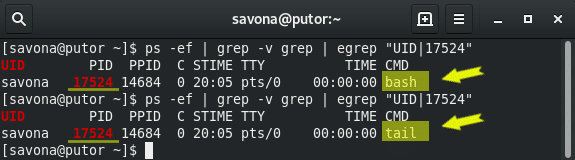
Let's run an experiment. First, I ran the ps command to find the process id of my second terminal window. In this case it was
17524. I then ran "exec tail" in that second terminal and checked the ps command again. If you look at the screenshot below, you
will see the tail process replaced the bash process (same process ID).
Screenshot 3
Since the tail command replaced the bash shell process, the shell will close when the tail command terminates.
Exec Command Options
If the -l option is supplied, exec adds a dash at the beginning of the first (zeroth) argument given. So if we ran the following
command:
exec -l tail -f /etc/redhat-release
It would produce the following output in the process list. Notice the highlighted dash in the CMD column.
The -c option causes the supplied command to run with a empty environment. Environmental variables like
PATH
, are cleared before the command it run.
Let's try an experiment. We know that the printenv command prints all the settings for a users environment. So here we will open
a new bash process, run the printenv command to show we have some variables set. We will then run printenv again but this time with
the exec -c option.
In the example above you can see that an empty environment is used when using exec with the -c option. This is why there was no
output to the printenv command when ran with exec.
The last option, -a [name], will pass
name
as the first argument to
command
. The command will still run as expected,
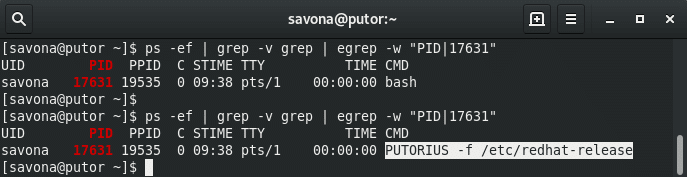
but the name of the process will change. In this next example we opened a second terminal and ran the following command:
exec -a PUTORIUS tail -f /etc/redhat-release
Here is the process list showing the results of the above command:
Screenshot 5
As you can see, exec passed PUTORIUS as first argument to
command
, therefore it shows in the process list with that name.
Using the Exec Command for Redirection & File Descriptor Manipulation
The exec command is often used for redirection. When a file descriptor is redirected with exec it affects the current shell. It
will exist for the life of the shell or until it is explicitly stopped.
If no
command
is specified, redirections may be used to affect the current shell environment.
– Bash Manual
Here are some examples of how to use exec for redirection and manipulating file descriptors. As we stated above, a deep dive into
redirection and file descriptors is outside the scope of this tutorial. Please read "
Linux IO, Standard Streams and
Redirection
" for a good primer and see the resources section for more information.
Redirect all standard output (STDOUT) to a file:
exec >file
In the example animation below, we use exec to redirect all standard output to a file. We then enter some commands that should
generate some output. We then use exec to redirect STDOUT to the /dev/tty to restore standard output to the terminal. This effectively
stops the redirection. Using the
cat
command
we can see that the file contains all the redirected output.
Open a file as file descriptor 6 for writing:
exec 6> file2write
Open file as file descriptor 8 for reading:
exec 8< file2read
Copy file descriptor 5 to file descriptor 7:
exec 7<&5
Close file descriptor 8:
exec 8<&-
Conclusion
In this article we covered the basics of the exec command. We discussed how to use it for process replacement, redirection and
file descriptor manipulation.
In the past I have seen exec used in some interesting ways. It is often used as a wrapper script for starting other binaries.
Using process replacement you can call a binary and when it takes over there is no trace of the original wrapper script in the process
table or memory. I have also seen many System Administrators use exec when transferring work from one script to another. If you call
a script inside of another script the original process stays open as a parent. You can use exec to replace that original script.
I am sure there are people out there using exec in some interesting ways. I would love to hear your experiences with exec. Please
feel free to leave a comment below with anything on your mind.
When running another script or inserting a script fragment with source,
control always resumes at the next line in the original script. The exec command instead
provides an unconditional change to a new script. Bash discards the original script entirely,
never to return.
#!/bin/bash
#
# exec1.sh
#
# Source command example
shopt -s -o nounset

declare -rx SCRIPT=${0##*/}
declare -r exec2="./exec2.sh"
if test ! -x "$exec2" ; then
   printf "$SCRIPT:$LINENO: the script $exec2 is not available\n" >&2
   exit 192
fi

printf "$SCRIPT: Transferring control to $exec2, never to return...\n"
exec "$exec2"

printf "$SCRIPT:$LINENO: exec failed!\n" >&2
exit 1
After the exec command is performed in exec1.sh, the script
is discarded and Bash begins executing exec2.sh instead. When exec2.sh is
finished, exec1.sh doesn't resume.
$ bash exec1.sh
exec1.sh: Transferring control to exec2.sh, never to return...
exec2.sh: now running exec2.sh
You can use the exec command to run other programs, not just other
shell scripts. If the -c switch is used, exec destroys all variables before
running the new program. The -l switch runs the program as if it were the first program
being run when a user logs in (by putting a minus sign in parameter $0). The -a
switch can specify a specific name for $0.
The exec never returns unless you set the execfail option.
If it is not set and the script cannot run the new program, the script simply exits.
A specialized command, exec is used primarily for scripts that are a
"front end" to a series of other scripts. For example, a script can examine a file sent by a
customer, categorize it, and then run an appropriate script to process it using exec.
Because there's no reason to return to the original script, exec is the appropriate
command to use.
Files can be read by piping their contents to a command, or by redirecting the file as standard input
to a command or group of commands. This is the easiest way to see what a text file contains, but it
has two drawbacks. First, only one file can be examined at a time. Second, it prevents the script from
interacting with the user because the read command reads from the redirected file instead of
the keyboard.
Instead of piping or redirection, files can be opened for reading by redirecting the file to a descriptor
number with the exec command:
#!/bin/bash
#
# open_file.sh: print the contents of robots.txt

shopt -s -o nounset

declare LINE

exec 3< robots.txt
while read LINE <&3 ; do
   printf "%s\n" "$LINE"
done
exit 0
In this case, the file robots.txt is redirected to file descriptor 3. Descriptor
3 is the lowest number that programs can normally use. File descriptor 0 is standard
input, file descriptor 1 is standard output, and file descriptor 2 is standard error.
The read command receives its input from descriptor 3 (robots.txt), which
is being redirected by <. read can also read from a particular file descriptor using
the Korn shell -u switch.
If the file opened with exec does not exist, Bash reports a "bad file number" error.
The file descriptor must also be a literal number, not a variable.
If exec is not used, the file descriptor can still be opened but it cannot be reassigned.
3< robots.txt
3< robots2.txt
In this example, file descriptor 3 is robots.txt. The second line has no
effect because descriptor 3 is already opened. If exec is used, the second line re-opens
descriptor 3 as robots2.txt.
To save file descriptors, exec can copy a descriptor to a second descriptor. To make input
file descriptor 4 the same file as file descriptor 3, do this
exec 4<&3
Now descriptor 3 and 4 refer to the same file and can be used interchangeably.
Descriptor 3 can be used to open another file and can be restored to its original value by
copying it back from descriptor 4. If descriptor 4 is omitted, Bash assumes that you
want to change standard input (descriptor 0).
You can move a file descriptor by appending a minus sign to it. This closes the original file after
the descriptor was copied.
exec 4<&3-
You can likewise duplicate output file descriptors with >& and move them by appending
a minus sign. The default output is standard output (descriptor 1).
To open a file for writing, use the output redirection symbol (>).
exec 3<robots.txt
exec 4>log.out
while read LINE <&3 ; do
  printf "%s\n" "$LINE" >&4
done
The <> symbol opens a file for both input and output.
exec 3<>robots.txt
The reading or writing proceeds sequentially from the beginning of the file. Writing to the
file overwrites its contents: As long as the characters being overwritten are the same length as the
original characters, the new characters replace the old. If the next line in a file is dog,
for example, writing the line cat over dog replaces the word dog. However,
if the next line in the file is horse, writing cat creates two lines--the line cat and the line
se. The linefeed character following cat overwrites the letter
r. The script will now read the line se.
<> has limited usefulness with regular files because there is no way to "back up" and rewrite
something that was just read. You can only overwrite something that you are about to read next.
The script below reads through a file and
appends a "Processed on" message to the end of the file.
#!/bin/bash
#
# open_files2.sh

shopt -o -s nounset

declare LINE

exec 3<>robots.txt
while read LINE <&3 ; do
  printf "%s\n" "$LINE"
done
printf "%s\n" "Processed on "'date' >&3
exit 0
<> is especially useful for socket programming
As files can be opened, so they can also be closed. An input file descriptor can be closed with
<&-. Be careful to include a file descriptor because, without one, this closes standard input.
An output file descriptor can be closed with >&-. Without a descriptor, this closes standard
output.
As a special Bash convention, file descriptors can be referred to by a pathname. A path in the form
of /dev/fd/n refers to file descriptor n. For example, standard output is
/dev/fd/1. Using this syntax, it is possible to refer to open file descriptors when running
Linux commands.
$ exec 4>results.out
$ printf "%s\n" "Send to fd 4 and standard out" | tee /dev/fd/4
Send to fd 4 and standard out
$ exec 4>&-
$ cat results.out
Send to fd 4 and standard out
We have three relevant streams when dealing with passing data around on the
command line. STDIN (0), STDOUT (1) and STDERR (2)
echo "hello" will return "hello" to STDOUT
echo "hello" | sed s/llo/y/g Returns: 'hey'
echo "hello" will print "hello" to STDOUT which we pipe to sed's STDIN. The
shell will fork both processes, echo and sed, and create a pipe between one's
STDOUT to the other's STDIN. A 'broken pipe' will occur when one terminates
unexpectedly.
strace echo "hello" will print the system calls that the command makes.
Lets say I just want to print out open() calls.
strace echo "hello" | grep open does not work. It seems that the grep
is ignored.
This is because strace sends it's output to STDERR and not STDOUT. In this
case we must redirect STDERR to STDOUT so grep can pick it up on it's STDIN.
strace echo "hello" 2>&1 | grep open will work successfully.
What if we want to redirect STDOUT and STDERR to a file? We simply redirect
STDOUT to a file and then redirect STDERR to STDOUT.
strace echo "hello" >/tmp/strace.output 2>&1
A nonstandard method of achieving the same by redirecting everything in one
go is strace echo "hello" &>/tmp/strace.output however this is not guaranteed
to work across all implementations.
The execcommand is used for redirection of file
descriptors 0:9. Example:
> ksh
$ exec 1>std.out
$ dir ~/test
$ ....
$ exit
In the above example, all output directed to stdout from the command exec
to the command exit is written on file std.out. To use file descriptor
5:
> cat kexec
# open file x.x by descriptor 5 with exec 5>x.x
exec 5>x.x
print -u5 "1. redirect print output to fd 5 opened by exec"
print -u5 "2. prinf on fd 5"
print -u5 "3. print on fd 5 again"
exec 5<&-
# close file x.x with exec 5<&-
echo "\n verify x.x by cat\n"
The kexec script listed above creates file x.x containing the script lines 1.-2.-3..
If the file descriptor is closed, any attempt to access closed file produces
the following error message:
> kexec
kexec[13]: print: bad file unit number
exec may be used to execute a script but user is logged out
exec is invoked when in parent shell.
The read command reads input from the terminal as single variables,
piped names or file redirected with exec as summarized in the
following example.
> cat kread
#!/bin/ksh
#-----------kread: read data with Korn shell---------------------
#
echo Proc $0: read command in Korn shell
echo
print "type a name> \c"                              # read var at promp
read name
print "typed name is: " $name
print "\npiped read example:"
print "apr may jun" | read a b c                     # pipe args
print arg1 from pipe is $a
print arg2 from pipe is $b
print arg3 from pipe is $c
print "\nread/write lines with exec redirection\n"
exec 0<$1                                            # redirect i/o
while read LINE
do
   print $LINE
done
#
#----------end script------------------

> kread
Proc kread: read command in Korn shell

type a name> any
typed name is:  any

piped read example:
arg1 from pipe is apr
arg2 from pipe is may
arg3 from pipe is jun

read/write lines with exec redirection

line 1
line 1
<ctrl>C
>
Korn Shell Read Options
-p
read line form co-process
-r
do not treat \ as continuation
-s
save input in history file
-un
read from file descriptor n
The prompt can be specified in the read statement:
$ read var?prompt
If var is not defined, input is assigned to variable REPLY. Field
separator can be assigned with the IFS (Internal Field Separator)
variable.
Example:
> cat kpwd
#!/bin/ksh
#-----------kpwd: read example in Korn shell
echo Proc $0: type pwd info with Korn shell
echo
read ok?"Type pwd info? (y/n)"                  #read with prompt
[[ $ok = @([Nn])* ]] && exit 1                  #test read variable
echo pwd data are:
echo ""
IFS=:                                           #set IFS to :
exec 0</etc/passwd                              #redirect stdin to /etc/passwd
# list users
#
while read -r NAME PAS UID GID COM HOME SHELL
do
   print "acct= $NAME - home= $HOME - shell= $SHELL:"
done
#----------end script------------------
> kpwd

Type pwd info? (y/n)y
pwd data are:

acct= john - home= /home/john - shell= /bin/tcsh:
acct= mary - home= /home/mary - shell= /bin/tcsh:
acct= tester - home= /d4/check - shell= /bin/sh:
>
An exec <filename command redirects stdin to a file.
From that point on, all stdin comes from that file, rather
than its normal source (usually keyboard input). This provides a method of reading
a file line by line and possibly parsing each line of input using
sed and/or
awk.
Example 16-1. Redirecting stdin using exec
   1 #!/bin/bash
   2 # Redirecting stdin using 'exec'.
   3
   4
   5 exec 6<&0          # Link file descriptor #6 with stdin.
   6                    # Saves stdin.
   7
   8 exec < data-file   # stdin replaced by file "data-file"
   9
  10 read a1            # Reads first line of file "data-file".
  11 read a2            # Reads second line of file "data-file."
  12
  13 echo
  14 echo "Following lines read from file."
  15 echo "-------------------------------"
  16 echo $a1
  17 echo $a2
  18
  19 echo; echo; echo
  20
  21 exec 0<&6 6<&-
  22 #  Now restore stdin from fd #6, where it had been saved,
  23 #+ and close fd #6 ( 6<&- ) to free it for other processes to use.
  24 #
  25 # <&6 6<&-    also works.
  26
  27 echo -n "Enter data  "
  28 read b1  # Now "read" functions as expected, reading from normal stdin.
  29 echo "Input read from stdin."
  30 echo "----------------------"
  31 echo "b1 = $b1"
  32
  33 echo
  34
  35 exit 0
Similarly, an exec >filename command redirects stdout
to a designated file. This sends all command output that would normally go to
stdout to that file.
Example 16-2. Redirecting stdout using exec
   1 #!/bin/bash
   2 # reassign-stdout.sh
   3
   4 LOGFILE=logfile.txt
   5
   6 exec 6>&1           # Link file descriptor #6 with stdout.
   7                     # Saves stdout.
   8
   9 exec > $LOGFILE     # stdout replaced with file "logfile.txt".
  10
  11 # ----------------------------------------------------------- #
  12 # All output from commands in this block sent to file $LOGFILE.
  13
  14 echo -n "Logfile: "
  15 date
  16 echo "-------------------------------------"
  17 echo
  18
  19 echo "Output of \"ls -al\" command"
  20 echo
  21 ls -al
  22 echo; echo
  23 echo "Output of \"df\" command"
  24 echo
  25 df
  26
  27 # ----------------------------------------------------------- #
  28
  29 exec 1>&6 6>&-      # Restore stdout and close file descriptor #6.
  30
  31 echo
  32 echo "== stdout now restored to default == "
  33 echo
  34 ls -al
  35 echo
  36
  37 exit 0
Example 16-3. Redirecting both stdin and stdout
in the same script with exec
   1 #!/bin/bash
   2 # upperconv.sh
   3 # Converts a specified input file to uppercase.
   4
   5 E_FILE_ACCESS=70
   6 E_WRONG_ARGS=71
   7
   8 if [ ! -r "$1" ]     # Is specified input file readable?
   9 then
  10   echo "Can't read from input file!"
  11   echo "Usage: $0 input-file output-file"
  12   exit $E_FILE_ACCESS
  13 fi                   #  Will exit with same error
  14                      #+ even if input file ($1) not specified.
  15
  16 if [ -z "$2" ]
  17 then
  18   echo "Need to specify output file."
  19   echo "Usage: $0 input-file output-file"
  20   exit $E_WRONG_ARGS
  21 fi
  22
  23
  24 exec 4<&0
  25 exec < $1            # Will read from input file.
  26
  27 exec 7>&1
  28 exec > $2            # Will write to output file.
  29                      # Assumes output file writable (add check?).
  30
  31 # -----------------------------------------------
  32     cat - | tr a-z A-Z   # Uppercase conversion.
  33 #   ^^^^^                # Reads from stdin.
  34 #           ^^^^^^^^^^   # Writes to stdout.
  35 # However, both stdin and stdout were redirected.
  36 # -----------------------------------------------
  37
  38 exec 1>&7 7>&-       # Restore stout.
  39 exec 0<&4 4<&-       # Restore stdin.
  40
  41 # After restoration, the following line prints to stdout as expected.
  42 echo "File \"$1\" written to \"$2\" as uppercase conversion."
  43
  44 exit 0
A file descriptor is
simply a number that the operating system assigns to an open file to
keep track of it. Consider it a simplified version of a file pointer.
It is analogous to a file handle in C.
Using file descriptor
5 might cause problems. When Bash creates a child process,
as with
exec,
the child inherits fd 5 (see Chet Ramey's archived e-mail,
SUBJECT: RE: File descriptor 5 is held open). Best leave this particular
fd alone.
Q: According to the many sources the exec command other than its use in find
and escaping the shell, has another definitive use.. which I am having a hard
time understanding.
according to many resources and info pages that I have read I can use
the exec command with a file descriptor.. such as exec 1< file
or exec 5>&0
I do not quite understand what a file descriptor is and what is the purpose
of this (pattern) or (expression)..
any feedback welcome
A: If you write a script, you can send input into it like this:
./somescript < inputfile
The script can accomplish the same thing internally by using: exec < inputfile
After that line, the script's input is inputfile. It can do the same to output:
exec > somescript.log 2>&1
This send stderr and stdout combined into the file. There is more to it, but
this is the basics.
Simply put, fork duplicates your shell (file descriptors, etc) in a subshell.
Usually a forked process will then exec in that subshell.
exec exec's the command in your current shell, basically co-opting it.
In pure versions of exec, if you do, just at the shell prompt:
exec khs <-- instead of exec ksh
your shell will be replaced by khs, which doesn't exist, and you'll lose your
shell (get logged out).
Redhat, OpenSolaris, and most Linux brands do a "fake exec" (really a fork and
then exec) now, where, even when you call exec and flub it, you don't lose your
shell.
Not a very technical explanation, but hopefully helpful
As Sys Admin contributing editors, we've had the opportunity to answer
a number of novice shell questions. In this column, we'll cover a few of the
questions we've been asked:
Using the exec and eval commands
Combining files using the paste command
Processing a string a character at a time
Deleting a file named dash
Using the exec & eval Commands
One novice asked when it was suitable to exec and eval
Unix commands:
exec mycommand
eval mycommand
The exec command works differently depending on the shell;
in the Bourne and Korn shells, the exec command replaces the
current shell with the command being exec'ed. Consider this stub script:
exec echo "Hello John"
echo "Hello Ed"
# end stub
When the above stub executes, the current shell will be replaced when exec'ing
the echo "Hello John" command. The echo "Hello Ed" command never gets the chance
to execute. Obviously, this capability has limited uses.
You might design a shell menu where the requirement is to execute an option
that never returns to the menu. Another use would be restricting the user from
obtaining the command line. The following last line in the user's .profile file
logs the user out as soon as my_executable terminates:
exec my_executable
However, most systems administrators probably use the exit command instead:
my_executable
exit
Don't confuse exec'ing a Unix command with using exec to assign
a file to a file descriptor. Remember that the default descriptors are standard
input, output, and error or 0, 1, and 2, respectively.
Let's consider an example where you need to read a file with a while loop
and ask the user for input in the same loop. Assign the file to an unused descriptor
-- 3 in this case -- and obtain the user input from standard input:
exec 3< file.txt
while read line <&3
do
    echo "$line"
    echo "what is your input? "
    read answer
    .
    .
done
exec 3<&-   # close the file descriptor when done
The eval command is more interesting. A common eval use is to
build a dynamic string containing valid Unix commands and then use eval
to execute the string. Why do we need eval? Often, you can build a command
that doesn't require eval:
evalstr="myexecutable"
$evalstr   # execute the command string
However, chances are the above command won't work if "myexecutable" requires
command-line arguments. That's where eval comes in.
Our man page says that the arguments to the eval command are "read
as input to the shell and the resulting commands executed". What does that mean?
Think of it as the eval command forcing a second pass so the string's
arguments become the arguments of the spawned child shell.
In a previous column, we built a dynamic sed command that skipped
3 header lines, printed 5 lines, and skipped 3 more lines until the end of the
file:
This command fails without eval. When the sed command executes
in the child shell, eval forces the remainder of the string to become
arguments to the child.
Possibly the coolest eval use is building dynamic Unix shell variables.
The following stub script dynamically creates shell variables user1 and user2
setting them equal to the strings John and Ed, respectively:
Another novice asked how to line up three files line by line sending the output
to another file. Given the following:
file1:

1
2
3

file2:

a
b
c

file3:

7
8
9
the output file should look like this:
1a7
2b8
3c9
The paste command is a ready-made solution:
paste file1 file2 file3
By default, the delimiter character between the columns is a tab key. The paste
command provides a -d delimiter option. Everything after -d is
treated as a list. For example, this paste rendition uses the pipe symbol and
ampersand characters as a list:
paste -d"|&" file1 file2 file3
The command produces this output:
1|a&7
2|b&8
3|c&9
The pipe symbol character, |, is used between columns 1 and 2, while the ampersand,
&, separates column 2 and 3. If the list is completely used, and if the paste
command contains more files arguments, then paste starts at the beginning of
the list.
To satisfy our original requirement, paste provides a null character, \0,
signifying no character. To prevent the shell from interpreting the character,
it must also be quoted:
The exec command will replace the parent process by whatever the command
is typed.
Try the following:
exec ls -l
As you will have noticed, this closes the shell you are currently using.
Why?
The exec command terminated the parent process and started (executed) the
ls command and the ls command did what it was supposed to do and
exited with a zero status, but ls has no parent process to return to,
and thereby the shell is shut down.
If for example, we ran our eatout.sh script, but instead of running it as
we have previously, we exec'd it, the script would run but would also close
our terminal from which we ran the script.
exec eatout.sh
This means that when the person finally types exit to exit the menu, they
are sent back to the login prompt.
To see this in action, let's consider the following sequence of commands:
pstree -p |less
You will notice that "pstree" starts with the init command or the init process.
Somewhere further down this 'tree', init starts a shell (bash/ksh/csh) which
is then going to run the pstree and the less command.
Now, in order to see exec at work, we need to find out the current process
id.
Use:
echo $$
to determine this (the ps command would give you the same information).
Now type the pstree command again, producing a diagram of your process tree.
pstree -p | less
Search for your process id recorded from the echo above. Once you have located
it, quit pstree and type:
exec bash
This would replace our current shell (our parent) with a new shell, and thus
a new process id (PID).
echo $$
You can also look at the pstree again.
By using the exec command, instead of making the new shell's parent your
original shell, the new shell will be owned by init.
The exec command will execute a command in place of the current shell;
that is, it terminates the current shell and starts a new process (38.3)
in its place.
Historically, exec was often used to execute the last command of a
shell script. This would kill the shell slightly earlier; otherwise, the shell
would wait until the last command was finished. This practice saved a process
and some memory. (Aren't you glad you're using a modern system? This sort of
conservation usually isn't necessary any longer unless your system limits the
number of processes each user can have.)
exec can be used to replace one shell with another shell:
% exec ksh
without incurring the additional overhead of having an unused shell waiting
for the new shell to finish.
exec also manipulates file descriptors (45.21,
45.22) in the Bourne shell. When you use exec to manage file descriptors,
it does not replace the current process. For example, the following command
makes the standard input of all commands come from the file formfile
instead of the default place (usually, your terminal):
The Last but not LeastTechnology is dominated by
two types of people: those who understand what they do not manage and those who manage what they do not understand ~Archibald Putt.
Ph.D
FAIR USE NOTICEThis site contains
copyrighted material the use of which has not always been specifically
authorized by the copyright owner. We are making such material available
to advance understanding of computer science, IT technology, economic, scientific, and social
issues. We believe this constitutes a 'fair use' of any such
copyrighted material as provided by section 107 of the US Copyright Law according to which
such material can be distributed without profit exclusively for research and educational purposes.
This is a Spartan WHYFF (We Help You For Free)
site written by people for whom English is not a native language. Grammar and spelling errors should
be expected. The site contain some broken links as it develops like a living tree...
You can use PayPal to to buy a cup of coffee for authors
of this site
Disclaimer:
The statements, views and opinions presented on this web page are those of the author (or
referenced source) and are
not endorsed by, nor do they necessarily reflect, the opinions of the Softpanorama society.We do not warrant the correctness
of the information provided or its fitness for any purpose. The site uses AdSense so you need to be aware of Google privacy policy. You you do not want to be
tracked by Google please disable Javascript for this site. This site is perfectly usable without
Javascript.




 Open a file as file descriptor 6 for writing:exec 6> file2writeOpen file as file descriptor 8 for reading:exec 8< file2readCopy file descriptor 5 to file descriptor 7:exec 7<&5Close file descriptor 8:exec 8<&-Conclusion
