|
|
Home | Switchboard | Unix Administration | Red Hat | TCP/IP Networks | Neoliberalism | Toxic Managers |
| (slightly skeptical) Educational society promoting "Back to basics" movement against IT overcomplexity and bastardization of classic Unix | |||||||
|
|
Domain Name System (DNS) is an Internet-wide naming system for resolving host names to IP addresses and IP addresses to host names. DNS supports name resolution for both local and remote hosts, and uses the concept of domains to allow multiple hosts with identical name to coexist on the Internet.
|
|
It is originated from the needs of addressing electronic mail. While the invention is attributed to Paul Mockapetris (the original specifications are described in RFC 882 November, 1983); the ideas were in the air for a long time: RFC 805 reflected the decision to introduce DNS-type names for mail addressing; RFC 811 by K. Harrenstien, V. White and E. Feinler introduced the idea of the original centralized hostname lookup server (March,1982); and RFC 819 documented the tree structure ideas of DNS (Aug, 1982).
Updated the DNS specification were published in 1987 (RFC
1034 and RFC 1035). Altogether
there is more then a dozen RFCs published that propose various extensions to the core protocol. Historically
DNS can be considered the first directory service implemented on Internet.
The collection of networked systems that use DNS is referred to as the DNS namespace. The DNS namespace
is divided into a hierarchy of domains. A DNS domain is a group of systems. Each domain is usually supported
by two or more name servers, a master name server, and one or more secondary (slave) DNS servers. In
Unix server implements DNS by running special daemon, the
in.named
daemon in case of bind. On the client�s side, DNS is implemented through the kernel�s resolver. The
resolver library resolves users� queries. The resolver queries several databases including a name server
in a specified order. In case DNS servers are queried one of them returns either the requested information
or a referral to another DNS server.
DNS's hierarchy has two dimensions. The first is the hierarchical domain names, such as www.softpanorama.org with hierarchy left to right. Rightmost (org) is the highest level of hierarchy, the second softpanorama is a subdomain of the org domain and www is a subdomain of softpanorama. The rightmost components of FDNS name are often called top-level domains, or TLDs. Among them com, edu, and org are the most popular, but several dozens exists including one for each country on the planet (based of ISO two-letter country codes). Together, the domain names which make up www.softpanorama.org, are called fully qualified domain name (FQDN).
However, DNS hierarchy has another dimension, which is how this information is distributed among DNS servers on the Internet. TLDs are maintained on so called root servers. Root servers contain information about second level DNS servers for each and every second level domain. This hierarchy of DNS servers on the Internet is completely distinct from the DNS hierarchy.
DNS is client-server architecture:
Name servers may be a primary or a secondary name server for its particular domain. Changes to primary domain name servers must be propagated to secondary name servers, as primary domain name servers own the database records. This is accomplished via a �zone transfer�, which copies a complete.
There are also name servers called �caching-only� name servers. These servers will resolve name queries, but do not own or maintain any DNS database files.
The client piece of the DNS architecture is known as a �resolver�, and the server piece is known as a �name server�. Resolvers retrieve information associated with a domain name, and domain name servers store various information about the domain space and return information to the resolvers upon request .
The top-level domains are administered by various organizations that maintain so called root servers. All organization with root servers report to the governing authority called the Internet Corporation for Assigned Names and Numbers (ICANN). Administration of the lower-level domains is delegated to the organizations which bought the domain name from one of DNS registrars. A typical year fee for the domain is highly varied and fluctuates between $4 and $35.
The top-level domain that you choose can depend on which one best suits the needs of your organization. Large international companies typically use the organizational domains, while small organizations or individuals often choose to use a country code. But this is true not for all countries. Country domains can be prohibitively expensive and can easily cost 10-100 times more that generic domains like .com, .net, .edu or .org. That's why many web sites from some countries of former USSR are registered under generic domains, typically .com.
And as any commercial enterprise domain business connected with DNS has its share of political issues. First of all the ability to extend naming scheme by introducing new top level domains is a highly charged political power and is ripe with different types of abuses. The second consideration is about a fair domain fee. How much it should cost to register the second level domain ?
There is also a phenomenon called domain hijacking when the organization that for some reason forgot to pay its year domain fee (expired domain) discover that somebody else already registered the name. Or even that non-expired domain name suddenly migrated from their ownership to somebody else because somebody transferred the domain from one registrar to another. In old days the organization that not yet have Internet presence and try to get one often discover that their domain name is already registered by some individual who wants a neat sum of money for the return of their name. Also because of multiple top level domain different organizations may own them. For example linux.com, linus.org linux.edu can be owned by different organizations. Important domains like linux.com can be sold for over a million dollars.
Everything below the secondary domain falls into a zone of authority maintained by the domain owner. It is the responsibility the zone owner, to design and implement the redundancy and robustness you need from DNS. Most TLD authorities require at least two working nameservers for a zone before they will delegate authority over it to the zone owner.
DNS has been designed to be redundant. When one server breaks down, the other servers for that domain will still be capable of answering queries about that zone on their own. All a subdomain's authoritative servers are listed in the domain above it. When your computer tries to find an address from a name, it has many alternative servers to query at each step in the process. If one server fails to answer within a set timeout, another will be queried. If they all fail then the query will fail and not return any result. The redundancy also provides load distribution between the servers that are authoritative for a domain.
If the two required nameservers of a zone were located in the same building, then power outage or a single router, or network switch failure could make DNS name service unavailable. If the two domain servers are also located in separate cities and use separate Internet providers then the company is pretty safe from one single failure taking out DNS service. Therefore the secondary name server generally should be geographically far apart from the primary, and in case the company has only one location probably should be implemented as a box in some hosting company or as a service.
The redundancy necessitates a zone duplication mechanism, a way to copy the zones from a master server to all the redundant slave servers of that zone (zone transfer). Until recently, these servers were usually called primary and secondary servers, not master and slave.
When zone file is updated on the master server, the slave server will either act on a notification of the update, or if the notification is lost, notice that a long time has elapsed since it last heard from the master server. It will then check whether there are any updates available. If the check fails, it will be repeated quite often until the master answers, making the duplication mechanism more robust against network failures. If the slave server has been incapable of contacting the master server for a long time, usually a week, it will not give up. Instead, it will stop serving queries from the old data it has stored. Serving old data masquerading as correct data can very well be worse than serving no data at all.
The rootservers are the most important servers on the entire Internet, which is why they are highly redundant. Right now, 13 root nameservers exist on different networks and on different continents. Recent attacks proved that they are pretty resilient and it is pretty unlikely that DNS will fail due to a rootserver failure.
There are four different types DNS servers:
primary server (mandatory)
secondary server (one is mandatory; optionally can be more then one)
caching server (optional)
forwarding server (optional)
Two main types of DNS name servers are primary and secondary name servers. There are also name servers called �caching-only� name servers. These servers will resolve name queries, but do not own or maintain any DNS database files. Changes to primary domain name servers must be propagated to secondary name servers, as primary domain name servers own the database records. This is accomplished via a �zone transfer�, which copies a complete. Here is a more full explanation of what each type means and how it functions:
They obtain a copy of the domain information for all domains they serve from the appropriate primary server or another secondary server for the domain.
They are authoritative for all domains they serve.
They periodically receive updates from the primary servers of the domain.
They provide load sharing with the primary server and other servers of the domain.
They provide redundancy in case one or more other servers are temporarily unavailable.
They provide more local access to name resolution if placed appropriately.
Answers returned from DNS servers can be described as authoritative or non-authoritative.
Authoritative Answers. Answers from authoritative DNS servers are retrieved from a disk file. They are "as good as it could possibly be" Since humans administer the DNS, it is possible for "bad" data to enter the DNS database but such cases are relatively rare.
Non-Authoritative Answers. Answers from non-authoritative DNS servers are retrieved from a server cache. They are typically correct but may be incorrect as an authoritative remote domain server recently updated the data that the non-authoritative server cached. For example when a site moved from one ISP to another.
DNS Name Resolution Process
The following sequence of steps is typically used by a DNS client to resolve name to address (let' assume that the client wants to access www.softpanorama.org):
The client system consults the /etc/nsswitch.conf file to determine name resolution order. In this example, the presumed order is local file first, DNS server second.
The client system consults the local /etc/inet/host file and does not find an entry.
The client system consults the /etc/resolv.conf file to determine the name resolution search list and the address of the local DNS server.
The client system resolver routines send a recursive DNS query regarding the return address for www.softpanorama.org to the local DNS server. (A recursive query says "I'll wait for the answer, you do all the work.") At this point, the client will wait until the local server has completed name resolution. Resolver does not maintain any cache. If case of Solaris if nscd is running its cache will be consulted before sending the query to the local DNS server. Let's assume that the name www.softpanorama.org was not cached.
The local DNS server consults the contents of its cached information in case this query has been tried recently. If the answer is in local cache, it is returned to the client as a non-authoritative answer.
The local DNS server contacts the appropriate DNS server for the softpanorama.org. domain, if known, or a root server and sends an iterative query. (An iterative query means "Send me the best answer you have, I'll do the rest."). Let's assume that the answer is not cached on the local DNS server. In this case the root server for org domain needs to be contacted.
The root server returns the best information it has. In this case, the only information you can be guaranteed that the root server will have is the names and addresses of all the org. servers. The root server returns these names and addresses along with a time-to-live value specifying how long the local name server can cache this information.
The local DNS server contacts one of the org. servers returned from the previous query, and transmits the same iterative query sent to the root servers earlier.
The org. server contacted returns the best information it has, which is the names and addresses of the softpanorama.org. DNS servers along with a time-to-live value.
The local DNS server contacts one of the softpanorama.org. DNS servers and makes the same query.
The softpanorama.org. DNS servers return the address(es) of the www.softpanorama.org. along with a time-to-live value.
The local DNS server returns the requested address to the client system and the WWW browser request to read a page can proceed.
It is up to organization how to implement its DNS server. Many organizations use Solaris for this purpose as one of more secure flavor of Unix. In Solaris DNS server is usually implemented using open source DNS package called BIND. Actually Sun ships Solaris with some version of bind preinstalled. Generally it does not make sense to preserve the original version of bind that comes with Solaris as more recent versions are often available (precompiled version can be found at Solaris Freeware site, but it is better to compile bind yourself using Studio 11 compiler). See Solaris DNS Server Installation and Administration page for more info.
Dr. Nikolai Bezroukov
|
|
Switchboard | ||||
| Latest | |||||
| Past week | |||||
| Past month | |||||
| 2007 | 2006 | 2005 | 2004 | 2003 | 2002 and earlier |
 |
 |
 |
May 08, 2020 | www.redhat.com
In part 1 of this article, I introduced you to Unbound , a great name resolution option for home labs and small network environments. We looked at what Unbound is, and we discussed how to install it. In this section, we'll work on the basic configuration of Unbound.
Basic configuration
First find and uncomment these two entries in
unbound.conf:interface: 0.0.0.0 interface: ::0Here, the
0entry indicates that we'll be accepting DNS queries on all interfaces. If you have more than one interface in your server and need to manage where DNS is available, you would put the address of the interface here.Next, we may want to control who is allowed to use our DNS server. We're going to limit access to the local subnets we're using. It's a good basic practice to be specific when we can:
Access-control: 127.0.0.0/8 allow  # (allow queries from the local host)
access-control: 192.168.0.0/24 allow
access-control: 192.168.1.0/24 allow
We also want to add an exception for local, unsecured domains that aren't using DNSSEC validation:
domain-insecure: "forest.local"Now I'm going to add my local authoritative BIND server as a stub-zone:
stub-zone:
        name: "forest"
        stub-addr: 192.168.0.220
        stub-first: yes
If you want or need to use your Unbound server as an authoritative server, you can add a set of local-zone entries that look like this:
local-zone:  "forest.local." static

local-data: "jupiter.forest"         IN       A        192.168.0.200
local-data: "callisto.forest"        IN       A        192.168.0.222
These can be any type of record you need locally but note again that since these are all in the main configuration file, you might want to configure them as stub zones if you need authoritative records for more than a few hosts (see above).
If you were going to use this Unbound server as an authoritative DNS server, you would also want to make sure you have a
root hintsfile, which is the zone file for the root DNS servers.Get the file from InterNIC . It is easiest to download it directly where you want it. My preference is usually to go ahead and put it where the other unbound related files are in
/etc/unbound:wget https://www.internic.net/domain/named.root -O /etc/unbound/root.hintsThen add an entry to your
unbound.conffile to let Unbound know where the hints file goes:# file to read root hints from. root-hints: "/etc/unbound/root.hints"Finally, we want to add at least one entry that tells Unbound where to forward requests to for recursion. Note that we could forward specific domains to specific DNS servers. In this example, I'm just going to forward everything out to a couple of DNS servers on the Internet:
forward-zone:
        name: "."
        forward-addr: 1.1.1.1
        forward-addr: 8.8.8.8
Now, as a sanity check, we want to run the
unbound-checkconfcommand, which checks the syntax of our configuration file. We then resolve any errors we find.[root@callisto ~]# unbound-checkconf /etc/unbound/unbound_server.key: No such file or directory [1584658345] unbound-checkconf[7553:0] fatal error: server-key-file: "/etc/unbound/unbound_server.key" does not existThis error indicates that a key file which is generated at startup does not exist yet, so let's start Unbound and see what happens:
[root@callisto ~]# systemctl start unboundWith no fatal errors found, we can go ahead and make it start by default at server startup:
[root@callisto ~]# systemctl enable unbound
Created symlink from /etc/systemd/system/multi-user.target.wants/unbound.service to /usr/lib/systemd/system/unbound.service.
And you should be all set. Next, let's apply some of our DNS troubleshooting skills to see if it's working correctly.
First, we need to set our DNS resolver to use the new server:
[root@showme1 ~]# nmcli con mod ext ipv4.dns 192.168.0.222
[root@showme1 ~]# systemctl restart NetworkManager
[root@showme1 ~]# cat /etc/resolv.conf
# Generated by NetworkManager
nameserver 192.168.0.222
[root@showme1 ~]#
Let's run
digand see who we can see:root@showme1 ~]# dig; <<>> DiG 9.11.4-P2-RedHat-9.11.4-9.P2.el7 <<>> ;; global options: +cmd ;; Got answer: ;; ->>HEADER<<- opcode: QUERY, status: NOERROR, id: 36486 ;; flags: qr rd ra ad; QUERY: 1, ANSWER: 13, AUTHORITY: 0, ADDITIONAL: 1 ;; OPT PSEUDOSECTION: ; EDNS: version: 0, flags:; udp: 4096 ;; QUESTION SECTION: ;. IN NS ;; ANSWER SECTION: . 508693 IN NS i.root-servers.net. <snip>Excellent! We are getting a response from the new server, and it's recursing us to the root domains. We don't see any errors so far. Now to check on a local host:
;; ANSWER SECTION:
jupiter.forest.         5190    IN      A       192.168.0.200
Great! We are getting the A record from the authoritative server back, and the IP address is correct. What about external domains?
;; ANSWER SECTION:
redhat.com.             3600    IN      A       209.132.183.105
Perfect! If we rerun it, will we get it from the cache?
;; ANSWER SECTION:
redhat.com.             3531    IN      A       209.132.183.105

;; Query time: 0 msec
;; SERVER: 192.168.0.222#53(192.168.0.222)
Note the Query time of
0seconds- this indicates that the answer lives on the caching server, so it wasn't necessary to go ask elsewhere. This is the main benefit of a local caching server, as we discussed earlier.Wrapping up
While we did not discuss some of the more advanced features that are available in Unbound, one thing that deserves mention is DNSSEC. DNSSEC is becoming a standard for DNS servers, as it provides an additional layer of protection for DNS transactions. DNSSEC establishes a trust relationship that helps prevent things like spoofing and injection attacks. It's worth looking into a bit if you are using a DNS server that faces the public even though It's beyond the scope of this article.
[ Getting started with networking? Check out the Linux networking cheat sheet . ]
|
|
|
Dec 01, 2019 | www.2daygeek.com
The common syntax for dig command as follows:
dig [Options] [TYPE] [Domain_Name.com]1) How to Lookup a Domain "A" Record (IP Address) on Linux Using the dig CommandUse the dig command followed by the domain name to find the given domain "A" record (IP address).
$ dig 2daygeek.com

; <<>> DiG 9.14.7 <<>> 2daygeek.com
;; global options: +cmd
;; Got answer:
;; ->>HEADER<<- opcode: QUERY, status: NOERROR, id: 7777
;; flags: qr rd ra; QUERY: 1, ANSWER: 2, AUTHORITY: 0, ADDITIONAL: 1

;; OPT PSEUDOSECTION:
; EDNS: version: 0, flags:; udp: 512
;; QUESTION SECTION:
;2daygeek.com.                  IN      A

;; ANSWER SECTION:
2daygeek.com.           299     IN      A       104.27.157.177
2daygeek.com.           299     IN      A       104.27.156.177

;; Query time: 29 msec
;; SERVER: 192.168.1.1#53(192.168.1.1)
;; WHEN: Thu Nov 07 16:10:56 IST 2019
;; MSG SIZE  rcvd: 73
It used the local DNS cache server to obtain the given domain information from via port number 53.
2) How to Only Lookup a Domain "A" Record (IP Address) on Linux Using the dig CommandUse the dig command followed by the domain name with additional query options to filter only the required values of the domain name.
In this example, we are only going to filter the Domain A record (IP address).
$ dig 2daygeek.com +nocomments +noquestion +noauthority +noadditional +nostats

; <<>> DiG 9.14.7 <<>> 2daygeek.com +nocomments +noquestion +noauthority +noadditional +nostats
;; global options: +cmd
2daygeek.com.           299     IN      A       104.27.157.177
2daygeek.com.           299     IN      A       104.27.156.177
3) How to Only Lookup a Domain "A" Record (IP Address) on Linux Using the +answer OptionAlternatively, only the "A" record (IP address) can be obtained using the "+answer" option.
$ dig 2daygeek.com +noall +answer

2daygeek.com.           299     IN      A       104.27.156.177
2daygeek.com.           299     IN      A       104.27.157.177
4) How Can I Only View a Domain "A" Record (IP address) on Linux Using the "+short" Option?This is similar to the output above, but it only shows the IP address.
$ dig 2daygeek.com +short

104.27.157.177
104.27.156.177
5) How to Lookup a Domain "MX" Record on Linux Using the dig CommandAdd the
MXquery type in the dig command to get the MX record of the domain.# dig 2daygeek.com MX +noall +answer or # dig -t MX 2daygeek.com +noall +answer 2daygeek.com. 299 IN MX 0 dc-7dba4d3ea8cd.2daygeek.com.According to the above output, it only has one MX record and the priority is 0.
6) How to Lookup a Domain "NS" Record on Linux Using the dig CommandAdd the
NSquery type in the dig command to get the Name Server (NS) record of the domain.# dig 2daygeek.com NS +noall +answer or # dig -t NS 2daygeek.com +noall +answer 2daygeek.com. 21588 IN NS jean.ns.cloudflare.com. 2daygeek.com. 21588 IN NS vin.ns.cloudflare.com.7) How to Lookup a Domain "TXT (SPF)" Record on Linux Using the dig CommandAdd the
TXTquery type in the dig command to get the TXT (SPF) record of the domain.# dig 2daygeek.com TXT +noall +answer or # dig -t TXT 2daygeek.com +noall +answer 2daygeek.com. 288 IN TXT "ca3-8edd8a413f634266ac71f4ca6ddffcea"8) How to Lookup a Domain "SOA" Record on Linux Using the dig CommandAdd the
SOAquery type in the dig command to get the SOA record of the domain.# dig 2daygeek.com SOA +noall +answer or # dig -t SOA 2daygeek.com +noall +answer 2daygeek.com. 3599 IN SOA jean.ns.cloudflare.com. dns.cloudflare.com. 2032249144 10000 2400 604800 36009) How to Lookup a Domain Reverse DNS "PTR" Record on Linux Using the dig CommandEnter the domain's IP address with the host command to find the domain's reverse DNS (PTR) record.
# dig -x 182.71.233.70 +noall +answer

70.233.71.182.in-addr.arpa. 21599 IN    PTR     nsg-static-070.233.71.182.airtel.in.
10) How to Find All Possible Records for a Domain on Linux Using the dig CommandInput the domain name followed by the dig command to find all possible records for a domain (A, NS, PTR, MX, SPF, TXT).
# dig 2daygeek.com ANY +noall +answer

; <<>> DiG 9.8.2rc1-RedHat-9.8.2-0.23.rc1.el6_5.1 <<>> 2daygeek.com ANY +noall +answer
;; global options: +cmd
2daygeek.com.           12922   IN      TXT     "v=spf1 ip4:182.71.233.70 +a +mx +ip4:49.50.66.31 ?all"
2daygeek.com.           12693   IN      MX      0 2daygeek.com.
2daygeek.com.           12670   IN      A       182.71.233.70
2daygeek.com.           84670   IN      NS      ns2.2daygeek.in.
2daygeek.com.           84670   IN      NS      ns1.2daygeek.in.
11) How to Lookup a Particular Name Server for a Domain NameAlso, you can look up a specific name server for a domain name using the dig command.
# dig jean.ns.cloudflare.com 2daygeek.com

; <<>> DiG 9.14.7 <<>> jean.ns.cloudflare.com 2daygeek.com
;; global options: +cmd
;; Got answer:
;; ->>HEADER<<- opcode: QUERY, status: NOERROR, id: 10718
;; flags: qr rd ra ad; QUERY: 1, ANSWER: 1, AUTHORITY: 0, ADDITIONAL: 1

;; OPT PSEUDOSECTION:
; EDNS: version: 0, flags:; udp: 512
;; QUESTION SECTION:
;jean.ns.cloudflare.com.                IN      A

;; ANSWER SECTION:
jean.ns.cloudflare.com. 21599   IN      A       173.245.58.121

;; Query time: 23 msec
;; SERVER: 192.168.1.1#53(192.168.1.1)
;; WHEN: Tue Nov 12 11:22:50 IST 2019
;; MSG SIZE  rcvd: 67

;; Got answer:
;; ->>HEADER<<- opcode: QUERY, status: NOERROR, id: 45300
;; flags: qr rd ra; QUERY: 1, ANSWER: 2, AUTHORITY: 0, ADDITIONAL: 1

;; OPT PSEUDOSECTION:
; EDNS: version: 0, flags:; udp: 512
;; QUESTION SECTION:
;2daygeek.com.                  IN      A

;; ANSWER SECTION:
2daygeek.com.           299     IN      A       104.27.156.177
2daygeek.com.           299     IN      A       104.27.157.177

;; Query time: 23 msec
;; SERVER: 192.168.1.1#53(192.168.1.1)
;; WHEN: Tue Nov 12 11:22:50 IST 2019
;; MSG SIZE  rcvd: 73
12) How To Query Multiple Domains DNS Information Using the dig CommandYou can query DNS information for multiple domains at once using the dig command.
# dig 2daygeek.com NS +noall +answer linuxtechnews.com TXT +noall +answer magesh.co.in SOA +noall +answer

2daygeek.com.           21578   IN      NS      jean.ns.cloudflare.com.
2daygeek.com.           21578   IN      NS      vin.ns.cloudflare.com.
linuxtechnews.com.      299     IN      TXT     "ca3-e9556bfcccf1456aa9008dbad23367e6"
linuxtechnews.com.      299     IN      TXT     "google-site-verification=a34OylEd_vQ7A_hIYWQ4wJ2jGrMgT0pRdu_CcvgSp4w"
magesh.co.in.           3599    IN      SOA     jean.ns.cloudflare.com. dns.cloudflare.com. 2032053532 10000 2400 604800 3600
13) How To Query DNS Information for Multiple Domains Using the dig Command from a text FileTo do so, first create a file and add it to the list of domains you want to check for DNS records.
In my case, I've created a file named
dig-demo.txtand added some domains to it.# vi dig-demo.txt 2daygeek.com linuxtechnews.com magesh.co.inOnce you have done the above operation, run the dig command to view DNS information.
# dig -f /home/daygeek/shell-script/dig-test.txt NS +noall +answer

2daygeek.com.           21599   IN      NS      jean.ns.cloudflare.com.
2daygeek.com.           21599   IN      NS      vin.ns.cloudflare.com.
linuxtechnews.com.      21599   IN      NS      jean.ns.cloudflare.com.
linuxtechnews.com.      21599   IN      NS      vin.ns.cloudflare.com.
magesh.co.in.           21599   IN      NS      jean.ns.cloudflare.com.
magesh.co.in.           21599   IN      NS      vin.ns.cloudflare.com.
14) How to use the .digrc FileYou can control the behavior of the dig command by adding the ".digrc" file to the user's home directory.
If you want to perform dig command with only answer section. Create the
.digrcfile in the user's home directory and save the default options+noalland+answer.# vi ~/.digrc +noall +answerOnce you done the above step. Simple run the dig command and see a magic.
# dig 2daygeek.com NS

2daygeek.com.           21478   IN      NS      jean.ns.cloudflare.com.
2daygeek.com.           21478   IN      NS      vin.ns.cloudflare.com.
|
|
|
zwischenzugs
Introduction Despite my woeful knowledge of networking, I run my own DNS servers on my own websites run from home. I achieved this through trial and error and now it requires almost zero maintenance, even though I don't have a static IP at home.Here I share how (and why) I persist in this endeavour.
Overview This is an overview of the setup:
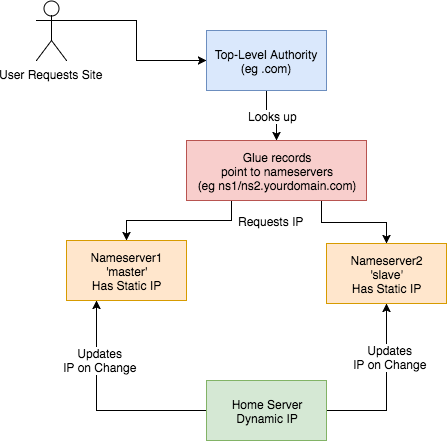
This is how I set up my DNS. I:
How? Walking through step-by-step how I did it: 1) Set up two Virtual Private Servers (VPSes) You will need two stable machines with static IP addresses. If you're not lucky enough to have these in your possession, then you can set one up on the cloud. I used this site , but there are plenty out there. NB I asked them, and their IPs are static per VPS. I use the cheapest cloud VPS (1$/month) and set up debian on there. NOTE: Replace any mention of
- got a domain from an authority (a
.tkdomain in my case)- set up glue records to defer DNS queries to my nameservers
- set up nameservers with static IPs
- set up a dynamic DNS updater from home
DNSIP1andDNSIP2below with the first and second static IP addresses you are given.Log on and set up root passwordSSH to the servers and set up a strong root password. 2) Set up domains You will need two domains: one for your dns servers, and one for the application running on your host. I use dot.tk to get free throwaway domains. In this case, I might setup a myuniquedns.tk DNS domain and a myuniquesite.tk site domain. Whatever you choose, replace your DNS domain when you seeYOURDNSDOMAINbelow. Similarly, replace your app domain when you seeYOURSITEDOMAINbelow. 3) Set up a 'glue' record If you use dot.tk as above, then to allow you to manage theYOURDNSDOMAINdomain you will need to set up a 'glue' record. What this does is tell the current domain authority (dot.tk) to defer to your nameservers (the two servers you've set up) for this specific domain. Otherwise it keeps referring back to the.tkdomain for the IP. See here for a fuller explanation. Another good explanation is here . To do this you need to check with the authority responsible how this is done, or become the authority yourself. dot.tk has a web interface for setting up a glue record, so I used that. There, you need to go to 'Manage Domains' => 'Manage Domain' => 'Management Tools' => 'Register Glue Records' and fill out the form. Your two hosts will be calledns1.YOURDNSDOMAINandns2.YOURDNSDOMAIN, and the glue records will point to either IP address. Note, you may need to wait a few hours (or longer) for this to take effect. If really unsure, give it a day.
If you like this post, you might be interested in my book Learn Bash the Hard Way , available here for just $5.![hero]()
4) Installbindon the DNS Servers On a Debian machine (for example), and as root, type:apt install bind9bindis the domain name server software you will be running. 5) Configurebindon the DNS Servers Now, this is the hairy bit. There are two parts this with two files involved:named.conf.local, and thedb.YOURDNSDOMAINfile. They are both in the/etc/bindfolder. Navigate there and edit these files.Part 1 �This file lists the 'zone's (domains) served by your DNS servers. It also defines whether thisnamed.conf.localbindinstance is the 'master' or the 'slave'. I'll assumens1.YOURDNSDOMAINis the 'master' andns2.YOURDNSDOMAINis the 'slave.Part 1a � the master
On the master/ns1.YOURNDSDOMAIN, thenamed.conf.localshould be changed to look like this:zone "YOURDNSDOMAIN" { type master; file "/etc/bind/db.YOURDNSDOMAIN"; allow-transfer { DNSIP2; }; }; zone "YOURSITEDOMAIN" { type master; file "/etc/bind/YOURDNSDOMAIN"; allow-transfer { DNSIP2; }; }; zone "14.127.75.in-addr.arpa" { type master; notify no; file "/etc/bind/db.75"; allow-transfer { DNSIP2; }; }; logging { channel query.log { file "/var/log/query.log"; // Set the severity to dynamic to see all the debug messages. severity debug 3; }; category queries { query.log; }; };The logging at the bottom is optional (I think). I added it a while ago, and I leave it in here for interest. I don't know what the 14.127 zone stanza is about.Part 1b � the slave
Jan 26, 2019 | zwischenzugs.com
On the slave/
ns2.YOURNDSDOMAIN, thenamed.conf.localshould be changed to look like this:zone "YOURDNSDOMAIN" { type slave; file "/var/cache/bind/db.YOURDNSDOMAIN"; masters { DNSIP1; }; }; zone "YOURSITEDOMAIN" { type slave; file "/var/cache/bind/db.YOURSITEDOMAIN"; masters { DNSIP1; }; }; zone "14.127.75.in-addr.arpa" { type slave; file "/var/cache/bind/db.75"; masters { DNSIP1; }; };Part 2 �db.YOURDNSDOMAINNow we get to the meat � your DNS database is stored in this file.
On the master/
ns1.YOURDNSDOMAINthedb.YOURDNSDOMAINfile looks like this :$TTL 4800 @ IN SOA ns1.YOURDNSDOMAIN. YOUREMAIL.YOUREMAILDOMAIN. ( 2018011615 ; Serial 604800 ; Refresh 86400 ; Retry 2419200 ; Expire 604800 ) ; Negative Cache TTL ; @ IN NS ns1.YOURDNSDOMAIN. @ IN NS ns2.YOURDNSDOMAIN. ns1 IN A DNSIP1 ns2 IN A DNSIP2 YOURSITEDOMAIN. IN A YOURDYNAMICIPOn the slave/
ns2.YOURDNSDOMAINit's very similar, but has ns1 in theSOAline, and theIN NSlines reversed. I can't remember if this reversal is needed or not :$TTL 4800 @ IN SOA ns1.YOURDNSDOMAIN. YOUREMAIL.YOUREMAILDOMAIN. ( 2018011615 ; Serial 604800 ; Refresh 86400 ; Retry 2419200 ; Expire 604800 ) ; Negative Cache TTL ; @ IN NS ns1.YOURDNSDOMAIN. @ IN NS ns2.YOURDNSDOMAIN. ns1 IN A DNSIP1 ns2IN A DNSIP2 YOURSITEDOMAIN. IN A YOURDYNAMICIPA few notes on the above:
- The dots at the end of lines are not typos � this is how domains are written in bind files. So
google.comis writtengoogle.com.- The
YOUREMAIL.YOUREMAILDOMAIN.part must be replaced by your own email. For example, my email address: [email protected] becomesianmiell.gmail.com.. Note also that the dot between first and last name is dropped. email ignores those anyway!YOURDYNAMICIPis the IP address your domain should be pointed to (ie the IP address returned by the DNS server). It doesn't matter what it is at this point, because .the next step is to dynamically update the DNS server with your dynamic IP address whenever it changes.
6) Copy ssh keysBefore setting up your dynamic DNS you need to set up your ssh keys so that your home server can access the DNS servers.
NOTE: This is not security advice. Use at your own risk.
First, check whether you already have an ssh key generated:
ls ~/.ssh/id_rsaIf that returns a file, you're all set up. Otherwise, type:
ssh-keygenand accept the defaults.
Then, once you have a key set up, copy your ssh ID to the nameservers:
ssh-copy-id root@DNSIP1
ssh-copy-id root@DNSIP2
Inputting your root password on each command.
7) Create an IP updater scriptNow ssh to both servers and place this script in
/root/update_ip.sh:#!/bin/bash set -o nounset sed -i "s/^(.*) IN A (.*)$/1 IN A $1/" /etc/bind/db.YOURDNSDOMAIN sed -i "s/.*Serial$/ $(date +%Y%m%d%H) ; Serial/" /etc/bind/db.YOURDNSDOMAIN /etc/init.d/bind9 restartMake it executable by running:
chmod +x /root/update_ip.shGoing through it line by line:
set -o nounsetThis line throws an error if the IP is not passed in as the argument to the script.
sed -i "s/^(.*) IN A (.*)$/1 IN A $1/" /etc/bind/db.YOURDNSDOMAINReplaces the IP address with the contents of the first argument to the script.
sed -i "s/.*Serial$/ $(date +%Y%m%d%H) ; Serial/" /etc/bind/db.YOURDNSDOMAINUps the 'serial number'
/etc/init.d/bind9 restartRestart the bind service on the host.
8) Cron Your Dynamic DNSAt this point you've got access to update the IP when your dynamic IP changes, and the script to do the update.
Here's the raw cron entry:
* * * * * curl ifconfig.co 2>/dev/null > /tmp/ip.tmp && (diff /tmp/ip.tmp /tmp/ip || (mv /tmp/ip.tmp /tmp/ip && ssh root@DNSIP1 "/root/update_ip.sh $(cat /tmp/ip)")); curl ifconfig.co 2>/dev/null > /tmp/ip.tmp2 && (diff /tmp/ip.tmp2 /tmp/ip2 || (mv /tmp/ip.tmp2 /tmp/ip2 && ssh [email protected] "/root/update_ip.sh $(cat /tmp/ip2)"))Breaking this command down step by step:
curl ifconfig.co 2>/dev/null > /tmp/ip.tmpThis curls a 'what is my IP address' site, and deposits the output to
/tmp/ip.tmpdiff /tmp/ip.tmp /tmp/ip || (mv /tmp/ip.tmp /tmp/ip && ssh root@DNSIP1 "/root/update_ip.sh $(cat /tmp/ip)"))This diffs the contents of
/tmp/ip.tmpwith/tmp/ip(which is yet to be created, and holds the last-updated ip address). If there is an error (ie there is a new IP address to update on the DNS server), then the subshell is run. This overwrites the ip address, and then ssh'es onto theThe same process is then repeated for
Why!?DNSIP2using separate files (/tmp/ip.tmp2and/tmp/ip2).You may be wondering why I do this in the age of cloud services and outsourcing. There's a few reasons.
It's CheapThe cost of running this stays at the cost of the two nameservers (24$/year) no matter how many domains I manage and whatever I want to do with them.
LearningI've learned a lot by doing this, probably far more than any course would have taught me.
More ControlI can do what I like with these domains: set up any number of subdomains, try my hand at secure mail techniques, experiment with obscure DNS records and so on.
I could extend this into a service. If you're interested, my rates are very low :)
If you like this post, you might be interested in my book Learn Bash the Hard Way , available here for just $5.
|
|
|
Jan 08, 2019 | www.reddit.com
submitted 11 days ago by
Bind 9 on my CentOS 7.6 machine threw this error:cryan7755 1 point 2 points 3 points 11 days ago (1 child)error (network unreachable) resolving './DNSKEY/IN': 2001:7fe::53#53 error (network unreachable) resolving './NS/IN': 2001:7fe::53#53 error (network unreachable) resolving './DNSKEY/IN': 2001:500:a8::e#53 error (network unreachable) resolving './NS/IN': 2001:500:a8::e#53 error (FORMERR) resolving './NS/IN': 198.97.190.53#53 error (network unreachable) resolving './DNSKEY/IN': 2001:dc3::35#53 error (network unreachable) resolving './NS/IN': 2001:dc3::35#53 error (network unreachable) resolving './DNSKEY/IN': 2001:500:2d::d#53 error (network unreachable) resolving './NS/IN': 2001:500:2d::d#53 managed-keys-zone: Unable to fetch DNSKEY set '.': failure
What does it mean? Can it be fixed?
And is it at all related with DNSSEC cause I cannot seem to get it working whatsoever.
Looks like failure to reach ipv6 addressed NS servers. If you don't utilize ipv6 on your network then this should be expected.knobbysideup 1 point 2 points 3 points 11 days ago (0 children)Can be dealt with by adding#/etc/sysconfig/named OPTIONS="-4"
|
|
|
Feb 23, 2015 | Linux Journal
... ... ...
There are a number of different ways to implement DNS caching. In the past, I've used systems like nscd that intercept DNS queries before they would go to name servers in /etc/resolv.conf and see if they already are present in the cache. Although it works, I always found nscd more difficult to troubleshoot than DNS when something went wrong. What I really wanted was just a local DNS server that honored TTL but would forward all requests to my real name servers. That way, I would get the speed and load benefits of a local cache, while also being able to troubleshoot any errors with standard DNS tools.
The solution I found was dnsmasq. Normally I am not a big advocate for dnsmasq, because it's often touted as an easy-to-configure full DNS and DHCP server solution, and I prefer going with standalone services for that. Dnsmasq often will be configured to read /etc/resolv.conf for a list of upstream name servers to forward to and use /etc/hosts for zone configuration. I wanted something completely different. I had full-featured DNS servers already in place, and if I liked relying on /etc/hosts instead of DNS for hostname resolution, I'd hop in my DeLorean and go back to the early 1980s. Instead, the bulk of my dnsmasq configuration will be focused on disabling a lot of the default features.
The first step is to install dnsmasq. This software is widely available for most distributions, so just use your standard package manager to install the dnsmasq package. In my case, I'm installing this on Debian, so there are a few Debianisms to deal with that you might not have to consider if you use a different distribution. First is the fact that there are some rather important settings placed in /etc/default/dnsmasq. The file is fully commented, so I won't paste it here. Instead, I list two variables I made sure to set:
ENABLED=1
IGNORE_RESOLVCONF=yes
The first variable makes sure the service starts, and the second will tell dnsmasq to ignore any input from the resolvconf service (if it's installed) when determining what name servers to use. I will be specifying those manually anyway.
The next step is to configure dnsmasq itself. The default configuration file can be found at /etc/dnsmasq.conf, and you can edit it directly if you want, but in my case, Debian automatically sets up an /etc/dnsmasq.d directory and will load the configuration from any file you find in there. As a heavy user of configuration management systems, I prefer the servicename.d configuration model, as it makes it easy to push different configurations for different uses. If your distribution doesn't set up this directory for you, you can just edit /etc/dnsmasq.conf directly or look into adding an option like this to dnsmasq.conf:
conf-dir=/etc/dnsmasq.dIn my case, I created a new file called /etc/dnsmasq.d/dnscache.conf with the following settings:
no-hosts
no-resolv
listen-address=127.0.0.1
bind-interfaces
server=/dev.example.com/10.0.0.5
server=/10.in-addr.arpa/10.0.0.5
server=/dev.example.com/10.0.0.6
server=/10.in-addr.arpa/10.0.0.6
server=/dev.example.com/10.0.0.7
server=/10.in-addr.arpa/10.0.0.7
Let's go over each setting. The first, no-hosts, tells dnsmasq to ignore /etc/hosts and not use it as a source of DNS records. You want dnsmasq to use your upstream name servers only. The no-resolv setting tells dnsmasq not to use /etc/resolv.conf for the list of name servers to use. This is important, as later on, you will add dnsmasq's own IP to the top of /etc/resolv.conf, and you don't want it to end up in some loop. The next two settings, listen-address and bind-interfaces ensure that dnsmasq binds to and listens on only the localhost interface (127.0.0.1). You don't want to risk outsiders using your service as an open DNS relay.
The server configuration lines are where you add the upstream name servers you want dnsmasq to use. In my case, I added three different upstream name servers in my preferred order. The syntax for this line is
server=/domain_to_use/nameserver_ip. So in the above example, it would use those name servers for dev.example.com resolution. In my case, I also wanted dnsmasq to use those name servers for IP-to-name resolution (PTR records), so since all the internal IPs are in the 10.x.x.x network, I added 10.in-addr.arpa as the domain.Once this configuration file is in place, restart dnsmasq so the settings take effect. Then you can use
digpointed to localhost to test whether dnsmasq works:$ dig ns1.dev.example.com @localhost ; <<>> DiG 9.8.4-rpz2+rl005.12-P1 <<>> ns1.dev.example.com @localhost ;; global options: +cmd ;; Got answer: ;; ->>HEADER<<- opcode: QUERY, status: NOERROR, id: 4208 ;; flags: qr rd ra; QUERY: 1, ANSWER: 1, AUTHORITY: 0, ADDITIONAL: 0 ;; QUESTION SECTION: ;ns1.dev.example.com. IN A ;; ANSWER SECTION: ns1.dev.example.com. 265 IN A 10.0.0.5 ;; Query time: 0 msec ;; SERVER: 127.0.0.1#53(127.0.0.1) ;; WHEN: Thu Sep 18 00:59:18 2014 ;; MSG SIZE rcvd: 56
Here, I tested ns1.dev.example.com and saw that it correctly resolved to 10.0.0.5. If you inspect the
digoutput, you can see near the bottom of the output thatSERVER: 127.0.0.1#53(127.0.0.1)confirms that I was indeed talking to 127.0.0.1 to get my answer. If you run this command again shortly afterward, you should notice that the TTL setting in the output (in the above example it was set to 265) will decrement. Dnsmasq is caching the response, and once the TTL gets to 0, dnsmasq will query a remote name server again.After you have validated that dnsmasq functions, the final step is to edit /etc/resolv.conf and make sure that you have nameserver 127.0.0.1 listed above all other nameserver lines. Note that you can leave all of the existing name servers in place. In fact, that provides a means of safety in case dnsmasq ever were to crash. If you use DHCP to get an IP or otherwise have these values set from a different file (such as is the case when resolvconf is installed), you'll need to track down what files to modify instead; otherwise, the next time you get a DHCP lease, it will overwrite this with your new settings.
I deployed this simple change to around 100 servers in a particular environment, and it was amazing to see the dramatic drop in DNS traffic, load and log entries on my internal name servers. What's more, with this in place, the environment is even more tolerant in the case there ever were a real problem with downstream DNS servers-existing cached entries still would resolve for the host until TTL expired. So if you find your internal name
|
|
|
Accidentally Changed Hostname and Triggered False Alarm
Accidentally changed the current hostname (I wanted to see current hostname settings) for one of our cluster node. Within minutes I received an alert message on both mobile and email.
hostname foo.example.com
Wrong CNAME DNS Entry
Created a wrong DNS CNAME entry in example.com zone file. The end result - a few visitors went to /dev/null:
echo 'foo 86400 IN CNAME lb0.example.com' >> example.com && rndc reload
|
|
|
- Introduction
- Beware of snake oil salesmen promising to recover your files
- AV companies were again caught without pants
- Paying ransom does not guarantee that you will get your files back, only cold backup does
- Names assigned to Trojan by various AV vendors
- Infection vectors
- Targeted files
- Encryption process
- Ability to hide command and control center
- Prevention
- Restoration of files from backup
This is a game changing Trojan, which belong to the class of malware known as Ransomware . It seriously changes views on malware, antivirus programs and on backup routines. One of few Trojan/viruses which managed to get into front pages of major newspapers like Guardian.
Unlike most Trojans this one does not need Admin access to inflict the most damage. It also targets backups of your data on USB and mapped network drives. If you offload your backups to cloud storage without versioning and this backup has an extension present in the list of extensions used by this Trojan, it will destroy (aka encrypt) your "cloud" backups too.
It really encrypts the data in a way that excludes possibility of decryption without paying ransom. So it is very effective in extorting money for decryption key. Which you may or may not get as servers that can transmit it from the Command and Control center might be already blocked; still chances are reasonably high -- server names to which Trojan connect to get public key changes (daily ?), so far at least one server the Trojan "pings" is usually operational. So even on Oct 28 decryption was possible). At the same time the three days timer is real and if it is expire possibility of decrypting files is gone. Essentially you have only two options:
- To pay the ransom hoping that cyber crooks will start the decryption
- Restore your files from a backup (if you are lucky to have a recent backup on disconnected or non-mapped drive or with the extension not targeted by the Trojan).
Beware snake oil salesmen, who try to sell you the "disinfection" solution. First of all disinfecting from Trojan is trivial, as it is launched by standard CurrentVersion\Run registry entry. The problem is that such a solution does not and can't include restoration of your files.
It was discovered in early September 2013 (around September 3 when domains to reach C&C center were registered, with the first description on September 10, see Trojan:Win32/Crilock.A.). Major AV programs did not detect it until September 17, which resulted in significant damage inflicted by Trojan.
Here is the screen displayed when the Trojan finished encrypting the files (it operates silently before that, load on computer is considerable -- encryption is a heavy computational task):
|
|
|
Business Name:Domain Registry of America
Domain Registry of CanadaDROA
Business Address: 2316 Delaware Ave
Ste 266
Buffalo, NY 14216
See the location on a Mapquest Map
See the location on a Google MapOriginal Business Start Date: 9/9/2002 Type of Entity: Corporation Principal:
Alvin Chen, Relations ManagerPhone Number:
(866) 434-0212(866) 434-0212
(905) 479-2533Fax Number:
(866) 434-0211BBB Accreditation: This business is not a BBB Accredited Business
Type of Business: INTERNET SERVICES
Website Address: http://www.droa.com
http://www.domainrenewalgroup.com
|
|
|
Domain Registry of America Scam
DROA serves as a reseller of domain name registration services for eNom, Inc. ("eNom"), an ICANN-accredited registrar of second level domain names. DROA's domain name registration services enable its customers to establish their identities on the web.
In the course of offering domain name services, DROA has engaged in a direct mail marketing campaign aimed at soliciting consumers in the United States to transfer their domain name registrations from their current registrar to eNom through DROA.
In many instances, consumers do not realize that by returning the invoices along with payment to "renew" their domain name registrations they are, in fact, transferring their domain name registrations from their then-current registrars to eNom. DROA's renewal notices/invoices do not clearly and conspicuously inform consumers of this material fact. 16. Defendant's renewal notices/invoices also fail to inform consumers that DROA charges a processing fee of $4.50 for any transfers of domain name registrations that are not completed, even if through no fault of the consumers. 17. In many instances, DROA promises credits to consumers who request them, but fails to transmit the credits to the consumers' credit card accounts in a timely manner.
Despite the FTC ruling again DRoA (located online at: http://www.ftc.gov/os/2003/12/031219stipdomainreg.pdf) IT IS HEREBY ORDERED that, in connection with the advertising, marketing, promotion, offering for sale, selling, distribution, or provision of any domain name services, Defendant, its successors, assigns, officers, agents, servants, and employees, and those persons in active concert or participation with it who receive actual notice of this Order by personal service or otherwise are hereby permanently restrained and enjoined from making or from assisting in the making of, expressly or by implication, orally or in writing, any false or misleading statement or representation of material fact, including but not limited to any representation that the transfer of a domain name registration is a renewal. II. IT IS FURTHER ORDERED that, in any written or oral communication where Defendant makes any representation that a domain name service is expiring or requires renewal, Defendant, its successors, assigns, officers, agents, servants, and employees, and those persons in active concert or participation with it who receive actual notice of this Order by personal service or otherwise are hereby permanently restrained and enjoined from failing to disclose, in a clear and conspicuous manner, in advance of receipt of any payment for services: A. Any cancellation or processing fees imposed prior to the effective date of any transfer or renewal; and B. Any limitations or restrictions on cancelling a request for domain name services.
June 27, 2010 | Website Design, Content Management System And SEO Blog
A few days ago we received a statement in the mail from Domain Registry of America. The invoice gives us the impression that a couple of our domain names are up for renewal and are about to expire. The letter actually states that, "Your domain name registrations will expire November 19, 2010!" Even though the dates they have on file are correct, we're not falling for this type of direct mail scam and you shouldn't either! This type of marketing scam is aimed at consumers who do not realize that by returning the invoices along with a payment, their domain names are in fact transferring from their current domain registrar to DROA.If you received one of these letters, please ignore it! Do NOT complete the payment slip at the bottom or make any payments to this company. To add insult to injury, the letter has their address listed as: 2316 Delaware Avenue #266 Buffalo, New York. With some quick help from Google maps, the address comes up the same as the UPS Store, so guaranteed it's just a mail box!
July 7, 2006 | Lucid Design
We have discovered that a company called "Domain Registry of America" or "DROA" has been emailing domain name owners with deceptive messages about domain transfers. The goal of the emails is to trick people into transferring their domain names away from their existing domain name provider. The emails falsely claim to be a response to a transfer request made by the current owner and should NOT be acted upon. This has been going on for over a year and several of our clients have been duped by this scam. Once DROA takes over ownership it can be somewhat difficult to regain control of the domain. This is in addition to the phenomenally high prices they charge (they make it sound like you get a good deal with them).
This scam seems to be targeting .com domains only and I haven't seen any cases yet for other domains.
If people wish to express their concern, they can contact The Federal Trade Commission (in the US) at www.ftc.gov or the Ministry of Consumer Affairs' scam watch (NZ) at www.consumeraffairs.govt.nz/scamwatch/
|
|
|
adsuck is a small DNS server that spoofs blacklisted addresses and forwards all other queries. The idea is to be able to prevent connections to undesirable sites such as ad servers, crawlers, etc. It can be used locally, for the road warrior, or on the network perimeter in order to protect local machines from malicious sites.
|
|
|
Creating zone data and configuring a name server is just the beginning. Managing a name server over time requires an understanding of how to control it and which commands it supports. It takes familiarity with other tools from the BIND distribution, includingnsupdate, used to send dynamic updates to a name server.This chapter includes lots of recipes that involve
ndcandrndc, programs that send control messages to BIND 8 and 9 name servers, respectively. These programs let an administrator reload modified zones, refresh slave zones, flush the cache, and much more. The list of commands the name server supports seems to grow with each successive release of BIND, so I've provided a peek at a few new commands in BIND 9.3.0 for the curious.In the brave new world of dynamic zones, an administrator may have to make most of the changes to zone data using dynamic update, rather than by manually editing zone data files.
Figuring Out How Much Memory a Name Server Will Need
Problem
You need to figure out how much memory a name server will require.
Solution
While this answer may seem like a cop-out, the only sure-fire way to determine how much memory a name server will need is to configure it, start it, and then monitor it using a tool like
top. After a week or so, the size of thenamedprocess should stabilize, and you'll know how much memory it needs.Discussion
The reason it's so difficult to calculate how much memory a name server requires is that there are so many variables involved. The size of the
namedexecutable varies on different operating systems and hardware architectures. Zones have a unique mix of records. Zone data files may use lots of shortcuts (e.g., leaving out the origin, or even using a$GENERATEcontrol statement) or none at all. The resolvers that use the name server may send a huge volume of queries, causing the name server's cache to swell, or may send just sporadic queries.Testing a Name Server's Configuration
Problem
You want to test a name server's configuration before putting it into production.
Solution
Use the
named-checkconfandnamed-checkzonprograms to check thenamed.conffile and zone data files, respectively.named-checkconfreads /etc/named.conf by default, so if you haven't moved the configuration file into /etc yet, specify the pathname to the configuration file you want to test as the argument:$ named-checkconf ~/test/named.conf
named-checkconfuses the routines in BIND (BIND 9.1.0 and later, to be exact) to make sure thenamed.conffile is syntactically correct. If there are any syntactic or semantic errors innamed.conf,named-checkconfwill print an error. For example:$ named-checkconf /tmp/named.conf /tmp/named.conf:3: missing ';' before '}'
named-checkzonuses BIND's own routines to check the syntax of a zone data file. To run it, specify the domain name of the zone and the name of the zone data file as arguments:$ named-checkzone foo.example db.foo.exampleIf the zone contains any errors,
named-checkzonprints an error. If the zone would load without errors,named-checkzonprints a message like this:zone foo.example/IN: loaded serial 2002022400 OKOnce you've checked the configuration file and zone data, configure the name server to listen on a nonstandard port with the
listen-on optionssubstatement, and not to use a control channel:controls { }; options { directory "/var/named"; listen-on port 1053 { any; }; };That way, the test name server won't interfere with any production name server you might already have running. Check the name server's syslog output (which should be clean, if you ran
named-checkconfandnamed-checkzon) and query the name server withdigor another query tool, specifying the alternate port:$ dig -p 1053 soa foo.example.Once you're satisfied with the name server's responses to a few queries, you can remove the
listen-onsubstatement, add a realcontrolsstatement and put it into production.Discussion
Even though
named-checkconfandnamed-checkzonfirst shipped with BIND 9.1.0, BIND 8's configuration syntax is similar enough to BIND 9's that you can easily usenamed-checkconfwith a BIND 8named.conffile. The zone data file format is exactly the same between versions, so you can usenamed-checkzon, too.
|
|
|
Posted by kdawson on Tuesday July 15, @08:07AM
from the be-afraid-be-very-afraid-then-get-patching dept.syncro writes "The recent massive, multi-vendor DNS patch advisory related to DNS cache poisoning vulnerability, discovered by Dan Kaminsky, has made headline news. However, the secretive preparation prior to the July 8th announcement and hype around a promised full disclosure of the flaw by Dan on August 7 at the Black Hat conference has generated a fair amount of backlash and skepticism among hackers and the security research community. In a post on CircleID, Paul Vixie offers his usual straightforward response to these allegations. The conclusion: 'Please do the following. First, take the advisory seriously - we're not just a bunch of n00b alarmists, if we tell you your DNS house is on fire, and we hand you a fire hose, take it. Second, take Secure DNS seriously, even though there are intractable problems in its business and governance model - deploy it locally and push on your vendors for the tools and services you need. Third, stop complaining, we've all got a lot of work to do by August 7 and it's a little silly to spend any time arguing when we need to be patching.'"
|
|
|
ITworld
A server problem at the U.S. National Security Agency has knocked the secretive intelligence agency off the Internet. The nsa.gov Web site was unresponsive at 7 a.m. Pacific time Thursday and continued to be unavailable
throughout the morning for Internet users.The Web site was unreachable because of a problem with the NSA's DNS (Domain Name System) servers, said Danny McPherson, chief research officer with Arbor Networks. DNS servers are used to translate things like the Web addresses typed into machine-readable Internet Protocol addresses that computers use to find each other on the Internet.
The agency's two authoritative DNS servers were unreachable Thursday morning, McPherson said.
Because this DNS information is sometimes cached by Internet service providers, the NSA would still be temporarily reachable by some users, but unless the problem is fixed, NSA servers will be knocked completely off-line. That means that e-mail sent to the agency will not be delivered, and in some cases, e-mail being sent by the NSA would not get through.
"We are aware of the situation and our techs are working on it," a NSA spokeswoman said at 9:45 a.m. PT. She declined to identify herself.
A similar DNS problem knocked Youtube.com off-line in early May.
There are three possible reasons the DNS server was knocked off-line, McPherson said. "It's either an internal routing problem of some sort on their side or they've messed up some firewall or ACL [access control list] policy," he said. "Or they've taken their servers off-line because something happened."
That "something else" could be a technical glitch or a hacking incident, McPherson said.
In fact, the NSA has made some basic security mistakes with its DNS servers, according to McPherson.
- The NSA should have hosted its two authoritative DNS servers on different machines, so that if a technical glitch knocked one of the servers off-line, the other would still be reachable.
- Compounding problems is the fact that the DNS servers are hosted on a machine that is also being used as a Web server for the NSA's National Computer Security Center.
"Say there was some Apache or Windows vulnerability and hackers controlled that server, they would now own the DNS server for nsa.gov," he said. "That really surprised me. I wouldn't think that these guys would do something like that."
The NSA is responsible for analysis of foreign communications, but it is also charged with helping protect the U.S. government against cyber attacks, so the outage is an embarrassment for the agency.
"I am certain that someone's going to send an e-mail at some point that's not going to get through," McPherson said. "If it's related to national security and it's not getting through, then as a U.S. citizen, that concerns me."
(Anders Lotsson with Computer Sweden contributed to this report.)
|
|
|
02/06/08 |Network World
The Domain Name System turned 25 last week.
Paul Mockapetris is credited with creating DNS 25 years ago and successfully tested the technology in June 1983, according to several sources.
The anniversary of the technology that underpins the Internet -- and prevents Web surfers from having to type a string of numbers when looking for their favorite sites -- reminds us how network managers can't afford to overlook even the smallest of details. Now in all honesty, DNS has been on my mind lately because of a recent film that used DNS and network technology in its plot, but savvy network managers have DNS on the mind daily.
DNS is often referred to as the phone book for the Internet, it matches the IP address with a name and makes sure people and devices requesting an address actually arrive at the right place. And if the servers hosting DNS are configured wrong, networks can be susceptible to downtime and attacks, such as DNS poisoning.
And in terms of managing networks, DNS has become a critical part of many IT organization's IP address management strategies. And with voice-over-IP and wireless technologies ramping up the number of IP addresses that need to be managed, IT staff are learning they need to also ramp up their IP address management efforts. Companies such as Whirlpool are on top of IP address management projects, but industry watchers say not all IT shops have that luxury. (Learn more about IP ADDRESS MANAGEMENT products from our IP ADDRESS MANAGEMENT Buyer's Guide)
"IP address management sometimes gets pushed to the back burner because a lot of times the business doesn't see the immediate benefit -- until something goes wrong," says Larry Burton, senior analyst with Enterprise Management Associates.
And the way people are doing IP address management today won't hold up under the proliferation of new devices, an update to the Internet Protocol (from IPv4 to IPv6) and the compliance requirements that demand detailed data on IP addresses.
"IP address management for a lot of IT shops today is manual and archaic. It is now how most would say to manage a critical network service," says Robert Whiteley, a senior analyst at Forrester Research. "Network teams need to fix how they approach IP address management to be considered up to date."
And those looking to overhaul their approach to IP address management might want to consider migrating how they do DNS and DHCP services as well. While the technology functions can be conducted with separate platforms -- albeit integration among them is a must -- some experts say while updating how they manage IP addresses, network managers should also take a look at their DNS and DHCP infrastructure.
"Some people think of IP address management as the straight up managing of IP addresses and others incorporate the DNS/DHCP infrastructure, says Lawrence Orans, research director at Gartner. "If you are updating how you manage IPs it's a good time to also see if how you are doing DNS and DHCP needs an update."
|
|
|
Linux Howtos and Tutorials
In this howto we will install 2 bind dns servers, one as the master and the other as a slave server. For security reasons we will chroot bind9 in its own jail.
Using two servers for a domain is a commonly used setup and in order to host your own domain you are required to have at least 2 domain servers. If one breaks, the other can continue to serve your domain.
Our setup will use Debian Sarge 3.1 (stable) for its base. A simple clean and up2date install will be enough since we will install the required packages with this howto.In this howto I will use the fictional domain "linux.lan". The nameservers will use 192.168.254.1 and 192.168.254.2 as there ip.
Some last words before we begin: I read Joe's howto (also on this site) and some more tuts but none of them worked without some tweaks. Therefor, i made my own howto. And it SHOULD work at once :)
|
|
|
The DNSSEC is a security protocol for providing cryptographic assurance (i.e. using the public key cryptography digital signature technology) to the data retrieved from the DNS distributed database (RFC4033). DNSSEC deployment at the root is said to be subject to politics, but there is seldom detailed discussion about this "DNS root signing" politics. Actually, DNSSEC deployment requires more than signing the DNS root zone data; it also involves secure delegations from the root to the TLDs, and DNSSEC deployment by TLD administrations (I omit other participants involvement as my focus is policy around the DNS root). There is a dose of naivety in the idea of detailing the political aspects of the DNS root, but I volunteer! My perspective is an interested observer.
Recent developments surrounding ICANN:
- The reconsideration request for the .xxx TLD rejection [PDF] again raises issues about the United States government control over the Internet.
- Indeed, I was personally explained by a US civil servant that the ICANN implementation of a signed DNS root zone according to the "transition agreement" (part of the ICANN-Verisign settlement [PDF]) is subject to the final say of the US Department of Commerce (i.e. ICANN and Verisign "are going to do whatever the DoC tells them to do").
- The .ca TLD administration, CIRA (Canadian Internet Registration Authority) recently withdrawn [PDF] ICANN support. If the .ca TLD supports DNSSEC by the time ICANN is ready to establish secure delegations, will ICANN agree to establish a secure delegation to .ca without first resolving the difficulty with CIRA? The more general question is the provision of an optional service, DNSSEC secure delegation from the root, by ICANN to ccTLDs with which there are no for formal agreement.
- In the ICANN routine of yearly operational and budget planning [PDF], ICANN lowered, at least nominally, the expectations for DNS root zone singing by qualifying the activity description with the phrase "Determine timetable, coordination requirements and costs for full deployment".
That is for policy-related signals. Turning to the technology and demand rationale for DNSSEC deployment, the picture is somehow more definite. At the time of this writing, from a technology development perspective, the DNSSEC protocols are almost ready for wide scale deployment, and at least one ccTLD supports it (the Swedish registry, .se). The specific protocol areas where developments are still under way include mainly:
1) solving a privacy issue (not to be confused with data confidentiality which is not part of DNSSEC) referred to as "zone walking" prevention, or "NSEC3" as a technical buzzword for the solution being finalized,
2) the trust anchor key rollover issue, a protocol development item that merges into the "root signing" activity (this is the area in which I am involved),
3) some further testing might be required to strengthen the confidence that DNSSEC is adequate for full-scale deployment.
Beyond the mere observation that the current DNS implementation lacks cryptographic assurance security, the demand for DNSSEC deployment comes from an overall concern with Internet e-commerce insecurity, and from specific needs for a distribution channel for public keys, the latter supporting spam-prevention schemes (a potential killer-application for DNSSEC?) and ubiquitous encryption key distribution (a nightmare for "national security" premises?). The materialization of such DNSSEC benefits requires more software development on the DNS resolver side and end-user applications, but since deployment must start somewhere, why not at the DNS root and TLDs!
Perhaps a characteristic of the DNSSEC technology deserves a special note to observers of the DNS governance: while a secure delegation (DS resource record) parallels the plain DNS delegation (NS resource records) along the name hierarchy, they are otherwise independent relationships. It means that almost nothing from the existing ICANN policy for namespace management can be taken for granted when defining policy for DNSSEC support. Here are a few of the questions that may arise:
- Once the cost structure of DNSSEC deployment is better understood, how does it fit the contractual arrangements and business models established by ICANN, with a possible impact on fee structure?
- As hinted above, will ICANN tie the secure delegation to ccTLDs to a formal agreement with the ccTLD administrations?
- How much of the PKI Certification Authority policy issues will be carried to ICANN in its role of a globally trusted organization for public key cryptography support? (After all, since DNSSEC is analogous to a streamlined PKI, can ICANN make it a policy-deprived PKI?)
- In this process, will some governments attempt to ban DNSSEC-backed encryption key distribution?
I'm getting more and more convinced that DNSSEC deployment momentum can only occur through TLD administrations involvement, with focus on their respective understanding on the DNS institutional and policy issues. If you think of TLDs as independent entities deploying cryptographic assurance to the DNS data they publish, with their own requirements and conditions as they see fit, you just whish there is a higher level of technical coordination, acting merely as an agent of each enrolled TLD. Gone the view that ICANN empowers TLDs to do something, e.g. provide DNSSEC value added name registrations. After all, the ICANN board justified the .xxx rejection by its inability to cope with the diversified societal and legal environments that make up the global Internet.
|
|
|
- I also do a lot of work with DNS and BIND. So I've got a lot of content in these areas to share:
- I've made the course book for my one-day "Deploying DNS and Sendmail" course available for free download. More information can be found here.
- Here's an overview talk I gave at the July 2004 Portland Linux User Group meeting on the current anti-spam landscape.
- I wrote an article for Sys Admin Magazine called "Improving Sendmail Security by Turning it Off". The article generated so much feedback that I wrote a follow-up piece called "Just Can't Get Enough Sendmail".
- I wrote an article, "Name Server Security with BIND and chroot()", for an on-line journal called 8wire, which is sadly now defunct. This article covers how to get BIND8 running chroot()-ed under Solaris.
- I also gave a talk on "DNS and BIND" to my local Linux/Unix user group, EUGLUG. Among other things, this talk covers running BIND9 chroot()-ed under (RedHat) Linux.
- Here's another Sys Admin Magazine article, "A Simple DNS-Based Approach for Blocking Web Advertising". Since writing the original article, I've received feedback from several sources with lots of good ideas. Read more about it in my short update to the original article.
|
|
|
BIND 9 is new in the Solaris Express 8/04 release. In the Solaris 10 3/05 release, the BIND version was upgraded to BIND version 9.2.4.
BIND is an open source implementation of DNS. BIND is developed by the Internet Systems Consortium (ISC). BIND allows DNS clients and applications to query DNS servers for the IPv4 and IPv6 networks. BIND includes two main components: a stub resolver API, resolver(3resolv), and the DNS name server with various DNS tools.
BIND enables DNS clients to connect to IPv6 DNS servers by using IPv6 transport. BIND provides a complete DNS client-server solution for IPv6 networks.
BIND 9.2.4 is a redesign of the DNS name server and tools by the Internet Systems Consortium (ISC). The BIND version 9.2.4 nameserver and tools are available in the Solaris 10 OS.
BIND 8.x-to-BIND 9 migration information is available in the System Administration Guide: Naming and Directory Services (DNS, NIS, and LDAP). Additional information and documentation about BIND 9 is also available on the ISC web site at http://www.isc.org. For information about IPv6 support, see the System Administration Guide: IP Services.
|
|
|
dns -
Tcl Domain Name Service Clientpackage require Tcl 8.2 package require dns ? 1.2.1 ? ::dns::resolve query ? options ? ::dns::configure ? options ? ::dns::name token ::dns::address token ::dns::cname token ::dns::result token ::dns::status token ::dns::error token ::dns::reset token ::dns::wait token ::dns::cleanup tokenThe dns package provides a Tcl only Domain Name Service client. You should refer to (1) and (2) for information about the DNS protocol or read resolver(3) to find out how the C library resolves domain names. The intention of this package is to insulate Tcl scripts from problems with using the system library resolver for slow name servers. It may or may not be of practical use. Internet name resolution is a complex business and DNS is only one part of the resolver. You may find you are supposed to be using hosts files, NIS or WINS to name a few other systems. This package is not a substitute for the C library resolver - it does however implement name resolution over DNS. The package also extends the package uri to support DNS URIs (4) of the form dns:what.host.com or dns://my.nameserver/what.host.com. The dns::resolve command can handle DNS URIs or simple domain names as a query.
Note: The package defaults to using DNS over TCP connections. If you wish to use UDP you will need to have the tcludp package installed and have a version that correctly handles binary data (> 1.0.4). This is available at http://tcludp.sourceforge.net/. If the udp package is present then UDP will be used by default.
- ::dns::resolve query ? options ?
- Resolve a domain name using the DNS protocol. query is the domain name to be lookup up. This should be either a fully qualified domain name or a DNS URI.
- -nameserver hostname or -server hostname
- Specify an alternative name server for this request.
- -protocol tcp|udp
- Specify the network protocol to use for this request. Can be one of tcp or udp.
- -port portnum
- Specify an alternative port.
- -search domainlist
- -timeout milliseconds
- Override the default timeout.
- -type TYPE
- Specify the type of DNS record you are interested in. Valid values are A, NS, MD, MF, CNAME, SOA, MB, MG, MR, NULL, WKS, PTR, HINFO, MINFO, MX, TXT, SPF, SRV, AAAA, AXFR, MAILB, MAILA and *. See RFC1035 for details about the return values. See http://spf.pobox.com/ about SPF. See (3) about AAAA records and RFC2782 for details of SRV records.
- -class CLASS
- Specify the class of domain name. This is usually IN but may be one of IN for internet domain names, CS, CH, HS or * for any class.
- -recurse boolean
- Set to false if you do not want the name server to recursively act upon your request. Normally set to true.
- -command procname
- Set a procedure to be called upon request completion. The procedure will be passed the token as its only argument.
- ::dns::configure ? options ?
- The ::dns::configure command is used to setup the dns package. The server to query, the protocol and domain search path are all set via this command. If no arguments are provided then a list of all the current settings is returned. If only one argument then it must the the name of an option and the value for that option is returned.
- -nameserver hostname
- Set the default name server to be used by all queries. The default is localhost.
- -protocol tcp|udp
- Set the default network protocol to be used. Default is tcp.
- -port portnum
- Set the default port to use on the name server. The default is 53.
- -search domainlist
- Set the domain search list. This is currently not used.
- -timeout milliseconds
- Set the default timeout value for DNS lookups. Default is 30 seconds.
- ::dns::name token
- Returns a list of all domain names returned as an answer to your query.
- ::dns::address token
- Returns a list of the address records that match your query.
- ::dns::cname token
- Returns a list of canonical names (usually just one) matching your query.
- ::dns::result token
- Returns a list of all the decoded answer records provided for your query. This permits you to extract the result for more unusual query types.
- ::dns::status token
- Returns the status flag. For a successfully completed query this will be ok. May be error or timeout or eof. See also ::dns::error
- ::dns::error token
- Returns the error message provided for requests whose status is error. If there is no error message then an empty string is returned.
- ::dns::reset token
- Reset or cancel a DNS query.
- ::dns::wait token
- Wait for a DNS query to complete and return the status upon completion.
- ::dns::cleanup token
- Remove all state variables associated with the request.
% set tok [dns::resolve www.tcl.tk]
::dns::1
% dns::status $tok
ok
% dns::address $tok
199.175.6.239
% dns::name $tok
www.tcl.tk
% dns::cleanup $tok
Using DNS URIs as queries:
% set tok [dns::resolve "dns:tcl.tk;type=MX"]
% set tok [dns::resolve "dns://l.root-servers.net/www.tcl.tk"]
Reverse address lookup:
% set tok [dns::resolve 127.0.0.1] ::dns::1 % dns::name $tok localhost % dns::cleanup $tokPat Thoyts
- Mockapetris, P., "Domain Names - Concepts and Facilities", RFC 1034, November 1987. (http://www.ietf.org/rfc/rfc1034.txt)
- Mockapetris, P., "Domain Names - Implementation and Specification", RFC 1035, November 1087. (http://www.ietf.org/rfc/rfc1035.txt)
- Thompson, S. and Huitema, C., "DNS Extensions to support IP version 6", RFC 1886, December 1995. (http://www.ietf.org/rfc/rfc1886.txt)
- Josefsson, S., "Domain Name System Uniform Resource Identifiers", Internet-Draft, October 2003, (http://www.ietf.org/internet-drafts/draft-josefsson-dns-url-09.txt)
- Gulbrandsen, A., Vixie, P. and Esibov, L., "A DNS RR for specifying the location of services (DNS SRV)", RFC 2782, February 2000, (http://www.ietf.org/rfc/rfc2782.txt)
resolver(5)
DNS, resolver, domain name service, rfc 1034, rfc 1035, rfc 1886
|
|
|
For the first time in Internet history the number of instances of DNS root servers outside the United States has overtaken the number within. The balance was tipped by the recent launch in Frankfurt of an anycast instance of the RIPE NCC operated K-root server.
The K-root server is one of the 13 DNS root servers that resolve lookups for domain names all over the world and form a critical part of the global Internet infrastructure. The K-root server has been operated by the RIPE NCC since 1997 when the first server was installed at the London Internet Exchange (LINX) in London, UK.
Deployment of anycast instances of the K-root server further improves the distribution of this crucial service in various Internet regions and its resilience against Distributed Denial of Service (DDoS) attacks. As K-root is one of the 13 root servers, this also means improvement for the whole Root Server System.
RIPE NCC technicians were among the pioneers of the anycast concept for root servers and have deployed instances of the K-root server, hosted at the LINX, at the AMS-IX in Amsterdam and at the DE-CIX, Frankfurt. They are planning to have up to 10 instances of the K-root server deployed by the end of 2004.
"We operate K-root as a service to the Internet at large on behalf of our 3,500 members, across more than 100 countries, to whom we provide Internet resources and co-ordination services," stated Axel Pawlik, Managing Director of the RIPE NCC. "As a membership association we are directly responsible for fulfilling the needs of our members. Our members are committed to providing reliable DNS service because their businesses depend on it."
Anycast allows exact copies of the server, including the name and IP address, to be deployed in different locations. These copies are deployed in collaboration with local partners but are under sole management and administrative control of the RIPE NCC. Using anycast makes the root server system more difficult to attack and improves the DNS response for local communities by providing shorter paths between clients and servers.
"Our strategy is to deploy servers at multiple locations where there is a lot of Internet connectivity. We do that in close co-operation with ISPs who are also our members," said Andrei Robachevsky, Chief Technology Officer at the RIPE NCC. "However, by taking full operational responsibility for the servers themselves, the RIPE NCC can build a very strong service that is resilient to disasters and attack."
By locating the servers at Internet exchange points, they have the advantage of being as hardened as the infrastructure at these points themselves. "This is very economical because we do not need to spend extra money to harden these sites or to develop their connectivity," noted Robachevsky. "Service quality and security is not always proportional to money spent."
"We do not need fancy, hardened Network Operations Centres," added Daniel Karrenberg, Chief Scientist of the RIPE NCC, who installed the first instance of k.root-servers.net at the London Internet Exchange (LINX) back in 1997. "Our engineering builds on diversity and distribution of functions. The servers will continue to run reliably for a very long time even if our Network Operations Centres should be down. We monitor the quality of the root name service from more than 50 locations worldwide, and we publish the results for everyone to see."
These results are available through the RIPE NCC DNS Monitoring site. The site uses Test Traffic Measurements (TTM) network to provide an up-to-date service overview of certain DNS root and Top-Level Domain (TLD) name servers. The DNS Monitoring service is available at: http://dnsmon.ripe.net
"The strength of the Internet does not come from centralistic or hierarchical designs but from de-centralised and distributed design and engineering," noted Karrenberg. "Operationally, the root servers are equal peers and client software can choose any one of them based on an estimate of which provides the best service to the client's location at the time."
The strength of the root name server system lies in its diversity on all levels, a legacy of the late Jon Postel who oversaw its construction in the 1990s. "It is not a weakness but a strength of the system that servers are operated by a widely diverse group of organisations," said Pawlik. "Measurements show that the current system is performing well," he added. "It will be hard to introduce more central or hierarchical structures without substantially weakening the system as a whole."
|
|
|
A ns.internic.net VeriSign Dulles, Virginia, USA B ns1.isi.edu ISI Marina Del Rey, California, USA C c.psi.net Cogent distributed using anycast D terp.umd.edu University of Maryland College Park, Maryland, USA E ns.nasa.gov NASA Mountain View, California, USA F ns.isc.org ISC distributed using anycast G ns.nic.ddn.mil U.S. DoD NIC Vienna, Virginia, USA H aos.arl.army.mil U.S. Army Research Lab Aberdeen Proving Ground, Maryland, USA I nic.nordu.net Autonomica distributed using anycast J
VeriSign distributed using anycast K
RIPE NCC distributed using anycast L
ICANN Los Angeles, California, USA M
WIDE Project Tokyo, Japan
|
|
|
The October attack was a DDoS "ping" attack. The attackers broke into machines on the Internet (popularly called "zombies") and programmed them to send streams of forged packets at the 13 DNS root servers via intermediary legitimate machines. The goal was to clog the servers, and communication links on the way to the servers, so that useful traffic was gridlocked. The assault is not DNS-specific--the same attack has been used against several popular Web servers in the last few years.
|
|
|
The domain name system--the global directory that maps names to Internet Protocol addresses--was designed to distribute authority, making organizations literally "masters of their own domain." But with this mastery comes the responsibility of contributing to the defense of the DNS.The distributed denial-of-service (DDoS) attacks against the DNS root servers on Oct. 21, 2002, should serve as a wake-up call. The attack was surprisingly successful--most of the root servers were disrupted by a well-known attack strategy that should have been easily defeated. Future attacks against all levels of the DNS--the root at the top; top-level domains like .com, .org and the country codes; and individual high-profile domains--are inevitable.
The October attack was a DDoS "ping" attack. The attackers broke into machines on the Internet (popularly called "zombies") and programmed them to send streams of forged packets at the 13 DNS root servers via intermediary legitimate machines. The goal was to clog the servers, and communication links on the way to the servers, so that useful traffic was gridlocked. The assault is not DNS-specific--the same attack has been used against several popular Web servers in the last few years.
The legitimate use of ping packets is to check whether a server is responding, so a flood of ping packets is clearly either an error or an attack. The typical defense is to program routers to throw away excessive ping packets, which is called rate limiting. While this protects the server, the attack streams can still create traffic jams up to the point where they are discarded.
Excess capacity in the network can help against such attacks, as long as the additional bandwidth can't be used to carry additional attacks. By intent, root servers are deployed at places in the network where multiple Internet service providers intersect. In the October attacks, some networks filtered out the attack traffic while others did not, so a particular root server would seem to be "up" for a network that was filtering and "down" for one that was not.
Unlike most DDoS attacks, which fade away gradually, the October strike on the root servers stopped abruptly after about an hour, probably to make it harder for law enforcement to trace.
Future attacks against all levels of the DNS are inevitable. DNS caching kept most people from noticing this assault. In very rough terms, if the root servers are disrupted, only about 1 percent of the Internet should notice for every two hours the attack continues--so it would take about a week for an attack to have a full effect. In this cat-and-mouse game between the attackers and network operators, defenders count on having time to respond to an assault.
Defending the root
The root servers are critical Internet resources, but occupy the "high ground" in terms of defensibility. The root server database is small and changes infrequently, and entries have a lifetime of about a week. Any organization can download an entire copy of the root database, check for updates once a day, and stay current with occasional reloads. A few organizations do this already.Root server operators are also starting to deploy root servers using "anycast" addresses that allow multiple machines in different network locations to look like a single server.
Unfortunately for those of us that depend on the Internet, the attackers seem likely to strengthen their tactics and distribute new attackware. In short, defending the DNS root is relatively easy since it is possible to minimize the importance of any root server, by creating more copies of the root database--some private, some public.
Top-level domains, or TLDs, will be much harder to defend. The copying strategy that can defend the root server will not work for most TLDs. It is much harder to protect, say, .com or .fr than to defend the root. This is because the data in TLDs is more voluminous and more volatile, and the owner is less inclined to distribute copies for privacy or commercial reasons.
There is no alternative. TLD operators must defend their DNS servers with rate-limiting routers and anycast because consumers of the TLD data cannot insulate themselves from the attacks.
Defending your organization
If your organization has an intranet, you should provide separate views of DNS to your internal users and your external customers. This will isolate the internal DNS from external attacks. Copy the root zone to insulate your organization from future DDoS attacks on the root. Consider also copying DNS zones from business partners on extranets. When DNS updates go over the Internet, they can also be hijacked in transit--use TSIGs (transaction signatures) to sign them or send updates over VPNs (virtual private networks) or other channels.But understand that until tools for digital signatures in DNS are finished and deployed, you are going to be at risk from the DNS counterfeiting attacks that lie not too far in the future (and that have apparently already occurred in China). Unfortunately for those of us who depend on the Internet, the attackers seem likely to strengthen their tactics and distribute new attackware, while the Internet community struggles to mount a coordinated approach to DNS defense.
biography
Paul Mockapetris, the inventor of the domain name system, is chief scientist and chairman of the board at Nominum.
|
|
|
The CMU NetReg/NetMon package is a lightweight and flexible Web-based system for managing networks. It consolidates information about DNS zones, subnets, machine registrations, and DHCP configuration, and provides tools for easy management. The system exports ISC BIND configuration and zone files and ISC DHCP configurations. The NetMon component provides a central system for device tracking (including DHCP lease information and ARP/CAM table tracking) and reporting.
|
|
|
|
|
|
scandns.pl is a command line script which will take a (sub)network entered by the user and check all the reverse DNS records for that network. scandns then checks the forward records of the hosts returned by the initial scan and reports any inconsistencies. This is quite useful for cleaning up old inverse records, as well as general network maintenance and security.
|
|
|
IS YOUR COMPANY'S DNS AT RISK? -- MEN & MICE ANNOUNCES SERVICE FOR CHECKING DNS VULNERABILITIES --
REYKJAVIK, Iceland, February 5, 2001/-- A new survey performed by DNS specialist Men & Mice shows that 40% of DNS servers for .com domains have serious security vulnerabilities. This news comes just days after Microsoft's web outage. To respond to these new threats, Men & Mice today announced its DNS Audit Service, that quickly checks a company's DNS system for numerous vulnerabilities. See further information at http://www.menandmice.com. The DNS Audit Service offers a comprehensive DNS security audit, covering the latest DNS security vulnerabilities including:
Tests for versions of BIND with known vulnerabilities Testing for the vulnerability that contributed to single point of failure Covers over 70 other DNS configuration tests Personalized advice depending on your knowledge (laymen vs. experts)
We are already receiving a number of queries from concerned corporations said Sigurdur Ragnarsson, Men & Mice's Director of DNS Audit Services. Cricket Liu, DNS specialist and author of the O'Reilly & Associates' Nutshell Handbook "DNS and BIND" said, "The Men & Mice Audit Service is the most comprehensive I know of. They are people that live and breathe this stuff�. This is an important service, because it allows companies to quickly get an independent snapshot of vulnerabilities in their DNS infrastructure. Registering for the service is quick and simple To use the service, log on to the Men & Mice Web site at http://www.menandmice.com, then enter your domain name and email address. The Men & Mice experts use DNS diagnostic tools to examine the set-up and configuration of the domain name and potential security issues. Sigurdur Ragnarsson said, "What you receive is a personalized, printable report of DNS misconfigurations, delivered to your email address. Our experts summarize the main findings and suggest corrective action. We adapt our recommendation to the customer's DNS knowledge." The DNS Audit, basic service is priced at $1490(USD). Please visit http://www.menandmice.com
Google matched content |
http://www.securecomputing.com/index.cfm?skey=430 -- list of DNS tutorials
BIND 9 Administrator Reference Manual
Nice collection can be found at Nominum-Resources-Standards Information-DNS RFCs
See also DNS related RFCs, DNS RFCs.
Search for RFCs is available at Internet Requests for Comments (RFC)
Major RFCs
Worth reading for zone administrators:
Reference documents about protocols and administrative rules:
Full list (from DNS related RFCs):
[5] K. Harrenstien, and V. White, "NICNAME/WHOIS",
RFC 812, Network
Information Center, SRI International, March 1982.
Z. Su, "A Distributed System for Internet Name Service",
RFC 830, Network Information Center,
SRI International,
October 1982.
comp.protocols.dns.bind Last 50 Messages
comp.protocols.dns.ops Last 50 Messages
USM Engineering Department -- System Guides DNS The Domain Name Service By Glenn Stevens. Very good slides
Network Ice Corporation. "DNS Zone Transfer."
2000.
URL: http://www.netice.com/advice/intrusions/2000401
(22 July, 2000).
Mr. DNS. "Restricting zone transfers in
BIND 4.9.x with the xfernets directive."
URL: http://acmebw.com/askmrdns/00031.htm
(22 July, 2000).
Network Ice Corporation. "Split-DNS"
URL:
http://www.netice.com/advice/Services/Directory/DNS/split-DNS/default.htm (22 July, 2000).
| DNS Redirect by IP range | |
|
| Reply To This Message |
| RE: DNS Redirect by IP range | |
|
| Reply To This Message |
| RE: DNS Redirect by IP range | |
|
| Reply To This Message |
| RE: DNS Redirect by IP range | |
|
| Reply To This Message |
| RE: DNS Redirect by IP range | |
|
DNS, DHCP, IP Address Management Solutions from Men & Mice
Yahoo! - Nominum, Inc. Company Profile
Troubleshooting DNS servers Domain Name System(DNS)
Slashdot U.S. Won't Let Go of DNS An Anonymous Reader wrote in with a story on the Eweek site, reporting that the Federal Government is going to keep control of the Domain Name System rather than handing it over to ICANN. From the article: "...the United States is committed to taking no action that would have the potential to adversely impact the effective and efficient operation of the DNS, and will therefore maintain its historic role in authorizing changes or modifications to the authoritative root zone file..."
Society
Groupthink : Two Party System as Polyarchy : Corruption of Regulators : Bureaucracies : Understanding Micromanagers and Control Freaks : Toxic Managers : Harvard Mafia : Diplomatic Communication : Surviving a Bad Performance Review : Insufficient Retirement Funds as Immanent Problem of Neoliberal Regime : PseudoScience : Who Rules America : Neoliberalism : The Iron Law of Oligarchy : Libertarian Philosophy
Quotes
War and Peace : Skeptical Finance : John Kenneth Galbraith :Talleyrand : Oscar Wilde : Otto Von Bismarck : Keynes : George Carlin : Skeptics : Propaganda : SE quotes : Language Design and Programming Quotes : Random IT-related quotes : Somerset Maugham : Marcus Aurelius : Kurt Vonnegut : Eric Hoffer : Winston Churchill : Napoleon Bonaparte : Ambrose Bierce : Bernard Shaw : Mark Twain Quotes
Bulletin:
Vol 25, No.12 (December, 2013) Rational Fools vs. Efficient Crooks The efficient markets hypothesis : Political Skeptic Bulletin, 2013 : Unemployment Bulletin, 2010 : Vol 23, No.10 (October, 2011) An observation about corporate security departments : Slightly Skeptical Euromaydan Chronicles, June 2014 : Greenspan legacy bulletin, 2008 : Vol 25, No.10 (October, 2013) Cryptolocker Trojan (Win32/Crilock.A) : Vol 25, No.08 (August, 2013) Cloud providers as intelligence collection hubs : Financial Humor Bulletin, 2010 : Inequality Bulletin, 2009 : Financial Humor Bulletin, 2008 : Copyleft Problems Bulletin, 2004 : Financial Humor Bulletin, 2011 : Energy Bulletin, 2010 : Malware Protection Bulletin, 2010 : Vol 26, No.1 (January, 2013) Object-Oriented Cult : Political Skeptic Bulletin, 2011 : Vol 23, No.11 (November, 2011) Softpanorama classification of sysadmin horror stories : Vol 25, No.05 (May, 2013) Corporate bullshit as a communication method : Vol 25, No.06 (June, 2013) A Note on the Relationship of Brooks Law and Conway Law
History:
Fifty glorious years (1950-2000): the triumph of the US computer engineering : Donald Knuth : TAoCP and its Influence of Computer Science : Richard Stallman : Linus Torvalds : Larry Wall : John K. Ousterhout : CTSS : Multix OS Unix History : Unix shell history : VI editor : History of pipes concept : Solaris : MS DOS : Programming Languages History : PL/1 : Simula 67 : C : History of GCC development : Scripting Languages : Perl history : OS History : Mail : DNS : SSH : CPU Instruction Sets : SPARC systems 1987-2006 : Norton Commander : Norton Utilities : Norton Ghost : Frontpage history : Malware Defense History : GNU Screen : OSS early history
Classic books:
The Peter Principle : Parkinson Law : 1984 : The Mythical Man-Month : How to Solve It by George Polya : The Art of Computer Programming : The Elements of Programming Style : The Unix Hater�s Handbook : The Jargon file : The True Believer : Programming Pearls : The Good Soldier Svejk : The Power Elite
Most popular humor pages:
Manifest of the Softpanorama IT Slacker Society : Ten Commandments of the IT Slackers Society : Computer Humor Collection : BSD Logo Story : The Cuckoo's Egg : IT Slang : C++ Humor : ARE YOU A BBS ADDICT? : The Perl Purity Test : Object oriented programmers of all nations : Financial Humor : Financial Humor Bulletin, 2008 : Financial Humor Bulletin, 2010 : The Most Comprehensive Collection of Editor-related Humor : Programming Language Humor : Goldman Sachs related humor : Greenspan humor : C Humor : Scripting Humor : Real Programmers Humor : Web Humor : GPL-related Humor : OFM Humor : Politically Incorrect Humor : IDS Humor : "Linux Sucks" Humor : Russian Musical Humor : Best Russian Programmer Humor : Microsoft plans to buy Catholic Church : Richard Stallman Related Humor : Admin Humor : Perl-related Humor : Linus Torvalds Related humor : PseudoScience Related Humor : Networking Humor : Shell Humor : Financial Humor Bulletin, 2011 : Financial Humor Bulletin, 2012 : Financial Humor Bulletin, 2013 : Java Humor : Software Engineering Humor : Sun Solaris Related Humor : Education Humor : IBM Humor : Assembler-related Humor : VIM Humor : Computer Viruses Humor : Bright tomorrow is rescheduled to a day after tomorrow : Classic Computer Humor
The Last but not Least Technology is dominated by two types of people: those who understand what they do not manage and those who manage what they do not understand ~Archibald Putt. Ph.D
Copyright � 1996-2021 by Softpanorama Society. www.softpanorama.org was initially created as a service to the (now defunct) UN Sustainable Development Networking Programme (SDNP) without any remuneration. This document is an industrial compilation designed and created exclusively for educational use and is distributed under the Softpanorama Content License. Original materials copyright belong to respective owners. Quotes are made for educational purposes only in compliance with the fair use doctrine.
FAIR USE NOTICE This site contains copyrighted material the use of which has not always been specifically authorized by the copyright owner. We are making such material available to advance understanding of computer science, IT technology, economic, scientific, and social issues. We believe this constitutes a 'fair use' of any such copyrighted material as provided by section 107 of the US Copyright Law according to which such material can be distributed without profit exclusively for research and educational purposes.
This is a Spartan WHYFF (We Help You For Free) site written by people for whom English is not a native language. Grammar and spelling errors should be expected. The site contain some broken links as it develops like a living tree...
|
|
You can use PayPal to to buy a cup of coffee for authors of this site |
Disclaimer:
The statements, views and opinions presented on this web page are those of the author (or referenced source) and are not endorsed by, nor do they necessarily reflect, the opinions of the Softpanorama society. We do not warrant the correctness of the information provided or its fitness for any purpose. The site uses AdSense so you need to be aware of Google privacy policy. You you do not want to be tracked by Google please disable Javascript for this site. This site is perfectly usable without Javascript.
Created May 16, 1996; Last modified: May 10, 2020

