|
|
Home | Switchboard | Unix Administration | Red Hat | TCP/IP Networks | Neoliberalism | Toxic Managers |
| (slightly skeptical) Educational society promoting "Back to basics" movement against IT overcomplexity and bastardization of classic Unix | |||||||
|
|
No matter how secure and robust your web, mail and other servers are, compromised and/or corrupted DNS systems can prevent customers and legitimate users from ever reaching them.
|
|
RFC2541, NSA, CERT and Center for Internet Security (CIS) are good documents and administrators are expected to be familiar with those guidelines.
The original DNS design was focused on availability not security and included no authentication. Still DNS is used as key component of security infrastructure as usually firewall rules operate with DNS names, not actual IP addresses. Because of the lack of understanding of the critical role of DNS in the security infrastructure, companies often neglect to manage and configure DNS properly. “It is clear that a stunning number of companies have serious DNS configuration problems which can lead to failure at any time.” states Cricket Liu the author of the Reilly Nutshell Handbook ‘DNS and BIND “It’s unfortunately widely known that DNS health on a global scale is poor. Anyone doing business on the Internet needs to take DNS outages seriously.”
There are four major points of attack: cache spoofing, traffic diversion, distributed denial-of-service (DDoS) attacks on the top-level domain servers themselves, and buffer overflow attacks. See for example Attacking_the_DNS_Protocol Add to this attacks on underling OS. Such attacks puts critical enterprise infrastructure, such as web presence and e-mail traffic, at risk. Therefore adequate attention needs to be paid to securing DNS servers and the OS on which they are running. Generally the OS should be secured on the level typical of bastion host and have internal firewall enabled.
Approximately 80% of DNS servers run on bind. That means that might make sense to stay away from the crowd. While abandonment of bind might be unwise, the first line of defense is to use platform different from x86, OS different from Linux (Solaris, AIX or OpenBSD) and compile BIND using the compiler different from gcc (for example using Studio 11 on Solaris). You can also buy a DNS appliance, but this is a mixed blessing.
Solaris X86 can be run under Oracle VM, as Oracle servers are way too expensive for the purpose.
On 2001's ICANN security meeting Patrick Thibodeau said,
“Some of the vulnerabilities potentially affecting the domain name system include its heavy reliance on Berkeley Internet Name Domain (BIND) software, which is freely distributed by the Internet Software Consortium.”
In the summer of 1997, Eugene Kashpureff demonstrated vulnerability of DNS quite convincingly by performing (as a protest against the InterNIC's monopoly over the top-level domain names) the mother of all DNS hacks -- the redirection of all of the traffic destined to the InterNIC to his own Alternic.net service (see Kashpureff to face federal charges CNET News.com). More commonly, a DNS system that is not properly hardened/configured and tells the world quite a lot, including staff than you do not want them to know. This can simplify the creation of attacks on other elements of IS infrastructure.
DNS vulnerabilities often make it to the very top of the list of most critical security vulnerabilities, but that does not mean that understanding of DNS servers security improves after this :-). See the SANS Institute paper: "How To Eliminate The Ten Most Critical Internet Security Threats: The Experts’ Consensus." 12 July, 2000. Version 1.25. URL: http://www.sans.org/topten.htm ( 23 July, 2000).
DNS, like many of the older protocols, was developed at a time when the Internet was a research network and was meant to provide a simple and unlimited way to provide information about what computers you have to anyone else. Obviously the Internet has changed, and changes to BIND 9 have improved our ability to lock down DNS.
Among important DNS security practices are:
In firewalled environment you need to split DNS servers into internal and external.
Simplest DNS checks can be done using "dig" (Domain Information Groper). For instance, the command
dig -t txt -c chaos [email protected]
will query for the version of BIND running on your DNS name server. You can block this capability using in named.conf:
options {
...
version "0.1";
};
But there are a lot of subtle things that you may miss in manual checks, so using hardening tools are desirable. They do not guarantee anything as your understanding of the DNS infrastructure cannot be matched by the tools but they can pinpoint some blunders and inconsistencies and they are much more diligent that individual sysadmin ;-).
Protecting DNS has several dimensions.
Since DNS security is one of the most complicated topics in DNS and you can definitely can go too far getting zero or negative return on investment, it is critical to understand first what you want to secure -- or rather what threat level you want to secure against. This will be very different, if you run a large corporation DNS server vs running a modest in-house DNS serving a couple of low volume web sites. Security is always a blend of real threat and paranoia -- but remember just because you are naturally paranoid does not mean that they are not after you... Some security measures like running bind in chrooted environment and split DNS solutions are actually universal. Solaris Zones are even better solution. Other like blocking zones transfers make more sense to external DNS.
If DNS is installed on Windows 2000 it should be compliant with NSA guidelines Guide to Securing Microsoft Windows 2000 DNS. This document contins a lot of useful information about security Unix based DNS servers too.
Zone transfers pose a significant risk for organizations running DNS. While there are legitimate and necessary reasons for why zone transfers occur, an attacker may request a zone transfer from any domain name server or secondary name server on the Internet. The reason attackers do this is to gather intimate details of an organization’s internal network, and use this information for further reconnaissance or as a launch pad for an attack. So set of IP from which zone transfers are accepted should be restricted.
The attacker’s job is made even easier by the existence of legitimate websites that host DNS tools that ease reconnaissance.
The risk that zone transfers pose may be reduced by incorporating a split-DNS architecture. Split-DNS uses a public DNS domain server for publicly reachable services within the DMZ, and a private DNS domain server for the private internal network. The public DNS server, and usually public www and mail servers, are the only servers defined in the public DNS server’s database. While the internal DNS server contains all the private server and workstation information for the internal network in its DNS databases.
If internal users are allowed to access the Internet, the firewall should allow the internal DNS server to query the Internet. All DNS queries from the Internet should use the external DNS server. Outbound DNS queries from the external DNS server should also be permitted.
BIND version 8.1 (and higher) uses the “allow-query” directive, which is also set in /etc/named.boot, to impose access list controls on IP address queries.
The BIND tar file includes the tool “DIG” (Domain Information Groper), which may be used to debug DNS servers and test security by generating queries that run against the server. For instance, the command “dig -t txt -c chaos VERSION.BIND @yourcompany.com” will query for the version of BIND running on the DNS name server. BIND also comes with an older tool called “nslookup". This is useful for doing inverse IP address to host-name DNS queries. For instance, the command “nslookup 10.5.4.3” will actually perform a regular DNS query on the domain name 3.4.5.10.in-addr.arpa (the IP address is reversed).
Stateful firewall should enforce packet filtering for the UDP/TCP port 53 (DNS). By doing so, IP packets bound for UDP port 53 from the Internet are limited to authorized replies from queries made from the internal network. If such a packet was not replying to a request from the internal DNS server, the firewall would deny it. The firewall should also deny IP packets bound for TCP port 53 on the internal DNS server to prevent unauthorized zone transfers. This is redundant if access control has been established using BIND, but it establishes “defense in depth”.
Dr. Nikolai Bezroukov
|
|
Switchboard | ||||
| Latest | |||||
| Past week | |||||
| Past month | |||||
 |
 |
 |
May 08, 2020 | www.redhat.com
In part 1 of this article, I introduced you to Unbound , a great name resolution option for home labs and small network environments. We looked at what Unbound is, and we discussed how to install it. In this section, we'll work on the basic configuration of Unbound.
Basic configuration
First find and uncomment these two entries in
unbound.conf:interface: 0.0.0.0 interface: ::0Here, the
0entry indicates that we'll be accepting DNS queries on all interfaces. If you have more than one interface in your server and need to manage where DNS is available, you would put the address of the interface here.Next, we may want to control who is allowed to use our DNS server. We're going to limit access to the local subnets we're using. It's a good basic practice to be specific when we can:
Access-control: 127.0.0.0/8 allow  # (allow queries from the local host)
access-control: 192.168.0.0/24 allow
access-control: 192.168.1.0/24 allow
We also want to add an exception for local, unsecured domains that aren't using DNSSEC validation:
domain-insecure: "forest.local"Now I'm going to add my local authoritative BIND server as a stub-zone:
stub-zone:
        name: "forest"
        stub-addr: 192.168.0.220
        stub-first: yes
If you want or need to use your Unbound server as an authoritative server, you can add a set of local-zone entries that look like this:
local-zone:  "forest.local." static

local-data: "jupiter.forest"         IN       A        192.168.0.200
local-data: "callisto.forest"        IN       A        192.168.0.222
These can be any type of record you need locally but note again that since these are all in the main configuration file, you might want to configure them as stub zones if you need authoritative records for more than a few hosts (see above).
If you were going to use this Unbound server as an authoritative DNS server, you would also want to make sure you have a
root hintsfile, which is the zone file for the root DNS servers.Get the file from InterNIC . It is easiest to download it directly where you want it. My preference is usually to go ahead and put it where the other unbound related files are in
/etc/unbound:wget https://www.internic.net/domain/named.root -O /etc/unbound/root.hintsThen add an entry to your
unbound.conffile to let Unbound know where the hints file goes:# file to read root hints from. root-hints: "/etc/unbound/root.hints"Finally, we want to add at least one entry that tells Unbound where to forward requests to for recursion. Note that we could forward specific domains to specific DNS servers. In this example, I'm just going to forward everything out to a couple of DNS servers on the Internet:
forward-zone:
        name: "."
        forward-addr: 1.1.1.1
        forward-addr: 8.8.8.8
Now, as a sanity check, we want to run the
unbound-checkconfcommand, which checks the syntax of our configuration file. We then resolve any errors we find.[root@callisto ~]# unbound-checkconf /etc/unbound/unbound_server.key: No such file or directory [1584658345] unbound-checkconf[7553:0] fatal error: server-key-file: "/etc/unbound/unbound_server.key" does not existThis error indicates that a key file which is generated at startup does not exist yet, so let's start Unbound and see what happens:
[root@callisto ~]# systemctl start unboundWith no fatal errors found, we can go ahead and make it start by default at server startup:
[root@callisto ~]# systemctl enable unbound
Created symlink from /etc/systemd/system/multi-user.target.wants/unbound.service to /usr/lib/systemd/system/unbound.service.
And you should be all set. Next, let's apply some of our DNS troubleshooting skills to see if it's working correctly.
First, we need to set our DNS resolver to use the new server:
[root@showme1 ~]# nmcli con mod ext ipv4.dns 192.168.0.222
[root@showme1 ~]# systemctl restart NetworkManager
[root@showme1 ~]# cat /etc/resolv.conf
# Generated by NetworkManager
nameserver 192.168.0.222
[root@showme1 ~]#
Let's run
digand see who we can see:root@showme1 ~]# dig; <<>> DiG 9.11.4-P2-RedHat-9.11.4-9.P2.el7 <<>> ;; global options: +cmd ;; Got answer: ;; ->>HEADER<<- opcode: QUERY, status: NOERROR, id: 36486 ;; flags: qr rd ra ad; QUERY: 1, ANSWER: 13, AUTHORITY: 0, ADDITIONAL: 1 ;; OPT PSEUDOSECTION: ; EDNS: version: 0, flags:; udp: 4096 ;; QUESTION SECTION: ;. IN NS ;; ANSWER SECTION: . 508693 IN NS i.root-servers.net. <snip>Excellent! We are getting a response from the new server, and it's recursing us to the root domains. We don't see any errors so far. Now to check on a local host:
;; ANSWER SECTION:
jupiter.forest.         5190    IN      A       192.168.0.200
Great! We are getting the A record from the authoritative server back, and the IP address is correct. What about external domains?
;; ANSWER SECTION:
redhat.com.             3600    IN      A       209.132.183.105
Perfect! If we rerun it, will we get it from the cache?
;; ANSWER SECTION:
redhat.com.             3531    IN      A       209.132.183.105

;; Query time: 0 msec
;; SERVER: 192.168.0.222#53(192.168.0.222)
Note the Query time of
0seconds- this indicates that the answer lives on the caching server, so it wasn't necessary to go ask elsewhere. This is the main benefit of a local caching server, as we discussed earlier.Wrapping up
While we did not discuss some of the more advanced features that are available in Unbound, one thing that deserves mention is DNSSEC. DNSSEC is becoming a standard for DNS servers, as it provides an additional layer of protection for DNS transactions. DNSSEC establishes a trust relationship that helps prevent things like spoofing and injection attacks. It's worth looking into a bit if you are using a DNS server that faces the public even though It's beyond the scope of this article.
[ Getting started with networking? Check out the Linux networking cheat sheet . ]
|
|
|
Dec 01, 2019 | www.2daygeek.com
The common syntax for dig command as follows:
dig [Options] [TYPE] [Domain_Name.com]1) How to Lookup a Domain "A" Record (IP Address) on Linux Using the dig CommandUse the dig command followed by the domain name to find the given domain "A" record (IP address).
$ dig 2daygeek.com

; <<>> DiG 9.14.7 <<>> 2daygeek.com
;; global options: +cmd
;; Got answer:
;; ->>HEADER<<- opcode: QUERY, status: NOERROR, id: 7777
;; flags: qr rd ra; QUERY: 1, ANSWER: 2, AUTHORITY: 0, ADDITIONAL: 1

;; OPT PSEUDOSECTION:
; EDNS: version: 0, flags:; udp: 512
;; QUESTION SECTION:
;2daygeek.com.                  IN      A

;; ANSWER SECTION:
2daygeek.com.           299     IN      A       104.27.157.177
2daygeek.com.           299     IN      A       104.27.156.177

;; Query time: 29 msec
;; SERVER: 192.168.1.1#53(192.168.1.1)
;; WHEN: Thu Nov 07 16:10:56 IST 2019
;; MSG SIZE  rcvd: 73
It used the local DNS cache server to obtain the given domain information from via port number 53.
2) How to Only Lookup a Domain "A" Record (IP Address) on Linux Using the dig CommandUse the dig command followed by the domain name with additional query options to filter only the required values of the domain name.
In this example, we are only going to filter the Domain A record (IP address).
$ dig 2daygeek.com +nocomments +noquestion +noauthority +noadditional +nostats

; <<>> DiG 9.14.7 <<>> 2daygeek.com +nocomments +noquestion +noauthority +noadditional +nostats
;; global options: +cmd
2daygeek.com.           299     IN      A       104.27.157.177
2daygeek.com.           299     IN      A       104.27.156.177
3) How to Only Lookup a Domain "A" Record (IP Address) on Linux Using the +answer OptionAlternatively, only the "A" record (IP address) can be obtained using the "+answer" option.
$ dig 2daygeek.com +noall +answer

2daygeek.com.           299     IN      A       104.27.156.177
2daygeek.com.           299     IN      A       104.27.157.177
4) How Can I Only View a Domain "A" Record (IP address) on Linux Using the "+short" Option?This is similar to the output above, but it only shows the IP address.
$ dig 2daygeek.com +short

104.27.157.177
104.27.156.177
5) How to Lookup a Domain "MX" Record on Linux Using the dig CommandAdd the
MXquery type in the dig command to get the MX record of the domain.# dig 2daygeek.com MX +noall +answer or # dig -t MX 2daygeek.com +noall +answer 2daygeek.com. 299 IN MX 0 dc-7dba4d3ea8cd.2daygeek.com.According to the above output, it only has one MX record and the priority is 0.
6) How to Lookup a Domain "NS" Record on Linux Using the dig CommandAdd the
NSquery type in the dig command to get the Name Server (NS) record of the domain.# dig 2daygeek.com NS +noall +answer or # dig -t NS 2daygeek.com +noall +answer 2daygeek.com. 21588 IN NS jean.ns.cloudflare.com. 2daygeek.com. 21588 IN NS vin.ns.cloudflare.com.7) How to Lookup a Domain "TXT (SPF)" Record on Linux Using the dig CommandAdd the
TXTquery type in the dig command to get the TXT (SPF) record of the domain.# dig 2daygeek.com TXT +noall +answer or # dig -t TXT 2daygeek.com +noall +answer 2daygeek.com. 288 IN TXT "ca3-8edd8a413f634266ac71f4ca6ddffcea"8) How to Lookup a Domain "SOA" Record on Linux Using the dig CommandAdd the
SOAquery type in the dig command to get the SOA record of the domain.# dig 2daygeek.com SOA +noall +answer or # dig -t SOA 2daygeek.com +noall +answer 2daygeek.com. 3599 IN SOA jean.ns.cloudflare.com. dns.cloudflare.com. 2032249144 10000 2400 604800 36009) How to Lookup a Domain Reverse DNS "PTR" Record on Linux Using the dig CommandEnter the domain's IP address with the host command to find the domain's reverse DNS (PTR) record.
# dig -x 182.71.233.70 +noall +answer

70.233.71.182.in-addr.arpa. 21599 IN    PTR     nsg-static-070.233.71.182.airtel.in.
10) How to Find All Possible Records for a Domain on Linux Using the dig CommandInput the domain name followed by the dig command to find all possible records for a domain (A, NS, PTR, MX, SPF, TXT).
# dig 2daygeek.com ANY +noall +answer

; <<>> DiG 9.8.2rc1-RedHat-9.8.2-0.23.rc1.el6_5.1 <<>> 2daygeek.com ANY +noall +answer
;; global options: +cmd
2daygeek.com.           12922   IN      TXT     "v=spf1 ip4:182.71.233.70 +a +mx +ip4:49.50.66.31 ?all"
2daygeek.com.           12693   IN      MX      0 2daygeek.com.
2daygeek.com.           12670   IN      A       182.71.233.70
2daygeek.com.           84670   IN      NS      ns2.2daygeek.in.
2daygeek.com.           84670   IN      NS      ns1.2daygeek.in.
11) How to Lookup a Particular Name Server for a Domain NameAlso, you can look up a specific name server for a domain name using the dig command.
# dig jean.ns.cloudflare.com 2daygeek.com

; <<>> DiG 9.14.7 <<>> jean.ns.cloudflare.com 2daygeek.com
;; global options: +cmd
;; Got answer:
;; ->>HEADER<<- opcode: QUERY, status: NOERROR, id: 10718
;; flags: qr rd ra ad; QUERY: 1, ANSWER: 1, AUTHORITY: 0, ADDITIONAL: 1

;; OPT PSEUDOSECTION:
; EDNS: version: 0, flags:; udp: 512
;; QUESTION SECTION:
;jean.ns.cloudflare.com.                IN      A

;; ANSWER SECTION:
jean.ns.cloudflare.com. 21599   IN      A       173.245.58.121

;; Query time: 23 msec
;; SERVER: 192.168.1.1#53(192.168.1.1)
;; WHEN: Tue Nov 12 11:22:50 IST 2019
;; MSG SIZE  rcvd: 67

;; Got answer:
;; ->>HEADER<<- opcode: QUERY, status: NOERROR, id: 45300
;; flags: qr rd ra; QUERY: 1, ANSWER: 2, AUTHORITY: 0, ADDITIONAL: 1

;; OPT PSEUDOSECTION:
; EDNS: version: 0, flags:; udp: 512
;; QUESTION SECTION:
;2daygeek.com.                  IN      A

;; ANSWER SECTION:
2daygeek.com.           299     IN      A       104.27.156.177
2daygeek.com.           299     IN      A       104.27.157.177

;; Query time: 23 msec
;; SERVER: 192.168.1.1#53(192.168.1.1)
;; WHEN: Tue Nov 12 11:22:50 IST 2019
;; MSG SIZE  rcvd: 73
12) How To Query Multiple Domains DNS Information Using the dig CommandYou can query DNS information for multiple domains at once using the dig command.
# dig 2daygeek.com NS +noall +answer linuxtechnews.com TXT +noall +answer magesh.co.in SOA +noall +answer

2daygeek.com.           21578   IN      NS      jean.ns.cloudflare.com.
2daygeek.com.           21578   IN      NS      vin.ns.cloudflare.com.
linuxtechnews.com.      299     IN      TXT     "ca3-e9556bfcccf1456aa9008dbad23367e6"
linuxtechnews.com.      299     IN      TXT     "google-site-verification=a34OylEd_vQ7A_hIYWQ4wJ2jGrMgT0pRdu_CcvgSp4w"
magesh.co.in.           3599    IN      SOA     jean.ns.cloudflare.com. dns.cloudflare.com. 2032053532 10000 2400 604800 3600
13) How To Query DNS Information for Multiple Domains Using the dig Command from a text FileTo do so, first create a file and add it to the list of domains you want to check for DNS records.
In my case, I've created a file named
dig-demo.txtand added some domains to it.# vi dig-demo.txt 2daygeek.com linuxtechnews.com magesh.co.inOnce you have done the above operation, run the dig command to view DNS information.
# dig -f /home/daygeek/shell-script/dig-test.txt NS +noall +answer

2daygeek.com.           21599   IN      NS      jean.ns.cloudflare.com.
2daygeek.com.           21599   IN      NS      vin.ns.cloudflare.com.
linuxtechnews.com.      21599   IN      NS      jean.ns.cloudflare.com.
linuxtechnews.com.      21599   IN      NS      vin.ns.cloudflare.com.
magesh.co.in.           21599   IN      NS      jean.ns.cloudflare.com.
magesh.co.in.           21599   IN      NS      vin.ns.cloudflare.com.
14) How to use the .digrc FileYou can control the behavior of the dig command by adding the ".digrc" file to the user's home directory.
If you want to perform dig command with only answer section. Create the
.digrcfile in the user's home directory and save the default options+noalland+answer.# vi ~/.digrc +noall +answerOnce you done the above step. Simple run the dig command and see a magic.
# dig 2daygeek.com NS

2daygeek.com.           21478   IN      NS      jean.ns.cloudflare.com.
2daygeek.com.           21478   IN      NS      vin.ns.cloudflare.com.
|
|
|
zwischenzugs
Introduction Despite my woeful knowledge of networking, I run my own DNS servers on my own websites run from home. I achieved this through trial and error and now it requires almost zero maintenance, even though I don't have a static IP at home.Here I share how (and why) I persist in this endeavour.
Overview This is an overview of the setup:
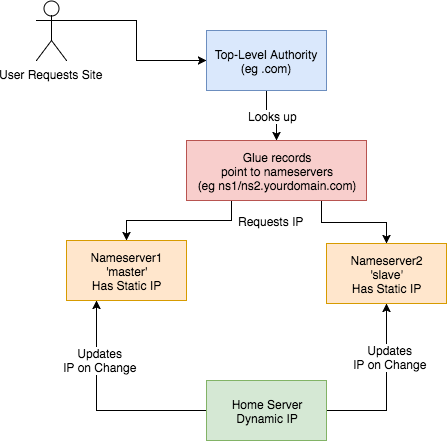
This is how I set up my DNS. I:
How? Walking through step-by-step how I did it: 1) Set up two Virtual Private Servers (VPSes) You will need two stable machines with static IP addresses. If you're not lucky enough to have these in your possession, then you can set one up on the cloud. I used this site , but there are plenty out there. NB I asked them, and their IPs are static per VPS. I use the cheapest cloud VPS (1$/month) and set up debian on there. NOTE: Replace any mention of
- got a domain from an authority (a
.tkdomain in my case)- set up glue records to defer DNS queries to my nameservers
- set up nameservers with static IPs
- set up a dynamic DNS updater from home
DNSIP1andDNSIP2below with the first and second static IP addresses you are given.Log on and set up root passwordSSH to the servers and set up a strong root password. 2) Set up domains You will need two domains: one for your dns servers, and one for the application running on your host. I use dot.tk to get free throwaway domains. In this case, I might setup a myuniquedns.tk DNS domain and a myuniquesite.tk site domain. Whatever you choose, replace your DNS domain when you seeYOURDNSDOMAINbelow. Similarly, replace your app domain when you seeYOURSITEDOMAINbelow. 3) Set up a 'glue' record If you use dot.tk as above, then to allow you to manage theYOURDNSDOMAINdomain you will need to set up a 'glue' record. What this does is tell the current domain authority (dot.tk) to defer to your nameservers (the two servers you've set up) for this specific domain. Otherwise it keeps referring back to the.tkdomain for the IP. See here for a fuller explanation. Another good explanation is here . To do this you need to check with the authority responsible how this is done, or become the authority yourself. dot.tk has a web interface for setting up a glue record, so I used that. There, you need to go to 'Manage Domains' => 'Manage Domain' => 'Management Tools' => 'Register Glue Records' and fill out the form. Your two hosts will be calledns1.YOURDNSDOMAINandns2.YOURDNSDOMAIN, and the glue records will point to either IP address. Note, you may need to wait a few hours (or longer) for this to take effect. If really unsure, give it a day.
If you like this post, you might be interested in my book Learn Bash the Hard Way , available here for just $5.![hero]()
4) Installbindon the DNS Servers On a Debian machine (for example), and as root, type:apt install bind9bindis the domain name server software you will be running. 5) Configurebindon the DNS Servers Now, this is the hairy bit. There are two parts this with two files involved:named.conf.local, and thedb.YOURDNSDOMAINfile. They are both in the/etc/bindfolder. Navigate there and edit these files.Part 1 –This file lists the 'zone's (domains) served by your DNS servers. It also defines whether thisnamed.conf.localbindinstance is the 'master' or the 'slave'. I'll assumens1.YOURDNSDOMAINis the 'master' andns2.YOURDNSDOMAINis the 'slave.Part 1a – the master
On the master/ns1.YOURNDSDOMAIN, thenamed.conf.localshould be changed to look like this:zone "YOURDNSDOMAIN" { type master; file "/etc/bind/db.YOURDNSDOMAIN"; allow-transfer { DNSIP2; }; }; zone "YOURSITEDOMAIN" { type master; file "/etc/bind/YOURDNSDOMAIN"; allow-transfer { DNSIP2; }; }; zone "14.127.75.in-addr.arpa" { type master; notify no; file "/etc/bind/db.75"; allow-transfer { DNSIP2; }; }; logging { channel query.log { file "/var/log/query.log"; // Set the severity to dynamic to see all the debug messages. severity debug 3; }; category queries { query.log; }; };The logging at the bottom is optional (I think). I added it a while ago, and I leave it in here for interest. I don't know what the 14.127 zone stanza is about.Part 1b – the slave
Jan 26, 2019 | zwischenzugs.com
On the slave/
ns2.YOURNDSDOMAIN, thenamed.conf.localshould be changed to look like this:zone "YOURDNSDOMAIN" { type slave; file "/var/cache/bind/db.YOURDNSDOMAIN"; masters { DNSIP1; }; }; zone "YOURSITEDOMAIN" { type slave; file "/var/cache/bind/db.YOURSITEDOMAIN"; masters { DNSIP1; }; }; zone "14.127.75.in-addr.arpa" { type slave; file "/var/cache/bind/db.75"; masters { DNSIP1; }; };Part 2 –db.YOURDNSDOMAINNow we get to the meat – your DNS database is stored in this file.
On the master/
ns1.YOURDNSDOMAINthedb.YOURDNSDOMAINfile looks like this :$TTL 4800 @ IN SOA ns1.YOURDNSDOMAIN. YOUREMAIL.YOUREMAILDOMAIN. ( 2018011615 ; Serial 604800 ; Refresh 86400 ; Retry 2419200 ; Expire 604800 ) ; Negative Cache TTL ; @ IN NS ns1.YOURDNSDOMAIN. @ IN NS ns2.YOURDNSDOMAIN. ns1 IN A DNSIP1 ns2 IN A DNSIP2 YOURSITEDOMAIN. IN A YOURDYNAMICIPOn the slave/
ns2.YOURDNSDOMAINit's very similar, but has ns1 in theSOAline, and theIN NSlines reversed. I can't remember if this reversal is needed or not :$TTL 4800 @ IN SOA ns1.YOURDNSDOMAIN. YOUREMAIL.YOUREMAILDOMAIN. ( 2018011615 ; Serial 604800 ; Refresh 86400 ; Retry 2419200 ; Expire 604800 ) ; Negative Cache TTL ; @ IN NS ns1.YOURDNSDOMAIN. @ IN NS ns2.YOURDNSDOMAIN. ns1 IN A DNSIP1 ns2IN A DNSIP2 YOURSITEDOMAIN. IN A YOURDYNAMICIPA few notes on the above:
- The dots at the end of lines are not typos – this is how domains are written in bind files. So
google.comis writtengoogle.com.- The
YOUREMAIL.YOUREMAILDOMAIN.part must be replaced by your own email. For example, my email address: [email protected] becomesianmiell.gmail.com.. Note also that the dot between first and last name is dropped. email ignores those anyway!YOURDYNAMICIPis the IP address your domain should be pointed to (ie the IP address returned by the DNS server). It doesn't matter what it is at this point, because .the next step is to dynamically update the DNS server with your dynamic IP address whenever it changes.
6) Copy ssh keysBefore setting up your dynamic DNS you need to set up your ssh keys so that your home server can access the DNS servers.
NOTE: This is not security advice. Use at your own risk.
First, check whether you already have an ssh key generated:
ls ~/.ssh/id_rsaIf that returns a file, you're all set up. Otherwise, type:
ssh-keygenand accept the defaults.
Then, once you have a key set up, copy your ssh ID to the nameservers:
ssh-copy-id root@DNSIP1
ssh-copy-id root@DNSIP2
Inputting your root password on each command.
7) Create an IP updater scriptNow ssh to both servers and place this script in
/root/update_ip.sh:#!/bin/bash set -o nounset sed -i "s/^(.*) IN A (.*)$/1 IN A $1/" /etc/bind/db.YOURDNSDOMAIN sed -i "s/.*Serial$/ $(date +%Y%m%d%H) ; Serial/" /etc/bind/db.YOURDNSDOMAIN /etc/init.d/bind9 restartMake it executable by running:
chmod +x /root/update_ip.shGoing through it line by line:
set -o nounsetThis line throws an error if the IP is not passed in as the argument to the script.
sed -i "s/^(.*) IN A (.*)$/1 IN A $1/" /etc/bind/db.YOURDNSDOMAINReplaces the IP address with the contents of the first argument to the script.
sed -i "s/.*Serial$/ $(date +%Y%m%d%H) ; Serial/" /etc/bind/db.YOURDNSDOMAINUps the 'serial number'
/etc/init.d/bind9 restartRestart the bind service on the host.
8) Cron Your Dynamic DNSAt this point you've got access to update the IP when your dynamic IP changes, and the script to do the update.
Here's the raw cron entry:
* * * * * curl ifconfig.co 2>/dev/null > /tmp/ip.tmp && (diff /tmp/ip.tmp /tmp/ip || (mv /tmp/ip.tmp /tmp/ip && ssh root@DNSIP1 "/root/update_ip.sh $(cat /tmp/ip)")); curl ifconfig.co 2>/dev/null > /tmp/ip.tmp2 && (diff /tmp/ip.tmp2 /tmp/ip2 || (mv /tmp/ip.tmp2 /tmp/ip2 && ssh [email protected] "/root/update_ip.sh $(cat /tmp/ip2)"))Breaking this command down step by step:
curl ifconfig.co 2>/dev/null > /tmp/ip.tmpThis curls a 'what is my IP address' site, and deposits the output to
/tmp/ip.tmpdiff /tmp/ip.tmp /tmp/ip || (mv /tmp/ip.tmp /tmp/ip && ssh root@DNSIP1 "/root/update_ip.sh $(cat /tmp/ip)"))This diffs the contents of
/tmp/ip.tmpwith/tmp/ip(which is yet to be created, and holds the last-updated ip address). If there is an error (ie there is a new IP address to update on the DNS server), then the subshell is run. This overwrites the ip address, and then ssh'es onto theThe same process is then repeated for
Why!?DNSIP2using separate files (/tmp/ip.tmp2and/tmp/ip2).You may be wondering why I do this in the age of cloud services and outsourcing. There's a few reasons.
It's CheapThe cost of running this stays at the cost of the two nameservers (24$/year) no matter how many domains I manage and whatever I want to do with them.
LearningI've learned a lot by doing this, probably far more than any course would have taught me.
More ControlI can do what I like with these domains: set up any number of subdomains, try my hand at secure mail techniques, experiment with obscure DNS records and so on.
I could extend this into a service. If you're interested, my rates are very low :)
If you like this post, you might be interested in my book Learn Bash the Hard Way , available here for just $5.
|
|
|
Jan 08, 2019 | www.reddit.com
submitted 11 days ago by
Bind 9 on my CentOS 7.6 machine threw this error:cryan7755 1 point 2 points 3 points 11 days ago (1 child)error (network unreachable) resolving './DNSKEY/IN': 2001:7fe::53#53 error (network unreachable) resolving './NS/IN': 2001:7fe::53#53 error (network unreachable) resolving './DNSKEY/IN': 2001:500:a8::e#53 error (network unreachable) resolving './NS/IN': 2001:500:a8::e#53 error (FORMERR) resolving './NS/IN': 198.97.190.53#53 error (network unreachable) resolving './DNSKEY/IN': 2001:dc3::35#53 error (network unreachable) resolving './NS/IN': 2001:dc3::35#53 error (network unreachable) resolving './DNSKEY/IN': 2001:500:2d::d#53 error (network unreachable) resolving './NS/IN': 2001:500:2d::d#53 managed-keys-zone: Unable to fetch DNSKEY set '.': failure
What does it mean? Can it be fixed?
And is it at all related with DNSSEC cause I cannot seem to get it working whatsoever.
Looks like failure to reach ipv6 addressed NS servers. If you don't utilize ipv6 on your network then this should be expected.knobbysideup 1 point 2 points 3 points 11 days ago (0 children)Can be dealt with by adding#/etc/sysconfig/named OPTIONS="-4"
|
|
|
Jake Montgomery discovered that Bind incorrectly handled certain specific combinations of RDATA. A remote attacker could use this flaw to cause Bind to crash, resulting in a denial of service.
|
|
|
Posted by kdawson on Tuesday July 15, @08:07AM
from the be-afraid-be-very-afraid-then-get-patching dept.syncro writes "The recent massive, multi-vendor DNS patch advisory related to DNS cache poisoning vulnerability, discovered by Dan Kaminsky, has made headline news. However, the secretive preparation prior to the July 8th announcement and hype around a promised full disclosure of the flaw by Dan on August 7 at the Black Hat conference has generated a fair amount of backlash and skepticism among hackers and the security research community. In a post on CircleID, Paul Vixie offers his usual straightforward response to these allegations. The conclusion: 'Please do the following. First, take the advisory seriously - we're not just a bunch of n00b alarmists, if we tell you your DNS house is on fire, and we hand you a fire hose, take it. Second, take Secure DNS seriously, even though there are intractable problems in its business and governance model - deploy it locally and push on your vendors for the tools and services you need. Third, stop complaining, we've all got a lot of work to do by August 7 and it's a little silly to spend any time arguing when we need to be patching.'"
|
|
|
A server problem at the U.S. National Security Agency has knocked the secretive intelligence agency off the Internet. The nsa.gov Web site was unresponsive at 7 a.m. Pacific time Thursday and continued to be unavailable
throughout the morning for Internet users.The Web site was unreachable because of a problem with the NSA's DNS (Domain Name System) servers, said Danny McPherson, chief research officer with Arbor Networks. DNS servers are used to translate things like the Web addresses typed into machine-readable Internet Protocol addresses that computers use to find each other on the Internet.
The agency's two authoritative DNS servers were unreachable Thursday morning, McPherson said.
Because this DNS information is sometimes cached by Internet service providers, the NSA would still be temporarily reachable by some users, but unless the problem is fixed, NSA servers will be knocked completely off-line. That means that e-mail sent to the agency will not be delivered, and in some cases, e-mail being sent by the NSA would not get through.
"We are aware of the situation and our techs are working on it," a NSA spokeswoman said at 9:45 a.m. PT. She declined to identify herself.
A similar DNS problem knocked Youtube.com off-line in early May.
There are three possible reasons the DNS server was knocked off-line, McPherson said. "It's either an internal routing problem of some sort on their side or they've messed up some firewall or ACL [access control list] policy," he said. "Or they've taken their servers off-line because something happened."
That "something else" could be a technical glitch or a hacking incident, McPherson said.
In fact, the NSA has made some basic security mistakes with its DNS servers, according to McPherson.
- The NSA should have hosted its two authoritative DNS servers on different machines, so that if a technical glitch knocked one of the servers off-line, the other would still be reachable.
- Compounding problems is the fact that the DNS servers are hosted on a machine that is also being used as a Web server for the NSA's National Computer Security Center.
"Say there was some Apache or Windows vulnerability and hackers controlled that server, they would now own the DNS server for nsa.gov," he said. "That really surprised me. I wouldn't think that these guys would do something like that."
The NSA is responsible for analysis of foreign communications, but it is also charged with helping protect the U.S. government against cyber attacks, so the outage is an embarrassment for the agency.
"I am certain that someone's going to send an e-mail at some point that's not going to get through," McPherson said. "If it's related to national security and it's not getting through, then as a U.S. citizen, that concerns me."
(Anders Lotsson with Computer Sweden contributed to this report.)
|
|
|
Hours after anti-spam company Blue Security pulled the plug on its spam-fighting Blue Frog software and service, the spammers whose attack caused the company to wave the white flag have escalated their assault, knocking Blue Security's farewell message and thousands more Web sites offline.
Just before midnight ET, Blue Security posted a notice on its home page that it was bowing out of the anti-spam business due to concerted attacks against its Web site that took millions of other sites and blogs with it. Within minutes of that online posting, bluesecurity.com went down and remains inaccessible at the time of this writing.
According to information obtained by Security Fix, the reason is that the attackers were hellbent on taking down Blue Security's site again, but had trouble because the company had signed up with Prolexic, which specializes in protecting Web sites from "distributed denial-of-service" (DDoS) attacks.
These massive assaults harness the power of thousands of hacked PCs to swamp sites with so much bogus traffic that they can no longer accommodate legitimate visitors. Prolexic built its business catering to the sites most frequently targeted by DDoS extortion attacks -- chiefly, online gambling and betting houses. But the company also serves thousands of other businesses, including banks, insurance companies and online payment processors.
For the past nine hours, however, most of Prolexic's customers have been knocked offline by an attack that flanked its defenses. Turns out the attackers decided not to attack Prolexic, but rather UltraDNS, its main provider of domain name system (DNS) services. (DNS is what helps direct Internet traffic to its destination by translating human-readable domain names like "www.example.com" into numeric Internet addresses that are easier for computers to understand.)
UltraDNS is the authoritative DNS provider for all Web sites ending in ".org" and ".uk," and also markets its "DNS Shield" service designed to help sites defend against another, increasingly common type of DDoS -- one that targets weaknesses inherent in the DNS system. (Incidentally, UltraDNS was recently acquired by Neustar, which in turn is responsible for handling all ".biz" domain registrations, and for overseeing the nation's authoritative directory of telephone numbers.)
In this case, at least, it does not appear that the DNS Shield service worked as advertised. Earlier today, I spoke with Prolexic founder Barrett G. Lyon, who told me the attack on UltraDNS had knocked about 80 percent of his company's clients offline, or roughly 2,000 or so Web businesses. Most of those businesses also remain offline as of this writing.
According to Lyon, the unknown attackers hit a key portion of UltraDNS's network with a flood of spoofed DNS requests at a rate of around 4 to 5 gigabits per second, which is enough traffic to make just about any Web site on the Internet fall over (many Internet routers can handle only a few hundred megabits of traffic before they start to fail). But this was no normal DDoS attack-- it was a kind of DDoS on the DNS system that security experts say has become alarmingly more common over the past six to eight months.
Known as DNS amplification attacks or "reflected DNS attacks," these kinds of DDoS assaults increase the traffic hurled at a victim by orders of magnitude. In a nutshell, the attackers find a whole bunch of poorly configured DNS servers and use them to create and send spoofed DNS requests from systems they control to the DNS servers they want to cripple. Because the DNS requests appear to be coming from other trusted DNS servers, the target servers have trouble distinguishing regular, legitimate DNS lookups from ones sent by the attackers. Sustained for long enough, the attack eventually overloads the victim's DNS servers with queries and knocks them out of commission.
To put the raw power of DNS amplification into perspective, consider the attack that knocked Akamai offline in the summer of 2004. For anyone unfamiliar with this company, Akamai sells a rather pricey service that lets deep-pocketed companies like FedEx, Microsoft and Xerox mirror their Web site content at thousands of different online servers, making DDoS attacks against their sites extremely difficult.
Akamai was for a long time considered the gold standard until one day in June 2004, when a DDoS attack knocked the company's services offline for about an hour. Akamai never talked publicly about the specifics of the attack, but several sources close to the investigation told me later that the outage was the result of a carefully coordinated DNS amplification attack -- one that was stopped when the attackers decided they had made their point (which was no doubt to demonstrate to would-be buyers of their DDoS services that they could knock just about anyone off the face of the Web.)
So where am I going with all of this? Well, UltraDNS marketed its DNS Shield as a protection against exactly these same types of amplification attacks. Only in this case it doesn't appear to have worked -- though, to be fair I haven't heard UltraDNS's side of the story since they have yet to return my calls. No doubt they are busy putting out fires. At any rate, score another one for the spammers, I suppose.
Update, 7:46 p.m. ET: I heard back from Neustar. Their spokesperson, Elizabeth Penniman, declined to discuss anything about today's attacks, saying only that "we have a handle on the situation and continue to work with service providers to ensure the best possible level of service to our customers."
|
|
|
April 08, 2005 (IDG News Service) Problems with the Domain Name System (DNS) servers at Internet service provider Comcast Corp. prevented customers around the U.S. from surfing the Web yesterday, but the company said the interruptions weren't linked in any way to a spate of recent DNS attacks known as "pharming" scams.
Comcast technicians noticed problems with the Philadelphia-based company's DNS servers around 6:30 p.m. EDT. The problems interrupted DNS service to Comcast high-speed Internet customers across the U.S. just hours after the SANS Institute's Internet Storm Center advised Internet service providers to make sure their DNS servers weren't vulnerable to new attacks.
However, the outage wasn't caused by those attacks or by maintenance related to the attacks, according to company spokeswoman Jeanne Russo.
During the outage, Comcast customers who attempted to connect to Web sites such as Google.com received frequent "Page not found" errors on their Web browsers. However, entering the numeric Internet Protocol address of the Web site in question would connect the user to the page.
Comcast technicians began working on the DNS problem immediately after identifying it yesterday evening and restored service to the company's customers by 12:00 a.m. EDT today, Russo said.
The DNS is a global network of computers that translates requests for reader-friendly Web domains, such as www.computerworld.com, into the numeric IP addresses that machines on the Internet use to communicate.
The recent attacks on DNS servers use a strategy called "DNS cache poisoning," in which malicious hackers use a DNS server they control to feed erroneous information to other DNS servers. The attacks take advantage of a vulnerable feature of DNS that allows any DNS server that receives a request about the IP address of a Web domain to return information about the address of other Web domains.
Online criminal groups and malicious hackers have used DNS cache poisoning recently in pharming scams, which are similar to phishing identity theft attacks but don't require a lure, such as a Web link that victims must click on to be taken to the attack Web site. Instead, corrupted DNS servers forward Internet users who are looking for legitimate Web pages, such as Google.com, to Web pages controlled by the attackers, which harvest personal information such as user names and passwords from the victims or install Trojan horse programs or other malicious code, according to the Anti-Phishing Working Group.
The attacks have been increasing in recent months, as Internet users become more savvy about traditional phishing scams and online criminal groups look for new ways to collect sensitive information or financial data from victims, the Anti-Phishing Working Group said.
In March, a rogue DNS server posed as the authoritative DNS server for the entire .com Web domain. Other DNS servers that were poisoned with this false information redirected all .com requests to the rogue server, which responded to all .com requests with one of two IP addresses controlled by the attackers.
An earlier attack in March targeted vulnerable products from Symantec Corp. and other companies to redirect requests from more than 900 unique Internet addresses and more than 75,000 e-mail messages, according to log data obtained from compromised Web servers that were used in the attacks, the Internet Storm Center said.
In recent days, a spate of such attacks prompted the Internet Storm Center to issue a "code yellow" alert, signifying increasing threats on the Internet, and prompted Microsoft Corp. to issue revised instructions for configuring Windows machines used as DNS servers to prevent cache poisoning.
|
|
|
Online scam artists are manipulating the Internet's directory service and taking advantage of a hole in some Symantec Corp. products to trick Internet users into installing adware and other annoying programs on their computers, according to an Internet security monitoring organization.Customers who use older versions of Symantec's Gateway Security Appliance and Enterprise Firewall are being hit by Domain Name System (DNS) "poisoning attacks." Such attacks cause Web browsers pointed at popular Web sites such as Google.com, eBay.com and Weather.com to go to malicious Web pages that install unwanted programs, according to Johannes Ullrich, chief technology officer at the SANS Institute's Internet Storm Center (ISC).
The attacks, which began on Thursday or Friday, may be one of the largest to use DNS poisoning, Ullrich said.
Symantec issued an emergency patch for the DNS poisoning hole on Friday. The company didn't immediately respond to requests for comment today.
The DNS is a global network of computers that translates requests for reader-friendly Web domains, such as www.computerworld.com, into the numeric IP addresses that machines on the Internet use to communicate.
In DNS poisoning attacks, malicious hackers take advantage of a feature that allows any DNS server that receives a request about the IP address of a Web domain to return information about the address of other Web domains.
For example, a DNS server could respond to a request for the address of www.yahoo.com with information on the address of www.google.com or www.amazon.com, even if information on those domains wasn't requested. The updated addresses are stored by the requesting DNS server in a temporary listing, or cache, of Internet domains and used to respond to future requests.
In poisoning attacks, malicious hackers use a DNS server they control to send out erroneous addresses to other DNS servers. Internet users who rely on a poisoned DNS server to manage their Web surfing requests might find that entering the URL of a well-known Web site directs them to an unexpected or malicious Web page, Ullrich said.
Some Symantec products, such as the Enterprise Security Gateway, include a proxy that can be used as a DNS server for users on the network that the product protects. That DNS proxy is vulnerable to the DNS poisoning attack, Symantec said on its Web site. Symantec's Enterprise Firewall Versions 7.04 and 8.0 for Microsoft Corp.'s Windows and Sun Microsystems Inc.'s Solaris have the DNS poisoning flaw, as do Versions 1.0 and 2.0 of the company's Gateway Security Appliance.
Internet users on some networks protected by the vulnerable Symantec products had requests for Web sites directed to attack Web pages that attempted to install the ABX tool bar, a search tool bar and spyware program that displays pop-up ads, Ullrich said.
The DNS poisoning attacks were easy to detect because Web sites involved in the attack don't mimic the sites that users were trying to reach, Ullrich said. However, DNS poisoning could be a potent tool for online identity thieves who could set up phishing Web sites that are identical to sites like Google.com or eBay.com but secretly capture user information, he said.
Some of those customers told ISC that they installed a patch that the company issued in June to fix a DNS cache-poisoning problem in many of the same products, but they were still susceptible to the latest DNS cache-poisoning attacks, according to information on the ISC Web site.
Ullrich said he doesn't believe that Symantec's customers are being targeted, just that they are susceptible to attacks that are being launched at a broad swath of DNS servers.
The ISC is collecting the Internet addresses of Web sites and DNS servers used in the attack and trying to have them shut down or blacklisted, ISC said.
Symantec customers using one of the affected products are advised to install the most recent hotfixes from the company, Ullrich said.
|
|
|
The following are assumed:
- The role is: dnsrole
- The user is: dnsadmin
- The profile is: DNS Admin ( case sensitive )
- Home directory for dnsrole is: /export/home/dnsrole
- Home directory for dnsadmin is: /export/home/dnsadmin
Configuration Steps
1. Create the role and assign it a password:
# roleadd -u 1001 -g 10 -d /export/home/dnsrole -m dnsrole# passwd dnsroleNOTE: Check in /etc/passwd that the shell is /bin/pfsh. This ensures that nobody can log in as the role.
Example line in /etc/passwd:
dnsrole:x:1001:10::/export/home/dnsrole:/bin/pfsh2. Create the profile called "DNS Admin":
Edit /etc/security/prof_attr and insert the following line:
DNS Admin:::BIND Domain Name System administrator:3. Add profile to the role using rolemod(1) or by editing /etc/user_attr:
# rolemod -P "DNS Admin" dnsroleVerify that the changes have been made in /etc/user_attr with profiles(1) or grep(1):
# profiles dnsroleDNS AdminBasic Solaris UserAll# grep dnsrole /etc/user_attrdnsrole::::type=role;profiles=DNS Admin
- Assign the role 'dnsrole' to the user 'dnsadmin':
- If 'dnsadmin' already exists then use usermod(1M) to add the role (user must not be logged in):
# usermod -R dnsrole dnsadmin- Otherwise create new user using useradd(1M) and passwd(1):
# useradd -u 1002 -g 10 -d /export/home/dnsadmin -m \-s /bin/ksh -R dnsrole dnsadmin# passwd dnsadmin- Confirm user has been added to role with roles(1) or grep(1):
# roles dnsadmidnsrole# grep ^dnsadmin: /etc/user_attrdnsadmin::::type=normal;roles=dnsrole5. Assign commands to the profile 'dns':
Add the following entries to /etc/security/exec_attr:
DNS Admin:suser:cmd:BIND 8:BIND 8 DNS:/usr/sbin/in.named:uid=0DNS Admin:suser:cmd:ndc:BIND 8 control program:/usr/sbin/ndc:uid=0If using Solaris 10 you may need to add a rule for BIND 9:
DNS Admin:suser:cmd:BIND 9:BIND 9 DNS:/usr/sfw/sbin/named:uid=0BIND 9 does not use ndc, instead rndc(1M) is used which does not require RBAC.
6. Create or Modify named configuration files.
To further limit the use of root in configuring and maintaining BIND make dnsadmin the owner of /etc/named.conf and the directory it specifies.
# chown dnsadmin /etc/named.conf# grep -i directory /etc/named.confdirectory "/var/named/";# chown dnsadmin /var/named7. Test the configuration:
Login as the user "dnsadmin" and start named:
$ su dnsrole -c '/usr/sbin/in.named -u dnsadmin'To stop named use ndc (for BIND 9 use rndc):
$ su dnsrole -c '/usr/sbin/ndc stop'Summary:
In this example the user 'dnsadmin' has been set up to manage the DNS configuration files and assume the role 'dnsrole' to start the named process.
The role 'dnsrole' is only used to start named and to control it with ndc (for BIND 8).
With this RBAC configuration the DNS process when started by user 'dnsrole' would acquire root privileges and thus have access to its configuration files.
The named options '-u dnsadmin' may be used to specify the user that the server should run as after it initializes. Furthermore 'dnsadmin' is then permitted to send signals to named as described in the named manual page.
References:
ndc(1M), named(1M), rbac(5), profiles(1), rolemod(1M), roles(1),rndc(1M), usermod(1M), useradd(1M)
|
|
|
[Feb 11, 2005] How To Create Custom Roles Using Based Access Control (RBAC)
#41168 How to set up RBAC to allow non-root user to manage in.named on DNS server
The following are assumed:
- The role is: dnsrole
- The user is: dnsadmin
- The profile is: DNS Admin ( case sensitive )
- Home directory for dnsrole is: /export/home/dnsrole
- Home directory for dnsadmin is: /export/home/dnsadmin
Configuration Steps
1. Create the role and assign it a password:
# roleadd -u 1001 -g 10 -d /export/home/dnsrole -m dnsrole# passwd dnsroleNOTE: Check in /etc/passwd that the shell is /bin/pfsh. This ensures that nobody can log in as the role.
Example line in /etc/passwd:
dnsrole:x:1001:10::/export/home/dnsrole:/bin/pfsh2. Create the profile called "DNS Admin":
Edit /etc/security/prof_attr and insert the following line:
DNS Admin:::BIND Domain Name System administrator:3. Add profile to the role using rolemod(1) or by editing /etc/user_attr:
# rolemod -P "DNS Admin" dnsroleVerify that the changes have been made in /etc/user_attr with profiles(1) or grep(1):
# profiles dnsroleDNS AdminBasic Solaris UserAll# grep dnsrole /etc/user_attrdnsrole::::type=role;profiles=DNS Admin
- Assign the role 'dnsrole' to the user 'dnsadmin':
- If 'dnsadmin' already exists then use usermod(1M) to add the role (user must not be logged in):
# usermod -R dnsrole dnsadmin- Otherwise create new user using useradd(1M) and passwd(1):
# useradd -u 1002 -g 10 -d /export/home/dnsadmin -m \-s /bin/ksh -R dnsrole dnsadmin# passwd dnsadmin- Confirm user has been added to role with roles(1) or grep(1):
# roles dnsadmidnsrole# grep ^dnsadmin: /etc/user_attrdnsadmin::::type=normal;roles=dnsrole5. Assign commands to the profile 'dns':
Add the following entries to /etc/security/exec_attr:
DNS Admin:suser:cmd:BIND 8:BIND 8 DNS:/usr/sbin/in.named:uid=0DNS Admin:suser:cmd:ndc:BIND 8 control program:/usr/sbin/ndc:uid=0If using Solaris 10 you may need to add a rule for BIND 9:
DNS Admin:suser:cmd:BIND 9:BIND 9 DNS:/usr/sfw/sbin/named:uid=0BIND 9 does not use ndc, instead rndc(1M) is used which does not require RBAC.
6. Create or Modify named configuration files.
To further limit the use of root in configuring and maintaining BIND make dnsadmin the owner of /etc/named.conf and the directory it specifies.
# chown dnsadmin /etc/named.conf# grep -i directory /etc/named.confdirectory "/var/named/";# chown dnsadmin /var/named7. Test the configuration:
Login as the user "dnsadmin" and start named:
$ su dnsrole -c '/usr/sbin/in.named -u dnsadmin'To stop named use ndc (for BIND 9 use rndc):
$ su dnsrole -c '/usr/sbin/ndc stop'Summary:
In this example the user 'dnsadmin' has been set up to manage the DNS configuration files and assume the role 'dnsrole' to start the named process.
The role 'dnsrole' is only used to start named and to control it with ndc (for BIND 8).
With this RBAC configuration the DNS process when started by user 'dnsrole' would acquire root privileges and thus have access to its configuration files.
The named options '-u dnsadmin' may be used to specify the user that the server should run as after it initializes. Furthermore 'dnsadmin' is then permitted to send signals to named as described in the named manual page.
References:
ndc(1M), named(1M), rbac(5), profiles(1), rolemod(1M), roles(1),rndc(1M), usermod(1M), useradd(1M)
Sys Admin Maintaining DNS Sanity with Hawk
If you are a DNS administrator for anything more than a few dozen hosts, it's easy for your database to get out of sync with what's really on your network. The GPL software tool, Hawk, is designed to help administrators track which hosts in DNS are really on your network and, just as importantly, which hosts are on your network but not in DNS. Hawk can help take the mystery out of DNS maintenance, resulting in a much cleaner, up-to-date database.
Hawk consists of three components: a monitor written in Perl, a MySQL database backend, and a PHP Web interface. The monitor periodically checks whether hosts on your network appear in DNS and are answering on your network. It checks for existence on the network by way of an ICMP ping. I mention ICMP because by default, the Perl Net::Ping module "pings" by attempting a UDP connection to a host's echo port. With the various types of hosts possible on a typical network, this is probably not desirable. As each IP address on your network is polled, the monitor records or updates in the database the current IP address and the hostname, if one exists. If the ping is successful, this timestamp is also recorded in the database.
The Hawk interface consists of a Web page that allows you to choose which "network" to view and how to sort the results. You can also choose whether to view addresses that are neither in DNS nor have responded to pings. These are typically uninteresting, so by default they are not displayed. Each host displayed on the page has a hostname (if available), a last ping time, and a colored "LED" indicating the current status of the address. The LED color will indicate one of five states:
- Green - Address exists in DNS, and is currently answering pings.
- Yellow - Address exists in DNS, but has not answered in more than 24 hours (configurable).
- Red - Address exists in DNS, but has not answered in more than 1 week (configurable).
- Blue - Address does not exist in DNS, however it is answering pings. This could indicate an unauthorized use of an address, or it could indicate something such as a DHCP - assigned address that has no DNS entry.
- Purple - Address does not exist in DNS, and does not answer pings. This is generally uninteresting to us, so by default these hosts are not displayed. See Figure 1.
Installation
Perl
As previously mentioned, Hawk has three components. These components may each be hosted on separate machines or the same machine, depending on your environment. The monitor should run happily with any version of Perl 5. But the following additional modules will need to be installed: Net::Netmask, Net::Ping, DBI, and DBD::mysql. You can install these modules as follows:
# perl -MCPAN -e "install Net::Netmask"
# perl -MCPAN -e "install Net::Ping"
# perl -MCPAN -e "install DBI"
# perl -MCPAN -e "install DBD::mysql"
MySQL
The database used for storing Hawk's data is MySQL. Hawk was originally written using MySQL 3.23, but since the database requirements are minimal, you can probably get away with older versions, and certainly newer ones. Before the Perl backend and PHP frontend can communicate with the database, you must create the appropriate database and table to store the data. Next, you need to create a database user to allow read and write access to the data from the scripts. Connect to the database as follows:
# mysql --user=<mysql admin user> --password --host=<mysql server>
Enter password:
Welcome to the MySQL monitor.  Commands end with ; or \g.
Your MySQL connection id is 8 to server version: 3.23.40-log

Type 'help;' or '\h' for help. Type '\c' to clear the buffer.

mysql>
Create the database "hawk" and table "ip" using the following SQL statements:
create database hawk;
use hawk;
create table ip (
   ip char(16) NOT NULL default '0',
   hostname char(255) default NULL,
   lastping int(10) default NULL,
   primary key  (ip),
   unique key ip (ip),
   key ip_2 (ip)
) type=MyISAM comment='Table for last ping time of hosts';
Create the user "hawk" using the following SQL:
grant select,insert,update,delete
     on hawk.*
     to hawk@localhost
     identified by 'hawk';
grant select,insert,update,delete
     on hawk.*
     to hawk@"%"
     identified by 'hawk';
flush privileges;
This will give permission for the user "hawk" to do basic selects and updates from any host on the network. For added security, you can limit this to a given host by changing the "%" to a specific hostname.
For managing MySQL, you may want to consider installing phpMyAdmin, which is available from:
phpMyAdmin is a Web-based tool for administering MySQL databases. It can be used to add/drop databases, create/drop/alter tables, delete/edit/add fields, execute SQL, manage keys, and import/export data. You can use this tool later in the installation process to verify that your database is being populated with data.
Apache/PHP
The interface was written using PHP 4.0.6 under Apache 1.3.22. Later versions of PHP should work fine, and any version of Apache will probably work. If your Web server is running on the same machine as the Hawk monitor, you can simply make a symbolic link in the Apache document root to the PHP directory of hawk as follows:
# cd /var/apache/htdocs
# ln -s /opt/hawk/php hawk
If you are running on separate machines, you will need to copy the entire PHP directory from the installation directory to a directory named "hawk" within the Apache document root.
Hawk
Hawk is hosted at SourceForge. To download, go to:
http://sourceforge.net/projects/iphawk
or
ftp://ftp.sourceforge.net/pub/sourceforge/iphawk
Under "Latest File Releases", click Download and you will be taken to the download page. The latest version will be highlighted. This article is based on Hawk version 0.6. The downloaded file will be called hawk-0.6.tar.gz. You can save this in the directory in which you want to extract the Hawk program, (e.g., /opt). Extract the software as follows:
# cd /opt
# tar xvzf hawk-0.6.tar.gz
# ln -s /opt/hawk-0.6 /opt/hawk
Within the installation directory, you have two subdirectories - one for the monitor and one for the PHP interface. Following is a basic breakdown of what is installed:
./daemon                 - directory for perl monitor daemon
./daemon/hawk            - the monitor daemon
./daemon/hawk.conf       - config file for monitor daemon
./php                    - directory for php interface
./php/hawk.conf.inc      - php web interface config file
./php/hawk.css           - style sheet file for web interface
./php/hawk.php           - web interface script
./php/images             - directory for web interface images
The first step to configure Hawk is to edit the monitor config file daemon/hawk.conf. The variables in this file need to follow standard Perl syntax conventions, as this file is read into the monitor script using a "do" statement. Configurable parameters in the config file are as follows:
- @networks - This should contain a list of local networks you want to be monitored by Hawk. The networks must be specified in CIDR format. That is, if you have a class C network (24 bits) of the range 192.168.2.0-255, the CIDR form would be "192.168.2.0/24."
- @gateways - This should contain the list of gateways used by all networks. This parameter is not required, however if it is used, the monitor will verify that the gateway is up before trying the rest of the hosts on that network.
- $frequency - This parameter is the number of seconds between checks. A 0 value will cause the monitor to loop continuously.
- $pingtimeout - This variable indicates how long a ping will wait before giving up and moving on to the next host.
- $debuglevel - This can be set at 0-2. During initial setup, you may want to use debug level 2. This will allow you to see every ping, and verify database operations. Level 1 will give basic progress reports (e.g., when each network is being checked). Level 0 is, of course, no logging at all. You probably want to switch to level 1 or 0 after initial install.
- $logfile - The name of the logfile where the above debugging information is written.
$dbuser: mysql database username
$dbpass: mysql database password
$dbhost: database server hostname or ip address
$dbname: database name ("hawk")

$pidfile: pid file used for shutting down and restarting hawk.
See hawk.conf.sample (Listing 1).
The PHP backend has a similar simple configuration. The config file is php/hawk.conf.inc. This file is sourced into the main hawk.php script so, like the monitor config file, it must contain syntax understood by PHP. The configurable parameters are as follows:
- $dbuser, $dbpass, $dbhost, $dbname - Should be set to the same as above.
- $redzone - If a host has not been ping-able in this amount of time (in seconds), the LED will glow red.
- $yellowzone - If a host has not been ping-able in this amount of time (in seconds), the LED will glow yellow, unless it has also surpassed $redzone.
- $networks - This should contain all the networks you specified within your hawk.conf file above. However, each of the networks is paired with a human-readable name for this parameter. If your network contains a really large broadcast domain, it may be too large for easy viewing on a single Web page, in which case you can break it into logical pieces. You can do so by specifying smaller, adjacent networks. For example, if you specified 192.168.4.0/22 in your daemon/hawk.conf above, you can break that into the following networks in php/hawk.conf.inc for display purposes: 192.168.4.0/24, 192.168.5.0/24, 192.168.6.0/24, 192.168.7.0/24. See hawk.conf.inc.sample (Listing 2).
The look and feel of the Web interface for Hawk are customizable using cascading style sheets. All of the styles have been placed into a separate CSS file, php/hawk.css.
Running Hawk
After installation of all components is complete, the next step is to start Hawk by hand and watch the logfile to verify proper operation:
# /opt/hawk-0.6/daemon/hawk &
# tail -f /var/log/hawk
If you set your $debuglevel to 2, this should provide a sufficient level of detail to identify any problems. The most common problem is database connectivity. If the logging seems to hang at the point it is doing a database access, the database server name might be the issue. This will also eventually cause the script to fail and exit. If there is a problem with user credentials (e.g., username/password), the script will fail immediately. Once database connectivity is properly established, the log should display every ping attempt and every database access/update. Also, verify that data is going into the database by viewing database logs or using a tool like phpMyAdmin.
Once proper operation is verified above, configure your system to start Hawk at boot. Below is a sample init.d script that can be used for starting/stopping/restarting Hawk. See hawk.init.d.sample (Listing 3).
You will need to copy the script into your init.d directory and make symbolic links to the appropriate rc?.d directories as follows:
For the 0, 1, S, and 6, runlevels:
ln -s /etc/init.d/hawk /etc/rc0.d/K90hawk
ln -s /etc/init.d/hawk /etc/rc1.d/K90hawk
ln -s /etc/init.d/hawk /etc/rc6.d/K90hawk
ln -s /etc/init.d/hawk /etc/rcS.d/K90hawk
For the 2, 3, and 4 runlevels:
ln -s /etc/init.d/hawk /etc/rc2.d/S90hawk
ln -s /etc/init.d/hawk /etc/rc3.d/S90hawk
ln -s /etc/init.d/hawk /etc/rc4.d/S90hawk
The location of init.d and rc?.d directories will vary between systems, so modify the commands to match the layout of your system. Also, runlevel 5 is used differently on different systems. Some UNIX systems use runlevel 5 for shutdown, while some Linux systems use runlevel 5 as the default runlevel. Verify how your system uses this runlevel and create the appropriate symbolic links as above.
Once you've verified proper operation of Hawk and installed the above startup scripts, reboot your system at the next opportunity to verify proper startup.
Next, you need to verify the interface is working properly by opening the page in your browser. The URL should be something like http://hawk.someplace.org/hawk/hawk.php. When the page loads, select a network and click "Go". The page will be redisplayed listing the hosts on your network as in Figure 1. If this does not work as expected, database connectivity is most likely the problem. PHP will generally report any connectivity problems directly on the Web page. The error messages given are usually very specific and you should be able to identify the problem right away. You should also check your MySQL log to verify the PHP queries are actually reaching the database.
If you were successful with your installation, you will be able to use Hawk to manage your DNS with a little more sanity.
Greg Heim has been working as a UNIX systems administrator for 13 years. He has a strong background in programming and relational databases. He can be contacted at: [email protected].
Ethereal User's Guide
Identify and Mitigate Windows DNS Threats
Zone transfers are preventable at the firewall and routers on the perimeter of your network. DNS client queries are transmitted on UDP port 53, and TCP port 53 is used for zone transfers. Zone transfers outside of the protected network (outside your firewall) via TCP port 53 should be avoided.Most organizations have internet-facing systems with both internal and external DNS servers to service each zone. In this case, incoming UDP and TCP port 53 should be blocked at the internal and external firewall, and DMZ routers. Allow TCP port 53 only through the routers and firewall which connect the internal and external DNS servers. To resolve queries for external names made by internal hosts, the internal DNS servers should forward queries out to the external DNS servers. External DNS servers in front of the firewall should be configured with root hints pointing to the root servers for the Internet. External hosts should use only the external DNS servers for Internet name resolution.
Even though Windows Server 2003 DNS only performs zone transfers with servers that are listed in the zone's Name Server (NS) resource records, you should still set your Windows DNS server to only allow zone transfers with specific IP addresses. Only allow reverse lookup zones to external DNS servers if necessary. Network Address Translation (NAT) (define) is a very good strategy to use on many networks and can be implemented on the DMZ where the DNS server is situated. NATing adds further protection from hackers and intruders as is obfuscates the issue by translating IP addresses to predetermined address ranges. Restricting zone transfers to only authorized or known servers also helps prevent the injection of unauthorized data into your DNS zone files by an attacker. If an attacker can't capture your zone data from a zone transfer, he won't be able to determine the makeup of your network and do ugly things such as spoofing IP addresses to make them appear to have come from an internal host.
Windows DNS Zone Transfer Configuration
(Click for a larger image)Another option, and undoubtedly the one Microsoft would prefer you use, is to use only AD-integrated DNS zones, as opposed to Standard DNS zones. AD-integrated DNS servers will only participate in zone replication with other AD-integrated DNS servers. Also, all DNS servers hosting AD-integrated zones must be registered in AD before they'll even be functional, and replication traffic between AD-integrated DNS servers is encrypted.
DNS Cache Poisoning is a situation in which an attacker is able to predict the DNS sequence numbers in a DNS conversation between server and client, and then insert bogus data into the data stream. This can be used by the attacker in a number of ways including redirecting a popular search engine to a pop-up ad site, or redirecting a user to a bogus bank website to gain access to account passwords.
Windows Server 2003 DNS servers use a secure response option that eliminates the addition of unrelated resource records that are included in a referral answer to the cache. Typically, a DNS server caches any names in referral answers, expediting the resolution of subsequent DNS queries. However, when the Secure Cache Against Pollution option is enabled, which it is by default on Windows 2003 DNS servers, the server can determine whether the referred name is polluting or insecure and discard it. The server determines whether to cache the name offered in the referral depending on whether it is part of the exact DNS domain tree for which the original name query was made. As an example, a query made for marketing.companysix.com with a referral answer of companyeight.net would not be cached.
Windows 2003 'Secure Cache Against Pollution Setting'
(Click for a larger image)If you have BIND-based DNS servers in your environment, you should update to BIND 9, which helps alleviate some of the more commonly used methods of DNS cache poisoning. It doesn't prevent them, however it does contain some improvements to the BIND protocol that make cache poisoning more difficult.
Denial of Service (DoS) attacks can occur when an attacker attempts to obstruct the availability of network services by flooding one or more DNS servers in the network with recursive queries or zone transfer requests. As a DNS server is flooded with queries, its resources will eventually reach their maximum and the DNS Server service will become unavailable. Blocking UDP and TCP port 53 at internal and external firewalls and DMZ routers should help alleviate this, as well as only allowing DNS-related traffic to and from authorized servers. There is a feature built into Windows 200x DNS called zone transfer metering. When a zone transfer occurs within the server, the server won't allow another zone transfer to happen for a period of time, because it is possible that a denial of service attack could be perpetrated on the server by flooding it with requests for zone transfers and queries causing the to be locked and preventing it from being able to do updates or answer queries efficiently - or at all.
Also on DNS at ENP In a DNS bind? Get Out with dnsmasq Harden BIND9 Against Cache Poisoning DNSSEC: For When a Spoof Isn't a Comedy DNSSEC: What Is It Good For? Client security and Dynamic updates: Dynamic updates are required for Active Directory-integrated zones. For highest protection, AD should be configured to allow secure dynamic updates or dynamic updates from DHCP instead of DNS clients wherever possible, to increase security of the DNS zone data. When using Secure Dynamic Updates, the DNS zone information is stored in Active Directory and thus is protected using Active Directory security features. When a zone has been configured as an Active Directory-integrated zone, Access Control List (ACL) entries can be used to specify which users, computers, and groups can make changes to a zone or a specific record. This restricts your DNS server to only accept new registrations from computers that have a computer account in Active Directory, and to only accept updates from the computer that registered the DNS record initially. It also forces the DHCP server and/or client PC's to encrypt the information.DNS Security (DNSSEC, RFC2535) is a public key infrastructure (PKI) (define) based system in which authentication and data integrity can be provided to DNS resolvers. Digital signatures are used and encrypted with private keys. These digital signatures can then be authenticated by DNSSEC-aware resolvers by using the corresponding public key. The required digital signature and public keys are added to the DNS zone in the form of resource records.
The public key is stored in the KEY RR (Resource Record), and the digital signature is stored in the SIG RR. The KEY RR must be supplied to the DNS resolver before it can successfully authenticate the SIG RR. DNSSEC also introduces one additional RR, the NXT RR, which is used to cryptographically assure the resolver that a particular RR does not exist in the zone.
DNSSEC is only partially supported in Windows Server 2003 DNS, providing basic support as specified in RFC 2535. A Windows Server 2003 DNS server can only operate as a secondary to a BIND server that fully supports DNSSEC. The support is partial because DNS in Windows Server 2003 does not provide any means to sign or verify the digital signatures. In addition, the Windows Server 2003 DNS resolver does not validate any of the DNSSEC data that is returned as a result of queries.
All of this by no means covers everything you need to know about installing and hardening your Windows-based DNS servers, but it should be a good start in giving you a better idea of the key things you need to do to protect your servers and your network. Grab some aspirin
FAQservers
We're not filtering UDP on port 53, but nobody can resolve from us. What do we need to change? Old versions of BIND made DNS resolution queries by attaching to port 53 of the remote nameserver and receiving replies back on port 53 as well. The new software connects to port 53, but the back-channel for data is designated as a random channel at port 1023 or higher. This presents a problem for sites that are filtering UDP traffic on port 1023 or higher.Most "older" firewalls will have ports 1023 and higher filtered as a matter of course. This will result in resolvers using BIND 8.1.1 not being able to get proper name resolution for sites behind those firewalls. This impacts customers using Allegiance Internet name resolvers, since those name servers will not be able to query the remote site about the names in question, and will time out.
If you are running a firewall and nameservers, it is necessary to remove UDP filtering for your nameserver from not only port 53 but 1023 and higher.
Won't removal of those filters create a security hole in my network?
No. You do not need to open up ports 1023 and higher for all machines on your network; only the nameservers. Most, if not all, firewall products will allow the selection of specific ports to be opened for specific machines. If you are a Allegiance Internet customer and your firewall product does not permit this, Allegiance Internet Security Services (800-581-8711) can assist you with possible solutions.
SANS - Internet Storm Center - Cooperative Cyber Threat Monitor And Alert System - Current Infosec News and Analysis
This might be bogus information. Treat it skeptically
Around 22:30 GMT on March 3, 2005 the SANS Internet Storm Center began receiving reports from multiple sites about DNS cache poisoning attacks that were redirecting users to websites hosting malware. As the "Handler on Duty" for March 4, I began investigating the incident over the course of the following hours and days. This report is intended to provide useful details about this incident to the community.
The initial reports showed solid evidence of DNS cache poisoning, but there also seemed to be a spyware/adware/malware component at work. After complete analysis, the attack involved several different technologies: dynamic DNS, DNS cache poisoning, a bug in Symantec firewall/gateway products, default settings on Windows NT4/2000, spyware/adware, and a compromise of at least 5 UNIX webservers. We received information the attack may have started as early as Feb. 22, 2005 but probably only affected a small number of people.
On March 24, we received reports of a different DNS cache poisoning attack. This attack did not appear to affect as many people. This will be referred to as the "second attack" in the remainder of this report.
After monitoring the situation for several weeks now, it has become apparent that the attacker(s) are changing their methods and toolset to point at different compromised servers in an effort to keep the attacks
alive. This attack morphed into a similar attack with different IP addresses that users were re-directed toward. This will be referred to as the third attack and is still ongoing as of April 1, 2005.
CERT Incident Note IN-2001-11 Cache Corruption on Microsoft DNS Servers
In the default configuration, Microsoft DNS server will accept bogus glue records from non-delegated servers. These bogus records will be added to the cache when a client attempts to resolve a particular hostname served by a malicious or incorrectly configured DNS server. The client can be coerced to request such a hostname as a result of an otherwise non-malicious piece of HTML email (such as spam) or in banner advertisements on websites, to give some examples.
Based on information contained in reports of this activity, there are sites actively engaged in this deceptive DNS resolution. These reports indicate that malicious DNS servers are providing bogus glue records for the generic top-level domain servers (gtld-servers.net) potentially resulting in erroneous results (e.g., failed resolution or redirection) for any DNS request.
More information about the problem can be found at
VU#109475 - Microsoft Windows NT and 2000 Domain Name Servers allow non-authoritative RRs to be cached by default
http://www.kb.cert.org/vuls/id/109475Secure server cache against names pollution
http://www.microsoft.com/WINDOWS2000/en/server/help/sag_DNS_pro_SecureCachePollutedNames.htmHow to Prevent DNS Cache Pollution (Q241352)
http://support.microsoft.com/support/kb/articles/Q241/3/52.ASP
http://msdn.microsoft.com/library/en-us/regentry/46753.asp
[Jan 8, 2003] Perspective Defending the DNS Perspectives CNET News.com By Paul Mockapetris
The domain name system--the global directory that maps names to Internet Protocol addresses--was designed to distribute authority, making organizations literally "masters of their own domain." But with this mastery comes the responsibility of contributing to the defense of the DNS.
The distributed denial-of-service (DDoS) attacks against the DNS root servers on Oct. 21, 2002, should serve as a wake-up call. The attack was surprisingly successful--most of the root servers were disrupted by a well-known attack strategy that should have been easily defeated. Future attacks against all levels of the DNS--the root at the top; top-level domains like .com, .org and the country codes; and individual high-profile domains--are inevitable.
The October attack was a DDoS "ping" attack. The attackers broke into machines on the Internet (popularly called "zombies") and programmed them to send streams of forged packets at the 13 DNS root servers via intermediary legitimate machines. The goal was to clog the servers, and communication links on the way to the servers, so that useful traffic was gridlocked. The assault is not DNS-specific--the same attack has been used against several popular Web servers in the last few years.
The legitimate use of ping packets is to check whether a server is responding, so a flood of ping packets is clearly either an error or an attack. The typical defense is to program routers to throw away excessive ping packets, which is called rate limiting. While this protects the server, the attack streams can still create traffic jams up to the point where they are discarded.
Excess capacity in the network can help against such attacks, as long as the additional bandwidth can't be used to carry additional attacks. By intent, root servers are deployed at places in the network where multiple Internet service providers intersect. In the October attacks, some networks filtered out the attack traffic while others did not, so a particular root server would seem to be "up" for a network that was filtering and "down" for one that was not.
Unlike most DDoS attacks, which fade away gradually, the October strike on the root servers stopped abruptly after about an hour, probably to make it harder for law enforcement to trace.
DNS caching kept most people from noticing this assault. In very rough terms, if the root servers are disrupted, only about 1 percent of the Internet should notice for every two hours the attack continues--so it would take about a week for an attack to have a full effect. In this cat-and-mouse game between the attackers and network operators, defenders count on having time to respond to an assault.
Future attacks against all levels of the DNS are inevitable. Defending the root
The root servers are critical Internet resources, but occupy the "high ground" in terms of defensibility. The root server database is small and changes infrequently, and entries have a lifetime of about a week. Any organization can download an entire copy of the root database, check for updates once a day, and stay current with occasional reloads. A few organizations do this already.Root server operators are also starting to deploy root servers using "anycast" addresses that allow multiple machines in different network locations to look like a single server.
Unfortunately for those of us that depend on the Internet, the attackers seem likely to strengthen their tactics and distribute new attackware. In short, defending the DNS root is relatively easy since it is possible to minimize the importance of any root server, by creating more copies of the root database--some private, some public.
Top-level domains, or TLDs, will be much harder to defend. The copying strategy that can defend the root server will not work for most TLDs. It is much harder to protect, say, .com or .fr than to defend the root. This is because the data in TLDs is more voluminous and more volatile, and the owner is less inclined to distribute copies for privacy or commercial reasons.
There is no alternative. TLD operators must defend their DNS servers with rate-limiting routers and anycast because consumers of the TLD data cannot insulate themselves from the attacks.
Defending your organization
If your organization has an intranet, you should provide separate views of DNS to your internal users and your external customers. This will isolate the internal DNS from external attacks. Copy the root zone to insulate your organization from future DDoS attacks on the root. Consider also copying DNS zones from business partners on extranets. When DNS updates go over the Internet, they can also be hijacked in transit--use TSIGs (transaction signatures) to sign them or send updates over VPNs (virtual private networks) or other channels.But understand that until tools for digital signatures in DNS are finished and deployed, you are going to be at risk from the DNS counterfeiting attacks that lie not too far in the future (and that have apparently already occurred in China). Unfortunately for those of us who depend on the Internet, the attackers seem likely to strengthen their tactics and distribute new attackware, while the Internet community struggles to mount a coordinated approach to DNS defense.
Biography
Paul Mockapetris, the inventor of the domain name system, is chief scientist and chairman of the board at Nominum.
Internet Systems Consortium, Inc.
BIND4/BIND8
Unsuitable for Forwarder Use
If a nameserver -- any nameserver, whether BIND or otherwise -- is configured to use ``forwarders'', then none of the the target forwarders can be running BIND4 or BIND8. Upgrade all nameservers used as ``forwarders'' to BIND9 . There is a current, wide scale Kashpureff-style DNS cache corruption attack which depends on BIND4 and BIND8 as ``forwarders'' targets.
[Jan 3, 2003] Perspective Defending the DNS Perspectives CNET News.com
The domain name system--the global directory that maps names to Internet Protocol addresses--was designed to distribute authority, making organizations literally "masters of their own domain." But with this mastery comes the responsibility of contributing to the defense of the DNS.The distributed denial-of-service (DDoS) attacks against the DNS root servers on Oct. 21, 2002, should serve as a wake-up call. The attack was surprisingly successful--most of the root servers were disrupted by a well-known attack strategy that should have been easily defeated. Future attacks against all levels of the DNS--the root at the top; top-level domains like .com, .org and the country codes; and individual high-profile domains--are inevitable.
The October attack was a DDoS "ping" attack. The attackers broke into machines on the Internet (popularly called "zombies") and programmed them to send streams of forged packets at the 13 DNS root servers via intermediary legitimate machines. The goal was to clog the servers, and communication links on the way to the servers, so that useful traffic was gridlocked. The assault is not DNS-specific--the same attack has been used against several popular Web servers in the last few years.
The legitimate use of ping packets is to check whether a server is responding, so a flood of ping packets is clearly either an error or an attack. The typical defense is to program routers to throw away excessive ping packets, which is called rate limiting. While this protects the server, the attack streams can still create traffic jams up to the point where they are discarded.
Excess capacity in the network can help against such attacks, as long as the additional bandwidth can't be used to carry additional attacks. By intent, root servers are deployed at places in the network where multiple Internet service providers intersect. In the October attacks, some networks filtered out the attack traffic while others did not, so a particular root server would seem to be "up" for a network that was filtering and "down" for one that was not.
Unlike most DDoS attacks, which fade away gradually, the October strike on the root servers stopped abruptly after about an hour, probably to make it harder for law enforcement to trace.
Future attacks against all levels of the DNS are inevitable. DNS caching kept most people from noticing this assault. In very rough terms, if the root servers are disrupted, only about 1 percent of the Internet should notice for every two hours the attack continues--so it would take about a week for an attack to have a full effect. In this cat-and-mouse game between the attackers and network operators, defenders count on having time to respond to an assault.
Defending the root
The root servers are critical Internet resources, but occupy the "high ground" in terms of defensibility. The root server database is small and changes infrequently, and entries have a lifetime of about a week. Any organization can download an entire copy of the root database, check for updates once a day, and stay current with occasional reloads. A few organizations do this already.Root server operators are also starting to deploy root servers using "anycast" addresses that allow multiple machines in different network locations to look like a single server.
Unfortunately for those of us that depend on the Internet, the attackers seem likely to strengthen their tactics and distribute new attackware.In short, defending the DNS root is relatively easy since it is possible to minimize the importance of any root server, by creating more copies of the root database--some private, some public.
Top-level domains, or TLDs, will be much harder to defend. The copying strategy that can defend the root server will not work for most TLDs. It is much harder to protect, say, .com or .fr than to defend the root. This is because the data in TLDs is more voluminous and more volatile, and the owner is less inclined to distribute copies for privacy or commercial reasons.
There is no alternative. TLD operators must defend their DNS servers with rate-limiting routers and anycast because consumers of the TLD data cannot insulate themselves from the attacks.
Defending your organization
If your organization has an intranet, you should provide separate views of DNS to your internal users and your external customers. This will isolate the internal DNS from external attacks. Copy the root zone to insulate your organization from future DDoS attacks on the root. Consider also copying DNS zones from business partners on extranets. When DNS updates go over the Internet, they can also be hijacked in transit--use TSIGs (transaction signatures) to sign them or send updates over VPNs (virtual private networks) or other channels.But understand that until tools for digital signatures in DNS are finished and deployed, you are going to be at risk from the DNS counterfeiting attacks that lie not too far in the future (and that have apparently already occurred in China). Unfortunately for those of us who depend on the Internet, the attackers seem likely to strengthen their tactics and distribute new attackware, while the Internet community struggles to mount a coordinated approach to DNS defense.
biography
Paul Mockapetris, the inventor of the domain name system, is chief scientist and chairman of the board at Nominum.Cache Pollution Protection
When cache pollution protection is enabled, the DNS server disregards DNS resource records that originate from DNS servers that are not authoritative for the resource records. Cache pollution protection is a significant security enhancement; however, when cache pollution protection is enabled, the number of DNS queries can increase.
In Windows Server 2003 DNS, cache pollution protection is enabled by default. You can disable cache pollution protection to reduce the number of DNS queries; however, to ensure the security of your system, it is strongly recommended that you leave cache pollution protection enabled on your DNS servers.
For information about cache pollution protection, see the Networking Guide of the Windows Server 2003 Resource Kit (or see the Networking Guide on the Web at http://www.microsoft.com/reskit).
BIND is the Berkeley Internet Name Domain system, which is an implementation of DNS. DNS is not a peice of software; it is a specification of a protocol as outlined in RFC 1034 and defined by RFC 1035. It is a system which is made up of a distributed database of host names and IP addresses maintained by administrators of Internet sites around the globe, and which provides a means of efficiently mapping host names to IP addresses and vice-versa. BIND is one software package that implements DNS, and is by far the most common software used to provide DNS service on the Internet today.
Achilles Heal of DNS Published on August 02, 2001 - by Christopher Irving, ©SANS Institute.
One of the four categories of Denial of Service (DoS) attacks list by Scambray, McClure, and Kurtz is Routing and DNS attacks (1). This refers to attacks which corrupt the information these systems use to perform their functions. Information Poisoning, though more general, is a more accurate term for categorizing these types of attacks. It is also more inclusive of attacks such as ARP Poisoning which employ similar tactics and are possible because of a common vulnerability. Each of the protocols associated with these attacks either completely lacks or has very poor methods of authentication. Attackers capitalize on this weakness to undermine the trust relationship between two systems. This paper will attempt to illustrate consequences of this deficiency. Buffer overflows and other attacks on specific software that implement DNS will not be covered.
DNSDusty is an uncomplicated Web-based DNS management tool. It does all of its modifications via signed dynamic updates, and gets info on zones via zone transfers. Thus, it does not require any external databases, and plays along well with other tools that do dynamic updates (such as DHCP). DNSDusty is written as a Perl CGI script, so it should work with most Web servers.
Sleuth is a simple Perl script for checking DNS zones for bugs and other inconsistencies. It should check all zone requirements mentioned in the corresponding RFCs plus several other common errors. The package also contains a trivial (but useful) WWW interface.
Murray Hill, N.J.'s Lucent Technologies (NYSE:LU) Wednesday unveiled DNS ProPerformance, which helps mind a customer's domain name system (DNS), a service that translates a host name to a numeric IP address, by scanning a customer's DNS infrastructure for security vulnerabilities from hackers. In addition, it's quite the diagnostic administrator because it performs more than 70 tests to assure that the DNS configuration is operating without any glitches.
How does this work? As previously stated, IP-based applications refer to a DNS server to translate domain names to their IP addresses in a numeric form. DNS ProPerformance helps ensure reliable DNS performance for applications. It notifies systems administrators of inaccurate or invalid DNS information that would render a site or application unreachable to prevent service glitches.
When problems are detected, the software sends e-mail notifications to the administrators, which saves them troubleshooting time. The product, a departure from the company's usual switch and router offerings, was created under the aegis of the Network Software Group.
"DNS-related errors are the second most frequent reason for failed Internet connections," said Madan Kumar, vice president of the Network Software Group in Lucent Technologies. "The DNS ProPerformance gives customers an automatic and proactive DNS management approach to provide carrier-class reliability and availability for their domain names."
Cricket Liu, DNS specialist and author of the O'Reilly & Associates Nutshell Handbook, "DNS and BIND," took a peek at DNS ProPerformance and discussed the importance of such applications at a time when security concerns run at all time highs.
"Because of the complex nature of DNS, companies often neglect to manage and configure DNS properly. This puts critical infrastructure, such as web presence and e-mail traffic, at risk," Liu said. "This new service provides a fast and simple way to get a comprehensive health report on DNS from an external source. It offers clear reports and detailed recommendations that are helpful in identifying and correcting configuration problems and security weaknesses." .
... ... ...
Early Warning System
The sooner we know that DNS is having trouble the sooner we can start dealing with the situation.
For the World-Wide-Web there are companies, such as Keynote, that monitor reachability and responsivity of web sites.
A similar system ought to be deployed to monitor DNS roots and major top level domain (TLD) servers.
Continuous polling could be performed (at a relatively low data rate) from monitoring stations around the world to note whether the major servers are visible and responding in a timely fashion with reasonable answers. The cost of establishing this system would be very low.
Pre-Written Filter Skeletons
Distributed denial of service (DDOS) attacks have been a major headache on the Internet for several years. Anyone who has been on the receiving end of one of these can testify to the difficulty of working backwards through chains of often not-very caring ISPs to track down the sources and smothering them. The IETF is working on technology to help do this backtracking. But that technology isn't here today and, assuming that it is perfected, it will take quite some time - probably years - to deploy and obtain sufficient coverage.
There is something we can do in the meantime. The number of machines that are DNS roots and TLD servers is relatively small and predictable. Consequently, we could prepare a small set of router filters skeletons that an ISP can pull out of its book of procedures, modify as appropriate, and slap into its routers. This could greatly reduce the time it takes to dampen a DDOS attack.
This would possibly give us a means to start reducing the impact of a DDOS attack within a period of minutes instead of a period of hours.
Pre-Planned Routing to Pre-Planned Fallback Positions
The Internet is not the Alamo; we can retreat when there is an attack.
When there are distributed denial of service attacks on DNS, it will sometimes be prudent to move some operations to new locations. Sometimes this will mean picking up a block of IP addresses - blocks that contain well known DNS servers - and moving them to a new point-of-attachment to the Internet.
This kind of shift will require an adjustment to the routing information used by the Internet. While this is not an extremely difficult task it is one that is somewhat delicate and not infrequently requires a cooperative effort, particularly as ISP's tend to be suspicious of routing information received from sources outside of their own networks. It would be prudent to preplan for this. In particular it would be worthwhile to work with the ISP community to have some of the potential routing changes thought through in advance in written down in a book of emergency procedures.
Diversity of Server Software
One of the things that we have learned from the viruses and worms that have plagued our existence on the Internet is that diversity improves the resistance of the overall system.
However, we do not have a great deal of software diversity at the upper layers of the Domain Name System- to a very large degree the same software is used: BIND running on Unix (including BSD and Linux derivatives). This means that many of these servers may be vulnerable to the same kind of attack.
We ought to consider whether it is prudent to maintain his degree of homogeneity or whether we should require that every DNS zone be served by multiplicity of implementations on a diverse set of platforms. This is not unlike the long established requirement of geographic diversity between servers.
The CMU NetReg/NetMon package is a lightweight and flexible Web-based system for managing networks. It consolidates information about DNS zones, subnets, machine registrations, and DHCP configuration, and provides tools for easy management. The system exports ISC BIND configuration and zone files and ISC DHCP configurations. The NetMon component provides a central system for device tracking (including DHCP lease information and ARP/CAM table tracking) and reporting.
The domain name system--the global directory that maps names to Internet Protocol addresses--was designed to distribute authority, making organizations literally "masters of their own domain." But with this mastery comes the responsibility of contributing to the defense of the DNS.The distributed denial-of-service (DDoS) attacks against the DNS root servers on Oct. 21, 2002, should serve as a wake-up call. The attack was surprisingly successful--most of the root servers were disrupted by a well-known attack strategy that should have been easily defeated. Future attacks against all levels of the DNS--the root at the top; top-level domains like .com, .org and the country codes; and individual high-profile domains--are inevitable.
The October attack was a DDoS "ping" attack. The attackers broke into machines on the Internet (popularly called "zombies") and programmed them to send streams of forged packets at the 13 DNS root servers via intermediary legitimate machines. The goal was to clog the servers, and communication links on the way to the servers, so that useful traffic was gridlocked. The assault is not DNS-specific--the same attack has been used against several popular Web servers in the last few years.
The legitimate use of ping packets is to check whether a server is responding, so a flood of ping packets is clearly either an error or an attack. The typical defense is to program routers to throw away excessive ping packets, which is called rate limiting. While this protects the server, the attack streams can still create traffic jams up to the point where they are discarded.
Excess capacity in the network can help against such attacks, as long as the additional bandwidth can't be used to carry additional attacks. By intent, root servers are deployed at places in the network where multiple Internet service providers intersect. In the October attacks, some networks filtered out the attack traffic while others did not, so a particular root server would seem to be "up" for a network that was filtering and "down" for one that was not.
Unlike most DDoS attacks, which fade away gradually, the October strike on the root servers stopped abruptly after about an hour, probably to make it harder for law enforcement to trace.
Future attacks against all levels of the DNS are inevitable. DNS caching kept most people from noticing this assault. In very rough terms, if the root servers are disrupted, only about 1 percent of the Internet should notice for every two hours the attack continues--so it would take about a week for an attack to have a full effect. In this cat-and-mouse game between the attackers and network operators, defenders count on having time to respond to an assault.
Defending the root
The root servers are critical Internet resources, but occupy the "high ground" in terms of defensibility. The root server database is small and changes infrequently, and entries have a lifetime of about a week. Any organization can download an entire copy of the root database, check for updates once a day, and stay current with occasional reloads. A few organizations do this already.Root server operators are also starting to deploy root servers using "anycast" addresses that allow multiple machines in different network locations to look like a single server.
Unfortunately for those of us that depend on the Internet, the attackers seem likely to strengthen their tactics and distribute new attackware.In short, defending the DNS root is relatively easy since it is possible to minimize the importance of any root server, by creating more copies of the root database--some private, some public.
Top-level domains, or TLDs, will be much harder to defend. The copying strategy that can defend the root server will not work for most TLDs. It is much harder to protect, say, .com or .fr than to defend the root. This is because the data in TLDs is more voluminous and more volatile, and the owner is less inclined to distribute copies for privacy or commercial reasons.
There is no alternative. TLD operators must defend their DNS servers with rate-limiting routers and anycast because consumers of the TLD data cannot insulate themselves from the attacks.
Defending your organization
If your organization has an intranet, you should provide separate views of DNS to your internal users and your external customers. This will isolate the internal DNS from external attacks. Copy the root zone to insulate your organization from future DDoS attacks on the root. Consider also copying DNS zones from business partners on extranets. When DNS updates go over the Internet, they can also be hijacked in transit--use TSIGs (transaction signatures) to sign them or send updates over VPNs (virtual private networks) or other channels.But understand that until tools for digital signatures in DNS are finished and deployed, you are going to be at risk from the DNS counterfeiting attacks that lie not too far in the future (and that have apparently already occurred in China). Unfortunately for those of us who depend on the Internet, the attackers seem likely to strengthen their tactics and distribute new attackware, while the Internet community struggles to mount a coordinated approach to DNS defense.
biography
Paul Mockapetris, the inventor of the domain name system, is chief scientist and chairman of the board at Nominum.
In the default configuration, Microsoft DNS server will accept bogus glue records from non-delegated servers. These bogus records will be added to the cache when a client attempts to resolve a particular hostname served by a malicious or incorrectly configured DNS server. The client can be coerced to request such a hostname as a result of an otherwise non-malicious piece of HTML email (such as spam) or in banner advertisements on websites, to give some examples.
Based on information contained in reports of this activity, there are sites actively engaged in this deceptive DNS resolution. These reports indicate that malicious DNS servers are providing bogus glue records for the generic top-level domain servers (gtld-servers.net) potentially resulting in erroneous results (e.g., failed resolution or redirection) for any DNS request.
More information about the problem can be found at
VU#109475 - Microsoft Windows NT and 2000 Domain Name Servers allow non-authoritative RRs to be cached by default
http://www.kb.cert.org/vuls/id/109475Secure server cache against names pollution
http://www.microsoft.com/WINDOWS2000/en/server/help/sag_DNS_pro_SecureCachePollutedNames.htmHow to Prevent DNS Cache Pollution (Q241352)
http://support.microsoft.com/support/kb/articles/Q241/3/52.ASP
http://msdn.microsoft.com/library/en-us/regentry/46753.asp
Online scam artists are manipulating the Internet's directory service and taking advantage of a hole in some Symantec Corp. products to trick Internet users into installing adware and other annoying programs on their computers, according to an Internet security monitoring organization.Customers who use older versions of Symantec's Gateway Security Appliance and Enterprise Firewall are being hit by Domain Name System (DNS) "poisoning attacks." Such attacks cause Web browsers pointed at popular Web sites such as Google.com, eBay.com and Weather.com to go to malicious Web pages that install unwanted programs, according to Johannes Ullrich, chief technology officer at the SANS Institute's Internet Storm Center (ISC).
The attacks, which began on Thursday or Friday, may be one of the largest to use DNS poisoning, Ullrich said.
Symantec issued an emergency patch for the DNS poisoning hole on Friday. The company didn't immediately respond to requests for comment today.
The DNS is a global network of computers that translates requests for reader-friendly Web domains, such as www.computerworld.com, into the numeric IP addresses that machines on the Internet use to communicate.
In DNS poisoning attacks, malicious hackers take advantage of a feature that allows any DNS server that receives a request about the IP address of a Web domain to return information about the address of other Web domains.
For example, a DNS server could respond to a request for the address of www.yahoo.com with information on the address of www.google.com or www.amazon.com, even if information on those domains wasn't requested. The updated addresses are stored by the requesting DNS server in a temporary listing, or cache, of Internet domains and used to respond to future requests.
In poisoning attacks, malicious hackers use a DNS server they control to send out erroneous addresses to other DNS servers. Internet users who rely on a poisoned DNS server to manage their Web surfing requests might find that entering the URL of a well-known Web site directs them to an unexpected or malicious Web page, Ullrich said.
Some Symantec products, such as the Enterprise Security Gateway, include a proxy that can be used as a DNS server for users on the network that the product protects. That DNS proxy is vulnerable to the DNS poisoning attack, Symantec said on its Web site. Symantec's Enterprise Firewall Versions 7.04 and 8.0 for Microsoft Corp.'s Windows and Sun Microsystems Inc.'s Solaris have the DNS poisoning flaw, as do Versions 1.0 and 2.0 of the company's Gateway Security Appliance.
Internet users on some networks protected by the vulnerable Symantec products had requests for Web sites directed to attack Web pages that attempted to install the ABX tool bar, a search tool bar and spyware program that displays pop-up ads, Ullrich said.
The DNS poisoning attacks were easy to detect because Web sites involved in the attack don't mimic the sites that users were trying to reach, Ullrich said. However, DNS poisoning could be a potent tool for online identity thieves who could set up phishing Web sites that are identical to sites like Google.com or eBay.com but secretly capture user information, he said.
Some of those customers told ISC that they installed a patch that the company issued in June to fix a DNS cache-poisoning problem in many of the same products, but they were still susceptible to the latest DNS cache-poisoning attacks, according to information on the ISC Web site.
Ullrich said he doesn't believe that Symantec's customers are being targeted, just that they are susceptible to attacks that are being launched at a broad swath of DNS servers.
The ISC is collecting the Internet addresses of Web sites and DNS servers used in the attack and trying to have them shut down or blacklisted, ISC said.
Symantec customers using one of the affected products are advised to install the most recent hotfixes from the company, Ullrich said.
IS YOUR COMPANY'S DNS AT RISK? -- MEN & MICE ANNOUNCES SERVICE FOR CHECKING DNS VULNERABILITIES --
REYKJAVIK, Iceland, February 5, 2001/-- A new survey performed by DNS specialist Men & Mice shows that 40% of DNS servers for .com domains have serious security vulnerabilities. This news comes just days after Microsoft's web outage. To respond to these new threats, Men & Mice today announced its DNS Audit Service, that quickly checks a company's DNS system for numerous vulnerabilities. See further information at http://www.menandmice.com. The DNS Audit Service offers a comprehensive DNS security audit, covering the latest DNS security vulnerabilities including:
Tests for versions of BIND with known vulnerabilities Testing for the vulnerability that contributed to single point of failure Covers over 70 other DNS configuration tests Personalized advice depending on your knowledge (laymen vs. experts)
We are already receiving a number of queries from concerned corporations said Sigurdur Ragnarsson, Men & Mice's Director of DNS Audit Services. Cricket Liu, DNS specialist and author of the O'Reilly & Associates' Nutshell Handbook "DNS and BIND" said, "The Men & Mice Audit Service is the most comprehensive I know of. They are people that live and breathe this stuffî. This is an important service, because it allows companies to quickly get an independent snapshot of vulnerabilities in their DNS infrastructure. Registering for the service is quick and simple To use the service, log on to the Men & Mice Web site at http://www.menandmice.com, then enter your domain name and email address. The Men & Mice experts use DNS diagnostic tools to examine the set-up and configuration of the domain name and potential security issues. Sigurdur Ragnarsson said, "What you receive is a personalized, printable report of DNS misconfigurations, delivered to your email address. Our experts summarize the main findings and suggest corrective action. We adapt our recommendation to the customer's DNS knowledge." The DNS Audit, basic service is priced at $1490(USD). Please visit http://www.menandmice.com
Google matched content |
Internet Systems Consortium, Inc./BIND Vulnerabilities This is the most current list of bind vulnerabilities
SANS InfoSec Reading Room - DNS Issues
Domain Name System (DNS) Security by Diane Davidowicz, 1999. A very good overview of key architectural security issues.
The Domain Name System (DNS) is vital to the Internet, providing a mechanism for resolving host names into Internet Protocol (IP) addresses. Insecure underlying protocols and lack of authentication and integrity checking of the information within the DNS threaten the proper functionality of the DNS. The Internet Engineering Task Force (IETF) is working on DNS security extensions to increase security within the DNS, known as DNSSEC. These security issues and solutions are presented in this paper.
DNS Security Considerations and the Alternatives to BIND By Seng Chor Lim, 2001 A good overview of DNS configuration issues.
This paper proposes either (a) securing your BIND 8 by running as an unprivileged user with chrooting into jail, (b) upgrading to BIND 9 and securing it running as an unprivileged user with chrooting into jail or (c) switch to using other alternatives.
Securityflaw's Information Security Bible
DNS Security and Vulnerabilities The Complete Documentation
Secure BIND Template v4.6 27 JAN 2005 Rob Thomas [email protected]
***** [PDF] Securing an Internet Name Server CERT paper based on Cricket Liu presentation
Hardening the BIND8 DNS Server guidelines by Sean Boran ([email protected]) for SecurityPortal. Solaris oriented paper [Oct 02, 2000]
This paper presents the risks posed by an insecure DNS server and walks through compiling, installing, configuring and optionally, chroot'ing BIND 8. The test environment is Solaris 2.5, 2.6, 7 and 8. Many configuration and troubleshooting tips are provided, along with up-to-date references on BIND and alternatives for NT, Linux and Solaris.
- Introduction: Why bother? What risks does an insecure BIND pose?
- Install and Configure BIND: compile, install, create DNS data, start BIND.
- Chroot'ing BIND: Create chroot jail, copy BIND to jail, start BIND.
- Troubleshooting
- Configuration Notes
- Footnotes
- References
Slashdot DNS Cache Poisoning Update
Re:Informative Links: (Score:4, Interesting)
by nothings (597917) on Friday April 08, @01:50PM (#12178141)
(http://nothings.org/)
Reposting from the previous slashdot thread, responding to a djbdns user; note specifically that djb admits the forgery resistance is "quantitative, not qualitative".
While I don't think I'm in the clear because of this, I feel better protected from the (unwashed
;)) internet. That seems fairly reasonable. I don't think you're really protected from poisoning, unless "poisoning" only applies to certain kinds of DNS spoofing. Specifically, first note the exceptions to the djbdns security guarantee (emphasis mine):
- Bugs outside of djbdns, such as OS bugs or browser bugs. (People could seize control of BIND 9.1 through an OpenSSL buffer overflow, but that was a bug in OpenSSL, not in BIND.)
- The vulnerability of DNS to forgery [cr.yp.to]. (BIND's port reuse makes blind forgery much less expensive, but this is a quantitative difference, not a qualitative difference. The DNS architecture needs cryptographic protection.)
- Denial-of-service attacks. (BIND 9's fragility makes denial of service completely trivial; but an attacker can easily take down the Domain Name System without using any of BIND's bugs. The DNS architecture needs to be decentralized.)
Specifically, his forgery page points out that a spoofing attack based on the birthday paradox can still work... although probably tens of millions of packets are required. This page [securityfocus.com], which I think I got off slashdot before, uses the TCP sequence-number guessing tools to try to attack it. It's probably not quite as secure as djb estimates, but probably still in the millions. They don't seem to have actually run numbers for the randomized-port plus randomized-id, so it's unclear whether they actually attacked that thoroughly.
Re:Informative Links: (Score:5, Informative)
by carpe_noctem (457178) on Friday April 08, @01:56PM (#12178206)
(http://www.aboleo.net/ | Last Journal: Tuesday October 15, @01:42PM)Update on the Update (Score:5, Informative) DJB is going to turn into the next RMS if he doesn't stop spouting at the mouth with how inferior all of his competitor's software is. Even his documentation is arrogant, for chrissakes. And I'm sorry, but bind9 isn't that complicated. I found djbdns to be much clunkier and difficult to set up. Like all of DJB's software, it relies on retarded configuration files and bizarre notation.
Don't get me wrong here; I'm a qmail admin myself and I love it, but I dislike it when people talk about his software like it was written by Moses and God and given to mankind for all of eternity. It may be pretty stable and secure, but it lacks common usability and many features of other, traditional DNS software.
by Hulkster (722642) on Friday April 08, @01:28PM (#12177891)
(http://www.komar.org/hulk/)That SAN's report actually came out yesterday, the 7th, probably when the article was submitted ... and ISC uses UTC time for their postings. There's an update the next day [sans.org] (today as I write this) where ISC returns the status to Green because they understand the DNS Poisoning problem and have recommendations for people to protect themselves - although it's still an issue. Ironically, that same update describes Comcast's nationwide problems that started last night (US Time) and says it was caused by an equipment upgrade and not related to the DNS Cache poisoning. BUT, the problem was not network connectivity, but the DHCP's DNS Servers became unavailable. Read more at DSLReports [dslreports.com] and (from first hand experience), the work-around was fairly easy which was to manually specify the DNS server, rather than use the DHCP'd one. Comcast says [comcast.net] it was resolved about two hours ago - scroll down to the bottom of the page.
SecurityDocs DNS links to more than a dozen of quality papers.
Notes on the Domain Name System by D. J. Bernstein
DNS and BIND, 4th Edition Chapter 11 Security -- a chapter from O'Reilly DNS book.
[PDF] Securing an Internet Name Server Securing an Internet Name Server Cricket Liu presentation
uk-dave.com - Tutorials - Linux - Securing BIND
Chapter 13 DNS Security ZyTrax Inc.
DNS Security is a huge and complex topic. It is made worse by the fact that almost all the documentation dives right in and you fail to see the forest for all the d@!mned trees.
The critical point is to first understand what you want to secure - or rather what threat level you want to secure against. This will be very different if you run a root server vs running a modest in-house DNS serving a couple of low volume web sites.
The term DNSSEC is thrown around as a blanket term in a lot of documentation. This is not correct. There are at least three types of DNS security, two of which are - relatively - painless and DNSSEC which is - relatively - painful.
Security is always an injudicious blend of real threat and paranoia - but remember just because you are naturally paranoid does not mean that they are not after you!
DNS Comments of Network Solutions Inc.
Whitehats.ca - Jeff Holland DNS-Bind Security
This paper will address security issues involved with the DNS client/server architecture within a UNIX environment. Suggestions on securing DNS by preventing unauthorized zone transfers will also be discussed.
DNS forgery
An attacker with access to your network can easily forge responses to your computer's DNS requests. He can steal your outgoing mail, for example, and intercept your ``secure'' web transactions.
If you're running a DNS server, an attacker with access to your network can easily forge responses from that DNS server to other people. He can steal your incoming mail, for example, and replace your web pages.
An attacker from anywhere on the Internet, without access to the client network and without access to the server network, can also forge responses, although not so easily. In particular, he has to guess the query time, the DNS ID (16 bits), and the DNS query port (15-16 bits). The dnscache program uses a cryptographic generator for the ID and query port to make them extremely difficult to predict; however, an attacker who makes a few billion random guesses is likely to succeed at least once.
(The same attack is much easier with BIND, because BIND uses the same port for every query.)
Cisco - Help DNS Registration & CCO
Daemon News Running BIND9 in a chroot cage using NetBSD's new startup system
The Berkeley Internet Name Domain software, AKA "named," is one of the most important pieces in the mosaic that represents the structure of the Internet. Due to this importance, it is also a preferred target for hackers, who want to keep DNS from working, or worse, use security holes in the software to gain control over the machine. Such hacking of a DNS server can result in a break of confidentiality of the data returned from this server, and is, in general, a bad thing.
Tlly runs as the root user on a system. There are two things that can be done to make things more safe against break-ins: The first is to not let the daemon run with full system (root) privileges; the other is to limit the possible damage by putting the named into a chroot environment where it can't access anything but a few files it needs to run. Running a program with a different root directory than /, which is done via the chroot command, is also called "sandboxing" or "jailing".
This article describes the steps that are necessary to run the BIND9 package on NetBSD in a chroot cage, using NetBSD's new rc.d-based startup system.
Information Security Reading Room - DNS Security
This paper will address security issues involved with the DNS client/server architecture within a UNIX environment. Suggestions on securing DNS by preventing unauthorized zone transfers will also be discussed.
There have been a large number of problems with BIND because of the size and complexity of the functions it performs. As a result a number of attacks (and here) are beginning to emerge that target this service specifically, some of which can allow full remote access to the target host. Because systems running DNS servers are so critical to the network infrastructure it is vital that these systems do not get compromised.
The following two documents attempt to explain how to run BIND version 8.x under a chroot() environment to contain it's functions in the event of a compromise.
Please let us know if you find any errors in these documents. Full credit will be given to suggestions that are used and you will help other admins who will be using this information to secure their domains from the script kiddies.
This work was inspired by Adam Shostack's article on the same subject matter. His page has information on containing bind 4.9.x under Solaris. You may want to check it out if you don't want to use version 8.x. His page is here.
- Securing BIND 8.x under OpenBSD (and variants).
- Securing BIND 8.x under RedHat Linux (and variants).
Matt Larson and Cricket Liu. "Using BIND: Don't get spoofed again: Learn how to secure your Internet domain name servers." June 5, 2000. URL: http://www.sunworld.com/swol-11-1997/swol-11-bind.html (22 July, 2000).
Pomeranz, Hal and Deer Run Associates. "Deploying DNS and Sendmail." Sun-I-4, October 3, 1999.
URL: http://www.deer-run.com/dns-send.htmlDNS Security - closing the b(l)inds by Kurt Seifried [Sep 29, 1999]
The first step is to define ACL's (access control lists) in your named.conf file, and then to use the "allow-query" and "allow-transfer" directives to grant or revoke access to information that the DNS server provides. DNS servers typically provides two kinds of information, the most obvious being domains that they host, such as example.com. This service is usually critical, as without it internal machines can't find each other, and customers won't be able to find your web site, or email server. These domains usually contain a complete list of every piece of network attached equipment in your infrastructure (such as firewall-nt.example.com) that can give an attacker help when planning an assault on your network. You should limit who is allowed to download the complete zone, this is where the "allow-transfer" directive comes in. The second service DNS server provide is name lookup and caching, which is controlled by the "allow-query" directive. Instead of having each client do all the work, they send their DNS requests to you servers, that in turn process the request, if they have done so recently they will have a cached answer, and can respond quickly. This service should only be provided to your internal clients, since allowing people to promiscuously query your servers can lead to denial of service attacks, and DNS cache poisoning.
acl "dns-servers" {
	1.2.3.4;
	1.2.3.5;
	9.8.7.6;
	9.8.7.5;
};

acl "internal-hosts" {
	10.0.0.0/8;
};

allow-query {
	"internal-hosts";
};
allow-transfer {
	none;
};

zone "example.com" {
	type master;
	file "master/example.com.zone";
	allow-query {
		any;
	};
	allow-update {
		none;
	};
	allow-transfer {
		dns-servers;
	};
};

zone "secret-research.example.com" {
	type master;
	file "master/secret-research.example.com.zone";
	allow-query {
		internal-hosts;
	};
	allow-update {
		none;
	};
	allow-transfer {
		none;
	};
};
You can also restrict querying for domains you host, for example you may have a subdomain called "secret-research.example.com" that you don't want the external world to know about at all. There is an excellent security advisory that covers this from AUSCERT (listed in resources).
... ... ...
Related links:
http://www.isc.org/view.cgi?/products/BIND/docs/index.phtml
ftp://ftp.auscert.org.au/pub/auscert/advisory/AL-1999.004.dns_dos
Securing the DNS server June 21, 1999
Run named as a non-root user. The first step in securing your DNS server is to run named as a non-root user. With named, as with many other daemons, it may make the most sense to create a userid with minimal permissions, specifically for running the process. This userid should not be able to login and run a shell. Essentially, this is nobody with a different name, such as dns, bind, named, etc.
Prevent Zone Transfers. A zone transfer allows a remote user to copy all of the contents out of your zone file. This will give them a complete listing of all of your hosts. Not only will they have all of your host names and IP addresses, they may also be able to get O/S type and version as well. A malicious cracker can then pick out the targets for further probing, i.e. ras.domain.com. A Zone Transfer should only be occurring between completely trusted parties, such as a host being configured to be a new secondary DNS server for your domain. Zone Transfers are controlled with the "xfrnets" directive in BIND 4.X and the "allow-transfer" directive in BIND 8.X.
BIND 4.X (boot file directive, usually in NAMED.BOOT)
xfernets 10.10.10.111&255.255.255.255 10.10.10.112&255.255.255.255BIND 8.X (NAMED.CONF)
allow-transfer { 10.10.10.111; 10.10.10.112;}Windows NT
To restrict access, you can configure the Microsoft DNS server to "Only allow access from secondaries included on the notify list", in the Notify tab of the Zone Propoerties (configured in the DNS manager Administrator tools.Consider a Split Domain Model. A split domain model means you have one group of DNS servers providing name resolution services for publicly available services (web, mail relay) and a second group of servers providing name resolution services for your intranet. Ideally, your internal DNS servers are behind a firewall and forward outside requests to a DNS proxy on the firewall, rather than directly contacting root servers through a hole punched in the firewall. With a split domain model, even if your public DNS servers are misconfigured or compromised, they will only divulge information about less sensitive hosts you already have on the Internet. If your physical configuration precludes the use of a split domain model, recent versions of BIND support a "secure zone" configuration. SECURE_ZONES must be compiled into named first. By adding a "secure_zone" record to your intranet zone file, you can provide query access to only internal systems. The following example allows only the 10.x.x.x network access:
secure_zone HS TXT "10.0.0.0:255.0.0.0"
Block DNS Spoofing Attacks. A DNS server that allows recursive queries can be the victim of a spoofing attack, which can pollute its cache. By predicting the sequence numbers of a DNS query, an attacker asks your server for an IP address (e.g. www.netscape.com), and when your server tries to contact the correct upstream host, the attacker will flood your server with spoofed response packets. This will allow them to set the IP address for a well known host to any value they desire. Additionally, they can increase the TTL (Time To Live) to an arbitrarily high value, requiring you to restart named before you can clear the cache of invalid entries.
While blocking recursive queries will prevent this behavior, you can only do this on systems that are not also providing resolver services to legitimate users and hosts. In this case you need to restrict responding to queries for non-authoritative zones to only trusted IP addresses, such as your internal network. For example, Company A will get queries for its own services from anywhere in the world, but it should only be receiving queries for other domains, such as microsoft.com, from your internal network (unless Company A is an ISP). BIND 8.X makes use of Access Control Lists, allowing much more granular and flexible security configurations than 4.X. With ACLs in BIND 8.X, it is possible to allow recursive queries for internal systems, but not external systems. With BIND 4.X or Windows NT DNS, recursive queries are either enabled or disabled.
Blocking Recursive Queries:
BIND 4.X: options no-recursion
BIND 8.X: options {
recursion no;
other commands
}Windows NT: HKEY_LOCAL_MACHINE\SYSTEM\CurrentControlSet\Services\DNS\
Add value NoRecursion, value 1, type DWORDAllowing Recursive Queries only from your Intranet (Only can be done with BIND 8.X, the Intranet in this case is defined as 10.10.10.x):
BIND 8.X: acl internal { 10.10.10/24; };
options {
recursion yes;
allow-query { internal; };
other commands
}zone "zone.name" {
type master;
allow-query { any; };
}Upgrade your DNS Server. There are several known and exploited vulnerabilities with older versions of DNS software. BIND 8.2 and 4.97 are the current versions in their respective families, and as we have seen, 8.X has several security improvements over 4.X. Fortunately with Linux, staying relatively current with BIND is a matter of staying current with your distribution.
BIND versions in Current Linux Distributions
Red Hat 6.0 Bind 8.2 Debian 2.1 Bind 8.1.2 Caldera 2.2 Bind 8.1.1 SuSE 6.0 Bind 8 What we have seen so far is some very rudimentary configuration options and simple security measures. Where, you might ask, are the strong encryption and authentication measures? How can I use an asymmetric crypto system to authenticate the validity of a server? Interoperability is always the requirement of protocols on the Internet, but there are technologies on the horizon to secure DNS. DNSSec is a set of security extensions for DNS defined by a working group of the IETF and comprising several RFCs.
Secure Domain Name System Dynamic Update (RFC 2137) (24824 bytes)
Domain Name System Security Extensions (RFC 2535) (110958 bytes)
DSA KEYs and SIGs in the Domain Name System (DNS) (RFC 2536) (11121 bytes)
RSA/MD5 KEYs and SIGs in the Domain Name System (DNS) (RFC 2537) (10810 bytes)
Storing Certificates in the Domain Name System (DNS) (RFC 2538) (19857 bytes)
Storage of Diffie-Hellman Keys in the Domain Name System (DNS) (RFC 2539) (13792 bytes)
Detached Domain Name System (DNS) Information (RFC 2540) (12546 bytes)
DNS Operational Security Considerations (RFC 2541) (14498 bytes)
***+ [ Nov 15, 2000 ]SecurityPortal - Foiling DNS Attacks Linux oriented. Not bad but the only new info in comparison with Boran's paper is the demonstration of how to use dig to test behavior of your DNS server.
Most of us take DNS servers for granted. Here, in a continuing series on attacking and defending your own machines, I discuss how people attack DNS servers and what you can do to better your security. I answer these questions:
- How do crackers exploit your DNS servers?
- How can you harden your DNS servers via configuration?
- How can you really make it a pain to hack your DNS servers?
I'll discuss this in attack/defense manner, the same way I did in Anyone With a Screwdriver Can Break In! The "defense" will be implemented on a BIND 8 DNS server, but the concepts apply to all DNS servers. This article should be useful to managers and admins alike, though the former will find the attacks and general concepts more interesting than the technical specifics of defense. So, here we go . . . .
Getting Too Much Information from Your DNS Servers
OK, so we're trying to profile the domain dumb.target.jay. Let's fire up nslookup, the primary DNS query tool. First, we need to know what dumb.target.jay's name servers are. Let's query on that:
[jay@max jay]$ nslookup
Default Server: ns.my.isp
Address: 10.0.0.1

> set q=ns
> dumb.target.jay
Server: ns.my.isp
Address: 10.0.0.1

Non-authoritative answer:
dumb.target.jay nameserver = dumb.target.jay
dumb.target.jay nameserver = ns2.dumb.target.jay

Authoritative answers can be found from:
dumb.target.jay internet address = 192.168.1.85
>
OK, so now we know what server to query. Let's ask this server for a complete listing of the zone, using dig to get a zone transfer.
[jay@max zone]# dig @192.168.1.85 dumb.target.jay axfr

; <<>> DiG 8.2 <<>> @192.168.1.85 dumb.target.jay axfr
; (1 server found)
$ORIGIN dumb.target.jay.
@        20H IN SOA   ns1 hostmaster.dumb.target.jay (
                      2000111001      ; serial
                      5H              ; refresh
                      1H              ; retry
                      4d4h            ; expire
                      1D )            ; minimum

         1H IN NS     dumb.target.jay.
         20H IN NS    ns.dumb.target.jay.
         20H IN NS    ns.dumbs.isp.
         20H IN A     192.168.1.85
         1D IN HINFO  "Pentium 133" "Red Hat 6.1"
         1D IN MX     10 mail
mail     1D IN A      192.168.1.2
really   1D IN A      192.168.1.20
         1D IN TXT    "Admin's Trusted Workstation"
         1D IN HINFO  "Athlon 850" "Red Hat 6.1"
rather   1D IN A      192.168.1.15
         1D IN HINFO  "Pentium 266" "Mandrake 7.1"
serious  1D IN CNAME  extra
extra    1D IN A      192.168.1.80
ns       1D IN A      192.168.1.30
r_g      1D IN A      192.168.1.68
roblimo  1D IN MX     10 r_g
         1D IN A      192.168.1.44
tahara   1D IN A      192.168.1.27
Look at all the information we grabbed here. Two commands, and now we've got a list of all the machines in this zone! Further, if you look at the HINFO records, you can learn what Linux distribution these machines are running. What does that give us? Well, I've got a list of exploits that work against Red Hat 6.1. If I do a zone transfer, as we did above, and then search for "Red Hat," I find two vulnerable machines, including the sysadmin's workstation. From there, I can focus my attack on these two machines. I'll put extra effort into cracking the admin's workstation, which usually has trust relationships with other valuable machines. These two DNS queries have been very useful to us - in fact, they're among the first steps a cracker makes when profiling a network!
Configure DNS Servers Intelligently
OK, so DNS was designed when the Internet was a much more trusting place. Too many large sites still configure their DNS servers to give out tons of extra information to anyone who asks. These HINFO and TXT records, while useful to internal site administrators trying to maintain tons of machines, are far more useful to external crackers trying to profile your company's computers.
DNS records only have to give IP/name mappings. You sure wouldn't make this mistake with your physical environment, would you? Would you let the receptionist give away not only people's extensions, but also their positions, qualifications, and project plan? Of course not! You'd risk corporate info and probably lose people when the head-hunters got wise!
We can easily configure your name server to only give information to those who need it. Let's edit the /etc/named.conf file, the master configuration file for BIND.
options {
        directory "/var/named";
};

zone "dumb.target.jay" {
        type master;
        file "zone/db.dumb.target.jay";
};

zone "1.168.192.in-addr.arpa" {
        type master;
        file "zone/db.192.168.1";
};
OK, so this configuration just lists an options block, which shows global settings, and the forward and reverse zones for a fictional dumb.target.jay domain. We've left out a root servers entry and a localhost entry, for brevity. This example is for a primary/master name server, rather than a secondary/slave.
First, let's consider zone transfers. Zone transfers are normally used only to keep secondary/slave name servers up to date with the primary/master name servers. Other than this, they're really only used to profile a target. Well, suppose your only secondary name servers have IP addresses 192.168.1.30 and 10.1.1.4. Then no other machines should be making zone transfers, right? Let's restrict this, like so:
options {
        directory "/var/named";
        allow-transfer { 192.168.1.30; 10.1.1.4; };
};
Suppose your internal network consists only of machines on the 192.168.1.x subnet. Machines outside this subnet should only query you for zones that you administer. This is important because most attacks on a DNS server require that an attacker can query said server, usually for a domain that the attacker controls. If we don't let an outsider query us for a domain that we don't own, we'll foil many attacks.
options {
        directory "/var/named";
        allow-transfer { 192.168.1.30; 10.1.1.4; };
        allow-query { 192.168.1.0/24; };
};

zone "dumb.target.jay" {
        type master;
        file "zone/db.dumb.target.jay";
        allow-query { any; };
};

zone "1.168.192.in-addr.arpa" {
        type master;
        file "zone/db.192.168.1";
        allow-query { any; };
};
OK, so everyone can query us for the domain dumb.target.jay and its reverse, but only internal hosts can make other queries. Finally, let's allow recursive queries only from internal hosts. This has to do with the way that individual hosts, equipped with only a resolver library, ask name servers for name/IP mappings. An individual host will ask for dumb.target.jay's IP. The name server first queries a root server to find someone responsible for the .jay domain. The root server gives it some IP, which it then contacts and asks for someone responsible for the .target.jay domain. It then queries this name server, asking for dumb.target.jay. Only your internal hosts should be able to ask your name server to do this. External hosts will have their own name servers. Allowing those hosts to ask your name server to answer recursive queries can open you up to certain kinds of cache poisoning attacks, and generally just gives too much access to the outsider.
options {
        directory "/var/named";
        allow-transfer { 192.168.1.30; 10.1.1.4; };
        allow-query { 192.168.1.0/24; };
        allow-recursion { 192.168.1.0/24; };
};
OK, so we've really, really tightened up our name server. What's left? Well, someone can still query those sensitive HINFO and TXT records, even if they can't do zone transfers. Like this:
[jay@max jay]$ dig @localhost dumb.target.jay hinfo

; <<>> DiG 8.2 <<>> @localhost dumb.target.jay hinfo
; (1 server found)
;; res options: init recurs defnam dnsrch
;; got answer:
;; ->>HEADER<<- opcode: QUERY, status: NOERROR, id: 6
;; flags: qr rd ra; QUERY: 1, ANSWER: 1, AUTHORITY: 0,
   ADDITIONAL: 0
;; QUERY SECTION:
;;      dumb.target.jay, type = HINFO, class = IN

;; ANSWER SECTION:
dumb.target.jay.  1D IN HINFO  "Pentium 166" "Red Hat 6.1"

;; Total query time: 1 msec
;; FROM: max.fictional.attacker to
   SERVER: localhost  127.0.0.1
;; WHEN: Sun Nov 12 00:17:08 2000
;; MSG SIZE  sent: 33  rcvd: 69
There's really no magic defense here. You have two choices:
- Remove all HINFO and TXT records from your zone data files. or
- Set up Split Horizon DNS.
The latter simply means making two sets of name servers, one inside your firewall and the other outside. I'll share the basics here, but going into the details would take an additional article or two. (Plug: There's a section on this in my as-yet-unfinished book!) Here's the basics: you use Network Address Translation (NAT) on your internal network and use an internal set of name servers, as well as an external set. The internal set gets all the information, including TXT and HINFO, while the external set has a very spartan name database. The external ones often don't list anything about most of your internal clients, since the NAT makes them all look like they're a single machine anyway.
Split Horizon DNS is a great deal of work, and most of you will save this for the next major DNS project. For now, please be very careful about those HINFO/TXT records, and your DNS records in general. Remember to follow the Principle of Minimalism, and only give outsiders what information they must have. Don't name your sysadmin's machine admin, and maybe rethink calling it overlord.
Cracking Your Name Server
OK, so we've really cleaned up on data-mining attacks, right? Well, the BIND DNS server itself has exploitable security vulnerabilities from time to time. For instance, BIND 8.2 - 8.2.2, non-patched, is vulnerable to a remote root exploit! You can read about it here.
Many, many script kiddies were scanning large blocks of the Internet for vulnerable versions, like this:
[jay@max bog]$ dig @dumb.target.jay dumb.target.jay
                   txt chaos version.bind

; <<>> DiG 8.2 <<>> @dumb.target.jay dumb.target.jay
                    txt chaos version.bind
; (1 server found)
;; res options: init recurs defnam dnsrch
;; got answer:
;; ->>HEADER<<- opcode: QUERY, status: NOERROR, id: 6
;; flags: qr aa rd ra; QUERY: 1, ANSWER: 1,
   AUTHORITY: 0, ADDITIONAL: 0
;; QUERY SECTION:
;; version.bind, type = TXT, class = CHAOS

;; ANSWER SECTION:
VERSION.BIND. 0S CHAOS TXT "8.2.2"

;; Total query time: 1 msec
;; FROM: max.fictional.attacker to
   SERVER: dumb.target.jay 192.168.1.85
;; WHEN: Mon Oct 20 18:30:05 2000
;; MSG SIZE sent: 30 rcvd: 63

[jay@max bog]$
Hey! We've got the version number - and it's vulnerable. Why is this so heinously bad? Because, as I point out in Why Do I Have to Tighten Security?, script kiddies tend to scan the Internet blindly looking for vulnerable servers. They might download (or, gods, write!) a three-line perl script to query a large block of addresses looking for vulnerable name servers. They could find ours! Further, if a knowledgeable cracker is profiling us, he'll definitely want to know whether we've got a vulnerable name server. He'd love to get that info without making a noisy attack!
Obscure Your BIND Version from Crackers and Their Scripts: Patch, Run as Non-root User
Luckily, we can change what string our name server comes back with. Make the following addition to your /etc/named.conf options block:
options {
        directory "/var/named";
        allow-transfer { 192.168.1.30; 10.1.1.4; };
        allow-query { 192.168.1.0/24; };
        version "Go away!";
};
You might instead use the string "10.0.0" to be less offensive, or "4.9.7" to throw them off the track.
On top of this measure, you really should make sure to keep your name server up to date. Patch that sucker religiously! Even doing this, though, you'll still have small windows of vulnerability. With most DNS server programs running as root, you will be open to remote root exploits, from when they're discovered until when they're patched. During this time, the only thing that will save you is hardening the name server. First, and fairly easily, set BIND to run as an alternate user, if it's not doing so. You can find out what user BIND runs as by typing the following:
      [jay@max jay]$ ps -ef | grep named
named     9179     1  0 12:15 ?        00:00:00 named -u named
That first column shows the user. On my test box, Mandrake 7.1, BIND's named runs as a lowly user called named. If you're running an operating system that shows named running as root, find the init script that activates named and modify it to use the -u and -g flags, like so:
/usr/sbin/named -u dns_user -g dns_groupYou'll have to create a user called dns_user and a group called dns_group. You can skip these boring names, and use whatever you like. MandrakeSoft picked named for the user and root for the group. I might pick bob and less, just to throw curious users/crackers off. In any case, please use both flags. By the way, whatever user that you create should have a disabled shell, like /bin/false, and should have a home directory of maybe /var/named, or wherever your DNS directory is.
This simple step would have removed the "root" from the "remote root exploit" in BIND 8.2-8.2.2 name servers. It would only have granted the script kiddies a normal user shell, and they would have had to escalate privilege to get a root shell, if they could. For most script kiddies, it would have stopped the attack cold. Now, if we want to stop the advanced cracker's attack cold, we'll have to take one more step.
Advanced: Chroot the Server
We can confine the server to run in a "chroot prison." This basically confines the server to only accessing files in a subset of the filesystem, often something like /home/dns or /chroot/dns. Bastille Linux's DNS.pm module will chroot the DNS server from a Red Hat 6.0-6.2 system. I've included scriptish instructions on my Website that will do the job on a bare Red Hat 6.0 system. In any case, expect a future article/book section on this defense. If you're really eager, there are a couple good articles on chroot'ing out there. It's a pain, but well worth it!
SANS Papers
- DNS Spoofing by The Man In The Middle Ian Green May 5, 2005 - (download paper - PDF)
- The Evolving Threats to the Availability and Security of the Domain Name Service
- John Holmblad December 13, 2003 - (download paper - PDF)
- Installation of a Red Hat 9.0 server with DNS services, emphasising security Mark Chandler September 8, 2003 - (download paper - PDF)
- Security Issues with DNS Florent Carli June 2, 2003 - (download paper - PDF)
- DNS, DNSSEC and the Future David Hinshelwood May 30, 2003 - (download paper - PDF)
- How Secure are the Root DNS Servers? Susan Baranowski May 6, 2003 - (download paper - PDF)
- Why is securing DNS zone transfer necessary ? Steve Lau March 31, 2003 - (download paper - PDF)
- Defense in Depth for DNS Cheng Teoh February 13, 2003 - (download paper - PDF)
- Current Issues in DNS Security: ICANN's November 2001 Annual Meeting James Sweetman November 28, 2001 - (download paper - PDF)
- DNS Security Considerations and the Alternatives to BIND Lim Seng Chor October 2, 2001 - (download paper - PDF)
- The Flat Footed Hacker Joe Klemencic September 17, 2001 - (download paper - PDF)
- The Achilles Heal of DNS Christopher Irving August 2, 2001 - (download paper - PDF)
Split DNS configuration
- You Need to Create a Split DNS!
- What is split DNS
- Setting Up Split DNS on FreeBSD 4.1
- Split DNS
- Using a Split DNS to Support Small Business Remote Access Connections
- Sidewinder 5.1 Split DNS Architecture
- Open UNIX 8, How do I use the BIND 9 view statement to configure split DNS
- DNS BIND 'named.conf' view statement Bind 9
Intrusion detection
freshmeat.net Project details for DNS Flood Detector
DNS Flood Detector was developed to detect abusive usage levels on high traffic nameservers and to enable quick response in halting (among other things) the use of one's nameserver to facilitate spam. DNS Flood Detector uses libpcap (in non-promiscuous mode) to monitor incoming dns queries to a nameserver. The tool may be run in one of two modes, either daemon mode or "bindsnap" mode. In daemon mode, the tool will alarm via syslog. In bindsnap mode, the user is able to get near-real-time stats on usage to aid in more detailed troubleshooting.
DNS Cache Snooping
DNS Cache Snooping
This research paper presents a technical overview of the technique known as DNS cache snooping. Firstly, a brief introduction to DNS is made followed by a discussion on common misconceptions regarding DNS sub-systems. Then this relatively unknown technique is introduced, followed by a field study to assert the overall exposure of the Internet to this threat. Also, a set of devised abuse scenarios that rely on cache snooping is presented. This paper concludes with recommendations on how to reduce exposure to this problem, including proposed changes to the BIND DNS server implementation.
By Luis Grangeia, 04/22/2004Random Findings
freshmeat.net Project details for rblcheck.pl
rblcheck.pl is Perl version of rblcheck, a simple tool for performing lookups in DNS-based IP address databases (such as the MAPS RBL), useful for filtering email and especially for anti-spam activists. When checking multiple RBLs, it is faster than rblcheck.
Etc
Society
Groupthink : Two Party System as Polyarchy : Corruption of Regulators : Bureaucracies : Understanding Micromanagers and Control Freaks : Toxic Managers : Harvard Mafia : Diplomatic Communication : Surviving a Bad Performance Review : Insufficient Retirement Funds as Immanent Problem of Neoliberal Regime : PseudoScience : Who Rules America : Neoliberalism : The Iron Law of Oligarchy : Libertarian Philosophy
Quotes
War and Peace : Skeptical Finance : John Kenneth Galbraith :Talleyrand : Oscar Wilde : Otto Von Bismarck : Keynes : George Carlin : Skeptics : Propaganda : SE quotes : Language Design and Programming Quotes : Random IT-related quotes : Somerset Maugham : Marcus Aurelius : Kurt Vonnegut : Eric Hoffer : Winston Churchill : Napoleon Bonaparte : Ambrose Bierce : Bernard Shaw : Mark Twain Quotes
Bulletin:
Vol 25, No.12 (December, 2013) Rational Fools vs. Efficient Crooks The efficient markets hypothesis : Political Skeptic Bulletin, 2013 : Unemployment Bulletin, 2010 : Vol 23, No.10 (October, 2011) An observation about corporate security departments : Slightly Skeptical Euromaydan Chronicles, June 2014 : Greenspan legacy bulletin, 2008 : Vol 25, No.10 (October, 2013) Cryptolocker Trojan (Win32/Crilock.A) : Vol 25, No.08 (August, 2013) Cloud providers as intelligence collection hubs : Financial Humor Bulletin, 2010 : Inequality Bulletin, 2009 : Financial Humor Bulletin, 2008 : Copyleft Problems Bulletin, 2004 : Financial Humor Bulletin, 2011 : Energy Bulletin, 2010 : Malware Protection Bulletin, 2010 : Vol 26, No.1 (January, 2013) Object-Oriented Cult : Political Skeptic Bulletin, 2011 : Vol 23, No.11 (November, 2011) Softpanorama classification of sysadmin horror stories : Vol 25, No.05 (May, 2013) Corporate bullshit as a communication method : Vol 25, No.06 (June, 2013) A Note on the Relationship of Brooks Law and Conway Law
History:
Fifty glorious years (1950-2000): the triumph of the US computer engineering : Donald Knuth : TAoCP and its Influence of Computer Science : Richard Stallman : Linus Torvalds : Larry Wall : John K. Ousterhout : CTSS : Multix OS Unix History : Unix shell history : VI editor : History of pipes concept : Solaris : MS DOS : Programming Languages History : PL/1 : Simula 67 : C : History of GCC development : Scripting Languages : Perl history : OS History : Mail : DNS : SSH : CPU Instruction Sets : SPARC systems 1987-2006 : Norton Commander : Norton Utilities : Norton Ghost : Frontpage history : Malware Defense History : GNU Screen : OSS early history
Classic books:
The Peter Principle : Parkinson Law : 1984 : The Mythical Man-Month : How to Solve It by George Polya : The Art of Computer Programming : The Elements of Programming Style : The Unix Hater’s Handbook : The Jargon file : The True Believer : Programming Pearls : The Good Soldier Svejk : The Power Elite
Most popular humor pages:
Manifest of the Softpanorama IT Slacker Society : Ten Commandments of the IT Slackers Society : Computer Humor Collection : BSD Logo Story : The Cuckoo's Egg : IT Slang : C++ Humor : ARE YOU A BBS ADDICT? : The Perl Purity Test : Object oriented programmers of all nations : Financial Humor : Financial Humor Bulletin, 2008 : Financial Humor Bulletin, 2010 : The Most Comprehensive Collection of Editor-related Humor : Programming Language Humor : Goldman Sachs related humor : Greenspan humor : C Humor : Scripting Humor : Real Programmers Humor : Web Humor : GPL-related Humor : OFM Humor : Politically Incorrect Humor : IDS Humor : "Linux Sucks" Humor : Russian Musical Humor : Best Russian Programmer Humor : Microsoft plans to buy Catholic Church : Richard Stallman Related Humor : Admin Humor : Perl-related Humor : Linus Torvalds Related humor : PseudoScience Related Humor : Networking Humor : Shell Humor : Financial Humor Bulletin, 2011 : Financial Humor Bulletin, 2012 : Financial Humor Bulletin, 2013 : Java Humor : Software Engineering Humor : Sun Solaris Related Humor : Education Humor : IBM Humor : Assembler-related Humor : VIM Humor : Computer Viruses Humor : Bright tomorrow is rescheduled to a day after tomorrow : Classic Computer Humor
The Last but not Least Technology is dominated by two types of people: those who understand what they do not manage and those who manage what they do not understand ~Archibald Putt. Ph.D
Copyright © 1996-2021 by Softpanorama Society. www.softpanorama.org was initially created as a service to the (now defunct) UN Sustainable Development Networking Programme (SDNP) without any remuneration. This document is an industrial compilation designed and created exclusively for educational use and is distributed under the Softpanorama Content License. Original materials copyright belong to respective owners. Quotes are made for educational purposes only in compliance with the fair use doctrine.
FAIR USE NOTICE This site contains copyrighted material the use of which has not always been specifically authorized by the copyright owner. We are making such material available to advance understanding of computer science, IT technology, economic, scientific, and social issues. We believe this constitutes a 'fair use' of any such copyrighted material as provided by section 107 of the US Copyright Law according to which such material can be distributed without profit exclusively for research and educational purposes.
This is a Spartan WHYFF (We Help You For Free) site written by people for whom English is not a native language. Grammar and spelling errors should be expected. The site contain some broken links as it develops like a living tree...

You can use PayPal to to buy a cup of coffee for authors of this site Disclaimer:
The statements, views and opinions presented on this web page are those of the author (or referenced source) and are not endorsed by, nor do they necessarily reflect, the opinions of the Softpanorama society. We do not warrant the correctness of the information provided or its fitness for any purpose. The site uses AdSense so you need to be aware of Google privacy policy. You you do not want to be tracked by Google please disable Javascript for this site. This site is perfectly usable without Javascript.
Last modified: May 10, 2020
