Philips says its 276E6 display is the world's first 'quantum dot' monitor, and it's designed to deliver pro-quality colors at a consumer price point. This short video review shows how the E6 shines - and where it falls short. )
Hard drive manufacturer Western Digital recommended that My Disk external hard drive owners
unplug them from the internet until further notice , after a flood of customers complained in a
support forum that all their data had been mysteriously deleted , according to
Ars Technica .
"I have a WD mybook live connected to my home LAN and worked fine for years," wrote the
person who started the thread. " I have just found that somehow all the data on it is gone
today, while the directories seems there but empty . Previously the 2T volume was almost full
but now it shows full capacity."
"All my data is gone too," another user responded. " I am totally screwed without that
data... years of it. "
Multiple users reported that the data loss coincided with a factory reset that was
performed on their devices. One person posted a log that showed unexplained behavior
occurring on Wednesday:
Jun 23 15:14:05 MyBookLive factoryRestore.sh: begin script:
Jun 23 15:14:05 MyBookLive shutdown[24582]: shutting down for system reboot
Jun 23 16:02:26 MyBookLive S15mountDataVolume.sh: begin script: start
Jun 23 16:02:29 MyBookLive _: pkg: wd-nas
Jun 23 16:02:30 MyBookLive _: pkg: networking-general
Jun 23 16:02:30 MyBookLive _: pkg: apache-php-webdav
Jun 23 16:02:31 MyBookLive _: pkg: date-time
Jun 23 16:02:31 MyBookLive _: pkg: alerts
Jun 23 16:02:31 MyBookLive logger: hostname=MyBookLive
Jun 23 16:02:32 MyBookLive _: pkg: admin-rest-api
"I believe this is the culprit of why this happens," the person wrote. " No one was even
home to use this drive at this time ." -Ars Technica
While the standard My Book storage device connects to computers via USB, the My Book Live
uses an ethernet cable to access the local network, from which owners can access their files
remotely and make configuration changes through the Western Digital cloud. The company stopped
supporting the product in 2015.
In response to the forum thread, Western Digital advised customers to disconnect their My
Book Live devices while the company investigates.
The incident is under active investigation from Western Digital. We do not have any
indications of a breach or compromise of Western Digital cloud services or systems.
We have determined that some My Book Live devices have been compromised by a threat actor.
In some cases, this compromise has led to a factory reset that appears to erase all data on
the device. The My Book Live device received its final firmware update in 2015.
At this time, we are recommending that customers disconnect their My Book Live devices
from the Internet to protect their data on the device.
Ars Technica suggests that "Reading between the lines, Western Digital's statement seems to
be saying that customer accounts were individually compromised. The advice to unplug devices
while the investigation continues is warranted, and users should follow it as soon as
possible."
"It is very scary and devastating that someone can do factory restore on my drive without
any permission granted from the end user," wrote one user. "I need a remedy to this issue
immediately as this is already incurring a great cost to me."
...The study, published in Nature Communications , was
carried out in collaboration with teams at the University of Exeter, India, Switzerland,
Singapore, and the US. [...] HDDs contain two major components: platters and a head. Data are
written on the platters using a magnetic head, which moves rapidly above them as they
spin.
The space between head and platter is continually decreasing to enable higher densities.
Currently, carbon-based overcoats (COCs) -- layers used to protect platters from mechanical
damages and corrosion -- occupy a significant part of this spacing. The data density of HDDs
has quadrupled since 1990, and the COC thickness has reduced from 12.5nm to around 3nm, which
corresponds to one terabyte per square inch. Now, graphene has enabled researchers to multiply
this by ten.
The Cambridge researchers have replaced commercial COCs with one to four layers of
graphene, and tested friction, wear, corrosion, thermal stability, and lubricant compatibility.
Beyond its unbeatable thinness, graphene fulfills all the ideal properties of an HDD overcoat
in terms of corrosion protection, low friction, wear resistance, hardness, lubricant
compatibility, and surface smoothness. Graphene enables two-fold reduction in friction and
provides better corrosion and wear than state-of-the-art solutions. In fact, one single
graphene layer reduces corrosion by 2.5 times. Cambridge scientists transferred graphene onto
hard disks made of iron-platinum as the magnetic recording layer, and tested Heat-Assisted
Magnetic Recording (HAMR) -- a new technology that enables an increase in storage density by
heating the recording layer to high temperatures. Current COCs do not perform at these high
temperatures, but graphene does. Thus, graphene, coupled with HAMR, can outperform current
HDDs, providing an unprecedented data density, higher than 10 terabytes per square
inch.
Posts: 6
[ Log in to
get rid of this advertisement]
Alright, you just got that fast NVMe SSD, or even a couple You hope this drive, the size of
a pack of chewing gum, will feed your need for speed.
So, you install it in your system and notice that your system is noticeably more responsive;
but there's something that makes you feel as though you might have missed something. What is
it?
Well, for starters, most likely, the one thing most people tend to overlook, is the
filesystem they choose to format their new NVMe SSD with. Two of the most popular filesystems
on Linux are "The Fourth Extended Filesystem" or as it is also known: "ext4", and XFS, which is
a 64-bit journalling file system created by Silicon Graphics, Inc
EXT4 and XFS are robust, journalling filesystems, and very well known and supported in the
Linux world. They are also given as options for formatting hard drives, during installation of
the various Linux distributions. But what is not as well known, is that EXT4 and XFS, like most
other filesystems, were never intended to be used on anything other than spinning hard
drives.
There was no NAND flash-based media when they were developed.
Granted, it works fine, can be grown or shrunk, depending on the needs of the user or system
administrator. Why then, you ask, did I even write this tutorial? I'll tell you.
SSDs and NVMe PCIe drives, are flash-based; and do things quite a bit differently than
rotational hard drives. In short, the filesystem I'm about to suggest, Flash Friendly
Filesystem (F2FS), has been designed from the ground up, specifically NAND flash-based SSDs, by
Samsung. Static binaries start up noticeably faster on this filesystem. And in this tutorial, I
will be using a pair of Samsung EVO PLUS 970 NVMe SSDs which offer sequential performance at
read/write speeds of up to 3,500/3,300 MB/s. And as a bonus, the 970 EVO Plus includes an AES
256-bit hardware-based encryption engine; a nice touch for those who like to encrypt their
data.
Why two? Because my motherboard has two M.2 slots, while some have three or more; and
because I prefer at least two drives in my setup. This means that in your case, one drive might
get a Windows installation, and the other Linux, or a Virtual Machine (VM) if you're into that
sort of thing.
Personally, I advise installing the '/' (root) on drive 1, and '/home' (user files) on drive
2. Or maybe you're a video editor, and the Operating System (OS) is on drive 1, and drive 2 for
your video editing and rendering software, etc. Or perhaps you're a gamer, and place the OS on
drive 1, and your games on drive number 2. The point is, when possible, place your OS on drive
1, and the programs you install yourself, on the second drive. And should you have three or
more drives, which you can use from within your OS, even better. This will allow you to
interleave commands between the drives, and as a result, you end up not noticing any slowdowns
in your perceived performance of the system.
Even though NVMe drives are way faster than rotational drives, it's still more efficient to
separate large programs from the OS, even though some might say it's not really necessary,
because the drives are so fast with a lot of throughput. It all depends on how you will be
using the system.
Anyway, let's get to the meat of this tutorial.
F2FS stands for "Flash Friendly File System", and was developed at Samsung Electronics Co.,
Ltd. And F2FS is also a filesystem designed to make the most of the performance capabilities of
modern NAND flash-based devices. It was designed from the ground up, for that purpose.
While it is possible to use it on rotational hard drives, it would defeat the purpose; as
you would not allow the filesystem to show you what it can do. It really should be used on NAND
flash-based drives.
My personal layout I will describe below.
First the hardware specifications:
CPU Intel i9-9900k
MOTHERBOARD Asus TUF-Z390 PLUS GAMING
RAM 32GB DDR4
NVMe SSDs 2x Samsung 970 EVO PLUS 250GB
SATA SSDs 2x Samsung 860 EVO 1TB
SATA HDD 1x Western Digital 3TB 5400rpm
Linux OS Slackware -current 64 bit (August 30, 2019)
You will need F2FS tools: f2fs-tools-1.12.0-x86_64-1.txz (latest version at the time of
this writing)
Now, one last thing: the drive space is setup under LVM (Logical Volume Management)
This makes it much simpler to shrink and or expand partition sizes on the fly.
I created the following:
So far this is fairly straightforward.
I forgot to mention that the other NVMe SSD was used for a Windows 10 installation, *before* I
started with the install of Slackware Linux. This prevents Windows from overwriting the boot
loader.
Now, for those unfamiliar with creating an LVM setup, I'll give generic instructions, which
should work on most Linux systems. Some of the instructions are lifted from alien Bob's
slackware LVM. Read all the instructions before you begin. Let's go.
To create a new Logical Volume (LV), this has to happen before you run the part of the
installer, where you actually install the OS. Start by creating the partition where you will
place the LVM with fdisk for BIOS, or gdisk for GPT disks. After creating the partition, then
change the type to "8e", which is Linux LVM. Reboot the system, and continue with setting up
the LVM.
Now I will leave the partition sizes up to you, but in this example, I will be dividing a
250GB SSD, over 2 partitions; swap, and the rest of the space for system install.
Start as follows:
1. pvcreate /dev/nvme0n1p2 (<-- the second partiton after swap)
2. vgcreate slackware /dev/nvme0n1p2 (<-- slackware is the name I chose, can be
anything)
3. lvcreate -L 32GB -n root slackware
4. lvcreate -L 40GB -n temp slackware
5. lvcreate -l 100%FREE -n home slackware (this command uses all the remaining space for
home)
Now you can continue with the OS installation.
Make sure you choose "/dev/slackware/root" as the "/" partition, when asked where to install
to; and format it with F2FS.
Then make sure you choose "/dev/slackware/temp" to mount as the "/tmp" partition, and choose to
format it with EXT4. And lastly, choose "/dev/slackware/home" to mount as the "/home"
partition, and format it with XFS.
When the installer finishes, it will ask you to reboot. But select "no" and go with the
option to let it drop you into a command prompt.
To boot this setup, you need to add the F2FS modules to your initrd, if using LILO, and install
the F2FS tools in your OS, before you reboot.
I previously downloaded the f2fs-tools-1.12.0-x86_64-1.txz on a partition of one of the
other SSDs, which I simply mounted, located the binary, and ran "installpkg
f2fs-tools-1.12.0-x86_64-1.txz".
Now, chroot into the installed OS, by typing: chroot /mnt (<-- Slackware specific
instructions YMMV)
Here's the command to create the initrd for kernel version 4.19.69 with modules for LVM and
F2FS:
(is a single line)
mkinitrd -c -k 4.19.69 -m crc32:libcrc32c:crc32c_generic:crc32c-intel:crc32-pclmul:f2fs -f f2fs
-r /dev/slackware/root -L
For a system using LILO, edit the lilo.conf file, so lilo uses the initrd, and add the
following:
image = /boot/vmlinuz-generic-4.19.69
initrd = /boot/initrd.gz
root = /dev/slackware/root
label = linux
read-only
Run /sbin/lilo when you are done editing lilo.conf.
If using GRUB, after installing the F2FS tools, you need to make sure the LVM modules load
before the rest of the system.
Edit /etc/default/grub, find the following line:
GRUB_PRELOAD_MODULES="... " (<-- there might be other modules already there)
And add the required modules between the quotation marks at the end.
Like so:
GRUB_PRELOAD_MODULES="... lvm f2fs"
Then run update-grub (or grub-mkconfig -o /boot/grub/grub.cfg), wait for it to complete, and
you should be set.
If at this point you reboot, and you can boot into your shiny new system without error...
Congratulations!
You are done.
Cheers!
For suggestions on improving this tutorial, please email to: [email protected]
or simply reply to this thread
If your computer explodes, any part of it gets damaged, you lose data, or Earth is destroyed
as a result of you following these instructions... I am not responsible for anything other than
providing you with the instructions on how to setup a system, with user-perceivable increased
speed. Understand this before you go through with it.
Last edited by WiseSon; 09-26-2019 at 12:17 PM. Reason: typos, spacing
One thing though - you don't mention RAID setup. While I prefer to separate OS and
other filesystems as you mentioned I would not do it at the cost of RAID redundancy of
the drives. Rather I'd put both drives into a RAID1 setup (NVME hardware or meta disk)
then use that as the PV for the VG then create separate LVs for the OS and other
filesystems. Of course I'd lose space availability of the equivalent of one drive but
wouldn't have to worry about one drive going down blowing me out of the water as I would
in a non-RAID config.
We made the mistake of using a single SSD card in a system because it claimed to do
"internal redundancy" by duplicating data from one memory spot to another. It bit us when
the controller on the SSD card itself died - that particular item was not redundant so we
lost the drive and the data on it.
You are right.
An LVM in a RAID SETUP, RAID 1 at least, would provide the minimum required
redundancy.
Though I must confess, I have never setup a RAID array before. However, since most of the
new motherboards come with a halfway decent raid chip, and the UEFI includes automated
RAID array creation, it has become rather easy.
While I familiarize myself with the RAID documentation, I will also add something that
is of use for those with UEFI/GPT setups: I successfully installed Slackware, GRUB on the
GPT initialized NVMe SSD. It turned out to be very simple as well. I'll edit the
instructions to include the updated information.
I would not draw too many conclusions based on phoronix benchmarks though. File system
performance and usability
wary wildly between every kernel release (even "maintenance" releases). The best is
always to do some simple
tests yourself, with the software you intend to use, and for your use case.
While designing a file system specifically with the underlying media in thought might
seem like a good idea, I
can't help but to wonder if the manufacturers of these devices thought: "Someone will
probably come up with a
file system that actually works well with these devices, one day" or if they are well
suited for the file systems
that were available at the time of their introduction.
Anyways; f2fs is (as of 5.2.15 on current) not really up to par in my tests. Heres an
exerpt from one of my
benchmark logs:
Benchmarking wd 250G ssd on 5.2.15, 32G AMD 9590 sata, current of 10sept 2019.
All tests are done on newly formatted and trimmed (ssd) media. File systems
were loaded with hardware accelerated routines where applicable.
Hot cache copying ~50G (a few ftp archives and ~30 kernel source trees)
from ssd (ext4) to ssd. Reads were never close to exhaustion in any of these.
Measured time is return time, variance is around 10 sec. Actual time to
unmount readiness is ~20 +seconds for xfs, a little bit less for the others.
mkfs.btrfs -L d5 -m single -d single /dev/sde1:
root@trooper~# time cp -r /usr/local/src/system /mnt/d5/
real 5m34.001s
user 0m4.620s
sys 1m29.392s
root@trooper~# time rm -rf /mnt/d5/system
root@trooper~# time cp -r /usr/local/src/system /mnt/d5/
real 5m10.676s
user 0m4.432s
sys 1m26.711s
root@trooper~# time rm -rf /mnt/d5/system
real 0m27.748s
user 0m0.912s
sys 0m25.331s
mkfs.xfs -L d5 /dev/sde1:
root@trooper~# time cp -r /usr/local/src/system /mnt/d5/
real 4m50.607s
user 0m4.642s
sys 1m22.464s
root@trooper~# time rm -rf /mnt/d5/system
real 1m5.594s
user 0m0.915s
sys 0m38.763s
mkfs.f2fs -l d5 /dev/sde1:
root@trooper~# time cp -r /usr/local/src/system /mnt/d5/
real 7m25.367s
user 0m4.171s
sys 1m22.977s
root@trooper~# time rm -rf /mnt/d5/system
real 1m1.034s
user 0m0.846s
sys 0m26.094s
While test installing "current" systems on f2fs root I've also had some nasty
surprises:
#1 mkinitrd does not include dependencies for f2fs (crc32c) when you build an initrd.
#2 fsck while booting on f2fs always claim corruption.
Many years ago - well before the turn of the century we had a very bad time with an early
log structured enterprise SAN (mainframe). I've always been leery about them ever since -
especially the garbage collection.
And given the changes constantly incorporated for flash support into the tradition
filesystems, I see no requirement in normal operation for f2fs.
Each to their own though, and good to see documentation efforts like this.
Analysis : We have more HPE Alletra 's features
and performance details, after analysing a
post by Dimitris Krekoukias.
The Nimble exec provided a more informed comparison with the competition, Primera arrays, and a view of the 9000's branding.
The new Alletra 9000 details we now have are:
Active Peer Persistence allow "a LUN to be simultaneously read from and written to from two sites synchronously replicating";
Multiple parallelised ASICs per controller help out the CPUs with various aspects of I/O handling for the all-NVMe SSDs;
Vast majority of I/O happens well within 250 microsecond latency;
Array OS determines what workloads to auto-prioritise
Alletra 9000 and competing arrays
Krekoukias charts the 9000 (and
6000 ) on a SAP HANA Nodes supported basis, against competing arrays from Hitachi (VSP), Dell EMC (PowerMax), IBM (DS8950, FlashSystem
9200), Pure Storage (FlashArray//X90), and NetApp (AFF A800).
Krekoukias makes much of the 9000's ability to deliver this performance from its single 4U enclosure. He believes it "makes it
the most performance-dense full-feature Tier 0 system in the world (by far)."
He says of the HDS VSP 5500: "The physically smallest possible HDS 5500 shown for comparison would need 18U to achieve 74 nodes.
So, the Alletra 9000 can do 30 per cent more speed in 4.5 times less rack space."
That means it beats HPE's own
XP8 , which is
an OEM'd HDS VSP 5100/5500 array.
As for Dell EMC's PowerMax: "A PowerMax 8000 2-Brick (4 controllers) needs 22U and only does 54 nodes. A 3-brick system (6 controllers)
can do 80 nodes and takes almost a whole rack (32U). So even with more controllers, a PowerMax needs 8x more rack space to provide
less performance than an Alletra 9000!"
There's more of the same regarding Pure Storage and NetApp.
We were interested in using the data to compare HPE's Primera arrays with the Alletra 9000. The Primera's architecture and OS
are the basis of the 9000.
Alletra 9000 and Primera
A quick Primera range recap: the current
Primera arrays
are three all flash models – the 24-slot x 2U x 2-node A630, the 48-slot x 4U x 2-4-node A650, and the A670 – and three hybrid
ones: the C630, C650 and C670, all with the same slot, chassis and node details. A node means a controller. The A630 and C630 have
a single ASIC per node while the A and C 650 and 670 systems have 4 ASICs per node.
The Alletra 9000 has a 4U chassis like the Primera A and C 650 and 670 arrays.
The ASICs handle zero detect, SHA-256, X/OR, cluster communications, and data movement functions.
Krekoukias writes: "The main difference is how the internal PCI architecture is laid out, and how PCI switches are used. In addition,
all media is now using the NVMe protocol. These optimisations have enabled a sizeable performance increase in real-world workloads."
The blog reveals the number of SAP HANA nodes it supports. We can chart the Alletra 900 and Primera array performance on that
basis:
This allows us to directly compare the 9000 models to the equivalent Primera models and work out the performance increase:
The 4-node (controller) models gain a 33.33 per cent speed boost; there were smaller increases for the 2-node models.
Alletra 9000 performance characteristics
As we understand it, an Alletra 9000 system, like a Primera multi-node system, is a cluster in a box. You cannot cluster separate
Alletra 9000s together, unlike the Nimble-based Alletra 6000s.
In theory, the only way to scale up Alletra 9000 performance further would be to add more controllers inside a chassis, or to
provide some form of interconnect to link separate Alletra 9000s together. Both cases would require hardware and software engineering
by HPE.
Without this, having only 4 controllers in its chassis limits the Alletra 9000's top-end performance, as with Primera. Somewhat
embarrassingly, it also uses PCIe gen 3 instead of the twice-as-fast PCIe gen 4 bus (like the Alletra 6000s).
The Alletra 9000s get more performance, per chassis, than the 6000s, even with the slower PCIe Gen 3 bus, as their ASIC hardware
accelerates their performance. But cluster the slower 6000 boxes together and they outrun the 9000, reaching 216 SAP HANA nodes supported.
Speeds and feeds
It is a bit of a mystery why the Alletra 9000 didn't move to AMD processors and the PCIe 4 bus, like the 6000, and gain a greater
performance boost over the Primera arrays. That said, the engineering burden would have been greater and taken longer to complete.
They would have needed to tune and tweak the ASICs for the new CPUs, and re-engineer the passive backplane to support PCIe Gen 4.
In our view there is an implicit roadmap to a second generation Alletra 9000, using AMD processors and PCIe gen 4. Whether that
roadmap contains a larger 9000 chassis to accommodate more nodes, six or eight, is a moot point. So is the addition of a clustering
capability, like that of the Alletra 6000.
Without these, faster Dell EMC PowerMax and clustered NetApp AFF systems, as well as clustered 6000s, will be able to outgun the
top-end Alletra 9000.
Branding conundrum
It's clear that, underneath the umbrella Alletra brand, the 9000 and 6000 arrays are different hardware systems with different
OS software as well. They are unified by the branding and by the shared management console and ownership/usage experience.
As we understand it, a migration from the 6000 to the 9000 would be a fork-lift upgrade. We have asked if there is an HPE strategy
to move to a common hardware/software architecture for the Alletra products.
From a public cloud point of view, where we order storage with particular service levels and characteristics – think S3 variations
– the Alletra, like S3, would be an umbrella brand signifying different storage service types available through a unified and consistent
front end. The actual hardware/software product details are abstracted away and underneath the AWS customer experience infrastructure.
Seen through this lens, the Alletra branding makes good sense.
Intel's Ice Lake servers will unblock storage performance by reading data faster and loading it into a larger memory space. Storage
writes are quicker too – that's because Ice Lake supports PCIe 4.0, more memory channels and Optane 200 series persistent memory.
Ice Lake is Intel's code name for the 10th generation Xeon processors which were introduced for laptops in August 2019. The server
version, Ice Lake SP, is due in early 2021.
The company teased out some performance details last week to coincide with SC20. In her presentation for the supercomputing event,
Trish Damkroger, GM of Intel's High Performance Computing Group, proclaimed: "The convergence of HPC and AI is a critical inflection
point. The Xeon SP is optimised for this convergence."
We'll discuss that another time. Let's dive into the numbers.
In general, Ice Lake should provide up to 38 per cent faster SPEC floating point rate benchmark performance, at identical core
count and frequency as a Cascade Lake Xeon. The greater memory capacity of Xeon SP Ice Lake servers translates into fewer IOs slowing
down the processor, hence significantly faster app processing speed and storage IO overall.
PCIe Gen 4 is twice as
fast as the current PCIe Gen 3's 32GB/sec maximum. The standard supports up to 16 lanes and 16Gbit/s data link speed to deliver 64GB/sec.
This means stored data can be loaded into memory faster – and that memory can be larger with Ice Lake.
Ice Lake SP increases memory capacity with two more memory channels per socket, with eight x DDR4 channels. Xeon Scalable Performance
(Skylake) series processors have two built-in memory controllers that each control up to three channels. That equals six memory channels
per CPU [socket]. Up to two DIMMs are possible per channel, totting up at 12 DIMMs per CPU. So, a Xeon SP M-class CPU has a maximum
of 1.5TB of memory, or 0.25TB per channel. Ice Lake increases the memory channel count to eight, handling 2TB of DRAM.
Trish Damkroger slide from her SC20 presentation.
Memory performance is faster at 3,200 MT/s, up from 2,933 MT/s. And bandwidth is increased to 190.7 GiB/s, up from 143.1 GiB/s.
In conjunction with Optane persistent memory, Xeon Cascade Lake has 4.5TB overall memory capacity. Ice Lake increases this to
6TB, using gen 2 Optane with sequential
read bandwidth of 8.10GB/sec and 3.15GB/sec for write bandwidth. The first generation Optane PMem series runs up to 6.8GB/sec read
and c2.3GB/sec writes.
Ice Lake and Sunny Cove
Intel is to introduce Sunny Cove
, a new core microarchitecture, for Ice Lake. This is designed for Intel's 10nm+ technology and provides about 18 per cent more
instructions per clock (IPC) than its predecessor in the Xeon Skylake chips. Things that make Sunny Cove chips faster include a 1.5x
large level 1 cache, 2x larger Level 2 cache and elements such as higher load-store bandwidth and lower effective access latencies.
As for the performance benchmarks versus AMD's 64 Core EPYC 7742 CPU, Intel claims that its 32 core Ice Lake-SP Xeon CPU can deliver
up to 30% faster performance in key life sciences and FSI workloads.
The performance was measured within NAMD STMV, Monet Carlo, and LAMMPS.
The Intel Xeon Ice Lake-SP CPU was configured with 32 cores and 64 cores per socket. The actual run used two Ice Lake-SP
Xeon CPUs for a total of 64 cores and 128 threads versus two AMD EPYC 7742 Rome CPUs with a total of 128 cores and 256 threads.
Posted by EditorDavid on Monday May 31, 2021 @07:34AM from the in-the-chips dept. Slashdot reader
4wdloop shared this report from NVIDIA's blog, joking that maybe
this is where all NVIDIA's chips are going:
It will help piece together a 3D map of the universe, probe subatomic interactions
for green energy sources and much more. Perlmutter, officially dedicated Thursday at the National Energy Research Scientific Computing
Center (NERSC), is a supercomputer
that will deliver nearly four exaflops of AI performance for more than 7,000 researchers. That makes Perlmutter the fastest system
on the planet on the 16- and 32-bit mixed-precision math AI uses. And that performance doesn't even include a second phase coming
later this year to the system based at Lawrence Berkeley National Lab.
More than two dozen applications are getting ready to be among the first to ride the 6,159
NVIDIA A100 Tensor Core GPUs in Perlmutter, the largest
A100-powered system in the world. They aim to advance science in astrophysics, climate science and more. In one project, the supercomputer
will help assemble the largest 3D map of the visible universe to date. It will process data from the Dark Energy Spectroscopic Instrument
( DESI ), a kind of cosmic camera that can capture as many as 5,000 galaxies
in a single exposure. Researchers need the speed of Perlmutter's GPUs to capture dozens of exposures from one night to know where
to point DESI the next night. Preparing a year's worth of the data for publication would take weeks or months on prior systems, but
Perlmutter should help them accomplish the task in as little as a few days.
"I'm really happy with the 20x speedups we've gotten on GPUs in our preparatory work," said Rollin Thomas, a data architect
at NERSC who's helping researchers get their code ready for Perlmutter. DESI's map aims to shed light on dark energy, the mysterious
physics behind the accelerating expansion of the universe.
A similar spirit fuels many projects that will run on NERSC's new supercomputer. For example, work in materials science aims
to discover atomic interactions that could point the way to better batteries and biofuels. Traditional supercomputers can barely
handle the math required to generate simulations of a few atoms over a few nanoseconds with programs such as Quantum Espresso. But
by combining their highly accurate simulations with machine learning, scientists can study more atoms over longer stretches of time.
"In the past it was impossible to do fully atomistic simulations of big systems like battery interfaces, but now scientists plan
to use Perlmutter to do just that," said Brandon Cook, an applications performance specialist at NERSC who's helping researchers
launch such projects. That's where Tensor Cores in the A100 play a unique role. They accelerate both the double-precision floating
point math for simulations and the mixed-precision calculations required for deep learning.
All 95 keys are fully programmable for complete customization Use the dedicated SmartSet key
for convenient on-the-fly Remaps and macros or use the all-new SmartSet app for special actions
or to customize lighting effects
Nine a vailable profiles with dual layers powerful macros quick
Remaps 9 game keys 1ms response time NKRO game mode & much more
All profiles and settings save directly to the keyboard's 4MB onboard memory
(theverge.com) 13
first 11th Gen Tiger Lake H-series processors for more powerful laptops, but at Computex
2021, the company is also
announcing a pair of new U-series chips -- one of which marks the first 5.0GHz clock speed
for the company's U-series lineup of lower voltage chips. From a report: Specifically, Intel
is announcing the Core i7-1195G7 -- its new top of the line chip in the U-series range -- and
the Core i5-1155G7, which takes the crown of Intel's most powerful Core i5-level chip, too.
Like the original 11th Gen U-series chips, the new chips operate in the 12W to 28W range. Both
new chips are four core / eight thread configurations, and feature Intel's Iris Xe integrated
graphics (the Core i7-1195G7 comes with 96 EUs, while the Core i5-1155G7 has 80 EUs.)
The Core i7-1195G7 features a base clock speed of 2.9GHz, but cranks up to a 5.0GHz
maximum single core speed using Intel's Turbo Boost Max 3.0 technology. The Core i5-1155G7, on
the other hand, has a base clock speed of 2.5GHz and a boosted speed of 4.5GHz. Getting to 5GHz
out of the box is a fairly recent development for laptop CPUs, period: Intel's first laptop
processor to cross the 5GHz mark arrived in 2019.Thermal Throttling
Kills the U-Series (
Score: 3 ) by caffeinejolt
( 584827 ) on Monday May 31, 2021 @08:17PM ( #61441180 ) This
sounds great... having a core hit 5GHz on your ultra-portable that gets 12 hours battery life.
Unfortunately, what they do not tell you is that most manufacturers of ultra-portables fail to
include the cooling necessary to sustain 5GHz for more than a few seconds. In reality, you are
better off getting the cheaper I5 instead of the I7 in most cases simply because you can't
access the higher clock speed since the CPU throttles down almost immediately to keep thermals
in check.
Reply to ThisMeh (
Score: 3 ) by RitchCraft (
6454710 ) on Monday May 31, 2021 @08:24PM ( #61441188 ) I'm
using a Sklylake Core i7 6700K @ 4GHz as my daily driver that I upgraded to a little over a
year ago. Before that an i7 3770 for over 7 years. I only upgraded because 6th gen processors
were getting scarce and expensive and I still wanted something that wasn't artificially
"locked" into Windows 10. Hell, I still have the i7 3770 system running and the difference
between it and the 6700 is very little. I see no value in going out and getting the latest and
greatest CPU from Intel. The performance gains are too minimal to justify the cost. I'm not a
heavy gamer though, so perhaps gamers see more value in this than I do.
Reply to This
9 Customizable G-keys Orion Spectrum's 9
fully-customizable G-keys can be assigned commands per profile, and have been positioned for optimal speed and accessibility
not
as loud, but feels cheaply made, comparison to Razer Blackwidow Elite Yellow linear silent.
4.0 out of 5 stars
not
as loud, but feels cheaply made, comparison to Razer Blackwidow Elite Yellow linear silent.
Reviewed in the United States on October 19, 2020
Style: Keyboard
Verified
Purchase
I am not a gamer. I am a super fast typist and work all day and into the late nights. I
first tried the Razer Blackwidow Elite, yellow, linear silent. That was solid as a rock, really strong quality, but too loud,
and the linear design does feel like after typing all day that my fingers get tired pressing down farther. This purchase was
aimed to have a quieter keyboard and try the tactile design. This one is much more plasticky-meaning cheap feeling.
Each key
when pressed is quieter. It however still is annoying, but my family cannot hear it in the other rooms, where the Razor yellow
as noted above, was audible downstairs! This one has a springy sound with each keystroke, which is annoying and I don't think it
is a durable keyboard.
The wrist rest on the Razor above was able to be removed and realigned w magnetic design. It was also
padded for comfort. This one has an unattachable wrist "support" which is hard plastic. so yes, my palm can rest on it for
support but it is not padded. It also cannot be removed so that we can buy our own padded one. If you remove the hard plastic,
then under it is a hard plastic frame which is not removable and is in a shape that would not be able to be matched.
My wrists
hurt more with this than the Razer. Significantly. The audio controls are fair and mostly digital except the roller ball volume.
The skip a song ahead button doesn't work unless I press it a couple of times sometimes. The volume control is good and is not
in a place you can inadvertantly swipe it. The Razer has more manual controls which I like, as they work better, though the
volume disc on the Razor sticks out of the side of the keyboard so my hand brushed it a few times in effort to grab my mouse and
then the music volume changed as a result; minor flaw in the Razer, but in this model the volume is flat on the keyboard top
above the numeric pad, so it's out of the way. Works fine. Saw someone else didn't like it; the more manual the better in my
opinion bc they dont break. Not happy the forward audio button fails often. I have not programmed anything in the programmable
keys yet but will once I have a minute. Also it is very clear whether I have caps/numbers lock on. It says it in print and a
light is next to it. On the Razor it doesn't say it and its just a few lights and you have to know which light is which. These
keys have a natural spot for fingertips. No weird slants. Razor is the same. Lighting is cool and I like it lit. Seems bright.
The keys are flush with the keyboard. In the Razor they are elevated.
This one is entirely plastic. Razor has metal base so it
is more durable. This one does feel relatively cheap in design. The cord to the computer is a single USB unbraided. I do not see
any USB passthrough. In the Razor there is USB passthrough and a double USB at the end and an audio cable.
So, if sound was not
an issue with the clackingclicks I would go for the Razor, I think. This one is too plasticky for me but it is quieter.
Oh one
other thing...the preprogramed keys on this keyboard are isolated separate keys which is nice for pre-programmable macro use.
The Razor are not special keys but you can program the keys.
They just are not specific for that purpose on the Razor. This is a
benefit of the Logitech in my opinion and they are noted G1,G2, G3, etc for 9 keys. This unit also takes up more desk space than
the Razor.
(siliconangle.com)
16first
Arm-based cloud compute offering on the Oracle Cloud Infrastructure platform. From a
report: The new offering, called OCI Ampere A1 Compute, is designed to power both
general-purpose and cloud-native workloads that demand high performance at more manageable
costs, Oracle said today. It's based on the Ampere Altra architecture built by Ampere
Computing. Today's announcement comes as Oracle makes a big investment into the Arm ecosystem
more generally, with the availability of more resources and tools, including a new development
environment for developers that's intended to support Arm-based application
development.
Arm's central processing units are known for their extremely efficient, flexible and
scalable architecture. They're most prominently used in smaller devices such as smartphones,
but in more recent years they have come to power everything from personal computers and
"internet of things" devices to computer servers and even supercomputers. Oracle said its new
Arm compute instances come in a range of options and sizes to fit just about any workload, with
choices including what it says are the industry's first Arm-based flexible virtual machine
shapes that can be right-sized for different jobs. There are also more powerful bare metal
server options.
(arstechnica.com) 92BeauHD on Friday May 21,
2021 @11:30PM from the new-and-improved dept. An anonymous reader quotes a report from Ars
Technica: Seagate has been working on dual-actuator hard drives -- drives with two
independently controlled sets of read/write heads -- for several years. Its first production
dual-actuator drive, the Mach.2, is now "available to select customers," meaning that
enterprises can buy it directly from Seagate, but end-users are out of luck for now. Seagate
lists the sustained, sequential transfer rate of the Mach.2 as up to 524MBps --
easily double that of a fast "normal" rust disk and edging into SATA SSD territory . The
performance gains extend into random I/O territory as well, with 304 IOPS read / 384 IOPS write
and only 4.16 ms average latency. (Normal hard drives tend to be 100/150 IOPS and about the
same average latency.)
The added performance requires additional power; Mach.2 drives are rated for 7.2 W idle,
while Seagate's standard Ironwolf line is rated at 5 W idle. It gets more difficult to compare
loaded power consumption because Seagate specs the Mach.2 differently than the Ironwolf. The
Mach.2's power consumption is explicitly rated for several random
I/O scenarios, while the Ironwolf line is rated for an unhelpful "average operating power,"
which isn't defined in the data
sheet . Still, if we assume -- probably not unreasonably -- a similar expansion of power
consumption while under load, the Mach.2 represents an excellent choice for power efficiency
since it offers roughly 200% of the performance of competing traditional drives at roughly 144%
of the power budget. Particularly power-conscious users can also use Seagate's PowerBalance
mode -- although that feature decreases sequential performance by 50% and random performance by
10%.
(theverge.com) 33
create a Windows on ARM-based dev kit for developers . From a report: The miniature PC
will be sold at the Microsoft Store this summer, and is designed to be more affordable to
encourage developers to create ARM64 apps for Snapdragon-based PCs. Until now, developers have
had to purchase devices like the Surface Pro X to fully test their ARM64 apps on Windows.
That's a costly exercise for developers, particularly when the Surface Pro X retails from $999
and up. While Microsoft and Qualcomm haven't put a price on this new dev kit, there are
promises it will be more affordable than what developers can buy today. "This developer kit
provides an affordable alternative to other consumer and commercial devices," says Miguel
Nunes, senior director of product management at Qualcomm. "With the smaller desktop
configuration, this kit gives developers more flexibility than notebook options, and at a lower
price point."
(pcgamer.com) 85BeauHD on Monday May 24,
2021 @07:20PM from the no-more-bent-CPU-pins dept. An anonymous reader quotes a report from PC
Gamer: According to a tweet from Executable Fix , a well-known
leaker, AMD will finally
move away from PGA to LGA with the shift to AM5 , the new socket set to replace AM4. They
say the new socket design will be LGA-1718 -- the number representing the number of pins
required for the package. They also note that a coming generation of AMD chip will support DDR5
and PCIe 4.0 with a 600-series chipset.
When we talk about PGA, we're most often discussing processors with pins sticking out the
underside of a chip that slot into a motherboard with a compatible socket. An LGA design will
instead see a flat array of connection points on the processor, which will align with pins
within the motherboard's socket. Either way you look at it, you're getting some very bendable,
if not breakable, pins. But in my opinion it's much easier to bend those pins on the CPU. While
a shift to LGA may seem somewhat trivial, the change will mark a major shakeup in AMD's desktop
lineup.
Posted by BeauHD on Monday May 03,
2021 @08:50PM from the game-changer dept.
The Apple Watch may gain the
ability to measure blood pressure, blood glucose, and blood alcohol levels , according to
newly-revealed information about one of Apple's chosen business partners. MacRumors reports:
Apple has been revealed to be the largest customer of the British electronics start-up
Rockley Photonics,
The Telegraph reports. Rockley Photonics has developed non-invasive optical sensors for
detecting multiple blood-related health metrics, including blood pressure, blood glucose, and
blood alcohol levels, many of which are only normally detectable with more invasive dedicated
medical equipment. Rockley's sensors beam infrared light through a user's skin, much like the
existing sensors on the back of the Apple Watch for detecting heart rate and blood oxygen
levels.
Rockley's disclosure that its biggest client is Apple came about as the company prepares
to go public in New York. The company's filings said that Apple accounted for the majority of
its revenue over the last two years and that it has an ongoing "supply and development
agreement" with the company, under which it expects to continue to heavily rely on Apple for
most of its revenue. Given the growth of Rockley Photonics and the scale of Apple's partnership
with the company, it seems to be virtually inevitable that the company's health sensor
technology will be coming to the Apple Watch sooner rather than later.
You'll have to either import or manually log blood sugar data in the Fitbit app yourself.
When you do, though, you can set custom target ranges and check trends both throughout the day
and over the long run.
You can see if a change in diet is having an effect, for instance. Standard blood sugar
tracking is free, although Fitbit Premium subscribers will "gradually" get the option to track
levels over 30-day periods, with correlations and trends.
Members will also get to share their levels through Health Coaching and the Wellness
Report.
5.0 out of 5 stars super quick, time saver
Reviewed in Canada on June 2, 2020 Verified Purchase Wish i purcase that before. I use it to
transfer averthing from my pc home (windows 10) to my work laptop (windows 7) to my work pc
(windows 7) and it works perfect. Super quick connection and super fast transfer. Only thing,
don't connect it before you turn on your computer if your bios is set to start from USB device
because it won't start as it tries to start from the device.
I tried this data transfer cable and four others similar to it. I found they were either cumbersome to work with, impossible
to figure out (at least for my purposes) or didn't work at all.
So I purchased an IOGear GUS 402 -- 2x4 USB 2.0 Peripheral Sharing Switch and a USB 2.0 flash drive. And, in the immortal words
of Elmer Fudd, Pwesto gazatz!
I had the perfect solution. It's like having a synchronized folder in both computers, because
whatever changes are made in one computer will show up when the drive is accessed from the other.
I have my browser set to download directly to the flash drive. Then with the push of a button, the contents of the drive show
up on my other computer, ready to use.
Perhaps this will help some of you who are in the same situation I was before I found this solution.
I recently got a new mouse, and I searched for a way to configure it under Linux. The mouse
is a Logitech G102. In most places, Solaar is the recommended go-to software to
configure Logitech mice (and other Logitech devices like keyboards or trackpads) on Linux, but
it doesn't seem to support my G102, as I'm getting an error saying "No Logitech receiver
found".
After some digging I discovered that "Solaar will detect all devices paired with your
Unifying, Lightspeed, or Nano receiver, and at the very least display some basic information
about them. Solaar will detect some Logitech devices that connect via a USB cable or
Bluetooth". So it seems that Solaar is mostly for Logitech devices that use a USB
receiver.
Piper
So I had to look elsewhere, and that's how I
found out about Piper , a
GTK application to configure gaming mice on Linux (using libratbag , a DBus daemon to configure input
devices, mainly gaming mice). It supports devices from Logitech, Etekcity, G.Skill, Roccat,
Nubwo and Steelseries, like:
Logitech G602, G502 Hero / Hero Wireless / Proteus Core / Proteus Spectrum, G903, G903
Hero, G Pro, G Pro Wireless, G102, G204, G300, G3002, G303, G402, G403, G403 Hero / Wireless
and many more
Roccat Kone Pure and Kone XTD
Steelseries Kinzu v2, Kinzu v2 Pro, Kinzu v3, Rival, Rival 310 / 600 and Sensei Raw /
310
The list of supported mice is constantly growing, so check out the complete list
.
Feature-wise, Piper supports the following:
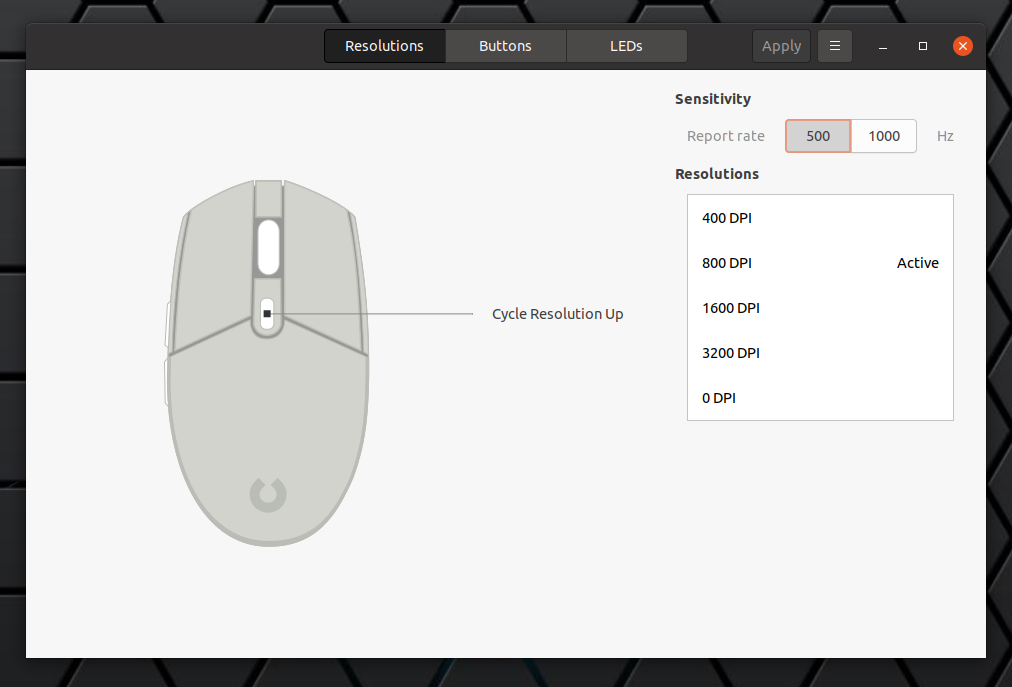
set the mouse sensitivity (report rate) and resolutions (DPI)
configure mouse buttons (including macros, if supported by the device)
configure LED colors
custom mouse profiles
I only know about the profiles feature from the Piper screenshots available on its project
page, because that button is missing in my case (I'm using the latest Piper, so I guess it's
due to my mouse not supporting it).
Here are some screenshots with the Piper Buttons and LEDs settings:
So far the application has worked great to tweak my Logitech G102 mouse on my Ubuntu 20.10
desktop, but I do have some complaints. For starters, it doesn't have a tray icon, which could
be very helpful to see the current DPI for example, or change profiles (if I could use
those).
Piper also doesn't notify you in any way when changing the DPI using the assigned mouse
button(s). What's more, the Piper user interface doesn't correctly show the active DPI when
changing it using the assigned mouse button, even after restarting the application.
By the way, if you have a gaming mouse on Linux, you'll want to disable mouse acceleration,
especially if you play FPS games. See this
article for how to disable mouse acceleration in Ubuntu / GNOME.
Install Piper to configure gaming mice on Linux
Piper should be available in the official repositories for most Linux distributions. Install
it using:
Debian buster (backports), bullseye and sid / Ubuntu 20.04 and 20.10 / Linux Mint 20 /
Pop!_OS 20.04 and 20.10 / Zorin OS and other Debian or Ubuntu-based Linux
distributions:
Posted by BeauHD on Tuesday July 07,
2020 @09:30PM from the new-and-improved dept. MojoKid writes:
Last month, AMD
made its Ryzen 3000XT series processors official , after weeks of leaks and speculation.
Ryzen 3000XT series processors are tweaked versions of the original 3000X series products, but
with higher clocks and the ability to maintain turbo frequencies longer. Launching today, AMD's
new Ryzen 5 3600XT is a 6 core/12-thread processor, with a 3.8GHz base clock and a 4.5GHz max
boost clock. That's a 100MHz increase over the 3600X. The Ryzen 7 3800XT is an 8-core/16-thread
processor with a base clock of 3.9GHz and a max boost clock of 4.7GHz, which is 200MHz higher
than the original 3800X. Finally, the Ryzen 9 3900XT is a 12-core/24-thread processor with a
base clock of 3.8GHz with a max boost clock of 4.7GHz, which is a 100MHz increase over the
original Ryzen 9 3900X.
AMD also notes these new processors can maintain boost
frequencies for somewhat longer durations as well , which should offer an additional
performance uplift, based on refinements made to the chip's 7nm manufacturing process. In
testing, the new CPUs offer small performance gains over their "non-XT" namesakes, with 100MHz
- 200MHz increases in boost clocks resulting in roughly 2% - 5%
increases to both their single and multi-threaded performance in most workloads. Those
frequency increases come at the expense of slightly higher peak power consumption as well of
course. The best news may be that AMD's original Ryzen 5 3600X, Ryzen 7 3800X, and the Ryzen 9
3900X will remain in the line-up for the time being, but their prices will be slashed a bit,
with the new Ryzen 5 3600XT, Ryzen 7 3800XT, and Ryzen 9 3900XT arriving with the same $249,
$399, and $499 introductory prices as the originals.
AnandTech reports: The new Snapdragon 865+ is a new binned
variant of the [Snapdragon 865] with higher peak frequencies on the part of the "prime" CPU as
well as the GPU, promising +10% performance on both aspects. Whilst in relative terms the new
chipset's +10% clock improvement isn't all that earth-shattering, in absolute terms it finally
allows the new Snapdragon 865+ to be the first mobile SoC to break past the 3GHz threshold,
slightly exceeding that mark at a peak 3.1GHz frequency.
Ever since the Cortex-A75 generation
we've seen Arm make claims about their CPU microarchitectures achieving such high clock
frequencies -- however in all those years actual silicon products by vendors never really
managed to quite get that close in commercial mass-production designs.
We've had a chat with Qualcomm's SVP and GM of mobile business Alex Katouzian, about how
Qualcomm achieved this, and fundamentally it's a combination of aggressive physical design of
the product as well as improving manufacturing yields during the product's lifecycle. Katouzian
explained that they would have been able to achieve these frequencies on the vanilla Snapdragon
865 -- but they would have had a lower quantity of products being able to meet this mark due to
manufacturing variations.
Yield improvements during the lifecycle of the Snapdragon 865 means
that the company is able to offer this higher frequency variant now. [...] There will be a
power increase to reach the higher frequencies, however this will only be linear with the
increased clock speed, meaning energy efficiency of the new SoC will maintain the same
excellent levels of that of the Snapdragon 865, so battery life will not be affected. [...]
Amongst other new novelties of the Snapdragon 865+ platform is the ability for vendors to
bundle with the new FastConnect 6900 Wi-Fi chips from Qualcomm, the company's new Wi-Fi 6
chipsets with 6GHz band capability (Wi-Fi 6E).
"... Helpful functions, like a timer, stopwatch, volume and ringtone controls allow the wearer to customize their watch to their lifestyle. Care Smart helps seniors stay effortlessly connected with loved ones with easy-to-use functions and simplified calling and texting. ..."
With one-button emergency contact calling and more to help keep seniors safe.
Care Smart watch is an easy-to-use smartwatch designed for seniors. With features like
streamlined calling and texting, text-to-speech, reminder settings, and one-button emergency
contact calling, 1 this device helps seniors stay connected and puts family members'
minds at ease.
Using the Care Smart app 2 caregivers can add up to 10 trusted
contacts 3 as well as manage useful things like medication reminders and location
alerts.
A large easy-to-read display, simple navigation and pre-set text replies make Care
Smart a trusted, everyday companion that seniors and caregivers can rely on. Stay connected
with your loved ones with the Care Smart watch and Verizon, America's most awarded network. See
Less
Simple to stay in touch.
Care Smart comes with a number of pre-loaded messages making it easier than ever for seniors
to respond to text messages. An easy-to-read screen displays the date and time and streamlined
3-touch navigation for accessing contacts, placing calls or sending texts makes this smartwatch
a snap to use.
Helpful functions, like a timer, stopwatch, volume and ringtone controls allow
the wearer to customize their watch to their lifestyle. Care Smart helps seniors stay
effortlessly connected with loved ones with easy-to-use functions and simplified calling and
texting.
Only connect with those you trust. With the Care Smart app caregivers can set up to 10 trusted
contacts in the senior's watch for calling or texting. And only those predesignated contacts
can call or text the wearer, eliminating the worry of fraudulent callers getting in touch with
seniors. 3
FULL worldwide coverage + REAL-TIME TRACKING: Full USA & Canada coverage + 185
countries. International SIM card included. MONTHLY FEE required: $19.95 or as low as $9.95
for long term plans. Track Vehicles cars, trucks, children, teen, spouse, dog, elderly,
motorcycle, ATV, boat, drone, equipment, tools, employees, assets, car fleets & valuable
belonging. Place in a backpack, luggage, package, shipment, hide it under a car & track
real-time whereabouts via easy-to-use iPhone, Android or Web app
Tracki's advantages that other trackers don't have: Tracki is 30% of the size &
weight. SIM works worldwide. Live phone customer service. Free tracker if tracker lost.
Lifetime warantee. Best smartphone App. Wi-Fi tracking when indoors. Can send beep to
tracker. Manual 15 seconds ping. Attachments: Magnet, Belt clip, Key-chain, lanyard. 5 years
history. Batt can be replaced, other dead if batt dies. 30 days batt tracking 4 times/day.
Optional 6x larger batt can last 6 mo tracking 4 times/day.
AS A WORLD LEADER in GPS tracking Tracki is developed & made by us. Our competitors
are just reselling same exact GL300 as 12 different brands. Tracki Smallest & Lightest
GPS tracker, only 1.26 ounce, works for unlimited distance. Rechargeable BATTERY LIFE last
2-3 days tracking real time every 1-5 minutes. If real time tracking not needed, battery last
30 days tracking 4 times/day. Optional batt https://amzn.to/2TEX4MW extends batt life to 2
weeks at 1 min update & 6 months tracking 4 times/day
ALERTS, MONITORING & SMART Notifications: Revolutionary technology works indoors
& outdoors. GPS/A-GSM/GSM for outdoors. Wi-Fi mac ID matching to Global database for
indoors tracking & Bluetooth for the last 50 feet. Get real-time alerts when the tracker
crosses a Geo-fence zone that you designate. Receive SOS, speed alerts & start moving
notifications about the tracker's movements via App notification, SMS or email. 5 years
history reports about the tracker such as route, speed & time stamps.
MONTHLY FEE: Just like a cellphone a tracker needs a data connection using the cellular
network. MONTHLY FEE is required:19.95, 16.60, 13.95 or $9.95 depending on the package term
for unlimited usage worldwide, no roaming fees, no hidden fees.
LIVE CUSTOMER SERVICE: At Tracki.com we care, live-chat support, ticketing, email or call us +13237852020 & our
technical experts will go the extra mile till you are 100% satisfied.
EASY SETUP working
out-of-the-box but Advanced enough for professionals
Garrets Daddio , Reviewed in the United States on September 18, 2019
I wanted to like this and I will start out with the only positive I can think about this
product. It's small and easy to hide.
Originally I was going to give this three stars but the negatives added up and then they
updated the app and made things much worse. You can view history and set alarms on both the
phone app and the web interface. However each interface has different abilities with some
options on one but not the other. The maps looked similar until the phone app updated. The
mess of lines when tracking history became even more unbearable as it lost the function of
telling you the direction of travel on the phone app. You can export a log file but it has no
real support for viewing on google earth, you loose all track lines and are stuck with random
dot points. Pulling up history often limits you to pulling up a full days worth of tracking.
So it's not easy to single out a hour or two of when you knew a particular event happened or
perhaps the time a particular person was driving unless you want to download the file and
alter it using third party software..
Battery life was bad. If you are actually tracking a moving object it takes more power. I
did stretch it out to 2.5 days once or twice but many days I had to charge it everyday. To
overcome this I was going to hard wire it into the vehicle... until they updated the app.
Also note that being discrete in removing and installing it so often to charge the tracker is
difficult to do. Also hard wiring it in defeats the purpose of having a small device. I even
tried the low power setting turning the device off for 15 minutes then on for 5 to take a
reading but it did not help much. Instructions for doing that are pretty much non existent
but you can make these changes on the web interface but not the app. The app was slightly
better at giving you more options for past history as long as it was in the past 24 hours.
But no matter what way you checked history after a day went past you only could view full
days at a time.
At it's best this tracker can update once a minute. This is actually the slowest setting
for other trackers, some update every 3 to 5 seconds. What this means is that often the track
will not follow roads. I also used other trackers that easily lasted 2 full weeks vs 1 day
this unit often gave me. At one minute intervals it was possible to see many stops when other
people got into the car. But reducing the intervals in attempt to save battery life lost the
ability to see people pull over to pick somebody up. It also makes it impossible to determine
what roads were actually used. It does not track data like miles driven like others do.
In terms of functionally I had better luck with free apps on an old cell phone. Oops I
dropped my phone in the car again? Silly me. The "magnetic mount" is actually a magnet
attached to velcro and made no sense to me. The app lost functionality after they updated it.
It also changed to a very plain looking map by default that actually makes it difficult to
figure out the location. You can change the view to something more viewable but it always
changes itself back to the default view I dislike.
Update 10/17/2019
As mentioned before originally I was going to give this a three star review but ended up
giving it one star for all the things I already mentioned. So how did we get to this point? I
am actually giving it five stars at this point.
A representative reached out to me. He was very professional and actually appreciated my
negative input. But more importantly I was under the impression that they strive to make the
product better. I waited to update this review though, perhaps a little too long. I wanted to
see the actions and improvements first. But yeah, customer service and attention to detail
really impressed me.
So what about those improvements that I am talking about? Both the web interface and the
Android app received updates. The battery saving function is now available on all formats and
it was simplified to set up. History can now be looked up without the cluttered mess of
looking at a full day. The map now retains your preferred method of viewing it, the arrows
are back indicating direction of travel. I added another photo so you can see for yourself
the difference between the old app map and the new one that indicates direction of travel.
The app is also less cluttered looking but at the same time gives you more available
information. I no longer have to switch from the app to pc to get all features as everything
is more uniform. I was told they would attempt to add even more features and I believe they
will.
The unit itself is currently selling below the competitors. It accurate. The monthly fee
is also below most competitors. Battery life is still somewhat of a disappointment to me. But
it normally falls between what they claim. For me usually two days as this point but at times
it surprises me with a third day. I can't take a star off for this as it is in a normal
variance and as advertised. However the thing with this device is that you can choose what
you want. A small device that is very lightweight for a kid to carry in a backpack or......
Get the optional battery pack/water proof holder with magnetic mount. The choice is up to
you. I have not used the the extended battery pack yet but it's charging now as I write this.
Although it does add size to the small tracker it does not make it any larger than the
competitors in other waterproof cases. I will perhaps update after I get familiar with how
well the case/extended battery works. For now though this company has completely turned my
opinion around with great customer service
victoria
, Reviewed in the United States on August 23, 2019
I purchased the Tracki with suspicion of my husband's activity and thanks for the Tracki I
was correct, it was a great device and works amazing, I highly recommend it
❗️
rcashley
, Reviewed in the United States on January 3, 2020
I have been using this tracking device for approx. one month now, and I will say it does a
very good job.
For the first week I used it with the original battery. Even though the instructions say
not to put it in the trunk or the engine bay, I tried it anyway, first in the engine bay
(placed high on the inside of the fender) and then the next day in the trunk (high on the
inside of the fender). The tracker did a good job in both places and the accuracy was very
good. The battery life with the original small battery was pretty good, it took about two
days to go down to 50%. I had the settings on 1 minute (the most frequent currently
available). The vehicle wasn't in constant motion all day, so keep in mind, if it was, and
reporting every minute, it would consume more battery, so you could always change to a less
frequent time (5, 10, 15, 30, 45, 60, 120). The history of where the tracker has been is
being recorded based on these reporting times. You can look up past history many ways (the
last few hours or a date range). This info. can be downloaded if needed. I ordered the
waterproof case with the larger battery and have been using that for the last three weeks.
The battery life with it is a huge improvement (it took two weeks to go down to 50%), and I
used it in the trunk and engine bay also with no negative issues. I have talked with Customer
Service a few times to report my thoughts, and I will say, they are as good as anyone could
hope. I have tracked my device with an iPhone/iPad and on a PC using various browsers. I will
say that if you use an iPhone/iPad, and you want to see "live tracking", there are a couple
of apps that you can use. The newer Tracki app still has a few bugs they are working out (as
far as seeing live tracking), but there is another app called Trackimo, and it doesn't have
all the "bells and whistles" of the new app, but "live tracking" works well on it. Keep in
mind the history of the device is being recorded (no matter what app or device you use to
check it), so you can always check it out from any computer with a browser. There are many
applications someone could use this device for, and the tracker is so small, you could put it
anywhere.
rcashley
, Reviewed in Canada on November 26, 2019
I wanted to follow my son when he takes the bus. I also wanted an alert for when the bus
quits the school using the area alert system, but the bus's route is so short that the alert
is not reaching me soon enough, so I have to go to the Tracki website and ping the device
repetitively until I see the bus moving. That way I know when I have to leave work and get to
my son on time.
The fact that the tracker is not as fast as I would have expected and the higher monthly
fee than some other 2G tracking device I've found made it loose one star.
Free returns are available for the shipping address you chose. You can return the
item for any reason in new and unused condition and get a full refund: no shipping
charges
NEVER WORRY OR WONDER AGAIN: Make sure people get where they're going, or where they say
they're going. Get alerted if they go too far. Monitor drivers, speed, safety and logistics
for businesses. Keep employees and spouses honest. And never lose your valuable possessions
or assets again.
PUT IT ANYWHERE: The tiny, lightweight Prime Tracking GPS fits and conceals easily in
strollers, vehicles, backpacks or pockets. So small, it's virtually undetectable.
TRACK ANYWHERE IN NORTH AMERICA FROM ANYWHERE, ANYTIME: Easily and privately track any
location in the U.S., Mexico and Canada from your computer, tablet, or phone. Works on
multiple devices and networks, wherever there is cellular service.
GET INFORMATION INSTANTLY: State-of-the-art 4G LTE technology means you get location,
movement and direction information as it happens, updated every 10 seconds in our smartphone
app or desktop interface.
MONITOR AFFORDABLY: Just $25 /month, or $20 / month for 6 months. Cancel anytime, no
contracts or activation fees. SIM Card INCLUDED.
Cesar Hawn , Reviewed in the United States on January 30, 2019
I'm always working late so my mom with an alzheimer's disease is left at home. Sometimes
she went outside, and buy food and things. One time, I got home like almost 12 midnight and
my mom isn't at home! I found her sitting at the bus station around 3 am. Thank you so much
for this tracker as I can now monitor my mother's location!!
Tina
A. , Reviewed in the United States on June 25, 2019
This tracker works fine but the reporting is not very good. I used to have this same type
of tracker that I purchased from Americaloc but I misplaced it so I thought I would try this
one because the device looked the same but was much cheaper. You get what you pay for! The
reporting features was so much better with the Americaloc GL300W! Reporting is great and very
precise!
Janet
Lord , Reviewed in the United States on February 1, 2019
This is the second tracking device I purchased and this product by far is the most
accurate and reliable. Battery lasted for 10 days which is good because my other tracker only
lasts 4-5 days. Subscription is also very cheap compared to its uses and the option to cancel
it any time.
I've been using GPS trackers to track my (quite expensive) electric bike - just in case it
gets stolen plus to see my routes after I'm done riding. I built it into my bike to where
it's powered by the main bike battery. You can also power it with your car battery with a
DC-DC converter - 12v-to-5v - or just take apart any usb car charger and wire it yourself. I
think that's really the cheapest way because those things only cost like $1-$2 at auto shops
(all it needs is a 5v input). I have another, very similar name-brand tracker (SpyTec) that I
can compare this one too so I'll list out the good differences and the bad differences (Pros
and Cons) below but before you see the cons, I should mention that I still think this GPS
tracker is the way to go:
Pros:
---- Cheaper in the long run: The device is the same price as the SpyTec GPS tracker BUT...
the service is cheaper (for "faster" updates). SpyTec is $25/month updating location every 60
seconds. This one is $20/month (with a 6-month payment deal) for 10 second updates.
---- Seems well-built. Battery ran for well over a week before I decided to recharge (was
down to around 30%).
---- Device appears to be water-tight, just like my other tracker - which is great :)
---- This one has a (usable) app! SpyTec does not.
---- Can export travel logs to
Cons:
---- About 150% larger than the SpyTec GPS tracker. This could be due to a larger battery or
just different electronics. Though it has the same battery life as the SpyTec.
---- Appears to only work in the US and Canada, where the SpyTec tracker works worldwide (as
long as you call them and let them know you're traveling).
---- Not nearly as much info on the site. The SpyTec gives start/stop info for every GPS
update. This one just shows a solid line. Website is not as user-friendly.
---- No text updates, only emails. This just means when the vehicle goes over the speed limit
OR leaves a geofenced area, it will send an email instead of a text. I do miss getting texts
from my SpyTec GPS but I'm willing to sacrifice that for the lower monthly fee of this
one.
---- Limited notifications. This one only has geofencing and speed alerts where SpyTec has
Geofencing, speed, ignition on, ignition off, tow alert (I LOVE THIS ONE, I wish
PrimeTracking had this alert), function key and low battery alert.
---- Shows speed in mph but distance in km. Can't find a way to switch distance to miles. Not
a huge con but I wish I could change it.
---- Less tracking options than SpyTec.
NOTE: By default, the device is set to only update every 60 seconds. In order to switch it
to 10-second updates, you have to either contact support and have them do it for you or do it
yourself by following these instructions:
"To access the Upload interval setting; Visit PrimeTracking.Net > Click more under your
tracker to the left > Click Upload Interval > to set the 10 second interval enter 10
into each of the four boxes and click save > if the tracker is online and the settings is
saved, you will get a notification that says "Command saved" otherwise you will get one that
says "please make device online first"."
Overall though, I think this GPS tracker is ALMOST 5 stars. It's almost there. If they
added a few features to their site (like tow alerts, the ability to pick an update point to
see information [instead of having to click "play" and then "pause" at the point you want to
see] and text alerts), I'd say 5 stars all the way. It just needs some work on the
website/tracking side of things. If their site gets updated with a more user-friendly UI and
some additional options, I'll come back and give it 5 stars. Other than those things though,
this GPS unit really does work quite well. And at a great subscription price. Good for
tracking a stolen car, your kids or a significant other that you suspect of cheating.
BTW: You can see more info on their website: MyPrimeTracking.com and actually track your
device on their other site: PrimeTracking.net
Verified my (now ex) girlfriend was cheating. Sucks but it's better than never knowing the truth. The tracker was incredibly
easy to set up. Charge lasted longer than what other reviews stated (mine is still 55% after just over a week). The best feature
by far is the Geofence; I would get text alerts whenever my ex arrived or left the dude's apartment complex. I placed the tracker
under her vehicle using the
Spy Tec M2 Waterproof Weatherproof Magnetic Case for STI GL300 / GX350 Real-Time GPS Trackers which I also recommend.
Since the job is done, I submitted a form on their website to cancel the service. If they continue to charge my card (as other
reviews warned of) I'll be sure to change this review to a one-star.
UPDATE: They confirmed my cancellation request within 24 hours. Locating the cancellation form was as easy as typing "spytec
gps cancellation" in my search bar. I would 10/10 recommend this product to anyone suspecting of infidelity.
DickDastardly , Reviewed in the United States on August 30, 2017
Used this to track my ex-wife. Suspected her of cheating and sure enough caught her visiting her boytoy during the day when
I was at work. I'm divorced now and can laugh about it, but at the time watching the Spytech screen and seeing her every move
was traumatic, but I had to know
I am in the medical field. I compared the FL-400 LED pulse oximeter to a medical grade
Datascope Passport 2 monitor with Masimo pulse oximeter (top of the line). The FL-400 was
able to acquire a signal a second sooner. The readings were very close and I would trust it
for medical use. The pulse rate was 2 bpm faster and the pulse oximeter was 1% lower. I would
feel comfortable using this in patient care. Build quality is very good. Good entry level
unit.
Couple of suggestions to make it work properly is to make sure the finger is seated in the
groove all the way in. This may be a problem if you have long fingernails. Keep movement to a
minimum. This is because the unit can get confused with movement with pulsations in the
capillaries. This happens in ALL pulse oximeters, but super expensive medical grade monitors
can compensate for this to a small degree. So do not expect to use this while running or
exercising and expect it or any pulse oximeter to work. Also, if you have blue nail polish on
your fingernails, itwill not work. Blue absorbs red and infrared which all pulse oximeters
use.
I do prefer the beeping pulse rate option and the ability to change screen orientation
with the button that is present on the FL-100 (color OLED unit). As far as accuracy, it is
spot on as long as the above is followed.
Kaylana
, Reviewed in the United States on March 24, 2018
This product very well may have saved my life!
The sheath and lanyard it comes with make it very convenient to carry around without worrying
about it getting damaged or lost. So when I felt a little funny after leaving the allergist
one day I didn't even have to think twice about pulling out my trustee oximeter to double
check vitals. My pulse was at 160 bpm! I didn't know why, I just knew it wasn't normal. I
immediately went back into my doctor. Turns out an acute anaphylactic reaction caused my
pulse to go way up due to low blood pressure and they were able to give me epi just in time.
If it weren't for the oxiimeter being readily available, I very well could have tried to
drive away and pass out moments later. Thank you FaceLake for providing this very nice
product at an affordable price!
Works great! I use this as a Respiratory Therapist every day at the hospital on hundred of
patients and have purchased this pulse odometer multiple times when they wear out after heavy
use. Well worth the money.
Anton
Giroux , Reviewed in the United States on March 31, 2017
We got this because my wife has O2 problems after her heart surgery. It immediately
alarmed because her O2 level was very low. Enough to run her into the emergency room. When we
got there, her levels had risen back into allowable range. The ER nurse told me to get the
meter checked. When we visited our family doctor we brought it along and compared it to a
calibrated meter.
Wife's readings - This meter - 85; hospital meter - 92
My readings - This meter - 90; hospital meter - 97
They tried a couple other staff there and this meter constantly read 7 - 9 units low.
I'm returning it and going to try a different meter. The nurse gave me a couple model
numbers they know work well. One was the same brand as this, but the model fl-350.
Love it... This is the second one I have purchased, I wanted the ECG capability and I'm in
the medical field I have tested them side by side and the watch is very accurate..... Thank
you gentleman for a great product! Read more
Blair
B. , Reviewed in the United States on November 11, 2019
I bought this for my father who is over 80, he needs some device can track EKG, BP, HR
etc. Until now, he loves it so much and take it every day,especially the screen is large and
bright for him to read and the APP is not complicated for not a computer wiz. Was surprised
that the battery life is really good which can go three days with all functions on. Most
important,The readings seems to be fairly accurate as compared to my father's other
instruments at home. Definitely this is NOT a substitute for your doctor and his more
accurate medical equipment. Good choice for daily use and reference.
Overall, this is a great purchase with this competitive price and gonna buy one more for my
mom. Recommend to all of your guys.
SPARTA
, Reviewed in the United States on November 3, 2019
I purchased this health monitor for my health. It was one of the very few devices that
provided an accurate blood pressure reading and an ECG. The fitbit was extremely accurate. It
is very easy to set up with my Iphone X. All my friends are getting this for christmas.
Read more
Jasmine
Zhong , Reviewed in the United States on November 13, 2019
I have bought it as a gift for my grandpa and never thought he felt in love so much with
the watch that I bought him, it is very convenient and easy to be carried, especially every
time when he wants to test the heart rate and blood pressure, it's so easy to operate, feel
in love with it and appreciate for the chance of purchasing it
Dan
, Reviewed in the United States on April 17, 2020
I struggle to give this 3 stars. This device certainly has some flaws, but I'll start with
what works...
* Heart rate, SPO2 and BP monitors seem to be pretty accurate. I cross checked its HR/SPO2
readings with other devices and they more or less agreed with one another. +/- a couple of
points here and there, but that's to be expected given the method of measure was different. I
wouldn't say it was wildly inaccurate, and good enough for the purpose. ECG seems pretty
accurate as well, although I have nothing to cross-check that with. I'll take its word for
it.
* Battery life is pretty good. It easily lasts a few days on a single charge. I've not even
had mine to full charge yet (had it a week) and it more than happily lasts all day, and then
some.
Now the cons...
* The app is pretty hit-and-miss. It's definitely been translated from Chinese, so some
parts of it don't really make much sense from a grammar perspective. You have to read some
parts a few times carefully to understand what it's actually trying to say. The app's
connection to the watch is also quite spotty. It randomly disconnects and refuses to
reconnect. Then randomly decides to connect all of its own accord. Some times it takes a
couple of refreshes to get it to sync all the data from watch, too. Google Fit integration
isn't all there either - it doesn't always fully sync an entire day's worth of data before
going onto the next day. My Google Fit data has huge chunks of data missing towards the end
of each day. It also doesn't sync sleep data, despite it claiming to do so.
* Sleep tracking is hit-and-miss too. If you happen to get up in the middle of night
sometimes, then it'll count that as the end of your sleep cycle, and won't track any further
sleeping. So last night according to my device, I got 1.8 hours of sleep, which was "Very
Good". I..have a differing opinion.
* Good luck finding a USB port that this thing will fit into to charge it. The design of the
watch/charge port - I can see what they were going for, and it's a nifty idea. But the
connector is too close to the watch's body, so it won't fit into 99% of the USB ports in my
possession. And the 1 thing that I've found that it will fit into (that I've had to modify
with a craft knife to cut part of the port's body away to make way for the watch's body), it
doesn't seem to get a great connection, and just stops charging. A little wiggle and it'll
resume. And then stop again. When it does stay charging for more than 10 seconds it boosts it
pretty quickly, so it doesn't need to charge for very long. Unfortunately, I've never managed
to get it to charge to 100% due to the aforementioned charging issues. I don't know if this
is just a faulty device, or a design flaw (though I'm more inclined to say it's the latter).
Either way, it's a good job it's got a decent battery life.
In conclusion; it's "alright". I wouldn't recommend this to a friend. There's probably
better ones out there, but this mid-range not-a-fitbit watch seemed like it's be pretty good
for the price. It had all the features I was looking for. But honestly just let down by the
software not having much in the way of quality control, and a poor design on the charging
port.
mrhine1
, Reviewed in the United States on February 15, 2020
The watch itself was good, and fairly accurate when I tested it against some devices my
old man has as a retired firefighter/paramedic.
The app is a battery sucking monster. It also uploads a ton of data when you give it
permission..like nearly a half a gig a day when I tracked it over my local wifi. 2 people
found this helpful Helpful
The
Mind Enhancer , Reviewed in the United States on February 21, 2020
Has great features and mobile app has alot of information. Accuracy is off by 20-30%.
Checked BP readings got 106/60 then manually checked and was 127/78. Did this several times
and found all readings off. The ekg measurements are really only good for heart rate to show
tachycardia or bradycardia. Ekg readings for QT intervals are very,very unreliable. The O2
levels are accurate. The steps are within reason. The sleep monitor is off, I have another
system for that and accuracy is much better. I like find my phone,stop watch, take a picture.
The battery life is horrible after 3 weeks I get 2 days top, where other trackers I get at
least a week. You get what you pay for and will be looking for a better more accurate tracker
watch.
"... Seagate hopes to get to 48TB by 2023, while Western Digital is planning on releasing 18TB and 20TB drives this year. ..."
"... Fellow Japanese electronics giant Toshiba is expected to ship drives with Showa platters later this year. Seagate will be the first American company to adopt HAMR, with 20TB drives scheduled to ship in late 2020. ..."
Hard drive makers are staving off obsolescence to solid-state drives (SSDs) by offering
capacities that are simply not feasible in an SSD. Seagate and Western Digital are both pushing
to release 20TB hard disks in the next few years. A 20TB SSD might be doable but also cost more
than a new car.
But Showa Denko K.K. of Japan has gone one further with the announcement of its
next-generation of heat-assisted magnetic recording (HAMR) media for hard drives . The platters
use all-new magnetic thin films to maximize their data density, with the goal of eventually
enabling 70TB to 80TB hard drives in a 3.5-inch form factor.
Showa Denko is the world's largest independent maker of platters for hard drives, selling
them to basically anyone left making hard drives not named Seagate and Western Digital. Those
two make their own platters and are working on their own next-generation drives for release in
the coming years.
While similar in concept, Seagate and Western Digital have chosen different solutions to the
same problem. HAMR, championed by Seagate and Showa, works by temporarily heating the disk
material during the write process so data can be written to a much smaller space, thus
increasing capacity.
Western Digital supports a different technology called
microwave-assisted magnetic recording (MAMR). It operates under a similar concept as HAMR but
uses microwaves instead of heat to alter the drive platter.
Seagate hopes to get to 48TB by 2023, while Western Digital is planning on releasing
18TB and 20TB drives this year.
Heat is never good for a piece of electrical equipment, and Showa Denko's platters for HAMR
HDDs are made of a special composite alloy to tolerate temperature and reduce wear, not to
mention increase density. A standard hard disk has a density of about 1.1TB per square inch.
Showa's drive platters have a density of 5-6TB per square inch.
The question is when they will be for sale, and who will use them.
Fellow Japanese electronics giant Toshiba is expected to ship drives with Showa platters
later this year. Seagate will be the first American company to adopt HAMR, with 20TB drives
scheduled to ship in late 2020.
ON-THE-FLY MACRO RECORDING (PC) Follow these steps to create an OTF Macro Recording: 1.
Press the key combination to start recording. 2. The Macro Recording Indicator will light up to
show that the device is ready to record. 3. Type in the keys you want to record. 4. Press the
key combination to stop the recording or the ESC key to cancel recording. The Macro Recording
Indicator will start blinking to show that the device has stopped recording and is ready to
save the macro. 5. Press the desired key where you want to save your macro. Upon selecting a
key assignment, you may then change it to one of the following functions: Default This option
enables you to return the selected key to its original setting. Keyboard Function This option
changes the key assignment into a keyboard function. You can also choose enable Turbo mode
which allows you to emulate repeatedly pressing the keyboard function while the key is held
down. Mouse Function This option allows you to change any key into a mouse function. Listed
below are the functions which you can choose from: ▪ Left Click - Performs a left mouse
click using the assigned button. ▪ Right Click - Performs a right mouse click using the
assigned button. ▪ Scroll Click - Activates the universal scrolling function. ▪
Double Click - Performs a double left click using the assigned button. ▪ Mouse Button 4 -
▪ Mouse Button 5 - ▪ Scroll Up - ▪ Scroll Down - ▪ Scroll Left -
▪ Scroll Right - You can also choose to enable Turbo mode in some of the mouse functions
which allow you to emulate repeatedly pressing and releasing said function while the key is
held down. Macro A Macro is a prerecorded sequence of keystrokes and button presses that is
executed with precise timing. By setting the key function to Macro, you can conveniently
execute a chain of commands Switch Profile Switch Profile enables you to quickly change
profiles and load a new set of key assignments. An on-screen notification will appear whenever
you switch profiles. Switch Lighting Switch Lighting allows you to easily switch between basic
and advanced lighting effects. to learn more about Advanced Chroma Effects Razer Hypershift
Setting the key to Razer Hypershift will allow you to activate Hypershift mode as long as the
key is held down. Launch Program Launch Program enables you to open an app or a website using
the assigned key. When you select Launch Program, two choices will appear which requires you to
search for a specific app you want to open, or write the address of the website you want to
visit. Multimedia This option allows you to assign multimedia controls to your Razer device.
Listed below are the multimedia controls you can choose from: ▪ Volume Down - Decreases
the audio output. ▪ Volume Up - Increases the audio output. ▪ Mute Volume - Mutes
the audio. ▪ Mic Volume Up - Increases the microphone volume. ▪ Mic Volume Down -
Decreases the microphone volume. ▪ Mute Mic - Mutes the microphone. ▪ Mute All -
Mutes both microphone and audio output. ▪ Play / Pause - Play, pause, or resume playback
of the current media. ▪ Previous Track - Play the previous media track. ▪ Next
Track - Play the next media track.
Posted by EditorDavid on Sunday October 20, 2019 @02:34PM from the
month-long-weekend-projects dept. Long-time Slashdot reader ttsiod works for the European Space Agency as an embedded
software engineer. He writes: After reading an interesting article from an NVIDIA engineer
about how he used a dirt-cheap field-programmable gate array board to code a real-time
ray-tracer, I got my hands on the same board -- and "compiled" a dual-core SPARC-compatible
CPU inside it... Basically, the same kind of design we fly in the European Space Agency's
satellites.
I decided to
document the process , since there's not much material of that kind available. I hope it
will be an interesting read for my fellow Slashdotters -- showcasing the trials and
tribulations faced by those who prefer the Open-Source ways of doing things... Just read it
and you'll see what I mean.
This is the same Slashdot reader who in 2016
reverse engineered his Android tablet so he could run a Debian chroot inside it. "Please
remember that I am a software developer, not a HW one," his new essay warns.
"I simply enjoy fooling around with technology like this."
05-30-2019 04:47 AM Remote Logging (SysLog) - iDRAC - OEMR XL R330 I do need some assistance. The idracs on our servers are not
sending any remote syslog. The following has been done from reading the idrac documentation:
1. Overview - Server - Logs - Remote Syslog enabled, correct IP inserted into 'Syslog Server1'.
2. Overview - Server - Alerts - alerts enabled, all alerts filters ticked, most of the 'Remote system log' checkboxes ticked under
'Alerts & remote system log configuration'.
3. Events triggered to produce something in the idrac syslog.
4. My network team report that the 'flow sessions'from the idrac server are empty.
5. idrac firmware updated to 2.61.60.60.
6. Settings checked against the syslog settings on the other idrac server
Remote server is running on the same network as iDRAC and the iDRAC is enterprise so remote syslog is allowed.
I can only think of about that it can be routing problem but I am not sure where I can find the routing table ?
Maybe you can help what can be the problem or point me to the right direction.
It looks like you have performed the steps necessary to enable remote syslog. I suggest reviewing everything again.
Verify iDRAC Enterprise license is being used in Overview>Server>Licenses
Enable remote syslog, enter IP of remote server, and enter port in Overview>Server>Logs>Settings
Configure alerts to send to remote syslog in Overview>Server>Alerts
Enable alerts in Overview>Server>Alerts
Make sure that you use the apply button on each page after changing settings. If you continue having issues then I suggest updating
the iDRAC/LCC firmware to the latest.
06-12-2019 05:17 AM Re: Remote Logging (SysLog) - iDRAC - OEMR XL R330 I've done everything which you pointed at. The firmware was
already updated to the newest one. License is good, port and other configuration seems to ok.
06-12-2019 10:29 AM Remote Logging syslog Remote syslog is not working. I tried to test it but without any luck.
I've done everything from the manual and also what Dell engineer pointed at. The firmware was already updated to the newest one.
License is good, port and other configuration seems to ok.
07-22-2016 12:20 PM RACADM - iDRAC 8 - R630 - Remote Syslog Alerting - Active DIMM
Errors are not logging - test messages are being sent to the remote syslog Hello -
I've successfully set up a remote rsyslog server, and have configured the iDRAC on another
machine, which has an active DIMM error, to report rsyslog messages to this rsyslog
server.
I am able to successfully send a test message from the iDRAC on the server in question,
and the messages appear in the rsyslog /var/log/servername directory.
racadm>>eventfilters test -i MEM0702
racadm eventfilters test -i MEM0702
RAC1027: Successfully sent the alert for the specified event to the configured
destination.
Verify if the alerts were received by the configured destination. Otherwise,
reconfigure the destination and retry the operation.
rsyslog logfile output:
Jul 21 22:57:50 server01.domain.com Severity: Critical, Category: System Health,
MessageID: MEM0702, Message: Correctable memory error rate exceeded for DIMM1.
SEL Log in the server in question with a bad DIMM
I've let the system sit for about 16 hours now, configured properly to send out alerts, I
have verified that the server can indeed send messages successfully. Why am I not seeing this
active error appearing in the syslog?
Will the system only send out NEW alert occurrences AFTER configuring the remote
syslogging? Here are some more screenshots of the configuration within racadm GUI
Also, with active DIMM errors, why is the Server Heath showing OK?
1. Why am I not seeing the system recognize that there are active DIMM errors and
reporting it to the remote rsyslog server?
07-22-2016 12:22 PM RACADM - iDRAC 8 - R630 - Remote Syslog Alerting - Active DIMM
Errors are not logging - test messages are being sent to the remote syslog I'm seeing some
information online that shows that a racadm racreset applies changes, is this true? Seems
silly to have to reset the rac to incorporate changes, but just throwing it out there just in
case. Tags (3)
07-25-2016 03:49 PM RE: RACADM - iDRAC 8 - R630 - Remote Syslog Alerting - Active
DIMM Errors are not logging - test messages are being sent to the remote syslog Following up,
over the weekend I saw some informational messages appear on their own into the remote
rsyslog server directory for this server in question. Those being:
Jul 23 03:00:15 server01 Severity: Informational, Category: Storage, MessageID: CTL37,
Message: A Patrol Read operation started for Integrated RAID Controller 1.
Jul 23 03:51:00 server01 Severity: Informational, Category: Storage, MessageID: CTL38,
Message: The Patrol Read operation completed for Integrated RAID Controller 1.
With this said, it appears that events that occur after configuring the remote
syslog server. The DIMM errors are not showing up in this log are still prevalent. I'm
wondering if clearing the events out of the SEL will allow these DIMM errors to kick in again
and then be logged - this is quite frustrating.
02-08-2017 09:32 PM RE: RACADM - iDRAC 8 - R630 - Remote Syslog Alerting - Active
DIMM Errors are not logging - test messages are being sent to the remote syslog hello,
1. I need dell server snmp and iDrac snmp configuration/setup.
2. can i use Prtg monitoring tool for above two?
I would be greatly appreciated it if anyone help me.
"... With the inaugural "Huawei AppGallery" emerging with the Mate 30, the company has now positioned itself on an investment trajectory to create a new "Huawei core" to compete with the world of Google-led Android systems outright. ..."
"... Beyond Apple and the iPhone, the Android operating system dominates in the global smartphone market. Describing it as an "operating system" is barely fitting; it might otherwise be described as "an ecosystem" with a wide range of Google orientated services within it. ..."
"... They include the popular browser Chrome, the YouTube video service, Google mail and, most critically, the "Google Playstore," which, owing to its popularity, attracts more developers and investors than any other unofficial App stores. This "ecosystem" creates a "web of comfort" which effectively entrenches the consumer in the Android orbit. ..."
"... p until May 2019, Huawei was a part of this orbit. Its subsequent estrangement from Android owing to the American government's decision has forced some difficult choices. It has made markets keen to observe how the Mate 30 will perform given its lack of Google applications and the need for users to obtain some apps through third-party stores. ..."
"... So, the question is: How are they now adapting and making that transition? Bengt Nordstrom of North Stream research in Sweden notes that "they have a strategy to become completely independent from U.S. technology. And in many areas, they have become independent." ..."
"... Huawei's announced bid to invest over 1 billion U.S. dollars in developing its own application "core" or ecosystem. This, in essence, is an effort to get developers to establish applications for the new "Huawei App store" and thus establish a self-reliant, independent path from the world of Android. ..."
"... To achieve this, the company has pledged a competitive revenue sharing scheme of 15 percent to developers, half of that what Apple and Google demand for participation in their own app-stores. ..."
September 21, 2019
Huawei's pivotal moment
By Tom Fowdy
Huawei launched its Mate 30 series on Friday, the first new device produced by the
Shenzhen telecommunications firm since it has been blacklisted by the United States
government and excluded from American technology markets.
The subsequent result of the listing had led Google to sever ties with the company and
prohibit new devices from using its Play Store services and operating system, something which
ultimately impacts the Mate 30 Series, which is using an open-source version of Android.
The impact of it all has led Western commentators to ask questions about Huawei's future
in Western smartphone markets, particularly what applications can it access.
However, not all is bleak, and what may start off as a hindrance for the company is set to
transform into an opportunity. The United States' assault on the company has forced Huawei to
innovate.
With the inaugural "Huawei AppGallery" emerging with the Mate 30, the company has now
positioned itself on an investment trajectory to create a new "Huawei core" to compete with
the world of Google-led Android systems outright.
In this case, what seems like a detriment is part of a broader pivotal moment for Huawei.
The company's portfolio is about to change forever.
Beyond Apple and the iPhone, the Android operating system dominates in the global
smartphone market. Describing it as an "operating system" is barely fitting; it might
otherwise be described as "an ecosystem" with a wide range of Google orientated services
within it.
They include the popular browser Chrome, the YouTube video service, Google mail and,
most critically, the "Google Playstore," which, owing to its popularity, attracts more
developers and investors than any other unofficial App stores. This "ecosystem" creates a
"web of comfort" which effectively entrenches the consumer in the Android orbit.
U p until May 2019, Huawei was a part of this orbit. Its subsequent estrangement from
Android owing to the American government's decision has forced some difficult choices. It has
made markets keen to observe how the Mate 30 will perform given its lack of Google
applications and the need for users to obtain some apps through third-party stores.
So, the question is: How are they now adapting and making that transition? Bengt
Nordstrom of North Stream research in Sweden notes that "they have a strategy to become
completely independent from U.S. technology. And in many areas, they have become
independent."
First of all, we are well aware that Huawei is developing its own Harmony Operating System
as a contingency measure, although it has not chosen to apply it to the Mate 30 as an olive
branch to Google.
Second, and most excitingly is Huawei's announced bid to invest over 1 billion U.S.
dollars in developing its own application "core" or ecosystem. This, in essence, is an effort
to get developers to establish applications for the new "Huawei App store" and thus establish
a self-reliant, independent path from the world of Android.
To achieve this, the company has pledged a competitive revenue sharing scheme of 15
percent to developers, half of that what Apple and Google demand for participation in their
own app-stores.
This effort is combined with a wider scope in research and development from the company,
which is also designed to forfeit dependence upon American technology chains in terms of
critical components and other parts.
We have already seen massive investment pledges from Huawei to build new research and
development centers in the United Kingdom, Belgium, Italy and Brazil. They are not empty
promises, but a serious and strategic effort.
In this case, what was intended to be a political effort to destroy and contain Huawei is
likely to prove a pivotal turning point in the company's history with huge repercussions for
global smartphone and technology markets.
Instead of having once been reliant on and thus beneficial to American technology markets,
the outcome is that Huawei will re-emerge independent of and competing against it.
Armed with a pending new operating system, a new application development drive and a
broader research effort, what seemed otherwise a detriment is likely to bring a massive
opportunity. Thus, it is very important to examine the long-term prospects for the company's
fortunes ahead of short-term challenges.
"... "The Kirin 990 is not only an SoC and a 5G modem glued together. We put a lot of effort in integrating the two chips. So the new chip uses less power and generates less heat while getting the job done," said Huawei fellow Ai Wei before the launch event. ..."
"... The whole Kirin 990 5G chip is so dense that it contains 10.3 billion semiconductors, the first and largest of its kind. ..."
"... Another example is AI-based video quality improvements, which takes in a low quality video and render a better one. Objects in the rendered video have much sharper edges. Huawei technicians refused to explain how they made it, but the underlying tech seems to be object recognition, content-based pixel generation and noise reduction, since these are the tricks AI does well. ..."
"... Huawei's P30 Pro smartphone, together with the Kirin 980 chip, has taken "smartphone zoom to the next level," according to third-party review site DxOMark. The phone was on top of all smartphones when it comes to photography in DxOMark's ranking. The Kirin 990 is packed with more graphic features to continue Huawei's dominance. ..."
Smartest and fastest: Huawei reveals new smartphone chip Kirin 990 5G
By Gong Zhe
Chinese smartphone giant Huawei, which has been under heavy attack from the U.S.
government during the last few months, just revealed its next-generation smartphone
system-on-a-chip (SoC) product "Kirin 990 5G," signaling the company's business is not
stalled by foreign strangling.
The launch event was held simultaneously at IFA electronic show in Berlin, Germany, and in
Beijing on Friday.
In his keynote speech, Huawei's head of gadgets Richard Yu told the press that the chip is
more advanced than other flagship smartphone SoCs, because it has a built-in 5G modem.
Current rivals of the chip, like Qualcomm's Snapdragon 855, have no 5G modem and have to
rely on an extra chip to support 5G.
"The Kirin 990 is not only an SoC and a 5G modem glued together. We put a lot of
effort in integrating the two chips. So the new chip uses less power and generates less heat
while getting the job done," said Huawei fellow Ai Wei before the launch event.
The whole Kirin 990 5G chip is so dense that it contains 10.3 billion semiconductors,
the first and largest of its kind.
Flexible AI power
The chip also features three AI cores, two larger than the other smaller. This design,
first in smartphones, saves battery power by only using the small core to process simple AI
tasks, while resorting to the larger cores for more complex jobs.
The company named the cores "Ascend Lite" and "Ascend Tiny" to relate the cores to
Huawei's new, self-proclaimed "fastest AI training chip in the world," the Ascend 910.
Huawei built a showcase at the Beijing launch event to demonstrate the chip's AI power.
They showed a FaceID-like face recognition feature in a Kirin 990-powered developer board
that can work when the person is four meters away from the phone, times further than Apple's
current product.
Another example is AI-based video quality improvements, which takes in a low quality
video and render a better one. Objects in the rendered video have much sharper edges. Huawei
technicians refused to explain how they made it, but the underlying tech seems to be object
recognition, content-based pixel generation and noise reduction, since these are the tricks
AI does well.
Even better photos
Huawei's P30 Pro smartphone, together with the Kirin 980 chip, has taken "smartphone
zoom to the next level," according to third-party review site DxOMark. The phone was on top
of all smartphones when it comes to photography in DxOMark's ranking. The Kirin 990 is packed
with more graphic features to continue Huawei's dominance.
A Kirin 990-powered smartphone can shoot 4K videos (3840 x 2160 pixels) at 60 frames per
second, on par with market flagship phones.
The chip can also run DSLR-level noise-reduction algorithm – namely "Block Match 3D"
– to bring professional tech to consumer devices.
"Porting an algorithm from DSLR to smartphone may be easy. But getting the program to run
fast enough can be hard for any phone maker," Ai told CGTN Digital.
Non-U.S. tech
The design of Kirin 990 is still based on technology Huawei bought from British tech
company ARM, used by several mainstream brands.
After the U.S. began imposing restrictions on Huawei, ARM cut ties with the Chinese phone
maker. Despite this, Huawei has been able to use and modify AMRv8 technology thanks to its
permanent ARM license. Hence why chips like Kirin 990 can still be legally built and
sold.
In addition to ARM, there are other major smartphone tech companies cutting ties with
Huawei, forcing the Chinese company to create its own alternatives. After Google announced to
bar Huawei phones from installing their apps, Huawei started porting its IoT system "Harmony"
to smartphones.
But Huawei still wishes to use technologies from all over the world. As Ai Wei explained
at the launch event, "Huawei will not deliberately remove all U.S. tech from its smartphones.
But when the supply from U.S. was cut, Huawei has to find a way to survive."
"That's why Huawei chose to create its own technology," Ai added....
The point in article after article is that China is emphasizing technical advance in building
the economy from rural to urban applications and the emphasis will not be lessened. The rural
applications I am reading about are especially exciting.
I appreciate the interview, but Clayton Dube as director of the University of Southern
California's U.S.-China Institute knows remarkably little about China or American relations
with China. Possibly Dube is being especially cautious, but still:
"The air in Los Angeles," the academic explains by way of an example, "is influenced by
the air coming out of northern China. But of course, that bad air in China is produced by
factories often producing for the American market. And so we have not only outsourced
production, we've outsourced pollution."
This is absurdly wrong. China has been working on cleaning the environment for years now
and the effects as monitored have been dramatic.
The idea that China thinks of 1849 to 1949 as a colonial period that took them 100 years to
get free from, for instance, immediately helps me understand some of where they are coming
from.
The idea that China thinks of 1849 to 1949 as a colonial period that took them 100 years to
get free from, for instance, immediately helps me understand some of where they are coming
from.
[ Surely so, this very day is "International Day of Peace in Nanjing" in memory of the
victims of the terrible Japanese occupation:
Four Years After Declaring War on Pollution, China Is Winning
Research gives estimates on the longer lives that are now possible in the country.
By Michael Greenstone
On March 4, 2014, the Chinese premier, Li Keqiang, told almost 3,000 delegates at the
National People's Congress and many more watching live on state television, "We will
resolutely declare war against pollution as we declared war against poverty."
China has had the benefit of skipping over other advanced nation's Legacy infrastructure.
Leapfrogging ahead in some areas of development is smart and saves money for China as
well, but that doesn't make China superior to other advanced nations.
The U.S. Has a Fleet of 300 Electric Buses. China Has 421,000
The rest of the world will struggle for years to match China's rapid embrace of electric
transit.
By Brian Eckhouse - Bloomberg
Fearing 'Spy Trains,' Congress May Ban a Chinese Maker of Subway Cars
By Ana Swanson
CHICAGO -- America's next fight with China is unfolding at a glistening new factory in
Chicago, which stands empty except for the shells of two subway cars and space for future
business that is unlikely to come.
A Chinese state-owned company called CRRC Corporation, the world's largest train maker,
completed the $100 million facility this year in the hopes of winning contracts to build
subway cars and other passenger trains for American cities like Chicago and Washington.
But growing fears about China's economic ambitions and its potential to track and spy on
Americans are about to quash those plans. Congress is soon expected to approve legislation
that would effectively bar the company from competing for new contracts in the United States,
citing national security and economic concerns. The White House has expressed its support for
the effort....
Terrific discussion on how the West perceives China...
[ Actually a discussion that shows a remarkable misperception of China even by an American
China academic-specialist. As such the discussion is important though discouraging. ]
As part of Dell's new consumer PC portfolio, the company also unveiled today a new
generation of its acclaimed XPS 13 Developer Edition powered by Ubuntu Linux.
Tech: "It Sure Feels Like the Headphone Jack Is Dead" [
New York Magazine ]. "[T]he headphone jack was also universal: if you had headphones, they
would work with the jack. It was nice, simple. Now we are in a hell wear you either have to
have specialty headphones with a specific connection mechanism, or have to remember to charge
your headphones -- one more thing for me to forget -- or use the dongle, which will fray and
you will lose. I hate it. (Personally speaking, I tried to be a dongle holdout but have
switched to a pair of cheap Bluetooth headphones from Anker. I will be dead and in Hell before
I buy a set of AirPods or pay four figures for a smartphone.) There are still approximately 600
bazillion devices that still feature the headphone jack. A total and complete phase-out, if it
ever truly happens, will take years if not decades to truly take effect. And then we'll be
stuck with headphones that are not universally compatible, or rely on batteries that wear out
and eventually need to be replaced. The fight to save the headphone jack is over. It sure seems
like we lost." • And as usual, Tim Cook's Apple led the way in degrading the user
experience.
In the open hardware community, three commerical efforts stand out: ErgoDox EZ,
Keyboardio, and Input Club.
ErgoDox EZ
ErgoDox EZ is a
pioneer in ergonomic keyboards and a community favorite. Its website emphasizes physical
customization and a selection of keycaps. The page for
ordering a keyboard will guide you through
the general options, and is especially useful for those who want to know which
keyswitches are loud or silent, or best for the office or for gaming. Some (including me)
find the general design ugly, but for those who judge on functionality rather than
aesthetics it remains a popular choice. Because the design is open source and therefore
unpatented, it has been copied by others, including Input Club. Ergodox EZ keyboard. Source: Ergodox EZ
Keyboardio
Keyboardio
includes all the features that are typical of an advanced keyboard, and adds the
aesthetics of maple enclosures. The fact that it is only now, after twenty months,
starting to ready a graphic configurator does not seem to have reduced the popularity of
its Model 01 product, possibly because its technical support is quick to respond and it's
supported by an active community. The Model 01 is designed for touch-typing, with fingers
drooping from the wrists. That means that it lacks wrists support, although there is room
on each half to add your own. However, with 61 of 66 keys custom-sculpted for easier
movement of the fingers, the Model 01 is is perhaps the most ergonomic keyboard on the
market today. I can personally testify that it reduces repetitive stress injuries -- with
some sources citing a roughly 90% reduction. A demonstration of the different physical
configurations of using the Keyboardio keyboard. Source: Keyboardio
Input Club
Input Club began by
selling do-it-your keyboard kits, including the Infinity ErgoDox. These kits are still
available, but require soldering. In the last few years the company has started shipping
assembled keyboards in a variety of sizes. Its prices are roughly two-thirds of ErgoDox
EZ's or Keyboardio's. In January 2020 Input Club plans to release the Keyboard Magnetic
Analog. This model promises new magnetic keyswitches that have two states, half and fully
depressed, which will allow more use of a single layout without the addition of macros.
The Keystone Analog will also have the ability to learn from your typing, so that if one
finger is weaker than another, the keys it presses will respond to less pressure. When
released, the Keyboard Analog will be the equal of any keyboard on the market, regardless
of whether its license is free or proprietary.
Innovation in Unexpected Places
The keyboard is one of the last places to expect innovation. The keyboard that most
computer users spend their day over has changed little in the last three decades.
However, as these three examples of open keyboards show, small open source companies
are upsetting those expectations. Not only are they are selling long-lived and
repairable keyboards that are usually found only in gaming keyboards for general use,
they are the forefront of innovation, offering features that industry giants like
Logitech have yet to match.
Remember the days when open source was struggling to catch up? In the case of
keyboards, open source is not only matching the hardware found at your local mall, but
are serious contenders in their field.
"... Mr. Lidow is among the semiconductor executives in the United States who have become concerned that the trade war with China -- particularly the Trump administration's ban on selling chips to some prominent Chinese customers -- won't just squeeze current revenue. He fears that recent events have convinced Chinese companies that American component makers can no longer be seen as dependable partners and are permanently shifting away from them. ..."
"... In May, President Trump ordered American companies on national-security grounds to stop selling components to companies like Huawei , China's big maker of mobile phones and networking equipment. And the administration placed five other Chinese entities on the same blacklist this month, including the computer maker Sugon and three subsidiaries. ..."
"... China has responded by saying it would put together its own "unreliable entities list," including many American tech companies. ..."
"... "The U.S. is in danger of becoming the vendor of last resort for China," said Walden Rhines, chief executive emeritus of Mentor, a unit of Siemens that sells software for designing chips ..."
SAN FRANCISCO -- Alex Lidow has sold semiconductors in China for decades, starting at a
company, called International Rectifier, that his father and grandfather founded in the Los
Angeles area in 1947.
Now Mr. Lidow runs Efficient Power Conversion, which makes chips that manage electrical
power in cars and other products. Efficient Power has a strong foothold in China, but has
lately run into resistance from customers there that he traces to moves in Washington.
Mr. Lidow is among the semiconductor executives in the United States who have become
concerned that the trade war with China -- particularly the Trump administration's ban on
selling chips to some prominent Chinese customers -- won't just squeeze current revenue. He
fears that recent events have convinced Chinese companies that American component makers can no
longer be seen as dependable partners and are permanently shifting away from them.
"In my 40 years in this business, I've had friends in China that viewed me as a trusted
supplier," Mr. Lidow said. "They can't now." His experience is part of the fallout affecting the American chip industry, one of the tech
sectors hardest hit by the tit-for-tat between the United States and China over trade and
national security.
In May, President Trump ordered American companies on national-security grounds to
stop selling
components to companies like Huawei , China's big maker of mobile phones and networking
equipment. And the administration placed
five other Chinese entities on the same blacklist this month, including the computer maker
Sugon and three subsidiaries.
Even if a new trade deal eases tensions -- Mr. Trump is set to meet with President Xi
Jinping of China in Osaka, Japan, on Saturday -- American chip executives and others said
lasting damage had already been done. They said Chinese officials and companies would step up
efforts to design and make more chips domestically. And Chinese customers seem likely to turn
to vendors from countries like Japan, South Korea and Taiwan if no homegrown chips are
available.
"The U.S. is in danger of becoming the vendor of last resort for China," said Walden
Rhines, chief executive emeritus of Mentor, a unit of Siemens that sells software for designing
chips
Already, big American chip makers have taken a financial hit from the China bans. Micron Technology, which sells two of the
most widely used varieties of memory chips, disclosed Tuesday that the Huawei ban had lowered sales in its most recent quarter
by nearly $200 million. Huawei is Micron’s largest customer, accounting for around 13 percent of its revenue.
"... Honestly, since 2015 feels like Apple wants to abandon it's PC business but just doesn't know how so ..."
"... The new line seems like a valid refresh, but the prices are higher than ever, and remember young people are earning less than ever, so I still think they are looking for a way out of the PC trade, maybe this refresh is to just buy time for an other five years before they close up. ..."
"... I wonder how much those tooling engineers in the US make compared to their Chinese competitors? It seems like a neoliberal virtuous circle: loot/guts education, then find skilled labor from places that still support education, by moving abroad or importing workers, reducing wages and further undermining the local skill base. ..."
"... I sympathize with y'all. It's not uncommon for good products to become less useful and more trouble as the original designers, etc., get arrogant from their success and start to believe that every idea they have is a useful improvement. Not even close. Too much of fixing things that aren't broken and gilding lilies. ..."
The iPod, the iPhone, the MacBook Air, the physical Apple Store, even the iconic packaging
of Apple products -- these products changed how we view and use their categories, or created
new categories, and will be with us a long time.
Ironically. both Jobs and Ive were inspired by Dieter Rams – whom iFixit calls "the
legendary industrial designer renowned for functional and simple consumer products." And unlike
Apple. Rams believed that good design didn't have to come at the expense of either durability
or the environment:
Rams loves durable products that are environmentally friendly. That's one of his
10
principles for good design : "Design makes an important contribution to the preservation
of the environment." But Ive has never publicly discussed the dissonance between his
inspiration and Apple's disposable, glued-together products. For years, Apple has openly combated green standards that would
make products easier to repair and recycle, stating that they need "complete design
flexibility" no matter the impact on the environment.
In fact, that complete design flexibility – at least as practiced by Ive – has
resulted in crapified products that are an environmental disaster. Their lack of durability
means they must be repaired to be functional, and the lack of repairability means many of these
products end up being tossed prematurely – no doubt not a bug, but a feature. As
Vice
recounts :
But history will not be kind to Ive, to Apple, or to their design choices. While the
company popularized the smartphone and minimalistic, sleek, gadget design, it also did things
like create brand new screws designed to keep consumers from repairing their iPhones.
Under Ive, Apple began gluing down batteries inside laptops and smartphones (rather than
screwing them down) to shave off a fraction of a millimeter at the expense of repairability
and sustainability.
It redesigned MacBook Pro keyboards with mechanisms that are, again, a fraction of a
millimeter thinner, but that are
easily defeated by dust and crumbs (the computer I am typing on right now -- which is six
months old -- has a busted spacebar and 'r' key). These keyboards are not easily repairable,
even by Apple, and many MacBook Pros have to be completely replaced due to a single key
breaking. The iPhone 6 Plus
had a design flaw that led to its touch screen spontaneously breaking -- it then told
consumers there was no problem for months
before ultimately creating a repair program . Meanwhile, Apple's own internal
tests showed those flaws . He designed AirPods, which feature an unreplaceable battery
that must be physically
destroyed in order to open .
Vice also notes that in addition to Apple's products becoming "less modular, less consumer
friendly, less upgradable, less repairable, and, at times, less functional than earlier
models", Apple's design decisions have not been confined to Apple. Instead, "Ive's influence is
obvious in products released by Samsung, HTC, Huawei, and others, which have similarly traded
modularity for sleekness."
Right to Repair
As I've written before, Apple is leading opponent of giving consumers a right to repair.
Nonetheless, there's been some global progress on this issue (see Global Gains on Right
to Repair ). And we've also seen a widening of support in the US for such a right. The
issue has arisen in the current presidential campaign, with Elizabeth Warren throwing down the
gauntlet by endorsing a right to repair for farm tractors. The New York Times has also taken up
the cause more generally (see Right
to Repair Initiatives Gain Support in US ). More than twenty states are considering
enacting right to repair statutes.
I've been using Apple since 1990, I concur with the article about h/w and add that from
Snow Leopard to Sierra the OSX was buggy as anything from the Windows world if not more so.
Got better with High Sierra but still not up to the hype. I haven't lived with Mojave. I use
Apple out of habit, haven't felt the love from them since Snow Leopard, exactly when they
became a cell phone company. People think Apple is Mercedes and PCs are Fords, but for a long
time now in practical use, leaving aside the snazzy aesthetics, under the hood it's GM vs
Ford. I'm not rich enough to buy a $1500 non-upgradable, non-repairable product so the new T2
protected computers can't be for me.
The new Dell XPS's are tempting, they got the right
idea, if you go to their service page you can dl complete service instructions, diagrams, and
blow ups. They don't seem at all worried about my hurting myself.
In the last few years PCs
offer what before I could only get from Apple; good screen, back lit keyboard, long battery
life, trim size.
Honestly, since 2015 feels like Apple wants to abandon it's PC business but just doesn't
know how so it's trying to drive off all the old legacy power users, the creative people that
actually work hard for their money, exchanging them for rich dilettantes, hedge fund
managers, and status seekers – an easier crowd to finally close up shop on.
The new
line seems like a valid refresh, but the prices are higher than ever, and remember young
people are earning less than ever, so I still think they are looking for a way out of the PC
trade, maybe this refresh is to just buy time for an other five years before they close up.
When you start thinking like this about a company you've been loyal to for 30 years something
is definitely wrong.
The reason that Apple moved the last of its production to China is, quite simply, that
China now has basically the entire industrial infrastructure that we used to have. We have
been hollowed out, and are now essentially third-world when it comes to industry. The entire
integrated supply chain that defines an industrial power, is now gone.
The part about China no longer being a low-wage country is correct. China's wages have
been higher than Mexico's for some time. But the part about the skilled workers is a slap in
the face.
How can US workers be skilled at manufacturing, when there are no longer any jobs
here where they can learn or use those skills?
I wonder how much those tooling engineers in the US make compared to their Chinese
competitors? It seems like a neoliberal virtuous circle: loot/guts education, then find
skilled labor from places that still support education, by moving abroad or importing
workers, reducing wages and further undermining the local skill base.
They lost me when they made the iMac so thin it couldn't play a CD – and had the
nerve to charge $85 for an Apple player. Bought another brand for $25. I don't care that it's
not as pretty. I do care that I had to buy it at all.
I need a new cellphone. You can bet it won't be an iPhone.
Although I have never used an Apple product, I sympathize with y'all. It's not uncommon
for good products to become less useful and more trouble as the original designers, etc., get
arrogant from their success and start to believe that every idea they have is a useful
improvement. Not even close. Too much of fixing things that aren't broken and gilding
lilies.
Worst computer I've ever owned: Apple Macbook Pro, c. 2011 or so.
Died within 2 years, and also more expensive than the desktops I've built since that
absolutely crush it in every possible performance metric (and last longer).
Meanwhile, I also still use a $300 Best Buy Toshiba craptop that has now lasted for 8
straight years.
"Beautiful objects" – aye, there's the rub. In point of fact, the goal of industrial
design is not to create beautiful objects. It is the goal of the fine arts to create
beautiful objects. The goal of design is to create useful things that are easy to use and are
effective at their tasks. Some -- including me -- would add to those most basic goals, the
additional goals of being safe to use, durable, and easy to repair; perhaps even easy to
adapt or suitable for recycling, or conservative of precious materials. The principles of
good product design are laid out admirably in the classic book by Donald A. Norman, The
Design of Everyday Things (1988). So this book was available to Jony Ive (born 1967) during
his entire career (which overlapped almost exactly the wonder years of Postmodernism –
and therein lies a clue). It would indeed be astonishing to learn that Ive took no notice of
it. Yet Norman's book can be used to show that Ive's Apple violated so many of the principles
of good design, so habitually, as to raise the suspicion that the company was not engaged in
"product design" at all. The output Apple in the Ive era, I'd say, belongs instead to the
realm of so-called "commodity aesthetics," which aims to give manufactured items a
sufficiently seductive appearance to induce their purchase – nothing more. Aethetics
appears as Dieter Rams's principle 3, as just one (and the only purely commercial) function
in his 10; so in a theoretical context that remains ensconced within a genuine, Modernist
functionalism. But in the Apple dispensation that single (aesthetic) principle seems to have
subsumed the entire design enterprise – precisely as one would expect from "the
cultural logic of late capitalism" (hat tip to Mr Jameson). Ive and his staff of formalists
were not designing industrial products, or what Norman calls "everyday things," let alone
devices; they were aestheticizing products in ways that first, foremost, and almost only
enhanced their performance as expressions of a brand. Their eyes turned away from the prosaic
prize of functionality to focus instead on the more profitable prize of sales -- to repeat
customers, aka the devotees of 'iconic' fetishism. Thus did they serve not the masses but
Mammon, and they did so as minions of minimalism. Nor was theirs the minimalism of the
Frankfurt kitchen, with its deep roots in ethics and ergonomics. It was only superficially
Miesian. Bauhaus-inspired? Oh, please. Only the more careless readers of Tom Wolfe and
Wikipedia could believe anything so preposterous. Surely Steve Jobs, he of the featureless
black turtleneck by Issey Miyake, knew better. Anyone who has so much as walked by an Apple
Store, ever, should know better. And I guess I should know how to write shorter
"... The important thing is that the penalty for spoofed calls needs to be on the telecom company, not the originator, who is outside American jurisdiction. If the originator can't be 100% verified, then deny the spoofing. ..."
"... I can't believe how bad the text spam/robocall situation is in the US. I mean, I'd read about it, but until a few days ago I'd both never had a US phone number and never had a robocall in my life. Then I activated a US SIM for travel, and within about fifteen minutes had text spam and several voicemails (which I've deleted without listening to them). Asked a US friend who said that she never answers phonecalls on her cellphone and has her SMS set to mute because it's so bad. ..."
"... How do people live with this? It makes cellphones basically unusable. ..."
(thehill.com)
73
thwarting the scourge of robocalls dialing up U.S. consumers
, about one month after the
Senate adopted its own anti-robocall bill
. From a report:
House Energy and Commerce Committee Chairman
Frank Pallone Jr. (D-N.J.) and ranking member Greg Walden (R-Ore.) on Thursday announced the legislation, which
differs from the Senate's version on some points but seems to have significant overlap. Pallone and Walden's
Stopping Bad Robocalls Act would require phone carriers to implement technology to authenticate whether calls
are real or spam, and allow carriers to offer call-blocking services. The legislation specifies the carriers
should make sure that legal calls, such as those from doctors offices or creditors, are not blocked, while
opening the door for the government to broaden its definition of what constitutes a "robocall."
A better solution would be to put an end to call spoofing, so incoming phone numbers can always
be verified. Then, make it easier to sue spammers across state lines or out of country, and
that $1,500 - $7,500 per call fine that consumers can sue for (and get the money from) will
make robocalls and scams and fraudsters go away quite quickly...
Any company of that size can do it's own infrastructure.
But lets say it's necessary
for smaller companies, the phone companies can simply have registries for which phone
numbers are allowed to be spoofed. Then any use of that spoofing service beyond their
terms of use would result in termination of their contract and exposure of their call
records to complainants so they can be sued.
Exactly this. It's not like phone companies can't set up case-by-case exceptions for
legitimate businesses. It's all computerized, so it would take little effort to have a
X-to-Y allowed spoof list on outgoing calls.
The issue is the way it is right now:
You can spoof your call as coming from ANY number, with no verification, limitations,
or penalties. Limiting it to spoofing to a number that leads back to your own company
would be a trivial verification step for a phone company to set up in comparison to
the spam call blocking they're working on.
Exactly this. It's not like phone companies can't set up case-by-case exceptions
for legitimate businesses.
It doesn't even need to be case-by-case. If a company owns the originating
number AND the displayed number, then the telecom (Verizon, AT&T, T-Mobile) can let
it through. Otherwise, it should be illegal for the telecom to allow it.
The important thing is that the penalty for spoofed calls needs to be on the
telecom company, not the originator, who is outside American jurisdiction. If the
originator can't be 100% verified, then deny the spoofing.
I can't believe how bad the text spam/robocall situation is in the US. I mean, I'd
read about it, but until a few days ago I'd both never had a US phone number and
never had a robocall in my life. Then I activated a US SIM for travel, and within
about fifteen minutes had text spam and several voicemails (which I've deleted
without listening to them). Asked a US friend who said that she never answers
phonecalls on her cellphone and has her SMS set to mute because it's so bad.
How
do people live with this? It makes cellphones basically unusable.
Isn't that more of a PBX you are describing and not the call spoofing that robocallers
use? I think it would be more them calling you from a number that has the same area
code and prefix as you - or from 000-000-0000 or some other obviously fake number is what
OP meant.
So you want businesses to have over 1000 different customer facing phone numbers when
they have to call a customer back?
If they want to display 1000 different outgoing phone numbers, then they need to OWN
THOSE NUMBERS.
If they want all their outgoing phones to display a single number, that is fine too,
as long as they OWN THAT NUMBER, and it is a valid call-back number that leads to a
human.
Overlaying calls onto numbers that belong to unsuspecting innocent people should not
be allowed, and it is outrageous that this is currently legal.
Sorry, but no company is going to have 1000s of call back numbers that lead to a
human.
Why not? Then can all lead to ONE human. If it takes more than one to deal with
all the angry calls, then they have two choices:
1. Hire more people.
2. Stop spamming.
The staffing requirement alone would scare them all off.
Why is that a bad thing?
Further it would destroy call centers.
Only if they are in the business of making unsolicited robocalls.
Yes. If they can make my phone ring I should be able to make their phone ring the same
one that called me. Or I should be able to set up a charge to call the reversing the
billing automaticly for incoming calls registered to businesses. I have a personal phone
line for personally is. If a business entity entity calls me and they should have to pay
per call. Personal non-business affiliated numbers should continue to work as normal.
Make the businesses pay. leave normal people alone.
Is there a way to use one computer to send keystrokes to another by usb ?
What i'm looking to do is to capture the usb signal used by a keyboard (with USBTrace for
example) and use it with PC-1 to send it to PC-2. So that PC-2 recognize it as a regular
keyboard input.
What you essentially need is a USB port on PC-1 that will act as a
USB device for PC-2.
That is not possible for the vast majority of PC systems because USB is an asymmetric bus,
with a host/device (or master/slave, if you wish) architecture. USB controllers (and their
ports) on most PCs can only work in host mode and cannot simulate a device.
That is the reason that you cannot network computers through USB without a special cable
with specialized electronics.
The only exception is if you somehow have a PC that supports the USB On-The-Go standard that allows for a USB
port to act in both host and device mode. USB-OTG devices do exist, but they are usually
embedded devices (smartphones etc). I don't know if there is a way to add a USB-OTG port to a
commodity PC.
EDIT:
If you do not need a keyboard before the OS on PC-2 boots, you might be able to use a pair
of USB Bluetooth dongles - one on each PC. You'd have to use specialised software on PC-1,
but it is definitely possible - I've already seen a
possible implementation on Linux , and I am reasonably certain that there must be one for
Windows. You will also need Bluetooth HID drivers on PC-2, if they are not already
installed.
On a different note, have you considered a purely software/network solution such as
TightVNC ?
This uses a network connection from your computer to the raspi which is connected to a
teensy (usb developer board) to send the key strokes.
This solution is not an out-of-the-box product. The required skill is similar to
programming some other devices like arduino. But it's a complete and working setup.
The cheapest options are commercial microcontrollers (eg arduino platform, pic, etc) or ready
built usb keyboard controllers (eg i-pac, arcade controllers,etc)
Connect 2 computer, write your own program to send signal to your (usb <-> rs232)
unit, then you can control another computer under the help of TWedge.
> ,
The above mentionned https://github.com/Flowm/etherkey is one way. The
keyboard is emulated from an rPi, but the principle can be used from PC to PC (or Mac to
Whatever). The core answer to your question is to use an OTG-capable chip, and then you
control this chip via a USB-serial adapter.
The generic answer is: you need an OTG capable, or slave capable device: Arduino, Teensy,
Pi 0 (either from Rapberry or Orange brands, both work; only the ZERO models are OTG
capable), or, an rPi-A with heavy customisation (since it does not include USB hub, it can
theoretically be converted into a slave; never found any public tutorial to do it), or any
smartphone (Samsung, Nokia, HTC, Oukitel ... most smartphones are OTG capable). If you go for
a Pi or a phone, then, you want to dig around USB Gadget. Cheaper solutions (Arduino/Teensy)
need custom firmware.
"... Time Warner already offers Nomorobo as a free service, and the only reason I tried the Sentry was to eliminate the one ring you get for blacklisted callers when you're using Nomorobo). ..."
I am an electrical
engineer, and I can tell you I searched high and low for the best device to defeat robocalls.
Forget the other devices like nomorobo that compare the incoming phone number to a big
blacklist..... telemarketers are just faking random caller id's.
This device has a recording that immediately tells callers to hit the '0' key while a robot
dialer is still searching for a telemarketer to connect the call to after it has been
answered.
Since the telemarketer doesn't hear that message, they never press '0', and the call is
never connected to you.
Once your friends and family press '0' and are in the system, their calls are passed through
directly to you without interruption.
The device also has a huge blacklist number memory for blocking certain numbers.
The unit also has a two memory answering machine function which ONLY works after a caller
has pressed '0'. Your regular answering machine will pick up all other legit calls. (The device
manual does not mention this feature.)
The Sentry-3 has been in service for one month. Black listed callers have been blocked and
white listed callers have rung through normally. Callers on neither list have been greeted by a
custom recorded message inviting them to press "zero" to ring my home phone. Only one caller
has pressed zero, rang through, and left a desired recorded message on my home recorder. The 35
other callers who did not press "zero" were blocked, and then I added them to the black list.
In short, the Sentry-3 handled all calls flawlessly.
Two items which warrant improvement are 1) the poor audio quality of the built-in incoming
and outgoing voice message recorders and 2) the surprisingly scanty and inadequate unit
operations documentation. Many of the needed Sentry-3 installation and operational details that
are not covered clearly, or not covered at all, can be gleaned from reading and interpolating
the documentation for the earlier Sentry models and by reading the reviews/questions/answers
for all of the models.
Initially I installed the base station of my Panasonic cordless phone system in series with
the S-3 as illustrated in the S-3 manual. With this arrangement no caller identifications or
numbers were displayed on any of the phones. After noting that an optional parallel S-3 setup
was mentioned in the earlier S-2 documentation I converted to a parallel setup and then the
Caller ID and number data were displayed.
To minimize the inconvenience and time required for a real person, not on the white or black
lists, to connect to my home phone I recorded this brief OGM: "This is (given name)" [Hopefully
the party would recognize the name and voice and not hang up without listening further]; "To
ring my home phone" [This is what they intended to do]; "Press zero, hang up, and redial my
number. Thank you". To improve the likelihood that the caller would be able to understand my
message I chose not to speak in conversational tones but instead pronounced each word as loudly
and as clearly as I could without yelling. This approach in effect partially compensated for
the poor quality of the voice recorder.
The two needed performance improvement items described earlier are of minor import compared
with the truly impressive ability of the S3 to eliminate unwanted calls. The unit does perform
as advertised. In my opinion it is fairly priced and offers a blocking capability not found in
any other landline blocker of which I am aware. Based on my experience to date I do recommend
it for consideration by anyone seeking an effective landline call blocker.
This is about my fourth edit of this review. Unfortunately, at this point
the unit is being returned, but it shows great promise and it's possible, if not likely, that my
home phone set up was the problem and others will not experience the same issues I did.
Initially, the Sentry 3 introduced significant background static when I inserted it inline
between my wall jack and my base phone and I thought it would have to go back. I'm on Time Warner
VOIP in NYC, and I'm using a Panasonic modular system with a base unit, so I thought that one of
those might have been the problem. But, after some more trial and error, the problem appeared to
have been because I introduced the Sentry Unit too far down the line, so to speak, in my interior
wiring. Once I installed it directly to the cable modem, and ran my complicated internal wiring
(which splits later on) directly out of the Sentry Unit at that initial point, the static was
gone. So that was good.
Unfortunately, this morning, I picked up my phone line and it was full of static and clicks
until I disconnected the Sentry. So then, based on someone else's review, I searched for the
instructions for the Sentry 2, which shows how to set up the unit in parallel (I've uploaded a
picture of it). Basically you just use a splitter to add the Sentry, but you don't run your
connection through it. This cleared all the static and clicks and returned my clarity of
sound.
But it comes at a cost. Because of the parallel wiring (and unlike when the unit was set up
in-line), my home phone rings at least once before the Sentry unit kicks in (notwithstanding that
I have the Sentry ringer setting, accessed by holding the ringer button down from the home
screen, set to "allow 0 rings"). For me, but maybe not for others, this defeats the purpose of
the system.
Time Warner already offers Nomorobo as a free service, and the only reason I tried
the Sentry was to eliminate the one ring you get for blacklisted callers when you're using
Nomorobo).
But if your system is different from mine (the Sentry, per its FAQs, seems to like AT&T
and VTech phones), you might want to give it a try. In which case, a few other notes.
First, Caller ID continued to come through on my Panasonic system.
Second, notwithstanding other reviews here, I thought the Sentry instructions were
straight-forward and fine. But, if you are having problems, there's a video on their web site
that walks you through the basics. I easily recorded my own custom message (e.g., "we're blocking
all Robocalls, but if you're a live person that we might want to talk to, please press zero,
hang-up, and redial and you'll be put through. You'll only have to do this one time"), and easily
entered a bunch of whitelisted numbers (without a prefix 1 in my case -- test whether you need it
before you enter all your whitelisted numbers!).
My custom message requires some explanation: you don't have to tell people to hang up and
redial -- if they press 0, then the Sentry unit will begin ringing -- I counted 9 very loud rings
(there doesn't seem to be way to change either the number of rings or the volume), before it
beeps (which the caller can hear) and its message machine kicks in -- and, if you pick up on your
own phone before this point (which does NOT ring in this context), you're connected. And,
regardless of whether you picked up or not, the caller is whitelisted for next time by having
pressed 0.
I didn't want this sequence -- specifically, the need to work with 2 answering machines -- or
the possibility of hearing the Sentry's rather obnoxious sounding ring -- hence the message to
hang up and call back.
As others have said, two improvements would make this a 5 star device (assuming it works with
your set-up): 1) better recording and playback quality on the OGM -- it's really a chore to get
it even reasonably clear and audible, and 2) the ability to have a caller press 0 and directly
ring your own phone. One star deducted for those flaws. And one star deducted for, when it's set
up in parallel, not being able to keep your phone from ringing once (although I'm not sure that's
technically feasible on Sentry's end given the signal is split and hitting both units at the same
time).
But, all in all, if it works with your set up, and you're willing to do the whitelist set-up
work and maybe have the occasional overlooked caller have to go through the 0 pressing process to
be added, it's a pretty amazing device for ending the plague that our home phone lines have
become thanks to all the telemarketers and scam artists.
Jeff 4 months ago
Report abuse Blocking the 1st ring in parallel isn't possible. Sentry uses the 1st ring to
recognize that there is an incoming call, so setting it to pickup on ring 0 is like saying pick
up before the call actually arrives. However, as someone else suggested, you can check your phone
to see if it has the option to not ring on the first ring... or buy one that does have this
feature. I think most of the current Panasonic phones do.
Manufacturer Account of Tel-Sentry Inc. 1 year ago
Report abuse Hi.
Thank you for your valuable feedback. Your suggestions for how we can improve are always
welcomed and appreciated. We also wanted to apologize that the device could not accommodate to
your preference. We are truly grateful that you gave our product a try. Should you have any questions or would
like to share some thoughts regarding your experience, please feel free to contact us. Thank
you.
Sincerely,
Michael Sentry Call Screener Support (714)-361-4615 M-Fr 9am-4pm PST [email protected]
It does effectively block both robo calls and telelmarketing calls by the use of "Accept"
and "Reject" lists and an "Advanced" mode for callers not on either list. In "Advanced" mode, a
pre-recording asks live telemarketers to remove your number from their list, and then leaves
the option for important callers to press "0".
If a caller chooses to press "0", the first time the caller presses "0", only the Sentry
device rings and the caller's number automatically gets saved to the whitelist. This is new
with version 2. The reasoning for the auto save is that important calls from live people (such
as family and friends) aren't totally blocked out from reaching you, but that on a second try,
they will get through and not get stopped by the pre-recorded screening. Of course, this opens
up the possibility that a persistent telemarketer or former friend can press "0" to
automatically get on your whitelist. Yet, if they do, placing them on the reject list manually
is as easy as scrolling to that number on the call list or accept list and holding down the
reject button until the "done" indicator shows up on the LCD.
From an email response received from the manufacturer, according the them, live
telemarketers rarely, if ever go to the effort of pressing "0" when encountering the
pre-recording.
Though made in China (aren't most things today?), the call blocker is designed in the USA.
The call blocker is actually quite intuitive and easy to use. The instruction sheet is only a
few pages and contains instructions on how to set up and use the different features. There are
easy to read lettering indicating a button's function above or below each button. The buttons
on the device doesn't feel cheap as in breaking anytime soon. The buttons are responsive and
don't feel like they are about to cave in when pressed.
Version 2 of the Sentry call blocker tackles many of the concerns of the earlier model.
First, now there are 3 ways to have numbers added to the whitelist. They are (a) view the
call list and press the "Accept" button (this is the same method as with version 1), (b) Add
whitelist numbers directly using the buttons on the device (the instructions are straight
forward. I was able to add about 20 numbers in 30 minutes), and (c) in "Advanced" mode, a
caller presses "0". This automatically saves the caller's number to the whitelist.
Second, by using the Down button, it's easy to toggle the Sentry ringer on or off.
Third, the screen brightness is easier to adjust. There are three levels and the LCD screen
is easy to read during adjustment.
Fourth, the recorded Sentry greeting no longer uses a British sounding male voice, but
instead has an authoritative sounding American male voice which clearly says to the caller that
this number is screened by Sentry and only if the caller has a valid reason, then press
"0".
Fifth, if receiving a call, and the caller presses "0", the alarm rings as usual. But unlike
the Sentry 1 version where the alarm rings even after pick up, with Sentry 2, once the phone is
picked up, the alarm stops and one can talk to the caller freely.
Sixth, to correct issues of the Sentry needing to reset due to power fluctuations (the
Sentry 1 version ran strictly off the phone line's power), the Sentry 2 version, in addition to
using the phone line, uses two AAA batteries as a back up power source, which should last about
6 months before needing a change. Not only does using batteries eliminate the need to unplug
and plug back in occasionally with the Sentry 1 model, but this is also handy when inputting
numbers on the whitelist as now one can do so without being connected to the phone line.
In summary, here is what I like and dislike about the Sentry Call Blocker version 2:
Likes
-----
- Effective call blocking, easy to use, should last, competitively priced
- a large capacity limit (9999 each) of numbers for both "Accept" and "Reject" calls
- Advanced mode blocks automated, robo calls
- (new with version 2) Battery backup eliminates freeze up and resetting issues. Can use device
cord free to input whitelist numbers
- Numbers are retained even if phone line disconnected
- (new with version 2) clear, American accented greeting (though I kinda of miss the English
butler's voice!)
- (new with version 2) ability to add numbers to the call blocker directly to the device
- (new with version 2) auto save to white list gives important callers not yet on the white
list a
second chance to reach you
- (new with version 2) easier to use LCD setting. Even during set up, as long as three is
surrounding light, the LCD isn't too dim to read. The LCD display shows a sharper contrast
- (new with version 2) ability to turn off the ringer
Dislikes
--------
- Only captures the phone number and not the name
- In darker areas, LCD may be a bit dim, would like a backlight button, especially now since
there is battery backup
Overall, I really like the Sentry call blocker, version 2. It feels nice reminding myself
that the phone usage belongs to me and not the telemarketers. In other words, "bring it on"
robo callers and telemarketers, the sheriff is ready for you!
Verified Purchase I just got my Sentry 2 call blocker
and so far I am very excited about this device. There was some confusing terminology about
this device before I purchased that has become clear to me now that I own the device. To
clarify the situation for others, the Sentry 2 works a couple of independent modes that make
the documentation confusing. The documentation referees to dual mode. But there seems to be
more then one dual mode. So which dual mode they are referring to at this point is unknown.
the parallel versus series modes
The first mode pair I will talk about is the parallel versus series modes. This means
there are two ways you can hook up the Sentry 2 to your home phones.
In parallel mode, the Sentry 2 acts like another handset, and you will hear the first ring
of every call that comes in. That means every call. Black listed, white listed, or unknown.
You plug the Sentry 2 into an unused phone jack. Or if you don't have an open phone jack, you
will need to use a splitter. A splitter did not come in my box which is strange because
parallel mode is probably the most common mode people will be able to hook up with. When a
call comes in, all your phones in your house ring instantly just like before. Caller ID with
names show up on all the phones which is a good situation.
The Sentry 2 monitors the Caller ID that comes in during the first ring and if it doesn't
like the number, it will "pick up the phone" and either play it's message or (if the number
is on the block list) hangs up immediately.
If the Sentry 2 is playing it's message, you still have a chance to pick up a phone
elsewhere in your house. This should stop the message playback and you can immediately talk
to the caller. After your call is done, you can then walk over to the Sentry 2 and accept the
last call (in the call history) into your white list, or stick it in the black list.
In series mode, the Sentry 2 sits between your incoming phone line and the rest of the
telephones in your house. In this mode, you will not hear the first ring of every call
because it appears the Sentry 2 will block the ring of every call until it gets a chance to
see the caller ID. This mode would probably make most people happy since more silence is good
right? Let me say right off if you have multiple phone brands scattered throughout your house
like I do chances are most likely you will not be able to use series mode. It seems if you
have even one incompatible phone in your system, or perhaps just too many phones in your
house, series mode probably will not work. While I would have hoped that I could have used
series mode (avoiding the first ring) I am still very glad to have a well functioning
parallel mode setup.
The other mode pair is the basic versus advanced modes.
The so called basic mode is like a standby mode or as it reads on the display of the
device it is the "off" mode. In basic (or "off") mode, all calls are let through except for
black listed numbers which still get blocked. So the part that is "off" is the white listing
capability. You may want to use this mode if your white list is incomplete, or if you are
expecting a call from someone who you don't know their phone number. For example, if you call
a refrigerator repair man. The operator tells you the repair man will call 15 minutes before
he arrives. You can then stick the Sentry 2 into basic "off" mode so that the repair man's
call gets let through. Basic mode can also be used to collect phone numbers from friends and
family, so you don't have to enter them in manually. Just leave Sentry 2 in basic (off) mode
for a few weeks. As the Sentry 2 collects numbers in it's call history, you can scroll
through the call history and add the numbers to your white (or black) list.
The other mode is called advanced mode. Advanced mode is when "off" is not displayed in
the upper right hand corner of the display. Let's be honest. Advanced mode is why we all
decided to purchase the Sentry 2. Advanced mode means the white list is actively checked.
White listed phone numbers are allowed to ring your phones. The black list is also checked.
Black listed numbers get an instant automatic good bye slam and no apology either.
Unknown numbers get a long somewhat annoying message telling them to go away, or press
"0" to be added to the white list. So why is it called advance mode anyway? Well to be
honest, most people will not want their friends or family members to encounter the Sentry 2's
go away message.
If someone presses "0" the Sentry 2 does not hang up. It will stop playing it's message
and the caller will hear silence. This will probably confuse the caller, since the Sentry 2
just told them to hang up. The Sentry 2 will then make a noise, like an alarm which the
caller can't hear. If you are fortunate enough to be able to hear the alarm, then you can
pick up a phone and start talking.
Samsung patents S Pen featuring built-in camera with optical zoom With its Galaxy
Note 9, Samsung brought Bluetooth functionality to its celebrated S Pen, allowing users to use
the stylus as a long-range shutter button – perfect for taking selfies and group photos
from a distance.Now, it appears that Samsung is looking to expand the S Pen's photo taking
functionality with the inclusion of a built-in camera, according to a patent that was
officially granted today by the United States Patent and Trademark Office.As reported by
Patently Mobile, the patent, which was originally filed in February of 2017, involves an
"electric pen device" with an "optical system including a lens and an image sensor", allowing a
camera to be "controlled from the external electronic device." You can check out the various
drawings and diagrams from the submission in Patently Mobile's tidy graphic below.
Image credit: Patently Mobile
Optical zoom functionality has long been considered an obstacle for phone manufacturers, due to
the added thickness it brings to a handset's form factor. However, moving that optical zoom
functionality to an external device (such as the Note Series' famous S Pen) would cleverly
side-step this hurdle entirely. If used for selfies, it could also make pinhole cameras and
notch cutouts a thing of the past, at least in theory. Of course, it's been two years since
this patent was initially filed, so there's no guarantee that Samsung is still planning to
implement a camera in its S Pen in the Galaxy Note 10 (or any other Note for that matter).
Still, it doesn't hurt to dream!
Galaxy Note 10 may have brilliant camera zoom if Samsung buys this company
My G600 (which I used for the left hand although it is not ambidextrous) died (right button
became "flaky" after three years of daily use; and that's typical for G600 -- it just does
not last that long) and I bought this one saving ,say, $15.
But there is no free lunch and one important defect of this mouse is that the wheel does
not have "clicks" for left and right tilt ) like say all expensive mice from Logitech, and
thus you can't assign macros to tilts. For those who do not use them it's OO, but for m this
is a big shortcoming. I deducted one star for this.
Please be aware that this mouse looks cheap in comparison wit, say $36 Logitech mice like
G602 , but it does work and is more conviniet to use with the left hand.
But you simply can't compare "look and feel" quality to G600 of G602 to this "student"
model. You can still use 6 macros with it and Logitech Gaming Software which allows you to
program macros in Lua, which are individualized for each application you use (not just games,
but any application)
As such this mouse is not only for gamers. It is perfectly suitable, for example, for Unix
sysadmins as it allows execute complex macros in Windows Terminal emulator such as
Teraterm.
Also helps for people with RSI who need to change hands in order give affected with RSI
hand time to recover.
I wish the industry would produce more models of ambidextrous mouse, as RSI is a real
epidemic among heavy computer users and professionals, but we have what we have.
Boot this mini pc and press "Delete" key -- -- Enter into "BIOS Interface" -- -- Select
"Boot" in the interface -- -- Select "Automatic Power On" -- -- Select "Enabled" -- -- "Save
& Exit"
Restore Factory Settings:
Boot this mini pc and press "Alt + F10" -- -- Choose an option -- -- Troubleshoot -- --
Reset this PC -- -- Keep my files or Remove everything -- -- Just remove my files or Fully
clean the drive -- -- Reset -- -- Star reset and wait for 100% completed -- -- Enter Text
Interface and choose "Esc" -- -- Waiting for "Installing Windows" finished. The whole process
will lasts for more than 2 hours. Please be patient.
The AP34 device is an N3450 SOC system. I had some troubles with the AP34 because the video
is only 1080p (and thus some older monitors and older TV's can't sync the video). I also had
issues with getting Ubuntu/Linux running or installed.
The seller provided an email with instructions that helped.
BUT there is a guy who wants to run linux on every smart device (search for Ian MORRISON
(Linuxium)).
Ian has Linux repacked distros that boot, work and install.
I am now running Ubuntu 17.10 with Cinnamon! It is beautiful. The AP34 hardware is a great
fit for Linux. I have added an M.2 drive based on instructions found on the Kodlix website.
Overall, this is a good buy for the sub $200 market.
If you are willing to spend 10-20% more, you might look at a N4200 mini-pc.
I'm a left handed gamer and as all us lefties know, there are no gaming mice made for us. The
best available are "ambidextrous" mice. Which drives me nuts since there is no reason for an
ambidextrous mouse. An ambidextrous person could use either a right or left handed mouse. An
ambidextrous mouse is just a poor compromise between the two, so why not just make a real
left handed mouse?
I tied many and while this mouse leaves much to be desired, its probably the best that can
be hoped for. At least all the buttons are accessible, if not entirely comfortable. It lacks
any thumb buttons, which means all nine buttons are most easily pressed with the index and
middle fingers. Some are really quite well placed and comfortable, other not so much.
However, it is much faster and easier than using key binds on the keyboard, and that is
what's important.
Otherwise the mouse is really nice. The software installs easily and is intuitive. The LED
color on the side can be changed. Its light, moves smoothy. All buttons feel solid and have a
positive response. It works great for gaming as well as les intense internet surfing and word
processing.
"... Each Xeon E-2100 can support up to 128GB of DDR4 memory running at 2666MHz. Intel is also boosting I/O capacity for its entry-level chip, with up to 40 lance of PCI Express 3.0 support for the Xeon E-2100. ..."
"... Sean Michael Kerner is a senior editor at ServerWatch and InternetNews.com. Follow him on Twitter @TechJournalist. ..."
Intel announced its new Cascade Lake advanced performance and Xeon E-2100 processors on Nov.
5, providing new options for organizations to improve performance for both high-end and
entry-level servers.
The Cascade Lake advanced performance silicon is a multi-chip platform that will include up
to 48 cores on each CPU and will support 12 DDR4 memory channels for each socket. The Cascade
Lake advanced performance chips are being targeted for deployment in 2-socket server
systems.
Intel is taking direct aim at AMD's EPYC 7601 server chips with the new Cascade Lake
advanced platform, claiming that it is up to 3.4 times faster on the Linpack benchmark. Intel
also noted the Cascade Lake advanced platform will be up to 1.21 times faster than its
currently shipping Xeon Scalable 8180 processor.
The Cascade Lake advanced platform is set for availability in the first half of 2019.
Xeon E-2100
The new Xeon E-2100 is being positioned by Intel as an entry-level server CPU. The Xeon
E-2100 is available in configurations of up to 6 cores and clock speeds of 4.7GHz with Intel's
Turbo Boost Technology 2.0.
Each Xeon E-2100 can support up to 128GB of DDR4 memory running at 2666MHz. Intel is
also boosting I/O capacity for its entry-level chip, with up to 40 lance of PCI Express 3.0
support for the Xeon E-2100. The Xeon E-2100 benefits from Intel SGX Secure Enclave
technology, which provides an isolated area in the processors for protecting and securing
sensitive data.
The Intel Xeon E-2100 processor for entry-level servers is generally available as of Nov.
5.
"We remain highly focused on delivering a wide range of workload-optimized solutions that
best meet our customers' system requirements. The addition of Cascade Lake advanced performance
CPUs and Xeon E-2100 processors to our Intel Xeon processor lineup once again demonstrates our
commitment to delivering performance-optimized solutions to a wide range of customers," Lisa
Spelman, Intel vice president and general manager of Intel Xeon products and data center
marketing, wrote in a statement.
Sean Michael Kerner is a senior editor at ServerWatch and InternetNews.com. Follow him
on Twitter @TechJournalist.
(reuters.com)BeauHD on Monday
November 05, 2018 @09:30PM from the can't-come-soon-enough dept. FCC Chairman Ajit Pai on
Monday wrote the chief executives of major telephone service providers and other companies,
demanding they launch a system no later than 2019 to combat billions of "robocalls " and
other nuisance calls received by American consumers. Reuters reports: In May, Pai called on
companies to adopt an industry-developed "call authentication system" or standard for the
cryptographic signing of telephone calls aimed at ending the use of illegitimate spoofed
numbers from the telephone system. Monday's letters seek answers by Nov. 19 on the status of
those efforts.
The letters went to 13 companies including AT&T, Verizon, T-Mobile, Alphabet,
Comcast, Cox, Sprint, CenturyLink, Charter, Bandwith and others. Pai's letters raised concerns
about some companies current efforts including Sprint, CenturyLink, Charter, Vonage, Telephone
and Data Systems and its U.S. Celullar unit and Frontier. The letters to those firms said they
do "not yet have concrete plans to implement a robust call authentication framework," citing
FCC staff. The authentication framework "digitally validates the handoff of phone calls passing
through the complex web of networks, allowing the phone company of the consumer receiving the
call to verify that a call is from the person supposedly making it," the FCC said.
22 minutes ago remove Share link Copy There's still way too much fake liquidity in the system.
Until C/B's pull back their exposure, or rates become so unattractive that lending against
yourself [like APPL issuing debt to buy back stock] **** will continue as usual.
play_arrowplay_arrow Reply reply Report
flag
Apple was under severe pressure to pay dividends as apple was buying back stock instead to
increase earnings.
Apple has bigger issues...a slowing consumer base that have grown up with adult
problems...paying for diapers, mortgages and car payments. All of a sudden that old phone
with some nicks and scratches seems just fine instead of shelling out $1100, for a phone
call, $10 per month for an insurance plan and $95 for a case and extra charger.
1200 dollars to make a phone call. ATT of 1980 was cheap by todays standards
While the phone has been
teased and hyped up for several months, Koh stressed that it will not be a "gimmick
product" that will "disappear after six to nine months after it's delivered."
It'll reportedly
be available globally. CNET reports:
However, the foldable Samsung phone, like the Galaxy
Round, will be Samsung's testbed device to see how reviewers and the market react. The Galaxy
Round, which bowed vertically in the middle, was Samsung's first curve-screen phone. It's a
direct ancestor to the dual curved screens we see on today's Galaxy S9 and Note 9 phones.
The
larger screen is important, Koh said. When Samsung first released the original Galaxy Note, he
said, competitors called its device dead on arrival. Now, after generations of Notes phones,
you see larger devices like the iPhone XS Max and the Pixel 3 XL, proving that consumers want
bigger screens.
A foldable phone would let screen sizes extend beyond 6.5 inches.
(qz.com)
50While we're now on 4G networks, it was only 35
years ago this week that Ameritech (now part of AT&T) launched 1G , or the first
commercial cell phone network. That network, called the Advanced Mobile Phone System (AMPS),
went online on October 13, 1983, allowing people in the Chicago area to make and receive mobile
calls for the first time. Ameritech president Bob Barnett, who made the first call, decided to
make the historic moment count by ringing Alexander Graham Bell's grandson. A little more than
a year later, UK's Vodafone hosted its first commercial call on New Year's Day. Israel's
Pelephone followed suit in 1986, followed by Australia in 1987.
Cellphone technology had been around for quite a while before that. AMPS was in
development for around 15 years, and engineers made the first mobile call on a prototype
network a decade before the first commercial network call. It took that long to troubleshoot
the various hardware, software, and radio frequency issues associated with setting up a fully
functional commercial network.
CBC News: The National
Published on 8 Oct 2018
The National goes undercover to investigate some of Apple's controversial business practices including allegations of
overpriced repair charges and the battery/slowdown scandal.
Who's your money on? Bloomberg's sources? Apple? Amazon? Super Micro?
####
Hit the comments. Quite a few very good points made, namely 'Why now?' (its da Chinese!)
as it supposed occurred some years ago, the US breaks this kind of story when it knows it
will shortly be fingered for doing the same (the US did a demo SCADA attack for the media
before the STUXNET story broke), if it was done it would have only been on select machines
etc. etc.
There was a headlining (which of course I cannot find now*) saying that the US is calling
on the UK, EU & Japan should get together and take on China economically. Why does the
might US need help? It's quite an admission. This is at the same time that the US is
targeting EU companies that do business with Russia and also telling Brussels that they do
not agree with its very modest proposals for WTO reform.** There's no balance. They're all
over the place, no to mention their spokespersons going tonto and shooting off their mouths
so casually (US NATO Amb).
The more you look at all the current revelations, who they are made by, the way they are
all being fed to the press and the demands now being made, it looks more and more that the
Euro-Atfantacists are making another concerted and desperate campaign to retain some sort of
influence. The UK is leaving the EU. Even if it rejoins, it won't be a 'special partner'. The
fact that the USA-insane Netherlands and the UK are running their stories together shows us
that the target is the rest of Europe, just as outgoing Pres of the EU J-C Juncker has said
that Europe's best interests are with a security treaty with Russia. BTW, Finland's Stubb is
putting himself forward to replace Juncker
"... Plus according to Microsemi's own website, all military and aerospace qualified versions of their parts are still made in the USA. So this "researcher" used commercial parts, which depending on the price point can be made in the plant in Shanghai or in the USA at Microsemi's own will. ..."
"... The "researcher" and the person who wrote the article need to spend some time reading more before talking. ..."
"... You clearly have NOT used a FPGA or similar. First the ProASIC3 the article focuses on is the CHEAPEST product in the product line (some of that model line reach down to below a dollar each). But beyond that ... Devices are SECURED by processes, such as blowing the JTAG fuses in the device which makes them operation only, and unreadable. They are secureable, if you follow the proper processes and methods laid out by the manufacturer of the specific chip. ..."
"... Just because a "research paper" claims there is other then standard methods of JTAG built into the JTAG doesn't mean that the device doesn't secure as it should, nor does it mean this researcher who is trying to peddle his own product is anything but biased in this situation. ..."
"... You do know that the Mossad has been caught stealing and collecting American Top Secrets. ..."
"... The original article is here. [cam.ac.uk] It refers to an Actel ProAsic3 chip, which is an FPGA with internal EEPROM to store the configuration. ..."
"... With regard to reprogramming the chip remotely or by the FPGA itself via the JTAG port: A secure system is one that can't reprogram itself. ..."
"... When I was designing VMEbus computer boards for a military subcontractor many years ago, every board had a JTAG connector that required the use of another computer with a special cable plugged into the board to perform reprogramming of the FPGAs. None of this update-by-remote-control crap. ..."
"... It seems that People's Republic of China has been misidentified with Taiwan (Republic of China). ..."
"... Either the claims will be backed up by independently reproduced tests or they won't. But, given his apparent track record in this area and the obvious scrutiny this would bring, Skorobogatov must have been sure of his results before announcing this. ..."
"... Where was this undocumented feature/bug designed in? I see plenty of "I hate China" posts, it would be quite hilarious if the fedgov talked the US mfgr into adding this backdoor, then the Chinese built it as designed. Perhaps the plan all along was to blame the Chinese if they're caught. ..."
"... These are not military chips. They are FPGAs that happen to be used occasionally for military apps. Most of them are sold for other, more commercially exploitable purposes. ..."
"... The page with a link to the final paper actually does mention China. However, it's an American design from a US company. I suspect we will find the backdoor was in the original plans. It will be interesting to see however. ..."
"Today's big news is that researchers have found proof of Chinese manufacturers putting
backdoors in American chips that the military uses. This is false. While they did find a
backdoor in a popular FPGA chip, there is no evidence the Chinese put it there, or even
that it was intentionally malicious.
Furthermore, the Actel ProAsic3 FPGA chip isn't fabricated in China at all !!
1) Read the paper http://www.cl.cam.ac.uk/~sps32/Silicon_scan_draft.pdf
2) This is talking about FPGAs designed by Microsemi/Actel.
3) The article focuses on the ProAsic3 chips but says all the Microsemi/Actel chips tested
had the same backdoor including but not limited to Igloo, Fusion and Smartfusion.
4) FPGAs give JTAG access to their internals for programming and debugging but many of the
access methods are proprietary and undocumented. (security through obscurity)
5) Most FPGAs have features that attempt to prevent reverse engineering by disabling the
ability to read out critical stuff.
6) These chips have a secret passphrase (security through obscurity again) that allows you to
read out the stuff that was supposed to be protected.
7) These researchers came up with a new way of analyzing the chip (pipeline emission
analysis) to discover the secret passphrase. More conventional analysis (differential power
analysis) was not sensitive enough to reveal it.
This sounds a lot (speculation on my part) like a deliberate backdoor put in for debug
purposes, security through obscurity at it's best. It doesn't sound like something secret
added by the chip fab company, although time will tell. Just as embedded controller companies
have gotten into trouble putting hidden logins into their code thinking they're making the
right tradeoff between convenience and security, this hardware company seems to have done the
same.
Someone forgot to tell the marketing droids though and they made up a bunch of stuff about
how the h/w was super secure.
I don't think anyone fully understands JTAG, there are a lot of different versions of it
mashed together on the typical hardware IC. Regardless if its a FPGA, microcontroller or
otherwise. The so called "back door" can only be accessed through the JTAG port as well, so
unless the military installed a JTAG bridge to communicate to the outside world and left it
there, well then the "backdoor" is rather useless.
Something that can also be completely disabled by setting the right fuse inside the chip
itself to disable all JTAG connections. Something that is considered standard practice on
IC's with a JTAG port available once assembled into their final product and programmed.
Plus according to Microsemi's own website, all military and aerospace qualified versions
of their parts are still made in the USA. So this "researcher" used commercial parts, which
depending on the price point can be made in the plant in Shanghai or in the USA at
Microsemi's own will.
The "researcher" and the person who wrote the article need to spend some time reading more
before talking.
The so called "back door" can only be accessed through the JTAG port as well, so unless
the military installed a JTAG bridge to communicate to the outside world and left it there,
well then the "backdoor" is rather useless.
With pin access to the FPGA it's trivial to hook it up, no bridges or transceivers needed.
If it's a BGA then get a breakout/riser board that provides pin access. This is off-the-shelf
stuff. This means if the Chinese military gets their hands on the hardware they can reverse
engineer it. They won't have to lean very hard on the manufacturer for them to cough up every
last detail. In China you just don't say no to such requests if you know what's good for you
and your business.
Not being readable even when someone has the device in hand is exactly what these secure
FPGAs are meant to protect against!
It's not a non-issue. It's a complete failure of a product to provide any advantages
over non-secure equivalents.
You clearly have NOT used a FPGA or similar. First the ProASIC3 the article focuses on is
the CHEAPEST product in the product line (some of that model line reach down to below a
dollar each). But beyond that ... Devices are SECURED by processes, such as blowing the JTAG fuses in the device which makes
them operation only, and unreadable. They are secureable, if you follow the proper processes
and methods laid out by the manufacturer of the specific chip.
Just because a "research paper" claims there is other then standard methods of JTAG built
into the JTAG doesn't mean that the device doesn't secure as it should, nor does it mean this
researcher who is trying to peddle his own product is anything but biased in this
situation.
"Even if this case turns out to be a false alarm, allowing a nation that you repeatedly
refer to as a 'near-peer competitor' to build parts of your high-tech weaponry is
idiotic."
Not to mention the non-backdoor ones.
'Bogus electronic parts from China have infiltrated critical U.S. defense systems and
equipment, including Navy helicopters and a commonly used Air Force cargo aircraft, a new
report says.'
The US military should have a strict policy of only buying military parts from
sovereign, free, democratic countries with a long history of friendship, such as Israel,
Canada, Europe, Japan and South Korea.
Didn't the US and UK governments sell crypto equipment they knew they could break to their
'allies' during the Cold War?
Second problem.... 20 years ago the DOD had their own processor manufacturing facilities,
IC chips, etc. They were shut down in favor of commercial equipment because some idiot
decided it was better to have an easier time buying replacement parts at Radioshack than
buying quality military-grade components that could last in austere environments. (Yes,
speaking from experience). Servers and workstations used to be built from the ground up at
places like Tobyhanna Army Depot. Now, servers and workstations are bought from Dell.
Fabs are expensive. The latest generation nodes cost billions of dollars to set up and
billions more to run. If they aren't cranking chips out 24/7, they're literally costing
money. Yes, I know it's hte military, but I'm sure people have a hard time justifying $10B
every few years just to fab a few chips. One of the biggest developments in the 90s was the
development of foundries that let anyone with a few tens of millions get in the game of
producing chips rather than requiring billions in startup costs. Hence the startup of tons of
fabless companies selling chips.
OK, another option is to buy a cheap obsolete fab and make chips that way - much cheaper
to run, but we're also talking maybe 10+ year old technology, at which point the chips are
going to be slower and take more power.
Also, building your own computer from the ground up is expensive - either you buy the
designs of your servers from say, Intel, or design your own. If you buy it, it'll be
expensive and probably require your fab to be upgraded (or you get stuck with an old design -
e.g., Pentium (the original) - which Intel bought back from the DoD because the DoD had been
debugging it over the decade). If you went with the older cheaper fab, the design has to be
modified to support that technology (you cannot just take a design and run with it - you have
to adapt your chip to the foundry you use).
If you roll your own, that becomes a support nightmare because now no one knows the
system.
And on the taxpayer side - I'm sure everyone will question why you're spending billions
running a fab that's only used at 10% capacity - unless you want the DoD getting into the
foundry business with its own issues.
Or, why is the military spending so much money designing and running its own computer
architecture and support services when they could buy much cheaper machines from Dell and run
Linux on them?
Hell, even if the DoD had budget for that, some bean counter will probably do the same so
they can save money from one side and use it to buy more fighter jets or something.
30+ years ago, defense spending on electronics formed a huge part of the overall
electronics spending. These days, defense spending is but a small fraction - it's far more
lucrative to go after the consumer market than the military - they just don't have the
economic clout they once had. End result is the military is forced to buy COTS ICs, or face
stuff like a $0.50 chip costing easily $50 or more for same just because the military is a
bit-player for semiconductors
You do know that the Mossad has been caught stealing and collecting American Top Secrets.
In fact most of the nations above save perhaps Canada have at one time or another been caught
either spying on us, or performing dirty deeds cheap against America's best interest. I'd say
for the really classified stuff, like the internal security devices that monitor everything
else... homegrown only thanks, and add that any enterprising person who's looking to get paid
twice by screwing with the hardware or selling secrets to certified unfriendlies get's to
cools their heels for VERY LONG TIME.
We investigated the PA3 backdoor problem through Internet searches, software and
hardware analysis and found that this particular backdoor is not a result of any mistake or
an innocent bug, but is instead a deliberately inserted and well thought-through backdoor
that is crafted into, and part of, the PA3 security system. We analysed other
Microsemi/Actel products and found they all have the same deliberate backdoor. Those
products include, but are not limited to: Igloo, Fusion and Smartfusion.
we have found that the PA3 is used in military products such as weapons, guidance,
flight control, networking and communications. In industry it is used in nuclear power
plants, power distribution, aerospace, aviation, public transport and automotive products.
This permits a new and disturbing possibility of a large scale Stuxnet-type attack via a
network or the Internet on the silicon itself. If the key is known, commands can be
embedded into a worm to scan for JTAG, then to attack and reprogram the firmware
remotely.
emphasis mine. Key is retrieved using the backdoor. Frankly, if this is true, Microsemi/Actel should get complete ban from all government
contracts, including using their chips in any item build for use by the government.
I would not be surprised if it's a factory backdoor that's included in all their products,
but is not documented and is assumed to not be a problem because it's not documented.
With regard to reprogramming the chip remotely or by the FPGA itself via the JTAG port: A
secure system is one that can't reprogram itself.
When I was designing VMEbus computer boards
for a military subcontractor many years ago, every board had a JTAG connector that required
the use of another computer with a special cable plugged into the board to perform
reprogramming of the FPGAs. None of this update-by-remote-control crap.
No
source approved [dla.mil] for Microsemi (Actel) qualified chips in China. If you use
non-approved sources then, well, shit happens (although how this HW backdoor would be
exploited is kind of unclear).
It seems that People's Republic of China has been misidentified with Taiwan (Republic of
China).
Either the claims will be backed up by independently reproduced tests or they won't. But,
given his apparent track record in this area and the obvious scrutiny this would bring,
Skorobogatov must have been sure of his results before announcing this.
Even though this story has been blowing-up on Twitter, there are a few caveats. The
backdoor doesn't seem to have been confirmed by anyone else, Skorobogatov is a little short
on details, and he is trying to sell the scanning technology used to uncover the
vulnerability.
Hey hey HEY! You stop that right this INSTANT, samzenpus! This is Slashdot! We'll have
none of your "actual investigative research" nonsense around here! Fear mongering to sell ad
space, mister, and that's ALL! Now get back to work! We need more fluffy space-filling
articles like that one about the minor holiday labeling bug Microsoft had in the UK! That's
what we want to see more of!
The back-door described in the white paper requires access to the JTAG (1149.1) interface
to exploit. Most deployed systems do not provide an active external interface for JTAG. With
physical access to a "secure" system based upon these parts, the techniques described in the
white paper allow for a total compromise of all IP within. Without physical access, very
little can be done to compromise systems based upon these parts.
Where was this undocumented feature/bug designed in? I see plenty of "I hate China" posts,
it would be quite hilarious if the fedgov talked the US mfgr into adding this backdoor, then
the Chinese built it as designed. Perhaps the plan all along was to blame the Chinese if
they're caught.
These are not military chips. They are FPGAs that happen to be used occasionally for
military apps. Most of them are sold for other, more commercially exploitable purposes.
This is a physical-access backdoor. You have to have your hands on the hardware to be able
to use JTAG. It's not a "remote kill switch" driven by a magic data trigger, it's a mechanism
that requires use of a special connector on the circuit board to connect to a dedicated JTAG
port that is simply neither used nor accessible in anything resembling normal operation.
That said, it's still pretty bad, because hardware does occasionally end up in the hands
of unfriendlies (e.g., crashed drones). FPGAs like these are often used to run classified
software radio algorithms with anti-jam and anti-interception goals, or to run classified
cryptographic algorithms. If those algorithms can be extracted from otherwise-dead and
disassembled equipment, that would be bad--the manufacturer's claim that the FPGA bitstream
can't be extracted might be part of the system's security certification assumptions. If that
claim is false, and no other counter-measures are place, that could be pretty bad.
Surreptitiously modifying a system in place through the JTAG port is possible, but less of
a threat: the adversary would have to get access to the system and then return it without
anyone noticing. Also, a backdoor inserted that way would have to co-exist peacefully with
all the other functions of the FPGA, a significant challenge both from an intellectual
standpoint and from a size/timing standpoint--the FPGA may just not have enough spare
capacity or spare cycles. They tend to be packed pretty full, 'coz they're expensive and you
want to use all the capacity you have available to do clever stuff.
This is a physical-access backdoor. You have to have your hands on the hardware to be
able to use JTAG. It's not a "remote kill switch" driven by a magic data trigger, it's a
mechanism that requires use of a special connector on the circuit board to connect to a
dedicated JTAG port that is simply neither used nor accessible in anything resembling
normal operation.
Surreptitiously modifying a system in place through the JTAG port is possible, but
less of a threat: the adversary would have to get access to the system and then return it
without anyone noticing.
As someone else mentioned in another post, physical access can be a bit of a misnomer.
Technically all that is required is for a computer to be connected via the JTAG interface in
order to exploit this. This might be a diagnostic computer for example. If that diagnostic
computer were to be infected with a targeted payload, there is your physical access.
The page with a link to the final paper actually does mention China. However, it's an
American design from a US company. I suspect we will find the backdoor was in the original
plans. It will be interesting to see however.
Kind of Chinagate, but China means her Taivan and the design is US-based. Completely false
malicious rumors -- propaganda attack on China. The goal is clearly to discredit Chinese hardware
manufactures by spreading technical innuendo. In other words this is a kick below the belt.
Bloomberg jerks are just feeding hacker paranoia.
First of all this is not easy to do, secondly this is a useless exercise, as you need access
to TCP/IP stack of the computer to transmit information. Software Trojans is much more productive
area for such activities.
Today, Bloomberg BusinessWeek published a story claiming that AWS was aware of modified
hardware or malicious chips in SuperMicro motherboards in Elemental Media's hardware at the
time Amazon acquired Elemental in 2015, and that Amazon was aware of modified hardware or chips
in AWS's China Region.
As we shared with Bloomberg BusinessWeek multiple times over the last couple months, this is
untrue. At no time, past or present, have we ever found any issues relating to modified
hardware or malicious chips in SuperMicro motherboards in any Elemental or Amazon systems. Nor
have we engaged in an investigation with the government.
There are so many inaccuracies in this article as it relates to Amazon that they're
hard to count. We will name only a few of them here. First, when Amazon was considering
acquiring Elemental, we did a lot of due diligence with our own security team, and also
commissioned a single external security company to do a security assessment for us as well.
That report did not identify any issues with modified chips or hardware. As is typical with
most of these audits, it offered some recommended areas to remediate, and we fixed all critical
issues before the acquisition closed. This was the sole external security report commissioned.
Bloomberg has admittedly never seen our commissioned security report nor any other (and refused
to share any details of any purported other report with us).
The article also claims that after learning of hardware modifications and malicious chips in
Elemental servers, we conducted a network-wide audit of SuperMicro motherboards and discovered
the malicious chips in a Beijing data center. This claim is similarly untrue. The first and
most obvious reason is that we never found modified hardware or malicious chips in Elemental
servers. Aside from that, we never found modified hardware or malicious chips in servers in any
of our data centers. And, this notion that we sold off the hardware and datacenter in China to
our partner Sinnet because we wanted to rid ourselves of SuperMicro servers is absurd. Sinnet
had been running these data centers since we launched in China, they owned these data
centers from the start, and the hardware we "sold" to them was a transfer-of-assets agreement
mandated by new China regulations for non-Chinese cloud providers to continue to operate in
China.
Amazon employs stringent security standards across our supply chain – investigating
all hardware and software prior to going into production and performing regular security audits
internally and with our supply chain partners. We further strengthen our security posture by
implementing our own hardware designs for critical components such as processors, servers,
storage systems, and networking equipment.
Security will always be our top priority. AWS is trusted by many of the world's most
risk-sensitive organizations precisely because we have demonstrated this unwavering commitment
to putting their security above all else. We are constantly vigilant about potential threats to
our customers, and we take swift and decisive action to address them whenever they are
identified.
– Steve Schmidt, Chief Information Security Officer
Trumptards are IDIOTs
CashMcCall , 5 hours ago
TRUMPTARDS have an enormous amount of surplus time on their hands to forward their Harry
Potter Styled Conspiracies.
APPLE AND AMAZON DENIED THE STORY. STORY OVER... GET IT CREEPY?
CashMcCall , 5 hours ago
While TRUMPTARDS were posting their Conspiracy Theories and the "TrumpEXPERTS" were
embellishing the ridiculous story with their lavish accounts of chip bug design, I was
enjoying a Bloomberg windfall.
Having confirmed early that the story was False since AMAZON and APPLE BOTH DENIED IT...
and their stock was not moving, I turned to Supermicro which was plunging and down over 50%.
I checked the options, and noted they were soft, so I put in bids for long shares and filled
blocks at 9 from two accounts.
The moronic TRUMPTARD Conspiracy posts continued, Supermicro is now up over 13.
That is the difference between having a brain in your head or having TRUMPTARD **** FOR
BRAINS...
Urban Roman , 5 hours ago
On second thought, this story is just ********. Note that the BBG story never mentions the
backdoors that were talked about for over a decade, nor did they mention Mr. Snowden's
revelation that those backdoors do exist, and are being used, by the surveillance state.
Since the Chinese factories are manufacturing these things, they'd have all the specs and
the blobs and whatever else they need, and would never require a super-secret hardware chip
like this. Maybe this MITM chip exists, and maybe it doesn't. But there's nothing to keep
China from using the ME on any recent Intel chip, or the equivalent on any recent AMD chip,
anywhere.
The purpose of this article is to scare you away from using Huawei or ZTE for anything,
and my guess is that it is because those companies did not include these now-standard
backdoors in their equipment. Maybe they included Chinese backdoors instead, but again, they
wouldn't need a tiny piece of hardware for this MITM attack, since modern processors are all
defective by design.
Chairman , 5 hours ago
I think I will start implementing this as an interview question. If a job candidate is
stupid enough to believe this **** then they will not work for me.
DisorderlyConduct , 4 hours ago
Well, hmmm, could be. To update a PCB is actually really poor work. I would freak my
biscuits if I received one of my PCBs with strange pads, traces or parts.
To substitute a part is craftier. To change the content of a part is harder, and nigh
impossible to detect without xray.
Even craftier is to change VHDL code in an OTP chip or an ASIC. The package and internal
structure is the same but the fuses would be burned different. No one would likely detect
this unless they were specifically looking for it.
Kendle C , 5 hours ago
Well written propaganda fails to prove claims. Everybody in networking and IT knows that
switches and routers have access to root, built in, often required by government, backdoors.
Scripts are no big thing often used to speed up updates, backups, and troubleshooting. So
when western manufacturers began shoveling their work to Taiwan and China, with them they
sent millions of text files, including instructions for backdoor access, the means and
technology (to do what this **** article is claiming) to modify the design, even classes with
default password and bypass operations for future techs. We were shoveling hand over foot
designs as fast as we could...all for the almighty dollar while stiffing American workers. So
you might say greed trumped security and that fault lies with us. So stuff this cobbled
together propaganda piece, warmongering ****.
AllBentOutOfShape , 5 hours ago
ZH has definitely been co-oped. This is just the latest propaganda ******** article of the
week they've come out with. I'm seeing more and more articles sourced from well known
propaganda outlets in recent months.
skunzie , 6 hours ago
Reminds me of how the US pulled off covert espionage of the Russians in the 70's using
Xerox copiers. The CIA inserted trained Xerox copy repairmen to handle repairs on balky
copiers in Russian embassies, etc. When a machine was down the technician inserted altered
motherboards which would transmit future copies directly to the CIA. This is a cautionary
tale for companies to cover their achilles heel (weakest point) as that is generally the
easiest way to infiltrate the unsuspecting company.
PrivetHedge , 6 hours ago
What another huge load of bollocks from our pharisee master morons.
I guess they think we're as stupid as they are.
CashMcCall , 6 hours ago
But but but the story came from one of the chosen money changers Bloomberg... everyone
knows a *** would never lie or print a false story at the market open
smacker , 7 hours ago
With all the existing ***** chips and backdoors on our computers and smartphones planted
by the CIA, NSA, M$, Goolag & friends, and now this chip supposedly from China, it won't
be long before there's no space left in RAM and on mobos for the chips that actually make the
device do what we bought it to do.
Stinkbug 1 , 7 hours ago
this was going on 20 years ago when it was discovered that digital picture frames from
china were collecting passwords and sending them back. it was just a test, so didn't get much
press.
now they have the kinks worked out, and are ready for the coup de grace.
This story seemed to die. Did anyone find anything indicating someone on our side has
actually got a look at the malicious chip, assuming it exists? Technical blogs have nothing,
only news rags like NewsMaxx. If 30 companies had these chips surely someone has one. This
might be one huge fake news story. Why Bloomberg would publish it is kind of odd.
FedPool , 7 hours ago
Probably a limited evaluation operation to gauge the population's appetite for war.
Pentagram market research. They're probably hitting all of the comment sections around the
web as we speak. Don't forget to wave 'hi'.
Heya warmongers. No, we don't want a war yet, k thanks.
underlying , 7 hours ago
Since were on the topic let's take a look at the scope hacking tools known to the general
public known prior to the Supermicro Server Motherboard Hardware Exploit; (P.S. What the ****
do you expect when you have Chinese state owned enterprises, at minimum quasi state owned
enterprises in special economic development zones controlled by the Chinese communist party,
building motherboards?)
Snowden NSA Leaks published in the gaurdian/intercept
This does not include the private/corporate sector hacking pen testing resources and
suites which are abundant and easily available to **** up the competition in their own
right.
Exactly. Why would they ever need a super-micro-man-in-the-middle-chip?
Maybe this 'chip' serves some niche in their spycraft, but the article in the keypost
ignores a herd of elephants swept under the carpet, and concentrates on a literal speck of
dust.
Moribundus , 8 hours ago
A US-funded biomedical laboratory in Georgia may have conducted bioweapons research under
the guise of a drug test, which claimed the lives of at least 73 subjects...new documents
"allow us to take a fresh look" at outbreaks of African swine fever in southern Russia in
2007-2018, which "spread from the territory of Georgia into the Russian Federation, European
nations and China. The infection strain in the samples collected from animals killed by the
disease in those nations was identical to the Georgia-2007 strain." https://www.rt.com/news/440309-us-georgia-toxic-bioweapon-test/
If you fall and are unresponsive for a minute the apple watch series 4 will call the emergency number for you. Also sends
your info to your emergency contact. AW also can now detect and alert on low heart rate and screen your heart rhythm and alert
if it detects a-fib
How much does Apple care about this heart-analysis feature? Here's the president of the American Heart Association to
call it "game changing."
You can have my Apple Watch when you pry it off my cold, dead wrist. Literally. :-)
I don't give a fuck about the next new iPhones that will not deliver any improvements in
technology. Bigger is just bigger, not better. How about Apple fix the problems that really
irritate people; 1) Siri sucks, fix the fucking thing, 2) Speech to text sucks, fix the
fucking thing, 3) Apple has never been able to maintain a reliable Bluetooth connection to a
headset, fix the fucking thing. That's just a the beginning. Stop blowing it out about your
wonderful amazing new OLED screens, it's already old technology, Samsung phones have had OLED
screens for years. How about Apple do what Jobs did and come up with products that change the
way people do things. The iPhone changed the way people communicate. The iPod changed the way
people listened to and purchased music. Invent something we haven't seen before and don't
even know we need it until it's introduced. Or...., just shut the fuck up...
alfbell ,
The new iPhone allows the CIA and NSA to keep better track of you and your activities.
Don't worry though, this is for your safety and protection.
TalkToLind ,
I only buy inexpensive, unlocked phones with removable batteries and I pay cash for
them.
Dr. Winston O'boogie ,
I prefer to keep my Galaxy S8. It is more than enough for my liking. I also have managed
to be perfectly satisfied with my 10 year old pc (with a few minor upgrades). The only Apple
product I use is my trusty, old Ipod.
This continued obsession with the masses to get their hands on the latest Apple product is
ridiculous.
AnonymousCitizen ,
Faster, thinner, more pixels, better camera. Okay, got it.
The dash cam is the perfect size. It does not obstruct the drivers view. I was surprised
at the quality of the picture day and night. Very clear. This cam is also very user friendly
vs some of the more expensive cams. Keep it simple! Definitely worth the price. It's going to
work great for my next off road adventure!
July 17, 2018 Verified Purchase
Helpful on road for any kind of unexpected accidents!!!
Dash cam is almost one of essential tool pf driving prooving best in case of any kind of
accodents, I have a old model car that doesnot cone with inbuilt.
It good qualitt picture at night also!
2k DVR gives good quality video for tracking any issues on road and around me!
easy to fit and start
just need to buy memory card sd!
Juniper, like Arista, has embraced the disaggregation battle cry and has made successful inroads
in selling to large cloud providers. While the company competes successfully there, it has been
knocked around by Cisco, particularly in the security market where Cisco has been growing
significantly over the past three years. Cisco and Juniper continue to do battle in the service/telco
world where the two companies have gone head-to-head for years.
The Open Compute Project began life when Facebook asked the question, "What if we could
design our own servers, rather than having to take what vendors offer?"
The answer was a series of designs for servers that would be cheaper to build and operate.
Facebook decided that it stood a better chance of finding a manufacturer for its designs if others
wanted to buy them too, so with the support of Intel and Rackspace, it opened up its designs and
invited others to build and build on them too.
Microsoft, a prolific user of server hardware to run its Azure cloud services, took a keen interest,
and suggested improvements and even complete designs of its own.
Now vendors including Hewlett Packard Enterprise are manufacturing servers to these open
designs, so you can profit too.
Unlike the consumer equipment, the web interface is informative and responsive. It is easy
to set up and works great. Additionally, I scanned the router and found no security issues;
my former wireless router had unpatched security issues, and Netgear had no plans to upgrade
the firmware. Meanwhile, Peplink still updates the firmware. Since it is enterprise grade, it
stays connected for a long time; I have purchased this wireless router for both my home and a
non-profit; neither unit has lost the connection, nor have they had to be rebooted. I am
surprised this unit is not sold at office supply stores, which only sell the same consumer
grade gear you can get anywhere else. I'm also surprised this unit isn't regularly reviewed
by the computer magazines since it is a higher quality piece of equipment with greater
stability than anything else offered at a consumer-level price point.
Neither Amazon nor Peplink indicates this comes with antennas; Amazon suggests the
purchase of antennas along with the unit. So imagine my surprise when there were antennas in
the box. However, there were no setup instructions in the box -- no paperwork of any kind. I
had to use my phone to get to the Peplink website and didn't find any instructions there
either. Finally, I went to their community forums and got the instructions. (Use an Ethernet
connection initially; browse to 192.168.50.1; UserId: admin; PWD: admin.)
December 27, 2016 Verified Purchase
Great purchase!
Received my MK3 router today. This is the first peplink product that I have dealt with. I
run a computer repair shop and was anxious to try this out to see if I can recommend the MK3
to customers. I am pretty happy with the setup and options that this thing comes with. Best
part about this router is that I can setup wifi networks with ease and then download the
configuration file for backup. No more having to retype all of that stuff for customers when
I have to reset to factory. The incontrol online portal is pretty awesome too. I don't think
I'll ever recommend a store bought router over this handy piece of equipment. Haven't tested
the failover WAN with my phone wifi yet but that's next on my list. A++ so far.
August 3, 2016 Verified Purchase
Great little unit.
Worked as discribed. I connected a Verizin Mifi to the pep link and it boost the signal
all around my house. 1800sq ft. Also got my security camera system hooked to it via Ethernet
and it broadcast clear video footage to the Internet so I can view on my phone.
Make sure you go into the settings and click "max signal boost" and turn on the external
antenna. It don't come set that way from factory.
August 3, 2017 Verified Purchase
So good I set up another one for family
Realized a family member had an old Belkin G series router. No updates, just waiting to
get hit. Ordered this from the 3G store once again (they are really great and friendly) and
had it shipped to their house. Other than them being stuck on Cox I was able to have
everything set up in 10 minutes. Two hours of rebooting the Cox modem to get the phone
service to remain on. Did the update to take the router to version 7 and no complaints about
speed (much faster to all devices), home and devices are much safer, and I can always reach
out to the 3G store staff should I have any issues (did I mention those folks are great and
very friendly!)
February 8, 2016 Verified Purchase
Very good router. Now offered in 801 a/c version. Bought it for it's good security &
support reputation.
UPDATED PREAMBLE TO MY OLDER REVIEW (4/21/2017).
The model currently marketed by Amazon (as of April 20th, 2017) is a "Mark 3" version of
the SOHO which now supports the latest "802.11 ac" Wi-Fi standard. It also now support
Gigabit ports. It only costs 20 dollars more than what I paid for my "N" version a year or so
back - well worth if for the potential performance gains. So this is good news for
consumers.
I'm happy as a clam with my older "N" version of this PEPLINK SOHO router. I'm writing
this "preamble" to my older review because Amazon insists on lumping all the Peplink SOHO
reviews together. I believe the newer MK3 version will provide backwards
compatibility/support for people who still have laptops / devices where their chipsets
transmit / receive 802.11n, 802.11g and 802.11b.
I would guess that, with the revisions in the Mark 3, IF you have Gigabit connectivity
from your ISP and also 802.11ac capable devices (tablet, laptop, gaming, etc) then 4 or 5
people can probably simultaneously "hog down" on 1080p movies and will not experience
stuttering.
The obvious question came up: Should I buy a smartphone to replace my trusted Ericsson?
I tested several of the current top-of-the-line smartphones - Motorola, Samsung, Apple. They
were in the same relative price range as my old Ericsson was at its time. But they lack in
usability. They either have a too small screen for their multitude of functions or they are
bricks that require an extra pocket.
I do not want to give all my data into the hands of
some unaccountable billionaires and unknown third parties. I do not want my privacy destroyed.
So no - I decided not to buy a smartphone as replacement for my trusted Ericsson
companion.
It is a Chinese product sold in Germany under the Olympia
brand. It is a GSM quad-band 'dumb' phone with FM radio and a flashlight. The standby time is
140 hours and talk-time is 3+ hours. The battery is a standardized model and future
replacements will be easy to find.
Size and weight are nearly the same as the old Ericsson. The keys are much bigger,
illuminated and easier to handle, especially in the dark. It is a robust construction and the
sound quality is good.
It cost me €22.00 ($26.40).
Posted by b on April 2, 2018 at 03:28 PM | Permalink
I'm not convinced the new generation of retro dumb phones aka feature phones do not also have
all the same surveillance capabilities as their smart brethren - even though they don't
expose those capabilities as features to the end user.
b - I only scanned your post, but my answer is: NO!
Don't buy a "smart" phone (or anything else labeled "smart"). They are nothing more than
data collectors, part of the Internet of Things that, IMNSHO, is an existential threat to our
civilization.
I just decided to look back at the end of the post. and I see that you took my advice.
;-)
Well you have to ask yourself, Do i want to participate in a mass surveillance system for
one, Then you have to ask Is their any reason i would accept constant audio recordings being
made of my environment, then you have the camera angle to contend... Then your GPS location
is a major issue, add the ultrasonic beacon thing and the cell tower triangulation aspect to
consider.... the phone you have from 2001 is not anywhere near as proficient at many of these
tasks being built well before the 2006 legislation regarding this series of systems... If it
were me and i knew all about this stuff, i would pay a hell of a lot more than a new phone is
worth to keep the old unit in service for as long as you could... Any new phone is going to
do all the above to your privacy and then some the old one is very limited, so how concerned
are you with being an open book to who ever has access to your phone from the hidden parts
and functions you never get to use? Me? I have seen a ton of serious problems with the uses
of the tech being built into the modern smartphones, some models give you lots of functions
to use, some give you a basic lite experience, But ALL new devices give the state running the
system a HEFTY pack of features you will never know about until it's damage has been done.
Take my advice Keep the 2000 model going for as long as you can if you must have a mobile
phone. If you WANT to be the target of every nasty thing the state does with this new tech
investigator/spy then by all means get one of the smart type, Any new one is just as bad as
any other after 2006 legislation changes went into effect. 2001 was a very bad event for this
topic... I will not have one after the events that befell me. A high performance radio
computer with many types of real world sensors, using a wide spread and near unavoidable
network of up link stations is the states most useful weapon. Everyone chooses to have what
they have, You can also choose to NOT have, but few choose NOT, many choose the worst option
on old values of this sort of choice and never think about the loss they incur to have the
NEW gadget for whatever reason they rationalize it.
Smart phones are destroyers of information sovereignty. With a PC one can save a copy of
every page you visit whereas with the smart phone all you can practically do is view things.
It pisses me off.
Has anyone noticed how shallow the so called world wide web has gotten these days.,?
Search terms which would in the psst throw up hundreds if not thousands of webpages on the
subject matter now result in sometimes no more than 3 or 4 entries. Google has stolen the
internet of us all. The web is dead. Cunts like zuckerberg should be drop kicked into the
long grass.
The main espionage equipment in a smartphone or dumbphone is not the application processor
and the programs that run on it. It's the GSM/3G/UMTS/LTE/5G chipset which every single one
of them obviously has. "We kill with metadata" is the most important aphorism about phones,
no matter which kind, ever.
However, a smartphone gives you lots of convenience which your 22$ chinaphone doesn't give
you. A browser when on the road, a book reader, a map device.
You have to take a few precautions, e.g. use LineageOS, install AFWall and XPrivacy. Nothing
different from using a PC basically. And you certainly shouldn't shell out 500$ for one.
Every dollar/euro above ca. 100 has to be very well justified.
Sure, you can live in the 80s, nothing wrong with that. We lived fine back in those days
too, but why not take advantage of some of the improvements since then?
psychohistorian | Apr 2, 2018 4:23:43 PM | 15
Nice post b. Expresses my sentiments exactly.
I had to take my Nokia X2 out of the plastic bag I keep it in so it doesn't get wet to see what model it was....I keep the
battery out and pay T Mobile $10/year to have emergency minutes when I need them....I maintain and use a land line for all my
calls.
It is not like these devices couldn't be useful but like the desktop OS world, bloatware is a standard now. I have programmed
handheld devices since 1985 and my latest was a MS Windoze10/C# inventory management application with barcodes and such.
Prior to the Nokia I have now I was nursing along a Palm 720p until I couldn't get a carrier to support it anymore. So since
the Palm I have consciously gone back to a Weekly Minder type of pocket calendar which I had to use before the online
capability came along.
If our world were to change like I want it to by making the tools finance a public utility I might learn to trust more of my
life to be held by technology than the 5 eyes already know......Everyone has seen the movie SNOWDEN , correct?.....my Mac
laptop had tape over the camera as soon as I brought it home.....I have a nice Nikon Coolpix camera with the GPS turned off
and the battery out......grin
I understand your choice, but you should have looked for a basic phone not just with GSM
(2G), but also at least with UMTS (3G).
GSM is being wound down, and the frequencies reallocated to LTE (4G).
Many operators in several countries have already switched off their GSM networks
(Australia, USA...) This means that in about 3-4 years, you will have real difficulties using
your new mobile phone, at least in developed countries; in the Third World, GSM will probably
last a bit longer.
I have a cheapo Nokia 100 for calls and a YotaPhone 2 as a tablet. The Yota is Russian but I
don't mind the FSB 😃 Aldo it has two screens, one being a passive black and white for
use in full bright sun light.
I think b made a wise decision. Up till now I've also not needed a smart phone and the
continious "connection" or being hooked to the "matrix" would not only eat my valuable time
away but would also make me feel more bound.
"Another disadvantage of smartphones is enormous amount of personal data they
inevitably steal for uncontrolled use by third parties. The technical consultant Dylan Curran
studied this:
As soon as an Android smartphone is switched on Google will collect ALL data on every
location change and on anything done on the phone. Apple does likewise with its
iPhones."
That's the basic privacy nullification. There is also what can be described as the
invasive potential. Certain companies, next to intelligence agencies, have made it their
business to switch a victims own smart phone into a full blown active spy device. Obviously
the victims are particular persons of interests like Dilma Roussef. Whenever a person is
having a conversation, talks to himself out loud, has a meeting or is intimate, all sounds
and conversations can be recorded next to video when the phone is positioned well. As we
know, most people will not or can't part from their beloved smart phone.
I can not tell what to do. In fact, when buying a "smartphone", you have to get used that the
phone will be discharged during 1 or 1.5 days, you will become dependent to next USB source,
or a battery pack (which is somewhat heavy, 1 pound ca. but not too bulky.
Personally, I am using such a device since 5 yrs ca., first a 4.7" HTC one of my daughters
gave me. I soon installed Cyanogenmod (now LineageOS) and threw away all the bloat and
especially the Google and Facebook dirt and spyware. I do not have an email account on the
brick, rather a browser over which I may access the Web representation of my email account,
which is NOT gmail or similar. I do not use Google playstore.
The "killer apps" for me are mainly FBReader, a free ebook reader, VLC for audio and
video, and OSMand, an OpenStreetMap client. Some simple calendar, picture etc. apps are on as
well. My recent phone is a Samsung S4 mini, bought used for 50€.
This is a minimalistic setup, but makes tracking and spying other than by government
agencies difficult. LineageOS is updated nearly every week, so fairly safe against Android
malware.
With a "regular" smartphone, you will lack updates after a few years, have a lot of bloat
on board you cannot get rid of, be forced to have a Google account for access of the software
repository Google playstore, which is deeply integrated into Android. If one does not care to
be spied and sniffed not only by the FBI and NSA, but by Brin and Zuckerberg in addition,
ok.
Provided one has access to good public WiFi: It seems to me that Wifi and a tablet, or laptop
(with a good battery) + the use of a virtual proxy network, VPN, which are almost always
encrypted, is better than a smartphone. (Of course if the tablet is Android don't use the
Chrome web browser.)
Then just buy a 25 euro Samsung or LG flip phone for the talking part of phone use. It
won't last 17 years, but one can still get batteries for them.
Of course this approach doesn't work if you don't have solid public WiFi where you'd
normally use a smartphone in public.
@mh505 #27 Even with a SIM card not linked to your personal ID card it's fairly easy to
automatically tie your smartphone to your person whereby you end up in the drag net you try
to escape. Not in the least thanks to your close ones whom probably have you listed with your
full name + phone number (thus SIM) in their smartphone. And that's even besides you
connecting to all kinds of services offered by Google and the likes that know where you
personally hang out because of WIFI access points, GPS location (if enabled), connected IP
address where someone else connected to who has GPS enabled etc.
Unfortunately your list of EU countries that don't require personal ID to purchase a SIM
card is incorrect.
In USA it pays to be stupid. The choice I have is to use a smart phone with a monthly
charge ca. 100 dollars or a stupid phone with a monthly charge of 8 dollars (or is it 15? and
the phone for 8). And if you are old enough you can bear with hardships like memorizing the
map of the area were you live, having to check stuff on your own desktop computer before you
leave home etc. And the difference in costs can be spent on cigarettes, beer, donations to
OxPham, it is your pick.
Concerning surveilance, a stupid phone is used sparingly, so it definitely provides less
tracking info.
I'm a 53 year old dog and try to keep things simple for myself. Being paranoid about being
tracked and watched isn't my thing. I use my smart phone as a phone when I need to talk to an
asswipe at work or my only friend to schedule a meetup or the wife unit when she calls. I
have limited data so I usually wait until I'm home to view porn and news websites on the pc.
I don't do any financial tasks on the phone, rarely text anyone, rarely use the camera, have
only a few apps for things like weather and writing myself a note to remember to pick up milk
or dog food on the way home from work. My life is so boring and my bank account so empty I'm
not worth a bother to "them".
(cnbc.com)BeauHD on Wednesday
February 14, 2018 @05:45PM from the heads-up dept. The heads of six top U.S. intelligence
agencies told the Senate Intelligence Committee on Tuesday they
would not advise Americans to use products or services from Chinese smartphone maker Huawei
. "The six -- including the heads of the CIA, FBI, NSA and the director of national
intelligence -- first expressed their distrust of Apple-rival Huawei and fellow Chinese telecom
company ZTE in reference to public servants and state agencies," reports CNBC. From the report:
"We're deeply concerned about the risks of allowing any company or entity that is beholden
to foreign governments that don't share our values to gain positions of power inside our
telecommunications networks," FBI Director Chris Wray testified. "That provides the capacity to
exert pressure or control over our telecommunications infrastructure," Wray said. "It provides
the capacity to maliciously modify or steal information. And it provides the capacity to
conduct undetected espionage."
In a response, Huawei said that it "poses no greater cybersecurity risk than any ICT
vendor." A spokesman said in a statement: "Huawei is aware of a range of U.S. government
activities seemingly aimed at inhibiting Huawei's business in the U.S. market. Huawei is
trusted by governments and customers in 170 countries worldwide and poses no greater
cybersecurity risk than any ICT vendor, sharing as we do common global supply chains and
production capabilities."
(wsj.com)Flashy phones of yesteryear, particularly Apple's iPhones and Samsung's Galaxy
S handsets, are getting refurbished, and U.S. consumers are snapping them up. Many shoppers are
balking at price tags for new phones pushing $1,000, and improvements on latest launches in
many cases haven't impressed[Editor's note: the link may be paywalled; alternative
source ] . As more people hold on to devices longer, new smartphone shipments plunged
to historic lows at the end of 2017. "Smartphones now resemble the car industry very closely,"
said Sean Cleland, director of mobile at B-Stock Solutions, the world's largest platform for
trade-in and overstock phones, based in Redwood City, Calif. "I still want to drive a Mercedes,
but I'll wait a couple of years to buy the older model. Same mentality." Another trend borrowed
from the car industry that has helped consumers get around sticker shock: leasing. Instead of
buying new phones, Sprint and T-Mobile allow subscribers to effectively lease them, allowing
them to trade up for the latest device. That option, though, hasn't yet gone
mainstream.
[...] Second-hand phones long found their way to Africa, India and other developing
markets. But now, U.S. buyers represent 93% of the purchases made at second-hand phone online
auctions run by B-Stock, compared with an about-even split between the U.S. and the rest of the
world in 2013. Samsung and Apple together sell more than one out of every three phones globally
and capture about 95% of the industry's profits. U.S. consumers, spurred by two-year carrier
contracts and phone subsidies, were upgrading every 23 months as recently as 2014, according to
BayStreet Research, which tracks device sales. Now, people are holding onto their phones for an
extra eight months. By next year, the time gap is estimated to widen to 33 months, BayStreet
says.
(betanews.com)Samsung says it is
mass producing a solid state drive with monstrous capacity. The "PM1643," as it is called,
offers an insane
30.72TB of storage space ! This is achieved by using 32 x 1TB NAND flash. "Samsung reached
the new capacity and performance enhancements through several technology progressions in the
design of its controller, DRAM packaging and associated software. Included in these
advancements is a highly efficient controller architecture that integrates nine controllers
from the previous high-capacity SSD lineup into a single package, enabling a greater amount of
space within the SSD to be used for storage. The PM1643 drive also applies Through Silicon Via
(TSV) technology to interconnect 8Gb DDR4 chips, creating 10 4GB TSV DRAM packages, totaling
40GB of DRAM. This marks the first time that TSV-applied DRAM has been used in an SSD," says
Samsung.
From Slope of Hope: Way back in 2014, I suggested shorting Rent-a-Center, partly because the chart was a disaster, and partly
because the company was evil. In spite of a completely fake, propped-up-by-trillions bull market, RCII has lost the vast majority
of its market cap since that post.
I didn't really know what kinds of stuff RCII was pulling, so just out of the blue, I clicked the very first thing I saw to
witness what kind of deal these guys were offering. So let's say you wanted a laptop. Here's what they offer:
All right, so you've got a piece-of-shit little laptop, ostensibly retailing at $785, which they'll "rent to own" at $25 per
WEEK, and in seventy-one short weeks, you'll own it. Of course, by that time, it'll be absolutely worthless, but you'll still own
this totally outdated door stop. That comes to an annual interest rate of about 90%.
But it gets worse. without even trying, I looked to see the price of this product (ignoring the "retail price" RCII claims)
and - - - again, without even making an effort - - here's what I found:
So if you're such a sorry son of a bitch that $320 is out of the question, you can instead send the scumbags at RCII $25 a
week for 71 weeks, spending $1765 on something which costs about one-SIXTH that price. So something like 450% interest.
It's heartening to see these shameless exploiters crumble:
Relax, guys. What normally happens is that the laptop is repossessed after the
first missed payment (typically about a month after the contract is signed), and RAC
puts it back on the shelf and re-rents it. In the meantime, they've made $75 and
spent nothing.
Basically, RAC makes out by having its inventory in people's dens
instead of having to maintain expensive warehouses. Furniture retailer called
Heilig-Meyers yoosta have the same business model: Rent it, repossess it, rent it
again. Friend of mine was an accountant for them, and he had to learn a whole
'nother level of math.
Ebay has business class refurb, off lease DELL HPE Lenovo units for like $150. yeah,
it's a few years old and not a cool guy macbook air but good enough, if you want a
better processor you can go up $20 or $30 bucks. Not horrendous.
I had a friend who was living in a 2 br apt with his Dad with no furniture, poor
as fuck basically. He used FOIA to get contact info for soldiers at most of the
large bases in the US and started mailing out little 3x5 postcards advertising cheap
financing on desktop PCs. This was early 90s when puters were not yet ubiquitous.
Same biz model as Rent a Center. Over priced up front cost and a ridiculous interest
rate. All done with military allotments so the default rate was near zero. He made
millions before state attorney generals started suing him. He setlled out of court
by paying some money to TPTB and kept his ill gotten gains. I asked him why these
folks don't save for 4 months and go pay cash for a puter, he replied "they want it
right the fuck now". Greed. He used it against them.
$319.99 is the true retail price. But, if these scumbags are doing any volume,
they're probably picking them up wholesale for around $200/ea. That makes the
effective interest rate about 750%.
So, either their potential customers turned
out to be smarter than they thought or,
Someone is doing a lot of skimming off the books (i.e., their investors were even
bigger fools than their prospective customers).
it will come with the latest pfSense(Username: admin; Password: pfsense). You also can
install OS and software package by yourself. F11 key boot from USB Drive. Delete key enter
BIOS.
This pc can be used as LAN or WAN Router firewall, proxy, wifi access point, VPN
appliance, DHCP Server,etc.
a title="External link -
https://www.wsj.com/articles/your-love-of-your-old-smartphone-is-a-problem-for-apple-and-samsung-1519822801"
target="_blank"
href="https://www.wsj.com/articles/your-love-of-your-old-smartphone-is-a-problem-for-apple-and-samsung-1519822801"
Flashy phones of yesteryear, particularly Apple's iPhones and Samsung's Galaxy S handsets,
are getting refurbished, and U.S. consumers are snapping them up. Many shoppers are
balking at price tags for new phones pushing $1,000, and improvements on latest launches in
many cases haven't impressed[Editor's note: the link may be paywalled; alternative
source ] . As more people hold on to devices longer, new smartphone shipments plunged
to historic lows at the end of 2017. "Smartphones now resemble the car industry very closely,"
said Sean Cleland, director of mobile at B-Stock Solutions, the world's largest platform for
trade-in and overstock phones, based in Redwood City, Calif. "I still want to drive a Mercedes,
but I'll wait a couple of years to buy the older model. Same mentality." Another trend borrowed
from the car industry that has helped consumers get around sticker shock: leasing. Instead of
buying new phones, Sprint and T-Mobile allow subscribers to effectively lease them, allowing
them to trade up for the latest device. That option, though, hasn't yet gone
mainstream.
[...] Second-hand phones long found their way to Africa, India and other developing
markets. But now, U.S. buyers represent 93% of the purchases made at second-hand phone online
auctions run by B-Stock, compared with an about-even split between the U.S. and the rest of the
world in 2013. Samsung and Apple together sell more than one out of every three phones globally
and capture about 95% of the industry's profits. U.S. consumers, spurred by two-year carrier
contracts and phone subsidies, were upgrading every 23 months as recently as 2014, according to
BayStreet Research, which tracks device sales. Now, people are holding onto their phones for an
extra eight months. By next year, the time gap is estimated to widen to 33 months, BayStreet
says.
Great little computer. I am using it with the Sophos UTM to front all my Internet traffic
and it performs spectacularly. The UTM is managing 5 fairly heavy Internet users and around
40 devices. Rarely do I see the CPU spike over 50%, it normally hoovers around 5-6%. The RAM
usually runs around 23%, but has gone up to 38% for short periods of time. I had a question
while I was installing the UTM and contacted support. They responded quickly and helpfully.
The PC is absolutely silent and doesn't run very warm. I have had zero issues with this
device and I highly recommend it for similar applications.
Matthew
Garrett, the well-known Linux and security developer who works for Google, explained recently
that, "Intel chipsets for
some years have included a Management Engine [ME] , a small microprocessor that runs
independently of the main CPU and operating system. Various pieces of software run on the ME,
ranging from code to handle media DRM to an implementation of a TPM.
AMT [Active Management Technology] is another piece of software running on the ME."
In May, we found out that AMT
had a major security flaw , which had been in there for nine -- count 'em -- nine
years.
"Fixing this requires a system firmware update in order to provide new ME firmware
(including an updated copy of the AMT code)," Garrett wrote. "Many of the affected machines are
no longer receiving firmware updates from their manufacturers, and so will probably never get a
fix," he said. "Anyone who ever enables AMT on one of these devices will be vulnerable."
Quick! How many of you patched your PC or server's chip firmware? Right. Darn few of you.
That's bad. It's not every processor, but if you or your hardware vendor has "explicitly
enabled AMT", your machine is still vulnerable to attack.
But Minnich found that what's going on within the chip is even more troubling. At a
presentation at Embedded Linux
Conference Europe , he reported that systems using Intel chips that have AMT, are running
MINIX.
If you learned about operating systems in the late '80s and early '90s, you knew MINIX as
Andrew S Tanenbaum's educational Unix-like operating system. It was used to teach operating
system principles. Today, it's best known as the OS that inspired Linus Torvalds to create
Linux.
So, what's it doing in Intel chips? A lot. These processors are running a closed-source
variation of the open-source MINIX 3. We don't know exactly what version or how it's been
modified since we don't have the source code. We do know that with it there:
Between the operating system and the hardware are at least 2 ½ OS kernels (MINIX
and UEFI)
These are proprietary and (perhaps not surprisingly) exploit-friendly
And the exploits can persist, i.e. be written to FLASH, and you can't fix that
In addition, thanks to Minnich and his fellow researchers' work, MINIX is running on three
separate x86 cores on modern chips. There, it's running:
TCP/IP networking stacks (4 and 6)
File systems
Drivers (disk, net, USB, mouse)
Web servers
MINIX also has access to your passwords. It can also reimage your computer's firmware even
if it's powered off. Let me repeat that. If your computer is "off" but still plugged in, MINIX
can still potentially change your computer's fundamental settings.
And, for even more fun, it "can implement self-modifying code that can persist across power
cycles". So, if an exploit happens here, even if you unplug your server in one last desperate
attempt to save it, the attack will still be there waiting for you when you plug it back
in.
How? MINIX can do all this because it runs at a fundamentally lower level.
You can't see it. You can't control it. It's just humming away there, running your computer.
The result, according to Minnich is "there are big giant holes that people can drive exploits
through." He continued, "Are you scared yet? If you're not scared yet, maybe I didn't explain
it very well, because I sure am scared."


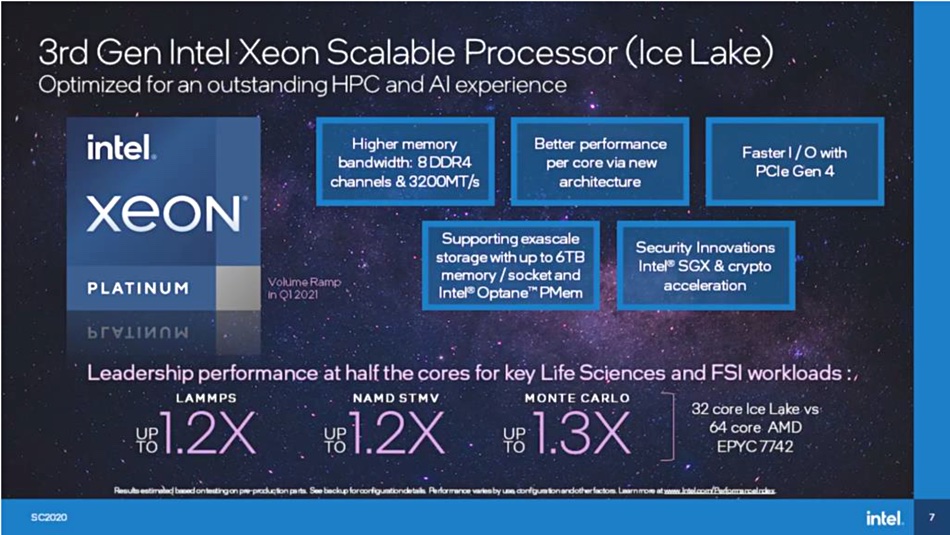
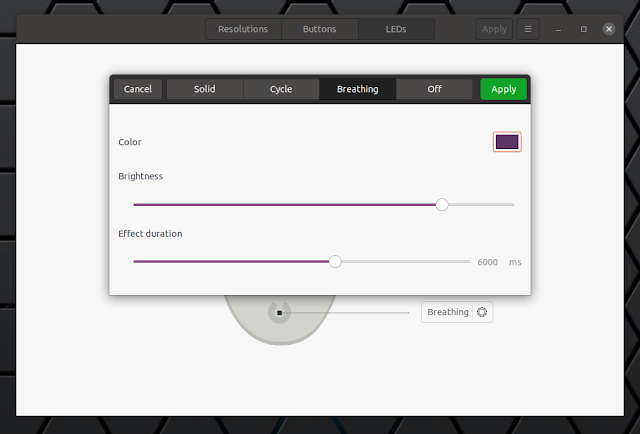

DELL-Daniel My Moderator
nintrix 2 Bronze
BludGeonT 1 Copper
mudastix 1 Copper