Perl as powerful and flexible tool for Unix system administrators
Perl was developed as the language for processing logs for NSA, then emerged as the language of choice for elite
Unix sysadmins, then enjoyed a short love affair with CGI programming but quickly was displaced by PHP (PHP started out as a set of
"Perl hacks" and cloned many Perl features); Now Perl returned to its roots -- it again became the language for the elite Unix sysadmins
Nothing in programming is as easy as it looks. Everything takes at least twice longer than you think.
If there is a possibility of several things going wrong, the one that will cause the most damage will be the one to
go wrong.
Corollary: If there is a worse time for something to go wrong, it will happen then.
If anything simply cannot go wrong, it will anyway. If you perceive that there are four possible ways in which a procedure
can receive wrong parameters, there is always be a fifth way.
Due to maintenance and enhancements which breaks conceptual integrity programs tend to degenerate from bad to worse
and number of bugs in later version does not decrease. It increases.
If logs suggest everything seems to be going well, you have obviously overlooked something.
Hardware always sides with the flaws in software.
It is extremely difficult to make a program foolproof because fools are so ingenious.
Whenever you set out to do something really important, something else comes out that should be done first.
Every solution of a problem breeds new problems, often more nasty...
Murphy laws of engineering
(author adaptation)
Higher level languages like Perl allow to use "defensive programming" paradigm more fully. So let's discuss this concept first as
increasing the level of language makes defensive programming more feasible (number of bugs typically is proportional to the length of
the program) and allow to implement the concept more fully.
Defensive programming is a style of programming which stems from programming style adopted by compiler writers who represent the
elite of the programming community and includes such names as:
and many other. We can add several people who developed scripting language interpreters:
Mike Cowlishaw (REXX, 1982); REXX was the first scripting language and it was a precursor to all later languages. Still
used as macrolanguage in Kedit, THE and ZOC terminal emulator.
Alfred Aho, Peter Weinberger, and Brian Kernighan (AWK, 1977; redesigned version in 1988); BTW Alfred Aho also
is the author of egrep
You can only design and write a few compilers from a reasonably complex language in your lifetime (Nicklaus Wirth manages to write
three, and while the languages involved were not on the level of complexity of PL/1 or Perl, this probably is a record; Ken Thomson
manages to create two C and Go). Besides the complexity of the code generation, in the past hardware moves ahead fast enough making
some compromises during the design phase obsolete. So creating a solid architecture of a portable complier for a particular language
means among other things correctly guessing trends in hardware for the next several years Writing a widely used compiler for a successful
language is the high art of system programming. The art which can be mastered by a few especially gifted programmers.
The basic idea behind this approach is to write the program like a compiler so that it is able to run properly even through unforeseen
input by users. In many ways, the concept of defensive programming is much like that of defensive driving, in that it tried to anticipate
problems before they arise. One common feature is the ability handle strange input without crashing or, worse, creating a disaster.
In a way, defensive programming tried to eliminate many bugs before they happen. The classic example of "non-defensive" programming
is the absence of checking of a return code for an external routine or some Unix utility. This type of bugs often slips into production
code and they are discovered only during production runs, possibly many years from initial release of the product, often at a great
cost. Just enforcement of the rule that no external module or utility can be used without checking its return code prevents many bugs
from happening.
In general the deeper in development cycle you find the bug, the more costly it is for fix. So while defensive programming might
produce some minor overhead in both source code lines count and the run time (which for system utilities does not matter at all)
it dramatically cheapens the total development costs, as fewer bugs slip into most costly for detention and elimination stage: the production
phase.
That essentially means that that the program is written in such way that it is able to able to protect itself against all invalid
inputs. Which is the standard behaviour of the complier, but which can be extended to other types of programs. It also emphasizes
the quality of diagnostic of wrong inputs and situations and "intelligent" dealing with those that still can guarantee the correct results.
The invalid inputs (aka bad data) can come from user input via the command line, as a result undetected errors on other parts of
the program, as a special conditions related to various objects such as file (i/o error in the file, missing file, insufficient permissions,
etc). Bad data can also come from other routines in your program via input parameters. Defensive programming is greatly facilitated
by an awareness of specific, typical blunders (aka SNAFU), and vulnerabilities ( for example for sysadmin scripts and utilities
a collection of "Horror Stories" exists; see for example
Creative uses of rm )
In other words, defensive programming is about making the software work in a predictable manner in spite of unexpected inputs.
Another "re-incarnation" of this concept can be traced to the period of creation of ADA programming language (1977-1983) or even
earlier in the context of writing real time software. Former DOD standard for large scale safety critical software development
emphasized encapsulation, data hiding, strong typing of data, minimization of dependencies between parts to minimize impact of fixes
and changes. Which is the right dose (determining of which requires programming talent) can improve the quality of programs and simplify
( but not necessary shorten ) the debugging and testing stages of program development.
One typical problem in large software modification is that creating changes by person who is not the original developer often damages
conceptual integrity of the product. In this case fixing one problem creates multiple others still to be detected and fixed (one step
forward, two steps back). One way to fight this problem of "increasing entropy with age" or loss of conceptual integrity is to
institute a set of sanity checks which detect abnormal parameters values (assertions or some similar mechanism). In most systems
resulting overhead is negligible as such check usually are administered outside the most inner loops. but the positive effect is great.
Many people independently came to the subset of ideas of defensive programming, so it is impossible to attribute this concept to
a single author. As an example of early attempt to formulate some principles of defensive programming style we can list Tom Christiansen
recommendations (Jan 1, 1998) for Perl language. Perl does not have strict typing of variables and, by default, does not require
any declaration of variables, creating potential for misspelled variables slipping into production version of the program. (unless you
use strict pragma -- the use the latter became standard in modern Perl). While they are more then 20 years old they are still
relevant:
use strict
#!/usr/bin/perl -w
Check all syscall return values, printing $!
Watch for external program failures in $?
Check $@ after eval"" or s///ee.
[Use] Parameter asserts
#!/usr/bin/perl -T (taint mode in which Perl distrust any data from outside world, see below)
Always have an else after a chain of elsifs
Put commas at the end of lists to so your program won't break if someone inserts another item at the end of the list.
Out of those the most interesting is taint option (strict is also interesting but it simply partially fixes oversights in the initial
design of the language; Python uses more sound idea of typing values and requires explicit conversion between values of different types).
Here is a quote from Perl Command-Line Options - Perl.com:
The final safety net is the -T option. This option puts Perl into "taint mode." In this mode, Perl inherently distrusts
any data that it receives from outside the program's source -- for example, data passed in on the command line, read from a file,
or taken from CGI parameters.
Tainted data cannot be used in an expression that interacts with the outside world -- for example, you can't use it in a call
to system or as the name of a file to open. The full list of restrictions is given in the perlsec manual
page.
In order to use this data in any of these potentially dangerous operations you need to untaint it. You do this by checking
it against a regular expression. A detailed discussion of taint mode would fill an article all by itself so I won't go into
any more details here, but using taint mode is a very good habit to get into -- particularly if you are writing programs (like CGI
programs) that take unknown input from users.
Create a pragma, for example "softsemicolon", which allow to make a semicolon optional at the end of the line, if there is
a balance of brackets on the line (with a look ahead for the first symbol on the next line) and the statement can be interpreted
as syntactically correct ( the solution used in famous IBM PL/1 debugging compiler). It can help those sysadmins
who use Perl along with bash on daily basis. It does not make much sense to leave statements without semicolons in the final,
production version of the program. See, for example, the discussion in Stack Overflow
Do you
recommend using semicolons after every statement in JavaScript
Compensate for some deficiencies of using curvy brackets as the block delimiters:
Treat "}:LABEL" as the bracket closing "LABEL:{" and all intermediate blocks(This idea
was also first implemented in PL/1.) This feature also makes complex nesting structures more reliable, and can't be compensated
with the editor, as people often just forget to check and assume that complex nesting structure is OK, while in reality it is
not. Some people argue that complex nesting structures should not exist. Those should not use this feature at all, but we should
not allow them to dictate how we should program our scripts, especially in areas they have no clue about. For example, hand-written
lexical and syntax analyzers and similar scripts with recursion and a very complex decision making.
Treat "}.." symbol as closing all opened brackets up to the subroutine/BEGIN block level and }... including
this level (closing up to the nesting level zero. ). Along with conserving vertical space, this allows search for missing closing
bracket to be more efficient. It might be possible to treat them as macros, which interpreter expands in the source code to regular
brackets. Like soft-semicolons this feature mainly benefits those who use command line and vi, not some sophisticated GUI editor.
Make functions slightly more flexible:
Introduce pragma that allows to define synonyms to built-in functions. For example, ss for for substr and
ix for index
Allow default read access for global variables with subroutines, but write mode only with own declaration via special
pragma, for example use sunglasses.
Introduce inline functions which will be expanded like macros at compile time. something like:
sub subindex inline{
    $_[0]=substr($_[0],index($_[0],$_[1],$_[2]))
}
As extracting of sub-string is a frequent operation in text processing scripts (for example to limit the scope of index function,
or regular expression) Perl operations on them should be expanded. Also in many cases it is more convenient to have indexes
of starting and ending symbols, not a starting symbol and length.
Adopt "range" notation. Which will allow to extract substring via : or '..' notations like $line [$from:$to]
(In Perl a label can't be put inside square brackets)
Expand tr function providing option to stop translation on the fist symbol out of set1 and return the positiono
of this symbol in the string (for example option x). Also provide ability to word from right to the left like rindex
via option R (r is already taken)
Explicitly distinguish between translation table and regular expressions by introducing tt-strings
Implement ltrim and ltrim functions, where the second argument can be integer, string, regex or translation
table and which work accordingly based on this second argument. For example, ltrim($line,7) would be synonyms to
substr ($line,0,$len) while ltrim($line,'<h1') would be equivalent to substr($line,max(0,index($line,'<h1'))
Implement trim function, delete left and right part for the argument supplied works as set of symbols like function tr
. The default can be made with the translation table for whitespace so trim($line) will delete whitespace
on left and right part. More general form trim(string,tt/leftcharacter_set/, tt/right_character_set/);
which deleted all characters from the first character set at the left and all characters from the second character set from the
right.
Implement extension of open function that allow to remove newline from read strings.
Allow to specify and use "hyperstrings" -- strings with characters occupying power of 2 bytes up to 16 byts (double word length(2,4,
8 and 16). Unicode is just a special case of hyperstring
$hyper_example1= h4/aaaa/bbbb/cccc/;
$hyper_example2= h2[aa][bb][cc];
$pos=index($hyper_example,h4/bbbb/cccc/)
Put more attention of managing namespaces.
Allow default read access for global variables, but write mode only with own declaration via special pragma, for example
use sunglasses.
Allow to specify set of characters and max number of characters in the name (for example 3), for which variable acquires
my attribute automatically. That will allow to avoid constructs like for my $i=0...
Introduce default minimum length for global variable my variables via pragma my (for example, variables with the length
of less then three character should always be my)
Allow to specify set of character starting from which variable is considered to be own, for example [A-Z] via pragma own.
Analyze structure of text processing functions in competing scripting languages and implement several enhancements for existing
functions. For example:
[Trivial to implement] Allow TO argument in index function, specifying upper range of the search. That can
help to exclude unnecessary use of substr to limit the range of search in long strings
[Trivial to implement] Extend the function tr with two new options: E -- exclude, which stops translation
at the first symbol which it not in set1 and returns the position of this symbol, and R which can be used with
option E to scan string in the reverse direction like rindex. For example, $line=~tr/ \t\n//dER will remove
whitespace from the end of the string, while $line=~tr/ \t//dE will remove leading whitespace. Also those new options can
be used for searching the position of a symbol in the string more efficiently, for example $pos=$line=~tr/_a-zA-Z//cE>
will return the position of the first letter in the string.
Implement delete function for strings and arrays. For example adel(@array,$from,$to)
Unify functions handling strings and arrays.
Improve control statements
Eliminate keyword 'given' and treat for(scalar) as a switch statement. Disable smart marching by default.
Interpreter should flag as an error if no $_ used in when construct to allow optimization (in this case elsif should
be used:
for($var){
   when($_ eq 'b'){ ...;} # means if ($var eq 'b') { ... ; last}
   when($_ >'c'){...;}
} # for
my rc==0;
for(...){
   if (condition1) { $rc=1; last;}
   elsif(...){$rc=2; last}
}
if ($rc==0){...}
elif($rc==1){...}
elif($rc==3){...}
One possible implementation would be usage of Pascal-style local labels (limited to the block in which they are defined), each
of which corresponds when in the loop body in that particular order. default local label executes statements
on normal exit from the loop, if any
for ...{
   when (...);
   when (...);
}after{
   default:
   1:
   2:
}
Add the ability for Perl interpreter to read zip archives like directories and introduce Java style packaging, which allow to
distribute a script and pm module packed into zip archive (similar to jar files in Java).
Come comments
As Perl now is involved with purge of brackets statement which previously requires them now can be written without them and that
creates problems, for example
$my_very_long_identifier=$first_var.$second_var
   if length($second-var)>0;
Also in the following expression the first line has a balance of brackets and looks syntactically correct. And the second line after
insertion semicolon is also syntactically correct -- it just does not make any sense.
$a = $b + $c
     + $d + $e;
Of cause you can always use extra parentheses that will be eliminated by the parser as redundant:
$a =($b + $c
     ;
So when you are limited to lexical analyzer for the implementation of this feature, you need to take some compromises in the implementation
which catch most of such errors but inevitably introduced a new one for somewhat "pathological" formatting styles (the firs example
does not requires suffix if clause and should probably be written as
As this is defined as debugging iad we probably do not need to use #\ to inform the scanner about his choice. People who want
to use it will adapt to limitation, if they benefit from this diagnostics and correction. There is no free lunch. This approach requires
specific discipline to formatting your code.
There are a lot well-meaning and not so well meaning pundits who claim that Perl is dying. But after language became widespread
and complier/interpreter is still supported and is included into all major OSes, it can only fade but never die. Just look at the Fortran.
Also for Unix sysadmin it remains the best scripting language to use. The language which is more deeply imbedded and congruent to the
Unix environment than any alternatives. After all, Larry Wall part of his career was a Unix
sysadmin. Major players on early Perl development such as
One important rule about Perl is "do not be a beta addict". Generally only version included in major Linux distributions can be considered
stable enough for production use. RHEL 7 uses Perl 5.16.3, so this version is the upper bound for production scripts right now.
As Perl development funds are scarce and it takes years to polish a particular release. That's why now it usually happens only
with releases included in major Linux distribution, which has reposes to do additional testing and bug fixing. While Perl development
are working as hard as they can, the problem of insufficient manpower can't be ignored.
Let's assume that the current version is 5.30.1. That means that version 5.26.3 (previous version which was used in Cygwin, which
is usually far ahead in Perl version then Linux distributions) will work more reliably. And version 5.16.3 used in RHEL 7 is recommended
for production code.
As for Python popularity it is connected with the power of modern computers. On computers typical for say 1996 Python did not stand
a chance. The level of overhead Python impose on programmer is substantial. Just watch
Advanced Python or Understanding Python - YouTube. This is pretty realistic
assessment of the complexity of the Python (and by extension inefficiency of its implementation). All this public masturbation
with multiple inheritance and other esoteric concepts are so far from problems any sysadmin needs to solve that you probably should
stay clear of this language created during the period of over fascination with OO. You better try to learn Golang instead, as,
at least, it is faster then Python ten times or more :-). Golang deliberately omits certain OO fads which dramatically increase
overhead, including inheritance and generic programming: two favorite topics of language complexity junkies.
Thanks God Perl did not fully dived into OO complexity mess due to lack of resource on the language development. Still the
number of complexity junking of Perl forums is really excessive. To the extent OO is useful all the features of it are available
in Perl (separation of namespaces, multiple entry procedures, initialization via constructors are the most important) Using
any class that has only one instance is just a modern perversion.
So in no way Perl is dying, but what is true there is a lot of unjustified hostility for the language. Which mostly comes from people
who never learned the language to any significant depth, but who like to demonstrate their prejudices. It gretly hurt the lange. As
well as rapid development of competitors such as PHP, Python, Javascript, Ruby, R to name just a few. Like in many other spheres
the winner is often not the best language, not the most powerful and flexible. But which is currently is the most politically correct.
With OO-paradigm being as popular as it is it became Python. There is nothing wrong with Pythons and it is nice language, but it is
not as fun to program as in Perl. It tries to enforce its own idiosyncratic "pythonic" view on the worlds and to the extend that it
deviates from Unix and C-tradition it is bad. In addition from a simple language suitable for beginners courses at universities
it developed into a monster that rival complexity of PErl (and in some areas exceed it). and due to abuse of OO tend to create programs
that are way too slow.
In a way that reminds me a sad history of PL/1 which was also the language which was far ahead of the baseline in late 60th
(this is the language which introduced exceptions, classic string functions (substr, index, translate), pointers, genetic procedures,
macrogenerator as the first path of compilation (inherited by C), classic classes of variables (static, automatic and controlled)
as well as two visibility classes (local and external), and the dynamic storage allocation into mainstream (along with quality
debugging and optimizing compilers, real masterpieces of software engineering) and which served as an inspiration for C)
Similar Perl introduced several lexical innovations such as many new digrams, prefix tags for strings (q, qq. qr, qx), postfix
conditionals, handing namespaces as via special statement, access to internal structures of the interpreter, amazing debugger,
and some operations on arrays which remind me of SETL.
All-in-all Perl remains an elegant scripting language which is fun to program in.
Perl has an interesting historical path: from a language for elite system administrators to mass Web development language and
back to the tool for elite system administrators. Several (or may be most) early adopters of Perl such as
Randal L.
Schwartz and Tom Christiansen (author of
Csh Programming Considered Harmful, 1995 ) were outstanding
Unix system administrators.
Perl has an interesting historical path: from a language for elite system administrators to mass Web development language,
and back to the tool for the elite system administrators
Perl is here to stay at least for the community of elite Unix sysadmin (which is a large community and it is the community in which
Perl started), because it is a natural fit. It was created by a sysadmin and carry a lot of commonality with classic Unix tool set.
And first of all with Unix shell, which is the language which all sysadmin known and use. In this respect it beats Python and
Ruby hands down. Both Python and Ruby also carry too heavy OO baggage and that's also diminishes their value as sysadmin tools -- only
few tasks in system administration area can benefit from OO approach. You can appreciate Perl more (and also see Python more realistically
despite all hype) if you try to write a couple of utilities for sysadmin work in Python. Then you would instantly understand how
fake are cries about Python superiority over Perl. At least in this particular domain. Languages are really similar in power,
but Perl 5 is much more convenient to use despite worse type system, necessity to put semicolons at the end of statements and
other annoyances.
Another thing that you will understand is that the popular claim that Python is orthogonal and Perl is baroque language is not quite
true. Python pushed a lot of complexity into modules/libraries (which are extremely baroque and some of them badly architectured) and
that backfired. It also discard several typical for people who program in C constructs (no C-style for loop; no ++ and --
for no obvious reason.) That reminds me idiotism of some language construction decisions in Pascal which has for loop with increments
only by one ;-)
And several popular construct of Perl are not very well emulated in Python. We can start with the pointers and the concept of "undef"
:-) . Neither language can be mastered in full by mere mortals due to the level of complexity they achived: you always use some subset
and need to consult documentation each time you use some rarely used part of the language. and re-learn it again and again.
And Python related OO-hype is what it is -- hype -- OO does not help much in writing system programs. Modules and explicit
control over namespaces are two things that usually all you need and want.
Now the idea of Perl 6 mutated is the separate language (Roku) and that's good. One can see that in Perl 6 OO zealots
prevail over more cooler heads and it try to use paradigm used in Python and Ruby competing with them in the same
space. Looks like Larry Wall bough OO hype "hook, line and sinker", and that was a questionable decision, making Perl 6 "Jonny
come lately" in this category.
There were several much simpler areas were Perl 5 could be more profitably be extended such as exceptions, coroutines and, especially,
introducing types of variables (forced conversion based on operator used (borrowed from Unix shell) is probably one on the most serious
problems with Perl 5, and it inferior even to questionable "lazy typing" used n Python, when a variable carries
its type after the initial assignment (but Python fall into other extreme -- it prohibited automatic conversion even in cases when it
is relatively safe.) Actually history static types proved to be better that iether "wild west" typing or lazy typing and that's
what should be used new languages and added to the old one (GO has static types and now eats Python lunch rising to the
top three in GitHub).
Now a couple works about OO (not as a religious doctrine, but as a way to structure the program namespaces). I think modules can
do 80% of that is useful in OO programming (managing namespaces) with only 10% of added complexity. Moreover, OO does not
matter much for writing system utilities, because in this case (unlike say GUI where windows fall pretty neatly into OO paradigm) there
no useful application of the concept of a class (function prototype, or structure with several references to subroutines along with
data fields) with multiple instances. It is also sad that Larry Wall also did not realize that Javascript prototypes based
OO model is a much better implementation of OO than Simula-67 model.
In any case Perl 5 modules do 80% of what is useful in classes (namely provide a separate namespace and the ability to share variables
in this namespace between several subroutines) without any OO. If you wish, a primitive constructor that initializes variables (for
example state variables) can be implemented as a BEGIN block. And for a medium to large programs the control of the namespace
is what matters most.
The synergy with Unix shell and access to Unix API alone makes Perl preferable language for writing small utilities which can help
of automate sysadmin tasks -- the main use of any scripting language for sysadmins. As it partially was created as an attempt
to merge shell and AWK on a new level it has strong conceptual linkage to bash. It is , essentially, a Borne shell that would
be created if Stephen_R._Bourne was replaced by the developers of
AWK ;-)
As of 2019 Perl remains one of the major scripting languages and has probably the second largest amount of production code
running of any scripting language, although most of it was written a while ago. It is not that visible on GitHub, but you understand
that GitHub store way too many vanity and dead projects, so total number of projects using particular language does not tell you a lot.
Amatures generally do not count. Let' assume that only projects with 100 or more stars matter. For example Bugzilla (over 300
stars). Outside system administration (, few large system development projects now use Perl ( bioperl.org
was probably the last large project of this type and it is gradually is replaced by biopython).
In the past several large Web sites such as Yahoo and Amazon used Perl as the programming language.
Perl no longer is used much for Web development, but the level of suitability to sysadmin tasks was and remain unsurpassed.
Because Python is used in Universities for teaching programming it became more popular for sysadmin tasks as well, but Perl in this
niche still is superior to any viable alternative including Python. So Python ascendance was not only due to the quality
of the language and its implementation, but also due to so called "Peter Naur effect": Peter Naur (of Algol 60 report and BNF
notation fame) in his
1975 lecture "Programming languages, natural languages, and mathematics" which later was reprinted in
hypothesized that since late 70th only those future languages what can be thought to beginners have changes to enter the
"main" programming languages space. All others are limited to niche applications. In this sense Perl is a clear violation of Peter
Naur hypothesis ;-).
Anther important factor in Perl success is that Perl is a very interesting language with highly unorthodox design, which despite
its warts produced a lot of innovative, even for this day concepts. As such it is attractive to elite programmers and system administrators
who can master the language complexity and benefit form its expressiveness. For example it is one of the few scripting languages which
has concept of pointers as a data type, much like C. Also it is unique in a sense that has explicit directives (package) for managing
namespace. Not to say an excellent access to Unix internals (Larry Wall
was a "superstar" Unix system administrator and it shows)
Perl also has several very well written textbooks although latest popular O'Reilly books are mostly junk as they were captured clueless
OO advocates (see Perl for system admins for extended discussion).Perl pioneered
huge testing suit for the language and is very stable. Versions 5.8.8 used in older Linux version (like RHEL 5) and version
5.10 that is used on many current Linux distributions are very stable indeed. Version 5.10 is preferable as it introduced several new
features useful for sysadmin tasks and first of all state variables -- variable that can be declared in subroutines but which
behave like static variable and are not reinitialized on entry to the subroutine. Also strict mode helps to cope
with the problem of contextual declaration of variables, which the source of nasty and difficult to find errors as misspelled variables
are viewed as just another variable with the default initial value.
Perl script can be writing in a way when they are transparent, readable and manageable. No less so then Python scripts which typically
suffer from the abuse of OO. The pervert trend of some Perl guru to push to the limit expressiveness of Perl and used difficult to comprehend
idioms should be resisted. Actually if you look at Larry Wall early scripts in Perl 4 he also abused this capability of the language,
but he can be excused as a designed of the language. But people like Randal L. Schwartz who make the abuse of language expressiveness
a semi-legitimate "Perl Guru" style which gave Perl a bad name should be condemned and never followed. Here I am reminded Talleyrand
advice to young diplomats "First and foremost not too much zeal".
This is a very limited effort to help Unix sysadmins to learn of Perl. It is based on my FDU lectures to CS students.
See also my ebook Introduction to Perl for Unix system administrators It discuss
an approach to programming known as "defensive programming" and limits exposure of Perl to a subset of Perl which can be called
"Minimal Perl". Which is only logical as this site explicitly condemns and tries to counter "excessive complexity" drive that
dominates many Perl-related sites and publications.
For sysadmins Perl hits a "sweet spot": (a) it is available on for all Linux distributions (it is important as often in large corporate
environment installation of additional languages is prohibited by the security department); (b) it integrates very well (I would say
amazingly well) in the shell environment; (c) it easily replaces multiple utilities (sed, awk, bash for longer scripts, etc.)
and is uniform between different flavors of Unix solution; (d) there are modules to interact with the entire application stack
including databases.
One important advantage of Perl over Python is that is very close to shell and programming skills for shell can be reused in Perl;
no so much in Python which stems from European school of language and compliers represented by Nicklaus Wirth. Also Perl
also significantly faster then Python, which carry the burden of object orientation even to single variables (creating for each of them
something like inode) although on modern CPUs and for the tasks of writing utilities this is critical only for a few tasks (log processing
tasks is one example).
And if one think that Python is a "regular language" I can tell you that it is not. For example variables in Python are treated in
C/Perl style -- assignment creates a copy of the variable.
a=3
b=a
a=5 # at this point b is still equal 3, like in Perl
But for arrays and other "compound objects" this is not the case:
alist = [25,50,75,100]
blist = alist # here Python copes the reference, not the array. so any change of alist[0] actually changes blist[0] too
The same is true about overall complexity of the language. The complexity of Python was just pushed into modules, it did not disappeared.
And for example for string processing Python is more complex and less expressive language then Perl in which most text processing is
done via regex engine. For example, Python does not have anything close in convenience to double quoted literals with interpolation
until Python 3.6. Only in Python 3.6+ you have something similar with f-strings:
Equivalents of Perl double quotes strings changed in Python half-dozen times, arriving to the close analog only in version 3.8.
In older versions of Python you need to use Fortran format style strings with % macros. And the best way to imitate Perl/shell double
quoted string changes with each major version of Python (String interpolation
- Wikipedia), which tell you something about consistency:
# in all versions
   apples = 4
   print("I have %d fruits" % apples)           # implementation via % operator; no longer recommended
   print("I have %(apples)d fruits" % apples )  # name of the variable is allowed; no longer recommended

# with Python 2.6+
   print("I have {0} fruits".format(apples))    # do now this is a method
   print("I have {a} fruits".format(a=apples))  # names instead of positional numerics

# with Python 2.7+
   print("I have {} fruits".format(apples))     # positional value now can be omitted
# with Python 3.0+
    from string import Template
    s = Template('I have $frutno fruits')      # The template object
    s.substitute(frutno=apples)                # actual substitution

# or with Python 3.6+
   print(f"I have {apples} apples")             # radically new implementation based on f-string
If you want interpolation in HERE strings in Perl you do not need to do anything special -- its automatic. But with Python only version
3.6+ has some analog called triple-quoted
f-string:
And if you you think that Python is logical original language superior to Perl I have a Brooklyn bridge to sell to you. For
example in Python search of the string can be performed with find method (C programmers and Perl users be damned):
If the substring is not present, find returns a value of -1 like index function in Perl. But the find() method
should be used only if you need to know the position of the substring. To check if substring is present in the string in conditional
expression you need to use the in operator. And there is also index function in Python that behave differently, just
to make C -programmers crazy ;-) It throws exception if the substring is not found. This incompatibility suggests that Python
designers have very little knowledge/respect of Unix and C when they started their project.
Moreover, if one wants to to calculate the length of the string in Python, he/she needs to use len function, not length
method as one would expect.
message = "hello world"
mlen = len(message)
And such "non-uniformities" and special cases are all over Python language. Also the mere number of methods provided in for
each type is overwhelming in Python. For example there are 37 (thirty seven) string methods. Perl has just a dozen string functions.
Everything else is done via regular expression. Strings in Python are immutable which create performance penalty.
While there are some reason to criticize Perl of excessive fascination with digrams and trigrams, Perl like an icebreaker opened
for newer languages interesting avenues in the lexical structure of the language. For example, IMHO, it is is under influence
of Perl Python got such lexical elements as r, b and f strings as well and triple quoted strings.
I think that this level of understanding of Perl is typical for "level-zero" comparisons done by level-zero programmers ;-). As soon
as an article claims that Perl is less readable that Python (or other language) this is telling indication that the article is junk
and the author does not understand what he is writing about. Or more charitably it reflects superficial problems with the language typical
for novices, who are limited to "toy" programs. Other features of the language are in play as for readability of medium and large programs.
Perl has a very complex code which makes it difficult to understand for a novice. Subroutines, and even other symbols like:
‘$`’, ‘$&’ etc are hard to understand and program for a less experienced programmer. Also, Perl code when
read would be difficult and complex to understand unless you have a quality experience.
In reality, sigils like "$" do not badly affect readability in most cases, and can even add to it. For example, this solution
automatically prevents using variable names identical to reserved keywords or names of built-in functions, which is problem that
Python programmers, especially those who have experience with other languages, need to deal with.
The real readability issues for medium and large size programs revolve around the concepts of lifespan, visibility of variables
and handling of namespaces. They are not limited or even greatly influenced by the lexical level. The idea of namespaces
is the generalization of the concept of global and local variables on a new, revolutionary level qhch makes access to them similar to
the access of files in Unix. They were introduced along with the concept of Modules in Nodule -- the language developed by Nicklaus
Wirth in the mid-1970s, It was quickly discontinued and replaces with Modula-2
developed between 1977 and 1985 which achieves some level of popularity in system programming and survived to this day.
The most important issue that defines readability is the rules for visibility of the variables. This is the area were Python beats
Perl, as in Python global variables are visible within subroutines but can't be changed without using global keyword to define
them. This is pretty ingenious, elegant solution for a very difficult and important problem. In Perl global variables are not only visible
in subroutines, but can't be changes in them. Attempt to change them creates a local variable with the same name (which might be not
what programmer intended, and as no warning were given by interpreter, this is a double edge sword which might introduce subtle errors
in the program)
Moreover in Perl is you assign a value of variable not declared as my in a subroutine to the variable that variable enters the global
scope. Which often is undesirable. And for one letter variables often used for indexes such as $i, $j, $k, $l, $m invites troubles.
In Python all variables the value to which is first assigned within the subroutine are automatically assumed to be local. That eliminates
the need to my keyword, which in Perl compensates excessive visibility global variables.
The second issue is the ability to specify the lifespan of the variables. Typically local variables are what PL/1 (which is the language
which originated many concepts used in later languages) were called "automatic" variables and Perl calls my variable: the storage
for them is allocated at the entry to the subroutine and is destroyed at the exit (they are sometimes called stack variables). The other
type of variable often called external in PL/1 (but that has nothing to do with visibility) are allocated at the beginning of execution
of the script and exists for the whole direction of program. Their visibility can be local or global. so visibility is assigned
independently of lifespan. In PL/1 they are called static as storage for them was allocated during compilation and included into
object file and in case they are global they are called external. Now all variables are allocated on the heap, so the word
"static" is incorrect but still reflects the essence.
In this area Perl has what Python is lacking and what greatly help structuring and understanding of large programs: local variables
with the lifespan of global variables (which preserve their value from one invocation to another). Thos variables called state
help to lessen the number of interactions between subroutines, in a way which in Python requires usage of classes. And this
feature of Python stimulates the abuse of OO for tasks that does not fit this paradigm, which negatively affects readability and
increase the number of lines of code.
The third important issue is namespaces. which becomes the dominant issue in readability as program size increases (say, above,
10K lines.) For a large program it is absolutely essential to partition namespace into separate sub-namespaces and specify the rules
of visibility for those variables. This is called exporting of the variable.
As for namespaces Perl is more flexible then Python -- in Python namespace are replica of Module namespaces and are firmly associated
with the module ("one module --one namespace). In Perl you can define additional namespaces when you need them within the same modules,
using the "package" keyword. Both languages allow to access variables from a different namespaces by qualification them with the
the name of the namespace -- a similar mechanism that is used in Unix for accessing files, when you need to specify path,
when you are accessing a file from a different directory. Here Perl is more flexible then Python because in Perl you can also specify
set of variables visible externally in the module, but you can import only a fraction of them in each of other modules from this
namespace.
The other approach is use of subclasses in OO, but this is another story and this approach has certain advantages
and drawbacks and is less important in comparison with the revolutionary concept of the module introduced by Wirth in Module language.
The critical part of success of OO success is not object orientation (which is an obscure and questionable concept, outside few
application domains) but the implementation of hierarchical namespaces model, in which siblings has access to parent namespace.
Despite the slide in popularity Perl experienced since 2000 Perl and severe lack of resources for the development of the language,
Perl continues to evolve and improve. Thankfully it evolves slowly, but during the last decade we got
state variables (5.10) and a couple of other useful features. Along with
several useless features or features that which many would consider redundant or even harmful and that should probably be removed
from the language. The latter is due to the fact that after the create of the language steps down there is no high authority to "bless"
changes for conceptual integrity. And petty people with high opinion about themselves and pretentions to become high priests of the
community try to make their "scratch" by spoiling the language :-(. This is a common, well known problem with large open
source project is which original developer stepped down and it is not limited to Perl. It is often described under the title "the loss
of conceptual integrity" *the term introduced in the The Mythical Man Month
by Fred Brooks. Different manifestation of the same are
also known Software Peter principle ,
Software entropy and Featuritis
So far the evolution of Perl failed to resolve the most obvious problem with the language such as
Absence of the types of variable. This is probably was the most severe problem in the original Perl design. It was
an interesting idea but it did not withstand the test of time. Even bash now has variable types (and declare statement) . The
idea of "flexible" types of variables proved to be generally counterproductive, although for qualified Perl programmer it does not
hurt that much. In this sense Python has, althouth far from perfect, but slightly more logical design can lazy typing: you
still can change the type of the variable, but after you change it all usage of variable should adhere to the same type --
no automatic conversion.
Both Perl and Python inherited from C problem with unintended usage of = instead of == in comparison (and for Perl additional
problem is the usage of == in string comparisons.) While Perl was originally designed for system administrators who are professional,
for Python such solution is a clear blundrer whioch goes against its claim that it is oriented on novices. Using classic Algol-60
':=" for assignment would be more appropriate for the language.
Perl inherited from Unix shell the idea of "type casting" of operators via operator they used with: in comparison using two distinct
sets of operators -- one for numeric values and the other for strings.
Perl suffers from the abuse of both round brackets and curvy brackets (there is not enough brackets, unfortunately, for language
designers ;-) and the absence of "defense" against missing '}' (no local labels concept like in PL/1 where you can close multiple
level of nesting by using label suffix after the keyword end like end l3). Python does not have this problem but the idea of "semi-open"
block, which is variation of Fortran style is also questionable. Most blocks are opened with ":" which serves as analog of Perl '{'
or Algol/PL/1 "begin", but are not closed with ;; or something like that which creates disconnect with people who use other language
along with Python.
Perl suffers from non uniform operations on arrays and strings (substr vs splice) which make
remembering two sets of operation more difficult. Also naming function for extracting substring from a string substr is unfortunate
because this function is heavily used. Python solution of string[from:to] is clearly superior and actually can be implemented
in Perl interpreter via look-ahead.
Contrary to popular opinion the use of sigils in Perl is more or less logical
especially for scalar variables. Sigil $ denotes derefercing. It is also undeniable that string interpolation inside double quoted string
is easier with sigils. Moreover sigils also clearly demarcate variables from built-in functions and subroutines making wting syntax
coloring in editors easier. So this particular decision withstand the test of the time.
Contrary to popular opinion, syntax of Perl 5 is pretty regular, and closely adheres to traditional C-style syntax which makes it
easy to learn for both sysadmin coming from BASH or ksh and C or C++ programmers coming from respective language. It can favorably
compared with the disaster which is syntax of Borne shell.
Actually it does not look too bad in comparison with Python which has syntax rules which are much farther from C and Unix.
Python creates severe cognitive dissonance for people who program in C or C++. Especially with some decisions like usage of whitespace
to determine the nesting. This decision has serious negative effects for long multipage loops and other control constructs, forcing
to make them shorter. Not that C-style solution used in Perl is perfect (runaway unclosed '{' bracket is a huge problem
with this notation), but at least it is uniform with C and C++, which is important. People who spend many years programming C or C++
have their own methods to compensate for the deficiency of this notation and accumulate tremendous skills of reading it and using it
large programs. Experience that Python just sends to the dust bin.
Somehow due to his natural talent (he was never trained as a compiler writer and does not have CS degree) Larry Wall managed to avoid
most classic pitfalls in creating of the syntax of the language, pitfalls in which creators on PHP readily fell ("dangling else" in
PHP is one example) and from which Python suffers as well.
Just as a side note Python inherits from C usage of = for assignment and == for comparison, the blunder that has
very serious consciences as for the amount of errors both in C and Perl. In Python assignment is invalid in conditional expressions
(Python 3.8 introduced Walrus operator := for assignment in conditionals), which makes it safer and eliminates this type of errors,
but at the same time losing expressive power and making programs more verbose:
One of Perl’s better-kept secrets is its built-in debugger that allows developers to test their programs with ease and to rapidly
track down errors in their Perl scripts. Python only recently got a semi-decent debugger. Before that the language sucked badly. PHP
is another similar sicker. Actually for qualified programmer the quality of the debugger is as important if not more important then
the quality of the language. In this area Perl really shines as it has powerful debugger as long as I remember (it did have it in 1994
when I started to use it)
This is a very powerful tool that unfortunately few Perl programmers (and even fewer sysadmins) know well. It allows to create
debugging scripts, create you own set of aliases for each program you debug, as well as remote debugging. I view it a crown jewel
of the Perl language environment.
While number of IDE that Perl has is less then Python you can use free Komodo editor (somewhat buggy and idiosyncratic, but OK) or
pycharm which does not advertize its support of Perl but
does it really well (and it has a free version for individual developers). Eclipse has Perl plug-in as well. all of them
integrates with Perl debugger.
I think the second book about the language you should read should be a book about Perl debugger (see below)
While Python is not installed by default in all major Linux distributions too, this is not true for AIX, Solaris and HP-US.
And in highly secure environment you are prohibited installing such huge packages without jumping via so many bureaucratic hoops that
you regret that you started this adventure.
Systems administrators need to deal with many repetitive tasks in a very complex, and changing environment which often includes several
different flavors of Linux (RHEL and Suse) and Unix (Solaris, HP-UX and AIX). Linux has Perl installed by default. It is
also included in all major Unix flavors but version installed might be outdated and need upgrading. For example Oracle installs Perl
too, so it is automatically present on all servers with Oracle database. Some other application install Perl too. That means
that it provides the simplest way to automate recurring tasks on multiple platforms. Among typical tasks which sysadmin need to deal
with:
Analyze log files. You can achieve high quality only by writing your own or customizing somebody else
log analyzer. Using default (for RHEL it is Logwatch) might not be all that
good as often you need to pay attention to specific combination of messages and that requires some programming. Modern computers
allow processing logs in memory, so multipass processing is not a problem. Some people successfully adapted spam engines written
in Perl for log processing.
Monitor filesystems, processes and networking. The most common and unfortunately poorly understood task is modifying free
disk space. Theoretically this should be included in Linux, but it is not. so postprocessing df output is the
most common way to do it. Many Perl scripts exists and can be adapted to the task (often within some monitoring framework, for example
mon)
Install software, applying patches to OS and application. Upgrade applications and sometimes OS to new version. the problem
with Linux is libraries hell and here custom scripts can help.
Manage user accounts. This is dull and unrewarding task if you do it manually on multiple servers. Tere are most often
specific requrements for creation of accounts that can be scripting (for example, the selection of UID and GID as well as usage of
User Private Groups )
Work with configuration files, including files in complex formats such as HTML and XML You often can do better by
generating those files from scripts them managing them as text files. The classic example here is the /etc/hosts file and
/etc/group file
Administer databases and webserver (often with LAMP installation), as in small companies there is no specialized personnel
for those tasks. If you are make responsible for webserver, or wiki engine that adds to your sysadmin responsibilities and without
"helper" scripts you might be overworked and underpaid.
Work with directory services like LDAP and Active Directory
Administer services like NTP, SMTP, DNS and DHCP. Often you need to process email logs and spam engine logs for quality
control.
Maintaining and enhancing server security. Often searching for a signs of intrusion requres creation of modification of existing
scripts. Also if you understand and can modify your hardening scripts in most cases you are better off then sysadmin who applies
them blindly and faces consequences ;-)
You definitely can greatly simplify your life as well as improve "manageability" of the servers (or group of servers) with additional
Perl scripts, some written by use, some borrowed and adapted to your environment. As long as you still apply KISS principle
and do not try to overload those scripts with "features". Because at some point the task of maintaining the scripts became evident
and unless scripts are simple the game might not worth the candles. that's the gotchas, which catches many sysadmin
who overreached and added too much complexity to their scripts. The slogan KISS can be in this contest mean: keep it simple
sysadmin.
As most sysadmins already know shell, the affinity with shell is one of the major advantages of using Perl as the second scripting
language for Unix sysadmin. no other language come close in this respect: Perl allow to reuse most of the key concepts of the shell.
IMHO the main advantage of using powerful complex language like Perl is the ability to write simple programs which in the past required
for sysadmin to use several languages (bash+AWK+SED). It also was created without OO which later was "bolted on". And I consider this
a very important advantage for sysadmin domain of utilities. Perhaps the world has gone overboard on this object-oriented thing.
I do not see much use of it for utilities space -- they add nothing and the attempt to structure utilities in OO fashion typically backfires
and leads to excessive complexity and bloat. Often it leads to the creating what is called "object
oriented spaghetti".
At the same time Perl is surprisingly high level language and for writing sysadmin utilities is has higher level then Python. You
do not need many tricks used in lower level languages as Perl itself provides you high level primitives for the task.
This page is linked to several sub-pages in the top "contents" table. The most important among them are:
Perl Language -- assorted language issues and programming
tricks
Perl applicationspage where I collected links to Perl module for many interesting application area. Please note that it has a companion page Perl
development tools.
Perl programming environment page, that
might be useful for finding links related to some tools and difficult to understand areas (namespaces).
All language have quirks, and all inflict a lot of pain before one can adapt to them. Once learned the quirks become incorporated
into your understanding of the language. But there is no royal way to mastering the language. The more different is one's background
is, more one needs to suffer. Generally any user of a new programming language needs to suffer a lot ;-)
When mastering a new language first you face a level of "cognitive overload" until the quirks of the language become easily handled
by your unconscious mind. At that point, all of the sudden the quirky interaction becomes a "standard" way of performing the task. For
example, regular expression syntax seems to be a weird base for serious programs, fraught with pitfalls, a big semantic mess as a result
of outgrowing its primary purpose. On the other hand, in skilled hands this is a very powerful tool that can serve a reliable parser
for complex data and in certain cases as a substitute for string functions such as index and substr.
There are several notable steps in adaptation to Perl idiosyncrasies for programmers who got used to other languages:
Missing semicolon at the end of statement. This is a typical problem for all languages that delimit statements with the
semicolon. There is something unnatural to humans in this arrangement. It looks to me that Fortran approach (statements ends at the
end of the line unless the line contains \ at the end is a better deal. IBM PL/1 debugging complier designers
(one of greatest teams ever to design compilers) implemented the idea of "soft semi-colon" -- if the insertion of semicolon
allow to continue parsing then correct this error and inform the user. But this was during the day of batch compliers and this
approach has its own drawbacks, as it can introduce errors to the program due to automatic correction.
The problem is that this error is persistent and continue to occur for highly qualified users of Perl with amazing and consistent
regularity. Multiple years of using the language under the belt does not help. One way to lessen this problem is to check for
it before you submit the script to the interpret. Prettyprinter can label such line too if you have your custom
Prettyprinter (I have)
Forgetting to put $ in front of scalar variable. This problem is aggravated if you use several language with the other that
does not require this prefix. One early sign is when you start to put $ on all scalar variables automatically. C programmer
can think about $ as as a dereferencing operator to the pointer to the value of the variable. So if line is as pointer,
then $line is the value of the variable referenced by this pointer. and $$line is the second level dereferencing.
That's easy for those people who use write their own shell scripts and generally is not a problem for sysadmins.Most mistakes
when you omit $ in front of the variable are diagnosed by interpreter, but some cases like $location{city} are not. The
problems arise if along with Unix shell you use the third language, for example C. In this case you automatically makes
make mistakes, despite your experience, and you need conscious effort to avoid them all the time. This is the case with me.
Using two different comparison operations, one for strings and the other for numerical values ("==" for numbers
vs. eq for strings) for comparison numbers and strings. This is design blunder Perl inherited from Unix shell.
That also makes operation "typed", which is an interesting, but very questionable approach inhereted by Perl from Shell. The problm
is that the game is not worth candles -- practice convincingly had shown that this adds very little to the language power and expressivness,
but introduces nasty bugs and it is better to allow only explicit type conversions. In case a constant is involved ( like
$line == 'EOF' ) Perl provides warnings, but if two variables are involved, the interpreter does not provide any warnings,
so you need to be very careful.
Especially if you use other language in parallel with Perl. In this case such errors crop into your scripts automatically.
Only if one of the operators of "==" is a string constant, meaningful automatic diagnostic can be provided.
Use of "=" as equality predicate for numbers instead of ==. If you use and C-style which uses
"=" for assignments you are in trouble: you can easy make an error using it instead of == in conditional. Please note that
Algol60 avoided this by using := for assignment, so even early languages recognized this problem., So in away this can be viewed
as a blunder in C-language design (or more correctly in PL/1 language design as C for all practical purposes is just a subset of
PL/1 with pointers; and it was designed as such (PL/1 was system programming language for Multics what was the major school of programming
for Thomson and Richie)
The pitfall of using "=" for assignment, results in the side effect of introducing errors in comparisons in Perl, as you put
"=" instead of "==". For example, if ($a=1)... instead of if ($a==1)...
This problem was understood by designers on Algol 60 ( To avoid it they used := for assignment instead of plain
=), which was designed is late 50th. But Perl designers followed C designers (which make this blunder, along with several other
in designing C) and naturally stepped on this rake again. With predictable result. Actually the designers of Fortran, PL/1,
C (as derivative of PL/1), C++ and Java ignored this lesson (Fortran designers are actually not guilty as it predates Algol 60).
But because C (with its derivatives such as C++ and Java) became dominant programming language we have, what we have:
propagation of this blunder to many top programming languages. Now think a little, about the notion of progress in programming language
design ;-) It's sad that the design blunder about which designers knew 65 years ago still is present in the most popular languages
used today ;-). In all languages that have lexical structure of C, this blunder remains one of the most rich source of subtle errors
for novices. Naturally this list includes Perl. C programmers typically are already trained to be aware about this language
pitfall. But in Perl you too can use several protective measures
Modify syntax highlighting in your editor so that such cases were marked in bold red.
Manually or automatically (simple regex done in the editor can detected ~ 99% of cases) reorganize such comparisons
Put the constant on the left part of comparison, like in if (1==$a)....
Recent versions of Perl interpreter provide warning in this case, so checking your script with option -cw or
better using use warnings pragma in all your scripts. It also helps if IDE provides capability to display of results
of checking of syntax in one of the windows and jump to the line in code listed in the error or warning (this is a standard feature
of all IDEs and actually this can be done in most editors too).
Missing closing "}" problem . This problem is typical for all C-style languages and generally requires pretty printer
to spot. But Perl interpreter has a blunder -- it does not recognize the fact that in Perl subroutines can't be nested
within blocks and does not point to the first subroutine as the diagnostic point -- it points to the end of the script.
Usually you need a Prettyprinter to spot this error. In you do notr have one and do not want to get one and learn to use it
(big mistake) one of the best way to find exact point of this error is to extract suspicious section into a new file and check it
separately, cutting not relevant parts, until you detect the problem. The longer the program is the more acute this problem becomes.
BTW this problem was elegantly solved in PL/1 which was created in early 60th: PL/1 has labels for closing statements as in "mainloop:
do... end mainloop" which close all intermediate constructs automatically. Both C and Perl failed to adopt this innovation.
Neither Perl not C also use the concept of Pascal "local numeric labels" -- labels that exist only until they are redefined,
see discussion at Knuth.
I would way that the lack of build-in Prettyprinter in Perl is a blunder of the designers of Perl interpreter. It is understandable
as Perl never enjoyed sizable material support from big corporations, but still...
Missing round brackets or unbalanced round brackets in control statements like if, while, etc . Like "missing
';' " problem this error is persistent and does not evaporates with the increate of your Perl skills. Looks like this is a design
flow of the language and you need to check you scripts for this particular error manually. Good Prettyprinter can point most of those
errors because they are more local than missing "}" error.
Missing " (double quote) or ' (single quote) problem. With good editor this is not a problem as syntax
highlighting points you where the problem begins. Perl has pragma of specified max constant length, which is one way to improve
quality of detection of this error. You can also implement program (one line sting literals only) in the interpreter, because
multiline strings pretty rate in real programs. To put multilateral string you can need to disable this pragma for the
fragment of the script where it is located.
Typos in variables which creates variables used only once. You can block this error now with strict pragma,
so it is less important unless yyou need to maintain huge legacy scripts. Also Perl interpreter provides warnings for all such
cases. Looks like that requrement to declare all variables before use is a sound programming language design practice.
The gains from contextual typing of variables (introduced BTW in Fortran) do not compensate the damage from such an error.
Please note that as syntax of Perl is complex. So the diagnostic in Perl interpreter is really bad and often point to the spot far
below where the error occurred. It is nowhere near the quality of diagnostics that mainframe programmers got in IBM PL/1 diagnostic
complier, which is also probably 50 years old and run on tiny by today standard machines with 256K (kilobytes, not megabytes)
of RAM and 7M (megabytes, not gigabytes, or terabytes) harddrives. The only comfort is that other scripting languages are
even worse then Perl ;-).
All-in-all Perl is the language that fits most sysadmin needs, It' not fancy and its general usage is in decline since 2000 but fashion
should never be primary factor in choosing the scripting language. Perl has stable and well tested interpreter and is close to
shell (to the extent that most concepts of shell can be directly reused). And that's what important. As on modern servers Perl
interpreter loads in a fraction of a second, Perl also allows to get rid of most usage of AWK and SED, making you environment more uniform
and less complex. This is an important advantage. Among benefits that Perl bring to system administration are
Extremely good integration with Unix. Most system calls are directly available from Perl much like in C.
Set of very useful for sysadmin modules such asexpect.pm
Extremely good debugger. Which is a half of language value.
Unix flavor independence. Perl is installed by default on each and every enterprise flavor of Unix
High level of commonality with shell and AWK, which are common languages for each sysadmin. That permit reuse of
skills and simplifies learning.
An excellent set of printed books, eBooks and articles, from beginner to expert
Huge centralized repository of code and modules (CPAN)
Good set of development tools, support of code coloring in all major editors, automated code formatting and pretty-printing
(perltidy)
Build-in "self-documenting" system (POD) which allow you to practice "literate
programming" if you are inclined to do so.
Elegant testing environment (Test::More etc)
Perl can use huge amounts of memory so even it can process very large file such as web logs in memory.
In short if make sense to learn Perl as it makes sysadmin like a lot easier. Probably more so then any other tool in sysadmin arsenal...
Perl is really great for text processing and in this particular domain is probably unmatched. For example in Python regular expressions
are implemented via standard library module; they are not even a part of the language.
As of 2017 Perl no longer belongs to the top 10 programming languages (Scripting
languages slip in popularity, except JavaScript and Python, Infoworld, Nov 13, 2017). It's still more popular then Visual
Basic, so there nothing to worry about. But far less then popular then Python. Of cause popularity is not everything. Python
and Perl share some characteristics, but don't exactly occupy the same niches. But it is a lot: fashion rules the programming, so this
is a factor that you need consciously evaluate and be aware of.
In large enterprise environment, outside system administration area Perl now is almost invisible. Python is gaining ground in research.
Mostly because universities both in the USA and Europe now teach Python in introductory classes and engineers come "knowing some Python".
This looks like "Java success story" of late 1990th on new level. Like Perl, Python is also now installed on all Linux distributions
by default and there are several important linux system programs written in Python (yum, Anaconda, etc) which implicitly suggest that
Python has Red Hat mark of adoption/approval too (yum was originally written at Duke University Department of Physics)
So there is now a pressure to adopt Python. That's sad, because IMHO Perl is a great scripting language which can be used on many
different levels, starting from AWK/SED replacement tool (this especially make sence if you use different platforms. for example their
behavior differs between Mac OS X and Linux. But PERL is the same in both those environments.). Going from Perl to Python for text processing
to me feels like leaving a Corvette and driving a station wagon. Python will gets you there. But it's not fun and will take more time
although you probably might feel more comfortable inside.
Perl is better. Perl has almost no constraints. It's philosophy is that there is more than one way to do it (TIMTOWTDI,
pronounced Tim Toady). Python artificially restricts what you can do as a programmer. It's philosophy is that there should
be one way to do it. If you don't agree with Guido's way of doing it, you're sh*t out of luck.
Basically, Python is Perl with training wheels. Training wheels are a great thing for a beginner, but eventually
you should outgrow them. Yes, riding without training wheels is less safe. You can wreck and make a bloody mess
of yourself. But you can also do things that you can't do if you have training wheels. You can go faster
and do interesting and useful tricks that aren't possible otherwise. Perl gives you great power, but with great power comes great
responsibility.
A big thing that Pythonistas tout as their superiority is that Python forces you to write clean code. That's true,
it does... at the point of a gun, sometimes at the detriment of simplicity or brevity. Perl merely gives you the tools
to write clean code (perltidy, perlcritic, use strict, /x option for commenting regexes) and gently encourages you to use them.
Perl gives you more than enough rope to hang yourself (and not just rope, Perl gives you bungee cords, wire, chain, string,
and just about any other thing you can possibly hang yourself with). This can be a problem. Python was
a reaction to this, and their idea of "solving" the problem was to only give you one piece of rope and make it so short you can't
possibly hurt yourself with it. If you want to tie a bungee cord around your waist and jump off a bridge, Python
says "no way, bungee cords aren't allowed". Perl says "Here you go, hope you know what you are doing... and by the way here
are some things that you can optionally use if you want to be safer"
One liners. Perl has a whole set of shortcuts for making it easy to write ad-hoc scripts on the command
line
Speed. For most tasks, Perl is significantly faster than Python
Regular expressions are a first-class datatype rather than an add in. This means you can manipulate them programatically
like any other first-class object.
Power. You can do things in Perl that are either much harder, or prohibited, in Python.
For instance the <> operator... this lets you trivially deal with the complexities of opening files from the command line and/or
accepting streams from pipes or redirection. You have to write several lines of boilerplate Python code to duplicate
the behavior of Perl's while (<>) { ... } construct (or even more trivially the -n switch, which automatically
wraps your code with this construct).
No significant whitespace. If your formatting gets mangled (by, say, posting it to a web forum or sending
it in an email that munges whitespace), the meaning of your code doesn't change, and you can trivially re-format your code
with Perltidy according to whatever coding style you define.
You can format your code as to what is most clear in context, rather than having to conform to an arbitrary set of restrictions.
Postfix notation. This can be ugly and is easily misused, but used with care it makes your code easier to
read, especially for things like die if $condition or die unless $condition assertions.
Sigils. It's a love it or hate it thing, but sigils unambiguously distinguish variables from commands, make
interpolation effortless, and make it easy to tell at a glance what kind of variable it is without having to resort to some
ugly hack like Hungarian notation.
Inline::Cand all of the
other Inline::* modules). Yes, you can write Python extensions in C but Inline::C makes it effortless.
Pod is vastly more powerful than Docstrings, especially when you throw in the power of something like
Pod::Weaver to write/manipulate
your documentation programmatically.
Advantages of Python
JVM interoperatiblity. For me this is huge. It's the only thing that Python does better than Perl.
Being able to write code that runs in the JVM and to work with Java objects/APIs without having to write Java code is a huge
win, and is pretty much the only reason I ever write anything in Python.
Learning curve. Python is easier to learn, no denying it. That's why I'm teaching it to my 12
year old son as his first programming language
User community. Python is more popular and has a larger active user community. Appeal to popularity
is a fallacy, but you can't just dismiss mindshare and 3rd party support either.
IDE that you can use with Perl
Usage of IDE is a must in the current environment. Often sysdmins neglect this, but it does diminished their productivity. the key
here is a powerful editor, built-in remote debugger while nice is not absolutely necessary. But ability to compare two versions,
show usage of particular variable and prompt for the write variable when writing statements are important. Show of nesting and
pretty printing are also important but can be done with the external tools. Also important is the ability to work
with data-space (renaming varibale in files for the whole project, etc). Perl does not even ship with the "Standard IDE". But there
are several usable options:
Paradoxically GVIM is not that bad and can be installed both on Windows and Linux.
Padre, which is somewhat competitive with Komodo is available for free. The problem is that but the latest binary distribution
suitable for beginners is from 2012. It's still highly usable.
Komodo Edit can serve as a surrogate IDE too. It is a decent editor and for Perl I would rate it slight higher then Notepad++.
It does a couple slick things: support macros and support syntax checking.
pycharm -- the most popular Python IDE can work with Perl
and works well. Attractive if you use some Python.
My feeling is that for Perl to remain competitive IDE should be maintained and shipped along with Perl interpreter (like in Python
and R distributions). May be at the expense of some esoteric modules included in standard library.
Books to read
Python now dominate books on scripting languages and number of books per year devoted to Python and available via Amazon
for 2017 is at least one order of magnitude larger then the number of books devoted to Perl (quality issues aside). All this creates
a real pressure to use Python everywhere, even in system administration. But first of all very few Python books are good.
Most do not explain the language well. And the second is that you need just a couple of them not a dozen. So while on number front
Perl definitely can't compete with Python several quality books (most not from O'Reilly) are available. i would recommend (Recommended
Perl Books)
Debugging Perl Troubleshooting for Programmers Martin C. Brown. This an old (2000), but still an excellent
book, which really provides overview of methods using which you can avoid most of typical errors. You need this before you
meet the "real world". Especially if you need to support adapt somebody else scripts.
RHEL 6.x now ships with Perl 5.10. Many classic Unixes still ship with Perl 5.8.8. Older versions of Solaris and HP-US servers
might have version below Perl 5.8.8 but in 2017 that's rare as most of such servers are decommissioned (typical lifespan of a server
in corporate environment is 5-7 years).
It you need compatibility with all major flavor of Unix in you scripts it is a safe bet to write for Perl 5.8.8. Such a decision
virtually guarantee compatibility with all enterprise servers, except those that should be discarded 5 or 10 years ago. In other words
no "state" variables, if you want "perfect" compatibility. Non perfect, but
acceptable.
If you need only Linux deployment compatibility that can be achieved by using version 5.10 which allow you to use "state" variables.
If you need compatibility with linux servers only version 5.10 look like a more or less safe bet too (very few enterprise servers
in 2017 are now below version RHEL 6; those typically have Perl 5.8).
Also too high version of Perl 5 is actually not desirable -- see note about Perl 5.22.
(the current version of Perl 5 is version 30). Hopefully warts added to version 22 will be corrected based on the feedback.
Here is a slide from Oct 3, 2016 by Tom Radcliffe The Perl Paradox
There is a type of Perl books authors that enjoy the fact that Perl is complex non-orthogonal language and like to drive this notion
to the extreme. I would call them complexity junkies. Be skeptical and do not take recommendations of Perl advocates like
Randal L. Schwartz or Tom Christiansen
for granted :-) Fancy idioms are very bad for novices. Please remember about KISS principle and try to write simple Perl scripts without
complex regular expressions and/or fancy idioms. Some Perl gurus pathological preoccupation with idioms is definitely not healthy
and is part of the problem, not a part of the solution...
We can defines three main types of Perl complexity junkies:
"Killing with obscurity" junkies. A classic example of this approach is an article
Understanding and Using Iterators. Actually Perl
has weak support of iterators as it lacks co-routine support. But you can never learn that from the paper where trivial example was
presented using obscure overcomplicated code that reminds me The International
Obfuscated C Code Contest. This type of junkies is simply damaging. Please don't follow them. Try to write simple transparent
code.
OO-enthusiasts flavor of Perl complexity junkies. Here Damian Conway is a good example. Unlike real teachers that make
complex things simple, and complex thing possible, those Perl OO enthusiasts make simple things complex and complex things impossible.
Instead of advocating the real value of OO which is a hierarchical segmentation of namespace they concentrate their efforts
on trivia. In no way their advice should not be taken at face value. OO has its place, especially when you are programming
GUI and Perl has pretty interesting "low level" OO mechanisms implementation that actually reveals the "kitchen" under OO. But their
relentless drive to convert Perl to OO religion has had effect: usage without necessity. Generally Perl modules also provide
namespace separation and in most cases are enough. Perl actually suffers from lower reliability as the result of conversion
of some Perl modules too OO paradigm. Modules like Net::FTP after conversion to OO became too unreliable to be used
in production environment.
Idiomatic Perl junkies. Pathological preoccupation with idioms in Perl is far from innocent and far from healthy. Although
definitely gifted authors, Randal L. Schwartz
and to lesser extent Tom Christiansen are good examples of people too preoccupied with this fancy art. Fancy idioms are bad for
novices and can contain subtle limitations or side effects that can byte even seasoned Perl programmers. As somebody quipped "My
issues with Perl is when people get Overly Obfuscated with their code, because the person thinks that less characters and
a few pointers makes the code faster. "
My issues with Perl is when people get Overly Obfuscated with their code,
because the person thinks that less characters and a few pointers makes the code faster.
Please remember about KISS principle and try to write simple Perl scripts without overly complex regular expressions or fancy idioms.
If you do this Perl is great language, unmatched for sysadmin domain. Simplicity has great merits even if goes again current fancy.
Generally the problems with OO mentioned above are more fundamental than the trivial "abstraction is the enemy of convenience". It
is more like that badly chosen notational abstraction at one level can lead to an inhibition of innovative notational abstraction on
others. In general OO is similar to idea of "compiler-copiler" when you create a new language in such a way that it allow to compile
new constructs with the existing complier. While in some cases useful or even indispensible, there is always a price to pay for
such fancy staff.
Some deficiencies of Perl syntax were directly inherited from C. One of the most notable "obligatory semi-colon after ach statement.
Which lead to tremendous amount of errors. You can use "soft semicolon" approach (implied semicolon on line end if round brackets
or similar symmetrical symbols are balanced) and put semicol on each line and then depete it on a fewline that do not need it
It is eady to implement using any editor maro (for example in vi) or as a mode of the pretty printer.
Such an approach cuts number of iteration required to get rid of syntax errors by two or three.
One of most famous C design blunder was the introduction of a small lexical difference between assignment and comparison (remember
that Algol used := for assignment; PL/1 uses = for both) caused by the design decision to make the language more compact
(terminals at this type were not very reliable and number of symbols typed matter greatly. In C assignment is allowed in if statement
but no attempts were made to make language more failsafe by avoiding possibility of mixing up "=" and "==".
In C syntax if ($a = $b) assigns the contents of $b to a and executes the code following if b not equal
to 0. It is easy to mix thing and write if ($a = $b ) instead of (if ($a == $b) which is a pretty nasty
bug. You can often reverse the sequence and put constant first like in
if ( 1==$i ) ...
as
if ( 1=$i ) ...
does not make any sense, such a blunder will be detected on syntax level.
This is the problem with all C-style language not only Perl. Ruby managed to avoid it switching to Algol-style delimiters, Typically
this is connected with your recent changes so you should know where to look. Pretty printer (even simplistic
Neatperl) allows instantly detent this type of errors
If you do not access to any pretty-printer (a very sad situation indeed) use diff with the last version that complied OK (I hope
you use come kind of CMS like subversion or git)
The optimal way to spot missing '}' is to use pretty printer. In the absence of pretty printer you can insert '}'
in binary search fashion until you find the spot where it is missing.
You can also extract part of your script and analyze it separately, deleting "balanced" parts one by one. This error actually
discourages writing very long "monolithic" Perl scripts so the is a silver lining in each dark cloud.
You can also use pseudo comments that signify nesting level zero and check those points with special program or by writing
an editor macro. One also can mark closing brackets with the name of construct it is closing
Use a good editor. moreover often you can split long literals into one line literals and concatenate them with dot operator.
Perl process those at complite time so there is not run-time hit for using this (and it should not be for any other language with
a decent complier -- this complier optimization is classed constant folding and is a standard in modern compliers).
As a historical note specifying max length of literals is an effecting way of catching missing quote that was implemented in
PL/1 compilers. You can also have an option to limit literal to a single line. In general multi-line literals should have different
lexical markers (like "here" construct in shell). Perl provides the opportunity to use concatenation operator for splitting literals
into multiple line, which are "merged" at compile time, so there is no performance penalty for this constructs. But there is no limit
on the number of lines string literal can occupy so this does not help much. If such limit can be communicated via pragma statement
at compile type in a particular fragment of text this is an effective way to avoid the problem. Usually only few places in program use
multiline literals, if any. Editors that use coloring help to detect unclosed literal problem but there are cases when they are
useless.
If you are comparing a variable and a constant Perl interpret can help you to detect this error. but if you are comparing two variable
you are on your own. And I often use wrong comparison operator just out of inertia or after usage of C. the most typical for ma error
is to use == for stings comparison.
One way is to comment sting comparisons and then match comments with the comparison operator used using simple macro
in editor (you should use programmable editor, and vim is programmable)
Usage of different set of comparison operator for number and string comparison is probably the blunder in Perl design (which Python
actually avoided) and was inherited from shell. Programmer that use other languages along with Perl are in huge disadvantage her
as other language experience force them to make the same errors again and again. Even shell solution (using different enclosing
brackets); it might well be that in Perl usage of ( ) for arithmetic comparison and ((...)) for string would
be a better deal. They still can be used as a part of defensive programming so that you can spot inconsistencies easier
Perl + C and, especially Perl+Unix+shell represent a new programming paradigm in which the OS became a part of
your programming toolkit and which is much more productive for large class of programs that OO-style development (OO-cult
;-). It became especially convenient in virtual machine environment when application typically "owns" the machine. In this case the
level of integration of the language and operating system became of paramount importance and Perl excels in this respect. You can use
shell for file manipulation and pipelines, Perl for high-level data structure manipulation and C when Perl is insufficient or too slow.
The latter question for complex programs is non-trivial and correct detection of bottlenecks needs careful measurements; generally Perl
is fast enough for most system programs.
Exploiting high level of integration of Perl with shell and Linux is a new programming paradigm which became especially
convenient in virtual machine environment when application typically "owns" the machine. In this case the level of integration
of the language and operating system became of paramount importance and Perl excels in this respect. In a way it is similar to
LAMP paradigm.
The key idea here is that any sufficiently flexible and programmable environment - and Perl is such an environment -- gradually
begins to take on characteristics of both language and operating system as it grows. See
Stevey's Blog Rants Get Famous
By Not Programming for more about this effect.
Any sufficiently flexible and programmable environment - and Perl is such an environment -- gradually begins to take on
characteristics of both language and operating system as it grows.
Unix shell can actually provide a good "in the large" framework of complex programming system serving as a glue for the components.
From the point of view of typical application-level programming Perl is very under appreciated and very little understood language.
Almost nobody is interested in details of interpreter, where debugger is integrated with the language really brilliantly. Also namespaces
in Perl and OO constructs are very unorthodox and very interesting design.
References are Perl innovation: classic CS view is that scripting language should not contain references (OO languages operate with
references but only implicitly). Role of list construct as implicit subroutine argument list is also implemented non trivially (elements
are "by reference" not "by name") and against CS orthodoxy (which favors default "by name" passing of arguments). There are many other
unique things about design of Perl. All-in-all for a professional like me, who used to write compilers, Perl is one of the few
relatively "new" languages that is not boring :-).
The quality of the debugger for the language is as important as the quality of language itself. Perl debugger is simply great. See
Debugging Perl Scripts
Perl license is a real brilliance. Incredible from my point of view feat taking into account when it was done. It provided peaceful
co-existence with GPL which is no small feat ;-). Dual licensing was a neat, extremely elegant cultural hack to make Perl acceptable
both to businesses and the FSF.
It's very sad that there no really good into for Perl written from the point of view of CS professional despite 100 or more books
published.
A small, crocky feature that sticks out of an otherwise clean design. Something conspicuous for localized ugliness, especially
a special-case exception to a general rule. ...
Perl extended C-style syntax in innovative way. For example if statement always uses {} block, never an individual statement,
also ; before } is optional. But it shares several C-style syntax shortcomings and introduced a couple of its own:
Lexical structure of the language is exceedingly complex and automatic type conversion is unnecessary, creates nasty errors,
and should probably be discouraged. You should always use strict mode to catch some errors that escape interpreter on the
stage of lexical and syntax analysis (at least in the form strict 'subs', or better use strict;
no strict "vars"; if you consider the requirement to declare all variables excessive and do not want to use our to "import"
global variables into local lexical scope). Due to complexity of the lexical level of the language, some errors are not located
properly and are passed to the syntax level were they are not detected iether. For example if you accidentally use $a==~/\d+/
you will be surprised by the result
[0]  # perl -v

This is perl 5, version 26, subversion 1 (v5.26.1) built for i686-cygwin-threads-64int-multi
(with 7 registered patches, see perl -V for more detail)
... ... ...
[0]  # cat lex_error.pl
#!/usr/bin/perl
# Error in lexical and/or syntax analysis phase of the interpreter (it does not detect ==~ as wrong operator)
 $a='2017';
 if ( $a ==~/\d/ ){
    print "String $a contains  digits\n";
 } else {
    print "String  $a does  not contains digits\n";
 }

[0]  # perl  lex_error.pl
String  2017 does  not contain digits
Usage of different set of comparison operator for number and string comparison is probably the most common source of difficult
to find bugs. Programmer that use other languages along with Perl are in huge disadvantage her as other language experience force
them to make the same errors again and again. Even shell solution (using different enclosing brackets); it might well be better
that in Perl (aka usage of ( ) for arithmetic comparison and ((...)) for string). You need to use "defensive
programming" methods so that you can spot inconsistencies easier
Usage of obligatory semi-colon at the end of statement. "Flexible semi-colon" concept (known from the days of
PL/ optimizing compiler) -- new line is equal to semicolon, if there is balance of round parenthesis or any other "symmetrical within
the statement" symbols) should be a better deal. One positive step in the right direction is that semicolon is optional
before "}".
There is no explicit operator into cast variable into specific type. While variable should be typeless, the value
should be typed (like in Python; strict partially enforced this). For example such functions n( ) and s( )
would help, although they can be imitated.
There is no ability to close multiple open "{" to a given level. For example "}...}" should close all nesting.
Subroutines should use different brackets of keyword like end so that nesting errors were detected earlier. If you missed closing
"}" finding that place is not trivial in a large script. Diagnostic is almost useless and only pretty printing can help. Also for
{ and } iether local label like in assembler should be allowed or duplication of symbols (treated as a single symbol syntactically
but closing only identical number of closing brackets. . For example,
local labels (like in Pascal, they might be number -- that's enough):
{1{ should be closed with }1} and {3{ with }3}
or some other similar notation like {#1 and }#1
via symbol duplication:{{{ should be closed with }}} and {{ with }}.
Such symbols also should close all unclosed intermediate brackets of the same type.
Round brackets mismatch problem; usage of round brackets in if ( ) {...} construct. In Perl
the logical expression is always terminated by opening curvy bracket "{". Which is a good thing. But that means that those
round brackets if statement are essentially redundant and lead to numerous difficult to find mistakes (round brackets bracket
mismatch errors)
Usage of "=" for assignment and "==" for equality is a huge design blunder inherited from C, which leads
to many nasty mistakes. One defensive trick that helps to prevent those nasty errors is to write constants in comparisons on
the left side (as in if ( 5==$i ) {... }. This transformation can be done in pretty printer.
There is no way to limit the max length of string constants ('string' and "string" types). Ability to limit them to say
256 character or to limit them to a single line are good crutches for this problem of "lost closing quote", which is present in most
programming language, but adequately was solved only in PL/1 optimizing complier. Missing quote is such a frequent error (along with
missing semicolon) that it deserve special treatment on the part of the interpreter. For example, pragma one_line_string_literals
In this case interpreter can better pinpoint exact place when such an error happens.
Subroutines should be delimited with other some keyword like end, not with curvy brackets , to allow
checking the banace of {} and () brackets on closing. Right now "unclosing/running bracket often is diagnosed only at the end
of the script. and you need iether to use pretty printer to find it or extract relevant fragment in editor and run via
interpreter separately.
For a language aficionado Larry Wall make way too many blunders in the design of Perl. Which is understandable (he has no computer
science background and was hacker in heart), but sad.
There are also several semantically problems with the language:
While namespaces in Perl is a thing of beauty (you can spl;it script into different
namespaces as you wish) they are not widely understood (mostly they are not understood at all) and outside packages very rarely used.
You can switch to using them with all variables with strict. O'Reilly authors are partially guilty for that (generally
they proved to be unable to grasp intricacies of Perl ;-) Due to this fact, global scope of all variables looks more like a
design blunder, then a useful feature. It would be better as an option/pragma to allow to force the usage of local namespace for
each function, which would force to access encompassing "main" namespace via $:: prefix $::myvar. So established
practice of writing Perl programs, as seen in into O'Reilly books leads to nasty side effects if you reuse variable inside function
without declaring it local or my. this abuse of "main" namespace is real problem due to which Perl is often considered If would
be good if Randal L. Schwartz and other "overcomplexity junkies" instead of inventing "yet another Perl idiom" put some effort
in propagating defensive programming style:
Declaring "overlapping" internal variables (my and state) in functions is one simple way to alleviate
the problem of global scope of variable in Perl. It is more natural then using a separate namespace for each function, but the
latter is more flexible.
Unfortunately keyword state was introduced only in Perl 5.10 and is rarely used and poorly understood.
Possibility of use of separate namespace for each function along with the ability to access for "global namespace" via
prefix$::is not widely understood. But it is a key to defensive programming in Perl.
Perl provide explicit access to interpreter symbol table (for example, the hash %main:: represents
the main namespace, but not built-in functions to check the type of value assigned to the variable like isnum and
isstring This is against the spirit of the language. So there is no direct analog to R built-in function class
Until version 5.10 there was no simple way to declare a persistent variable belonging to local namespace in subroutines.
The variables were iether global or initialized on entry (my variables)Now it can be done by declaring variable
as "state" instead of "my". That actually means that 5.10 should be minimal version that you should use (which
in 2017 is not a problems). See state - perldoc.perl.org)
state declares a lexically scoped
variable, just like my. However, those
variables will never be reinitialized, contrary to lexical variables that are reinitialized each time their enclosing
block is entered. See Persistent
Private Variables in perlsub for details.
If more than one variable is listed, the list must be placed in parentheses.
With a parenthesized list, undef can
be used as a dummy placeholder. However, since initialization of state variables in list context is currently not possible
this would serve no purpose.
statevariables are enabled
only when theuse feature "state"pragma is in effect, unless the keyword is written as CORE::state . See also
feature.
Unquoted strings (identifiers without leading $, such as upper_limit ) should be considered to be constants.
Value to them can be assigned via special statement (say let or operator := ) only once. Currently
you can achieve the same effect using built-in capability of Perl to invoke C preprocessor.
There is no "inline" functions in Perl and functions with multiple entry points. Those are very useful inside loops.
the idea of different exists for break statement implemented in Python is also not bad and might be considered, although
Python syntax is really ugly and should be avoided.
There is no explicit passing of parameters using keyword-value pairs (can be simulated with a hash, so not
a big deal, you can automatically assume that all keywords are my variable in the function avoiding statements like my text=$_[0]
)
It would be better to use symbol '^' for concatenation and use dot as in other programming languages for member functions
of the class/package.
Automatic detection of Unix vs. Windows encoding in data files sometimes leads to nasty surprises, when file with windows
encoding is processed as Unix file. Extra symbol at the end of the line screw pattern matching. It looks like Perl implicitly
assumes that if script is in Unix encoding data files should be in Unix encoding too. This is sometimes not the case so such assumption
is a deadly blunder. There should option to force all files to specific encoding in the interpreter (like --unix)
as the conversion can be implemented reading the file. Same conversion option should be available in open statement.
R-language has RStudio which probably can be viewed as gold standard of minimal features needed for scripting language GUI.
While RStudio has a weak editor it has syntax highlighting and integration with debugger and as such is adequate for medium scripts.
There is no similar "established" as standard de-facto GUI shipped with Perl interpreter and looks like nobody cares. That's a bad
design decision although you can use Orthodox file manager (such as Midnight commander, or in Windows Far or Total Commander) as
poor man IDE. Komodo Edit
is more or less OK editor for Perl and is free although in no way it is full IDE.
This is not a show stopper for system administrators as they can use screen and multiple/different terminal
sessions for running scripting and editing them. Also mcedit is handy and generally adequate for small scripts. To say nothing
that each sysadmin know badic set of command for vi/vim, and many know it well.
But this is a problem when you try to write Perl scripts with over 1K lines which consist of multiple files. Many things in
modern IDE helps to avoid typical errors (for example identifiers can be picked up from the many by right clicking, braces are easier
to match if editor provide small almost invisible vertical rulers, color of the string help to detect running string constants, etc.
Currently Komodo and free Komodo editor are almost the only viable game in town.
For mature language the key area of development is not questionable enhancements, but improvement of interpreter diagnostics and
efforts in preventing typical errors (which at this point are known).
Perl version 5.10 was the version when two very useful enhancement to the language were added:
state variables which are similar to PL/1 static variables, but are allocated on the heap
Still very little was done to improve interpreter in order to help programmers to avoid most typical Perl errors. that means that
the quality of the editor for Perl programmers is of paramount importance. I would recommend free Komodo editor. It allows you to see
the list of already declared variables in the program and thus avoid classic "typo in the variable" type of errors.
Not all enhancements that Perl developers adopters after version 5.10 have practical value. Some, as requirement to use backslash
in regular expressions number of iterations ( so that /\d{2}/ in "normal" Perl became /\d\{2}/ in version 5.22), are
counterproductive. For that reason I do not recommend using version 5.22. You can also use pragma
use v5.12.0
to avoid stupid warnings version 5.20 generates.
There is no attempts to standardize Perl and do enhancements via orderly, negotiated by major stakeholders process. Like is done
with C or Fortran (each 11 years; which is a very reasonable period which allow current fads to die ;-). At the same time quality of
diagnostics of typical errors by Perl interpreter remains weak (it imporved with the introduction of strict though).
Support for a couple of useful pragma, for example, the ability to limit the length of string constants to a given length (for example
120) for certain parts of the script is absent. Ot something similar like "do not cross the line" limitation.
Local labels might help to close multiple level of nesting (the problem of missing curvy bracket is typical in al C-style languages)
 1:if( $i==1 ){
     if( $k==0 ){
         if ($m==0 ){
   # the curvy bracket below closes all opened clock since the local label 1
 }:1
Multiple entry points into subroutines might help to organize namespaces.
Working with namespaces can and should be improved and rules for Perl namespaces should be much better better documented. Like pointers
namespaces provide powerful facity to structuring language programs. which can be used with or without modules framework. this is a
very nice and very powerful Perl feature that makes Perl a class or its own for experienced programmers. Please note that modules are
not the only game in town. Actually the way they were constructed has some issues and (sometime stupid) overemphasis on OO only exacerbate
those issues. Multiple entry points in procedures would be probably more useful and more efficient addition to the language. Additional
that is very easy to implement. The desire to be like the rest of the pack often backfire... From SE point of view scripting language
as VHL stands above OO in pecking order ;-). OO is mainly force feed for low level guys who suffer from Java...
Actually there are certain features that should probably be eliminated from Perl 5. For example use of unquoted words as indexes
to hashes is definitely a language designers blunder and should be gone. String functions and array functions should be better
unified. Exception mechanism should be introduced. Assignment in if statements should be somehow restricted. Assignment
of constants to variables in if statement (and all conditions) should be flagged as a clear error (as in if ($a=5) ...
). I think latest version of Perl interpreter do this already.
Attention: The release contains an obvious newly introduced wart in regex tokenizer, which now requires backslash
for number of repetitions part of basic regex symbols. For example in case of /\d{2}/ which you now need to write /\d\{2}/
-- pretty illogical as a curvy brace here a part of \d construct, not a separate symbol (which of course
should be escaped);
Looks to me like a typical SNAFU. But the problem is wider and not limited to Perl. There is generally tendency for a gradual
loss of architectural integrity after the initial author is gone and there is no strong "language standard committee" which drive the
language development (like in Fortran, which issues an undated version of the standard of the language each 11 years).
So some languages like Python this is still in the future, but for many older languages is is already reality and a real danger.
Mechanism for preventing this are not well understood. The same situation happens with OS like Linux (systemd).
This newly introduced bug (aka feature) also affects regexes that use opening curvy bracket as a delimiter. Which is a minor but
pretty annoying "change we can believe in" ;-). I think that idiosyncrasy will prevent spread this version into production version of
Linux Unix for a long, long time (say 10 years) or forever. Image the task of modification of somebody else 30-50K lines Perl
scripts for those warnings that heavily uses curvy braces in regex or use \d{1,3} constructs for parsing IP addresses.
This looks more and more like an artificially created year 2000 problem for Perl.
Anything after the __DATA__ line is not part of the program but is available to
the program through the special DATA filehandle:
#!/usr/bin/perl
print "---Outputting DATA\n", <DATA>, "---Done\n";
__DATA__
Dog
Cat
Bird
The output shows each line after __DATA__ :
---Outputting DATA
Dog
Cat
Bird
---Done
I typically go the other way by starting with a data file and adding a program to the top of
it:
#!/usr/bin/perl
use v5.26;
use Text::CSV_XS;

my $csv = Text::CSV_XS->new;
while( my $row = $csv->getline(*DATA) ) {
        say join ':', $row->@[3,7];
    }

__DATA__
...many CSV lines...
This is the end, my friend, the END
You probably also know that you can use __END__ instead. I'm used to using that
because it's a holdover from Perl 4 and that's where I first learned this:
#!/usr/bin/perl
print "---Outputting DATA\n", <DATA>, "---Done\n";
__END__
Dog
Cat
Bird
We've had fun with the perl interpreter and the shebang, but perl
has a -x which is already fun by design. This option tells Perl that the program
to execute is actually embedded in a larger chunk of unrelated text to ignore. Perhaps the Perl
program is in the middle of an email message:
"I do not know if it is what you want, but it is what you get.
        -- Larry Wall"

#!/usr/bin/env perl

print "perl -x ignores everything before shebang\n";
print <DATA>;

__END__

"Fortunately, it is easier to keep an old interpreter around than an
old computer.
        -- Larry Wall"
Executing this as a program is a syntax error because the Larry Wall quote before the
shebang is not valid Perl. When we execute this code with perl -x , everything
before the shebang is ignored and it works:
$ perl -x email.txt
perl -x ignores everything before shebang

"Fortunately, it is easier to keep an old interpreter around than an
old computer.
        -- Larry Wall"
Out of curiosity, what if we tried to go one step further? How about multiple shebangs in a
file, where one of them has a -x :
#!/usr/bin/perl -x
#!/usr/bin/perl
But it only produces an error:
Can't emulate -x on #! line.
There is however a trick to achieve this, by using shell eval . That perl
-x is now executed in a shell process and not interpreted by perl binary like
previously.:
This article would not be complete without discussing a bit about the config variable
$Config{startperl} . This variable comes from Config.pm that provides
information about configuration environment (which you also see with perl -V
):
This is actually built during compilation from defaults or user/vendor provided configs.
What if we want a different value? Simply specify the value of this during the
./Configure step, the configure option is -Dstartperl='...' . We then
need to rebuild perl :
$ ./Configure -des -Dstartperl='#!/my/shebang'
$ make test install
Take care to use an interpreter or a program that behaves like a perl
interpreter! Some CPAN modules use startperl to write first line of generated perl
tests. The /usr/bin/env limitation still apply here.
If I give open a filename of an explicit undef and the read-write
mode ( +> or +< ), Perl opens an anonymous temporary file:
open my $fh, '+>', undef;
Perl actually creates a named file and opens it, but immediately unlinks the name. No one
else will be able to get to that file because no one else has the name for it. If I had used
File::Temp , I might leave
the temporary file there, or something else might be able to see it while I'm working with
it.
Print to a string
If my perl is compiled with PerlIO (it probably is), I can open a filehandle on a scalar
variable if the filename argument is a reference to that variable.
open my $fh, '>', \ my $string;
This is handy when I want to capture output for an interface that expects a filehandle:
something_that_prints( $fh );
Now $string contains whatever was printed by the function. I can inspect it by
printing it:
say "I captured:\n$string";
Read lines from a string
I can also read from a scalar variable by opening a filehandle on it.
open my $fh, '<', \ $string;
Now I can play with the string line-by-line without messing around with regex anchors or
line endings:
Most Unix programmers probably already know that they can read the output from a command as
the input for another command. I can do that with Perl's open too:
use v5.10;

open my $pipe, '-|', 'date';
while( <$pipe> ) {
  say "$_";
  }
This reads the output of the date system command and prints it. But, I can have
more than one command in that pipeline. I have to abandon the three-argument form which
purposely prevents this nonsense:
open my $pipe, qq(cat '$0' | sort |);
while( <$pipe> ) {
  print "$.: $_";
  }
This captures the text of the current program, sorts each line alphabetically and prints the
output with numbered lines. I might get a Useless Use of cat Award for that program that sorts
the lines of the program, but it's still a feature.
gzip on the fly
In Gzipping data
directly from Perl , I showed how I could compress data on the fly by using Perl's gzip IO
layer. This is handy when I have limited disk space:
open my $fh, '>:gzip', $filename
  or die "Could not write to $filename: $!";

while( $_ = something_interesting() ) {
  print { $fh } $_;
}
I can go the other direction as well, reading directly from compressed files when I don't
have enough space to uncompress them first:
open my $fh, '<:gzip', $filename
  or die "Could not read from $filename: $!";

while( <$fh> ) {
  print;
  }
Change STDOUT
I can change the default output filehandle with select if I don't like standard
output, but I can do that in another way. I can change STDOUT for the times when
the easy way isn't fun enough. David Farrell showed some of this in How to
redirect and restore STDOUT .
First I can say the "dupe" the standard output filehandle with the special
& mode:
use v5.10;

open my $STDOLD, '>&', STDOUT;
Any of the file modes will work there as long as I append the & to it.
I can then re-open STDOUT :
open STDOUT, '>>', 'log.txt';
say 'This should be logged to log.txt.';
When I'm ready to change it back, I do the same thing:
open STDOUT, '>&', $STDOLD;
say 'This should show in the terminal';
If I only have the file descriptor, perhaps because I'm working with an old Unix programmer
who thinks vi is a crutch, I can use that:
open my $fh, "<&=$fd"
  or die "Could not open filehandle on $fd\n";
This file descriptor has a three-argument form too:
open my $fh, '<&=', $fd
  or die "Could not open filehandle on $fd\n";
I can have multiple filehandles that go to the same place since they are different names for
the same file descriptor:
use v5.10;

open my $fh, '>>&=', fileno(STDOUT);

say         'Going to default';
say $fh     'Going to duped version. fileno ' . fileno($fh);
say STDOUT  'Going to STDOUT. fileno ' . fileno($fh);
https://5a0213f7409d39e4f4257675bd947b2c.safeframe.googlesyndication.com/safeframe/1-0-38/html/container.html
Report this ad
Chris Madden ,
172 38
I have Perl script and need to determine the full path and filename of the script during
execution. I discovered that depending on how you call the script $0 varies and
sometimes contains the fullpath+filename and sometimes just
filename . Because the working directory can vary as well I can't think of a way
to reliably get the fullpath+filename of the script.
I know this was a long time ago but I was just looking for a perl windows way of doing this
and am quite happy with my solution #!/usr/bin/perl -w my @catalog= dir ;
$myHome = substr($catalog[3],14); $myHome = &rtrim($myHome); print qq(<$myHome>\n);
# Right trim function to remove trailing whitespace sub rtrim { my $string = shift; $string
=~ s/\s+$//; return $string; } just thought I'd share – user1210923 Dec 4 '20 at 17:42
Drew Stephens , 2008-09-18 07:30:54
259
There are a few ways:
$0
is the currently executing script as provided by POSIX, relative to the current working
directory if the script is at or below the CWD
Additionally, cwd() , getcwd() and abs_path()
are provided by the Cwd module and tell you where the
script is being run from
The module FindBin provides the
$Bin & $RealBin variables that usually are the path to
the executing script; this module also provides $Script &
$RealScript that are the name of the script
__FILE__ is the
actual file that the Perl interpreter deals with during compilation, including its full
path.
I've seen the first three ( $0 , the Cwd module and the FindBin module) fail under
mod_perl spectacularly, producing worthless output such as '.' or
an empty string. In such environments, I use __FILE__ and get
the path from that using the File::Basename module:
use File::Basename;
my $dirname = dirname(__FILE__);
This is really the best solution, especially if you already have a modified $0 –
Caterham Jan 8 '12
at 1:04
Ovid , 2008-09-17 16:19:48
148
$0 is typically the name of your program, so how about this?
use Cwd 'abs_path';
print abs_path($0);
Seems to me that this should work as abs_path knows if you are using a relative or
absolute path.
Update For anyone reading this years later, you should read Drew's answer . It's much better than mine.
Share Improve this answer
Follow edited Jul 4
'19 at 2:47 cxw 15.4k 2 2 gold badges 37 37 silver badges 69 69 bronze badges answered
Sep 17 '08 at 16:19 Ovid 11.1k 7 7 gold badges 41 41 silver
badges 75 75 bronze badges
GreenGiant ,
Small comment, on activestate perl on windows $0 typically contains backslashes and abs_path
returned forward slashes, so a quick "tr /\//\\/;" was needed to fix it. – Chris Madden Sep 17 '08 at
17:03
@bmdhacks, you're right. Presumption is, you didn't change 0$. For example you do work above
as soon as script starts (in initialization block), or elsewhere when you don't change $0.
But $0 is excellent way to change process description visible under 'ps' unix tool :) This
can show curren process status, etc. This is depended on programmer purpose :) –
Znik Mar 3 '14 at
12:24
Eric Wilhelm ,
9
Getting the absolute path to $0 or __FILE__ is what you want.
The only trouble is if someone did a chdir() and the $0 was
relative -- then you need to get the absolute path in a BEGIN{} to prevent any
surprises.
FindBin tries to go one better and grovel around in the $PATH
for something matching the basename($0) , but there are times when that does
far-too-surprising things (specifically: when the file is "right in front of you" in the
cwd.)
Is it really likely that anyone would be so foolish as to (permanently) chdir()
at compile time? – SamB Feb 12 '12 at 21:23
wnoise , 2008-09-17 16:52:24
7
Some short background:
Unfortunately the Unix API doesn't provide a running program with the full path to the
executable. In fact, the program executing yours can provide whatever it wants in the field
that normally tells your program what it is. There are, as all the answers point out, various
heuristics for finding likely candidates. But nothing short of searching the entire
filesystem will always work, and even that will fail if the executable is moved or
removed.
But you don't want the Perl executable, which is what's actually running, but the script
it is executing. And Perl needs to know where the script is to find it. It stores this in
__FILE__ , while $0 is from the Unix API. This can still be a
relative path, so take Mark's suggestion and canonize it with File::Spec->rel2abs(
__FILE__ );Share Improve
this answer Follow edited Aug 19 '13 at 21:30 the Tin Man
151k 39 39 gold badges 197 197 silver badges 279 279 bronze badges answered Sep 17 '08 at
16:52 wnoise 9,310
32 32 silver badges 46 46 bronze badges
use FindBin '$Bin';
print "The script is located in $Bin.\n";
It really depends on how it's being called and if it's CGI or being run from a normal
shell, etc. Share Improve this
answer Follow answered Sep 17 '08 at 16:21 Sean 4,433 1 1 gold badge 17 17 silver badges
17 17 bronze badges
perlfaq8 answers a
very similar question with using the rel2abs() function on $0 .
That function can be found in File::Spec. Share Improve this answer Follow edited Aug 19 '13 at 21:31 the Tin
Man 151k 39 39 gold badges 197 197 silver badges 279 279 bronze badges answered Sep 17
'08 at 16:34 moritz 12.3k 1 1 gold badge 36 36 silver
badges 62 62 bronze badges
There's no need to use external modules, with just one line you can have the file name and
relative path. If you are using modules and need to apply a path relative to the script
directory, the relative path is enough.
It does not provide the proper full path of the script if you run it like "./myscript.pl", as
it would only show "." instead. But I still like this solution. – Keve Jun 27 '16 at 10:12
mkc , 2012-11-26 14:01:34
1
#!/usr/bin/perl -w
use strict;


my $path = $0;
$path =~ s/\.\///g;
if ($path =~ /\//){
  if ($path =~ /^\//){
    $path =~ /^((\/[^\/]+){1,}\/)[^\/]+$/;
    $path = $1;
    }
  else {
    $path =~ /^(([^\/]+\/){1,})[^\/]+$/;
    my $path_b = $1;
    my $path_a = `pwd`;
    chop($path_a);
    $path = $path_a."/".$path_b;
    }
  }
else{
  $path = `pwd`;
  chop($path);
  $path.="/";
  }
$path =~ s/\/\//\//g;


print "\n$path\n";
use strict ; use warnings ; use Cwd 'abs_path';
    sub ResolveMyProductBaseDir {

        # Start - Resolve the ProductBaseDir
        #resolve the run dir where this scripts is placed
        my $ScriptAbsolutPath = abs_path($0) ;
        #debug print "\$ScriptAbsolutPath is $ScriptAbsolutPath \n" ;
        $ScriptAbsolutPath =~ m/^(.*)(\\|\/)(.*)\.([a-z]*)/;
        $RunDir = $1 ;
        #debug print "\$1 is $1 \n" ;
        #change the \'s to /'s if we are on Windows
        $RunDir =~s/\\/\//gi ;
        my @DirParts = split ('/' , $RunDir) ;
        for (my $count=0; $count < 4; $count++) {   pop @DirParts ;     }
        my $ProductBaseDir = join ( '/' , @DirParts ) ;
        # Stop - Resolve the ProductBaseDir
        #debug print "ResolveMyProductBaseDir $ProductBaseDir is $ProductBaseDir \n" ;
        return $ProductBaseDir ;
    } #eof sub
While a source-only answer might solve the user's question, it doesn't help them understand
why it works. You've given the user a fish, but instead you should teach them HOW to fish.
– the Tin
Man Aug 19 '13 at 21:28
Jonathan ,
0
The problem with __FILE__ is that it will print the core module ".pm" path
not necessarily the ".cgi" or ".pl" script path that is running. I guess it depends on what
your goal is.
It seems to me that Cwd just needs to be
updated for mod_perl. Here is my suggestion:
my $path;

use File::Basename;
my $file = basename($ENV{SCRIPT_NAME});

if (exists $ENV{MOD_PERL} && ($ENV{MOD_PERL_API_VERSION} < 2)) {
  if ($^O =~/Win/) {
    $path = `echo %cd%`;
    chop $path;
    $path =~ s!\\!/!g;
    $path .= $ENV{SCRIPT_NAME};
  }
  else {
    $path = `pwd`;
    $path .= "/$file";
  }
  # add support for other operating systems
}
else {
  require Cwd;
  $path = Cwd::getcwd()."/$file";
}
print $path;
The problem with just using dirname(__FILE__) is that it doesn't follow
symlinks. I had to use this for my script to follow the symlink to the actual file
location.
use File::Basename;
my $script_dir = undef;
if(-l __FILE__) {
  $script_dir = dirname(readlink(__FILE__));
}
else {
  $script_dir = dirname(__FILE__);
}
All the library-free solutions don't actually work for more than a few ways to write a
path (think ../ or /bla/x/../bin/./x/../ etc. My solution looks like below. I have one quirk:
I don't have the faintest idea why I have to run the replacements twice. If I don't, I get a
spurious "./" or "../". Apart from that, it seems quite robust to me.
  my $callpath = $0;
  my $pwd = `pwd`; chomp($pwd);

  # if called relative -> add pwd in front
  if ($callpath !~ /^\//) { $callpath = $pwd."/".$callpath; }

  # do the cleanup
  $callpath =~ s!^\./!!;                          # starts with ./ -> drop
  $callpath =~ s!/\./!/!g;                        # /./ -> /
  $callpath =~ s!/\./!/!g;                        # /./ -> /        (twice)

  $callpath =~ s!/[^/]+/\.\./!/!g;                # /xxx/../ -> /
  $callpath =~ s!/[^/]+/\.\./!/!g;                # /xxx/../ -> /   (twice)

  my $calldir = $callpath;
  $calldir =~ s/(.*)\/([^\/]+)/$1/;
None of the "top" answers were right for me. The problem with using FindBin '$Bin' or Cwd
is that they return absolute path with all symbolic links resolved. In my case I needed the
exact path with symbolic links present - the same as returns Unix command "pwd" and not "pwd
-P". The following function provides the solution:
sub get_script_full_path {
    use File::Basename;
    use File::Spec;
    use Cwd qw(chdir cwd);
    my $curr_dir = cwd();
    chdir(dirname($0));
    my $dir = $ENV{PWD};
    chdir( $curr_dir);
    return File::Spec->catfile($dir, basename($0));
}
On Windows using dirname and abs_path together worked best for
me.
use File::Basename;
use Cwd qw(abs_path);

# absolute path of the directory containing the executing script
my $abs_dirname = dirname(abs_path($0));
print "\ndirname(abs_path(\$0)) -> $abs_dirname\n";
here's why:
# this gives the answer I want in relative path form, not absolute
my $rel_dirname = dirname(__FILE__);
print "dirname(__FILE__) -> $rel_dirname\n";

# this gives the slightly wrong answer, but in the form I want
my $full_filepath = abs_path($0);
print "abs_path(\$0) -> $full_filepath\n";
$ cat >testdirname
use File::Basename;
print dirname(__FILE__);
$ perl testdirname
.$ perl -v

This is perl 5, version 28, subversion 1 (v5.28.1) built for x86_64-linux-gnu-thread-multi][1]
i've thought of using substr but i can't be sure that the number above in quotes will
always be the same number of characters
You can use substr() without knowing the number of characters.
To remove the first character of $str: substr($str, 0, 1, '')
To remove the last character of $str : substr($str, -1, 1, '')
Or remove the last character of $str : substr($str, length($str) - 1, '')
Or, just use chop() to remove the last character, as you've already noted.
"what is the best way to remove the first and last character, or remove the "" from the
variable ?" [my emphasis]
If you only need to remove the leading and trailing quotes, and the example data you
provided is representative, i.e. no embedded quotes, the easiest and most efficient way to do
this would be by using transliteration
:
It's not clear to me if flieckster intends to deal only with
strings like '"foo"' (from which it is clear that 'foo' should be
extracted), or if he or she may also be dealing with strings like 'foo' '"foo' 'foo"'
'f"o"o' etc., i.e., strings not having double-quotes at both the start and end of
the string.
In the latter case, it should be noted that qr/^\"(.+)\"$/
will not match and will return an empty list, leaving $got undefined.
As with others who have commented in this thread, it's not clear to me just what
flieckster wants to
achieve.
If, and it's a big if, the aim is to remove double-quotes only when they are
paired at both the start and end of the string and never in any other circumstance, then qr{ (?| \A " (.*) " \z | (.*)) }xms # needs 5.10+
will do the trick. With this regex, '""' '""""' '"foo"' '"fo"o"' '"f"o"o"'
become '' '""' 'foo' 'fo"o' 'f"o"o'
respectively, while strings like '' '"' '"foo' 'foo"' 'f"oo' 'f"o"o'
are unchanged.
Note that this regex needs Perl version 5.10+ because it uses the (?|...) branch
reset regex extension. The regex can be made to work in pre-5.10 versions by removing the
(?|...) and adding a grep defined, ... filter to the output of the regex
match.
Re^3: What's happening in
this expression?> why $a remains uninitialized? It's not the same It's not the
same $a The lexical scope in the debugger is limited to the The lexical scope in the
debugger is limited to the The lexical scope in the debugger is limited to the
eval'ed line. Skip the
my to avoid
this effect.
The debugger is a bad place to play with scoping like this. In effect when you evaluate
single lines like this they're more like doing an
eval within the scope of the program
(more or less; I'm sure someone more familiar with the perl5db could give more
specifics).
It's kind of like (handwaving) textually shimming in say DebugDump( eval {
YOURTEXTHERE } ) into wherever you're looking at and seeing the result.
This means
that your my declaration is happening inside of a transient scope (that single
eval statement) and then it's going away. Since the my was affecting only $a when
you check for defined-ness it fails because the package $a wasn't defined (however
your modifications to $xet al changes the package versions of those and
the values do persist after the statement).
$ cat test.pl use 5.032; my $foo =
10; say qq{foo: $foo} $ perl -d test.pl Loading DB routines from perl5db.pl version 1.57
Editor support available. Enter h or 'h h' for help, or 'man perldebug' for more help.
main::(test.pl:2): my $foo = 10; DB<1> x $foo 0 undef DB<2> n
main::(test.pl:3): say qq{foo: $foo} DB<2> x $foo 0 10 DB<3> my $foo = 20
DB<4> x $foo 0 10 DB<5> my $foo = 20; say qq{foo: $foo} foo: 20 DB<6> x
$foo 0 10[download]
Simple rule of thumb I tend to follow is just don't use
my (or
state or
our ) from the debugger command line to
try and affect anything outside of that immediate command line.
The cake is a lie. The cake is a lie. The cake is a lie.
You are right. My variables are not always treated correctly, although recently the
situation improved. I remember that in the past you just can't work with my variables
at all. I just have a utility that stripped my moving them to tail comments and then
reversed the situation. But now the usage of my "official" as it is forced by the
strict pragma. Which means that such a situation is less acceptable.
Also if you are using recursion my attribute can't be stripped at all. So this is a
clear deficiently.
That's sad, because IMHO the debugger is the crown jewel of Perl language
environment and remains in certain areas unmatched by competition(macros, flexibility
of c command, etc.) Possibility of b lineno ($var eq "value") is
indispensable for debugging complex programs. That's what I always stress in my Perl
advocacy efforts" "Unmatched by competition."
So any deficiencies here are "highly undesirable."
That's, of course, raises the question of development priorities...
This is the follow up of Perl Automateaching -- part 1: brainstorming so
read it first to have an idea of my intentions even if the pseudocode presented there is not
what I currently plan.
I have choosen the name for this project and it will be Perl::Teacher as it is
clear and explicative.
This post is a mere proof of concept about Perl teaching and, yes! it can be done! I'd like
to be billionaire to hire super skilled perl geeks to develop my idea... but let's say they are
all busy at the moment :) so the pupil ( discipulus in Latin) will squeeze his brain and
will dress teacher dresses. Contributors are welcome!
In the final form Perl::Teacher will be document oriented, ie: it will analyze perl
programs wrote by the pupil in physical files. But in the current proof of concepts various
student's attempts are hardcoded into the below program contained in scalars from
$work_01 to $work_n and with a $solution_code
Also the final form of Perl::Teacher will be a bit interactive presenting and
reviewing assignements and telling small lessons, but for the moment nothing of this is
done.
So running the below program you will see a serie of attempts to satisfy the assignemnt and
results of tests applied to provided code fragments.
Modify the $debug variable to 1 or 2 to see much more messages.
Proof of
concept
Here my efforts up now ( Ignore the warning you'll receive: Having more than one /x
regexp modifier is deprecated at
.../perl5.24-64b/perl/site/lib/Perl/Critic/Policy/ValuesAndExpressions/RequireInterpolationOfMetachars.pm
line 110. beacuse it is a problem of Perl::Critic itself: see resolved issue on github
)
use strict; use warnings; use PPI; use PPI::Dumper; use Perl::Critic; use
Test::Deep::NoTest; use Data::Dump; my $debug = 0; # 0..2 my $perl_critic_severity = 'gentle';
# 'gentle' 'stern' 'harsh' 'crue + l' 'brutal' # assignemnt print <<'EOP'; Assignement:
-Create an array named @letters with 5 elements and fill it with first + 5 letters of the
English alphabet -Remove the first element using a list operator and assign it to a sca + lar
variable -Remove the last element using a list operator and assign it to a scal + ar variable
-Join these two removed elements with a '-' (using single quotes) sign + and assign the result
to a scalar named $result NB: All variables have to be lexically scoped NB: each above steps
must be accomplished in one statement EOP # solution code my $solution_code = <<'EOC';
use strict; use warnings; my @letters = ('a'..'e'); my $first = shift @letters; my $last = pop
@letters; my $result = join '-', $first, $last; EOC # student attempts my $work_01 =
<<EOT; need to crash! EOT my $work_02 = <<EOT; # comment: no need to crash! EOT my
$work_03 = <<EOT; # comment: no need to crash! use strict; EOT my $work_04 = <<EOT;
# comment: no need to crash! use strict; use warnings; EOT my $work_05 = <<'EOT'; use
strict; use warnings; my @letters = ('a'..'e'); EOT my %tests = ( # TEST DESCRIPTION # number
=> anonymous hash (tests will be executed in a sorted + order) # name => # run => send
the code to a sub returning 0|1 plus + messages # select_child_of => given a PPI class
search each element + of such class # to see if they contain all required el + ements. #
returns 0|1 plus messages # class => the class of elements to analyze (all el + ements of
such class will be tested) # tests => anonymous array: check children of the c + urrent
element to be of the appropriate class # and to hold the desired content (string + or regex can
be used) # evaluate_to => optional but only possible if select_child + _of was used: the
DPOM fragment # extracted by select_child_of will be chec + k to hold a precise value (at
runtime: see below) # hint => # docs => 001 => { name => 'code compiles', run =>
\&test_compile, # select_child_of ... # evaluate_to ... hint => "comment the line
causing crash with a # in fro + nt of it", docs => ['perldoc perlintro',
'https://perldoc.perl.org + /perlintro.html#Basic-syntax-overview'], }, 002 => { name =>
'strictures', # run => ... select_child_of => { class => 'PPI::Statement::Include',
tests => [ #['PPI::Token::Word', 'use'], ['PPI::Token::Word', qr/^use$/],
['PPI::Token::Word', 'strict'] ], }, # evaluate_to ... hint => "search perlintro for safety
net", docs => ['https://perldoc.perl.org/perlintro.html#Safet + y-net'], }, 003 => { name
=> 'warnings', # run => ... select_child_of => { class =>
'PPI::Statement::Include', tests => [ ['PPI::Token::Word', 'use'], #['PPI::Token::Word',
qr/^use$/], ['PPI::Token::Word', 'warnings'] ], }, # evaluate_to ... hint => "search
perlintro for safety net", docs => ['https://perldoc.perl.org/perlintro.html#Safet +
y-net'], }, 004 => { name => 'array creation', select_child_of => { class =>
'PPI::Statement::Variable', tests => [ ['PPI::Token::Word', 'my'], ['PPI::Token::Symbol',
'@letters'], ['PPI::Token::Operator', '='], ], }, evaluate_to => [ ('a'..'e') ], hint =>
"search perlintro basic variable types", docs =>
['https://perldoc.perl.org/perlintro.html#Perl- + variable-types'], }, 005 => { name =>
'first element of the array', select_child_of => { class => 'PPI::Statement::Variable',
tests => [ ['PPI::Token::Word', 'my'], ['PPI::Token::Symbol', qr/\$[\S]/],
['PPI::Token::Operator', '='], ['PPI::Token::Word', 'shift'], ['PPI::Token::Symbol',
'@letters'], ], }, evaluate_to => \'a', hint => "search functions related to real
arrays", docs => ['https://perldoc.perl.org/5.32.0/perlfunc.html +
#Perl-Functions-by-Category'], }, 006 => { name => 'last element of the array',
select_child_of => { class => 'PPI::Statement::Variable', tests => [
['PPI::Token::Word', 'my'], ['PPI::Token::Symbol', qr/\$[\S]/], ['PPI::Token::Operator', '='],
['PPI::Token::Word', 'pop'], ['PPI::Token::Symbol', '@letters'], ], }, evaluate_to => \'e',
hint => "search functions related to real arrays", docs =>
['https://perldoc.perl.org/5.32.0/perlfunc.html + #Perl-Functions-by-Category'], }, 007 => {
name => 'final result', select_child_of => { class => 'PPI::Statement::Variable',
tests => [ ['PPI::Token::Word', 'my'], ['PPI::Token::Symbol', '$result'],
['PPI::Token::Operator', '='], ['PPI::Token::Word', 'join'], ['PPI::Token::Quote::Single',
"'-'"], ['PPI::Token::Operator', ','], ['PPI::Token::Symbol', qr/^\$[\S]/],
['PPI::Token::Operator', ','], ['PPI::Token::Symbol', qr/^\$[\S]/], ], }, evaluate_to =>
\'a-e', hint => "search functions related to strings", docs =>
['https://perldoc.perl.org/5.32.0/perlfunc.html + #Perl-Functions-by-Category'], }, ); #
student's attempts examination foreach my $code ( $work_01, $work_02, $work_03, $work_04,
$work_05, $ + solution_code){ $code = PPI::Document->new( \$code ); print "\n# START of
provided code:\n",$code=~s/^/| /gmr,"# END of + provided code\n# TESTS:\n";
PPI::Dumper->new($code)->print if $debug > 1; my $passed_tests; foreach my $test (sort
keys %tests){ print "DEBUG: starting test $test - $tests{ $test }{ name }\n" + if $debug; # if
run defined my $run_result; my $run_msg; if ( exists $tests{ $test }{ run } ){ ($run_result,
$run_msg) = $tests{ $test }{ run }->( $code + ); if ( $run_result ){ print "OK test [$tests{
$test }{ name }]\n"; $passed_tests++; # next test next; } else{ $run_msg =~ s/\n//; print
"FAILED test [$tests{ $test }{ name }] because: + $run_msg\n"; if ( $tests{ $test }{ hint } ){
print "HINT: $tests{ $test }{ hint }\n"; } if ( $tests{ $test }{ docs } ){ print map {"DOCS:
$_\n"} @{$tests{ $test }{ docs } + } ; } last; } } # select_child_of defined my
$candidate_pdom; my $select_child_of_msg; if ( exists $tests{ $test }{ select_child_of } ){
($candidate_pdom, $select_child_of_msg) = select_child_of( pdom => $code, wanted_class =>
$tests{ $test }{ select_child_of } + { class }, tests => $tests{ $test }{ select_child_of }{
tests + } ); } # also evaluation is required if( $candidate_pdom and exists $tests{ $test }{
evaluate_to } + ){ my ($evauleted_pdom, $eval_msg) = evaluate_to ( $candidate_pdom, $tests{
$test }{ evalua + te_to } ); if($evauleted_pdom){ print "OK test [$tests{ $test }{ name }]\n";
$passed_tests++; # jump to next test next; } else{ print "FAILED test [$tests{ $test }{ name }]
becau + se: $eval_msg\n"; if ( $tests{ $test }{ hint } ){ print "HINT: $tests{ $test }{ hint
}\n"; } if ( $tests{ $test }{ docs } ){ print map {"DOCS: $_\n"} @{$tests{ $test }{ do + cs }}
; } } } elsif( $candidate_pdom ){ print "OK test [$tests{ $test }{ name }]\n"; $passed_tests++
; # jump to next test next; } else{ print "FAILED test [$tests{ $test }{ name }] because: $sel
+ ect_child_of_msg\n"; if ( $tests{ $test }{ hint } ){ print "HINT: $tests{ $test }{ hint }\n";
} if ( $tests{ $test }{ docs } ){ print map {"DOCS: $_\n"} @{$tests{ $test }{ docs }} ; } # if
one test breaks end the testing loop last; } } # all tests passed if ( $passed_tests == scalar
keys %tests ){ print "\nALL tests passed\n"; my $critic = Perl::Critic->new( -severity =>
$perl_critic_sev + erity ); my @violations = $critic->critique($code); if ( @violations ){
print "Perl::Critic violations (with severity: $perl_criti + c_severity):\n"; print
@violations; } else{ print "No Perl::Critic violations using severity level: $p +
erl_critic_severity\n"; } } print "\n\n"; } ################################ # TESTS
################################ sub evaluate_to{ my $pdom = shift; # passed by reference my
$expected_value = shift; ############################### # VERY DIRTY TRICK - START
############################### # only last element is returned in string evaluation # so the
below code cuts the parent where the current # pdom is found. so the current statement will be
the # last one of the whole code (parent) and its value # returned by the string evaluation #
(probably I'll need to redirect STDOUT in this scope) # # NB this will fail for multiline
statements! my $pdom_parent = $pdom->parent; my @lines_od_code =
split/\n/,$pdom_parent->content; if ( $debug > 1 ){ print "ORIGINAL CODE:\n"; dd
@lines_od_code; print "FOUND current PDOM element at line: ", $pdom->line_numb + er, "\n";
print "CUTTING code at line: ", $pdom->line_number, "\n"; dd
@lines_od_code[0..$pdom->line_number-1] } $pdom = PPI::Document->new(
\join"\n",@lines_od_code[0..$pdom->lin + e_number-1] ); ############################### #
VERY DIRTY TRICK - END ############################### { local $@; my $got; # we expect a
scalar ref if ( ref $expected_value eq 'SCALAR' ){ $got = \eval $pdom ; } # we expect an array
ref elsif ( ref $expected_value eq 'ARRAY' ){ $got = [ eval $pdom ]; } # we expect a hash ref
elsif ( ref $expected_value eq 'HASH' ){ $got = { eval $pdom }; } # we expect a regexp ref
elsif ( ref $expected_value eq 'Regexp' ){ $got = eval $pdom; $got = qr/$got/; } # Not a
reference else{ $got = eval $pdom; } # check to be the same type if ( ref $expected_value ne
ref $got ){ return (0, "got and expected values are not of the same ty + pe") } else{ print
"DEBUG: OK both got and expected are of the same typ + e: ", ref $got,"\n" if $debug; } if (
eq_deeply( $got, $expected_value ) ){ if ( $debug > 1 ){ print "DEBUG: OK both got and
expected hold sa + me content: "; dd $got; } return ($pdom, "expected value found for the expre
+ ssion [$pdom]"); } else{ if ( $debug ){ print "GOT: ",ref $got,"\n"; dd $got; print
"EXPECTED: ",ref $expected_value,"\n"; dd $expected_value; #print "PARENT: ";
PPI::Dumper->new( $pdom->parent )-> + print; } return (0, "wrong value of the
expression [$pdom]") } } } sub select_child_of{ my %opt = @_; my $pdom_fragments = $opt{ pdom
}->find( $opt{ wanted_class } ); return (0, "no element found of the correct type") unless
$pdom_fr + agments; foreach my $pdom_candidate ( @$pdom_fragments ){ print "DEBUG: checking
fragment: [$pdom_candidate]\n" if $debu + g; my $expected_ok; foreach my $test ( @{$opt{ tests
}} ){ my ($class, $content) = @$test; print "DEBUG: testing for class [$class] and content
[$con + tent]\n" if $debug; if ( $pdom_candidate->find( sub { $_[1]->isa($class) and (
ref $content eq 'R + egexp' ? ( $_[1]->content = + ~ /$content/ ) : ( $_[1]->content e +
q $content ) ) } ) ){ $expected_ok++; #print "DEBUG FOUND: [",ref $_[1],"] [",$_[1]->content
+ ,"]\n"; print "DEBUG: OK..\n" if $debug; if ( $expected_ok == scalar @{$opt{ tests }} ){
print "DEBUG: found a good candidate: [$pdom_candi + date]\n" if $debug; return (
$pdom_candidate, "found expected code in: + [$pdom_candidate]" ) } } else{ print "DEBUG: FAIL
skipping to next fragment of co + de\n" if $debug; last; } } } #FAILED return (0,"element not
found") } sub test_compile{ my $code = shift; { local $@; eval $code; if ( $@ ){ # print "\$@ =
$@"; return (0, $@, "Comment the line with a # in front of it", + "perlintro" ); } else { #
$code instead of 1?????? return (1, "code compiles correctly"); } } }[download]Implementation (current)
As you can see there is a lot PPI stuff but not exclusively. Tests are execuded in
order from 001 to 00n and if a test fails the current mini program is
rejected.
Each test can contain different steps, the first one being the optional run that
simply sends the current code to a sub: this preliminary, optional test passes if the sub
returns 1 and fails otherwise. Here it is used only to check if the program compiles ( see
below for future ideas ).
The second step of a test is select_child_of and it expects a PPI class name and a
serie of subtests. Each PPI element of the specified PPI class, for example
PPI::Statement::Variable (a variable declaration) will be processed to see if they
contains PPI elemnts which satisfy all subtests. The first PPI element passing all subtests is
returned by select_child_of and becomes a candidate for further inspections.
Infact if evaluate_to is also specified, the current PPI element is, take a deep
breath, keep calm, string evaluated to see if it holds the wanted value. And hic sunt
leones or here are dragons because eval only returns the last statement
value. Search the code above for the string dirty trick to see my workaround. For me
it is a genial solution, but wait, I'm the guy who string eval'ed entire CPAN.. :) so
improvements are warmly welcome.
This form of testing is a proof of concepts: is not the final form of the testing framework
needed by Perl::Teacher
When a miniprogram passes all tests it is evaluated by Perl::Critic to give more
hints to the student. Eventual policy violations will not make the program to be marked as
wrong, but are just presented as suggestions.
A note about flexibilty: looking carefully at the assignement you will notice that
@letters and $result are constraints. Not the same for the intermediate
scalars containing the first element and the last one.
Implementation (future)module design The main Perl::Teacher module will provide only a framework to
produce courses. The $teacher will load or create a configuration will have
methods to deal with the student's input and to emit messages, but the main activity will be to
load and follow courses plugins of the class Perl::Teacher::Course
In my idea the course creator will publish
Perl::Teacher::Course::EN::BasicVariables or
Perl::Teacher::Course::IT::RegexIntroduzione all being child of the main
Perl::Teacher::Course class. These courses have to be pluggable to the
$teacher object ( Module::Pluggable probably but I have to
investigate it further)
Each course will contain a serie of lessons published a sub modules, as in
Perl::Teacher::Course::EN::BasicVariables::01_strings , ..::02_lists etc.
Yes I know: very long names.. but this will ensure a clarity of intent and of usage, in my
opinion.
Each lesson will contain an ordered serie of optional elements: zero one or more
assignement , multiple test elements possibly interleaved by one or more
discourse and direct question .
So a possible flow can be:
01 - discourse - introduction to the lesson 02 - discourse
- more words 03 - assignement 04 - test 05 - test - more test 06 - test - test test ( block
until all tests are ok ) 07 - discourse - explain and add a task 08 - assignement - the main
assignement is updated 09 - test 10 - test - more test 11 - test - test test ( block until all
tests are ok ) 12 - question 13 - question 14 - discourse - explaining answers ... nn -
discourse - TIMTOWTDI nn - discourse - see also[download]
Suggestions on module design are warmly welcome, but i want to keep it as simple as
possible, not spawning objects for everything.
tests
Tests presented in the above code are too semplicistics to cover each teaching activity. I
need beside positive tests also negative ones for example to prevent the use
of modules, or all modules but one, to prevent external program execution and so on. Theese
tests will be quite on success and will emit messages only on failure: "dont do this!".
I can use Test::Script to add tests about correct overall syntax check, behaviour
of STDOUT and STDERR given different arguments and so on.
Then Perl::Teacher will provide its own tests like ones presented above:
evaluate_to ( evaluate_at is probably a better name as it eval the code at a
certain line), is dirty but it seems to me a viable option not so risky given the super small
and controlled environment. I also plan a method named evaluate_subs which will grab
al subs to test them.
I have to mix all this features in a clean and easy to use interface. Suggetions are
welcome.
student interaction
During a lesson the student must have the possibility to review the current assignement, to
receive hints and be pointed to relevant documentation. Part of this is roughly done in the
presented code using hints and docs embedded in tests. Can be and must be
improved.
I like to add a TIMTOWTDI discourse at the end of each lesson showing more ways to
accomplish, even if not in the very same way, the assignement.
Every output, comprensive of examined code, errors and hints, emitted during
03_array_manipulation must be saved into a 03_array_manipulation.history file
so that the student can review the whole lesson including errors commited and pitfalls
and the solution alongside different approaches to the same problem. Passing the time this
becomes a good source of knoweledge.
further ideas
Testing standalone scripts is an idea haunting me since years. Modulino is an
approach. I can be mad enough to take the original PDOM of a given program, then save all subs
and use PPI method prune to delete them from the PDOM, then wrap the rest
into a new main_original_program sub, add it to a new PDOM along with all previously
saved subs. Then I could do the obtained file and test it nicely. A lot of cut 'n
paste and probably error prone, but can be a path to explore.
I'd like also my Perl::Teacher to be as much possible input/output agnostic:
implement a way to interact with the console leaving open the possibility to be used by a web
interface too: how to do this?
I'd like to ear your opinions about this project, sugesstions on module design and
implementation of its parts, comments to the above proof concepts and everything you want to
share.
L*
There are no rules, there are no thumbs..
Reinvent the wheel, then learn The Wheel; may be one day you reinvent one of THE WHEELS.
Taking it seriously it demonstrate an important concept: learning is a path to follow,
possibly alongside a teacher. Many of us can produce ten different ways to satisfy an
assignment using perl. But this is not the point.
As you noticed (lack of lower case specification for the array and the costraint of a
single quote for the dash) it is very important to be clear in the assignement, making it
also pedantic, and to be sure it imply the usage of already presented elements.
A teacher must introduce concepts and verify how much students have incorporated
them.
Teaching, at first, is dedicated to fill ignorant's gap with notions and concepts (then
teach how to learn and how to think, but is not my goal).
So a course (in general but also mines) starts with assumed ignorance in one field, and
step by step introduces elements and tests the overall students understanding.
To produce PPI tests making all your example to be verified is an immane task, not worth
even to plan. While teaching or learning the appropriate virtue is patience not
hubris infact to learn is fondamental to recognize somethig superior who teach
you.
So I can add this note to my Perl::Teacher project:
about assignements:
-be sure to imply only already introduced elements, possibly refering + to the lesson where
they were discussed -in the hints section put reminders to previous lessons -be pedantic in
the assignement -possibly show up what was expected by tests when datastructures are i +
nvolved (this can clarify an assignement)[download]
References are used frequently and extensively in Perl code. They're very important for a
Perl web developer to understand, as the syntax of element access changes depending on whether
you have a reference or direct access.
Q: In Perl, how do you initialize the
following?
an array
an array reference
A hash
A hash reference
Furthermore, how would you change an array to an array reference, a hash to a hash
reference, and vice versa? How do you access elements from within these variables?
A: The
use of hash and array references is a pretty basic concept for any experienced Perl developer,
but it may syntactically trip up some newer Perl developers or developers who never really
grasped the underlying basics.Initializing an Array:
my @arr = (0, 1, 2);
An array is initialized with an @ symbol prefixed to the variable name, which
denotes the variable type as an array; its elements are placed in
parentheses.
Initializing an Array Reference:
my $arr_ref = [0, 1, 2];
With an array reference, you use the $ symbol, which denotes 'scalar', and the
elements are placed in square brackets. The reference isn't specified as an array, just as a
scalar, so you have to be careful to handle the variable type appropriately.
Like an array reference, a hash reference variable is prefixed with a $ , but
the elements are placed in curly braces.
Referencing a Hash or an Array
Referencing an array or hash is pretty straightforward. In Perl, a backslash in front of a
variable will return the reference to it. You should expect something like the following:
my $arr_ref = \@arr;

my $hash_ref = \%hash;
Dereferencing
Dereferencing a referenced variable is as easy as reassigning it with the appropriate
variable identifier. For example, here's how you would dereference arrays and hashes:
my @arr = @$arr_ref;

my %hash = %$hash_ref;
Accessing Elements
The differences between accessing elements of these variable types and their reference
versions is another area where amateur developers may get tripped up.
# to access an element of an array
my $element = $arr[0];
Notice that for an array you are not using the @ prefix but rather the
$ to denote a scalar, which is the type returned when accessing any element of an
array. Accessing the elements of an array reference, a hash, and a hash reference follows a
similar syntax:
# to access an element of an array reference
my $element = ${$array_ref}[0];


# to access an element of a hash
my $element = $hash{0};


# to access an element of a hash reference
my $element = $hash_ref->{0};
This creates a breakpoint at the very first executable statement of the subroutine
valuedir.
b-command can also be used to halt a program only when a specified condition meets.
For example, below mentioned command tells the debugger to halt when it is about to execute
line 12 and the variable $vardir is equal to the null string:
DB<15> b 12 ($vardir eq "")
Any legal Perl conditional expression can be specified with the b statement.
https://tpc.googlesyndication.com/safeframe/1-0-37/html/container.html Report this ad
Stephen , 2017-10-03 16:52:57
17 7
I have never fully understood Perl's resolution of package names, but I always assumed
that the following should always work, assuming you are executing myscript.pl from within the
directory that contains it:
myscript.pl (contains the following statement: use Class1::Class2::Class3)
Class1/
    Class2/
        Class3.pm (contains the following package declaration: package Class1::Class2::Class3;)
However, this is not working in my code because Class3.pm cannot be located. Looking at
@INC, it does not include the current directory, only various directories of my Strawberry
Perl installation.
What is the recommended way to solve this? I suppose I could modify @INC, or I could start
using FindBin, but I'm not sure which is best. I have inherited this code and am simply
migrating it to a new location, but it doesn't look like the old code needed either such
solution (I could be wrong, still looking...) perl share edit follow edited Nov 21 '17 at 15:50
ikegami 308k 14 14 gold badges 213 213 silver badges 452 452 bronze badges asked Oct 3
'17 at 16:52 Stephen 5,308 5 5 gold badges 34 34
silver badges 66 66 bronze badges
Perl doesn't search the current directory for modules or the script's directory for
modules, at least not anymore. The current directory was removed from @INC in
5.26 for security reasons.
However, any code that relies on the current directory being in @INC was
buggy far before 5.26. Code that did so, like yours, incorrectly used the current directory
as a proxy for the script's directory. That assumption is often incorrect.
To tell Perl to look in the script's directory for modules, use the following:
use FindBin 1.51 qw( $RealBin );
use lib $RealBin;
or
use Cwd qw( abs_path );
use File::Basename qw( dirname );
use lib dirname(abs_path($0));
A tangential question, but why $RealBin and not just $Bin ? Does
having the links resolved give us any benefit here, or have you used it here just a general
good practice? – sundar - Reinstate Monica Apr
9 '18 at 12:19
melpomene , 2017-10-03 17:00:02
9
Having . (the current directory) in @INC was
removed in 5.26 for security reasons ( CVE-2016-1238 ). Some Linux
distributions have backported the change, so you might run into this problem even if you're
using e.g. 5.24. share edit follow edited Oct 3 '17 at 17:44
answered Oct 3 '17 at 17:00 melpomene 77.6k 6 6 gold badges 63 63
silver badges 117 117 bronze badges
A BLOCK by itself (labeled or not) is semantically equivalent to a loop that executes once.
Thus you can use any of the loop control statements in it to leave or restart the block. (Note
that this is NOT true in eval{} , sub{} , or contrary to
popular belief do{} blocks, which do NOT count as loops.) The
continue block is optional.
The BLOCK construct can be used to emulate case structures.
SWITCH: {
    if (/^abc/) { $abc = 1; last SWITCH; }
    if (/^def/) { $def = 1; last SWITCH; }
    if (/^xyz/) { $xyz = 1; last SWITCH; }
    $nothing = 1;
}
You'll also find that foreach loop used to create a topicalizer and a
switch:
SWITCH:
for ($var) {
    if (/^abc/) { $abc = 1; last SWITCH; }
    if (/^def/) { $def = 1; last SWITCH; }
    if (/^xyz/) { $xyz = 1; last SWITCH; }
    $nothing = 1;
}
Such constructs are quite frequently used, both because older versions of Perl had no
official switch statement, and also because the new version described immediately
below remains experimental and can sometimes be confusing.
Setting PERL5LIB at runtime will not affect Perl's search path. You need to
export the variable before executing the interpreter.
Alternatively you can modify @INC at compile time (also possible to do in a
separate script/module):
This doesn't work for me, I think because the PERL5LIB environment variable is processed by
the interpreter before the script is executed, so @INC isn't modified. – Mark Mar 2 '11 at 13:25
Mark , 2011-03-02 13:11:54
4
You'd do this via 'use lib' rather than manipulating the environment:
PERL5INC is a shell environment variable, so you wouldn't set it
inside your Perl program (normally) but instead specify it before invoking Perl. The below is
a shell command where I've used PERL5LIB to instruct prove to find a Perl module residing in ~/OnePop :
$ PERL5LIB=~/OnePop prove -l t
... PERL5LIB is unset here ....
When a command is preceded by a variable assignment like this, the shell sets and exports
the variable ( PERL5LIB ) to that command, but after that the variable will be
unset again. You can also set the variable in the shell, so that all subsequent commands will
inherit it.
$ export PERL5LIB=~/OnePop
...
$ prove -l t
... PERL5LIB continues to be set here ...
If you forget the export keyword in the above example (i.e. assigns the value
using PERL5LIB=~/OnePop on a separate line) the variable will be set in the
shell, but it will not be inherited by any commands you run (meaning that
prove will not be able to see it).
Finally, if you wanted to set the environment PERL5LIB variable from inside a
Perl program you'd have to write it like this:
$ENV{PERL5LIB} = glob("~/OnePop");   # glob() expands the tilde
system(qw( prove -l t ));
Though, as other have pointed out, if you want to specify the include path from inside
Perl it is easier/better to use use lib $PATH . share improve this answer follow answered May 20
'14 at 11:05 zrajm
1,149 1 1 gold badge 11 11 silver badges 18 18 bronze badges
PERL5INC is an environment variable. Environment variables are only inherited from parents
to their children and can't (easily) be set the other way around. If you want to store extra
search paths in an external file I suggest you make it a simple list of paths and write a
simple loop to read each path from the file and manipulate @INC in the current process. If
you want this to be done early at compile time you'll have to use a BEGIN {} block.
For example
BEGIN{
  open(INCFILE,"<","my.inc.file") or die($!);
  foreach(<INCFILE>){
    push @INC,$_;
  }
  close(INCFILE);
}
You could instead install the latest version of Perl 5 available (in a non-system
location, of course). After you have used a module file or done whatever is necessary to make
the new perl and cpan executables visible to your shell, you can
use cpan to install all the modules you need. I have sometimes done this for
individual applications in a similar vein to using Python Virtual Environments.
I just installed Perl 5.18, and I get a lot of warnings like this,
given is experimental at .\[...].pl line [...].
when is experimental at .\[...].pl line [...].
Smartmatch is experimental at C:/strawberry/perl/site/lib/[...] line [...].
Looking into these warnings -- which I've never heard mentioned anywhere -- I was only
able to find this in two places,
perldelta for 5.18 ,
which only really mentions insofar as to say that the feature has been downgraded to
experimental ?
The Perl Delta still does the most to give mention as to what's happening with those
features, it's halfway down buried in the pod,
Smart match, added in v5.10.0 and significantly revised in v5.10.1, has been a regular
point of complaint. Although there are a number of ways in which it is useful, it has also
proven problematic and confusing for both users and implementors of Perl. There have been a
number of proposals on how to best address the problem. It is clear that smartmatch is
almost certainly either going to change or go away in the future. Relying on its current
behavior is not recommended. Warnings will now be issued when the parser sees ~~, given, or
when.
I'm confused at how the most significant change in Perl in the past 10 years could be
pulled. I've started using given , when , and
smartmatch all over the place. Is there any more information about these
futures? How is anyone finding them "confusing?" How are these features likely to change? Is
there a plan to implement these features with a module? perl smartmatch share improve this
question follow edited Aug 23 at 19:21 HoldOffHunger
7,890 4 4 gold badges 44 44 silver badges 85 85 bronze badges asked Jun 4 '13 at 20:37
Evan
Carroll 59.4k 37 37 gold badges 193 193 silver badges 316 316 bronze badges
There are problems with the design of smart-matching. The decision of what any given
TYPE ~~ TYPE should do is most often unobvious, inconsistent and/or disputed.
The idea isn't to remove smart matching; it's to fix it.
Specifically, ~~ will be greatly simplified, as you can see in a proposal by the 5.18
pumpking. Decisions as to how two things should match will be done with helpers such as those
that already exist in Smart::Match .
... ~~ any(...)
Much more readable, much more flexible (fully extensible), and solves a number of problems
(such as "When should X be considered a number, and when should it be considered a string?").
share improve this answer
follow edited
Jul 3 '13 at 20:23 answered Jun 5 '13 at 2:25 ikegami 308k 14 14 gold badges 212 212
silver badges 451 451 bronze badges
Some insights might be gained by reading rjbs's proposed changes to smartmatch . He
is the pumpking (Perl release manager) after all, so his comments and his view of the future
is more relevant than most. There is also plenty of community comment on the matter, see
here for instance. The 'experimental' status is in effect because, since things are
likely to change in the future, it is responsible to inform users of that fact, even if we
don't know what those changes will be. share improve this answer follow edited Jun 5 '13 at
3:40 answered Jun 5 '13 at 3:19 Joel Berger 19.5k 4 4 gold badges 45
45 silver badges 99 99 bronze badges
Well, that's what's said in the description of the patch
that downgraded this set of features to experimental:
The behavior of given/when/~~ are likely to change in perl 5.20.0: either smart match
will be removed or stripped down. In light of this, users of these features should be
warned. A category "experimental::smartmatch" warning should be issued for these features
when they are used.
So whil you can indeed turn these warnings off, with something like this ( source ):
no if $] >= 5.018, warnings => "experimental::smartmatch";
... it's just turning your eyes off the problem. share improve this answer follow answered Jun 4
'13 at 20:43 raina77ow 86.7k 10 10 gold badges 171
171 silver badges 201 201 bronze badges
tjd ,
It's not about how to turn these warnings off, it's about what's wrong with
Smartmatch/given/when and how will they be remedying the problem. The roadmap is just "change
ahead" with no certainty of direction. – Evan Carroll Jun 4 '13 at 20:48
Monday, June 23, 2014Perl smartmatch : what now ? Sorry to wake up an old
discussion, but ... does anybody have a clear idea of what is going to happen to smartmatch
?
Our team maintains dozens of internal applications and modules containing "given/when" and
smartmatch statements. Most of this code was written between 2007 and 2012 -- remember, at that
time smartmatch was an official feature, never mentioned as being "experimental", so we happily
used it in many places. The reasons for using smartmatch were quite modest :
match a scalar against an array
match 2 scalars, without a warning when one of the scalars is undef
more readable switch statements, thanks to "given/when"
When 5.18 came out, I was quite worried about the regression of
smartmatch to "experimental" status, but I was confident that things would be settled in
5.20, so I decided not to upgrade (we still use 5.14). Now 5.20 is out .. and nothing has
changed about smartmatch, without even a clue about how this is going to evolve.
Our servers cannot easily upgrade to 5.20, because this would throw warnings all over
the place. I tried to find a way to globally turn off these warnings (like set
PERL5OPT=-M-warnings=experimental::smartmatch, or PERL5OPT=-M= experimental::smartmatch ), but this doesn't
work because the "no warnings" pragma is lexically scoped, so global settings are not taken
into account.
So my options are :
don't change anything, don't upgrade, and wait for 5.22, hoping that some reasonable form
of smartmatch will be reintroduced into the core
revise all source files, adding a line "use experimental qw/smartmatch/;" at the
beginning of each lexical scope ... but I have no guarantee that this will still work in
future versions
revise all source files, removing the given/when/smartmatch statements and replacing them
with plain old Perl, or with features from some CPAN modules like match::smart or Smart::Match ... but it would be a pity to engage
in such work if regular smartmatch comes back in a future version of Perl.
As you can see, none of these options is really satisfactory, so
I would be interested in hearing if other companies are in the same situation and how they
decided to handle it.
By the way, I love the new Perl way of introducing new features as "experimental", until
they become stable and official ... but this only works well when the experimental status
is declared from the start . The problem with smartmatch is that it had been
official for several years, before being retrograted to experimental. Agreed, the full
semantics of smartmatch as published in 10.0 had inconsistencies, but throwing away the
whole thing is a bit too harsh -- I'm sure that many users like me would be happy with a
reasonable subset of rules for matching common cases.
Thanks in advance, Laurent Dami Posted by dami at 9:07 PM13
comments:
grep will always iterate through the entire list given. any will stop as soon as it
finds a single element matching the condition, which means on average it only has to
iterate through half the elements.
Hey, I'm in the same boat, I've been using smartmatch for switch since appearance and I
like it, it works for me. The way i deal with pragmas is that i centralize them in a custom
minipackage, as in "package pragmas" and I import that, so it's easier to manage "slight
incompatibilities" like these. So when p5p marked it as experimental and issued a warning
for it, i just put warnings->unimport( 'experimental::smartmatch' ) if $] >= 5.018;
right below the "usual" warnings->import( FATAL => 'all' ); If p5p will would rip it
off entirely, I'll just fetch some variant from cpan, put it in the pragmas package and
import it from there, transparently. It's annoying, but it's not p5p's responsibility to
update my code, if I wanna keep up with all the goodies and advancements. Otherwise you
keep the code "dead", stuck on 5.14 and that's that, it works.
Hi we had the same issue with pseudhashes which was an official feature until 5.10
The problem was that old systems had huge databases with old storables containing
pseudohashes. there was no way
I had to write a module to serialize pseudohashes structures into plain hashes, and we
then saved as hashed structured when they appreared.
Or just leave them unitl all nodes in a cluster was uploaded from the perl 5.8.9.
You have to live with it, just write software that adopts.
Hello, I may be ressurect an old post, but as written here (
http://perldoc.perl.org/perl5180delta.html#The-smartmatch-family-of-features-are-now-experimental
), it is possible to stop the warning with this command:
no if $] >= 5.018, warnings => "experimental::smartmatch";
This post will be part of a new communication channel between p5p and the community. We
hope to share more with you and keep you up-to-date using this platform.
On December 20th, 2017, we released Perl 5.27.7, which included a massive change to
smartmatch . Since then it has
been reverted. What happened?
Smartmatch has a long history. It was introduced in 5.10 back in December 2007 and
significantly revised in 5.10.1. It was a good idea, but ended up causing more harm than good
to the point it was deemed unreliable.
In an unprecedented step, it was marked as "experimental" in Perl 5.18.0, released in May
2013. Here is the mention of this in perldelta :
Smartmatch, added in v5.10.0 and significantly revised in v5.10.1, has been a regular
point of complaint. Although there are some ways in which it is useful, it has also proven
problematic and confusing for both users and implementors of Perl. There have been some
proposals on how to best address the problem. It is clear that smartmatch is almost certainly
either going to change or go away in the future. Relying on its current behavior is not
recommended.
Warnings will now be issued when the parser sees ~~ , given , or
when .
Since then, various threads were raised on how to resolve it. The decided approach was to
simplify the syntax considerably. It took several rounds of discussions (with some
bike-shedding) to settle what to simplify and to reach an agreement on the new behavior.
Last year we had finally reached an agreement on the significant perspectives. The changes
were implemented by Zefram, a core developer. The work was published on a public branch for
comments.
When no objections were filed, Zefram merged the new branch. It was included in the
5.27.7
development release.
Following the release of this development version, issues started popping up with the effect
this change made. A fair portion of CPAN was breaking to the point that one of the dedicated
Perl testers decided it was unfeasible for them to continue testing. Subsequently, we decided
to revert this change.
What went wrong?
First of all, it was clear that moving smartmatch to experimental did not achieve what we
had hoped. Features are marked as experimental to allow us to freely (for some value of
"freely") adjust and tinker with them until we are comfortable making them stable. The policy
is that any experimental feature can be declared stable after two releases with no behavioral
change. With smartmatch, it was marked after numerous versions in which it existed as a stable
feature.
Secondly, the change was massive. This in and of itself is not necessarily wrong, but how we
handled it leaves room for improvement.
Thirdly, centering the communication around this change on the core mailing list was
insufficient to receive enough feedback and eyes on the problem and the proposed solution. We
should have published it off the list and sought more input and comments. We hope to use this
platform to accomplish that.
Fourthly, we could have asked our dedicated testers for help on running additional, specific
tests, to view what would break on CPAN and how damaging this change could be.
Where do
we go from here?
Despite not being the best way to learn from a mistake, there was minimal damage. The new
syntax and behavior were only available on a single development release, did not reach any
production code, and was reverted within that single release.
To address smartmatch again, we will need to reflect upon our mistakes and consider
approaching it again by communicating the change better and by receiving additional feedback to
both offer a useful feature and pleasing syntax. This will take time, and we are not rushing to
revisit smartmatch at the moment.
We apologize for the scare and we appreciate the quick responses to resolve this situation.
Thank you.
When a Perl script is executed the user can pass arguments on the command line in various
ways. For example perl program.pl file1.txt file2.txt or perl program.pl from-address
to-address file1.txt file2.txt or, the most common and most useful way:
When the scripts starts to run, Perl will automatically create an array called @ARGV and put
all the values on the command line separated by spaces in that variable. It won't include perl
and it won't include the name of our script ( program.pl in our case), that will be placed in
the $0 variable. @ARGV will only include the values located after the name of the script.
In the above case @ARGV will contain: ('-vd', '--from', 'from-address', '--to',
'to-address', 'file1.txt', 'file2.txt')
We can access @ARGV manually as described in the article about @ARGV , but there are a number of
modules that will handle most of the work for you. In this article we'll see Getopt::Long a module that also comes with the
standard installation of Perl.
Explain the command line
Just before doing that, let's see what is really our expectation from the command line
processing.
Long names with values: we would like to be able to accept parameters with long names
followed by a value. For example --to VALUE . ("Long" is relative here, it just means more
than 1 character.)
Long names without value: We would like to accept flags that by their mere existence will
turn some flag on. For example --verbose .
Short names (or single-character names) with or without values. The above two just
written -t VALUE and -v .
Combining short names: -vd should be understood as -v -d . So we want to be able to
differentiate between "long names" and "multiple short names combined". The difference here
is that "long names" start with double-dash -- while short names, even if several of them
were combined together start with a single dash - .
Non-affiliated values, values that don't have any name starting with a dash in front of
them. For example file1.txt file2.txt .
There can be lots of other requirements and Getopt::Long can handle quite a few of them, but
we'll focus on the basics.
Getopt::Long
Getopt::Long exports a
function called GetOptions , that can process the content of @ARGV based on the configuration
we give to it. It returns true or false indicating if the processing
was successful or not. During processing it removes the items from @ARGV that have been
successfully recognized. We'll take a look at possible errors later on. For now, let' see a
small example we save in cli.pl :
use strict ;
use warnings ;
use 5.010 ;
use Getopt :: Long qw ( GetOptions );
my $source_address ;
GetOptions ( 'from=s' => \$source_address ) or die "Usage: $0 --from NAME\n" ;
if ( $source_address ) {
say $source_address ;
}
After loading the module we declare a variable called $source_address where the value of the
--from command line flag will be stored. We call GetOptions with key-value pairs. The keys (in
this case one key) is the description of the flag. In this case the from=s declares that we are
expecting a command line parameter called --from with a string after it. Because in Perl
numbers can also be seen as strings, this basically means "pass me any value". This declaration
is then mapped to the variable we declared earlier. In case the syntax is unclear => is a
"fat arrow" you might be familiar from hashes and the back-slash \ in-front of the variable
indicates that we are passing a reference to the variable. You don't need to understand
references in order understand this code. Just remember that the variables on the right hand
side of the "fat comma" operators need to have a back-slash when calling GetOptions .
We can run this program in several ways: perl cli.pl --from Foo will print "Foo". The value
passed after the -from flag is assigned to the $source_address variable. On the other hand
running perl cli.pl will not print anything as we have no passed any value.
If we run it perl cli.pl Foo it won't print anything either, as GetOptions only deals with
options that start with a dash ( - ). (This is actually configurable, but let's not get there
now.)
If we run the script passing something that looks like a parameter name, but which has not
been declared when calling GetOptions . Something that starts with a dash - . For example:
perl cli.pl --to Bar
Unknown option: to
Usage: cli.pl --from NAME
The first line is a warning printed by GetOptions , the second line is the string we
generated using die .
Option requires an argument
Another case is when we run the script, pass --from , but without passing any value after
it:
perl cli.pl --from
In that case the output will look like this:
Option from requires an argument
Usage: cli.pl --from NAME
Here too, the first line was from GetOptions and the second line from our call to die . When
we called GetOptions we explicitly said =s that we are expecting a string after the --from
.
Default values
Often we would like to give a default value to one of the options. For example in the case
of the --from field we might want it to default to the word 'Maven'. We can do it by assigning
this value to the $source_address variable before calling GetOptions . For example, at the time
we declare it using my .
my $source_address = 'Maven' ;
GetOptions ( 'from=s' => \$source_address ) or die "Usage: $0 --from NAME\n" ;
if ( $source_address ) {
say $source_address ;
}
If the user does not pass the --from flag then GetOptions will not modify the value in the
$source_address variable. Running perl cli.pl will result in "Maven".
Flags without
value
In addition to parameters that require a value, we also would like to allow flags. Names,
that by their presence make a difference. These things are used when we want to allow the users
to turn on debugging, or to set the verbosity of the script.
use strict ;
use warnings ;
use 5.010 ;
use Getopt :: Long qw ( GetOptions );
my $debug ;
GetOptions ( 'debug' => \$debug ) or die "Usage: $0 --debug\n" ;
say $debug ? 'debug' : 'no debug' ;
Originally the $debug variable contained undef which is considered to be false in
Perl. If the user passes the --debug flag, the corresponding variable will be set to some
true value. (I think
it is the number one, but we should only rely on the fact that it evaluates to true.) We then
use the ternary
operator to decide what to print.
The various ways we call it and the output they produce:
The last example shows that values placed after such name are disregarded.
Multiple
flags
Obviously, in most of the scripts you will need to handle more than one flag. In those cases
we still call GetOptions once and provide it with all the parameters:
Combining the above two cases together we can have a larger example:
use strict ;
use warnings ;
use 5.010 ;
use Getopt :: Long qw ( GetOptions );
my $debug ;
my $source_address = 'Maven' ;
GetOptions (
'from=s' => \$source_address ,
'debug' => \$debug ,
) or die "Usage: $0 --debug --from NAME\n" ;
say $debug ? 'debug' : 'no debug' ;
if ( $source_address ) {
say $source_address ;
}
Running without any parameter will leave $debug as undef and the $source_address as
'Maven':
$ perl cli.pl
no debug
Maven
Passing --debug will set $debug to true, but will leave $source_address as 'Maven':
$ perl cli.pl --debug
debug
Maven
Passing --from Foo will set the $source_address but leave $debug as undef :
$ perl cli.pl  --from Foo
no debug
Foo
If we provide parameters, they will both set the respective variables:
$ perl cli.pl --debug --from Foo
debug
Foo
The order of the parameters on the command line does not matter:
$ perl cli.pl  --from Foo --debug
debug
Foo
Short names
Getopt::Long
automatically handles shortening of the option names up to ambiguity. We can run the above
script in the following manner:
$ perl cli.pl --fr Foo --deb
debug
Foo
We can even shorten the names to a single character:
$ perl cli.pl --f Foo --d
debug
Foo
and in that case we can even use single-dash - prefixes:
$ perl files/cli.pl -f Foo -d
debug
Foo
These however are not really single-character options, and as they are they cannot be
combined:
In order to combine them we need two do two things. First, we need to declare the options as
real single-character options. We can do this by providing alternate, single-character names in
the definition of the options:
GetOptions (
'from|f=s' => \$source_address ,
'debug|d' => \$debug ,
) or die "Usage: $0 --debug --from NAME\n" ;
The second thing is that we need to enable the gnu_getopt configuration option of
Getopt::Long by calling Getopt::Long::Configure qw(gnu_getopt);
use Getopt :: Long qw ( GetOptions );
Getopt :: Long :: Configure qw ( gnu_getopt );
After doing that we can now run
$ perl cli.pl -df Foo
debug
Foo
The full version of the script with the above changes looks like this:
use strict ;
use warnings ;
use 5.010 ;
use Getopt :: Long qw ( GetOptions );
Getopt :: Long :: Configure qw ( gnu_getopt );
use Data :: Dumper ;
my $debug ;
my $source_address = 'Maven' ;
GetOptions (
'from|f=s' => \$source_address ,
'debug|d' => \$debug ,
) or die "Usage: $0 --debug --from NAME\n" ;
say $debug ? 'debug' : 'no debug' ;
if ( $source_address ) {
say $source_address ;
}
Non-affiliated values
The GetOptions function only handles the parameters that start with a dash and their
corresponding values, when they are relevant. Once it processed the options it will remove them
from @ARGV . (Both the option name and the option value will be removed.) Any other,
non-affiliated values on the command line will stay in @ARGV . Hence if we add Data::Dumper to our script and use
that to print the content of @ARGV at the end ( print Dumper \@ARGV ) as in this script:
After processing the options, file1.txt and file2.txt were left in @ARGV . We can now do
whatever we want with them, for example we can iterate over the @ARGV array using foreach
.
Advanced
Getopt::Long has tons of
other options. You might want to check out the documentation.
We need not "assume that somebody uses this formatting". I do it frequently, and I have
often seen it in other people's code. That fact that you use it and saw it in other people code
means nothing. People often adopt and use bad programming style. Even talented programmers do.
Look at classic The Elements of Programming Style , by Brian W. Kernighan and P.
J. Plauger. They include such recommendations as ( cited from
https://en.wikipedia.org/wiki/The_Elements_of_Programming_Style ) :
Write clearly -- don't be too clever.
Say what you mean, simply and directly.
... ... ...
Write clearly -- don't sacrifice clarity for efficiency.
... ... ...
Parenthesize to avoid ambiguity.
... ... ...
Make sure special cases are truly special.
... ... ...
The real question is whether the use you advocate represents a good Perl programming
style or not.
I would understand the use of post-fix if construct in a loop to specify exit condition.
Something like:
return if ($exit_condition);
They make code more readable in comparison with the regular if statement as as such have
certain value and IMHO represent a good programming style.
In many other cases the desire to save two curly braces looks to me a very questionable
practice and a bad programming style. Your mileage may vary.
"... In your private role you are free to do whatever you wish. After all programming open source is about fun, not so much about discipline. ..."
"... The situation radically changes in commercial projects. If you are a manager of a large project you need to ensure a uniform and preferably simple style via guidelines that explicitly prohibit such "excesses" and to step on the throat of such "excessively creative" people to make them "behave". ..."
"... That's why languages that allow too much syntactic freedom are generally not welcomed in large commercial projects, even if they are able to manage large namespaces more or less OK. ..."
If I have to maintain (as only maintainer) a piece of perl code, I will *rewrite* *all*
statements as you state from action if expression; to expression and action; as that (to
me) is waaaaaaaaaay easier to read/understand/maintain. Nothing to do with "idiomatic
perl". Nothing at all!
People are extremely flexible. The same is true for programmers. Many of
talented programmers I encountered have a somewhat idiosyncratic style...
In your private role you are free to do whatever you wish. After all programming open
source is about fun, not so much about discipline.
The situation radically changes in commercial projects. If you are a manager of a large
project you need to ensure a uniform and preferably simple style via guidelines that
explicitly prohibit such "excesses" and to step on the throat of such "excessively
creative" people to make them "behave".
That's why languages that allow too much syntactic freedom are generally not welcomed in
large commercial projects, even if they are able to manage large namespaces more or less
OK.
Let's be frank: Perl lost Web applications development more or less completely. The
reasons are not clear and can be argued, but the fact is indisputable. But the problem that
I see is that Perl can lose attraction among sysadmins because of excessive push of OO
programming style by OO-fanatics and the second rate book authors, as well as due to
inability of distribute remaining scarce development resources toward modest and not fancy
(unlike closures, accessors, frameworks and other fancy staff) improvements in the
procedural programming arena (the area which this post is all about).
An interesting question is: at what point excessive syntactic flexibility stimulates
perverted programming style which is reflected in the derogative term "complexity junkies"?
When in the program simple things look complex, and complex unmanageable. "Object oriented
spaghetti" ('Lasagna code' with too many layers) is another term that addresses the same
problem. See, for example, discussion at
https://medium.com/better-programming/is-object-oriented-programming-garbage-66c4f41adcaa
At least in the US all other things being equal there is a tendency to root for the underdog
in any given conflict. Python is seen as king. Perl is seen as an "old man's language." Never
mind the two languages are contemporaries and Perl that follows best practices isn't difficult
to follow.
My first thought its we can probably leverage the psychological tendency to root for the
underdog as means to promote the language. Let's talk about that. Am I right? Am I wrong?
Second, it seems that there are very few Code Academy type sites that support and promote
Perl as a language worth learning. I keep hearing about the need for "fresh blood." Well, I'm
"fresh blood" but I used books from Amazon to get where I'm at. I'm still in the process of
learning. It seems most younger developers just want to go from one structured tutorial to
another without buying a print or even Kindle book.
So, how do we promote Perl to such sites? That's a major bottle neck, I think. Sure, Python
dominates but there is space for Rust and Go devops. I see space for Perl at the table too.
Third, there are lots of small to medium sized projects that happen to be written in Perl
that don't get a lot of visibility. Sure, they're (probably) on CPAN, but we can't all know
everything.
Someone made a point to me in another post that programming languages are like gods in some
fantasy literature: they lose power as others stop believing in them. Point taken. So, let's
increase the number of devotees by talking about these projects and their usefulness.
What are some cool projects out there that leverage the best of Perl that don't get the
visibility they deserve? Yes, you can plug your own project and/or talk about its
challenges.
ncps - A
handy colorized(optional) ps like utility that with search options. Also can be told to
display memory/CPU summary for all matched procs.
ncnetstat
- A handy colorized(optional) netstat like utility that with search options. Among other
interesting features, can be told to display CPU and memory usage for process that has
the connection.
piddler
- Grab info from the proc table for a single PID and display it and all open files and
network connections.
essearcher -
A handy command line utility for searching elasticsearch and displaying the results in a
nicely formatted manner. Can even me used as a nagios check. Comes with support for
fail2ban, HTTP access logs, Postfix, and syslog out of the box.
inidhcp
- Helps for managing DHCP subnets... adding new ones, checking for overlap, some basic
sanity checking, and generation.... I use it to basically help manage PXE boot
subnets.
Rex is an Ansible-like automation tool written in Perl
I love rex. So much more friendly than ansible and so bloody flexible. erkiferenc 3 points·
2 days ago
Rex is cool, but no one is adopting it over Ansible/Salt/Puppet/etc.
As Rex maintainer, I feel the words "no one" to be too strong in this context, so let
me clarify that claim a bit :)
I agree that the market share is relatively low. Partly because it's a volunteers-only
project, and I'm currently not aware of anybody actively flooding the advertisement
channels with Rex content in their free time (and for free). Anybody willing to change
that, please go ahead!
Another factor for relatively low visibility is that the purpose of Rex, as a
framework, is to allow one to build their own automation tool required to solve their own
needs. This means most of the Rex-based solutions are custom-made. So it's often too
specific for their own situation, or they don't have the permissions to publish it.
Personally, I have more first-hand experience with use cases where Rex is used right
form the start. Based on community reports, it's also fairly common that one of the
alternatives are replaced with Rex at some point. Overall there are known use cases
ranging from one-man shows to tens of thousands of servers.
I guess we gotta put up a success stories page or similar to the website to give those
cases more visibility :) Until then, please feel free to blog about it, tweet about it,
give a talk at the next event, star it on GitHub, favorite it on MetaCPAN, vote on
StackShare...or even hire/sponsor me to do it all! :D
level 1 DerBronco 9 points·
3 days ago
I am living in a 25k town with no metropolitan area within 200km.
My client is a leading importer and big wholesaler with a big shipping
warehouse.
Our backoffice runs in perl. The warehouse in/out is perl/mariadb.
There are dozens of retailers and dropshippers connected to our db, some pushing,
some csv/xml-generators, OpenTrans, shopify, even Lexware-odbc based stuff.
All of it individual code in perl. And not even hip modern perl, but rather
oldschool stuff, only few cpan modules etc
that makes me indespensable. There are simply no perl coders in the wider area. It
wouldnt even make sense to train somebody in perl AND my codebase thats been growing
since 2003 because that will take years.
And thats why im staying with perl.
TLDR: using underdog coding language will make my living and pay my bills till
retirement.
If I may, I'd like to challenge you asking why would you like to promote Perl
and Perl-based projects?
I think in order for this to be successful you need to formulate an answer to
that question.
I know why would it be great for me, but:
What do you gain from Perl being more popular? What do others gain from it? Who
has interest in it? Who has the energy and time to invest in this effort? Who might
have money to
financially support Perl-related promotional or development efforts?
I do not understand your train of thought. In the first example end of the
line occurred when all brackets are balanced, so it will will be interpretered as
print( "Hello World" ); if( 1 );[download]
So this is a syntactically incorrect example, as it should be. The second example will
be interpreted as
That supports another critique of the same proposal -- it might break old Perl 5 scripts
and should be implemented only as optional pragma. Useful only for programmers who
experience this problem.
Because even the fact that this error is universal and occurs to all programmers is
disputed here.
if we assume that somebody uses this formatting to suffix conditionals
I do, pretty much all the time! The ability to span a statement over multiple lines
without jumping through backslash hoops is one of the things that makes Perl so attractive.
I also think it makes code much easier to read rather than having excessively long lines
that involve either horizontal scrolling or line wrapping. As to your comment regarding excessive length
identifiers, I come from a Fortran IV background where we had a maximum of 8 characters for
identifiers (ICL 1900 Fortran compiler) so I'm all for long, descriptive and unambiguous
identifiers that aid those who come after in understanding my code.
In the following, the first line has a balance of brackets and looks syntactically
correct. Would you expect the lexer to add a semicolon?
  $a = $b + $c
            + $d + $e;
Yes, and the user will get an error. This is similar to previous example with
trailing on a new line "if (1);" suffix. The first question is why he/she wants to format
the code this way if he/she suffers from this problem, wants to avoid missing semicolon
error and, supposedly enabled pragma "softsemicolons" for that?
This is the case where the user need to use #\ to inform the scanner about his choice.
But you are right in a sense that it creates a new type of errors -- "missing
continuation." And that there is no free lunch. This approach requires specific discipline
to formatting your code.
The reason I gave that code as an example is that it's a perfectly normal way of
spreading complex expressions over multiple lines: e.g. where you need to add several
variables together and the variables have non-trivial (i.e. long) names, e.g.
[download]
In this case, the automatic semicolons are unhelpful and will give rise to confusing error
messages. So you've just switched one problem for another, and raised the cognitive load - people
now need to know about your pragma and also know when its in scope.
Yes it discourages certain formatting style. So what ? If you can't live without such
formatting (many can) do not use this pragma. BTW you can always use extra parentheses,
which will be eliminated by the parser as in
* How exactly does the lexer/parser know when it should insert a soft semicolon?
* How exactly does it give a meaningful error message when it inserts one where the user
didn't intend for there to be one?
My problem with your proposal is that it seems to require the parser to apply some
complex heuristics to determine when to insert and when to complain meaningfully. It is not
obvious to me what these heuristics should be. My suspicion is that such an implementation
will just add to perl's already colourful collection of edge cases, and just confuse both
beginner and expert alike.
Bear in mind that I am one of just a handful of people who actively work on perl's lexer
and parser, so I have a good understanding of how it works, and am painfully aware of its
many complexities. (And its quite likely that I would end up being the one implementing
this.)
The lexical analyzer is Perl is quite sophisticated due to lexical complexity of the
language. So I think it already counts past lexems and thus can determine the balance of
"()", '[]' and "{}"
So you probably can initially experiment with the following scheme
If all the following conditions are true
You reached the EOL
Pragma "softsemicolon" is on
The balance is zero
The next symbol via look-ahead buffer is not one of the set "{", "}", ';', and ".",
-- no Perl statement can start with the dot. Probably this set can be extended with
"&&", '||', and "!". Also the last ',' on the current line, and some other
symbols clearly pointing toward extension of the statement on the next line should block
this insertion.
the lexical analyzer needs to insert lexem "semicolon" in the stream of lexem passed to
syntax analyzer.
The warning issued should be something like:
"Attempt to correct missing semicolon was attempted. If this is incorrect please use
extra parenthesis or disable pragma "softsemicolon" for this fragment."
From what I read, Perl syntax analyser relies on lexical analyser in some
unorthodox way, so it might be possible to use "clues" from syntax analyser for improving
this scheme. See, for example, the scheme proposed for recursive descent parsers in:
Follow set error recovery
C Stirling - Software: Practice and Experience, 1985 - Wiley Online Library
  Some accounts of the recovery scheme mention and make use of non-systematic changes to
their recursive descent parsers in order to improve   In the former he anticipates the possibility of
a missing semicolon whereas in the latter he does not anticipate a missing comma
All of the following satisfy your criteria, are valid and normal Perl code, and would get
a semicolon incorrectly inserted based on your criteria:
use softsemicolon;
$x = $a
     + $b;
$x = 1
     if $condition;
$x = 1 unless $condition1
     && $condition2;
Yes in cases 1 and 2; it depends on depth of look-ahead in case 3. Yes if it
is one symbol. No it it is two(no Perl statement can start with && )
As for "valid and normal" your millage may vary. For people who would want to use this
pragma it is definitely not "valid and normal". Both 1 and 2 looks to me like frivolities
without any useful meaning or justification. Moreover, case 1 can be rewritten as:
$x =($a
        + $b);
[download]
The case 3 actually happens in Perl most often with regular if and here opening bracket is
obligatory:
if ( ( $tokenstr=~/a\[s\]/ || $tokenstr =~/h\[s\]/ )
        && ( $tokenstr... ) ){ .... }


                                             [download]

                                          Also Python-inspired fascination with eliminating all brackets does not do here any good
I was surprised that the case without brackets was accepted by the syntax analyser.
Because how would you interpret $x=1 if $a{$b}; without brackets is unclear to me.
It has dual meaning: should be a syntax error in one case
$x=1 if $a{
        $b
      };
[download]
and the test for an element of hash $a in another.
Both 1 and 2 looks to me like frivolities without any useful meaning or
justification
You and I have vastly differing perceptions of what constitutes normal perl
code. For example there are over 700 examples of the 'postfix if on next line' pattern in
the .pm files distributed with the perl core.
There doesn't really seem any point in discussing this further. You have failed to
convince me, and I am very unlikely to work on this myself or accept such a patch into
core.
You and I have vastly differing perceptions of what constitutes normal perl code. For
example there are over 700 examples of the 'postfix if on next line' pattern in the .pm
files distributed with the perl core.
Probably yes. I am an adherent of "defensive programming" who is against
over-complexity as well as arbitrary formatting (pretty printer is preferable to me to
manual formatting of code). Which in this audience unfortunately means that I am a
minority.
BTW your idea that this pragma (which should be optional) matters for Perl standard
library has no connection to reality.
is %HASH{answer}, 'forty-two', '%HASH properly filled';
A: I had the answer right, but I messed up the sigil on HASH . It should
be:
is $HASH{answer}, 'forty-two', '%HASH properly filled';
#  ^ $, not %
Unfortunately, on Perl v5.20+, both statements work the same way! I didn't catch the problem
until I shipped this code and cpantesters showed me my mistake.
It was an easy fix, but it reminded me that Perl's variant
sigils can trip up programmers at any level. If I could change one thing about Perl 5, I
would change to invariant sigils.
The current situation
In Perl, the sigil tells you how many things to
expect . Scalars such as $foo are single values. Any single value in an array
@foo or hash %foo , since it is only one thing, also uses
$ , so $foo , @foo , and %foo could all
refer to different pieces of the same variable -- or to different variables. This technique of
"variant sigils" works, but confuses new Perl users and tripped up yours truly. To know what
you are accessing in an array or hash, you have to look at both the sigil and the brackets. As
a reminder:
Sigil
No brackets
[ ] (array access)
{ } (hash access)
$
$z : a scalar, i.e., a single value
$z[0] : the first element of array @z
$z{0} : the value in hash %z at key "0"
@
@z : An array, i.e., a list of value(s)
@z[0, 1] : the list ($z[0], $z[1]) of two elements from
@z (an "array slice")
@z{0, "foo"} : the list ($z{0}, $z{foo}) of two elements
from hash %z
%
%z : A hash, i.e., a list of key/value pair(s)
%z[0, 1] : the list (0, $z[0], 1, $z[1]) of keys and two
values from array @z (a "hash slice")
%z{0, "foo"} : the list ("0", $z{0}, "foo", $z{foo}) of
keys and values from hash %z
Make the sigils part of the name
To save myself from repeating my errors, I'd like the sigil to be part of a variable's name.
This is not a new idea; scalars work this way in Perl, bash, and Raku ( formerly
Perl 6 ). That would make the above table look like:
Sigil
No brackets
[ ] (array access)
{ } (hash access)
$
$z : a scalar, i.e., a single value
$z[0] : N/A
$z{0} : N/A
@
@z : An array, i.e., a list of value(s)
@z[0] : the first element of @z
@z{0} : N/A
%
%z : A hash, i.e., a list of key/value pair(s)
%z[0] : N/A
%z{0} : the value in hash %z at key 0
Simpler! Any reference to @z would always be doing something with the
array named @z .
But what about slices?
Slices such as @z[0,1] and %z{qw(hello there)} return multiple
values from an array or hash. If sigils @ and % are no longer
available for slicing, we need an alternative. The Perl family currently provides two models:
postfix dereferencing ("postderef") syntax and postfix adverbs.
Perl v5.20+ support postderef ,
which gives us one option. Postderef separates the name from the slice:
# Valid Perl v5.20+
$hashref->{a};      # Scalar, element at index "a" of the hash pointed to by $hashref
$hashref->@{a};     # List including the "a" element of the hash pointed to by $hashref
$hashref->%{a};     # List including the key "a" and the "a" element of the hash pointed to by $hashref
The type of slice comes after the reference, instead of as a sigil before the reference.
With non-references, that idea would give us slice syntax such as @array@[1,2,3]
or %hash%{a} .
Raku gives us another option: "adverbs" such as :kv . For example:
# Valid Raku
%hash{"a"}          # Single value, element at index "a" of %hash
%hash{"a"}:v;       # The same --- just the value
%hash{"a"}:kv;      # The list including key "a" and the value of the "a" element of %hash
The adverb (e.g., :kv ) goes in postfix position, immediately after the
brackets or braces. Following this model, slices would look like @array[1,2,3]:l
or %hash{a}:kv . (For clarity, I propose :l , as in l ist, instead of
Raku's :v . Raku's :v can return a scalar or a list.)
So, the choices I see are (postderef-inspired / Raku-inspired):
What you want
No subscript
[ ] access
{ } access
Scalar
$z : a scalar, i.e., a single value
@z[0] : a single value from an array
%z{0} : the value in hash %z at key "0"
List of values
@z : an array, i.e., a list of value(s)
@z@[0, 1] / @z[0, 1]:l : the list currently written
($z[0], $z[1])
%z@{0, "foo"} / %z{0, "foo"}:l : the list currently written
($z{0}, $z{foo})
List of key/value pairs
%z : a hash, i.e., a list of key/value pair(s)
@z%[0, 1] / @z[0, 1]:kv : the list currently written
(0, $z[0], 1, $z[1])
%z%{0, "foo"} / %z{0, "foo"}:kv : the list currently
written ("0", $z{0}, "foo", $z{foo})
You can't always get what you want
I prefer the adverb syntax. It is easy to read, and it draws on all the expertise that has
gone into the design of Raku. However, my preference has to be implementable. I'm not convinced
that it is without major surgery.
The Perl parser decides how to interpret what is inside the brackets depending on the
context provided by the slice. The parser interprets the ... in
@foo[...] as a list (
ref ). In $foo[...] , the parser sees the ... as a scalar
expression (
ref ). For any slice syntax, the Perl parser needs to know the desired type of result while
parsing the subscript expression. The adverb form, unfortunately, leaves the parser guessing
until after the subscript is parsed.
You can, in fact, hack the Perl parser to save the subscript until it sees a postfix adverb.
The parser can then apply the correct context. I wrote a
proof-of-concept for @arr[expr]:v . It doesn't execute any code, but it does
parse a postfix-adverb slice without crashing! However, while writing that code, I ran across a
surprise: new syntax isn't tied to a use v5.xx directive.
It turns out the Perl parser lets code written against any Perl version use the latest
syntax. Both of the following command lines work on Perl v5.30:
$ perl -Mstrict -Mwarnings -E 'my $z; $z->@* = 10..20'
#                           ^ -E: use all the latest features
$ perl -Mstrict -Mwarnings -e 'my $z; $z->@* = 10..20'   # (!!!)
#                           ^ -e: not the latest features
The second command line does not use v5.30 , so you can't use say
(introduced in v5.10). However, you can use postderef (from v5.20)!
Because the parser lets old programs use new syntax, any proposed addition to Perl's syntax
has to be meaningless in all previous Perl versions. A postfix adverb fails this test. For
example, the following is a valid Perl program:
sub kv { "kv" }
my @arr = 10..20;
print 1 ? @arr[1,2]:kv;
        # ^^^^^^^^^^^^ valid Perl 5 syntax, but not a slice :(
print "\n";
My preferred slice syntax could change the meaning of existing programs, so it looks like I
can't get my first choice.
Next Steps
This is not the end of the story! In Part 2, I will dig deeper into Perl's parser and
tokenizer. I will share some surprises I discovered while investigating postderef. I will then
describe a possible path to invariant sigils and the simplicity they can provide.
Given an array listing rulers in the Kingdom of Jerusalem like this one:
@kings = ('Baldwin', 'Melisende', 'Fulk', 'Amalric', 'Guy', 'Conrad') . How can we create one
that is built from the 2nd, the 4th and then the 1st element?
One solution is:
@names = ($kings[2], $kings[4], $kings[1])
The other, the simpler solution is to use array slices:
@names = @kings[2,4,1]
In this case we use the @ prefix of the array and provide several indexes. If you are
familiar with arrays in Perl ,
you surely remember that when we talk about the whole array we put @ in front of the name, but
when we talk about a single element of an array we replace
the @ sigil by the $ sigil and put square brackets at the end.
When we want create a list of one or more of the elements of the array we use the @ sigil
again, as it represents "plural" and then we put one or more indexes in the square brackets
after the name of the array.
Scalar value @kings[2] better written as $kings[2] at array_slice.pl line 14 (#1)
    (W syntax) You've used an array slice (indicated by @) to select a
    single element of an array.  Generally it's better to ask for a scalar
    value (indicated by $).  The difference is that $foo[&bar] always
    behaves like a scalar, both when assigning to it and when evaluating its
    argument, while @foo[&bar] behaves like a list when you assign to it,
    and provides a list context to its subscript, which can do weird things
    if you're expecting only one subscript.
On the other hand, if you were actually hoping to treat the array element as a list, you
need to look into how references work, because Perl will not magically convert between scalars
and lists for you. See perlref.
If you would like to create a new array using a single element of another array then you
should probably write:
my @s = $kings[2];
or if you want to make sure readers of your code won't be surprised by the assignment of a
scalar to an array, then you can even put parentheses around the value.
my @s = ($kings[2]);
Slice of an array reference
If we have out data in an ARRAY reference and not in an array, the code will be a bit more
complex:
In this case we have a variable called $kings which is a reference to an array.
In the plain version, when we use individual elements we just need to dereference the ARRAY
reference for each individual element.
my @names = ($kings->[2], $kings->[4], $kings->[1]);
If we would like to use the array slice syntax then first we need to dereference the whole
array putting the @ sigil in-front of the reference: @$kings , but then we can simply put the
square brackets behind that construct: my @slice = @$kings[2,4,1]; though I think I prefer the
version when we put curly braces around the reference, thereby making it clear that it is a
single unit of expression:
Match "http://stackoverflow.com/"
     Group 1: "http"
     Group 2: "stackoverflow.com"
     Group 3: "/"

Match "https://stackoverflow.com/questions/tagged/regex"
     Group 1: "https"
     Group 2: "stackoverflow.com"
     Group 3: "/questions/tagged/regex"
But I don't care about the protocol -- I just want the host and path of the URL. So, I
change the regex to include the non-capturing group (?:) .
(?:https?|ftp)://([^/\r\n]+)(/[^\r\n]*)?
Now, my result looks like this:
Match "http://stackoverflow.com/"
     Group 1: "stackoverflow.com"
     Group 2: "/"

Match "https://stackoverflow.com/questions/tagged/regex"
     Group 1: "stackoverflow.com"
     Group 2: "/questions/tagged/regex"
See? The first group has not been captured. The parser uses it to match the text, but
ignores it later, in the final result.
EDIT:
As requested, let me try to explain groups too.
Well, groups serve many purposes. They can help you to extract exact information from a
bigger match (which can also be named), they let you rematch a previous matched group, and
can be used for substitutions. Let's try some examples, shall we?
Imagine you have some kind of XML or HTML (be aware that
regex may not be the best tool for the job , but it is nice as an example). You want to
parse the tags, so you could do something like this (I have added spaces to make it easier to
understand):
   \<(?<TAG>.+?)\> [^<]*? \</\k<TAG>\>
or
   \<(.+?)\> [^<]*? \</\1\>
The first regex has a named group (TAG), while the second one uses a common group. Both
regexes do the same thing: they use the value from the first group (the name of the tag) to
match the closing tag. The difference is that the first one uses the name to match the value,
and the second one uses the group index (which starts at 1).
Let's try some substitutions now. Consider the following text:
Lorem ipsum dolor sit amet consectetuer feugiat fames malesuada pretium egestas.
Now, let's use this dumb regex over it:
\b(\S)(\S)(\S)(\S*)\b
This regex matches words with at least 3 characters, and uses groups to separate the first
three letters. The result is this:
Match "Lorem"
     Group 1: "L"
     Group 2: "o"
     Group 3: "r"
     Group 4: "em"
Match "ipsum"
     Group 1: "i"
     Group 2: "p"
     Group 3: "s"
     Group 4: "um"
...

Match "consectetuer"
     Group 1: "c"
     Group 2: "o"
     Group 3: "n"
     Group 4: "sectetuer"
...
So, if we apply the substitution string:
$1_$3$2_$4
... over it, we are trying to use the first group, add an underscore, use the third group,
then the second group, add another underscore, and then the fourth group. The resulting
string would be like the one below.
You can use named groups for substitutions too, using ${name} .
To play around with regexes, I recommend http://regex101.com/ , which offers a good amount of details on
how the regex works; it also offers a few regex engines to choose from.
You can use capturing groups to organize and parse an expression. A non-capturing group
has the first benefit, but doesn't have the overhead of the second. You can still say a
non-capturing group is optional, for example.
Say you want to match numeric text, but some numbers could be written as 1st, 2nd, 3rd,
4th,... If you want to capture the numeric part, but not the (optional) suffix you can use a
non-capturing group.
([0-9]+)(?:st|nd|rd|th)?
That will match numbers in the form 1, 2, 3... or in the form 1st, 2nd, 3rd,... but it
will only capture the numeric part.
I work quit a bit with lib ReadLine and the lib Perl Readline.
Yet, the Perl debugger refuses to save the session command line history.
Thus, each time I invoke the debugger I lose all of my previous history.
Does anyone know how to have the Perl debugger save, and hopefully, append session history
similar to the bash HISTORYFILE ?
eli ,
just for anyone else looking for that: for readline to work in perl (ctrl-p / ctrl-n / ...)
one has to apt-get install libterm-readline-gnu-perl (at least in debian)
– eli Jun 7 '18
at 14:13
ysth ,
The way I do this is by having the following line in my ~/.perldb file:
Debugger commands are then stored in ~/.perldb.hist and accessible across
sessions.
ysth ,
@bitbucket: I've had enough problems in the past getting the built-in readline support
working that I don't even bother anymore :) – ysth Jun 22 '11 at 16:59
Removes the elements designated by OFFSET and LENGTH from an array, and replaces them
with the elements of LIST, if any. In list context, returns the elements removed from the
array. In scalar context, returns the last element removed, or undef if no elements are
removed. The array grows or shrinks as necessary. If OFFSET is negative then it starts that
far from the end of the array. If LENGTH is omitted, removes everything from OFFSET onward.
If LENGTH is negative, removes the elements from OFFSET onward except for -LENGTH elements
at the end of the array. If both OFFSET and LENGTH are omitted, removes everything. If
OFFSET is past the end of the array and a LENGTH was provided, Perl issues a warning, and
splices at the end of the array.
The following equivalences hold (assuming $#a >= $i )
Starting with Perl 5.14, an experimental feature allowed splice
to take a scalar expression. This experiment has been deemed unsuccessful, and was removed
as of Perl 5.24.
The important point to remember is the distinction between () and []. '()' gives you a
list of elements, for eg. (1, 2, 3) which you could then assign to an array variable as so
-
my @listOfElem = (1, 2, 3);
'[]' is an array reference and returns a
scalar value which you could incorporate into your list.
my $refToElem = ['a', 'b', 'c'];
In your case, if you are initializing the first array then you could simply insert the
second array elements like so,
my @listOfElem = (1, 2, ['a', 'b', 'c'], 3);
#This gives you a list of "4" elements with the third
#one being an array reference

my @listOfElem = (1, 2, $refToELem, 3);
#Same as above, here we insert a reference scalar variable

my @secondListOfElem = ('a', 'b', 'c');
my @listOfElem       = (1, 2, \@secondListOfElem, 3);
#Same as above, instead of using a scalar, we insert a reference
#to an existing array which, presumably, is what you want to do.

#To access the array within the array you would write -
$listOfElem[2]->[0]  #Returns 'a'
@{listOfElem[2]}[0]  #Same as above.
If you have to add the array elements on the fly in the middle of the array then just use
'splice' as detailed in the other posts.
This is the sort of thing you'll understand after going through the first part of
Intermediate Perl ,
which covers references and data structures. You can also look in the Perl data structures cookbook .
In short, you store an array in another array by using a reference (which is just a
scalar):
my @big_array = ( $foo, $bar, \@other_array, $baz );
In your case, you used the anonymous array constructor and just want to splice it into an
existing array. There's nothing special about it being an array reference:
splice @big_array, $offset, $length, @new_items;
In your case, you wanted to start at element 1, remove 0 items, and add your
reference:
#!/usr/bin/perl

use strict;
use warnings;

my @array    = ("element 1","element 2","element 3");
my $arrayref = ["this will", "go between", "element 1 and 2"];

splice( @array, 1, 0, $arrayref );  # Grow the array with the list (which is $arrayref)

for ( my $i = 0; $i <= $#array; $i++ ) {
    print "\@array[$i] = $array[$i]\n";
}
It looks like Perl split function treats single quotes literal semantically inconsistently
with other constructs
But not always :-). For example
($line)=split(' ',$line,1)
is treated consistently (in AWK way). This is the only way I know to avoid using regex for a
very common task of trimming the leading blanks.
In general, split function should behave differently if the first argument is string and not
a regex. But right now single quoted literal is treated as regular expression. For example:
$line="head xxx tail";
say split('x+',$line);
will print
head tail
Am I missing something? BTW this would be similar to Python distinguishing between
split and re.split but in a more elegant, Perlish way. And a big help for
sysadmins.
As another special case, split emulates the default behavior of
the command line tool awk when the PATTERN is either omitted or a string
composed of a single space character (such as ' ' or "\x20" , but not
e.g. / / ). In this case, any leading whitespace in EXPR is removed
before splitting occurs, and the PATTERN is instead treated as if it were
/\s+/ ; in particular, this means that any contiguous whitespace (not just a
single space character) is used as a separator.
You also write:
Regular expressions are also treated a bit differently than regular expressions in
qr//, m// and s///.
I don't understand this statement. Can you elaborate? Give a man a fish
:<%-{-{-{-<
I can assert that conextually, splitting on all characters for split //, $string
is a lot more meaningful than splitting on nothing and returning just the original
$string . The big surprise actually happens for users (like me) who don't realize
the first parameter of split is a regular expression. But that surprise quickly turns into
joy .
> In general, split function should behave differently if the first argument is
string and not a regex.
Should ? That's pretty presumptuous. You'll notice that Perl has FAR few built in
functions (particularly string functions) than PHP, JavaScript, or Python. This is because
they've all been generalized away into regular expressions. You must also understand that the
primary design philosphy is more related to spoken linquistics than written code. The
implication here is that humans are lazy and don't want to learn more words than they need to
communicate - not true of all humans, of course. But true enough for 99% of them. This is
also reflected in the Huffmanization of most Perl syntax. This refers to Huffman
compression, which necessarily compresses more frequently used things (characters,
words, etc) into the symbols of the smallest size. I mean Perl isn't APL, but certainly gets
this idea from it.
The balkanization of built-in functions that are truly special cases of a general
case is against any philosophical underpinnings that Perl follows. I am not saying it's
perfect, but it is highly resistent to becoming a tower of babble. If that's your interest
(not accusing you of being malicious), there are more fruitful avenues to attack Perl. Most
notably, the areas of object orientation and threading. But you'll have pretty much zero
success convincing anyone who has been around Perl for a while that the approach to
split is
incorrect .
Oh, also a string (as you're calling it) is a regular expression in the
purest sense of the term . It's best described as a
concatenation of a finite set of symbols in fixed ordering. For some reason a lot of people
think this regex magic is only present in patterns that may have no beginning or no end, or
neither. In your case it just happens to have both. Doesn't make it any less of a regular
expression, though.
by you !!! on Aug 14,
2020 at 19:29 UTC Reputation: 5
The balkanization of built-in functions that are truly special cases of a general case is
against any philosophical underpinnings that Perl follows. I am not saying it's perfect,
but it is highly resistant to becoming a tower of babble. If that's your interest (not
accusing you of being malicious), there are more fruitful avenues to attack Perl
I respectfully disagree. Perl philosophy states that there should be shortcuts for
special cases if they are used often. That's the idea behind suffix conditionals (
return if (index($line,'EOL')>-1) ) and bash-style if statement ( ($debug)
&& say line; )
You also are missing the idea. My suggestion is that we can enhance the power of Perl by
treating single quoted string differently from regex in split. And do this without adding
to balkanization.
Balkanization of built-ins is generally what Python got having two different functions.
Perl can avoid this providing the same functionality with a single function. That's the
idea.
And my point is that this particular change requires minimal work in interpreter as it
already treats ' ' in a special way (AWK way).
So this is a suggestion for improving the language, not for balkanization, IMHO. And
intuitively it is logical as people understand (and expect) the difference in behavior
between single quoted literals and regex in split. So, in a way, the current situation can
be viewed as a bug, which became a feature.
To be fair, this is a lot of perl . But I can't rightfully assert that this
behavior was unintentional, in fact it appears to be very intentional (e.g., awk
emulation).
> You also are missing the idea.
My understanding is that you wish for "strings" (versus "regexes") to invoke the
awk behavior of trimming leading white space. Is that right? I'm not here to judge
your suggestion, but I can easily think of several reasons why adding another special case
to split is not
a great idea.
All I can say is you're the same guy who was looking for the trim method in Perl. If that's not a red flag
for being okay with balkanization , I don't know what is.
Finally, I must reiterate. A "string" is a regular expression . The single
quoted whitespace is most definitely a special exception since it is also a regular
expression. You're recommending not only removing one regex from the pool of potential
regexes, but an entire class of them available via quoting - i.e., fixed length strings of
a fixed ordering. I am not sure how this is really a suggestion of making all quoted
things not be regexes, because then how do you decide if it is "regex" or not?
(maybe use a regex? xD)
Comment on Why split
function treats single quotes literals as regex, instead of a special case?
Is there any way to trim both leading and trailing blanks in a text line (one of the most
common operations in text processing; often implemented as trim function which BTW was
present in Perl 6) without resorting to regular expressions (which are definitely an overkill
for this particular purpose)? This is clearly an important special case.
So far the most common solution is to use something like $line =~ s/^\s+|\s+$//g
which clearly is an abuse of regex.
See, for example, https://perlmaven.com/trim
Or install String::Util which is a not a standard module and as such creates
difficulties in enterprise env.
without resorting to regular expressions (which are definitely an overkill for this
particular purpose)?
Sure, just write your own function to do it. Having written that you will then come to the
conclusion that regular expressions are definitely not an overkill for this particular
purpose.
This is clearly an important special case. ... which clearly is an abuse of regex.
by you !!! on Aug 14,
2020 at 19:39 UTC Reputation: 6
So if you want the exact same semantic, it'll become far more complicated than this
regex.
I agree. That's a good point. Thank you !
In other words it is not easy to design a good trim function without regex, but it is
possible to design one that used regex, but treating the single quoted string as a special
case
For example
trim(' ',$line)
vs
trim(/\s/.$line)
BTW this is impossible in Python which implements regex via library, unless you add a new
lexical type to the Language (regex string instead of raw string that is used).
I will usually reach for one of Perl's string handling functions (e.g. index , rindex , substr , and so on) in preference to a
regex when that is appropriate; however, in this case, I would say that the regex makes for
much cleaner code.
You could implement a trim() function using the guts of this code (which uses
neither a regex nor any modules, standard or otherwise):
$ perl -E ' my @x = (" a b c
", "d e f ", " g h i", "j k l", " ", ""); say "*** Initial strings ***"; say "|$_|" for @x;
for my $i (0 .. $#x) { my $str = $x[$i]; while (0 == index $str, " ") { $str = substr $str,
1; } my $str_end = length($str) - 1; while ($str_end == rindex $str, " ") { $str = substr
$str, 0, $str_end; --$str_end; } $x[$i] = $str; } say "*** Final strings ***"; say "|$_|" for
@x; ' *** Initial strings *** | a b c | |d e f | | g h i| |j k l| | | || *** Final strings
*** |a b c| |d e f| |g h i| |j k l| || ||[download]
If your question was genuinely serious, please Benchmark a trim() function using
something like I've provided against another trim() function using a regex. You
could obviously do the same for ltrim() and rtrim() functions.
[As others have either asked or alluded to, please explain phrases such as "definitely
an overkill", "important special case" and "abuse of regex". Unfortunately, use of such
language makes your post come across as some sort of trollish rant -- I'm not saying that was
your intent, just how it presents itself.]
That's a valid point. My main intent with that code was really to show the complexity of
the solution when a regex or module were not used. Anyway, adding a little more complexity,
you can trim whatever blanks you want:
$ perl -E ' my @blanks = (" ", "\n",
"\r", "\t"); my @x = ( " a b c ", "d e f \r ", " \t g h i", "j k l", " ", "\n",
"\n\nXYZ\n\n", "" ); say "*** Initial strings ***"; say "|$_|" for @x; for my $i (0 .. $#x)
{ my $str = $x[$i]; while (grep { 0 == index $str, $_ } @blanks) { $str = substr $str, 1; }
my $str_end = length($str) - 1; while (grep { $str_end == rindex $str, $_ } @blanks) { $str
= substr $str, 0, $str_end; --$str_end; } $x[$i] = $str; } say "*** Final strings ***"; say
"|$_|" for @x; ' *** Initial strings *** | a b c | | e f | g h i| |j k l| | | | | | XYZ |
|| *** Final strings *** |a b c| |d e f| |g h i| |j k l| || || |XYZ| ||[download]
You're quite correct about "The OP should be clearer ..." . The word 'blank' is
often used to mean various things: a single space, multiple consecutive spaces, a whitepace
character, multiple consecutive whitepace characters, and I have also seen it used to refer
to a zero-length string. Similarly, the word 'space' can mean a single space, any gap
between visible characters, and so on. So, as with many posts, we're left with guessing the
most likely meaning from the context.
My belief, that a regex is a better option, strengthens as the complexity of the
non-regex and non-module code increases. :-)
s/^\s+|\s+$//g has been benchmarked. And I now think this is faster and "better"
than 2 statements. There is one post at Re^3: script optmization that shows some
benchmarks.
This is certainly not an "abuse" of regex. This is what regex is is for! The Perl regex
engine continually becomes better and usually faster between releases.
$rocks[0] = 'bedrock';
$rocks[1] = 'slate';
$rocks[2]= 'lava';
$rocks[3] = 'crushed rock';
$rocks[99] = 'schist';

$#rocks = 2; # forget all rocks after 'lava'
$#rocks = 99; # add 97 undef elements (the forgotten rocks are gone forever)
So I'm following the book Learning Perl, there's this code with
comments in it: If I do print $rocks[$#rocks]; it prints nothing. Why? When I comment
out $#rocks = 99; it prints 'lava' and when I comment out $#rocks = 2; it
prints 'schist'.
But when I maintain the two it prints nothing as I already said.
And what the comments "add 97 undef elements (the forgotten rocks are gone forever)" and
"forget all rocks after 'lava'" mean?
I look this up about once a month. Too bad I can't upvote it each time. – kyle Oct 29 '14 at 19:31
Ether , 2011-01-04 20:33:47
This is available in String::Util with the trim method:
Editor's note: String::Util is not a core module, but you can install it
from CPAN with [sudo] cpan
String::Util .
use String::Util 'trim';
my $str = "  hello  ";
$str = trim($str);
print "string is now: '$str'\n";
prints:
string is now 'hello'
However it is easy enough to do yourself:
$str =~ s/^\s+//;
$str =~ s/\s+$//;
Marki555 ,
@mklement0 nor will it ever be. But this is not relevant, since everyone should be using
modules from the CPAN. – Ether Jun 9 '15 at 21:12
> ,
UncleCarl ,
@Ether With all due respect, I really appreciate knowing that this is a non-core module. This
post is talking about using a module in lieu of a fairly simple regex one-liner. If the
module is core, I would be much more open to it. It is relevant in this case. –
UncleCarl Mar 1
'18 at 16:57
> ,
There's no built-in trim function, but you can easily implement your own using a
simple substitution:
sub trim {
    (my $s = $_[0]) =~ s/^\s+|\s+$//g;
    return $s;
}
Summary: This page is a printf formatting cheat sheet. I originally created this
cheat sheet for my own purposes, and then thought I would share it here.
A great thing about the printf formatting syntax is that the format specifiers
you can use are very similar -- if not identical -- between different languages, including C,
C++, Java, Perl, PHP, Ruby, Scala, and others. This means that your printf
knowledge is reusable, which is a good thing.
In this cheat sheet I'll show all the examples using Perl, but at first it might help to see
one example using both Perl and Java. Therefore, here's a simple Perl printf
example to get things started:
printf("the %s jumped over the %s, %d times", "cow", "moon", 2);
And here are three different Java printf examples, using different string
formatting methods that are available to you in the Java programming language:
System.out.format("the %s jumped over the %s, %d times", "cow", "moon", 2);
System.err.format("the %s jumped over the %s, %d times", "cow", "moon", 2);
String result = String.format("the %s jumped over the %s, %d times", "cow", "moon", 2);
As you can see in that last String.format example, that line of code doesn't
print any output, while the first line prints to standard output, and the second line prints to
standard error.
In the remainder of this document I'll use Perl examples, but again, the actual format
specifier strings can be used in many different languages.
As a summary of printf integer formatting, here's a little collection of
integer formatting examples. Several different options are shown, including a minimum width
specification, left-justified, zero-filled, and also a plus sign for positive numbers.
Description
Code
Result
At least five wide
printf("'%5d'", 10);
' 10'
At least five-wide, left-justified
printf("'%-5d'", 10);
'10 '
At least five-wide, zero-filled
printf("'%05d'", 10);
'00010'
At least five-wide, with a plus sign
printf("'%+5d'", 10);
' +10'
Five-wide, plus sign, left-justified
printf("'%-+5d'", 10);
'+10 '
Back to topformatting floating point numbers with printf
Here are several examples showing how to format floating-point numbers with
printf :
Description
Code
Result
Print one position after the decimal
printf("'%.1f'", 10.3456);
'10.3'
Two positions after the decimal
printf("'%.2f'", 10.3456);
'10.35'
Eight-wide, two positions after the decimal
printf("'%8.2f'", 10.3456);
' 10.35'
Eight-wide, four positions after the decimal
printf("'%8.4f'", 10.3456);
' 10.3456'
Eight-wide, two positions after the decimal, zero-filled
printf("'%08.2f'", 10.3456);
'00010.35'
Eight-wide, two positions after the decimal, left-justified
printf("'%-8.2f'", 10.3456);
'10.35 '
Printing a much larger number with that same format
The following character sequences have a special meaning when used as printf
format specifiers:
\a
audible alert
\b
backspace
\f
form feed
\n
newline, or linefeed
\r
carriage return
\t
tab
\v
vertical tab
\\
backslash
As you can see from that last example, because the backslash character itself is treated
specially, you have to print two backslash characters in a row to get one backslash character
to appear in your output.
Here are a few examples of how to use these special characters:
Submitted by Anonymoose (not verified) on November 5, 2009 - 10:36am
PermalinkI have to commend you, you've
I have to commend you, you've created a very easy to read manual on the basics of the printf
function. That's a feat in and of itself. Bookmarked!
Permalinkprintf formatting problems
fixed Sorry for the long delay, but hopefully I've finally fixed the formatting
problems with this article. If you see any errors please let me know, and I'll try to get them
corrected.
I would like to expose all subs into my namespace without having to list them one at a time:
@EXPORT = qw( firstsub secondsub third sub etc );
Using fully qualified names would require bunch of change to existing code so I'd rather
not do that.
Is there @EXPORT_ALL?
I think documentation says it's a bad idea, but I'd like to do it anyway, or at least know
how.
To answer Jon's why: right now for quick refactoring I want to move of bunch of subs into
their own package with least hassle and code changes to the existing scripts (where those
subs are currenty used and often repeated).
Also, mostly, I was just curious. (since it seemed like that Exporter might as well have
that as standard feature, but somewhat surprisingly based on answers so far it doesn't)
brian d foy , 2009-04-08 23:58:35
Don't do any exporting at all, and don't declare a package name in your library. Just load
the file with require and everything will be in the current package. Easy peasy.
Michael Carman , 2009-04-09 00:15:10
Don't. But if you really want to... write a custom import that walks the symbol
table and export all the named subroutines.
# Export all subs in package. Not for use in production code!
sub import {
    no strict 'refs';

    my $caller = caller;

    while (my ($name, $symbol) = each %{__PACKAGE__ . '::'}) {
        next if      $name eq 'BEGIN';   # don't export BEGIN blocks
        next if      $name eq 'import';  # don't export this sub
        next unless *{$symbol}{CODE};    # export subs only

        my $imported = $caller . '::' . $name;
        *{ $imported } = \*{ $symbol };
    }
}
Chas. Owens ,
Warning, the code following is as bad an idea as exporting everything:
package Expo;

use base "Exporter";

seek DATA, 0, 0; #move DATA back to package

#read this file looking for sub names
our @EXPORT = map { /^sub\s+([^({\s]+)/ ? $1 : () } <DATA>;

my $sub = sub {}; #make sure anon funcs aren't grabbed

sub foo($) {
    print shift, "\n";
}

sub bar ($) {
    print shift, "\n";
}

sub baz{
    print shift,"\n";
}

sub quux {
    print shift,"\n";
}

1;

__DATA__
Here is the some code that uses the module:
#!/usr/bin/perl

use strict;
use warnings;

use Expo;

print map { "[$_]\n" } @Expo::EXPORT;

foo("foo");
bar("bar");
baz("baz");
quux("quux");
And here is its output:
[foo]
[bar]
[baz]
[quux]
foo
bar
baz
quux
Jon Ericson , 2009-04-08 22:33:36
You can always call subroutines in there fully-specified form:
MyModule::firstsub();
For modules I write internally, I find this convention works fairly well. It's a bit more
typing, but tends to be better documentation.
Take a look at perldoc perlmod for more information about what you are trying
to accomplish.
More generally, you could look at Exporter 's code and see how it uses glob
aliasing. Or you can examine your module's namespace and export each subroutine. (I don't
care to search for how to do that at the moment, but Perl makes this fairly easy.) Or you
could just stick your subroutines in the main package:
 package main;
 sub firstsub() { ... }
(I don't think that's a good idea, but you know better than I do what you are trying to
accomplish.)
There's nothing wrong with doing this provided you know what you are doing and aren't just
trying to avoid thinking about your interface to the outside world.
ysth , 2009-04-09 01:29:04
Perhaps you would be interested in one of the Export* modules on CPAN that lets you mark subs
as exportable simply by adding an attribute to the sub definition? (Don't remember which one
it was, though.)
Although it is not usually wise to dump all sub s from module into the caller
namespace, it is sometimes useful (and more DRY!) to automatically generate
@EXPORT_OK and %EXPORT_TAGS variables.
The easiest method is to extend the Exporter. A simple example is something like this:
package Exporter::AutoOkay;
#
#   Automatically add all subroutines from caller package into the
#   @EXPORT_OK array. In the package use like Exporter, f.ex.:
#
#       use parent 'Exporter::AutoOkay';
#
use warnings;
use strict;
no strict 'refs';

require Exporter;

sub import {
    my $package = $_[0].'::';

    # Get the list of exportable items
    my @export_ok = (@{$package.'EXPORT_OK'});

    # Automatically add all subroutines from package into the list
    foreach (keys %{$package}) {
        next unless defined &{$package.$_};
        push @export_ok, $_;
    }

    # Set variable ready for Exporter
    @{$package.'EXPORT_OK'} = @export_ok;

    # Let Exporter do the rest
    goto &Exporter::import;
}

1;
Note the use of goto that removes us from the caller stack.
A more complete example can be found here: http://pastebin.com/Z1QWzcpZ It automatically generates
tag groups from subroutine prefixes.
Sérgio , 2013-11-14 21:38:06
case 1
Library is :
package mycommon;

use strict;
use warnings;

sub onefunctionthatyoumadeonlibary() {
}
1;
you can use it, calling common:: :
#!/usr/bin/perl
use strict;
use warnings;
use mycommon;

common::onefunctionthatyoumadeonlibary()
case 2
Library is , yousimple export them :
package mycommon;

use strict;
use warnings;

use base 'Exporter';

our @EXPORT = qw(onefunctionthatyoumadeonlibary);
sub onefunctionthatyoumadeonlibary() {
}
1;
use it in same "namespace":
#!/usr/bin/perl
use strict;
use warnings;
use mycommon qw(onefunctionthatyoumadeonlibary);

onefunctionthatyoumadeonlibary()
Also we can do a mix of this two cases , we can export more common functions to use it
without calling the packages name and other functions that we only call it with package name
and that ones don't need to be exported.
> ,
You will have to do some typeglob munging. I describe something similar here:
The import routine there should do exactly what you want -- just don't import any symbols
into your own namespace.
Ville M ,
I would like to expose all subs into my namespace without having to list them one at a time:
@EXPORT = qw( firstsub secondsub third sub etc );
Using fully qualified names would require bunch of change to existing code so I'd rather
not do that.
Is there @EXPORT_ALL?
I think documentation says it's a bad idea, but I'd like to do it anyway, or at least know
how.
To answer Jon's why: right now for quick refactoring I want to move of bunch of subs into
their own package with least hassle and code changes to the existing scripts (where those
subs are currenty used and often repeated).
Also, mostly, I was just curious. (since it seemed like that Exporter might as well have
that as standard feature, but somewhat surprisingly based on answers so far it doesn't)
brian d foy , 2009-04-08 23:58:35
Don't do any exporting at all, and don't declare a package name in your library. Just load
the file with require and everything will be in the current package. Easy peasy.
Michael Carman , 2009-04-09 00:15:10
Don't. But if you really want to... write a custom import that walks the symbol
table and export all the named subroutines.
# Export all subs in package. Not for use in production code!
sub import {
    no strict 'refs';

    my $caller = caller;

    while (my ($name, $symbol) = each %{__PACKAGE__ . '::'}) {
        next if      $name eq 'BEGIN';   # don't export BEGIN blocks
        next if      $name eq 'import';  # don't export this sub
        next unless *{$symbol}{CODE};    # export subs only

        my $imported = $caller . '::' . $name;
        *{ $imported } = \*{ $symbol };
    }
}
Chas. Owens ,
Warning, the code following is as bad an idea as exporting everything:
package Expo;

use base "Exporter";

seek DATA, 0, 0; #move DATA back to package

#read this file looking for sub names
our @EXPORT = map { /^sub\s+([^({\s]+)/ ? $1 : () } <DATA>;

my $sub = sub {}; #make sure anon funcs aren't grabbed

sub foo($) {
    print shift, "\n";
}

sub bar ($) {
    print shift, "\n";
}

sub baz{
    print shift,"\n";
}

sub quux {
    print shift,"\n";
}

1;

__DATA__
Here is the some code that uses the module:
#!/usr/bin/perl

use strict;
use warnings;

use Expo;

print map { "[$_]\n" } @Expo::EXPORT;

foo("foo");
bar("bar");
baz("baz");
quux("quux");
And here is its output:
[foo]
[bar]
[baz]
[quux]
foo
bar
baz
quux
Jon Ericson , 2009-04-08 22:33:36
You can always call subroutines in there fully-specified form:
MyModule::firstsub();
For modules I write internally, I find this convention works fairly well. It's a bit more
typing, but tends to be better documentation.
Take a look at perldoc perlmod for more information about what you are trying
to accomplish.
More generally, you could look at Exporter 's code and see how it uses glob
aliasing. Or you can examine your module's namespace and export each subroutine. (I don't
care to search for how to do that at the moment, but Perl makes this fairly easy.) Or you
could just stick your subroutines in the main package:
 package main;
 sub firstsub() { ... }
(I don't think that's a good idea, but you know better than I do what you are trying to
accomplish.)
There's nothing wrong with doing this provided you know what you are doing and aren't just
trying to avoid thinking about your interface to the outside world.
ysth , 2009-04-09 01:29:04
Perhaps you would be interested in one of the Export* modules on CPAN that lets you mark subs
as exportable simply by adding an attribute to the sub definition? (Don't remember which one
it was, though.)
Although it is not usually wise to dump all sub s from module into the caller
namespace, it is sometimes useful (and more DRY!) to automatically generate
@EXPORT_OK and %EXPORT_TAGS variables.
The easiest method is to extend the Exporter. A simple example is something like this:
package Exporter::AutoOkay;
#
#   Automatically add all subroutines from caller package into the
#   @EXPORT_OK array. In the package use like Exporter, f.ex.:
#
#       use parent 'Exporter::AutoOkay';
#
use warnings;
use strict;
no strict 'refs';

require Exporter;

sub import {
    my $package = $_[0].'::';

    # Get the list of exportable items
    my @export_ok = (@{$package.'EXPORT_OK'});

    # Automatically add all subroutines from package into the list
    foreach (keys %{$package}) {
        next unless defined &{$package.$_};
        push @export_ok, $_;
    }

    # Set variable ready for Exporter
    @{$package.'EXPORT_OK'} = @export_ok;

    # Let Exporter do the rest
    goto &Exporter::import;
}

1;
Note the use of goto that removes us from the caller stack.
A more complete example can be found here: http://pastebin.com/Z1QWzcpZ It automatically generates
tag groups from subroutine prefixes.
Sérgio , 2013-11-14 21:38:06
case 1
Library is :
package mycommon;

use strict;
use warnings;

sub onefunctionthatyoumadeonlibary() {
}
1;
you can use it, calling common:: :
#!/usr/bin/perl
use strict;
use warnings;
use mycommon;

common::onefunctionthatyoumadeonlibary()
case 2
Library is , yousimple export them :
package mycommon;

use strict;
use warnings;

use base 'Exporter';

our @EXPORT = qw(onefunctionthatyoumadeonlibary);
sub onefunctionthatyoumadeonlibary() {
}
1;
use it in same "namespace":
#!/usr/bin/perl
use strict;
use warnings;
use mycommon qw(onefunctionthatyoumadeonlibary);

onefunctionthatyoumadeonlibary()
Also we can do a mix of this two cases , we can export more common functions to use it
without calling the packages name and other functions that we only call it with package name
and that ones don't need to be exported.
> ,
You will have to do some typeglob munging. I describe something similar here:
The import routine there should do exactly what you want -- just don't import any symbols
into your own namespace.
Ville M ,
I would like to expose all subs into my namespace without having to list them one at a time:
@EXPORT = qw( firstsub secondsub third sub etc );
Using fully qualified names would require bunch of change to existing code so I'd rather
not do that.
Is there @EXPORT_ALL?
I think documentation says it's a bad idea, but I'd like to do it anyway, or at least know
how.
To answer Jon's why: right now for quick refactoring I want to move of bunch of subs into
their own package with least hassle and code changes to the existing scripts (where those
subs are currenty used and often repeated).
Also, mostly, I was just curious. (since it seemed like that Exporter might as well have
that as standard feature, but somewhat surprisingly based on answers so far it doesn't)
brian d foy , 2009-04-08 23:58:35
Don't do any exporting at all, and don't declare a package name in your library. Just load
the file with require and everything will be in the current package. Easy peasy.
Michael Carman , 2009-04-09 00:15:10
Don't. But if you really want to... write a custom import that walks the symbol
table and export all the named subroutines.
# Export all subs in package. Not for use in production code!
sub import {
    no strict 'refs';

    my $caller = caller;

    while (my ($name, $symbol) = each %{__PACKAGE__ . '::'}) {
        next if      $name eq 'BEGIN';   # don't export BEGIN blocks
        next if      $name eq 'import';  # don't export this sub
        next unless *{$symbol}{CODE};    # export subs only

        my $imported = $caller . '::' . $name;
        *{ $imported } = \*{ $symbol };
    }
}
Chas. Owens ,
Warning, the code following is as bad an idea as exporting everything:
package Expo;

use base "Exporter";

seek DATA, 0, 0; #move DATA back to package

#read this file looking for sub names
our @EXPORT = map { /^sub\s+([^({\s]+)/ ? $1 : () } <DATA>;

my $sub = sub {}; #make sure anon funcs aren't grabbed

sub foo($) {
    print shift, "\n";
}

sub bar ($) {
    print shift, "\n";
}

sub baz{
    print shift,"\n";
}

sub quux {
    print shift,"\n";
}

1;

__DATA__
Here is the some code that uses the module:
#!/usr/bin/perl

use strict;
use warnings;

use Expo;

print map { "[$_]\n" } @Expo::EXPORT;

foo("foo");
bar("bar");
baz("baz");
quux("quux");
And here is its output:
[foo]
[bar]
[baz]
[quux]
foo
bar
baz
quux
Jon Ericson , 2009-04-08 22:33:36
You can always call subroutines in there fully-specified form:
MyModule::firstsub();
For modules I write internally, I find this convention works fairly well. It's a bit more
typing, but tends to be better documentation.
Take a look at perldoc perlmod for more information about what you are trying
to accomplish.
More generally, you could look at Exporter 's code and see how it uses glob
aliasing. Or you can examine your module's namespace and export each subroutine. (I don't
care to search for how to do that at the moment, but Perl makes this fairly easy.) Or you
could just stick your subroutines in the main package:
 package main;
 sub firstsub() { ... }
(I don't think that's a good idea, but you know better than I do what you are trying to
accomplish.)
There's nothing wrong with doing this provided you know what you are doing and aren't just
trying to avoid thinking about your interface to the outside world.
ysth , 2009-04-09 01:29:04
Perhaps you would be interested in one of the Export* modules on CPAN that lets you mark subs
as exportable simply by adding an attribute to the sub definition? (Don't remember which one
it was, though.)
Although it is not usually wise to dump all sub s from module into the caller
namespace, it is sometimes useful (and more DRY!) to automatically generate
@EXPORT_OK and %EXPORT_TAGS variables.
The easiest method is to extend the Exporter. A simple example is something like this:
package Exporter::AutoOkay;
#
#   Automatically add all subroutines from caller package into the
#   @EXPORT_OK array. In the package use like Exporter, f.ex.:
#
#       use parent 'Exporter::AutoOkay';
#
use warnings;
use strict;
no strict 'refs';

require Exporter;

sub import {
    my $package = $_[0].'::';

    # Get the list of exportable items
    my @export_ok = (@{$package.'EXPORT_OK'});

    # Automatically add all subroutines from package into the list
    foreach (keys %{$package}) {
        next unless defined &{$package.$_};
        push @export_ok, $_;
    }

    # Set variable ready for Exporter
    @{$package.'EXPORT_OK'} = @export_ok;

    # Let Exporter do the rest
    goto &Exporter::import;
}

1;
Note the use of goto that removes us from the caller stack.
A more complete example can be found here: http://pastebin.com/Z1QWzcpZ It automatically generates
tag groups from subroutine prefixes.
Sérgio , 2013-11-14 21:38:06
case 1
Library is :
package mycommon;

use strict;
use warnings;

sub onefunctionthatyoumadeonlibary() {
}
1;
you can use it, calling common:: :
#!/usr/bin/perl
use strict;
use warnings;
use mycommon;

common::onefunctionthatyoumadeonlibary()
case 2
Library is , yousimple export them :
package mycommon;

use strict;
use warnings;

use base 'Exporter';

our @EXPORT = qw(onefunctionthatyoumadeonlibary);
sub onefunctionthatyoumadeonlibary() {
}
1;
use it in same "namespace":
#!/usr/bin/perl
use strict;
use warnings;
use mycommon qw(onefunctionthatyoumadeonlibary);

onefunctionthatyoumadeonlibary()
Also we can do a mix of this two cases , we can export more common functions to use it
without calling the packages name and other functions that we only call it with package name
and that ones don't need to be exported.
> ,
You will have to do some typeglob munging. I describe something similar here:
The import routine there should do exactly what you want -- just don't import any symbols
into your own namespace.
Ville M ,
I would like to expose all subs into my namespace without having to list them one at a time:
@EXPORT = qw( firstsub secondsub third sub etc );
Using fully qualified names would require bunch of change to existing code so I'd rather
not do that.
Is there @EXPORT_ALL?
I think documentation says it's a bad idea, but I'd like to do it anyway, or at least know
how.
To answer Jon's why: right now for quick refactoring I want to move of bunch of subs into
their own package with least hassle and code changes to the existing scripts (where those
subs are currenty used and often repeated).
Also, mostly, I was just curious. (since it seemed like that Exporter might as well have
that as standard feature, but somewhat surprisingly based on answers so far it doesn't)
brian d foy , 2009-04-08 23:58:35
Don't do any exporting at all, and don't declare a package name in your library. Just load
the file with require and everything will be in the current package. Easy peasy.
Michael Carman , 2009-04-09 00:15:10
Don't. But if you really want to... write a custom import that walks the symbol
table and export all the named subroutines.
# Export all subs in package. Not for use in production code!
sub import {
    no strict 'refs';

    my $caller = caller;

    while (my ($name, $symbol) = each %{__PACKAGE__ . '::'}) {
        next if      $name eq 'BEGIN';   # don't export BEGIN blocks
        next if      $name eq 'import';  # don't export this sub
        next unless *{$symbol}{CODE};    # export subs only

        my $imported = $caller . '::' . $name;
        *{ $imported } = \*{ $symbol };
    }
}
Chas. Owens ,
Warning, the code following is as bad an idea as exporting everything:
package Expo;

use base "Exporter";

seek DATA, 0, 0; #move DATA back to package

#read this file looking for sub names
our @EXPORT = map { /^sub\s+([^({\s]+)/ ? $1 : () } <DATA>;

my $sub = sub {}; #make sure anon funcs aren't grabbed

sub foo($) {
    print shift, "\n";
}

sub bar ($) {
    print shift, "\n";
}

sub baz{
    print shift,"\n";
}

sub quux {
    print shift,"\n";
}

1;

__DATA__
Here is the some code that uses the module:
#!/usr/bin/perl

use strict;
use warnings;

use Expo;

print map { "[$_]\n" } @Expo::EXPORT;

foo("foo");
bar("bar");
baz("baz");
quux("quux");
And here is its output:
[foo]
[bar]
[baz]
[quux]
foo
bar
baz
quux
Jon Ericson , 2009-04-08 22:33:36
You can always call subroutines in there fully-specified form:
MyModule::firstsub();
For modules I write internally, I find this convention works fairly well. It's a bit more
typing, but tends to be better documentation.
Take a look at perldoc perlmod for more information about what you are trying
to accomplish.
More generally, you could look at Exporter 's code and see how it uses glob
aliasing. Or you can examine your module's namespace and export each subroutine. (I don't
care to search for how to do that at the moment, but Perl makes this fairly easy.) Or you
could just stick your subroutines in the main package:
 package main;
 sub firstsub() { ... }
(I don't think that's a good idea, but you know better than I do what you are trying to
accomplish.)
There's nothing wrong with doing this provided you know what you are doing and aren't just
trying to avoid thinking about your interface to the outside world.
ysth , 2009-04-09 01:29:04
Perhaps you would be interested in one of the Export* modules on CPAN that lets you mark subs
as exportable simply by adding an attribute to the sub definition? (Don't remember which one
it was, though.)
Although it is not usually wise to dump all sub s from module into the caller
namespace, it is sometimes useful (and more DRY!) to automatically generate
@EXPORT_OK and %EXPORT_TAGS variables.
The easiest method is to extend the Exporter. A simple example is something like this:
package Exporter::AutoOkay;
#
#   Automatically add all subroutines from caller package into the
#   @EXPORT_OK array. In the package use like Exporter, f.ex.:
#
#       use parent 'Exporter::AutoOkay';
#
use warnings;
use strict;
no strict 'refs';

require Exporter;

sub import {
    my $package = $_[0].'::';

    # Get the list of exportable items
    my @export_ok = (@{$package.'EXPORT_OK'});

    # Automatically add all subroutines from package into the list
    foreach (keys %{$package}) {
        next unless defined &{$package.$_};
        push @export_ok, $_;
    }

    # Set variable ready for Exporter
    @{$package.'EXPORT_OK'} = @export_ok;

    # Let Exporter do the rest
    goto &Exporter::import;
}

1;
Note the use of goto that removes us from the caller stack.
A more complete example can be found here: http://pastebin.com/Z1QWzcpZ It automatically generates
tag groups from subroutine prefixes.
Sérgio , 2013-11-14 21:38:06
case 1
Library is :
package mycommon;

use strict;
use warnings;

sub onefunctionthatyoumadeonlibary() {
}
1;
you can use it, calling common:: :
#!/usr/bin/perl
use strict;
use warnings;
use mycommon;

common::onefunctionthatyoumadeonlibary()
case 2
Library is , yousimple export them :
package mycommon;

use strict;
use warnings;

use base 'Exporter';

our @EXPORT = qw(onefunctionthatyoumadeonlibary);
sub onefunctionthatyoumadeonlibary() {
}
1;
use it in same "namespace":
#!/usr/bin/perl
use strict;
use warnings;
use mycommon qw(onefunctionthatyoumadeonlibary);

onefunctionthatyoumadeonlibary()
Also we can do a mix of this two cases , we can export more common functions to use it
without calling the packages name and other functions that we only call it with package name
and that ones don't need to be exported.
> ,
You will have to do some typeglob munging. I describe something similar here:
The import routine there should do exactly what you want -- just don't import any symbols
into your own namespace.
Ville M ,
I would like to expose all subs into my namespace without having to list them one at a time:
@EXPORT = qw( firstsub secondsub third sub etc );
Using fully qualified names would require bunch of change to existing code so I'd rather
not do that.
Is there @EXPORT_ALL?
I think documentation says it's a bad idea, but I'd like to do it anyway, or at least know
how.
To answer Jon's why: right now for quick refactoring I want to move of bunch of subs into
their own package with least hassle and code changes to the existing scripts (where those
subs are currenty used and often repeated).
Also, mostly, I was just curious. (since it seemed like that Exporter might as well have
that as standard feature, but somewhat surprisingly based on answers so far it doesn't)
brian d foy , 2009-04-08 23:58:35
Don't do any exporting at all, and don't declare a package name in your library. Just load
the file with require and everything will be in the current package. Easy peasy.
Michael Carman , 2009-04-09 00:15:10
Don't. But if you really want to... write a custom import that walks the symbol
table and export all the named subroutines.
# Export all subs in package. Not for use in production code!
sub import {
    no strict 'refs';

    my $caller = caller;

    while (my ($name, $symbol) = each %{__PACKAGE__ . '::'}) {
        next if      $name eq 'BEGIN';   # don't export BEGIN blocks
        next if      $name eq 'import';  # don't export this sub
        next unless *{$symbol}{CODE};    # export subs only

        my $imported = $caller . '::' . $name;
        *{ $imported } = \*{ $symbol };
    }
}
Chas. Owens ,
Warning, the code following is as bad an idea as exporting everything:
package Expo;

use base "Exporter";

seek DATA, 0, 0; #move DATA back to package

#read this file looking for sub names
our @EXPORT = map { /^sub\s+([^({\s]+)/ ? $1 : () } <DATA>;

my $sub = sub {}; #make sure anon funcs aren't grabbed

sub foo($) {
    print shift, "\n";
}

sub bar ($) {
    print shift, "\n";
}

sub baz{
    print shift,"\n";
}

sub quux {
    print shift,"\n";
}

1;

__DATA__
Here is the some code that uses the module:
#!/usr/bin/perl

use strict;
use warnings;

use Expo;

print map { "[$_]\n" } @Expo::EXPORT;

foo("foo");
bar("bar");
baz("baz");
quux("quux");
And here is its output:
[foo]
[bar]
[baz]
[quux]
foo
bar
baz
quux
Jon Ericson , 2009-04-08 22:33:36
You can always call subroutines in there fully-specified form:
MyModule::firstsub();
For modules I write internally, I find this convention works fairly well. It's a bit more
typing, but tends to be better documentation.
Take a look at perldoc perlmod for more information about what you are trying
to accomplish.
More generally, you could look at Exporter 's code and see how it uses glob
aliasing. Or you can examine your module's namespace and export each subroutine. (I don't
care to search for how to do that at the moment, but Perl makes this fairly easy.) Or you
could just stick your subroutines in the main package:
 package main;
 sub firstsub() { ... }
(I don't think that's a good idea, but you know better than I do what you are trying to
accomplish.)
There's nothing wrong with doing this provided you know what you are doing and aren't just
trying to avoid thinking about your interface to the outside world.
ysth , 2009-04-09 01:29:04
Perhaps you would be interested in one of the Export* modules on CPAN that lets you mark subs
as exportable simply by adding an attribute to the sub definition? (Don't remember which one
it was, though.)
Although it is not usually wise to dump all sub s from module into the caller
namespace, it is sometimes useful (and more DRY!) to automatically generate
@EXPORT_OK and %EXPORT_TAGS variables.
The easiest method is to extend the Exporter. A simple example is something like this:
package Exporter::AutoOkay;
#
#   Automatically add all subroutines from caller package into the
#   @EXPORT_OK array. In the package use like Exporter, f.ex.:
#
#       use parent 'Exporter::AutoOkay';
#
use warnings;
use strict;
no strict 'refs';

require Exporter;

sub import {
    my $package = $_[0].'::';

    # Get the list of exportable items
    my @export_ok = (@{$package.'EXPORT_OK'});

    # Automatically add all subroutines from package into the list
    foreach (keys %{$package}) {
        next unless defined &{$package.$_};
        push @export_ok, $_;
    }

    # Set variable ready for Exporter
    @{$package.'EXPORT_OK'} = @export_ok;

    # Let Exporter do the rest
    goto &Exporter::import;
}

1;
Note the use of goto that removes us from the caller stack.
A more complete example can be found here: http://pastebin.com/Z1QWzcpZ It automatically generates
tag groups from subroutine prefixes.
Sérgio , 2013-11-14 21:38:06
case 1
Library is :
package mycommon;

use strict;
use warnings;

sub onefunctionthatyoumadeonlibary() {
}
1;
you can use it, calling common:: :
#!/usr/bin/perl
use strict;
use warnings;
use mycommon;

common::onefunctionthatyoumadeonlibary()
case 2
Library is , yousimple export them :
package mycommon;

use strict;
use warnings;

use base 'Exporter';

our @EXPORT = qw(onefunctionthatyoumadeonlibary);
sub onefunctionthatyoumadeonlibary() {
}
1;
use it in same "namespace":
#!/usr/bin/perl
use strict;
use warnings;
use mycommon qw(onefunctionthatyoumadeonlibary);

onefunctionthatyoumadeonlibary()
Also we can do a mix of this two cases , we can export more common functions to use it
without calling the packages name and other functions that we only call it with package name
and that ones don't need to be exported.
> ,
You will have to do some typeglob munging. I describe something similar here:
The import routine there should do exactly what you want -- just don't import any symbols
into your own namespace.
Ville M ,
I would like to expose all subs into my namespace without having to list them one at a time:
@EXPORT = qw( firstsub secondsub third sub etc );
Using fully qualified names would require bunch of change to existing code so I'd rather
not do that.
Is there @EXPORT_ALL?
I think documentation says it's a bad idea, but I'd like to do it anyway, or at least know
how.
To answer Jon's why: right now for quick refactoring I want to move of bunch of subs into
their own package with least hassle and code changes to the existing scripts (where those
subs are currenty used and often repeated).
Also, mostly, I was just curious. (since it seemed like that Exporter might as well have
that as standard feature, but somewhat surprisingly based on answers so far it doesn't)
brian d foy , 2009-04-08 23:58:35
Don't do any exporting at all, and don't declare a package name in your library. Just load
the file with require and everything will be in the current package. Easy peasy.
Michael Carman , 2009-04-09 00:15:10
Don't. But if you really want to... write a custom import that walks the symbol
table and export all the named subroutines.
# Export all subs in package. Not for use in production code!
sub import {
    no strict 'refs';

    my $caller = caller;

    while (my ($name, $symbol) = each %{__PACKAGE__ . '::'}) {
        next if      $name eq 'BEGIN';   # don't export BEGIN blocks
        next if      $name eq 'import';  # don't export this sub
        next unless *{$symbol}{CODE};    # export subs only

        my $imported = $caller . '::' . $name;
        *{ $imported } = \*{ $symbol };
    }
}
Chas. Owens ,
Warning, the code following is as bad an idea as exporting everything:
package Expo;

use base "Exporter";

seek DATA, 0, 0; #move DATA back to package

#read this file looking for sub names
our @EXPORT = map { /^sub\s+([^({\s]+)/ ? $1 : () } <DATA>;

my $sub = sub {}; #make sure anon funcs aren't grabbed

sub foo($) {
    print shift, "\n";
}

sub bar ($) {
    print shift, "\n";
}

sub baz{
    print shift,"\n";
}

sub quux {
    print shift,"\n";
}

1;

__DATA__
Here is the some code that uses the module:
#!/usr/bin/perl

use strict;
use warnings;

use Expo;

print map { "[$_]\n" } @Expo::EXPORT;

foo("foo");
bar("bar");
baz("baz");
quux("quux");
And here is its output:
[foo]
[bar]
[baz]
[quux]
foo
bar
baz
quux
Jon Ericson , 2009-04-08 22:33:36
You can always call subroutines in there fully-specified form:
MyModule::firstsub();
For modules I write internally, I find this convention works fairly well. It's a bit more
typing, but tends to be better documentation.
Take a look at perldoc perlmod for more information about what you are trying
to accomplish.
More generally, you could look at Exporter 's code and see how it uses glob
aliasing. Or you can examine your module's namespace and export each subroutine. (I don't
care to search for how to do that at the moment, but Perl makes this fairly easy.) Or you
could just stick your subroutines in the main package:
 package main;
 sub firstsub() { ... }
(I don't think that's a good idea, but you know better than I do what you are trying to
accomplish.)
There's nothing wrong with doing this provided you know what you are doing and aren't just
trying to avoid thinking about your interface to the outside world.
ysth , 2009-04-09 01:29:04
Perhaps you would be interested in one of the Export* modules on CPAN that lets you mark subs
as exportable simply by adding an attribute to the sub definition? (Don't remember which one
it was, though.)
Although it is not usually wise to dump all sub s from module into the caller
namespace, it is sometimes useful (and more DRY!) to automatically generate
@EXPORT_OK and %EXPORT_TAGS variables.
The easiest method is to extend the Exporter. A simple example is something like this:
package Exporter::AutoOkay;
#
#   Automatically add all subroutines from caller package into the
#   @EXPORT_OK array. In the package use like Exporter, f.ex.:
#
#       use parent 'Exporter::AutoOkay';
#
use warnings;
use strict;
no strict 'refs';

require Exporter;

sub import {
    my $package = $_[0].'::';

    # Get the list of exportable items
    my @export_ok = (@{$package.'EXPORT_OK'});

    # Automatically add all subroutines from package into the list
    foreach (keys %{$package}) {
        next unless defined &{$package.$_};
        push @export_ok, $_;
    }

    # Set variable ready for Exporter
    @{$package.'EXPORT_OK'} = @export_ok;

    # Let Exporter do the rest
    goto &Exporter::import;
}

1;
Note the use of goto that removes us from the caller stack.
A more complete example can be found here: http://pastebin.com/Z1QWzcpZ It automatically generates
tag groups from subroutine prefixes.
Sérgio , 2013-11-14 21:38:06
case 1
Library is :
package mycommon;

use strict;
use warnings;

sub onefunctionthatyoumadeonlibary() {
}
1;
you can use it, calling common:: :
#!/usr/bin/perl
use strict;
use warnings;
use mycommon;

common::onefunctionthatyoumadeonlibary()
case 2
Library is , yousimple export them :
package mycommon;

use strict;
use warnings;

use base 'Exporter';

our @EXPORT = qw(onefunctionthatyoumadeonlibary);
sub onefunctionthatyoumadeonlibary() {
}
1;
use it in same "namespace":
#!/usr/bin/perl
use strict;
use warnings;
use mycommon qw(onefunctionthatyoumadeonlibary);

onefunctionthatyoumadeonlibary()
Also we can do a mix of this two cases , we can export more common functions to use it
without calling the packages name and other functions that we only call it with package name
and that ones don't need to be exported.
> ,
You will have to do some typeglob munging. I describe something similar here:
I would like to expose all subs into my namespace without having to list them one at a time:
@EXPORT = qw( firstsub secondsub third sub etc );
Using fully qualified names would require bunch of change to existing code so I'd rather
not do that.
Is there @EXPORT_ALL?
I think documentation says it's a bad idea, but I'd like to do it anyway, or at least know
how.
To answer Jon's why: right now for quick refactoring I want to move of bunch of subs into
their own package with least hassle and code changes to the existing scripts (where those
subs are currenty used and often repeated).
Also, mostly, I was just curious. (since it seemed like that Exporter might as well have
that as standard feature, but somewhat surprisingly based on answers so far it doesn't)
brian d foy , 2009-04-08 23:58:35
Don't do any exporting at all, and don't declare a package name in your library. Just load
the file with require and everything will be in the current package. Easy peasy.
Michael Carman , 2009-04-09 00:15:10
Don't. But if you really want to... write a custom import that walks the symbol
table and export all the named subroutines.
# Export all subs in package. Not for use in production code!
sub import {
    no strict 'refs';

    my $caller = caller;

    while (my ($name, $symbol) = each %{__PACKAGE__ . '::'}) {
        next if      $name eq 'BEGIN';   # don't export BEGIN blocks
        next if      $name eq 'import';  # don't export this sub
        next unless *{$symbol}{CODE};    # export subs only

        my $imported = $caller . '::' . $name;
        *{ $imported } = \*{ $symbol };
    }
}
Chas. Owens ,
Warning, the code following is as bad an idea as exporting everything:
package Expo;

use base "Exporter";

seek DATA, 0, 0; #move DATA back to package

#read this file looking for sub names
our @EXPORT = map { /^sub\s+([^({\s]+)/ ? $1 : () } <DATA>;

my $sub = sub {}; #make sure anon funcs aren't grabbed

sub foo($) {
    print shift, "\n";
}

sub bar ($) {
    print shift, "\n";
}

sub baz{
    print shift,"\n";
}

sub quux {
    print shift,"\n";
}

1;

__DATA__
Here is the some code that uses the module:
#!/usr/bin/perl

use strict;
use warnings;

use Expo;

print map { "[$_]\n" } @Expo::EXPORT;

foo("foo");
bar("bar");
baz("baz");
quux("quux");
And here is its output:
[foo]
[bar]
[baz]
[quux]
foo
bar
baz
quux
Jon Ericson , 2009-04-08 22:33:36
You can always call subroutines in there fully-specified form:
MyModule::firstsub();
For modules I write internally, I find this convention works fairly well. It's a bit more
typing, but tends to be better documentation.
Take a look at perldoc perlmod for more information about what you are trying
to accomplish.
More generally, you could look at Exporter 's code and see how it uses glob
aliasing. Or you can examine your module's namespace and export each subroutine. (I don't
care to search for how to do that at the moment, but Perl makes this fairly easy.) Or you
could just stick your subroutines in the main package:
package main;
sub firstsub() { ... }
(I don't think that's a good idea, but you know better than I do what you are trying to
accomplish.)
There's nothing wrong with doing this provided you know what you are doing and aren't just
trying to avoid thinking about your interface to the outside world.
ysth , 2009-04-09 01:29:04
Perhaps you would be interested in one of the Export* modules on CPAN that lets you mark subs
as exportable simply by adding an attribute to the sub definition? (Don't remember which one
it was, though.)
Although it is not usually wise to dump all sub s from module into the caller
namespace, it is sometimes useful (and more DRY!) to automatically generate
@EXPORT_OK and %EXPORT_TAGS variables.
The easiest method is to extend the Exporter. A simple example is something like this:
package Exporter::AutoOkay;
#
# Automatically add all subroutines from caller package into the
# @EXPORT_OK array. In the package use like Exporter, f.ex.:
#
# use parent 'Exporter::AutoOkay';
#
use warnings;
use strict;
no strict 'refs';
require Exporter;
sub import {
my $package = $_[0].'::';
# Get the list of exportable items
my @export_ok = (@{$package.'EXPORT_OK'});
# Automatically add all subroutines from package into the list
foreach (keys %{$package}) {
next unless defined &{$package.$_};
push @export_ok, $_;
}
# Set variable ready for Exporter
@{$package.'EXPORT_OK'} = @export_ok;
# Let Exporter do the rest
goto &Exporter::import;
}
1;
Note the use of goto that removes us from the caller stack.
A more complete example can be found here: http://pastebin.com/Z1QWzcpZ It automatically generates
tag groups from subroutine prefixes.
Sérgio , 2013-11-14 21:38:06
case 1
Library is :
package mycommon;
use strict;
use warnings;
sub onefunctionthatyoumadeonlibary() {
}
1;
you can use it, calling common:: :
#!/usr/bin/perl
use strict;
use warnings;
use mycommon;
common::onefunctionthatyoumadeonlibary()
case 2
Library is , yousimple export them :
package mycommon;
use strict;
use warnings;
use base 'Exporter';
our @EXPORT = qw(onefunctionthatyoumadeonlibary);
sub onefunctionthatyoumadeonlibary() {
}
1;
use it in same "namespace":
#!/usr/bin/perl
use strict;
use warnings;
use mycommon qw(onefunctionthatyoumadeonlibary);
onefunctionthatyoumadeonlibary()
Also we can do a mix of this two cases , we can export more common functions to use it
without calling the packages name and other functions that we only call it with package name
and that ones don't need to be exported.
> ,
You will have to do some typeglob munging. I describe something similar here:
Joe Venetos ,
history, European Union and politics, int'l relations
Answered Aug 22 2017 · Author has 485 answers and 325k answer views
Neither.
The USSR as it was was not sustainable, and the writing was all over the wall.
The reason it wasn't sustainable, however, is widely misunderstood.
The Soviet Union could have switched to a market or hybrid economy and still remained a
unified state. However, it was made up of 15 very different essentially nation-states from
Estonia to Uzbekistan, and separatist movements were tearing the Union apart.
Unlike other multi-national European empires that met their day earlier in the 20th century,
such as the British, French, Portuguese, Austro-Hungarian, or Ottoman Empires, the Russian
Empi...
The USSR as it was was not sustainable, and the writing was all over the wall.
The reason it wasn't sustainable, however, is widely misunderstood.
The Soviet Union could have switched to a market or hybrid economy and still remained a
unified state. However, it was made up of 15 very different essentially nation-states from
Estonia to Uzbekistan, and separatist movements were tearing the Union apart.
Unlike other multi-national European empires that met their day earlier in the 20th century,
such as the British, French, Portuguese, Austro-Hungarian, or Ottoman Empires, the Russian
Empire never had the chance to disband; the can was simply kicked down the road by the
Bolshevik revolution and the Soviet era. Restrictions on free speech and press, followed by a
gradual economic downturn that began in the 1970s, brewed anti-Union and separatist sentiments
among sizeable sections of society. It's important to note, however, that not everyone wanted
the disband the USSR, and not everyone in the Russian republic wanted to keep it together (the
Central Asian states were the most reluctant to secede). There was, actually, a referendum on
whether or not to keep the Union together, and a slight majority voted in favor (something
Gorbachev points out to this day), but the vote was also boycotted by quite a few people,
especially in the Baltic republics. So, we know that the citizens had mixed feelings and the
reasons for the USSR's end were far more complex than just "communism failed".
By the summer of 1991, there was nothing Gorbachev could do. The hardliners saw him as
incompetent to save the Union, but too many citizens and military personnel had defected to the
politicians of the constituent republics (rather than the Union's leadership), including Russia
itself, that were increasingly pursuing their independence since the first multiparty elections
across the Union in 1989. By December 1991, Union-level political bodies agreed to
disband. So, Gorbachev had no choice but to admit that the USSR no longer existed.
Gorbachev could have ruled with an iron fist, and he could have done so from the 1985
without ever implementing glasnost and perestroika, but that could have been a disaster.
We don't really know, actually, but in my opinion, an oligarchy -which is what the USSR
was in its later years, not an authoritarian state like it was under Stalin- still needs
some level of public consent to continue governing, like China (which is also a diverse
society, but far more homogenous than the USSR was). If you have all this economic and
separatist malaise brewing, it's not going to work out.
In the long run, Russia is much better off. They now have a state where ethnic
Russians make up 80% of the population (a good balance), from what was, I think 50% in the
USSR.
While some Russians regret that the USSR ended, others don't care or were ready to call
themselves "Russian" rather than "Soviet". It's no different to French public opinion turning
against the Algerian war in the 1960s and supporting Algerian independence, or British public
opinion starting to support the independence of India yet some people from those countries, may
look back fondly. Also, Russia went through a tough economic period in the 1990s, which
strengthened Soviet nostalgia, understandably, thinking back to a time when the state
guaranteed everyone with housing and a job. While some sentiments still exist today in
the Russian Federation that may appear pro-Soviet, it's important to point out that that
doesn't necessarily mean these folks would like to recreate the Soviet Union as it
was . Many just simply miss the heaftier influence the USSR had, versus what they perceive
to be weakness or disrespect for Russia today. The communist party today gets few votes in
Russian elections; and many Russians now were not adults prior to 1991, and thus don't quite
remember the era too well; many others may be old enough to remember the economic downturn of
the 80s, and not the economic good times of the 60s.
One final point, regarding Gorbachev being a "stooge of the West": that gives far too
much credit to America under Reagan for taking down the USSR. The "West" had nothing to do with
it. In the longer run, as we may be seeing slowly unravel since the Bush Jr administration,
America pretty much screwed itself with the massive military spending that started in the 80s
and continues upward, with supporting the mujahedeen to lure the USSR into Afghanistan in 1979
(a war that lasted until 1989), with opposing any secular regime in the Middle East
friendly to Moscow in the 70s and 80s, and so on we all know how these events started playing
out for the US much later, from 9/11 to the current Trump mess.
I'm looking for advice on Perl best practices. I wrote a script which had a complicated
regular expression:
my $regex = qr/complicated/;
# ...
sub foo {
# ...
if (/$regex/)
# ...
}
where foo is a function which is called often, and $regex is not
used outside that function. What is the best way to handle situations like this? I only want
it to be interpreted once, since it's long and complicated. But it seems a bit questionable
to have it in global scope since it's only used in that sub. Is there a reasonable way to
declare it static?
A similar issue arises with another possibly-unjustified global. It reads in the current
date and time and formats it appropriately. This is also used many times, and again only in
one function. But in this case it's even more important that it not be re-initialized, since
I want all instances of the date-time to be the same from a given invocation of the script,
even if the minutes roll over during execution.
At the moment I have something like
my ($regex, $DT);
sub driver {
$regex = qr/complicated/;
$DT = dateTime();
# ...
}
# ...
driver();
which at least slightly segregates it. But perhaps there are better ways.
Again: I'm looking for the right way to do this, in terms of following best practices and
Perl idioms. Performance is nice but readability and other needs take priority if I can't
have everything.
hobbs ,
If you're using perl 5.10+, use a state variable.
use feature 'state';
# use 5.010; also works
sub womble {
state $foo = something_expensive();
return $foo ** 2;
}
will only call something_expensive once.
If you need to work with older perls, then use a lexical variable in an outer scope with
an extra pair of braces:
{
my $foo = something_expensive();
sub womble {
return $foo ** 2;
}
}
this keeps $foo from leaking to anyone except for womble .
ikegami , 2012-05-31 21:14:04
Is there any interpolation in the pattern? If not, the pattern will only be compiled once no
matter how many times the qr// is executed.
use feature qw( state );
sub foo {
state $re = qr/.../;
...
/$re/
...
}
Alan Rocker , 2014-07-02 16:25:27
Regexes can be specified with the "o" modifier, which says "compile pattern once only" - in
the 3rd. edition of the Camel, see p. 147
zoul ,
There's a state
keyword that might be a good fit for this situation:
sub foo {
state $regex = /.../;
...
}
TrueY , 2015-01-23 10:14:12
I would like to complete ikegami 's great answer. Some more words I would like
to waste on the definition of local variables in pre 5.10 perl .
Let's see a simple example code:
#!/bin/env perl
use strict;
use warnings;
{ # local
my $local = "After Crying";
sub show { print $local,"\n"; }
} # local
sub show2;
show;
show2;
exit;
{ # local
my $local = "Solaris";
sub show2 { print $local,"\n"; }
} # local
The user would expect that both sub will print the local variable, but this
is not true!
Output:
After Crying
Use of uninitialized value $local in print at ./x.pl line 20.
The reason is that show2 is parsed, but the initialization of the local
variable is not executed! (Of course if exit is removed and a show2
is added at the end, Solaris will be printed in the thirds line)
This can be fixed easily:
{ # local
my $local;
BEGIN { $local = "Solaris"; }
sub show2 { print $local,"\n"; }
} # local
This chapter introduces you to the concepts behind references to Perl modules, packages, and
classes. It also shows you how to create a few sample modules.
A Perl module is a set of Perl code that acts like a library of function calls. The term
module in Perl is synonymous with the word package . Packages are a feature of
Perl 4, whereas modules are prevalent in Perl 5.
You can keep all your reusable Perl code specific to a set of tasks in a Perl module.
Therefore, all the functionality pertaining to one type of task is contained in one file. It's
easier to build an application on these modular blocks. Hence, the word module applies a
bit more than package .
Here's a quick introduction to modules. Certain topics in this section will be covered in
detail throughout the rest of the book. Read the following paragraphs carefully to get an
overview of what lies ahead as you write and use your own modules.
What is confusing is that the terms module and package are used
interchangeably in all Perl documentation, and these two terms mean the very same thing
. So when reading Perl documents, just think "package" when you see "module" and vice
versa.
So, what's the premise for using modules? Well, modules are there to package (pardon the
pun) variables, symbols, and interconnected data items together. For example, using global
variables with very common names such as $k , $j , or $i in a
program is generally not a good idea. Also, a loop counter, $i , should be allowed to
work independently in two different portions of the code. Declaring $i as a global
variable and then incrementing it from within a subroutine will create unmanageable problems
with your application code because the subroutine may have been called from within a loop that
also uses a variable called $i . The use of modules in Perl allows variables with the
same name to be created at different, distinct places in the same program.
The symbols defined for your variables are stored in an associative array, referred to as a
symbol table . These symbol tables are unique to a package. Therefore, variables of the
same name in two different packages can have different values.
Each module has its own symbol table of all symbols that are declared within it. The symbol
table basically isolates synonymous names in one module from another. The symbol table defines
a namespace , that is, a space for independent variable names to exist in. Thus, the use
of modules, each with its own symbol table, prevents a variable declared in one section from
overwriting the values of other variables with the same name declared elsewhere in the same
program.
As a matter of fact, all variables in Perl belong to a package. The variables in a Perl
program belong to the main package. All other packages within a Perl program either
are nested within this main package or exist at the same level. There are some truly global
variables, such as the signal handler array %SIG , that are available to all other
modules in an application program and cannot be isolated via namespaces. Only those variable
identifiers starting with letters or an underscore are kept in a module's symbol table. All
other symbols, such as the names STDIN , STDOUT , STDERR ,
ARGV , ARGVOUT , ENV , Inc , and SIG are forced to
be in package _main.
Switching between packages affects only namespaces. All you are doing when you use one
package or another is declaring which symbol table to use as the default symbol table for
lookup of variable names. Only dynamic variables are affected by the use of symbol tables.
Variables declared by the use of the my keyword are still resolved with the code block
they happen to reside in and are not referenced through symbol tables. In fact, the scope of a
package declaration remains active only within the code block it is declared in. Therefore, if
you switch symbol tables by using a package within a subroutine, the original symbol table in
effect when the call was made will be restored when the subroutine returns.
Switching symbol tables affects only the default lookup of dynamic variable names. You can
still explicitly refer to variables, file handles, and so on in a specific package by
prepending a packageName :: to the variable name. You saw what a package
context was when using references in Chapter 3 . A package context
simply implies the use of the symbol table by the Perl interpreter for resolving variable names
in a program. By switching symbol tables, you are switching the package context.
Modules can be nested within other modules. The nested module can use the variables and
functions of the module it is nested within. For nested modules, you would have to use
moduleName :: nestedModuleName and so on. Using the double colon (
:: ) is synonymous with using a back quote ( ` ). However, the double colon
is the preferred, future way of addressing variables within modules.
Explicit addressing of module variables is always done with a complete reference. For
example, suppose you have a module, Investment , which is the default package in use,
and you want to address another module, Bonds , which is nested within the
Investment module. In this case, you cannot use Bond:: . Instead, you would
have to use Investment::Bond:: to address variables and functions within the
Bond module. Using Bond:: would imply the use of a package Bond that
is nested within the main module and not within the Investment module.
The symbol table for a module is actually stored in an associative array of the module's
names appended with two colons. The symbol table for a module called Bond will be
referred to as the associative array %Bond:: . The name for the symbol table for the
main module is %main:: , and can even be shortened to %:: .
Similarly, all nested packages have their symbols stored in associative arrays with double
colons separating each nesting level. For example, in the Bond module that is nested
within the Investment module, the associative array for the symbols in the
Bond module will be named %Investment::Bond:: .
A typeglob is really a global type for a symbol name. You can perform aliasing
operations by assigning to a typeglob . One or more entries in an associative array
for symbols will be used when an assignment via a typeglob is used. The actual value
in each entry of the associative array is what you are referring to when you use the *
variableName notation. Thus, there are two ways of referring to variable names in a
package:
*Investment::money = *Investment::bills;
$Investment::{'money'} = $Investment::{'bills'};
In the first method, you are referring to the variables via a typeglob reference.
The use of the symbol table, %Investment:: , is implied here, and Perl will optimize
the lookup for symbols money and bills . This is the faster and preferred way
of addressing a symbol. The second method uses a lookup for the value of a variable addressed
by 'money' and 'bills' in the associative array used for symbols,
%Investment:: explicitly. This lookup would be done dynamically and will not be
optimized by Perl. Therefore, the lookup will be forced to check the associative array every
time the statement is executed. As a result, the second method is not efficient and should be
used only for demonstration of how the symbol table is implemented internally.
Another example in this statement
*kamran = *husain;
causes variables, subroutines, and file handles that are named via the symbol
kamran to also be addressed via the symbol husain . That is, all symbol
entries in the current symbol table with the key kamran will now contain references to
those symbols addressed by the key husain . To prevent such a global assignment, you
can use explicit references. For example, the following statement will let you address the
contents of $husain via the variable $kamran :
*kamran = \$husain;
However, any arrays such @kamran and @husain will not be the same. Only
what the references specified explicitly will be changed. To summarize, when you assign one
typeglob to another, you affect all the entries in a symbol table regardless of the
type of variable being referred to. When you assign a reference from one variable type to
another, you are only affecting one entry in the symbol table.
The filename has to be called ModuleName.pm . The name of a module must end in the
string .pm by convention. The package statement is the first line of the
file. The last line of the file must contain the line with the 1; statement. This in
effect returns a true value to the application program using the module. Not using the
1; statement will not let the module be loaded correctly.
The package statement tells the Perl interpreter to start with a new namespace
domain. Basically, all your variables in a Perl script belong to a package called main
. Every variable in the main package can be referred to as $main'variable
.
Here's the syntax for such references:
$packageName'variableName
The single quote ( ' ) is synonymous with the double colon ( :: )
operator. I cover more uses of the :: operator in the next chapter. For the time
being, you must remember that the following two statements are equivalent:
The double-colon syntax is considered standard in the Perl world. Therefore, to preserve
readability, I use the double-colon syntax in the rest of this book unless it's absolutely
necessary to make exceptions to prove a point.
The default use of a variable name defers to the current package active at the time of
compilation. Thus, if you are in the package Finance.pm and specify a variable
$pv , the variable is actually equal to $Finance::$pv .
You include Perl modules in your program by using the use or the require
statement. Here's the way to use either of these statements:
use ModuleName; require ModuleName;
Note that the .pm extension is not used in the code shown above. Also note that
neither statement allows a file to be included more than once in a program. The returned value
of true ( 1; ) as the last statement is required to let Perl know that a
require d or use d module loaded correctly and lets the Perl interpreter
ignore any reloads. In general, it's better to use the use Module; statement than the
require Module; statement in a Perl program to remain compatible with future versions
of Perl.
For modules, you might want to consider continuing to use the require statement.
Here's why: The use statement does a little bit more work than the require
statement in that it alters the namespace of the module that includes another module. You want
this extra update of the namespace to be done in a program. However, when writing code for a
module, you may not want the namespace to be altered unless it's explicitly required. In this
event, you will use the require statement.
The require statement includes the full pathname of a file in the @Inc
array so that the functions and variables in the module's file are in a known location during
execution time. Therefore, the functions that are imported from a module are imported via an
explicit module reference at runtime with the require statement. The use
statement does the same thing as the require statement because it updates the
@Inc array with full pathnames of loaded modules. The code for the use
function also goes a step further and calls an import function in the module being
use d to explicitly load the list of exported functions at compile time, thus saving
the time required for an explicit resolution of a function name during execution.
Basically, the use statement is equivalent to
require ModuleName; import ModuleName [list of imported functions];
The use of the use statement does change your program's namespace because the
imported function names are inserted in the symbol table. The require statement does
not alter your program's namespace. Therefore, the following statement
use ModuleName ();
is equivalent to this statement:
require ModuleName;
Functions are imported from a module via a call to a function called import . You
can write your own import function in a module, or you can use the Exporter
module and use its import function. In almost all cases, you will use the
Exporter module to provide an import function instead of reinventing the
wheel. (You'll learn more on this in the next section.) Should you decide not to use the
Exporter module, you will have to write your own import function in each
module that you write. It's much easier to simply use the Exporter module and let Perl
do the work for you.
The best way to illustrate the semantics of how a module is used in Perl is to write a
simple module and show how to use it. Let's take the example of a local loan shark, Rudious
Maximus, who is simply tired of typing the same "request for payment" letters. Being an avid
fan of computers and Perl, Rudious takes the lazy programmer's approach and writes a Perl
module to help him generate his memos and letters.
Now, instead of typing within fields in a memo template file, all he has to do is type a few
lines to produce his nice, threatening note. Listing 4.1 shows you what he has to type.
Listing 4.1. Using theLettermodule.
1 #!/usr/bin/perl -w
2 #
3 # Uncomment the line below to include the current dir in @Inc.
4 # push (@Inc, 'pwd');
5 #
6 use Letter;
7
8 Letter::To("Mr. Gambling Man","The money for Lucky Dog, Race 2");
9 Letter::ClaimMoneyNice();
10 Letter::ThankDem();
11 Letter::Finish();
The use Letter; statement is present to force the Perl interpreter to include the
code for the module in the application program. The module should be located in the
/usr/lib/perl5/ directory, or you can place it in any directory listed in the
@Inc array. The @Inc array is the list of directories that the Perl
interpreter will look for when attempting to load the code for the named module. The commented
line (number 4) shows how to add the current working directory to include the path. The next
four lines in the file generate the subject matter for the letter.
Here's the output from using the Letter module:
To: Mr. Gambling Man
Fm: Rudious Maximus, Loan Shark
Dt: Wed Feb 7 10:35:51 CST 1996
It has come to my attention that your account is
way over due.
You gonna pay us soon?
Or would you like me to come ovah?
Thanks for your support.
Sincerely,
Rudious
The Letter module file is shown in Listing 4.2. The name of the package is declared
in the first line. Because this module's functions will be exported, I use the
Exporter module. Therefore, the statement use Exporter; is required to
inherit functionality from the Exporter module. Another required step is putting the
word Exported in the @ISA array to allow searching for Exported.pm
.
Note
The @ISA array is a special array within each package. Each item in the
array lists where else to look for a method if it cannot be found in the current
package. The order in which packages are listed in the @ISA array is the
order in which Perl searches for unresolved symbols. A class that is listed in the
@ISA array is referred to as the base class of that particular class. Perl
will cache missing methods found in base classes for future references. Modifying the
@ISA array will flush the cache and cause Perl to look up all methods again.
Let's now look at the code for Letter.pm in Listing 4.2.
Listing 4.2. TheLetter.pmmodule.
1 package Letter;
2
3 require Exporter;
4 @ISA = (Exporter);
5
6 =head1 NAME
7
8 Letter - Sample module to generate letterhead for you
9
10 =head1 SYNOPSIS
11
12 use Letter;
13
14 Letter::Date();
15 Letter::To($name,$company,$address);
16
17 Then one of the following:
18 Letter::ClaimMoneyNice() {
19 Letter::ClaimMoney();
20 Letter::ThreatBreakLeg();
21
22 Letter::ThankDem();
23 Letter::Finish();
24
25 =head1 DESCRIPTION
26
27 This module provides a short example of generating a letter for a
28 friendly neighborbood loan shark.
29
30 The code begins after the "cut" statement.
31 =cut
32
33 @EXPORT = qw( Date,
34 To,
35 ClaimMoney,
36 ClaimMoneyNice,
37 ThankDem,
38 Finish );
39
40 #
41 # Print today's date
42 #
43 sub Letter::Date {
44 $date = 'date';
45 print "\n Today is $date";
46 }
47
48 sub Letter::To {
49 local($name) = shift;
50 local($subject) = shift;
51 print "\n To: $name";
52 print "\n Fm: Rudious Maximus, Loan Shark";
53 print "\n Dt: ", `date`;
54 print "\n Re: $subject";
55 print "\n\n";
56 print "\n====================================================\n";
57 }
58 sub Letter::ClaimMoney() {
59 print "\n You owe me money. Get your act together";
60 print "\n Do you want me to send Bruno over to ";
61 print "\n collect it , or are you gonna pay up?";
62 }
63
64 sub Letter::ClaimMoneyNice() {
65 print "\n It is come to my attention that your account is ";
66 print "\n way over due.";
67 print "\n You gonna pay us soon..";
68 print "\n or would you like me to come ovah?";
69 }
70
71 sub Letter::ThreatBreakLeg() {
72 print "\n apparently letters like these dont help";
73 print "\n I will have to make an example of you";
74 print "\n \n See you in the hospital, pal!";
75 }
76
77 sub Letter::ThankDem() {
78 print "\n\n Thanks for your support";
79 }
80
81 sub Letter::Finish(){
82 printf "\n\n\n\n Sincerely";
83 printf "\n Rudious \n ";
84 }
85
86 1;
Lines containing the equal sign are used for documentation. You must document each module
for your own reference; Perl modules do not need to be documented, but it's a good idea to
write a few lines about what your code does. A few years from now, you may forget what a module
is about. Good documentation is always a must if you want to remember what you did in the
past!
I cover documentation styles used for Perl in Chapter 8 , "Documenting Perl
Scripts." For this sample module, the =head1 statement begins the documentation.
Everything up to the =cut statement is ignored by the Perl interpreter.
Next, the module lists all the functions exported by this module in the @EXPORT
array. The @EXPORT array defines all the function names that can be called by outside
code. If you do not list a function in this @EXPORT array, it won't be seen by
external code modules.
Following the @EXPORT array is the body of the code, one subroutine at a time.
After all the subroutines are defined, the final statement 1; ends the module file.
1; must be the last executable line in the file.
Let's look at some of the functions defined in this module. The first function to look at is
the simple Date function, lines 43 to 46, which prints the current UNIX date and time.
There are no parameters to this function, and it doesn't return anything meaningful back to the
caller.
Note the use of my before the $date variable in line 44. The my
keyword is used to limit the scope of the variable to within the Date function's curly
braces. Code between curly braces is referred to as a block . Variables declared within
a block are limited in scope to within the curly braces. In 49 and 50, the local variables
$name and $subject are visible to all functions.
You can also declare variables with the local qualifier. The use of local
allows a variable to be in scope for the current block as well as for other blocks of code
called from within this block. Thus, a local $x declared within one block is visible
to all subsequent blocks called from within this block and can be referenced. In the following
sample code, the ToTitled function's $name variable can be accessed but not
the data in $iphone :
The sample code for Letter.pm showed how to extract one parameter at a time. The
subroutine To() takes two parameters to set up the header for the memo.
Using functions within a module is not any different than using and defining Perl modules
within the same code file. Parameters are passed by reference unless otherwise specified.
Multiple arrays passed into a subroutine, if not explicitly dereferenced using the backslash,
are concatenated.
The @_ input array in a function is always an array of scalar values. Passing
values by reference is the preferred way in Perl to pass a large amount of data into a
subroutine. ( See Chapter 3 ,
"References.")
The Finance module, shown in Listing 4.3, is used to provide simple calculations
for loan values. Using the Finance module is straightforward. All the functions are
written with the same parameters, as shown in the formula for the functions.
Let's look at how the future value of an investment can be calculated. For example, if you
invest some dollars, $pv , in a bond that offers a fixed percentage rate, $r
, applied at known intervals for $n time periods, what is the value of the bond at the
time of its expiration? In this case, you'll be using the following formula:
$fv = $pv * (1+$r) ** $n ;
The function to get the future value is declared as FutureValue . Refer to Listing
4.3 to see how to use it.
Listing 4.3. Using theFinancemodule.
1 #!/usr/bin/perl -w
2
3 push(@Inc,'pwd');
4 use Finance;
5
6 $loan = 5000.00;
7 $apr = 3.5; # APR
8 $year = 10; # in years.
9
10 # ----------------------------------------------------------------
11 # Calculate the value at the end of the loan if interest
12 # is applied every year.
13 # ----------------------------------------------------------------
14 $time = $year;
15 $fv1 = Finance::FutureValue($loan,$apr,$time);
16 print "\n If interest is applied at end of year";
17 print "\n The future value for a loan of \$" . $loan . "\n";
18 print " at an APR of ", $apr , " for ", $time, " years";
19 printf " is %8.2f \n" , $fv1;
20
21 # ----------------------------------------------------------------
22 # Calculate the value at the end of the loan if interest
23 # is applied every month.
24 # ----------------------------------------------------------------
25 $rate = $apr / 12; # APR
26 $time = $year * 12; # in months
27 $fv2 = Finance::FutureValue($loan,$rate,$time);
28
29 print "\n If interest is applied at end of each month";
30 print "\n The future value for a loan of \$" . $loan . "\n";
31 print " at an APR of ", $apr , " for ", $time, " months";
32 printf " is %8.2f \n" , $fv2;
33
34 printf "\n The difference in value is %8.2f", $fv2 - $fv1;
35 printf "\n Therefore by applying interest at shorter time periods";
36 printf "\n we are actually getting more money in interest.\n";
Here is sample input and output of Listing 4.3.
$ testme
If interest is applied at end of year
The future value for a loan of $5000
at an APR of 3.5 for 10 years is 7052.99
If interest is applied at end of each month
The future value for a loan of $5000
at an APR of 3.5 for 120 months is 7091.72
The difference in value is 38.73
Therefore by applying interest at shorter time periods
we are actually getting more money in interest.
The revelation in the output is the result of the comparison of values between $fv1
and $fv2 . The $fv1 value is calculated with the application of interest once
every year over the life of the bond. $fv2 is the value if the interest is applied
every month at the equivalent monthly interest rate.
The Finance.pm package is shown in Listing 4.4 in its early development stages.
Listing 4.4. TheFinance.pmpackage.
1 package Finance;
2
3 require Exporter;
4 @ISA = (Exporter);
5
6 =head1 Finance.pm
7
8 Financial Calculator - Financial calculations made easy with Perl
9
10 =head 2
11 use Finance;
12
13 $pv = 10000.0;
14
15 $rate = 12.5 / 12; # APR per month.
16
17 $time = 360 ; # months for loan to mature
18
19 $fv = FutureValue();
20
21 print $fv;
22
23 =cut
24
25 @EXPORT = qw( FutureValue,
26 PresentValue,
27 FVofAnnuity,
28 AnnuityOfFV,
29 getLastAverage,
30 getMovingAverage,
31 SetInterest);
32
33 #
34 # Globals, if any
35 #
36
37 local $defaultInterest = 5.0;
38
39 sub Finance::SetInterest($) {
40 my $rate = shift(@_);
41 $defaultInterest = $rate;
42 printf "\n \$defaultInterest = $rate";
43 }
44
45 # --------------------------------------------------------------------
46 # Notes:
47 # 1. The interest rate $r is given in a value of [0-100].
48 # 2. The $n given in the terms is the rate at which the interest
49 # is applied.
50 #
51 # --------------------------------------------------------------------
52
53 # --------------------------------------------------------------------
54 # Present value of an investment given
55 # fv - a future value
56 # r - rate per period
57 # n - number of period
58 # --------------------------------------------------------------------
59 sub Finance::FutureValue($$$) {
60 my ($pv,$r,$n) = @_;
61 my $fv = $pv * ((1 + ($r/100)) ** $n);
62 return $fv;
63 }
64
65 # --------------------------------------------------------------------
66 # Present value of an investment given
67 # fv - a future value
68 # r - rate per period
69 # n - number of period
70 # --------------------------------------------------------------------
71 sub Finance::PresentValue($$$) {
72 my $pv;
73 my ($fv,$r,$n) = @_;
74 $pv = $fv / ((1 + ($r/100)) ** $n);
75 return $pv;
76
77 }
78
79 # --------------------------------------------------------------------
80 # Get the future value of an annuity given
81 # mp - Monthly Payment of Annuity
82 # r - rate per period
83 # n - number of period
84 # --------------------------------------------------------------------
85
86 sub FVofAnnuity($$$) {
87 my $fv;
88 my $oneR;
89 my ($mp,$r,$n) = @_;
90
91 $oneR = ( 1 + $r) ** $n;
92 $fv = $mp * ( ($oneR - 1)/ $r);
93 return $fv;
94 }
95
96 # --------------------------------------------------------------------
97 # Get the annuity from the following bits of information
98 # r - rate per period
99 # n - number of period
100 # fv - Future Value
101 # --------------------------------------------------------------------
102
103 sub AnnuityOfFV($$$) {
104 my $mp; # mp - Monthly Payment of Annuity
105 my $oneR;
106 my ($fv,$r,$n) = @_;
107
108 $oneR = ( 1 + $r) ** $n;
109 $mp = $fv * ( $r/ ($oneR - 1));
110 return $mp;
111 }
112
113 # --------------------------------------------------------------------
114 # Get the average of the last "n" values in an array.
115 # --------------------------------------------------------------------
116 # The last $count number of elements from the array in @values
117 # The total number of elements in @values is in $number
118 #
119 sub getLastAverage($$@) {
120 my ($count, $number, @values) = @_;
121 my $i;
122
123 my $a = 0;
124 return 0 if ($count == 0);
125 for ($i = 0; $i< $count; $i++) {
126 $a += $values[$number - $i - 1];
127 }
128 return $a / $count;
129 }
130
131 # --------------------------------------------------------------------
132 # Get a moving average of the values.
133 # --------------------------------------------------------------------
134 # The window size is the first parameter, the number of items in the
135 # passed array is next. (This can easily be calculated within the
136 # function using the scalar() function, but the subroutine shown here
137 # is also being used to illustrate how to pass pointers.) The reference to the
138 # array of values is passed next, followed by a reference to the place
139 # the return values are to be stored.
140 #
141 sub getMovingAve($$\@\@) {
142 my ($count, $number, $values, $movingAve) = @_;
143 my $i;
144 my $a = 0;
145 my $v = 0;
146
147 return 0 if ($count == 0);
148 return -1 if ($count > $number);
149 return -2 if ($count < 2);
150
151 $$movingAve[0] = 0;
152 $$movingAve[$number - 1] = 0;
153 for ($i=0; $i<$count;$i++) {
154 $v = $$values[$i];
155 $a += $v / $count;
156 $$movingAve[$i] = 0;
157 }
158 for ($i=$count; $i<$number;$i++) {
159 $v = $$values[$i];
160 $a += $v / $count;
161 $v = $$values[$i - $count - 1];
162 $a -= $v / $count;
163 $$movingAve[$i] = $a;
164 }
165 return 0;
166 }
167
168 1;
Look at the declaration of the function FutureValue with ($$$) . The three
dollar signs together signify three scalar numbers being passed into the function. This extra
scoping is present for validating the type of the parameters passed into the function. If you
were to pass a string instead of a number into the function, you would get a message very
similar to this one:
Too many arguments for Finance::FutureValue at ./f4.pl line 15, near "$time)"
Execution of ./f4.pl aborted due to compilation errors.
The use of prototypes when defining functions prevents you from sending in values other than
what the function expects. Use @ or % to pass in an array of values. If you
are passing by reference, use \@ or \% to show a scalar reference to an array
or hash, respectively. If you do not use the backslash, all other types in the argument list
prototype are ignored. Other types of disqualifiers include an ampersand for a reference to a
function, an asterisk for any type, and a semicolon to indicate that all other parameters are
optional.
Now, let's look at the lastMovingAverage function declaration, which specifies two
integers in the front followed by an array. The way the arguments are used in the function is
to assign a value to each of the two scalars, $count and $number , whereas
everything else is sent to the array. Look at the function getMovingAverage() to see
how two arrays are passed in order to get the moving average on a list of values.
The way to call the getMovingAverage function is shown in Listing 4.5.
Listing 4.5. Using the moving average function.
1 #!/usr/bin/perl -w
2
3 push(@Inc,'pwd');
4 use Finance;
5
6 @values = ( 12,22,23,24,21,23,24,23,23,21,29,27,26,28 );
7 @mv = (0);
8 $size = scalar(@values);
9 print "\n Values to work with = { @values } \n";
10 print " Number of values = $size \n";
11
12 # ----------------------------------------------------------------
13 # Calculate the average of the above function
14 # ----------------------------------------------------------------
15 $ave = Finance::getLastAverage(5,$size,@values);
16 print "\n Average of last 5 days = $ave \n";
17
18 Finance::getMovingAve(5,$size,@values,@mv);
19 print "\n Moving Average with 5 days window = \n { @mv } \n";
Here's the output from Listing 4.5:
Values to work with = { 12 22 23 24 21 23 24 23 23 21 29 27 26 28 }
Number of values = 14
Average of last 5 days = 26.2
Moving Average with 5 days window =
{ 0 0 0 0 0 19.4 21.8 22 22 21.4 23 23.8 24.2 25.2 }
The getMovingAverage() function takes two scalars and then two references to arrays
as scalars. Within the function, the two scalars to the arrays are dereferenced for use as
numeric arrays. The returned set of values is inserted in the area passed in as the second
reference. Had the input parameters not been specified with \@ for each referenced
array, the $movingAve array reference would have been empty and would have caused
errors at runtime. In other words, the following declaration is not correct:
sub getMovingAve($$@@)
The resulting spew of error messages from a bad function prototype is as follows:
Use of uninitialized value at Finance.pm line 128.
Use of uninitialized value at Finance.pm line 128.
Use of uninitialized value at Finance.pm line 128.
Use of uninitialized value at Finance.pm line 128.
Use of uninitialized value at Finance.pm line 128.
Use of uninitialized value at Finance.pm line 133.
Use of uninitialized value at Finance.pm line 135.
Use of uninitialized value at Finance.pm line 133.
Use of uninitialized value at Finance.pm line 135.
Use of uninitialized value at Finance.pm line 133.
Use of uninitialized value at Finance.pm line 135.
Use of uninitialized value at Finance.pm line 133.
Use of uninitialized value at Finance.pm line 135.
Use of uninitialized value at Finance.pm line 133.
Use of uninitialized value at Finance.pm line 135.
Use of uninitialized value at Finance.pm line 133.
Use of uninitialized value at Finance.pm line 135.
Use of uninitialized value at Finance.pm line 133.
Use of uninitialized value at Finance.pm line 135.
Use of uninitialized value at Finance.pm line 133.
Use of uninitialized value at Finance.pm line 135.
Use of uninitialized value at Finance.pm line 133.
Use of uninitialized value at Finance.pm line 135.
Values to work with = { 12 22 23 24 21 23 24 23 23 21 29 27 26 28 }
Number of values = 14
Average of last 5 days = 26.2
Moving Average with 5 days window =
{ 0 }
This is obviously not the correct output. Therefore, it's critical that you pass by
reference when sending more than one array.
Global variables for use within the package can also be declared. Look at the following
segment of code from the Finance.pm module to see what the default value of the
Interest variable would be if nothing was specified in the input. (The current module
requires the interest to be passed in, but you can change this.)
Here's a little snippet of code that can be added to the end of the program shown in Listing
4.5 to add the ability to set interest rates.
20 local $defaultInterest = 5.0;
21 sub Finance::SetInterest($) {
22 my $rate = shift(@_);
23 $rate *= -1 if ($rate < 0);
24 $defaultInterest = $rate;
25 printf "\n \$defaultInterest = $rate";
26 }
The local variable $defaultInterest is declared in line 20. The subroutine
SetInterest to modify the rate is declared in lines 21 through 26. The $rate
variable uses the values passed into the subroutine and simply assigns a positive value for it.
You can always add more error checking if necessary.
To access the defaultInterest variable's value, you could define either a
subroutine that returns the value or refer to the value directly with a call to the following
in your application program:
The variable holding the return value from the module function is declared as my
variable . The scope of this variable is within the curly braces of the function only.
When the called subroutine returns, the reference to my variable is returned. If the
calling program uses this returned reference somewhere, the link counter on the variable is not
zero; therefore, the storage area containing the returned values is not freed to the memory
pool. Thus, the function that declares
my $pv
and then later returns the value of $pv returns a reference to the value stored at
that location. If the calling routine performs a call like this one:
Finance::FVofAnnuity($monthly,$rate,$time);
there is no variable specified here into which Perl stores the returned reference;
therefore, any returned value (or a list of values) is destroyed. Instead, the call with the
returned value assigned to a local variable, such as this one:
$fv = Finance::FVofAnnuity($monthly,$rate,$time);
maintains the variable with the value. Consider the example shown in Listing 4.6, which
manipulates values returned by functions.
Listing 4.6. Sample usage of themyfunction.
1 #!/usr/bin/perl -w
2
3 push(@Inc,'pwd');
4 use Finance;
5
6 $monthly = 400;
7 $rate = 0.2; # i.e. 6 % APR
8 $time = 36; # in months
9
10 print "\n# ------------------------------------------------";
11 $fv = Finance::FVofAnnuity($monthly,$rate,$time);
12 printf "\n For a monthly %8.2f at a rate of %%%6.2f for %d periods",
13 $monthly, $rate, $time;
14 printf "\n you get a future value of %8.2f ", $fv;
15
16 $fv *= 1.1; # allow 10 % gain in the house value.
17
18 $mo = Finance::AnnuityOfFV($fv,$rate,$time);
19
20 printf "\n To get 10 percent more at the end, i.e. %8.2f",$fv;
21 printf "\n you need a monthly payment value of %8.2f",$mo,$fv;
22
23 print "\n# ------------------------------------------------ \n";
Here is sample input and output for this function:
$ testme # ------------------------------------------------
For a monthly 400.00 at a rate of % 0.20 for 36 periods
you get a future value of 1415603.75
To get 10 percent more at the end, i.e. 1557164.12
you need a monthly payment value of 440.00
# ------------------------------------------------
Modules implement classes in a Perl program that uses the object-oriented features of Perl.
Included in object-oriented features is the concept of inheritance . (You'll learn more
on the object-oriented features of Perl in Chapter 5 , "Object-Oriented
Programming in Perl .") Inheritance means
the process with which a module inherits the functions from its base classes. A module that is
nested within another module inherits its parent modules' functions. So inheritance in Perl is
accomplished with the :: construct. Here's the basic syntax:
SuperClass::NextSubClass:: ... ::ThisClass.
The file for these is stored in ./SuperClass/NextSubClass/ . Each double colon
indicates a lower-level directory in which to look for the module. Each module, in turn,
declares itself as a package with statements like the following:
For example, say that you really want to create a Money class with two subclasses,
Stocks and Finance . Here's how to structure the hierarchy, assuming you are
in the /usr/lib/perl5 directory:
Create a Money directory under the /usr/lib/perl5 directory.
Copy the existing Finance.pm file into the Money subdirectory.
Create the new Stocks.pm file in the Money subdirectory.
Edit the Finance.pm file to use the line package Money::Finance instead
of package Finance; .
Edit scripts to use Money::Finance as the subroutine prefix instead of
Finance:: .
Create a Money.pm file in the /usr/lib/perl5 directory.
The Perl script that gets the moving average for a series of numbers is presented in Listing
4.7.
Listing 4.7. Using inheriting modules.
1 #!/usr/bin/perl -w
2 $aa = 'pwd';
3 $aa .= "/Money";
4 push(@Inc,$aa);
5 use Money::Finance;
6 @values = ( 12,22,23,24,21,23,24,23,23,21,29,27,26,28 );
7 @mv = (0);
8 $size = scalar(@values);
9 print "\n Values to work with = { @values } \n";
10 print " Number of values = $size \n";
11 # ----------------------------------------------------------------
12 # Calculate the average of the above function
13 # ----------------------------------------------------------------
14 $ave = Money::Finance::getLastAverage(5,$size,@values);
15 print "\n Average of last 5 days = $ave \n";
16 Money::Finance::getMovingAve(5,$size,@values,@mv);
17 # foreach $i (@values) {
18 # print "\n Moving with 5 days window = $mv[$i] \n";
19 # }
20 print "\n Moving Average with 5 days window = \n { @mv } \n";
Lines 2 through 4 add the path to the Money subdirectory. The use
statement in line 5 now addresses the Finance.pm file in the ./Money
subdirectory. The calls to the functions within Finance.pm are now called with the
prefix Money::Finance:: instead of Finance:: . Therefore, a new subdirectory
is shown via the :: symbol when Perl is searching for modules to load.
The Money.pm file is not required. Even so, you should create a template for future
use. Actually, the file would be required to put any special requirements for initialization
that the entire hierarchy of modules uses. The code for initialization is placed in the
BEGIN() function. The sample Money.pm file is shown in Listing 4.8.
Listing 4.8. The superclass module forFinance.pm.
1 package Money;
2 require Exporter;
3
4 BEGIN {
5 printf "\n Hello! Zipping into existence for you\n";
6 }
7 1;
To see the line of output from the printf statement in line 5, you have to insert
the following commands at the beginning of your Perl script:
use Money;
use Money::Finance;
To use the functions in the Stocks.pm module, you use this line:
use Money::Stocks;
The Stocks.pm file appears in the Money subdirectory and is defined in the
same format as the Finance.pm file, with the exceptions that use Stocks is
used instead of use Finance and the set of functions to export is
different.
A number of modules are included in the Perl distribution. Check the
/usr/lib/perl5/lib directory for a complete listing after you install Perl. There are
two kinds of modules you should know about and look for in your Perl 5 release, Pragmatic and
Standard modules.
Pragmatic modules, which are also like pragmas in C compiler directives, tend to affect the
compilation of your program. They are similar in operation to the preprocessor elements of a C
program. Pragmas are locally scoped so that they can be turned off with the no
command. Thus, the command
no POSIX ;
turns off the POSIX features in the script. These features can be turned back on
with the use statement.
Standard modules bundled with the Perl package include several functioning packages of code
for you to use. Refer to appendix B, "Perl Module Archives," for a complete list of these
standard modules.
To find out all the .pm modules installed on your system, issue the following
command. (If you get an error, add the /usr/lib/perl5 directory to your path.)
Extension modules are written in C (or a mixture of Perl and C) and are dynamically loaded
into Perl if and when you need them. These types of modules for dynamic loading require support
in the kernel. Solaris lets you use these modules. For a Linux machine, check the installation
pages on how to upgrade to the ELF format binaries for your Linux kernel.
The term CPAN (Comprehensive Perl Archive Network) refers to all the hosts containing copies
of sets of data, documents, and Perl modules on the Net. To find out about the CPAN site
nearest you, search on the keyword CPAN in search engines such as Yahoo!, AltaVista, or
Magellan. A good place to start is the www.metronet.com site .
This chapter introduced you to Perl 5 modules and described what they have to offer. A more
comprehensive list is found on the Internet via the addresses shown in the Web sites
http://www.metronet.com
and http://www.perl.com
.
A Perl package is a set of Perl code that looks like a library file. A Perl module is a
package that is defined in a library file of the same name. A module is designed to be
reusable. You can do some type checking with Perl function prototypes to see whether parameters
are being passed correctly. A module has to export its functions with the @EXPORT
array and therefore requires the Exporter module. Modules are searched for in the
directories listed in the @Inc array.
Obviously, there is a lot more to writing modules for Perl than what is shown in this
chapter. The simple examples in this chapter show you how to get started with Perl modules. In
the rest of the book I cover the modules and their features, so hang in there.
I cover Perl objects, classes, and related concepts in Chapter 5 .
List::Util module provides a number of simple
and some more complex functions that can be used on lists, anything that returns a list
anything that can be seen as a list.
For example these can be used on arrays as they "return their content" in list context .
min
If given a list of numbers to it, it will return the smallest number:
# Argument "2x" isn't numeric in subroutine entry at examples/min.pl line 14.
say min ( 10 , 3 , '2x' , 21 ); # 2
If one of the arguments is a string that cannot be fully converted to a number automatically
and if you have use
warnings on as you should , then you'll see the following warnings: Argument ... isn't
numeric in subroutine entry at ...
minstr
There is a corresponding function called minstr that will accept strings and sort them
according to the ASCII order, though I guess it will work with Unicode as well if that's what
you are feeding it.
examples/minstr.pl
use 5.010 ;
use strict ;
use warnings ;
use List :: Util qw ( minstr );
say minstr ( 'f' , 'b' , 'e' ); # b
It can also accept numbers as parameters and will treat them as strings. The result might
surprise you, if you are not familiar with the automatic number to string conversion of Perl,
and that the string "11" is ahead of the string "2" because the comparison works
character-by-character and in this case the first character of "11" is ahead of the first (and
only) character of "2" in the ASCII table.
examples/minstr_numbers.pl
use 5.010 ;
use strict ;
use warnings ;
use List :: Util qw ( minstr );
say minstr ( 2 , 11 , 99 ); # 11
After all internally it uses the lt operator.
max
Similar to min just returns the biggest number.
maxstr
Similar to minstr , returns the biggest string in ASCII order.
sum
The sum function adds up the provided numbers and returns their sum. If one or more of the
values provided is a string that cannot be fully converted to a number it will generate a
warning like this: Argument ... isn't numeric in subroutine entry at ... . If the parameters of
sum are empty the function returns undef . This is unfortunate as it should be 0, but in order
to provide backwards compatibility, if the provided list is empty then undef is returned.
examples/sum.pl
use 5.010 ;
use strict ;
use warnings ;
use List :: Util qw ( sum );
say sum ( 10 , 3 , - 8 , 21 ); # 26
my @prices = ( 17.2 , 23.6 , '1.1' );
say sum ( @prices ); # 41.9
my @empty ;
# Use of uninitialized value in say at examples/sum.pl line 14.
say sum ( @empty ); # (prints nothing)
sum0
In order to fix the above issue, that sum() return undef , in version 1.26 of the module, in
2012, a new function called sum0 was introduced that behaves exactly like the sum function, but
returns 0 if no values was supplied.
examples/sum0.pl
use 5.010 ;
use strict ;
use warnings ;
use List :: Util qw ( sum0 );
say sum0 ( 10 , 3 , - 8 , 21 ); # 26
my @prices = ( 17.2 , 23.6 , '1.1' );
say sum0 ( @prices ); # 41.9
my @empty ;
say sum0 ( @empty ); # 0
product
The product function multiplies its parameters. As this function is newer it was not
constrained with backward compatibility issues so if the provided list is empty, the returned
value will be 1.
examples/product.pl
use 5.010 ;
use strict ;
use warnings ;
use List :: Util qw ( product );
my @interest = ( 1.2 , 2.6 , 4 , '1.3' );
say product ( @interest ); # 16.224
my @empty ;
say product ( @empty ); # 1
Other functions of List::Util
The module has a number of other functions that were used in various other
articles:
The any function will return true if any of the given values satisfies
the given condition. It is shown in the article Filtering values using Perl grep as
a better solution.
I will try to explain the logic behind the style decisions taken over that last 35+ years of
programming in different languages.
About programming style and layout there are as many opinions as there are people. Most
important in my opinion is to think about the reasoning behind what you, your team or
your company chooses to follow as guides.
I seriously think that way too many (young) programmers leave school, brainwashed with
GNU-style coding without realizing that the amount of indentation and the placing of braces,
brackets and parentheses were well thought about.
Several well known styles (including mine) are discussed at wikimedia . It is worth
reading through them to see the pros and cons of each.
For me personally, the GNU coding style is one of the reasons I do NOT contribute a
lot to these projects. The style does not fit my logic, and if I send patches that are rejected
simply because I wrote them in a style/layout that I think is way better because I then
understand the underlying logic, I give up.
Here I will take a tour through what I think is the only correct way of (perl) code layout,
and why. Most of this can be achieved with Perl::Tidy and a correct .perltidyrc . I'll use their configuration definitions as
a guide.
Indentation in code blocks
Opening Block Brace Right or Left
Braces Left
Because braces are just syntactic sugar to keep a block together, it should visually also
bind to the block, and not to the conditional. As the closing brace - or END
in languages like PASCAL - is visually showing me the end of the block, it should obviously
have the same indent as the block itself. An advantage is that the alignment of the closing
brace with the block emphasizes the fact that the entire block is conceptually (as well as
programmatically) a single compound statement.
In other words: I see the braces being part of the block, and as all statements inside a
block share the same indentation, in my opinion the brace - being part of the block -
should have the same indentation too.
Indent width is 4, tabs are allowed (when set to 8). I prefer having it being spaces
only, but as I cannot see the difference with good editors, I do not really
care.
Opening brace should be on the same line as the conditional
Block should be indented
Closing brace should have the same indent as the block
Of course cuddled else is not the way to go, as it makes removing either branch more
difficult and makes the indent of the closing brace go wrong. The only right way to use
if/else indent is uncuddled:
sub _directives
{
{ ENDIF => \&_endif,
IF => \&_if,
};
} # _directives
the opening brace of a sub may optionally be put on a new line. If so, it should be in column
one, for all those that use 'vi' or one of it's clones, so }, {, ]], and [[ work as expected.
if the opening brace is on the same line, which I prefer, it requires a single leading
space
sub _directives {
{ ENDIF => \&_endif,
IF => \&_if,
};
} # _directives
my @month_of_year = (qw(
Jan Feb Mar Apr May Jun
Jul Aug Sep Oct Nov Dec
));
As with the closing brace of a block, the closing parenthesis belongs to the data in the
container it closes, and thus should have the same indentation.
Define Horizontal Tightness
Of course function <space> <paren> <no-space> <first-arg>
<comma> <space>
if ((my $duration = travel ($target, $means)) > 1200) {
One of my pet-peeves. Having white-space between the function name and its opening
parenthesis is the best match to how we think. As an example, if I would ask someone to describe
his/her day, he/she might answer
I woke up
I freshened myself
I had breakfast
I got to work
I worked
I had lunch
I worked again
I went home
I had diner
I watched TV
I brushed my teeth
I went to bed
for $day in (qw( Mon Tue Wed Thu Fri )) {
wake_up ();
wash ($self);
eat ("breakfast");
:
:
Or, more extreme to show the sequence of actions
for $day in (qw( Mon Tue Wed Thu Fri )) {
wake_up ();
wash ($self);
eat ("breakfast");
:
:
Where it, IMHO, clearly shows that the actions are far more important than what it takes to
perform the action. When I read through the process, I don't care about what transport the person
uses to get to work and if eggs are part of the breakfast. These are the parameters to the actions
I will only have a look at the function's argument if I need to. In reading that I
eat , I see what action is taken. That's enough for understanding the program
flow. The arguments to the function have to be grouped together using parenthesis for the
function to know that all the arguments are for the function: the parenthesis are there to
group the arguments, not to make the function a function so the parenthesis belong to the
arguments and not to the function and therefor are to be close to the arguments ant not to
the function.
Arguments are separated by a comma and a space, just to separate the arguments more
for better readability
A rule of thumb is to NEVER use statement modifiers like
go_home () unless $work_done; # WRONG!
As it will draw the attention to going home (unconditionally) instead of to the condition,
which is more important. This is especially annoying when using exit, die, croak or return. Any of
these will visually end the current scope, so you do not have to read on. Unless there is a
statement modifier and you need to re-read the entire section.
No else after return/exit/die/croak/throw
if (expression) {
return;
}
else {
return 42;
}
As any of return, exit, die, croak, or throw will immediately exit the current scope, the
mind will read the code as to stop processing it right there, which is exactly what those keywords
are for.
In an if/else construct, the code after the construct is supposed to be executed
when either if the if/else branches where followed. If the if-branch exits the current
scope, there is no need to run the code after the construct, so the else is useless.
This is the main reason why these keywords should never have a statement modifier
(and no, you cannot come up with a valid exception to this rule).
Statement Termination Semicolon Spaces
my $i = 1;
For Loop Semicolon Spaces
for (@a = @$ap, $u = shift @a; @a; $u = $v) {
Block Comment Indentation
If comment is aligned to the left margin, leave it there
If the original comment was indented, match the indent to the surrounding code.
Never reformat comments itself. Do not wrap
Outdenting Long Quotes
if ($source_stream) {
if (@ARGV > 0) {
die "You may not specify any filenames when a source array is given\n";
}
}
if ($source_stream) {
if (@ARGV > 0) {
die "You may not specify any filenames ".
"when a source array is given\n";
}
}
for (@methods) {
push @results, {
name => $_->name,
help => $_->help,
};
}
1) Created ~/.perldb , which did not exist previously.
2) Added &parse_options("HistFile=$ENV{HOME}/.perldb.hist"); from mirod's
answer.
3) Added export PERLDB_OPTS=HistFile=$HOME/.perldb.history to ~/.bashrc from
mephinet's answer.
4) Ran source .bashrc
5) Ran perl -d my program.pl , and got this warning/error
perldb: Must not source insecure rcfile /home/ics/.perldb.
You or the superuser must be the owner, and it must not
be writable by anyone but its owner.
6) I protected ~/.perldb with owner rw chmod 700 ~/.perldb , and
the error went away.
This code was written as a solution to the problem posed in Search for identical substrings . As best I can
tell it runs about 3 million times faster than the original code.
The code reads a series of strings and searches them for the longest substring between any
pair of strings. In the original problem there were 300 strings about 3K long each. A test set
comprising 6 strings was used to test the code with the result given below.
Someone with Perl module creation and publication experience could wrap this up and publish
it if they wish.
use strict;
use warnings;
use Time::HiRes;
use List::Util qw(min max);
my $allLCS = 1;
my $subStrSize = 8; # Determines minimum match length. Should be a power of 2
# and less than half the minimum interesting match length. The larger this value
# the faster the search runs.
if (@ARGV != 1)
{
print "Finds longest matching substring between any pair of test strings\n";
print "the given file. Pairs of lines are expected with the first of a\n";
print "pair being the string name and the second the test string.";
exit (1);
}
# Read in the strings
my @strings;
while ()
{
chomp;
my $strName = $_;
$_ = ;
chomp;
push @strings, [$strName, $_];
}
my $lastStr = @strings - 1;
my @bestMatches = [(0, 0, 0, 0, 0)]; # Best match details
my $longest = 0; # Best match length so far (unexpanded)
my $startTime = [Time::HiRes::gettimeofday ()];
# Do the search
for (0..$lastStr)
{
my $curStr = $_;
my @subStrs;
my $source = $strings[$curStr][1];
my $sourceName = $strings[$curStr][0];
for (my $i = 0; $i 0;
push @localBests, [@test] if $dm >= 0;
$offset = $test[3] + $test[4];
next if $test[4] 0;
push @bestMatches, [@test];
}
continue {++$offset;}
}
next if ! $allLCS;
if (! @localBests)
{
print "Didn't find LCS for $sourceName and $targetName\n";
next;
}
for (@localBests)
{
my @curr = @$_;
printf "%03d:%03d L[%4d] (%4d %4d)\n",
$curr[0], $curr[1], $curr[4], $curr[2], $curr[3];
}
}
}
print "Completed in " . Time::HiRes::tv_interval ($startTime) . "\n";
for (@bestMatches)
{
my @curr = @$_;
printf "Best match: %s - %s. %d characters starting at %d and %d.\n",
$strings[$curr[0]][0], $strings[$curr[1]][0], $curr[4], $curr[2], $curr[3];
}
sub expandMatch
{
my ($index1, $index2, $str1Start, $str2Start, $matchLen) = @_;
my $maxMatch = max (0, min ($str1Start, $subStrSize + 10, $str2Start));
my $matchStr1 = substr ($strings[$index1][1], $str1Start - $maxMatch, $maxMatch);
my $matchStr2 = substr ($strings[$index2][1], $str2Start - $maxMatch, $maxMatch);
($matchStr1 ^ $matchStr2) =~ /\0*$/;
my $adj = $+[0] - $-[0];
$matchLen += $adj;
$str1Start -= $adj;
$str2Start -= $adj;
return ($index1, $index2, $str1Start, $str2Start, $matchLen);
}
Joshua Day ,
Currently developing reporting and testing tools for linux
Updated Apr 26 · Author has 83 answers and 71k answer views
There are several reasons and ill try to name a few.
Perl syntax and semantics closely resembles shell languages that are part of core Unix
systems like sed, awk, and bash. Of these languages at least bash knowledge is required to
administer a Unix system anyway.
Perl was designed to replace or improve the shell languages in Unix/linux by combining
all their best features into a single language whereby an administrator can write a complex
script with a single language instead of 3 languages. It was essentially designed for
Unix/linux system administration.
Perl regular expressions (text manipulation) were modeled off of sed and then drastically
improved upon to the extent that subsequent languages like python have borrowed the syntax
because of just how powerful it is. This is infinitely powerful on a unix system because the
entire OS is controlled using textual data and files. No other language ever devised has
implemented regular expressions as gracefully as perl and that includes the beloved python.
Only in perl is regex integrated with such natural syntax.
Perl typically comes preinstalled on Unix and linux systems and is practically considered
part of the collection of softwares that define such a system.
Thousands of apps written for Unix and linux utilize the unique properties of this
language to accomplish any number of tasks. A Unix/linux sysadmin must be somewhat familiar
with perl to be effective at all. To remove the language would take considerable effort for
most systems to the extent that it's not practical.. Therefore with regard to this
environment Perl will remain for years to come.
Perl's module archive called CPAN already contains a massive quantity of modules geared
directly for unix systems. If you use Perl for your administration tasks you can capitalize
on these modules. These are not newly written and untested modules. These libraries have been
controlling Unix systems for 20 years reliably and the pinnacle of stability in Unix systems
running across the world.
Perl is particularly good at glueing other software together. It can take the output of
one application and manipulate it into a format that is easily consumable by another, mostly
due to its simplistic text manipulation syntax. This has made Perl the number 1 glue language
in the world. There are millions of softwares around the world that are talking to each other
even though they were not designed to do so. This is in large part because of Perl. This
particular niche will probably decline as standardization of interchange formats and APIs
improves but it will never go away.
I hope this helps you understand why perl is so prominent for Unix administrators. These
features may not seem so obviously valuable on windows systems and the like. However on Unix
systems this language comes alive like no other.
Daniel
Korenblum , works at Bayes Impact
Updated May 25, 2015 There are many reasons why non-OOP languages and paradigms/practices
are on the rise, contributing to the relative decline of OOP.
First off, there are a few things about OOP that many people don't like, which makes them
interested in learning and using other approaches. Below are some references from the OOP wiki
article:
One of the comments therein linked a few other good wikipedia articles which also provide
relevant discussion on increasingly-popular alternatives to OOP:
Modularity and design-by-contract are better implemented by module systems ( Standard ML
)
Personally, I sometimes think that OOP is a bit like an antique car. Sure, it has a bigger
engine and fins and lots of chrome etc., it's fun to drive around, and it does look pretty. It
is good for some applications, all kidding aside. The real question is not whether it's useful
or not, but for how many projects?
When I'm done building an OOP application, it's like a large and elaborate structure.
Changing the way objects are connected and organized can be hard, and the design choices of the
past tend to become "frozen" or locked in place for all future times. Is this the best choice
for every application? Probably not.
If you want to drive 500-5000 miles a week in a car that you can fix yourself without
special ordering any parts, it's probably better to go with a Honda or something more easily
adaptable than an antique vehicle-with-fins.
Finally, the best example is the growth of JavaScript as a language (officially called
EcmaScript now?). Although JavaScript/EcmaScript (JS/ES) is not a pure functional programming
language, it is much more "functional" than "OOP" in its design. JS/ES was the first mainstream
language to promote the use of functional programming concepts such as higher-order functions,
currying, and monads.
The recent growth of the JS/ES open-source community has not only been impressive in its
extent but also unexpected from the standpoint of many established programmers. This is partly
evidenced by the overwhelming number of active repositories on Github using
JavaScript/EcmaScript:
Because JS/ES treats both functions and objects as structs/hashes, it encourages us to blur
the line dividing them in our minds. This is a division that many other languages impose -
"there are functions and there are objects/variables, and they are different".
This seemingly minor (and often confusing) design choice enables a lot of flexibility and
power. In part this seemingly tiny detail has enabled JS/ES to achieve its meteoric growth
between 2005-2015.
This partially explains the rise of JS/ES and the corresponding relative decline of OOP. OOP
had become a "standard" or "fixed" way of doing things for a while, and there will probably
always be a time and place for OOP. But as programmers we should avoid getting too stuck in one
way of thinking / doing things, because different applications may require different
approaches.
Above and beyond the OOP-vs-non-OOP debate, one of our main goals as engineers should be
custom-tailoring our designs by skillfully choosing the most appropriate programming
paradigm(s) for each distinct type of application, in order to maximize the "bang for the buck"
that our software provides.
Although this is something most engineers can agree on, we still have a long way to go until
we reach some sort of consensus about how best to teach and hone these skills. This is not only
a challenge for us as programmers today, but also a huge opportunity for the next generation of
educators to create better guidelines and best practices than the current OOP-centric
pedagogical system.
Here are a couple of good books that elaborates on these ideas and techniques in more
detail. They are free-to-read online:
Mike MacHenry ,
software engineer, improv comedian, maker Answered
Feb 14, 2015 · Author has 286 answers and 513.7k answer views Because the phrase
itself was over hyped to an extrodinary degree. Then as is common with over hyped things many
other things took on that phrase as a name. Then people got confused and stopped calling what
they are don't OOP.
Yes I think OOP ( the phrase ) is on the decline because people are becoming more educated
about the topic.
It's like, artificial intelligence, now that I think about it. There aren't many people
these days that say they do AI to anyone but the laymen. They would say they do machine
learning or natural language processing or something else. These are fields that the vastly
over hyped and really nebulous term AI used to describe but then AI ( the term ) experienced a
sharp decline while these very concrete fields continued to flourish.
"... Per Damien Conway’s recommendations, I always unpack all the arguments from @_in the first line of a subroutine, which ends up looking just like a subroutine signature. (I almost never use shift for this purpose.) ..."
"... Perl bashing is largely hear-say. People hear something and they say it. It doesn't require a great deal of thought. ..."
"... It may not be as common as the usual gang of languages, but there's an enormous amount of work done in Perl. ..."
Perl bashing is popular sport among a particularly vocal crowd.
Perl is extremely flexible. Perl holds up TIMTOWTDI ( There Is More Than One
Way To Do It ) as a virtue. Larry Wall's Twitter handle is @TimToady, for goodness sake!
That flexibility makes it extremely powerful. It also makes it extremely easy to write
code that nobody else can understand. (Hence, Tim Toady
Bicarbonate.)
You can pack a lot of punch in a one-liner in Perl:
It is still used, but its usage is declining. People use Python today in situations when
they would have used Perl ten years ago.
The problem is that Perl is extremely pragmatic. It is designed to be “a language to
get your job done”, and it does that well; however, that led to rejection by language
formalists. However, Perl is very well designed, only it is well designed for professionals
who grab in the dark expecting that at this place there should be a button to do the desired
functionality, and indeed, there will be the button. It is much safer to use than for example
C (the sharp knife that was delivered without a handle), but it is easy to produce quite
messy code with it if you are a newbie who doesn’t understand/feel the principles of
Perl. In the 90s and 2000s, it was the goto web language, so the web was full of terrible
programs written by those newbies, and that led to the bad reputation.
Strangely enough, PHP, which is frowned upon a lot by Perl programmers, won the favour of
the noobs, but never got the general bad reputation; in fact it is missing the design
principles I mentioned, that language is just a product of adhockery.
But today, Perl went back to its status as a niche language, and you cannot mention it in
presence of a lady, so to speak. Its support is slowly waning; I’d suggest to learn
Python, but don’t force me to learn it as well.
You should learn things that make your life easier or better. I am not an excellent Perl
user, but it is usually my go-to scripting language for important projects. The syntax is
difficult, and it's very easy to forget how to use it when you take significant time away
from it.
That being said, I love how regular expressions work in Perl. I can use sed like commands
$myvar =~ s/old/new/g for string replacement when processing or filtering strings. It's much
nicer than other languages imo.
I also like Perls foreach loops and its data structures.
I tried writing a program of moderate length in Python and it just seemed to be taking up
too much space. I stopped part way though and switched to Perl. I got the whole thing
completed in much less space (lines), and seemed to have an easier time doing it.
I am not a super fanboy, but it has just always worked for me in the past, and I can't
outright discount it because of that.
Also, look up CPAN modules. The installation of those for me on GNU is a breeze.
My last scripting project I did in Python and it went very well. I will probably shift to
Python more in the future, because I would like to build a stronger basis of knowledge with
the modules and basics of Python so that I can hop into it and create some powerful stuff
when needed. Ie I want to focus on 1–3 languages, and learn them to a higher level
instead of being "just ok" with 5–7.
Gary
Puckering , Fluent in C#, Python, and perl; rusty in C/C++ and too many others to count
Answered Apr 25, 2018 · Author has 1.1k answers and 2.5m answer views
Why is Perl so hated and not commonly used?
I think there are several reasons why Perl has a lot of detractors
Sigils . A lot of programmers seem to hate the $@% sigils! If you are coming
from a strongly typed language like C/C++, and also hate things like Hungarian notation,
you won’t like sigils.
One liners. As others have commented, writing dense and even obfuscated code
rose to the level of sport within the Perl community. The same thing happened, years
earlier, in the APL community. Programmers and managers saw that you could write
unmaintainable code, and that helped instill a fear that it was unavoidable and that
perhaps the language was flawed because it didn’t discourage the practice.
Auto-magic . The programming language PL/I, which attempted to combine the best
of COBOL and FORTRAN, went absolutely crazy with default behaviors. I remember reading an
article in the 1970’s where programming in PL/I was described as being like flying a
Boeing 747. The cockpit is filled with hundreds of buttons, knobs, switches and levers. The
autopilot does most of the work, but trying to figure out the interaction between it and
things you manually set can be bewildering. Perl, to some extent, suffers from the same
problem. In Perl 5, without enabling warnings and strict, variables spring into life simply
by naming them. A typo can instantiate and entirely new variable. Hashes get new keys
simply by an attempt to access a key. You can increment a scalar that contains a string and
it’ll try to generate a sequence using the string as a pattern (e.g. a, b, c …
z, aa, ab …). If you come from a language where you control everything, all this
auto-magic stuff can really bite you in the ass.
An odd object-oriented syntax. Until Moose (and now Moo and Mouse) came along,
writing classes in Perl meant using keywords like package and bless, as well as rolling all
your own accessor methods. If you come from C++, Java , Python or just about any
other language supporting OO your first question is going to be: where’s the
friggin’ class statement!
Dynamic typing . Some people like it. Some hate it. There are modules that let
you add typing I’d you wish, though it’ll only be enforced at run time.
No subroutine signatures . Although Perl 5 now supports subroutine signatures,
they are still considered “experimental”. This is a turn-off for most
programmers who are used to them. Per Damien Conway’s recommendations, I always
unpack all the arguments from @_in the first line of a subroutine, which ends up looking
just like a subroutine signature. (I almost never use shift for this purpose.)
Lots of magic symbols . Although you can use English names, and should do so for
more maintainable code, many Perl programmers stick to using special names like $_,
$’, $; etc. This makes Perl code look very cryptic, and increases your cognitive load
when working with the language. It’s a lot to remember. But if you use the English
names, you can largely avoid this issue.
Perl 6 is a discontinuous evolution . Although Perl 5 continues to evolve, and
some of the advances that have been put in Perl 6 have been added to Perl 5, the lack
of,upward compatibility between 5 and 6 creates uncertainly about its future.
And why should I learn it?
Despite the above, you can write maintainable code in Perl by following Damian
Comways’s Perl Best Practices. The utility perlcritic can be used to help train
yourself to write better Perl code.
Perl is multi-paradigm. In execution, it’s faster than Python. It has a superb
ecosystem in cpan , where you can find a module to help you solve almost every
imaginable problem. For command line utilities, file system administration, database
administration, data extraction-transformation-loading tasks, batch processes, connecting
disparate systems, and quick and dirty scripts, it’s often the best tool for the
job.
I frequently use Perl in connection with Excel. You can do a lot in Excel, and it provides
a great interactive UI. But complex formulas can be a pain to get right, and it can be
tedious to write code in VBA. Often, I find it much quicker to just copy cells to the
clipboard, switch to a command shell, run a Perl script over the data, sending the results to
the clipboard, switch back to Excel, and then paste the results in situ or in a new
location.
Perl is also deep. It does a good job of supporting imperative programming, OOP, and
functional programming. For more on the latter, see the book Higher-Order Perl .
Perl is powerful. Perl is fast. Perl is an effective tool to have in your toolkit. Those
are all good reasons to learn it.
Reed White , former
Engineer at Hewlett-Packard (1978-2000)
Answered Nov 7, 2017 · Author has 2.3k answers and 380.8k answer views
Yes, Perl takes verbal abuse; but in truth, it is an extremely powerful, reliable
language. In my opinion, one of its outstanding characteristics is that you don't need much
knowledge before you can write useful programs. As time goes by, you gradually learn the real
power of the language.
However, because Perl-bashing is popular, you might better put your efforts into learning
Python, which is also quite capable.
Richard Conto ,
Programmer in multiple languages. Debugger in even more
Answered Dec 18, 2017 · Author has 5.9k answers and 4.3m answer views
Perl bashing is largely hear-say. People hear something and they say it. It doesn't
require a great deal of thought.
As for Perl not commonly being used - that's BS. It may not be as common as the usual
gang of languages, but there's an enormous amount of work done in Perl.
As for you you should learn Perl, it's for the same reason you would learn any other
language - it helps you solve a particular problem better than another language available.
And yes, that can be a very subjective decision to make.
The truth is, that by any metric, more Perl is being done today than during the dot com
boom. It's just a somewhat smaller piece of a much bigger pie. In fact, I've heard from some
hiring managers that there's actually a shortage of Perl programmers, and not just for
maintaining projects, but for new greenfield deploys.
How do I change the value of a variable in the package used by a module so that subroutines
in that module can use it?
Here's my test case:
testmodule.pm:
package testmodule;
use strict;
use warnings;
require Exporter;
our ($VERSION, @ISA, @EXPORT, @EXPORT_OK, %EXPORT_TAGS);
@ISA = qw(Exporter);
@EXPORT = qw(testsub);
my $greeting = "hello testmodule";
my $var2;
sub testsub {
printf "__PACKAGE__: %s\n", __PACKAGE__;
printf "\$main::greeting: %s\n", $main::greeting;
printf "\$greeting: %s\n", $greeting;
printf "\$testmodule::greeting: %s\n", $testmodule::greeting;
printf "\$var2: %s\n", $var2;
} # End testsub
1;
testscript.pl:
#!/usr/bin/perl -w
use strict;
use warnings;
use testmodule;
our $greeting = "hello main";
my $var2 = "my var2 in testscript";
$testmodule::greeting = "hello testmodule from testscript";
$testmodule::var2 = "hello var2 from testscript";
testsub();
output:
Name "testmodule::var2" used only once: possible typo at ./testscript.pl line 11.
__PACKAGE__: testmodule
$main::greeting: hello main
$greeting: hello testmodule
$testmodule::greeting: hello testmodule from testscript
Use of uninitialized value $var2 in printf at testmodule.pm line 20.
$var2:
I expected $greeting and $testmodule::greeting to be the same
since the package of the subroutine is testmodule .
I guess this has something to do with the way use d modules are
eval d as if in a BEGIN block, but I'd like to understand it
better.
I was hoping to set the value of the variable from the main script and use it in the
module's subroutine without using the fully-qualified name of the variable.
As you found out, when you use my , you are creating a locally scoped
non-package variable. To create a package variable, you use our and not
my :
my $foo = "this is a locally scoped, non-package variable";
our $bar = "This is a package variable that's visible in the entire package";
Even better:
{
my $foo = "This variable is only available in this block";
our $bar = "This variable is available in the whole package":
}
print "$foo\n"; #Whoops! Undefined variable
print "$bar\n"; #Bar is still defined even out of the block
When you don't put use strict in your program, all variables defined are
package variables. That's why when you don't put it, it works the way you think it should and
putting it in breaks your program.
However, as you can see in the following example, using our will solve your
dilemma:
File Local/Foo.pm
#! /usr/local/bin perl
package Local::Foo;
use strict;
use warnings;
use feature qw(say);
use Exporter 'import';
our @EXPORT = qw(testme);
our $bar = "This is the package's bar value!";
sub testme {
# $foo is a locally scoped, non-package variable. It's undefined and an error
say qq(The value of \$main::foo is "$main::foo");
# $bar is defined in package main::, and will print out
say qq(The value of \$main::bar is "$main::bar");
# These both refer to $Local::Foo::bar
say qq(The value of \$Local::Foo::bar is "$Local::Foo::bar");
say qq(The value of bar is "$bar");
}
1;
File test.pl
#! /usr/local/bin perl
use strict;
use warnings;
use feature qw(say);
use Local::Foo;
my $foo = "This is foo";
our $bar = "This is bar";
testme;
say "";
$Local::Foo::bar = "This is the NEW value for the package's bar";
testme
And, the output is:
Use of uninitialized value $foo in concatenation (.) or string at Local/Foo.pm line 14.
The value of $main::foo is ""
The value of $main::bar is "This is bar"
The value of $Local::Foo::bar is "This is the package's bar value!"
The value of bar is "This is the package's bar value!"
Use of uninitialized value $foo in concatenation (.) or string at Local/Foo.pm line 14.
The value of $main::foo is ""
The value of $main::bar is "This is bar"
The value of $Local::Foo::bar is "This is the NEW value for the package's bar"
The value of bar is "This is the NEW value for the package's bar"
The error message you're getting is the result of $foo being a local
variable, and thus isn't visible inside the package. Meanwhile, $bar is a
package variable and is visible.
Sometimes, it can be a bit tricky:
if ($bar -eq "one") {
my $foo = 1;
}
else {
my $foo = 2;
}
print "Foo = $foo\n";
That doesn't work because $foo only bas a value inside the if
block. You have to do this:
Yes, it can be a bit to get your head wrapped around it initially, but the use of
use strict; and use warnings; is now de rigueur and for good
reasons. The use of use strict; and use warnings; probably has
eliminated 90% of the mistakes people make in Perl. You can't make a mistake of setting the
value of $foo in one part of the program, and attempting to use
$Foo in another. It's one of the things I really miss in Python.
> ,
After reading Variable
Scoping in Perl: the basics more carefully, I realized that a variable declared with
my isn't in the current package. For example, in a simple script with no modules
if I declare my $var = "hello"$main::var still doesn't have a
value.
The way that this applies in this case is in the module. Since my $greeting
is declared in the file, that hides the package's version of $greeting and
that's the value which the subroutine sees. If I don't declare the variable first, the
subroutine would see the package variable, but it doesn't get that far because I use
strict .
If I don't use strict and don't declare my $greeting , it works
as I would have expected. Another way to get the intended value and not break use
strict is to use our $greeting . The difference being that my declares a variable in the
current scope while our declares a variable in the current
package .
I want to repeatedly search for values in an array that does not change.
So far, I have been doing it this way: I put the values in a hash (so I have an array and a hash with essentially the same
contents) and I search the hash using exists .
I don't like having two different variables (the array and the hash) that both store the same thing; however, the hash is much
faster for searching.
I found out that there is a ~~ (smartmatch) operator in Perl 5.10. How efficient is it when searching for a scalar
in an array?
> ,
If you want to search for a single scalar in an array, you can use
List::Util 's first subroutine. It stops as soon
as it knows the answer. I don't expect this to be faster than a hash lookup if you already have the hash , but when you
consider creating the hash and having it in memory, it might be more convenient for you to just search the array you already have.
As for the smarts of the smart-match operator, if you want to see how smart it is, test it. :)
There are at least three cases you want to examine. The worst case is that every element you want to find is at the end. The
best case is that every element you want to find is at the beginning. The likely case is that the elements you want to find average
out to being in the middle.
Now, before I start this benchmark, I expect that if the smart match can short circuit (and it can; its documented in
perlsyn ), that the best case times will stay the same despite
the array size, while the other ones get increasingly worse. If it can't short circuit and has to scan the entire array every
time, there should be no difference in the times because every case involves the same amount of work.
Here's a benchmark:
#!perl
use 5.12.2;
use strict;
use warnings;
use Benchmark qw(cmpthese);
my @hits = qw(A B C);
my @base = qw(one two three four five six) x ( $ARGV[0] || 1 );
my @at_end = ( @base, @hits );
my @at_beginning = ( @hits, @base );
my @in_middle = @base;
splice @in_middle, int( @in_middle / 2 ), 0, @hits;
my @random = @base;
foreach my $item ( @hits ) {
my $index = int rand @random;
splice @random, $index, 0, $item;
}
sub count {
my( $hits, $candidates ) = @_;
my $count;
foreach ( @$hits ) { when( $candidates ) { $count++ } }
$count;
}
cmpthese(-5, {
hits_beginning => sub { my $count = count( \@hits, \@at_beginning ) },
hits_end => sub { my $count = count( \@hits, \@at_end ) },
hits_middle => sub { my $count = count( \@hits, \@in_middle ) },
hits_random => sub { my $count = count( \@hits, \@random ) },
control => sub { my $count = count( [], [] ) },
}
);
div class="answercell post-layout--right
,
Here's how the various parts did. Note that this is a logarithmic plot on both axes, so the slopes of the plunging lines aren't
as close as they look:
So, it looks like the smart match operator is a bit smart, but that doesn't really help you because you still might have to
scan the entire array. You probably don't know ahead of time where you'll find your elements. I expect a hash will perform the
same as the best case smart match, even if you have to give up some memory for it.
Okay, so the smart match being smart times two is great, but the real question is "Should I use it?". The alternative is a
hash lookup, and it's been bugging me that I haven't considered that case.
As with any benchmark, I start off thinking about what the results might be before I actually test them. I expect that if I
already have the hash, looking up a value is going to be lightning fast. That case isn't a problem. I'm more interested in the
case where I don't have the hash yet. How quickly can I make the hash and lookup a key? I expect that to perform not so well,
but is it still better than the worst case smart match?
Before you see the benchmark, though, remember that there's almost never enough information about which technique you should
use just by looking at the numbers. The context of the problem selects the best technique, not the fastest, contextless micro-benchmark.
Consider a couple of cases that would select different techniques:
You have one array you will search repeatedly
You always get a new array that you only need to search once
You get very large arrays but have limited memory
Now, keeping those in mind, I add to my previous program:
my %old_hash = map {$_,1} @in_middle;
cmpthese(-5, {
...,
new_hash => sub {
my %h = map {$_,1} @in_middle;
my $count = 0;
foreach ( @hits ) { $count++ if exists $h{$_} }
$count;
},
old_hash => sub {
my $count = 0;
foreach ( @hits ) { $count++ if exists $old_hash{$_} }
$count;
},
control_hash => sub {
my $count = 0;
foreach ( @hits ) { $count++ }
$count;
},
}
);
Here's the plot. The colors are a bit difficult to distinguish. The lowest line there is the case where you have to create
the hash any time you want to search it. That's pretty poor. The highest two (green) lines are the control for the hash (no hash
actually there) and the existing hash lookup. This is a log/log plot; those two cases are faster than even the smart match control
(which just calls a subroutine).
There are a few other things to note. The lines for the "random" case are a bit different. That's understandable because each
benchmark (so, once per array scale run) randomly places the hit elements in the candidate array. Some runs put them a bit earlier
and some a bit later, but since I only make the @random array once per run of the entire program, they move around
a bit. That means that the bumps in the line aren't significant. If I tried all positions and averaged, I expect that "random"
line to be the same as the "middle" line.
Now, looking at these results, I'd say that a smart-match is much faster in its worst case than the hash lookup is in its worst
case. That makes sense. To create a hash, I have to visit every element of the array and also make the hash, which is a lot of
copying. There's no copying with the smart match.
Here's a further case I won't examine though. When does the hash become better than the smart match? That is, when does the
overhead of creating the hash spread out enough over repeated searches that the hash is the better choice?
,
Fast for small numbers of potential matches, but not faster than the hash. Hashes are really the right tool for testing set membership.
Since hash access is O(log n) and smartmatch on an array is still O(n) linear scan (albeit short-circuiting, unlike grep), with
larger numbers of values in the allowed matches, smartmatch gets relatively worse. Benchmark code (matching against 3 values):
#!perl
use 5.12.0;
use Benchmark qw(cmpthese);
my @hits = qw(one two three);
my @candidates = qw(one two three four five six); # 50% hit rate
my %hash;
@hash{@hits} = ();
sub count_hits_hash {
my $count = 0;
for (@_) {
$count++ if exists $hash{$_};
}
$count;
}
sub count_hits_smartmatch {
my $count = 0;
for (@_) {
$count++ when @hits;
}
$count;
}
say count_hits_hash(@candidates);
say count_hits_smartmatch(@candidates);
cmpthese(-5, {
hash => sub { count_hits_hash((@candidates) x 1000) },
smartmatch => sub { count_hits_smartmatch((@candidates) x 1000) },
}
);
Is there any static code analysis module in Perl except B::Lint and Perl::Critic? How
effective is Module::Checkstyle?
> ,
There is a post on
perlmonks.org asking if PPI can be used for static analysis. PPI is the power behind
Perl::Critic, according to the reviews of this module. (I have not used it yet).
Module::Checkstyle is a tool similar to checkstyle http://checkstyle.sourceforge.net for Java. It allows
you to validate that your code confirms to a set of guidelines checking various things such as
indentation, naming, whitespace, complexity and so forth.
Module::Checkstyle is also extensible so your organization can implement custom checks that
are not provided by the standard distribution. There is a guide on how to write checks in
Module::Checkstyle::Check
Module::Checkstyle is mostly used via the provided module-checkstyle tool. You
probablly want to read module-checkstyle
.
NAME
module-checkstyle - Check that your code keeps style
SYNOPSIS
module-checkstyle [options] [file and directories ...]
This program is the command-line interface to Module::Checkstyle .
You invoke it by supplying a list of files or directories that contain Perl code that
should be checked aginst the configuration. Any problems found will be reported on standard
out.
OPTIONS
-help
Print a brief help message and exits.
-man
Prints the manual page and exists.
-config
Use an alternate config file instead of ~/.module-checkstyle/config .
-all
Don't ignore common files when traversing directories. Common files are things such as
blib/* t/* Makefile.PL etc.
Is there any static code analysis module in Perl except B::Lint and Perl::Critic? How
effective is Module::Checkstyle?
> ,
There is a post on
perlmonks.org asking if PPI can be used for static analysis. PPI is the power behind
Perl::Critic, according to the reviews of this module. (I have not used it yet).
Module::Checkstyle is a tool similar to checkstyle http://checkstyle.sourceforge.net for Java. It allows
you to validate that your code confirms to a set of guidelines checking various things such as
indentation, naming, whitespace, complexity and so forth.
Module::Checkstyle is also extensible so your organization can implement custom checks that
are not provided by the standard distribution. There is a guide on how to write checks in
Module::Checkstyle::Check
Module::Checkstyle is mostly used via the provided module-checkstyle tool. You
probablly want to read module-checkstyle
.
NAME
module-checkstyle - Check that your code keeps style
SYNOPSIS
module-checkstyle [options] [file and directories ...]
This program is the command-line interface to Module::Checkstyle .
You invoke it by supplying a list of files or directories that contain Perl code that
should be checked aginst the configuration. Any problems found will be reported on standard
out.
OPTIONS
-help
Print a brief help message and exits.
-man
Prints the manual page and exists.
-config
Use an alternate config file instead of ~/.module-checkstyle/config .
-all
Don't ignore common files when traversing directories. Common files are things such as
blib/* t/* Makefile.PL etc.
I want to repeatedly search for values in an array that does not change.
So far, I have been doing it this way: I put the values in a hash (so I have an array
and a hash with essentially the same contents) and I search the hash using
exists .
I don't like having two different variables (the array and the hash) that both store
the same thing; however, the hash is much faster for searching.
I found out that there is a ~~ (smartmatch) operator in Perl 5.10. How
efficient is it when searching for a scalar in an array?
> ,
If you want to search for a single scalar in an array, you can use List::Util 's first
subroutine. It stops as soon as it knows the answer. I don't expect this to be faster
than a hash lookup if you already have the hash , but when you consider creating
the hash and having it in memory, it might be more convenient for you to just search the
array you already have.
As for the smarts of the smart-match operator, if you want to see how smart it is,
test it. :)
There are at least three cases you want to examine. The worst case is that every
element you want to find is at the end. The best case is that every element you want to
find is at the beginning. The likely case is that the elements you want to find average
out to being in the middle.
Now, before I start this benchmark, I expect that if the smart match can short circuit
(and it can; its documented in perlsyn ), that the best case times will stay
the same despite the array size, while the other ones get increasingly worse. If it can't
short circuit and has to scan the entire array every time, there should be no difference
in the times because every case involves the same amount of work.
Here's a benchmark:
#!perl
use 5.12.2;
use strict;
use warnings;
use Benchmark qw(cmpthese);
my @hits = qw(A B C);
my @base = qw(one two three four five six) x ( $ARGV[0] || 1 );
my @at_end = ( @base, @hits );
my @at_beginning = ( @hits, @base );
my @in_middle = @base;
splice @in_middle, int( @in_middle / 2 ), 0, @hits;
my @random = @base;
foreach my $item ( @hits ) {
my $index = int rand @random;
splice @random, $index, 0, $item;
}
sub count {
my( $hits, $candidates ) = @_;
my $count;
foreach ( @$hits ) { when( $candidates ) { $count++ } }
$count;
}
cmpthese(-5, {
hits_beginning => sub { my $count = count( \@hits, \@at_beginning ) },
hits_end => sub { my $count = count( \@hits, \@at_end ) },
hits_middle => sub { my $count = count( \@hits, \@in_middle ) },
hits_random => sub { my $count = count( \@hits, \@random ) },
control => sub { my $count = count( [], [] ) },
}
);
div class="answercell post-layout--right
,
Here's how the various parts did. Note that this is a logarithmic plot on both axes, so
the slopes of the plunging lines aren't as close as they look:
So, it looks like the smart match operator is a bit smart, but that doesn't really
help you because you still might have to scan the entire array. You probably don't know
ahead of time where you'll find your elements. I expect a hash will perform the same as
the best case smart match, even if you have to give up some memory for it.
Okay, so the smart match being smart times two is great, but the real question is
"Should I use it?". The alternative is a hash lookup, and it's been bugging me that I
haven't considered that case.
As with any benchmark, I start off thinking about what the results might be before I
actually test them. I expect that if I already have the hash, looking up a value is going
to be lightning fast. That case isn't a problem. I'm more interested in the case where I
don't have the hash yet. How quickly can I make the hash and lookup a key? I expect that
to perform not so well, but is it still better than the worst case smart match?
Before you see the benchmark, though, remember that there's almost never enough
information about which technique you should use just by looking at the numbers. The
context of the problem selects the best technique, not the fastest, contextless
micro-benchmark. Consider a couple of cases that would select different techniques:
You have one array you will search repeatedly
You always get a new array that you only need to search once
You get very large arrays but have limited memory
Now, keeping those in mind, I add to my previous program:
my %old_hash = map {$_,1} @in_middle;
cmpthese(-5, {
...,
new_hash => sub {
my %h = map {$_,1} @in_middle;
my $count = 0;
foreach ( @hits ) { $count++ if exists $h{$_} }
$count;
},
old_hash => sub {
my $count = 0;
foreach ( @hits ) { $count++ if exists $old_hash{$_} }
$count;
},
control_hash => sub {
my $count = 0;
foreach ( @hits ) { $count++ }
$count;
},
}
);
Here's the plot. The colors are a bit difficult to distinguish. The lowest line there
is the case where you have to create the hash any time you want to search it. That's
pretty poor. The highest two (green) lines are the control for the hash (no hash actually
there) and the existing hash lookup. This is a log/log plot; those two cases are faster
than even the smart match control (which just calls a subroutine).
There are a few other things to note. The lines for the "random" case are a bit
different. That's understandable because each benchmark (so, once per array scale run)
randomly places the hit elements in the candidate array. Some runs put them a bit earlier
and some a bit later, but since I only make the @random array once per run
of the entire program, they move around a bit. That means that the bumps in the line
aren't significant. If I tried all positions and averaged, I expect that "random" line to
be the same as the "middle" line.
Now, looking at these results, I'd say that a smart-match is much faster in its worst
case than the hash lookup is in its worst case. That makes sense. To create a hash, I
have to visit every element of the array and also make the hash, which is a lot of
copying. There's no copying with the smart match.
Here's a further case I won't examine though. When does the hash become better than
the smart match? That is, when does the overhead of creating the hash spread out enough
over repeated searches that the hash is the better choice?
,
Fast for small numbers of potential matches, but not faster than the hash. Hashes are
really the right tool for testing set membership. Since hash access is O(log n) and
smartmatch on an array is still O(n) linear scan (albeit short-circuiting, unlike grep),
with larger numbers of values in the allowed matches, smartmatch gets relatively worse.
Benchmark code (matching against 3 values):
#!perl
use 5.12.0;
use Benchmark qw(cmpthese);
my @hits = qw(one two three);
my @candidates = qw(one two three four five six); # 50% hit rate
my %hash;
@hash{@hits} = ();
sub count_hits_hash {
my $count = 0;
for (@_) {
$count++ if exists $hash{$_};
}
$count;
}
sub count_hits_smartmatch {
my $count = 0;
for (@_) {
$count++ when @hits;
}
$count;
}
say count_hits_hash(@candidates);
say count_hits_smartmatch(@candidates);
cmpthese(-5, {
hash => sub { count_hits_hash((@candidates) x 1000) },
smartmatch => sub { count_hits_smartmatch((@candidates) x 1000) },
}
);
For web workflows check out
QuantifiedCode
. It's a data-driven code quality
platform we've built to automate code reviews. It offers you
static analysis as a service--for free.
I use pyflakes for code
checking inside Vim and find it very useful. But still, pylint is
better for pre-commit code checking. You should have two levels of
code checking: errors that cannot be commited and warnings that
are code-smells but can be commited. You can configure that and
many other things with pylint.
Sometime you might think pylint is too picky: it may complain for
something that you think is perfectly ok. Think twice about it.
Very often, I found that the warning I found overly conservative
some month ago was actually a very good advice.
So my answer is that pylint is reliable and robust, and I am not aware of a much better code analyzer.
Spending time
in the static analysis will really(really) advantage you and your
group as far as time spending on discovering bugs, as far as
disclosing the code to extend newcomers, regarding undertaking
costs and so on. On the off chance that you invest the energy
doing it forthrightly, it might appear as though you're not
chipping away at highlights but rather it will return to you later
on you will profit by this sooner or later.
There are a
couple of interesting points on our voyage for brilliant code. In
the first place, this adventure isn't one of unadulterated
objectivity. There are some solid sentiments of what top-notch
code resembles.
While everybody
can ideally concede to the identifiers referenced over, the manner
in which they get accomplished is an emotional street. The most
obstinate themes generally come up when you talk about
accomplishing intelligibility, upkeep, and extensibility.
And if you're
using Python 3.6+, you can add typing hints to your code and run
mypy
, a static typechecker over your code.
(Technically, mypy
will work with Python 2 code as well,
but given that typing hints weren't added to Python until 3.5, you
have to put the typing hints in comments which is a bit cumbersome
and hard to maintain.)
For web workflows check out
QuantifiedCode
. It's a data-driven code quality
platform we've built to automate code reviews. It offers you
static analysis as a service--for free.
I use pyflakes for code
checking inside Vim and find it very useful. But still, pylint is
better for pre-commit code checking. You should have two levels of
code checking: errors that cannot be commited and warnings that
are code-smells but can be commited. You can configure that and
many other things with pylint.
Sometime you might think pylint is too picky: it may complain for
something that you think is perfectly ok. Think twice about it.
Very often, I found that the warning I found overly conservative
some month ago was actually a very good advice.
So my answer is that pylint is reliable and robust, and I am not aware of a much better code analyzer.
Spending time
in the static analysis will really(really) advantage you and your
group as far as time spending on discovering bugs, as far as
disclosing the code to extend newcomers, regarding undertaking
costs and so on. On the off chance that you invest the energy
doing it forthrightly, it might appear as though you're not
chipping away at highlights but rather it will return to you later
on you will profit by this sooner or later.
There are a
couple of interesting points on our voyage for brilliant code. In
the first place, this adventure isn't one of unadulterated
objectivity. There are some solid sentiments of what top-notch
code resembles.
While everybody
can ideally concede to the identifiers referenced over, the manner
in which they get accomplished is an emotional street. The most
obstinate themes generally come up when you talk about
accomplishing intelligibility, upkeep, and extensibility.
And if you're
using Python 3.6+, you can add typing hints to your code and run
mypy
, a static typechecker over your code.
(Technically, mypy
will work with Python 2 code as well,
but given that typing hints weren't added to Python until 3.5, you
have to put the typing hints in comments which is a bit cumbersome
and hard to maintain.)
Racu now needs to compete on its own merits with
established languages which is extremely difficult as Ruby and Python covers the same application area
This is a positive decision for Perl5 as it slowly returns to its main niche -- the tool for
advanced Unix sysadmins. Still as the decision was made rather late in language development cycle
itt will negativly affect Racu future, if it has any. The main interest in the new language was
because of the name -- Perl6. No this is gone.
It also split the community into Perl 5 supporters and "coming to Racu" beta addicts which is
probably a good thing. But, at the same time, the loss of mindshare to Ruby and Python might
accelerate.
makecheck on Oct 7, 2015 [-]
In multiple organizations I have primarily seen Perl used in a very large, complex and
established code bases that also make significant use of things like reading/writing Perl data
structures.
Did you know that Perl is a great programming language for system administrators? Perl is
platform-independent so you can do things on different operating systems without rewriting your
scripts. Scripting in Perl is quick and easy, and its portability makes your scripts amazingly
useful. Here are a few examples, just to get your creative juices flowing! Renaming a bunch
of files
Suppose you need to rename a whole bunch of files in a directory. In this case, we've got a
directory full of .xml files, and we want to rename them all to .html
. Easy-peasy!
Then just cd to the directory where you need to make the change, and run the script. You
could put this in a cron job, if you needed to run it regularly, and it is easily enhanced to
accept parameters.
Speaking of accepting parameters, let's take a look at a script that does just
that.
Suppose you need to regularly create Linux user accounts on your system, and the format of
the username is first initial/last name, as is common in many businesses. (This is, of course,
a good idea, until you get John Smith and Jane Smith working at the same company -- or want
John to have two accounts, as he works part-time in two different departments. But humor me,
okay?) Each user account needs to be in a group based on their department, and home directories
are of the format /home/<department>/<username> . Let's take a look at a
script to do that:
# If the user calls the script with no parameters,
# give them help!
if ( not @ ARGV ) {
usage () ;
}
# Gather our options; if they specify any undefined option,
# they'll get sent some help!
my %opts ;
GetOptions ( \%opts ,
'fname=s' ,
'lname=s' ,
'dept=s' ,
'run' ,
) or usage () ;
# Let's validate our inputs. All three parameters are
# required, and must be alphabetic.
# You could be clever, and do this with a foreach loop,
# but let's keep it simple for now.
if ( not $opts { fname } or $opts { fname } !~ /^[a-zA-Z]+$/ ) {
usage ( "First name must be alphabetic" ) ;
}
if ( not $opts { lname } or $opts { lname } !~ /^[a-zA-Z]+$/ ) {
usage ( "Last name must be alphabetic" ) ;
}
if ( not $opts { dept } or $opts { dept } !~ /^[a-zA-Z]+$/ ) {
usage ( "Department must be alphabetic" ) ;
}
print "$cmd \n "
;
if ( $opts { run }) { system $cmd ;
} else { print "You need to
add the --run flag to actually execute \n " ;
}
sub usage {
my ( $msg ) = @_ ;
if ( $msg ) { print "$msg \n\n "
;
} print "Usage: $0
--fname FirstName --lname LastName --dept Department --run \n " ; exit ;
}
As with the previous script, there are opportunities for enhancement, but something like
this might be all that you need for this task.
One more, just for fun!
Change copyright text in every Perl source file in a directory
tree
Now we're going to try a mass edit. Suppose you've got a directory full of code, and each
file has a copyright statement somewhere in it. (Rich Bowen wrote a great article, Copyright
statements proliferate inside open source code a couple of years ago that discusses the
wisdom of copyright statements in open source code. It is a good read, and I recommend it
highly. But again, humor me.) You want to change that text in each and every file in the
directory tree. File::Find and File::Slurp are your
friends!
#!/usr/bin/perl
use strict ;
use warnings ;
use File :: Find qw
( find ) ;
use File :: Slurp qw (
read_file write_file ) ;
# If the user gives a directory name, use that. Otherwise,
# use the current directory.
my $dir = $ARGV [ 0 ] || '.' ;
# File::Find::find is kind of dark-arts magic.
# You give it a reference to some code,
# and a directory to hunt in, and it will
# execute that code on every file in the
# directory, and all subdirectories. In this
# case, \&change_file is the reference
# to our code, a subroutine. You could, if
# what you wanted to do was really short,
# include it in a { } block instead. But doing
# it this way is nice and readable.
find ( \&change_file , $dir ) ;
sub change_file {
my $name = $_ ;
# If the file is a directory, symlink, or other
# non-regular file, don't do anything
if ( not - f $name ) { return ;
}
# If it's not Perl, don't do anything.
# Gobble up the file, complete with carriage
# returns and everything.
# Be wary of this if you have very large files
# on a system with limited memory!
my $data = read_file ( $name ) ;
# Use a regex to make the change. If the string appears
# more than once, this will change it everywhere!
Because of Perl's portability, you could use this script on a Windows system as well as a
Linux system -- it Just Works because of the underlying Perl interpreter code. In our
create-an-account code above, that one is not portable, but is Linux-specific because it uses
Linux commands such as adduser .
In my experience, I've found it useful to have a Git repository of these things somewhere
that I can clone on each new system I'm working with. Over time, you'll think of changes to
make to the code to enhance the capabilities, or you'll add new scripts, and Git can help you
make sure that all your tools and tricks are available on all your systems.
I hope these little scripts have given you some ideas how you can use Perl to make your
system administration life a little easier. In addition to these longer scripts, take a look at
a fantastic list of Perl one-liners, and links to other
Perl magic assembled by Mischa Peterson.
Hey I've been using Linux for a while and thought it was time to finally dive into shell
scripting.
The problem is I've failed to find any significant advantage of using Bash over something
like Perl or Python. Are there any performance or power differences between the two? I'd
figure Python/Perl would be more well suited as far as power and efficiency goes.
Simplicity: direct access to all wonderful linux tools wc ,
ls , cat , grep , sed ... etc. Why
constantly use python's subprocess module?
I'm increasingly fond of using gnu parallel , with which you can
execute your bash scripts in parallel. E.g. from the man page, batch create thumbs of all
jpgs in directory in parallel:
ls *.jpg | parallel convert -geometry 120 {} thumb_{}
By the way, I usually have some python calls in my bash scripts (e.g. for plotting). Use
whatever is best for the task!
bash isn't a language so much as a command interpreter that's been hacked to death to allow
for things that make it look like a scripting language. It's great for the simplest 1-5 line
one-off tasks, but things that are dead simple in Perl or Python like array manipulation are
horribly ugly in bash. I also find that bash tends not to pass two critical rules of thumb:
The 6-month rule, which says you should be able to easily discern the purpose and basic
mechanics of a script you wrote but haven't looked at in 6 months.
The 'WTF per minute' rule. Everyone has their limit, and mine is pretty small. Once I
get to 3 WTFs/min, I'm looking elsewhere.
As for 'shelling out' in scripting languages like Perl and Python, I find that I almost
never need to do this, fwiw (disclaimer: I code almost 100% in Python). The Python os and
shutil modules have most of what I need most of the time, and there are built-in modules for
handling tarfiles, gzip files, zip files, etc. There's a glob module, an fnmatch module...
there's a lot of stuff there. If you come across something you need to parallelize, then
indent your code a level, put it in a 'run()' method, put that in a class that extends either
threading.Thread or multiprocessing.Process, instantiate as many of those as you want,
calling 'start()' on each one. Less than 5 minutes to get parallel execution generally.
There are a few things you can only do in bash (for example, alter the calling environment
(when a script is sourced rather than run). Also, shell scripting is commonplace. It is
worthwhile to learn the basics and learn your way around the available docs.
Plus there are times when knowing a shell well can save your bacon (on a fork-bombed
system where you can't start any new processes, or if /usr/bin and or
/usr/local/bin fail to mount).
The advantage is that it's right there. Unless you use Python (or Perl) as your shell,
writing a script to do a simple loop is a bunch of extra work.
For short, simple scripts that call other programs, I'll use Bash. If I want to keep the
output, odds are good that I'll trade up to Python.
For example:
for file in *; do process $file ; done
where process is a program I want to run on each file, or...
while true; do program_with_a_tendency_to_fail ; done
Doing either of those in Python or Perl is overkill.
For actually writing a program that I expect to maintain and use over time, Bash is rarely
the right tool for the job. Particularly since most modern Unices come with both Perl and
Python.
The most important advantage of POSIX shell scripts over Python or Perl scripts is that a
POSIX shell is available on virtually every Unix machine. (There are also a few tasks shell
scripts happen to be slightly more convenient for, but that's not a major issue.) If the
portability is not an issue for you, I don't see much need to learn shell scripting.
If you want to execute programs installed on the machine, nothing beats bash. You can always
make a system call from Perl or Python, but I find it to be a hassle to read return values,
etc.
And since you know it will work pretty much anywhere throughout all of of time...
The advantage of shell scripting is that it's globally present on *ix boxes, and has a
relatively stable core set of features you can rely on to run everywhere. With Perl and
Python you have to worry about whether they're available and if so what version, as there
have been significant syntactical incompatibilities throughout their lifespans. (Especially
if you include Python 3 and Perl 6.)
The disadvantage of shell scripting is everything else. Shell scripting languages are
typically lacking in expressiveness, functionality and performance. And hacking command lines
together from strings in a language without strong string processing features and libraries,
to ensure the escaping is correct, invites security problems. Unless there's a compelling
compatibility reason you need to go with shell, I would personally plump for a scripting
language every time.
(github.com)
100hondo77 notes that Larry Wall has given his approval to the
re-naming of Perl 6.
In the "Path to Raku" pull request, Larry Wall indicated his approval, leaving this comment:
I am in favor of this change, because it reflects an
ancient wisdom :
"No one sews a patch of unshrunk cloth on an old garment, for the patch will pull away
from the garment, making the tear worse. Neither do people pour new wine into old wineskins.
If they do, the skins will burst; the wine will run out and the wineskins will be ruined. No,
they pour new wine into new wineskins, and both are preserved."
"Perl 6 will become Raku, assuming the four people who haven't yet approved the pull request
give their okay," reports the Register, adding that Perl 5 will then become
simply Perl .
Dozens of comments on that pull request have now already been marked as "outdated," and
while a few contributors have made a point of abstaining from the approval process, reviewer
Alex Daniel notes that "this
pull request will be merged on October 14th if nobody in the list rejects it or requests more
changes."
"... Perl has native regular expression support, ..."
"... Perl has quite a few more operators , including matching ..."
"... In PHP, new is an operator. In Perl, it's the conventional name of an object creation subroutine defined in packages, nothing special as far as the language is concerned. ..."
"... Perl logical operators return their arguments, while they return booleans in PHP. ..."
"... Perl gives access to the symbol table ..."
"... Note that "references" has a different meaning in PHP and Perl. In PHP, references are symbol table aliases. In Perl, references are smart pointers. ..."
"... Perl has different types for integer-indexed collections (arrays) and string indexed collections (hashes). In PHP, they're the same type: an associative array/ordered map ..."
"... Perl arrays aren't sparse ..."
"... Perl supports hash and array slices natively, ..."
Perl and PHP are more different than alike. Let's consider Perl 5, since Perl 6 is still under development. Some differences,
grouped roughly by subject:
Perl has native regular expression support, including regexp literals. PHP uses Perl's regexp functions as an
extension.
In PHP, new is an operator. In Perl, it's the conventional
name of an object creation
subroutine defined in packages, nothing special as far as the language is concerned.
Perl logical operators return their arguments, while they
return booleans in PHP. Try:
$foo = '' || 'bar';
in each language. In Perl, you can even do $foo ||= 'default' to set $foo to a value if it's not already set.
The shortest way of doing this in PHP is $foo = isset($foo) ? $foo : 'default'; (Update, in PHP 7.0+ you can do
$foo = $foo ?? 'default' )
Perl variable names indicate built-in
type, of which Perl has three, and the type specifier is part of the name (called a "
sigil "), so $foo is a
different variable than @foo or %foo . (related to the previous point) Perl has separate
symbol table entries
for scalars, arrays, hashes, code, file/directory handles and formats. Each has its own namespace.
Perl gives access to the symbol table
, though manipulating it isn't for the faint of heart. In PHP, symbol table manipulation is limited to creating
references and the extract function.
Note that "references" has a different meaning in PHP and Perl. In PHP,
references are symbol table aliases. In Perl,
references are smart pointers.
Perl has different types for integer-indexed collections (arrays) and string indexed collections (hashes). In PHP,
they're the same type: an associative array/ordered map.
Perl arrays aren't sparse: setting an element with index larger than the current size of the array will set all
intervening elements to undefined (see perldata
). PHP arrays are sparse; setting an element won't set intervening elements.
Perl supports hash and array slices natively,
and slices are assignable, which has all sorts of
uses . In PHP, you use array_slice to extract a slice
and array_splice to assign to a slice.
In addition, Perl has global, lexical (block), and package
scope . PHP has global, function, object,
class and namespace scope .
In Perl, variables are global by default. In PHP, variables in functions are local by default.
Perl supports explicit tail calls via the
goto function.
Perl's prototypes provide more limited type
checking for function arguments than PHP's
type hinting . As a result, prototypes are of more limited utility than type hinting.
In Perl, the last evaluated statement is returned as the value of a subroutine if the statement is an expression (i.e.
it has a value), even if a return statement isn't used. If the last statement isn't an expression (i.e. doesn't have a value),
such as a loop, the return value is unspecified (see perlsub
). In PHP, if there's no explicit return, the
return value is NULL .
Perl flattens lists (see perlsub ); for un-flattened
data structures, use references.
@foo = qw(bar baz);
@qux = ('qux', @foo, 'quux'); # @qux is an array containing 4 strings
@bam = ('bug-AWWK!', \@foo, 'fum'); # @bam contains 3 elements: two strings and a array ref
PHP doesn't flatten arrays.
Perl has special
code blocks ( BEGIN , UNITCHECK , CHECK , INIT and END
) that are executed. Unlike PHP's auto_prepend_file and
auto_append_file
, there is no limit to the number of each type of code block. Also, the code blocks are defined within the scripts, whereas
the PHP options are set in the server and per-directory config files.
In Perl, the semicolon separates statements
. In PHP, it terminates
them, excepting that a PHP close tag ("?>") can also terminate a statement.
Negative subscripts in Perl are relative to the end of the array. $bam[-1] is the final element of the array.
Negative subscripts in PHP are subscripts like any other.
In Perl 5, classes are based on packages and look nothing like classes in PHP (or most other languages). Perl 6 classes
are closer to PHP classes, but still quite different. (Perl 6 is
different from Perl 5 in many other ways, but that's
off topic.) Many of the differences between Perl 5 and PHP arise from the fact that most of the OO features are not built-in
to Perl but based on hacks. For example, $obj->method(@args) gets translated to something like (ref $obj)::method($obj,
@args) . Non-exhaustive list:
PHP automatically provides the special variable $this in methods. Perl passes a reference to the object
as the first argument to methods.
Perl requires references to be blessed to
create an object. Any reference can be blessed as an instance of a given class.
In Perl, you can dynamically change inheritance via the packages @ISA variable.
Strictly speaking, Perl doesn't have multiline comments, but the
POD system can be used for the same affect.
In Perl, // is an operator. In PHP, it's the start of a one-line comment.
Until PHP 5.3, PHP had terrible support for anonymous functions (the create_function function) and no support
for closures.
PHP had nothing like Perl's packages until version 5.3, which introduced
namespaces .
Arguably, Perl's built-in support for exceptions looks almost nothing like exceptions in other languages, so much so that
they scarcely seem like exceptions. You evaluate a block and check the value of $@ ( eval instead
of try , die instead of
throw ). The ErrorTry::Tiny module supports exceptions as you find them in other languages
(as well as some other modules listed in Error's See Also
section).
PHP was inspired by Perl the same way Phantom of the Paradise was inspired by Phantom of the Opera , or Strange
Brew was inspired by Hamlet . It's best to put the behavior specifics of PHP out of your mind when learning Perl, else
you'll get tripped up.
I've noticed that most PHP vs. Perl pages seem to be of the
PHP is better than Perl because <insert lame reason here>
ilk, and rarely make reasonable comparisons.
Syntax-wise, you will find PHP is often easier to understand than Perl, particularly when you have little experience. For example,
trimming a string of leading and trailing whitespace in PHP is simply
$string = trim($string);
In Perl it is the somewhat more cryptic
$string =~ s/^\s+//;
$string =~ s/\s+$//;
(I believe this is slightly more efficient than a single line capture and replace, and also a little more understandable.)
However, even though PHP is often more English-like, it sometimes still shows its roots as a wrapper for low level C, for example,
strpbrk and strspn are probably rarely used, because most PHP dabblers write their own equivalent functions
for anything too esoteric, rather than spending time exploring the manual. I also wonder about programmers for whom English is
a second language, as everybody is on equal footing with things such as Perl, having to learn it from scratch.
I have already mentioned the manual. PHP has a fine online manual, and unfortunately it needs it. I still refer to it from
time to time for things that should be simple, such as order of parameters or function naming convention. With Perl, you will
probably find you are referring to the manual a lot as you get started and then one day you will have an a-ha moment and
never need it again. Well, at least not until you're more advanced and realize that not only is there more than one way, there
is probably a better way, somebody else has probably already done it that better way, and perhaps you should just visit CPAN.
Perl does have a lot more options and ways to express things. This is not necessarily a good thing, although it allows code
to be more readable if used wisely and at least one of the ways you are likely to be familiar with. There are certain styles and
idioms that you will find yourself falling into, and I can heartily recommend reading
Perl Best Practices (sooner rather than
later), along with Perl Cookbook, Second Edition
to get up to speed on solving common problems.
I believe the reason Perl is used less often in shared hosting environments is that historically the perceived slowness of
CGI and hosts' unwillingness to install mod_perl due to security
and configuration issues has made PHP a more attractive option. The cycle then continued, more people learned to use PHP because
more hosts offered it, and more hosts offered it because that's what people wanted to use. The speed differences and security
issues are rendered moot by FastCGI these days, and in most
cases PHP is run out of FastCGI as well, rather than leaving it in the core of the web server.
Whether or not this is the case or there are other reasons, PHP became popular and a myriad of applications have been written
in it. For the majority of people who just want an entry-level website with a simple blog or photo gallery, PHP is all they need
so that's what the hosts promote. There should be nothing stopping you from using Perl (or anything else you choose) if you want.
At an enterprise level, I doubt you would find too much PHP in production (and please, no-one point at Facebook as a
counter-example, I said enterprise level).
Perl is used plenty for websites, no less than Python and Ruby for example. That said, PHP is used way more often than any of
those. I think the most important factors in that are PHP's ease of deployment and the ease to start with it.
The differences in syntax are too many to sum up here, but generally it is true that it has more ways to express yourself (this
is know as TIMTWOTDI, There Is More Than One Way To Do It).
My favorite thing about Perl is the way it handles arrays/lists. Here's an example of how you would make and use a Perl function
(or "subroutine"), which makes use of this for arguments:
sub multiply
{
my ($arg1, $arg2) = @_; # @_ is the array of arguments
return $arg1 * $arg2;
}
In PHP you could do a similar thing with list() , but it's not quite the same; in Perl lists and arrays are actually
treated the same (usually). You can also do things like:
And another difference that you MUST know about, is numerical/string comparison operators. In Perl, if you use <
, > , == , != , <=> , and so on, Perl converts both operands to numbers. If
you want to convert as strings instead, you have to use lt , gt , eq , ne
, cmp (the respective equivalents of the operators listed previously). Examples where this will really get you:
if ("a" == "b") { ... } # This is true.
if ("a" == 0) { ... } # This is also true, for the same reason.
Gabor Szabo is an expert in Perl who originally wrote Padre Perl Padre http://padre.perlide.org (abandonware since 2013). The last
that was available was Ubuntu 10.10.
Notable quotes:
"... This code will set element 3 (the 4th element of the array) to undef , but will NOT change the size of the array: ..."
In response to an earlier article about undef one of the readers asked me:
How do you eliminate a value in the middle of an array in Perl?
I am not sure if undef and eliminating values from an array are related, though I guess, if
we see having a value of undef as being "empty", then I can understand the connection. In
general though, setting something to be undef and deleting something is not the same.
Radu Grigore ,
argued rigor
Answered Apr 22 2012 I think some of the main original contributions to Computer Science
are the following:
Knuth-Bendix algorithm/orders, used in all modern theorem provers, such as Z3 and
Vampire, which in turn are used by many program analysis tools. The article is Simple Word
Problems in Universal Algebras .
Knuth-Moris-Pratt string searching (already mentioned). The article is Fast Pattern
Matching in Strings .
LR(k) grammars, which lay the foundation for parser generators (think yacc and
successors). The article is On the Translation of Languages from Left to Right .
Attribute grammars, a way to define the semantics of a (simple) programming language that
pops up in research every now and then. For example, they were used in the study of VLSI
circuits. The article is Semantics of Context-Free Languages .
I believe he was the first to profile programs. The article is An Empirical Study of
FORTRAN Programs .
He also did some work in mathematics. If I remember correctly, I saw him in a video saying
that the article he is most proud of is The Birth of the Giant Component . Mark VandeWettering , I
have a lab coat, trust me!
Answered Jan 10, 2014 · Author has 7.2k answers and 23.3m answer views Knuth won the
Turing Award in 1974 for his contributions to the analysis of algorithms I'd submit that his
"expository" work in the form of The Art of Programming go well beyond simple exposition, and
brought a rigor and precision to the analysis of algorithms which was (and probably still is)
unparalleled in term of thoroughness and scope. There is more knowledge in the margins of The
Art of Programming than there is in most programming courses. 1.2k views ·
View 7 Upvoters Eugene Miya ,
Ex-Journal Editor, parallelism DB, committees and conferences, etc.
Answered Sep 9, 2014 · Author has 11.2k answers and 7.9m answer views Everyone cites
and overcites TAOCP.
For one-off tasks it can be very useful to be able to run a piece of Perl code without
creating a file. The code itself needs to be between quotes. Due to differences between the
Unix/Linux shell and the MS Windows Command prompt we need to use different quotes around our
code.
On Unix/Linux systsem (including Mac OSX) it is recommended to put our code in single quotes
as in the following example:
$ perl -e 'print qq{Hello World\n}'
Hello World
On MS Windows we must use double quotes around our code.
$ perl -e "print qq{Hello World\n}"
Hello World
Internally, it is probably the best to use q and qq instead of
single-quote and double-quote, respectively. That might help reduce the confusion caused by the
behavior of the shell and command prompt.
-E execute code on the command line with all
the latest features enabled
Since version 5.10 of Perl has been released, Perl includes some additional keywords (called
features) in the language. For improved backward compatibility these keywords are only enabled
if the user explicitly ask for them with use feature ... . For example by writing use feature
qw(say); , or by declaring a minimal version of Perl with use 5.010; .
On the command line we can achieve the same by using -E instead of -e . It will turn on all
the features of the version of Perl we are currently running.
For me the most important of all these features, at least in one-liners is the say
keyword introduced in perl 5.10 . It is just print with a trailing newline added. Nothing
fancy, but makes the one-liners even shorter.
The above examples would look like these:
Unix/Linux:
$ perl -E 'say q{Hello World}'
Hello World
MS Windows:
$ perl -E "say q{Hello World}"
Hello World
You can notice the change from qq to q . As we don't need to include a newline \n in our
strings we could switch from qq to q .
-n
wrap the -e/-E code in a while loop
If we provide the -n command line option it will wrap our code provided using either the -e
or the -E options in a while with a diamond operator .
So
perl -n -E 'say if /code/' file.txt
is the same as
while (<>) {
say if /code/;
}
That will go over all the lines of all the files provided on the command line (in this case
it is file.txt) and print out every line that matches the /code/ regex.
-p is like -n
with print $_
The -p option is very similar to the -n flag, but it also prints the content of $_ at the
end of each iteration.
So we could write:
perl -p -E 's/code/foobar/' file.txt
which would become
while (<>) {
s/code/foobar/
print;
}
That will print the result to the screen.
-i for in-place editing
The most common use of -p is together with the -i option that provides "in-place editing".
It means that instead of printing to the screen, all the output generated by our one-liner will
be written back to the same file it was taken from.
So this one-liner will replace the first appearance of the string "code" by "foobar" in
every line of the file "file.txt".
Prev
Next In most of the cases we either want a variable to be accessible only from inside a
small scope, inside a function or even inside a loop. These variables get created when we enter
the function (or the scope created by a a block) and destroyed when we leave the scope.
In some cases, especially when we don't want to pay attention to our code, we want variables
to be global, to be accessible from anywhere in our script and be destroyed only when the
script ends. In General having such global variables is not a good practice.
In some cases we want a variable to stay alive between function calls, but still to be
private to that function. We want it to retain its value between calls.
In the C programming language one can designate a variable to be a static variable . This means it gets
initialized only once and it sticks around retaining its old value between function calls.
In Perl, the same can be achieved using the state variable which
is available starting from version 5.10, but there is a construct that will work in every
version of Perl 5. In a way it is even more powerful.
$counter is initialized to 0
only once, the first time we call counter() . In subsequent calls, the line state $counter = 0;
does not get executed and $counter has the same value as it had when we left the function the
last time.
showing that the state $counter = say "world"; line only gets executed once. In the first
call to count() say , which was also added in version
5.10 , will return 1 upon success.
static variables in the "traditional" way
use strict ;
use warnings ;
use 5.010 ;
{
my $counter = 0 ;
sub count {
$counter ++;
return $counter ;
}
}
say count ();
say count ();
say count ();
This provides the same result as the above version using state , except that this could work
in older versions of perl as well. (Especially if I did not want to use the say keyword, that
was also introduced in 5.10.)
This version works because functions declarations are global in perl - so count() is
accessible in the main body of the script even though it was declared inside a block. On the
other hand the variable $counter is not accessible from the outside world because it was
declared inside the block. Lastly, but probably most importantly, it does not get destroyed
when we leave the count() function (or when the execution is outside the block), because the
existing count() function still references it.
Thus $count is effectively a static variable.
First assignment time
use strict ;
use warnings ;
use 5.010 ;
say "hi" ;
{
my $counter = say "world" ;
sub count {
$counter ++;
return $counter ;
}
}
say "hello" ;
say count ();
say count ();
say count ();
hi
world
hello
2
3
4
This shows that in this case too, the declaration and the initial assignment my $counter =
say "world"; happens only once, but we can also see that the assignment happens before
the first call to count() as if the my $counter = say "world"; statement was part of the
control flow of the code outside of the block.
Shared static variable
This "traditional" or "home made" static variable has an extra feature. Because it does not
belong to the the count() subroutine, but to the block surrounding it, we can declare more than
one functions in that block and we can share this static variable between two or even more
functions.
For example we could add a reset_counter() function:
use strict ;
use warnings ;
use 5.010 ;
{
my $counter = 0 ;
sub count {
$counter ++;
return $counter ;
}
sub reset_counter {
$counter = 0 ;
}
}
say count ();
say count ();
say count ();
reset_counter ();
say count ();
say count ();
1
2
3
1
2
Now both functions can access the $counter variable, but still nothing outside the enclosing
block can access it.
Static arrays and hashes
As of now, you cannot use the state declaration in list context. This means you cannot write
state @y = (1, 1); . This limitation could be overcome by some extra coding. For example in
this implementation of the Fibonacci series, we checked if the array is empty and set the
default values:
use strict ;
use warnings ;
use 5.010 ;
sub fib {
state @y ;
@y = ( 1 , 1 ) if not @y ; # workaround initialization
push @y , $y [ 0 ]+ $y [ 1 ];
return shift @y ;
}
say fib ();
say fib ();
say fib ();
say fib ();
say fib ();
Alternatively we could use the "old-style" static variable with the enclosing block.
Here is the example generating the Fibonacci series:
The problem is that use strict is complaining that there is a variable $x which is not
declared with my and that it does not know about it. So we need a way to tell strict that it is
ok. We know about the $x variable and we want to use it, but we want it to be a package
variable. We don't want to declare it using my and we don't want to always prefix it with the
package name.
With use vars ('$x') we can achieve that:
use strict ;
package VeryLongName ;
use vars ( '$x' );
$x = 23 ;
print "VeryLongName: $x\n" ;
This works, but the documentation of vars tells us that the functionality provided by
this pragma has been superseded by "our" declarations .
So how does our work?
our
use strict ;
package VeryLongName ;
our $x = 23 ;
print "VeryLongName: $x\n" ;
Caveat
The our declaration itself is lexically scoped, meaning it is limited by the file or by
enclosing curly braces. In the next example we don't have curly braces and thus the declaration
our $x = 23; will be intact even after switching namespaces. This can lead to very unpleasant
situations. My recommendation is to avoid using our (you almost always need to use my anyway)
and to put every package in its own file.
I know what my is in Perl. It defines a variable that exists only in the scope
of the block in which it is defined. What does our do? How does our
differ from my ?
Great question: How does our differ from my and what
does our do?
In Summary:
Available since Perl 5, my is a way to declare:
non-package variables, that are
private,
new ,
non-global variables,
separate from any package. So that the variable cannot be accessed in the form
of $package_name::variable .
On the other hand, our variables are:
package variables, and thus automatically
global variables,
definitely not private ,
nor are they necessarily new; and they
can be accessed outside the package (or lexical scope) with the qualified
namespace, as $package_name::variable .
Declaring a variable with our allows you to predeclare variables in
order to use them under use strict without getting typo warnings or
compile-time errors. Since Perl 5.6, it has replaced the obsolete use
vars , which was only file-scoped, and not lexically scoped as is
our .
For example, the formal, qualified name for variable $x inside package
main is $main::x . Declaring our $x allows you to use
the bare $x variable without penalty (i.e., without a resulting error), in the
scope of the declaration, when the script uses use strict or use
strict "vars" . The scope might be one, or two, or more packages, or one small
block.
The PerlMonks and PerlDoc links from cartman and Olafur are a great reference - below is my
crack at a summary:
my variables are lexically scoped within a single block defined by
{} or within the same file if not in {} s. They are not accessible
from packages/subroutines defined outside of the same lexical scope / block.
our variables are scoped within a package/file and accessible from any code
that use or require that package/file - name conflicts are resolved
between packages by prepending the appropriate namespace.
Just to round it out, local variables are "dynamically" scoped, differing
from my variables in that they are also accessible from subroutines called
within the same block.
use strict;
for (1 .. 2){
# Both variables are lexically scoped to the block.
our ($o); # Belongs to 'main' package.
my ($m); # Does not belong to a package.
# The variables differ with respect to newness.
$o ++;
$m ++;
print __PACKAGE__, " >> o=$o m=$m\n"; # $m is always 1.
# The package has changed, but we still have direct,
# unqualified access to both variables, because the
# lexical scope has not changed.
package Fubb;
print __PACKAGE__, " >> o=$o m=$m\n";
}
# The our() and my() variables differ with respect to privacy.
# We can still access the variable declared with our(), provided
# that we fully qualify its name, but the variable declared
# with my() is unavailable.
print __PACKAGE__, " >> main::o=$main::o\n"; # 2
print __PACKAGE__, " >> main::m=$main::m\n"; # Undefined.
# Attempts to access the variables directly won't compile.
# print __PACKAGE__, " >> o=$o\n";
# print __PACKAGE__, " >> m=$m\n";
# Variables declared with use vars() are like those declared
# with our(): belong to a package; not private; and not new.
# However, their scoping is package-based rather than lexical.
for (1 .. 9){
use vars qw($uv);
$uv ++;
}
# Even though we are outside the lexical scope where the
# use vars() variable was declared, we have direct access
# because the package has not changed.
print __PACKAGE__, " >> uv=$uv\n";
# And we can access it from another package.
package Bubb;
print __PACKAGE__, " >> main::uv=$main::uv\n";
Coping with Scoping
is a good overview of Perl scoping rules. It's old enough that our is not
discussed in the body of the text. It is addressed in the Notes section at the end.
The article talks about package variables and dynamic scope and how that differs from
lexical variables and lexical scope.
It's an old question, but I ever met some pitfalls about lexical declarations in Perl that
messed me up, which are also related to this question, so I just add my summary here:
1. definition or declaration?
local $var = 42;
print "var: $var\n";
The output is var: 42 . However we couldn't tell if local $var =
42; is a definition or declaration. But how about this:
use strict;
use warnings;
local $var = 42;
print "var: $var\n";
The second program will throw an error:
Global symbol "$var" requires explicit package name.
$var is not defined, which means local $var; is just a
declaration! Before using local to declare a variable, make sure that it is
defined as a global variable previously.
But why this won't fail?
use strict;
use warnings;
local $a = 42;
print "var: $a\n";
The output is: var: 42 .
That's because $a , as well as $b , is a global variable
pre-defined in Perl. Remember the sort function?
2. lexical or global?
I was a C programmer before starting using Perl, so the concept of lexical and global
variables seems straightforward to me: just corresponds to auto and external variables in C.
But there're small differences:
In C, an external variable is a variable defined outside any function block. On the other
hand, an automatic variable is a variable defined inside a function block. Like this:
int global;
int main(void) {
int local;
}
While in Perl, things are subtle:
sub main {
$var = 42;
}
&main;
print "var: $var\n";
The output is var: 42 , $var is a global variable even it's
defined in a function block! Actually in Perl, any variable is declared as global by
default.
The lesson is to always add use strict; use warnings; at the beginning of a
Perl program, which will force the programmer to declare the lexical variable explicitly, so
that we don't get messed up by some mistakes taken for granted.
Unlike my, which both allocates storage for a variable and associates a simple name with
that storage for use within the current scope, our associates a simple name with a package
variable in the current package, for use within the current scope. In other words, our has
the same scoping rules as my, but does not necessarily create a variable.
This is only somewhat related to the question, but I've just discovered a (to me) obscure bit
of perl syntax that you can use with "our" (package) variables that you can't use with "my"
(local) variables.
print "package is: " . __PACKAGE__ . "\n";
our $test = 1;
print "trying to print global var from main package: $test\n";
package Changed;
{
my $test = 10;
my $test1 = 11;
print "trying to print local vars from a closed block: $test, $test1\n";
}
&Check_global;
sub Check_global {
print "trying to print global var from a function: $test\n";
}
print "package is: " . __PACKAGE__ . "\n";
print "trying to print global var outside the func and from \"Changed\" package: $test\n";
print "trying to print local var outside the block $test1\n";
Will Output this:
package is: main
trying to print global var from main package: 1
trying to print local vars from a closed block: 10, 11
trying to print global var from a function: 1
package is: Changed
trying to print global var outside the func and from "Changed" package: 1
trying to print local var outside the block
In case using "use strict" will get this failure while attempting to run the script:
Global symbol "$test1" requires explicit package name at ./check_global.pl line 24.
Execution of ./check_global.pl aborted due to compilation errors.
#!/usr/local/bin/perl
use feature ':5.10';
#use warnings;
package a;
{
my $b = 100;
our $a = 10;
print "$a \n";
print "$b \n";
}
package b;
#my $b = 200;
#our $a = 20 ;
print "in package b value of my b $a::b \n";
print "in package b value of our a $a::a \n";
#!/usr/bin/perl -l
use strict;
# if string below commented out, prints 'lol' , if the string enabled, prints 'eeeeeeeee'
#my $lol = 'eeeeeeeeeee' ;
# no errors or warnings at any case, despite of 'strict'
our $lol = eval {$lol} || 'lol' ;
print $lol;
Let us think what an interpreter actually is: it's a piece of code that stores values in
memory and lets the instructions in a program that it interprets access those values by their
names, which are specified inside these instructions. So, the big job of an interpreter is to
shape the rules of how we should use the names in those instructions to access the values
that the interpreter stores.
On encountering "my", the interpreter creates a lexical variable: a named value that the
interpreter can access only while it executes a block, and only from within that syntactic
block. On encountering "our", the interpreter makes a lexical alias of a package variable: it
binds a name, which the interpreter is supposed from then on to process as a lexical
variable's name, until the block is finished, to the value of the package variable with the
same name.
The effect is that you can then pretend that you're using a lexical variable and bypass
the rules of 'use strict' on full qualification of package variables. Since the interpreter
automatically creates package variables when they are first used, the side effect of using
"our" may also be that the interpreter creates a package variable as well. In this case, two
things are created: a package variable, which the interpreter can access from everywhere,
provided it's properly designated as requested by 'use strict' (prepended with the name of
its package and two colons), and its lexical alias.
is it possible to import ( use ) a perl module within a different namespace?
Let's say I have a Module A (XS Module with no methods Exported
@EXPORT is empty) and I have no way of changing the module.
This Module has a Method A::open
currently I can use that Module in my main program (package main) by calling
A::open I would like to have that module inside my package main so
that I can directly call open
I tried to manually push every key of %A:: into %main:: however
that did not work as expected.
The only way that I know to achieve what I want is by using package A; inside
my main program, effectively changing the package of my program from main to
A . Im not satisfied with this. I would really like to keep my program inside
package main.
Is there any way to achieve this and still keep my program in package main?
Offtopic: Yes I know usually you would not want to import everything into your
namespace but this module is used by us extensively and we don't want to type A:: (well the
actual module name is way longer which isn't making the situation better)in front of hundreds
or thousands of calls
This is one of those "impossible" situations, where the clear solution -- to rework that
module -- is off limits.
But, you can alias that package's subs names, from its symbol table, to the same
names in main . Worse than being rude, this comes with a glitch: it catches all
names that that package itself imported in any way. However, since this package is a fixed
quantity it stands to reason that you can establish that list (and even hard-code it). It is
just this one time, right?
main
use warnings;
use strict;
use feature 'say';
use OffLimits;
GET_SUBS: {
# The list of names to be excluded
my $re_exclude = qr/^(?:BEGIN|import)$/; # ...
my @subs = grep { !/$re_exclude/ } sort keys %OffLimits::;
no strict 'refs';
for my $sub_name (@subs) {
*{ $sub_name } = \&{ 'OffLimits::' . $sub_name };
}
};
my $name = name('name() called from ' . __PACKAGE__);
my $id = id('id() called from ' . __PACKAGE__);
say "name() returned: $name";
say "id() returned: $id";
with OffLimits.pm
package OffLimits;
use warnings;
use strict;
sub name { return "In " . __PACKAGE__ . ": @_" }
sub id { return "In " . __PACKAGE__ . ": @_" }
1;
It prints
name() returned: In OffLimits: name() called from main
id() returned: In OffLimits: id() called from main
You may need that code in a BEGIN block, depending on other details.
Another option is of course to hard-code the subs to be "exported" (in @subs
). Given that the module is in practice immutable this option is reasonable and more
reliable.
This can also be wrapped in a module, so that you have the normal, selective,
importing.
WrapOffLimits.pm
package WrapOffLimits;
use warnings;
use strict;
use OffLimits;
use Exporter qw(import);
our @sub_names;
our @EXPORT_OK = @sub_names;
our %EXPORT_TAGS = (all => \@sub_names);
BEGIN {
# Or supply a hard-coded list of all module's subs in @sub_names
my $re_exclude = qr/^(?:BEGIN|import)$/; # ...
@sub_names = grep { !/$re_exclude/ } sort keys %OffLimits::;
no strict 'refs';
for my $sub_name (@sub_names) {
*{ $sub_name } = \&{ 'OffLimits::' . $sub_name };
}
};
1;
and now in the caller you can import either only some subs
use WrapOffLimits qw(name);
or all
use WrapOffLimits qw(:all);
with otherwise the same main as above for a test.
The module name is hard-coded, which should be OK as this is meant only for that
module.
The following is added mostly for completeness.
One can pass the module name to the wrapper by writing one's own import sub,
which is what gets used then. The import list can be passed as well, at the expense of an
awkward interface of the use statement.
It goes along the lines of
package WrapModule;
use warnings;
use strict;
use OffLimits;
use Exporter qw(); # will need our own import
our ($mod_name, @sub_names);
our @EXPORT_OK = @sub_names;
our %EXPORT_TAGS = (all => \@sub_names);
sub import {
my $mod_name = splice @_, 1, 1; # remove mod name from @_ for goto
my $re_exclude = qr/^(?:BEGIN|import)$/; # etc
no strict 'refs';
@sub_names = grep { !/$re_exclude/ } sort keys %{ $mod_name . '::'};
for my $sub_name (@sub_names) {
*{ $sub_name } = \&{ $mod_name . '::' . $sub_name };
}
push @EXPORT_OK, @sub_names;
goto &Exporter::import;
}
1;
what can be used as
use WrapModule qw(OffLimits name id); # or (OffLimits :all)
or, with the list broken-up so to remind the user of the unusual interface
use WrapModule 'OffLimits', qw(name id);
When used with the main above this prints the same output.
The use statement ends up using the import sub defined in the module, which
exports symbols by writing to the caller's symbol table. (If no import sub is
written then the Exporter 's import method is nicely used, which is
how this is normally done.)
This way we are able to unpack the arguments and have the module name supplied at
use invocation. With the import list supplied as well now we have to
push manually to @EXPORT_OK since this can't be in the
BEGIN phase. In the end the sub is replaced by Exporter::import via
the (good form of) goto , to complete the job.
You can forcibly "import" a function into main using glob assignment to alias the subroutine
(and you want to do it in BEGIN so it happens at compile time, before calls to that
subroutine are parsed later in the file):
use strict;
use warnings;
use Other::Module;
BEGIN { *open = \&Other::Module::open }
However, another problem you might have here is that open is a builtin function, which may
cause some problems . You can add
use subs 'open'; to indicate that you want to override the built-in function in
this case, since you aren't using an actual import function to do so.
Here is what I now came up with. Yes this is hacky and yes I also feel like I opened pandoras
box with this. However at least a small dummy program ran perfectly fine.
I renamed the module in my code again. In my original post I used the example
A::open actually this module does not contain any method/variable reserved by
the perl core. This is why I blindly import everything here.
BEGIN {
# using the caller to determine the parent. Usually this is main but maybe we want it somewhere else in some cases
my ($parent_package) = caller;
package A;
foreach (keys(%A::)) {
if (defined $$_) {
eval '*'.$parent_package.'::'.$_.' = \$A::'.$_;
}
elsif (%$_) {
eval '*'.$parent_package.'::'.$_.' = \%A::'.$_;
}
elsif (@$_) {
eval '*'.$parent_package.'::'.$_.' = \@A::'.$_;
}
else {
eval '*'.$parent_package.'::'.$_.' = \&A::'.$_;
}
}
}
I have a Perl module (Module.pm) that initializes a number of variables, some of which I'd
like to import ($VAR2, $VAR3) into additional submodules that it might load during execution.
The way I'm currently setting up Module.pm is as follows:
package Module;
use warnings;
use strict;
use vars qw($SUBMODULES $VAR1 $VAR2 $VAR3);
require Exporter;
our @ISA = qw(Exporter);
our @EXPORT = qw($VAR2 $VAR3);
sub new {
my ($package) = @_;
my $self = {};
bless ($self, $package);
return $self;
}
sub SubModules1 {
my $self = shift;
if($SUBMODULES->{'1'}) { return $SUBMODULES->{'1'}; }
# Load & cache submodule
require Module::SubModule1;
$SUBMODULES->{'1'} = Module::SubModule1->new(@_);
return $SUBMODULES->{'1'};
}
sub SubModules2 {
my $self = shift;
if($SUBMODULES->{'2'}) { return $SUBMODULES->{'2'}; }
# Load & cache submodule
require Module::SubModule2;
$SUBMODULES->{'2'} = Module::SubModule2->new(@_);
return $SUBMODULES->{'2'};
}
Each submodule is structured as follows:
package Module::SubModule1;
use warnings;
use strict;
use Carp;
use vars qw();
sub new {
my ($package) = @_;
my $self = {};
bless ($self, $package);
return $self;
}
I want to be able to import the $VAR2 and $VAR3 variables into each of the submodules
without having to reference them as $Module::VAR2 and $Module::VAR3. I noticed that the
calling script is able to access both the variables that I have exported in Module.pm in the
desired fashion but SubModule1.pm and SubModule2.pm still have to reference the variables as
being from Module.pm.
I tried updating each submodule as follows which unfortunately didn't work I was
hoping:
package Module::SubModule1;
use warnings;
use strict;
use Carp;
use vars qw($VAR2 $VAR3);
sub new {
my ($package) = @_;
my $self = {};
bless ($self, $package);
$VAR2 = $Module::VAR2;
$VAR3 = $Module::VAR3;
return $self;
}
Please let me know how I can successfully export $VAR2 and $VAR3 from Module.pm into each
Submodule. Thanks in advance for your help!
? Calling use Module from another package (say
Module::Submodule9 ) will try to run the Module::import method.
Since you don't have that method, it will call the Exporter::import method, and
that is where the magic that exports Module 's variables into the
Module::Submodule9 namespace will happen.
In your program there is only one Module namespace and only one instance of
the (global) variable $Module::VAR2 . Exporting creates aliases to this variable
in other namespaces, so the same variable can be accessed in different ways. Try this in a
separate script:
package Whatever;
use Module;
use strict;
use vars qw($VAR2);
$Module::VAR2 = 5;
print $Whatever::VAR2; # should be 5.
$VAR2 = 14; # same as $Whatever::VAR2 = 14
print $Module::VAR2; # should be 14
package M;
use strict;
use warnings;
#our is better than "use vars" for creating package variables
#it creates an alias to $M::foo named $foo in the current lexical scope
our $foo = 5;
sub inM { print "$foo\n" }
1;
In M/S.pm
package M;
#creates an alias to $M::foo that will last for the entire scope,
#in this case the entire file
our $foo;
package M::S;
use strict;
use warnings;
sub inMS { print "$foo\n" }
1;
In the script:
#!/usr/bin/perl
use strict;
use warnings;
use M;
use M::S;
M::inM();
M::S::inMS();
But I would advise against this. Global variables are not a good practice, and sharing
global variables between modules is even worse.
These are the oldest type of variables in Perl. They are still used in some cases, even
though in most cases you should just use lexical variables.
In old times, if we started to use a variable without declaring it with the my or state
keywords, we automatically got a variable in the current namespace. Thus we could write:
$x = 42 ;
print "$x\n" ; # 42
Please note, we don't use strict; in these examples. Even though you should always use strict . We'll fix this in a
bit.
The default namespace in every perl script is called "main" and you can always access
variables using their full name including the namespace:
$x = 42 ;
print "$x\n" ; # 42
print "$main::x\n" ; # 42
The package keyword is used to switch namespaces:
$x = 42 ;
print "$x\n" ; # 42
print "$main::x\n" ; # 42
package Foo ;
print "Foo: $x\n" ; # Foo:
Please note, once we switched to the "Foo" namespace, the $x name refers to the variable in
the Foo namespace. It does not have any value yet.
$x = 42 ;
print "$x\n" ; # 42
print "$main::x\n" ; # 42
package Foo ;
print "Foo: $x\n" ; # Foo:
$x = 23 ;
print "Foo: $x\n" ; # Foo 23;
Do we really have two $x-es? Can we reach the $x in the main namespace while we are in the
Foo namespace?
$x = 42 ;
print "$x\n" ; # 42
print "$main::x\n" ; # 42
package Foo ;
print "Foo: $x\n" ; # Foo:
$x = 23 ;
print "Foo: $x\n" ; # Foo 23
print "main: $main::x\n" ; # main: 42
print "Foo: $Foo::x\n" ; # Foo: 23
package main ;
print "main: $main::x\n" ; # main: 42
print "Foo: $Foo::x\n" ; # Foo: 23
print "$x\n" ; # 42
We even switched back to the main namespace (using package main; ) and if you look closely,
you can see that while we were already in the main package we could reach to the $x of the Foo
package using $Foo::x but if we accessed $x without the full package name, we reach the one in
the main namespace.
Every package (or namespace) can hold variables with the same name.
Returns the integer portion of EXPR. If EXPR is omitted, uses $_ . You should not use this function for
rounding: one because it truncates towards 0 , and two because machine
representations of floating-point numbers can sometimes produce counterintuitive
results.
For example, int(-6.725/0.025) produces -268
rather than the correct -269; that's because it's really more like
-268.99999999999994315658 instead.
Emits a warning, usually by printing it to STDERR . warn interprets its
operand LIST in the same way as die , but is slightly different in
what it defaults to when LIST is empty or makes an empty string. If it is empty and
$@ already
contains an exception value then that value is used after appending
"\t...caught" . If it is empty and $@ is also empty then the
string "Warning: Something's wrong" is used.
By default, the exception derived from the operand LIST is stringified and printed to
STDERR . This behaviour can be altered by installing a $SIG{__WARN__} handler. If there is
such a handler then no message is automatically printed; it is the handler's responsibility
to deal with the exception as it sees fit (like, for instance, converting it into a
die ).
Most handlers must therefore arrange to actually display the warnings that they are not
prepared to deal with, by calling warn again in the handler.
Note that this is quite safe and will not produce an endless loop, since
__WARN__ hooks are not called from inside one.
You will find this behavior is slightly different from that of $SIG{__DIE__} handlers (which don't
suppress the error text, but can instead call die again to change it).
Using a __WARN__ handler provides a powerful way to silence all warnings
(even the so-called mandatory ones). An example:
# wipe out *all* compile-time warnings
BEGIN {
$SIG { '__WARN__' } = sub { warn $_ [ 0 ] if $DOWARN } }
See perlvar for
details on setting %SIG entries and for more examples. See
the Carp module for other
kinds of warnings using its carp and cluck functions.
In the Beginning, some time around 1960, every part of your program had access to all the
variables in every other part of the program. That turned out to be a problem, so language
designers invented local variables, which were visible in only a small part of the program.
That way, programmers who used a variable x could be sure that nobody was able to
tamper with the contents of x behind their back. They could also be sure that by using
x they weren't tampering with someone else's variable by mistake.
Every programming language has a philosophy, and these days most of these philosophies have
to do with the way the names of variables are managed. Details of which variables are visible
to which parts of the program, and what names mean what, and when, are of prime importance. The
details vary from somewhat baroque, in languages like Lisp, to extremely baroque, in languages
like C++. Perl unfortunately, falls somewhere towards the rococo end of this scale.
The problem with Perl isn't that it has no clearly-defined system of name management, but
rather that it two systems, both working at once. Here's the Big Secret about Perl variables
that most people learn too late: Perl has two completely separate, independent sets of
variables. One is left over from Perl 4, and the other is new. The two sets of variables are
called `package variables' and `lexical variables', and they have nothing to do with each
other.
Package variables came first, so we'll talk about them first. Then we'll see some problems
with package variables, and how lexical variables were introduced in Perl 5 to avoid these
problems. Finally, we'll see how to get Perl to automatically diagnose places where you might
not be getting the variable you meant to get, which can find mistakes before they turn into
bugs.
Here, $x is a package
variable . There are two important things to know about package variables:
Package variables are what you get if you don't say otherwise.
Package variables are always global.
Global means that package variables are
always visible everywhere in every program. After you do $x = 1 , any other part of
the program, even some other subroutine defined in some other file, can inspect and modify the
value of $x . There's no exception to this; package variables are always global.
Package variables are divided into families, called packages . Every package variable has a name with two parts. The two
parts are analogous to the variable's given name and family name. You can call the
Vice-President of the United States `Al', if you want, but that's really short for his full
name, which is `Al Gore'. Similarly, $x has a full name, which is something like
$main::x . The main part is the package qualifier , analogous to the `Gore' part of `Al
Gore'. Al Gore and Al Capone are different people even though they're both named `Al'. In the
same way, $Gore::Al and $Capone::Al are different variables, and
$main::x and $DBI::x are different variables.
You're always allowed to include the package part of the variable's name, and if you do,
Perl will know exactly which variable you mean. But for brevity, you usually like to leave the
package qualifier off. What happens if you do?
If you just say $x , perl assumes that you mean the variable $x in the
current package. What's the current package? It's normally main , but you can change
the current package by writing
package Mypackage;
in your program; from that point on, the current package is Mypackage . The only
thing the current package does is affect the interpretation of package variables that you wrote
without package names. If the current package is Mypackage , then $x really
means $Mypackage::x . If the current package is main , then $x
really means $main::x.
If you were writing a module, let's say the MyModule module, you would probably put
a line like this at the top of the module file:
package MyModule;
From there on, all the package variables you used in the module file would be in package
MyModule , and you could be pretty sure that those variables wouldn't conflict with
the variables in the rest of the program. It wouldn't matter if both you and the author of
DBI were to use a variable named $x , because one of those $x es
would be $MyModule::x and the other would be $DBI::x .
Remember that package variables are always global. Even if you're not in package DBI, even
if you've never heard of package DBI, nothing can stop you from reading from or writing
to $DBI::errstr . You don't have to do anything special. $DBI::errstr , like
all package variables, is a global variable, and it's available globally; all you have to do is
mention its full name to get it. You could even say
There are only three other things to know about package variables, and you might want to
skip them on the first reading:
The package with the empty name is the same as main . So $::x is the
same as $main::x for any x .
Some variables are always forced to be in package main. For example, if you mention
%ENV , Perl assumes that you mean %main::ENV , even if the current package
isn't main . If you want %Fred::ENV , you have to say so explicitly, even
if the current package is Fred . Other names that are special this way include
INC , all the one-punctuation-character names like $_ and $$ ,
@ARGV , and STDIN , STDOUT , and STDERR .
Package names, but not variable names, can contain :: . You can have a variable
named $DBD::Oracle::x. This means the variable x in the package
DBD::Oracle ; it has nothing at all to do with the package DBD which is
unrelated. Isaac Newton is not related to Olivia Newton-John, and Newton::Isaac is
not related to Newton::John::Olivia . Even though it appears that they both begin
with Newton , the appearance is deceptive. Newton::John::Olivia is in
package Newton::John , not package Newton.
That's all there is to know about package variables.
Package variables are global, which is dangerous, because you can never be sure that someone
else isn't tampering with them behind your back. Up through Perl 4, all variables were package
variables, which was worrisome. So Perl 5 added new variables that aren't
global.
Perl's other set of variables are called lexical variables (we'll see why later) or private
variables because they're private. They're also sometimes called my variables
because they're always declared with my . It's tempting to call them `local
variables', because their effect is confined to a small part of the program, but don't do that,
because people might think you're talking about Perl's local operator, which we'll see
later. When you want a `local variable', think my , not local .
The declaration
my $x;
creates a new variable, named x , which is totally inaccessible to most parts of
the program---anything outside the block where the variable was declared. This block is called
the scope of the variable. If the variable
wasn't declared in any block, its scope is from the place it was declared to the end of the
file.
You can also declare and initialize a my variable by writing something like
my $x = 119;
You can declare and initialize several at once:
my ($x, $y, $z, @args) = (5, 23, @_);
Let's see an example of where some private variables will be useful. Consider this
subroutine:
If lookup_salary happens to also use a variable named $employee , that's
going to be the same variable as the one used in print_report , and the works might
get gummed up. The two programmers responsible for print_report and
lookup_salary will have to coordinate to make sure they don't use the same variables.
That's a pain. In fact, in even a medium-sized project, it's an intolerable pain.
The solution: Use my variables:
sub print_report {
my @employee_list = @_;
foreach my $employee (@employee_list) {
my $salary = lookup_salary($employee);
print_partial_report($employee, $salary);
}
}
my @employee_list creates a new array variable which is totally inaccessible
outside the print_report function. for my $employee creates a new scalar
variable which is totally inaccessible outside the foreach loop, as does my
$salary . You don't have to worry that the other functions in the program are tampering
with these variables, because they can't; they don't know where to find them, because the names
have different meanings outside the scope of the my declarations. These `my variables'
are sometimes called `lexical' because their scope depends only on the program text itself, and
not on details of execution, such as what gets executed in what order. You can determine the
scope by inspecting the source code without knowing what it does. Whenever you see a variable,
look for a my declaration higher up in the same block. If you find one, you can be
sure that the variable is inaccessible outside that block. If you don't find a declaration in
the smallest block, look at the next larger block that contains it, and so on, until you do
find one. If there is no my declaration anywhere, then the variable is a package
variable.
my variables are not package variables. They're not part of a package, and they
don't have package qualifiers. The current package has no effect on the way they're
interpreted. Here's an example:
my $x = 17;
package A;
$x = 12;
package B;
$x = 20;
# $x is now 20.
# $A::x and $B::x are still undefined
The declaration my $x = 17 at the top creates a new lexical variable named x whose
scope continues to the end of the file. This new meaning of $x overrides the default
meaning, which was that $x meant the package variable $x in the current
package.
package A changes the current package, but because $x refers to the
lexical variable, not to the package variable, $x=12 doesn't have any effect on
$A::x . Similarly, after package B , $x=20 modifies the lexical
variable, and not any of the package variables.
At the end of the file, the lexical variable $x holds 20, and the package variables
$main::x , $A::x , and $B::x are still undefined. If you had wanted
them, you could still have accessed them by using their full names.
The maxim you must remember is:
Package variables are global variables.
For private variables, you must use my .
Almost everyone already knows that there's a local function that has something to
do with local variables. What is it, and how does it related to my ? The answer is
simple, but bizarre:
my creates a local variable. local doesn't.
First, here's what local $x really does: It saves the current value of the
package variable $x in a safe place, and replaces it with a new value, or with
undef if no new value was specified. It also arranges for the old value to be restored
when control leaves the current block. The variables that it affects are package variables,
which get local values. But package variables are always global, and a local
package variable is no exception. To see the difference, try this:
$lo = 'global';
$m = 'global';
A();
sub A {
local $lo = 'AAA';
my $m = 'AAA';
B();
}
sub B {
print "B ", ($lo eq 'AAA' ? 'can' : 'cannot') ,
" see the value of lo set by A.\n";
print "B ", ($m eq 'AAA' ? 'can' : 'cannot') ,
" see the value of m set by A.\n";
}
This prints
B can see the value of lo set by A.
B cannot see the value of m set by A.
What happened here? The local declaration in A saved a new temporary
value, AAA , in the package variable $lo . The old value, global ,
will be restored when A returns, but before that happens, A calls B
. B has no problem accessing the contents of $lo , because $lo is a
package variable and package variables are always available everywhere, and so it sees the
value AAA set by A .
In contrast, the my declaration created a new, lexically scoped variable named
$m , which is only visible inside of function A . Outside of A ,
$m retains its old meaning: It refers the the package variable $m ; which is
still set to global . This is the variable that B sees. It doesn't see the
AAA because the variable with that value is a lexical variable, and only exists inside
of A .
Because local does not actually create local variables, it is not very much use.
If, in the example above, B happened to modify the value of $lo , then the
value set by A would be overwritten. That is exactly what we don't want to happen. We want each
function to have its own variables that are untouchable by the others. This is what my
does.
Why have local at all? The answer is 90% history. Early versions of Perl only had
global variables. local was very easy to implement, and was added to Perl 4 as a
partial solution to the local variable problem. Later, in Perl 5, more work was done, and real
local variables were put into the language. But the name local was already taken, so
the new feature was invoked with the word my . my was chosen because it
suggests privacy, and also because it's very short; the shortness is supposed to encourage you
to use it instead of local . my is also faster than local
.
Every time control reaches a my declaration, Perl creates a new, fresh variable.
For example, this code prints x=1 fifty times:
for (1 .. 50) {
my $x;
$x++;
print "x=$x\n";
}
You get a new $x , initialized to undef , every time through the loop.
If the declaration were outside the loop, control would only pass by it once, so there would
only be one variable:
{ my $x;
for (1 .. 50) {
$x++;
print "x=$x\n";
}
}
This prints x=1 , x=2 , x=3 , ... x=50 .
You can use this to play a useful trick. Suppose you have a function that needs to remember
a value from one call to the next. For example, consider a random number generator. A typical
random number generator (like Perl's rand function) has a seed in it. The seed
is just a number. When you ask the random number generator for a random number, the function
performs some arithmetic operation that scrambles the seed, and it returns the result. It also
saves the result and uses it as the seed for the next time it is called.
Here's typical code: (I stole it from the ANSI C standard, but it behaves poorly, so don't
use it for anything important.)
There's a problem here, which is that $seed is a global variable, and that means we
have to worry that someone might inadvertently tamper with it. Or they might tamper with it on
purpose, which could affect the rest of the program. What if the function were used in a
gambling program, and someone tampered with the random number generator?
But we can't declare $seed as a my variable in the function:
sub my_rand {
my $seed;
$seed = int(($seed * 1103515245 + 12345) / 65536) % 32768;
return $seed;
}
If we did, it would be initialized to undef every time we called my_rand .
We need it to retain its value between calls to my_rand .
The declaration is outside the function, so it only happens once, at the time the program is
compiled, not every time the function is called. But it's a my variable, and it's in a
block, so it's only accessible to code inside the block. my_rand is the only other
thing in the block, so the $seed variable is only accessible to the my_rand
function.
$seed here is sometimes called a `static' variable, because it stays the same in
between calls to the function. (And because there's a similar feature in the C language that is
activated by the static keyword.)
You can't declare a variable my if its name is a punctuation character, like
$_ , @_ , or $$ . You can't declare the backreference variables
$1 , $2 , ... as my . The authors of my thought that that
would be too confusing.
Obviously, you can't say my $DBI::errstr , because that's contradictory---it
says that the package variable $DBI::errstr is now a lexical variable. But you
can say local $DBI::errstr ; it saves the current value of
$DBI::errstr and arranges for it to be restored at the end of the block.
New in Perl 5.004, you can write
foreach my $i (@list) {
instead, to confine the $i to the scope of the loop instead. Similarly,
If you're writing a function, and you want it to have private variables, you need to declare
the variables with my . What happens if you forget?
sub function {
$x = 42; # Oops, should have been my $x = 42.
}
In this case, your function modifies the global package variable $x . If you were
using that variable for something else, it could be a disaster for your program.
Recent versions of Perl have an optional protection against this that you can enable if you
want. If you put
use strict 'vars';
at the top of your program, Perl will require that package variables have an explicit
package qualifier. The $x in $x=42 has no such qualifier, so the program
won't even compile; instead, the compiler will abort and deliver this error message:
Global symbol "$x" requires explicit package name at ...
If you wanted $x to be a private my variable, you can go back and add the
my . If you really wanted to use the global package variable, you could go back and
change it to
$main::x = 42;
or whatever would be appropriate.
Just saying use strict turns on strict vars , and several other checks
besides. See perldoc strict for more details.
Now suppose you're writing the Algorithms::KnuthBendix modules, and you want the
protections of strict vars But you're afraid that you won't be able to finish the
module because your fingers are starting to fall off from typing
$Algorithms::KnuthBendix::Error all the time.
Package variables are always global. They have a name and a package qualifier. You can omit
the package qualifier, in which case Perl uses a default, which you can set with the
package declaration. For private variables, use my . Don't use local
; it's obsolete.
You should avoid using global variables because it can be hard to be sure that no two parts
of the program are using one another's variables by mistake.
To avoid using global variables by accident, add use strict 'vars' to your program.
It checks to make sure that all variables are either declared private, are explicitly qualified
with package qualifiers, or are explicitly declared with use vars .
The tech editors complained about my maxim `Never use local .' But 97% of the
time, the maxim is exactly right. local has a few uses, but only a few, and they
don't come up too often, so I left them out, because the whole point of a tutorial article is
to present 97% of the utility in 50% of the space.
I was still afraid I'd get a lot of tiresome email from people saying ``You forgot to
mention that local can be used for such-and-so, you know.'' So in the colophon at
the end of the article, I threatened to deliver Seven Useful Uses for local
in three months. I mostly said it to get people off my back about local . But it
turned out that I did write it, and it was published some time later.
Here's another potentially interesting matter that I left out for space and clarity. I
got email from Robert Watkins with a program he was writing that didn't work. The essence of
the bug looked like this:
my $x;
for $x (1..5) {
s();
}
sub s { print "$x, " }
Robert wanted this to print 1, 2, 3, 4, 5, but it did not. Instead, it printed
, , , , , . Where did the values of $x go?
The deal here is that normally, when you write something like this:
for $x (...) { }
Perl wants to confine the value of the index variable to inside the loop. If $x
is a package variable, it pretends that you wrote this instead:
{ local $x; for $x (...) { } }
But if $x is a lexical variable, it pretends you wrote this instead, instead:
{ my $x; for $x (...) { } }
This means that the loop index variable won't get propagated to subroutines, even if
they're in the scope of the original declaration.
I probably shouldn't have gone on at such length, because the perlsyn manual page
describes it pretty well:
...the variable is implicitly local to the loop and regains its former value upon exiting
the loop. If the variable was previously declared with my , it uses that
variable instead of the global one, but it's still localized to the loop. (Note that a
lexically scoped variable can cause problems if you have subroutine or format
declarations within the loop which refer to it.)
In my opinion, lexically scoping the index variable was probably a mistake. If you had
wanted that, you would have written for my $x ... in the first place. What I would
have liked it to do was to localize the lexical variable: It could save the value of the
lexical variable before the loop, and restore it again afterwards. But there may be
technical reasons why that couldn't be done, because this doesn't work either:
my $m;
{ local $m = 12;
...
}
The local fails with this error message:
Can't localize lexical variable $m...
There's been talk on P5P about making this work, but I gather it's not trivial.
Added 2000-01-05: Perl 5.6.0 introduced a new our(...) declaration. Its syntax
is the same as for my() , and it is a replacement for use vars .
Without getting into the details, our() is just like use vars ; its
only effect is to declare variables so that they are exempt from the strict 'vars'
checking. It has two possible advantages over use vars , however: Its syntax is
less weird, and its effect is lexical. That is, the exception that it creates to the
strict checking continues only to the end of the current block:
use strict 'vars';
{
our($x);
$x = 1; # Use of global variable $x here is OK
}
$x = 2; # Use of $x here is a compile-time error as usual
So whereas use vars '$x' declares that it is OK to use the global variable
$x everywhere, our($x) allows you to say that global $x should
be permitted only in certain parts of your program, and should still be flagged as an error
if you accidentally use it elsewhere.
Added 2000-01-05: Here's a little wart that takes people by surprise. Consider the
following program:
use strict 'vars';
my @lines = <>;
my @sorted = sort backwards @lines;
print @sorted;
sub backwards { $b cmp $a }
Here we have not declared $a or $b , so they are global variables. In
fact, they have to be global, because the sort operator must to be able to set
them up for the backwards function. Why doesn't strict produce a
failure?
The variables $a and $b are exempted from strict vars
checking, for exactly this reason.
A package is a collection of code which lives in its own namespace
A namespace is a named collection of unique variable names (also called a symbol table).
Namespaces prevent variable name collisions between packages
Packages enable the construction of modules which, when used, won't clobbber variables and functions outside of the modules's
own namespace
The Package Statement
package statement switches the current naming context to a specified namespace (symbol table)
If the named package does not exists, a new namespace is first created.
$i = 1; print "$i\n"; # Prints "1"
package foo;
$i = 2; print "$i\n"; # Prints "2"
package main;
print "$i\n"; # Prints "1"
The package stays in effect until either another package statement is invoked, or until the end of the end of the current
block or file.
You can explicitly refer to variables within a package using the :: package qualifier
$PACKAGE_NAME::VARIABLE_NAME
For Example:
$i = 1; print "$i\n"; # Prints "1"
package foo;
$i = 2; print "$i\n"; # Prints "2"
package main;
print "$i\n"; # Prints "1"
print "$foo::i\n"; # Prints "2"
BEGIN and END Blocks
You may define any number of code blocks named BEGIN and END which act as constructors and destructors respectively.
BEGIN { ... }
END { ... }
BEGIN { ... }
END { ... }
Every BEGIN block is executed after the perl script is loaded and compiled but before any other statement is executed
Every END block is executed just before the perl interpreter exits.
The BEGIN and END blocks are particularly useful when creating Perl modules.
What are Perl Modules?
A Perl module is a reusable package defined in a library file whose name is the same as the name of the package (with a .pm on
the end).
A Perl module file called "Foo.pm" might contain statements like this.
#!/usr/bin/perl
package Foo;
sub bar {
print "Hello $_[0]\n"
}
sub blat {
print "World $_[0]\n"
}
1;
Few noteable points about modules
The functions require and use will load a module.
Both use the list of search paths in @INC to find the module (you may modify it!)
Both call the eval function to process the code
The 1; at the bottom causes eval to evaluate to TRUE (and thus not fail)
The Require Function
A module can be loaded by calling the require function
#!/usr/bin/perl
require Foo;
Foo::bar( "a" );
Foo::blat( "b" );
Notice above that the subroutine names must be fully qualified (because they are isolated in their own package)
It would be nice to enable the functions bar and blat to be imported into our own namespace so we wouldn't have to use the Foo::
qualifier.
The Use Function
A module can be loaded by calling the use function
#!/usr/bin/perl
use Foo;
bar( "a" );
blat( "b" );
Notice that we didn't have to fully qualify the package's function names?
The use function will export a list of symbols from a module given a few added statements inside a module
require Exporter;
@ISA = qw(Exporter);
Then, provide a list of symbols (scalars, lists, hashes, subroutines, etc) by filling the list variable named @EXPORT :
For Example
package Module;
require Exporter;
@ISA = qw(Exporter);
@EXPORT = qw(bar blat);
sub bar { print "Hello $_[0]\n" }
sub blat { print "World $_[0]\n" }
sub splat { print "Not $_[0]\n" } # Not exported!
1;
Create the Perl Module Tree
When you are ready to ship your PERL module then there is standard way of creating a Perl Module Tree. This is done using h2xs
utility. This utility comes alongwith PERL. Here is the syntax to use h2xs
$h2xs -AX -n Module Name
# For example, if your module is available in Person.pm file
$h2xs -AX -n Person
This will produce following result
Writing Person/lib/Person.pm
Writing Person/Makefile.PL
Writing Person/README
Writing Person/t/Person.t
Writing Person/Changes
Writing Person/MANIFEST
Here is the descritpion of these options
-A omits the Autoloader code (best used by modules that define a large number of infrequently used subroutines)
-X omits XS elements (eXternal Subroutine, where eXternal means external to Perl, i.e. C)
-n specifies the name of the module
So above command creates the following structure inside Person directory. Actual result is shown above.
Changes
Makefile.PL
MANIFEST (contains the list of all files in the package)
README
t/ (test files)
lib/ ( Actual source code goes here
So finally you tar this directory structure into a file Person.tar and you can ship it. You would have to update README
file with the proper instructions. You can provide some test examples files in t directory.
Installing Perl Module
Installing a Perl Module is very easy. Use the following sequence to install any Perl Module.
perl Makefile.PL
make
make install
The Perl interpreter has a list of directories in which it searches for modules (global array @INC)
You can see that Larry Wall bought OO paradigm "hook, line and sinker" , and that was very bad, IMHO disastrous decision. There
were several areas were Perl 5 could be more profitably be extended such as exceptions, coroutines and, especially, introducing types
of variables. He also did not realize that Javascript prototypes based OO model has much better implementation of OO then Simula-67
model. And that Perl 5 modules do 80% of what is useful in classes (namely provide a separate namespace and the ability to share variables
in this namespace between several subroutines)
Notable quotes:
"... Perl 5 had this problem with "do" loops because they weren't real loops - they were a "do" block followed by a statement modifier, and people kept wanting to use loop control it them. Well, we can fix that. "loop" now is a real loop. And it allows a modifier on it but still behaves as a real loop. And so, do goes off to have other duties, and you can write a loop that tests at the end and it is a real loop. And this is just one of many many many things that confused new Perl 5 programmers. ..."
"... We have properties which you can put on variables and onto values. These are generalizations of things that were special code in Perl 5, but now we have general mechanisms to do the same things, they're actually done using a mix-in mechanism like Ruby. ..."
"... Smart match operators is, like Damian say, equal-tilda ("=~") on steroids. Instead of just allowing a regular expression on the right side it allows basically anything, and it figures out that this wants to do a numeric comparison, this wants to do a string comparison, this wants to compare two arrays, this wants to do a lookup in the hash; this wants to call the closure on the right passing in the left argument, and it will tell if you if $x can quack. Now that looks a little strange because you can just say "$x.can('quack')". Why would you do it this way? Well, you'll see. ..."
"If I wanted it fast, I'd write it in C" - That's almost a direct quote from the original awk page.
"I thought of a way to do it so it must be right" - That's obviously PHP. ( laughter and applause )
"You can build anything with NAND gates" - Any language designed by an electrical engineer. ( laughter )
"This is a very high level language, who cares about bits?" - The entire scope of fourth generation languages fell into this...
problem.
"Users care about elegance" - A lot of languages from Europe tend to fall into this. You know, Eiffel.
"The specification is good enough" - Ada.
"Abstraction equals usability" - Scheme. Things like that.
"The common kernel should be as small as possible" - Forth.
"Let's make this easy for the computer" - Lisp. ( laughter )
"Most programs are designed top-down" - Pascal. ( laughter )
"Everything is a vector" - APL.
"Everything is an object" - Smalltalk and its children. (whispered:) Ruby. ( laughter )
"Everything is a hypothesis" - Prolog. ( laughter )
"Everything is a function" - Haskell. ( laughter )
"Programmers should never have been given free will" - Obviously, Python. ( laughter )
So my psychological conjecture is that normal people, if they perceive that a computer language is forcing them to learn theory,
they won't like it. In other words, hide the fancy stuff. It can be there, just hide it. Fan Mail (14:42)
Q: "Dear Larry, I love Perl. It has saved my company, my crew, my sanity and my marriage. After Perl I can't imagine going
back to any other language. I dream in Perl, I tell everyone else about Perl. How can you improve on perfection? Signed, Happy
in Haifa."
A: "Dear Happy,
You need to recognize that Perl can be good in some dimensions and not so good in other dimensions. You also need to recognize
that there will be some pain in climbing over or tunneling through the barrier to the true minimum."
Now Perl 5 has a few false minima. Syntax, semantics, pragmatics, ( laughter ), discourse structure, implementation, documentation,
culture... Other than that Perl 5 is not too bad.
Q: "Dear Larry,
You have often talked about the waterbed theory of linguistic complexity, and beauty times brains equals a constant. Isn't
it true that improving Perl in some areas will automatically make it worse in other areas? Signed, Terrified in Tel-Aviv."
A: "Dear Terrified,
...
No." ( laughter )
You see, you can make some things so they aren't any worse. For instance, we changed all the sigils to be more consistent, and
they're just the same length, they're just different. And you can make some things much better. Instead of having to write all this
gobbledygook to dereference references in Perl 5 you can just do it straight left to right in Perl 6. Or there's even more shortcuts,
so multidimensional arrays and constant hash subscripts get their own notation, so it's even clearer, at least once you've learned
it. Again, we're optimizing for expressiveness, not necessarily learnability.
Q: "Dear Larry,
I've heard a disturbing rumor that Perl 6 is turning into Java, or Python, or (whispered:) Ruby, or something. What's the
point of using Perl if it's just another object-oriented language? Why are we changing the arrow operator to the dot operator?
Signed, Nervous in Netanya."
A: "Dear Nervous,
First of all, we can do object orientation better without making other things worse. As I said. Now, we're changing from
arrow to dot, because ... because ... Well, just 'cuz I said so!"
You know, actually, we do have some good reasons - it's shorter, it's the industry standard, I wanted the arrow for something
else, and I wanted the dot as a secondary sigil. Now we can have it for attributes that have accessors. I also wanted the unary dot
for topical type calls, with an assumed object on the left and finally, because I said so. Darn it.
... ... ...
No arbitrary limits round two : Perl started off with the idea that strings should grow infinitely, if you have memory.
Just let's get rid of those arbitrary limits that plagued Unix utilities in the early years. Perl 6 is taking this in a number of
different dimensions than just how long your strings are. No arbitrary limits - you ought to be able to program very abstractly,
you ought to be able to program very concretely - that's just one dimension.
... .. ...
Perl 5 is just all full of these strange gobbledygooky variables which we all know and love - and hate. So the error variables
are now unified into a single error variable. These variables have been deprecated forever, they're gone! These weird things that
just drive syntax highlighters nuts ( laughter ) now actually have more regular names. The star there, $*GID, that's what
we call a secondary sigil, what that just says is this is in the global namespace. So we know that that's a global variable for the
entire process. Similarly for uids.
... ... ...
Perl 5 had this problem with "do" loops because they weren't real loops - they were a "do" block followed by a statement modifier,
and people kept wanting to use loop control it them. Well, we can fix that. "loop" now is a real loop. And it allows a modifier on
it but still behaves as a real loop. And so, do goes off to have other duties, and you can write a loop that tests at the end and
it is a real loop. And this is just one of many many many things that confused new Perl 5 programmers.
... ... ...
Perl 5, another place where it was too orthogonal - we defined parameter passing to just come in as an array. You know arrays,
subroutines - they're just orthogonal. You just happen to have one called @_, which your parameters come in, and it was wonderfully
orthogonal, and people built all sorts of stuff on top of it, and it's another place where we are changing.
... .. ...
Likewise, if you turn them inside out - the french quotes - you can use the regular angle brackets, and yes, we did change here-docs
so it does not conflict, then that's the equivalent of "qw". This qw interpolates, with single-angles it does not interpolate - that
is the exact "qw".
We have properties which you can put on variables and onto values. These are generalizations of things that were special code
in Perl 5, but now we have general mechanisms to do the same things, they're actually done using a mix-in mechanism like Ruby.
Smart match operators is, like Damian say, equal-tilda ("=~") on steroids. Instead of just allowing a regular expression on the
right side it allows basically anything, and it figures out that this wants to do a numeric comparison, this wants to do a string
comparison, this wants to compare two arrays, this wants to do a lookup in the hash; this wants to call the closure on the right
passing in the left argument, and it will tell if you if $x can quack. Now that looks a little strange because you can just say "$x.can('quack')".
Why would you do it this way? Well, you'll see.
... ... ..
There's a lot of cruft that we inherited from the UNIX culture and we added more cruft, and we're cleaning it up. So in Perl 5
we made the mistake of interpreting regular expressions as strings, which means we had to do weird things like back-references are
\1 on the left, but they're $1 on the right, even though it means the same thing. In Perl 6, because it's just a language, (an embedded
language) $1 is the back-reference. It does not automatically interpolate this $1 from what it was before. You can also get it translated
to Euros I guess.
Perl is unique complex non-orthogonal language and due to this it has unique level of
expressiveness.
Also the complexity of Perl to a large extent reflect the complexity of Perl environment
(which is Unix environment at the beginning, but now also Windows environment with its
quirks)
Notable quotes:
"... On a syntactic level, in the particular case of Perl, I placed variable names in a separate namespace from reserved words. That's one of the reasons there are funny characters on the front of variable names -- dollar signs and so forth. That allowed me to add new reserved words without breaking old programs. ..."
"... A script is something that is easy to tweak, and a program is something that is locked in. There are all sorts of metaphorical tie-ins that tend to make programs static and scripts dynamic, but of course, it's a continuum. You can write Perl programs, and you can write C scripts. People do talk more about Perl programs than C scripts. Maybe that just means Perl is more versatile. ..."
"... A good language actually gives you a range, a wide dynamic range, of your level of discipline. We're starting to move in that direction with Perl. The initial Perl was lackadaisical about requiring things to be defined or declared or what have you. Perl 5 has some declarations that you can use if you want to increase your level of discipline. But it's optional. So you can say "use strict," or you can turn on warnings, or you can do various sorts of declarations. ..."
"... But Perl was an experiment in trying to come up with not a large language -- not as large as English -- but a medium-sized language, and to try to see if, by adding certain kinds of complexity from natural language, the expressiveness of the language grew faster than the pain of using it. And, by and large, I think that experiment has been successful. ..."
"... If you used the regular expression in a list context, it will pass back a list of the various subexpressions that it matched. A different computer language may add regular expressions, even have a module that's called Perl 5 regular expressions, but it won't be integrated into the language. You'll have to jump through an extra hoop, take that right angle turn, in order to say, "Okay, well here, now apply the regular expression, now let's pull the things out of the regular expression," rather than being able to use the thing in a particular context and have it do something meaningful. ..."
"... A language is not a set of syntax rules. It is not just a set of semantics. It's the entire culture surrounding the language itself. So part of the cultural context in which you analyze a language includes all the personalities and people involved -- how everybody sees the language, how they propagate the language to other people, how it gets taught, the attitudes of people who are helping each other learn the language -- all of this goes into the pot of context. ..."
"... In the beginning, I just tried to help everybody. Particularly being on USENET. You know, there are even some sneaky things in there -- like looking for people's Perl questions in many different newsgroups. For a long time, I resisted creating a newsgroup for Perl, specifically because I did not want it to be ghettoized. You know, if someone can say, "Oh, this is a discussion about Perl, take it over to the Perl newsgroup," then they shut off the discussion in the shell newsgroup. If there are only the shell newsgroups, and someone says, "Oh, by the way, in Perl, you can solve it like this," that's free advertising. So, it's fuzzy. We had proposed Perl as a newsgroup probably a year or two before we actually created it. It eventually came to the point where the time was right for it, and we did that. ..."
"... For most web applications, Perl is severely underutilized. Your typical CGI script says print, print, print, print, print, print, print. But in a sense, it's the dynamic range of Perl that allows for that. You don't have to say a whole lot to write a simple Perl script, whereas your minimal Java program is, you know, eight or ten lines long anyway. Many of the features that made it competitive in the UNIX space will make it competitive in other spaces. ..."
"... Over the years, much of the work of making Perl work for people has been in designing ways for people to come to Perl. I actually delayed the first version of Perl for a couple of months until I had a sed-to-Perl and an awk-to-Perl translator. One of the benefits of borrowing features from various other languages is that those subsets of Perl that use those features are familiar to people coming from that other culture. What would be best, in my book, is if someone had a way of saying, "Well, I've got this thing in Visual Basic. Now, can I just rewrite some of these things in Perl?" ..."
The creator of Perl talks about language design and Perl. By Eugene Eric
Kim
DDJ : Is Perl 5.005 what you envisioned Perl to be when you set out to do
it?
LW: That assumes that I'm smart enough to envision something as complicated as Perl.
I knew that Perl would be good at some things, and would be good at more things as time went
on. So, in a sense, I'm sort of blessed with natural stupidity -- as opposed to artificial
intelligence -- in the sense that I know what my intellectual limits are.
I'm not one of these people who can sit down and design an entire system from scratch and
figure out how everything relates to everything else, so I knew from the start that I had to
take the bear-of-very-little-brain approach, and design the thing to evolve. But that fit in
with my background in linguistics, because natural languages evolve over time.
You can apply biological metaphors to languages. They move into niches, and as new needs
arise, languages change over time. It's actually a practical way to design a computer language.
Not all computer programs can be designed that way, but I think more can be designed that way
than have been. A lot of the majestic failures that have occurred in computer science have been
because people thought they could design the whole thing in advance.
DDJ : How do you design a language to evolve?
LW: There are several aspects to that, depending on whether you are talking about
syntax or semantics. On a syntactic level, in the particular case of Perl, I placed
variable names in a separate namespace from reserved words. That's one of the reasons there are
funny characters on the front of variable names -- dollar signs and so forth. That allowed me
to add new reserved words without breaking old programs.
DDJ : What is a scripting language? Does Perl fall into the category of a
scripting language?
LW: Well, being a linguist, I tend to go back to the etymological meanings of
"script" and "program," though, of course, that's fallacious in terms of what they mean
nowadays. A script is what you hand to the actors, and a program is what you hand to the
audience. Now hopefully, the program is already locked in by the time you hand that out,
whereas the script is something you can tinker with. I think of phrases like "following the
script," or "breaking from the script." The notion that you can evolve your script ties into
the notion of rapid prototyping.
A script is something that is easy to tweak, and a program is something that is locked
in. There are all sorts of metaphorical tie-ins that tend to make programs static and scripts
dynamic, but of course, it's a continuum. You can write Perl programs, and you can write C
scripts. People do talk more about Perl programs than C scripts. Maybe that just means Perl is
more versatile.
... ... ...
DDJ : Would that be a better distinction than interpreted versus compiled --
run-time versus compile-time binding?
LW: It's a more useful distinction in many ways because, with late-binding languages
like Perl or Java, you cannot make up your mind about what the real meaning of it is until the
last moment. But there are different definitions of what the last moment is. Computer
scientists would say there are really different "latenesses" of binding.
A good language actually gives you a range, a wide dynamic range, of your level of
discipline. We're starting to move in that direction with Perl. The initial Perl was
lackadaisical about requiring things to be defined or declared or what have you. Perl 5 has
some declarations that you can use if you want to increase your level of discipline. But it's
optional. So you can say "use strict," or you can turn on warnings, or you can do various sorts
of declarations.
DDJ : Would it be accurate to say that Perl doesn't enforce good design?
LW: No, it does not. It tries to give you some tools to help if you want to do that, but I'm
a firm believer that a language -- whether it's a natural language or a computer language --
ought to be an amoral artistic medium.
You can write pretty poems or you can write ugly poems, but that doesn't say whether English
is pretty or ugly. So, while I kind of like to see beautiful computer programs, I don't think
the chief virtue of a language is beauty. That's like asking an artist whether they use
beautiful paints and a beautiful canvas and a beautiful palette. A language should be a medium
of expression, which does not restrict your feeling unless you ask it to.
DDJ : Where does the beauty of a program lie? In the underlying algorithms, in the
syntax of the description?
LW: Well, there are many different definitions of artistic beauty. It can be argued
that it's symmetry, which in a computer language might be considered orthogonality. It's also
been argued that broken symmetry is what is considered most beautiful and most artistic and
diverse. Symmetry breaking is the root of our whole universe according to physicists, so if God
is an artist, then maybe that's his definition of what beauty is.
This actually ties back in with the built-to-evolve concept on the semantic level. A lot of
computer languages were defined to be naturally orthogonal, or at least the computer scientists
who designed them were giving lip service to orthogonality. And that's all very well if you're
trying to define a position in a space. But that's not how people think. It's not how natural
languages work. Natural languages are not orthogonal, they're diagonal. They give you
hypotenuses.
Suppose you're flying from California to Quebec. You don't fly due east, and take a left
turn over Nashville, and then go due north. You fly straight, more or less, from here to there.
And it's a network. And it's actually sort of a fractal network, where your big link is
straight, and you have little "fractally" things at the end for your taxi and bicycle and
whatever the mode of transport you use. Languages work the same way. And they're designed to
get you most of the way here, and then have ways of refining the additional shades of
meaning.
When they first built the University of California at Irvine campus, they just put the
buildings in. They did not put any sidewalks, they just planted grass. The next year, they came
back and built the sidewalks where the trails were in the grass. Perl is that kind of a
language. It is not designed from first principles. Perl is those sidewalks in the grass. Those
trails that were there before were the previous computer languages that Perl has borrowed ideas
from. And Perl has unashamedly borrowed ideas from many, many different languages. Those paths
can go diagonally. We want shortcuts. Sometimes we want to be able to do the orthogonal thing,
so Perl generally allows the orthogonal approach also. But it also allows a certain number of
shortcuts, and being able to insert those shortcuts is part of that evolutionary thing.
I don't want to claim that this is the only way to design a computer language, or that
everyone is going to actually enjoy a computer language that is designed in this way.
Obviously, some people speak other languages. But Perl was an experiment in trying to come
up with not a large language -- not as large as English -- but a medium-sized language, and to
try to see if, by adding certain kinds of complexity from natural language, the expressiveness
of the language grew faster than the pain of using it. And, by and large, I think that
experiment has been successful.
DDJ : Give an example of one of the things you think is expressive about Perl that
you wouldn't find in other languages.
LW: The fact that regular-expression parsing and the use of regular expressions is
built right into the language. If you used the regular expression in a list context, it
will pass back a list of the various subexpressions that it matched. A different computer
language may add regular expressions, even have a module that's called Perl 5 regular
expressions, but it won't be integrated into the language. You'll have to jump through an extra
hoop, take that right angle turn, in order to say, "Okay, well here, now apply the regular
expression, now let's pull the things out of the regular expression," rather than being able to
use the thing in a particular context and have it do something meaningful.
The school of linguistics I happened to come up through is called tagmemics, and it makes a
big deal about context. In a real language -- this is a tagmemic idea -- you can distinguish
between what the conventional meaning of the "thing" is and how it's being used. You think of
"dog" primarily as a noun, but you can use it as a verb. That's the prototypical example, but
the "thing" applies at many different levels. You think of a sentence as a sentence.
Transformational grammar was built on the notion of analyzing a sentence. And they had all
their cute rules, and they eventually ended up throwing most of them back out again.
But in the tagmemic view, you can take a sentence as a unit and use it differently. You can
say a sentence like, "I don't like your I-can-use-anything-like-a-sentence attitude." There,
I've used the sentence as an adjective. The sentence isn't an adjective if you analyze it, any
way you want to analyze it. But this is the way people think. If there's a way to make sense of
something in a particular context, they'll do so. And Perl is just trying to make those things
make sense. There's the basic distinction in Perl between singular and plural context -- call
it list context and scalar context, if you will. But you can use a particular construct in a
singular context that has one meaning that sort of makes sense using the list context, and it
may have a different meaning that makes sense in the plural context.
That is where the expressiveness comes from. In English, you read essays by people who say,
"Well, how does this metaphor thing work?" Owen Barfield talks about this. You say one thing
and mean another. That's how metaphors arise. Or you take two things and jam them together. I
think it was Owen Barfield, or maybe it was C.S. Lewis, who talked about "a piercing
sweetness." And we know what "piercing" is, and we know what "sweetness" is, but you put those
two together, and you've created a new meaning. And that's how languages ought to work.
DDJ : Is a more expressive language more difficult to learn?
LW: Yes. It was a conscious tradeoff at the beginning of Perl that it would be more
difficult to master the whole language. However, taking another clue from a natural language,
we do not require 5-year olds to speak with the same diction as 50-year olds. It is okay for
you to use the subset of a language that you are comfortable with, and to learn as you go. This
is not true of so many computer-science languages. If you program C++ in a subset that
corresponds to C, you get laughed out of the office.
There's a whole subject that we haven't touched here. A language is not a set of syntax
rules. It is not just a set of semantics. It's the entire culture surrounding the language
itself. So part of the cultural context in which you analyze a language includes all the
personalities and people involved -- how everybody sees the language, how they propagate the
language to other people, how it gets taught, the attitudes of people who are helping each
other learn the language -- all of this goes into the pot of context.
Because I had already put out other freeware projects (rn and patch), I realized before I
ever wrote Perl that a great deal of the value of those things was from collaboration. Many of
the really good ideas in rn and Perl came from other people.
I think that Perl is in its adolescence right now. There are places where it is grown up,
and places where it's still throwing tantrums. I have a couple of teenagers, and the thing you
notice about teenagers is that they're always plus or minus ten years from their real age. So
if you've got a 15-year old, they're either acting 25 or they're acting 5. Sometimes
simultaneously! And Perl is a little that way, but that's okay.
DDJ : What part of Perl isn't quite grown up?
LW: Well, I think that the part of Perl, which has not been realistic up until now
has been on the order of how you enable people in certain business situations to actually use
it properly. There are a lot of people who cannot use freeware because it is, you know,
schlocky. Their bosses won't let them, their government won't let them, or they think their
government won't let them. There are a lot of people who, unknown to their bosses or their
government, are using Perl.
DDJ : So these aren't technical issues.
LW: I suppose it depends on how you define technology. Some of it is perceptions,
some of it is business models, and things like that. I'm trying to generate a new symbiosis
between the commercial and the freeware interests. I think there's an artificial dividing line
between those groups and that they could be more collaborative.
As a linguist, the generation of a linguistic culture is a technical issue. So, these
adjustments we might make in people's attitudes toward commercial operations or in how Perl is
being supported, distributed, advertised, and marketed -- not in terms of trying to make bucks,
but just how we propagate the culture -- these are technical ideas in the psychological and the
linguistic sense. They are, of course, not technical in the computer-science sense. But I think
that's where Perl has really excelled -- its growth has not been driven solely by technical
merits.
DDJ : What are the things that you do when you set out to create a culture around
the software that you write?
LW:In the beginning, I just tried to help everybody. Particularly being on
USENET. You know, there are even some sneaky things in there -- like looking for people's Perl
questions in many different newsgroups. For a long time, I resisted creating a newsgroup for
Perl, specifically because I did not want it to be ghettoized. You know, if someone can say,
"Oh, this is a discussion about Perl, take it over to the Perl newsgroup," then they shut off
the discussion in the shell newsgroup. If there are only the shell newsgroups, and someone
says, "Oh, by the way, in Perl, you can solve it like this," that's free advertising. So, it's
fuzzy. We had proposed Perl as a newsgroup probably a year or two before we actually created
it. It eventually came to the point where the time was right for it, and we did that.
DDJ : Perl has really been pigeonholed as a language of the Web. One result is
that people mistakenly try to compare Perl to Java. Why do you think people make the comparison
in the first place? Is there anything to compare?
LW: Well, people always compare everything.
DDJ : Do you agree that Perl has been pigeonholed?
LW: Yes, but I'm not sure that it bothers me. Before it was pigeonholed as a web
language, it was pigeonholed as a system-administration language, and I think that -- this goes
counter to what I was saying earlier about marketing Perl -- if the abilities are there to do a
particular job, there will be somebody there to apply it, generally speaking. So I'm not too
worried about Perl moving into new ecological niches, as long as it has the capability of
surviving in there.
Perl is actually a scrappy language for surviving in a particular ecological niche. (Can you
tell I like biological metaphors?) You've got to understand that it first went up against C and
against shell, both of which were much loved in the UNIX community, and it succeeded against
them. So that early competition actually makes it quite a fit competitor in many other realms,
too.
For most web applications, Perl is severely underutilized. Your typical CGI script says
print, print, print, print, print, print, print. But in a sense, it's the dynamic range of Perl
that allows for that. You don't have to say a whole lot to write a simple Perl script, whereas
your minimal Java program is, you know, eight or ten lines long anyway. Many of the features
that made it competitive in the UNIX space will make it competitive in other spaces.
Now, there are things that Perl can't do. One of the things that you can't do with Perl
right now is compile it down to Java bytecode. And if that, in the long run, becomes a large
ecological niche (and this is not yet a sure thing), then that is a capability I want to be
certain that Perl has.
DDJ : There's been a movement to merge the two development paths between the
ActiveWare Perl for Windows and the main distribution of Perl. You were talking about
ecological niches earlier, and how Perl started off as a text-processing language. The
scripting languages that are dominant on the Microsoft platforms -- like VB -- tend to be more
visual than textual. Given Perl's UNIX origins -- awk, sed, and C, for that matter -- do you
think that Perl, as it currently stands, has the tools to fit into a Windows niche?
LW: Yes and no. It depends on your problem domain and who's trying to solve the
problem. There are problems that only need a textual solution or don't need a visual solution.
Automation things of certain sorts don't need to interact with the desktop, so for those sorts
of things -- and for the programmers who aren't really all that interested in visual
programming -- it's already good for that. And people are already using it for that. Certainly,
there is a group of people who would be enabled to use Perl if it had more of a visual
interface, and one of the things we're talking about doing for the O'Reilly NT Perl Resource
Kit is some sort of a visual interface.
A lot of what Windows is designed to do is to get mere mortals from 0 to 60, and there are
some people who want to get from 60 to 100. We are not really interested in being in
Microsoft's crosshairs. We're not actually interested in competing head-to-head with Visual
Basic, and to the extent that we do compete with them, it's going to be kind of subtle. There
has to be some way to get people from the slow lane to the fast lane. It's one thing to give
them a way to get from 60 to 100, but if they have to spin out to get from the slow lane to the
fast lane, then that's not going to work either.
Over the years, much of the work of making Perl work for people has been in designing
ways for people to come to Perl. I actually delayed the first version of Perl for a couple of
months until I had a sed-to-Perl and an awk-to-Perl translator. One of the benefits of
borrowing features from various other languages is that those subsets of Perl that use those
features are familiar to people coming from that other culture. What would be best, in my book,
is if someone had a way of saying, "Well, I've got this thing in Visual Basic. Now, can I just
rewrite some of these things in Perl?"
We're already doing this with Java. On our UNIX Perl Resource Kit, I've got a hybrid
language called "jpl" -- that's partly a pun on my old alma mater, Jet Propulsion Laboratory,
and partly for Java, Perl...Lingo, there we go! That's good. "Java Perl Lingo." You've heard it
first here! jpl lets you take a Java program and magically turn one of the methods into a chunk
of Perl right there inline. It turns Perl code into a native method, and automates the linkage
so that when you pull in the Java code, it also pulls in the Perl code, and the interpreter,
and everything else. It's actually calling out from Java's Virtual Machine into Perl's virtual
machine. And we can call in the other direction, too. You can embed Java in Perl, except that
there's a bug in JDK having to do with threads that prevents us from doing any I/O. But that's
Java's problem.
It's a way of letting somebody evolve from a purely Java solution into, at least partly, a
Perl solution. It's important not only to make Perl evolve, but to make it so that people can
evolve their own programs. It's how I program, and I think a lot of people program that way.
Most of us are too stupid to know what we want at the beginning.
DDJ : Is there hope down the line to present Perl to a standardization
body?
LW: Well, I have said in jest that people will be free to standardize Perl when I'm
dead. There may come a time when that is the right thing to do, but it doesn't seem appropriate
yet.
DDJ : When would that time be?
LW: Oh, maybe when the federal government declares that we can't export Perl unless
it's standardized or something.
DDJ : Only when you're forced to, basically.
LW: Yeah. To me, once things get to a standards body, it's not very interesting
anymore. The most efficient form of government is a benevolent dictatorship. I remember walking
into some BOF that USENIX held six or seven years ago, and John Quarterman was running it, and
he saw me sneak in, sit in the back corner, and he said, "Oh, here comes Larry Wall! He's a
standards committee all of his own!"
A great deal of the success of Perl so far has been based on some of my own idiosyncrasies.
And I recognize that they are idiosyncrasies, and I try to let people argue me out of them
whenever appropriate. But there are still ways of looking at things that I seem to do
differently than anybody else. It may well be that perl5-porters will one day degenerate into a
standards committee. So far, I have not abused my authority to the point that people have
written me off, and so I am still allowed to exercise a certain amount of absolute power over
the Perl core.
I just think headless standards committees tend to reduce everything to mush. There is a
conservatism that committees have that individuals don't, and there are times when you want to
have that conservatism and times you don't. I try to exercise my authority where we don't want
that conservatism. And I try not to exercise it at other times.
DDJ : How did you get involved in computer science? You're a linguist by
background?
LW: Because I talk to computer scientists more than I talk to linguists, I wear the
linguistics mantle more than I wear the computer-science mantle, but they actually came along
in parallel, and I'm probably a 50/50 hybrid. You know, basically, I'm no good at either
linguistics or computer science.
DDJ : So you took computer-science courses in college?
LW: In college, yeah. In college, I had various majors, but what I eventually
graduated in -- I'm one of those people that packed four years into eight -- what I eventually
graduated in was a self-constructed major, and it was Natural and Artificial Languages, which
seems positively prescient considering where I ended up.
DDJ : When did you join O'Reilly as a salaried employee? And how did that come
about?
LW: A year-and-a-half ago. It was partly because my previous job was kind of winding
down.
DDJ : What was your previous job?
LW: I was working for Seagate Software. They were shutting down that branch of
operations there. So, I was just starting to look around a little bit, and Tim noticed me
looking around and said, "Well, you know, I've wanted to hire you for a long time," so we
talked. And Gina Blaber (O'Reilly's software director) and I met. So, they more or less offered
to pay me to mess around with Perl.
So it's sort of my dream job. I get to work from home, and if I feel like taking a nap in
the afternoon, I can take a nap in the afternoon and work all night.
DDJ : Do you have any final comments, or tips for aspiring programmers? Or
aspiring Perl programmers?
LW: Assume that your first idea is wrong, and try to think through the various
options. I think that the biggest mistake people make is latching onto the first idea that
comes to them and trying to do that. It really comes to a thing that my folks taught me about
money. Don't buy something unless you've wanted it three times. Similarly, don't throw in a
feature when you first think of it. Think if there's a way to generalize it, think if it should
be generalized. Sometimes you can generalize things too much. I think like the things in Scheme
were generalized too much. There is a level of abstraction beyond which people don't want to
go. Take a good look at what you want to do, and try to come up with the long-term lazy way,
not the short-term lazy way.
"... It baffles me the most because the common objection to Perl is legibility. Even if you assume that the objection is made from ignorance - i.e. not even having looked at some Perl to gauge its legibility - the nonsense you see in a complex bash script is orders of magnitude worse! ..."
"... Maybe it's not reassuring to hear that, but I took an interest in Perl precisely because it's seen as an underdog and "dead" despite having experienced users and a lot of code, kind of like TCL, Prolog, or Ada. ..."
"... There's a long history of bad code written by mediocre developers who became the only one who could maintain the codebase until they no longer worked for the organization. The next poor sap to go in found a mess of a codebase and did their best to not break it further. After a few iterations, the whole thing is ready for /dev/null and Perl gets the blame. ..."
"... All in all, Perl is still my first go-to language, but there are definitely some things I wish it did better. ..."
"... The Perl leadership Osborned itself with Perl6. 20/20 hindsight says the new project should have been given a different name at conception, that way all the "watch this space -- under construction" signage wouldn't have steered people away from perfectly usable Perl5. Again, IMO. ..."
"... I don't observe the premise at all though. Is bash really gaining ground over anything recently? ..."
"... Python again is loved, because "taught by rote" idiots. Now you can give them pretty little packages. And it's no wonder they can do little better than be glorified system admins (which id rather have a real sys admin, since he's likely to understand Perl) ..."
"... Making a new language means lots of new training. Lots of profit in this. Nobody profits from writing new books on old languages. Lots of profit in general from supporting a new language. In the end, owning the language gets you profits. ..."
"... And I still don't get why tab for blocks python is even remotely more readable than Perl. ..."
"... If anything, JavaScript is pretty dang godly at what it does, I understand why that's popular. But I don't get python one bit, except to employ millions of entry level minions who can't think on their own. ..."
"... "Every teacher I know has students using it. We do it because it's an easy language, there's only one way to do it, and with whitespace as syntax it's easy to grade. We don't teach it because it is some powerful or exceptional language. " ..."
Setting aside Perl vs. Python for the moment, how did Perl lose ground to Bash? It used to be that Bash scripts often got replaced
by Perl scripts because Perl was more powerful. Even with very modern versions of Bash, Perl is much more powerful.
The Linux Standards Base (LSB) has helped ensure that certain tools are in predictable locations. Bash has gotten a bit more powerful
since the release of 4.x, sure. Arrays, handicapped to 2-D arrays, have improved somewhat. There is a native regex engine in Bash
3.x, which admit is a big deal. There is also support for hash maps.
This is all good stuff for Bash. But, none of this is sufficient to explain why Perl isn't the thing you learn after Bash, or,
after Bash and Python; take your pick. Thoughts?
Because Perl has suffered immensely in the popularity arena and is now viewed as undesirable. It's not that Bash is seen as
an adequate replacement for Perl, that's where Python has landed.
- "thou must use Moose for everything" -> "Perl is too slow" -> rewrite in Python because the architect loves Python -> Python
is even slower -> architect shunned by the team and everything new written in Go, nobody dares to complain about speed now because
the budget people don't trust them -> Perl is slow
- "globals are bad, singletons are good" -> spaghetti -> Perl is unreadable
- "lets use every single item from the gang of four book" -> insanity -> Perl is bad
- "we must be more OOP" -> everything is a faux object with everything else as attributes -> maintenance team quits and they
all take PHP jobs, at least the PHP people know their place in the order of things and do less hype-driven-development -> Perl
is not OOP enough
- "CGI is bad" -> app needs 6.54GB of RAM for one worker -> customer refuses to pay for more RAM, fires the team, picks a PHP
team to do the next version -> PHP team laughs all the way to the bank, chanting "CGI is king"
It baffles me the most because the common objection to Perl is legibility. Even if you assume that the objection is made
from ignorance - i.e. not even having looked at some Perl to gauge its legibility - the nonsense you see in a complex bash script
is orders of magnitude worse!
Not to mention its total lack of common language features like first-class data and... Like, a compiler...
I no longer write bash scripts because it takes about 5 lines to become unmaintainable.
When I discuss projects with peers and mention that I chose to develop in Perl, the responses range from passive bemusement,
to scorn, to ridicule. The assumption is usually that I'm using a dead language that's crippled in functionality and uses syntax
that will surely make everyone's eyes bleed to read. This is the culture everywhere from the casual hackers to the C-suite.
I've proven at work that I can write nontrivial software using Perl. I'm still asked to use Python or Go (edit: or node, ugh)
for any project that'll have contributors from other teams, or to containerize apps using Docker to remove the need for Perl knowledge
for end-users (no CPAN, carton, etc.). But I'll take what I can get, and now the attitude has gone from "get with the times" or
"that's cute", to "ok but I don't expect everyone else to know it".
Perl has got a lot to offer, and I vastly enjoy using it over other languages I work with. I know that all the impassioned
figures in the Perl community love it just the same, but the community's got some major fragmentation going on. I understand that
everyone's got ideas about the future of the language, but is this really the best time to pull the community apart? I feel like
if everyone was able to let go of their ego and put their heads together to bring us to a point of stability, even a place where
we're not laughed at for professing our support for the language, it would be a major step in the right direction. I think we're
heading to the bottom fast, otherwise.
In that spirit of togetherness, I think the language, particularly the community, needs to be made more accessible to newcomers.
Not accessible to one Perl offshoot, but accessible to Perl. It needs to be decided what Perl means in today's day and age. What
can it do? Why would I want to use it over another shiny language? What are the definitive places I can go to learn more? Who
else will be there? How do I contribute and grow as a Perl developer? There need to be people talking about Perl in places that
aren't necessarily hubs for other Perl enthusiasts. It needs to be something business decision-makers can look at and feel confident
in using.
I really hope something changes. I'd be pretty sad if I had to spend the rest of my career writing whatever the trendy
language of the day is. These are just observations from someone that likes writing Perl and has been watching from the sidelines.
Maybe it's not reassuring to hear that, but I took an interest in Perl precisely because it's seen as an underdog and "dead"
despite having experienced users and a lot of code, kind of like TCL, Prolog, or Ada.
Being able to read Modern Perl for
free also helped a lot. I'm still lacking experience in Perl and I've yet to write anything of importance in it because I don't
see an area in which it's clearly better than anything else, either because of the language, a package, or a framework, and I
don't do a lot of text-munging anymore (I'm also a fan of awk so for small tasks it has the priority).
Don't call it Perl. Unfortunately. Also IME multitasking in Perl5 (or the lack thereof and/or severe issues with) has been
a detriment to it's standing in a "multithread all the things" world.
So often I see people drag themselves down that "thread my app" path. Eventually realize that they are implementing a whole
multi-processing operating system inside their app rather than taking advantage of the perfectly good one they are running on.
There are several perfectly good ways to do concurrency, multitasking, async IO and so on in perl. Many work well in the single
node case and in the multi-node case. Anyone who tells you that multitasking systems are easy because of some implementation language
choice has not made it through the whole Dunning Kruger cycle yet.
Multithreading is never easy. The processors will always manage to do things in a "wrong" order unless you are very careful
with your gatekeeping. However, other languages/frameworks have paradigms that make it seem easier such that those race conditions
show up much later in your product lifecycle.
There's a long history of bad code written by mediocre developers who became the only one who could maintain the codebase
until they no longer worked for the organization. The next poor sap to go in found a mess of a codebase and did their best to
not break it further. After a few iterations, the whole thing is ready for /dev/null and Perl gets the blame.
Bash has limitations, but that (usually) means fewer ways to mess it up. There's less domain knowledge to learn, (afaik) no
CPAN equivalent, and fewer issues with things like "I need to upgrade this but I can't because this other thing uses this older
version which is incompatible with the newer version so now we have to maintain two versions of the library and/or interpreter."
All in all, Perl is still my first go-to language, but there are definitely some things I wish it did better.
Perl has a largish executable memory-footprint*. If that gets in your way (which can happen in tight spaces such as semi/embedded),
you've got two choices: if it's shellable code, go to bash; otherwise, port to C. Or at least, that's my decision tree, and Perl5
is my go-to language. I use bash only when I must, and I hit the books every time.
The Perl leadership Osborned itself with Perl6. 20/20 hindsight says the new project should have been given a different
name at conception, that way all the "watch this space -- under construction" signage wouldn't have steered people away from perfectly
usable Perl5. Again, IMO.
*[e:] Consider, not just core here, but CPAN pull-in as well. I had one project clobbered on a smaller-memory machine when
I tried to set up a pure-Perl scp transfer -- there wasn't room enough for the full file to transfer if it was larger than about
50k, what with all the CPAN. Shelling to commandline scp worked just fine.
To be fair, wrapping a Perl script around something that's (if I read your comment right) just running SCP is adding a pointless
extra layer of complexity anyway.
It's a matter of using the best tool for each particular job, not just sticking with one. My own ~/bin directory has a big
mix of Perl and pure shell, depending on the complexity of the job to be done.
Agreed; I brought that example up to illustrate the bulk issue. In it, I was feeling my way, not sure how much finagling I
might have to do for the task (backdoor-passing legitimate sparse but possibly quite bulky email from one server to another),
which is why I initially went for the pure-Perl approach, so I'd have the mechanics exposed for any needed hackery. The experience
taught me to get by more on shelling to precompiled tooling where appropriate... and a healthy respect for CPAN pull-in, [e:]
the way that this module depends on that module so it gets pulled in along with its dependencies in turn, and the pileup
grows in memory. There was a time or two here and there where I only needed a teeny bit of what a module does, so I went in and
studied the code, then implemented it internally as a function without the object's generalities and bulk. The caution learned
on ancient x86 boxes now seems appropriate on ARM boards like rPi; what goes around comes around.
wouldn't have steered people away from perfectly usable Perl5
Perl5 development was completely stalled at the time. Perl6 brought not only new blood into it's own effort, it reinvigorated
Perl5 in the process.
It's completely backwards to suggest Perl 5 was fine until perl6 came along. It was almost dormant and became a lively language
after Perl 6 was announced.
Perl is better than pretty much everything g out there at what it does.
But keep in mind,
They say C sharp is loved by everyone, when in reality it's Microsoft pushing their narrative and the army of "learn by rote"
engineers In developing countries
Python again is loved, because "taught by rote" idiots. Now you can give them pretty little packages. And it's no wonder
they can do little better than be glorified system admins (which id rather have a real sys admin, since he's likely to understand
Perl)
Making a new language means lots of new training. Lots of profit in this. Nobody profits from writing new books on old
languages. Lots of profit in general from supporting a new language. In the end, owning the language gets you profits.
And I still don't get why tab for blocks python is even remotely more readable than Perl.
If anything, JavaScript is pretty dang godly at what it does, I understand why that's popular. But I don't get python one
bit, except to employ millions of entry level minions who can't think on their own.
I know a comp sci professor. I asked why he thought Python was so popular.
"Every teacher I know has students using it. We do it because it's an easy language, there's only one way to do it, and
with whitespace as syntax it's easy to grade. We don't teach it because it is some powerful or exceptional language. "
Then he said if he really needs to get something done, it's Perl or C.
Perl has a steeper and longer learning with it. curve than Python, and there is more than one way to do anything. And there
quite a few that continue coding
Min and max
functions are available in perl, but you need to load them first. To do this, add
use List::Util qw[min max];
to the top of the script. These functions take a list of numbers and return the min/max of
that list. The list can have 2 numbers or 100 – it doesn't matter:
Sunday, August 2, 2009Cute Perl Gem to Get the Minimum/Maximum Value Saw this
little nugget on #[email protected] the other night. It determines the minimum of two
values:
[$b, $a]->[$a <= $b]
It takes advantage of the fact that Perl doesn't have a Boolean return type for true or false,
so the comparison operators return 1 or 0 for true and false, respectively, which are then used
by this code to index the array ref.
To get the maximum of the two values, just flip the operator to >= Posted by Luke at
9:41 PM
Perl enables you to write powerful programs right from the start, whether you're a
programming novice or expert. Perl offers the standard programming tools -- comparison
operators, pattern-matching quantifiers, list functions -- and has shortcuts for inputting
character ranges. Perl also offers file tests so you can find what you want fast.
The
Most Useful File Tests in Perl
Programming with Perl is fairly straightforward, which runs to the letters you use for file
tests. For example, r tests whether a file can be r ead, and T looks for a
t ext file. Here are most useful file tests in Perl:
Test
Description
-e
File exists.
-r
File can be read.
-w
File can be written to.
-z
File is exactly zero bytes long.
-d
Named item is a directory, not a file.
-T
File is a text file. (The first chunk of a file is examined,
and it's a text file if fewer than 30 percent or so of the
characters are nonprintable.)
-B
File is a binary file. (This is the exact opposite of the -T
test -- it's a binary file if more than 30 percent or so
of the characters are nonprintable.)
-s
Size of the file in bytes.
-C
Creation age of file.
-A
Access age of file.
-M
Modification age of file.
Special Characters in Perl
Like any programming language, Perl uses special commands for special characters, such as
backspaces or vertical tabs. So, if you need to program in a bell or a beep or just a carriage
return, check the following table for the character that will produce it:
Character
Meaning
n
Newline
r
Carriage return
t
Tab character
f
Formfeed character
b
Backspace character
v
Vertical tab
a
Bell or beep
e
Escape character
Perl True-False Comparison Operators
When you're programming with Perl -- or any other language -- you use comparison operators
all the time. The following table shows the common comparisons for Perl in both math and string
form:
Comparison
Math
String
Equal to
==
eq
Not equal to
!=
ne
Less than
<
lt
Greater than
>
gt
Less than or equal to
<=
le
Greater than or equal to
>=
ge
Common List Functions in Perl
Perl was originally designed to help process reports more easily. Reports often contain
lists, and you may want to use Perl to perform certain functions within a list. The following
table shows you common list functions, their splice equivalents, and explains what the function
does:
Function
splice Equivalent
What It Does
push (@r, @s)
splice(@r, $#r+1,0, @s)
Adds to the right of the list
pop (@r)
splice(@r, $#r, 1)
Removes from the right of the list
shift (@r)
splice(@r, 0, 1)
Removes from the left of the list
unshift (@r, @s)
splice(@r, 0, 0,@s)
Adds to the left of the list
Shortcuts for Character Ranges in Perl
You're programming along in Perl and want to use a code shortcut to represent anything from
a number to a non-number to any letter or number. You're in luck, because the following table
gives you the code, shows you what it's a shortcut for, and describes it.
Code
Replaces
Description
d
[0..9]
Any digit
w
[a-zA-Z_0-9]
Any alphanumeric character
s
[ tnrf]
A whitespace character
D
^[0..9]
Any non-digit
W
^[a-zA-Z_0-9]
Any non-alphanumeric character
S
^[ tnrf]
A non-whitespace character
Perl Pattern-Matching Quantifiers
Perl enables you to use common symbols to instruct the program you're writing to match data
once, never, or up to a certain number of times. The following table shows you which symbol to
use to get the match you want:
Symbol
Meaning
+
Match 1 or more times
*
Match 0 or more times
?
Match 0 or 1 time
{n}
Match exactly n times
{n,}
Match at least n times
{n,m}
Match at least n, but not more than m, times (these values must
be less than 65,536)
I'm trying to parse a single string and get multiple chunks of data out from the same string
with the same regex conditions. I'm parsing a single HTML doc that is static (For an
undisclosed reason, I can't use an HTML parser to do the job.) I have an expression that
looks like:
$string =~ /\<img\ssrc\="(.*)"/;
and I want to get the value of $1. However, in the one string, there are many img tags
like this, so I need something like an array returned (@1?) is this possible?
Entering a typo or two during the course of writing a Perl program is not uncommon. But when
you attempt to run a program containing a text-entry slip-up, Perl usually becomes confused and
tells you so by reporting an error. The natural reaction for most people, even those with years
of programming experience, is to get worried or angry or both when an error message pops
up.
Don't panic. Take a deep breath. Take another slow, deep breath. Seriously, you can't get to
the root of the problem if you're all tense and bothered. No matter how many years you program,
you always end up finding some errors in the code you're written.
So, now that you are (hopefully!) a bit calmer, you can start to appreciate the fact that
Perl has more helpful error messages than almost any other programming language. The messages
aren't always right on the money, but they can get you pretty close to the spot where the
problem lies with minimal searching on your part.
Perl has myriad error messages, but a few definitely crop up more than others owing to some
common typos that everyone seems to make. The following errors result from minor text-entry
goofs that you can easily avoid.
Forgetting a semicolon
Probably the most common error message you see when programming in Perl looks something like
this:
# syntax error, near "open"
File 'counter1.pl'; Line 10
# Execution aborted due to compilation errors.
You can look and look at Line 10, the one with the open statement, and you won't see
anything wrong with it. The trick here is to examine the statement that comes before the
open statement and see whether it ends with a semicolon. (Perl knows that a statement ends only
when it encounters a semicolon.) In this case, the error is caused by a missing semicolon at
the end of Line 7 of the program:
$TheFile = "sample.txt"
Forgetting a quotation mark
The following sort of error message can be extremely frustrating if you don't know of a
quick fix:
# Bare word found where operator expected, near
# "open(INFILE, $TheFile) or die "The"
# (Might be a runaway multi-line " string starting on
# line 7)
File 'counter1.pl'; Line 10
This error is similar to forgetting a semicolon; instead, it's a quotation mark that's
accidentally omitted:
$TheFile = "sample.txt;
In this case, Perl did a good job of guessing what is wrong, suggesting that a runaway
multi-line " string on Line 7 is the problem, which is precisely right.
Entering one
parenthesis too many or too few
When you have loads of opening and closing parentheses in a program, it's easy to slip an
extra one in by accident. If that's the case, you may see a message from Perl that reads
something like this:
# syntax error, near ") eq"
File 'counter1.pl'; Line 38
# syntax error, near "}"
File 'counter1.pl'; Line 42
Here, Perl can't determine where the error is exactly, but it actually got it right on the
first guess: Line 38 contains an extra right parenthesis:
if(substr($TheLine, $CharPos, 1)) eq " ")
Having one parenthesis too few in a Perl program can cause harder-to-find problems:
# Can't use constant item as left arg of implicit -- >,
# near "1 }"
File 'counter1.pl'; Line 39
# Scalar found where operator expected, near "$CharPos"
File 'counter1.pl'; Line 40
# (Missing semicolon on previous line?)
# syntax error, near "$CharPos "
File 'counter1.pl'; Line 40
Yarp! All this was produced because the last parenthesis on Line 38 is missing:
if(substr($TheLine, $CharPos, 1) eq " "
Here is another good lesson in hunting down typing errors: Start where Perl says it found an
error. If you don't find the error there, go up a line or two and see if the problem started
earlier.
A final word of advice: Trust Perl to find the simple typos for you (where it can), and
remember that it's giving you all the help it can, which is more than you can say for many
programming languages.
to enable an experimental switch feature. This is loosely based on an old version of a Perl
6 proposal, but it no longer resembles the Perl 6 construct. You also get the switch feature
whenever you declare that your code prefers to run under a version of Perl that is 5.10 or
later. For example:
Under the "switch" feature, Perl gains the experimental keywords given , when , default ,
continue , and break . Starting from
Perl 5.16, one can prefix the switch keywords with CORE:: to access the feature
without a use
feature statement. The keywords given and when are analogous to
switch and case in other languages -- though continue is not -- so the
code in the previous section could be rewritten as
The arguments to given and when are in scalar context, and
given
assigns the $_ variable its topic value.
Exactly what the EXPR argument to when does is hard to describe
precisely, but in general, it tries to guess what you want done. Sometimes it is interpreted as
$_ ~~ EXPR , and sometimes it is not. It also behaves differently when
lexically enclosed by a given block than it does when
dynamically enclosed by a foreach loop. The rules are far
too difficult to understand to be described here. See Experimental
Details on given and when later on.
Due to an unfortunate bug in how given was implemented between Perl
5.10 and 5.16, under those implementations the version of $_ governed by
given
is merely a lexically scoped copy of the original, not a dynamically scoped alias to the
original, as it would be if it were a foreach or under both the original
and the current Perl 6 language specification. This bug was fixed in Perl 5.18 (and lexicalized
$_ itself was removed in Perl 5.24).
If your code still needs to run on older versions, stick to foreach for your topicalizer and
you will be less unhappy.
die " Reports of my death are greatly exaggerated . \n "
Perl is alive and well, but it has steadily been losing promise over the past 20
years.
It's still heavily used for the tasks it was used for when I learnt it, in 1994–1995,
but at that time, it looked set for an even brighter future: it was developing into one of the
top-5 languages, a universal scripting language, a language you expect to find wherever
scripting or dynamically typed languages are appropriate.
You can still find evidence of that today: some software has an extension API in Perl, some
web applications are written in Perl, some larger system administration software is written in
Perl, etcetera. But these systems are typically 20 years old. If you do this today, be prepared
to justify yourself.
This is not because Perl has become any less suitable for doing these things. On the
contrary, it has continued to improve. Yet, people have turned away from Perl, towards newer
scripting languages such as Python, PHP, Ruby, and Lua, for tasks that in 1995 they would
probably have used Perl for.
Why?
I believe the reason is simple: Perl is very free, syntactically and semantically. This
makes it very good at what it was designed to do (scripting) but less suited for larger-scale
programming.
Perl's syntactic freedom mostly originates from its mimicking idioms from other languages.
It was designed to be a suitable replacement for other scripting languages, most notably the
Bourne shell (
/bin/ sh ) and awk , so it adopts some of their idioms. This is
perfect if you like these idioms for their compactness.
For instance, in the Bourne shell, we can write
if mkdir $directory
then
echo successfully created directory : $directory
elif test - d $directory
then
echo pre - existing directory : $directory
else
echo cannot create directory : $directory
fi
In the Bourne shell, every statement is a Unix command invocation; in this case,
test and mkdir . (Some commands, such as test , were
built into the shell later.) Every command will succeed or fail, so we can use it in the
condition of an if statement.
Now what if we only want to print a warning when something went wrong? We can write
this:
if mkdir $directory
then
: # nothing
elif test - d $directory
then
: # nothing
else
echo cannot create directory : $directory
fi
or we can combine the two conditions:
if mkdir $directory || test - d $directory
then
: # nothing
else
echo cannot create directory : $directory
fi
or we can combine them even further:
mkdir $directory ||
test - d $directory ||
echo cannot create directory : $directory
These all do the same exact thing; clearly, the last version is the most compact. In a shell
script with a lot of tests like this, writing things this way can save a considerable amount of
space. Especially in throwaway scripts of a few lines, it's a lot easier to use more compact
syntax.
Most programmers are familiar with seeing some special syntax for conditions in
if statements. For this reason, Unix has the [ command, which scans
its arguments for a matching ], and then invokes test with the arguments up to
that point. So we can always replace
test - d $directory
with
[ - d $directory ]
in the pieces of code above. It means the same thing.
Now, Perl comes onto the scene. It is designed to be easy to replace Bourne shell scripts
with. This is a very frequent use case for Perl, even today: I regularly find myself rewriting
my Bourne shell scripts into Perl by going through them line by line.
So what do the Perl replacements of the above look like?
Here we go:
if ( mkdir $directory )
{
# nothing
} elsif (- d $directory )
{
# nothing
} else {
say "cannot create directory: $directory"
}
or we can combine the two conditions:
if ( mkdir $directory || - d $directory )
{
# nothing
} else {
say "cannot create directory: $directory"
}
or we can combine them even further:
mkdir $directory or
- d $directory or
say "cannot create directory: $directory"
As you can see, these are literal transliterations of the corresponding Bourne shell
fragments.
In a language such as Java, you can use the first two forms, but not the third one. In such
languages, there is a syntactic separation between expressions , which yield a value,
and must be used in a context that demands such a value, and statements , which do not
yield a value, and must be used in contexts that do not demand one. The third form is
syntactically an expression, used in a context that demands a statement, which is invalid in
such a language.
No such distinction is made in Perl, a trait it inherited from the Bourne shell, which in
turn took it from Algol 68.
So here we have an example of syntactic freedom in Perl that many other languages lack, and
in this case, Perl took it from the Bourne shell.
Allowing more compactness isn't the only reason for this freedom. The direct reason the
Bourne shell doesn't make the distinction is that it relies on Unix commands, which do not make
the distinction, either. Every Unix command can return a value (a return code) to indicate
whether it failed and how. Therefore, it acts both as a statement and as a condition. There is
a deeper reason behind this: concurrency.
For instance, when we want to create a directory, we can't separate doing it from testing
whether it can/could be done. We could try and write something like
if ( some test to see if we can mkdir $directory )
then
mkdir directory
fi
if ( some test to see if we managed to mkdir directory )
then
[...]
fi
but that logic isn't correct. Unix is a multiprogramming environment, so anything could
happen between our first test and our mkdir command, and before our mkdir command
and the second test. Someone else might create that directory or remove it, or do something
else that causes problems. Therefore, the only correct way to write code that tries to create a
directory and determines whether it succeeds is to actually issue the mkdir command and
check the value it returned. Which is what the constructs above do.
A shortcut like
mkdir $directory or
- d $directory or
say "cannot create directory: $directory"
is just a consequence. Of course, you can still object to using it for stylistic reasons,
but at least the construct makes sense once you know its origins.
Programmers who are unfamiliar with the paradigm of mixing statements and expressions, who
have never seen any but the simplest of Bourne shell scripts, who have only been given
programming tasks in which their program calls all the shots and nothing else can interfere,
have never encountered a reason to treat statements and expressions as the same thing. They
will be taken aback by a construct like this. I can't read this , they will mutter,
it's incomprehensible gibberish . And if Perl is the first language they've seen that
allows it, they will blame Perl. Only because they were never subjected to a large amount of
Bourne shell scripting. Once you can read that, you can read anything ; Perl will look
pretty tame in comparison.
Similar reasons can be given for most of the other syntactical freedom in Perl. I must say,
Perl sometimes seems to make a point of being quirky, and I find some of the resulting oddities
hard to justify, but they do make sense in context. The overall motivation is compactness. In
scripting, where you type a lot and throw away a lot, the ability to write compact code is a
great virtue.
Due to these syntactic quirks, Perl got a reputation for being a write-only language -
meaning that when programmer A is faced with programmer B 's code, B may
have used all kinds of idioms that A is unfamiliar with, causing delays for A .
There is some truth to this, but the problem is exaggerated: syntax is the first thing you
notice about a program, which is why it sticks out, but it's pretty superficial: new syntax
really isn't so hard to learn.
So I'm not really convinced Perl's syntactic freedom is such a bad thing, except that people
tend to blow it out of proportion.
However, Perl is also very free semantically : it is a truly dynamic language,
allowing programmers to do all kinds of things that stricter languages forbid. For instance, I
can monkey-patch
functions and methods in arbitrary code that I'm using. This can make it very hard for
programmers to understand how a piece of code is working, or whether it is working as
intended.
This becomes more important when a software system grows larger or when others than the
original author start to rely on it. The code doesn't just need to work, but it must be
understandable to others. Consequently, in large, stable code bases, compactness and freedom of
expression are less important than consistency, a smooth learning curve for beginners, and
protection against routine errors. Therefore, many software development teams prefer languages
such as Java, with its very limited syntactic freedom and strict compile-time type checking.
Perl is at the opposite end of the spectrum, with its extreme syntactic and semantic
freedom.
This wouldn't be a problem if there were ways to straitjacket Perl if you wanted to; if
there was a way to say: for this project, be as rigid as Java syntactically or semantically; I
want as few surprises as possible in code that I didn't write. Sure enough, Perl has support
for compile-time checking ( use strict ; use warnings , and the
perlcritic utility) and consistent code formatting (the perltidy
utility), but they were added as afterthoughts and cannot come anywhere near the level of
strictness a Java programmer would expect.
To support that, the language needed to be redesigned from scratch, and the result would be
incompatible with the original. This effort has been made, producing Perl 6, but in the
meantime, many other languages sprung up and became popular for the cases Perl programmers
wanted to use Perl for, and if you're going to switch to an incompatible language anyway, why
not use one of those instead?
The fate of Perl 6 is unclear but Perl 5.10 is here to stay. Some thing were screwed after Perl 5.10, but they might be
eventually corrected. OO-enthusiasts did a every bad service to Perl trying to enforce unsuitable for programming, say, utilities
paradigm on everybody. That led to huge inefficiencies and bloated difficult to maintain code. That also somewhat devalued
Perl standard library as the conversion to OO spoiled the broth.
Notable quotes:
"... I'm keeping up with Perl, but not really, I still see a feature, like in Perl 5.16, and I go, Oh, that's in relatively modern Perl, no wonder I don't know about it. I think of Perl as whatever was back in 5.10 and 5.12, that's the latest that I was writing my books for, my trainings for. ..."
"... So the stuff that's coming out in 5.18 and 5.20 and 5.22 now, is sort of beyond me, I just can't keep up with Perl-delta, and that's a scary thing for the number one prolific author about Perl, to not be able to keep up with what's happening in the Perl community, this is clearly an indication that Perl is alive and well, and I've kind of missed the boat, now. ..."
"... And every time I go to YAPC or some other place where they're talking about Perl 6, I get excited about it, for all of a month, and then I come back and then I go, How am I going to use this practically? None of my current clients are demanding that. ..."
Yeah, I think a few years ago, it was all about cloud stuff. So it
was all about running your application in cloud. Starting probably a couple years ago, with the
Docker revolution, it's all about
containers now.
But we're also seeing a revolution in smart, JavaScript-based ultimately, front-ends, that
are doing things like single-page applications and stuff,
and I'm really pretty excited about that. Not that I ever really wanted to spend a lot of time
playing with JavaScript, but unfortunately I guess that that's a requirement, so I'm continuing
to hone my JavaScript skills.
I'm also honing my Dart skills,
because that language out of Google, is really gaining some traction, in terms of being able to
do server-side stuff, essentially replacing Node.JS with a reasonable language. And also client-side stuff for
all the modern browsers, and it translating down into JavaScript, so as long as there's a
reasonable ECMA 5 or
something available in the browser, Dart works really nicely. But Dart looks closer, as a
language, to something like Java, with optional typing, so if you add types to variables, you
can actually get hints from your development environment and that's pretty slick. So I'm
learning Dart in the background, I actually have a couple applications for it already, that as
I learn more, I'll be able to deploy. I'm also learning things like Angular , so I can have reactive front-ends, and again, it's like
there's not enough hours in the day for me to learn everything I want to learn.
I'm keeping up with Perl, but not really, I still see a feature, like in Perl 5.16, and
I go, Oh, that's in relatively modern Perl, no wonder I don't know about it. I think of
Perl as whatever was back in 5.10 and 5.12, that's the latest that I was writing my books for,
my trainings for.
So the stuff that's coming out in 5.18 and 5.20 and 5.22 now, is sort of beyond me, I
just can't keep up with Perl-delta, and that's a scary thing for the number one prolific author
about Perl, to not be able to keep up with what's happening in the Perl community, this is
clearly an indication that Perl is alive and well, and I've kind of missed the boat,
now.
17:53 Gabor Szabo Yeah, so as a closing question, I would like to go back a little bit to
the languages and the things you do with open source, and ask you, where are you heading? Are
you going to go back to Perl and learn what the new things in Perl are, or are you more
interested in other languages, and which ones?
18:16 Randal Schwartz
Well, I download and compile Perl 6 every day. And every time I go to YAPC or some other place where they're talking about Perl 6, I get
excited about it, for all of a month, and then I come back and then I go, How am I going to
use this practically? None of my current clients are demanding that.
Clearly if I were to write training materials for that, I'd have to present it at least to 200
people, whether that's 10 classes of 20, or a giant 200 person week-end event, that's sort of
the minimum for amortizing the inception cost for any class that I've ever written. So I use
the 200 number as kind of a rule of thumb.
And I just don't see that happening, I don't see getting enough people together in the right
places, to be able to do that. So I continue to watch what people are doing with Perl 6, I
continue compiling it every day, and I'd love for it to become extremely popular so I could go
back to that, and say I could continue my Perl heritage.
But, as I mentioned earlier, I think Dart has legs. Given that Google's behind it, given
that Google and a number of other companies are already deploying public-facing projects in it.
Given that it does compile down and work in all modern browsers, I easily see the need for like
rent a hotel room for a weekend and have 20, 50, 100 people show up to learn about it,
because single-page applications are all the rage right now, and Dart is a really solid
language for that, and Google is betting on that.
You may say, Where is Go in that equation? Go is great for server-side stuff, and
great for the kind of things they're doing on back-ends, and although Dart can also do back-end
stuff, essentially replacing Node.JS for that sort of thing, and have a single language for
both back-end and front-end. Dart's real win is in the front-end, being able to be transpiled
over to JavaScript and being able to scale to hundreds of thousands of lines of code for some
of their larger applications. I think that's got legs, I'm in on the groundfloor, like I was on
Perl, I'm already recognized among the Dart people as being someone who can put things
together. I did a one-hour long intro to Dart talk that was reviewed by some of the key people
in the Dart community, and they really like what I did with it, so I seem to have, again, that
knack for finding something complex and finding the simplest ends of it, and I'm already there
with Dart.
And also, the whole Fuchsia announcement a few weeks ago, where
Google's coming out with this language for real-time operating systems, and it has a strong
Dart component in it. I think that's another thing that says, say if they start putting that in
Google Glass , or if
they even put that as a replacement for the Android operating system, or for Google Chrome,
which some people are suspecting that this is all amalgamation of it.
Especially when somebody's looking at the source code the other day, and it has a lot of
files, not only from Android, but also from the old Be OS , which was sort of the predecessor of what
eventually became OS X, kind of interesting that that's part of that project as well.
So with Fuchsia on the horizon, with Dart already being deployed by numbers of people, with
me having a knack for understanding how Dart actually works, given that it was also built by
some of the key players in Smalltalk, which I go back 16 years with, I think this is probably
the right place for me to look at my future.
22:02 Gabor Szabo And I guess, FLOSS Weekly?
22:05 Randal Schwartz
FLOSS Weekly will continue.
In fact I just had a converstaion recently with Leo, we're one of the smaller shows on the
network, but he's absolutely committed to this show. He likes what I'm doing with it, he likes
the directions I'm taking it, he likes the team I've put together, who were able to pick up the
show, even when I was absent for six weeks, in the hospital recently, without notice
unfortunately, I guess that's always the way you end up in the hospital.
So my team picked up, and Aaron Newcomb did a great job of hosting while I was gone, but Leo
likes the team I've built and Leo likes the kinds of guests I'm getting on, the variety
especially. I've had a lot of people write in and say, I don't always want or understand the
thing you're talking about, but I listen to the way you interview them, and I listen to the
things you're able to pull out, like what's the governance model, how are you making money with
this, what got you started? These sorts of things are really sort of cross-project. You
know, you can learn that sort of stuff about anything you want to start, and like I said, I
learned a lot already by doing this show and so a lot of the audience is picking that up. And
we have a fun time.
I tell jokes sometimes and I have a bad way of making really bad puns. And that's kind of
the way it works but I really enjoy the show, I'm going to keep doing it. And I told Leo I
would just keep doing this as long as he let's me, and he goes, Well then, that makes two of
us. So we'll still be doing this in 20 years, if they let us. And I said, That sounds
like a great promise, Leo, thank you. So yeah, I'll be doing FLOSS Weekly for at least
awhile longer.
23:45 Gabor Szabo I'm happy to hear that and I hope to see a lot more of that. And I hope to
see you somewhere, I don't know, maybe at a Dart conference?
23:56 Randal Schwartz
Yeah, that'd be awesome!
And I think you come to OSCon , occasionally, or maybe, well I've got to get
out to a YAPC::Europe or a YAPC::Israel or
something at some point, but just haven't made those yet. I think it's partially because I need
to figure out what to pitch to the Perl conference.
Oh wait, I could just be press again! That's the other thing, is that FLOSS Weekly has
allowed me to apply as press for OSCon for the last few years, even though I don't have an
actual talk to give. And Red Hat actually
invited me to their conference, as press. And I thought, Well, that's the first time that's
happened. That really says I've made it. That really says that FLOSS Weekly is recognized as
legitimate press. So I'm wearing a whole 'nother hat, so my hat tree of all my hats,
hanging up in the corner, has gotten a whole 'nother rung.
#!/usr/bin/perl -w
#
# This script was developed by Robin Barker ([email protected]),
# from Larry Wall's original script eg/rename from the perl source.
#
# This script is free software; you can redistribute it and/or modify it
# under the same terms as Perl itself.
#
# Larry(?)'s RCS header:
# RCSfile: rename,v Revision: 4.1 Date: 92/08/07 17:20:30
#
# $RCSfile: rename,v $$Revision: 1.5 $$Date: 1998/12/18 16:16:31 $
#
# $Log: rename,v $
# Revision 1.5 1998/12/18 16:16:31 rmb1
# moved to perl/source
# changed man documentation to POD
#
# Revision 1.4 1997/02/27 17:19:26 rmb1
# corrected usage string
#
# Revision 1.3 1997/02/27 16:39:07 rmb1
# added -v
#
# Revision 1.2 1997/02/27 16:15:40 rmb1
# *** empty log message ***
#
# Revision 1.1 1997/02/27 15:48:51 rmb1
# Initial revision
#
use strict;
use Getopt::Long;
Getopt::Long::Configure('bundling');
my ($verbose, $no_act, $force, $op);
die "Usage: rename [-v] [-n] [-f] perlexpr [filenames]\n"
unless GetOptions(
'v|verbose' => \$verbose,
'n|no-act' => \$no_act,
'f|force' => \$force,
) and $op = shift;
$verbose++ if $no_act;
if (!@ARGV) {
print "reading filenames from STDIN\n" if $verbose;
@ARGV = ;
chop(@ARGV);
}
for (@ARGV) {
my $was = $_;
eval $op;
die $@ if $@;
next if $was eq $_; # ignore quietly
if (-e $_ and !$force)
{
warn "$was not renamed: $_ already exists\n";
}
elsif ($no_act or rename $was, $_)
{
print "$was renamed as $_\n" if $verbose;
}
else
{
warn "Can't rename $was $_: $!\n";
}
}
__END__
=head1 NAME
rename - renames multiple files
=head1 SYNOPSIS
B S ]> S ]> S ]> I S ]>
=head1 DESCRIPTION
C
renames the filenames supplied according to the rule specified as the
first argument.
The I
argument is a Perl expression which is expected to modify the C
string in Perl for at least some of the filenames specified.
If a given filename is not modified by the expression, it will not be
renamed.
If no filenames are given on the command line, filenames will be read
via standard input.
For example, to rename all files matching C to strip the extension,
you might say
rename 's/\.bak$//' *.bak
To translate uppercase names to lower, you'd use
rename 'y/A-Z/a-z/' *
=head1 OPTIONS
=over 8
=item B, B
Verbose: print names of files successfully renamed.
=item B, B
No Action: show what files would have been renamed.
=item B, B
Force: overwrite existing files.
=back
=head1 ENVIRONMENT
No environment variables are used.
=head1 AUTHOR
Larry Wall
=head1 SEE ALSO
mv(1), perl(1)
=head1 DIAGNOSTICS
If you give an invalid Perl expression you'll get a syntax error.
=head1 BUGS
The original C did not check for the existence of target filenames,
so had to be used with care. I hope I've fixed that (Robin Barker).
=cut
A module is a container which holds a group of variables and subroutines which can be used in a program. Every module has a public
interface, a set of functions and variables.
To use a module into your program, require or use statement can be used, although their semantics are slightly different.
The 'require' statement loads module at runtime to avoid redundant loading of module. The 'use' statement is like require with
two added properties, compile time loading and automatic importing.
Namespace is a container of a distinct set of identifiers (variables, functions). A namespace would be like name::variable .
Every piece of Perl code is in a namespace.
In the following code,
use strict;
use warnings;
my $x = "Hello" ;
$main ::x = "Bye" ;
print "$main::x\n" ; # Bye
print "$x\n" ; # Hello
Here are two different variables defined as x . the $main::x is a package variable and $x is a lexical variable. Mostly we use
lexical variable declared with my keyword and use namespace to separate functions.
In the above code, if we won't use use strict , we'll get a warning message as
Name "main::x" used only once: possible typo at line..
The main is the namespace of the current script and of current variable. We have not written anything and yet we are already in
the 'main' namespace.
By adding 'use strict', now we got the following error,
Global symbol "$x" requires explicit package name
In this error, we got a new word 'package'. It indicates that we forgot to use 'my' keyword before declaring variable but actually
it indicates that we should provide name of the package the variable resides in.
Perl Switching namespace using package keyword
Look at the following code,
use strict;
use warnings;
use 5.010;
sub hii {
return "main" ;
}
package two;
sub hii {
return "two" ;
}
say main::hii(); # main
say two::hii(); # two
say hii(); # two
package main;
say main::hii(); # main
say two::hii(); # two
say hii(); # main
Here we are using package keyword to switch from 'main' namespace to 'two' namespace.
Calling hii() with namespaces returns respective namespaces. Like , say main::hii(); returns 'main' and say two::hii(); returns
'two'.
Calling hii() without namespace prefix, returns the function that was local to the current namespace. In first time, we were in
'two' namespace. Hence it returned 'two'. In second time, we switched the namespace using package main. Hence it returns 'main'.
The older way is adding a -w flag on the sh-bang line. Usually looks like this as the first
line of your script:
#!/usr/bin/perl -w
There are certain differences, but as use warnings is available for 12 years now, there is
no reason to avoid it. In other words:
Always use warnings; !
Let's go back to the actual warning I wanted to explain.
A quick explanation
Use of uninitialized value $x in say at perl_warning_1.pl line 6.
This means the variable $x has no value (its value is the special value undef ). Either it
never got a value, or at some point undef was assigned to it.
You should look for the places where the variable got the last assignment, or you should try
to understand why that piece of code has never been executed.
A simple example
The following example will generate such warning.
use warnings ;
use strict ;
use 5.010 ;
my $x ;
say $x ;
Perl is very nice, tells us which file generated the warning and on which line.
Only a
warning
As I mentioned this is only a warning. If the script has more statements after that say
statement, they will be executed:
use warnings ;
use strict ;
use 5.010 ;
my $x ;
say $x ;
$x = 42 ;
say $x ;
This will print
Use of uninitialized value $x in say at perl_warning_1.pl line 6.
42
Confusing output order
Beware though, if your code has print statements before the line generating the warning,
like in this example:
use warnings ;
use strict ;
use 5.010 ;
print 'OK' ;
my $x ;
say $x ;
$x = 42 ;
say $x ;
the result might be confusing.
Use of uninitialized value $x in say at perl_warning_1.pl line 7.
OK
42
Here, 'OK', the result of the print is seen after the warning, even though it was
called before the code that generated the warning.
This strangeness is the result of IO buffering . By default Perl buffers STDOUT, the
standard output channel, while it does not buffer STDERR, the standard error channel.
So while the word 'OK' is waiting for the buffer to be flushed, the warning message already
arrives to the screen.
Turning off buffering
In order to avoid this you can turn off the buffering of STDOUT.
This is done by the following code: $| = 1; at the beginning of the script.
use warnings ;
use strict ;
use 5.010 ;
$ | = 1 ;
print 'OK' ;
my $x ;
say $x ;
$x = 42 ;
say $x ;
OKUse of uninitialized value $x in say at perl_warning_1.pl line 7.
42
(The warning is on the same line as the OK because we have not printed a newline \n
after the OK.)
The unwanted scope
use warnings ;
use strict ;
use 5.010 ;
my $x ;
my $y = 1 ;
if ( $y ) {
my $x = 42 ;
}
say $x ;
This code too produces Use of uninitialized value $x in say at perl_warning_1.pl line
11.
I have managed to make this mistake several times. Not paying attention I used my $x inside
the if block, which meant I have created another $x variable, assigned 42 to it just to let it
go out of the scope at the end of the block. (The $y = 1 is just a placeholder for some real
code and some real condition. It is there only to make this example a bit more realistic.)
There are of course cases when I need to declare a variable inside an if block, but not
always. When I do that by mistake it is painful to find the bug.
I use this scrub function to clean up output from other functions.
#!/usr/bin/perl
use warnings;
use strict;
use Data::Dumper;
my %h = (
a => 1,
b => 1
);
print scrub($h{c});
sub scrub {
my $a = shift;
return ($a eq '' or $a eq '~' or not defined $a) ? -1 : $a;
}
The problem occurs when I also would like to handle the case, where the key in a hash
doesn't exist, which is shown in the example with scrub($h{c}) .
What change should be make to scrub so it can handle this case?
You're checking whether $a eq '' before checking whether it's defined, hence the
warning "Use of uninitialized value in string eq". Simply change the order of things in the
conditional:
return (!defined($a) or $a eq '' or $a eq '~') ? -1 : $a;
As soon as anything in the chain of 'or's matches, Perl will stop processing the
conditional, thus avoiding the erroneous attempt to compare undef to a string.
In scrub it is too late to check, if the hash has an entry for key
key . scrub() only sees a scalar, which is undef , if
the hash key does not exist. But a hash could have an entry with the value undef
also, like this:
my %h = (
a => 1,
b => 1,
c => undef
);
So I suggest to check for hash entries with the exists function.
Perl doesn't offer a way to check whether or not a variable has been initialized.
However, scalar variables that haven't been explicitly initialized with some value happen
to have the value of undef by default. You are right about defined
being the right way to check whether or not a variable has a value of undef
.
There's several other ways tho. If you want to assign to the variable if it's
undef , which your example code seems to indicate, you could, for example, use
perl's defined-or operator:
It depends on what you're trying to do. The proper C way to do things is to
initialize variables when they are declared; however, Perl is not C , so one of
the following may be what you want:
1) $var = "foo" unless defined $var; # set default after the fact
2) $var = defined $var? $var : {...}; # ternary operation
3) {...} if !(defined $var); # another way to write 1)
4) $var = $var || "foo"; # set to $var unless it's falsy, in which case set to 'foo'
5) $var ||= "foo"; # retain value of $var unless it's falsy, in which case set to 'foo' (same as previous line)
6) $var = $var // "foo"; # set to $var unless it's undefined, in which case set to 'foo'
7) $var //= "foo"; # 5.10+ ; retain value of $var unless it's undefined, in which case set to 'foo' (same as previous line)
C way of doing things ( not recommended ):
# initialize the variable to a default value during declaration
# then test against that value when you want to see if it's been changed
my $var = "foo";
{...}
if ($var eq "foo"){
... # do something
} else {
... # do something else
}
Another long-winded way of doing this is to create a class and a flag when the variable's
been changed, which is unnecessary.
The multi dimensional
array is represented in the form of rows and columns, also called Matrix.
They can not hold arrays or hashes, they can only hold scalar values. They can contain
references to another arrays or hashes.
Perl Multidimensional Array Matrix Example
Here, we are printing a 3 dimensional matrix by combining three different arrays arr1 , arr2
and arr3 . These three arrays are merged to make a matrix array final .
Two for loops are used with two control variables $i and $j .
## Declaring arrays
my @arr1 = qw(0 10 0);
my @arr2 = qw(0 0 20);
my@arr3 = qw(30 0 0);
## Merging all the single dimensional arrays
my @final = (\@arr1, \@arr2, \@arr3);
print "Print Using Array Index\n" ;
for (my $i = 0; $i <= $#final; $i ++){
# $#final gives highest index from the array
for (my $j = 0; $j <= $#final ; $j ++){
print "$final[$i][$j] " ;
}
print "\n" ;
}
Output:
Print Using Array Index
0 10 0
0 0 20
30 0 0
Perl Multidimensional Array Initialization and Declaration Example
In this example we are initializing and declaring a three dimensional Perl array .
The hashes is the most essential and influential part of the perl language. A hash is a group of key-value pairs. The keys are
unique strings and values are scalar values.
Hashes are declared using my keyword. The variable name starts with a (%) sign.
Hashes are like arrays but there are two differences between them. First arrays are ordered but hashes are unordered. Second,
hash elements are accessed using its value while array elements are accessed using its index value.
No repeating keys are allowed in hashes which makes the key values unique inside a hash. Every key has its single value.
Syntax:
my %hashName = (
"key" => "value" ;
)
Perl Hash Accessing
To access single element of hash, ($) sign is used before the variable name. And then key element is written inside {} braces.
my %capitals = (
"India" => "New Delhi" ,
"South Korea" => "Seoul" ,
"USA" => "Washington, D.C." ,
"Australia" => "Canberra"
);
print "$capitals{'India'}\n" ;
print "$capitals{'South Korea'}\n" ;
print "$capitals{'USA'}\n" ;
print "$capitals{'Australia'}\n" ;
Output:
New Delhi
Seoul
Washington, D.C.
Canberra
Perl Hash Indexing
Hashes are indexed using $key and $value variables. All the hash values will be printed using a while loop. As the while loop
runs, values of each of these variables will be printed.
my %capitals = (
"India" => "New Delhi" ,
"South Korea" => "Seoul" ,
"USA" => "Washington, D.C." ,
"Australia" => "Canberra"
);
# LOOP THROUGH IT
while (( $key , $value ) = each(%capitals)){
print $key . ", " . $value . "\n" ;
}
Output:
Australia, Canberra
India, New Delhi
USA, Washington, D.C.
South Korea, Seoul
Perl sorting Hash by key
You can sort a hash using either its key element or value element. Perl provides a sort() function for this. In this example,
we'll sort the hash by its key elements.
my %capitals = (
"India" => "New Delhi" ,
"South Korea" => "Seoul" ,
"USA" => "Washington, D.C." ,
"Australia" => "Canberra"
);
# Foreach loop
foreach $key (sort keys %capitals) {
print "$key: $capitals{$key}\n" ;
}
Output:
Australia: Canberra
India: New Delhi
South Korea: Seoul
USA: Washington: D.C.
Look at the output, all the key elements are sorted alphabetically.
This title was published in hardcover in March 2005 by Apress, a relatively new member of
the technical publishing world. The publisher has a
Web page for the book that includes links to all of the source code in a Zip file, the
table of contents in PDF format, and a form for submitting errata. The book comprises 269
pages, the majority of which are organized into 16 chapters:
Introduction (not to be confused with the true Introduction immediately preceding
it),
Inspecting Variables and Getting Help, Controlling Program Execution, Debugging a
Simple Command Line Program, Tracing Execution, Debugging Modules, Debugging Object-Oriented
Perl, Using the Debugger As a Shell, Debugging a CGI Program, Perl Threads and Forked
Processes, Debugging Regular Expressions, Debugger Customization, Optimization and Performance
Hints and Tips, Command Line and GUI Debuggers, Comprehensive Command Reference, Book
References and URLs.
When debugging I emphasize the use of "warn" over "print". It's the same syntax, but the
warn statements don't get spooled and therefore their timing is quicker.
This is vital when you code just plain blows up. Using "print" means that a statement
which got executed before the disaster may not make it to console, thus leading you to
believe that it never got executed. "warn" avoids this problem and thus leads you to the
problem more accurately. It also makes it easy to globally comment out the warn statements
before going releasing the code.
[That's one freelance Perl programmer I'll have to remember never to hire.]
Seriously, I'm one of those people who use a debugger every day. Actually, when I write new
code in Perl, often the first thing I do is step through it in the debugger to make sure it
does what I think it should. Especially in Perl, it is very easy to accidentally do something
that's a little off. With the "wait until something goes wrong before I investigate" attitude
demonstrated here, you'll never know anything is amiss until some nasty bug crops up as a
result. Using the debugger to sanity check my code means that I catch most bugs before they
ever cause problems.
I'm sure I'm going to get some snide remarks about this approach, but really, I've been a
serious Perl programmer for about eight years now, and often write moderately complex Perl
programs that work perfectly the first time--run through the debugger or not. I can't say that
about any other language, and it's something most people can't say about any language, let
alone Perl ;)
#!/usr/bin/perl
use warnings;
use Net::Cisco;
################################### S
open( OUTPUTS, ">log_Success.txt" );
open( OUTPUTF, ">log_Fail.txt" );
################################### E
open( SWITCHIP, "ip.txt" ) or die "couldn't open ip.txt";
my $count = 0;
while (<SWITCHIP>) {
chomp($_);
my $switch = $_;
my $tl = 0;
my $t = Net::Telnet::Cisco->new(
Host => $switch,
Prompt =>
'/(?m:^(?:[\w.\/]+\:)?[\w.-]+\s?(?:\(config[^\)]*\))?\s?[\$#>]\s?(?:\(enable\))?\s*$)/',
Timeout => 5,
Errmode => 'return'
) or $tl = 1;
my @output = ();
################################### S
if ( $tl != 1 ) {
print "$switch Telnet success\n"; # for printing it in screen
print OUTPUTS "$switch Telnet success\n"; # it will print it in the log_Success.txt
}
else {
my $telnetstat = "Telnet Failed";
print "$switch $telnetstat\n"; # for printing it in screen
print OUTPUTF "$switch $telnetstat\n"; # it will print it in the log_Fail.txt
}
################################### E
$count++;
}
################################### S
close(SWITCHIP);
close(OUTPUTS);
close(OUTPUTF);
################################### E
In print statement after print just write the filehandle name which is OUTPUT in
your code:
print OUTPUT "$switch Telnet success\n";
and
print OUTPUT "$switch $telnetstat\n";
A side note: always use a lexical filehandle and three arguments with error handling to
open a file. This line open(OUTPUT, ">log.txt"); you can write like this:
But since you're opening a log.txt file with the handle OUTPUT ,
just change your two print statements to have OUTPUT as the first
argument and the string as the next (without a comma).
my $telnetstat;
if($tl != 1) {
$telnetstat = "Telnet success";
} else {
$telnetstat = "Telnet Failed";
}
print OUTPUT "$switch $telnetstat\n";
# Or the shorter ternary operator line for all the above:
print OUTPUT $swtich . (!$tl ? " Telnet success\n" : " Telnet failed\n");
Matt Egan , former
US Intelligence Officer (1967-2006)
Answered Sep 8, 2017 · Author has 4.8k answers and 2.3m answer views
It does appear he said something very much along those lines, though I doubt it meant what
it appears to mean absent the context. He made the statement not long after he became the
Director of Central Intelligence, during a discussion of the fact that, to his amazement, about
80 percent of the contents of typical CIA intelligence publications was based on information
from open, unclassified sources, such as newspapers and magazines.
Apparently, and reasonably,
he judged that about the same proportion of Soviet intelligence products was probably based on
open sources, as well. That meant that CIA disinformation programs directed at the USSR
wouldn't work unless what was being disseminated by US magazines and newspapers on the same
subjects comported with what the CIA was trying to sell the Soviets.
Given that the CIA could
not possibly control the access to open sources of all US publications, the subjects of CIA
disinformation operations had to be limited to topics not being covered by US public media. To
be sure, some items of disinformation planted by the CIA in foreign publications might
subsequently be discovered and republished by US media. I'm guessing the CIA would not leap to
correct those items.
But that is a far cry from concluding that the CIA would (or even could) arrange that
"everything the American public believes is false."
"... You've heard of the "Manchurian Candidate"? We are the "Manchurian Populace". They spout the aforementioned mantra, and we all turn into mindless followers ..."
"... Assume that CIA launched disinformation in a hostile country to impact them. Then international news agencies picked it up and it got published by media in the US. If the disinformation were harmless to the US, then our Federal Government would not comment and would let the disinformation stand. To repudiate it might have bad effects on national security. Would this be a case of the CIA lying to the American people? No. ..."
"... The CIA once had influence in a number of English language publications abroad, some of which stories were reprinted in the US media. This was known as "blowback", and unintended in most cases. ..."
"... The CIA fabricated a story that the Russians in Afghanistan made plastic bombs in the shape of toys, to blow up children. Casey repeated this story, knowing it to be disinformation, as fact to US journalists and politicians. ..."
"... He doesn't need to have said it. CIA has run many disinformation campaigns against American public. Operation Mockingbird ..."
Not that it matters. No conservative I know retains the ability to
think off script, let alone rise above his indoctrination, and
neither the script or their indoctrination allows this to be real.
So as far as they're concerned, it simply isn't possible.
Neither was David Stockman's admission that the idea of 'trickle
down' was to bankrupt the federal government so they could finally do
away with social security, while making themselves filthy rich...
Or Reagan being a traitor for negotiating with the Iranians BEFORE he
was elected....
The fact that our
"leaders" continue to put our brave young men and women in harm's
way, as we also kill millions of "others", and the American people
stand idly by, is proof enough for me. "So and so is evil and he
oppresses his people, so we need to remove him and bring democracy to
such and such country!" This has been the game plan for decades. In
the info age we know all this.
A convicted war criminal like Eliot
Abrams is hired by a president the media and the Democrats hate and
call a liar, and we suddenly suspend our disbelief, and follow
blindly into another regime change war while we are buddies with many
dictators around the world.
You've heard of the "Manchurian
Candidate"? We are the "Manchurian Populace". They spout the
aforementioned mantra, and we all turn into mindless followers of
these MONSTERS!
806 views
· View 3 Upvoters
About two years
ago, one Barbara Honneger said in Quora that she was there. But I can
find no credible news source that affirms this.
It is possible
that Director Casey said it without any negative significance for the
American people.
How?
Assume that CIA launched disinformation in a hostile country to impact them. Then international news agencies picked it up
and it got published by media in the US. If the disinformation were harmless to the US, then our Federal Government would not
comment and would let the disinformation stand. To repudiate it might have bad effects on national security. Would this be a case
of the CIA lying to the American people? No.
The CIA once had influence in a number of English language
publications abroad, some of which stories were reprinted in the US
media. This was known as "blowback", and unintended in most cases.
The CIA fabricated a story that the Russians in Afghanistan made plastic bombs in the shape of toys, to blow up children.
Casey repeated this story, knowing it to be disinformation, as fact to US journalists and politicians.
cperl adds many more traditional compile-time optimizations: more and earlier constant
folding, type promotions, shaped arrays, usage of literal and typed constants, loop unrolling,
omit unnecessary array bounds checks, function inlining and conversion of static method calls
to functions.
Perl 5 only inlines constant function bodies with an explicit empty ()
prototype.
sub x() {1+2} # inlined in perl5
sub x {1+2} # inlined in cperl only
cperl inlines constant function bodies even without empty prototype declaration, has type
declarations for most internal ops, and optimizes these ops depending on the argument types;
currently for all arithmetic unops and binops, and the data-accessing ops padsv, svop, and
sassign. opnames.h stores PL_op_type_variants , all possible type
promotions for each op. opcode.h stores PL_op_type with the type
declarations of all ops.
Perl 11 is not (yet) an actual version of Perl; rather, Perl 11 is currently a philosophy
with 3 primary tenets:
1. Pluggability Of Perl On All Levels
2. Reunification Of Perl 5 & Perl 6
3. Runtime Performance Of C/C++ Or Faster
Perl 11 promotes ideas which will make Perl 5 pluggable at the following levels:
Runtime Virtual Machine
Compilation Unit Format / AST
Source Code Syntax / Compilers
This will open up the doors to many kinds of language / technology experimentation, without
endangering the existing Perl 5 / CPAN code bases that we depend on every day.
Pluggable VMs would be parrot, p2, JVM or .NET running Perl5 and Perl 6 code. 5 + 6 ==
11!
Perl 11 Projects
The following projects are important in reaching the vision of Perl 11:
RPerl
A Restricted Perl by Will Braswell which translates a medium-magic subset of Perl 5 into
C/C++ using Inline::C and Inline::CPP
cperl is an improved variant of perl5, running all of perl5 and CPAN code. With many perl6
features, just faster.
Faster than perl5 and perl6. It is stable and usable, but still in development with many more
features being added soon.
open my $fp, '<', $file or die $!;
while (<$fp>) {
my $line = $_;
if ($line =~ /$regex/) {
# How do I find out which line number this match happened at?
}
}
close $fp;
Open Access This article is distributed under the terms of the Creative Commons Attribution 4.0 International License (
http://creativecommons.org/licenses/by/4.0/ ), which permits
unrestricted use, distribution, and reproduction in any medium, provided you give appropriate credit to the original author(s) and
the source, provide a link to the Creative Commons license, and indicate if changes were made. The Creative Commons Public Domain
Dedication waiver ( http://creativecommons.org/publicdomain/zero/1.0/
) applies to the data made available in this article, unless otherwise stated.
Go to:
AbstractBackground
To reproduce and report a bioinformatics analysis, it is important to be able to determine the environment in which a program
was run. It can also be valuable when trying to debug why different executions are giving unexpectedly different results.
Results
Log::ProgramInfo is a Perl module that writes a log file at the termination of execution of the enclosing program, to document
useful execution characteristics. This log file can be used to re-create the environment in order to reproduce an earlier execution.
It can also be used to compare the environments of two executions to determine whether there were any differences that might affect
(or explain) their operation.
Using Log::ProgramInfo in programs creating result data for publishable research, and including the Log::ProgramInfo output log
as part of the publication of that research is a valuable method to assist others to duplicate the programming environment as a precursor
to validating and/or extending that research. Keywords: Reproducibility, Log, Environment
Go to:Background
Reproducibility is a major concern in science as a whole, and computational biology in particular. For reproducibility, it is
not sufficient to provide access to the raw data -- it is ever more critical to also provide access to the program code used to analyse
those data [ 2 ]. But the program code
is a dynamic mixture of program text, command line arguments, libraries, and various other environmental aspects -- all of which
may need to be exactly reproduced to achieve the same results. So, simply providing access to the code used is not a complete solution.
It is necessary, but not sufficient.
The need for reproducibility is growing because our pipelines are getting increasingly complex: a typical sequencing pipeline
might involve a chain of a dozen unique tools [
3 ]. But reproducing these pipelines is fundamentally
very difficult, in part because it requires duplicating the versions of all dependent tools and libraries used in an analysis. Given
the rapid rate of release of updates to common tools (e.g. BWA had 7 updates during the course of 2014 [
4 ], this can be a significant challenge.
Among the best practices for scientific computing (e.g. [
5 ]) is listed the need to collect and publish:
Unique identifiers and version numbers for programs and libraries;
The values of parameters used to generate any given output; and
The names and version numbers of programs (however small) used to generate those outputs.
A large fraction of pipelines for bioinformatics are written in the Perl programming language (e.g. BioPerl [
6 ]). However, for logging the precise state
of a program at run-time, and capturing all the dependency versions and other key information, there are no automated choices available.
To resolve this issue, we introduce here the module Log::ProgramInfo to facilitate run-time logging of Perl-based pipelines, thereby
directly improving the reproducibility of modern bioinformatic analyses.
A further advantage to such tracking information is the ability to test an analsis using later versions of the component tools
to determine whether they provide different results (possibly more accurate if the later releases provide better resolution; possibly
identifying erroneous results in the original analysis if the tools have been updated with critical fixes to their operation).
Go to:
Related work
A search found some programs for related processes but nothing that served the same purposes.
There are some programs available to collect and document the computing process - by recording the steps invoved, including command
lines and arguments during the actual data processing. Such a program could work well together with the described module but addresses
a different aspect of the reproducibility issue. In our lab, when the workflow of the data analysis was sufficiently complex to require
such a description, we instead write a program to encapsulate that process, so there is no long list of manual processing steps to
document.
In particular, the program (ReproZip) [ 7
] was capable of discovering and bundling together all of the programs used during the execution of a process. That seems to have
different trade-offs. Such a bundle is only useful on similar hardware and it provides no possibility for assisting with script library
version info, or in allowing a later run to use selected variations on the programming environment (such as allowing updated versions
of programs that still have the same function but have had security problems fixed).
Go to:Implementation
The Log::ProgramInfo module Macdonald and Boutros, Log-ProgramInfo.
http://search.cpan.org/~boutroslb/Log-ProgramInfo/
is available as open source, and has been distributed on CPAN (the Comprehansive Perl Archive Network - used as the standard distribution
mechanism for the vast majority of open source Perl modules, and described in the Perl documentation with the command "perldoc perlmodinstall").
Log::ProgramInfo is enabled simply by being included with a Perl use statement. Since its effect is global to the program, it
should be enabled directly from the main program, or from a utility module that contains global configuration settings for a suite
of programs.
Any desired setting of non-default values for the options can be provided either through environment variables, or as "import"
list options.
When the module is used for the first time, the loading process carries out a number of actions for its operation:
- An END block is created. It will be executed when the program terminates, to write out the log information.
- Signal handlers are installed for catcheable signals - if one of them occurs, the log information will be printed out before
the program terminates.
- options are set to their default values
- any env variables to control options are saved
- a copy is made of the original command line arguments for eventual logging
- the start time is recorded for eventual logging
-... (numerous other system attributes are saved for eventual logging)
Every time the Log::ProgramInfo module is used, the import list is processed and any values in it are used to update the option
values. (The first time it is used, this processing happens after the initialization steps described above.)
That permits a common group of option settings be processed first, and then specific exceptions to that list over-ridden.
Any option settings provided in environent variables will over-ride the corresponding setting (whether a default or specified
by the program import lists). This allows changing the option settings for individual runs so that the log can be suppressed, enabled,
or redirected for a single run of the program.
The code that prints the log information ensures that it only executes once (in case multiple signals, or a signal during program
termination, would cause it to be called additional times).
If the main body of the program changes a signal handler after Log::ProgramInfo has set it up, that will usually not interfere
with Log::ProgramInfo. Usually, the program will catch signals and handle them in a way that allows it continue to operate, or to
terminate with an exception. It is only if the program resets a signal handler to its default (abort without normal termination processing)
that Log::ProgramInfo's log will not be written. That is not a problem for publication - if the program is being killed by some signal
then it is not yet running successfully, and thus not yet ready for publication. However, it does mean that the log might not be
available as a diagnostic aid in such situations.
For most cases, that is the only interaction between the program and Log::ProgramInfo.
The one additional interaction that might occur is if there is information unique to the program that is desired to be logged.
The function
Log::ProgramInfo::add_extra_logger can be called by the program to specify a callable function that will write additional information
to the log. (See the program documentation for precise details.)
Go to:Results and discussion
Parameters are available to control the logging process: whether (and if so, where) a log is to be written. Choosing the location
where the log is written allows collecting and managing this important information in a way that co-ordinates with the entire set
of computational activity carried out for a research project (or an entire organisation's collection of research projects). The default
name used for the log file includes the name of the program that is being reported upon as well as a time-stamp to distinguish separate
runs -- you might choose to override the name or directory path to provide more complete organisation of logged results. Suppressing
log output can be useful for runs that are not intended to generate reproducible results, such as while the software is being developed.
However, even in such cases, it might turn out to be useful to have this log output to assist diagnosing problems with system configuration
changes -- to confirm that the environment being used is the one that was intended and that updates have actually occurred, etc.
There is an additional parameter that permits the logged information to be sent to a separate logging mechanism, such as a Log4Perl
log. This would allow the information to be collected with the other logged information from the program. The output to such logs
is mixed with the other logged output from the program, and is also usually reformatted to some extent. Such logs cannot be processed
by the Log::ProgramInfo parser provided with the package; hence the normal action for Log::ProgramInfo is to still write its own
log file as well. Go to:Log output
The output created by Log::ProgramInfo contains the following information:
MODULE – Name, version, file location, and checksum for each perl library module used by the program.
INC – The search path used to find modules.
UNAME – Operating system information.
PROCn – Specific information for each processor (memory, cores, etc.)
PERL – The perl interpretor pathname.
PERLVer – The perl interpretor version.
PERLSum – Checksum of the perl interpretor binary.
libc – The version of libc used by the perl interpretor.
libcSUM – Checksum of the libc library used by the perl interpretor.
User – The user ID (and real user ID, if different) running the program.
Group – The group IDs (and real group IDs, if different) running the program.
ProgDir – The directory containing the program.
Program – The program name.
Version – The program's version.
ProgSUM – Checksum of the program file.
Args – The number and values of the command line arguments provided to the program.
Start – The time the program started running.
End – The time the program stopped running.
Elapsed – The elapsed time while the program was running.
EndStat – The program's exit status.
program-specified – Any additional info provided by program-specified callback functions.
The format of the log file is designed to be easily parsed. A parsing subroutine is provided in the package. You could call that
subroutine from a program that analyses logs according to your needs. See the program documentation for details. If you have written
the log info using a logging module such as Log4Perl, you will have to separately extract the bare ProgramInfo log information out
of that log, separating it from any other logging by the program, and removing any line decorations added by the log module.
Go to:Example
Here is an example of using Log::ProgramInfo. Assume a simple program, called simple.pl.
The first line is the expected output from the program, the second line comes from Log::ProgramInfo to tell you that a log file
was created, and where.
Now, take a look at the log file:
lines beginning with a plus sign are wrapped to fit the page width
lines wrapped in angle brackets describe text that has been omitted for brevity
Now that you have a log file, you still have to make use of it. Typically, you would treat this log file as one of the output
files of your processing activities. So, if you normally discard the output files (e.g. for a test run while developing the pipeline),
you will likely also discard the log. On the other hand, for significant runs, you would collect the log file along with the other
output files, labelling and storing them as appropriate for reference. The log file would be available as a synopsis of how the output
data was created, ready to be used for publication, or reproducing the process (either to validate the results, or to apply the same
process to additional data for subsequent research).
Go to:Limitations
The C environment is not well built for program introspection activities such as determining which static and/or dynamic libraries
have been linked into the program's executable image. This module lists the version of libc that was build into the perl binary -
but that information can be out of date. A future release may try to get info about other libraries beyond libc.
Another major problem is that even if a perl module is downloaded from CPAN (which would be one way of ensuring that other people
could get the same version), the install process that puts it into the library path for perl programs can be done in may ways, and
often is not even done on the same computer as the one that is running the perl program. So, it is not easy to do any sort of detailed
validation - the downloaded package bundle is not accessible in any determinable way (and possibly not at all) to the program itself
(and thus to Log::ProgramInfo). While it would be possible to compute checksums for every library module that has been loaded, that
would take a significant amount of time and is not currently being done. It may be added as an option that could request it explicitly.
Go to:Conclusion
Module Log::ProgramInfo provides a convenient way of logging information about the way a program is run. Adding it to existing
programs is as easy as adding one line to the program or any module the program already includes.
Log::ProgramInfo's output file can be easily included in the published results along with the actual source code (or references
to where it can be found). With this log output, other researchers have information necessary to any meaningful attempt to reproduce
the original research, either in the process of validating or extending that research.
Log::ProgramInfo is a good candidate for inclusion in modules intended to mandate standards, and may find use well beyond the
field of bioinformatics. Go to:Availability
and requirements
This study was conducted with the support of the Ontario Institute for Cancer Research to PCB through funding provided by the
Government of Ontario. This work was supported by Prostate Cancer Canada and is proudly funded by the Movember Foundation – Grant
#RS2014-01. Dr. Boutros was supported by a Terry Fox Research Institute New Investigator Award and a CIHR New Investigator Award.
This project was supported by Genome Canada through a Large-Scale Applied Project contract to PCB, Dr. Sohrab Shah and Dr. Ryan Morin.
Authors' contributions
The module was written by the authors. Both authors read and approved the final manuscript.
Competing interests
The authors declare that they have no competing interests.
Paul C. Boutros, Email: [email protected] .
Go to:References 1. Macdonald J, Boutros
P. Log-ProgramInfo. module available from CPAN. http://search.cpan.org/~boutroslb/Log-ProgramInfo/
. 2. Nature-editorial. Code share. Nature. 2014;514. doi:10.1038/514536a. 3. Ewing A, Houlahan K, Hu Y, Ellrott K, Caloian C, Yamaguchi
T, Bare J, P'ng C, Waggott D, Sabelnykova V, ICGC-TCGA DREAM Somatic Mutation Calling Challenge participants. Kellen M, Norman T,
Haussler D, Friend S, Stolovitzky G, Margolin A, Stuart J, Boutros P. Combining accurate tumour genome simulation with crowd-sourcing
to benchmark somatic single nucleotide variant detection. Nat Methods. 2015; 514 :623–30. doi: 10.1038/nmeth.3407. [
PMC free article ] [
PubMed ] [
CrossRef ] [
Google Scholar ] 4. sourceforge-BWA-files. Sourceforge File Listing for BWA on 30 Apr 2015. hand counted from web page.
http://sourceforge.net/projects/bio-bwa/files/ . 5.
Wilson G, Aruliah DA, Brown CT, Hong NPC, Davis M, Guy RT, Haddock SHD, Huff KD, Mitchell IM, Plumbley MD, Waugh B, White EP, Wilson
P. Best practices for scientific computing. PLoS Biol. 2014;12(1). doi:10.1371/journal.pbio.1001745. [
PMC free article ] [
PubMed ] 6. Stajich J, Block D, Boulez K, Brenner SE,
Dagdigian C, Fuellen G, Gilbert JGR, Korf I, Lapp H, Lehväslaiho H, Matsalla C, Mungall CJ, Osborne BI, Popock MR, Schattner P, Senger
M, Stein L, Stupka E, Wilkinson MD, Birney E. The bioperl toolkit: Perl modules for the life sciences. Genome Res. 2002; 12 (10):1611–8.
doi: 10.1101/gr.361602. [ PMC free article ] [
PubMed ] [
CrossRef ] [
Google Scholar ] 7. Chirigati F, Shasha D, Freire J. Presented as Part of the 5th USENIX Workshop on the Theory and Practice
of Provenance. Berkeley: USENIX; 2013. Reprozip: Using provenance to support computational reproducibility. [
Google Scholar ]
These are available with the __LINE__ and __FILE__ tokens, as
documented in perldoc perldata under "Special
Literals":
The special literals __FILE__, __LINE__, and __PACKAGE__ represent the current filename,
line number, and package name at that point in your program. They may be used only as
separate tokens; they will not be interpolated into strings. If there is no current package
(due to an empty package; directive), __PACKAGE__ is the undefined value.
The caller function will do what you are looking for:
sub print_info {
my ($package, $filename, $line) = caller;
...
}
print_info(); # prints info about this line
This will get the information from where the sub is called, which is probably what you are
looking for. The __FILE__ and __LINE__ directives only apply to
where they are written, so you can not encapsulate their effect in a subroutine. (unless you
wanted a sub that only prints info about where it is defined)
In most of the cases we either want a variable to be accessible only from inside a small
scope, inside a function or even inside a loop. These variables get created when we enter the
function (or the scope created by a a block) and destroyed when we leave the scope.
In some cases, especially when we don't want to pay attention to our code, we want variables
to be global, to be accessible from anywhere in our script and be destroyed only when the
script ends. In General having such global variables is not a good practice.
In some cases we want a variable to stay alive between function calls, but still to be
private to that function. We want it to retain its value between calls.
In the C programming language one can designate a variable to be a static variable . This means it gets
initialized only once and it sticks around retaining its old value between function calls.
In Perl, the same can be achieved using the state variable which
is available starting from version 5.10, but there is a construct that will work in every
version of Perl 5. In a way it is even more powerful.
$counter is initialized to 0
only once, the first time we call counter() . In subsequent calls, the line state $counter = 0;
does not get executed and $counter has the same value as it had when we left the function the
last time.
showing that the state $counter = say "world"; line only gets executed once. In the first
call to count() say , which was also added in version
5.10 , will return 1 upon success.
static variables in the "traditional" way
use strict ;
use warnings ;
use 5.010 ;
{
my $counter = 0 ;
sub count {
$counter ++;
return $counter ;
}
}
say count ();
say count ();
say count ();
This provides the same result as the above version using state , except that this could work
in older versions of perl as well. (Especially if I did not want to use the say keyword, that
was also introduced in 5.10.)
This version works because functions declarations are global in perl - so count() is
accessible in the main body of the script even though it was declared inside a block. On the
other hand the variable $counter is not accessible from the outside world because it was
declared inside the block. Lastly, but probably most importantly, it does not get destroyed
when we leave the count() function (or when the execution is outside the block), because the
existing count() function still references it.
Thus $count is effectively a static variable.
First assignment time
use strict ;
use warnings ;
use 5.010 ;
say "hi" ;
{
my $counter = say "world" ;
sub count {
$counter ++;
return $counter ;
}
}
say "hello" ;
say count ();
say count ();
say count ();
hi
world
hello
2
3
4
This shows that in this case too, the declaration and the initial assignment my $counter =
say "world"; happens only once, but we can also see that the assignment happens before
the first call to count() as if the my $counter = say "world"; statement was part of the
control flow of the code outside of the block.
Shared static variable
This "traditional" or "home made" static variable has an extra feature. Because it does not
belong to the the count() subroutine, but to the block surrounding it, we can declare more than
one functions in that block and we can share this static variable between two or even more
functions.
For example we could add a reset_counter() function:
use strict ;
use warnings ;
use 5.010 ;
{
my $counter = 0 ;
sub count {
$counter ++;
return $counter ;
}
sub reset_counter {
$counter = 0 ;
}
}
say count ();
say count ();
say count ();
reset_counter ();
say count ();
say count ();
1
2
3
1
2
Now both functions can access the $counter variable, but still nothing outside the enclosing
block can access it.
Static arrays and hashes
As of now, you cannot use the state declaration in list context. This means you cannot write
state @y = (1, 1); . This limitation could be overcome by some extra coding. For example in
this implementation of the Fibonacci series, we checked if the array is empty and set the
default values:
use strict ;
use warnings ;
use 5.010 ;
sub fib {
state @y ;
@y = ( 1 , 1 ) if not @y ; # workaround initialization
push @y , $y [ 0 ]+ $y [ 1 ];
return shift @y ;
}
say fib ();
say fib ();
say fib ();
say fib ();
say fib ();
Alternatively we could use the "old-style" static variable with the enclosing block.
Here is the example generating the Fibonacci series:
If you want to do remote debug (for cgi or if you don't want to mess output with debug
command line) use this:
given test:
use v5.14;
say 1;
say 2;
say 3;
Start a listener on whatever host and port on terminal 1 (here localhost:12345):
$ nc -v -l localhost -p 12345
for readline support use rlwrap (you can use on perl
-d too):
$ rlwrap nc -v -l localhost -p 12345
And start the test on another terminal (say terminal 2):
$ PERLDB_OPTS="RemotePort=localhost:12345" perl -d test
Input/Output on terminal 1:
Connection from 127.0.0.1:42994
Loading DB routines from perl5db.pl version 1.49
Editor support available.
Enter h or 'h h' for help, or 'man perldebug' for more help.
main::(test:2): say 1;
DB<1> n
main::(test:3): say 2;
DB<1> select $DB::OUT
DB<2> n
2
main::(test:4): say 3;
DB<2> n
3
Debugged program terminated. Use q to quit or R to restart,
use o inhibit_exit to avoid stopping after program termination,
h q, h R or h o to get additional info.
DB<2>
Output on terminal 2:
1
Note the sentence if you want output on debug terminal
select $DB::OUT
If you are vim user, install this plugin: dbg.vim which provides basic support for perl
This is like "please can you give me an example how to drive a car" .
I have explained the basic commands that you will use most often. Beyond this you must
read the debugger's inline help and reread the perldebug documentation
The debugger starts by displaying the next line to be executed: usually the
first line in your program
Debugger commands are mostly single letters, possibly with parameters. The command will
be actioned as soon as you press Enter
You should concentrate on commands s and n to step through
the program. If the next statement is a subroutine (or method) call then s
will step into the subroutine while n will step over the call.
Otherwise s and n behave identically
Be careful using s when a single line of code contains multiple
subroutine calls. You may not be stepping into the subroutine that you expect
You can't step into a built-in function, or a subroutine not written in
Perl
Once you have executed a statement there is no going back. You must restart the
program to try something different
You can execute a line of Perl code just by typing it in and pressing Enter
. the code will be executed in the context of the current statement
You can examine or modify any variable this way
The p command is identical to print . The output from
p $var or p @arr will be the same as if you had typed p
$var or p @arr
You can use x to dump an expression in list context. The output
consists of numbered lines showing each element of the list
The commands dot . , hyphen - and v are useful
for looking at the source code. . and - will display the current
and previous source line respectively. v will display a window around the
current source line
To rapidly return to a specific line of code you can set a breakpoint and
continue execution until that line using the c command. For example c
13Enter will execute all code until line 13 and then stop
Breakpoints defined using c are temporary , so if you want to
continue to the same line again (in a loop) then you have to enter c 13Enter again
c without any parameters will run the rest of the program until it exits
or until a permanent breakpoint, defined using b , is reached
You can specify breakpoints with more complex conditions using the b
command. They can be deleted only with the corresponding B command, or B
* which will clear all breakpoints
h shows a list of the commands available, and h *command* ,
like h c , will show you detailed help on a single command
Finally, q will end the debug session and terminate the program
The debugger will do a lot more than this, but these are the basic commands that you need
to know. You should experiment with them and look at the contents of the help text to get
more proficient with the Perl debugger
"... There is a photo of someone who looks like him standing in front of the School Book Depository. Bush is one of the few people in America who can't remember where he was that day. ..."
There is some flimsy photo evidence of someone who looked like him in Dealey Plaza, so my
answer would be, "not sure." But anecdotally, there sure seems to be a large number of
"coincidences" around a guy who could apparently walk across a snow covered field without
leaving foot prints , so maybe.
Since the beginning, the rumored driving motive for JFK's assassination, (from both sides
really) was the cluster-fuck known as "The Bay of Pigs invasion," so we'll start there. At the
end of Mark Lane's book "Plausible Denial," (the account of E. Howard Hunt's ill-fated lawsuit
against The Liberty Lobby) some interesting facts about the Bay of Pigs invasion were tossed
out that leaves one scratching his or her head and wondering if 41 had anything to do with it.
The operation was ostensibly to deliver small arms and ordnance to a (turns out to be
fictional) 25,000 man rebel army that was in the Cuban hills waiting for help to depose Castro.
The US Navy supplied a couple of ships, but they were decommissioned, had their numbers scraped
off, and were renamed the "Houston" and the "Barbara," (or the Spanish spelling of Barbara.)
This is while 41 was living in Houston with his wife Barbara. Also, the CIA code name for the
invasion was "Operation Zapata."
This while the name of 41's business was "Zapata Offshore."
(Or something like that. 41 had business' using Zapata's name since his days as an oilman in
Midland Texas.) The day after Kennedy's killing, a George Bush met with Army Intel. What went
on in that meeting is a mystery, and the CIA unconvincingly claims that they had another guy
working for them named George Bush, only he wasn't hired until 1964 and his expertise was
meteorology so it's difficult to understand why they wanted to talk with him on that day. Then
there's the fact that Oswald's CIA handler, a guy name Georges DeMorinshilt (sp?) had the name
George (Poppy) Bush in his address book along with 41's Houston address and phone number.
Of course this is all coincidental, but consider: 41 was a failed two-term congressman who
couldn't hold his seat, (in Houston Texas of all places) and yet was made by Nixon the
ambassador to the UN, then Ford named him ambassador to China and the Director of the CIA. Wow!
What a lucky guy.
So was he involved with the Kennedy assassination and photographed in Dealey Plaza? Don't
know. I was 13 at the time, but in the intervening years, the politics in this country,
especially relating to the Republican Party, have become shall we say, "Kalfkaesque."
There is a photo of someone who looks like him standing in front of the School Book
Depository. Bush is one of the few people in America who can't remember where he was that day.
There is also a memo by J.Edgar Hoover referencing a "George Bush of the CIA" reporting on
"misguided Cubans" in Dallas that day. The CIA had a safe house stuffed with Cuban agents in
the Oak Cliff neighborhood, and Lee Harvey Oswald rented a room nearby shortly before the
assassination took place.
Astoundingly, Bush, the elder, claims that he does not remember where he was when Kennedy
was assassinated. I do. I'll bet a dollar that you do (if old enough). Everyone above the age
of fifty-five does except George H. W. Bush. He does however, remember that he was not at
Dealey Plaza at the time.
It is interesting to note that photographs and videos exist showing a man who looks very
much like Bush, at the site, at the time. It was not difficult to find them on line in the
past. Now, they seem to have been expunged somehow, though a few blurry photos can still be
found.
Christopher Story
Lives in Hawai'i
25.3k answer views
788
this month
Christopher Story
Answered
Sep
1 2015
·
Author has
64
answers and
25.3k
answer views
One could say that an
ideology is a religion if and only if it is theocratic, but I find
Yuval Harari's understanding of religion less arbitrary and more
compelling.
"Religion is any system of human norms and values that is
founded on a belief in superhuman laws. Religion tells us that we
must obey certain laws that were not invented by humans, and that
humans cannot change at will. Some religions, such as Islam,
Christianity and Hinduism, believe that these super-human laws
were created by the gods. Other religions, such as Buddhism,
Communism and Nazism, believe that these super-human laws are
natural laws. Thus Buddhists believe in the natural laws of karma,
Nazis argued that their ideology reflected the laws of natural
selection, and Communists believe that they follow the natural
laws of economics. No matter whether they believe in divine laws
or in natural laws, all religions have exactly the same function:
to give legitimacy to human norms and values, and to give
stability to human institutions such as states and corporations.
Without some kind of religion, it is simply impossible to maintain
social order. During the modern era religions that believe in
divine laws went into eclipse. But religions that believe in
natural laws became ever more powerful. In the future, they are
likely to become more powerful yet. Silicon Valley, for example,
is today a hot-house of new techno-religions, that promise
humankind paradise here on earth with the help of new technology."
"... No. Possibly Boeing & the FAA will solve the immediate issue, but they have destroyed Trust. ..."
"... It has emerged on the 737MAX that larger LEAP-1B engines were unsuited to the airframe and there is no way now to alter the airframe to balance the aircraft. ..."
"... Boeing failed to provide training or training material to pilots or even advise them the existence of MCAS. There was a complex two step process required of pilots in ET302 and JT610 crashes and their QRH handbook did not explain this: ..."
No. Possibly
Boeing & the FAA will solve the immediate issue, but they have
destroyed Trust.
Other brands of
aircraft like Airbus with AF447 established trust after their A330
aircraft plunged into the Atlantic in a mysterious accident.
With Airbus
everyone saw transparency & integrity in how their accidents were
investigated. How Boeing & FAA approached accident investigation
destroyed public Trust.
By direct
contrast in the mysterious disappearance of MH370, Boeing
contributed nothing to the search effort and tried to blame the
pilot or hijackers.
With the 737MAX
in Lion Air and Ethiopian crashes Boeing again tried to blame
pilots, poor training, poor maintenance and then when mechanical
defect was proven, Boeing tried to downplay how serious the issue
was and gave false assurances after Lion Air that the plane was
still safe. ET302 proved otherwise.
It is no longer
possible to trust the aircraft's certification. It is no longer
possible to trust that safety was the overriding principle in
design of the Boeing 737 MAX nor several other Boeing designs for
that matter.
The Public have
yet to realize that the Boeing 777 is an all electric design where
in certain scenarios like electrical fire in the avionics bay, an
MEC override vent opens allowing cabin air pressure to push out
smoke. This silences the cabin depressurization alarms.
As an
electrical failure worsens, in that scenario another system called
ELMS turns off electrical power to the Air Cycle Machine which
pumps pressurized air into the cabin. The result of ELMS cutting
power means the override vent fails to close again and no new
pressurized air maintains pressure in the cabin. Pilots get no
warning.
An incident in
2007 is cited as AD 2007–07–05 by the FAA in which part but not
all of this scenario played out in a B777 at altitude.
MH370 may have
been the incident in which the full scenario played out, but of
course Boeing is not keen for MH370 to be found and unlike Airbus
which funded the search for AF447, Boeing contributed nothing to
finding MH370.
It has emerged
on the 737MAX that larger LEAP-1B engines were unsuited to the
airframe and there is no way now to alter the airframe to balance
the aircraft.
It also emerged
that the choice to fit engines to this airframe have origins in a
commercial decision to please Southwest Airlines and cancel the
Boeing 757.
Boeing failed
to provide training or training material to pilots or even advise
them the existence of MCAS. There was a complex two step process
required of pilots in ET302 and JT610 crashes and their QRH
handbook did not explain this:
The MAX is
an aerodynamically unbalanced aircraft vulnerable to any sort of
disruption, ranging from electrical failure, out of phase
generator, faulty AOA sensor, faulty PCU failure alert, digital
encoding error in the DFDAU.
Jason Eaton
Former Service Manager
Studied at University of
Life
Lives in Sydney,
Australia
564k answer views
50.7k
this month
Answered Mar 24, 2019
·
No I wouldn't.
I'm not a pilot or an aerospace technician but I am a mechanical
engineer, so I know a little bit about physics and stuff.
The 737–8
is carrying engines it was never designed for, that cause it to
become inherently unstable. So unstable in fact, that it can't be
controlled by humans and instead relies on computer aided control
to maintain the correct attitude, particularly during ascent and
descent.
The MCAS system
is, effectively, a band aid to fix a problem brought about by poor
design philosophy. Boeing should have designed a new airframe that
complements the new engines, instead of ruining a perfectly good
aircraft by bolting on power units it's not designed to carry, and
then trying to solve the resulting instability with software. And
if that isn't bad enough, the system relies on data from just the
one sensor which if it doesn't agree with, it'll force the
aircraft nose down regardless of the pilots' better judgement.
That might be
ok for the Eurofighter Typhoon but it's definitely not ok for fare
paying passengers on a commercial jetliner.
So, no. I won't
be flying on a 737–8 until it's been redesigned to fly safely. You
know, like a properly designed aeroplane should.
4.8k
Views
·
View 36 Upvoters
He and the rest of his family are all crooks as are most politicians. Deals are made
between thieves. Wealth serves as a mask.
I wonder how much he will make! Am so sick at
the lack of morals among officials all over the world. Do good because it is the right
thing to do not because of the accolades. Let thereby real judge!
No! Of course not. Why does anyone believe this nonsense!
First off, I think by "bring peace to the Middle East" you must be referring to "solve the
Israeli-Palestinian dilemma". There are numerous conflicts in the broader Middle East that make
broader peace impossible.
Jared Kushner has no diplomatic experience. He doesn't seem to have any special knowledge
about the conflict between Israel and the Palestinians. Being raised an Orthodox Jew, I think
it will be impossible for the Palestinians to see him as a neutral party.
Here's something that people should have learned before the election: p...
(more)
I would like Perl to write to STDERR only if STDOUT is not the same. For example, if both
STDOUT and STDERR would redirect output to the Terminal, then I don't want STDERR to be
printed.
Consider the following example (outerr.pl):
#!/usr/bin/perl
use strict;
use warnings;
print STDOUT "Hello standard output!\n";
print STDERR "Hello standard error\n" if ($someMagicalFlag);
exit 0
Now consider this (this is what I would like to achieve):
bash $ outerr.pl
Hello standard output!
However, if I redirect out to a file, I'd like to get:
bash $ outerr.pl > /dev/null
Hello standard error
and similary the other way round:
bash $ outerr.pl 2> /dev/null
Hello standard output!
If I re-direct both out/err to the same file, then only stdout should be
displayed:
my @stat_err = stat STDERR;
my @stat_out = stat STDOUT;
my $stderr_is_not_stdout = (($stat_err[0] != $stat_out[0]) ||
($stat_err[1] != $stat_out[1]));
But that won't work on Windows, which doesn't have real inode numbers. It gives both false
positives (thinks they're different when they aren't) and false negatives (thinks they're the
same when they aren't).
EDIT: Solutions for the case that both STDERR and STDOUT are regular files:
Tom Christianson suggested to stat and compare the dev and ino fields. This will work in
UNIX, but, as @cjm pointed out, not in Windows.
If you can guarantee that no other program will write to the file, you could do the
following both in Windows and UNIX:
check the position the file descriptors for STDOUT and STDERR are at, if they are not
equal, you redirected one of them with >> to a nonempty file.
Otherwise, write 42 bytes to file descriptor 2
Seek to the end of file descriptor 1. If it is 42 more than before, chances are high
that both are redirected to the same file. If it is unchanged, files are different. If it
is changed, but not by 42, someone else is writing there, all bets are off (but then,
you're not in Windows, so the stat method will work).
Emmanuel
Gautier I know some stuff, still trying to figure out all the rest. MSc Industrial
Engineering & Management, École Centrale Paris Graduated 2017 Lives in France 2.4m
answer views 11.9k this month Top Writer 2018 fr Active in French 6 AnswersEmmanuel Gautier , Assiduous
foreign observer of US Politics
Updated Jun 1, 2018 · Author has 350 answers and 2.4m answer views
As much as I hate to say this, I think that as things stand right now, it's going to be
Trump.
I'm sorry,what?You mean the most unpopular President in modern US
political history? Donald 'both sides' Trump? Donald 'muslim ban' Trump? Donald 'covfefe'
Trump? Donald 'golf at Mar-a-Lago every weekend while the country's trying to keep it together'
Trump?
Yup, that Trump.
Now, this is the part when you pull out some pen and paper, and start proving to me, using
political theorems, why a President with such low approval ratings eight months into his first
term is pretty much doomed for reelection.
And that's when I point out that we've been over this kind of math, a million times,
remember? That was the entire 2016 election in a nutshell. If I had a dollar every time I heard
'Trump has no path to 270 Electoral votes', 'Trump is the most unpopular candidate in an
election ever', 'Trump is spending less money on grassroots operations than Clinton' last year,
I could've formed a Super PAC. Election Day should've made it pretty clear, by now, that the
usual political math does not apply to Trump.
Is it? He's at 40% on polls of likely or registered voters. There are 200 million registered
voters in the US. So Trump has a base of 80 million registered voters . He won with less
than 63 million in 2016. I'd say that's more than enough.
Of course, I'm not saying all 80 million will turn up in 2020. I'm just saying that right
now, he has more voters who think he's doing a good job than he needs to be elected, even
after what he's done so far in his term .
But isn't that the point? He's going to do more crazy stuff and end up losing
support?
That's not how things have turned out so far. Remember when Trump said he could go on 5th
Ave, shoot someone, and not lose a point in the polls? He was absolutely right.
Most politicians work hard on their respectability. Not only does it cost them a lot when
they show the slightest crack, it ends up looking more like superiority. Trump made the
insane wager that turning the problem upside down could work, and it did. It cost him
hatred from half the country, but it earned him unconditional support from the other half.
His vulgarity - note that the word comes from Latin, ' vulgus ', which means 'the
people' - puts the bar so low that nothing he does or says does any real damage to him.
And more importantly, his demeanor screams, ' I am like you. I don't speak using
fancy words. I'm not PC - when I think something, I just say it, even if it's kinda sexist or
racist. At night I just sit and watch Fox News while tweeting mean stuff.'
Trump replaced the 'superego' politician - one that Americans could aspire to be -
with the 'id' politician - one that Americans want to be . People don't want to
be first of their class, or do their homework. They don't want to be war heroes or presidents
of the Harvard Law Review - at best, they aspire to . What people want , is to
make money, fuck models, and give orders, all with minimal effort. And that's the fantasy that
Trump sells them.
Of course, that's not true of every American, but it's true of enough of them. And now that
they've stuck with him through so much, there's little that could turn them around, as long as
he maintains this course.
So I think that Trump won't come down much lower than 30–32%. He could go up again
during the next election cycle and win.
No, wait. Some of his base doesn't like the character, they just have faith in his
nationalist agenda because he says he's going to bring jobs back. They're going to stop
supporting him when it doesn't work.
I'm not sure. He's proven quite masterful at bypassing the mainstream media, talking
directly to the people, destroying the concept of truth, and painting whoever's in his way as
'the establishment' and 'the elites', all convenient opponents.
There are many ways he could spin his term as a win, or at least blame his failings on
others. Hell, he's already campaigning for 2020. I mean, literally . He's
started holding rallies for 2020 as soon as he got into office.
I'm pretty sure that right now, Trump supporters believe that the failure to repeal
Obamacare was entirely on the GOP establishment. And see how he's already boasting that the job
market is doing well, even though there's no policy he's responsible for that could possibly
have caused this? To be fair, all Presidents tend to take undue credit for jobs they have
little to do with, but still.
Trump hates his job. He's a child who wanted a toy because it was shiny and realized
it wasn't meant for him. Maybe he won't run, or sabotage his campaign?
That's right, Trump hates the job. But he's never happier than when he's running, and
winning. That's why he can't stop talking about his 2016 win. That's why he's already holding
those rallies. He's deeply insecure, and his political career is just a way for him to fill
this enormous affection deficit that he has. He is going to run in 2020, and he'll want to
win.
At the end of the day, Trump only won because he ran against Hillary Clinton. She was
the weakest candidate ever.
No she wasn't. She was ultra-qualified, and had the temperament. She just happened, in an
election that was marked by populism, to epitomize the career politician. Bernie scathed her,
for Trump to finish her in the General Election. Put down the forks and torches, Bernie bros,
I'm not saying it was his fault. He ran a campaign against her, and ultimately conceded and
endorsed her. He did what was right all the way through, but the fact is that she came out of
the primary quite damaged.
Objectively, the emails were nothing compared to everything Trump had (Russian ties, Trump
U, Trump foundation, allegations of sexual harrassment and assault), but remember what I said
about setting the bar low?
That's probably what's going to happen with his opponent next time: the Democrats are
going to look for an unsinkable candidate, and the harder they'll try, the more Trump will
exploit the smallest flaw to maximum effect , while being immune to scandal himself. Once
again, he's going to be the champion of right-wingers who want him to 'stick it to those
arrogant Dems'.
Democrats cannot defeat Trump just by taking the moral high ground. It simply doesn't work,
and Trump understands this perfectly. He sets traps for them, and they keep falling into them,
as Bannon says: ' The Democrats, the longer they talk about identity politics, I got
'em. I want them to talk about racism every day. If the left is focused on race and
identity, and we go with economic nationalism, we can crush the Democrats.' [1]
Every time he says something awful, he knows that his supporters are either going to agree
or not care, and that Democrats and the media will enter the usual cycle of hysterical outrage
that accomplishes nothing.
So the Dems haven't proved to me that they're capable of inspiring trust and desire from
voters. All they have to propose so far is 'not Trump'. That makes me pessimistic about
their 2020 campaign. And that's not even counting the possibility of a third-party run that
could split the left and center vote.
Maybe the undoing of Trump will come from the GOP itself. They don't support his
platform of economic nationalism.
As long as Trump does the tax cuts for corporations and the wealthy, shrinks the federal
government and keeps the NRA happy, the GOP won't ditch him. There will be some clashes between
Ryan/McConnell and Trump, but it won't be enough to make them renounce the White House just to
get rid of him.
Some 'mavericks' such as McCain (who may have been one of the three GOP Senators who killed
the Obamacare repeal, but still votes with Trump 83% of the time [2]
) may openly criticize him or even endorse his opponent, but it won't be enough, just like it
wasn't enough during the Access Hollywood turmoil. He played it by saying 'the shackles are off
now', and it worked just fine. His base doesn't care about the GOP, they care about
him.
Okay. But hey, one more thing. Russia. What if Trump's impeached?
We're gonna have to wait for the results of the investigation for that. Even if they are
incriminating, the only real juror here is the public. As long as his public support doesn't
fall apart, the GOP-controlled house will not impeach, and the GOP-controlled Senate will not
convict.
So, is there just no way of defeating Trump in 2020?
It's not inevitable. All I'm saying is, right now his re-election looks increasingly likely.
If Democrats changed their approach, they could find a candidate suited for fighting Trump. If
Trump himself changed course, he could finally alienate his base. But it seems that right now,
we're stuck in a Nash equilibrium: there are no direct incentives for anyone to behave
differently than they are.
Trump is a parasite , that dwells in everyone's cerebrum, living off of attention,
obsession even. He constantly lays larvas in our minds, in the form of brash statements or
actions. They feed off his supporters' delight and his opponents' outrage, growing into more
Trump memes that remain engraved in our brains. We may move on from him one day, but it's going
to take waking up from this state of hypnosis he put us in, and start looking around for actual
alternatives.
I'm new to Perl and I'm writing a program where I want to force the user to enter a word. If
the user enters an empty string then the program should exit.
This is what I have so far:
print "Enter a word to look up: ";
chomp ($usrword = <STDIN>);
print "Enter a word to look up: ";
my $userword = <STDIN>; # I moved chomp to a new line to make it more readable
chomp $userword; # Get rid of newline character at the end
exit 0 if ($userword eq ""); # If empty string, exit.
File output is buffered by default. Since the prompt is so short, it is still sitting in
the output buffer. You can disable buffering on STDOUT by adding this line of code before
printing...
called on a hash in list context, returns a 2-element list consisting of the key and value
for the next element of a hash. In Perl 5.12 and later only, it will also return the index and
value for the next element of an array so that you can iterate over it; older Perls consider
this a syntax error. When called in scalar context, returns only the key (not the value) in a
hash, or the index in an array.
Hash entries are returned in an apparently random order. The actual random order is specific
to a given hash; the exact same series of operations on two hashes may result in a different
order for each hash. Any insertion into the hash may change the order, as will any deletion,
with the exception that the most recent key returned by each or keys may be deleted without
changing the order. So long as a given hash is unmodified you may rely on keys , values and each to repeatedly
return the same order as each other. See Algorithmic Complexity
Attacks in perlsec for details on why hash order is randomized. Aside from the guarantees
provided here the exact details of Perl's hash algorithm and the hash traversal order are
subject to change in any release of Perl.
After each has returned all entries from
the hash or array, the next call to each returns the empty list in list
context and undef in scalar context; the next
call following that one restarts iteration. Each hash or array has its own internal
iterator, accessed by each , keys , and values . The iterator is
implicitly reset when each has reached the end as just
described; it can be explicitly reset by calling keys or values on the hash or array. If
you add or delete a hash's elements while iterating over it, the effect on the iterator is
unspecified; for example, entries may be skipped or duplicated--so don't do that. Exception: It
is always safe to delete the item most recently returned by each , so the following code works
properly:
Starting with Perl 5.14, an experimental feature allowed each to take a scalar expression.
This experiment has been deemed unsuccessful, and was removed as of Perl 5.24.
As of Perl 5.18 you can use a bare each in a while loop,
which will set $_ on
every iteration.
To avoid confusing would-be users of your code who are running earlier versions of Perl with
mysterious syntax errors, put this sort of thing at the top of your file to signal that your
code will work only on Perls of a recent vintage:
I'm surprised it works with cat but not with echo. cat should expect a file name as stdin,
not a char string. psql << EOF sounds logical, but not othewise. Works with cat but not
with echo. Strange behaviour. Any clue about that? – Alex
Mar 23 '15 at 23:31
Answering to myself: cat without parameters executes and replicates to the output whatever
send via input (stdin), hence using its output to fill the file via >. In fact a file name
read as a parameter is not a stdin stream. – Alex
Mar 23 '15 at 23:39
@Alex echo just prints it's command line arguments while cat reads stding(when
piped to it) or reads a file that corresponds to it's command line args – The-null-Pointer-
Jan 1 '18 at 18:03
This type of redirection instructs the shell to read input from the current source until
a line containing only word (with no trailing blanks) is seen.
All of the lines read up to that point are then used as the standard input for a
command.
The format of here-documents is:
<<[-]word
here-document
delimiter
No parameter expansion, command substitution, arithmetic expansion, or pathname
expansion is performed on word . If any characters in word are quoted, the delimiter is the
result of quote removal on word , and the lines in the here-document are not expanded. If
word is unquoted, all lines of the here-document are subjected to parameter expansion,
command substitution, and arithmetic expansion. In the latter case, the character sequence
\<newline> is ignored, and \ must be used to quote the
characters \ , $ , and ` .
If the redirection operator is <<- , then all leading tab characters
are stripped from input lines and the line containing delimiter . This allows
here-documents within shell scripts to be indented in a natural fashion.
I was having the hardest time disabling variable/parameter expansion. All I needed to do was
use "double-quotes" and that fixed it! Thanks for the info! – Xeoncross
May 26 '11 at 22:51
Concerning <<- please note that only leading tab characters are
stripped -- not soft tab characters. This is one of those rare case when you actually need
the tab character. If the rest of your document uses soft tabs, make sure to show invisible
characters and (e.g.) copy and paste a tab character. If you do it right, your syntax
highlighting should correctly catch the ending delimiter. – trkoch
Nov 10 '15 at 17:23
I don't see how this answer is more helpful than the ones below. It merely regurgitates
information that can be found in other places (that have likely already been checked) –
BrDaHa
Jul 13 '17 at 19:01
The cat <<EOF syntax is very useful when working with multi-line text in
Bash, eg. when assigning multi-line string to a shell variable, file or a pipe. Examples
of cat <<EOF syntax usage in Bash:1. Assign multi-line string to a
shell variable
$ sql=$(cat <<EOF
SELECT foo, bar FROM db
WHERE foo='baz'
EOF
)
The $sql variable now holds the new-line characters too. You can verify
with echo -e "$sql" .
In your case, "EOF" is known as a "Here Tag". Basically <<Here tells the
shell that you are going to enter a multiline string until the "tag" Here . You
can name this tag as you want, it's often EOF or STOP .
Some rules about the Here tags:
The tag can be any string, uppercase or lowercase, though most people use uppercase by
convention.
The tag will not be considered as a Here tag if there are other words in that line. In
this case, it will merely be considered part of the string. The tag should be by itself on
a separate line, to be considered a tag.
The tag should have no leading or trailing spaces in that line to be considered a tag.
Otherwise it will be considered as part of the string.
example:
$ cat >> test <<HERE
> Hello world HERE <-- Not by itself on a separate line -> not considered end of string
> This is a test
> HERE <-- Leading space, so not considered end of string
> and a new line
> HERE <-- Now we have the end of the string
this is the best actual answer ... you define both and clearly state the primary purpose of
the use instead of related theory ... which is important but not necessary ... thanks - super
helpful – oemb1905
Feb 22 '17 at 7:17
The redirection operators "<<" and "<<-" both allow redirection of lines
contained in a shell input file, known as a "here-document", to the input of a command.
The here-document shall be treated as a single word that begins after the next and
continues until there is a line containing only the delimiter and a , with no characters in
between. Then the next here-document starts, if there is one. The format is as follows:
[n]<<word
here-document
delimiter
where the optional n represents the file descriptor number. If the number is omitted,
the here-document refers to standard input (file descriptor 0).
If any character in word is quoted, the delimiter shall be formed by performing quote
removal on word, and the here-document lines shall not be expanded. Otherwise, the
delimiter shall be the word itself.
If no characters in word are quoted, all lines of the here-document shall be expanded
for parameter expansion, command substitution, and arithmetic expansion. In this case, the
in the input behaves as the inside double-quotes (see Double-Quotes). However, the
double-quote character ( '"' ) shall not be treated specially within a here-document,
except when the double-quote appears within "$()", "``", or "${}".
If the redirection symbol is "<<-", all leading <tab>
characters shall be stripped from input lines and the line containing the trailing
delimiter. If more than one "<<" or "<<-" operator is specified on a line, the
here-document associated with the first operator shall be supplied first by the application
and shall be read first by the shell.
When a here-document is read from a terminal device and the shell is interactive, it
shall write the contents of the variable PS2, processed as described in Shell Variables, to
standard error before reading each line of input until the delimiter has been
recognized.
Examples
Some examples not yet given.
Quotes prevent parameter expansion
Without quotes:
a=0
cat <<EOF
$a
EOF
Output:
0
With quotes:
a=0
cat <<'EOF'
$a
EOF
or (ugly but valid):
a=0
cat <<E"O"F
$a
EOF
Outputs:
$a
Hyphen removes leading tabs
Without hyphen:
cat <<EOF
<tab>a
EOF
where <tab> is a literal tab, and can be inserted with Ctrl + V
<tab>
Output:
<tab>a
With hyphen:
cat <<-EOF
<tab>a
<tab>EOF
Output:
a
This exists of course so that you can indent your cat like the surrounding
code, which is easier to read and maintain. E.g.:
if true; then
cat <<-EOF
a
EOF
fi
Unfortunately, this does not work for space characters: POSIX favored tab
indentation here. Yikes.
In your last example discussing <<- and <tab>a , it
should be noted that the purpose was to allow normal indentation of code within the script
while allowing heredoc text presented to the receiving process to begin in column 0. It is a
not too commonly seen feature and a bit more context may prevent a good deal of
head-scratching... – David C. Rankin
Aug 12 '15 at 7:10
@JeanmichelCote I don't see a better option :-) With regular strings you can also consider
mixing up quotes like "$a"'$b'"$c" , but there is no analogue here AFAIK.
–
Ciro Santilli 新疆改造中心
六四事件 法轮功
Sep 23 '15 at 20:01
Not exactly as an answer to the original question, but I wanted to share this anyway: I
had the need to create a config file in a directory that required root rights.
That is all . (Ok, so
I realize some of you will need some more information. Brad Fitzpatrick, with Danga and now
SixApart, is pretty amazing when it comes to the software he's developed and released to the
public . These range from utilities to provide secure backups on hardware you don't own (
brackup ) distributed job
schedulers (The Schwartz) and others
I've written about . Note for you Perl-bashers that he did much of this in Perl.)
The main benefit of Docker is that it automatically solves the problems with versioning and
cross-platform deployment, as the images can be easily recombined to form any version and can
run in any environment where Docker is installed. "Run anywhere" meme...
James Lee ,
former Software Engineer at Google (2013-2016) Answered Jul
12 · Author has 106 answers and 258.1k answer views
There are many beneifits of Docker. Firstly, I would mention the beneifits of Docker and
then let you know about the future of Docker. The content mentioned here is from my recent
article on Docker.
Docker Beneifits:
Docker is an open-source project based on Linux containers. It uses the features based on
the Linux Kernel. For example, namespaces and control groups create containers. But are
containers new? No, Google has been using it for years! They have their own container
technology. There are some other Linux container technologies like Solaris Zones, LXC, etc.
These container technologies are already there before Docker came into existence. Then why
Docker? What difference did it make? Why is it on the rise? Ok, I will tell you why!
Number 1: Docker offers ease of use
Taking advantage of containers wasn't an easy task with earlier technologies. Docker has
made it easy for everyone like developers, system admins, architects, and more. Test portable
applications are easy to build. Anyone can package an application from their laptop. He/She can
then run it unmodified on any public/private cloud or bare metal. The slogan is, "build once,
run anywhere"!
Number 2: Docker offers speed
Being lightweight, the containers are fast. They also consume fewer resources. One can
easily run a Docker container in seconds. On the other side, virtual machines usually take
longer as they go through the whole process of booting up the complete virtual operating
system, every time!
Number 3: The Docker Hub
Docker offers an ecosystem known as the Docker Hub. You can consider it as an app store for
Docker images. It contains many public images created by the community. These images are ready
to use. You can easily search the images as per your requirements.
Number 4: Docker gives modularity and scalability
It is possible to break down the application functionality into individual containers.
Docker gives this freedom! It is easy to link containers together and create your application
with Docker. One can easily scale and update components independently in the future.
The Future
A lot of people come and ask me that "Will Docker eat up virtual machines?" I don't think
so! Docker is gaining a lot of momentum but this won't affect virtual machines. This reason is
that virtual machines are better under certain circumstances as compared to Docker. For
example, if there is a requirement of running multiple applications on multiple servers, then
virtual machines is a better choice. On the contrary, if there is a requirement to run multiple
copies of a single application, Docker is a better choice.
Docker containers could create a problem when it comes to security because containers share
the same kernel. The barriers between containers are quite thin. But I do believe that security
and management improve with experience and exposure. Docker certainly has a great future! I
hope that this Docker tutorial has helped you understand the basics of Containers, VM's, and
Dockers. But Docker in itself is an ocean. It isn't possible to study Docker in just one
article. For an in-depth study of Docker, I recommend this Docker course.
Please feel free to Like/Subscribe/Comment on my YouTube Videos/Channel mentioned below
:
"Docker is both a daemon (a process running in the background) and a client command. It's
like a virtual machine but it's different in important ways. First, there's less duplication.
With each extra VM you run, you duplicate the virtualization of CPU and memory and quickly run
out resources when running locally. Docker is great at setting up a local development
environment because it easily adds the running process without duplicating the virtualized
resource. Second, it's more modular. Docker makes it easy to run multiple versions or instances
of the same program without configuration headaches and port collisions. Try that in a VM!
With Docker, developers can focus on writing code without worrying about the system on which
their code will run. Applications become truly portable. You can repeatably run your
application on any other machine running Docker with confidence. For operations staff, Docker
is lightweight, easily allowing the running and management of applications with different
requirements side by side in isolated containers. This flexibility can increase resource use
per server and may reduce the number of systems needed because of its lower overhead, which in
turn reduces cost.
Docker has made Linux containerization technology easy to use.
There are a dozen reasons to use Docker. I'll focus here on three: consistency, speed and
isolation. By consistency , I mean that Docker provides a consistent environment for
your application from development all the way through production – you run from the same
starting point every time. By speed , I mean you can rapidly run a new process on a
server. Because the image is preconfigured and installed with the process you want to run, it
takes the challenge of running a process out of the equation. By isolation , I mean that
by default each Docker container that's running is isolated from the network, the file system
and other running processes.
A fourth reason is Docker's layered file system. Starting from a base image, every change
you make to a container or image becomes a new layer in the file system. As a result, file
system layers are cached, reducing the number of repetitive steps during the Docker build
process AND reducing the time it takes to upload and download similar images. It also allows
you to save the container state if, for example, you need troubleshoot why a container is
failing. The file system layers are like Git, but at the file system level. Each Docker image
is a particular combination of layers in the same way that each Git branch is a particular
combination of commits."
Docker is the most popular file format for Linux-based container development and
deployments. If you're using containers, you're most likely familiar with the
container-specific toolset of Docker tools that enable you to create and deploy container
images to a cloud-based container hosting environment.
This can work great for brand-new environments, but it can be a challenge to mix container
tooling with the systems and tools you need to manage your traditional IT environments. And, if
you're deploying your containers locally, you still need to manage the underlying
infrastructure and environment.
Portability: let's suppose in the case of Linux you have your own customized Nginx
container. You can run that Nginx container anywhere, no matter it's a cloud or data center on
even your own laptop as long as you have a docker engine running Linux OS.
Rollback: you can just run your previous build image and all charges will
automatically roll back.
Image Simplicity: Every image has a tree hierarchy and all the child images depend
upon its parent image. For example, let's suppose there is a vulnerability in docker container,
you can easily identify and patch that parent image and when you will rebuild child,
variability will automatically remove from the child images also.
Container Registry: You can store all images at a central location, you can apply
ACLs, you can do vulnerability scanning and image signing.
Runtime: No matter you want to run thousand of container you can start all within
five seconds.
Isolation: We can run hundred of the process in one Os and all will be isolated to
each other.
Ethen , Web Designer
(2015-present) Answered
Aug 30, 2018 · Author has 154 answers and 56.2k answer views
Docker is an open platform for every one of the developers bringing them a large number of
open source venture including the arrangement open source Docker
tools , and the management framework with in excess of 85,000 Dockerized applications.
Docker is even today accepted to be something more than only an application stage. What's more,
the compartment eco framework is proceeding to develop so quick that with such a large number
of Docker devices being made accessible on the web, it starts to feel like an overwhelming
undertaking when you are simply attempting to comprehend the accessible alternatives kept
directly before you.
From my personal experience, I think people just want to containerize everything without
looking at how the architectural considerations change which basically ruins the
technology.
e.g. How will someone benefit from creating FAT container images of a size of a VM when the
basic advantage of docker is to ship lightweight images.
Google
schedules their performance reviews twice a year -- one major one at the end of the year and a
smaller one mid-year. This answer is based on my experience as a Google engineer, and the
performance review process may differ slightly for other positions.
Each review consists of a self-assessment, a set of peer reviews, and if you're applying for
a promotion, reasons for why should be promoted to the next level. Each review component is
submitted via an online tool. Around performance review time, it's not uncommon to see many
engineers taking a day or more just to write the reviews through the tool.
In the self-assessment, you summarize your major accomplishments and contributions since the
last review. You're also asked to describe your strengths and areas for improvement; typically
you'd frame them with respect to the job expectations described by your career ladder. For
example, if you're a senior engineer, you might write about your strengths being the tech lead
of your current project.
For peer reviews, employees are expected to choose around 3-8 peers (fellow engineers,
product managers, or others that can comment on their work) to write their peer reviews.
Oftentimes, managers will also assign additional individuals to write peer reviews for one of
their reports, particularly newer or younger reports who may be less familiar with the
process.
Peers comment on your projects and contributions, on your strengths, and on areas for
improvement. The peer reviews serve three purposes:
They allow your peers to give you direct feedback on your code quality, your teamwork,
etc., and to give direct feedback to your manager that you don't feel comfortable directly
sharing with the employee.
Along with the self-assessment, they feed into your manager's decision regarding your
performance rating, which determines your yearly bonus multiplier.
If you apply for a promotion, the peer reviews also become part of your promotion
application packet.
An additional part of the peer review is indicating a list of engineers that are working
below the level of the peer and a list of engineers that are working above the level of the
peer. These factor into a total ordering of engineers within a team and are used to determine
cutoffs for bonuses and promotions.
If you're applying for a promotion during a performance review cycle, you're given an
additional opportunity to explain why you should be promoted. A key part to a strong
application is explaining with specific details and examples how you're achieving and
contributing based on the expectations of the next level in the job ladder.
"... Reviews should never (ever ever ever) be a surprise to either party (ever). If there is something in your review that was never brought up before, ask why your manager waited until now to bring it up instead of addressing it in the moment. ..."
"... Does the company as a whole actually give a crap about reviews? Are reviews used to make decisions on what departments to trim/cut and who is at the bottom? Are they used for financial decisions? (none of those uses is good by the way). ..."
Reviews should never (ever ever ever) be a surprise to either party (ever). If there is
something in your review that was never brought up before, ask why your manager waited until
now to bring it up instead of addressing it in the moment. Have an uncomfortable
discussion (yikes! YES. have an uncomfortable dialogue about it). Uncomfortable doesn't mean
ugly or yelling or fist pounding. We don't like conflict, so we don't like asking people to
explain why they chose to act in a certain way when we feel wronged. Get over that discomfort
(respectfully). You have every right to ask why something was put in your review if it was a
surprise.
Does the company as a whole actually give a crap about reviews? Are reviews used to make
decisions on what departments to trim/cut and who is at the bottom? Are they used for financial
decisions? (none of those uses is good by the way). Or do they sit in a file gathering
dust? Has anyone ever actually pulled out someone's performance review from 2 years ago and
taken action on it? If none of these things are true, while the bad review is still crappy,
perhaps it's less of an issue overall.
... ... ...
If the comments are more behavioral or personal, this will be tougher. "Johnny rarely
demonstrates a positive attitude" or "Johnny is difficult to work with" or "Johnny doesn't seem
to be a team player" - for statements like this, you must ask for a detailed explanation. Not
to defend yourself (at first anyway) but to understand. What did they mean exactly by the
attitude or difficulty or team player? Ask for specific examples. "Please tell me when I
demonstrated a bad attitude because I really want to understand how it comes across that way".
BUT you MUST listen for the answer. If you are not willing to hear the answer and then work on
it, then the entire exercise is a waste of time. You have a right to ask for these specifics.
If your boss hesitates on giving examples, your response is then "How can I correct this issue
if I don't know what the issue is?"
... ... ...
Lastly, if all of this fails and you're not given a chance to discuss the review and you
truly believe it is wrong, ask for a meeting with HR to start that discussion. But be sure that
you come across with the desire to come to an understanding by considering all the issues
together professionally. And don't grumble and complain about it to colleagues unless everyone
else is getting the same bad review treatment. This situation is between you and your manager
and you should treat it as such or it can backfire.
If traditional performance reviews aren't officially dead, they certainly should be.
The arbitrary task of assigning some meaningless ranking number which is not connected to
anything actionable is a painful waste of everyone's time. "You look like a 3.2 today, Joe looks
like a 2.7, but Mary looks like a 4.1." In today's environment filled with knowledge workers,
such rankings are silly at best and demotivating at worst. There is no proven correlation that
such a system yields high-performance productivity results.
David Spearman ,
I operate by Crocker's Rules. Answered
Feb 26, 2015 Yes if and only if you have documentation that some factual information in the
review is false. Even then, you need to be careful to be as polite as possible. Anything else
is unlikely to get you anywhere and may make your situation much worse.
It's not MCQ type exam where u will be given options to select right one ..Rather u have to
configure everything practically. LDAP, autofs,user management,LVM . 20 questions to be
configured in exam setup
The example included some tricky details, so you can fail the first time even if you are
experience Linux sysadmin, but did not use particular daemons or functions. You should have
working knowledge about LVM, IPtables and SELinux as well as some rounting. You should practice
it over and over again until you are confident that you can take the exam.
My answer is slightly dated, I did my RHCE on RHEL4 so it is now expired. At the time, the
exam was offered as a combination RHCSA and RHCE exam, where if you received less than 80% you
received RHCSA designation and over 80%, RHCE. I took the 4 day bootcamp before the exam as my
prep. There were a range of people in the course, from yearlings like you to people with 10+
years of sysadmin work under their belt. Only 2 of us out of 7 got RHCE, although one of the
people at the exam didn't take the course (he was disappointed, as he was quite experienced and
thought he'd get the advanced cert), but everyone passed and got RHCSA at least.
The main difference between the RHCEs and the RHCSAs was speed. The test required a lot of
work to be done fast and without error. I still supervise and work with hands-on admins, and I
think if you've been working on it and do some studying you'll have no trouble with RHCSA.
They actually put us under NDA for the exam so I can't talk about what was that old one, but
it's pretty well documented what the required skills are, so just make sure you're fresh and
are ready to troubleshoot and build cleanly and quickly.
If you have any kind of background in Linux, it is not too difficult. There are a number of
books withexample test scenarios, and if you go through those and practice them for a few
evenings you will be fine.
The RHCSA questions are not terribly hard, and the exam is "performance-based," meaning you
are given tasks to accomplish on an actual RHEL system, and you are graded by the end state of
the system. If you accomplish the task, you get credit for that question. It is not a
multiple-choice exam.
Gautam K , Red Hat
Certified Engineer (RHCE)
Updated Jun 22 2016 · Author has 281 answers and 902.3k answer views
RHCSA is not so hard, but You need to know the Exam Environment.
According to my experience, You will get 20-22 questions along of these:
You need to prepare:-
File Systems User Administration Archiving (Compression) Finding & Processing Job Scheduling LVM Swap LDAP ACL Permission
Suraj Lulla , Certified RHCSA Red Hat 7,
Co-founder Websiters.in
Answered Aug 10, 2016 · Author has 65 answers and 94.3k answer views
RHCSA certification is not at all tough if you're good at handling linux. If you're good at
the following, you're ready to rock.
Resetting password of the virtual machine's user.
Changing SELinux's status (enforcing).
Creating a new kernel.
Creation of cron jobs.
Accessing directories, adding users + groups and giving them permissions via
Terminal.
NTP - your timezone.
Using yum install and vi editor.
Creating different types of compressed archives via terminal.
Time consuming ones:
LDAP
Logical volumes
Once you're fast enough on the above mentioned simple stuff, you can surely give it a
try.
I left the United States
because I married a Danish woman. We tried living in
New York, but we struggled a lot. She was not used to
being without the normal help she gets from the Danish
system. We...
(more)
Loading
I left the United States
because I married a Danish woman. We tried living in
New York, but we struggled a lot. She was not used to
being without the normal help she gets from the Danish
system. We made the move a few years ago, and right
away our lives started to improve dramatically.
Now I am working in IT,
making a great money, with private health insurance.
Yes I pay high taxes, but the benefits outweigh the
costs. The other things is that the Danish people
trust in the government and trust in each other. There
is no need for #metoo or blacklivesmatter, because the
people already treat each other with respect.
While I now enjoy an easier
life in Denmark, I sit back and watch the country I
fiercely love continue to fall to pieces because of
divisive rhetoric and the corporate greed buying out
our government.
Trump is just a symptom of
the problem. If people could live in the US as they
did 50 years ago, when a single person could take care
of their entire family, and an education didn't cost
so much, there would be no need for this revolution.
But wages have been stagnant since the 70's and the
wealth has shifted upwards from the middle class to
the top .001 percent. This has been decades in the
making. You can't blame Obama or Trump for this.
Meanwhile, I sit in Denmark
watching conservatives blame liberalism, immigrants,
poor people, and socialism, while Democrats blame
rednecks, crony capitalism, and republican greed.
Everything is now "fake news". Whether it be CNN or
FOX, no one knows who to trust anymore. Everything has
become a conspiracy. Our own president doesn't even
trust his own FBI or CIA. And he pushes conspiracy
theories to mobilize his base. I am glad to be away
from all that, and living in a much healthier
environment, where people aren't constantly attacking
one another.
Maybe if the US can get it's
healthcare and education systems together, I would
consider moving back one day. But it would also be
nice if people learned to trust one another, and trust
in the system again. Until then, I prefer to be around
emotionally intelligent people, who are objective, and
don't fall for every piece of propaganda. Not much of
that happening in America these days. The left has
gone off the deep end playing identity politics and
focusing way too much on implementing government
mandated Social Justice. Meanwhile the conservatives
are using any propaganda and lying necessary to push
their corporate backed agenda. This is all at the cost
of our environment, our free trade agreements, peace
treaties, and our European allies. Despite how much I
love my country, I breaks my heart to say, I don't see
myself returning any time soon I'm afraid.
I don't do a lot of development work, but while learning Python I've found pycharm to be a
robust and helpful IDE. Other than that, I'm old school like Proksch and use vi.
MICHAEL BAKER
SYSTEM ADMINISTRATOR, IT MAIL SERVICES
Yes, I'm the same as @Proksch. For my development environment at Red Hat, vim is easiest to
use as I'm using Linux to pop in and out of files. Otherwise, I've had a lot of great
experiences with Visual Studio.
"... Editor's note: If you're looking for tips on how to write more efficient, robust, and maintainable Perl code, you'll want to check out Damien Conway's " Modern Perl Best Practices " video. ..."
The need to extract interesting bits of an HTML document comes up often enough that by now
we have all seen many ways of doing it wrong and some ways of doing it right for some values of
"right".
Let's say you want to check all the links on a page to identify stale ones, using regular
expressions:
1 2 3 4 5 6 7 8 9 10 11 12 13 14 15 16 17 18
use strict ; use warnings ; use feature 'say' ; my $ re = qr /< as + href = [
"']([^"']+)["' ] / i ; my $ html = do { local $ / ; < DATA > }; # slurp _DATA_
section my @ links = ($ html =~ m { $ re } gx ); say for @ links ; __DATA__ < html
>< body > < p >< a href = "http://example.com/" > An Example </ a
></ p > <!-- < a href = "http://invalid.example.com/" > An Example </
a > --> </ body ></ html >
In this self-contained example, I put a small document in the __DATA__
section. This example corresponds to a situation where the maintainer of the page commented out
a previously broken link, and replaced it with the correct link.
It is surprisingly easy to fix using HTML::TokeParser::Simple . Just
replace the body of the script above with:
1 2 3 4 5 6 7 8
use HTML :: TokeParser :: Simple ; my $ parser = HTML :: TokeParser :: Simple -> new
( handle => * DATA ); while ( my $ anchor = $ parser -> get_tag ( 'a' )) { next
unless defined ( my $ href = $ anchor -> get_attr ( 'href' )); say $ href ; }
When run, this script correctly prints:
1 2
$ . / href http : //example.com/
And, it looks like we made it much more readable in the process!
Of course, interesting HTML parsing jobs involve more than just extracting links. While even
that task can be made ever-increasingly complex for the regular expression jockey by, say,
adding some interesting attributes between the a and the href , code
using HTML::TokeParser::Simple would not be affected.
Another specialized HTML parsing module is HTML::TableExtract . In most cases, it
makes going through tables on a page a breeze. For example, the State
Actions to Address Health Insurance Exchanges contains State Table 2: Snapshot of State
Actions and Figures. The contents of this page may change with new developments, so here is
a screenshot of the first few lines of the table:
Parsing this table using HTML::TableExtract is straightforward:
1 2 3 4 5 6 7 8 9 10 11 12 13 14 15 16 17 18
use HTML :: TableExtract ; use Text :: Table ; my $ doc =
'state-actions-to-implement-the-health-benefit.aspx' ; my $ headers = [ 'State' , 'Selected
a Plan' ]; my $ table_extract = HTML :: TableExtract -> new ( headers => $ headers );
my $ table_output = Text :: Table -> new (@$ headers ); $ table_extract -> parse_file
($ doc ); my ($ table ) = $ table_extract -> tables ; for my $ row ($ table -> rows )
{ clean_up_spaces ($ row ); # not shown for brevity $ table_output -> load ($ row ); }
print $ table_output ;
Running this script yields:
1 2 3 4 5 6 7
$ . / te State Selected a Plan Alabama 624 Alaska 53 Arizona 739 Arkansas 250
Note that I did not even have to look at the underlying HTML code at all for this code to
work. If it hadn't, I would have had to delve into that mess to find the specific problem, but,
in this case, as in many others in my experience, HTML::TableExtract gave me just
what I wanted. So long as the substrings I picked continue to match the content, my script will
extract the desired columns even if some of the underlying HTML changes.
Both HTML::TokeParser::Simple (based on HTML::PullParser ) and
HTML::TableExtract (which subclasses HTML::Parser parse a stream rather than loading
the entire document to memory and building a tree. This made them performant enough for
whatever I was able to throw at them in the past.
With HTML::TokeParser::Simple , it is also easy to stop processing a file once
you have extracted what you need. That helps when you are dealing with thousands of documents,
each several megabytes in size where the interesting content is located towards the beginning.
With HTML::TablExtract , performance can be improved by switching to less robust
table identifiers such as depths and counts. However, in certain pathological conditions I seem
to run into a lot, you may need to play with regexes to first extract the exact region of the
HTML source that contains the content of interest.
In one case I had to process large sets of HTML files I had to process where each file was
about 8 Mb. The interesting table occurred about 3/4 through the HTML source, and it was
clearly separated from the rest of the page by <!-- interesting content here
--> style comments. In this particular case, slurping each file, extracting the
interesting bit, and passing the content to HTML::TableExtract helped. Throw a
little Parallel::ForkManager into the mix, and
a task that used to take a few hours went down to less than half an hour.
Sometimes, you just need to be able to extract the contents of the third span within the
sixth paragraph of the first content div on the right. Especially if you need to extract
multiple pieces of information depending on various parts of the document, creating a tree
structure will make that task simpler. It may have a huge performance cost, however, depending
on the size of the document. Building trees out of the smallest possible HTML fragments can
help here.
Once you have the tree structure, you can address each element or sets of elements.
XPath is a way of addressing those
elements. HTML::TreeBuilder builds a tree
representation of HTML documents. HTML::TreeBuilder::XPath adds the
ability to locate nodes in that representation using XPath expressions. So, if I wanted to get
the table of contents of the same document, I could have used something along the lines of:
1 2 3 4 5 6 7 8 9 10 11 12 13 14 15 16 17 18 19
use HTML :: TreeBuilder :: XPath ; use Text :: Table ; my $ doc =
'state-actions-to-implement-the-health-benefit.aspx' ; my $ tree = HTML :: TreeBuilder ::
XPath -> new ; my $ toc_table = Text :: Table -> new ( 'Entry' , 'Link' ); $ tree
-> parse_file ($ doc ); my @ toc = $ tree -> findnodes (
'//table[@id="bookmark"]/tbody/*/*/*//li/a' ); for my $ el ( @ toc ) { $ toc_table ->
add ( $ el -> as_trimmed_text , $ el -> attr ( 'href' ), ); } print $ toc_table
;
Mojo::DOM is an
excellent module that uses JQuery style selectors
to address individual elements. It is extremely helpful when dealing with documents were HTML
elements, classes, and ids were used in intelligent ways.
XML::Twig will also work for
some HTML documents, but in general, using an XML parser to parse HTML documents found in the
wild is perilious. On the other hand, if you do have well-formed documents, or HTML::Tidy can make them nice,
XML::Twig is a joy to use. Unfortunately, it is depressingly too common to find
documents pretending to be HTML, using a mish-mash of XML and HTML styles, and doing all sorts
of things which browsers can accommodate, but XML parsers cannot.
And, if your purpose is just to clean some wild HTML document, use HTML::Tidy . It gives you an interface to the
command line utility tidyp . For really
convoluted HTML, it sometimes pays to pass through tidyp first before feeding it
into one of the higher level modules.
Thanks to others who have built on HTML::Parser , I have never had to write a line of
event handler code myself for real work. It is not that they are difficult to write. I do
recommend you study the examples bundled with the
distribution to see how the underlying machinery works. It is just that the modules others
have built on top of and beyond HTML::Parser make life so much easier that I never
had to worry much about going to the lowest possible level.
That's a good thing.
Editor's note: If you're looking for tips on how to write more efficient, robust, and
maintainable Perl code, you'll want to check out Damien Conway's " Modern Perl Best Practices " video.
For some reason, there exists a common misconception that there is no cross-platform,
built-in way in Perl to handle binary files. The copy_file code snippet below illustrates that
Perl handles such tasks quite well. The trick is to use "binmode" on both the input and output
files after opening them. "Binmode" switches files to binary mode, which for the input file
means it won't stop reading at the first "end of text file" character (^Z in win/dos); for the
output file binmode means it won't translate '\n' (LF) into '\r\n' (CRLF) when printing. In
this way the files get copied byte for byte.
sub copy_file {
my ($srcfile, $destfile) = @_;
my $buffer;
open INF, $srcfile
or die "\nCan't open $srcfile for reading: $!\n";
open OUTF, ">$destfile"
or die "\nCan't open $destfile for writing: $!\n";
binmode INF;
binmode OUTF;
while (
read (INF, $buffer, 65536) # read in (up to) 64k chunks, write
and print OUTF $buffer # exit if read or write fails
) {};
die "Problem copying: $!\n" if $!;
close OUTF
or die "Can't close $destfile: $!\n";
close INF
or die "Can't close $srcfile: $!\n";
}
jpk1292000
has asked for the wisdom of the Perl Monks
concerning the following question:
Hi monks, I'm new to the board and I've been struggling with this problem for some time now.
Hope someone can give me some suggestions... I am trying to read a binary file with the following format: The 4-byte
integer and (4 byte float) are in the native format of the machine.
*** First record (4 byte integer) - byte size of record (4*N) (f77 header) (4 byte float) ..
value 1 (4 byte float) .. value 2 ... (4 byte float) .. value N N = number of grid points in the field (4 byte
integer) .. byte size of record (4*N) (f77 trailer) **** Second record (4 byte integer) - byte size of record (4*N)
(f77 header) (4 byte float) .. value 1 (4 byte float) .. value 2 ... (4 byte float) .. value N N = number of grid
points in the field (4 byte integer) .. byte size of record (4*N) (f77 trailer)
[download]
The data is meteorological data (temperature in degrees K) on a 614 x 428 grid. I tried coding up a reader for this,
but am getting nonsensical results. Here is the code:
my $out_file = "/dicast2-papp/DICAST/smg_data/" . $gfn . ".bin"; #path
+
to binary file my $template = "if262792i"; #binary layout (integer 262792 floats
in
+
teger) as described in the format documentation
above (not sure if th
+
is is correct) my $record_length
= 4; #not sure what record_length is supposed to rep
+
resent
(number of values in 1st record, or should it be length of var
+
iable
[4 bytes]) my (@fields,$record); open (FH, $out_files ) || die "couldn't open $out_files\n"; until (eof(FH)) { my $val_of_read
= read (FH, $record, $record_length) == $record_
+
length
or die "short read\n"; @fields = unpack ($template, $record); print "field = $fields[0]\n"; }
[download]
The results I get when I print out the first field are non-sensical (negative numbers, etc). I think the issue is
that I'm not properly setting up my template and record length. Also, how do I find out what is "the native format of
the machine"?
You can find out more about how "read" works by reading
its documentation
.
From there, you'll find out that the third parameter (your $record_length) is the number of bytes to read
from the filehandle[1]. As your template is set up to handle all of the data for one record in one go, you'll
need to read one record's worth of data. That's 4 * (1 + 262792 + 1) bytes of data. Currently you're reading
four bytes, and the template is looking for a lot more.
If there are more pack codes or if the repeat count of a field or a group is larger than what the
remainder of the input string allows, the result is not well defined: in some cases, the repeat count is
decreased, or unpack() will produce null strings or zeroes, or terminate with an error. If the input string
is longer than one described by the TEMPLATE, the rest is ignored.
[1] Actually, the number of _characters_ but let's assume single byte characters for the time being.
Depending on your OS, another problem is the lack of
binmode
. Add
binmode(FH)
after the
open
so that Perl doesn't mess
with the data. Not all OSes require
binmode
, but it's safe to use
binmode
on all OSes.
Oh and I'd use
l
instead of
i
.
i
is not guaranteed to be 4 bytes.
jpk1292000
(Initiate)
on Nov 16, 2006 at 19:09 UTC
by
jpk1292000
(Initiate)
on Nov 16, 2006 at 19:09 UTC
Got it working. Thanks for help. My problem was two-fold. I wasn't using the correct record length, and I
wasn't using bin mode. Once I fixed these two issues, it worked.
Something like this should do it. See the docs and/or ask for anything you do not understand.
#! perl -slw use strict; my @grid; open my $fh, '<:raw', 'the file' or die $!; while( 1
) { my( $recSize, $dummy, $record ); sysread( $fh, $recSize, 4 ) or last; $recSize = unpack 'N', $recSize;
##(*) sysread( $fh, $record, $recSize ) == $recSize or die "truncated record"; sysread( $fh, $dummy, 4 ) == 4
and unpack( 'N', $dummy ) == $recSize ##(*) or die "missing or invalid trailer"; ## (*) You may need V
depending upon which platform your file was
+
created
on push @grid, [ unpack 'N*', $record ]; } close $fh; ## @grid should now contain your data ## Addressable in
the usual $grid[ X ][ Y ] manner. ## Though it might be $array[ Y ][ X ] ## I forget which order FORTRAN
writes arrays in?
[download]
Examine what is said, not who speaks -- Silence betokens consent -- Love the truth but pardon error.
Lingua non convalesco, consenesco et abolesco. -- Rule 1 has a caveat! -- Who broke the cabal?
"Science is about questioning the status quo. Questioning authority".
In the absence of evidence, opinion is indistinguishable from prejudice.
Why sysread over read? The only difference is that read is buffered, which is a good thing. I'd
replace sysread with read.
Partially habit. On my system, at least at some point in the past, the interaction between Perl
buffering and the OS caching was less productive that using the systems caching alone.
It bypasses buffered IO, so mixing this with other kinds of reads, print, write, seek, tell, or eof can
cause confusion because the perlio or stdio layers usually buffers data.
And since I used
'<:raw'
, which (as I understand it, bypasses PerlIO
layers), it seems prudent to avoid buffered IO calls.
N* for floats?
Mea culpa. The code is untested as I don't have a relevant data file, and could not mock one up because
I do not know what system it was written on.
Basically, the code I posted was intended as an example of how to proceed, not production ready
copy&paste.
I don't think a smaller than expected return value is an error. It simply means you need to call the read
function again.
I think that's true when reading from a stream device--terminal, socket or pipe--but for a disk file, if
you do not get the requested number of bytes, (I believe) it means end of file.
I'm open to correction on that, but I do not see the circumstances in which a disk read would fail to
return the requested number of bytes if they are available?
Examine what is said, not who speaks -- Silence betokens consent -- Love the truth but pardon error.
Lingua non convalesco, consenesco et abolesco. -- Rule 1 has a caveat! -- Who broke the cabal?
"Science is about questioning the status quo. Questioning authority".
In the absence of evidence, opinion is indistinguishable from prejudice.
#!/usr/bin/perl -w use strict; open FILE, 'file.bin' or die "Couldn't open file: $!\n";
binmode FILE; my $record = 1; my $buffer = ''; while ( read( FILE, $buffer, 4 ) ) { my $record_length =
unpack 'N', $buffer; my $num_fields = $record_length / 4; printf "Record %d. Number of fields = %d\n",
$record, $num_fie
+
lds; for (1 .. $num_fields ) {
read( FILE, $buffer, 4 ); my $temperature = unpack 'f', $buffer; # Or if the above gives the wrong result try
this: #my $temperature = unpack 'f', reverse $buffer; print "\t", $temperature, "\n"; } # Read but ignore
record trailer. read( FILE, $buffer, 4 ); print "\n"; $record++; } __END__
[download]
If the number of fields is wrong subtitute
unpack 'V'
for
unpack 'N'
. If the float is wrong
try the
reverse
ed value that is commented out.
I'm having an issue with writing a Perl script to read a binary file.
My code is as the following
whereby the
$file
are files in binary format. I tried to search through the web and apply
in my code, tried to print it out, but it seems it doesn't work well.
Currently it only prints the '&&&&&&&&&&&" and ""ppppppppppp", but what I really want is it can
print out each of the
$line
, so that I can do some other post processing later. Also, I'm
not quite sure what the
$data
is as I see it is part of the code from sample in article,
stating suppose to be a scalar. I need somebody who can pin point me where the error goes wrong in my
code. Below is what I did.
my $tmp = "$basedir/$key";
opendir (TEMP1, "$tmp");
my @dirs = readdir(TEMP1);
closedir(TEMP1);
foreach my $dirs (@dirs) {
next if ($dirs eq "." || $dirs eq "..");
print "---->$dirs\n";
my $d = "$basedir/$key/$dirs";
if (-d "$d") {
opendir (TEMP2, $d) || die $!;
my @files = readdir (TEMP2); # This should read binary files
closedir (TEMP2);
#my $buffer = "";
#opendir (FILE, $d) || die $!;
#binmode (FILE);
#my @files = readdir (FILE, $buffer, 169108570);
#closedir (FILE);
foreach my $file (@files) {
next if ($file eq "." || $file eq "..");
my $f = "$d/$file";
print "==>$file\n";
open FILE, $file || die $!;
binmode FILE;
foreach ($line = read (FILE, $data, 169108570)) {
print "&&&&&&&&&&&$line\n";
print "ppppppppppp$data\n";
}
close FILE;
}
}
}
I have altered my code so that it goes like as below. Now I can read the $data. Thanks J-16 SDiZ for
pointing out that. I'm trying to push the info I got from the binary file to an array called "@array",
thinkking to grep data from the array for string whichever match "p04" but fail. Can someone point out
where is the error?
my $tmp = "$basedir/$key";
opendir (TEMP1, "$tmp");
my @dirs = readdir (TEMP1);
closedir (TEMP1);
foreach my $dirs (@dirs) {
next if ($dirs eq "." || $dirs eq "..");
print "---->$dirs\n";
my $d = "$basedir/$key/$dirs";
if (-d "$d") {
opendir (TEMP2, $d) || die $!;
my @files = readdir (TEMP2); #This should read binary files
closedir (TEMP2);
foreach my $file (@files) {
next if ($file eq "." || $file eq "..");
my $f = "$d/$file";
print "==>$file\n";
open FILE, $file || die $!;
binmode FILE;
foreach ($line = read (FILE, $data, 169108570)) {
print "&&&&&&&&&&&$line\n";
print "ppppppppppp$data\n";
push @array, $data;
}
close FILE;
}
}
}
foreach $item (@array) {
#print "==>$item<==\n"; # It prints out content of binary file without the ==> and <== if I uncomment this.. weird!
if ($item =~ /p04(.*)/) {
print "=>$item<===============\n"; # It prints "=><===============" according to the number of binary file I have. This is wrong that I aspect it to print the content of each binary file instead :(
next if ($item !~ /^w+/);
open (LOG, ">log") or die $!;
#print LOG $item;
close LOG;
}
}
Again, I changed my code as following, but it still doesn't work as it do not able to grep the "p04"
correctly by checking on the "log" file. It did grep the whole file including binary like this
"@^@^@^@^G^D^@^@^@^^@p04bbhi06^@^^@^@^@^@^@^@^@^@hh^R^@^@^@^^@^@^@p04lohhj09^@^@^@^^@@" . What I'm
aspecting is it do grep the anything with p04 only such as grepping p04bbhi06 and p04lohhj09. Here is
how my code goes:-
foreach my $file (@files) {
next if ($file eq "." || $file eq "..");
my $f = "$d/$file";
print "==>$file\n";
open FILE, $f || die $!;
binmode FILE;
my @lines = <FILE>;
close FILE;
foreach $cell (@lines) {
if ($cell =~ /b12/) {
push @array, $cell;
}
}
}
#my @matches = grep /p04/, @lines;
#foreach $item (@matches) {
foreach $item (@array) {
#print "-->$item<--";
open (LOG, ">log") or die $!;
print LOG $item;
close LOG;
}
There is no such thing as 'binary format'. Please be more precise.
What format are the files in? What characteristics do they have that cause you to call them 'in
binary format'?
–
reinierpost
Jan 30 '12 at 13:00
It is in .gds format. This file is able to read in Unix with strings
command. It was reaable in my Perl script but I am not able to grep the data I wanted (p04* here
in my code) .
–
Grace
Jan 31 '12 at 6:56
As already suggested, use File::Find or something to get your list of
files. For the rest, what do you really want? Output the whole file content if you found a match?
Or just the parts that match? And what do you want to match?
p04(.*)
matches
anything from "p04" up to the next newline. You then have that "anything" in
$1
.
Leave out all the clumsy directory stuff and concentrate first on what you want out of a single
file. How big are the files? You are only reading the first 170MB. And you keep overwriting the
"log" file, so it only contains the last item from the last file.
–
mivk
Nov 19 '13 at 13:16
@reinierpost the OP under the "binary file" probably mean the opposite
of the text files - e.g. same thing as is in the
perldoc's -X
documentation
see the
-B
explanation. (cite:
-B
File is a "binary"
file (opposite of -T).)
–
jm666
May 12 '15 at 6:44
The data is in
$data
; and
$line
is the number of bytes read.
my $f = "$d/$file" ;
print "==>$file\n" ;
open FILE, $file || die $! ;
I guess the full path is in
$f
, but you are opening
$file
. (In my
testing -- even
$f
is not the full path, but I guess you may have some other glue
code...)
If you just want to walk all the files in a directory, try
File::DirWalk
or
File::Find
.
Hi J-16 SDiZ, thanks for the reply. each of the $file is in binary
format, and what I want to do is to read eaxh of the file to grep some information in readable
format and dump into another file (which I consider here as post processing). I want to perform
something like "strings <filename> | grep <text synctax>" as in Unix. whereby the <filename> is
the $file here in my code. My problem here is cannot read the binary file so that I can proceed
with other stuff. Thanks.
–
Grace
Jan 19 '12 at 2:34
Hi Dinanoid, thanks for your answer, I tried it but it didn't work
well for me. I tried to edit my code as above (my own code, and it didn't work). Also, tried
code as below as you suggested, it didn't work for me either. Can you point out where I did
wrong? Thanks.
–
Grace
Jan 30 '12 at 4:30
I'm not sure I'll be able to answer the OP question exactly, but here are some notes that may be
related. (edit: this is the same approach as answer by @Dimanoid, but with more detail)
Say you
have a file, which is a mix of ASCII data, and binary. Here is an example in a
bash
terminal:
Note that byte
00
(specified as
\x00
) is a non-printable character, (and
in
C
, it also means "end of a string") - thereby, its presence makes
tester.txt
a binary file. The file has size of 13 bytes as seen by
du
, because of the trailing
\n
added by the
echo
(as it can be seen from
hexdump
).
Now, let's see what happens when we try to read it with
perl
's
<>
diamond operator (see also
What's the use of <>
in perl?
):
$ perl -e '
open IN, "<./tester.txt";
binmode(IN);
$data = <IN>; # does this slurp entire file in one go?
close(IN);
print "length is: " . length($data) . "\n";
print "data is: --$data--\n";
'
length is: 7
data is: --aa aa
--
Clearly, the entire file didn't get slurped - it broke at the line end
\n
(and not at
the binary
\x00
). That is because the diamond filehandle
<FH>
operator is
actually shortcut for
readline
(see
Perl
Cookbook: Chapter 8, File Contents
)
The same link tells that one should undef the input record separator,
\$
(which by
default is set to
\n
), in order to slurp the entire file. You may want to have this
change be only local, which is why the braces and
local
are used instead of
undef
(see
Perl Idioms
Explained - my $string = do { local $/; };
); so we have:
$ perl -e '
open IN, "<./tester.txt";
print "_$/_\n"; # check if $/ is \n
binmode(IN);
{
local $/; # undef $/; is global
$data = <IN>; # this should slurp one go now
};
print "_$/_\n"; # check again if $/ is \n
close(IN);
print "length is: " . length($data) . "\n";
print "data is: --$data--\n";
'
_
_
_
_
length is: 13
data is: --aa aa
bb bb
--
... and now we can see the file is slurped in its entirety.
Since binary data implies unprintable characters, you may want to inspect the actual contents of
$data
by printing via
sprintf
or
pack
/
unpack
instead.
I have an attribute (32 bits-long), that each bit responsible to specific functionality. Perl
script I'm writing should turn on 4th bit, but save previous definitions of other bits.
I use in my program:
Sub BitOperationOnAttr
{
my $a="";
MyGetFunc( $a);
$a |= 0x00000008;
MySetFunc( $a);
}
** MyGetFunc/ MySetFunc my own functions that know read/fix value.
Questions:
if usage of $a |= 0x00000008; is right ?
how extract hex value by Regular Expression from string I have : For example:
Your questions are not related; they should be posted separately. That makes it easier for
other people with similar questions to find them. – Michael CarmanJan
12 '11 at 16:13
I upvoted, but there is something very important missing: vec operates on a
string! If we use a number; say: $val=5; printf("b%08b",$val); (this gives
b00000101 ) -- then one can see that the "check bit" syntax, say:
for($ix=7;$ix>=0;$ix--) { print vec($val, $ix, 1); }; print "\n"; will not
work (it gives 00110101 , which is not the same number). The correct is to
convert the number to ASCII char, i.e. print vec(sprintf("%c", $val), $ix, 1); .
– sdaauJul
15 '14 at 5:01
One very common error is to use elseif instead of the correct elsif
keyword. As you program, you'll find that you consistently make certain kinds of errors. This
is okay. Everyone has his or her own little quirks. Mine is that I keep using the assignment
operator instead of the equality operator. Just remember what your particular blind spot is.
When errors occur, check for your personal common errors first.
This section shows some common syntax errors and the error messages that are generated as a
result. First, the error message is shown and then the script that generated it. After the
script, I'll cast some light as to why that particular message was generated.
Missing semiconon in one of the statements
Scalar found where operator expected at test.pl line 2, near "$bar"
(Missing semicolon on previous line?)
$foo = { } # this line is missing a semi-colon.
$bar = 5;
Perl sees the anonymous hash on the first line and is expecting either an operator or the
semicolon to follow it. The scalar variable that it finds, $bar , does not fit the syntax
of an expression because two variables can't be right after each other. In this case, even though
the error message indicates line 2, the problem is in line 1.
Missing quote
Bare word found where operator expected at
test.pl line 2, near "print("This"
(Might be a runaway multi-line "" string starting on line 1)
syntax error at test.pl line 2, near "print("This is "
String found where operator expected at test.pl line 3, near "print(""
(Might be a runaway multi-line "" string starting on line 2)
(Missing semicolon on previous line?)
Bare word found where operator expected at
test.pl line 3, near "print("This"
String found where operator expected at test.pl line 3, at end of line
(Missing operator before ");
?)
Can't find string terminator '"' anywhere before EOF at test.pl line 3.
print("This is a test.\n); # this line is missing a ending quote.
print("This is a test.\n");
print("This is a test.\n");
In this example, a missing end quote has generated 12 lines of error messages! You really
need to look only at the last one in order to find out that the problem is a missing string
terminator. While the last error message describes the problem, it does not tell you where the
problem is. For that piece of information, you need to look at the first line where it tells you to
look at line two. Of course, by this time you already know that if the error message says line 2,
the error is probably in line 1.
Unquoted literal
Can't call method "a" in empty package "test" at test.pl line 1.
print(This is a test.\n); # this line is missing a beginning quote.
The error being generated here is very cryptic and has little to do with the actual problem.
In order to understand why the message mentions methods and packages, you need to understand the
different, arcane ways you can invoke methods when programming with objects. You probably need to
add a beginning quote if you ever see this error message.
... ... ..
This list of syntax errors could go on for quite a while, but you probably understand the
basic concepts:
Errors are not always located on the line mentioned in the error message.
Errors frequently have nothing to do with the error message displayed.
This safer version of chop removes
any trailing string that corresponds to the current value of
$/ (also known as $INPUT_RECORD_SEPARATOR
in the English module). It returns the total number of characters
removed from all its arguments. It's often used to remove the newline from the end of an input record when you're worried that
the final record may be missing its newline. When in paragraph mode ( $/ = '' ), it removes all trailing newlines
from the string. When in slurp mode ( $/ = undef
) or fixed-length record mode ( $/ is a reference to
an integer or the like; see perlvar ),
chomp won't remove anything. If VARIABLE
is omitted, it chomps $_ . Example:
To debug a Perl program, specify the -d option when you run the program. For
example, to debug a program named debugtest , specify the following command:
$ perl -d debugtest
You can supply other options along with -d if you want to.
When the Perl interpreter sees the -d option, it starts the Perl debugger. The
debugger begins by displaying a message similar to the following one on your screen:
Loading DB routines from $RCSfile: perldb.pl,v $$Revision: 4.0.1.3
$$Date: 92/06/08 13:43:57 $
Emacs support available.
Enter h for help.
main::(debugtest:3): $dircount = 0;
DB<1>
The first few lines display the date on which this version of the debugger was created. The
only lines of interest are the last two.
The second-to-last line in this display lists the line that the debugger is about to
execute. When the debugger starts, the first executable line of the program is displayed.
When the debugger displays a line that it is about to execute, it also provides the
following information about the line:
The package in which the line is contained (in this case, the default package, which is
main )
The name of the file containing the line (here, the file is named debugtest
)
The current line number (which, in this example, is 3)
The last line of the display prompts you for a debugging command. The number enclosed in
angle brackets indicates the command number; in this case, the number is 1 , because
you are about to specify the first debugging command.
Later today you will learn how to use the debugging command number to re-enter debugging
commands you have previously executed.
NOTE
To enter the debugger without supplying a program, supply the -e option with
the -d option:
$ perl -d -e "1;"
This line starts the debugger with a "program" consisting of the single statement
1;
(which is an expression that doesn't do anything meaningful).
Starting the debugger without a program enables you to examine the predefined system
variables or supply statements to be executed. You will learn how to perform both of
these tasks later in today's lesson
You can list any part of your program from within the debugger. The following sections
describe debugging commands that perform the display operations.
The simplest way to list part of your program is with the l command, which lists
the next few statements in your program:
DB<1> l
3: $dircount = 0;
4: $curdir = "";
5: while (1) {
6: # if we don't have a current directory, get one
7: if ($curdir eq "") {
8: print ("Enter directory to list:\n");
9: $curdir = <STDIN>;
10: $curdir =~ s/^\s+|\s+$//g;
11: $curdir = &followlink($curdir);
12: &readsubdirs($curdir);
The l command lists a window of executable statements, which is a group of
statements small enough to be easily displayed on your screen. A window usually consists of
about ten statements. The line number of each statement is displayed at the beginning of its
line.
NOTE
The statements displayed in today's lesson are taken from the program presented in
"Week 2 in Review."
Entering the l command again displays the window of statements immediately
following the last displayed line, which in this example is line 12:
DB<1> l
13: }
14: $curdir = &menudir($curdir);
15: }
16:
17:
18: # Find all subdirectories of the given directory,
19: # and store them in an associative array.
20: #
21: # The associative array subscripts and values are:
22: # <directory name>: 1
You can specify the lines displayed by the l command. If you specify a single line
number with the l command, it displays that line:
DB<1> l 10
10: $curdir =~ s/^\s+|\s+$//g;
To display a range of lines, specify the first and last line number, and separate them with
a hyphen:
To display a specified number of lines starting at a certain point, supply the starting line
number, a + character, and a number of additional lines to display:
You also can use the l command to specify a subroutine to display. To do this,
provide the name of the subroutine to display:
DB<1> l readsubdirs
26: sub readsubdirs {
27: local ($dirname) = @_;
28: local ($dirvar, $subdircount, $name, $index);
29:
30: # open the current directory;
31: # $dircount ensures that each file variable is unique
32: $dirvar = "DIR" . ++$dircount;
33: if (!opendir ($dirvar, $dirname)) {
34: warn ("Can't open $dirname\n");
35: return;
This command lists the statements in the subroutine. If the subroutine is too large to fit
in a single window, only the first few statements are listed; you can list subsequent
statements by entering l with no arguments.
You can display the lines immediately preceding the last displayed line by entering the
- command. For example, the following - command lists the window of lines
immediately preceding the subroutine readsubdirs .
DB<1> -
16:
17:
18: # Find all subdirectories of the given directory,
19: # and store them in an associative array.
20: #
21: # The associative array subscripts and values are:
22: # <directory name>: 1
23: # (indicates that directory has been read)
24: # <directory name>.<num> the <num>th subdirectory
25:
Subsequent - commands go back further in the file.
To list a window of lines containinga specified line, use the w command, and
specify the number of the line to be included:
DB<1> w 7
4: $curdir = "";
5: while (1) {
6: # if we don't have a current directory, get one
7: if ($curdir eq "") {
8: print ("Enter directory to list:\n");
9: $curdir = <STDIN>;
10: $curdir =~ s/^\s+|\s+$//g;
11: $curdir = &followlink($curdir);
12: &readsubdirs($curdir);
13: }
The w command displays the three lines before the specified line and fills the
window with the lines following it.
One of the most useful features of the Perl debugger is the capability to execute a program
one statement at a time. The following sections describe the statements that carry out this
action.
To execute a single statement of your program, use the s command:
DB<2> s
main::(debugtest:4): $curdir = "";
This command executes one statement of your program and then displays the next statement to
be executed. If the statement executed needs to read from the standard input file, the debugger
waits until the input is provided before displaying the next line to execute.
TIP
If you have forgotten which line is the next line to execute (because, for example,
you have displayed lines using the l command), you can list the next line to
execute using the L command:
DB<2> L
3: $dircount = 0;
The L command lists the last lines executed by the program. It also lists
any breakpoints and line actions that have been defined for particular lines.
Breakpoints and line actions are discussed later today.
If the statement executed by the s command calls a subroutine, the Perl debugger
enters the subroutine but does not execute any statements in it. Instead, it stops at the first
executable statement in the subroutine and displays it. For example, if the following is the
current line:
main::(debugtest:12): &readsubdirs($curdir);
specifying the s command tells the Perl debugger to enter readsubdirs and
display the following, which is the first executable line of readsubdirs :
main::readsubdirs(debugtest:27): local ($dirname) = @_;
The s command assumes that you want to debug the subroutine you have entered. If
you know that a particular subroutine works properly and you don't want to step through it one
statement at a time, use the n command, described in the following
section.
The n command, like the s command, executes one line of your program and
displays the next line to be executed:
DB<2> n
main::(debugtest:5): while (1) {
The n statement, however, does not enter any subroutines. If the statement executed
by n contains a subroutine call, the subroutine is executed in its entirety. After the
subroutine is executed, the debugger displays the line immediately following the call.
For example, if the current line is
main::(debugtest:12): &readsubdirs($curdir);
the n command tells the debugger to execute readsubdirs and then display
the next line in the program, which is
main::(debugtest:13:): }
Combining the use of s and n ensures that the debugger examines only the
subroutines you want to see.
NOTE
The Perl debugger does not enable you to enter any library functions. You can enter
only subroutines that you have created yourself or that have been created previously
and added to a subroutine library
The f command tells the Perl debugger to execute the remainder of the statements in
the current subroutine and then display the line immediately after the subroutine call. This is
useful when you are looking for a bug and have determined that the current subroutine does not
contain the problem.
If you are stepping through a program using s or n , you can save yourself
some typing by just pressing Enter when you want to execute another statement. When you press
Enter, the debugger repeats the last s or n command executed.
For example, to step from line 5 to line 7, you can use the s command as usual:
DB<3> s
main::(debugtest:7): if ($curdir eq "") {
(Line 6 is skipped because it contains no executable statements.) To execute line 7, you can
now just press Enter:
DB<2>
main::(debugtest:8): print ("Enter directory to list:\n");
NOTE
Pressing Enter has no effect if you have not specified any s or n
commands.
If you are inside a subroutine and decide that you no longer need to step through it, you
can tell the Perl debugger to finish executing the subroutine and return to the statement after
the subroutine call. To do this, use the r command:
DB<4> r
main::(debugtest:13:): }
The statement displayed by the debugger is the first statement following the call to the
subroutine.
Another powerful feature of the Perl debugger is the capability to display the value of any
variable at any time. The following sections describe the commands that perform this
action.
The X command displays variables in the current package (which is main if
no other package has been specified). If the X command is specified by itself, it
lists all the variables in the current package, including the system-defined variables and the
variables used by the Perl interpreter itself. Usually, you won't want to use the X
command by itself, because there are a lot of system-defined and internal variables known to
the Perl interpreter.
To print the value of a particular variable or variables, specify the variable name or names
with the X command:
DB<5> X dircount
$dircount = '0'
This capability often is useful when you are checking for errors in your program.
You must not supply the $ character with the variable name when you use the
X command. If you supply the $ character (or the @ or
% characters for arrays), the debugger displays nothing.
You can use X to display the values of array variables and associative array
variables.
Each command prints the subscripts of the array and their values. Regular arrays are printed
in order of subscript; associative arrays are printed in no particular order.
NOTE
If you have an array variable and a scalar variable with the same name, the
X command prints both variables:
DB<8> X var
$var = '0'
@var = (
0 'test1'
1 'test2'
)
There is no way to use X to display one variable but not the other.
The V command is identical to the X command except that it prints the
values of variables in any package. If you specify just a package name, as in the following,
this command displays the values of all variables in the package (including system-defined and
internal variables):
DB<9> V mypack
If you specify a package name and one or more variable names, as in the following, the
debugger prints the values of the variables (if they are defined in that package):
As you have seen, you can tell the Perl debugger to execute one statement at a time. Another
way of controlling program execution is to tell the debugger to execute up to a certain
specified point in the program, called a breakpoint .
The following sections describe the commands that create breakpoints, and the command that
executes until a breakpoint is detected.
To set a breakpoint in your program, use the b command. This command tells the
debugger to halt program execution whenever it is about to execute the specified line. For
example, the following command tells the debugger to halt when it is about to execute line
10:
DB<11> b 10
(If the line is not breakable, the debugger will return Line 10 is not breakable
.)
NOTE
You can have as many breakpoints in your program as you want. The debugger will halt
program execution if it is about to execute any of the statements at which a
breakpoint has been defined.
The b command also accepts subroutine names:
DB<12> b menudir
This sets a breakpoint at the first executable statement of the subroutine menudir
.
You can use the b command to tell the program to halt only when a specified
condition is true. For example, the following command tells the debugger to halt if it is about
to execute line 10 and the variable $curdir is equal to the null string:
DB<12> b 10 ($curdir eq "")
The condition specified with the b statement can be any legal Perl conditional
expression.
If a statement is longer than a single line, you can set a breakpoint only at the
first line of the statement:
71: print ("Test", 72: " here is more output");
Here, you can set a breakpoint at line 71, but not line 72.
After you have set a breakpoint, you can tell the debugger to execute until it reaches
either the breakpoint or the end of the program. To do this, use the c command:
DB<13> c
main::(debugtest:10): $curdir =~ s/^\s+|\s+$//g;
DB<14>
When the debugger detects that it is about to execute line 10-the line at which the
breakpoint was set-it halts and displays the line. (Recall that the debugger always displays
the line it is about to execute.)
The debugger now prompts you for another debugging command. This action enables you to start
executing one statement at a time using n or s , continue execution using
c , set more breakpoints using b , or perform any other debugging
operation.
You can specify a temporary (one-time-only) breakpoint with the c command by
supplying a line number:
DB<15> c 12
main::(debugtest:12): &readsubdirs($curdir);
The argument 12 supplied with the c command tells the debugger to define a
temporary breakpoint at line 12 and then resume execution. When the debugger reaches line 12,
it halts execution, displays the line, and deletes the breakpoint. (The line itself still
exists, of course.)
Using c to define a temporary breakpoint is useful if you want to skip a few lines
without wasting your time executing the program one statement at a time. Using c also
means that you don't have to bother defining a breakpoint using b and deleting it
using d (described in the following section).
TIP
If you intend to define breakpoints using c or b , it is a good
idea to ensure that each line of your program contains at most one statement. If you
are in the habit of writing lines that contain more than one statement, such as
$x++; $y++;
you won't get as much use out of the debugger, because it can't stop in the middle of
a line
To list all of your breakpoints, use the L command. This command lists the last few
lines executed, the current line, the breakpoints you have defined, and the conditions under
which the breakpoints go into effect.
DB<16> L
3: $dircount = 0;
4: $curdir = "";
5: while (1) {
7: if ($curdir eq "") {
10: $curdir =~ s/^\s+|\s+$//g;
break if (1)
Here, the program has executed lines 3-7, and a breakpoint is defined for line 10. (Line 6
is not listed because it is a comment.) You can distinguish breakpoints from executed lines by
looking for the breakpoint conditional expression, which immediately follows the breakpoint.
Here, the conditional expression is (1) , which indicates that the breakpoint is
always in effect.
When you run a program using the Perl debugger, you can tell it to display each line as it
is executed. When the debugger is doing this, it is said to be in trace mode .
To turn on trace mode, use the T command.
DB<18> t
Trace = on
When a statement is executed in trace mode, the statement is displayed. For example, if the
current line is line 5 and the command c 10 (which executes up to line 10) is entered,
the following is displayed:
DB<18> c 10
main::(debugtest:5): while (1) {
main::(debugtest:7): if ($curdir eq "") {
main::(debugtest:10): $curdir =~ s/^\s+|\s+$//g;
DB<19>
The debugger prints and executes line 5 and line 7, then displays line 10 and waits for
further instructions.
To turn off trace mode, specify the t command again.
DB<19> t
Trace = off
At this point, trace mode is turned off until another t command is
entered.
The Perl debugger enables you to specify one or more statements to be executed whenever the
program reaches a specified line. Such statements are known as line actions. The most common
line actions are printing the value of a variable and resetting a variable containing an
erroneous value to the value you want.
The following sections describe the debugging commands that define line
actions.
To specify a line action for a particular line, use the a command.
DB<19> a 10 print ("curdir is $curdir\n");
This command tells the debugger to execute the statement
print ("curdir is $curdir\n");
whenever it is about to execute line 10 of the program. The debugger performs the action
just after it displays the current line and before it asks for the next debugging command.
To create a line action containing more than one statement, just string the statements
together. If you need more than one line for the statements, put a backslash at the end of the
first line.
DB<20> a 10 print ("curdir is $curdir\n"); print \
("this is a long line action\n");
In this case, when the debugger reaches line 10, it executes the following statements:
print ("curdir is $curdir\n");
print ("this is a long line action\n");
To define a line action that is to be executed before the debugger executes any further
statements, use the > command.
DB<21> > print ("curdir before execution is $curdir\n");
This command tells the debugger to print the value of $curdir before
continuing.
Similarly, the < command defines a line action that is to be performed after the
debugger has finished executing statements and before it asks for another debugging
command:
DB<22> < print ("curdir after execution is $curdir\n");
This command tells the debugger to print the value of $curdir before halting
execution again.
The < and > commands are useful when you know that one of your
variables has the wrong value, but you don't know which statement assigned the wrong value to
the variable. By single-stepping through the program using s or n , and
printing the variable either before or after executing each statement, you can determine where
the variable was given its incorrect value.
NOTE
To delete a line action defined by the < command, enter another
< command with no line action defined.
DB<23> <
Similarly, the following command undoes the effects of a > command:
The L command prints any line actions you have defined using the a command
(as well as breakpoints and executed lines). For example, suppose that you have defined a line
action using the following command:
DB<25> a 10 print ("curdir is $curdir\n");
The L command then displays this line action as shown here:
main::(debugtest:10): $curdir =~ s/^\s+|\s+$//g;
action: print ("curdir is $curdir\n");
The line action is always displayed immediately after the line for which it is defined. This
method of display enables you to distinguish lines containing line actions from other lines
displayed by the L command.
The H (for "history") command lists the preceding few commands you have
entered.
DB<4> H
3: b 7
2: b 14
1: b 13
The commands are listed in reverse order, with the most recently executed command listed
first. Each command is preceded by its command number, which is used by the ! command
(described in the following section).
NOTE
The debugger saves only the commands that actually affect the debugging environment.
Commands such as l and s , which perform useful work but do not
change how the debugger behaves, are not listed by the H command.
This is not a significant limitation because you can enter the letter again if
needed.
Each command that is saved by the debugger and can be listed by the H command has a
command number. You can use this command number to repeat a previously executed command. For
example, to repeat command number 5, make the following entry:
DB <11> !5
b 8
DB <12>
The debugger displays command number 5-in this case, the command b 8 - and then
executes it.
If you omit the number, the debugger repeats the last command executed.
DB <12> $foo += $bar + 1
DB <13> !
$foo += $bar + 1
DB <14>
If you specify a negative number with ! , the debugger skips back that many
commands:
DB <14> $foo += $bar + 1
DB <15> $foo *= 2
DB <16> ! -2
$foo += $bar + 1
DB <17>
Here, the ! -2 command refers to the command $foo += $bar + 1 .
You can use ! only to repeat commands that are actually repeatable. Use the
H command to list the commands that the debugger has saved and that can be
repeated
The T command enables you to display a stack trace, which is a collection of all
the subroutines that have been called, listed in reverse order. Here is an example:
DB <16> T
$ = &main::sub2('hi') from file debug1 line 7
$ = &main::sub1('hi') from file debug1 line 3
Here, the T command indicates that the program is currently inside subroutine
sub2 , which was called from line 7 of your program; this subroutine is part of the
main package. The call to sub2 is passed the argument 'hi' .
The $ = preceding the subroutine name indicates that the subroutine call is
expecting a scalar return value. If the call is expecting a list to be returned, the characters
@ = appear in front of the subroutine name.
The next line of the displayed output tells you that sub2 was called by another
subroutine, sub1 . This subroutine was also passed the argument 'hi' , and it
was called by line 3 of the program. Because the stack trace lists no more subroutines, line 3
is part of your main program.
NOTE
The list of arguments passed to a subroutine that is displayed by the stack trace is
the list of actual values after variable substitution and expression evaluation are
performed. This procedure enables you to use the stack trace to check whether your
subroutines are being passed the values you expect.
If you find yourself repeatedly entering a long debugging command and you want to save
yourself some typing, you can define an alias for the long command by using the =
command. For example:
DB <15> = pc print ("curdir is $curdir\n");
= pc print ("curdir is $curdir\n");
The = command prints the alias you have just defined and then stores it in the
associative array %DB'alias (package DB , array name alias ) for
future reference. From here on, the command
DB <16> pc
is equivalent to the command
DB <16> print ("curdir is $curdir\n");
To list the aliases you have defined so far, enter the = command by itself:
DB <17> =
pc = print ("curdir is $curdir\n")
This command displays your defined aliases and their equivalent values.
You can define aliases that are to be created every time you enter the Perl debugger.
When the debugger starts, it first searches for a file named .perldb in your home
directory. If the debugger finds this file, it executes the statements contained there.
To create an alias, add it to the .perldb file. For example, to add the alias
= pc print ("curdir is $curdir\n");
add the following statement to your .perldb file:
$DB'alias{"pc"} = 's/^pc/print ("curdir is $curdir\n");/';
Here's how this works: when the Perl debugger creates an alias, it adds an element to the
$DB'alias associative array. The subscript for this element is the alias you are
defining, and the value is a substitution command that replaces the alias with the actual
command you want to use. In the preceding example, the substitution takes any command starting
with pc and replaces it with
print ("curdir is $curdir\n");
Be careful when you define aliases in this way. For example, your substitution should
match only the beginning of a command, as in /^pc/ . Otherwise, the alias
will replace any occurrence of the letters pc with your print command, which
is not what you want.
The h (for help) command provides a list of each of the debugger commands listed in
today's lesson, along with a one-line explanation of each. This is handy if you are in the
middle of debugging a program and forget the syntax of a particular command.
Is it possible to enter more than one debugging command at a time?
A:
No; however, there's no real need to do so. If you want to perform several single steps
at once, use the c command to skip ahead to a specified point. If you want to both
step ahead and print the value of a variable, use the < or >
command.
Q:
Is it possible to examine variables in one package while inside another?
A:
Yes. Use the V command or the standard Perl package/variable syntax.
Q:
If I discover that my program works and I want to turn off debugging, what do I
do?
A:
You cannot exit the debugger in the middle of a program. However, if you delete all
breakpoints and line actions and then enter the c command, the program begins
executing normally and is no longer under control of the debugger.
Q:
How can I convert to a reusable breakpoint a one-time breakpoint created using
c ?
A:
By default, the b command sets a breakpoint at the line that is about to be
executed. This is the line at which c has set its one-time breakpoint.
Q:
How can I execute other UNIX commands from inside the debugger?
A:
Enter a statement containing a call to the Perl system function. For example,
to display the contents of the current directory, enter the following command: DB <11> system ("ls"); To temporarily escape from the debugger to a UNIX
shell, enter the following command: DB <12> system ("sh"); When you are finished with the shell, enter the
command exit, and you will return to the debugger.
Q:
What special built-in variables can be accessed from inside the debugger?
Debugger commands are then stored in ~/.perldb.hist and accessible across
sessions.
I did the following:
1) Created ~/.perldb , which did not exist previously.
2) Added &parse_options("HistFile=$ENV{HOME}/.perldb.hist"); from mirod's
answer.
3) Added export PERLDB_OPTS=HistFile=$HOME/.perldb.history to ~/.bashrc from
mephinet's answer.
4) Ran source .bashrc
5) Ran perl -d my program.pl , and got this warning/error
perldb: Must not source insecure rcfile /home/ics/.perldb.
You or the superuser must be the owner, and it must not
be writable by anyone but its owner.
6) I protected ~/.perldb with owner rw chmod 700 ~/.perldb , and
the error went away.
There is one more variation of the list code command, l . It is the ability to list
the code of a subroutine, by typing l sub , where
sub is the subroutine name.
Running the code in Listing 2 returns:
Loading DB routines from perl5db.pl version 1
Emacs support available.
Enter h or h h for help.
main::(./p2.pl:3): require 5.001;
DB<1>
Entering l searchdir allows us to see the text of searchdir , which is the
meat of this program.
22 sub searchdir { # takes directory as argument
23: my($dir) = @_;
24: my(@files, @subdirs);
25
26: opendir(DIR,$dir) or die "Can't open \"
27: $dir\" for reading: $!\n";
28
29: while(defined($_ = readdir(DIR))) {
30: /^\./ and next; # if file begins with '.', skip
31
32 ### SUBTLE HINT ###
As you can see, I left a subtle hint. The bug is that I deleted an important line at
this point.
Setting Breakpoints
If we were to step through every line of code in a subroutine that is supposed to be
recursive, it would take all day. As I mentioned before, the code as in Listing 2 seems only to
list the files in the current directory, and it ignores the files in any subdirectories. Since
the code only prints the files in the current, initial directory, maybe the recursive calls
aren't working. Invoke the Listing 2 code under the debugger.
Now, set a breakpoint. A breakpoint is a way to tell the debugger that we want normal
execution of the program until it gets to a specific point in the code. To specify where the
debugger should stop, we insert a breakpoint. In the Perl debugger, there there are two basic
ways to insert a breakpoint. The first is by line number, with the syntax b linenum . If
linenum is omitted, the breakpoint is inserted at the next line about to be executed.
However, we can also specify breakpoints by subroutine, by typing b sub
, where sub is the subroutine name. Both forms of breakpointing take an
optional second argument, a Perl conditional. If when the flow of execution reached the
breakpoint the conditional evaluates to true, the debugger will stop at the breakpoint;
otherwise, it will continue. This gives greater control of execution.
For now we'll set a break at the searchdir subroutine with b searchdir . Once
the breakpoint is set, we'll just execute until we hit the subroutine. To do this, enter
c (for continue). Adding Actions
Looking at the code in Listing 2, we can see that the first call to searchdir comes
in the main code. This seems to works fine, or else nothing would be printed out. Press
c again to continue to the next invocation of searchdir , which occurs in the
searchdir routine.
We wish to know what is in the $dir variable, which represents the directory that
will be searched for files and subdirectories. Specifically, we want to know the contents of
this variable each time we cycle through the code. We can do this by setting an action. By
looking at the program listing, we see that by line 25, the variable $dir has been
assigned. So, set an action at line 25 in this way:
a 25 print "dir is $dir\n"
Now, whenever line 25 comes around, the print command will be executed. Note that for
the a command, the line number is optional and defaults to the next line to be
executed.
Pressing c will execute the code until we come across a breakpoint, executing action
points that are set along the way. In our example, pressing c continuously will yield
the following:
main::(../p2.pl:3): require 5.001;
DB<1> b searchdir
DB<2> a 25 print "dir is $dir\n"
DB<3> c
main::searchdir(../p2.pl:23): my($dir) = @_;
DB<3> c
dir is .
main::searchdir(../p2.pl:23): my($dir) = @_;
DB<3> c
dir is dir1.0
main::searchdir(../p2.pl:23): my($dir) = @_;
DB<3> c
dir is dir2.0
main::searchdir(../p2.pl:23): my($dir) = @_;
DB<3> c
dir is dir3.0
file1
file1
file1
file1
DB::fake::(/usr/lib/perl5/perl5db.pl:2043):
2043: "Debugged program terminated. Use `q' to quit or `R' to
restart.";
DB<3>
Note that older versions of the debugger don't output the last line as listed here, but
instead exit the debugger. This newer version is nice because when the program has finished it
still lets you have control so that you can restart the program.
It still seems that we aren't getting into any subdirectories. Enter D and A
to clear all breakpoints and actions, respectively, and enter R to restart. Or, in older
debugger versions, simply restart the program to begin again.
We now know that the searchdir subroutine isn't being called for any subdirectories
except the first level ones. Looking back at the text of the program, notice in lines 44
through 46 that the only time the searchdir subroutine is called recursively is when there is
something in the @subdirs list. Put an action at line 42 that will print the $dir
and @subdirs variables by entering:
a 42 print "in $dir is @subdirs \n"
Now, put a breakpoint at line 12 to prevent the program from outputting to our screen ( b
12 ), then enter c . This will tell us all the subdirectories that our program
thinks are in the directory.
main::(../p2.pl:3): require 5.001;
DB<1> a 42 print "in $dir is @subdirs \n"
DB<2> b 12
DB<3> c
in . is dir1.0 dir2.0 dir3.0
in dir1.0 is
in dir2.0 is
in dir3.0 is
main::(../p2.pl:12): foreach (@files) {
DB<3>
This program sees that there are directories in ".", but not in any of the subdirectories
within ".". Since we are printing out the value of @subdirs at line 42, we know that
@subdirs has no elements in it. (Notice that when listing line 42, there is the letter "a"
after the line number and a colon. This tells us that there is an action point here.) So, nothing
is being assigned to @subdirs in line 37, but should be if the current (as held in
$_ ) file is a directory. If it is, it should be pushed into the @subdirs list. This
is not happening.
One error I've committed (intentionally, of course) is on line 38. There is no catch-all
"else" statement. I should probably put an error statement here. Instead of doing this, let's
put in another action point. Reinitialize the program so that all points are cleared and enter
the following:
a 34 if( ! -f $_ and ! -d $_ ) { print "in $dir: $_ is
weird!\n" }
b 12"
c
which reveals:
main::(../p2.pl:3): require 5.001;
DB<1> a 34 if( ! -f $_ and ! -d $_ ) { print "in $dir:
$_ is weird!\n" }
DB<2> b 12
DB<3> c
in dir1.0: dir1.1 is weird!
in dir1.0: dir2.1 is weird!
in dir1.0: file2 is weird!
in dir1.0: file3 is weird!
in dir2.0: dir2.1 is weird!
in dir2.0: dir1.1 is weird!
in dir2.0: file2 is weird!
in dir2.0: file3 is weird!
main::(../p2.pl:12): foreach (@files) {
DB<3>
While the program can read (through the readdir call on line 29) that dir1.1 is a file
of some type in dir1.0, the file test (the -f construct) on dir1.1 says that it is not.
It would be nice to halt the execution at a point (line 34) where we have a problem. We can
use the conditional breakpoint that I mentioned earlier to do this. Reinitialize or restart the
debugger, and enter:
b 34 ( ! -f $_ and ! -d $_ )
c
p
p $dir
You'll get output that looks like this:
main::(../p2.pl:3): require 5.001;
DB<1> b 34 ( ! -f $_ and ! -d $_ )
DB<2> c
main::searchdir(../p2.pl:34): if( -f $_) { # if its a file...
DB<2> p
dir1.1
DB<2> p $dir
dir1.0
DB<3>
The first line sets the breakpoint, the next c executes the program until the break
point stops it. The p prints the contents of the variable $_ and the last command,
p $dir prints out $dir . So, dir1.1 is a file in dir1.0, but the file tests (
-d and -f ) don't admit that it exists, and therefore dir1.1 is not being inserted
into @subdirs (if it's a directory) or into @files (if it's a file).
Now that we are back at a prompt, we could inspect all sorts of variables, subroutines or
any other Perl construct. To save you from banging your heads against your monitors, and thus
saving both your heads and your monitors, I'll tell you what is wrong.
All programs have something known as the current working directory (CWD). By default, the
CWD is the directory where the program starts. Any and all file accesses (such as file tests or
file and directory openings) are made in reference from the CWD. At no time does our program
change its CWD. But the values returned by the readdir call on line 29 are simply file
names relative to the directory that readdir is reading (which is in $dir ). So,
when we do the readdir , $_ gets assigned a string representing a file (or
directory) within the directory in $dir (which is why it's called a subdirectory). But
when running the -f and -d file tests, they look for $_ in the context of
the CWD. But it isn't in the CWD, it's in the directory represented by $dir . The moral
of the story is that we should be working with $dir/$_ , not just $_ . So the
string
###SUBTLE HINT###
should be replaced by
$_ = "$dir/$_"; # make all path names absolute
That sums it up. Our problem was we were dealing with relative paths, not absolute (from the
CWD) paths.
Putting it back into our example, we need to check dir1.0/dir1.1 , not dir1.1
. To check to make sure that this is what we want, we can put in another action point. Try
typing:
a 34 $_ = "$dir/$_"
c
In effect this temporarily places the corrective measure into our code. Action points are
the first item on the line to be evaluated. You should now see the proper results of the
execution of the program:
DB<1> a 34 $_ = "$dir/$_"
DB<2> c
./file1
./dir1.0/file1
./dir1.0/file2
./dir1.0/file3
./dir1.0/dir1.1/file1
./dir1.0/dir1.1/file2
./dir1.0/dir1.1/file3
./dir2.0/file1
./dir2.0/file2
./dir2.0/file3
./dir2.0/dir2.1/file1
./dir2.0/dir2.1/file2
./dir3.0/file1
DB::fake::(/usr/lib/perl5/perl5db.pl:2043):
2043: "Debugged program terminated. Use `q' to quit or `R' to
restart.";
DB<2>
Stack Traces
Now that we've got the recursive call debugged, let's play with the calling stack a bit.
Giving the command T will display the current calling stack. The calling stack is a list
of the subroutines which have been called between the current point in execution and the
beginning of execution. In other words, if the main portion of the code executes subroutine
"a", which in turn executes subroutine "b", which calls "c", then pressing "T" while in the
middle of subroutine "c" outputs a list going from "c" all the way back to "main".
Start up the program and enter the following commands (omit the second one if you have fixed
the bug we discovered in the last section):
b 34 ( $_ =~ /file2$/)
a 34 $_ = "$dir/$_"
c
These commands set a breakpoint that will only stop execution if the value of the variable
$_ ends with the string file2 . Effectively, this code will halt execution at
arbitrary points in the program. Press T and you'll get this:
@ = main::searchdir('./dir1.0/file2') called from file '../p2.pl' line
45
@ = main::searchdir(.) called from file '../p2.pl' line 10
Enter c , then T again:
@ = main::searchdir('./dir1.0/dir1.1/file2') called from file
`../p2.pl' line 45
@ = main::searchdir(undef) called from file '../p2.pl' line 45
@ = main::searchdir(.) called from file '../p2.pl' line 10
Do it once more:
@ = main::searchdir('./dir2.0/file2') called from file '../p2.pl' line
45
@ = main::searchdir(.) called from file '../p2.pl' line 10
You can go on, if you so desire, but I think we have enough data from the arbitrary stack
dumps we've taken.
We see here which subroutines were called, the debugger's best guess of which arguments were
passed to the subroutine and which line of which file the subroutine was called from. Since the
lines begin with @ = , we know that searchdir will return a list. If it were
going to return a scalar value, we'd see $ = . For hashes (also known as associative
arrays), we would see % = .
I say "best guess of what arguments were passed" because in Perl, the arguments to
subroutines are placed into the @_ magic list. However, manipulating @_ (or $_ ) in the
body of the subroutine is allowed and even encouraged. When a T is entered, the stack
trace is printed out, and the current value of @_ is printed as the arguments to the
subroutine. So when @_ is changed, the trace doesn't reflect what was actually passed as
arguments to the subroutine.
The
= command is used to create command aliases. If you find yourself issuing the same
long command over and over again, you can create an alias for that command. For example, the
debugger command
= pFoo print("foo=$foo\n");
creates an alias called pFoo . After this command is issued, typing pFoo at
the debugger prompt produces the same results as typing print("foo=$foo\n"); .
You use the = command without any arguments when you want a list of the current
aliases.
If you want to set up some aliases that will always be defined, create a file called
.perldb and fill it with your alias definitions. Use the following line as a
template:
$DB::alias{'pFoo'} = 'print("foo=$foo\n");';
After you create this file and its alias definitions, the aliases will be available in every
debugging session.
The debugger reads commands from the files .perldb in the current and home directories, and
stops before the first run-time executable statement, displaying the line it is about to
execute and a prompt:
DB<1>
If you run code from the debugger and hit another breakpoint, the prompt will look like
DB"42". The numbers within the angle brackets are the command numbers, used when repeating
commands.
Any input to the debugger that is not recognized is executed as Perl code in the current
package.
Prefixing a command with ' | ' pipes the output to your current pager.
To see the values of certain variables in the program, use the V command. Used by itself, V lists all the variables
in scope at this time. Here's the syntax:
V [ package [ variable ]]
To look at values in your program, you'll want to look at the main package. For example, to print the value of $reply
, use this command:
V main reply
$reply = '1'
Note that the dollar sign before the variable specified to V is not supplied. Therefore, if you specify the command
V main $reply , you are actually asking for the value of $$reply and not $reply .
The trace option is available with the t toggle command. Issuing trace once turns it on, and issuing
it again turns it off. See Figure 30.4 for a sample use of the trace command on Listing 30.2. In this example, trace
is turned on, and then the c command is issued to run the debugger continuously. In trace mode, the debugger
prints out each line of code that executes.
The X command is helpful when displaying values of variables in the current package. Remember that the main
package is the default package for a Perl script. Issued by itself with no options, the X command displays all the variables
in the current package. Avoid issuing the X command by itself because it can generate a very long listing of all the variables
in the main package.
To see the value of a particular variable instead of all the variables, type the name of the variable after the X command.
For example, the following command
X fileNumber
will print the value of the fileNumber variable in the current package. If you have array variables and scalar
variables with the same name in the same package, the X command will display the values of both these variables. For example,
if you have a scalar variable called names and an array called names , the X command will show the values
of both variables:
You can place breakpoints at suspect locations in your code and run the program until one of the specified breakpoints is hit.
Breakpoints can be specified to be hit as soon as the line of code is about to be executed.
The c command is used to step forward until either the program stops or a specified breakpoint is hit. To specify a breakpoint
at the current line, use the b command without any parameters. To specify a specific line, use the command of the form:
b linenumber
Usually, you use trace statements to see statements between the current execution point and a breakpoint (refer to Figure
30.4). The program is run in continuous mode with the c command until it hits a breakpoint. There is a breakpoint in Listing
30.1 that causes the debugger to stop. The L command is issued in the example to list the breakpoints in the system.
Breakpoints can also be specified to occur at the first executable line of code within a subroutine. Simply use the b
command with the name of the subroutine as the first parameter. For example, to break at the first line of code in the xyc
subroutine, try this command:
b xyc
You can also ask the debugger to look at a condition when a line is hit with a breakpoint tag on it. If the breakpoint is specified
at a line and the condition is true, the debugger stops; otherwise, it keeps on going. For example, if you want the debugger to stop
in xyc only when the global $reply is 1 , use this command:
b xyc ($reply == '1')
To list all breakpoints defined during a debug session, use the L command. If you issue unconditional breakpoints, you'll
see breakpoints listed as this:
break if (1)
The L command will also list up to the last five executed lines of the program.
To remove a breakpoint, use the d command and specify the line number to delete. To remove all breakpoints, use the
D command. For example, to delete a breakpoint at line 12, you would issue the command d 12 .
The DB package uses the following sequence to hit breakpoints and evaluate code on each line of executable code:
Checks to see whether the breakpoint is defined at this line number. If there is no breakpoint defined for this line, it starts
to process the next line. If there is a break-
point at this line, the debugger prepares to stop. If the condition for the defined breakpoint is true, the debugger stops execution
and presents a prompt to the user.
Checks to see whether the line of code is printable. If so, it prints the entire line of code (including code spanning multiple
lines).
Checks to see whether there are any actions defined for this line and performs these actions. (An action is a set of
Perl commands to be executed.)
Checks to see whether the stop was due to a breakpoint. If the condition for the breakpoint is true and a breakpoint has been
marked in this location, the debugger stops and presents a prompt for user interaction.
Evaluates the line and gets ready to execute it. Gets user input if the user is stopping; otherwise, it executes the line
and returns to item 1 in order to process the next line.
You can specify actions to take when a certain line of code is executed. This step is very important when you want to print out
values as the program executes (see Figure 30.5). Notice how the value of reply is printed out when line 73 is reached.
The action is defined with this statement:
Notice that you did not have to terminate the action command with a semicolon. You need to use semicolons only if you have more
than one statement for an action. If you forget to supply the terminating semicolon, the debugger will supply it for you. In any
event, try to keep actions simple and short. Don't write lengthy actions unless absolutely necessary; otherwise, you'll slow down
the debugger and clutter up the output on your terminal.
Actions are not limited to displaying values. For instance, you can use an action to reset a variable to a known value while in
a loop, using a statement like this:
a 73 $reply = 1; print "forced reply to 1\n";
To execute statements within the debugged program's space, simply type the command at the prompt. For example, to explicitly create
and set the value of $kw to 2 in the code, use the following commands at the DB<> prompt:
DB<1> $kw = 2 ... nothing is printed here ... DB<1> print $kw
2
DB<1> V main kw
$kw = '2'
In this example, the variable $kw is created and defined in the program environment. You cannot modify the source code
in the original program, but you can add items to the name space.
In some cases, your program may have redirected its output to STDOUT and therefore whatever it is printing will not be
shown on the console. To evaluate an expression and print its value out to the console regardless of how STDOUT is redirected,
you can use the p command. The p command evaluates an expression in the current program's environment and prints
it out to the debugger console. Basically, the print command prints the output to wherever STDOUT is redirected,
whereas the p command is equivalent to the following print command:
print DB::OUT
The command above forces output from a print command to where the DB:: package prints its output.
To look for certain strings in the source code, you can use the forward slash command followed by the string to look for. Note
that there are no spaces between the / and the string you are looking for. The string can be specified between two slashes,
but the second slash is optional. Actually, you can search for regular expressions, just as in Perl.
To search forward in the file, use the / operator. To search backward, use the question mark operator ( ? ).
The history of the commands you have executed is tracked in the debugger. Only commands greater than one character long are listed
in this directory. To execute commands from the history list, use the bang operator ( ! ) followed by the index of the command.
To execute a command from the history, type ! and the index of the command to redo. This should be familiar to Bash and
C shell programmers.
To see the current history of commands in the buffer of commands in the debugger, type the H command. For example, in
the middle of a debug session, if you type in the H command at the DB<3> prompt, you should expect to see three
items listed in reverse order of execution:
To list all the subroutines currently in the system, use the S command. The output from the S command lists
all subroutines in any package that your code uses. For example, if you run the program in Listing 30.2 with the debugger, you will
see output as shown in Figure 30.6.
At any time in a debug session, you can do a "stack trace," which is a listing of the calling order of the functions called so
far. Be aware that if you are modifying the argument stack in any way, the values of the passed arguments might not be correct. The
T command will do a stack trace for you.
First of all, there is no way to restart the debugger if there is a problem. If you overstep something, you have to start all
over. This means getting out of the program and restarting the debugger.
Second, the debugger itself is not completely debugged yet. If you notice certain problems, such as your commands not being recognized,
it's probably because you typed too many characters at the prompt.
Table 30.1 lists the information about the available debugger commands. All information in this table is gleaned from the
perl5db.pl source file. Keep this table handy so that you don't have to go to the file to see what options are available.
Table 30.1. The commands available from the debugger.
Command
Description
a [ ln ] command
Sets an action to take before the line is executed.
b
Sets an unconditional breakpoint at the current line.
b [ ln ] [ cond ]
Sets a breakpoint if the condition is true at the specified line number.
b sname [ cond ]
Sets a breakpoint at the first line inside the subroutine sname() .
c
Continues until the next breakpoint or until the end of the program.
c line
Continues and stops at the specified line.
d [ line ]
Deletes the breakpoint at a given line.
D
Deletes all breakpoints.
f filename
Switches to the filename as the default.
H - number
Displays history of all commands longer than one character.
L
Lists all breakpoints and actions.
l min+incr
Lists incr+1 lines starting at line #min .
l min-max
Lists lines from min to max , inclusively.
l line
Lists one line of code at a specified line.
l
Lists the next 10 lines of code from the last location.
l name
Lists a subroutine by name.
n
Next code at the same level. Steps over subroutine calls.
p expr
Same as print DB::OUT expr in current package.
q or ^D
Quits. You cannot use quit .
r
Returns from current subroutine.
s
Single-step over code. Steps into subroutines.
S
Lists all known subroutine names in the current scope.
t
Toggles trace mode on and off.
T
Performs a stack trace.
V
Lists all variables in all used packages.
V pkg
List all variables in a given package.
V pkg var
Lists all variables in a package that have var in them.
w line
Lists five lines before and five lines after current line.
<CR>
Repeats last n or s .
-
Lists the previous window.
/ regexp /
Searches forward for a pattern using a regular expression.
? regexp ?
Searches backward for a pattern using a regular expression.
< command
Defines the command before the prompt.
> command
Defines the command after the prompt.
! number
Redoes a command (the default is the previous command).
! - number
Redoes number\'th to the last command.
= [ alias value ]
Starts a command alias.
=
Lists all the current aliases.
command
Executes as a Perl statement in the current package.
There are ways to customize your debugger environment. If you do not like the one-character commands that come with the debugger,
you can use different aliases. There is a hash in the DB:: package called %alias() that contains the command strings.
You can substitute your own commands in place of the existing ones using the = command. Since most of the time you'll want
to keep your changes consistent between debug sessions, you can edit a file called .perldb in the current working directory
and place the assignments there. Here's a sample .perldb file:
These two lines will substitute the value of p for every command ln you type, and the value of l for
every z command. Of course, you'll probably want to alias long commands into short one-character sequences to save yourself
some time.
Using the debugger should not be your only method for getting bugs out of the system. The -w switch is important if you
want Perl to do checking and warn you of error conditions while executing. The types of messages generated vary from warnings to
notifications of fatal errors that can cause the program to abort.
Reading the source file perl5db.pl gives you a few clues about how the debugger works and the commands that are available
during a debug session. Consult the perldebug.html page at www.metronet.com . This file contains the full list
of all the options in the debug environment. Review the perldiag.html page for a list of possible diagnostic values you
get from using the w switch.
Nothing really beats the use of well-placed print statements to do debugging. However, Perl does offer a simple yet powerful
debugging tool with the -d option. The interactive debugger lets you step through code, into or over subroutines, set breakpoints,
execute commands, and look at variables in a Perl program.
In October 2009 we ran a poll asking people Which editor(s) or IDE(s) are you using for
Perl development? . The poll was promoted via the blog of Gabor Szabo which is syndicated in several Perl related
sites such as the Iron Man
Challenge , Perlshpere and Planet Perl . It was also promoted via Twitter , the Perl group in Reddit , the Perl Mongers group in LinkedIn and the Perl Community Adserver to get more people to cast their vote.
Request was also sent to the Perl Monger group
leaders. Some of them have forwarded the request to their respective groups.
The list of editors was taken from the Perl Development Tools page on
Perlmonks and the "randomize answers" checkbox was clicked after filling in the data. No idea
if that really randomized the answers. During the poll people could mark other editors
and type in the name of and editor. Some of these editors were added to the list of possible
answers during the poll. In addition there were people who typed in the name of the editor in
the other field even though the name appeared on the list.
At the begining we set the poll to allow multiple choice with up to 3 answers per person but
later on we noticed that at one of the updates it became multiple choice unlimited answers.
Unfortunatelly the free polling system we used gave details only on the number of answers and
not the number of people who answered.
The poll ran between 21-24 October 2009 for about 72 hours. There were 3,234 answers when it
was closed.
On this page, I will post aides and tools that Perl provides which allow you to more
efficently debug your Perl code. I will post updates as we cover material necessary for
understanding the tools mentioned.
CGI::Dump
Dump is one of the functions exported in CGI.pm's :standard set. It's
functionality is similar to that of Data::Dumper . Rather than pretty-printing a
complex data structure, however, this module pretty-prints all of the parameters passed to
your CGI script. That is to say that when called, it generates an HTML list of each
parameter's name and value, so that you can see exactly what parameters were passed to your
script. Don't forget that you must print the return value of this function - it doesn't do
any printing on its own.
Analyzing two or more chunks of code to see how they compare time-wise is known as
"Benchmarking". Perl provides a standard module that will Benchmark your code for you. It
is named, unsurprisingly, Benchmark . Benchmark provides several helpful
subroutines, but the most common is called cmpthese() . This subroutine takes two
arguments: The number of iterations to run each method, and a hashref containing the code
blocks (subroutines) you want to compare, keyed by a label for each block. It will run each
subroutine the number of times specified, and then print out statistics telling you how
they compare.
For example, my solution to ICA5 contained three different
ways of creating a two dimensional array. Which one of these ways is "best"? Let's have
Benchmark tell us:
#!/usr/bin/perl
use strict;
use warnings;
use Benchmark 'cmpthese';
sub explicit {
my @two_d = ([ ('x') x 10 ],
[ ('x') x 10 ],
[ ('x') x 10 ],
[ ('x') x 10 ],
[ ('x') x 10 ]);
}
sub new_per_loop {
my @two_d;
for (0..4){
my @inner = ('x') x 10;
push @two_d, \@inner;
}
}
sub anon_ref_per_loop {
my @two_d;
for (0..4){
push @two_d, [ ('x') x 10 ];
}
}
sub nested {
my @two_d;
for my $i (0..4){
for my $j (0..9){
$two_d[$i][$j] = 'x';
}
}
}
cmpthese (10_000, {
'Explicit' => \&explicit,
'New Array Per Loop' => \&new_per_loop,
'Anon. Ref Per Loop' => \&anon_ref_per_loop,
'Nested Loops' => \&nested,
}
);
The above code will print out the following statistics (numbers may be slightly off, of
course):
Benchmark: timing 10000 iterations of Anon. Ref Per Loop, Explicit, Nested Loops, New Array Per Loop...
Anon. Ref Per Loop: 2 wallclock secs ( 1.53 usr + 0.00 sys = 1.53 CPU) @ 6535.95/s (n=10000)
Explicit: 1 wallclock secs ( 1.24 usr + 0.00 sys = 1.24 CPU) @ 8064.52/s (n=10000)
Nested Loops: 4 wallclock secs ( 4.01 usr + 0.00 sys = 4.01 CPU) @ 2493.77/s (n=10000)
New Array Per Loop: 2 wallclock secs ( 1.76 usr + 0.00 sys = 1.76 CPU) @ 5681.82/s (n=10000)
Rate Nested Loops New Array Per Loop Anon. Ref Per Loop Explicit
Nested Loops 2494/s -- -56% -62% -69%
New Array Per Loop 5682/s 128% -- -13% -30%
Anon. Ref Per Loop 6536/s 162% 15% -- -19%
Explicit 8065/s 223% 42% 23% --
The benchmark first tells us how many iterations of which subroutines it's running. It
then tells us how long each method took to run the given number of iterations. Finally, it
prints out the statistics table, sorted from slowest to fastest. The Rate column
tells us how many iterations each subroutine was able to perform per second. The remaining
colums tells us how fast each method was in comparison to each of the other methods. (For
example, 'Explicit' was 223% faster than 'Nested Loops', while 'New Array Per Loop' is 13%
slower than 'Anon. Ref Per Loop'). From the above, we can see that 'Explicit' is by far the
fastest of the four methods. It is, however, only 23% faster than 'Ref Per Loop', which
requires far less typing and is much more easily maintainable (if your boss suddenly tells
you he'd rather have the two-d array be 20x17, and each cell init'ed to 'X' rather than
'x', which of the two would you rather had been used?).
You can, of course, read more about this module, and see its other options, by reading:
perldoc Benchmark
Command-line options
Perl provides several command-line options which make it possible to write very quick and
very useful "one-liners". For more information on all the options available, refer to
perldoc perlrun
-e
This option takes a string and evaluates the Perl code within. This is the primary
means of executing a one-liner
perl -e'print qq{Hello World\n};'
(In windows, you may have to use double-quotes rather than single. Either way, it's probably
better to use q// and qq// within your one liner, rather than remembering to escape the quotes).
-l
This option has two distinct effects that work in conjunction. First, it sets $\ (the
output record terminator) to the current value of $/ (the input record separator). In
effect, this means that every print statement will automatically have a newline
appended. Secondly, it auto-chomps any input read via the <> operator, saving you
the typing necessary to do it.
perl -le 'while (<>){ $_ .= q{testing}; print; }'
The above would automatically chomp $_, and then add the newline back on at the print
statement, so that "testing" appears on the same line as the entered string.
-w
This is the standard way to enable warnings in your one liners. This saves you from
having to type use warnings;
This disturbingly powerful option wraps your entire one-liner in a while (<>)
{ ... } loop. That is, your one-liner will be executed once for each line of each
file specified on the command line, each time setting $_ to the current line and $. to
current line number.
perl -ne 'print if /^\d/' foo.txt beta.txt
The above one-line of code would loop through foo.txt and beta.txt, printing out all the
lines that start with a digit. ($_ is assigned via the implicit while (<>) loop, and
both print and m// operate on $_ if an explict argument isn't given).
-p
This is essentially the same thing as -n , except that it places a
continue { print; } block after the while (<>) { ... } loop in
which your code is wrapped. This is useful for reading through a list of files, making
some sort of modification, and printing the results.
perl -pe 's/Paul/John/' email.txt
Open the file email.txt, loop through each line, replacing any instance of "Paul" with
"John", and print every line (modified or not) to STDOUT
-i
This one sometimes astounds people that such a thing is possible with so little typing.
-i is used in conjunction with either -n or -p. It causes the files specified on the
command line to be edited "in-place", meaning that while you're looping through the
lines of the files, all print statements are directed back to the original files. (That
goes for both explicit print s, as well as the print in the continue
block added by -p.)
If you give -i a string, this string will be used to create a back-up copy of the
original file. Like so:
perl -pi.bkp -e's/Paul/John/' email.txt msg.txt
The above opens email.txt, replaces each line's instance of "Paul" with "John", and prints
the results back to email.txt. The original email.txt is saved as email.txt.bkp. The same is then
done for msg.txt
Remember that any of the command-line options listed here can also be given at the end
of the shebang in non-one-liners. (But please do not start using -w in your real programs -
use warnings; is still preferred because of its lexical scope and
configurability).
Data::Dumper
The standard Data::Dumper module is very useful for examining exactly what is contained in
your data structure (be it hash, array, or object (when we come to them) ). When you
use this module, it exports one function, named Dumper . This function
takes a reference to a data structure and returns a nicely formatted description of what
that structure contains.
#!/usr/bin/env perl
use strict;
use warnings;
use Data::Dumper;
my @foo = (5..10);
#add one element to the end of the array
#do you see the error?
$foo[@foo+1] = 'last';
print Dumper(\@foo);
When run, this program shows you exactly what is inside @foo:
$VAR1 = [
5,
6,
7,
8,
9,
10,
undef,
'last'
];
(I know we haven't covered references yet. For now, just accept my assertion that you
create a reference by prepending the variable name with a backslash...)
__DATA__ & <DATA>
Perl uses the __DATA__ marker as a pseudo-datafile. You can use this marker to write quick
tests which would involve finding a file name, opening that file, and reading from that
file. If you just want to test a piece of code that requires a file to be read (but don't
want to test the actual file opening and reading), place the data that would be in the
input file under the __DATA__ marker. You can then read from this pseudo-file using
<DATA>, without bothering to open an actual file:
#!/usr/bin/env perl
use strict;
use warnings;
while (my $line = <DATA>) {
chomp $line;
print "Size of line $.: ", length $line, "\n";
}
__DATA__
hello world
42
abcde
The above program would print:
Size of line 1: 11
Size of line 2: 2
Size of line 3: 5
$.
The $. variable keeps track of the line numbers of the file currently being
processed via a while (<$fh>) { ... } loop. More explicitly, it is the number
of the last line read of the last file read.
__FILE__ & __LINE__
These are two special markers that return, respectively, the name of the file Perl is
currently executing, and the Line number where it resides. These can be used in your own
debugging statements, to remind yourself where your outputs were in the source code:
print "On line " . __LINE__ . " of file " . __FILE__ . ", \$foo = $foo\n";
Note that neither of these markers are variables, so they cannot be interpolated in a
double-quoted string
warn() & die()
These are the most basic of all debugging techniques. warn() takes a list of
strings, and prints them to STDERR. If the last element of the list does not end in a
newline, warn() will also print the current filename and line number on which the
warning occurred. Execution then proceeds as normal.
die() is identical to warn() , with one major exception - the program
exits after printing the list of strings.
All debugging statements should make use of either warn() or die()
rather than print() . This will insure you see your debugging output even if
STDOUT has been redirected, and will give you the helpful clues of exactly where in your
code the warning occurred.
This section explains how to use Open Perl IDE for debugging.
Important: Open Perl IDE is not able to debug any scripts, if it does not know a path to
"perl.exe". If the PATH environment variable contains a valid location, then "perl.exe" will be
detected automatically. Otherwise it is necessary to enter a valid location into the
"Preferences | General | Directories | Path to perl.exe" field.
There are two methods to debug a script:
Set one or more breakpoints (as explained in section 5.1 Breakpoints) and run the script,
which is executed until a breakpoint is reached.
Choose Step Over from the Run Menu. After the script and all required modules are loaded
and initalized, the execution stops on the first line of non-initialization code.
After execution is stopped, it is possible to analyse the actual state of the script by
Viewing Console Output, see section 4.2 Compile and Run a script
Evaluating some variables, see section 5.2 Variable Evaluation
Viewing the list of loaded modules, see section 5.3 Other debug windows
Viewing the callstack, see section 5.3 Other debug windows
Furthermore, it is possible to set/delete breakpoints (see section 5.1 Breakpoints) or to
continue/abort the execution of the script. The following table shows the different navigation
possibilities:
Table: Debug Navigation
Name
Shortcut
Description
Run
F9
Start/Continue script execution until next breakpoint is reached.
Step Over
F8
Execute the current script line, not tracing into subroutines.
Step Into
F7
Execute the next command in the current script line, tracing into subroutines.
Abort
CTRL-F2
Request termination of debug session.
Force Termination
CTRL-ALT-F12
Immediately terminate debug session. You should only use "Force Termination" if you see no other way to stop script
execution. Dont't expect Open Perl IDE to work correctly after using forced termination
!
If script execution has finished, then Open Perl IDE automatically switches back from debug
mode to edit mode.
"Complexity is the enemy, and our aim is to kill it."-Jan Baan
One of Perl's greatest strengths is its expressiveness and extreme conciseness. Complexity
is the bane of software development: when a program grows beyond a certain size, it becomes
much harder to test, maintain, read, or extend. Unfortunately, today's problems mean this is
true for every program we need. Anything you can do to minimize the complexity of your program
will pay handsome dividends.
The complexity of a program is a function of several factors:
The number of distinct lexical tokens
The number of characters
The number of branches in which control can pass to a different point
The number of distinct program objects in scope at any time
Whenever a language allows you to change some code to reduce any of these factors, you
reduce complexity.
3.7.1 Lose the Temporary Variables
The poster child for complexity is the temporary variable. Any time a language intrudes
between you and the solution you visualize, it diminishes your ability to implement the
solution. All languages do this to some degree; Perl less than most. 13 In
most languages, you swap two variables a and b with the following
algorithm:
Declare temp to be of the same type as a and b
temp = a;
a = b;
b = temp;
But most languages are not Perl:
($b, $a) = ($a, $b);
Iterating over an array usually requires an index variable and a count of how many things
are currently stored in the array:
int i;
for (i = 0; i < count_lines; i++)
{
strcat (line[i], suffix);
}
Whereas in Perl, you have the foreach construct borrowed from the shell:
foreach my $line (@lines) { $line .= $suffix }
And if you feel put out by having to type foreach instead of just for ,
you're in luck, because they're synonyms for each other; so just type for if you want
(Perl can tell which one you mean).
Because functions can return lists, you no longer need to build special structures just to
return multivalued data. Because Perl does reference-counting garbage collection, you can
return variables from the subroutine in which they are created and know that they won't be
trampled on, yet their storage will be released later when they're no longer in use. And
because Perl doesn't have strong typing of scalars, you can fill a hierarchical data structure
with heterogeneous values without having to construct a union datatype and some kind of type
descriptor.
Because built-in functions take lists of arguments where it makes sense to do that, you can
pass them the results of other functions without having to construct an iterative loop:
unlink grep /~$/, readdir DIR;
And the map function lets you form a new list from an old one with no unnecessary
temporary variables:
open PASSWD, '/etc/passwd' or die "passwd: $!\n";
my @usernames = map /^([^:]+)/, <PASSWD>;
close PASSWD;
Because Perl's arrays grow and shrink automatically and there are simple operators for
inserting, modifying, or deleting array elements, you don't need to build linked lists and
worry if you've got the traversal termination conditions right. And because Perl has the hash
data type, you can quickly locate a particular chunk of information by key or find out whether
a member of a set exists.
3.7.2 Scope Out the Problem
Of course, sometimes temporary variables are unavoidable. Whenever you create one though, be
sure and do it in the innermost scope possible (in other words, within the most deeply nested
set of braces containing all references to the variable).
Create variables in the innermost
scope possible.
For example, let's say somewhere in my program I am traversing my Netscape history file and
want to save the URLs visited in the last 10 days in @URLs :
use Netscape::History;
my $history = new Netscape::History;
my (@URLs, $url);
while (defined($url = $history->next_url() ))
{
push @URLs, $url if
time - $url->last_visit_time < 10 * 24 * 3600;
}
This looks quite reasonable on the face of it, but what if later on in our program we create
a variable called $history or $url ? We'd get the message
"my" variable $url masks earlier declaration in same scope
which would cause us to search backward in the code to find exactly which one it's referring
to. Note the clause " in same scope " -- if in the meantime you created a variable
$url at a different scope, well, that may be the one you find when searching backward
with a text editor, but it won't be the right one. You may have to check your indentation level
to see the scope level.
This process could be time-consuming. And really, the problem is in the earlier code, which
created the variables $history or $url with far too wide a scope to begin
with. We can (as of perl 5.004) put the my declaration of $url right where it
is first used in the while statement and thereby limit its scope to the while
block. As for $history , we can wrap a bare block around all the code to limit the
scope of those variables:
use Netscape::History;
my @URLs;
{
my $history = new Netscape::History;
while (defined(my $url = $history->next_url() ))
{
push @URLs, $url
if time - $url->last_visit_time < 10 * 24 * 3600;
}
}
If you want to create a constant value to use in several places, use constant.pm to
make sure it can't be overwritten:
$PI = 3.1415926535897932384;
use constant PI => 3.1415926535897932384;
my $volume = 4/3 * PI * $radius ** 3;
$PI = 3.0; # The 'Indiana maneuver' works!
PI = 3.0; # But this does not
In response to the last statement, Perl returns the error message, " Can't modify
constant item in scalar assignment ."
constant.pm creates a subroutine of that name which returns the value you've
assigned to it, so trying to overwrite it is like trying to assign a value to a subroutine
call. Although the absurdity of that may sound like sufficient explanation for how use
constant works, in fact, the latest version of perl allows you to assign a value to a
subroutine call, provided the result of the subroutine is a place where you could store the
value. For example, the subroutine could return a scalar variable. The term for this feature is
lvaluable subroutine . But since the results of the subroutines created by use
constant aren't lvalues, lvaluable subroutines won't cause problems for them.
Bugs are as inevitable as death and taxes. Nevertheless, the following material should help you avoid the pitfalls of bugs.
... ... ...
First
let's simply make sure the bug is repeatable. We'll set an action on line 8 to print $line
where the error occurred, and run the program.
perl -d ./buggy.pl buggy.pl
use Data::Dumpe
a 8 print 'The line variable is now ', Dumper $line
The Data::Dumper module loads so that the autoaction can use a nice output format. The
autoaction is set to do a print statement every time line 8 is reached. Now let's watch the
show.
Earlier we discussed
the basics of how to write and execute a perl program using
Perl Hello World Example .
In this article, Let us review how to debug a perl program / script using Perl debugger ,
which is similar to the gdb tool for debugging C
code .
To debug a perl program, invoke the perl debugger using "perl -d" as shown below.
# perl -d ./perl_debugger.pl
To understand the perl debugger commands in detail, let us create the following sample perl
program (perl_debugger.pl).
$ cat perl_debugger.pl
#!/usr/bin/perl -w
# Script to list out the filenames (in the pwd) that contains specific pattern.
#Enabling slurp mode
$/=undef;
# Function : get_pattern
# Description : to get the pattern to be matched in files.
sub get_pattern
{
my $pattern;
print "Enter search string: ";
chomp ($pattern = <> );
return $pattern;
}
# Function : find_files
# Description : to get list of filenames that contains the input pattern.
sub find_files
{
my $pattern = shift;
my (@files,@list,$file);
# using glob, obtaining the filenames,
@files = <./*>;
# taking out the filenames that contains pattern.
@list = grep {
$file = $_;
open $FH,"$file";
@lines = <$FH>;
$count = grep { /$pattern/ } @lines;
$file if($count);
} @files;
return @list;
}
# to obtain the pattern from STDIN
$pattern = get_pattern();
# to find-out the list of filenames which has the input pattern.
@list = find_files($pattern);
print join "\n",@list;
1. Enter Perl Debugger
# perl -d ./perl_debugger.pl
it prompts,
DB<1>
2. View specific lines or subroutine statements using (l)
3. Set the breakpoint on get_pattern function using (b)
DB<3> b find_files
4. Set the breakpoint on specific line using (b)
DB<4> b 44
5. View the breakpoints using (L)
DB<5> L
./perl_debugger.pl:
22: my $pattern = shift;
break if (1)
44: print join "\n",@list;
break if (1)
6. step by step execution using (s and n)
DB<5> s
main::(./perl_debugger.pl:39): $pattern = get_pattern();
DB<5> s
main::get_pattern(./perl_debugger.pl:12):
12: my $pattern;
Option s and n does step by step execution of each statements. Option s steps into the
subroutine. Option n executes the subroutine in a single step (stepping over it).
The s option does stepping into the subroutine but while n option which would execute the
subroutine(stepping over it).
7. Continue till next breakpoint (or line number, or
subroutine) using (c)
DB<5> c
Enter search string: perl
main::find_files(./perl_debugger.pl:22):
22: my $pattern = shift;
8. Continue down to the specific line number using (c)
DB<5> c 36
main::find_files(./perl_debugger.pl:36):
36: return @list;
9. Print the value in the specific variable using (p)
DB<6> p $pattern
perl
DB<7> c
main::(./perl_debugger.pl:44): print join "\n",@list;
DB<7> c
./perl_debugger.pl
Debugged program terminated. Use q to quit or R to restart,
use o inhibit_exit to avoid stopping after program termination,
h q, h R or h o to get additional info.
After the last continue operation, the output gets printed on the stdout as
"./perl_debugger.pl" since it matches the pattern "perl".
10. Get debug commands from the
file (source)
Perl debugger can get the debug command from the file and execute it. For example, create
the file called "debug_cmds" with the perl debug commands as,
c
p $pattern
q
Note that R is used to restart the operation(no need quit and start debugger again).
DB<7> R
DB<7> source debug_cmds
>> c
Enter search string: perl
./perl_debugger.pl
Debugged program terminated. Use q to quit or R to restart,
use o inhibit_exit to avoid stopping after program termination,
h q, h R or h o to get additional info.
>> p $pattern
perl
>> q
Not for the fainthearted, if you want to see how a regular expression runs when used in a
match or substitution, use the core re pragma with its debug
option:
% perl -Mstrict -Mwarnings
use re qw(debug);
$_ = "cats=purr, dog=bark";
my %sound = /(\w+)=(\w+)/g;
^D
Compiling REx `(\w+)=(\w+)'
size 15 first at 4
1: OPEN1(3)
3: PLUS(5)
4: ALNUM(0)
5: CLOSE1(7)
7: EXACT <=>(9)
9: OPEN2(11)
11: PLUS(13)
12: ALNUM(0)
13: CLOSE2(15)
15: END(0)
floating `=' at 1..2147483647 (checking floating) stclass `ALNUM' plus
minlen 3
Guessing start of match, REx `(\w+)=(\w+)' against `cats=purr,
dog=bark'...
Found floating substr `=' at offset 4...
Does not contradict STCLASS...
Guessed: match at offset 0
Matching REx `(\w+)=(\w+)' against `cats=purr, dog=bark'
Setting an EVAL scope, savestack=3
0 <> <cats=purr, d> | 1: OPEN1
0 <> <cats=purr, d> | 3: PLUS
ALNUM can match 4 times out of 32767...
Setting an EVAL scope, savestack=3
4 <cats> <=purr, d> | 5: CLOSE1
4 <cats> <=purr, d> | 7: EXACT <=>
5 <cats=> <purr, d> | 9: OPEN2
5 <cats=> <purr, d> | 11: PLUS
Setting an EVAL scope, savestack=3
9 <=purr> <, dog=b> | 13: CLOSE2
9 <=purr> <, dog=b> | 15: END
Match successful!
Guessing start of match, REx `(\w+)=(\w+)' against `, dog=bark'...
Found floating substr `=' at offset 5...
By STCLASS: moving 0 --> 2
Guessed: match at offset 2
Matching REx `(\w+)=(\w+)' against `dog=bark'
Setting an EVAL scope, savestack=3
11 <urr, > <dog=bar> | 1: OPEN1
11 <urr, > <dog=bar> | 3: PLUS
ALNUM can match 3 times out of 32767...
Setting an EVAL scope, savestack=3
14 <rr, dog> <=bark> | 5: CLOSE1
14 <rr, dog> <=bark> | 7: EXACT <=>
15 <rr, dog=> <bark> | 9: OPEN2
15 <rr, dog=> <bark> | 11: PLUS
ALNUM can match 4 times out of 32767...
Setting an EVAL scope, savestack=3
19 <rr, dog=bark> <> | 13: CLOSE2
19 <rr, dog=bark> <> | 15: END
Match successful!
Freeing REx: `(\w+)=(\w+)'
debugcolor option instead of debug , you'll get some form of
highlighting or coloring in the output that'll make it prettier, if not more understandable
Actually, just writing the tests is often a damn fine way of finding bugs. No exactly what OP is after at the moment, but something
that is at the forefront of my mind because I'm in the middle of writing a set of tests (in Perl :) for some XML processing C++ code
and turning up a pile of bugs as I go.
However it does suggest another test avenue: write test harnesses for modules so that you can exercise them in isolation and better
understand how they work. If the test harness ends up part of a regression test system so much the better.
converter has asked for the wisdom of the Perl Monks concerning
the following question:
For the past several months I've been busy rewriting the horrible Perl code left behind by my predecessor. His approach to
development was "Write some code. If the code runs without revealing any of the damage it's done, ship it. If not, write some
more code."
This code is so bad that when co-workers ask me what I'm working on, I tell them "The Madman's Diary." Yes, it would have been
cheaper and faster to throw this code away and start over, but I wasn't given that option.
My latest assignment is the repair of a tangled mess of a show-stopper that was discovered in a product that was supposed to
ship today. After adding an open() override that logs the arguments to open() and some quality time with the watch(1) utility
observing changes to the files containing the data that are causing the problem, I've narrowed the list of suspects down to a
couple in-house scripts and a few (probably altered) webmin modules.
Now that I know where to look, I'd like to identify as quickly as possible which details can be safely ignored. I plan to use
Devel::DProf to produce an execution graph for reference and Tie::Watch to watch variables, but I wonder if there are other tools
that I should look at. A utility or module that would allow me to incrementally build a profile with persistent notes would be
wonderful.
Debugging this code is a whole different game, and I'd really appreciate some input from other monks who've dealt with this
type of problem.
I agree with adrianh . If a component is not broken, don't
rewrite it. Rewrite a component when you find a number of bugs in it. But first write a regression test suite for the component.
I've seen many folks over the years throw out old code, rewrite it ... and introduce a heap of new bugs in the process. If you
come into a new company and introduce a swag of new bugs in previously working code, you will start to smell very badly.
Actually, just writing the tests is often a damn fine way of finding bugs. No exactly what OP is after at the moment, but something
that is at the forefront of my mind because I'm in the middle of writing a set of tests (in Perl :) for some XML processing C++
code and turning up a pile of bugs as I go.
However it does suggest another test avenue: write test harnesses for modules so that you can exercise them in isolation and
better understand how they work. If the test harness ends up part of a regression test system so much the better.
I would not spend any time fixing the code if it's not breaking (assuming you're not being paid to review/fix the code). However
evil it may be - if it's doing it's job leave it alone.
Instead - every time you need to fix a bug or add some new functionality just test/refactor the bits of the evil code that
are touched by the changes. I've found incrementally adding tests and refactoring to be much more effective than any sort of "big
bang" fixing things for the sake of them approach :-)
If you are being paid to do a review/fix then
Perl::Critic might give you some
useful places to look.
Definitely agree about the approach of sorting things out with gradual refactoring and tests as the need arises. The problem with
the "Big Bang" approach is that you have the potential for a very long stretch of time where there are two forks of the code:
ugly shipping code that will need to be fixed and refactored as bugs are reported, and pretty nonfunctioning code that will need
to incorporate those fixes as they are uncovered, resulting in a perpetual loop of "it's not quite ready yet."
What tools are you using already and on what platform? For a large range of "detail" debugging there is nothing like as good
as an IDE with a good integrated debugger. For a higher level view of where things are going
Devel::TraceCalls may be handy, although it's
output can be rather voluminous.
1) Ensure there is sufficient functional and technical design documentation against which the routines can be tested.
2) (updated) Make sure there is a sufficiently detailed project plan to include tasks for: systems analysis, functional and
technical design, test planning, test script writing (e.g. using
Expect ), developing, unit-, integrated and
functional testing, rework and implementation, to include a GANTT chart of the work done so far and by who to what % of completion,
to avoid getting the blame for not meeting poorly conceived targets over which you had no control.
In response to formal testing against the plan, I find it a useful aid to bug-fixing to monitor execution with perl -d, setting
breakpoints and examining variables to hunt down which line of code causes each failure.
The Doxygen perl extension creates docs that are great for seeing what classes re-implement what methods etc. Also the
UML::Sequence sounds intriguing
- it pupports to generate a sequence diagram by monitoring code execution.
Tie::File represents a regular text file as a Perl array. Each element in the
array corresponds to a record in the file. The first line of the file is element 0 of the
array; the second line is element 1, and so on.
The file is not loaded into memory, so this will work even for gigantic files.
Changes to the array are reflected in the file immediately.
Lazy people and beginners may now stop reading the manual.
recsep
What is a 'record'? By default, the meaning is the same as for the <...>
operator: It's a string terminated by $/ , which is probably "\n" .
(Minor exception: on DOS and Win32 systems, a 'record' is a string terminated by
"\r\n" .) You may change the definition of "record" by supplying the
recsep option in the tie call:
This says that records are delimited by the string es . If the file contained
the following data:
Curse these pesky flies !\
then the @array would appear to have four elements:
"Curse th"
"e p"
"ky fli"
"!\n"
An undefined value is not permitted as a record separator. Perl's special "paragraph mode"
semantics (à la $/ = "" ) are not emulated.
Records read from the tied array do not have the record separator string on the end; this is
to allow
$array 17 ] .= "extra"
to work as expected.
(See autochomp
, below.) Records stored into the array will have the record separator string appended before
they are written to the file, if they don't have one already. For example, if the record
separator string is "\n" , then the following two lines do exactly the same
thing:
$array 17 ] = "Cherry pie"
$array 17 ] = "Cherry pie\n"
The result is that the contents of line 17 of the file will be replaced with "Cherry pie"; a
newline character will separate line 17 from line 18. This means that this code will do
nothing:
Because the chomp ed value will have
the separator reattached when it is written back to the file. There is no way to create a file
whose trailing record separator string is missing.
Inserting records that contain the record separator string is not supported by this
module. It will probably produce a reasonable result, but what this result will be may change
in a future version. Use 'splice' to insert records or to replace one record with
several.
autochomp
Normally, array elements have the record separator removed, so that if the file contains the
text
Gold
Frankincense
Myrrh
the tied array will appear to contain "Gold" "Frankincense" "Myrrh" . If you
set autochomp to a false value, the record separator will not be removed. If the
file above was tied with
then the array @gifts would appear to contain "Gold\n" "Frankincense\n"
"Myrrh\n" , or (on Win32 systems) "Gold\r\n" "Frankincense\r\n" "Myrrh\r\n"
.
mode
Normally, the specified file will be opened for read and write access, and will be created
if it does not exist. (That is, the flags O_RDWR | O_CREAT are supplied in the
open call.) If you want
to change this, you may supply alternative flags in the mode option. See
Fcntl for a listing of
available flags. For example:
# open the file if it exists, but fail if it does not exist
Opening the data file in write-only or append mode is not
supported.
memory
This is an upper limit on the amount of memory that Tie::File will consume at
any time while managing the file. This is used for two things: managing the read cache
and managing the deferred write buffer .
Records read in from the file are cached, to avoid having to re-read them repeatedly. If you
read the same record twice, the first time it will be stored in memory, and the second time it
will be fetched from the read cache . The amount of data in the read cache will not
exceed the value you specified for memory . If Tie::File wants to
cache a new record, but the read cache is full, it will make room by expiring the
least-recently visited records from the read cache.
The default memory limit is 2Mib. You can adjust the maximum read cache size by supplying
the memory option. The argument is the desired cache size, in bytes.
# I have a lot of memory, so use a large cache to speed up access
Setting the memory limit to 0 will inhibit caching; records will be fetched from disk every
time you examine them.
The memory value is not an absolute or exact limit on the memory used.
Tie::File objects contains some structures besides the read cache and the deferred
write buffer, whose sizes are not charged against memory .
The cache itself consumes about 310 bytes per cached record, so if your file has many short
records, you may want to decrease the cache memory limit, or else the cache overhead may exceed
the size of the cached data.
dw_size
(This is an advanced feature. Skip this section on first reading.)
If you use deferred writing (See Deferred
Writing , below) then data you write into the array will not be written directly to the
file; instead, it will be saved in the deferred write buffer to be written out later.
Data in the deferred write buffer is also charged against the memory limit you set with the
memory option.
You may set the dw_size option to limit the amount of data that can be saved in
the deferred write buffer. This limit may not exceed the total memory limit. For example, if
you set dw_size to 1000 and memory to 2500, that means that no more
than 1000 bytes of deferred writes will be saved up. The space available for the read cache
will vary, but it will always be at least 1500 bytes (if the deferred write buffer is full) and
it could grow as large as 2500 bytes (if the deferred write buffer is empty.)
If you don't specify a dw_size , it defaults to the entire memory
limit.
Option Format
- mode is a synonym for mode . - recsep is a synonym
for recsep . - memory is a synonym for memory . You get
the idea.
Public Methods
The tie call returns an
object, say $o . You may call
$rec = $o->FETCH $n
$o->STORE $n $rec
to fetch or store the record at line $n , respectively; similarly the other
tied array methods. (See perltie for details.)
You may also call the following methods on this object:
will lock the tied file. MODE has the same meaning as the second argument to
the Perl built-in flock function; for
example LOCK_SH or LOCK_EX | LOCK_NB . (These constants are provided
by the use Fcntl ':flock'
declaration.)
MODE is optional; the default is LOCK_EX .
Tie::File maintains an internal table of the byte offset of each record it has
seen in the file.
When you use flock to lock the file,
Tie::File assumes that the read cache is no longer trustworthy, because another
process might have modified the file since the last time it was read. Therefore, a successful
call to flock discards the
contents of the read cache and the internal record offset table.
Tie::File promises that the following sequence of operations will be safe:
In particular, Tie::File will not read or write the file during the
tie call. (Exception:
Using mode => O_TRUNC will, of course, erase the file during the
tie call. If you want to
do this safely, then open the file without O_TRUNC , lock the file, and use
@array = () .)
The best way to unlock a file is to discard the object and untie the array. It is probably
unsafe to unlock the file without also untying it, because if you do, changes may remain
unwritten inside the object. That is why there is no shortcut for unlocking. If you really want
to unlock the file prematurely, you know what to do; if you don't know what to do, then don't
do it.
All the usual warnings about file locking apply here. In particular, note that file locking
in Perl is advisory , which means that holding a lock will not prevent anyone else from
reading, writing, or erasing the file; it only prevents them from getting another lock at the
same time. Locks are analogous to green traffic lights: If you have a green light, that does
not prevent the idiot coming the other way from plowing into you sideways; it merely guarantees
to you that the idiot does not also have a green light at the same
time.
autochomp
my $old_value =
$o->autochomp # disable autochomp option
my $old_value =
$o->autochomp # enable autochomp option
Handles that were opened write-only won't work. Handles that were opened read-only will work
as long as you don't try to modify the array. Handles must be attached to seekable sources of
data---that means no pipes or sockets. If Tie::File can detect that you supplied a
non-seekable handle, the tie call will throw an
exception. (On Unix systems, it can detect this.)
Note that Tie::File will only close any filehandles that it opened internally. If you passed
it a filehandle as above, you "own" the filehandle, and are responsible for closing it after
you have untied the @array.
Deferred Writing
(This is an advanced feature. Skip this section on first reading.)
Normally, modifying a Tie::File array writes to the underlying file
immediately. Every assignment like $a ] = ... rewrites as much of the file as is
necessary; typically, everything from line 3 through the end will need to be rewritten. This is
the simplest and most transparent behavior. Performance even for large files is reasonably
good.
However, under some circumstances, this behavior may be excessively slow. For example,
suppose you have a million-record file, and you want to do:
for @FILE
$_ = "> $_"
The first time through the loop, you will rewrite the entire file, from line 0 through the
end. The second time through the loop, you will rewrite the entire file from line 1 through the
end. The third time through the loop, you will rewrite the entire file from line 2 to the end.
And so on.
If the performance in such cases is unacceptable, you may defer the actual writing, and then
have it done all at once. The following loop will perform much better for large files:
If Tie::File 's memory limit is large enough, all the writing will done in
memory. Then, when you call ->flush , the entire file will be rewritten in a
single pass.
(Actually, the preceding discussion is something of a fib. You don't need to enable deferred
writing to get good performance for this common case, because Tie::File will do it
for you automatically unless you specifically tell it not to. See autodeferring
, below.)
Calling ->flush returns the array to immediate-write mode. If you wish to
discard the deferred writes, you may call ->discard instead of
->flush . Note that in some cases, some of the data will have been written
already, and it will be too late for ->discard to discard all the changes.
Support for ->discard may be withdrawn in a future version of
Tie::File .
Deferred writes are cached in memory up to the limit specified by the dw_size
option (see above). If the deferred-write buffer is full and you try to write still more
deferred data, the buffer will be flushed. All buffered data will be written immediately, the
buffer will be emptied, and the now-empty space will be used for future deferred writes.
If the deferred-write buffer isn't yet full, but the total size of the buffer and the read
cache would exceed the memory limit, the oldest records will be expired from the
read cache until the total size is under the limit.
push , pop ,
shift , unshift ,
and splice cannot be
deferred. When you perform one of these operations, any deferred data is written to the file
and the operation is performed immediately. This may change in a future version.
If you resize the array with deferred writing enabled, the file will be resized immediately,
but deferred records will not be written. This has a surprising consequence: @a =
... erases the file immediately, but the writing of the actual data is deferred. This
might be a bug. If it is a bug, it will be fixed in a future version.
Autodeferring
Tie::File tries to guess when deferred writing might be helpful, and to turn it
on and off automatically.
for @a
$_ = "> $_"
In this example, only the first two assignments will be done immediately; after this, all
the changes to the file will be deferred up to the user-specified memory limit.
You should usually be able to ignore this and just use the module without thinking about
deferring. However, special applications may require fine control over which writes are
deferred, or may require that all writes be immediate. To disable the autodeferment feature,
use
Similarly, ->autodefer re-enables autodeferment, and ->autodefer
() recovers the current value of the autodefer setting.
CONCURRENT ACCESS TO
FILES
Caching and deferred writing are inappropriate if you want the same file to be accessed
simultaneously from more than one process. Other optimizations performed internally by this
module are also incompatible with concurrent access. A future version of this module will
support a concurrent => option that enables safe concurrent access.
Previous versions of this documentation suggested using memory => for safe
concurrent access. This was mistaken. Tie::File will not support safe concurrent access before
version 0.96.
CAVEATS
(That's Latin for 'warnings'.)
Reasonable effort was made to make this module efficient. Nevertheless, changing the size
of a record in the middle of a large file will always be fairly slow, because everything
after the new record must be moved.
The behavior of tied arrays is not precisely the same as for regular arrays. For example:
undef -ing a
Tie::File array element just blanks out the corresponding record in the file.
When you read it back again, you'll get the empty string, so the supposedly-
undef 'ed value will
be defined. Similarly, if you have autochomp disabled, then
# This DOES print "How unusual!" if 'autochomp' is disabled
Because when autochomp is disabled, $a 10 will read back as
"\n" (or whatever the record separator string is.)
There are other minor differences, particularly regarding exists and
delete , but in
general, the correspondence is extremely close.
I have supposed that since this module is concerned with file I/O, almost all normal use
of it will be heavily I/O bound. This means that the time to maintain complicated data
structures inside the module will be dominated by the time to actually perform the I/O. When
there was an opportunity to spend CPU time to avoid doing I/O, I usually tried to take
it.
You might be tempted to think that deferred writing is like transactions, with
flush as commit and discard as rollback ,
but it isn't, so don't.
There is a large memory overhead for each record offset and for each cache entry: about
310 bytes per cached data record, and about 21 bytes per offset table entry.
The per-record overhead will limit the maximum number of records you can access per
file. Note that accessing the length of the array via $x = scalar
@tied_file accesses all records and stores their offsets. The same for
foreach @tied_file , even if you exit the loop early.
SUBCLASSING
This version promises absolutely nothing about the internals, which may change without
notice. A future version of the module will have a well-defined and stable subclassing
API.
WHAT ABOUT DB_File ?
People sometimes point out that DB_File will do
something similar, and ask why Tie::File module is necessary.
To contact the author, send email to: mjd perl tiefile @plover com
To receive an announcement whenever a new version of this module is released, send a blank
email message to mjd perl tiefile subscribe @plover com .
The most recent version of this module, including documentation and any news of importance,
will be available at
http://perl.plover.com/TieFile/
LICENSE
Tie::File version 0.96 is copyright (C) 2003 Mark Jason Dominus.
This library is free software; you may redistribute it and/or modify it under the same terms
as Perl itself.
These terms are your choice of any of (1) the Perl Artistic Licence, or (2) version 2 of the
GNU General Public License as published by the Free Software Foundation, or (3) any later
version of the GNU General Public License.
This library is distributed in the hope that it will be useful, but WITHOUT ANY WARRANTY;
without even the implied warranty of MERCHANTABILITY or FITNESS FOR A PARTICULAR PURPOSE. See
the GNU General Public License for more details.
You should have received a copy of the GNU General Public License along with this library
program; it should be in the file COPYING . If not, write to the Free Software
Foundation, Inc., 51 Franklin Street, Fifth Floor, Boston, MA 02110-1301, USA
For licensing inquiries, contact the author at:
Mark Jason Dominus
255 S. Warnock St.
Philadelphia, PA 19107
WARRANTY
Tie::File version 0.98 comes with ABSOLUTELY NO WARRANTY. For details, see the
license.
the script is very compilcated(12000 LOC). If I will comment out any of regex then the execution will fail..Also if I provide
dummy values, then it will give unexpected results :( –
AnonGeek
Jun 20 '12 at 20:55
I have this problem: I need to control the perl-debugger from an external script. By research I found out about various solutions,
but I don't understand them. I failed to properly set up the RemotePort option (editing ".perldb"), which was the first I tried,
and found no useful information on providing a filehandle from which the debugger would get its input (by somehow setting @cmdfhs)
I found both options over here: http://search.cpan.org/~nwclark/perl-5.8.6/lib/perl5db.pl
It would be nice if you could tell me how to provide the filehandle from which the debugger gets its input, or if you know
a link where this is explained?
Here's a simple example setting it up using RemotePort , which seemed easier to me:
The trick to using RemotePort is that you have to have someone listening on the remote end BEFORE you launch the
script to be debugged.
As soon as you launch your script with -d Perl will attempt to connect to RemotePort . So you have
to make sure the initial connection succeeds by having someone listening there beforehand.
Here I assume some Linux/Unix variant, which has the netcat utility installed. We use netcat to wait
for incoming connections in this example, but you can use anything else you wish too which is able to create a service port and
shuffle data between that and the current TTY:
In terminal 1
# Use netcat to listen for incoming connections on port 9999
> nc -l -p 9999
In terminal 2
# Start perl with -d and request a RemotePort connection
> PERLDB_OPTS=RemotePort=127.0.0.1:9999 perl -d my_script.pl
As soon as you do that in terminal 1 you will see something like this:
Loading DB routines from perl5db.pl version 1.39_10
Editor support available.
Enter h or 'h h' for help, or 'man perldebug' for more help.
main::(my_script.pl:4):
DB<1>
There you go..debug away.
Devel::Trepan is a gdb-like debugger. Although it has remote
control, you can also run it at the outset with the option --command which will "source" (in the gdb-sense) or run
a series of debugger commands.
To go into remote control, either start the debugger using the --server option or inside the debugger use the
" server " command once inside
the debugger.
See Options for a list of options you can give
at the outset.
@char_array now contains all the characters of the $s1 string
and it's possible to manipulate it, iterate over it or do whatever to it just like with any
other array.
You can you splice to insert elements at a given position of the array:
echo -e 'hello\ndisk\ncaller' | perl -F'' -ane ' splice (@F,2,0," "); splice(@F,4,0," "); foreach(@F){print}'
he l lo
di s k
ca l ler
You can use Data::Dumper for better visualization when working with arrays:
@char_array now contains all the characters of the $s1 string
and it's possible to manipulate it, iterate over it or do whatever to it just like with any
other array.
You can you splice to insert elements at a given position of the array:
echo -e 'hello\ndisk\ncaller' | perl -F'' -ane ' splice (@F,2,0," "); splice(@F,4,0," "); foreach(@F){print}'
he l lo
di s k
ca l ler
You can use Data::Dumper for better visualization when working with arrays:
"... Smart::Comments++ When used with the -ENV switch, it's a fantastic tool for this sort of thing. Much better than having to strip all the tests out before going to production, as someone else suggested. ..."
Smart::Comments++ When used with the -ENV switch, it's a fantastic tool for this sort of
thing. Much better than having to strip all the tests out before going to production, as
someone else suggested.
$var_to_check =~ /sometest/ or die "bad variable!";
I tend to throw things like this in my code, and later use a find and replace to get rid
of them (in production code).
Also, ' eval '
can be used to run a section of code and capture errors and can be used to create exception
handling functionality. If you are asserting that a value is not 0, perhaps you want to throw
an exception and handle that case in a special way?
> ,
if ( $next_sunrise_time > 24*60*60 ) { warn( "assertion failed" ); } # Assert that the sun must rise in the next 24 hours.
You can do this if you do not have access to Perl 5.9 which is required for Carp::Assert .
Smart::Comments++ When used with the -ENV switch, it's a fantastic tool for this sort of
thing. Much better than having to strip all the tests out before going to production, as
someone else suggested.
$var_to_check =~ /sometest/ or die "bad variable!";
I tend to throw things like this in my code, and later use a find and replace to get rid
of them (in production code).
Also, ' eval '
can be used to run a section of code and capture errors and can be used to create exception
handling functionality. If you are asserting that a value is not 0, perhaps you want to throw
an exception and handle that case in a special way?
> ,
if ( $next_sunrise_time > 24*60*60 ) { warn( "assertion failed" ); } # Assert that the sun must rise in the next 24 hours.
You can do this if you do not have access to Perl 5.9 which is required for Carp::Assert .
Perl array FAQ: How can I test to see if a Perl array already
contains a given value? (Also written as, How do I search an array with the Perl grep
function?)
I use the Perl grep function to see if a Perl array contains a given entry. For
instance, in this Perl code:
if ( grep { $_ eq $clientAddress} @ip_addresses ) {
# the array already contains this ip address; skip it this time
next;
} else {
# the array does not yet contain this ip address; add it
push @ip_addresses, $clientAddress;
}
I'm testing to see if the Perl array "@ip_addresses" contains an entry given by the variable
"$clientAddress".
Just use this Perl array search technique in an "if" clause, as shown, and then add whatever
logic you want within your if and else statements. In this case, if the current IP address is
not already in the array, I add it to the array in the "else" clause, but of course your logic
will be unique.
An easier "Perl array contains" example
If it's easier to read without a variable in there, here's another example of this "Perl
array contains" code:
if ( grep { $_ eq '192.168.1.100'} @ip_addresses )
if you'd like more details, I didn't realize it, but I have another good example out here in
my " Perl
grep array tutorial ." (It's pretty bad when you can't find things on your own
website.)
I've been reading up on dispatch tables and I get the general idea of how they work, but I'm
having some trouble taking what I see online and applying the concept to some code I
originally wrote as an ugly mess of if-elsif-else statements.
I have options parsing configured by using GetOpt::Long , and in turn, those
options set a value in the %OPTIONS hash, depending on the option used.
Taking the below code as an example... ( UPDATED WITH MORE DETAIL
use 5.008008;
use strict;
use warnings;
use File::Basename qw(basename);
use Getopt::Long qw(HelpMessage VersionMessage :config posix_default require_order no_ignore_case auto_version auto_help);
my $EMPTY => q{};
sub usage
{
my $PROG = basename($0);
print {*STDERR} $_ for @_;
print {*STDERR} "Try $PROG --help for more information.\n";
exit(1);
}
sub process_args
{
my %OPTIONS;
$OPTIONS{host} = $EMPTY;
$OPTIONS{bash} = 0;
$OPTIONS{nic} = 0;
$OPTIONS{nicName} = $EMPTY;
$OPTIONS{console} = 0;
$OPTIONS{virtual} = 0;
$OPTIONS{cmdb} = 0;
$OPTIONS{policyid} = 0;
$OPTIONS{showcompliant} = 0;
$OPTIONS{backup} = 0;
$OPTIONS{backuphistory} = 0;
$OPTIONS{page} = $EMPTY;
GetOptions
(
'host|h=s' => \$OPTIONS{host} ,
'use-bash-script' => \$OPTIONS{bash} ,
'remote-console|r!' => \$OPTIONS{console} ,
'virtual-console|v!' => \$OPTIONS{virtual} ,
'nic|n!' => \$OPTIONS{nic} ,
'nic-name|m=s' => \$OPTIONS{nicName} ,
'cmdb|d!' => \$OPTIONS{cmdb} ,
'policy|p=i' => \$OPTIONS{policyid} ,
'show-compliant|c!' => \$OPTIONS{showcompliant} ,
'backup|b!' => \$OPTIONS{backup} ,
'backup-history|s!' => \$OPTIONS{backuphistory} ,
'page|g=s' => \$OPTIONS{page} ,
'help' => sub { HelpMessage(-exitval => 0, -verbose ->1) },
'version' => sub { VersionMessage() },
) or usage;
if ($OPTIONS{host} eq $EMPTY)
{
print {*STDERR} "ERROR: Must specify a host with -h flag\n";
HelpMessage;
}
sanity_check_options(\%OPTIONS);
# Parse anything else on the command line and throw usage
for (@ARGV)
{
warn "Unknown argument: $_\n";
HelpMessage;
}
return {%OPTIONS};
}
sub sanity_check_options
{
my $OPTIONS = shift;
if (($OPTIONS->{console}) and ($OPTIONS->{virtual}))
{
print "ERROR: Cannot use flags -r and -v together\n";
HelpMessage;
}
elsif (($OPTIONS->{console}) and ($OPTIONS->{cmdb}))
{
print "ERROR: Cannot use flags -r and -d together\n";
HelpMessage;
}
elsif (($OPTIONS->{console}) and ($OPTIONS->{backup}))
{
print "ERROR: Cannot use flags -r and -b together\n";
HelpMessage;
}
elsif (($OPTIONS->{console}) and ($OPTIONS->{nic}))
{
print "ERROR: Cannot use flags -r and -n together\n";
HelpMessage;
}
if (($OPTIONS->{virtual}) and ($OPTIONS->{backup}))
{
print "ERROR: Cannot use flags -v and -b together\n";
HelpMessage;
}
elsif (($OPTIONS->{virtual}) and ($OPTIONS->{cmdb}))
{
print "ERROR: Cannot use flags -v and -d together\n";
HelpMessage;
}
elsif (($OPTIONS->{virtual}) and ($OPTIONS->{nic}))
{
print "ERROR: Cannot use flags -v and -n together\n";
HelpMessage;
}
if (($OPTIONS->{backup}) and ($OPTIONS->{cmdb}))
{
print "ERROR: Cannot use flags -b and -d together\n";
HelpMessage;
}
elsif (($OPTIONS->{backup}) and ($OPTIONS->{nic}))
{
print "ERROR: Cannot use flags -b and -n together\n";
HelpMessage;
}
if (($OPTIONS->{nic}) and ($OPTIONS->{cmdb}))
{
print "ERROR: Cannot use flags -n and -d together\n";
HelpMessage;
}
if (($OPTIONS->{policyid} != 0) and not ($OPTIONS->{cmdb}))
{
print "ERROR: Cannot use flag -p without also specifying -d\n";
HelpMessage;
}
if (($OPTIONS->{showcompliant}) and not ($OPTIONS->{cmdb}))
{
print "ERROR: Cannot use flag -c without also specifying -d\n";
HelpMessage;
}
if (($OPTIONS->{backuphistory}) and not ($OPTIONS->{backup}))
{
print "ERROR: Cannot use flag -s without also specifying -b\n";
HelpMessage;
}
if (($OPTIONS->{nicName}) and not ($OPTIONS->{nic}))
{
print "ERROR: Cannot use flag -m without also specifying -n\n";
HelpMessage;
}
return %{$OPTIONS};
}
I'd like to turn the above code into a dispatch table, but can't figure out how to do
it.
Are the sets of conflicting options always pairs? Can you have situations where options
a , b , and c cannot occur together but any two are
OK? Before you can pick a representation you need to be sure your model can handle the logic
you need in a general way. This is not an easy problem. – Jim Garrison
2 days ago
@JimGarrison -- you are correct. The if-elsif-else does not explicitly account for 3 options
that conflict (though it does account for that implicitly) As an example, using
-h is required with all of the other options. But, using -h ,
-r , v , all together is not allowed, while -h ,
-r , and -d is allowed. – Speeddymon
yesterday
I am not sure how a dispatch table would help since you need to go through pair-wise
combinations of specific possibilities, and thus cannot trigger a suitable action by one
lookup.
Here is another way to organize it
use List::MoreUtils 'firstval';
sub sanity_check_options
{
my ($OPTIONS, $opt_excl) = @_;
# Check each of 'opt_excl' against all other for ConFLict
my @excl = sort keys %$opt_excl;
while (my $eo = shift @excl)
{
if (my $cfl = firstval { $OPTIONS->{$eo} and $OPTIONS->{$_} } @excl)
{
say "Can't use -$opt_excl->{$eo} and -$opt_excl->{$cfl} together";
HelpMessage();
last;
}
}
# Go through specific checks on
# policyid, showcompliant, backuphistory, and nicName
...
return 1; # or some measure of whether there were errors
}
# Mutually exclusive options
my %opt_excl = (
console => 'r', virtual => 'v', cmdb => 'c', backup => 'b', nic => 'n'
);
sanity_check_options(\%OPTIONS, \%opt_excl);
This checks all options listed in %opt_excl against each other for conflict,
removing the segments of elsif involving the (five) options that are mutually
exclusive. It uses
List::MoreUtils::firstval . The few other specific invocations are best checked one by
one.
There is no use of returning $OPTIONS since it is passed as reference so any
changes apply to the original structure (while it's not meant to be changed either). Perhaps
you can keep track of whether there were errors and return that if it can be used in the
caller, or just return 1 .
This addresses the long elsif chain as asked, and doesn't go into the rest of
code. Here is one comment though: There is no need for {%OPTIONS} , which copies
the hash in order to create an anonymous one; just use return \%OPTIONS;
Comment on possible multiple conflicting options
This answer as it stands does not print all conflicting options that have been
used if there are more than two, as raised by ikegami in comments; it does catch any
conflicts so that the run is aborted.
The code is readily adjusted for this. Instead of the code in the if block
either
set a flag as a conflict is detected and break out of the loop, then print the list of
those that must not be used with each other ( values %opt_excl ) or point at
the following usage message
collect the conflicts as they are observed; print them after the loop
However, one is expected to know of allowed invocations and any listing of conflicts is a
courtesy to the forgetful user (or a debugging aid); a usage message is printed as well
anyway.
Given the high number of conflicting options the usage message should contain a prominent
note on this. Also consider that so many conflicting options may indicate a design flaw.
Finally, this code fully relies on the fact that this processing goes once per
run and operates with a handful of options; thus it is not concerned with efficiency and
freely uses ancillary data structures.
@Speeddymon Thank you, updated. This brings together checks of those five options which can't
go one with another. The remaining few I leave to be checked one by one; "encoding" one or
two possibilities in some all-encompassing system would just increase complexity (and may end
up less readable). – zdim
yesterday
@Speeddymon, Apparently, it's not clear as you think since you didn't realize if doesn't
work. It doesn't mention the error of using -r and -c together if
-b is also provided. And why is a hash being used at all? Wasteful and
needlessly complex. – ikegami
23 hours ago
You can use a dispatch table if there are a lot of options. I would build that table
programmatically. It might not be the best option here, but it works and the configuration is
more readable than your elsif construct.
use strict;
use warnings;
use Ref::Util::XS 'is_arrayref'; # or Ref::Util
sub create_key {
my $input = shift;
# this would come from somewhere else, probably the Getopt config
my @opts = qw( host bash nic nicName console virtual cmdb
policyid showcompliant backup backuphistory page );
# this is to cover the configuration with easier syntax
$input = { map { $_ => 1 } @{$input} }
if is_arrayref($input);
# options are always prefilled with false values
return join q{}, map { $input->{$_} ? 1 : 0 }
sort @opts;
}
my %forbidden_combinations = (
map { create_key( $_->[0] ) => $_->[1] } (
[ [qw( console virtual )] => q{Cannot use flags -r and -v together} ],
[ [qw( console cmdb )] => q{Cannot use flags -r and -d together} ],
[ [qw( console backup )] => q{Cannot use flags -r and -b together} ],
[ [qw( console nic )] => q{Cannot use flags -r and -n together} ],
)
);
p %forbidden_combinations; # from Data::Printer
The output of the p function is the dispatch table.
{
00101 "Cannot use flags -r and -v together",
00110 "Cannot use flags -r and -n together",
01100 "Cannot use flags -r and -d together",
10100 "Cannot use flags -r and -b together"
}
As you can see, we've sorted all the options ascii-betically to use them as keys. That
way, you could in theory build all kinds of combinations like exclusive options.
We use a list of array references. Each entry is on one line and contains two pieces of
information. Using the fat comma => makes it easy to read. The first part,
which is much like a key in a hash, is the combination. It's a list of fields that
should not occur together. The second element in the array ref is the error message. I've
removed all the recurring elements, like the newline, to make it easier to change how and
where the error can be displayed.
The map around this list of combination configuration runs the options
through our create_key function, which translates it to a simple bitmap-style
string. We assign all of it to a hash of that map and the error message.
Inside create_key , we check if it was called with an array reference as its
argument. If that's the case, the call was for building the table, and we convert it to a
hash reference so we have a proper map to look stuff up in. We know that the
%OPTIONS always contains all the keys that exist, and that those are pre-filled
with values that all evaluate to false . We can harness that convert the truthiness
of those values to 1 or 0 , which then builds our key.
We will see in a moment why that is useful.
Now how do we use this?
sub HelpMessage { exit; }; # as a placeholder
# set up OPTIONS
my %OPTIONS = (
host => q{},
bash => 0,
nic => 0,
nicName => q{},
console => 0,
virtual => 0,
cmdb => 0,
policyid => 0,
showcompliant => 0,
backup => 0,
backuphistory => 0,
page => q{},
);
# read options with Getopt::Long ...
$OPTIONS{console} = $OPTIONS{virtual} = 1;
# ... and check for wrong invocations
if ( exists $forbidden_combinations{ my $key = create_key($OPTIONS) } ) {
warn "ERROR: $forbidden_combinations{$key}\n";
HelpMessage;
}
All we need to do now is get the $OPTIONS hash reference from Getopt::Long,
and pass it through our create_key function to turn it into the map string. Then
we can simply see if that key exists in our
%forbidden_combinations dispatch table and show the corresponding error
message.
Advantages of this approach
If you want to add more parameters, all you need to do is include them in
@opts . In a full implementation that would probably be auto-generated from the
config for the Getopt call. The keys will change under the hood, but since that is abstracted
away you don't have to care.
Furthermore, this is easy to read. The create_key aside, the actual dispatch
table syntax is quite concise and even has documentary character.
Disadvantages of this approach
There is a lot of programmatic generation going on for just a single call. It's certainly
not the most efficient way to do it.
To take this further, you can write functions that auto-generate entries for certain
scenarios.
Thank you for the detailed answer. I've updated the question to help clarify how the
$OPTIONS hash is setup. Can your example work within the bounds of what I have
already, or should I rewrite the whole thing from scratch? – Speeddymon
yesterday
@Speeddymon yeah, that should work. I see you've got %OPTIONS , and it is always
pre-set with values. That's going to be interesting. Let me try. – simbabque
yesterday
Speaking of the HOP book... That was actually what I was using to try to learn and where I
was having trouble in applying the concept to my code. :-) I couldn't find a PDF version
before, so thank you for the link! – Speeddymon
yesterday
@Speeddymon I've updated the answer and changed it to match your updated code. I suggest you
read the diff first. What I don't like about it yet is that the possible keys are there
twice, but that can be solved with some more trickery. I think that would blow up the answer
even more, so I didn't do that. – simbabque
yesterday
You shouldn't be using elsif here because multiple condition could be true. And since
multiple conditions could be true, a dispatch table can't be used. Your code can still be
simplified greatly.
my @errors;
push @errors, "ERROR: Host must be provided\n"
if !defined($OPTIONS{host});
my @conflicting =
map { my ($opt, $flag) = @$_; $OPTIONS->{$opt} ? $flag : () }
[ 'console', '-r' ],
[ 'virtual', '-v' ],
[ 'cmdb', '-d' ],
[ 'backup', '-b' ],
[ 'nic', '-n' ];
push @errors, "ERROR: Can only use one the following flags at a time: @conflicting\n"
if @conflicting > 1;
push @errors, "ERROR: Can't use flag -p without also specifying -d\n"
if defined($OPTIONS->{policyid}) && !$OPTIONS->{cmdb};
push @errors, "ERROR: Can't use flag -c without also specifying -d\n"
if $OPTIONS->{showcompliant} && !$OPTIONS->{cmdb};
push @errors, "ERROR: Can't use flag -s without also specifying -b\n"
if $OPTIONS->{backuphistory} && !$OPTIONS->{backup};
push @errors, "ERROR: Can't use flag -m without also specifying -n\n"
if defined($OPTIONS->{nicName}) && !$OPTIONS->{nic};
push @errors, "ERROR: Incorrect number of arguments\n"
if @ARGV;
usage(@errors) if @errors;
Note that the above fixes numerous errors in your code.
Help vs Usage Error
--help should provide the requested help to STDOUT, and shouldn't result
in an error exit code.
Usage errors should be printed to STDERR, and should result in an error exit code.
Calling HelpMessage indifferently in both situations is therefore
incorrect.
Create the following sub named usage to use (without arguments) when
GetOptions returns false, and with an error message when some other usage error
occurs:
use File::Basename qw( basename );
sub usage {
my $prog = basename($0);
print STDERR $_ for @_;
print STDERR "Try '$prog --help' for more information.\n";
exit(1);
}
Keep using HelpMessage in response to --help , but the defaults
for the arguments are not appropriate for --help . You should use the
following:
I wondered if it would be impossible because of multiple conditions being true, but based on
other answers, it seems that it is possible to still build a table and compare... –
Speeddymon
yesterday
What are you talking about? No answer used a dispatch table. All the answers (including mine)
used a ( for or map ) loop that performs as many checks as there
are conditions. The points of a dispatch table is to do a single check no matter how many
conditions there are. Since all conditions can be true, you need to check all conditions, so
a dispatch table is impossible by definition. (And that's without even mentioning that the
value of a dispatch table should be a code reference or similar (something to dispatch to).)
– ikegami
yesterday
The difference between mine and the others is that mine avoids using an inefficient unordered
hash and uses an efficient ordered list instead. (You could place the list in an array if you
prefer.) – ikegami
yesterday
Updated to match updated question. That fact that none of the other answers can be extended
for your updated question proves my pointthat trying to put everything into one loop or table
just makes things less flexible, longer and more complex. – ikegami
yesterday
Just to add a minor suggestion here, to the full cover reply of fellow monk Discipulus . It will assist you a
lot also to read Simple Module
Tutorial
Update: Direct answer to your question can be found here How to add a relative
directory to @INC with multiple possible solutions. I would strongly recommend to go
through all the articles that all monks proposed.
Hope this helps, BR.
Seeking for Perl wisdom...on the process of learning...not
there...yet!
This is a monastery - a place of quite contemplation. The louder you shout the less wisdom
shall you receive.
The error message Can't locate dog.pm in @INC is pretty explicit. Either your
module file is not called dog.pm in which case, change it or else your file
dog.pm is not in any of the directories listed in @INC in which case either move it
to one of those directories or else change @INC with use lib .
I also see, despite the lack of formatting in your post that your module doesn't use any
namespace. You should probably address that. Perhaps a solid read through Simple Module Tutorial would be a good
idea?
Welcome to the language ... and, to the Monastery. The "simple module tutorial" listed
above is a very good place to start. Like all languages of its kind, Perl looks at runtime
for external modules in a prescribed list of places, in a specified order. You can affect
this in several ways, as the tutorials describe. Please read them carefully.
In the Perl(-5) language, this list is stored in a pre-defined array variable called
@INC and it is populated from a variety of sources: a base-list that is
compiled directly into the Perl interpreter, the PERL5LIB
environment-variable, use lib statements, and even direct modification of the
variable itself. Perl searches this list from beginning to end and processes (only) the first
matching file that it finds.
(Note that, in Perl, the use statement is actually a pragma, or
declaration to the compiler, and as such it has many "uses" and a somewhat complicated
syntax.)
(Note that, in Perl, the use statement is actually a pragma, or declaration to the
compiler, and as such it has many "uses" and a somewhat complicated syntax.)
Please no.
The word "pragma" has a special meaning in Perl, and it is highly confusing to claim that
a Perl "keyword" would be a "pragma". use certainly is a keyword and nothing
else.
If you mean to say something different, please describe in more words what you want to
say.
Perl grep array FAQ - How to search an array/list of strings By Alvin Alexander. Last
updated: June 3 2016 Perl "grep array" FAQ: Can you demonstrate a Perl grep array
example? (Related: Can you demonstrate how to search a Perl array?)
A very cool thing about Perl is that you can search lists (arrays) with the Perl
grep function. This makes it very easy to find things in large lists -- without having
to write your own Perl for/foreach loops.
A simple Perl grep array example (Perl array
search)
Here's a simple Perl array grep example. First I create a small string array (pizza
toppings), and then search the Perl array for the string "pepper":
# create a perl list/array of strings
@pizzas = qw(cheese pepperoni veggie sausage spinach garlic);
# use the perl grep function to search the @pizzas list for the string "pepper"
@results = grep /pepper/, @pizzas;
# print the results
print "@results\n";
As you might guess from looking at the code, my @results Perl array prints the
following output:
pepperoni
Perl grep array - case-insensitive searching
If you're familiar with Perl regular expressions, you might also guess that it's very easy
to make this Perl array search example case-insensitive using the standard i
operator at the end of my search string.
Here's what our Perl grep array example looks like with this change:
@results = grep /pepper/i, @pizzas;
Perl grep array and regular expressions (regex)
You can also use more complex Perl regular expressions (regex) in your array search. For
instance, if for some reason you wanted to find all strings in your array that contain at least
eight consecutive word characters, you could use this search pattern:
@results = grep /\w{8}/, @pizzas;
That example results in the following output:
pepperoni
Perl grep array - Summary
I hope this Perl grep array example (Perl array search example) has been helpful. For
related Perl examples, see the Related block on this web page, or use the search form on this
website. If you have any questions, or better yet, more Perl array search examples, feel free
to use the Comments section below.
Given an array @A we want to check if the element $B is in it. One
way is to say this:
Foreach $element (@A){
if($element eq $B){
print "$B is in array A";
}
}
However when it gets to Perl, I am thinking always about the most elegant way. And this is
what I am thinking: Is there a way to find out if array A contains B if we convert A to a
variable string and use
The List::Util::first() example is (potentially) subtly incorrect when searching for false
values, since $found will also evaluate false. ( die unless $found
... oops!) List::MoreUtils::any does the right
thing here. – pilcrow
May 2 '12 at 19:56
You have to be very careful with this because this distributes the match over the elements.
If @A has an array reference element that contains $B, this will still match even though $B
isn't a top level element of @A. The smart match is fundamentally broken for this and many
other reasons. – brian d foy
Apr 20 '12 at 13:07
Beware that first can also return a false value if it finds, e.g., "0", which
would confound the example given in this answer. any has the desired semantics.
– pilcrow
May 3 '12 at 1:38
Bitwise
operator works on bits and perform bit by bit operation. Assume if $a = 60; and $b = 13; Now in
binary format they will be as follows − $a = 0011 1100 $b = 0000 1101 -----------------
$a&$b = 0000 1100 $a|$b = 0011 1101 $a^$b = 0011 0001 ~$a = 1100 0011 There are following
Bitwise operators supported by Perl language, assume if $a = 60; and $b = 13
S.No.
Operator & Description
1
&
Binary AND Operator copies a bit to the result if it exists in both operands.
Example − ($a & $b) will give 12 which is 0000 1100
2
|
Binary OR Operator copies a bit if it exists in eather operand.
Example − ($a | $b) will give 61 which is 0011 1101
3
^
Binary XOR Operator copies the bit if it is set in one operand but not both.
Example − ($a ^ $b) will give 49 which is 0011 0001
4
~
Binary Ones Complement Operator is unary and has the efect of 'flipping' bits.
Example − (~$a ) will give -61 which is 1100 0011 in 2's complement form
due to a signed binary number.
5
<<
Binary Left Shift Operator. The left operands value is moved left by the number of
bits specified by the right operand.
Example − $a << 2 will give 240 which is 1111 0000
6
>>
Binary Right Shift Operator. The left operands value is moved right by the number of
bits specified by the right operand.
Example − $a >> 2 will give 15 which is 0000 1111
Example
Try the following example to understand all the bitwise operators available in Perl. Copy
and paste the following Perl program in test.pl file and execute this program.
#!/usr/local/bin/perl
use integer;
$a = 60;
$b = 13;
print "Value of \$a = $a and value of \$b = $b\n";
$c = $a & $b;
print "Value of \$a & \$b = $c\n";
$c = $a | $b;
print "Value of \$a | \$b = $c\n";
$c = $a ^ $b;
print "Value of \$a ^ \$b = $c\n";
$c = ~$a;
print "Value of ~\$a = $c\n";
$c = $a << 2;
print "Value of \$a << 2 = $c\n";
$c = $a >> 2;
print "Value of \$a >> 2 = $c\n";
When the above code is executed, it produces the following result −
Value of $a = 60 and value of $b = 13
Value of $a & $b = 12
Value of $a | $b = 61
Value of $a ^ $b = 49
Value of ~$a = -61
Value of $a << 2 = 240
Value of $a >> 2 = 15
Bitwise
operator works on bits and perform bit by bit operation. Assume if $a = 60; and $b = 13; Now in
binary format they will be as follows − $a = 0011 1100 $b = 0000 1101 -----------------
$a&$b = 0000 1100 $a|$b = 0011 1101 $a^$b = 0011 0001 ~$a = 1100 0011 There are following
Bitwise operators supported by Perl language, assume if $a = 60; and $b = 13
S.No.
Operator & Description
1
&
Binary AND Operator copies a bit to the result if it exists in both operands.
Example − ($a & $b) will give 12 which is 0000 1100
2
|
Binary OR Operator copies a bit if it exists in eather operand.
Example − ($a | $b) will give 61 which is 0011 1101
3
^
Binary XOR Operator copies the bit if it is set in one operand but not both.
Example − ($a ^ $b) will give 49 which is 0011 0001
4
~
Binary Ones Complement Operator is unary and has the efect of 'flipping' bits.
Example − (~$a ) will give -61 which is 1100 0011 in 2's complement form
due to a signed binary number.
5
<<
Binary Left Shift Operator. The left operands value is moved left by the number of
bits specified by the right operand.
Example − $a << 2 will give 240 which is 1111 0000
6
>>
Binary Right Shift Operator. The left operands value is moved right by the number of
bits specified by the right operand.
Example − $a >> 2 will give 15 which is 0000 1111
Example
Try the following example to understand all the bitwise operators available in Perl. Copy
and paste the following Perl program in test.pl file and execute this program.
#!/usr/local/bin/perl
use integer;
$a = 60;
$b = 13;
print "Value of \$a = $a and value of \$b = $b\n";
$c = $a & $b;
print "Value of \$a & \$b = $c\n";
$c = $a | $b;
print "Value of \$a | \$b = $c\n";
$c = $a ^ $b;
print "Value of \$a ^ \$b = $c\n";
$c = ~$a;
print "Value of ~\$a = $c\n";
$c = $a << 2;
print "Value of \$a << 2 = $c\n";
$c = $a >> 2;
print "Value of \$a >> 2 = $c\n";
When the above code is executed, it produces the following result −
Value of $a = 60 and value of $b = 13
Value of $a & $b = 12
Value of $a | $b = 61
Value of $a ^ $b = 49
Value of ~$a = -61
Value of $a << 2 = 240
Value of $a >> 2 = 15
The command line debugger that comes with perl is very powerful.
Not only does it allow us to debug script but it can be used as a REPL - a Read Eval Print Loop to explore the capabilities of the
language. There are a few basic examples in this screencast.
nikmit has asked for
the wisdom of the Perl Monks concerning the following question:
Dear monks,
I came across this behaviour in perl which I find unintuitive, was wondering what the use
case scenario for it is or whether I have done something wrong to bring it about...
I had a statement checking for the existence of data like so return 0 unless keys
%{$hashref->{$key}} and I failed to realise that $key may not always exist.
I would have expected to see an error if $href->{$key} is undefined and
therefore not a reference, but instead $key was just added to the hash.
Example:
#!/usr/bin/perl -w #perl-5.22.3 use strict; my $href = { cat => {milk
=> 1}, dog => {bone => 1} }; if (keys %{$href->{cow}}) { print "noop\n"; } else {
if (exists $href->{cow}) { print "holy cow\n"; } else { print "no cow\n"; } }[download]
This prints 'holy cow'
Discipulus (Monsignor)
on Nov 17, 2017 at 09:32 UTC
This is "autovivification" and was just discussed the other day, see the replies in the
thread Array dereference in
foreach() , including the ones deeper down in the thread.
Use exists to
check if a hash key exists. As described in its documentation, if you have multi-level data
structures (hashes of hashes), you need to check every level. Update:Discipulus just updated to show an example.
FYI, while keys %hash returns the number of keys in scalar context, you can also
use the hash itself, the value will be false if the hash is empty and true otherwise
(actually 0 when empty, and information on the content otherwise). So if (exists
$href->{cow} and %{ $href->{cow} }) . Unlike the keys version, scalar %{ $href->{cow}
} will not create a new hash (autovivify) if the cow key doesn't exist, but die instead (at least if you
forgot to check if the key exists, you'll get an error in the right place).
TOPIC: FAST!! Random Access Indexed, Relational Flat File Databases, Indexed by external
Perl SDBM databases of key/value pairs tied to program "in memory" hash tables, where the Key
in the Key/Value Pair is one or more fields and/or partial fields concatenated together
(separated by a delimiter such as a pipe "|") and contained within the Flat File records for
you to arbitrarily seek to a single record or a sorted/related group of records within your
database.
Since it has been over 2 years ago since I first posted about this TOPIC I discovered, I
wanted to alert the Perl community to the original thread where you can find Perl source code
now for examples of how to implement Joint Database Technology/Methodology. Inparticular the
King James Bible Navigator software DEMO I posted which used FlatFile/SDBM for its database.
I have made this a native Windows GUI application (TreeView/RichEdit COMBO interface) to
demonstrate how to show your end-users a summary of the information of the data contained
within a database, and allow them to drill down to a small amount of specific information
(e.g. verses within a single book/chapter) for actual viewing (and retrieving from the
database). The TreeView Double Click Event was originally written to random access the first
verse within a chapter, then sequentially access the remaining verses within a chapter -
performing a READ for each verse. I posted a separate modified TreeView Double Click Event
for you to insert into the Application which reads an entire chapter in one (1) giant READ,
breaking out the individual verses (into an array) using the UNPACK statement. -- Eric
Consider this code that constructs a set and tests for membership:
my $num_set = set( < 1 2 3 4 > );
say "set: ", $num_set.perl;
say "4 is in set: ", 4 ∈ $num_set;
say "IntStr 4 is in set: ", IntStr.new(4, "Four") ∈ $num_set;
say "IntStr(4,...) is 4: ", IntStr.new(4, "Four") == 4;
say "5 is in set: ", 5 ∈ $num_set;
A straight 4 is not in the set, but the IntStr version is:
set: set(IntStr.new(4, "4"),IntStr.new(1, "1"),IntStr.new(2, "2"),IntStr.new(3, "3"))
4 is in set: False
IntStr 4 is in set: True
IntStr(4,...) is 4: True
5 is in set: False
I think most people aren't going to expect this, but the ∈ docs doesn't
say anything about how this might work. I don't have this problem if I don't use the quote
words (i.e. set( 1, 2, 3, 4) ).
You took a wrong turn in the middle. The important part is what nqp::existskey
is called with: the k.WHICH . This method is there for value types, i.e.
immutable types where the value - rather than identity - defines if two things are supposed
to be the same thing (even if created twice). It returns a string representation of an
object's value that is equal for two things that are supposed to be equal. For
<1>.WHICH you get IntStr|1 and for 1.WHICH you
get just Int|1 .
That's not really clear from that statement. That's talking about which elements are in the
set. Beyond that, even if you choose to compare with ===, you have to know how other things
are stored. This is the sort of info that should show up next to the Set operators. –
brian d foy
Nov 26 '16 at 21:28
Indeed, I think I've found a bug. The qw docs says this should be true: < a b 137
> eqv ( 'a', 'b', '137' ) , but in the same version of Rakudo Star I get false.
It's different object types on each side. – brian d foy
Nov 26 '16 at 23:09
Despite all this, your answer was the A-ha! moment that led me to look at the right thing.
Thanks for all of your help. – brian d foy
Nov 26 '16 at 23:16
As you mention in your answer, your code works if you write your numbers as a simple comma
separated list rather than using the <...> construct.
Here's why:
4 ∈ set 1, 2, 3, 4 # True
A bare numeric literal in code like the 4 to the left of ∈
constructs a single value with a numeric type. (In this case the type is Int, an integer.) If
a set constructor receives a list of similar literals on the right then
everything works out fine.
The various <...>"quote words" constructs turn
the list of whitespace separated literal elements within the angle brackets into an output
list of values.
The foundational variant ( qw<...> ) outputs nothing but strings. Using
it for your use case doesn't work:
4 ∈ set qw<1 2 3 4> # False
The 4 on the left constructs a single numeric value, type Int .
In the meantime the set constructor receives a list of strings, type
Str : ('1','2','3','4') . The ∈ operator doesn't
find an Int in the set because all the values are Str s so returns
False .
Moving along, the huffmanized <...> variant outputs Str s
unless an element is recognized as a number. If an element is recognized as a number then the
output value is a "dual value". For example a 1 becomes an IntStr .
According to the doc "an IntStr can be used interchangeably where one might use a Str or
an Int". But can it?
Your scenario is a case in point. While 1 ∈ set 1,2,3 and
<1> ∈ set <1 2 3> both work, 1 ∈ set <1 2
3> and <1> ∈ set 1, 2, 3 both return False
.
So it seems the ∈ operator isn't living up to the quoted doc's claim of
dual value interchangeability
This may already be recognized as a bug in the ∈ set operation and/or
other operations. Even if not, this sharp "dual value" edge of the <...>
list constructor may eventually be viewed as sufficiently painful that Perl 6 needs to
change.
I think this is a bug, but not in the set stuff. The other answers were very helpful in
sorting out what was important and what wasn't.
I used the angle-brackets form of the quote
words . The quote words form is supposed to be equivalent to the quoting version (that
is, True under eqv ). Here's the doc example:
<a b c> eqv ('a', 'b', 'c')
But, when I try this with a word that is all digits, this is broken:
$ perl6
> < a b 137 > eqv ( 'a', 'b', '137' )
False
But, the other forms work:
> qw/ a b 137 / eqv ( 'a', 'b', '137' )
True
> Q:w/ a b 137 / eqv ( 'a', 'b', '137' )
True
You typically see these sorts of errors when there are two code paths to get to a final
result instead of shared code that converges to one path very early. That's what I would look
for if I wanted to track this down (but, I need to work on the book!)
This does highlight, though, that you have to be very careful about sets. Even if this bug
was fixed, there are other, non-buggy ways that eqv can fail. I would have still
failed because 4 as Int is not
"4" as Str . I think this level
of attention to data types in unperly in it's DWIMery. It's certainly something I'd have to
explain very carefully in a classroom and still watch everyone mess up on it.
For what it's worth, I think the results of gist tend to be misleading in
their oversimplification, and sometimes the results of perl aren't rich enough
(e.g. hiding Str which forces me to .WHAT ). The more I use those,
the less useful I find them.
But, knowing that I messed up before I even started would have saved me from that code
spelunking that ended up meaning nothing!
Could you clarify what you consider the bug to be? As far as I can tell, this is all by
design: (a) <...> goes through &val , which returns allomorphs if
possible (b) set membership is defined in terms of identity, which distinguishes between
allomorphs and their corresponding value types; so I would not classify it as a bug, but
'broken' by design; or phrased another way, it's just the WAT that comes with this particular DWIM – Christoph
Nov 26 '16 at 23:55
This was intentionally added, and is
part of the
testsuite . ( I can't seem to find anywhere that tests for < > being
equivalent to q:w:v< > and << >> / "
" being equivalent to qq:ww:v<< >> ) – Brad Gilbert
Nov 26 '16 at 23:59
The documentation seems to be just wrong here, <...> does not correspond
to qw(...) , but qw:v(...) . Cf S02 for the description of the
adverb and this
test that Brad was <del>looking for</del> already linked to –
Christoph
Nov 27 '16 at 0:17
or perhaps not outright wrong, but rather 'just' misleading: <...> is
indeed a:w form, and the given example code does compare equal according
to eqv – Christoph
Nov 27 '16 at 0:45
Just to add to the other answers and point out a consistancy here between sets and object
hashes .
An object hash is declared as my %object-hash{Any} . This effectively hashes
on objects .WHICH method, which is similar to how sets distinguish individual
members.
Substituting the set with an object hash:
my %obj-hash{Any};
%obj-hash< 1 2 3 4 > = Any;
say "hash: ", %obj-hash.keys.perl;
say "4 is in hash: ", %obj-hash{4}:exists;
say "IntStr 4 is in hash: ", %obj-hash{ IntStr.new(4, "Four") }:exists;
say "IntStr(4,...) is 4: ", IntStr.new(4, "Four") == 4;
say "5 is in hash: ", %obj-hash{5}:exists;
gives similar results to your original example:
hash: (IntStr.new(4, "4"), IntStr.new(1, "1"), IntStr.new(2, "2"), IntStr.new(3, "3")).Seq
4 is in hash: False
IntStr 4 is in hash: True
IntStr(4,...) is 4: True
5 is in hash: False
In which I detail the Perl 6 elements that have most changed my Perl 5 coding, and share the
Perl 5 techniques I have adopted.
I eat, sleep, live, and breathe Perl!
Consultant and Contract Programmer Frequent PerlMongers speaker Dedicated Shakespeare
theater-goer Armchair Mathematician Author of Blue_Tiger, a tool for modernizing Perl.
36 years coding 22 years Perl 16 years Married 15 YAPCs 7 Hackathons 3 PerlWhirls Perl
interests: Refactoring, Perl Idioms / Micropatterns, RosettaCode, and Perl 6.
I have an attribute (32 bits-long), that each bit responsible to specific functionality. Perl
script I'm writing should turn on 4th bit, but save previous definitions of other bits.
I use in my program:
Sub BitOperationOnAttr
{
my $a="";
MyGetFunc( $a);
$a |= 0x00000008;
MySetFunc( $a);
}
** MyGetFunc/ MySetFunc my own functions that know read/fix value.
Questions:
if usage of $a |= 0x00000008; is right ?
how extract hex value by Regular Expression from string I have : For example:
Your questions are not related; they should be posted separately. That makes it easier for
other people with similar questions to find them. – Michael CarmanJan
12 '11 at 16:13
We have to use localtime to convert in time from epoch seconds and gmtime to convert in time
from normal seconds i got it now....Thanks!! – confused
yesterday
Exactly. To expound, localtime() takes the epoch and returns a string (or date
parts array) representing the time in your local timezone; gmtime() takes the
epoch and returns a string (or date parts array) representing the time in UTC. –
mwp
4 hours ago
,
I would recommend using Time::Piece for this job - it's core in perl.
#!/usr/bin/env perl
use strict;
use warnings;
use Time::Piece;
my $t = localtime ( 1510652305 );
print $t;
It'll print default format, or you can use formatted using strftime .
Dealing with data that comes from webpages can be really complicated. There is likely to be a
combination of ASCII, UTF-8, and wide characters in the data returned and you cannot depend
on the website to tell you what type of content is being returned. The routines safeString,
safeSubstr, testString, and trueLength can be used to easily manipulate these strings. Pass
any string to safeString and you will never get a wide character warning from print. Use
safeSubstr to extract complete UTF-8 characters sequences from a string. Use testString to
tell you what's really in the string. Use trueLength to find out how many characters wide the
output will be. # This string has a mixture of ASCII, UTF-8, 2 byte wide, and 4 byte #
wide characters my $crazy = "Hello\x{26c4}".encode("utf-8","\x{26f0}"). "\x{10102}\x{2fa1b}";
# Now the string only has ASCII and UTF-8 characters my $sane = safeString($crazy); #
testString($crazy) returns 7 # testString($sane) returns 3 # length($sane) returns 19 #
trueLength($sane) returns 9 my $snowman = safeSubstr($crazy,5,1);
######################################## # safeString($string) # return a safe version of the
string sub safeString { my ($string) = @_; return "" unless defined($string); my $t =
testString($string); return $string if $t <= 3; return encode("utf-8",$string) if $t <=
5; # The string has both UTF-8 and wide characters so it needs # tender-loving care my @s =
unpack('C*',$string); my @r; for (my $i = 0; $i < scalar(@s);) { if ($s[$i] < 128) {
push @r, $s[$i]; $i++; } elsif ($s[$i] > 255) { # encode a wide character push
@r,unpack("C*",encode("utf-8",chr($s[$i]))); $i++; } else { # copy all the utf-8 bytes $n =
_charBytes($i,@s) - 1; map { push @r, $s[$i+$_] } 0..$n; $i += $n + 1; } } return
pack("C*",@r); } ######################################## # safeSubstr($string,$pos,$n) #
return a safe substring (treats utf-8 sequences as a single # character) sub safeSubstr { my
($string,$pos,$n) = @_; $s = safeString($string); my $p = 0; my $rPos = 0; my $rEnd = -1; my
@s = unpack('C*',$s); for (my $i = 0; $i < scalar(@s);) { if ($s[$i] < 128) { $i++; }
elsif ($s[$i] > 255) { $i++; } else { $i += _charBytes($i,@s); } $p++; $rPos = $i if $p ==
$pos; $rEnd = $i-1 if $p == $pos + $n; } $rEnd = scalar(@s) - 1 if $rEnd < 0; return "" if
$rPos > $rEnd; my @r; map { push @r, $s[$_] } $rPos..$rEnd; return pack("C*",@r); }
######################################## # testString($string) # returns information about
the characters in the string # # The 1, 2, and 4 bits of the result are for ASCII, UTF-8, and
# wide characters respectively. If multiple bits are set, # characters of each type appear in
the string. If the result is: # <= 1 simple ASCII string # <= 3 simple UTF-8 string #
>3 && <= 5 mixed ASCII & wide characters # >= 6 mixed UTF-8 & wide
characters sub testString { my ($s) = @_; return undef unless defined($s); my $r = 0; my @s =
unpack('C*',$s); for (my $i = 0; $i < scalar(@s);) { if ($s[$i] < 128) { $r |= 1; $i++;
} elsif ($s[$i] > 255) { $r |= 4; $i++; } else { $r |= 2; $i += _charBytes($i,@s); } }
return $r; } ######################################## # trueLength($string) # returns the
number of UTF-8 characters in a string sub trueLength { my ($s) = @_; return unless
defined($s); my $len = 0; my @s = unpack('C*',$s); for (my $i = 0; $i < scalar(@s);) { if
($s[$i] < 128) { $i++; } elsif ($s[$i] > 255) { $i++; } else { $i += _charBytes($i,@s);
} $len++; } return $len; } ######################################## # String support routines
sub _charBytes { my $n = shift(@_); my $len = scalar(@_); if ($_[$n] < 128) { return 1; }
elsif ($_[$n] > 65535) { return 4; } elsif ($_[$n] > 255) { return 2; } elsif (($_[$n]
& 0xFC) == 0xFC) { return min(6,$len); } elsif (($_[$n] & 0xF8) == 0xF8) { return
min(5,$len); } elsif (($_[$n] & 0xF0) == 0xF0) { return min(4,$len); } elsif (($_[$n]
& 0xE0) == 0xE0) { return min(3,$len); } elsif (($_[$n] & 0xC0) == 0xC0) { return
min(2,$len); } else { return 1; } }
TOPIC: FAST!! Random Access Indexed, Relational Flat File Databases, Indexed by external
Perl SDBM databases of key/value pairs tied to program "in memory" hash tables, where the Key
in the Key/Value Pair is one or more fields and/or partial fields concatenated together
(separated by a delimiter such as a pipe "|") and contained within the Flat File records for
you to arbitrarily seek to a single record or a sorted/related group of records within your
database.
Since it has been over 2 years ago since I first posted about this TOPIC I discovered, I
wanted to alert the Perl community to the original thread where you can find Perl source code
now for examples of how to implement Joint Database Technology/Methodology. Inparticular the
King James Bible Navigator software DEMO I posted which used FlatFile/SDBM for its database.
I have made this a native Windows GUI application (TreeView/RichEdit COMBO interface) to
demonstrate how to show your end-users a summary of the information of the data contained
within a database, and allow them to drill down to a small amount of specific information
(e.g. verses within a single book/chapter) for actual viewing (and retrieving from the
database). The TreeView Double Click Event was originally written to random access the first
verse within a chapter, then sequentially access the remaining verses within a chapter -
performing a READ for each verse. I posted a separate modified TreeView Double Click Event
for you to insert into the Application which reads an entire chapter in one (1) giant READ,
breaking out the individual verses (into an array) using the UNPACK statement. -- Eric
Consider this code that constructs a set and tests for membership:
my $num_set = set( < 1 2 3 4 > );
say "set: ", $num_set.perl;
say "4 is in set: ", 4 ∈ $num_set;
say "IntStr 4 is in set: ", IntStr.new(4, "Four") ∈ $num_set;
say "IntStr(4,...) is 4: ", IntStr.new(4, "Four") == 4;
say "5 is in set: ", 5 ∈ $num_set;
A straight 4 is not in the set, but the IntStr version is:
set: set(IntStr.new(4, "4"),IntStr.new(1, "1"),IntStr.new(2, "2"),IntStr.new(3, "3"))
4 is in set: False
IntStr 4 is in set: True
IntStr(4,...) is 4: True
5 is in set: False
I think most people aren't going to expect this, but the ∈ docs doesn't
say anything about how this might work. I don't have this problem if I don't use the quote
words (i.e. set( 1, 2, 3, 4) ).
You took a wrong turn in the middle. The important part is what nqp::existskey
is called with: the k.WHICH . This method is there for value types, i.e.
immutable types where the value - rather than identity - defines if two things are supposed
to be the same thing (even if created twice). It returns a string representation of an
object's value that is equal for two things that are supposed to be equal. For
<1>.WHICH you get IntStr|1 and for 1.WHICH you
get just Int|1 .
That's not really clear from that statement. That's talking about which elements are in the
set. Beyond that, even if you choose to compare with ===, you have to know how other things
are stored. This is the sort of info that should show up next to the Set operators. –
brian d foy
Nov 26 '16 at 21:28
Indeed, I think I've found a bug. The qw docs says this should be true: < a b 137
> eqv ( 'a', 'b', '137' ) , but in the same version of Rakudo Star I get false.
It's different object types on each side. – brian d foy
Nov 26 '16 at 23:09
Despite all this, your answer was the A-ha! moment that led me to look at the right thing.
Thanks for all of your help. – brian d foy
Nov 26 '16 at 23:16
As you mention in your answer, your code works if you write your numbers as a simple comma
separated list rather than using the <...> construct.
Here's why:
4 ∈ set 1, 2, 3, 4 # True
A bare numeric literal in code like the 4 to the left of ∈
constructs a single value with a numeric type. (In this case the type is Int, an integer.) If
a set constructor receives a list of similar literals on the right then
everything works out fine.
The various <...>"quote words" constructs turn
the list of whitespace separated literal elements within the angle brackets into an output
list of values.
The foundational variant ( qw<...> ) outputs nothing but strings. Using
it for your use case doesn't work:
4 ∈ set qw<1 2 3 4> # False
The 4 on the left constructs a single numeric value, type Int .
In the meantime the set constructor receives a list of strings, type
Str : ('1','2','3','4') . The ∈ operator doesn't
find an Int in the set because all the values are Str s so returns
False .
Moving along, the huffmanized <...> variant outputs Str s
unless an element is recognized as a number. If an element is recognized as a number then the
output value is a "dual value". For example a 1 becomes an IntStr .
According to the doc "an IntStr can be used interchangeably where one might use a Str or
an Int". But can it?
Your scenario is a case in point. While 1 ∈ set 1,2,3 and
<1> ∈ set <1 2 3> both work, 1 ∈ set <1 2
3> and <1> ∈ set 1, 2, 3 both return False
.
So it seems the ∈ operator isn't living up to the quoted doc's claim of
dual value interchangeability
This may already be recognized as a bug in the ∈ set operation and/or
other operations. Even if not, this sharp "dual value" edge of the <...>
list constructor may eventually be viewed as sufficiently painful that Perl 6 needs to
change.
I think this is a bug, but not in the set stuff. The other answers were very helpful in
sorting out what was important and what wasn't.
I used the angle-brackets form of the quote
words . The quote words form is supposed to be equivalent to the quoting version (that
is, True under eqv ). Here's the doc example:
<a b c> eqv ('a', 'b', 'c')
But, when I try this with a word that is all digits, this is broken:
$ perl6
> < a b 137 > eqv ( 'a', 'b', '137' )
False
But, the other forms work:
> qw/ a b 137 / eqv ( 'a', 'b', '137' )
True
> Q:w/ a b 137 / eqv ( 'a', 'b', '137' )
True
You typically see these sorts of errors when there are two code paths to get to a final
result instead of shared code that converges to one path very early. That's what I would look
for if I wanted to track this down (but, I need to work on the book!)
This does highlight, though, that you have to be very careful about sets. Even if this bug
was fixed, there are other, non-buggy ways that eqv can fail. I would have still
failed because 4 as Int is not
"4" as Str . I think this level
of attention to data types in unperly in it's DWIMery. It's certainly something I'd have to
explain very carefully in a classroom and still watch everyone mess up on it.
For what it's worth, I think the results of gist tend to be misleading in
their oversimplification, and sometimes the results of perl aren't rich enough
(e.g. hiding Str which forces me to .WHAT ). The more I use those,
the less useful I find them.
But, knowing that I messed up before I even started would have saved me from that code
spelunking that ended up meaning nothing!
Could you clarify what you consider the bug to be? As far as I can tell, this is all by
design: (a) <...> goes through &val , which returns allomorphs if
possible (b) set membership is defined in terms of identity, which distinguishes between
allomorphs and their corresponding value types; so I would not classify it as a bug, but
'broken' by design; or phrased another way, it's just the WAT that comes with this particular DWIM – Christoph
Nov 26 '16 at 23:55
This was intentionally added, and is
part of the
testsuite . ( I can't seem to find anywhere that tests for < > being
equivalent to q:w:v< > and << >> / "
" being equivalent to qq:ww:v<< >> ) – Brad Gilbert
Nov 26 '16 at 23:59
The documentation seems to be just wrong here, <...> does not correspond
to qw(...) , but qw:v(...) . Cf S02 for the description of the
adverb and this
test that Brad was <del>looking for</del> already linked to –
Christoph
Nov 27 '16 at 0:17
or perhaps not outright wrong, but rather 'just' misleading: <...> is
indeed a:w form, and the given example code does compare equal according
to eqv – Christoph
Nov 27 '16 at 0:45
Just to add to the other answers and point out a consistancy here between sets and object
hashes .
An object hash is declared as my %object-hash{Any} . This effectively hashes
on objects .WHICH method, which is similar to how sets distinguish individual
members.
Substituting the set with an object hash:
my %obj-hash{Any};
%obj-hash< 1 2 3 4 > = Any;
say "hash: ", %obj-hash.keys.perl;
say "4 is in hash: ", %obj-hash{4}:exists;
say "IntStr 4 is in hash: ", %obj-hash{ IntStr.new(4, "Four") }:exists;
say "IntStr(4,...) is 4: ", IntStr.new(4, "Four") == 4;
say "5 is in hash: ", %obj-hash{5}:exists;
gives similar results to your original example:
hash: (IntStr.new(4, "4"), IntStr.new(1, "1"), IntStr.new(2, "2"), IntStr.new(3, "3")).Seq
4 is in hash: False
IntStr 4 is in hash: True
IntStr(4,...) is 4: True
5 is in hash: False
In which I detail the Perl 6 elements that have most changed my Perl 5 coding, and share the
Perl 5 techniques I have adopted.
I eat, sleep, live, and breathe Perl!
Consultant and Contract Programmer Frequent PerlMongers speaker Dedicated Shakespeare
theater-goer Armchair Mathematician Author of Blue_Tiger, a tool for modernizing Perl.
36 years coding 22 years Perl 16 years Married 15 YAPCs 7 Hackathons 3 PerlWhirls Perl
interests: Refactoring, Perl Idioms / Micropatterns, RosettaCode, and Perl 6.
I have an attribute (32 bits-long), that each bit responsible to specific functionality. Perl
script I'm writing should turn on 4th bit, but save previous definitions of other bits.
I use in my program:
Sub BitOperationOnAttr
{
my $a="";
MyGetFunc( $a);
$a |= 0x00000008;
MySetFunc( $a);
}
** MyGetFunc/ MySetFunc my own functions that know read/fix value.
Questions:
if usage of $a |= 0x00000008; is right ?
how extract hex value by Regular Expression from string I have : For example:
Your questions are not related; they should be posted separately. That makes it easier for
other people with similar questions to find them. – Michael CarmanJan
12 '11 at 16:13
We have to use localtime to convert in time from epoch seconds and gmtime to convert in time
from normal seconds i got it now....Thanks!! – confused
yesterday
Exactly. To expound, localtime() takes the epoch and returns a string (or date
parts array) representing the time in your local timezone; gmtime() takes the
epoch and returns a string (or date parts array) representing the time in UTC. –
mwp
4 hours ago
,
I would recommend using Time::Piece for this job - it's core in perl.
#!/usr/bin/env perl
use strict;
use warnings;
use Time::Piece;
my $t = localtime ( 1510652305 );
print $t;
It'll print default format, or you can use formatted using strftime .
I come to you because of a mystery I'
d like to unravel: The module import code doesn'
t work as I expected. So, as I'
m thinking that it probably is a problem with my chair-keyboard interface, rather than with the language, I need your help.
So, there are these modules I have, the first one goes like this:
use utf8;
use Date::Manip;
use LogsMarcoPolo;
package LibOutils;
BEGIN { require Exporter;
# set the version for version checking our $VERSION = 1.00;
# Inherit from Exporter to export functions and variables our @ISA = qw(Exporter);
# Functions and variables which are exported by default our @EXPORT = qw(getDateDuJour getHeureActuelle getInfosSemaine ge tTailleRepertoire
getInfosPartition getHashInfosContenuRepertoire dor mir);
# Functions and variables which can be optionally exported our @EXPORT_OK = qw();
} # Under this line are definitions of local variables, and the subs.
[download]
I also have another module, which goes like that:
use utf8;
use strict;
use warnings;
use Cwd;
# Module "
CORE"
use Encode;
use LibOutils qw(getHeureActuelle);
package LogsMarcoPolo;
BEGIN { require Exporter;
# set the version for version checking our $VERSION = 1.00;
# Inherit from Exporter to export functions and variables our @ISA = qw(Exporter);
# Functions and variables which are exported by default our @EXPORT = qw(setNomProgramme ouvreFichierPourLog assigneFluxPo urLog
pushFlux popFlux init printAndLog);
# Functions and variables which can be optionally exported our @EXPORT_OK = qw();
} # Here are other definitions of variables and subs, which I removed fo r the sake of clarity sub init { my ($nomDuProgramme, $pathLogGeneral,
$pathLogErreurs) = @_;
my $date = LibOutils::getDateDuJour();
# La date de l'
appel à init() my $time = LibOutils::getHeureActuelle();
# L'
heure de l'
appel à init() $nomProgramme = $nomDuProgramme;
# Ouverture du flux pour STDOUT: my $stdout = assigneFluxPourLog(*STDOUT);
# On l'
ajoute à la liste de flux '
OUT'
: pushFlux('
OUT'
, $stdout);
# Ouverture du flux pour STDERR: my $stderr = assigneFluxPourLog(*STDERR);
# On l'
ajoute à la liste de flux '
ERR'
, et à la liste '
DUO'
: pushFlux('
ERR'
, $stderr);
pushFlux('
DUO'
, $stderr);
if (defined $pathLogGeneral) { my $plg = $pathLogGeneral;
$plg =~ s/<
DATE>
/$date/g;
$plg =~ s/<
TIME>
/$time/g;
my $logG = ouvreFichierPourLog($plg);
pushFlux('
OUT'
, $logG);
pushFlux('
DUO'
, $logG);
} if (defined $pathLogErreurs) { my $ple = $pathLogErreurs;
$ple =~ s/<
DATE>
/$date/g;
$ple =~ s/<
TIME>
/$time/g;
my $logE = ouvreFichierPourLog($ple);
pushFlux('
ERR'
, $logE);
pushFlux('
DUO'
, $logE);
} }
[download]
Now, look at the second module: When, in the "
init"
sub, I call the getDateDuJour() and getHeureActuelle() functions with an explicit namespace, it works fine.
If I remove the prefix, it doesn'
t work, even for the function whose name I put in the "
qw(...)"
chain after the use.
By putting package after the
use clauses, you are importing all the functions to the
"
main"
namespace, not into your package'
s namespace. Moving the package declaration up should help.
I wonder, could it have something to do with loop-including ?
Circular dependencies don'
t automatically cause a problem, it also depends on what the module does in its body (which you haven'
t shown). If you think there is a problem, a short piece of example code that reproduces the problem would help, see http://sscce.org/
when dumping an array, do Data::Dumper::Dumper(\@array), not ...(@array). if passed a list,
Dumper dumps each element individually, which is not what you want here – ysth
yesterday
,
I would say "don't" and instead:
my %fin_nodes;
$fin_nodes{$node} = [$hindex, $e->{$hip}->{FREQ}]);
And then you can simply if ($fin_nodes{$node}) {
Failing that though - you don't need to grep every element, as your node name is always
first.
eq is probably a better choice than =~ here, because the latter
will substring match. (And worse, can potentially do some quite unexpected things if you've
metacharacters in there, since you're not quoting or escaping them)
E.g. in your example - if you look for a node called "node" you'll get
multiple hits.
Note - if you're only looking for one match, you can do something like:
This will just get you the first result, and the rest will be discarded. (Which
isn't too efficient, because grep will continue to iterate the whole list).
Your last statement was on point, I only needed one match. Then before pushing a node onto
fin_nodes this was enough: "if (!$first_match)" – Taranasaur
yesterday
@Taranasaur: I think you missed the point of Sobrique's answer. A hash is by far the
better choice for this, and you can simply write $fin_nodes{$node} //= [ $hindex,
$e->{$hip}{FREQ} ] and avoid the need for any explicit test altogether. –
Borodin
yesterday
@Borodin, no I do get Sobrique's point. The fin_nodes array is being used for a simple list
function that another method is already using quite happily in my program. I will at some
point go back and create a hash as there might be more attributes I'll need to include in
that array/hash – Taranasaur
yesterday
use Net::FTP;
my $ftp = Net::FTP->new("example.com", Debug => 1) or die "Cannot connect to example.com: $@";
$ftp->login("username",'xxxx') or die "Cannot login ", $ftp->message;
$ftp->pasv();
$ftp->binary();
$ftp->cwd("/web/example.com/public_html/cgi-bin/links/admin/IMPORT") or die "Cannot change working directory ", $ftp->message;
print "Currently in: " . $ftp->pwd(). "\n";
$ftp->put("/home/chambres/web/example.com/public_html/cgi-bin/links/admin/org.csv") or die "Cannot upload ", $ftp->message;
$ftp->quit;
However, when I run it I get:
Net::FTP>>> Net::FTP(3.05)
Net::FTP>>> Exporter(5.72)
Net::FTP>>> Net::Cmd(3.05)
Net::FTP>>> IO::Socket::SSL(2.024)
Net::FTP>>> IO::Socket::IP(0.37)
Net::FTP>>> IO::Socket(1.38)
Net::FTP>>> IO::Handle(1.35)
Net::FTP=GLOB(0x182e348)<<< 220 (vsFTPd 3.0.3)
Net::FTP=GLOB(0x182e348)>>> USER username
Net::FTP=GLOB(0x182e348)<<< 331 Please specify the password.
Net::FTP=GLOB(0x182e348)>>> PASS ....
Net::FTP=GLOB(0x182e348)<<< 230 Login successful.
Net::FTP=GLOB(0x182e348)>>> EPSV
Net::FTP=GLOB(0x182e348)<<< 229 Entering Extended Passive Mode (|||12065|)
Net::FTP=GLOB(0x182e348)>>> TYPE I
Net::FTP=GLOB(0x182e348)<<< 200 Switching to Binary mode.
Net::FTP=GLOB(0x182e348)>>> CWD /web/example.com/public_html/cgi-bin/links/admin/IMPORT
Net::FTP=GLOB(0x182e348)<<< 250 Directory successfully changed.
Net::FTP=GLOB(0x182e348)>>> PWD
Net::FTP=GLOB(0x182e348)<<< 257 "/web/example.com/public_html/cgi-bin/links/admin/IMPORT" is the current directory
Currently in: /web/example.com/public_html/cgi-bin/links/admin/IMPORT
Net::FTP=GLOB(0x182e348)>>> PORT 139,162,208,252,155,199
Net::FTP=GLOB(0x182e348)<<< 200 PORT command successful. Consider using PASV.
Net::FTP=GLOB(0x182e348)>>> FEAT
Net::FTP=GLOB(0x182e348)<<< 211-Features:
Net::FTP=GLOB(0x182e348)<<< EPRT
Net::FTP=GLOB(0x182e348)<<< EPSV
Net::FTP=GLOB(0x182e348)<<< MDTM
Net::FTP=GLOB(0x182e348)<<< PASV
Net::FTP=GLOB(0x182e348)<<< REST STREAM
Net::FTP=GLOB(0x182e348)<<< SIZE
Net::FTP=GLOB(0x182e348)<<< TVFS
Net::FTP=GLOB(0x182e348)<<< 211 End
Net::FTP=GLOB(0x182e348)>>> HELP ALLO
Net::FTP=GLOB(0x182e348)<<< 214-The following commands are recognized.
Net::FTP=GLOB(0x182e348)<<< ABOR ACCT ALLO APPE CDUP CWD DELE EPRT EPSV FEAT HELP LIST MDTM MKD
Net::FTP=GLOB(0x182e348)<<< MODE NLST NOOP OPTS PASS PASV PORT PWD QUIT REIN REST RETR RMD RNFR
Net::FTP=GLOB(0x182e348)<<< RNTO SITE SIZE SMNT STAT STOR STOU STRU SYST TYPE USER XCUP XCWD XMKD
Net::FTP=GLOB(0x182e348)<<< XPWD XRMD
Net::FTP=GLOB(0x182e348)<<< 214 Help OK.
Net::FTP=GLOB(0x182e348)>>> ALLO 37954326
Net::FTP=GLOB(0x182e348)<<< 202 ALLO command ignored.
Net::FTP=GLOB(0x182e348)>>> STOR org.csv
Net::FTP=GLOB(0x182e348)<<< 425 Failed to establish connection.
<h1>Software error:</h1>
<pre>Cannot upload Failed to establish connection.
</pre>
<p>
For help, please send mail to this site's webmaster, giving this error message
and the time and date of the error.
</p>
[Fri Nov 10 10:57:33 2017] export-csv-other-sites.cgi: Cannot upload Failed to establish connection.
It seems to work up until the put() command. Any ideas as to what is going
on?
Secondly, it is not connecting. It tells you that twice
Net::FTP=GLOB(0x182e348)<<< 425 Failed to establish connection. and then
again <pre>Cannot upload Failed to establish connection – Gerhard Barnard
Nov 10 at 11:38
@GerhardBarnard - I know that :) The weird part, is that it says it IS connected:
Currently in: /web/example.com/public_html/cgi-bin/links/admin/IMPORT . –
Andrew
Newby
Nov 10 at 11:41
I suspect it is not keeping the connection open. can you also fix the code? it seems
incomplete. $ftp->put("/home/chambres/web/example.com/public_html/cgi-
– Gerhard Barnard
Nov 10 at 11:43
Net::FTP=GLOB(0x182e348)>>> PORT 139,162,208,252,155,199
Net::FTP=GLOB(0x182e348)<<< 200 PORT command successful. Consider using PASV.
FTP uses a control connection for the command and data connections for each data transfer.
With the PORT command your local system is instructing the server to connect to the given IP
address (139.162.208.252) and port (39879=155*256+199). Connecting from outside to some
arbitrary port on your system will not work if you are behind a firewall or some NAT or if
there is a firewall configured on your system. In these cases it might work to use the
passive mode where the client opens a connection to the server and not the server a
connection to the client.
Net::FTP=GLOB(0x182e348)>>> STOR org.csv
Net::FTP=GLOB(0x182e348)<<< 425 Failed to establish connection.
It looks like the server could not connect to your system in order to create a connection
to transfer the data. Probably a firewall or NAT involved. Try passive mode.
It looks like that you tried to use passive mode already:
Only you did it the wrong way. The command above just sends the PASV/EPSV command to the
server but does not change which mode gets used for the next data transfer. To cite from
the documentation :
If for some reason you want to have complete control over the data connection, this
includes generating it and calling the response method when required, then the user can use
these methods to do so.
However calling these methods only affects the use of the methods above that can return a
data connection. They have no effect on methods get, put, put_unique and those that do not
require data connections.
To instead enable passive mode in connection with put , get etc
use passive not pasv :
Strings with arbitrary delimiters after tr, m, s, etc are a special, additional
type of literals. Each with its own rules. And those rules are different from rules that exist
for single quoted strings, or double quoted strings or regex (three most popular types of
literals in Perl).
For example, the treatment of backslash in "tr literal" is different from single quoted
strings:
"A single-quoted, literal string. A backslash represents a backslash unless followed by the
delimiter or another backslash, in which case the delimiter or backslash is interpolated."
This means that in Perl there is a dozen or so of different types of literals, each with its
own idiosyncratic rules. Which create confusion even for long type Perl users as they tend to
forget detail of constructs they use rarely and extrapolate them from more often used
constructs.
For example, in my case, I was burned by the fact that "m literals" allows interpolation of
variables, but "tr literals" do not. And even created a test case to study this behavior
:-)
In other words, the nature of those "context-dependent-literals" (on the level of lexical
scanner they are all literals) is completely defined not by delimiters they are using (which
are arbitrary), but by the operator used before it. If there none, m is assumed.
This "design decision" (in retrospect this is a design decision, although in reality it was
"absence of design decition" situation ;-) adds unnecessary complexity to the language and
several new (and completely unnecessary) types of bugs.
This "design decision" is also poorly documented and for typical "possible blunders" (for tr
that would be usage of "[","$","@" without preceding backslash) there is no warnings.
This trick of putting tr description into http://perldoc.perl.org/perlop.html that I
mentioned before now can be viewed as an attempt to hide this additional complexity. It might
be beneficial to revise the docs along the lines I proposed.
In reality in Perl q, qq, qr, m, s, tr are functions each of which accepts (and interpret) a
specific, unique type of "context-dependent-literal" as the argument. That's the reality of
this, pretty unique, situation with the language, as I see it.
Quote-Like-Operators shows 2 interesting examples with tr: tr[aeiouy][yuoiea] or
tr(+\-*/)/ABCD/.[download]
The second variant look like a perversion for me. I never thought that this is
possible. I thought that the "arbitrary delimiter" is "catched" after the operator and after
that they should be uniform within the operator ;-).
And the first is not without problems either: if you "extrapolate" your skills with regex
into tr you can write instead of tr[aeiouy][yuoiea] obviously incorrect<
code>tr/ aeiouy /]
yuoiea / that will work fine as
long as strings are of equal length.
I don't think this is the code you are using. This code doesn't compile. You are missing a
semicolon at the end of the use File::Find line. And once I fix that, I get
another problem as you are not loading sample.pm in your main program. Please
don't waste our time by posting sample code where we have to fix simple errors like that.
– Dave
Cross
Nov 11 at 6:54
Two more errors. sample.pm does not return a true value. And the filename is
different between this sample code and the error message that you quote. – Dave Cross
Nov 11 at 6:55
Basically i wanted to know whether we can open a file under main.pl and i need this file
handle to be accessible in different Perl modules. – Rotch Miller
Nov 11 at 7:01
This is unrelated to the problem that you are asking about, but what do you think will happen
when you open your logfile in '>' mode, and then discover you're unable to
obtain an exclusive lock because someone else has it locked? – DavidO
Nov 11 at 7:11
Hint: Clobber-output mode will clobber the output file before you've obtained a lock. This
means if someone else already had the file opened with a lock, you just clobbered them.
– DavidO
Nov 11 at 7:13
The reason why you're seeing this error is that $main::LOGFILE refers to the
scalar variable $LOGFILE which contains the filename, sample . The
filehandle, LOGFILE , is a completely different variable. And here we see the
dangers of having two variables of different types (scalar vs filehandle) with the same name.
Bareword filehandles (the ones in capital letters with no sigil attached, the type you are
using) are slightly strange variables. They don't need a sigil, so you shouldn't use one. So
the simplest fix is to just remove the $ .
sub func()
{
print main::LOGFILE ("Printing in subroutine\n");
}
But using global variables like this is a terrible idea. It will quickly lead to your code
turning into an unmaintainable mess.
Far better to use a lexical filehandle and to pass that into your subroutine.
our $LOGFILE="sample";
open( my $log_fh, ">$LOGFILE" ) or die "__ERROR: can't open file\n'",$LOGFILE,"'!\n";
flock( $log_fh, LOCK_EX );
print $log_fh ("Tool Start\n");
&sample::func($log_fh);
flock( $log_fh, LOCK_UN );
close( $log_fh );
And in sample.pm :
sub func
{
my ($fh) = @_;
print $fh ("Printing in subroutine\n");
}
Note that as I'm now passing a parameter to func() . I've removed the
prototype saying that it takes no parameters (although the fact that you were calling it with
& turns off parameter checking!)
A few other points.
You don't need both -w and use warnings . Remove the
-w .
You don't need both use strict and use strict 'refs' . Remove
the latter.
Modules with all lower-case names are reserved for special Perl features called pragmas
. Don't name your modules like that.
There's no need for $LOGFILE to be a package variable (defined with
our ). Just make it a lexical (defined with my ).
There is no reason to call subroutines with & (and, in fact, it has a
couple of downsides that will confused you).
Don't define subroutines with prototypes unless you know what they are for.
No need for a shebang line in modules.
Use strict and warnings in modules.
I'd write your code like this:
# main.pl
use warnings;
use strict;
use File::Basename; # Not used. Remove?
use Fcntl ':flock'; # Not user. Remove?
use feature qw/say switch/;
use File::Spec::Functions; # Not user. Remove?
use File::Find; # Not user. Remove?
use Sample;
my $LOGFILE = 'sample';
# Lexical filehandle. Three-arg version of open()
open( my $log_fh, '>', $LOGFILE )
or die "__ERROR: can't open file\n'$LOGFILE'!\n";
flock( $log_fh, LOCK_EX );
print $log_fh ("Tool Start\n");
sample::func($log_fh);
flock( $log_fh, LOCK_UN );
close( $log_fh );
And...
package Sample;
use strict;
use warnings;
sub func {
my ($fh) = @_;
print $fh ("Printing in subroutine\n");
}
1;
Is there any method where we can avoid passing the file handler to a subroutine ? I need to
directly access the file handler in the perl module which is present in main,pl. Reason for
this requirement is because i may have different Perl modules and different subroutines
inside each modules, every time i need to pass the file handlers to each of these subroutines
in Perl module. Another difficulty will be always subroutine need not be called from main.pl
file, subroutine defined in a *.pm file may call other subroutine which is defined in another
*.pm module. – Rotch Miller
Nov 11 at 7:29
Main underlying problem is the way how the file handler's can be made visible in the
subroutine of different Perl modules. Like how we have to export a scalar variables from one
*.pm module to any perl modules using the EXPORTER, similar concept for file handlers would
be good. – Rotch Miller
Nov 11 at 7:54
@RotchMiller: Exporter works fine for filehandles. Obviously not if they're lexical
variables. But for package variables and bareword filehandles, there's no problem. –
Dave Cross
Nov 11 at 7:59
@RotchMiller The traditional way to make a variable visible within subroutines in many
different modules is to pass it in as a parameter. But if you want to ignore seventy years of
good software engineering practice - feel free :-) – Dave Cross
Nov 11 at 8:03
Here I'd like to offer a way to cleanly provide a log file for all modules to write
to.
Introduce a module that performs the writes to a log file in a sub; load it by all modules
that need that. In that sub open the log file to append, using state filehandle which thus stays
open across the calls. Then the modules write by invoking this sub, and this can be
initiated by a call from main .
The logger module
package LogAll;
use warnings;
use strict;
use feature qw(say state);
use Carp qw(croak);
use Exporter qw(import);
our @EXPORT_OK = qw(write_log);
sub write_log {
state $fh = do { # initialize; stays open across calls
my $log = 'LOG_FILE.txt';
open my $afh, '>>', $log or croak "Can't open $log: $!";
$afh;
};
say $fh $_ for @_;
}
1;
Two other modules, that need to log, are virtually the same for this example; here is
one
package Mod1;
use warnings;
use strict;
use Exporter qw(import);
use LogAll qw(write_log);
our @EXPORT_OK = qw(f1);
sub f1 {
write_log(__PACKAGE__ . ": @_");
}
1;
The main
use warnings;
use strict;
use LogAll qw(write_log);
use Mod1 qw(f1);
use Mod2 qw(f2);
write_log('START');
f1("hi from " . __PACKAGE__);
f2("another " . __PACKAGE__);
A run results in the file LOG_FILE.txt
START
Mod1: hi from main
Mod2: another main
I print START for a demo but the file need not be opened from
main .
Please develop the printer module further as suitable. For example, and a way for the file
name to be passed optionally so that main can name the log (by varying type and
number of arguments), and add a way to close the log controllably,
"... The auto-increment operator has a little extra builtin magic to it. If you increment a variable that is numeric, or that has ever been used in a numeric context, you get a normal increment. If, however, the variable has been used in only string contexts since it was set, and has a value that is not the empty string and matches the pattern /^ a-zA-Z * 0-9 *\z/ , the increment is done as a string, preserving each character within its range, with carry: ..."
"... print ++($foo = "99"); # prints "100" print ++($foo = "a0"); # prints "a1" print ++($foo = "Az"); # prints "Ba" print ++($foo = "zz"); # prints "aaa" [download] ..."
The thing to consider here is that the .. range operator leverages the semantics
provided by ++ (auto-increment). The documentation for auto-increment says this:
The auto-increment operator has a little extra builtin magic to it. If you increment
a variable that is numeric, or that has ever been used in a numeric context, you get a
normal increment. If, however, the variable has been used in only string contexts since it
was set, and has a value that is not the empty string and matches the pattern /^ a-zA-Z * 0-9 *\z/ , the increment is done as a string,
preserving each character within its range, with carry:
print ++($foo =
"99"); # prints "100" print ++($foo = "a0"); # prints "a1" print ++($foo = "Az"); # prints
"Ba" print ++($foo = "zz"); # prints "aaa"[download]
The components of the range you are trying to construct do not meet the criteria for
Perl's built-in autoincrement behavior.
However, if you're using Perl 5.26 or newer, and enable unicode_strings you can
use the following, as documented in perlop Range Operators .
use
charnames "greek"; my @greek_small = map { chr } (ord("\N{alpha}") .. ord("\N{omega}"));[download]
Or forgo the \N{charname} lookups and just use the actual ordinal
values:
my @chars = map {chr} $ord_first .. $ord_last;[download]
Dave
Your Mother
(Chancellor) on Nov 16, 2017 at 06:13 UTC
I have an HTML file containing a 2-column table which I want to parse in order to extract
pairs of strings representing the columns. The page layout of the HTML (white space, new
lines) is arbitrary, hence I can't parse the file line by line.
I recall that you can parse such a thing by slurping the whole file into a string and
operating on the entire string, which I'm finding a bit more challenging. I'm trying things
like the following:
#!/usr/bin/perl
open(FILE, "Glossary") || die "Couldn't open file\n";
@lines = <FILE>;
close(FILE);
$data = join(' ', @lines);
while ($data =~ /<tr>.*(<td>.*<\/td>).*(<td>.*<\/td>).*<\/tr>/g) {
print $1, ":", $2, "\n";
}
which gives a null output. Here's a section of the input file:
To correct my early comment (removed), while I recommend HTML::TreeBuilder
for general parsing of HTML (and there are others), here you indeed want
HTML::TableExtract . And you do not want to use regex – zdim
Nov 12 at 21:46
There is a HTML::TableExtract module in CPAN, which
simplifies the problem you are trying to solve:
use strict;
use warnings;
use HTML::TableExtract qw(tree);
my $te = HTML::TableExtract->new( headers => qw(Term Meaning) );
my $html_file = "Glossary";
$te->parse_file($html_file);
my $table = $te->first_table_found;
# ...
Thank you and I'm sure TableExtract is the better way of doing it, but the object of my
question was to improve my understanding of how to use regular expressions since they're so
central to Perl. Adding gs to the regexpr as someone suggested (since deleted) was the leg-up
I needed. – pleriche
yesterday
I see your point, and it's really important build a solid knowlegment on regexpr. But, like
other people have said, it's not a goot idea apply regexpr to parsing html documents –
Miguel Prz
yesterday
,
You already have answers explaining why you shouldn't parse HTML with regexes. And you really
shouldn't. But you've asked for an explanation of why your code doesn't work. So here goes...
You have two problems in your code. One stops it working and the other stops it working as
you expect.
Firstly, you are using . in your regex to match any character. But
. doesn't match any character. It matches any character except a newline. And
you have newlines in your string. You fix that by adding the /s option to your
match operator (so it has /gs instead of /s ).
With that fix in place, you get a result from your code. Using your test data, I see:
<td><b>Term</b>
</td>:<td><b>Meaning</b>
</td>
Which is correct. But looking at your test data, I wondered why I wasn't getting two
results - because of the /g . I soon realised it was because your test data is
missing the closing </td> . When I added that, I got this result:
Ok. It's now finding the second result. But what has happened to the first one? That's the
second error in your code.
You have .* a few times in your regex. That means "zero or more of any
character". But it's the "or more" that is a problem here. By default, Perl regex qualifiers
( * or + ) are greedy. That means they will use up as much of the
string as possible. And the first .* in your regex is eating up a lot of your
string. All of it up to the second <tr> in fact.
The solution to that is to make the .* non-greedy. And you do that by adding
? to the end. So you can replace all of the .* with
.*? . Having done that, I get this output:
The pack function puts one or more things together in a single string. It
represents things as octets (bytes) in a way that it can unpack reliably in some other
program. That program might be far away (like, the distance to Mars far away). It doesn't
matter if it starts as something human readable or not. That's not the point.
Consider some task where you have a numeric ID that's up to about 65,000 and a string that
might be up to six characters.
print pack 'S A6', 137, $ARGV[0];
It's easier to see what this is doing if you run it through a hex dumper as you run
it:
The first column counts the position in the output so ignore that. Then the first two
octets represent the S (short, 'word', whatever, but two octets) format. I gave
it the number 137 and it stored that as 0x8900. Then it stored 'Snoopy' in the next six
octets.
Now it truncates the string to fit the six available spaces.
Consider the case where you immediately send this through a socket or some other way of
communicating with something else. The thing on the other side knows it's going to get eight
octets. It also knows that the first two will be the short and the next six will be the name.
Suppose the other side stored that it $tidy_little_package . It gets the
separate values by unpacking them:
That's the idea. You can represent many values of different types in a binary format
that's completely reversible. You send that packed string wherever it needs to be used.
The thing to consider here is that the .. range operator leverages the semantics
provided by ++ (auto-increment). The documentation for auto-increment says this:
The auto-increment operator has a little extra builtin magic to it. If you increment
a variable that is numeric, or that has ever been used in a numeric context, you get a
normal increment. If, however, the variable has been used in only string contexts since it
was set, and has a value that is not the empty string and matches the pattern /^ a-zA-Z * 0-9 *\z/ , the increment is done as a string,
preserving each character within its range, with carry:
print ++($foo =
"99"); # prints "100" print ++($foo = "a0"); # prints "a1" print ++($foo = "Az"); # prints
"Ba" print ++($foo = "zz"); # prints "aaa"[download]
The components of the range you are trying to construct do not meet the criteria for
Perl's built-in autoincrement behavior.
However, if you're using Perl 5.26 or newer, and enable unicode_strings you can
use the following, as documented in perlop Range Operators .
use
charnames "greek"; my @greek_small = map { chr } (ord("\N{alpha}") .. ord("\N{omega}"));[download]
Or forgo the \N{charname} lookups and just use the actual ordinal
values:
my @chars = map {chr} $ord_first .. $ord_last;[download]
Dave
Your Mother
(Chancellor) on Nov 16, 2017 at 06:13 UTC
I have an HTML file containing a 2-column table which I want to parse in order to extract
pairs of strings representing the columns. The page layout of the HTML (white space, new
lines) is arbitrary, hence I can't parse the file line by line.
I recall that you can parse such a thing by slurping the whole file into a string and
operating on the entire string, which I'm finding a bit more challenging. I'm trying things
like the following:
#!/usr/bin/perl
open(FILE, "Glossary") || die "Couldn't open file\n";
@lines = <FILE>;
close(FILE);
$data = join(' ', @lines);
while ($data =~ /<tr>.*(<td>.*<\/td>).*(<td>.*<\/td>).*<\/tr>/g) {
print $1, ":", $2, "\n";
}
which gives a null output. Here's a section of the input file:
To correct my early comment (removed), while I recommend HTML::TreeBuilder
for general parsing of HTML (and there are others), here you indeed want
HTML::TableExtract . And you do not want to use regex – zdim
Nov 12 at 21:46
There is a HTML::TableExtract module in CPAN, which
simplifies the problem you are trying to solve:
use strict;
use warnings;
use HTML::TableExtract qw(tree);
my $te = HTML::TableExtract->new( headers => qw(Term Meaning) );
my $html_file = "Glossary";
$te->parse_file($html_file);
my $table = $te->first_table_found;
# ...
Thank you and I'm sure TableExtract is the better way of doing it, but the object of my
question was to improve my understanding of how to use regular expressions since they're so
central to Perl. Adding gs to the regexpr as someone suggested (since deleted) was the leg-up
I needed. – pleriche
yesterday
I see your point, and it's really important build a solid knowlegment on regexpr. But, like
other people have said, it's not a goot idea apply regexpr to parsing html documents –
Miguel Prz
yesterday
,
You already have answers explaining why you shouldn't parse HTML with regexes. And you really
shouldn't. But you've asked for an explanation of why your code doesn't work. So here goes...
You have two problems in your code. One stops it working and the other stops it working as
you expect.
Firstly, you are using . in your regex to match any character. But
. doesn't match any character. It matches any character except a newline. And
you have newlines in your string. You fix that by adding the /s option to your
match operator (so it has /gs instead of /s ).
With that fix in place, you get a result from your code. Using your test data, I see:
<td><b>Term</b>
</td>:<td><b>Meaning</b>
</td>
Which is correct. But looking at your test data, I wondered why I wasn't getting two
results - because of the /g . I soon realised it was because your test data is
missing the closing </td> . When I added that, I got this result:
Ok. It's now finding the second result. But what has happened to the first one? That's the
second error in your code.
You have .* a few times in your regex. That means "zero or more of any
character". But it's the "or more" that is a problem here. By default, Perl regex qualifiers
( * or + ) are greedy. That means they will use up as much of the
string as possible. And the first .* in your regex is eating up a lot of your
string. All of it up to the second <tr> in fact.
The solution to that is to make the .* non-greedy. And you do that by adding
? to the end. So you can replace all of the .* with
.*? . Having done that, I get this output:
The pack function puts one or more things together in a single string. It
represents things as octets (bytes) in a way that it can unpack reliably in some other
program. That program might be far away (like, the distance to Mars far away). It doesn't
matter if it starts as something human readable or not. That's not the point.
Consider some task where you have a numeric ID that's up to about 65,000 and a string that
might be up to six characters.
print pack 'S A6', 137, $ARGV[0];
It's easier to see what this is doing if you run it through a hex dumper as you run
it:
The first column counts the position in the output so ignore that. Then the first two
octets represent the S (short, 'word', whatever, but two octets) format. I gave
it the number 137 and it stored that as 0x8900. Then it stored 'Snoopy' in the next six
octets.
Now it truncates the string to fit the six available spaces.
Consider the case where you immediately send this through a socket or some other way of
communicating with something else. The thing on the other side knows it's going to get eight
octets. It also knows that the first two will be the short and the next six will be the name.
Suppose the other side stored that it $tidy_little_package . It gets the
separate values by unpacking them:
That's the idea. You can represent many values of different types in a binary format
that's completely reversible. You send that packed string wherever it needs to be used.
There are no arrays in your code. And there are no method calls in your code.
Your hash is defined incorrectly. You cannot embed hashes inside other hashes. You need to
use hash references. Like this:
my %data = (
'a' => {
x => 'Hello',
y => 'World'
},
'b' => {
x => 'Foo',
y => 'Bar'
}
);
Note, I'm using { ... } to define your inner hashes, not ( ... )
.
That still gives us an error though.
Type of arg 1 to main::p must be hash (not hash element) at passhash line 20, near
"})"
If that's unclear, we can always try adding use diagnostics to get more
details of the error:
(F) This function requires the argument in that position to be of a certain type. Arrays
must be @NAME or @{EXPR}. Hashes must be %NAME or %{EXPR}. No implicit dereferencing is
allowed--use the {EXPR} forms as an explicit dereference. See perlref.
Parameter type definitions come from prototypes. Your prototype is \% .
People often think that means a hash reference. It doesn't. It means, "give me a real hash in
this position and I'll take a reference to it and pass that reference to the subroutine".
(See, this is why people say that prototypes shouldn't be used in Perl - they often don't
do what you think they do.)
You're not passing a hash. You're passing a hash reference. You can fix it by
dereferencing the hash in the subroutine call.
p(%{$data{a}});
But that's a really silly idea. Take a hash reference and turn it into a hash, so that
Perl can take its reference to pass it into a subroutine.
What you really want to do is to change the prototype to just $ so the
subroutine accepts a hash reference. You can then check that you have a hash reference using
ref .
But that's still overkill. People advise against using Perl prototypes for very good
reasons. Just remove it
> ,
Your definition of the structure is wrong. Inner hashes need to use {} , not
() .
my %data = (
a => {
x => 'Hello',
y => 'World'
},
b => {
x => 'Foo',
y => 'Bar'
}
);
Also, to get a single hash element, use $data{'a'} (or even
$data{a} ), not %data{'a'} .
Moreover, see Why are
Perl 5's function prototypes bad? on why not to use prototypes. After correcting the
syntax as above, the code works even without the prototype. If you really need the prototype,
use % , not \% . But you clearly don't know exactly what purpose
prototypes serve, so don't use them.
I have a function in perl that returns a list. It is my understanding that when foo() is
assigned to list a copy is made:
sub foo() { return `ping 127.0.0.1` }
my @list = foo();
That @list then needs to be transferred to another list like @oldlist =
@list; and another copy is made. So I was thinking can I just make a reference from
the returned list like my $listref = \foo(); and then I can assign that
reference, but that doesn't work.
The function I'm working with runs a command that returns a pretty big list (the ping
command is just for example purposes) and I have call it often so I want to minimize the
copies if possible. what is a good way to deal with that?
Make an anonymous array reference of the list that is returned
my $listref = [ foo() ];
But, can you not return an arrayref to start with? That is better in general, too.
What you attempted "takes a reference of a list" ... what one cannot do in the literal
sense; lists are "elusive" things , while a
reference
can be taken
By using the backslash operator on a variable, subroutine, or value.
and a "list" isn't either (with a subroutine we need syntax \&sub_name
)
However, with the \ operator a reference is taken, either to all
elements of the list if in list context
or to a scalar if in scalar context, which is what happens in your attempt. Since your sub
returns a list of values, they are evaluated by the comma operator and discarded, one
by one, until the last one. The reference is then taken of that scalar
my $ref_of_LIST = \( 1,2,3 ); #--> $ref_of_LIST: \3
As it happens, all this applies without parens as well, with \foo() .
I don't know how to return an array ref from a command that returns a list. Would it be
acceptable to do it as return [`ping 1.2.3.4`]; – newguy
2 days ago
@newguy Yes, that would be a fine way to do it. Another is to store the command's return in
an array variable (say, @ary ) -- if you need it elsewhere in the sub -- and
then return \@ary; – zdim
2 days ago
@newguy For one, those elements must be stored somewhere, either anonymously by [ ..
] or associated with a named variable by @ary = .. . I don't know whether
yet an extra copy is made in order to construct an array, but I'd expect that it isn't When
you return \@ary no new copies are made. I would expect that they are about the
same. – zdim
2 days ago
"... Characters may be literals or any of the escape sequences accepted in double-quoted strings. But there is no interpolation, so "$" and "@" are treated as literals. ..."
Obviously only the second result in both tests is correct. Looks like only explicitly given first set is correctly compiled. Is
this a feature or a bug ?
Athanasius (Chancellor) on Nov 16, 2017 at 03:08 UTC
The transliteration operator tr/SEARCHLIST/REPLACEMENTLIST/ does not interpolate its SEARCHLIST ,
so in your first example the search list is simply the literal characters , , , , . See
Quote and Quote like Operators
.
Characters may be literals or any of the escape sequences accepted in double-quoted strings. But there is no interpolation,
so "$" and "@" are treated as literals.
A hyphen at the beginning or end, or preceded by a backslash is considered a literal. Escape sequence details are in the
table near the beginning of this section.
So if you want to use a string to specify the values in a tr statement, you'll probably have to do it via a string
eval:
$ cat foo.pl use strict; use warnings;
my $str1 = 'abcde';
my $str2 = 'eda';
my $diff1 = 0;
eval "\$diff1=\$str1=~tr/$str2//";
print "diff1: $diff1\n";
perl foo.pl diff1: 3
Looks like in tr function a scalar variable is accepted as the fist argument, but is not compiled properly into set of characters
:)
you're guessing how tr /// works, you're guessing it
works like s/// or m///, but you can't guess , it doesn't work like that, it doesn't interpolate variables, read perldoc -f
tr for the details
you're guessing how tr/// works, you're guessing it works like s/// or m///, but you can't guess , it doesn't work like
that, it doesn't interpolate variables, read perldoc -f tr for the details
Houston, we have a problem ;-)
First of all that limits tr area of applicability.
The second, it's not that I am guessing, I just (wrongly) extrapolated regex behavior on tr, as people more often use regex
then tr. Funny, but searching my old code and comments in it is clear that I remembered (probably discovered the hard way, not
by reading the documentation ;-) this nuance several years ago. Not now. Completely forgotten. Erased from memory. And that tells
you something about Perl complexity (actually tr is not that frequently used by most programmers, especially for counting characters).
And that's a real situation, that we face with Perl in other areas too (and not only with Perl): Perl exceeds typical human
memory capacity to hold the information about the language. That's why we need "crutches" like strict.
You simply can't remember all the nuances of more then a dozen of string-related built-in functions, can you? You probably
can (and should) for index/rindex and substr , but that's about it.
So here are two problems here:
1. Are / / strings uniformly interpreted in the language, or there is a "gotcha" because they are differently interpreted by
tr (essentially as a single quoted strings) and regex (as double quoted strings) ?
2. If so, what is the quality of warnings about this gotcha? There is no warning issued, if you use strict and warnings. BTW,
it looks like $ can be escaped:
Right now there is zero warnings issued with use strict and use warnings enabled. Looks like this idea of using =~ for tr was
not so good, after all. Regular syntax like tr(set1, set2) would be much better. But it's to late to change and now we need warnings
to be implemented.
"... The Perl Monks website has 83 data tables, two main type hierarchies (nodetypes and perl classes), a core engine of about 12K and about 600 additional code units spread throughout the database. Documentation is scattered and mostly out of date. ..."
"... The initial architecture seems solid but its features have been used inconsistently over time. ..."
Re^2: Swallowing an elephant in 10 easy steps
by ELISHEVA (Prior) on Aug
13, 2009 at 18:27 UTC
The time drivers are the overall quality of the design, ease of access to code and
database schemas, and the size of the system: the number of database tables, the complexity
of the type/class system(s), the amount of code, and the number of features in whatever
subsystem you explore in step 10. Rather than an average, I'll take the most recent example,
Perl Monks.
The Perl Monks website has 83 data tables, two main type hierarchies (nodetypes and
perl classes), a core engine of about 12K and about 600 additional code units spread
throughout the database. Documentation is scattered and mostly out of date.
The initial architecture seems solid but its features have been used inconsistently
over time. Accessing the schema and code samples is slow because there is no tarball to
download - it has to be done through the web interface or manually cut and pasted into files
off line. The database/class assessment (1-4) took about 16 hours. Steps 5-7 took about 30
hours. Steps 8-10 took about 24 hours. All told that is 70 hours, including writing up
documentation and formatting it with HTML.
However, I always like to leave myself some breathing space. If I were contracting to
learn a system that size, I'd want 90 hours and an opportunity to reassess time schedules
after the initial code walk through was complete. If a system is very poorly designed this
process takes somewhat longer.
A crucial element in controlling time is controlling the amount of detail needed to gain
understanding. It is easy to lose sight of the forest for the trees. That is why I advise
stopping and moving onto the next phase once your categories give a place to most design
elements and the categories work together to tell story. That is also why I recommend
backtracking as needed. Sometimes we make mistakes about which details really matter and
which can be temporarily blackboxed. Knowing I can backtrack lets me err on the side of black
boxing.
The other element affecting time is, of course, the skill of the analyst or developer. I
have the advantage that I have worked both at the coding and the architecture level of
software. I doubt I could work that fast if I didn't know how to read code fluently and trace
the flow of data through code. Having been exposed to many different system designs over the
years also helps - architectural strategies leave telltale footprints and experience helps me
pick up on those quickly.
However one can also learn these skills by doing. The more you practice scanning,
categorizing and tracing through code and data the better you get at it. It will take longer,
but the steps are designed to build on themselves and are, in a way, self-teaching. That is
why you can't just do the 10 steps in parallel as jdporter jokingly suggests below.
However some theoretical context and a naturally open mind definitely helps: if you think
that database tables should always have a one-to-one relationship with classes you will be
very very confused by a system where that isn't true. If I had to delegate this work to
someone else I probably would work up a set of reading materials on different design
strategies that have been used in the past 30 years. Alternatively or in addition, I might
pair an analyst with a programmer so that they could learn from each other (with neither
having priority!)
Best, beth
Update: expanded description of the PerlMonks system so that it addresses all of
the time drivers mentioned in the first paragaph.
Having recently done this on a fairly large codebase that grew organically (no design, no
refactoring) over the course of four years, I feel your pain.
Writing a testsuite, on any level, is nearly essential for this. If you're rewriting an
existing module, you'll need to ensure it's compatible with the old one, and the only sane
way to do that is to test. If the old code is monolithic, it might be difficult to test
individual units, but don't let that stop you from testing at a higher level.
B::Xref helped me make sense of the interactions in the old codebase. I didn't bother with
any visualization tools or graph-creation, though. I just took the output of perl
-MO=Xref filename for each file, removed some of the cruft with a text editor, ran it
through mpage -4 to print, and spent a day with coffee and pencil, figuring out how
things worked.
Pretty much the same tactic was used on the actual code. Print it out, annotate it away
from the computer, and then sit down with the notes to implement the refactoring. If your
codebase is huge (mine was about 4-5k lines in several .pl and .pm files, and was still
manageable) you might not want to do this, though.
The Doxygen perl extension creates docs that are great for seeing what classes
re-implement what methods etc. Also the UML::Sequence
sounds intriguing - it pupports to generate a sequence diagram by monitoring code
execution.
With regard to the To Do list, I scatter them throughout my code if there is a place I
need to do further work. However, I have a make rule for todo that searches for all
of the lines with TODO in them and prints them out. So a usage of a TODO:
if ($whatever) {
# TODO - Finish code to take over the world
}
Kinda ugly, but it lets me put the TODO statements where I actually need to do the
work.
So I can proof out a block of code by writing narrative comments with TODO at the start of
the line (behind comment characters of course).
Then fill in the code later and not worry about missing a piece. Also since the TODOs are
where the stuff needs to be filled in, I have lots of context around the issue and don't need
to write as much as I would if they were at the top of the file. Plus anyone without
something to do in the group can just type make todo and add some code. Finally, it
is easier to add a TODO right where you need it, than bop up to the top of the file and then
have to find where you were back in the code.
Debugging is just an extreme case of dynamic analysis. Third-party code can be extremely
convoluted (so can your own code, of course, but you don't usually think of it that way because
you're familiar with it; you knew it when it was just a subroutine); sometimes you just can't
tell how part of the code fits in, or whether it's called at all. The code is laid out in some
arrangement that makes no sense; if only you could see where the program would actually go when
it was run.
Well, you can, using Perl's built-in debugger. Even though you're not actually trying to
find a bug, the code-tracing ability of the debugger is perfect for the job.
This isn't the place for a full treatment of the debugger (you can see more detail in [
SCOTT01 ]), but fortunately
you don't need a full treatment; a subset of the commands is enough for what you need to do.
(Using the debugger is like getting in a fight; it's usually over very quickly without using
many of the fancy moves you trained for.)
-d command-line flag; either edit the program to add -d to the
shebang line, or run the program by invoking Perl explicitly:
% perl -d program argument argument...
Make sure that the perl in your path is the same one in the shebang line of program
or you'll go crazy if there are differences between the two perls.
Basic Debugger Commands
h h h Brief verbose help (verbose brief help prior to 5.8.0)
b subroutine Set breakpoint at first executable statement of subroutine
b line Set breakpoint for line line
b place condition Set breakpoint for place (either line or subroutine) but trigger it
only when the Perl expression condition is true
с Continue until end of program or breakpoint
с line Continue until line line, end of program, or earlier breakpoint
x expression Examine the value of a variable or expression
n Execute current statement, skipping over any subroutines called from it
s Execute next Perl statement, going into a subroutine called from the current statement
if necessary
1 List source code from current line
r Execute statements until return from current subroutine, end of program, or earlier
breakpoint
T Display stack trace
q Quit
Armed with these commands, we can go code spelunking. Suppose you are debugging a program
containing the following code fragment:
77 for my $url (@url_queue)
78 {
79 my $res = $ua->request($url);
80 summarize($res->content);
81 }
and you know that whenever the program gets to the URL http://www.perlmedic.com/fnord.html something
strange happens in the summarize() subroutine. You'd like to check the
HTTP::Response object to see if there were any redirects you didn't know about. You start the
program under the debugger and type:
DB<1> b 80 $url =~ /fnord/
DB<2>
The program will run until it has fetched the URL you're interested in, at which point you
can examine the response object -- here's an example of what it might look like:
Perl 5.8.0 and later will give you a stack trace anyway if you run a program under the
debugger and some code triggers a warning. But suppose you are either running under an earlier
perl, or you'd really like to have a debugger prompt at the point the warning was about to
happen.
You can combine two advanced features of Perl to do this: pseudo-signal handlers,
and programmatic debugger control .
A signal handler is a subroutine you can tell Perl to execute whenever your program receives
a signal. For instance, when the user interrupts your program by pressing Control-C, that works
by sending an INT signal to your program, which interprets it by default as an instruction to
stop executing.
There are two pseudo-signals, called __WARN__ and __DIE__ . They
aren't real signals, but Perl "generates" them whenever it's told to issue a warning or to die,
respectively. You can supply code to be run in those events by inserting a subroutine reference
in the %SIG hash (see perlvar ) as follows:
$SIG{__WARN__} = sub { print "Ouch, I'm bad" };
(Try it on some code that generates a warning.)
The next piece of the solution is that the debugger can be controlled from within your
program; the variable $single in the special package DB determines what Perl does
at each statement: 0 means keep going, and 1 or 2 mean give a user prompt. 1
So setting $DB::single to 1 in a pseudo-signal handler will give us a debugger
prompt at just the point we wanted.
1 . The difference
between the two values is that a 1 causes the debugger to act as though the last n
or s command the user typed was s , whereas a 2 is equivalent to an
n . When you type an empty command in the debugger (just hit Return), it repeats
whatever the last n or s command was.
Putting the pieces together, you can start running the program under the debugger and give
the commands:
Now the program will breakpoint where it was about to issue a warning, and you can issue a
T command to see a stack trace, examine data, or do anything else you want.
2 The warning is
still printed first.
2 . Under some
circumstances, the breakpoint might not occur at the actual place of warning: The current
routine might return if the statement triggering the warning is the last one being executed in
that routine.
Unfortunately, no __DIE__ pseudo-signal handler will return control to the
debugger (evidently death is considered too pressing an engagement to be interrupted). However,
you can get a stack trace by calling the confess() function in the Carp
module:
DB<1> use Carp
DB<2> $SIG{__DIE__} = sub { confess (@_) }
The output will look something like this:
DB<3>
Insufficient privilege to launch preemptive strike at wargames line
109.
main::__ANON__[(eval 17)[/usr/lib/perl5/5.6.1/
perl5db.pl:1521]:2]('Insufficient privilege to launch preemptive
strike at wargames line 109.^J') called at wargames line 121
main::preemptive('Strike=HASH(0x82069d4)') called at wargames
line 109
main::make_strike('ICBM=HASH(0x820692c)') called at wargames
line 74
main::icbm('Silo_ND') called at wargames line 32
main::wmd('ICBM') called at wargames line 22
main::strike() called at wargames line 11
main::menu() called at wargames line 5
Debugged program terminated. Use q to quit or R to restart,
use O inhibit_exit to avoid stopping after program termination,
h q, h R or h O to get additional info.
I've often found it amusing that the debugger refers to the program at this point as
"debugged."
Modern Perl is one way to describe the way the world's most effective Perl 5
programmers work. They use language idioms. They take advantage of the CPAN. They show good
taste and craft to write powerful, maintainable, scalable, concise, and effective code. You can
learn these skills too!
Perl first appeared in 1987 as a simple tool for system administration. Though it began by
declaring and occupying a comfortable niche between shell scripting and C programming, it has
become a powerful, general-purpose language family. Perl 5 has a solid history of pragmatism
and a bright future of polish and enhancement Perl 6 is a reinvention of programming based on
the solid principles of Perl, but it's a subject of another book.
Over Perl's long history -- especially the 17 years of Perl 5 -- our understanding of what
makes great Perl programs has changed. While you can write productive programs which never take
advantage of all the language has to offer, the global Perl community has invented, borrowed,
enhanced, and polished ideas and made them available to anyone willing to learn them.
likbez has asked for the wisdom of the Perl Monks
concerning the following question:
This is kind of topic that previously was reserved to Cobol and PL/1 forums ;-) but now Perl is almost 30 years old and it looks
like the space for Perl archeology is gradually opening ;-).
I got a dozen of fairly large scripts (several thousand lines each) written in a (very) early version of Perl 5 (below Perl
5.6), I now need:
1. Convert them to use strict pragma. The problem is that all of them share (some heavily, some not) information from
main program to subroutines (and sometimes among subroutines too) via global variables in addition to (or sometimes instead of)
parameters. Those scripts mostly do not use my declarations either.
So I need to map variables into local and global namespaces for each subroutine (around 40 per script; each pretty small --
less then hundred lines) to declare them properly.
As initial step I just plan use global variable with namespace qualification or our lists for each subroutine. Currently I
plan to postprocess output of perl -MO=Xref old_perl_script.pl
and generate such statement. Is there a better way ?
2. If possible, I want to split the main namespace into at least two chunks putting all subroutines into another namespace,
or module. I actually do not know how to export subroutines names into other namespace (for example main::) when just package
statements is used in Perl as in example below. Modules do some magic via exporter that I just use but do not fully understand.
For example if we have
#main_script ... ... ... x:a(1,2,3); ... ... ... package x; sub a {...) sub b {...} sub c {...} package y; ... ... ...[download] How can
I access subs a,b,c without qualifying them with namespace x from the main:: namespace?
3. Generally this task looks like a case of refactoring. I wonder, if any Perl IDE has some of required capabilities, or
are there tools that can helpful.
My time to make the conversion is limited and using some off the shelf tools that speed up the process would be a great help.
Any advice will be greatly appreciated.
AnomalousMonk (Chancellor) on Nov 14, 2017 at 07:20 UTC
Step 0: Write a test suite that the current code passes for all normal modes of operation and for all failure
modes.
With this test suite, you can be reasonably certain that refactored code isn't just going to be spreading the devastation.
Given that you seem to be describing a spaghetti-coded application with communication from function to function via all kinds
of secret tunnels and spooky-action-at-a-distance global variables, I'd say you have a job on your hands just with Step 0. But
you've already taken a test suite into consideration... Right?
by Monk::Thomas (Friar) on Nov 14, 2017 at 12:14 UTC
This is what I would do after 'Step 0':
identify a function using a global variable.
verify the global variable does not change during execution of this function, e.g. some other function called by this function
modifies it. (insert some code to do this for you)
convert global variable into an argument and update all callers.
If the variable does change during the run then pick a different function first. When you got the global state disentangled
a bit it's a lot easier to reason about what this code is doing. Everything that's still using a global needs to be treated with
very careful attention.
In addition to AnomalousMonk s advice of a test suite,
I would suggest at the very least to invest the time up front to run automatic regression tests between whatever development version
of the program you have and the current "good" (but ugly) version. That way you can easily verify whether your change affected
the output and operation of the program. Ideally, the output of your new program and the old program should remain identical while
you are cleaning things up.
Note that you can enable strict locally in blocks, so you
don't need to make the main program compliant but can start out with subroutines or files and slowly convert them.
For your second question, have a look at Exporter . Basically
it allows you to im/export subroutine names between packages:
package x;
use Exporter 'import';
our @EXPORT_OK = ('a', 'b', 'c'); [download]#main_script use x 'a', 'b'; # makes a() and b() available in the main namespace[download]
To find and collect the global variables, maybe it helps you to dump the global namespace before and after your program has
run. All these names are good candidates for being at least declared via our to make them visible, and then ideally removed
to pass the parameters explicitly instead of implicitly:
#!perl -w
use strict;
our $already_fixed = 1; # this won't show up
# Put this right before the "uncleaned" part of the script starts
my %initial_variables;
BEGIN {
%initial_variables = %main::; # make a copy at the start of the program
}
END {
#use Data::Dumper;
#warn Dumper \%initial_variables;
#warn Dumper \%main::;
# At the end, look what names came newly into being, and tell us about them:
for my $key (sort keys %main::) {
if( ! exists $initial_variables{ $key } ) {
print "Undeclared global variable '$key' found\n";
my $glob = $main::{ $key };
if( defined *{ $glob }{GLOB}) {
print "used as filehandle *'$key', replace by a lexical filehandle\n";
};
if( defined *{ $glob }{CODE}) {
print "used as subroutine '$key'\n"; # so maybe a false alarm unless you dynamically load code?!
};
if( defined *{ $glob }{SCALAR}) {
print "used as scalar \$'$key', declare as 'our'\n";
};
if( defined *{ $glob }{ARRAY}) {
print "used as array \@'$key', declare as 'our'\n";
};
if( defined *{ $glob }{HASH}) {
print "used as hash \%'$key', declare as 'our'\n";
};
};
};
}
no strict;
$foo = 1;
@bar = (qw(baz bat man));
open LOG, '<', *STDIN;
sub foo_2 {}
The above code is a rough cut and for some reason it claims all global names as scalars in addition to their real use, but
it should give you a start at generating a list of undeclared names.
That pretty much means convert one at a time by hand after you have learned the understanding of importance of knowing
:) Speed kills
2. If possible ... I do not understand ...
That is a hint you shouldn't be refactoring anything programmatically. There are a million nodes on perlmonks, and a readers
digest version might be Modern Perla loose description
of how experienced and effective Perl 5 programmers work....You can learn this too.
Hurry up and bone up
3. Generally this task looks like a case of refactoring. I wonder, if any Perl IDE has some of required capabilities, or
are there tools that can helpful.
"... temporarily changes the value of the variable ..."
"... within the scope ..."
"... Unlike dynamic variables created by the local operator, lexical variables declared with my are totally hidden from the outside world, including any called subroutines. ..."
Dynamic Scoping. It is a neat concept. Many people don't use it, or understand it.
Basically think of my as creating and anchoring a variable to one block of
{}, A.K.A. scope.
my $foo if (true); # $foo lives and dies within the if statement.
So a my variable is what you are used to. whereas with dynamic scoping $var
can be declared anywhere and used anywhere. So with local you basically suspend
the use of that global variable, and use a "local value" to work with it. So
local creates a temporary scope for a temporary variable.
The short answer is that my marks a variable as private in a lexical scope, and
local marks a variable as private in a dynamic scope.
It's easier to understand my , since that creates a local variable in the
usual sense. There is a new variable created and it's accessible only within the enclosing
lexical block, which is usually marked by curly braces. There are some exceptions to the
curly-brace rule, such as:
foreach my $x (@foo) { print "$x\n"; }
But that's just Perl doing what you mean. Normally you have something like this:
sub Foo {
my $x = shift;
print "$x\n";
}
In that case, $x is private to the subroutine and it's scope is enclosed by
the curly braces. The thing to note, and this is the contrast to local , is that
the scope of a my variable is defined with respect to your code as it is written
in the file. It's a compile-time phenomenon.
To understand local , you need to think in terms of the calling stack of your
program as it is running. When a variable is local , it is redefined from the
point at which the local statement executes for everything below that on the
stack, until you return back up the stack to the caller of the block containing the
local .
This can be confusing at first, so consider the following example.
sub foo { print "$x\n"; }
sub bar { local $x; $x = 2; foo(); }
$x = 1;
foo(); # prints '1'
bar(); # prints '2' because $x was localed in bar
foo(); # prints '1' again because local from foo is no longer in effect
When foo is called the first time, it sees the global value of
$x which is 1. When bar is called and local $x runs,
that redefines the global $x on the stack. Now when foo is called
from bar , it sees the new value of 2 for $x . So far that isn't
very special, because the same thing would have happened without the call to
local . The magic is that when bar returns we exit the dynamic
scope created by local $x and the previous global $x comes back
into scope. So for the final call of foo , $x is 1.
You will almost always want to use my , since that gives you the local
variable you're looking for. Once in a blue moon, local is really handy to do
cool things.
But local is misnamed, or at least misleadingly named. Our friend Chip Salzenberg says
that if he ever gets a chance to go back in a time machine to 1986 and give Larry one piece
of advice, he'd tell Larry to call local by the name "save" instead.[14] That's because
local actually will save the given global variable's value away, so it will later
automatically be restored to the global variable. (That's right: these so-called "local"
variables are actually globals!) This save-and-restore mechanism is the same one we've
already seen twice now, in the control variable of a foreach loop, and in the @_ array of
subroutine parameters.
So, local saves a global variable's current value and then set it to some
form of empty value. You'll often see it used to slurp an entire file, rather than leading
just a line:
my $file_content;
{
local $/;
open IN, "foo.txt";
$file_content = <IN>;
}
Calling local $/ sets the input record separator (the value that Perl stops
reading a "line" at) to an empty value, causing the spaceship operator to read the entire
file, so it never hits the input record separator.
Word of warning: both of these articles are quite old, and the second one (by the author's
own warning) is obsolete. It demonstrates techniques for localization of file handles that
have been superseded by lexical file handles in modern versions of Perl. – dan1111
Jan 28 '13 at 11:21
Unlike dynamic variables created by the local operator, lexical variables declared with
my are totally hidden from the outside world, including any called subroutines. This is
true if it's the same subroutine called from itself or elsewhere--every call gets its own
copy.
A local modifies its listed variables to be "local" to the enclosing block, eval, or do
FILE --and to any subroutine called from within that block. A local just gives temporary
values to global (meaning package) variables. It does not create a local variable. This is
known as dynamic scoping. Lexical scoping is done with my, which works more like C's auto
declarations.
I don't think this is at all unclear, other than to say that by "local to the enclosing
block", what it means is that the original value is restored when the block is exited.
While this may be true, it's basically a side effect of the fact that "local"s are intended
to be visible down the callstack, while "my"s are not. And while overriding the value of a
global may be the main reason for using "local", there's no reason you can't use "local" to
define a new variable. – Kevin Crumley
Sep 24 '08 at 20:27
local does not actually define a new variable. For example, try using local to define a
variable when option explicit is enabled. You need to use "our" or "my" to define a new
global or local variable. "local" is correctly used to give a variable a new value –
1800
INFORMATION
Jan 21 '09 at 10:02
Jesus did I really say option explicit to refer to the Perl feature. I meant obviously "use
strict". I've obviously not coded in Perl in a while – 1800 INFORMATION
Jan 29 '09 at 10:45
Unlike dynamic variables created by the local operator, lexical variables declared
with my are totally hidden from the outside world, including any called subroutines.
So, oversimplifying, my makes your variable visible only where it's declared.
local makes it visible down the call stack too. You will usually want to use
my instead of local .
Your confusion is understandable. Lexical scoping is fairly easy to understand but dynamic
scoping is an unusual concept. The situation is made worse by the names my and
local being somewhat inaccurate (or at least unintuitive) for historical
reasons.
my declares a lexical variable -- one that is visible from the point of
declaration until the end of the enclosing block (or file). It is completely independent from
any other variables with the same name in the rest of the program. It is private to that
block.
local , on the other hand, declares a temporary change to the value of a
global variable. The change ends at the end of the enclosing scope, but the variable -- being
global -- is visible anywhere in the program.
As a rule of thumb, use my to declare your own variables and
local to control the impact of changes to Perl's built-in variables.
For a more thorough description see Mark Jason Dominus' article Coping with Scoping .
local is an older method of localization, from the times when Perl had only dynamic scoping.
Lexical scoping is much more natural for the programmer and much safer in many situations. my
variables belong to the scope (block, package, or file) in which they are declared.
local variables instead actually belong to a global namespace. If you refer to a variable
$x with local, you are actually referring to $main::x, which is a global variable. Contrary
to what it's name implies, all local does is push a new value onto a stack of values for
$main::x until the end of this block, at which time the old value will be restored. That's a
useful feature in and of itself, but it's not a good way to have local variables for a host
of reasons (think what happens when you have threads! and think what happens when you call a
routine that genuinely wants to use a global that you have localized!). However, it was the
only way to have variables that looked like local variables back in the bad old days before
Perl 5. We're still stuck with it.
"my" variables are visible in the current code block only. "local" variables are also visible
where ever they were visible before. For example, if you say "my $x;" and call a
sub-function, it cannot see that variable $x. But if you say "local $/;" (to null out the
value of the record separator) then you change the way reading from files works in any
functions you call.
In practice, you almost always want "my", not "local".
dinomite's example of using local to redefine the record delimiter is the only time I have
ran across in a lot of perl programming. I live in a niche perl environment [security
programming], but it really is a rarely used scope in my experience.
I have a variable $x which currently has a local scope in A.pm and I want to use the output
of $x (which is usually PASSED/FAILED) in an if else statement in B.pm
Something like below
A.pm:
if (condition1) { $x = 'PASSED'; }
if (condition2) { $x = 'FAILED'; }
B.pm:
if ($x=='PASSED') { $y=1; } else { $y=0; }
I tried using require ("A.pm"); in B.pm but it gives me an error global
symbol requires an explicit package name which means it is not able to read the
variable from require. Any inputs would help
This sounds like a very strange configuration. Your A.pm has executable code as
well as values that you want to access externally. Is that code in subroutines? Are you
aware that any code outside a subroutine will be executed the first time the external
code requires the file? You need to show us the contents of A.pm or
we can't help you much. – Borodin
Apr 3 '14 at 17:27
Normally, you'd return $x from a function defined in A and called in B; this is
a much cleaner, less pathological way of getting at the information. – Jonathan Leffler
Apr 3 '14 at 17:29
Yes the above if conditions in A.pm are in a subroutine. Is there a way I could read that
subroutine outside to extract the value of $x? – Rancho
Apr 3 '14 at 17:41
I have a variable $x which currently has a local scope in A.pm and I want to use the
output of $x (which is usually PASSED/FAILED) in an if else statement in B.pm
We could show you how to do this, but this is a really bad, awful idea.
There's a reason why variables are scoped, and even global variables declared
with our and not my are still scoped to a particular package.
Imagine someone modifying one of your packages, and not realizing there's a direct
connection to a variable name $x . They could end up making a big mess without
even knowing why.
What I would HIGHLY recommend is that you use functions (subroutines) to pass
around the value you need:
Local/A.pm
package Local::A;
use strict;
use warnings;
use lib qw($ENV{HOME});
use Exporter qw(import);
our @EXPORT_OK = qw(set_condition);
sub set_condition {
if ( condition1 ) {
return "PASSED";
elsif ( condition2 ) {
return "FALSED";
else {
return "Huh?";
}
1;
Here's what I did:
I can't use B as a module name because that's an actual module. Therefore,
I used Local::B and Local::A instead. The Local
module namespace is undefined in CPAN and never used. You can always declare your own
modules under this module namespace.
The use lib allows me to specify where to find my modules.
The package command gives this module a completely separate namespace.
This way, variables in A.pm don't affect B.pm .
use Exporter allows me to export subroutines from one module to
another. @EXPORT_OK are the names of the subroutines I want to export.
Finally, there's a subroutine that runs my test for me. Instead of setting a variable
in A.pm , I return the value from this subroutine.
Check your logic. Your logic is set that $x isn't set if neither condition
is true. You probably don't want that.
Your module can't return a zero as the last value. Thus, it's common to always put
1; as the last line of a module.
Local/B.pm
package Local::B;
use lib qw($ENV{HOME});
use Local::A qw(set_condition);
my $condition = set_contition();
my $y;
if ( $condition eq 'PASSED' ) { # Note: Use `eq` and not `==` because THIS IS A STRING!
$y = 1;
else {
$y = 0;
}
1;
Again, I define a separate module namespace with package .
I use Local::A qw(set_condition); to export my set_condition
subroutine into B.pm . Now, I can call this subroutine without prefixing it
with Local::A all of the time.
I set a locally scoped variable called $condition to the status of my
condition.
Now, I can set $y from the results of the subroutine
set_condition . No messy need to export variables from one package to
another.
If all of this looks like mysterious magic, you need to read about Perl modules . This isn't light summer
reading. It can be a bit impenetrable, but it's definitely worth the struggle. Or, get
Learning Perl
and read up on Chapter 11.
print "$Robert has canned $name's sorry butt\n"; I tried running this in PERL and it yelled
at me saying that it didn't like $name::s. I changed this line of code to: print "$Robert has
canned $name sorry butt\n"; And it worked fine 0_o An error in the tutorial perhaps?
Aristotle (Chancellor)
on Dec 24, 2004 at 01:50 UTC
by Aristotle (Chancellor) on
Dec 24, 2004 at 01:50 UTC
Try
print "$Robert has canned ${name}'s sorry butt\n";[download]
The apostrophe is the old-style package separator, still supported, so $name's
is indeed equivalent to $name::s . By putting the curlies in there, you tell Perl
exactly which part of the string to consider part of the variable name, and which part to
consider a literal value.
I'd put more emphasis on the fact that the first argument to split is always, always, always a regular expression (except
for the one special case where it isn't :-). Too often do I see people write code like this:
@stuff = split "|", $string; # or worse ... $delim = "|"; @stuff = split $delim, $string;[download] And expect
it to split on the pipe symbol because they have fooled themselves into thinking that the first argument is somehow interpreted as
a string rather than a regular expression. duff
There are cases where it is equally easy to use a regexp in list context to split a string as it is to use the split function.
Consider the following examples:my @list = split /\s+/, $string; my @list = $string =~ /(\S+)/g;[download]In
the first example you're defining what to throw away. In the second, you're defining what to keep. But you're getting the same
results. That is a case where it's equally easy to use either syntax.
In your regexp example you don't need the parentheses, it will work the same without them.
If $string contains leading whitespace then you will NOT get the same results. To demonstrate examples
that produce the same results:
my @list = split ' ', $string; my @list = $string =~ /\S+/g;[download]
chromatic (Archbishop) on Dec 29, 2006 at 00:52 UTC
What happens if the delimiter is indicated to be a null string (a string of zero characters)?
perl behaves inconsistently with regard to the "empty" regex:
chromatic has pointed out that split treats an empty pattern
normally, not as a directive to reuse the last successfully matching pattern, as m// and s/// do.
A pattern that split treats specially but m// and s/// treat normally is /^/. Normally, ^ only matches at the beginning of
a string. Given the /m flag, it also matches after newlines in the interior of the string. It's common to want to break a string
up into lines without removing the newlines as splitting on /\n/ would do. One way to do this is @lines = /^(.*\n?)/mg
. Another, perhaps more straightforward, is @lines = split /^/m . Without the /m, the ^ should match only at the beginning
of the string, so the split should return only one element, containing the entire original string. Since this is useless, and
splitting on /^/m instead is common, /^/ silently becomes /^/m.
This only applies to a pattern consisting of just ^; even the apparently equivalent /^(?#)/ or /^ /x are treated normally and
don't split the string at all.
I am trying to extract the Pod documentation from a Perl file. I do not want to convert the
documentation to text as is done by Pod::Simple::Text . I just want
the Pod text as Pod text, such that I can feed it into Pod::Template later. For example:
use warnings;
use strict;
use Pod::Simple::Text;
my $ps=Pod::Simple::Text->new();
my $str;
$ps->output_string( \$str );
$ps->parse_file($0);
print $str;
__END__
=head1 SYNOPSIS
prog [OPTIONS]
This will print the Pod as text. Is there a CPAN module that can give me the Pod text,
that is:
=head1 SYNOPSIS
prog [OPTIONS]
instead?
Update
The solution should be able to handle Pod docs in strings, like
use strict;
use warnings;
use PPI;
# Slurp source code
my $src = do { local ( @ARGV, $/ ) = $0; <> };
# Load a document
my $doc = PPI::Document->new( \$src );
# Find all the pod within the doc
my $pod = $doc->find('PPI::Token::Pod');
for (@$pod) {
print $_->content, "\n";
}
=comment
Hi Pod
=cut
1;
__END__
=head1 SYNOPSIS
prog [OPTIONS]
Outputs:
=comment
Hi Pod
=cut
=head1 SYNOPSIS
prog [OPTIONS]
Thanks for this great solution. It even works with Pod docs embedded in strings, like
my $str='__END__ =head1 SYNOPSIS'; – Håkon
Hægland
Nov 3 '14 at 12:51
Use the -u option for perldoc . This strips out the POD and
displays it raw.
If you want to extract the POD from within a Perl program, you could do something like
this:
my $rawpod;
if (open my $fh, '-|', 'perldoc', '-u', $filename) {
local $/;
my $output = <$fh>;
if (close $fh) {
$rawpod = $output;
}
}
If you really don't want to run perldoc as an executable, you might
be interested that the perldoc executable is a very simple wrapper around
Pod::Perldoc which you might want to consider using yourself.
Well, if you change the question, it's not that surprising that a given answer no longer
works. I'm pleased you've found a solution to your new question. – Tim
Nov 3 '14 at 18:54
"... "Biological data are typically huge. For reasons of efficiency, when dealing with this type of data, you should choose a fast solution over a slower one. Perl's string handling functions ... are measurably faster than regexes ..." ..."
I have a subroutine for a basic one frame translation that is giving me an error for "Use
of uninitialized value $codon in hash element" and "substr outside of string". I think my
problem is I need to modify the subroutine's for loop to account for nucleotide sequences
with odd numbers of acids (i.e. not in multiples of 3).
Does anyone have suggestions for how to modify the code properly?
Here is the subroutine I'm using in a simple example:
my @seqarray = split(//,$seq); ## Explodes the string
for (my $i=0; $i
Re: Translation Substring
Error (updated)
by haukex
(Monsignor) on Nov 09, 2017 at 15:47 UTC
@seqarray and $seqarray are two
different variables, and you never assign anything to $seqarray,
so using substr on it does not
make much sense, I suspect you just want to look directly at $seq
instead of splitting it (BTW, to
get multiple elements out of an array, use
Slices or
splice). Also, note that you
overwrite $amino_acid on every loop iteration. The following
minimal changes make your code work for me:
my $seq = shift; my $amino_acid; for (my $i=0; $i<=length($seq)-3; $i=$i+3) { my
$codon = substr($seq,$i,3); $amino_acid .= $genetic_code{$codon}; } return $amino_acid;[download]
<update2> Fixed an off-by-one error in the above code; I initially
incorrectly translated your $#seqarray-2 into length($seq)-2 (
$#seqarray returns the last index of the array, not its length like
scalar(@seqarray) does, or length does for strings). That's a good
argument against the classic for(;;) and for the two solutions below instead :-)
</update2>
If you output the return value from OneFrameTranslation (your current code is
ignoring the return value), this gives you:
By the way, you can probably move your %genetic_code to the top of your code
(outside of the sub ), so that it only gets initialized once instead of on every
call to the sub , and making its name uppercase is the usual convention to indicate
it is a constant that should not be changed.
Another way to break up a string is using regular expressions, the following also works -
it matches three characters, and then matches again at the position that the previous match
finished, and so on:
my $amino_acid; while ($seq=~/\G(...)/sg) { $amino_acid .=
$genetic_code{$1}; } return $amino_acid;[download]
Or, possibly going a little overboard, here's a technique I describe in Building Regex Alternations Dynamically to
make the replacements using a single regex. I have left out the quotemeta and sort steps only because I know for certain
that all keys are three-character strings without any special characters, if you have any
doubts about the input data, put those steps back in!
# build the regex, this only
needs to be done once my ($genetic_regex) = map qr/$_/, join '|', keys %genetic_code; # apply
the regex (my $amino_acid = $seq) =~ s/($genetic_regex)/$genetic_code{$1}/g; return
$amino_acid;[download]
However, note this produces slightly different output for the first input: " MPVC
" (the leftover C remains unchanged). Whether or not you want this behavior or not
is up to you; it can also be accomplished in the first two solutions (although slightly less
elegantly than with a regex). Update: Also, in the first two solutions you haven't
defined what would happen if a code happens to not be available in the table; the third regex
solution would simply leave it unchanged. Also minor edits for clarification.
Good point. If a nucleotide triplet with an unknown nucleotide appears (ex. ANC instead
of ATC), I'd want to either skip those, or mark them with a letter like 'X'.
I do like the regex solution though, it's quite elegant.
If a nucleotide triplet with an unknown nucleotide appears (ex. ANC instead of ATC),
I'd want to either skip those, or mark them with a letter like 'X'.
In the first two solutions, you can use exists , e.g.:
if ( exists
$genetic_code{$codon} ) { $amino_acid .= $genetic_code{$codon}; } else { $amino_acid .=
$codon; # - OR - $amino_acid .= 'X'; # or something else... }[download]
Update: Or, written more tersely, either $amino_acid .= exists
$genetic_code{$codon} ? $genetic_code{$codon} : 'X'; or $amino_acid .=
$genetic_code{$codon} // 'X'; (the former uses the Conditional Operator , and
the latter uses Logical Defined Or instead of
exists ,
assuming you don't have any undef values in your hash).
I do like the regex solution though, it's quite elegant.
You can combine my second and third suggestions (for nonexistent codes, this uses the
defined-or solution I showed here , the exists solution would work as
well):
The reason for the "substr outside of string" warning is that you assign the $seqarray
variable to the empty string and you never assign it any other value. You are likely getting
confused because you use the same name for two variables (an array and a scalar): $seqarray
is a different variable from @seqarray. If you can specify what you want for output, you will
get more specific help.
use strict; use warnings; my $s1 = 'ATGCCCGTAC'; ## Sequence 1 my $s2 =
'GCTTCCCAGCGC'; ## Sequence 2 print "Sequence 1 Translation:"; my $amino_acid =
OneFrameTranslation ($s1); ## Calls subroutine print "$amino_acid\n"; print "Sequence 2
Translation:"; $amino_acid = OneFrameTranslation ($s2); ## Calls subroutine print
"$amino_acid\n"; ### Subroutine ### sub OneFrameTranslation { my ($seq) = shift; my
$amino_acid=''; my $seqarray=''; my %genetic_code = ( 'TTT' => 'F', 'TTC' => 'F', 'TTA'
=> 'L', 'TTG' => 'L', 'CTT' => 'L', 'CTC' => 'L', 'CTA' => 'L', 'CTG' =>
'L', 'ATT' => 'I', 'ATC' => 'I', 'ATA' => 'I', 'ATG' => 'M', 'GTT' => 'V',
'GTC' => 'V', 'GTA' => 'V', 'GTG' => 'V', 'TCT' => 'S', 'TCC' => 'S', 'TCA'
=> 'S', 'TCG' => 'S', 'CCT' => 'P', 'CCC' => 'P', 'CCA' => 'P', 'CCG' =>
'P', 'ACT' => 'T', 'ACC' => 'T', 'ACA' => 'T', 'ACG' => 'T', 'GCT' => 'A',
'GCC' => 'A', 'GCA' => 'A', 'GCG' => 'A', 'TAT' => 'Y', 'TAC' => 'Y', 'TAA'
=> '*', 'TAG' => '*', 'CAT' => 'H', 'CAC' => 'H', 'CAA' => 'Q', 'CAG' =>
'Q', 'AAT' => 'N', 'AAC' => 'N', 'AAA' => 'K', 'AAG' => 'K', 'GAT' => 'D',
'GAC' => 'D', 'GAA' => 'E', 'GAG' => 'E', 'TGT' => 'C', 'TGC' => 'C', 'TGA'
=> '*', 'TGG' => 'W', 'CGT' => 'R', 'CGC' => 'R', 'CGA' => 'R', 'CGG' =>
'R', 'AGT' => 'S', 'AGC' => 'S', 'AGA' => 'R', 'AGG' => 'R', 'GGT' => 'G',
'GGC' => 'G', 'GGA' => 'G', 'GGG' => 'G' ); ## '---' = 3 character codon in hash
above ## '-' = one letter amino acid abbreviation in hash above my @seqarray =
split(//,$seq); ## Explodes the string for (my $i=0; $i<=$#seqarray-2; $i=$i+3) { my
$codon = substr($seq,$i,3); $amino_acid .= $genetic_code{$codon}; } return ($amino_acid);
}[download]
The main errors in your code is that the $seqarray is never initialized to anything
(note that this is different from @seqarray ) and that you don't use the return
values from your subroutines.
Update:haukex and
toolic were faster than me.
Also note I only made the minimal changes, you don't really need to create @seqarray
, since you're not really using it (except in the $i<=$#seqarray-2 for loop
termination clause where you could simply use the length of the sequence).
This is not addressing the problem you were having, rather it is a suggestion for a
simpler way of initialising your %genetic_code hash that would save some typing. The
glob function can
be used to generate combinations of letters. Your hash contains 64 keys which are all
possible 3-character combinations of A, C, G and T. These can be generated using glob like this
...
Arranging the corresponding amino acid letters in an array allows us to map keys (genetic codes) and values
(amino acids) shift 'ed from the array together to
create the hash lookup.
my %genetic_code = do { my @amino_acids = qw{ K N K N T T T T
R S R S I I M I Q H Q H P P P P R R R R L L L L E D E D A A A A G G G G V V V V * Y * Y S S S
S * C W C L F L F }; map { $_ => shift @amino_acids } glob q{{A,C,G,T}} x 3; };[download]
"Biological data are typically huge. For reasons of efficiency, when dealing with this
type of data, you should choose a fast solution over a slower one. Perl's string handling
functions ... are measurably faster than regexes ..."
Here's a solution that uses the string handling functions length and substr (no regexes are used at
all):
#!/usr/bin/env perl -l use strict; use warnings; my @dna_seqs = qw{ATGCCCGTAC
GCTTCCCAGCGC}; print "$_ => ", dna_prot_map($_) for @dna_seqs; { my %code; BEGIN { %code =
qw{ATG M CCC P GTA V GCT A TCC S CAG Q CGC R} } sub dna_prot_map { join '', map $code{substr
$_[0], $_*3, 3}, 0..length($_[0])/3- 1 } }[download]
My %code is just a subset of your %genetic_code : it only has the data
required for your example sequences. You will still need all the data; you can save yourself
some typing by omitting the 128 single quotes around all the keys.
You can use state within your subroutine (if you're
using Perl version 5.10 or higher); although, be aware that limits the scope. I
often find that when I write code like:
sub f { state $static_var = ... ... do
something with $static_var here ... }[download]
instead of like:
{ my $static_var; BEGIN { $static_var = ... } sub f { ... do
something with $static_var here ... } }[download]
I subsequently find I need to share $static_var with another routine. This
requires a major rewrite which ends up looking very much like the version with BEGIN
:
{ my $static_var; BEGIN { $static_var = ... } sub f { ... do something with
$static_var here ... } sub g { ... do something with $static_var here ... } }[download]
Just having to add ' sub g { ... } ' to existing code is a lot less work and a
lot less error-prone.
How you choose to do it is up to you: I'm only providing advice of possible pitfalls based
on my experience.
I am trying to extract the Pod documentation from a Perl file. I do not want to convert the
documentation to text as is done by Pod::Simple::Text . I just want
the Pod text as Pod text, such that I can feed it into Pod::Template later. For example:
use warnings;
use strict;
use Pod::Simple::Text;
my $ps=Pod::Simple::Text->new();
my $str;
$ps->output_string( \$str );
$ps->parse_file($0);
print $str;
__END__
=head1 SYNOPSIS
prog [OPTIONS]
This will print the Pod as text. Is there a CPAN module that can give me the Pod text,
that is:
=head1 SYNOPSIS
prog [OPTIONS]
instead?
Update
The solution should be able to handle Pod docs in strings, like
use strict;
use warnings;
use PPI;
# Slurp source code
my $src = do { local ( @ARGV, $/ ) = $0; <> };
# Load a document
my $doc = PPI::Document->new( \$src );
# Find all the pod within the doc
my $pod = $doc->find('PPI::Token::Pod');
for (@$pod) {
print $_->content, "\n";
}
=comment
Hi Pod
=cut
1;
__END__
=head1 SYNOPSIS
prog [OPTIONS]
Outputs:
=comment
Hi Pod
=cut
=head1 SYNOPSIS
prog [OPTIONS]
Thanks for this great solution. It even works with Pod docs embedded in strings, like
my $str='__END__ =head1 SYNOPSIS'; – Håkon
Hægland
Nov 3 '14 at 12:51
Use the -u option for perldoc . This strips out the POD and
displays it raw.
If you want to extract the POD from within a Perl program, you could do something like
this:
my $rawpod;
if (open my $fh, '-|', 'perldoc', '-u', $filename) {
local $/;
my $output = <$fh>;
if (close $fh) {
$rawpod = $output;
}
}
If you really don't want to run perldoc as an executable, you might
be interested that the perldoc executable is a very simple wrapper around
Pod::Perldoc which you might want to consider using yourself.
Well, if you change the question, it's not that surprising that a given answer no longer
works. I'm pleased you've found a solution to your new question. – Tim
Nov 3 '14 at 18:54
I have a subroutine for a basic one frame translation that is giving me an error for "Use
of uninitialized value $codon in hash element" and "substr outside of string". I think my
problem is I need to modify the subroutine's for loop to account for nucleotide sequences
with odd numbers of acids (i.e. not in multiples of 3).
Does anyone have suggestions for how to modify the code properly?
Here is the subroutine I'm using in a simple example:
my @seqarray = split(//,$seq); ## Explodes the string
for (my $i=0; $i
Re: Translation Substring
Error (updated)
by haukex
(Monsignor) on Nov 09, 2017 at 15:47 UTC
@seqarray and $seqarray are two
different variables, and you never assign anything to $seqarray,
so using substr on it does not
make much sense, I suspect you just want to look directly at $seq
instead of splitting it (BTW, to
get multiple elements out of an array, use
Slices or
splice). Also, note that you
overwrite $amino_acid on every loop iteration. The following
minimal changes make your code work for me:
my $seq = shift; my $amino_acid; for (my $i=0; $i<=length($seq)-3; $i=$i+3) { my
$codon = substr($seq,$i,3); $amino_acid .= $genetic_code{$codon}; } return $amino_acid;[download]
<update2> Fixed an off-by-one error in the above code; I initially
incorrectly translated your $#seqarray-2 into length($seq)-2 (
$#seqarray returns the last index of the array, not its length like
scalar(@seqarray) does, or length does for strings). That's a good
argument against the classic for(;;) and for the two solutions below instead :-)
</update2>
If you output the return value from OneFrameTranslation (your current code is
ignoring the return value), this gives you:
By the way, you can probably move your %genetic_code to the top of your code
(outside of the sub ), so that it only gets initialized once instead of on every
call to the sub , and making its name uppercase is the usual convention to indicate
it is a constant that should not be changed.
Another way to break up a string is using regular expressions, the following also works -
it matches three characters, and then matches again at the position that the previous match
finished, and so on:
my $amino_acid; while ($seq=~/\G(...)/sg) { $amino_acid .=
$genetic_code{$1}; } return $amino_acid;[download]
Or, possibly going a little overboard, here's a technique I describe in Building Regex Alternations Dynamically to
make the replacements using a single regex. I have left out the quotemeta and sort steps only because I know for certain
that all keys are three-character strings without any special characters, if you have any
doubts about the input data, put those steps back in!
# build the regex, this only
needs to be done once my ($genetic_regex) = map qr/$_/, join '|', keys %genetic_code; # apply
the regex (my $amino_acid = $seq) =~ s/($genetic_regex)/$genetic_code{$1}/g; return
$amino_acid;[download]
However, note this produces slightly different output for the first input: " MPVC
" (the leftover C remains unchanged). Whether or not you want this behavior or not
is up to you; it can also be accomplished in the first two solutions (although slightly less
elegantly than with a regex). Update: Also, in the first two solutions you haven't
defined what would happen if a code happens to not be available in the table; the third regex
solution would simply leave it unchanged. Also minor edits for clarification.
Good point. If a nucleotide triplet with an unknown nucleotide appears (ex. ANC instead
of ATC), I'd want to either skip those, or mark them with a letter like 'X'.
I do like the regex solution though, it's quite elegant.
If a nucleotide triplet with an unknown nucleotide appears (ex. ANC instead of ATC),
I'd want to either skip those, or mark them with a letter like 'X'.
In the first two solutions, you can use exists , e.g.:
if ( exists
$genetic_code{$codon} ) { $amino_acid .= $genetic_code{$codon}; } else { $amino_acid .=
$codon; # - OR - $amino_acid .= 'X'; # or something else... }[download]
Update: Or, written more tersely, either $amino_acid .= exists
$genetic_code{$codon} ? $genetic_code{$codon} : 'X'; or $amino_acid .=
$genetic_code{$codon} // 'X'; (the former uses the Conditional Operator , and
the latter uses Logical Defined Or instead of
exists ,
assuming you don't have any undef values in your hash).
I do like the regex solution though, it's quite elegant.
You can combine my second and third suggestions (for nonexistent codes, this uses the
defined-or solution I showed here , the exists solution would work as
well):
The reason for the "substr outside of string" warning is that you assign the $seqarray
variable to the empty string and you never assign it any other value. You are likely getting
confused because you use the same name for two variables (an array and a scalar): $seqarray
is a different variable from @seqarray. If you can specify what you want for output, you will
get more specific help.
This is what I'm getting with your program modified as in my earlier post below: $ perl
dna.pl Sequence 1 Translation:MPV Sequence 2 Translation:ASQR[download]
use strict; use warnings; my $s1 = 'ATGCCCGTAC'; ## Sequence 1 my $s2 =
'GCTTCCCAGCGC'; ## Sequence 2 print "Sequence 1 Translation:"; my $amino_acid =
OneFrameTranslation ($s1); ## Calls subroutine print "$amino_acid\n"; print "Sequence 2
Translation:"; $amino_acid = OneFrameTranslation ($s2); ## Calls subroutine print
"$amino_acid\n"; ### Subroutine ### sub OneFrameTranslation { my ($seq) = shift; my
$amino_acid=''; my $seqarray=''; my %genetic_code = ( 'TTT' => 'F', 'TTC' => 'F', 'TTA'
=> 'L', 'TTG' => 'L', 'CTT' => 'L', 'CTC' => 'L', 'CTA' => 'L', 'CTG' =>
'L', 'ATT' => 'I', 'ATC' => 'I', 'ATA' => 'I', 'ATG' => 'M', 'GTT' => 'V',
'GTC' => 'V', 'GTA' => 'V', 'GTG' => 'V', 'TCT' => 'S', 'TCC' => 'S', 'TCA'
=> 'S', 'TCG' => 'S', 'CCT' => 'P', 'CCC' => 'P', 'CCA' => 'P', 'CCG' =>
'P', 'ACT' => 'T', 'ACC' => 'T', 'ACA' => 'T', 'ACG' => 'T', 'GCT' => 'A',
'GCC' => 'A', 'GCA' => 'A', 'GCG' => 'A', 'TAT' => 'Y', 'TAC' => 'Y', 'TAA'
=> '*', 'TAG' => '*', 'CAT' => 'H', 'CAC' => 'H', 'CAA' => 'Q', 'CAG' =>
'Q', 'AAT' => 'N', 'AAC' => 'N', 'AAA' => 'K', 'AAG' => 'K', 'GAT' => 'D',
'GAC' => 'D', 'GAA' => 'E', 'GAG' => 'E', 'TGT' => 'C', 'TGC' => 'C', 'TGA'
=> '*', 'TGG' => 'W', 'CGT' => 'R', 'CGC' => 'R', 'CGA' => 'R', 'CGG' =>
'R', 'AGT' => 'S', 'AGC' => 'S', 'AGA' => 'R', 'AGG' => 'R', 'GGT' => 'G',
'GGC' => 'G', 'GGA' => 'G', 'GGG' => 'G' ); ## '---' = 3 character codon in hash
above ## '-' = one letter amino acid abbreviation in hash above my @seqarray =
split(//,$seq); ## Explodes the string for (my $i=0; $i<=$#seqarray-2; $i=$i+3) { my
$codon = substr($seq,$i,3); $amino_acid .= $genetic_code{$codon}; } return ($amino_acid);
}[download]
The main errors in your code is that the $seqarray is never initialized to anything
(note that this is different from @seqarray ) and that you don't use the return
values from your subroutines.
Update:haukex and
toolic were faster than me.
Also note I only made the minimal changes, you don't really need to create @seqarray
, since you're not really using it (except in the $i<=$#seqarray-2 for loop
termination clause where you could simply use the length of the sequence).
This is not addressing the problem you were having, rather it is a suggestion for a
simpler way of initialising your %genetic_code hash that would save some typing. The
glob function can
be used to generate combinations of letters. Your hash contains 64 keys which are all
possible 3-character combinations of A, C, G and T. These can be generated using glob like this
...
Arranging the corresponding amino acid letters in an array allows us to map keys (genetic codes) and values
(amino acids) shift 'ed from the array together to
create the hash lookup.
my %genetic_code = do { my @amino_acids = qw{ K N K N T T T T
R S R S I I M I Q H Q H P P P P R R R R L L L L E D E D A A A A G G G G V V V V * Y * Y S S S
S * C W C L F L F }; map { $_ => shift @amino_acids } glob q{{A,C,G,T}} x 3; };[download]
"Biological data are typically huge. For reasons of efficiency, when dealing with this
type of data, you should choose a fast solution over a slower one. Perl's string handling
functions ... are measurably faster than regexes ..."
Here's a solution that uses the string handling functions length and substr (no regexes are used at
all):
#!/usr/bin/env perl -l use strict; use warnings; my @dna_seqs = qw{ATGCCCGTAC
GCTTCCCAGCGC}; print "$_ => ", dna_prot_map($_) for @dna_seqs; { my %code; BEGIN { %code =
qw{ATG M CCC P GTA V GCT A TCC S CAG Q CGC R} } sub dna_prot_map { join '', map $code{substr
$_[0], $_*3, 3}, 0..length($_[0])/3- 1 } }[download]
My %code is just a subset of your %genetic_code : it only has the data
required for your example sequences. You will still need all the data; you can save yourself
some typing by omitting the 128 single quotes around all the keys.
You can use state within your subroutine (if you're
using Perl version 5.10 or higher); although, be aware that limits the scope. I
often find that when I write code like:
sub f { state $static_var = ... ... do
something with $static_var here ... }[download]
instead of like:
{ my $static_var; BEGIN { $static_var = ... } sub f { ... do
something with $static_var here ... } }[download]
I subsequently find I need to share $static_var with another routine. This
requires a major rewrite which ends up looking very much like the version with BEGIN
:
{ my $static_var; BEGIN { $static_var = ... } sub f { ... do something with
$static_var here ... } sub g { ... do something with $static_var here ... } }[download]
Just having to add ' sub g { ... } ' to existing code is a lot less work and a
lot less error-prone.
How you choose to do it is up to you: I'm only providing advice of possible pitfalls based
on my experience.
#!/usr/local/bin/perl use strict;
foreach my $name ('A', 'B') { my $res = 'Init' if (0); if (defined ($res)) { print "$name: res
= $res\n"; } else { print "$name: res is undef\n" } $res = 'Post'; }[download]
Result:
A: res is undef
B: res = Post
As $res is under lexical variable scope, shouldn't it disappear at the bottom of the
block
and be recreated by the second pass, producing an identical result?
Bug? Feature? Saving CPU?
perl -v
This is perl, v5.10.1 (*) built for x86_64-linux-thread-multi
NOTE: The behaviour of a my , state , or our modified
with a statement modifier conditional or loop construct (for example, my $x if ...
) is undefined . The value of the my variable may be undef , any
previously assigned value, or possibly anything else. Don't rely on it. Future versions of
perl might do something different from the version of perl you try it out on. Here be
dragons.
Update: Heh, Eily and
I posted within 4 seconds of another ;-)
BEGIN { my $static_val = 0; sub gimme_another { return
++$static_val; } } # - OR - in Perl >=5.10: use feature 'state'; sub gimme_another { state
$static_val = 0; return ++$static_val; }[download]
$ perl -e 'my $x if
0' Deprecated use of my() in false conditional. This will be a fatal erro r in Perl 5.30 at
-e line 1.[download]
Update 3: Apparently, the warning " Deprecated use of my() in false
conditional " first showed up in Perl 5.10 and became a default warning in 5.12. Note
that your Perl 5.10.1 is now more than eight years old, and you should upgrade. Also, you
should generally use warnings; ( Use strict and warnings ).
NOTE: The behaviour of a my, state, or our modified with a statement modifier conditional
or loop construct (for example, my $x if ... ) is undefined. The value of the my variable
may be undef, any previously assigned value, or possibly anything else. Don't rely on it.
Future versions of perl might do something different from the version of perl you try it
out on. Here be dragons.
So neither bug nor feature, third option.
AnomalousMonk
(Chancellor) on Nov 10, 2017 at 17:07 UTC
I'm new to Perl programming. I've noticed that every time I want to declare a new variable, I
should use the my keyword before that variable if strict and
warnings are on (which I was told to do, for reasons also I do not know.)
So how to declare a variable in perl without using my and without getting
warnings?
My question is: Is it possible to declare a variable without using my and
without omitting the use strict; and use warnings; and without
getting warnings at all?
It seems to me that many of the questions in the Perl tag could be solved if people would
use:
use strict;
use warnings;
I think some people consider these to be akin to training wheels, or unnecessary
complications, which is clearly not true, since even very skilled Perl programmers use
them.
It seems as though most people who are proficient in Perl always use these two pragmas,
whereas those who would benefit most from using them seldom do. So, I thought it would be a
good idea to have a question to link to when encouraging people to use strict
and warnings .
So, why should a Perl developer use strict and warnings ?
I always wonder for stuff like this why they don't just make it the default and have the dev
actually have to actively loosen stuff, where is the use loose; –
Paul Tyng
Nov 5 '11 at 23:08
Like many cool and useful things Perl started as a hack, as a tool for the guy who invents
it. Later it became more popular and an increasing number of unskilled people started using
it. This is when you start thinking something like use strict was a good idea
but backwards compatibility has already become a real problem to you:-( – Daniel
Böhmer
Nov 5 '11 at 23:15
@JB Nizet, @Paul T., Actually, use strict; is on by default when you request the
Perl 5.12 (or higher) language. Try perl -e"use v5.012; $x=123;" . no
strict; actually turns it off. – ikegami
Nov 6 '11 at 0:04
Though in the end your point is true, the more times we say it, maybe the more people will
hear. There has been some rumbling lately of trying to make more/better/modern Perl tutorials
available and certainly strict/warnings will be on the top of each of these. For mine I plan
to have s/w on the top of every snippet, just so that all newbies see it every time –
Joel Berger
Nov 6 '11 at 3:05
@JoelBerger No, actually it is nothing like it. Just like I said, it only has similar words
in the title. It's for backwards compatibility. is the first sentence in the accepted
answer, how do you propose that applies to my question? – TLP
Nov 6 '11 at 5:04
For starters, it helps find typos in variable names. Even experienced programmers make such
errors. A common case is forgetting to rename an instance of a variable when cleaning up or
refactoring code.
The pragmas catch many errors sooner than they would be caught otherwise, which makes it
easier to find the root causes of the errors. The root cause might be the need for an error
or validation check, and that can happen regardless or programmer skill.
What's good about Perl warnings is that they are rarely spurious, so there's next to no
cost to using them.
@TLP, I'm not about to make a study to quantify how much it helps. It should suffice to say
that they help unconditionally. – ikegami
Nov 6 '11 at 19:42
Why is it made optional then if it has so many benefits ? Why not enable it by default (like
someone commented above) ? Is it for compatibility reasons ? – Jean
Sep 26 '13 at 16:11
@Jean, backwards compatibility. Note that use strict; is enabled by default if
you use version 5.12 or newer of the language ( use 5.012; ). – ikegami
Sep 26 '13 at 16:34
@Jean if you are writing a simple script you really don't want to get alerted by warnings
about file handler names or for not declaring the variable before using them :-) –
user2676847
Aug 17 '14 at 8:51
Apparently use strict should(must) be used when you want to force perl to code
properly which could be forcing declaration, being explicit on strings and subs i.e.
barewords or using refs with caution. Note: if there are errors use strict will abort the
execution if used.
While use warnings; will help you find typing mistakes in program like you
missed a semicolon, you used 'elseif' and not 'elsif', you are using deprecated syntax or
function, whatever like that. Note: use warnings will only provide warnings and continue
execution i.e. wont abort the execution..
Anyway, It would be better if we go into details, which I am specifiying below
which means that you must always declare variables before you use them.
If you don't declare you will probably get error message for the undeclared variable
Global symbol "$variablename" requires explicit package name at scriptname.pl line 3
This warning mean Perl is not exactly clear about what the scope of variable is. So you
need to be explicit about your variables, which means either declaring them with
my so they are restricted to the current block, or referring to them with their
fully qualified name (for ex: $MAIN::variablename).
So, a compile-time error is triggered if you attempt to access a variable that hasn't met
at least one of the following criteria:
Predefined by Perl itself, such as @ARGV, %ENV, and all the global punctuation
variables such as $. or $_.
Declared with our (for a global) or my (for a lexical).
Imported from another package. (The use vars pragma fakes up an import, but use our
instead.)
Fully qualified using its package name and the double-colon package separator.
use strict 'subs';
Consider two programs
# prog 1
$a = test_value;
print "First program: ", $a, "\n";
sub test_value { return "test passed"; }
Output: First program's result: test_value
# prog 2
sub test_value { return "test passed"; }
$a = test_value;
print "Second program: ", $a, "\n";
Output: Second program's result: test passed
In both cases we have a test_value() sub and we want to put its result into $a. And yet,
when we run the two programs, we get two different results:
In the first program, at the point we get to $a = test_value; , Perl doesn't
know of any test_value() sub, and test_value is interpreted as string 'test_value'. In the
second program, the definition of test_value() comes before the $a = test_value;
line. Perl thinks test_value as sub call.
The technical term for isolated words like test_value that might be subs and might be
strings depending on context, by the way, is bareword . Perl's handling of
barewords can be
confusing, and it can cause bug in program.
The bug is what we encountered in our first program, Remember that Perl won't look forward
to find test_value() , so since it hasn't already seen test_value(), it assumes
that you want a string. So if you use strict subs; , it will cause this program
to die with an error:
Bareword "test_value" not allowed while "strict subs" in use at ./a6-strictsubs.pl line
3.
Solution to this error would be
1. Use parentheses to make it clear you're calling a sub. If Perl sees $a =
test_value();,
2. Declare your sub before you first use it
use strict;
sub test_value; # Declares that there's a test_value() coming later ...
my $a = test_value; # ...so Perl will know this line is okay.
.......
sub test_value { return "test_passed"; }
3. And If you mean to use it as a string, quote it.
So, This stricture makes Perl treat all barewords as syntax errors. *A bareword
is any bare name or identifier that has no other interpretation forced by context. (Context
is often forced by a nearby keyword or token, or by predeclaration of the word in question.)*
So If you mean to use it as a string, quote it and If you mean to use it as a function call,
predeclare it or use parentheses.
Barewords are dangerous because of this unpredictable behavior. use strict; (or use
strict 'subs';) makes them predictable, because barewords that might cause strange
behavior in the future will make your program die before they can wreak havoc
There's one place where it's OK to use barewords even when you've turned on strict subs:
when you are assigning hash keys.
$hash{sample} = 6; # Same as $hash{'sample'} = 6
%other_hash = ( pie => 'apple' );
Barewords in hash keys are always interpreted as strings, so there is no ambiguity.
use strict 'refs';
This generates a run-time error if you use symbolic references, intentionally or
otherwise. A value that is not a hard reference is then treated as a symbolic
reference . That is, the reference is interpreted as a string representing the name of a
global variable.
use strict 'refs';
$ref = \$foo; # Store "real" (hard) reference.
print $$ref; # Dereferencing is ok.
$ref = "foo"; # Store name of global (package) variable.
print $$ref; # WRONG, run-time error under strict refs.
use warnings;
This lexically scoped pragma permits flexible control over Perl's built-in warnings, both
those emitted by the compiler as well as those from the run-time system.
So The majority of warning messages from the classifications below i.e. W, D & S can
be controlled using the warnings pragma.
(W) A warning (optional)
(D) A deprecation (enabled by default)
(S) A severe warning (enabled by default)
I have listed some of warnings messages those occurs often below by classifications. For
detailed info on them and others messages refer perldiag
(W) A warning (optional):
Missing argument in %s
Missing argument to -%c
(Did you mean &%s instead?)
(Did you mean "local" instead of "our"?)
(Did you mean $ or @ instead of %?)
'%s' is not a code reference
length() used on %s
Misplaced _ in number
(D) A deprecation (enabled by default):
defined(@array) is deprecated
defined(%hash) is deprecated
Deprecated use of my() in false conditional
$# is no longer supported
(S) A severe warning (enabled by default)
elseif should be elsif
%s found where operator expected
(Missing operator before %s?)
(Missing semicolon on previous line?)
%s never introduced
Operator or semicolon missing before %s
Precedence problem: open %s should be open(%s)
Prototype mismatch: %s vs %s
Warning: Use of "%s" without parentheses is ambiguous
Can't open %s: %s
Actually, you have to delay the FATAL => "all" till runtime, by assigning to
$SIG{__WARN__} = sub { croak "fatalized warning @_" }; or else you screw up the
compiler trying to tell you what it needs to. – tchrist
Nov 5 '11 at 23:52
@tchrist: This has always worked for me as-is and as documented. If you have found a case
where it doesn't work as documented, please patch the documentation using
perlbug . – toolic
Nov 6 '11 at 0:06
Use will export functions and variable names to the main namespace by calling modules
import() function.
A pragma is a module which influences some aspect of the compile time or run time
behavior of perl.Pragmas give hints to the compiler.
Use warnings - perl complaints about variables used only once,improper conversions of
strings into numbers,.Trying to write to files that are not opened .it happens at compile
time.It is used to control warnings.
Use strict - declare variables scope. It is used to set some kind of discipline in the
script.If barewords are used in the code they are interpreted.All the variables should be
given scope ,like my,our or local.
The "use strict" directive tells Perl to do extra checking during the compilation of your
code. Using this directive will save you time debugging your Perl code because it finds
common coding bugs that you might overlook otherwise.
strict and warnings are the mode for the perl program,and it is allowing the user to enter
the code more liberally and more than that,that perl code will be look formal and its coding
standard will be effective.
warnings means same like "-w" in the perl shabang line,so it will provide you the warnings
generated by the perl program,it will display inthe terminal
checklist
of tips and techniques to get you started.
This list is meant for debugging some of the most common Perl programming problems; it
assumes no prior working experience with the Perl debugger ( perldebtut ). Think of it as a First Aid kit,
rather than a fully-staffed state-of-the-art operating room.
These tips are meant to act as a guide to help you answer the following questions:
Are you sure your data is what you think it is?
Are you sure your code is what you think it is?
Are you inadvertently ignoring error and warning messages?
Display the contents of variables using print or warnwarn "$var\n"; print "@things\n";
# array with spaces between elements[download]
Check for unexpected whitespace
chomp , then print with
delimiters of your choice, such as colons or balanced brackets, for visibility chomp
$var; print ">>>$var<<<\n";[download]
Check for unprintable characters by converting them into their ASCII hex codes using
ordmy $copy = $str; $copy =~ s/([^\x20-\x7E])/sprintf '\x{%02x}', ord $1/eg; print
":$copy:\n";[download]
Dump arrays,
hashes and arbitrarily complex data structures. You can get started using the core module
Data::Dumper . Should
the output prove to be unsuitable to you, other alternatives can be downloaded from CPAN,
such as Data::Dump , YAML , or JSON . See also How can I visualize my complex data structure?use Data::Dumper; print Dumper(\%hash); print Dumper($ref);[download]
If you were expecting a ref erence, make sure it is the
right kind (ARRAY, HASH, etc.) print ref $ref, "\n";[download]
Check to see if your code is what you thought it was: B::Deparse$ perl -MO=Deparse -p
program.pl[download]
Check the return ( error ) status of your commands
open with $!open my $fh,
'<', 'foo.txt' or die "can not open foo.txt: $!";[download]
system and backticks (
qx )
with $?if (system $cmd) {
print "Error: $? for command $cmd" } else { print "Command $cmd is OK" } $out = `$cmd`;
print $? if $?;[download]
Demystify regular expressions by installing and using the CPAN module YAPE::Regex::Explain# what the heck does /^\s+$/ mean? use YAPE::Regex::Explain; print
YAPE::Regex::Explain->new('/^\s+$/')->explain();[download]
Neaten up your code by installing and using the CPAN script perltidy . Poor indentation can often obscure
problems.
Checklist for debugging when using CPAN modules:
Check the Bug List by following the module's "View Bugs" link.
Is your installed version the latest version? If not, check the change log by
following the "Changes" link. Also follow the "Other Tools" link to "Diff" and "Grep" the
release.
If a module provides status methods, check them in your code as you would check
return status of built-in functions: use WWW::Mechanize; if ($mech->success()) {
... }[download]
What's next? If you are not already doing so, use an editor that understands Perl syntax
(such as vim or emacs), a GUI debugger (such as Devel::ptkdb ) or use a full-blown IDE.
Lastly, use a version control system so that you can fearlessly make these temporary hacks to
your code without trashing the real thing.
Damned decent posting :D ... just a couple of suggestions tho'...
Step 5 - Use a stringified ref. to provide straightforward visual comparison of 2, or
more, ref.s - I've recently been using this to verify that a ref. in 2 different places is
actually the same object.
Step 7 - add use autodie; to provide default exception throwing on
failure
Step 7 & 8 - add use CGI::Carp; for CGI/WWW scripts
Your final observation WRT IDEs etc. could, IMHO, suggest that the use of Eclipse, for
perl dev't, isn't for the fainthearted...
When debugging warnings from the perl core like Use of uninitialized value ... let
the debugger pause right there. Then have a good look at the context that led to this
situation and investigate variables and the callstack.
To let the debugger do this automatically I use a debugger customization script:
sub afterinit
{
$::SIG{'__WARN__'} = sub {
my $warning = shift;
if ( $warning =~ m{\s at \s \S+ \s line \s \d+ \. $}xms ) {
$DB::single = 1; # debugger stops here automatically
}
warn $warning;
};
print "sigwarn handler installed!\n";
return;
}
Save the content to file .perldb (or perldb.ini on Windows) and place it in
the current or in your HOME directory.
The subroutine will be called initially by the debugger and installs a signal handler for
all warnings. If the format matches one from the perl core, execution in the debugger is
paused by setting $DB::single = 1 .
If you don't quite understand what you're looking at (output of deparse, perl syntax),
then ppi_dumper can help
you look at the right part of the manual, an example
Regular expressions are used to match delimiters with the split function, to break up strings into a
list of substrings. The join function is in some ways the inverse of
split. It takes a list of strings and joins them together again, optionally, with a delimiter.
We'll discuss split first, and then move on to join.
A simple example...
Let's first consider a simple use of split: split a string on whitespace.
$line =
"Bart Lisa Maggie Marge Homer"; @simpsons = split ( /\s/, $line ); # Splits line and uses
single whitespaces # as the delimiter.[download]
@simpsons now contains "Bart", "", "Lisa", "Maggie", "Marge", and "Homer".
There is an empty element in the list that split placed in @simpsons . That is
because \s matched exactly one whitespace character. But in our string, $line
, there were two spaces between Bart and Lisa. Split, using single whitespaces as delimiters,
created an empty string at the point where two whitespaces were found next to each other. That
also includes preceding whitespace. In fact, empty delimiters found anywhere in the string will
result in empty strings being returned as part of the list of strings.
We can specify a more
flexible delimiter that eliminates the creation of an empty string in the list. @simpsons =
split ( /\s+/, $line ); #Now splits on one-or-more whitespaces.[download]
@simpsons now contains "Bart", "Lisa", "Maggie", "Marge", and "Homer", because the
delimiter match is seen as one or more whitespaces, multiple whitespaces next to each other are
consumed as one delimiter.
Where do delimiters go?
"What does split do with the delimiters?" Usually it discards them, returning only what is
found to either side of the delimiters (including empty strings if two delimiters are next to
each other, as seen in our first example). Let's examine that point in the following
example:
The delimiter is something visible: 'humility'. And after this code executes, @japh
contains four strings, "Just ", "another ", "Perl ", and "hacker.". 'humility' bit the
bit-bucket, and was tossed aside.
Preserving delimiters
If you want to keep the delimiters you can. Here's an example of how. Hint, you use
capturing parenthesis.
@list now contains "alpha","-", "bravo","-", "charlie", and so on. The parenthesis
caused the delimiters to be captured into the list passed to @list right alongside the stuff
between the delimiters.
The null delimiter
What happens if the delimiter is indicated to be a null string (a string of zero
characters)? Let's find out.
Now @letters contains a list of four letters, "M", "o", "n", and "k". If split is
given a null string as a delimiter, it splits on each null position in the string, or in other
words, every character boundary. The effect is that the split returns a list broken into
individual characters of $string .
Split's return value
Earlier I mentioned that split returns a list. That list, of course, can be stored in an
array, and often is. But another use of split is to store its return values in a list of
scalars. Take the following code:
@mydata = ( "Simpson:Homer:1-800-000-0000:40:M",
"Simpson:Marge:1-800-111-1111:38:F", "Simpson:Bart:1-800-222-2222:11:M",
"Simpson:Lisa:1-800-333-3333:9:F", "Simpson:Maggie:1-800-444-4444:2:F" ); foreach ( @mydata ) {
( $last, $first, $phone, $age ) = split ( /:/ ); print "You may call $age year old $first $last
at $phone.\n"; }[download]
What happened to the person's sex? It's just discarded because we're only accepting four of
the five fields into our list of scalars. And how does split know what string to split up? When
split isn't explicitly given a string to split up, it assumes you want to split the contents of
$_ . That's handy, because foreach aliases $_ to each element (one at a time)
of @mydata .
Words about Context
Put to its normal use, split is used in list context. It may also be used in scalar context,
though its use in scalar context is deprecated. In scalar context, split returns the number of
fields found, and splits into the @_ array. It's easy to see why that might not be desirable,
and thus, why using split in scalar context is frowned upon.
The limit argument
Split can optionally take a third argument. If you specify a third argument to split, as in
@list = split ( /\s+/, $string, 3 ); split returns no more than the number of fields
you specify in the third argument. So if you combine that with our previous
example.....
Now, $everything_else contains Bart's phone number, his age, and his sex, delimited
by ":", because we told split to stop early. If you specify a negative limit value, split
understands that as being the same as an arbitrarily large limit.
Unspecified split
pattern
As mentioned before, limit is an optional parameter. If you leave limit off, you
may also, optionally, choose to not specify the split string. Leaving out the split string
causes split to attempt to split the string contained in $_. And if you leave off the split
string (and limit), you may also choose to not specify a delimiter pattern.
If you leave off the pattern, split assumes you want to split on /\s+/ . Not
specifying a pattern also causes split to skip leading whitespace. It then splits on any
whitespace field (of one or more whitespaces), and skips past any trailing whitespace. One
special case is when you specify the string literal, " " (a quoted space), which does the same
thing as specifying no delimiter at all (no argument).
The star quantifier (zero or
more)
Finally, consider what happens if we specify a split delimiter of /\s*/ . The
quantifier "*" means zero or more of the item it is quantifying. So this split can split on
nothing (character boundaries), any amount of whitespace. And remember, delimiters get thrown
away. See this in action:
@letters now contains "H", "e", "l", "l", "o", "w", "o", "r", "l", "d", and
"!".
Notice that the whitespace is gone. You just split $string , character by character
(because null matches boundaries), and on whitespace (which gets discarded because
it's a delimiter).
Using split versus Regular Expressions
There are cases where it is equally easy to use a regexp in list context to split a string
as it is to use the split function. Consider the following examples:
my @list = split
/\s+/, $string; my @list = $string =~ /(\S+)/g;[download]
In the first example you're defining what to throw away. In the second, you're defining what
to keep. But you're getting the same results. That is a case where it's equally easy to use
either syntax.
But what if you need to be more specific as to what you keep, and perhaps are a little less
concerned with what comes between what you're keeping? That's a situation where a regexp is
probably a better choice. See the following example:
my @bignumbers = $string =~
/(\d{4,})/g;[download]
That type of a match would be difficult to accomplish with split. Try not to fall into the
pitfall of using one where the other would be handier. In general, if you know what you want to
keep, use a regexp. If you know what you want to get rid of, use split. That's an
oversimplification, but start there and if you start tearing your hair out over the code,
consider taking another approach. There is always more than one way to do it
.
Regular expressions are used to match delimiters with the split function, to break up strings into a
list of substrings. The join function is in some ways the inverse of
split. It takes a list of strings and joins them together again, optionally, with a delimiter.
We'll discuss split first, and then move on to join.
A simple example...
Let's first consider a simple use of split: split a string on whitespace.
$line =
"Bart Lisa Maggie Marge Homer"; @simpsons = split ( /\s/, $line ); # Splits line and uses
single whitespaces # as the delimiter.[download]
@simpsons now contains "Bart", "", "Lisa", "Maggie", "Marge", and "Homer".
There is an empty element in the list that split placed in @simpsons . That is
because \s matched exactly one whitespace character. But in our string, $line
, there were two spaces between Bart and Lisa. Split, using single whitespaces as delimiters,
created an empty string at the point where two whitespaces were found next to each other. That
also includes preceding whitespace. In fact, empty delimiters found anywhere in the string will
result in empty strings being returned as part of the list of strings.
We can specify a more
flexible delimiter that eliminates the creation of an empty string in the list. @simpsons =
split ( /\s+/, $line ); #Now splits on one-or-more whitespaces.[download]
@simpsons now contains "Bart", "Lisa", "Maggie", "Marge", and "Homer", because the
delimiter match is seen as one or more whitespaces, multiple whitespaces next to each other are
consumed as one delimiter.
Where do delimiters go?
"What does split do with the delimiters?" Usually it discards them, returning only what is
found to either side of the delimiters (including empty strings if two delimiters are next to
each other, as seen in our first example). Let's examine that point in the following
example:
The delimiter is something visible: 'humility'. And after this code executes, @japh
contains four strings, "Just ", "another ", "Perl ", and "hacker.". 'humility' bit the
bit-bucket, and was tossed aside.
Preserving delimiters
If you want to keep the delimiters you can. Here's an example of how. Hint, you use
capturing parenthesis.
@list now contains "alpha","-", "bravo","-", "charlie", and so on. The parenthesis
caused the delimiters to be captured into the list passed to @list right alongside the stuff
between the delimiters.
The null delimiter
What happens if the delimiter is indicated to be a null string (a string of zero
characters)? Let's find out.
Now @letters contains a list of four letters, "M", "o", "n", and "k". If split is
given a null string as a delimiter, it splits on each null position in the string, or in other
words, every character boundary. The effect is that the split returns a list broken into
individual characters of $string .
Split's return value
Earlier I mentioned that split returns a list. That list, of course, can be stored in an
array, and often is. But another use of split is to store its return values in a list of
scalars. Take the following code:
@mydata = ( "Simpson:Homer:1-800-000-0000:40:M",
"Simpson:Marge:1-800-111-1111:38:F", "Simpson:Bart:1-800-222-2222:11:M",
"Simpson:Lisa:1-800-333-3333:9:F", "Simpson:Maggie:1-800-444-4444:2:F" ); foreach ( @mydata ) {
( $last, $first, $phone, $age ) = split ( /:/ ); print "You may call $age year old $first $last
at $phone.\n"; }[download]
What happened to the person's sex? It's just discarded because we're only accepting four of
the five fields into our list of scalars. And how does split know what string to split up? When
split isn't explicitly given a string to split up, it assumes you want to split the contents of
$_ . That's handy, because foreach aliases $_ to each element (one at a time)
of @mydata .
Words about Context
Put to its normal use, split is used in list context. It may also be used in scalar context,
though its use in scalar context is deprecated. In scalar context, split returns the number of
fields found, and splits into the @_ array. It's easy to see why that might not be desirable,
and thus, why using split in scalar context is frowned upon.
The limit argument
Split can optionally take a third argument. If you specify a third argument to split, as in
@list = split ( /\s+/, $string, 3 ); split returns no more than the number of fields
you specify in the third argument. So if you combine that with our previous
example.....
Now, $everything_else contains Bart's phone number, his age, and his sex, delimited
by ":", because we told split to stop early. If you specify a negative limit value, split
understands that as being the same as an arbitrarily large limit.
Unspecified split
pattern
As mentioned before, limit is an optional parameter. If you leave limit off, you
may also, optionally, choose to not specify the split string. Leaving out the split string
causes split to attempt to split the string contained in $_. And if you leave off the split
string (and limit), you may also choose to not specify a delimiter pattern.
If you leave off the pattern, split assumes you want to split on /\s+/ . Not
specifying a pattern also causes split to skip leading whitespace. It then splits on any
whitespace field (of one or more whitespaces), and skips past any trailing whitespace. One
special case is when you specify the string literal, " " (a quoted space), which does the same
thing as specifying no delimiter at all (no argument).
The star quantifier (zero or
more)
Finally, consider what happens if we specify a split delimiter of /\s*/ . The
quantifier "*" means zero or more of the item it is quantifying. So this split can split on
nothing (character boundaries), any amount of whitespace. And remember, delimiters get thrown
away. See this in action:
@letters now contains "H", "e", "l", "l", "o", "w", "o", "r", "l", "d", and
"!".
Notice that the whitespace is gone. You just split $string , character by character
(because null matches boundaries), and on whitespace (which gets discarded because
it's a delimiter).
Using split versus Regular Expressions
There are cases where it is equally easy to use a regexp in list context to split a string
as it is to use the split function. Consider the following examples:
my @list = split
/\s+/, $string; my @list = $string =~ /(\S+)/g;[download]
In the first example you're defining what to throw away. In the second, you're defining what
to keep. But you're getting the same results. That is a case where it's equally easy to use
either syntax.
But what if you need to be more specific as to what you keep, and perhaps are a little less
concerned with what comes between what you're keeping? That's a situation where a regexp is
probably a better choice. See the following example:
my @bignumbers = $string =~
/(\d{4,})/g;[download]
That type of a match would be difficult to accomplish with split. Try not to fall into the
pitfall of using one where the other would be handier. In general, if you know what you want to
keep, use a regexp. If you know what you want to get rid of, use split. That's an
oversimplification, but start there and if you start tearing your hair out over the code,
consider taking another approach. There is always more than one way to do it
.
I currently use the following Perl to check if a variable is defined and contains text. I
have to check defined first to avoid an 'uninitialized value' warning:
if (defined $name && length $name > 0) {
# do something with $name
}
Is there a better (presumably more concise) way to write this?
You often see the check for definedness so you don't have to deal with the warning for using
an undef value (and in Perl 5.10 it tells you the offending variable):
Use of uninitialized value $name in ...
So, to get around this warning, people come up with all sorts of code, and that code
starts to look like an important part of the solution rather than the bubble gum and duct
tape that it is. Sometimes, it's better to show what you are doing by explicitly turning off
the warning that you are trying to avoid:
In other cases, use some sort of null value instead of the data. With
Perl 5.10's defined-or operator , you can give length an explicit empty
string (defined, and give back zero length) instead of the variable that will trigger the
warning:
use 5.010;
if( length( $name // '' ) ) {
...
}
In Perl 5.12, it's a bit easier because
length on an undefined value also returns undefined . That might seem like a bit
of silliness, but that pleases the mathematician I might have wanted to be. That doesn't
issue a warning, which is the reason this question exists.
use 5.012;
use warnings;
my $name;
if( length $name ) { # no warning
...
}
Also, in v5.12 and later, length undef returns undef, instead of warning and
returning 0. In boolean context, undef is just as false as 0, so if you're targeting v5.12 or
later, you can just write if (length $name) { ... } – rjbs
Jul 9 '14 at 17:14
As mobrule indicates, you could use the following instead for a small savings:
if (defined $name && $name ne '') {
# do something with $name
}
You could ditch the defined check and get something even shorter, e.g.:
if ($name ne '') {
# do something with $name
}
But in the case where $name is not defined, although the logic flow will work
just as intended, if you are using warnings (and you should be), then you'll get
the following admonishment:
Use of uninitialized value in string ne
So, if there's a chance that $name might not be defined, you really do need
to check for definedness first and foremost in order to avoid that warning. As Sinan
Ünür points out, you can use Scalar::MoreUtils to get code that does
exactly that (checks for definedness, then checks for zero length) out of the box, via the
empty() method:
use Scalar::MoreUtils qw(empty);
if(not empty($name)) {
# do something with $name
}
First, since length always returns a non-negative number,
if ( length $name )
and
if ( length $name > 0 )
are equivalent.
If you are OK with replacing an undefined value with an empty string, you can use Perl
5.10's //= operator which assigns the RHS to the LHS unless the LHS is
defined:
#!/usr/bin/perl
use feature qw( say );
use strict; use warnings;
my $name;
say 'nonempty' if length($name //= '');
say "'$name'";
Note the absence of warnings about an uninitialized variable as $name is
assigned the empty string if it is undefined.
However, if you do not want to depend on 5.10 being installed, use the functions provided
by Scalar::MoreUtils . For example, the
above can be written as:
#!/usr/bin/perl
use strict; use warnings;
use Scalar::MoreUtils qw( define );
my $name;
print "nonempty\n" if length($name = define $name);
print "'$name'\n";
If you don't want to clobber $name , use default .
I wouldn't use //= in this case since it changes the data as a side effect. Instead, use the
slightly shorter length( $name // '' ) . – brian d foy
Sep 26 '09 at 19:16
As @rjbs pointed out in my answer, with v5.12 and later length can now return
something that is not a number (but not NaN ;) – brian d foy
Aug 29 '15 at 1:44
@RET: you can't use the || operator here since it replaces the string '0' with ''. You have
to check if it is defined, not true. – brian d foy
Sep 29 '09 at 4:25
Chris, RET: Yup, I know. I was specifically trying to suggest that if Jessica was not
concerned with the difference between undef and "" , she should
just change one to the other and use a single test. This won't work in the general case, for
which the other solutions posted are way better, but in this specific case leads to neat
code. Should I rephrase my answer to make this clearer? – Gaurav
Sep 29 '09 at 4:27
This will still give you a warning. The reason people check definedness first is to avoid the
'uninitialized value' warning. – brian d foy
Sep 26 '09 at 19:20
It isn't always possible to do repetitive things in a simple and elegant way.
Just do what you always do when you have common code that gets replicated across many
projects:
Search CPAN, someone may have already the code for you. For this issue I found Scalar::MoreUtils .
If you don't fined something you like on CPAN, make a module and put the code in a
subroutine:
package My::String::Util;
use strict;
use warnings;
our @ISA = qw( Exporter );
our @EXPORT = ();
our @EXPORT_OK = qw( is_nonempty);
use Carp qw(croak);
sub is_nonempty ($) {
croak "is_nonempty() requires an argument"
unless @_ == 1;
no warnings 'uninitialized';
return( defined $_[0] and length $_[0] != 0 );
}
1;
=head1 BOILERPLATE POD
blah blah blah
=head3 is_nonempty
Returns true if the argument is defined and has non-zero length.
More boilerplate POD.
=cut
Then in your code call it:
use My::String::Util qw( is_nonempty );
if ( is_nonempty $name ) {
# do something with $name
}
Or if you object to prototypes and don't object to the extra parens, skip the prototype in
the module, and call it like: is_nonempty($name) .
@Zoran No. Factoring code out like this beats having a complicated condition replicated in
many different places. That would be like using pinpricks to kill an elephant. @daotoad: I
think you should shorten your answer to emphasize the use of Scalar::MoreUtils .
– Sinan Ünür
Sep 26 '09 at 7:05
@Zoran: Scalar::MoreUtils is a very lightweight module with no dependencies. Its semantics
are also well known. Unless you are allergic to CPAN, there's not much reason to avoid using
it. – Adam Bellaire
Sep 26 '09 at 11:45
@Chris Lutz, yeah, I shouldn't. But prototypes are semi-broken--there are easy ways to break
prototype enforcement. For example, crappy and/or outdated tutorials continue to encourage
the use of the & sigil when calling functions. So I tend not to rely on
prototypes to do all the work. I suppose I could add "and quit using the & sigil on sub
calls unless you really mean it" to the error message. – daotoad
Sep 28 '09 at 7:35
It's easier to think about prototypes as hints to the perl compiler so it knows how to parse
something. They aren't there to validate arguments. They may be broken in terms of people's
expectations, but so many things are. :) – brian d foy
Sep 28 '09 at 18:52
if (length ($name || '')) {
# do something with $name
}
This isn't quite equivalent to your original version, as it will also return false if
$name is the numeric value 0 or the string '0' , but will behave
the same in all other cases.
In perl 5.10 (or later), the appropriate approach would be to use the defined-or operator
instead:
use feature ':5.10';
if (length ($name // '')) {
# do something with $name
}
This will decide what to get the length of based on whether $name is defined,
rather than whether it's true, so 0/ '0' will handle those cases correctly, but
it requires a more recent version of perl than many people have available.
Because, as I also mentioned, 5.10 is "a more recent version of perl than many people have
available." YMMV, but "this is a 99% solution that I know you can use, but there's a better
one that maybe you can use, maybe you can't" seems better to me than "here's the perfect
solution, but you probably can't use it, so here's an alternative you can probably get by
with as a fallback." – Dave Sherohman
Sep 26 '09 at 22:20
if ($name )
{
#since undef and '' both evaluate to false
#this should work only when string is defined and non-empty...
#unless you're expecting someting like $name="0" which is false.
#notice though that $name="00" is not false
}
; , Sep 29, 2009 at 15:20
Unfortunately this will be false when $name = 0; – user180804
Sep 29 '09 at 15:20
I am attempting to parse a CSV, but am not allowed to install the CSV parsing module
because of "security reasons" (what a joke), so I'm attempting to use 'split' to break up a
comma-delimited file.
My issue is that as soon as an "empty" field comes up (two commas in a row), split seems
to think the line is done and goes to the next one.
Everything I've read online says that split will return a null field, but I don't know how
to get it to go to the next element and not just skip to the next line.
Expand|Select|Wrap|Line Numbers
while (<INFILE>) {
# use 'split' to avoid module-dependent functionality
# split line on commas, OS info in [3] (4th group, but
# counting starts first element at 0)
# line = <textonly>,<text+num>,<ip>,<whatIwant>,
chomp($_);
@a_splitLine = split (/,/, $_);
# move OS info out of string to avoid accidentally
# parsing over stuff
$s_info = $a_splitLine[3];
Could anyone see either a better way to accomplish what I'm trying to do, or help get
split to capture all the elements?
I was thinking I could run a simple substitution before parsing of a known string
(something ridiculous that'll never show up in my data - like &^%$#), then split, and
then when printing, if that matches the current item, just print some sort of whitespace, but
that doesn't sound like the best method to me - like I'm overcomplicating it.
Interesting, so then how would I access the b or the 6?
#!/bin/perl
use strict;
use warnings;
use Data::Dumper;
my $str = 'a,,,b,,,,6,,';
my @fields = split /,/, $str;
my $n = 0;
print Dumper @fields;
while ($fields[$n]) {
print "$n: $fields[$n]\n";
$n++;
}
print "done!\n";
Expand|Select|Wrap|Line Numbers
$ ./splitTest.pl
$VAR1 = 'a';
$VAR2 = '';
$VAR3 = '';
$VAR4 = 'b';
$VAR5 = '';
$VAR6 = '';
$VAR7 = '';
$VAR8 = '6';
0: a
done!
In the above, my attempt to print with a while loop stops as soon as the first
empty set is reached. I'm guessing I'd have to check each one to see which are
valid and which are not, but what am I looking for - null?
I have to agree with Ron. Since this is a csv file, you should already know
which field is what. All you would have to do is reference it by its index.
Otherwise, you can use the code above to iterate through each one and pull out the
variables with values other than null.
Cool, thanks. I am really only interested in one of those fields, but then have
to make sure once I edit that field, I re-append all the others back on, so I will
play around with that.
There's an alternative way of option parsing using the core module Getopt::Long:
use Getopt::Long;
use constant WEB => 1;
use constant SQL => 2;
use constant REG => 4;
my %dbg_flag = (
'WEB' => WEB,
'SQL' => SQL,
'REG' => REG);
my %dbg;
GetOptions(\%dbg, "D=s@");
my $DEBUG = WEB | REG unless $dbg{D};
$DEBUG |= $dbg_flag{$_}
|| die "Unknown debug flag $_\n"
foreach @{$dbg{D}};
(We've shown only the option-parsing part.) This has a slightly different interface;
instead of separating multiple values with commas, we must repeat the -D flag:
% whizzbang.pl -D WEB -D REG
(We could also say "-D=WEB -D=REG".)
Getopt::Long permits many more choices than this, of course. If you have
a complex program (particularly one worked on by multiple programmers), look to it for support for
the kind of debug flag setting interface you'll find useful. Brad Appleton says
Sometimes I will have a debug flag per each important subsystem of a large
Perl program encompassing many modules. Each one will have an integer value. Sometimes I will
have a debug argument along the lines of
-debug Pkg1=f1,f2,... -debug Pkg2=f3,f4,...
If the value for Pkg1 is an integer, it sets a package-wide debug
level/flag. Otherwise, it says which specific functions to debug in the package.
The -d command line option makes your script run under the debugger. You can either
add it to the options in the #! line at the beginning of your script, or you can
override the options by explicitly running the script through perl. So for example, if
wombat . pl currently has the -w option set, you can either change
its first line to
#!/usr/bin/perl -wd
or you can type
% perl -wd wombat.pl
to debug it without having to change the script. Unlike some debuggers, with this one you
supply arguments to the program on the command line, not as part of a debugger command; for
example:
% perl -wd wombat.pl kangaroo platypus wallaby
The debugger will announce itself and provide a prompt:
Loading DB routines from perl5db.pl version 1.07
Emacs support available.
Enter h or `h h' for help.
main::(wombat.pl:1): my $marsupial = shift;
DB<1>
From now on we will elide everything before the first prompt (and the code on which it is
stopped) when reproducing debugger sessions.
To begin, let's look at some simple commands. The very first of interest, of course, is
h for help. The output from this is several screens long, which gives us an
opportunity to mention an option we can apply to all commands: put a vertical bar ( |
) before any command and it will run the output through your pager (the program that prints
things one screen at a time, waiting for you to tell it when to continue -- more or less
more or less ).
7.2.1. Watch the Code Execute: s, n, r
Enter this simple program into debug . pl:
#!/usr/local/bin/perl -w
use strict;
my @parole = qw(Salutations Hello Hey);
print_line(@parole);
print "Done\n";
# Our subroutine accepts an array, then prints the
# value of each element appended to "Perl World."
sub print_line
{
my @parole = @_;
foreach (@parole)
{
print "$_ Perl World\n";
}
}
Now run it under the debugger and step through the program one statement at a time using the
n (next) command:
% perl -dw debug.pl
main::(debug.pl:4): my @parole = qw(Salutations Hello Hey);
DB<1> n
main::(debug.pl:6): &print_line(@parole);
DB<1> n
Salutations Perl World
Hello Perl World
Hey Perl World
main::(debug.pl:7): print "Done\n";
DB<1> n
Done
Debugged program terminated. Use q to quit or R to restart, use
O inhibit_exit to avoid stopping after program termination, h
q, h R or h O to get additional info.
DB<1> q
Before the prompt, the debugger prints the source line(s) containing the statement to be
executed in the next step. (If you have more than one executable statement in a line, it prints
the line each time you type n until it's done executing all the statements on the
line.) Notice the output of our program going to the terminal is intermingled with the debugger
text. Notice also when we called print_line(@parole) , we executed all the statements
in the subroutine before we got another prompt.
(From now on, we won't reproduce the optimistic Debugged program terminated blurb
printed by the debugger.)
Suppose we wanted to step through the code inside subroutines like print_line .
That's the reason for s (single step). Let's see how it's used, along with another
handy stepping command, r (return):
% perl -d debug.pl
main::(debug.pl:4): my @parole = qw(Salutations Hello Hey);
DB<1> n
main::(debug.pl:6): print_line(@parole);
DB<1> s
main::print_line(debug.pl:13): my @parole = @_;
DB<1> n
main::print_line(debug.pl:14): foreach (@parole)
main::print_line(debug.pl:15): {
DB<1>
main::print_line(debug.pl:16): print "$_ Perl World\n";
DB<1> r
Salutations Perl World
Hello Perl World
Hey Perl World
void context return from main::print_line
main::(debug.pl:7): print "Done\n";
DB<1> s
Done
Debugged program terminated.
The effect of r is to execute all the code up to the end of the current subroutine.
(All these command letters are copied from existing popular Unix command line debuggers and are
mnemonic -- n ext, s tep, r eturn). In addition, note that just
hitting carriage return as a command repeats the last n or s command (and if
there hasn't been one yet, it does nothing).
7.2.2. Examining Variables: p, x, V
Stepping through code is dandy, but how do we check our variables' values? Use either
pexpression to print the result of the expression (which is equivalent to
print ing to the filehandle $DB::OUT , so expression is put in list
context) or xvariable , which prints a variable in a pleasantly formatted
form, following references. Once again, with the simple program:
% perl -wd debug.pl
main::(debug.pl:4): my @parole = qw(Salutations Hello Hey);
DB<1> p
@parole
DB<2> n
main::(debug.pl:6): print_line(@parole);
DB<2> p
@parole
SalutationsHelloHey
DB<3> x
@parole
0 'Salutations'
1 'Hello'
2 'Hey'
In the first command, we instruct the debugger to print the value of @parole .
However, the @parole assignment has yet to execute, so nothing comes out. Step past
the assignment and then print the value with p ; we see the current state of the array
in a list format. Print the array value with x , and we see the individual elements
formatted with array indices (a pretty print).
This might look familiar if you've been playing with the Data::Dumper module we
referenced in Chapter 5 . In fact, the output of
x is intentionally very similar.
You can see all of the dynamic variables in a given package (default: main:: ) with
the V command. This isn't as useful as it sounds because, unlike the x or
p commands, it won't show you any lexical variables (which you declared with
my ). Yet you want to make as many of your variables as possible lexical ones (see
Perl of Wisdom #8). Unfortunately there is no (easy) way to dump out all the lexical variables
in a package, so you're reduced to printing the ones you know about.
A common problem is running off the end of the program and getting the Debugged program
terminated message. At that point, all your variables have been destroyed. If you want to
inspect the state of variables after the last line of your program has executed, add a dummy
line (a 1 by itself will work) so that you can set a breakpoint on it.
Tip
when e x amining a hash, examine a reference to it instead. This lets the
x command see the datatype you're inspecting instead of being handed the list that it
evaluates to, and it can format it more appealingly:
Examine references to hashes instead of the hashes themselves in the debugger to get
well-formatted output.
7.2.3. Examining Source: l, -, w,
Sometimes you want more of the context of your program than just the current line. The
following commands show you parts of your source code:
l
List successive windows of source code starting from the
current line about to be executed.
lx+y
List + 1 lines of source starting from line x.
lx-y
List source lines through y.
-
List successive windows of source code before the current
line.
w
List a window of lines around the current line.
wline
List a window of lines around line.
.
Reset pointer for window listings to current line.
Source lines that are breakable (i.e. can have a breakpoint inserted before them -- see the
following section) have a colon after the line number.
7.2.4. Playing in the Sandbox
Since the debugger is a full-fledged Perl environment, you can type in Perl code on the fly
to examine its effects under the debugger; [1] some people do this as a way of testing code
quickly without having to enter it in a script or type in everything perfectly before hitting
end-of-file. (You just saw us do this at the end of section 7.2.2 .)
[1] So, you might wonder, how would you
enter Perl code which happened to look like a debugger command (because you'd defined a
subroutine l , perhaps)? In versions of Perl prior to 5.6.0, if you enter leading
white space before text, the debugger assumes it must be Perl code and not a debugger
command. So be careful not to hit the space bar by accident before typing a debugger command.
This was no longer true as of version 5.6.0.
Type perl-de0 to enter this environment. [2] Let's use this as a sandbox for testing Perl
constructs:
[2] There are many expressions other than
0 that would work equally well, of course. Perl just needs something innocuous to
run.
You can even use this feature to change the values of variables in a program you are
debugging, which can be a legitimate strategy for seeing how your program behaves under
different circumstances. If the way your program constructs the value of some internal variable
is complex and it would require numerous changes in the input to have it form the variable
differently, then a good way of playing "What if?" is to stop the program at the right place in
the debugger and change the value by hand. How would we stop it? Let's see
7.2.5.
Breakpointing: c, b, L
An important feature of a debugger is the ability to allow your program to continue
executing until some condition is met. The most common such condition is the arrival of the
debugger at a particular line in your source. You can tell the Perl debugger to run until a
particular line number with the c (for continue) command:
main::(debug.pl:4): my @parole = qw(Salutations Hello Hey);
DB<1> c
16
main::print_line(debug.pl:16): print "$_ Perl World\n";
DB<2>
What the debugger actually did was set a one-time breakpoint at line 16 and then executed
your code until it got there. If it had hit another breakpoint earlier, it would have stopped
there first.
So what's a breakpoint? It's a marker set by you immediately before a line of code,
invisible to anyone but the perl debugger, which causes it to halt when it gets there and
return control to you with a debugger prompt. If you have a breakpoint set at a line of code
that gets printed out with one of the source examination commands listed earlier, you'll see a
b next to it. It's analogous to putting a horse pill in the trail of bread crumbs the
mouse follows so the mouse gets indigestion and stops to take a breather (we really have to
give up this metaphor soon).
You set a breakpoint with the b command; the most useful forms are bline
or bsubroutine to set a breakpoint either at a given line number or
immediately upon entering a subroutine. To run until the next breakpoint, type c . To
delete a breakpoint, use dline to delete the breakpoint at line number
line or D to delete all breakpoints.
In certain situations you won't want to break the next time you hit a particular breakpoint,
but only when some condition is true, like every hundredth time through a loop. You can add a
third argument to b specifying a condition that must be true before the debugger will
stop at the breakpoint. For example,
main::(debug.pl:4): my @parole = qw(Salutations Hello Hey);
DB<1> l
4==> my @parole = qw(Salutations Hello Hey);
5
6: print_line(@parole);
7: print "Done\n";
8
9 # Our subroutine which accepts an array, then prints
10 # the value of each element appended to "Perl World."
11 sub print_line
12 {
13: my @parole = @_;
DB<1> l
14: foreach (@parole)
15 {
16: print "$_ Perl World\n";
17 }
18 }
DB<1> b
16 /Hey/
DB<2> c
Salutations Perl World
Hello Perl World
main::print_line(debug.pl:16): print "$_ Perl World\n";
DB<2> p
Hey
Notice that we've demonstrated several things here: the source listing command l ,
the conditional breakpoint with the criterion that $_ must match /Hey/ , and
that $_ is the default variable for the p command (because p just
calls print ).
The capability of the debugger to insert code that gets executed in the context of the
program being debugged does not exist in compiled languages and is a significant example of the
kind of thing that is possible in a language as well designed as Perl.
The command L lists all breakpoints.
7.2.6. Taking Action: a, A
An even more advanced use of the facility to execute arbitrary code in the debugger is the
action capability. With the a command (syntax: aline code ), you
can specify code to be executed just before a line would be executed. (If a breakpoint is set
for that line, the action executes first; then you get the debugger prompt.) The action can be
arbitrarily complicated and, unlike this facility in debuggers for compiled languages, lets you
reach into the program itself:
main::(debug.pl:4): my @parole = qw(Salutations Hello Hey);
DB<1> a
16 s/Hey/Greetings/
DB<2> c
Salutations Perl World
Hello Perl World
Greetings Perl World
Done
Debugged program terminated.
L also lists any actions you have created. Delete all the installed actions with
the A command. This process is commonly used to insert tracing code on the fly. For
example, suppose you have a program executing a loop containing way too much code to step
through, but you want to monitor the state of certain variables each time it goes around the
loop. You might want to confirm what's actually being ordered in a shopping cart application
test (looking at just a fragment of an imaginary such application here):
Suppose you want to break on a condition that is dictated not by a particular line of code
but by a change in a particular variable. This is called a watchpoint, and in Perl you set it
with the W command followed by the name of a variable. [3]
[3] In fact, Perl can monitor anything
that evaluates to an lvalue, so you can watch just specific array or hash entries, for
example.
Let's say you're reading a file of telephone numbers and to whom they belong into a hash,
and you want to stop once you've read in the number 555-1212 to inspect the next input line
before going on to check other things:
main::(foo:1): my %phone;
DB<1> l
1-5
1==> my %phone;
2: while (<>) {
3: my ($k, $v) = split;
4: $phone{$k} = $v;
5 }
DB<2> W
$phone{'555-1212'}
DB<3> c
Watchpoint 0: $phone{'555-1212'} changed:
old value: undef
new value: 'Information'
main::(foo:2): while (<>) {
DB<3> n
main::(foo:3): my ($k, $v) = split;
DB<3> p
555-1234 Weather
Delete all watchpoints with a blank W command.
7.2.8. Trace:
The debugger's t command provides a trace mode for those instances that require a
complete trace of program execution. Running the program with an active trace mode:
% perl -wd debug.pl
main::(debug.pl:4): my @parole = qw(Salutations Hello Hey);
DB<1> t
Trace = on
DB<1> n
main::(debug.pl:6): print_line(@parole);
DB<1> n
main::print_line(debug.pl:13): my @parole = @_;
main::print_line(debug.pl:14): foreach (@parole)
main::print_line(debug.pl:15): {
main::print_line(debug.pl:16): print "$_ Perl World\n";
Salutations Perl World
main::print_line(debug.pl:14): foreach (@parole)
main::print_line(debug.pl:15): {
main::print_line(debug.pl:16): print "$_ Perl World\n";
Hello Perl World
main::print_line(debug.pl:14): foreach (@parole)
main::print_line(debug.pl:15): {
main::print_line(debug.pl:16): print "$_ Perl World\n";
Hey Perl World
main::print_line(debug.pl:14): foreach (@parole)
main::print_line(debug.pl:15): {
main::(debug.pl:7): print "Done\n";
Notice that trace mode causes the debugger to output the call tree when execution enters the
print_line subroutine.
7.2.9. Programmatic Interaction with the Debugger
You can put code in your program to force a call to the debugger at a particular point. For
instance, suppose you're processing a long input file line by line and you want to start
tracing when it reaches a particular line. You could set a conditional breakpoint, but you
could also extend the semantics of your input by creating "enable debugger" lines. Consider the
following code:
while (<INPUT>)
{
$DB::trace = 1, next if /debug/;
$DB::trace = 0, next if /nodebug/;
# more code
}
When run under the debugger, this enables tracing when the loop encounters an input line
containing "debug" and ceases tracing upon reading one containing " nodebug ". You can
even force the debugger to breakpoint by setting the variable $DB::single to
1 , which also happens to provide a way you can debug code in BEGIN blocks (which
otherwise are executed before control is given to the debugger).
7.2.10. Optimization
Although the Perl debugger displays lines of code as it runs, it's important to note that
these are not what actually executes. Perl internally executes its compiled opcode tree, which
doesn't always have a contiguous mapping to the lines of code you typed, due to the processes
of compilation and optimization. If you have used interactive debuggers on C code in the past,
you may be familiar with this process.
When debugging C programs on VAX/VMS, it was common for me to want to examine an
important variable only to get the message that the variable was not in memory and had
been "optimized away."
Perl has an optimizer to do as good a job as it can -- in the short amount of time people
will wait for compilation -- of taking shortcuts in the code you've given it. For instance, in
a process called constant folding, it does things like build a single string in places where
you concatenate various constant strings together so that the concatenation operator need not
be called at run-time.
The optimization process also means that perl may execute opcodes in an order different from
the order of statements in your program, and therefore when the debugger displays the current
statement, you may see it jump around oddly. As recently as version 5.004_04 of perl, this
could be observed in a program like the following:
1 my @a = qw(one two three);
2 while ($_ = pop @a)
3 {
4 print "$_\n";
5 }
6 1;
See what happens when we step through this, again using perl 5.004_04 or earlier:
main::(while.pl:1): my @a = qw(one two three);
DB<1> n
main::(while.pl:6): 1;
DB<1>
main::(while.pl:4): print "$_\n";
DB<1>
three
main::(while.pl:2): while ($_ = pop @a)
DB<1>
main::(while.pl:4): print "$_\n";
DB<1>
two
In fact, if we set a breakpoint for line 6 and ran to it, we'd get there before the loop
executed at all. So it's important to realize that under some circumstances, what the debugger
tells you about where you are can be confusing. If this inconveniences you,
upgrade.
7.2.11. Another "Gotcha"
If you set a lexical variable as the last statement of a block, there is no way to see what
it was set to if the block exits to a scope that doesn't include the lexical. Why would code do
that? In a word, closures. For example,
{ # Start a closure-enclosing block
my $spam_type; # This lexical will outlive its block
sub type_spam
{
# ...
$spam_type = $spam_types[complex_func()];
}
}
In this case, either type_spam or some other subroutine in the closure block would
have a good reason for seeing the last value of $spam_type . But if you're stepping
through in the debugger, you won't see the value it gets set to on the last line because, after
the statement executes, the debugger pops out to a scope where $spam_type is not in
scope (unless type_spam() was called from within the enclosing block). Unfortunately,
in this case, if the result of the function is not used by the caller, you're out of luck.
The package directive sets the namespace. As such, the namespace is also called
the package.
Perl doesn't have a formal definition of module. There's a lot of variance, but the
following holds for a huge majority of modules:
A file with a .pm extension.
The file contains a single package declaration that covers the entirety of
the code. (But see below.)
The file is named based on the namespace named by that package .
The file is expected to return a true value when executed.
The file is expected to be executed no more than once per interpreter.
It's not uncommon to encounter .pm files with multiple packages. Whether
that's a single module, multiple modules or both is up for debate.
Namespace is a general computing term meaning a container for a distinct set of
identifiers. The same identifier can appear independently in different namespaces and refer
to different objects, and a fully-qualified identifier which unambiguously identifies an
object consists of the namespace plus the identifier.
Perl implements namespaces using the package keyword.
A Perl module is a different thing altogether. It is a piece of Perl code that
can be incorporated into any program with the use keyword. The filename should
end with .pm - for erl odule - and the code it contains should have a
package statement using a package name that is equivalent to the file's name,
including its path. For instance, a module written in a file called
My/Useful/Module.pm should have a package statement like
package My::Useful::Module .
What you may have been thinking of is a class which, again, is a general
computing term, this time meaning a type of object-oriented data. Perl uses its packages as
class names, and an object-oriented module will have a constructor subroutine -
usually called new - that will return a reference to data that has been
blessed to make it behave in
an object-oriented fashion. By no means all Perl modules are object-oriented ones: some can
be simple libraries of subroutines.
1 does not matter. It can be 2 , it can be "foo" , it
can be ["a", "list"] . What matters is it's not 0 , or anything
else that evaluates as false, or use would fail. – Amadan
Aug 4 '10 at 5:32
.pl is actually a perl library - perl scripts, like C programs or programs written in other
languages, do not have an ending, except on operating systems that need one to functiopn,
such as windows. – Marc Lehmann
Oct 16 '15 at 22:08
At the very core, the file extension you use makes no difference as to how perl
interprets those files.
However, putting modules in .pm files following a certain directory structure
that follows the package name provides a convenience. So, if you have a module
Example::Plot::FourD and you put it in a directory
Example/Plot/FourD.pm in a path in your @INC , then use and require will do the
right thing when given the package name as in use Example::Plot::FourD .
The file must return true as the last statement to indicate successful execution of any
initialization code, so it's customary to end such a file with 1; unless
you're sure it'll return true otherwise. But it's better just to put the 1; ,
in case you add more statements.
If EXPR is a bareword, the require assumes a ".pm" extension
and replaces "::" with "/" in the filename for you, to make it easy to load standard
modules. This form of loading of modules does not risk altering your namespace.
All use does is to figure out the filename from the package name provided,
require it in a BEGIN block and invoke import on the
package. There is nothing preventing you from not using use but taking those
steps manually.
For example, below I put the Example::Plot::FourD package in a file called
t.pl , loaded it in a script in file s.pl .
C:\Temp> cat t.pl
package Example::Plot::FourD;
use strict; use warnings;
sub new { bless {} => shift }
sub something { print "something\n" }
"Example::Plot::FourD"
C:\Temp> cat s.pl
#!/usr/bin/perl
use strict; use warnings;
BEGIN {
require 't.pl';
}
my $p = Example::Plot::FourD->new;
$p->something;
C:\Temp> s
something
This example shows that module files do not have to end in 1 , any true value
will do.
In .pm ( Perl Module ) you have
functions that you can use from other Perl scripts:
A Perl module is a self-contained piece of Perl code that can be used by a Perl program
or by other Perl modules. It is conceptually similar to a C link library, or a C++
class.
"A .pl is a single script." Not true. It's only on broken operating systems that you need to
identify Perl programs with a .pl extension. And originally .pl indicated a "Perl library" -
external subroutines that you loaded with a "require" or "do" command. – Dave Cross
Sep 17 '10 at 9:37
You may be creating more and more scripts for your systems, which need to use the same functions.
You already mastered the ancient art of copy-paste, but you are not satisfied with the result.
You probably know lots of Perl modules that allow you to use their functions and you also want to create one.
However, you don't know how to create such a module.
The module
package My :: Math
use strict
use warnings
use Exporter qw import );
our @EXPORT_OK = qw add multiply );
sub add
my $x $y = @_
return $x $y
sub multiply
my $x $y = @_
return $x $y
Save this in somedir/lib/My/Math.pm (or somedir\lib\My\Math.pm on Windows).
The script
#!/usr/bin/perl
use strict
use warnings
use My :: Math qw add );
print add 19 23 );
Save this in somedir/bin/app.pl (or somedir\bin\app.pl on Windows).
Now run perl somedir/bin/app.pl . (or perl somedir\bin\app.pl on Windows).
It is going to print an error like this:
Can't locate My/Math.pm in @INC (@INC contains:
...
...
...
BEGIN failed--compilation aborted at somedir/bin/app.pl line 9.
What is the problem?
In the script we loaded the module with the use keyword. Specifically with the use My::Math qw(add); line. This searches the directories
listed in the built-in @INC variable looking for a subdirectory called My and in that subdirectory for a file called Math.pm
.
The problem is that your .pm file is not in any of the standard directories of perl: it is not in any of the directories listed in
@INC.
You could either move your module, or you could change @INC.
The former can be problematic, especially on systems where there is a strong separation between the system administrator and the
user. For example on Unix and Linux system only the user "root" (the administrator) has write access to these directories. So in
general it is easier and more correct to change @INC.
Change @INC from the command line
Before we try to load the module, we have to make sure the directory of the module is in the @INC array.
Try this:
perl -Isomedir/lib/ somedir/bin/app.pl .
This will print the answer: 42.
In this case, the -I flag of perl helped us add a directory path to @INC.
Change @INC from inside the script
Because we know that the "My" directory that holds our module is in a fixed place relative to the script, we have another
possibility for changing the script:
#!/usr/bin/perl
use strict
use warnings
use File :: Basename qw dirname );
use Cwd qw abs_path );
use lib dirname dirname abs_path $0 '/lib'
use My :: Math qw add );
print add 19 23 );
and run it again with this command:
perl somedir/bin/app.pl .
Now it works.
Let's explain the change:
How to change @INC to point to a relative directory
This line: use lib dirname(dirname abs_path $0) . '/lib'; adds the relative lib directory to the beginning of @INC
$0 holds the name of the current script. abs_path() of Cwd returns the absolute path to the script.
Given a path to a file or to a directory the call to dirname() of File::Basename returns the directory part, except of the last
part.
In our case $0 contains app.pl
abs_path($0) returns .../somedir/bin/app.pl
dirname(abs_path $0) returns .../somedir/bin
dirname( dirname abs_path $0) returns .../somedir
That's the root directory of our project.
dirname( dirname abs_path $0) . '/lib' then points to .../somedir/lib
So what we have there is basically
use lib '.../somedir/lib';
but without hard-coding the actual location of the whole tree.
The whole task of this call is to add the '.../somedir/lib' to be the first element of @INC.
Once that's done, the subsequent call to use My::Math qw(add); will find the 'My' directory in '.../somedir/lib' and the Math.pm
in '.../somedir/lib/My'.
The advantage of this solution is that the user of the script does not have to remember to put the -I... on the command line.
So as I wrote earlier, the use call will look for the My directory and the Math.pm file in it.
The first one it finds will be loaded into memory and the import function of My::Math will be called with the parameters after
the name of the module. In our case import( qw(add) ) which is just the same as calling import( 'add' )
The explanation of the script
There is not much left to explain in the script. After the use statement is done calling the import function, we can just call
the newly imported add function of the My::Math module. Just as if I declared the function in the same script.
What is more interesting is to see the parts of the module.
The explanation of the module
A module in Perl is a namespace in the file corresponding to that namespace. The package keyword creates the namespace. A module
name My::Math maps to the file My/Math.pm. A module name A::B::C maps to the file A/B/C.pm somewhere in the directories listed in
@INC.
As you recall, the use My::Math qw(add); statement in the script will load the module and then call the import function. Most
people don't want to implement their own import function, so they load the Exporter module and import the 'import' function.
Yes, it is a bit confusing. The important thing to remember is that Exporter gives you the import.
That import function will look at the @EXPORT_OK array in your module and arrange for on-demand importing of the functions listed
in this array.
OK, maybe I need to clarify: The module "exports" functions and the script "imports" them.
The last thing I need to mention is the 1; at the end of the module. Basically the use statement is executing the module and it
needs to see some kind of a true statement there. It could be anything. Some people put there 42; , others, the really funny ones
put "FALSE" there. After all every string with letters in it is
considered to be true in Perl . That confuses about everyone.
There are even people who put quotes from poems there.
"Famous last words."
That's actually nice, but might still confuse some people at first.
There are also two functions in the module. We decided to export both of them, but the user (the author of the script) wanted
to import only one of the subroutines.
Conclusion
Aside from a few lines that I explained above, it is quite simple to create a Perl module. Of course there are other things you
might want to learn about modules that will appear in other articles, but there is nothing stopping you now from moving some common
functions into a module.
Maybe one more advice on how to call your module:
Naming of modules
It is highly recommended to use capital letter as the first letter of every part in the module name and lower case for the rest
of the letters. It is also recommended to use a namespace several levels deep.
If you work in a company called Abc, I'd recommend preceding all the modules with the Abc:: namespace. If within the company the
project is called Xyz, then all its modules should be in Abc::Xyz::.
So if you have a module dealing with configuration you might call the package Abc::Xyz::Config which indicates the file .../projectdir/lib/Abc/Xyz/Config.pm
Please avoid calling it just Config.pm. That will confuse both Perl (that comes with its own Config.pm) and you.
Great question: How does our differ from my and what
does our do?
In Summary:
Available since Perl 5, my is a way to declare:
non-package variables, that are
private,
new ,
non-global variables,
separate from any package. So that the variable cannot be accessed in the form
of $package_name::variable .
On the other hand, our variables are:
package variables, and thus automatically
global variables,
definitely not private ,
nor are they necessarily new; and they
can be accessed outside the package (or lexical scope) with the qualified namespace,
as $package_name::variable .
Declaring a variable with our allows you to predeclare variables in order
to use them under use strict without getting typo warnings or compile-time
errors. Since Perl 5.6, it has replaced the obsolete use vars , which was
only file-scoped, and not lexically scoped as is our
For example, the formal, qualified name for variable $x inside package main
is $main::x . Declaring our $x allows you to use the bare
$x variable without penalty (i.e., without a resulting error), in the scope of the
declaration, when the script uses use strict or use strict "vars"
. The scope might be one, or two, or more packages, or one small block.
@Nathan Fellman, local doesn't create variables. It doesn't relate to my
and our at all. local temporarily backs up the value of variable and
clears its current value. –
ikegami
Sep 21 '11 at 16:57
our variables are not package variables. They aren't globally-scoped, but lexically-scoped
variables just like my variables. You can see that in the following program:
package Foo; our $x = 123; package Bar; say $x; . If you want to "declare" a package
variable, you need to use use vars qw( $x ); . our $x; declares a lexically-scoped
variable that is aliased to the same-named variable in the package in which the our
was compiled. – ikegami
Nov 20 '16 at 1:15
The PerlMonks and PerlDoc links from cartman and Olafur are a great reference - below is my crack
at a summary:
my variables are lexically scoped within a single block defined by {}
or within the same file if not in {} s. They are not accessible from packages/subroutines
defined outside of the same lexical scope / block.
our variables are scoped within a package/file and accessible from any code that
use or require that package/file - name conflicts are resolved between
packages by prepending the appropriate namespace.
Just to round it out, local variables are "dynamically" scoped, differing from
my variables in that they are also accessible from subroutines called within the
same block.
use strict;
for (1 .. 2){
# Both variables are lexically scoped to the block.
our ($o); # Belongs to 'main' package.
my ($m); # Does not belong to a package.
# The variables differ with respect to newness.
$o ++;
$m ++;
print __PACKAGE__, " >> o=$o m=$m\n"; # $m is always 1.
# The package has changed, but we still have direct,
# unqualified access to both variables, because the
# lexical scope has not changed.
package Fubb;
print __PACKAGE__, " >> o=$o m=$m\n";
}
# The our() and my() variables differ with respect to privacy.
# We can still access the variable declared with our(), provided
# that we fully qualify its name, but the variable declared
# with my() is unavailable.
print __PACKAGE__, " >> main::o=$main::o\n"; # 2
print __PACKAGE__, " >> main::m=$main::m\n"; # Undefined.
# Attempts to access the variables directly won't compile.
# print __PACKAGE__, " >> o=$o\n";
# print __PACKAGE__, " >> m=$m\n";
# Variables declared with use vars() are like those declared
# with our(): belong to a package; not private; and not new.
# However, their scoping is package-based rather than lexical.
for (1 .. 9){
use vars qw($uv);
$uv ++;
}
# Even though we are outside the lexical scope where the
# use vars() variable was declared, we have direct access
# because the package has not changed.
print __PACKAGE__, " >> uv=$uv\n";
# And we can access it from another package.
package Bubb;
print __PACKAGE__, " >> main::uv=$main::uv\n";
Coping with Scoping
is a good overview of Perl scoping rules. It's old enough that our is not discussed
in the body of the text. It is addressed in the Notes section at the end.
The article talks about package variables and dynamic scope and how that differs from lexical
variables and lexical scope.
Be careful tossing around the words local and global. The proper terms are lexical and package.
You can't create true global variables in Perl, but some already exist like $_, and local refers
to package variables with localized values (created by local), not to lexical variables (created
with my). – Chas. Owens
May 11 '09 at 0:16
It's an old question, but I ever met some pitfalls about lexical declarations in Perl that messed
me up, which are also related to this question, so I just add my summary here:
1. definition or declaration?
local $var = 42;
print "var: $var\n";
The output is var: 42 . However we couldn't tell if local $var = 42;
is a definition or declaration. But how about this:
use strict;
use warnings;
local $var = 42;
print "var: $var\n";
The second program will throw an error:
Global symbol "$var" requires explicit package name.
$var is not defined, which means local $var; is just a declaration!
Before using local to declare a variable, make sure that it is defined as a global
variable previously.
But why this won't fail?
use strict;
use warnings;
local $a = 42;
print "var: $a\n";
The output is: var: 42 .
That's because $a , as well as $b , is a global variable pre-defined
in Perl. Remember the sort
function?
2. lexical or global?
I was a C programmer before starting using Perl, so the concept of lexical and global variables
seems straightforward to me: just corresponds to auto and external variables in C. But there're
small differences:
In C, an external variable is a variable defined outside any function block. On the other hand,
an automatic variable is a variable defined inside a function block. Like this:
int global;
int main(void) {
int local;
}
While in Perl, things are subtle:
sub main {
$var = 42;
}
&main;
print "var: $var\n";
The output is var: 42 , $var is a global variable even it's defined
in a function block! Actually in Perl, any variable is declared as global by default.
The lesson is to always add use strict; use warnings; at the beginning of a Perl
program, which will force the programmer to declare the lexical variable explicitly, so that we
don't get messed up by some mistakes taken for granted.
Unlike my, which both allocates storage for a variable and associates a simple name with
that storage for use within the current scope, our associates a simple name with a package
variable in the current package, for use within the current scope. In other words, our has
the same scoping rules as my, but does not necessarily create a variable.
This is only somewhat related to the question, but I've just discovered a (to me) obscure bit
of perl syntax that you can use with "our" (package) variables that you can't use with "my" (local)
variables.
Not so. $foo ${foo} ${'foo'} ${"foo"} all work the same for variable assignment or dereferencing.
Swapping the our in the above example for my does work. What you probably experienced
was trying to dereference $foo as a package variable, such as $main::foo or $::foo which will
only work for package globals, such as those defined with our . –
Cosmicnet
Oct 21 '14 at 14:08
My test (on windows): perl -e "my $foo = 'bar'; print $foo; ${foo} = 'baz'; pr int $foo"
output: barbazperl -e "my $foo = 'bar'; print $foo; ${"foo"} = 'baz'; print
$foo" output: barbazperl -e "my $foo = 'bar'; print $foo; ${\"foo\"}
= 'baz'; print $foo" output: barbar So in my testing I'd fallen into the same
trap. ${foo} is the same as $foo, the brackets are useful when interpolating. ${"foo"} is actually
a look up to $main::{} which is the main symbol table, as such only contains package scoped variables.
– Cosmicnet
Nov 22 '14 at 13:44
${"main::foo"}, ${"::foo"}, and $main::foo are the same as ${"foo"}. The shorthand is package
sensitive perl -e "package test; our $foo = 'bar'; print $foo; ${\"foo\"} = 'baz'; print
$foo" works, as in this context ${"foo"} is now equal to ${"test::foo"}.
Of Symbol Tables and Globs
has some information on it, as does the Advanced Perl programming book. Sorry for my previous
mistake. – Cosmicnet
Nov 22 '14 at 13:57
print "package is: " . __PACKAGE__ . "\n";
our $test = 1;
print "trying to print global var from main package: $test\n";
package Changed;
{
my $test = 10;
my $test1 = 11;
print "trying to print local vars from a closed block: $test, $test1\n";
}
&Check_global;
sub Check_global {
print "trying to print global var from a function: $test\n";
}
print "package is: " . __PACKAGE__ . "\n";
print "trying to print global var outside the func and from \"Changed\" package: $test\n";
print "trying to print local var outside the block $test1\n";
Will Output this:
package is: main
trying to print global var from main package: 1
trying to print local vars from a closed block: 10, 11
trying to print global var from a function: 1
package is: Changed
trying to print global var outside the func and from "Changed" package: 1
trying to print local var outside the block
In case using "use strict" will get this failure while attempting to run the script:
Global symbol "$test1" requires explicit package name at ./check_global.pl line 24.
Execution of ./check_global.pl aborted due to compilation errors.
in simple words: Our (as the name sais) is a variable decliration to use that variable from any
place in the script (function, block etc ...), every variable by default (in case not declared)
belong to "main" package, our variable still can be used even after decliration of another package
in the script. "my" variable in case declared in a block or function, can be used in that block/function
only. in case "my" variable was declared not closed in a block, it can be used any where in the
scriot, in a closed block as well or in a function as "our" variable, but can't used in case package
changed – Lavi
Buchnik
Sep 6 '14 at 20:08
My script above shows that by default we are in the "main" package, then the script print an "our"
variable from "main" package (not closed in a block), then we declare two "my" variables in a
function and print them from that function. then we print an "our" variable from another function
to show it can be used in a function. then we changing the package to "changed" (not "main" no
more), and we print again the "our" variable successfully. then trying to print a "my" variable
outside of the function and failed. the script just showing the difference between "our" and "my"
usage. – Lavi Buchnik
Sep 6 '14 at 20:13
#!/usr/local/bin/perl
use feature ':5.10';
#use warnings;
package a;
{
my $b = 100;
our $a = 10;
print "$a \n";
print "$b \n";
}
package b;
#my $b = 200;
#our $a = 20 ;
print "in package b value of my b $a::b \n";
print "in package b value of our a $a::a \n";
This explains the difference between my and our. The my variable goes out of scope outside the
curly braces and is garbage collected but the our variable still lives. –
Yugdev
Nov 5 '15 at 14:03
#!/usr/bin/perl -l
use strict;
# if string below commented out, prints 'lol' , if the string enabled, prints 'eeeeeeeee'
#my $lol = 'eeeeeeeeeee' ;
# no errors or warnings at any case, despite of 'strict'
our $lol = eval {$lol} || 'lol' ;
print $lol;
Can you explain what this code is meant to demonstrate? Why are our and my
different? How does this example show it? –
Nathan Fellman
May 16 '13 at 11:07
Let us think what an interpreter actually is: it's a piece of code that stores values in memory
and lets the instructions in a program that it interprets access those values by their names,
which are specified inside these instructions. So, the big job of an interpreter is to shape the
rules of how we should use the names in those instructions to access the values that the interpreter
stores.
On encountering "my", the interpreter creates a lexical variable: a named value that the interpreter
can access only while it executes a block, and only from within that syntactic block. On encountering
"our", the interpreter makes a lexical alias of a package variable: it binds a name, which the
interpreter is supposed from then on to process as a lexical variable's name, until the block
is finished, to the value of the package variable with the same name.
The effect is that you can then pretend that you're using a lexical variable and bypass the
rules of 'use strict' on full qualification of package variables. Since the interpreter automatically
creates package variables when they are first used, the side effect of using "our" may also be
that the interpreter creates a package variable as well. In this case, two things are created:
a package variable, which the interpreter can access from everywhere, provided it's properly designated
as requested by 'use strict' (prepended with the name of its package and two colons), and
its lexical alias.
Often in programs we would like to have symbols that represent a constant value. Symbols
that we can set to a specific values once, and be sure they never change. As with many other
problems, there are several ways to solve this in Perl, but in most cases enforcement of
"constantness" is not necessary.
In most cases we can just adhere to the established consensus, that variables with all
upper-case names should be treated as constants .
Later we'll see a couple of solutions that actually enforce the "constantness" of the
variables, but for most purposes, having a variable in upper case is enough.
Treat
upper-case variables as constants
We declare and set the values just as we'd do with any other variable in Perl:
use strict
use warnings
use 5.010
my $SPEED_OF_LIGHT 299 _792_458 # m/s
my DATA
Mercury => 0.4 0.055 ],
Venus => 0.7 0.815 ],
Earth => ],
Mars => 1.5 0.107 ],
Ceres => 2.77 0.00015 ],
Jupiter => 5.2 318 ],
Saturn => 9.5 95 ],
Uranus => 19.6 14 ],
Neptune => 30 17 ],
Pluto => 39 0.00218 ],
Charon => 39 0.000254 ],
);
my @PLANETS sort keys DATA
Each planet in the Solar
System has two values. The first is their average distance from the Sun and the second is
their mass, relative to the Earth.
Once the values are initially set, they should NOT be
changed. Nothing enforces it, besides a secret agreement among Perl programmers and
Astronomers.
say join ', ' @PLANETS
say $SPEED_OF_LIGHT
$SPEED_OF_LIGHT 300 _000_000
say "The speed of light is now $SPEED_OF_LIGHT"
We can use these "constants" in the same way as we would use any variable. We could even
change the values, but it is not recommended.
Besides its simplicity, one of the nice things in this solution is that we can actually
compute the values of these constants during run time, as we did with the @PLANETS array.
In many cases this is enough and the cost of creating "real" constants is
unnecessary.
Nevertheless, let's see two other solutions:
The Readonly module
The Readonly module from
CPAN allow us to designate some of our "variables" to be read-only. Effectively turning them
into constants.
use strict
use warnings
use 5.010
use Readonly
Readonly my $SPEED_OF_LIGHT => 299 _792_458 # m/s
Readonly my DATA =>
Mercury => 0.4 0.055 ],
Venus => 0.7 0.815 ],
Earth => ],
Mars => 1.5 0.107 ],
Ceres => 2.77 0.00015 ],
Jupiter => 5.2 318 ],
Saturn => 9.5 95 ],
Uranus => 19.6 14 ],
Neptune => 30 17 ],
Pluto => 39 0.00218 ],
Charon => 39 0.000254 ],
);
Readonly my @PLANETS => sort keys DATA
The declaration of the read-only variables (our constants) is very similar to what happens
with regular variables, except that we precede each declaration with the Readonly keyword, and
instead of assignment , we separate the name of the variable and their values by a fat-arrow:
=>
While the names of the read-only variables can be in any case, it is recommended to only use
UPPER-CASE names, to make it easy for the reader of the code to recognize them, even without
looking at the declaration.
Readonly allows us to create constants during the run-time as we have done above with the
@PLANETS array.
say join ', ' @PLANETS
say "The speed of light is $SPEED_OF_LIGHT"
$SPEED_OF_LIGHT 300 _000_000
say "The speed of light is now $SPEED_OF_LIGHT"
If we run the above code, we'll get an exception that says: Modification of a read-only
value attempted at ... at the line where we tried to assign the new value to the
$SPEED_OF_LIGHT
The same would have happened if we attempted to change one of the internal values such as
either of these:
$DATA Sun 'big'
$DATA Mercury }[
The biggest drawback of Readonly, is its relatively slow performance.
Readonly::XS
There is also the Readonly::XS module that can be installed. One does
not need to make any changes to their code, once the use Readonly; statement notices that
Readonly::XS is also installed, the latter will be used to provide a speed
improvement.
The constant pragma
Perl comes with the constant pragma that can create constants.
The constants themselves can only hold scalars or references to complex data structure
(arrays and hashes). The names of the constants do not have any sigils in front of them. The
names can be any case, but even in the documentation of constant all the examples use upper case, and it is
probably better to stick to that style for clarity.
use strict
use warnings
use 5.010
use constant SPEED_OF_LIGHT => 299 _792_458 # m/s
use constant DATA =>
Mercury => 0.4 0.055 ],
Venus => 0.7 0.815 ],
Earth => ],
Mars => 1.5 0.107 ],
Ceres => 2.77 0.00015 ],
Jupiter => 5.2 318 ],
Saturn => 9.5 95 ],
Uranus => 19.6 14 ],
Neptune => 30 17 ],
Pluto => 39 0.00218 ],
Charon => 39 0.000254 ],
};
use constant PLANETS => sort keys %{ DATA () ];
Creating a constant with a scalar value, such as the SPEED_OF_LIGHT is easy. We just need to
use the constant pragma. We cannot create a constant hash, but we can create a constant
reference to an anonymous hash. The difficulty comes when we would like to use it as a real
hash. We need to dereference it using the %{ } construct, but in order to make it work we have
to put a pair of parentheses after the name DATA .
This might look strange, but the reason is that the constant actually creates functions with
the given names, that return the fixed values. In the above case use constant DATA ... created
a function called DATA()
We don't have to always use the parentheses. For example we can write:
say SPEED_OF_LIGHT
and that will work. On the other hand the following code will print The speed of light is
now SPEED_OF_LIGHT . Because these constants don't have sigils, they cannot interpolate in a
string.
say "The speed of light is now SPEED_OF_LIGHT"
If we try to modify the constant:
SPEED_OF_LIGHT 300 _000_000
we get an exception: Can't modify constant item in scalar assignment at ... . but we can
re-declare them:
use constant SPEED_OF_LIGHT => 300 _000_000 # m/s
say SPEED_OF_LIGHT
that will print 300000000. It will give a warning Constant subroutine main::SPEED_OF_LIGHT
redefined only if we have use warnings; enabled.
So the constant pragma does not fully protect us from changing the "constant".
Note, fetching the values from a constant that holds a reference to an array also requires
the parentheses again, and the de-referencing construct:
One of the first Perl operators to learn is the "dot" concatenation
operator (.) for strings. For example:
my $string = 'foo' . 'bar';
# $string is 'foobar'.
On the other hand, if you have an array of strings @arr, then you can concatenate them by
joining them with an empty string in-between:
my $string = join('', @arr);
But what if you just want 10 "foo"s in a line? You might try the Python approach with 'foo' *
10 but Perl with its type conversion on the fly will try to convert 'foo' into a number and say
something like:
Argument "foo" isn't numeric in multiplication (*) at...
Instead you should use the repetition operator (x) which takes a string on the left and
a number on the right:
my $string = 'foo' x 10;
and $string is then
foofoofoofoofoofoofoofoofoofoo
Note that even if you have integers on both sides, the 'x' repetition operator will cast the
left operand into a string so that:
my $str = 20 x 10;
# $str is "2020202020202020202020"
Now this isn't all the repetition operator is good for - it can also be used for repetition of
lists. For example:
('x','y','z') x 10
evaluates as:
('x','y','z','x','y','z','x','y', ...)
But be
warned : if the left operand is not enclosed in parentheses it is treated as a scalar.
my @arr = ('x', 'y', 'z');
my @bar = @arr x 10;
is equivalent to
my @bar = scalar(@arr) x 10;
# @bar is an array of a single integer (3333333333)
while, turning the array into a list of its elements by enclosing it in parentheses:
my @foo = ( (@arr) x 10 );
# then @foo is ('x','y','z','x','y','z','x','y', ...)
In summary, if you remember that 'x' is different to '*' and lists are treated differently to
scalars, it's less likely your code will give you an unpleasant surprise!
"... Usually when we use split , we provide a regex. Whatever the regex matches is "thrown away" and the pieces between these matches are returned. In this example we get back the two strings even including the spaces. ..."
"... If however, the regex contains capturing parentheses, then whatever they captured will be also included in the list of returned strings. In this case the string of digits '23' is also included. ..."
Usually when we use split ,
we provide a regex. Whatever the regex matches is "thrown away" and the pieces between these
matches are returned. In this example we get back the two strings even including the spaces.
examples/split_str.pl
use strict
use warnings
use Data :: Dumper qw Dumper );
my $str "abc 23 def"
my @pieces split \d +/, $str
print Dumper \@pieces
$VAR1 = [
'abc ',
' def'
];
If however, the regex contains capturing parentheses, then whatever they captured will be
also included in the list of returned strings. In this case the string of digits '23' is also
included.
examples/split_str_retain.pl
use strict
use warnings
use Data :: Dumper qw Dumper );
my $str "abc 23 def"
my @pieces split /( \d +)/, $str
print Dumper \@pieces
$VAR1 = [
'abc ',
'23',
' def'
];
Only what is captured is retained
Remember, not the separator, the substring that was matched, will be retained, but whatever
is in the capturing parentheses.
examples/split_str_multiple.pl
use strict
use warnings
use Data :: Dumper qw Dumper );
my $str "abc 2=3 def "
my @pieces split /( \d +)=( \d +)/, $str
print Dumper \@pieces
$VAR1 = [
'abc ',
'2',
'3',
' def '
];
In this example the sign is not in the resulting list.
Coming to Perl from PHP can be confusing because of the apparently similar and yet quite different
ways the two languages use the $ identifier as a variable prefix. If you're accustomed
to PHP, you'll be used to declaring variables of various types, using the $ prefix each
time:
So when you begin working in Perl, you're lulled into a false sense of security because it looks
like you can do the same thing with any kind of data:
#!/usr/bin/perl
my $string = "string";
my $integer = 6;
my $float = 1.337;
my $object = Object->new();
But then you start dealing with arrays and hashes, and suddenly everything stops working the way
you expect. Consider this snippet:
#!/usr/bin/perl
my $array = (1, 2, 3);
print $array. "\n";
That's perfectly valid syntax. However, when you run it, expecting to see all your elements or
at least an Array like in PHP, you get the output of "3". Not being able to assign a
list to a scalar, Perl just gives you the last item of the list instead. You sit there confused,
wondering how on earth Perl could think that's what you meant.
References in PHP
In PHP, every identifier is a reference, or pointer, towards some underlying data. PHP handles
the memory management for you. When you declare an object, PHP writes the data into memory, and puts
into the variable you define a reference to that data. The variable is not the data itself,
it's just a pointer to it. To oversimplify things a bit, what's actually stored in your $variable
is an address in memory, and not a sequence of data.
When PHP manages all this for you and you're writing basic programs, you don't really notice,
because any time you actually use the value it gets dereferenced implicitly, meaning that
PHP will use the data that the variable points to. So when you write something like:
$string = "string";
print $string;
The output you get is "string", and not "0x00abf0a9", which might be the "real" value of
$string as an address in memory. In this way, PHP is kind of coddling you a bit. In fact,
if you actually want two identifiers to point to the same piece of data rather than making
a copy in memory, you have to use a special reference syntax:
$string2 = &$string1;
Perl and C programmers aren't quite as timid about hiding references, because being able to manipulate
them a bit more directly turns out to be very useful for writing quick, clean code, in particular
for conserving memory and dealing with state intelligently.
References in Perl
In Perl, you have three basic data types; scalars arrays , and hashes . These all use different
identifiers; Scalars use $ , arrays use @ , and hashes use %
.
my $string = "string";
my $integer = 0;
my $float = 0.0;
my @array = (1,2,3);
my %hash = (name => "Tom Ryder",
blog => "Arabesque");
So scalars can refer directly to data in the way you're accustomed to in PHP, but they can also
be references to any other kind of data. For example, you could write:
my $string = "string";
my $copy = $string;
my $reference = \$string;
The value of both $string and $copy , when printed, will be "string",
as you might expect. However, the $reference scalar becomes a reference to
the data stored in $string , and when printed out would give something like SCALAR(0x2160718)
. Similarly, you can define a scalar as a reference to an array or hash:
my @array = (1,2,3);
my $arrayref = \@array;
my %hash = (name => "Tom Ryder",
blog => "Arabesque");
my $hashref = \%hash;
There are even shorthands for doing this, if you want to declare a reference and the data it references
inline. For array references, you use square brackets, and for hash references, curly brackets:
I'll answer seriously. I do not know of any program to translate a shell script into Perl,
and I doubt any interpreter module would provide the performance benefits. So I'll give an
outline of how I would go about it.
Now, you want to reuse your code as much as possible. In that case, I suggest selecting
pieces of that code, write a Perl version of that, and then call the Perl script from the
main script. That will enable you to do the conversion in small steps, assert that the
converted part is working, and improve gradually your Perl knowledge.
As you can call outside programs from a Perl script, you can even replace some bigger
logic with Perl, and call smaller shell scripts (or other commands) from Perl to do something
you don't feel comfortable yet to convert. So you'll have a shell script calling a perl
script calling another shell script. And, in fact, I did exactly that with my own very first
Perl script.
Of course, it's important to select well what to convert. I'll explain, below, how many
patterns common in shell scripts are written in Perl, so that you can identify them inside
your script, and create replacements by as much cut&paste as possible.
First, both Perl scripts and Shell scripts are code+functions. Ie, anything which is not a
function declaration is executed in the order it is encountered. You don't need to declare
functions before use, though. That means the general layout of the script can be preserved,
though the ability to keep things in memory (like a whole file, or a processed form of it)
makes it possible to simplify tasks.
A Perl script, in Unix, starts with something like this:
#!/usr/bin/perl
use strict;
use warnings;
use Data::Dumper;
#other libraries
(rest of the code)
The first line, obviously, points to the commands to be used to run the script, just like
normal shells do. The following two "use" lines make then language more strict, which should
decrease the amount of bugs you encounter because you don't know the language well (or plain
did something wrong). The third use line imports the "Dumper" function of the "Data" module.
It's useful for debugging purposes. If you want to know the value of an array or hash table,
just print Dumper(whatever).
Note also that comments are just like shell's, lines starting with "#".
Now, you call external programs and pipe to or pipe from them. For example:
open THIS, "cat $ARGV[0] |";
That will run cat, passing " $ARGV[0] ", which would be $1 on shell -- the
first argument passed to it. The result of that will be piped into your Perl script through
"THIS", which you can use to read that from it, as I'll show later.
You can use "|" at the beginning or end of line, to indicate the mode "pipe to" or "pipe
from", and specify a command to be run, and you can also use ">" or ">>" at the
beginning, to open a file for writing with or without truncation, "<" to explicitly
indicate opening a file for reading (the default), or "+<" and "+>" for read and write.
Notice that the later will truncate the file first.
Another syntax for "open", which will avoid problems with files with such characters in
their names, is having the opening mode as a second argument:
open THIS, "-|", "cat $ARGV[0]";
This will do the same thing. The mode "-|" stands for "pipe from" and "|-" stands for
"pipe to". The rest of the modes can be used as they were ( >, >>, <,
+>, +< ). While there is more than this to open, it should suffice for most
things.
But you should avoid calling external programs as much as possible. You could open the
file directly, by doing open THIS, "$ARGV[0]"; , for example, and have much
better performance.
So, what external programs you could cut out? Well, almost everything. But let's stay with
the basics: cat, grep, cut, head, tail, uniq, wc, sort.
CAT
Well, there isn't much to be said about this one. Just remember that, if possible, read
the file only once and keep it in memory. If the file is huge you won't do that, of course,
but there are almost always ways to avoid reading a file more than once.
Anyway, the basic syntax for cat would be:
my $filename = "whatever";
open FILE, "$filename" or die "Could not open $filename!\n";
while(<FILE>) {
print $_;
}
close FILE;
This opens a file, and prints all it's contents (" while(<FILE>) " will
loop until EOF, assigning each line to " $_ "), and close it again.
If I wanted to direct the output to another file, I could do this:
my $filename = "whatever";
my $anotherfile = "another";
open (FILE, "$filename") || die "Could not open $filename!\n";
open OUT, ">", "$anotherfile" or die "Could not open $anotherfile for writing!\n";
while(<FILE>) {
print OUT $_;
}
close FILE;
This will print the line to the file indicated by " OUT ". You can use
STDIN , STDOUT and STDERR in the appropriate places as
well, without having to open them first. In fact, " print " defaults to
STDOUT , and " die " defaults to " STDERR ".
Notice also the " or die ... " and " || die ... ". The operators
or and || means it will only execute the following command if the
first returns false (which means empty string, null reference, 0, and the like). The die
command stops the script with an error message.
The main difference between " or " and " || " is priority. If "
or " was replaced by " || " in the examples above, it would not
work as expected, because the line would be interpreted as:
open FILE, ("$filename" || die "Could not open $filename!\n");
Which is not at all what is expected. As " or " has a lower priority, it
works. In the line where " || " is used, the parameters to open are
passed between parenthesis, making it possible to use " || ".
Alas, there is something which is pretty much what cat does:
while(<>) {
print $_;
}
That will print all files in the command line, or anything passed through STDIN.
GREP
So, how would our "grep" script work? I'll assume "grep -E", because that's easier in Perl
than simple grep. Anyway:
my $pattern = $ARGV[0];
shift @ARGV;
while(<>) {
print $_ if /$pattern/o;
}
The "o" passed to $patttern instructs Perl to compile that pattern only once, thus gaining
you speed. Not the style "something if cond". It means it will only execute "something" if
the condition is true. Finally, " /$pattern/ ", alone, is the same as " $_
=~ m/$pattern/ ", which means compare $_ with the regex pattern indicated. If you want
standard grep behavior, ie, just substring matching, you could write:
print $_ if $_ =~ "$pattern";
CUT
Usually, you do better using regex groups to get the exact string than cut. What you would
do with "sed", for instance. Anyway, here are two ways of reproducing cut:
That will get you the fourth column of every line, using "," as separator. Note
@array and $array[3] . The @ sigil means "array"
should be treated as an, well, array. It will receive an array composed of each column in the
currently processed line. Next, the $ sigil means array[3] is a
scalar value. It will return the column you are asking for.
This is not a good implementation, though, as "split" will scan the whole string. I once
reduced a process from 30 minutes to 2 seconds just by not using split -- the lines where
rather large, though. Anyway, the following has a superior performance if the lines are
expected to be big, and the columns you want are low:
while(<>) {
my ($column) = /^(?:[^,]*,){3}([^,]*),/;
print $column, "\n";
}
This leverages regular expressions to get the desired information, and only that.
If you want positional columns, you can use:
while(<>) {
print substr($_, 5, 10), "\n";
}
Which will print 10 characters starting from the sixth (again, 0 means the first
character).
HEAD
This one is pretty simple:
my $printlines = abs(shift);
my $lines = 0;
my $current;
while(<>) {
if($ARGV ne $current) {
$lines = 0;
$current = $ARGV;
}
print "$_" if $lines < $printlines;
$lines++;
}
Things to note here. I use "ne" to compare strings. Now, $ARGV will always point to the
current file, being read, so I keep track of them to restart my counting once I'm reading a
new file. Also note the more traditional syntax for "if", right along with the post-fixed
one.
I also use a simplified syntax to get the number of lines to be printed. When you use
"shift" by itself it will assume "shift @ARGV". Also, note that shift, besides modifying
@ARGV, will return the element that was shifted out of it.
As with a shell, there is no distinction between a number and a string -- you just use it.
Even things like "2"+"2" will work. In fact, Perl is even more lenient, cheerfully treating
anything non-number as a 0, so you might want to be careful there.
This script is very inefficient, though, as it reads ALL file, not only the required
lines. Let's improve it, and see a couple of important keywords in the process:
my $printlines = abs(shift);
my @files;
if(scalar(@ARGV) == 0) {
@files = ("-");
} else {
@files = @ARGV;
}
for my $file (@files) {
next unless -f $file && -r $file;
open FILE, "<", $file or next;
my $lines = 0;
while(<FILE>) {
last if $lines == $printlines;
print "$_";
$lines++;
}
close FILE;
}
The keywords "next" and "last" are very useful. First, "next" will tell Perl to go back to
the loop condition, getting the next element if applicable. Here we use it to skip a file
unless it is truly a file (not a directory) and readable. It will also skip if we couldn't
open the file even then.
Then "last" is used to immediately jump out of a loop. We use it to stop reading the file
once we have reached the required number of lines. It's true we read one line too many, but
having "last" in that position shows clearly that the lines after it won't be executed.
There is also "redo", which will go back to the beginning of the loop, but without
reevaluating the condition nor getting the next element.
TAIL
I'll do a little trick here.
my $skiplines = abs(shift);
my @lines;
my $current = "";
while(<>) {
if($ARGV ne $current) {
print @lines;
undef @lines;
$current = $ARGV;
}
push @lines, $_;
shift @lines if $#lines == $skiplines;
}
print @lines;
Ok, I'm combining "push", which appends a value to an array, with "shift", which takes
something from the beginning of an array. If you want a stack, you can use push/pop or
shift/unshift. Mix them, and you have a queue. I keep my queue with at most 10 elements with
$#lines which will give me the index of the last element in the array. You could
also get the number of elements in @lines with scalar(@lines) .
UNIQ
Now, uniq only eliminates repeated consecutive lines, which should be easy with what you
have seen so far. So I'll eliminate all of them:
my $current = "";
my %lines;
while(<>) {
if($ARGV ne $current) {
undef %lines;
$current = $ARGV;
}
print $_ unless defined($lines{$_});
$lines{$_} = "";
}
Now here I'm keeping the whole file in memory, inside %lines . The use of the
% sigil indicates this is a hash table. I'm using the lines as keys, and storing
nothing as value -- as I have no interest in the values. I check where the key exist with
"defined($lines{$_})", which will test if the value associated with that key is defined or
not; the keyword "unless" works just like "if", but with the opposite effect, so it only
prints a line if the line is NOT defined.
Note, too, the syntax $lines{$_} = "" as a way to store something in a hash
table. Note the use of {} for hash table, as opposed to [] for
arrays.
WC
This will actually use a lot of stuff we have seen:
my $current;
my %lines;
my %words;
my %chars;
while(<>) {
$lines{"$ARGV"}++;
$chars{"$ARGV"} += length($_);
$words{"$ARGV"} += scalar(grep {$_ ne ""} split /\s/);
}
for my $file (keys %lines) {
print "$lines{$file} $words{$file} $chars{$file} $file\n";
}
Three new things. Two are the "+=" operator, which should be obvious, and the "for"
expression. Basically, a "for" will assign each element of the array to the variable
indicated. The "my" is there to declare the variable, though it's unneeded if declared
previously. I could have an @array variable inside those parenthesis. The "keys %lines"
expression will return as an array they keys (the filenames) which exist for the hash table
"%lines". The rest should be obvious.
The third thing, which I actually added only revising the answer, is the "grep". The
format here is:
grep { code } array
It will run "code" for each element of the array, passing the element as "$_". Then grep
will return all elements for which the code evaluates to "true" (not 0, not "", etc). This
avoids counting empty strings resulting from consecutive spaces.
Similar to "grep" there is "map", which I won't demonstrate here. Instead of filtering, it
will return an array formed by the results of "code" for each element.
SORT
Finally, sort. This one is easy too:
my @lines;
my $current = "";
while(<>) {
if($ARGV ne $current) {
print sort @lines;
undef @lines;
$current = $ARGV;
}
push @lines, $_;
}
print sort @lines;
Here, "sort" will sort the array. Note that sort can receive a function to define the
sorting criteria. For instance, if I wanted to sort numbers I could do this:
Here " $a " and " $b " receive the elements to be compared. "
<=> " returns -1, 0 or 1 depending on whether the number is less than,
equal to or greater than the other. For strings, "cmp" does the same thing.
HANDLING FILES, DIRECTORIES & OTHER STUFF
As for the rest, basic mathematical expressions should be easy to understand. You can test
certain conditions about files this way:
for my $file (@ARGV) {
print "$file is a file\n" if -f "$file";
print "$file is a directory\n" if -d "$file";
print "I can read $file\n" if -r "$file";
print "I can write to $file\n" if -w "$file";
}
I'm not trying to be exaustive here, there are many other such tests. I can also do "glob"
patterns, like shell's "*" and "?", like this:
for my $file (glob("*")) {
print $file;
print "*" if -x "$file" && ! -d "$file";
print "/" if -d "$file";
print "\t";
}
If you combined that with "chdir", you can emulate "find" as well:
sub list_dir($$) {
my ($dir, $prefix) = @_;
my $newprefix = $prefix;
if ($prefix eq "") {
$newprefix = $dir;
} else {
$newprefix .= "/$dir";
}
chdir $dir;
for my $file (glob("*")) {
print "$prefix/" if $prefix ne "";
print "$dir/$file\n";
list_dir($file, $newprefix) if -d "$file";
}
chdir "..";
}
list_dir(".", "");
Here we see, finally, a function. A function is declared with the syntax:
sub name (params) { code }
Strictly speakings, "(params)" is optional. The declared parameter I used, "
($$) ", means I'm receiving two scalar parameters. I could have " @
" or " % " in there as well. The array " @_ " has all the
parameters passed. The line " my ($dir, $prefix) = @_ " is just a simple way of
assigning the first two elements of that array to the variables $dir and
$prefix .
This function does not return anything (it's a procedure, really), but you can have
functions which return values just by adding " return something; " to it, and
have it return "something".
The rest of it should be pretty obvious.
MIXING EVERYTHING
Now I'll present a more involved example. I'll show some bad code to explain what's wrong
with it, and then show better code.
For this first example, I have two files, the names.txt file, which names and phone
numbers, the systems.txt, with systems and the name of the responsible for them. Here they
are:
names.txt
John Doe, (555) 1234-4321
Jane Doe, (555) 5555-5555
The Boss, (666) 5555-5555
systems.txt
Sales, Jane Doe
Inventory, John Doe
Payment, That Guy
I want, then, to print the first file, with the system appended to the name of the person,
if that person is responsible for that system. The first version might look like this:
#!/usr/bin/perl
use strict;
use warnings;
open FILE, "names.txt";
while(<FILE>) {
my ($name) = /^([^,]*),/;
my $system = get_system($name);
print $_ . ", $system\n";
}
close FILE;
sub get_system($) {
my ($name) = @_;
my $system = "";
open FILE, "systems.txt";
while(<FILE>) {
next unless /$name/o;
($system) = /([^,]*)/;
}
close FILE;
return $system;
}
This code won't work, though. Perl will complain that the function was used too early for
the prototype to be checked, but that's just a warning. It will give an error on line 8 (the
first while loop), complaining about a readline on a closed filehandle. What happened here is
that " FILE " is global, so the function get_system is changing it.
Let's rewrite it, fixing both things:
#!/usr/bin/perl
use strict;
use warnings;
sub get_system($) {
my ($name) = @_;
my $system = "";
open my $filehandle, "systems.txt";
while(<$filehandle>) {
next unless /$name/o;
($system) = /([^,]*)/;
}
close $filehandle;
return $system;
}
open FILE, "names.txt";
while(<FILE>) {
my ($name) = /^([^,]*),/;
my $system = get_system($name);
print $_ . ", $system\n";
}
close FILE;
This won't give any error or warnings, nor will it work. It returns just the sysems, but
not the names and phone numbers! What happened? Well, what happened is that we are making a
reference to " $_ " after calling get_system , but, by reading the
file, get_system is overwriting the value of $_ !
To avoid that, we'll make $_ local inside get_system . This will
give it a local scope, and the original value will then be restored once returned from
get_system :
#!/usr/bin/perl
use strict;
use warnings;
sub get_system($) {
my ($name) = @_;
my $system = "";
local $_;
open my $filehandle, "systems.txt";
while(<$filehandle>) {
next unless /$name/o;
($system) = /([^,]*)/;
}
close $filehandle;
return $system;
}
open FILE, "names.txt";
while(<FILE>) {
my ($name) = /^([^,]*),/;
my $system = get_system($name);
print $_ . ", $system\n";
}
close FILE;
And that still doesn't work! It prints a newline between the name and the system. Well,
Perl reads the line including any newline it might have. There is a neat command which will
remove newlines from strings, " chomp ", which we'll use to fix this problem.
And since not every name has a system, we might, as well, avoid printing the comma when that
happens:
#!/usr/bin/perl
use strict;
use warnings;
sub get_system($) {
my ($name) = @_;
my $system = "";
local $_;
open my $filehandle, "systems.txt";
while(<$filehandle>) {
next unless /$name/o;
($system) = /([^,]*)/;
}
close $filehandle;
return $system;
}
open FILE, "names.txt";
while(<FILE>) {
my ($name) = /^([^,]*),/;
my $system = get_system($name);
chomp;
print $_;
print ", $system" if $system ne "";
print "\n";
}
close FILE;
That works, but it also happens to be horribly inefficient. We read the whole systems file
for every line in the names file. To avoid that, we'll read all data from systems once, and
then use that to process names.
Now, sometimes a file is so big you can't read it into memory. When that happens, you
should try to read into memory any other file needed to process it, so that you can
do everything in a single pass for each file. Anyway, here is the first optimized version of
it:
#!/usr/bin/perl
use strict;
use warnings;
our %systems;
open SYSTEMS, "systems.txt";
while(<SYSTEMS>) {
my ($system, $name) = /([^,]*),(.*)/;
$systems{$name} = $system;
}
close SYSTEMS;
open NAMES, "names.txt";
while(<NAMES>) {
my ($name) = /^([^,]*),/;
chomp;
print $_;
print ", $systems{$name}" if defined $systems{$name};
print "\n";
}
close NAMES;
Unfortunately, it doesn't work. No system ever appears! What has happened? Well, let's
look into what " %systems " contains, by using Data::Dumper :
#!/usr/bin/perl
use strict;
use warnings;
use Data::Dumper;
our %systems;
open SYSTEMS, "systems.txt";
while(<SYSTEMS>) {
my ($system, $name) = /([^,]*),(.*)/;
$systems{$name} = $system;
}
close SYSTEMS;
print Dumper(%systems);
open NAMES, "names.txt";
while(<NAMES>) {
my ($name) = /^([^,]*),/;
chomp;
print $_;
print ", $systems{$name}" if defined $systems{$name};
print "\n";
}
close NAMES;
The output will be something like this:
$VAR1 = ' Jane Doe';
$VAR2 = 'Sales';
$VAR3 = ' That Guy';
$VAR4 = 'Payment';
$VAR5 = ' John Doe';
$VAR6 = 'Inventory';
John Doe, (555) 1234-4321
Jane Doe, (555) 5555-5555
The Boss, (666) 5555-5555
Those $VAR1/$VAR2/etc is how Dumper displays a hash table. The
odd numbers are the keys, and the succeeding even numbers are the values. Now we can see that
each name in %systems has a preceeding space! Silly regex mistake, let's fix
it:
#!/usr/bin/perl
use strict;
use warnings;
our %systems;
open SYSTEMS, "systems.txt";
while(<SYSTEMS>) {
my ($system, $name) = /^\s*([^,]*?)\s*,\s*(.*?)\s*$/;
$systems{$name} = $system;
}
close SYSTEMS;
open NAMES, "names.txt";
while(<NAMES>) {
my ($name) = /^\s*([^,]*?)\s*,/;
chomp;
print $_;
print ", $systems{$name}" if defined $systems{$name};
print "\n";
}
close NAMES;
So, here, we are aggressively removing any spaces from the beginning or end of name and
system. There are other ways to form that regex, but that's beside the point. There is still
one problem with this script, which you'll have seen if your "names.txt" and/or "systems.txt"
files have an empty line at the end. The warnings look like this:
Use of uninitialized value in hash element at ./exemplo3e.pl line 10, <SYSTEMS> line 4.
Use of uninitialized value in hash element at ./exemplo3e.pl line 10, <SYSTEMS> line 4.
John Doe, (555) 1234-4321, Inventory
Jane Doe, (555) 5555-5555, Sales
The Boss, (666) 5555-5555
Use of uninitialized value in hash element at ./exemplo3e.pl line 19, <NAMES> line 4.
What happened here is that nothing went into the " $name " variable when the
empty line was processed. There are many ways around that, but I choose the following:
#!/usr/bin/perl
use strict;
use warnings;
our %systems;
open SYSTEMS, "systems.txt" or die "Could not open systems.txt!";
while(<SYSTEMS>) {
my ($system, $name) = /^\s*([^,]+?)\s*,\s*(.+?)\s*$/;
$systems{$name} = $system if defined $name;
}
close SYSTEMS;
open NAMES, "names.txt" or die "Could not open names.txt!";
while(<NAMES>) {
my ($name) = /^\s*([^,]+?)\s*,/;
chomp;
print $_;
print ", $systems{$name}" if defined($name) && defined($systems{$name});
print "\n";
}
close NAMES;
The regular expressions now require at least one character for name and system, and we
test to see if " $name " is defined before we use it.
CONCLUSION
Well, then, these are the basic tools to translate a shell script. You can do MUCH more
with Perl, but that was not your question, and it wouldn't fit here anyway.
Just as a basic overview of some important topics,
A Perl script that might be attacked by hackers need to be run with the -T option, so
that Perl will complain about any vulnerable input which has not been properly
handled.
There are libraries, called modules, for database accesses, XML&cia handling,
Telnet, HTTP & other protocols. In fact, there are miriads of modules which can be
found at CPAN .
As mentioned by someone else, if you make use of AWK or SED, you can translate those
into Perl with A2P and S2P .
Perl can be written in an Object Oriented way.
There are multiple versions of Perl. As of this writing, the stable one is 5.8.8 and
there is a 5.10.0 available. There is also a Perl 6 in development, but experience has
taught everyone not to wait too eagerly for it.
There is a free, good, hands-on, hard & fast book about Perl called Learning Perl The Hard Way . It's style is
similar to this very answer. It might be a good place to go from here.
I hope this helped.
DISCLAIMER
I'm NOT trying to teach Perl, and you will need to have at least some reference
material. There are guidelines to good Perl habits, such as using " use strict;
" and " use warnings; " at the beginning of the script, to make it less lenient
of badly written code, or using STDOUT and STDERR on the print lines, to indicate the correct
output pipe.
This is stuff I agree with, but I decided it would detract from the basic goal of showing
patterns for common shell script utilities.
When using the multiline quoting mechanism called a here document , the text
must be flush against the margin, which looks out of place in the code. You would like to
indent the here document text in the code, but not have the indentation appear in the
final string value. Solution
Use a s///
# all in one
($var = <<HERE_TARGET) =~ s/^\s+//gm;
your text
goes here
HERE_TARGET
# or with two steps
$var = <<HERE_TARGET;
your text
goes here
HERE_TARGET
$var =~ s/^\s+//gm;
The substitution is straightforward. It removes leading whitespace from the text of
the here document. The /m modifier lets the ^ character match
at the start of each line in the string, and the /g modifier makes the
pattern matching engine repeat the substitution as often as it can (i.e., for every line
in the here document).
($definition = <<'FINIS') =~ s/^\s+//gm;
The five varieties of camelids
are the familiar camel, his friends
the llama and the alpaca, and the
rather less well-known guanaco
and vicuЯa.
FINIS
Be warned: all the patterns in this recipe use \s\s with
[^\S\n] in the patterns.
The substitution makes use of the property that the result of an assignment can be
used as the left-hand side of =~ . This lets us do it all in one line, but
it only works when you're assigning to a variable. When you're using the here document
directly, it would be considered a constant value and you wouldn't be able to modify it.
In fact, you can't change a here document's value unless you first put it into a
variable.
Not to worry, though, because there's an easy way around this, particularly if you're
going to do this a lot in the program. Just write a subroutine to do it:
sub fix {
my $string = shift;
$string =~ s/^\s+//gm;
return $string;
}
print fix(<<"END");
My stuff goes here
END
# With function predeclaration, you can omit the parens:
print fix <<"END";
My stuff goes here
END
As with all here documents, you have to place this here document's target (the token
that marks its end, END in this case) flush against the left-hand margin. If
you want to have the target indented also, you'll have to put the same amount of
whitespace in the quoted string as you use to indent the token.
($quote = <<' FINIS') =~ s/^\s+//gm;
...we will have peace, when you and all your works have
perished--and the works of your dark master to whom you would
deliver us. You are a liar, Saruman, and a corrupter of men's
hearts. --Theoden in /usr/src/perl/taint.c
FINIS
$quote =~ s/\s+--/\n--/; #move attribution to line of its own
If you're doing this to strings that contain code you're building up for an
eval , or just text to print out, you might not want to blindly strip off
all leading whitespace because that would destroy your indentation. Although
eval wouldn't care, your reader might.
Another embellishment is to use a special leading string for code that stands out. For
example, here we'll prepend each line with @@@ , properly indented:
if ($REMEMBER_THE_MAIN) {
$perl_main_C = dequote<<' MAIN_INTERPRETER_LOOP';
@@@ int
@@@ runops() {
@@@ SAVEI32(runlevel);
@@@ runlevel++;
@@@ while ( op = (*op->op_ppaddr)() ) ;
@@@ TAINT_NOT;
@@@ return 0;
@@@ }
MAIN_INTERPRETER_LOOP
# add more code here if you want
}
Destroying indentation also gets you in trouble with poets.
sub dequote;
$poem = dequote<<EVER_ON_AND_ON;
Now far ahead the Road has gone,
And I must follow, if I can,
Pursuing it with eager feet,
Until it joins some larger way
Where many paths and errands meet.
And whither then? I cannot say.
--Bilbo in /usr/src/perl/pp_ctl.c
EVER_ON_AND_ON
print "Here's your poem:\n\n$poem\n";
Here is its sample output:
Here's your poem:
Now far ahead the Road has gone,
And I must follow, if I can,
Pursuing it with eager feet,
Until it joins some larger way
Where many paths and errands meet.
And whither then? I cannot say.
--Bilbo in /usr/src/perl/pp_ctl.c
The following dequote
sub dequote {
local $_ = shift;
my ($white, $leader); # common whitespace and common leading string
if (/^\s*(?:([^\w\s]+)(\s*).*\n)(?:\s*\1\2?.*\n)+$/) {
($white, $leader) = ($2, quotemeta($1));
} else {
($white, $leader) = (/^(\s+)/, '');
}
s/^\s*?$leader(?:$white)?//gm;
return $_;
}
If that pattern makes your eyes glaze over, you could always break it up and add
comments by adding /x :
if (m{
^ # start of line
\s * # 0 or more whitespace chars
(?: # begin first non-remembered grouping
( # begin save buffer $1
[^\w\s] # one byte neither space nor word
+ # 1 or more of such
) # end save buffer $1
( \s* ) # put 0 or more white in buffer $2
.* \n # match through the end of first line
) # end of first grouping
(?: # begin second non-remembered grouping
\s * # 0 or more whitespace chars
\1 # whatever string is destined for $1
\2 ? # what'll be in $2, but optionally
.* \n # match through the end of the line
) + # now repeat that group idea 1 or more
$ # until the end of the line
}x
)
{
($white, $leader) = ($2, quotemeta($1));
} else {
($white, $leader) = (/^(\s+)/, '');
}
s{
^ # start of each line (due to /m)
\s * # any amount of leading whitespace
? # but minimally matched
$leader # our quoted, saved per-line leader
(?: # begin unremembered grouping
$white # the same amount
) ? # optionalize in case EOL after leader
}{}xgm;
There, isn't that much easier to read? Well, maybe not; sometimes it doesn't help to
pepper your code with insipid comments that mirror the code. This may be one of those
cases. See Also
If you're tempted to write multi-line output with multiple print() statements,
because that's what you're used to in some other language, consider using a HERE-document
instead.
Inspired by the here-documents in the Unix command line shells, Perl HERE-documents provide
a convenient way to handle the quoting of multi-line values.
So you can replace this:
print "Welcome to the MCG Carpark.\n";
print "\n";
print "There are currently 2,506 parking spaces available.\n";
print "Please drive up to a booth and collect a ticket.\n";
with this:
print <<'EOT';
Welcome to the MCG Carpark.
There are currently 2,506 parking spaces available.
Please drive up to a booth and collect a ticket.
EOT
The EOT in this example is an arbitrary string that you provide to indicate the
start and end of the text being quoted. The terminating string must appear on a line by
itself.
The usual Perl quoting conventions apply, so if you want to interpolate variables in a
here-document, use double quotes around your chosen terminating string:
print <<"EOT";
Welcome to the MCG Carpark.
There are currently $available_places parking spaces available.
Please drive up to booth and collect a ticket.
EOT
Note that whilst you can quote your terminator with " or ' , you
cannot use the equivalent qq() and q() operators. So this code is
invalid:
# This example will fail
print <<qq(EOT);
Welcome to the MCG Carpark.
There are currently $available_places parking spaces available.
Please drive up to booth and collect a ticket.
EOT
Naturally, all of the text you supply to a here-document is quoted by the starting and
ending strings. This means that any indentation you provide becomes part of the text that is
used. In this example, each line of the output will contain four leading spaces.
# Let's indent the text to be displayed. The leading spaces will be
# preserved in the output.
print <<"EOT";
Welcome to the MCG Carpark.
CAR PARK FULL.
EOT
The terminating string must appear on a line by itself, and it must have no whitespace
before or after it. In this example, the terminating string EOT is preceded by
four spaces, so Perl will not find it:
# Let's indent the following lines. This introduces an error
print <<"EOT";
Welcome to the MCG Carpark.
CAR PARK FULL.
EOT
Can't find string terminator "EOT" anywhere before EOF at ....
The here-document mechanism is just a generalized means of quoting text, so you can just as
easily use it in an assignment:
my $message = <<"EOT";
Welcome to the MCG Carpark.
CAR PARK FULL.
EOT
print $message;
And don't let the samples you've seen so far stop from considering the full range of
possibilities. The terminating tag doesn't have to appear at the end of a statement.
Here is an example from CPAN.pm that conditionally assigns some text to
$msg .
$msg = <<EOF unless $configpm =~ /MyConfig/;
# This is CPAN.pm's systemwide configuration file. This file provides
# defaults for users, and the values can be changed in a per-user
# configuration file. The user-config file is being looked for as
# ~/.cpan/CPAN/MyConfig.pm.
EOF
And this example from Module::Build::PPMMaker uses a here-document to construct the format
string for sprintf() :
"... Perl version 5.10 of Perl was released on the 20th anniversary of Perl 1.0: December 18, 2007. Version 5.10 marks the start of the "Modern Perl" movement. ..."
Larry Wall released Perl 1.0 to the comp.sources.misc Usenet newsgroup on December 18, 1987. In
the nearly 30 years since then, both the language and the community of enthusiasts that sprung up
around it have grown and thrived -- and they continue to do so, despite suggestions to the contrary!
Wall's fundamental assertion -- there is more than one way to do it -- continues to resonate
with developers. Perl allows programmers to embody the three chief virtues of a programmer: laziness,
impatience, and hubris. Perl was originally designed for utility, not beauty. Perl is a programming
language for fixing things, for quick hacks, and for making complicated things possible partly through
the power of community. This was a conscious decision on Larry Wall's part: In an interview in 1999,
he posed the question, "When's the last time you used duct tape on a duct?"
A history lesson
Perl 1.0 - Perl 4.036 Perl allows programmers to embody the three chief virtues of
a programmer: laziness, impatience, and hubris. Larry Wall developed the first Perl interpreter
and language while working for System Development Corporation, later a part of Unisys. Early releases
focused on the tools needed for the system engineering problems that he was trying to solve. Perl
2's release in 1988 made improvements on the regular expression engine. Perl 3, in 1989, added
support for binary data streams. In March of 1991, Perl 4 was released, along with the first edition
of Programming
Perl , by Larry Wall and Randal L. Schwartz. Prior to Perl 4, the documentation for Perl
had been maintained in a single document, but the O'Reilly-published "Camel Book," as it is called,
continues to be the canonical reference for the Perl language. As Perl has changed over the years,
Programming Perl has been updated, and it is now in its fourth edition.
Early Perl 5 Perl 5.000, released on October 17, 1994, was a nearly complete rewrite
of the interpreter. New features included objects, references, lexical variables, and the use
of external, reusable modules. This new modularity provides a tool for growing the language without
modifying the underlying interpreter. Perl 5.004 introduced CGI.pm, which contributed to its use
as an early scripting language for the internet. Many Perl-driven internet applications and sites
still in use today emerged about this time, including IMDB, Craigslist, Bugzilla, and cPanel.
Modern Perl 5Perl version 5.10 of Perl was released on the 20th anniversary of
Perl 1.0: December 18, 2007. Version 5.10 marks the start of the "Modern Perl" movement.
Modern Perl is a style of development that takes advantage of the newest language features, places
a high importance on readable code, encourages testing, and relies heavily on the use of the CPAN
ecosystem of contributed code. Development of Perl 5 continues along more modern lines, with attention
in recent years to Unicode compatibility, JSON support, and other useful features for object-oriented
coders.
... ... ...
The Perl community
... ... ...
Perl Mongers In 1997, a group of Perl enthusiasts from the New York City area met at
the first O'Reilly Perl Conference (which later became OSCON), and formed the New York Perl Mongers,
or NY.pm
. The ".pm" suffix for Perl Mongers groups is a play on the fact that shared-code Perl files are
suffixed .pm, for "Perl module." The Perl Mongers
organization has, for the past 20 years, provided a framework for the foundation and nurturing
of local user groups all over the world and currently boasts of 250 Perl monger groups. Individual
groups, or groups working as a team, sponsor and host conferences, hackathons, and workshops from
time to time, as well as local meetings for technical and social discussions.
PerlMonks Have a question? Want to read the wisdom of some of the gurus of Perl? Check
out PerlMonks . You'll find numerous tutorials,
a venue to ask questions and get answers from the community, along with lighthearted bits about
Perl and the Perl community. The software that drives PerlMonks is getting a little long in the
tooth, but the community continues to thrive, with new posts daily and a humorous take on the
religious fervor that developers express about their favorite languages. As you participate, you
gain points and levels
. The Meditations contains
discussions about Perl, hacker culture, or other related things; some include suggestions and
ideas for new features.
... ... ...
As Perl turns 30, the community that emerged around Larry Wall's solution to sticky system administration
problems continues to grow and thrive. New developers enter the community all the time, and substantial
new work is being done to modernize the language and keep it useful for solving a new generation
of problems. Interested? Find your local Perl Mongers group, or join us online, or attend a Perl
Conference near you!
Ruth Holloway - Ruth Holloway has been a system administrator and software developer for
a long, long time, getting her professional start on a VAX 11/780, way back when. She spent a lot
of her career (so far) serving the technology needs of libraries, and has been a contributor since
2008 to the Koha open source library automation suite.Ruth is currently a Perl Developer at cPanel
in Houston, and also serves as chief of staff for an obnoxious cat. In her copious free time, she
occasionally reviews old romance... "
q// is generally the same thing as using single quotes - meaning it doesn't interpolate values
inside the delimiters.
qq// is the same as double quoting a string. It interpolates.
qw// return a list of white space delimited words. @q = qw/this is a test/ is functionally the
same as @q = ('this', 'is', 'a', 'test')
qx// is the same thing as using the backtick operators.
The author pays outsize attention to superficial things like popularity with particular
groups of users. For sysadmin this matter less then the the level of integration with the underling
OS and the quality of the debugger.
The real story is that Python has less steep initial learning curve and that helped to entrenched
it in universities. Students brought it to large companies like Red Hat. The rest is history. Google support also was a positive factor.
Python also basked in OO hype. So this is more widespread language now much like Microsoft
Basic. That does not automatically makes it a better language in sysadmin domain.
The phase " Perl's quirky stylistic conventions, such as using $ in front to declare
variables, are in contrast for the other declarative symbol $ for practical programmers today–the
money that goes into the continued development and feature set of Perl's frenemies such as Python
and Ruby." smells with "syntax junkie" mentality. What wrong with dereferencing using $ symbol?
yes it creates problem if you are using simultaneously other languages like C or Python, but for
experienced programmer this is a minor thing. Yes Perl has some questionable syntax choices so so
are any other language in existence. While painful, it is the semantic and "programming
environment" that mater most.
My impression is that Perl returned to its roots -- migrated back to being an
excellent sysadmin tool -- as there is strong synergy between Perl and Unix shells. The fact
that Perl 5 is reasonably stable is a huge plus in this area.
Notable quotes:
"... By the late 2000s Python was not only the dominant alternative to Perl for many text parsing tasks typically associated with Perl (i.e. regular expressions in the field of bioinformatics ) but it was also the most proclaimed popular language , talked about with elegance and eloquence among my circle of campus friends, who liked being part of an up-and-coming movement. ..."
"... Others point out that Perl is left out of the languages to learn first –in an era where Python and Java had grown enormously, and a new entrant from the mid-2000s, Ruby, continues to gain ground by attracting new users in the web application arena (via Rails ), followed by the Django framework in Python (PHP has remained stable as the simplest option as well). ..."
"... In bioinformatics, where Perl's position as the most popular scripting language powered many 1990s breakthroughs like genetic sequencing, Perl has been supplanted by Python and the statistical language R (a variant of S-plus and descendent of S , also developed in the 1980s). ..."
"... By 2013, Python was the language of choice in academia, where I was to return for a year, and whatever it lacked in OOP classes, it made up for in college classes. Python was like Google, who helped spread Python and employed van Rossum for many years. Meanwhile, its adversary Yahoo (largely developed in Perl ) did well, but comparatively fell further behind in defining the future of programming. Python was the favorite and the incumbent; roles had been reversed. ..."
"... from my experience? Perl's eventual problem is that if the Perl community cannot attract beginner users like Python successfully has ..."
"... The fact that you have to import a library, or put up with some extra syntax, is significantly easier than the transactional cost of learning a new language and switching to it. ..."
"... MIT Python replaced Scheme as the first language of instruction for all incoming freshman, in the mid-2000s ..."
I first heard of Perl when I was in middle school in the early
2000s. It was one of the world's most versatile programming languages, dubbed the
Swiss army knife of the Internet.
But compared to its rival Python, Perl has faded from popularity. What happened to the web's most
promising language? Perl's low entry barrier compared to compiled, lower level language alternatives
(namely, C) meant that Perl attracted users without a formal CS background (read: script kiddies
and beginners who wrote poor code). It also boasted a small group of power users ("hardcore hackers")
who could quickly and flexibly write powerful, dense programs that fueled Perl's popularity to a
new generation of programmers.
A central repository (the Comprehensive Perl Archive Network, or
CPAN ) meant that for every person who wrote code,
many more in the Perl community (the
Programming Republic of Perl
) could employ it. This, along with the witty evangelism by eclectic
creator Larry Wall , whose interest in
language ensured that Perl led in text parsing, was a formula for success during a time in which
lots of text information was spreading over the Internet.
As the 21st century approached, many pearls of wisdom were wrought to move and analyze information
on the web. Perl did have a learning curve–often meaning that it was the third or fourth language
learned by adopters–but it sat at the top of the stack.
"In the race to the millennium, it looks like C++ will win, Java will place, and Perl will show,"
Wall said in the third State of Perl address in 1999. "Some of you no doubt will wish we could erase
those top two lines, but I don't think you should be unduly concerned. Note that both C++ and Java
are systems programming languages. They're the two sports cars out in front of the race. Meanwhile,
Perl is the fastest SUV, coming up in front of all the other SUVs. It's the best in its class. Of
course, we all know Perl is in a class of its own."
Then Python came along. Compared to Perl's straight-jacketed scripting, Python was a lopsided
affair. It even took after its namesake, Monty Python's Flying Circus. Fittingly, most of Wall's
early references to Python were lighthearted jokes at its expense. Well, the millennium passed, computers
survived Y2K , and
my teenage years came and went. I studied math, science, and humanities but kept myself an arm's
distance away from typing computer code. My knowledge of Perl remained like the start of a new text
file: cursory , followed by a lot of blank space to fill up.
In college, CS friends at Princeton raved about Python as their favorite language (in spite of
popular professor
Brian
Kernighan on campus, who helped popularize C). I thought Python was new, but I later learned
it was around when I grew up as well,
just not visible on the
charts.
By the late 2000s Python was not only the dominant alternative to Perl for many text parsing tasks
typically associated with Perl (i.e.
regular expressions
in the field of
bioinformatics
) but it was also the
most proclaimed popular language
, talked about with elegance and eloquence among my circle of
campus friends, who liked being part of an up-and-coming movement.
Despite Python and Perl's
well documented rivalry
and design decision differences–which persist to this day–they occupy a similar niche in the
programming ecosystem. Both are frequently referred to as "scripting languages," even though later
versions are retro-fitted with object oriented programming (OOP) capabilities.
Stylistically, Perl and Python have different philosophies. Perl's best known mottos is "
There's
More Than One Way to Do It ". Python is designed to have one obvious way to do it. Python's construction
gave an advantage to beginners: A syntax with more rules and stylistic conventions (for example,
requiring whitespace indentations for functions) ensured newcomers would see a more consistent set
of programming practices; code that accomplished the same task would look more or less the same.
Perl's construction favors experienced programmers: a more compact, less verbose language with built-in
shortcuts which made programming for the expert a breeze.
During the dotcom era and the tech recovery of the mid to late 2000s, high-profile websites and
companies such as
Dropbox
(Python) and Amazon and
Craigslist
(Perl), in addition to some of the world's largest news organizations (
BBC ,
Perl ) used
the languages to accomplish tasks integral to the functioning of doing business on the Internet.
But over the course of the last
15 years , not only how companies do business has changed and grown, but so have the tools they
use to have grown as well,
unequally to the
detriment of Perl. (A growing trend that was identified in the last comparison of the languages,
" A Perl
Hacker in the Land of Python ," as well as from the Python side
a Pythonista's evangelism aggregator
, also done in the year 2000.)
Today, Perl's growth has stagnated. At the Orlando Perl Workshop in 2013, one of the talks was
titled "
Perl is not Dead, It is a Dead End
," and claimed that Perl now existed on an island. Once Perl
programmers checked out, they always left for good, never to return.
Others
point out that Perl is
left out of the languages to learn first
–in an era where Python and Java had grown enormously,
and a new entrant from the mid-2000s, Ruby, continues to gain ground by attracting new users in the
web application arena (via Rails ), followed
by the Django framework in Python (PHP
has remained stable as the simplest option as well).
In bioinformatics, where Perl's position as the most popular scripting language powered many 1990s
breakthroughs like genetic sequencing, Perl has been supplanted by Python and the statistical language
R (a variant of S-plus and descendent of
S , also
developed in the 1980s).
In scientific computing, my present field, Python, not Perl, is the open source overlord, even
expanding at Matlab's expense (also a
child of the 1980s
, and similarly retrofitted with
OOP abilities
). And upstart PHP grew in size
to the point where it is now arguably the most common language for web development (although its
position is dynamic, as Ruby
and Python have quelled PHP's dominance and are now entrenched as legitimate alternatives.)
While Perl is not in danger of disappearing altogether, it
is in danger of
losing cultural relevance , an ironic fate given Wall's love of language. How has Perl become
the underdog, and can this trend be reversed? (And, perhaps more importantly, will
Perl 6 be released!?)
Why Python , and not Perl?
Perhaps an illustrative example of what happened to Perl is my own experience with the language.
In college, I still stuck to the contained environments of Matlab and Mathematica, but my programming
perspective changed dramatically in 2012. I realized lacking knowledge of structured computer code
outside the "walled garden" of a desktop application prevented me from fully simulating hypotheses
about the natural world, let alone analyzing data sets using the web, which was also becoming an
increasingly intellectual and financially lucrative skill set.
One year after college, I resolved to learn a "real" programming language in a serious manner:
An all-in immersion taking me over the hump of knowledge so that, even if I took a break, I would
still retain enough to pick up where I left off. An older alum from my college who shared similar
interests–and an experienced programmer since the late 1990s–convinced me of his favorite language
to sift and sort through text in just a few lines of code, and "get things done": Perl. Python, he
dismissed, was what "what academics used to think." I was about to be acquainted formally.
Before making a definitive decision on which language to learn, I took stock of online resources,
lurked on PerlMonks , and acquired several used
O'Reilly books, the Camel
Book and the Llama Book
, in addition to other beginner books. Yet once again,
Python reared its head , and
even Perl forums and sites
dedicated to the language were lamenting
the
digital siege their language was succumbing to . What happened to Perl? I wondered. Ultimately
undeterred, I found enough to get started (quality over quantity, I figured!), and began studying
the syntax and working through examples.
But it was not to be. In trying to overcome the engineered flexibility of Perl's syntax choices,
I hit a wall. I had adopted Perl for text analysis, but upon accepting an engineering graduate program
offer, switched to Python to prepare.
By this point, CPAN's enormous
advantage had been whittled away by ad hoc, hodgepodge efforts from uncoordinated but overwhelming
groups of Pythonistas that now assemble in
Meetups , at startups, and on
college and
corporate campuses
to evangelize the Zen of Python . This has created a lot of issues with importing (
pointed out by Wall
), and package download synchronizations to get scientific computing libraries (as I found),
but has also resulted in distributions of Python such as
Anaconda that incorporate
the most important libraries besides the standard library to ease the time tariff on imports.
As if to capitalize on the zeitgiest, technical book publisher O'Reilly
ran this ad , inflaming
Perl devotees.
By 2013, Python was the language of choice in academia, where I was to return for a year, and
whatever it lacked in OOP classes, it made up for in college classes. Python was like Google, who
helped spread Python and
employed van Rossum
for many years. Meanwhile, its adversary Yahoo (largely developed in
Perl
) did well, but comparatively fell further behind in defining the future of programming.
Python was the favorite and the incumbent; roles had been reversed.
So after six months of Perl-making effort, this straw of reality broke the Perl camel's back and
caused a coup that overthrew the programming Republic which had established itself on my laptop.
I sheepishly abandoned the llama
. Several weeks later, the tantalizing promise of a
new MIT edX course
teaching general CS principles in Python, in addition to
numerous n00b examples , made Perl's
syntax all too easy to forget instead of regret.
Measurements of the popularity of programming languages, in addition to friends and fellow programming
enthusiasts I have met in the development community in the past year and a half, have confirmed this
trend, along with the rise of Ruby in the mid-2000s, which has also eaten away at Perl's ubiquity
in stitching together programs written in different languages.
While historically many arguments could explain away any one of these studies–perhaps Perl programmers
do not cheerlead their language as much, since they are too busy productively programming. Job listings
or search engine hits could mean that a programming language has many errors and issues with it,
or that there is simply a large temporary gap between supply and demand.
The concomitant picture, and one that many in the Perl community now acknowledge, is that Perl
is now essentially a second-tier language, one that has its place but will not be the first several
languages known outside of the Computer Science domain such as Java, C, or now Python.
I believe
Perl has a future
, but it could be one for a limited audience. Present-day Perl is more suitable
to users who have
worked with the language from its early days
, already
dressed to impress
. Perl's quirky stylistic conventions, such as using $ in front to declare
variables, are in contrast for the other declarative symbol $ for practical programmers today–the
money that goes into the continued development and feature set of Perl's frenemies such as Python
and Ruby. And the high activation cost of learning Perl, instead of implementing a Python solution.
Ironically, much in the same way that Perl jested at other languages, Perl now
finds
itself at the receiving
end .
What's wrong
with Perl , from my experience? Perl's eventual problem is that if the Perl community cannot
attract beginner users like Python successfully has, it runs the risk of become like Children of Men
, dwindling away to a standstill; vast repositories of hieroglyphic code looming in sections
of the Internet and in data center partitions like the halls of the Mines of
Moria . (Awe-inspiring
and historical? Yes. Lively? No.)
Perl 6 has been an ongoing
development since 2000. Yet after 14 years it is not officially done
, making it the equivalent of Chinese Democracyfor Guns N'
Roses. In Larry Wall's words
: "We're not trying to make Perl a better language than C++, or Python, or Java, or JavaScript.
We're trying to make Perl a better language than Perl. That's all." Perl may be on the same self-inflicted
path to perfection as Axl Rose, underestimating not others but itself. "All" might still be too much.
Absent a game-changing Perl release (which still could be "too little, too late") people who learn
to program in Python have no need to switch if Python can fulfill their needs, even if it is widely
regarded as second or third best in some areas. The fact that you have to import a library, or put
up with some extra syntax, is significantly easier than the transactional cost of learning a new
language and switching to it. So over time, Python's audience stays young through its gateway strategy
that van Rossum himself pioneered,
Computer Programming for Everybody
. (This effort has been a complete success. For example, at MIT
Python replaced Scheme as
the first language of instruction for all incoming freshman, in the mid-2000s.)
Python continues to gain footholds one by one in areas of interest, such as visualization (where
Python still lags behind other language graphics, like Matlab, Mathematica, or
the recent d3.js
), website creation (the Django framework is now a mainstream choice), scientific
computing (including NumPy/SciPy), parallel programming (mpi4py with CUDA), machine learning, and
natural language processing (scikit-learn and NLTK) and the list continues.
While none of these efforts are centrally coordinated by van Rossum himself, a continually expanding
user base, and getting to CS students first before other languages (such as even Java or C), increases
the odds that collaborations in disciplines will emerge to build a Python library for themselves,
in the same open source spirit that made Perl a success in the 1990s.
As for me? I'm open to returning to Perl if it can offer me a significantly different experience
from Python (but "being frustrating" doesn't count!). Perhaps Perl 6 will be that release. However,
in the interim, I have heeded the advice of many others with a similar dilemma on the web. I'll just
wait and C .
Relational databases started to get to be a big deal in the 1970's, and they're still a big deal
today, which is a little peculiar, because they're a 1960's technology.
A relational database is a bunch of rectangular tables. Each row of a table is a record about
one person or thing; the record contains several pieces of information called fields . Here
is an example table:
LASTNAME FIRSTNAME ID POSTAL_CODE AGE SEX
Gauss Karl 119 19107 30 M
Smith Mark 3 T2V 3V4 53 M
Noether Emmy 118 19107 31 F
Smith Jeff 28 K2G 5J9 19 M
Hamilton William 247 10139 2 M
The names of the fields are LASTNAME , FIRSTNAME , ID ,
POSTAL_CODE , AGE , and SEX . Each line in the table is a
record , or sometimes a row or tuple . For example, the first row of the
table represents a 30-year-old male whose name is Karl Gauss, who lives at postal code 19107, and
whose ID number is 119.
Sometimes this is a very silly way to store information. When the information naturally has a
tabular structure it's fine. When it doesn't, you have to squeeze it into a table, and some of the
techniques for doing that are more successful than others. Nevertheless, tables are simple and are
easy to understand, and most of the high-performance database systems you can buy today operate under
this 1960's model.
SQL stands for Structured Query Language . It was invented at IBM in the 1970's. It's
a language for describing searches and modifications to a relational database.
SQL was a huge success, probably because it's incredibly simple and anyone can pick it up in ten
minutes. As a result, all the important database systems support it in some fashion or another. This
includes the big players, like Oracle and Sybase, high-quality free or inexpensive database systems
like MySQL, and funny hacks like Perl's DBD::CSV module, which we'll see later.
There are four important things one can do with a table:
Those are the four most important SQL commands, also called queries . Suppose that the
example table above is named people . Here are examples of each of the four important
kinds of queries:
SELECT firstname FROM people WHERE lastname = 'Smith'
(Locate the first names of all the Smiths.)
DELETE FROM people WHERE id = 3
(Delete Mark Smith from the table)
UPDATE people SET age = age+1 WHERE id = 247
(William Hamilton just had a birthday.)
(Add Leonhard Euler to the table.)
There are a bunch of other SQL commands for creating and discarding tables, for granting and revoking
access permissions, for committing and abandoning transactions, and so forth. But these four are
the important ones. Congratulations; you are now a SQL programmer. For the details, go to any reasonable
bookstore and pick up a SQL quick reference.
Every database system is a little different. You talk to some databases over the network and make
requests of the database engine; other databases you talk to through files or something else.
Typically when you buy a commercial database, you get a library with it. The vendor has
written some functions for talking to the database in some language like C, compiled the functions,
and the compiled code is the library. You can write a C program that calls the functions in the library
when it wants to talk to the database.
There's a saying that any software problem can be solved by adding a layer of indirection. That's
what Perl's DBI (`Database Interface') module is all about. It was written by Tim Bunce.
DBI is designed to protect you from the details of the vendor libraries. It has a
very simple interface for saying what SQL queries you want to make, and for getting the results back.
DBI doesn't know how to talk to any particular database, but it does know how to locate
and load in DBD modules have the vendor libraries in them and know how to talk to the
real databases; there is one DBD module for every different database.
When you ask DBI module, which spins around three times or drinks out of its sneaker
or whatever is necessary to communicate with the real database. When it gets the results back, it
passes them to DBI . Then DBI gives you the results. Since your program
only has to deal with DBI , and not with the real database, you don't have to worry
about barking like a chicken.
Here's your program talking to the DBI library. You are using two databases at once.
One is an Oracle database server on some other machine, and another is a DBD::CSV database
that stores the data in a bunch of plain text files on the local disk.
Your program sends a query to DBI , which forwards it to the appropriate DBD
module; let's say it's DBD::Oracle . DBD::Oracle knows how to translate
what it gets from DBI into the format demanded by the Oracle library, which is built
into it. The library forwards the request across the network, gets the results back, and returns
them to DBD::Oracle . DBD::Oracle returns the results to DBI
as a Perl data structure. Finally, your program can get the results from DBI
.
On the other hand, suppose that your program was querying the text files. It would prepare the
same sort of query in exactly the same way, and send it to DBI in exactly the same way.
DBI would see that you were trying to talk to the DBD::CSV database and
forward the request to the DBD::CSV module. The DBD::CSV module has Perl
functions in it that tell it how to parse SQL and how to hunt around in the text files to find the
information you asked for. It then returns the results to DBI as a Perl data structure.
Finally, your program gets the results from DBI in exactly the same way that it would
have if you were talking to Oracle instead.
There are two big wins that result from this organization. First, you don't have to worry about
the details of hunting around in text files or talking on the network to the Oracle server or dealing
with Oracle's library. You just have to know how to talk to DBI .
Second, if you build your program to use Oracle, and then the following week upper management
signs a new Strategic Partnership with Sybase, it's easy to convert your code to use Sybase instead
of Oracle. You change exactly one line in your program, the line that tells DBI to talk
to DBD::Oracle , and have it use DBD::Sybase instead. Or you might build
your program to talk to a cheap, crappy database like MS Access, and then next year when the application
is doing well and getting more use than you expected, you can upgrade to a better database next year
without changing any of your code.
There are DBD modules for talking to every important kind of SQL database.
DBD::Oracle will talk to Oracle, and DBD::Sybase will talk to Sybase. DBD::ODBC
will talk to any ODBC database including Microsoft Acesss. (ODBC is a Microsoft invention
that is analogous to DBI itself. There is no DBD module for talking to
Access directly.) DBD::CSV allows SQL queries on plain text files. DBD::mysql
talks to the excellent MySQL database from TCX DataKonsultAB in Sweden. (MySQL is a tremendous
bargain: It's $200 for commercial use, and free for noncommerical use.)
Here's a typical program. When you run it, it waits for you to type a last name. Then it searches
the database for people with that last name and prints out the full name and ID number for each person
it finds. For example:
Enter name> Noether
118: Emmy Noether
Enter name> Smith
3: Mark Smith
28: Jeff Smith
Enter name> Snonkopus
No names matched `Snonkopus'.
Enter name> ^D
Here is the code:
use DBI;
my $dbh = DBI->connect('DBI:Oracle:payroll')
or die "Couldn't connect to database: " . DBI->errstr;
my $sth = $dbh->prepare('SELECT * FROM people WHERE lastname = ?')
or die "Couldn't prepare statement: " . $dbh->errstr;
print "Enter name> ";
while ($lastname = <>) { # Read input from the user
my @data;
chomp $lastname;
$sth->execute($lastname) # Execute the query
or die "Couldn't execute statement: " . $sth->errstr;
# Read the matching records and print them out
while (@data = $sth->fetchrow_array()) {
my $firstname = $data[1];
my $id = $data[2];
print "\t$id: $firstname $lastname\n";
}
if ($sth->rows == 0) {
print "No names matched `$lastname'.\n\n";
}
$sth->finish;
print "\n";
print "Enter name> ";
}
$dbh->disconnect;
This loads in the DBI module. Notice that we don't have to load in any DBD
module. DBI will do that for us when it needs to.
my $dbh = DBI->connect('DBI:Oracle:payroll');
or die "Couldn't connect to database: " . DBI->errstr;
The connect call tries to connect to a database. The first argument, DBI:Oracle:payroll
, tells DBI what kind of database it is connecting to. The Oracle
part tells it to load DBD::Oracle and to use that to communicate with the database.
If we had to switch to Sybase next week, this is the one line of the program that we would change.
We would have to change Oracle to Sybase .
payroll is the name of the database we will be searching. If we were going to supply
a username and password to the database, we would do it in the connect call:
my $dbh = DBI->connect('DBI:Oracle:payroll', 'username', 'password')
or die "Couldn't connect to database: " . DBI->errstr;
If DBI connects to the database, it returns a database handle object, which
we store into $dbh . This object represents the database connection. We can be connected
to many databases at once and have many such database connection objects.
If DBI can't connect, it returns an undefined value. In this case, we use die
to abort the program with an error message. DBI->errstr returns the reason why
we couldn't connect-``Bad password'' for example.
my $sth = $dbh->prepare('SELECT * FROM people WHERE lastname = ?')
or die "Couldn't prepare statement: " . $dbh->errstr;
The prepare call prepares a query to be executed by the database. The argument is
any SQL at all. On high-end databases, prepare will send the SQL to the database server,
which will compile it. If prepare is successful, it returns a statement handle
object which represents the statement; otherwise it returns an undefined value and we abort
the program. $dbh->errstr will return the reason for failure, which might be ``Syntax
error in SQL''. It gets this reason from the actual database, if possible.
The ? in the SQL will be filled in later. Most databases can handle this. For some
databases that don't understand the ? , the DBD module will emulate it for you and will
pretend that the database understands how to fill values in later, even though it doesn't.
print "Enter name> ";
Here we just print a prompt for the user.
while ($lastname = <>) { # Read input from the user
...
}
This loop will repeat over and over again as long as the user enters a last name. If they type
a blank line, it will exit. The Perl <> symbol means to read from the terminal or from
files named on the command line if there were any.
my @data;
This declares a variable to hold the data that we will get back from the database.
chomp $lastname;
This trims the newline character off the end of the user's input.
$sth->execute($lastname) # Execute the query
or die "Couldn't execute statement: " . $sth->errstr;
execute executes the statement that we prepared before. The argument $lastname
is substituted into the SQL in place of the ? that we saw earlier. execute
returns a true value if it succeeds and a false value otherwise, so we abort if for some reason
the execution fails.
while (@data = $sth->fetchrow_array()) {
...
}
fetchrow_array returns one of the selected rows from the database. You get back an
array whose elements contain the data from the selected row. In this case, the array you get back
has six elements. The first element is the person's last name; the second element is the first name;
the third element is the ID, and then the other elements are the postal code, age, and sex.
Each time we call fetchrow_array , we get back a different record from the database.
When there are no more matching records, fetchrow_array returns the empty list and the
while loop exits.
my $firstname = $data[1];
my $id = $data[2];
These lines extract the first name and the ID number from the record data.
print "\t$id: $firstname $lastname\n";
This prints out the result.
if ($sth->rows == 0) {
print "No names matched `$lastname'.\n\n";
}
The rows method returns the number of rows of the database that were selected. If
no rows were selected, then there is nobody in the database with the last name that the user is looking
for. In that case, we print out a message. We have to do this after the while
loop that fetches whatever rows were available, because with some databases you don't know
how many rows there were until after you've gotten them all.
$sth->finish;
print "\n";
print "Enter name> ";
Once we're done reporting about the result of the query, we print another prompt so that the user
can enter another name. finish tells the database that we have finished retrieving all
the data for this query and allows it to reinitialize the handle so that we can execute it again
for the next query.
$dbh->disconnect;
When the user has finished querying the database, they type a blank line and the main while
loop exits. disconnect closes the connection to the database.
Here's a function which looks up someone in the example table, given their ID number, and returns
their age:
sub age_by_id {
# Arguments: database handle, person ID number
my ($dbh, $id) = @_;
my $sth = $dbh->prepare('SELECT age FROM people WHERE id = ?')
or die "Couldn't prepare statement: " . $dbh->errstr;
$sth->execute($id)
or die "Couldn't execute statement: " . $sth->errstr;
my ($age) = $sth->fetchrow_array();
return $age;
}
It prepares the query, executes it, and retrieves the result.
There's a problem here though. Even though the function works correctly, it's inefficient. Every
time it's called, it prepares a new query. Typically, preparing a query is a relatively expensive
operation. For example, the database engine may parse and understand the SQL and translate it into
an internal format. Since the query is the same every time, it's wasteful to throw away this work
when the function returns.
Here's one solution:
{ my $sth;
sub age_by_id {
# Arguments: database handle, person ID number
my ($dbh, $id) = @_;
if (! defined $sth) {
$sth = $dbh->prepare('SELECT age FROM people WHERE id = ?')
or die "Couldn't prepare statement: " . $dbh->errstr;
}
$sth->execute($id)
or die "Couldn't execute statement: " . $sth->errstr;
my ($age) = $sth->fetchrow_array();
return $age;
}
}
There are two big changes to this function from the previous version. First, the $sth
variable has moved outside of the function; this tells Perl that its value should persist
even after the function returns. Next time the function is called, $sth will have the
same value as before.
Second, the prepare code is in a conditional block. It's only executed if $sth
does not yet have a value. The first time the function is called, the prepare
code is executed and the statement handle is stored into $sth . This value persists
after the function returns, and the next time the function is called, $sth still contains
the statement handle and the prepare code is skipped.
Here's another solution:
sub age_by_id {
# Arguments: database handle, person ID number
my ($dbh, $id) = @_;
my $sth = $dbh->prepare_cached('SELECT age FROM people WHERE id = ?')
or die "Couldn't prepare statement: " . $dbh->errstr;
$sth->execute($id)
or die "Couldn't execute statement: " . $sth->errstr;
my ($age) = $sth->fetchrow_array();
return $age;
}
Here the only change to to replace prepare with prepare_cached . The
prepare_cached call is just like prepare , except that it looks to see
if the query is the same as last time. If so, it gives you the statement handle that it gave you
before.
Many databases support transactions . This means that you can make a whole bunch of queries
which would modify the databases, but none of the changes are actually made. Then at the end you
issue the special SQL query COMMIT , and all the changes are made simultaneously. Alternatively,
you can issue the query ROLLBACK , in which case all the queries are thrown away.
As an example of this, consider a function to add a new employee to a database. The database has
a table called employees that looks like this:
FIRSTNAME LASTNAME DEPARTMENT_ID
Gauss Karl 17
Smith Mark 19
Noether Emmy 17
Smith Jeff 666
Hamilton William 17
and a table called departments that looks like this:
ID NAME NUM_MEMBERS
17 Mathematics 3
666 Legal 1
19 Grounds Crew 1
The mathematics department is department #17 and has three members: Karl Gauss, Emmy Noether,
and William Hamilton.
Here's our first cut at a function to insert a new employee. It will return true or false depending
on whether or not it was successful:
sub new_employee {
# Arguments: database handle; first and last names of new employee;
# department ID number for new employee's work assignment
my ($dbh, $first, $last, $department) = @_;
my ($insert_handle, $update_handle);
my $insert_handle =
$dbh->prepare_cached('INSERT INTO employees VALUES (?,?,?)');
my $update_handle =
$dbh->prepare_cached('UPDATE departments
SET num_members = num_members + 1
WHERE id = ?');
die "Couldn't prepare queries; aborting"
unless defined $insert_handle && defined $update_handle;
$insert_handle->execute($first, $last, $department) or return 0;
$update_handle->execute($department) or return 0;
return 1; # Success
}
We create two handles, one for an insert query that will insert the new employee's
name and department number into the employees table, and an update query
that will increment the number of members in the new employee's department in the department
table. Then we execute the two queries with the appropriate arguments.
There's a big problem here: Suppose, for some reason, the second query fails. Our function returns
a failure code, but it's too late, it has already added the employee to the employees
table, and that means that the count in the departments table is wrong. The database
now has corrupted data in it.
The solution is to make both updates part of the same transaction. Most databases will do this
automatically, but without an explicit instruction about whether or not to commit the changes, some
databases will commit the changes when we disconnect from the database, and others will roll them
back. We should specify the behavior explicitly.
Typically, no changes will actually be made to the database until we issue a commit
. The version of our program with commit looks like this:
sub new_employee {
# Arguments: database handle; first and last names of new employee;
# department ID number for new employee's work assignment
my ($dbh, $first, $last, $department) = @_;
my ($insert_handle, $update_handle);
my $insert_handle =
$dbh->prepare_cached('INSERT INTO employees VALUES (?,?,?)');
my $update_handle =
$dbh->prepare_cached('UPDATE departments
SET num_members = num_members + 1
WHERE id = ?');
die "Couldn't prepare queries; aborting"
unless defined $insert_handle && defined $update_handle;
We perform both queries, and record in $success whether they both succeeded.
$success will be true if both queries succeeded, false otherwise. If the queries succeded,
we commit the transaction; otherwise, we roll it back, cancelling all our changes.
The problem of concurrent database access is also solved by transactions. Suppose that queries
were executed immediately, and that some other program came along and examined the database after
our insert but before our update. It would see inconsistent data in the database, even if our update
would eventually have succeeded. But with transactions, all the changes happen simultaneously when
we do the commit , and the changes are committed automatically, which means that any
other program looking at the database either sees all of them or none.
If you're doing an UPDATE , INSERT , or DELETE there is
no data that comes back from the database, so there is a short cut. You can say
$dbh->do('DELETE FROM people WHERE age > 65');
for example, and DBI will prepare the statement, execute it, and finish it.
do returns a true value if it succeeded, and a false value if it failed. Actually, if it succeeds
it returns the number of affected rows. In the example it would return the number of rows that were
actually deleted. ( DBI plays a magic trick so that the value it turns is true even
when it is 0. This is bizarre, because 0 is usually false in Perl. But it's convenient because you
can use it either as a number or as a true-or-false success code, and it works both ways.)
If your transactions are simple, you can save yourself the trouble of having to issue a lot of
commit s. When you make the connect call, you can specify an AutoCommit
option which will perform an automatic commit operation after every successful
query. Here's what it looks like:
my $dbh = DBI->connect('DBI:Oracle:payroll',
{AutoCommit => 1},
)
or die "Couldn't connect to database: " . DBI->errstr;
When you make the connect call, you can specify a RaiseErrors option
that handles errors for you automatically. When an error occurs, DBI will abort your
program instead of returning a failure code. If all you want is to abort the program on an error,
this can be convenient:
my $dbh = DBI->connect('DBI:Oracle:payroll',
{RaiseError => 1},
)
or die "Couldn't connect to database: " . DBI->errstr;
while ($lastname = <>) {
my $sth = $dbh->prepare("SELECT * FROM people
WHERE lastname = '$lastname'");
$sth->execute();
# and so on ...
}
Here we interpolated the value of $lastname directly into the SQL in the prepare
call.
This is a bad thing to do for three reasons.
First, prepare calls can take a long time. The database server has to compile the
SQL and figure out how it is going to run the query. If you have many similar queries, that is a
waste of time.
Second, it will not work if $lastname contains a name like O'Malley or D'Amico or
some other name with an ' . The ' has a special meaning in SQL, and the
database will not understand when you ask it to prepare a statement that looks like
SELECT * FROM people WHERE lastname = 'O'Malley'
It will see that you have three ' s and complain that you don't have a fourth matching
' somewhere else.
Finally, if you're going to be constructing your query based on a user input, as we did in the
example program, it's unsafe to simply interpolate the input directly into the query, because the
user can construct a strange input in an attempt to trick your program into doing something it didn't
expect. For example, suppose the user enters the following bizarre value for $input
:
x' or lastname = lastname or lastname = 'y
Now our query has become something very surprising:
SELECT * FROM people WHERE lastname = 'x'
or lastname = lastname or lastname = 'y'
The part of this query that our sneaky user is interested in is the second or clause.
This clause selects all the records for which lastname is equal to lastname
; that is, all of them. We thought that the user was only going to be able to see a few records
at a time, and now they've found a way to get them all at once. This probably wasn't what we wanted.
References
• A complete list of DBD modules are available
here
• You can download these modules
here
• DBI modules are available
here
• You can get MySQL from www.tcx.se
People go to all sorts of trouble to get around these problems with interpolation. They write
a function that puts the last name in quotes and then backslashes any apostrophes that appear in
it. Then it breaks because they forgot to backslash backslashes. Then they make their escape function
better. Then their code is a big message because they are calling the backslashing function every
other line. They put a lot of work into it the backslashing function, and it was all for nothing,
because the whole problem is solved by just putting a ? into the query, like this
SELECT * FROM people WHERE lastname = ?
All my examples look like this. It is safer and more convenient and more efficient to
do it this way.
Damian Conway is the author of the newly released
Object Oriented Perl
, the first of a new series of Perl books from Manning.
Object-oriented programming in Perl is easy. Forget the heavy theory and the sesquipedalian jargon:
classes in Perl are just regular packages, objects are just variables, methods are just subroutines.
The syntax and semantics are a little different from regular Perl, but the basic building blocks
are completely familiar.
The one problem most newcomers to object-oriented Perl seem to stumble over is the notion of references
and referents, and how the two combine to create objects in Perl. So let's look at how references
and referents relate to Perl objects, and see who gets to be blessed and who just gets to point the
finger.
Let's start with a short detour down a dark alley...
References and referents
Sometimes it's important to be able to access a variable indirectly- to be able to use it without
specifying its name. There are two obvious motivations: the variable you want may not have
a name (it may be an anonymous array or hash), or you may only know which variable you want at run-time
(so you don't have a name to offer the compiler).
To handle such cases, Perl provides a special scalar datatype called a reference . A reference
is like the traditional Zen idea of the "finger pointing at the moon". It's something that identifies
a variable, and allows us to locate it. And that's the stumbling block most people need to get over:
the finger (reference) isn't the moon (variable); it's merely a means of working out where the moon
is.
Making a reference
When you prefix an existing variable or value with the unary \ operator you get a reference to
the original variable or value. That original is then known as the referent to which the reference
refers.
For example, if $s is a scalar variable, then \$s is a reference to that scalar variable (i.e.
a finger pointing at it) and $s is that finger's referent. Likewise, if @a in an array, then \@a
is a reference to it.
In Perl, a reference to any kind of variable can be stored in another scalar variable. For example:
$slr_ref = \$s;
# scalar $slr_ref stores a reference to scalar $s
$arr_ref = \@a;
# scalar $arr_ref stores a reference to array @a
$hsh_ref = \%h;
# scalar $hsh_ref stores a reference to hash %h
Figure 1 shows the relationships produced by those assignments.
Note that the references are separate entities from the referents at which they point. The only
time that isn't the case is when a variable happens to contain a reference to itself:
$self_ref = \$self_ref;
# $self_ref stores a reference to itself!
That (highly unusual) situation produces an arrangement shown in Figure 2.
Once you have a reference, you can get back to the original thing it refers to-it's referent-simply
by prefixing the variable containing the reference (optionally in curly braces) with the appropriate
variable symbol. Hence to access $s , you could write $$slr_ref or ${$slr_ref} . At first glance,
that might look like one too many dollar signs, but it isn't. The $slr_ref tells Perl which variable
has the reference; the extra $ tells Perl to follow that reference and treat the referent as a scalar.
Similarly, you could access the array @a as @{$arr_ref} , or the hash %h as %{$hsh_ref} . In each
case, the $whatever_ref is the name of the scalar containing the reference, and the leading @ or
% indicates what type of variable the referent is. That type is important: if you attempt to prefix
a reference with the wrong symbol (for example, @{$slr_ref} or ${$hsh_ref} ), Perl produces a fatal
run-time error.
Figure 1: References and their referents
Figure 2: A reference that is its own referent
The "arrow" operator
Accessing the elements of an array or a hash through a reference can be awkward using the syntax
shown above. You end up with a confusing tangle of dollar signs and brackets:
${$arr_ref}[0] = ${$hsh_ref}{"first"};
# i.e. $a[0] = $h{"first"}
So Perl provides a little extra syntax to make life just a little less cluttered:
$arr_ref->[0] = $hsh_ref->{"first"};
# i.e. $a[0] = $h{"first"}
The "arrow" operator ( -> ) takes a reference on its left and either an array index (in square brackets)
or a hash key (in curly braces) on its right. It locates the array or hash that the reference refers
to, and then accesses the appropriate element of it.
Identifying a referent
Because a scalar variable can store a reference to any kind of data, and because dereferencing
a reference with the wrong prefix leads to fatal errors, it's sometimes important to be able to determine
what type of referent a specific reference refers to. Perl provides a built-in function called ref
that takes a scalar and returns a description of the kind of reference it contains. Table 1 summarizes
the string that is returned for each type of reference.
If $slr_ref contains...
then ref($slr_ref) returns...
undef
a reference to a scalar
a reference to an array
"ARRAY"
a reference to a hash
"HASH"
a reference to a subroutine
"CODE"
a reference to a filehandle
"IO" or "IO::Handle"
a reference to a typeglob
"GLOB"
a reference to a precompiled pattern
"Regexp"
a reference to another reference
"REF"
Table 1: What ref returns
As Table 1 indicates, you can create references to many kinds of Perl constructs, apart from variables.
If a reference is used in a context where a string is expected, then the ref function is called
automatically to produce the expected string, and a unique hexadecimal value (the internal memory
address of the thing being referred to) is appended. That means that printing out a reference:
print $hsh_ref, "\n";
produces something like:
HASH(0x10027588)
since each element of print 's argument list is stringified before printing.
The ref function has a vital additional role in object-oriented Perl, where it can be used to
identify the class to which a particular object belongs. More on that in a moment.
References, referents, and objects
References and referents matter because they're both required when you come to build objects in
Perl. In fact, Perl objects are just referents (i.e. variables or values) that have a special relationship
with a particular package. References come into the picture because Perl objects are always accessed
via a reference, using an extension of the "arrow" notation.
But that doesn't mean that Perl's object-oriented features are difficult to use (even if you're
still unsure of references and referents). To do real, useful, production-strength, object-oriented
programming in Perl you only need to learn about one extra function, one straightforward piece of
additional syntax, and three very simple rules. Let's start with the rules...
Rule 1: To create a class, build a package
Perl packages already have a number of class-like features:
They collect related code together;
They distinguish that code from unrelated code;
They provide a separate namespace within the program, which keeps subroutine names from clashing
with those in other packages;
They have a name, which can be used to identify data and subroutines defined in the package.
In Perl, those features are sufficient to allow a package to act like a class.
Suppose you wanted to build an application to track faults in a system. Here's how to declare
a class named "Bug" in Perl:
package Bug;
That's it! In Perl, classes are packages. No magic, no extra syntax, just plain, ordinary packages.
Of course, a class like the one declared above isn't very interesting or useful, since its objects
will have no attributes or behaviour.
That brings us to the second rule...
Rule 2: To create a method, write a subroutine
In object-oriented theory, methods are just subroutines that are associated with a particular
class and exist specifically to operate on objects that are instances of that class. In Perl, a subroutine
that is declared in a particular package is already associated with that package. So to write
a Perl method, you just write a subroutine within the package that is acting as your class.
For example, here's how to provide an object method to print Bug objects:
package Bug;
sub print_me
{
# The code needed to print the Bug goes here
}
Again, that's it. The subroutine print_me is now associated with the package Bug, so whenever Bug
is used as a class, Perl automatically treats Bug::print_me as a method.
Invoking the Bug::print_me method involves that one extra piece of syntax mentioned above-an extension
to the existing Perl "arrow" notation. If you have a reference to an object of class Bug, you can
access any method of that object by using a -> symbol, followed by the name of the method.
For example, if the variable $nextbug holds a reference to a Bug object, you could call Bug::print_me
on that object by writing:
$nextbug->print_me();
Calling a method through an arrow should be very familiar to any C++ programmers; for the rest of
us, it's at least consistent with other Perl usages:
$hsh_ref->{"key"};
# Access the hash referred to by $hashref
$arr_ref->[$index];
# Access the array referred to by $arrayref
$sub_ref->(@args);
# Access the sub referred to by $subref
$obj_ref->method(@args);
# Access the object referred to by $objref
The only difference with the last case is that the referent (i.e. the object) pointed to by $objref
has many ways of being accessed (namely, its various methods). So, when you want to access that object,
you have to specify which particular way-which method-should be used. Hence, the method name after
the arrow.
When a method like Bug::print_me is called, the argument list that it receives begins with the
reference through which it was called, followed by any arguments that were explicitly given to the
method. That means that calling Bug::print_me("logfile") is not the same as calling $nextbug->print_me("logfile")
. In the first case, print_me is treated as a regular subroutine so the argument list passed to Bug::print_me
is equivalent to:
( "logfile" )
In the second case, print_me is treated as a method so the argument list is equivalent to:
( $objref, "logfile" )
Having a reference to the object passed as the first parameter is vital, because it means that the
method then has access to the object on which it's supposed to operate. Hence you'll find that most
methods in Perl start with something equivalent to this:
package Bug;
sub print_me
{
my ($self) = shift;
# The @_ array now stores the arguments passed to &Bug::print_me
# The rest of &print_me uses the data referred to by $self
# and the explicit arguments (still in @_)
}
or, better still:
package Bug;
sub print_me
{
my ($self, @args) = @_;
# The @args array now stores the arguments passed to &Bug::print_me
# The rest of &print_me uses the data referred to by $self
# and the explicit arguments (now in @args)
}
This second version is better because it provides a lexically scoped copy of the argument list (
@args ). Remember that the @_ array is "magical"-changing any element of it actually changes the
caller's version of the corresponding argument. Copying argument values to a lexical array
like @args prevents nasty surprises of this kind, as well as improving the internal documentation
of the subroutine (especially if a more meaningful name than @args is chosen).
The only remaining question is: how do you create the invoking object in the first place?
Rule 3: To create an object, bless a referent
Unlike other object-oriented languages, Perl doesn't require that an object be a special kind
of record-like data structure. In fact, you can use any existing type of Perl variable-a scalar,
an array, a hash, etc.-as an object in Perl.
Hence, the issue isn't how to create the object, because you create them exactly like any
other Perl variable: declare them with a my , or generate them anonymously with a [ ... ] or { ...
} . The real problem is how to tell Perl that such an object belongs to a particular class.
That brings us to the one extra built-in Perl function you need to know about. It's called bless
, and its only job is to mark a variable as belonging to a particular class.
The bless function takes two arguments: a reference to the variable to be marked, and a string
containing the name of the class. It then sets an internal flag on the variable, indicating that
it now belongs to the class.
For example, suppose that $nextbug actually stores a reference to an anonymous hash:
$nextbug = {
id => "00001",
type => "fatal",
descr => "application does not compile",
};
To turn that anonymous hash into an object of class Bug you write:
bless $nextbug, "Bug";
And, once again, that's it! The anonymous array referred to by $nextbug is now marked as being an
object of class Bug. Note that the variable $nextbug itself hasn't been altered in any way; only
the nameless hash it refers to has been marked. In other words, bless sanctified the referent,
not the reference. Figure 3 illustrates where the new class membership flag is set.
You can check that the blessing succeeded by applying the built-in ref function to $nextbug .
As explained above, when ref is applied to a reference, it normally returns the type of that reference.
Hence, before $nextbug was blessed, ref($nextbug) would have returned the string 'HASH' .
Once an object is blessed, ref returns the name of its class instead. So after the blessing, ref($nextbug)
will return 'Bug' . Of course the object itself still is a hash, but now it's a hash that
belongs to the Bug class. The various entries of the hash become the attributes of the newly
created Bug object.
Figure 3: What changes when an object is blessed
Creating a constructor
Given that you're likely to want to create many such Bug objects, it would be convenient to have
a subroutine that took care of all the messy, blessy details. You could pass it the necessary information,
and it would then wrap it in an anonymous hash, bless the hash, and give you back a reference to
the resulting object.
And, of course, you might as well put such a subroutine in the Bug package itself, and call it
something that indicates its role. Such a subroutine is known as a constructor, and it generally
looks like this:
package Bug;
sub new
{
my $class = $_[0];
my $objref = {
id => $_[1],
type => $_[2],
descr => $_[3],
};
bless $objref, $class;
return $objref;
}
Note that the middle bits of the subroutine (in bold) look just like the raw blessing that was handed
out to $nextbug in the previous example.
The bless function is set up to make writing constructors like this a little easier. Specifically,
it returns the reference that's passed as its first argument (i.e. the reference to whatever referent
it just blessed into object-hood). And since Perl subroutines automatically return the value of their
last evaluated statement, that means that you could condense the definition of Bug::new to this:
sub Bug::new
{
bless { id => $_[1], type => $_[2], descr => $_[3] }, $_[0];
}
This version has exactly the same effects: slot the data into an anonymous hash, bless the hash into
the class specified first argument, and return a reference to the hash.
Regardless of which version you use, now whenever you want to create a new Bug object, you can
just call:
That's a little redundant, since you have to type "Bug" twice. Fortunately, there's another feature
of the "arrow" method-call syntax that solves this problem. If the operand to the left of the arrow
is the name of a class -rather than an object reference-then the appropriate method of that class
is called. More importantly, if the arrow notation is used, the first argument passed to the method
is a string containing the class name. That means that you could rewrite the previous call to Bug::new
like this:
$nextbug = Bug->new($id, $type, $description);
There are other benefits to this notation when your class uses inheritance, so you should always
call constructors and other class methods this way.
Method enacting
Apart from encapsulating the gory details of object creation within the class itself, using a
class method like this to create objects has another big advantage. If you abide by the convention
of only ever creating new Bug objects by calling Bug::new , you're guaranteed that all such objects
will always be hashes. Of course, there's nothing to prevent us from "manually" blessing arrays,
or scalars as Bug objects, but it turns out to make life much easier if you stick to blessing
one type of object into each class.
For example, if you can be confident that any Bug object is going to be a blessed hash, you can
(finally!) fill in the missing code in the Bug:: print_me method:
package Bug;
sub print_me
{
my ($self) = @_;
print "ID: $self->{id}\n";
print "$self->{descr}\n";
print "(Note: problem is fatal)\n" if $self->{type} eq "fatal";
}
Now, whenever the print_me method is called via a reference to any hash that's been blessed into
the Bug class, the $self variable extracts the reference that was passed as the first argument and
then the print statements access the various entries of the blessed hash.
Till death us do part...
Objects sometimes require special attention at the other end of their lifespan too. Most object-oriented
languages provide the ability to specify a subroutine that is called automatically when an object
ceases to exist. Such subroutines are usually called destructors , and are used to undo any
side-effects caused by the previous existence of an object. That may include:
deallocating related memory (although in Perl that's almost never necessary since reference
counting usually takes care of it for you);
closing file or directory handles stored in the object;
closing pipes to other processes;
closing databases used by the object;
updating class-wide information;
anything else that the object should do before it ceases to exist (such as logging the
fact of its own demise, or storing its data away to provide persistence, etc.)
In Perl, you can set up a destructor for a class by defining a subroutine named DESTROY in the class's
package. Any such subroutine is automatically called on an object of that class, just before that
object's memory is reclaimed. Typically, this happens when the last variable holding a reference
to the object goes out of scope, or has another value assigned to it.
For example, you could provide a destructor for the Bug class like this:
package Bug;
# other stuff as before
sub DESTROY
{
my ($self) = @_;
print "<< Squashed the bug: $self->{id} >>\n\n";
}
Now, every time an object of class Bug is about to cease to exist, that object will automatically
have its DESTROY method called, which will print an epitaph for the object. For example, the following
code:
package main;
use Bug;
open BUGDATA, "Bug.dat" or die "Couldn't find Bug data";
while (<BUGDATA>)
{
my @data = split ',', $_;
# extract comma-separated Bug data
my $bug = Bug->new(@data);
# create a new Bug object
$bug->print_me();
# print it out
}
print "(end of list)\n";
prints out something like this:
ID: HW000761
"Cup holder" broken
Note: problem is fatal
<< Squashed the bug HW000761 >>
ID: SW000214
Word processor trashing disk after 20 saves.
<< Squashed the bug SW000214 >>
ID: OS000633
Can't change background colour (blue) on blue screen of death.
<< Squashed the bug OS000633 >>
(end of list)
That's because, at the end of each iteration of the while loop, the lexical variable $bug goes out
of scope, taking with it the only reference to the Bug object created earlier in the same loop. That
object's reference count immediately becomes zero and, because it was blessed, the corresponding
DESTROY method (i.e. Bug::DESTROY ) is automatically called on the object.
Where to from here?
Of course, these fundamental techniques only scratch the surface of object-oriented programming
in Perl. Simple hash-based classes with methods, constructors, and destructors may be enough to let
you solve real problems in Perl, but there's a vast array of powerful and labor-saving techniques
you can add to those basic components: autoloaded methods, class methods and class attributes, inheritance
and multiple inheritance, polymorphism, multiple dispatch, enforced encapsulation, operator overloading,
tied objects, genericity, and persistence.
Perl's standard documentation includes plenty of good material- perlref , perlreftut
, perlobj , perltoot , perltootc , and perlbot to get you started.
But if you're looking for a comprehensive tutorial on everything you need to know, you may also like
to consider my new book, Object Oriented
Perl , from which this article has been adapted.
NOTE : The following is an excerpt from the draft manuscript of Programming Perl , 4ᵗʰ
edition
Calling sort without a comparison function is quite often the wrong thing to do,
even on plain text. That's because if you use a bare sort, you can get really strange results. It's
not just Perl either: almost all programming languages work this way, even the shell command. You
might be surprised to find that with this sort of nonsense sort, ‹B› comes before ‹a› not after it,
‹é› comes before ‹d›, and ‹ff› comes after ‹zz›. There's no end to such silliness, either; see the
default sort tables at the end of this article to see what I mean.
There are situations when a bare sort is appropriate, but fewer than you think. One
scenario is when every string you're sorting contains nothing but the 26 lowercase (or uppercase,
but not both) Latin letters from ‹a-z›, without any whitespace or punctuation.
Another occasion when a simple, unadorned sort is appropriate is when you have no
other goal but to iterate in an order that is merely repeatable, even if that order should happen
to be completely arbitrary. In other words, yes, it's garbage, but it's the same garbage this time
as it was last time. That's because the default sort resorts to an unmediated
cmp operator, which has the "predictable garbage" characteristics I just mentioned.
The last situation is much less frequent than the first two. It requires that the things you're
sorting be special‐purpose, dedicated binary keys whose bit sequences have with excruciating care
been arranged to sort in some prescribed fashion. This is also the strategy for any reasonable use
of the cmp operator.
So what's wrong with sort anyway?
I know, I know. I can hear everyone saying, "But it's called sort , so how could
that ever be wrong?" Sure it's called sort , but you still have to know how to use it
to get useful results out. Probably the most surprising thing about sort is that
it does not by default do an alphabetic, an alphanumeric, or a numeric sort. What it actually
does is something else altogether, and that something else is of surprisingly limited usefulness.
Imagine you have an array of records. It does you virtually no good to write:
@sorted_recs = sort @recs;
Because Perl's cmp operator does only a bit comparison not an alphabetic one, it
does nearly as little good to write your record sort this way:
The problem is that that cmp for the record's SURNAME field is not
an alphabetic comparison. It's merely a code point comparison. That means it works like C's
strcmp function or Java's String.compareTo method. Although commonly referred
to as a "lexicographic" comparison, this is a gross misnomer: it's about as far away from the way
real lexicographers sort dictionary entries as you can get without flipping a coin.
Fortunately, you don't have to come up with your own algorithm for dictionary sorting, because
Perl provides a standard class to do this for you:
Unicode::Collate .
Don't let the name throw you, because while it was first invented for Unicode, it works great on
regular ASCII text, too, and does a better job at making lexicographers happy than a plain old
sort ever manages.
If you have code that purports to sort text that looks like this:
@sorted_lines = sort @lines;
Then all you have to get a dictionary sort is write instead:
use Unicode::Collate;
@sorted_lines = Unicode::Collate::->new->sort(@lines);
For structured records, like those with ages and surnames in them, you have to be a bit fancier.
One way to fix it would be to use the class's own cmp operator instead of the built‐in
one.
use Unicode::Collate;
my $collator = Unicode::Collate::->new();
@srecs = sort {
$b->{AGE} <=> $b->{AGE}
||
$collator->cmp( $a->{SURNAME}, $b->{SURNAME} )
} @recs;
However, that makes a fairly expensive method call for every possible comparison. Because Perl's
adaptive merge sort algorithm usually runs in O(n · log n) time given n items,
and because each comparison requires two different computed keys, that can be a lot of duplicate
effort. Our sorting class therefore provide a convenient getSortKey method that calculates
a special binary key which you can cache and later pass to the normal cmp operator on
your own. This trick lets you use cmp yet get a truly alphabetic sort out of it for
a change.
Here is a simple but sufficient example of how to do that:
use Unicode::Collate;
my $collator = Unicode::Collate::->new();
# first calculate the magic sort key for each text field, and cache it
for my $rec (@recs) {
$rec->{SURNAME_key} = $collator->getSortKey( $rec->{SURNAME} );
}
# now sort the records as before, but for the surname field,
# use the cached sort key instead
@srecs = sort {
$b->{AGE} <=> $b->{AGE}
||
$a->{SURNAME_key} cmp $b->{SURNAME_key}
} @recs;
That's what I meant about very carefully preparing a mediated sort key that contains the precomputed
binary key.
English Card Catalogue Sorts
The simple code just demonstrated assumes you want to sort names the same way you do regular text.
That isn't a good assumption, however. Many countries, languages, institutions, and sometimes even
librarians have their own notions about how a card catalogue or a phonebook ought to be sorted.
For example, in the English language, surnames with Scottish patronymics starting with ‹Mc› or
‹Mac›, like MacKinley and McKinley , not only count as completely identical synonyms
for sorting purposes, they go before any other surname that begins with ‹M›, and so precede surnames
like Mables or Machado .
Yes, really.
That means that the following names are sorted correctly -- for English:
Lewis, C.S.
McKinley, Bill
MacKinley, Ron
Mables, Martha
Machado, José
Macon, Bacon
Yes, it's true. Check out your local large English‐language bookseller or library -- presuming
you can find one. If you do, best make sure to blow the dust off first.
Sorting Spanish Names
It's a good thing those names follow English rules for sorting names. If this were Spanish, we
would have to deal with double‐barrelled surnames, where the patronym sorts before the matronym,
which in turn sorts before any given names. That means that if Señor Machado's full name were, like
the poet's, Antonio Cipriano José María y Francisco de Santa Ana Machado y Ruiz , then you
would have to sort him with the other Machados but then consider Ruiz before Antonio
if there were any other Machados . Similarly, the poet Federico del Sagrado Corazón
de Jesús García Lorca sorts before the writer Gabriel José de la Concordia García Márquez
.
On the other hand, if your records are not full multifield hashes but only simple text that don't
happen to be surnames, your task is a lot simpler, since now all you have to is get the cmp
operator to behave sensibly. That you can do easily enough this way:
use Unicode::Collate;
@sorted_text = Unicode::Collate::->new->sort(@text);
Sorting Text, Not Binary
Imagine you had this list of German‐language authors:
If you just sorted them with an unmediated sort operator, you would get this utter
nonsense:
Bobrowski
Bodmer
Borchert
Born
Brandis
Brant
Böhme
Böll
Böttcher
Or maybe this equally nonsensical answer:
Bobrowski
Bodmer
Borchert
Born
Böll
Brandis
Brant
Böhme
Böttcher
Or even this still completely nonsensical answer:
Bobrowski
Bodmer
Borchert
Born
Böhme
Böll
Brandis
Brant
Böttcher
The crucial point to all that is that it's text not binary , so not only can you never
judge what its bit patterns hold just by eyeballing it, more importantly, it has special rules to
make it sort alphabetically (some might say sanely), an ordering no naïve code‐point sort will never
come even close to getting right, especially on Unicode.
The correct ordering is:
Bobrowski
Bodmer
Böhme
Böll
Borchert
Born
Böttcher
Brandis
Brant
And that is precisely what
use Unicode::Collate;
@sorted_germans = Unicode::Collate::->new->sort(@german_names);
gives you: a correctly sorted list of those Germans' names.
Sorting German Names
Hold on, though.
Correct in what language? In English, yes, the order given is now correct. But considering that
these authors wrote in the German language, it is quite conceivable that you should be following
the rules for ordering German names in German , not in English. That produces this ordering:
Bobrowski
Bodmer
Böhme
Böll
Böttcher
Borchert
Born
Brandis
Brant
How come Böttcher now came before Borchert ? Because Böttcher is supposed
to be the same as Boettcher . In a German phonebook or other German list of German names,
things like ‹ö› and ‹oe› are considered synonyms, which is not at all how it works in English. To
get the German phonebook sort, you merely have to modify your constructor this way:
use Unicode::Collate::Locale;
@sorted_germans = Unicode::Collate::Locale::
->new(locale => "de_phonebook")
->sort(@german_names);
Isn't this fun?
Be glad you're not sorting names. Sorting names is hard.
Default Sort Tables
Here are most of the Latin letters, ordered using the default sort :
A B C D E F G H I J K L M N O P Q R S T U V W X Y Z a b c d e f g h i j
k l m n o p q r s t u v w x y z ª º À Á Â Ã Ä Å Æ Ç È É Ê Ë Ì Í Î Ï Ð Ñ
Ò Ó Ô Õ Ö Ø Ù Ú Û Ü Ý Þ ß à á â ã ä å æ ç è é ê ë ì í î ï ð ñ ò ó ô õ ö
ø ù ú û ü ý þ ÿ Ā ā Ă ă Ą ą Ć ć Ĉ ĉ Ċ ċ Č č Ď ď Đ đ Ē ē Ĕ ĕ Ė ė Ę ę Ě ě
Ĝ ĝ Ğ ğ Ġ ġ Ģ ģ Ĥ ĥ Ħ ħ Ĩ ĩ Ī ī Ĭ ĭ Į į İ ı IJ ij Ĵ ĵ Ķ ķ ĸ Ĺ ĺ Ļ ļ Ľ ľ Ŀ
ŀ Ł ł Ń ń Ņ ņ Ň ň Ŋ ŋ Ō ō Ŏ ŏ Ő ő Œ œ Ŕ ŕ Ŗ ŗ Ř ř Ś ś Ŝ ŝ Ş ş Š š Ţ ţ Ť
ť Ŧ ŧ Ũ ũ Ū ū Ŭ ŭ Ů ů Ű ű Ų ų Ŵ ŵ Ŷ ŷ Ÿ Ź ź Ż ż Ž ž ſ ƀ Ɓ Ƃ ƃ Ƈ ƈ Ɖ Ɗ Ƌ
ƌ ƍ Ǝ Ə Ɛ Ƒ ƒ Ɠ Ɣ ƕ Ɩ Ɨ Ƙ ƙ ƚ ƛ Ɯ Ɲ ƞ Ƥ ƥ Ʀ ƫ Ƭ ƭ Ʈ Ư ư Ʊ Ʋ Ƴ ƴ Ƶ ƶ Ʒ Ƹ
ƹ ƺ ƾ ƿ DŽ Dž dž LJ Lj lj NJ Nj nj Ǎ ǎ Ǐ ǐ Ǒ ǒ Ǔ ǔ Ǖ ǖ Ǘ ǘ Ǚ ǚ Ǜ ǜ ǝ Ǟ ǟ Ǡ ǡ Ǣ ǣ
Ǥ ǥ Ǧ ǧ Ǩ ǩ Ǫ ǫ Ǭ ǭ Ǯ ǯ ǰ DZ Dz dz Ǵ ǵ Ƿ Ǹ ǹ Ǻ ǻ Ǽ ǽ Ǿ ǿ Ȁ ȁ Ȃ ȃ Ȅ ȅ Ȇ ȇ Ȉ
ȉ Ȋ ȋ Ȍ ȍ Ȏ ȏ Ȑ ȑ Ȓ ȓ Ȕ ȕ Ȗ ȗ Ș ș Ț ț Ȝ ȝ Ȟ ȟ Ƞ ȡ Ȥ ȥ Ȧ ȧ Ȩ ȩ Ȫ ȫ Ȭ ȭ Ȯ
ȯ Ȱ ȱ Ȳ ȳ ȴ ȵ ȶ ȷ Ⱥ Ȼ ȼ Ƚ Ⱦ ɐ ɑ ɒ ɓ ɕ ɖ ɗ ɘ ə ɚ ɛ ɜ ɝ ɞ ɟ ɠ ɡ ɢ ɣ ɤ ɥ ɦ
ɧ ɨ ɩ ɪ ɫ ɬ ɭ ɮ ɯ ɰ ɱ ɲ ɳ ɴ ɶ ɹ ɺ ɻ ɼ ɽ ɾ ɿ ʀ ʁ ʂ ʃ ʄ ʅ ʆ ʇ ʈ ʉ ʊ ʋ ʌ ʍ
ʎ ʏ ʐ ʑ ʒ ʓ ʙ ʚ ʛ ʜ ʝ ʞ ʟ ʠ ʣ ʤ ʥ ʦ ʧ ʨ ʩ ʪ ʫ ˡ ˢ ˣ ᴀ ᴁ ᴂ ᴃ ᴄ ᴅ ᴆ ᴇ ᴈ ᴉ
ᴊ ᴋ ᴌ ᴍ ᴎ ᴏ ᴑ ᴓ ᴔ ᴘ ᴙ ᴚ ᴛ ᴜ ᴝ ᴞ ᴟ ᴠ ᴡ ᴢ ᴣ ᴬ ᴭ ᴮ ᴯ ᴰ ᴱ ᴲ ᴳ ᴴ ᴵ ᴶ ᴷ ᴸ ᴹ ᴺ
ᴻ ᴼ ᴾ ᴿ ᵀ ᵁ ᵂ ᵃ ᵄ ᵅ ᵆ ᵇ ᵈ ᵉ ᵊ ᵋ ᵌ ᵍ ᵎ ᵏ ᵐ ᵑ ᵒ ᵖ ᵗ ᵘ ᵙ ᵚ ᵛ ᵢ ᵣ ᵤ ᵥ ᵫ ᵬ ᵭ
ᵮ ᵯ ᵰ ᵱ ᵲ ᵳ ᵴ ᵵ ᵶ Ḁ ḁ Ḃ ḃ Ḅ ḅ Ḇ ḇ Ḉ ḉ Ḋ ḋ Ḍ ḍ Ḏ ḏ Ḑ ḑ Ḓ ḓ Ḕ ḕ Ḗ ḗ Ḙ ḙ Ḛ
ḛ Ḝ ḝ Ḟ ḟ Ḡ ḡ Ḣ ḣ Ḥ ḥ Ḧ ḧ Ḩ ḩ Ḫ ḫ Ḭ ḭ Ḯ ḯ Ḱ ḱ Ḳ ḳ Ḵ ḵ Ḷ ḷ Ḹ ḹ Ḻ ḻ Ḽ ḽ Ḿ
ḿ Ṁ ṁ Ṃ ṃ Ṅ ṅ Ṇ ṇ Ṉ ṉ Ṋ ṋ Ṍ ṍ Ṏ ṏ Ṑ ṑ Ṓ ṓ Ṕ ṕ Ṗ ṗ Ṙ ṙ Ṛ ṛ Ṝ ṝ Ṟ ṟ Ṡ ṡ Ṣ
ṣ Ṥ ṥ Ṧ ṧ Ṩ ṩ Ṫ ṫ Ṭ ṭ Ṯ ṯ Ṱ ṱ Ṳ ṳ Ṵ ṵ Ṷ ṷ Ṹ ṹ Ṻ ṻ Ṽ ṽ Ṿ ṿ Ẁ ẁ Ẃ ẃ Ẅ ẅ Ẇ
ẇ Ẉ ẉ Ẋ ẋ Ẍ ẍ Ẏ ẏ Ẑ ẑ Ẓ ẓ Ẕ ẕ ẖ ẗ ẘ ẙ ẚ ẛ ẞ ẟ Ạ ạ Ả ả Ấ ấ Ầ ầ Ẩ ẩ Ẫ ẫ Ậ
ậ Ắ ắ Ằ ằ Ẳ ẳ Ẵ ẵ Ặ ặ Ẹ ẹ Ẻ ẻ Ẽ ẽ Ế ế Ề ề Ể ể Ễ ễ Ệ ệ Ỉ ỉ Ị ị Ọ ọ Ỏ ỏ Ố
ố Ồ ồ Ổ ổ Ỗ ỗ Ộ ộ Ớ ớ Ờ ờ Ở ở Ỡ ỡ Ợ ợ Ụ ụ Ủ ủ Ứ ứ Ừ ừ Ử ử Ữ ữ Ự ự Ỳ ỳ Ỵ
ỵ Ỷ ỷ Ỹ ỹ K Å Ⅎ ⅎ Ⅰ Ⅱ Ⅲ Ⅳ Ⅴ Ⅵ Ⅶ Ⅷ Ⅸ Ⅹ Ⅺ Ⅻ Ⅼ Ⅽ Ⅾ Ⅿ ⅰ ⅱ ⅲ ⅳ ⅴ
ⅵ ⅶ ⅷ ⅸ ⅹ ⅺ ⅻ ⅼ ⅽ ⅾ ⅿ ff fi fl ffi ffl ſt st A B C D E F G H I
J K L M N O P Q R S T U V W X Y Z a b c d e f g h i
j k l m n o p q r s t u v w x y z
As you can see, those letters are scattered all over the place. Sure, it's not completely random,
but it's not useful either, because it is full of arbitrary placement that makes no alphabetical
sense. That's because it is not an alphabetic sort at all. However, with the special kind of sort
I've just shown you above, the ones that call the sort method from the Unicode::Collate
class, you do get an alphabetic sort. Using that method, the Latin letters I just showed you
now come out in alphabetical order, which is like this:
a a A A ª ᵃ ᴬ á Á à À ă Ă ắ Ắ ằ Ằ ẵ Ẵ ẳ Ẳ â Â ấ Ấ ầ Ầ ẫ Ẫ ẩ Ẩ ǎ Ǎ å Å
Å ǻ Ǻ ä Ä ǟ Ǟ ã Ã ȧ Ȧ ǡ Ǡ ą Ą ā Ā ả Ả ȁ Ȁ ȃ Ȃ ạ Ạ ặ Ặ ậ Ậ ḁ Ḁ æ Æ ᴭ ǽ Ǽ
ǣ Ǣ ẚ ᴀ Ⱥ ᴁ ᴂ ᵆ ɐ ᵄ ɑ ᵅ ɒ b b B B ᵇ ᴮ ḃ Ḃ ḅ Ḅ ḇ Ḇ ʙ ƀ ᴯ ᴃ ᵬ ɓ Ɓ ƃ Ƃ c
c ⅽ C C Ⅽ ć Ć ĉ Ĉ č Č ċ Ċ ç Ç ḉ Ḉ ᴄ ȼ Ȼ ƈ Ƈ ɕ d d ⅾ D D Ⅾ ᵈ ᴰ ď Ď ḋ
Ḋ ḑ Ḑ ḍ Ḍ ḓ Ḓ ḏ Ḏ đ Đ ð Ð dz ʣ Dz DZ dž Dž DŽ ʥ ʤ ᴅ ᴆ ᵭ ɖ Ɖ ɗ Ɗ ƌ Ƌ ȡ ẟ e e E
E ᵉ ᴱ é É è È ĕ Ĕ ê Ê ế Ế ề Ề ễ Ễ ể Ể ě Ě ë Ë ẽ Ẽ ė Ė ȩ Ȩ ḝ Ḝ ę Ę ē Ē ḗ
Ḗ ḕ Ḕ ẻ Ẻ ȅ Ȅ ȇ Ȇ ẹ Ẹ ệ Ệ ḙ Ḙ ḛ Ḛ ᴇ ǝ Ǝ ᴲ ə Ə ᵊ ɛ Ɛ ᵋ ɘ ɚ ɜ ᴈ ᵌ ɝ ɞ ʚ ɤ
f f F F ḟ Ḟ ff ffi ffl fi fl ʩ ᵮ ƒ Ƒ ⅎ Ⅎ g g G G ᵍ ᴳ ǵ Ǵ ğ Ğ ĝ Ĝ ǧ Ǧ ġ Ġ ģ
Ģ ḡ Ḡ ɡ ɢ ǥ Ǥ ɠ Ɠ ʛ ɣ Ɣ h h H H ᴴ ĥ Ĥ ȟ Ȟ ḧ Ḧ ḣ Ḣ ḩ Ḩ ḥ Ḥ ḫ Ḫ ẖ ħ Ħ ʜ
ƕ ɦ ɧ i i ⅰ I I Ⅰ ᵢ ᴵ í Í ì Ì ĭ Ĭ î Î ǐ Ǐ ï Ï ḯ Ḯ ĩ Ĩ İ į Į ī Ī ỉ Ỉ ȉ
Ȉ ȋ Ȋ ị Ị ḭ Ḭ ⅱ Ⅱ ⅲ Ⅲ ij IJ ⅳ Ⅳ ⅸ Ⅸ ı ɪ ᴉ ᵎ ɨ Ɨ ɩ Ɩ j j J J ᴶ ĵ Ĵ ǰ ȷ ᴊ
ʝ ɟ ʄ k k K K K ᵏ ᴷ ḱ Ḱ ǩ Ǩ ķ Ķ ḳ Ḳ ḵ Ḵ ᴋ ƙ Ƙ ʞ l l ⅼ L L Ⅼ ˡ ᴸ ĺ Ĺ
ľ Ľ ļ Ļ ḷ Ḷ ḹ Ḹ ḽ Ḽ ḻ Ḻ ł Ł ŀ Ŀ lj Lj LJ ʪ ʫ ʟ ᴌ ƚ Ƚ ɫ ɬ ɭ ȴ ɮ ƛ ʎ m m ⅿ M
M Ⅿ ᵐ ᴹ ḿ Ḿ ṁ Ṁ ṃ Ṃ ᴍ ᵯ ɱ n n N N ᴺ ń Ń ǹ Ǹ ň Ň ñ Ñ ṅ Ṅ ņ Ņ ṇ Ṇ ṋ Ṋ ṉ
Ṉ nj Nj NJ ɴ ᴻ ᴎ ᵰ ɲ Ɲ ƞ Ƞ ɳ ȵ ŋ Ŋ ᵑ o o O O º ᵒ ᴼ ó Ó ò Ò ŏ Ŏ ô Ô ố Ố ồ
Ồ ỗ Ỗ ổ Ổ ǒ Ǒ ö Ö ȫ Ȫ ő Ő õ Õ ṍ Ṍ ṏ Ṏ ȭ Ȭ ȯ Ȯ ȱ Ȱ ø Ø ǿ Ǿ ǫ Ǫ ǭ Ǭ ō Ō ṓ
Ṓ ṑ Ṑ ỏ Ỏ ȍ Ȍ ȏ Ȏ ớ Ớ ờ Ờ ỡ Ỡ ở Ở ợ Ợ ọ Ọ ộ Ộ œ Œ ᴏ ᴑ ɶ ᴔ ᴓ p p P P ᵖ
ᴾ ṕ Ṕ ṗ Ṗ ᴘ ᵱ ƥ Ƥ q q Q Q ʠ ĸ r r R R ᵣ ᴿ ŕ Ŕ ř Ř ṙ Ṙ ŗ Ŗ ȑ Ȑ ȓ Ȓ ṛ
Ṛ ṝ Ṝ ṟ Ṟ ʀ Ʀ ᴙ ᵲ ɹ ᴚ ɺ ɻ ɼ ɽ ɾ ᵳ ɿ ʁ s s S S ˢ ś Ś ṥ Ṥ ŝ Ŝ š Š ṧ Ṧ ṡ
Ṡ ş Ş ṣ Ṣ ṩ Ṩ ș Ș ſ ẛ ß ẞ st ſt ᵴ ʂ ʃ ʅ ʆ t t T T ᵗ ᵀ ť Ť ẗ ṫ Ṫ ţ Ţ ṭ Ṭ
ț Ț ṱ Ṱ ṯ Ṯ ʨ ƾ ʦ ʧ ᴛ ŧ Ŧ Ⱦ ᵵ ƫ ƭ Ƭ ʈ Ʈ ȶ ʇ u u U U ᵘ ᵤ ᵁ ú Ú ù Ù ŭ Ŭ
û Û ǔ Ǔ ů Ů ü Ü ǘ Ǘ ǜ Ǜ ǚ Ǚ ǖ Ǖ ű Ű ũ Ũ ṹ Ṹ ų Ų ū Ū ṻ Ṻ ủ Ủ ȕ Ȕ ȗ Ȗ ư Ư
ứ Ứ ừ Ừ ữ Ữ ử Ử ự Ự ụ Ụ ṳ Ṳ ṷ Ṷ ṵ Ṵ ᴜ ᴝ ᵙ ᴞ ᵫ ʉ ɥ ɯ Ɯ ᵚ ᴟ ɰ ʊ Ʊ v v ⅴ V
V Ⅴ ᵛ ᵥ ṽ Ṽ ṿ Ṿ ⅵ Ⅵ ⅶ Ⅶ ⅷ Ⅷ ᴠ ʋ Ʋ ʌ w w W W ᵂ ẃ Ẃ ẁ Ẁ ŵ Ŵ ẘ ẅ Ẅ ẇ Ẇ ẉ
Ẉ ᴡ ʍ x x ⅹ X X Ⅹ ˣ ẍ Ẍ ẋ Ẋ ⅺ Ⅺ ⅻ Ⅻ y y Y Y ý Ý ỳ Ỳ ŷ Ŷ ẙ ÿ Ÿ ỹ Ỹ ẏ
Ẏ ȳ Ȳ ỷ Ỷ ỵ Ỵ ʏ ƴ Ƴ z z Z Z ź Ź ẑ Ẑ ž Ž ż Ż ẓ Ẓ ẕ Ẕ ƍ ᴢ ƶ Ƶ ᵶ ȥ Ȥ ʐ ʑ
ʒ Ʒ ǯ Ǯ ᴣ ƹ Ƹ ƺ ʓ ȝ Ȝ þ Þ ƿ Ƿ
Isn't that much nicer?
Romani Ite Domum
In case you're wondering what that last row of distinctly un‐Roman Latin letters might possibly
be, they're called respectively
ezh ʒ,
yogh ȝ,
thorn þ, and
wynn ƿ. They had to go somewhere,
so they ended up getting stuck after ‹z›
Some are still used in certain non‐English (but still Latin) alphabets today, such as Icelandic,
and even though you probably won't bump into them in contemporary English texts, you might see some
if you're reading the original texts of famous medieval English poems like Beowulf , Sir
Gawain and the Green Knight , or Brut .
The last of those, Brut , was written by a fellow named Laȝamon , a name whose third
letter is a yogh. Famous though he was, I wouldn't suggest changing your name to ‹Laȝamon› in his
honor, as I doubt the phone company would be amused.
By
Andy Sylvester
on
August 7,
2007 12:00 AM
Perl software development can occur at several levels. When first
developing the idea for an application, a Perl developer may start
with a short program to flesh out the necessary algorithms. After
that, the next step might be to create a package to support
object-oriented development. The final work is often to create a Perl
module for the package to make the logic available to all parts of the
application. Andy Sylvester explores this topic with a simple
mathematical function.
Creating a Perl Subroutine
I am working on ideas for implementing some mathematical concepts
for a method of composing music. The ideas come from the work of
Joseph
Schillinger
. At the heart of the method is being able to generate
patterns using mathematical operations and using those patterns in
music composition. One of the basic operations described by
Schillinger is creating a "resultant," or series of numbers, based on
two integers (or "generators"). Figure 1 shows a diagram of how to
create the resultant of the integers 5 and 3.
Figure 1. Creating the resultant of 5 and 3
Figure 1 shows two line patterns with units of 5 and units of 3.
The lines continue until both lines come down (or "close") at the same
time. The length of each line corresponds to the product of the two
generators (5 x 3 = 15). If you draw dotted lines down from where each
of the two generator lines change state, you can create a third line
that changes state at each of the dotted line points. The lengths of
the segments of the third line make up the resultant of the integers 5
and 3 (3, 2, 1, 3, 1, 2, 3).
Schillinger used graph paper to create resultants in his
System of
Musical Composition
. However, another convenient way of creating a
resultant is to calculate the modulus of a counter and then calculate
a term in the resultant series based on the state of the counter. An
algorithm to create the terms in a resultant might resemble:
Read generators from command line
Determine total number of counts for resultant
(major_generator * minor_generator)
Initialize resultant counter = 0
For MyCounts from 1 to the total number of counts
Get the modulus of MyCounts to the major and minor generators
Increment the resultant counter
If either modulus = 0
Save the resultant counter to the resultant array
Re-initialize resultant counter = 0
End if
End for
From this design, I wrote a short program using the Perl modulus
operator (
%
):
#!/usr/bin/perl
#*******************************************************
#
# FILENAME: result01.pl
#
# USAGE: perl result01.pl major_generator minor_generator
#
# DESCRIPTION:
# This Perl script will generate a Schillinger resultant
# based on two integers for the major generator and minor
# generator.
#
# In normal usage, the user will input the two integers
# via the command line. The sequence of numbers representing
# the resultant will be sent to standard output (the console
# window).
#
# INPUTS:
# major_generator - First generator for the resultant, input
# as the first calling argument on the
# command line.
#
# minor_generator - Second generator for the resultant, input
# as the second calling argument on the
# command line.
#
# OUTPUTS:
# resultant - Sequence of numbers written to the console window
#
#**************************************************************
use strict;
use warnings;
my $major_generator = $ARGV[0];
my $minor_generator = $ARGV[1];
my $total_counts = $major_generator * $minor_generator;
my $result_counter = 0;
my $major_mod = 0;
my $minor_mod = 0;
my $i = 0;
my $j = 0;
my @resultant;
print "Generator Total = $total_counts\n";
while ($i < $total_counts) {
$i++;
$result_counter++;
$major_mod = $i % $major_generator;
$minor_mod = $i % $minor_generator;
if (($major_mod == 0) || ($minor_mod == 0)) {
push(@resultant, $result_counter);
$result_counter = 0;
}
print "$i \n";
print "Modulus of $major_generator is $major_mod \n";
print "Modulus of $minor_generator is $minor_mod \n";
}
print "\n";
print "The resultant is @resultant \n";
Run the program with 5 and 3 as the inputs (
perl result01.pl
5 3
):
Generator Total = 15
1
Modulus of 5 is 1
Modulus of 3 is 1
2
Modulus of 5 is 2
Modulus of 3 is 2
3
Modulus of 5 is 3
Modulus of 3 is 0
4
Modulus of 5 is 4
Modulus of 3 is 1
5
Modulus of 5 is 0
Modulus of 3 is 2
6
Modulus of 5 is 1
Modulus of 3 is 0
7
Modulus of 5 is 2
Modulus of 3 is 1
8
Modulus of 5 is 3
Modulus of 3 is 2
9
Modulus of 5 is 4
Modulus of 3 is 0
10
Modulus of 5 is 0
Modulus of 3 is 1
11
Modulus of 5 is 1
Modulus of 3 is 2
12
Modulus of 5 is 2
Modulus of 3 is 0
13
Modulus of 5 is 3
Modulus of 3 is 1
14
Modulus of 5 is 4
Modulus of 3 is 2
15
Modulus of 5 is 0
Modulus of 3 is 0
The resultant is 3 2 1 3 1 2 3
This result matches the resultant terms as shown in the graph in
Figure 1, so it looks like the program generates the correct output.
Creating a Perl Package from a Program
With a working program, you can create a Perl package as a step
toward being able to reuse code in a larger application. The initial
program has two pieces of input data (the major generator and the
minor generator). The single output is the list of numbers that make
up the resultant. These three pieces of data could be combined in an
object. The program could easily become a subroutine to generate the
terms in the resultant. This could be a method in the class contained
in the package. Creating a class implies adding a constructor method
to create a new object. Finally, there should be some methods to get
the major generator and minor generator from the object to use in
generating the resultant (see the
perlboot
and
perltoot
tutorials
for background on object-oriented programming in Perl).
From these requirements, the resulting package might be:
#!/usr/bin/perl
#*******************************************************
#
# Filename: result01a.pl
#
# Description:
# This Perl script creates a class for a Schillinger resultant
# based on two integers for the major generator and the
# minor generator.
#
# Class Name: Resultant
#
# Synopsis:
#
# use Resultant;
#
# Class Methods:
#
# $seq1 = Resultant ->new(5, 3)
#
# Creates a new object with a major generator of 5 and
# a minor generator of 3. These parameters need to be
# initialized when a new object is created, as there
# are no methods to set these elements within the object.
#
# $seq1->generate()
#
# Generates a resultant and saves it in the ResultList array
#
# Object Data Methods:
#
# $major_generator = $seq1->get_major()
#
# Returns the major generator
#
# $minor_generator = $seq1->get_minor()
#
# Returns the minor generator
#
#
#**************************************************************
{ package Resultant;
use strict;
sub new {
my $class = shift;
my $major_generator = shift;
my $minor_generator = shift;
my $self = {Major => $major_generator,
Minor => $minor_generator,
ResultantList => []};
bless $self, $class;
return $self;
}
sub get_major {
my $self = shift;
return $self->{Major};
}
sub get_minor {
my $self = shift;
return $self->{Minor};
}
sub generate {
my $self = shift;
my $total_counts = $self->get_major * $self->get_minor;
my $i = 0;
my $major_mod;
my $minor_mod;
my @result;
my $result_counter = 0;
while ($i < $total_counts) {
$i++;
$result_counter++;
$major_mod = $i % $self->get_major;
$minor_mod = $i % $self->get_minor;
if (($major_mod == 0) || ($minor_mod == 0)) {
push(@result, $result_counter);
$result_counter = 0;
}
}
@{$self->{ResultList}} = @result;
}
}
#
# Test code to check out class methods
#
# Counter declaration
my $j;
# Create new object and initialize major and minor generators
my $seq1 = Resultant->new(5, 3);
# Print major and minor generators
print "The major generator is ", $seq1->get_major(), "\n";
print "The minor generator is ", $seq1->get_minor(), "\n";
# Generate a resultant
$seq1->generate();
# Print the resultant
print "The resultant is ";
foreach $j (@{$seq1->{ResultList}}) {
print "$j ";
}
print "\n";
Execute the file (
perl result01a.pl
):
The major generator is 5
The minor generator is 3
The resultant is 3 2 1 3 1 2 3
This output text shows the same resultant terms as produced by the
first program.
Creating a Perl Module
From a package, you can create a Perl module to make the package
fully reusable in an application. Also, you can modify our original
test code into a series of module tests to show that the module works
the same as the standalone package and the original program.
I like to use the Perl module
Module::Starter
to create a skeleton module for the package code.
To start, install the
Module::Starter
module and its
associated modules from CPAN, using the Perl Package Manager, or some
other package manager. To see if you already have the
Module::Starter
module installed, type
perldoc
Module::Starter
in a terminal window. If the man page does not
appear, you probably do not have the module installed.
Select a working directory to create the module directory. This can
be the same directory that you have been using to develop your Perl
program. Type the following command (though with your own name and
email address):
In the working directory, you should see a folder or directory
called
Music-Resultant
. Change your current directory to
Music-Resultant
, then type the commands:
$
perl Makefile.PL
$
make
These commands will create the full directory structure for the
module. Now paste the text from the package into the module template
at
Music-Resultant/lib/Music/Resultant.pm
. Open
Resultant.pm
in a text editor and paste the subroutines from the
package after the lines:
=head1 FUNCTIONS
=head2 function1
=cut
When you paste the package source code, remove the opening brace
from the package, so that the first lines appear as:
package Resultant;
sub new {
use strict;
my $class = shift;
and the last lines of the source appears without the the final
closing brace as:
@{$self->{ResultList}} = @result;
}
After making the above changes, save
Resultant.pm
. This is
all that you need to do to create a module for your own use. If you
eventually release your module to the Perl community or upload it to
CPAN
, you should do some more work
to prepare the module and its documentation (see the
perlmod
and
perlmodlib
documentation for more information).
After modifying
Resultant.pm
, you need to install the
module to make it available for other Perl applications. To avoid
configuration issues, install the module in your home directory,
separate from your main Perl installation.
In your home directory, create a
lib/
directory, then
create a
perl/
directory within the
lib/
directory. The result should resemble:
/home/myname/lib/perl
Go to your module directory (
Music-Resultant
) and
re-run the build process with a directory path to tell Perl where
to install the module:
$
perl Makefile.PL LIB=/home/myname/lib/perl
$
make install
Once this is complete, the module will be installed in the
directory.
The final step in module development is to add tests to the
.t
file templates created in the module directory. The Perl distribution
includes several built-in test modules, such as
Test::Simple
and
Test::More
to help test Perl subroutines and modules.
To test the module, open the file
Music-Resultant/t/00-load.t
.
The initial text in this file is:
You can run this test file from the
t/
directory using the
command:
perl -I/home/myname/lib/perl -T 00-load.t
The
-I
switch tells the Perl interpreter to look for
the module
Resultant.pm
in your alternate installation
directory. The directory path must immediately follow the
-I
switch, or Perl may not search your alternate directory for your
module. The
-T
switch is necessary because there is a
-T
switch in the first line of the test script, which
turns on taint checking. (Taint checking only works when enabled at
Perl startup;
perl
will exit with an error if you try to
enable it later.) Your results should resemble the following(your Perl
version may be different).
1..1
ok 1 - use Music::Resultant;
# Testing Music::Resultant 0.01, Perl 5.008006, perl
The test code from the second listing is easy to convert to the
format used by
Test::More
. Change the number at the end
of the tests line from 1 to 4, as you will be adding three more tests
to this file. The template file has an initial test to show that the
module exists. Next, add tests after the
BEGIN
block in
the file:
# Test 2:
my $seq1 = Resultant->new(5, 3); # create an object
isa_ok ($seq1, Resultant); # check object definition
# Test 3: check major generator
my $local_major_generator = $seq1->get_major();
is ($local_major_generator, 5, 'major generator is correct' );
# Test 4: check minor generator
my $local_minor_generator = $seq1->get_minor();
is ($local_minor_generator, 3, 'minor generator is correct' );
To run the tests, retype the earlier command line in the
Music-Resultant/
directory:
$
perl -I/home/myname/lib/perl -T t/00-load.t
You should see the results:
1..4
ok 1 - use Music::Resultant;
ok 2 - The object isa Resultant
ok 3 - major generator is correct
ok 4 - minor generator is correct
# Testing Music::Resultant 0.01, Perl 5.008006, perl
These tests create a Resultant object with a major generator of 5
and a minor generator of 3 (Test 2), and check to see that the major
generator in the object is correct (Test 3), and that the minor
generator is correct (Test 4). They do
not
cover the
resultant terms. One way to check the resultant is to add the test
code used in the second listing to the
.t
file:
# Generate a resultant
$seq1->generate();
# Print the resultant
my $j;
print "The resultant is ";
foreach $j (@{$seq1->{ResultList}}) {
print "$j ";
}
print "\n";
You should get the following results:
1..4
ok 1 - use Music::Resultant;
ok 2 - The object isa Resultant
ok 3 - major generator is correct
ok 4 - minor generator is correct
The resultant is 3 2 1 3 1 2 3
# Testing Music::Resultant 0.01, Perl 5.008006, perl
That's not valid test output, so it needs a little bit of
manipulation. To check the elements of a list using a testing
function, install the
Test::Differences
module and its associated modules from CPAN,
using the Perl Package Manager, or some other package manager. To see
if you already have the
Test::Differences
module
installed, type
perldoc Test::Differences
in a terminal
window. If the man page does not appear, you probably do not have the
module installed.
Once that module is part of your Perl installation, change the
number of tests from 4 to 5 on the
Test::More
statement
line and add a following statement after the
use Test::More
statement:
use Test::Differences;
Finally, replace the code that prints the resultant with:
# Test 5: (uses Test::Differences and associated modules)
$seq1->generate();
my @result = @{$seq1->{ResultList}};
my @expected = (3, 2, 1, 3, 1, 2, 3);
eq_or_diff \@result, \@expected, "resultant terms are correct";
Now when the test file runs, you can confirm that the resultant is
correct:
1..5
ok 1 - use Music::Resultant;
ok 2 - The object isa Resultant
ok 3 - major generator is correct
ok 4 - minor generator is correct
ok 5 - resultant terms are correct
# Testing Music::Resultant 0.01, Perl 5.008006, perl
Summary
There are multiple levels of Perl software development. Once you
start to create modules to enable reuse of your Perl code, you will be
able to leverage your effort into larger applications. By using Perl
testing modules, you can ensure that your code works the way you
expect and provide a way to ensure that the modules continue to work
as you add more features.
Resources
Here are some other good resources on creating Perl modules:
Perl Module Mechanics
goes into detail about the various files
created when you create a module directory.
While example are genome sequencing specific most code is good illustiontion of string processing
in Perl and as such has a wider appeal. See also
molecularevolution.org
This page contains an uncompressed copy of example code from your course text, downloaded on January
15, 2003. Please see the official
Beginning Perl for Bioinformatics
Website under the heading " Examples and Exercises " for any updates to this code.
General files
readme.txt
- overview of code provided by text author
NOTE: Examples 4-5 to 4-7 also require the protein sequence data file:
NM_021964fragment.pep.txt - To match the example in your book, save the file out with the name:
NM_021964fragment.pep
NOTE: Example 5-3 also requires the protein sequence data file:
NM_021964fragment.pep.txt - To match the example in your book, save the file out with the name:
NM_021964fragment.pep NOTE: Example 5-4, 5-6 and 5-7 also require the DNA file:
small.dna.txt
- To match the example in your book, save the file out with the name: small.dna
NOTE: BeginPerlBioinfo.pm
may be needed to execute some code examples from this chapter. Place this file in the same directory
as your .pl files.
NOTE: Example 8-2,8-3 and 8-4 also require the DNA file:
sample.dna.txt
- To match the example in your book, save the file out with the name: sample.dna
Perl is remarkably good for slicing, dicing, twisting, wringing, smoothing, summarizing
and otherwise mangling text. Although the biological sciences do involve a good deal of
numeric analysis now, most of the primary data is still text: clone names, annotations, comments,
bibliographic references. Even DNA sequences are textlike. Interconverting incompatible data
formats is a matter of text mangling combined with some creative guesswork. Perl's powerful
regular expression matching and string manipulation operators simplify this job in a way that
isn't equalled by any other modern language.
Perl is forgiving. Biological data is often incomplete, fields can be missing, or
a field that is expected to be present once occurs several times (because, for example, an
experiment was run in duplicate), or the data was entered by hand and doesn't quite fit the
expected format. Perl doesn't particularly mind if a value is empty or contains odd characters.
Regular expressions can be written to pick up and correct a variety of common errors in data
entry. Of course this flexibility can be also be a curse. I talk more about the problems with
Perl below.
Perl is component-oriented. Perl encourages people to write their software in small
modules, either using Perl library modules or with the classic Unix tool-oriented approach.
External programs can easily be incorporated into a Perl script using a pipe, system call or
socket. The dynamic loader introduced with Perl5 allows people to extend the Perl language
with C routines or to make entire compiled libraries available for the Perl interpreter. An
effort is currently under way to gather all the world's collected wisdom about biological data
into a set of modules called "bioPerl" (discussed at length in an article to be published later
in the Perl Journal).
Perl is easy to write and fast to develop in. The interpreter doesn't require you
to declare all your function prototypes and data types in advance, new variables spring into
existence as needed, calls to undefined functions only cause an error when the function is
needed. The debugger works well with Emacs and allows a comfortable interactive style of development.
Perl is a good prototyping language. Because Perl is quick and dirty, it often makes
sense to prototype new algorithms in Perl before moving them to a fast compiled language. Sometimes
it turns out that Perl is fast enough so that of the algorithm doesn't have to be ported; more
frequently one can write a small core of the algorithm in C, compile it as a dynamically loaded
module or external executable, and leave the rest of the application in Perl (for an example
of a complex genome mapping application implemented in this way, see
http://waldo.wi.mit.edu/ftp/distribution/software/rhmapper/
).
Perl is a good language for Web CGI scripting, and is growing in importance as more
labs turn to the Web for publishing their data.
I use lots of Perl for dealing with qualitative and quantitative data in social science research.
In terms of getting things done (largely with text) quickly, finding libraries on CPAN (nice central
location), and generally just getting things done quickly, it can't be surpassed.
Perl is also excellent glue, so if you have some instrumental records, and you need to glue
them to data analysis routines, then Perl is your language. Perl is very powerful when it comes
to deal with text and it's present in almost every Linux/Unix distribution. In bioinformatics,
not only are sequence data very easy to manipulate with Perl, but also most of the bionformatics
algorithms will output some kind of text results.
Then, the biggest bioinformatics centers like the
EBI
had that great guy, Ewan Birney, who was leading the
BioPerl project. That library
has lots of parsers for every kind of popular bioinformatics algorithms' results, and for manipulating
the different sequence formats used in major sequence databases.
Nowadays, however, Perl is not the only language used by bioinformaticians: along with sequence
data, labs produce more and more different kinds of data types and other languages are more often
used in those areas.
The R
statistics programming language for example, is widely used for statistical analysis of microarray
and qPCR data (among others). Again, why are we using it so much? Because it has great libraries
for that kind of data (see bioconductor
project).
Now when it comes to web development,
CGI is not
really state of the art today, but people who know Perl may stick to it. In my company though
it is no longer used...
I hope this helps.
Bioinformatics deals primarily in text parsing and Perl is the best programming language for the
job as it is made for string parsing. As the O'Reilly book (Beginning Perl for Bioinformatics) says
that "With [Perl]s highly developed capacity to detect patterns in data, Perl has become one of the
most popular languages for biological data analysis." This seems to be a pretty comprehensive response.
Perhaps one thing missing, however, is that most biologists (until recently, perhaps) don't have
much programming experience at all. The learning curve for Perl is much lower than for compiled languages
(like C or Java), and yet Perl still provides a ton of features when it comes to text processing.
So what if it takes longer to run? Biologists can definitely handle that. Lab experiments routinely
take one hour or more finish, so waiting a few extra minutes for that data processing to finish isn't
going to kill them!
Just note that I am talking here about biologists that program out of necessity. I understand
that there are some very skilled programmers and computer scientists out there that use Perl as well,
and these comments may not apply to them.
===
People missed out DBI , the
Perl abstract database interface that makes it really easy to work with bioinformatic databases.
There is also the one-liner
angle. You can write something to reformat data in a single line in Perl and just use the
-pe flag to embed that at the command line. Many people using
AWK and
sed moved to Perl. Even in full programs,
file I/O is incredibly easy and quick to write, and text transformation is expressive at a high level
compared to any engineering language around. People who use Java or even Python for one-off text
transformation are just too lazy to learn another language. Java especially has a high dependence
on the JVM implementation
and its I/O performance.
At least you know how fast or slow Perl will be everywhere, slightly slower than C I/O. Don't
learn grep ,
cut ,
sed , or
AWK ; just learn Perl as your command
line tool, even if you don't produce large programs with it. Regarding CGI, Perl has plenty of better
web frameworks such as
Catalyst and
Mojolicious , but the mindshare
definitely came from CGI and bioinformatics being one of the earliest heavy users of the Internet.
===
Perl is very easy to learn as compared to other languages. It can fully exploit the biological
data which is becoming the big data. It can manipulate big data and perform good for manipulation
data curation and all type of DNA programming, automation of biology has become easy due languages
like Perl, Python and
Ruby .
It is very easy for those who are knowing biology, but not knowing how to program that in other programming
languages.
Personally, and I know this will date me, but it's because I learned Perl first. I was being asked
to take FASTA files and
mix with other FASTA files. Perl was the recommended tool when I asked around.
At the time I'd been through a few computer science classes, but I didn't really know programming
all that well.
Perl proved fairly easy to learn. Once I'd gotten
regular expressions
into my head I was parsing and making new FASTA files within a day.
As has been suggested, I was not a programmer. I was a biochemistry graduate working in a lab,
and I'd made the mistake of setting up a Linux server where everyone could see me. This was back
in the day when that was an all-day project.
Anyway, Perl became my goto for anything I needed to do around the lab. It was awesome, easy to
use, super flexible, other Perl guys in other labs we're a lot like me.
So, to cut it short, Perl is easy to learn, flexible and forgiving, and it did what I needed.
Once I really got into bioinformatics I picked up R, Python, and even Java. Perl is not that great
at helping to create maintainable code, mostly because it is so flexible. Now I just use the language
for the job, but Perl is still one of my favorite languages, like a first kiss or something.
To reiterate, most bioinformatics folks learned coding by just kluging stuff together, and most
of the time you're just trying to get an answer for the
principal investigator
(PI), so you can't spend days on code design. Perl is superb at just getting an answer, it probably
won't work a second time, and you will not understand anything in your own code if you see it six
months later; BUT if you need something now, then it is a good choice even though I mostly use Python
now.
I hope that gives you an answer from someone who lived it.
Perl subst function can used as pseudo function on the left side of assignment, That
allow to insert a substring into arbitrary point of the string
For example, the code fragment:
$test_string='<cite>xxx<blockquote>test to show to insert substring into string using substr as pseudo-function</blockquote>';
print "Before: $test_string\n";
substr($test_string,length('<cite>xxx'),0)='</cite>';
print "After: $test_string\n";
will print
Before: <cite>xxx<blockquote>test to show to insert substring into string using substr as pseudo-function</blockquote>
After: <cite>xxx</cite><blockquote>test to show to insert substring into string using substr as pseudo-function</blockquote>
Please note that is you found the symbol of string bafore which you need to insert the string
you need to substrac one from the found position
This article, as regular readers may have guessed, is the sequel to "
One-liners
101
," which appeared in a previous installment of "Cultured Perl".
The earlier article is an absolute requirement for understanding the
material here, so please take a look at it before you continue.
The goal of this article, as with its predecessor, is to show legible
and reusable code, not necessarily the shortest or most efficient version
of a program. With that in mind, let's get to the code!
Tom Christiansen's list
Tom Christiansen posted a list of one-liners on Usenet years ago, and
that list is still interesting and useful for any Perl programmer. We
will look at the more complex one-liners from the list; the full list is
available in the file tomc.txt (see
Related topics
to download this file). The list overlaps slightly
with the "
One-liners
101
" article, and I will try to point out those intersections.
Awk is commonly used for basic tasks such as breaking up text into
fields; Perl excels at text manipulation by design. Thus, we come to our
first one-liner, intended to add two columns in the text input to the
script.
Listing 1. Like awk?
1
2
3
4
# add first and
penultimate columns
# NOTE the equivalent
awk script:
# awk '{i = NF - 1;
print $1 + $i}'
perl -lane 'print
$F[0] + $F[-2]'
So what does it do? The magic is in the switches. The
-n
and
-a
switches make the script a wrapper around input that
splits the input on whitespace into the
@F
array; the
-e
switch adds an extra statement into the wrapper. The code of
interest actually produced is:
Listing 2: The full Monty
1
2
3
4
5
while (<>)
{
@F
= split(' ');
print
$F[0] + $F[-2]; # offset -2 means "2nd to last
element of the array"
}
Another common task is to print the contents of a file between two
markers or between two line numbers.
Listing 3: Printing a range of lines
1
2
3
4
5
6
7
8
9
10
11
# 1. just lines 15 to
17
perl -ne 'print if 15
.. 17'
# 2. just lines NOT
between line 10 and 20
perl -ne 'print
unless 10 .. 20'
# 3. lines between
START and END
perl -ne 'print if
/^START$/ .. /^END$/'
# 4. lines NOT
between START and END
perl -ne 'print
unless /^START$/ .. /^END$/'
A problem with the first one-liner in Listing 3 is that it will go
through the
whole
file, even if the necessary range has already
been covered. The third one-liner does
not
have that problem,
because it will print all the lines between the
START
and
END
markers. If there are eight sets of
START/END
markers, the third one-liner will print the lines inside all eight sets.
Preventing the inefficiency of the first one-liner is easy: just use
the
$.
variable, which tells you the current line. Start
printing if
$.
is over 15 and exit if
$.
is
greater than 17.
Listing 4: Printing a numeric range of
lines more efficiently
1
2
# just lines 15 to
17, efficiently
perl -ne 'print if $.
>= 15; exit if $. >= 17;'
Enough printing, let's do some editing. Needless to say, if you are
experimenting with one-liners, especially ones
intended
to
modify data, you should keep backups. You wouldn't be the first
programmer to think a minor modification couldn't possibly make a
difference to a one-liner program; just don't make that assumption while
editing the Sendmail configuration or your mailbox.
Listing 5: In-place editing
1
2
3
4
5
6
7
8
9
10
11
12
13
14
15
16
17
# 1. in-place edit of
*.c files changing all foo to bar
perl -p -i.bak -e
's/\bfoo\b/bar/g' *.c
# 2. delete first 10
lines
perl -i.old -ne
'print unless 1 .. 10' foo.txt
# 3. change all the
isolated oldvar occurrences to newvar
perl -i.old -pe
's{\boldvar\b}{newvar}g' *.[chy]
# 4. increment all
numbers found in these files
perl -i.tiny -pe
's/(\d+)/ 1 + $1 /ge' file1 file2 ....
# 5. delete all but
lines between START and END
perl -i.old -ne
'print unless /^START$/ .. /^END$/' foo.txt
# 6. binary edit
(careful!)
perl -i.bak -pe
's/Mozilla/Slopoke/g' /usr/local/bin/netscape
Why does
1 .. 10
specify line numbers 1 through 10? Read
the "perldoc perlop" manual page. Basically, the
..
operator
iterates through a range. Thus, the script does not count 10
lines
,
it counts 10 iterations of the loop generated by the
-n
switch (see "perldoc perlrun" and Listing 2 for an example of that loop).
The magic of the
-i
switch is that it replaces each file
in
@ARGV
with the version produced by the script's output on
that file. Thus, the
-i
switch makes Perl into an editing
text filter. Do
not
forget to use the backup option to the
-i
switch. Following the
i
with an extension will
make a backup of the edited file using that extension.
Note how the
-p
and
-n
switch are used. The
-n
switch is used when you want explicitly to print out
data. The
-p
switch implicitly inserts a
print $_
statement in the loop produced by the
-n
switch. Thus, the
-p
switch is better for
full
processing of a file,
while the
-n
switch is better for
selective
file
processing, where only specific data needs to be printed.
Examples of in-place editing can also be found in the "
One-liners
101
" article.
Reversing the contents of a file is not a common task, but the
following one-liners show than the
-n
and
-p
switches are not always the best choice when processing an entire file.
Listing 6: Reversal of files' fortunes
1
2
3
4
5
6
7
8
9
10
11
12
13
14
15
16
# 1. command-line
that reverses the whole input by lines
# (printing each
line in reverse order)
perl -e 'print
reverse <>' file1 file2 file3 ....
# 2. command-line
that shows each line with its characters backwards
perl -nle 'print
scalar reverse $_' file1 file2 file3 ....
# 3. find palindromes
in the /usr/dict/words dictionary file
perl -lne '$_ = lc
$_; print if $_ eq reverse' /usr/dict/words
# 4. command-line
that reverses all the bytes in a file
perl -0777e 'print
scalar reverse <>' f1 f2 f3 ...
# 5. command-line
that reverses each paragraph in the file but prints
# them in order
perl -00 -e 'print
reverse <>' file1 file2 file3 ....
The
-0
(zero) flag is very useful if you want to read a
full paragraph or a full file into a single string. (It also works with
any character number, so you can use a special character as a marker.) Be
careful when reading a full file in one command (
-0777
),
because a large file will use up all your memory. If you need to read the
contents of a file backwards (for instance, to analyze a log in reverse
order), use the CPAN module File::ReadBackwards. Also see "
One-liners
101
," which shows an example of log analysis with
File::ReadBackwards.
Note the similarity between the first and second scripts in Listing 6.
The first one, however, is completely different from the second one. The
difference lies in using <> in scalar context (as
-n
does in
the second script) or list context (as the first script does).
The third script, the palindrome detector, did not originally have the
$_ = lc $_;
segment. I added that to catch those palindromes
like "Bob" that are not the same backwards.
My addition can be written as
$_ = lc;
as well, but
explicitly stating the subject of the
lc()
function makes
the one-liner more legible, in my opinion.
Paul Joslin's list
Paul Joslin was kind enough to send me some of his one-liners for this
article.
Listing 7: Rewrite with a random number
1
2
# replace string XYZ
with a random number less than 611 in these files
perl -i.bak -pe
"s/XYZ/int rand(611)/e" f1 f2 f3
This is a filter that replaces
XYZ
with a random number
less than 611 (that number is arbitrarily chosen). Remember the
rand()
function returns a random number between 0 and its
argument.
Note that
XYZ
will be replaced by a
different
random number every time, because the substitution evaluates "int
rand(611)" every time.
Listing 8: Revealing the files' base nature
1
2
3
4
5
6
7
8
9
10
11
# 1. Run basename on
contents of file
perl -pe "s@.*/@@gio"
INDEX
# 2. Run dirname on
contents of file
perl -pe
's@^(.*/)[^/]+@$1\n@' INDEX
# 3. Run basename on
contents of file
perl -MFile::Basename
-ne 'print basename $_' INDEX
# 4. Run dirname on
contents of file
perl -MFile::Basename
-ne 'print dirname $_' INDEX
One-liners 1 and 2 came from Paul, while 3 and 4 were my rewrites of
them with the File::Basename module. Their purpose is simple, but any
system administrator will find these one-liners useful.
Listing 9: Moving or renaming, it's all the
same in UNIX
1
2
3
4
5
6
# 1. write command to
mv dirs XYZ_asd to Asd
# (you may have to
preface each '!' with a '\' depending on your shell)
ls | perl -pe
's!([^_]+)_(.)(.*)!mv $1_$2$3 \u$2\E$3!gio'
# 2. Write a shell
script to move input from xyz to Xyz
ls | perl -ne 'chop;
printf "mv $_ %s\n", ucfirst $_;'
For regular users or system administrators, renaming files based on a
pattern is a very common task. The scripts above will do two kinds of
job: either remove the file name portion up to the
_
character, or change each filename so that its first letter is uppercased
according to the Perl
ucfirst()
function.
There is a UNIX utility called "mmv" by Vladimir Lanin that may also
be of interest. It allows you to rename files based on simple patterns,
and it's surprisingly powerful. See the
Related topics
section for a link to this utility.
Some of mine
The following is not a one-liner, but it's a pretty useful script that
started as a one-liner. It is similar to Listing 7 in that it replaces a
fixed string, but the trick is that the replacement itself for the fixed
string becomes the fixed string the next time.
The idea came from a newsgroup posting a long time ago, but I haven't
been able to find original version. The script is useful in case you need
to replace one IP address with another in all your system files -- for
instance, if your default router has changed. The script includes
$0
(in UNIX, usually the name of the script) in the list of files
to rewrite.
As a one-liner it ultimately proved too complex, and the messages
regarding what is about to be executed are necessary when system files
are going to be modified.
Listing 10: Replace one IP address with
another one
#!/usr/bin/perl -w
use Regexp::Common qw/net/;
# provides the regular expressions for IP matching
my $replacement =
shift @ARGV; # get the new IP address
die "You must provide
$0 with a replacement string for the IP
111.111.111.111"
unless
$replacement;
# we require that
$replacement be JUST a valid IP address
die "Invalid IP
address provided: [$replacement]"
unless
$replacement =~ m/^$RE{net}{IPv4}$/;
# replace the string
in each file
foreach my $file ($0,
qw[/etc/hosts /etc/defaultrouter /etc/ethers], @ARGV)
{
#
note that we know $replacement is a valid IP
address, so this is
#
not a dangerous invocation
my
$command = "perl -p -i.bak -e
's/111.111.111.111/$replacement/g' $file";
print
"Executing [$command]\n";
system($command);
}
Note the use of the Regexp::Common module, an indispensable resource
for any Perl programmer today. Without Regexp::Common, you will be
wasting a lot of time trying to match a number or other common patterns
manually, and you're likely to get it wrong.
Conclusion
Thanks to Paul Joslin for sending me his list of one-liners. And in
the spirit of conciseness that one-liners inspire, I'll refer you to "
One-liners
101
" for some closing thoughts on one-line Perl scripts.
Earlier this year, ActiveState conducted
a survey of users
who had downloaded our distribution of Perl over the prior year and a half. We received 356 responses–99
commercial users and 257 individual users. I've been using Perl for a long time, and I expected that
lengthy experience would be typical of the Perl community. Our survey results, however, tell a different
story.
Almost one-third of the respondents have three or fewer years of experience. Nearly half of all
respondents reported using Perl for fewer than five years, a statistic that could be attributed to
Perl's outstanding, inclusive community. The powerful and pragmatic nature of Perl and its supportive
community make it a great choice for a wide array of uses across a variety of industries.
For a deeper dive, check out this video of
my talk at YAPC
North America this year.
Perl careers
Right now you can search online and find Perl jobs related to Amazon and BBC, not to mention several
positions at Boeing. A quick search on Dice.com, an IT and engineering career website, yielded 3,575
listings containing the word Perl at companies like Amazon, Athena Health, and Northrop Grumman.
Perl is also found in the finance industry, where it's primarily used to pull data from databases
and process it.
Perl benefits
Perl's consistent utilization is the result of myriad factors, but its open source background
is a powerful attribute.
Projects using Perl reduce upfront costs and downstream risks, and when you factor in how clean
and powerful Perl is, it becomes quite a compelling option. Add to this that Perl sees yearly releases
(more than that, even, as Perl has seen seven releases since 2012), and you can begin to understand
why Perl still runs large parts of the web.
Mojolicious, Dancer, and Catalyst are just a few of the powerful web frameworks built for Perl.
Designed for simplicity and scalability, these frameworks provide aspiring Perl developers an easy
entry point to the language, which might explain some of the numbers from the survey I mentioned
above. The inclusive nature of the Perl community draws developers, as well. It's hard to find a
more welcoming or active community, and you can see evidence of that in the online groups, open source
projects, and regular worldwide conferences and workshops.
Perl modules
Perl also has a mature installation tool chain and a strong testing culture. Anyone who wants
to create automated test suites for Perl projects has the assistance of the over 400 testing and
quality modules available on CPAN (Comprehensive Perl Archive Network). They won't have to sort through
all 400 to choose the best, though: Test::Most is a one-stop shop for the most commonly used test
modules. CPAN is one of Perl's biggest advantages over other programming languages. The archive hosts
tens of thousands of ready-to-use modules for Perl, and the breadth and variety of those modules
is astounding.
Even with a quick search you can find hardcore numerical modules, ODE (ordinary differential equations)
solvers, and countless other types of modules written over the last 20 years by thousands of contributors.
This contribution-based archive network helps keep Perl fresh and relevant, proliferating modules
like pollen that will blow around to the incredible number of Perl projects out in the world.
You might think that community modules aren't the most reliable, but every distribution of modules
on CPAN has been tested on myriad platforms and Perl configurations. As a testament to the determination
of Perl users, the community has constructed a testing network and they spend time to make sure each
Perl module works well on every available platform. They also maintain extensively-checked libraries
that help Perl developers with big data projects.
What we're seeing today is a significant, dedicated community of Perl developers. This is not
only because the language is pragmatic, effective, and powerful, but also because of the incredible
community that these developers compose. The Perl community doesn't appear to be going anywhere,
which means neither is Perl.
Posted by EditorDavid on Saturday December 03, 2016 @10:34AM
An anonymous reader writes: Thursday brought this year's first new posts on
the Perl Advent Calendar , a
geeky tradition first started back in 2000.
Friday's post described Santa's need for fast, efficient
code, and the day that a Christmas miracle occurred during Santa's annual code review (involving
the is_hashref subroutine from Perl's reference utility library). And for the last five
years, the calendar has also had its own
Twitter feed .
But in another corner of the North Pole, you can also unwrap the
Perl 6 Advent Calendar , which this
year celebrates the one-year anniversary of the official launch of Perl 6. Friday's post was by brian
d foy, a writer on the classic Perl textbooks Learning Perl and Intermediate Perl (who's now also
crowdfunding
his next O'Reilly book , Learning Perl 6 ).
foy's post talked about Perl 6's object
hashes, while the calendar kicked off its new season Thursday with a discussion about creating Docker
images using webhooks triggered by GitHub commits as an example of Perl 6's "whipupitude".
**** the author tried to cover way too much for the introductory book. If
you skip some chapters this might be book introductory book. Otherwise it is tilted toward intermediate.
Most material is well written and it is clear that the author is knowledgabe in the subject he is trying
to cover.
Utterly inadequate editing. e.g. In the references chapter, where a backslash is essential
to the description at hand, the backslashes don't show. There are numerous other less critical
editing failures.
The result makes the book useless as a training aid.
Preface
I have been dabbling in Perl on and off since about 1993. For a decade or so, it was mostly "off",
and then I took a position programming Perl full time about a year ago. We currently use perl
5.8.9, and I spend part of my time teaching Perl to old school mainframe COBOL programmers. Dare
I say, I am the target market for this book?
Chapter 1
The author takes the time, to explain that you should ever use `PERL', since it's not an acronym.
I find it funny that the section headings utilize an "all caps" font, so the author does end up
using `PERL'. That's not even a quibble, I just chuckle at such things.
The author covers the perlbrew utility. Fantastic! What about all of us schmucks that are stuck
with Windows at work, or elsewhere? Throw us a bone!! Ok, I don't think there is a bone to throw
us, but the author does a great job of covering the options for Windows.
He covers the community! Amazing! Wonderful! Of all things a beginner should know, this is
one of them, and it's great that the author has taken some time to describe what's out there.
One other note are the...notes. I love the fact that the author has left little breadcrumbs
in the book (each starts with "NOTE" in a grey box), warning you about things that could ultimately
hurt you. Case in point, the warning on page 13 regarding the old OO docs that came with 5.8 and
5.10. Wonderful.
Chapter 2
An entire chapter on CPAN? Yes!!! CPAN is a great resource, and part of what makes Perl so great.
The author even has some advice regarding how to evaluate a module. Odd, though, there is no mention
of the wonderful http://metacpan.org site. That is quickly becoming the favorite of a lot of people.
It is great that the author covers the various cpan clients. However, if you end up in a shop
like mine, that ends up being useless as you have to beg some sysadmin for every module you want
installed.
Chapter 3
The basics of Perl are covered here in a very thorough way. The author takes you from "What is
programming?" to package variables and some of the Perl built-in variables in short order.
Chapter 4
Much more useful stuff is contained in this chapter. I mean I wish pack() and unpack() were made
known to me when I first saw Perl, but hey, Perl is huge and I can understand leaving such things
out, but I'm happy the author left a lot of them in.
Herein lies another one of those wonderful grey boxes. On page 106 you'll find the box labeled
`What is "TRUTH"?' So many seem to stumble over this, so it is great that it's in the book and
your attention is drawn to it.
Chapter 5
Here you'll find the usual assortment of control-flow discussion including the experimental given/when,
which most will know as a "switch" or "case" statement. The author even has a section to warn
you against your temptation to use the "Switch" module. That's good stuff.
Chapter 6
Wow references so early in the book!?!? Upon reflecting a bit, I think this is a good move. They
allow so much flexibility with Perl, that I'm happy the author has explored them so early.
Chapter 7
I do find it odd that a chapter on subroutines comes after a chapter on references, though. It
seems like subroutines are the obvious choice to get a beginning programmer to start organizing
their code. Hence, it should have come earlier.
Having said that, I love the authors technique of "Named Arguments" and calling the hash passed
in "%arg_for". It reads so well! I'm a fan and now tend to use this. Of course, it is obvious
now that references needed to be discussed first, or this technique would just be "black magic"
to a new Perl person.
There are so many other good things in this chapter: Carp, Try::Tiny, wantarray, Closures,
recursion, etc. This is definitely a good chapter to read a couple of times and experiment with
the code.
Chapter 8
As the author points out, an entire book has been written on the topic of regular expressions
(perhaps even more than one book). The author does a good job of pulling out the stuff you're
most likely to use and run across in code.
Chapter 9
Here's one that sort of depends on what you do. It's good to know, but if you spend your days
writing web apps that never interact with the file system, you'll never use this stuff. Of course
thinking that will mean that you'll use it tomorrow, so read the chapter today anyway. :)
Chapter 10
A chapter on just sort, map, and grep? Yes, yes there is, and it is well worth reading. This kind
of stuff is usually left for some sort of "intermediate" level book, but it's good to read about
it now and try to use them to see how they can help.
Chapter 11
Ah, yes, a good chapter for when you've gotten past a single file with 100 subroutines and want
to organize that in a more manageable way. I find it a bit odd that POD comes up in this chapter,
rather than somewhere else. I guess it makes sense here, but would you really not document until
you got to this point? Perhaps, but hey, at least you're documenting now. :)
Chapter 12 and 13
I like the author's presentation of OO. I think you get a good feel for the "old school" version
that you are likely to see in old code bases with a good comparison of how that can be easier
by using Moose. These two chapters are worth reading a few times and playing with some code.
Chapter 14
Unit testing for the win! I loved seeing this chapter. I walked into a shop with zero unit tests
and have started the effort. Testing has been part of the Perl culture since the beginning. Embrace
it. We can't live in a world without unit tests. I've been doing that and it hurts, don't do that
to yourself.
Chapter 15
"The Interwebs", really? I don't know what I would have called this chapter, but I'm happy it
exists. Plack is covered, yay!!! Actually, this is a good overview of "web programming", and just
"how the web works". Good stuff.
Chapter 16
A chapter on DBI? Yes! This is useful. If you work in almost any shop, data will be in a database
and you'll need to get to it.
Chapter 17
"Plays well with others"...hmmm....another odd title, yet I can't think of a more appropriate
one. How about "The chapter about STDIN, STDOUT, and STDERR". That's pretty catchy, right?
Chapter 18
A chapter on common tasks, yet I've only had to do one of those things ( parsing and manipulating
dates). I think my shop is weird, or I just haven't gotten involved with projects that required
any of the other activities, such as reading/writing XML.
Including the debugger and a profiler is good. However, how do you use the debugger with a
web app? I don't know. Perhaps one day I'll figure it out. That's a section I wish was in the
book. The author doesn't mention modulinos, but I think that's the way to use the debugger for
stepping through module. I could be wrong. In any case, a little more on debugger scenarios would
have been helpful. A lot of those comments also apply to profiling. I hope I just missed that
stuff in this chapter. :)
Chapter 19
Wow, the sort of "leftover" chapter, yet still useful. It is good to know about ORMs for instance,
even if you are like me and can't use them at work (yet).
Quick coverage of templates and web frameworks? Yes, and Yes! I love a book that doesn't mention
CGI.pm, since it is defunct now. Having said that, there are probably tons of shops that use it
(like mine) until their employees demand that it be deleted from systems without remorse. So,
it probably should have been given at least some lip service.
I am an admitted "fanboy" of Ovid. Given that, I can see how you might think I got paid for
this or something. I didn't. I just think that he did a great job covering Perl with this book.
He gives you stuff here that other authors have separated into multiple books. So much, in fact,
that you won't even miss the discussion of what was improved with Perl's past v5.10.
All in all, if you buy this book, I think you'll be quite happy with it.
[Nov 16, 2015] undef can be used as a dummy variable in split function
LWP (short for "Library for WWW in Perl") is a popular group of Perl modules for accessing data
on the Web. Like most Perl module-distributions, each of LWP's component modules comes with documentation
that is a complete reference to its interface. However, there are so many modules in LWP that it's
hard to know where to look for information on doing even the simplest things.
Introducing you to using LWP would require a whole book--a book that just happens to exist, called
Perl & LWP. This article
offers a sampling of recipes that let you perform common tasks with LWP.
Getting Documents with LWP::Simple
If you just want to access what's at a particular URL,
the simplest way to do it is to use LWP::Simple's functions.
In a Perl program, you can call its get($url) function. It will try getting that
URL's content. If it works, then it'll return the content; but if there's some error, it'll return
undef.
my $url = 'http://freshair.npr.org/dayFA.cfm?todayDate=current';
# Just an example: the URL for the most recent /Fresh Air/ show
use LWP::Simple;
my $content = get $url;
die "Couldn't get $url" unless defined $content;
# Then go do things with $content, like this:
if($content =~ m/jazz/i) {
print "They're talking about jazz today on Fresh Air!\n";
} else {
print "Fresh Air is apparently jazzless today.\n";
}
The handiest variant on get is getprint, which is useful in Perl one-liners.
If it can get the page whose URL you provide, it sends it to STDOUT; otherwise it complains
to STDERR.
This is the URL of a plain-text file. It lists new files in CPAN in the past two weeks. You can
easily make it part of a tidy little shell command, like this one that mails you the list of new
Acme:: modules:
% perl -MLWP::Simple -e "getprint 'http://cpan.org/RECENT'" \
| grep "/by-module/Acme" | mail -s "New Acme modules! Joy!" $USER
There are other useful functions in LWP::Simple, including one function for running
a HEAD request on a URL (useful for checking links, or getting the last-revised time
of a URL), and two functions for saving and mirroring a URL to a local file. See the
LWP::Simple
documentation for the full details, or Chapter 2, "Web Basics" of Perl & LWP for more
examples.
The Basics of the LWP Class Model
LWP::Simple's functions are handy for simple
cases, but its functions don't support cookies or authorization; they don't support setting header
lines in the HTTP request; and generally, they don't support reading header lines in the HTTP response
(most notably the full HTTP error message, in case of an error). To get at all those features, you'll
have to use the full LWP class model.
While LWP consists of dozens of classes, the two that you have to understand are LWP::UserAgent
and HTTP::Response. LWP::UserAgent is a class for "virtual browsers," which
you use for performing requests, and HTTP::Response is a class for the responses (or
error messages) that you get back from those requests.
The basic idiom is $response = $browser->get($url), or fully illustrated:
# Early in your program:
use LWP 5.64; # Loads all important LWP classes, and makes
# sure your version is reasonably recent.
my $browser = LWP::UserAgent->new;
...
# Then later, whenever you need to make a get request:
my $url = 'http://freshair.npr.org/dayFA.cfm?todayDate=current';
my $response = $browser->get( $url );
die "Can't get $url -- ", $response->status_line
unless $response->is_success;
die "Hey, I was expecting HTML, not ", $response->content_type
unless $response->content_type eq 'text/html';
# or whatever content-type you're equipped to deal with
# Otherwise, process the content somehow:
if($response->content =~ m/jazz/i) {
print "They're talking about jazz today on Fresh Air!\n";
} else {
print "Fresh Air is apparently jazzless today.\n";
}
There are two objects involved: $browser, which holds an object of the class LWP::UserAgent,
and then the $response object, which is of the class HTTP::Response. You
really need only one browser object per program; but every time you make a request, you get back
a new HTTP::Response object, which will have some interesting attributes:
A status code indicating success or failure (which you can test with $response->is_success).
An HTTP status line, which I hope is informative if there is a failure (which you can see
with $response->status_line, and which returns something like "404 Not Found").
A MIME content-type like "text/html", "image/gif", "application/xml", and so on, which you
can see with $response->content_type
The actual content of the response, in $response->content. If the response is
HTML, that's where the HTML source will be; if it's a GIF, then $response->content
will be the binary GIF data.
And dozens of other convenient and more specific methods that are documented in the docs for
HTTP::Response, and its superclasses, HTTP::Message and HTTP::Headers.
Adding Other HTTP Request Headers
The most commonly used syntax for requests is $response
= $browser->get($url), but in truth, you can add extra HTTP header lines to the request by
adding a list of key-value pairs after the URL, like so:
If you were only going to change the 'User-Agent' line, you could just change the $browser
object's default line from "libwww-perl/5.65" (or the like) to whatever you like, using LWP::UserAgent's
agent method:
$browser->agent('Mozilla/4.76 [en] (Win98; U)');
Enabling Cookies
A default LWP::UserAgent object acts like a browser with its
cookies support turned off. There are various ways of turning it on, by setting its cookie_jar
attribute. A "cookie jar" is an object representing a little database of all the HTTP cookies that
a browser can know about. It can correspond to a file on disk (the way Netscape uses its cookies.txt
file), or it can be just an in-memory object that starts out empty, and whose collection of cookies
will disappear once the program is finished running.
To give a browser an in-memory empty cookie jar, you set its cookie_jar attribute
like so:
$browser->cookie_jar({});
To give it a copy that will be read from a file on disk, and will be saved to it when the program
is finished running, set the cookie_jar attribute like this:
use HTTP::Cookies;
$browser->cookie_jar( HTTP::Cookies->new(
'file' => '/some/where/cookies.lwp',
# where to read/write cookies
'autosave' => 1,
# save it to disk when done
));
That file will be an LWP-specific format. If you want to access the cookies in your Netscape cookies
file, you can use the HTTP::Cookies::Netscape class:
use HTTP::Cookies;
# yes, loads HTTP::Cookies::Netscape too
$browser->cookie_jar( HTTP::Cookies::Netscape->new(
'file' => 'c:/Program Files/Netscape/Users/DIR-NAME-HERE/cookies.txt',
# where to read cookies
));
You could add an 'autosave' => 1 line as we did earlier, but at time of writing,
it's uncertain whether Netscape might discard some of the cookies you could be writing back to disk.
Posting Form Data
Many HTML forms send data to their server using an HTTP POST request,
which you can send with this syntax:
For example, the following program makes a search request to AltaVista (by sending some form data
via an HTTP POST request), and extracts from the HTML the report of the number of matches:
use strict;
use warnings;
use LWP 5.64;
my $browser = LWP::UserAgent->new;
my $word = 'tarragon';
my $url = 'http://www.altavista.com/sites/search/web';
my $response = $browser->post( $url,
[ 'q' => $word, # the Altavista query string
'pg' => 'q', 'avkw' => 'tgz', 'kl' => 'XX',
]
);
die "$url error: ", $response->status_line
unless $response->is_success;
die "Weird content type at $url -- ", $response->content_type
unless $response->content_type eq 'text/html';
if( $response->content =~ m{AltaVista found ([0-9,]+) results} ) {
# The substring will be like "AltaVista found 2,345 results"
print "$word: $1\n";
} else {
print "Couldn't find the match-string in the response\n";
}
Sending GET Form Data
Some HTML forms convey their form data not by sending the data in
an HTTP POST request, but by making a normal GET request with the data stuck on the
end of the URL. For example, if you went to imdb.com
and ran a search on Blade Runner, the URL you'd see in your browser window would be:
To run the same search with LWP, you'd use this idiom, which involves the URI class:
use URI;
my $url = URI->new( 'http://us.imdb.com/Tsearch' );
# makes an object representing the URL
$url->query_form( # And here the form data pairs:
'title' => 'Blade Runner',
'restrict' => 'Movies and TV',
);
my $response = $browser->get($url);
See Chapter 5, "Forms" of Perl & LWP for a longer discussion of HTML forms and of form
data, as well as Chapter 6 through Chapter 9 for a longer discussion of extracting data from HTML.
Absolutizing URLs
The URI class that we just mentioned above provides all sorts of methods
for accessing and modifying parts of URLs (such as asking sort of URL it is with $url->scheme,
and asking what host it refers to with $url->host, and so on, as described in
the docs for the URI class.
However, the methods of most immediate interest are the query_form method seen above,
and now the new_abs method for taking a probably relative URL string (like "../foo.html")
and getting back an absolute URL (like "http://www.perl.com/stuff/foo.html"), as shown here:
use URI;
$abs = URI->new_abs($maybe_relative, $base);
For example, consider this program that matches URLs in the HTML list of new modules in CPAN:
use strict;
use warnings;
use LWP 5.64;
my $browser = LWP::UserAgent->new;
my $url = 'http://www.cpan.org/RECENT.html';
my $response = $browser->get($url);
die "Can't get $url -- ", $response->status_line
unless $response->is_success;
my $html = $response->content;
while( $html =~ m/<A HREF=\"(.*?)\"/g ) {
print "$1\n";
}
When run, it emits output that starts out something like this:
(The $response->base method from HTTP::Message is for returning the
URL that should be used for resolving relative URLs--it's usually just the same as the URL that you
requested.)
See Chapter 4, "URLs", of Perl & LWP for a longer discussion of URI objects.
Of course, using a regexp to match hrefs is a bit simplistic, and for more robust programs, you'll
probably want to use an HTML-parsing module like HTML::LinkExtor, or HTML::TokeParser,
or even maybe HTML::TreeBuilder.
Other Browser Attributes
LWP::UserAgent objects have many attributes for controlling
how they work. Here are a few notable ones:
$browser->timeout(15): This sets this browser object to give up on requests that
don't answer within 15 seconds.
$browser->protocols_allowed( [ 'http', 'gopher'] ): This sets this browser object
to not speak any protocols other than HTTP and gopher. If it tries accessing any other kind of
URL (like an "ftp:" or "mailto:" or "news:" URL), then it won't actually try connecting, but instead
will immediately return an error code 500, with a message like "Access to ftp URIs has been disabled".
use LWP::ConnCache;
$browser->conn_cache(LWP::ConnCache->new()): This tells the browser object to try using
the HTTP/1.1 "Keep-Alive" feature, which speeds up requests by reusing the same socket connection
for multiple requests to the same server.
$browser->agent( 'SomeName/1.23 (more info here maybe)' ): This changes how the
browser object will identify itself in the default "User-Agent" line is its HTTP requests. By
default, it'll send "libwww-perl/versionnumber", like "libwww-perl/5.65". You can change
that to something more descriptive like this:
push @{ $ua->requests_redirectable }, 'POST': This tells this browser to obey
redirection responses to POST requests (like most modern interactive browsers), even though the
HTTP RFC says that should not normally be done.
If you want to make sure that your LWP-based program respects robots.txt
files and doesn't make too many requests too fast, you can use the LWP::RobotUA class
instead of the LWP::UserAgent class.
LWP::RobotUA class is just like LWP::UserAgent, and you can use it like
so:
use LWP::RobotUA;
my $browser = LWP::RobotUA->new(
'YourSuperBot/1.34', '[email protected]');
# Your bot's name and your email address
my $response = $browser->get($url);
But HTTP::RobotUA adds these features:
If the robots.txt on $url's server forbids you from accessing $url,
then the $browser object (assuming it's of the class LWP::RobotUA) won't
actually request it, but instead will give you back (in $response) a 403 error with
a message "Forbidden by robots.txt". That is, if you have this line:
die "$url -- ", $response->status_line, "\nAborted"
unless $response->is_success;
then the program would die with an error message like this:
http://whatever.site.int/pith/x.html -- 403 Forbidden
by robots.txt
Aborted at whateverprogram.pl line 1234
If this $browser object sees that the last time it talked to $url's
server was too recently, then it will pause (via sleep) to avoid making too many
requests too often. How long it will pause for, is by default one minute--but you can control
it with the $browser->delay( minutes ) attribute.
For example, this code:
$browser->delay( 7/60 );
means that this browser will pause when it needs to avoid talking to any given server more
than once every 7 seconds.
In some cases, you will want to (or will have to) use proxies for accessing
certain sites or for using certain protocols. This is most commonly the case when your LWP program
is running (or could be running) on a machine that is behind a firewall.
To make a browser object use proxies that are defined in the usual environment variables (HTTP_PROXY),
just call the env_proxy on a user-agent object before you go making any requests on
it. Specifically:
use LWP::UserAgent;
my $browser = LWP::UserAgent->new;
# And before you go making any requests:
$browser->env_proxy;
For more information on proxy parameters, see
the
LWP::UserAgent documentation, specifically the proxy, env_proxy, and
no_proxy methods.
HTTP Authentication
Many Web sites restrict access to documents by using "HTTP Authentication".
This isn't just any form of "enter your password" restriction, but is a specific mechanism where
the HTTP server sends the browser an HTTP code that says "That document is part of a protected 'realm',
and you can access it only if you re-request it and add some special authorization headers to your
request".
For example, the Unicode.org administrators stop email-harvesting bots from harvesting the contents
of their mailing list archives by protecting them with HTTP Authentication, and then publicly stating
the username and password (at http://www.unicode.org/mail-arch/)--namely username "unicode-ml"
and password "unicode".
For example, consider this URL, which is part of the protected area of the Web site:
If you access that with a browser, you'll get a prompt like "Enter username and password for 'Unicode-MailList-Archives'
at server 'www.unicode.org'", or in a graphical browser, something like this:
In LWP, if you just request that URL, like this:
use LWP 5.64;
my $browser = LWP::UserAgent->new;
my $url =
'http://www.unicode.org/mail-arch/unicode-ml/y2002-m08/0067.html';
my $response = $browser->get($url);
die "Error: ", $response->header('WWW-Authenticate') ||
'Error accessing',
# ('WWW-Authenticate' is the realm-name)
"\n ", $response->status_line, "\n at $url\n Aborting"
unless $response->is_success;
Then you'll get this error:
Error: Basic realm="Unicode-MailList-Archives"
401 Authorization Required
at http://www.unicode.org/mail-arch/unicode-ml/y2002-m08/0067.html
Aborting at auth1.pl line 9. [or wherever]
because the $browser doesn't know any the username and password for that realm ("Unicode-MailList-Archives")
at that host ("www.unicode.org"). The simplest way to let the browser know about this is to use the
credentials method to let it know about a username and password that it can try using
for that realm at that host. The syntax is:
In most cases, the port number is 80, the default TCP/IP port for HTTP; and you usually call the
credentials method before you make any requests. For example:
So if we add the following to the program above, right after the $browser = LWP::UserAgent->new;
line:
$browser->credentials( # add this to our $browser 's "key ring"
'www.unicode.org:80',
'Unicode-MailList-Archives',
'unicode-ml' => 'unicode'
);
and then when we run it, the request succeeds, instead of causing the die to be called.
Accessing HTTPS URLs
When you access an HTTPS URL, it'll work for you just like an HTTP
URL would--if your LWP installation has HTTPS support (via an appropriate Secure Sockets Layer library).
For example:
use LWP 5.64;
my $url = 'https://www.paypal.com/'; # Yes, HTTPS!
my $browser = LWP::UserAgent->new;
my $response = $browser->get($url);
die "Error at $url\n ", $response->status_line, "\n Aborting"
unless $response->is_success;
print "Whee, it worked! I got that ",
$response->content_type, " document!\n";
If your LWP installation doesn't have HTTPS support set up, then the response will be unsuccessful,
and you'll get this error message:
Error at https://www.paypal.com/
501 Protocol scheme 'https' is not supported
Aborting at paypal.pl line 7. [or whatever program and line]
If your LWP installation does have HTTPS support installed, then the response should be
successful, and you should be able to consult $response just like with any normal HTTP
response.
For information about installing HTTPS support for your LWP installation, see the helpful README.SSL
file that comes in the libwww-perl distribution.
Getting Large Documents
When you're requesting a large (or at least potentially large) document,
a problem with the normal way of using the request methods (like $response = $browser->get($url))
is that the response object in memory will have to hold the whole document--in memory. If
the response is a 30-megabyte file, this is likely to be quite an imposition on this process's memory
usage.
A notable alternative is to have LWP save the content to a file on disk, instead of saving it
up in memory. This is the syntax to use:
When you use this :content_file option, the $response will have all
the normal header lines, but $response->content will be empty.
Note that this ":content_file" option isn't supported under older versions of LWP, so you should
consider adding use LWP 5.66; to check the LWP version, if you think your program might
run on systems with older versions.
If you need to be compatible with older LWP versions, then use this syntax, which does the same
thing:
use HTTP::Request::Common;
$response = $ua->request( GET($url), $filespec );
Resources
Remember, this article is just the most rudimentary introduction to LWP--to learn more about LWP
and LWP-related tasks, you really must read from the following:
LWP::Simple:
Simple functions for getting, heading, and mirroring URLs.
Here maintainers went in wrong direction. Those guys are playing dangerous games and keeping
users hostage. I wonder why this warning is installed but in any case it is implemented
incorrectly. It raised the warning in $zone
=~/^(\d{4})\/(\d{1,2})\/(\d{1,2})$/ which breaks compatibility with huge mass of Perl scripts
and Perl books. Is not this stupid? I think this is a death sentence for version 5.22.
Reading Perl delta it looks like developers do not have any clear ideas how version 5 of the
language should develop, do not write any documents about it that could be discussed.
Notable quotes:
"... A literal { should now be escaped in a pattern ..."
in reply to "Unescaped left brace in regex is deprecated"
From the perldelta for Perl v5.22.0:
A literal { should now be escaped in a pattern
If you want a literal left curly bracket (also called a left brace) in a regular expression
pattern, you should now escape it by either preceding it with a backslash (\{) or enclosing it
within square brackets [{], or by using \Q; otherwise a deprecation warning will be raised.
This was first announced as forthcoming in the v5.16 release; it will allow future extensions
to the language to happen.
The LWP (Library for WWW in Perl) suite of modules lets your programs download and extract information
from the Web. Perl & LWP shows how to make web requests, submit forms, and even provide authentication
information, and it demonstrates using regular expressions, tokens, and trees to parse HTML. This
book is a must have for Perl programmers who want to automate and mine the Web.
Gavin
Excellent coverage of LWP, packed full of useful examples, on July 16, 2002
I was definitely interested when I first heard that O'Reilly were publishing a book on LWP.
LWP is a definitive collection of perl modules covering everything you could think of doing with
URIs, HTML, and HTTP. While 'web services' are the buzzword friendly technology of the day, sometimes
you need to roll your sleeves up and get a bit dirty scraping screens and hacking at HTML. For
such a deep subject, this book weighs in at a slim 242 pages. This is a very good thing. I'm far
too busy to read these massive shelf-destroying tomes that seem to be churned out recently.
It covers everything you need to know with concise examples, which is what makes this book
really shine. You start with the basics using LWP::Simple through to more advanced topics using
LWP::UserAgent, HTTP::Cookies, and WWW::RobotRules. Sean shows finger saving tips and shortcuts
that take you more than a couple notches above what you can learn from the lwpcook manpage, with
enough depth to satisfy somebody who is an experienced LWP hacker.
This book is a great reference, just flick through and you'll find a relevant chapter with
an example to save the day. Chapters include filling in forms and extracting data from HTML using
regular expressions, then more advanced topics using HTML::TokeParser, and then my preferred tool,
the author's own HTML::TreeBuilder. The book ends with a chapter on spidering, with excellent
coverage of design and warnings to get your started on your web trawling.
If I give open a filename of an explicit undef and the read-write mode
(+> or +<), Perl opens an anonymous temporary file:
open my $fh , '+>' , undef ;
Perl actually creates a named file and opens it, but immediately unlinks the name. No one else
will be able to get to that file because no one else has the name for it. If I had used
File::Temp, I might leave the temporary
file there, or something else might be able to see it while I'm working with it.
Print to a string
If my perl is compiled with PerlIO (it probably is), I can open a filehandle on a scalar
variable if the filename argument is a reference to that variable.
open my $fh , '>' , \ my $string ;
This is handy when I want to capture output for an interface that expects a filehandle:
something_that_prints ( $fh );
Now $string contains whatever was printed by the function. I can inspect it by printing
it:
say "I captured:\n$string" ;
Read lines from a string
I can also read from a scalar variable by opening a filehandle on it.
open my $fh , '<' , \ $string ;
Now I can play with the string line-by-line without messing around with regex anchors or line
endings:
Most Unix programmers probably already know that they can read the output from a command as the
input for another command. I can do that with Perl's open too:
use v5 . 10 ;
open my $pipe , '-|' , 'date' ;
while ( < $pipe > ) {
say "$_" ;
}
This reads the output of the date system command and prints it. But, I can have more
than one command in that pipeline. I have to abandon the three-argument form which purposely prevents
this nonsense:
open my $pipe , qq ( cat '$0' | sort |);
while ( < $pipe > ) {
print "$.: $_" ;
}
This captures the text of the current program, sorts each line alphabetically and prints the output
with numbered lines. I might get a
Useless Use of cat Award for that program that sorts the lines of the program, but it's still
a feature.
gzip on the fly
In
Gzipping data directly from Perl, I showed how I could compress data on the fly by using Perl's
gzip IO layer. This is handy when I have limited disk space:
open my $fh , '>:gzip' $filename
or die "Could not write to $filename: $!" ;
while ( $_ = something_interesting () ) {
print { $fh } $_ ;
}
I can go the other direction as well, reading directly from compressed files when I don't have
enough space to uncompress them first:
open my $fh , '<:gzip' $filename
or die "Could not read from $filename: $!" ;
while ( < $fh > ) {
print ;
}
Change STDOUT
I can change the default output filehandle with select if I don't like standard output,
but I can do that in another way. I can change STDOUT for the times when the easy way
isn't fun enough. David Farrell showed some of this in
How to redirect and restore STDOUT.
First I can say the "dupe" the standard output filehandle with the special &mode:
use v5 . 10 ;
open my $STDOLD , '>&' , STDOUT ;
Any of the file modes will work there as long as I append the & to it.
I can then re-open STDOUT:
open STDOUT , '>>' , 'log.txt' ;
say 'This should be logged to log.txt.' ;
When I'm ready to change it back, I do the same thing:
open STDOUT , '>&' , $STDOLD ;
say 'This should show in the terminal' ;
If I only have the file descriptor, perhaps because I'm working with an old Unix programmer who
thinks vi is a crutch, I can use that:
open my $fh , "<&=$fd"
or die "Could not open filehandle on $fd\n" ;
This file descriptor has a three-argument form too:
open my $fh , '<&=' , $fd
or die "Could not open filehandle on $fd\n" ;
I can have multiple filehandles that go to the same place since they are different names for the
same file descriptor:
use v5 . 10 ;
open my $fh , '>>&=' , fileno ( STDOUT );
say 'Going to default' ;
say $fh 'Going to duped version. fileno ' . fileno ( $fh );
say STDOUT 'Going to STDOUT. fileno ' . fileno ( $fh );
The release is quite disappointing, not to say worse ... Warning about non escaped { in regex is a SNAFU as it is implemented completely
incorrectly and does no distinguish the important cases like \d{3} or .{3} (in this case no backslash should never be required).
Perl v5.22 is bringing myriad new features and ways of doing things, making its perldelta file much more interesting than
most releases. While I normally wait until after the first stable release to go through these features over at
The Effective Perler, here's a preview of some of the big
news.
A safer ARGV
The line input operator, <> looks at the @ARGV array for filenames to open and read through the
ARGV filehandle. It has the same meta-character problem as the two-argument open. Special characters in
the filename might do shell things. To get around this unintended feature (which I think might be useful if that's what you want),
there's a new line-input operator, <<>>, that doesn't treat any character as special:
The Perl maintainers have been stripping modules from the Standard Library. Sometimes that's because no one uses (or should use)
that module anymore, no one wants to maintain that module, or it's better to get it from CPAN where the maintainer can update it
faster than the Perl release cycle. You can still find these modules on CPAN, though.
The CGI.pm module, only one of Lincoln Stein's amazing contributions to the Perl community, is from another era. It was light
years ahead of its Perl 4 predecessor, cgi.pl. It did everything, including HTML generation. This was the time before robust
templating systems came around, and CGI.pm was good. But, they've laid it to rest.
Somehow, Module::Build fell out of favor. Before then, building and installing Perl modules depended on a non-perl tool, make.
That's a portability problem. However, we already know they have Perl, so if there were a pure Perl tool that could do the same thing
we could solve the portability problem. We could also do much more fancy things. It was the wave of the future. I didn't really buy
into Module::Build although I had used it for a distributions, but I'm still a bit sad to see it go. It had some technical limitations
and was unmaintained for a bit, and now it's been cut loose. David Golden explains more about that in
Paying respect to Module::Build.
This highlights a long-standing and usually undiscovered problem with modules that depend on modules in the Standard Library.
For years, most authors did not bother to declare those dependencies because Perl was there and its modules must be there too. When
those modules move to a CPAN-only state, they end up with an undeclared dependencies. This also shows up in some linux distributions
that violate the Perl license by removing some modules or putting them in a different package. Either way, always declare a dependency
on everything you use despite its provenance.
Hexadecimal floating point values
Have you always felt too constrained by ten digits, but were also stuck with non-integers? Now your problems are solved with hexadecimal
floating point numbers.
We already have the exponential notation with uses the e to note the exponent, as in 1.23e4. But that
e is a hexadecimal digit, so we can't use that to denote the exponent. Instead, we use p and an exponent
that's a power of two:
use v5.22;
my $num = 0.p2;
Variable aliases
We can now assign to the reference version of a non-reference variable. This creates an alias for the referenced value.
use v5.22;
use feature qw(refaliasing);
\%other_hash = \%hash;
I think we'll discover many interesting uses for this, and probably some dangerous ones, but the use case in the docs looks interesting.
We can now assign to something other than a scalar for the foreach control variable:
use v5.22;
use feature qw(refaliasing);
foreach \my %hash ( @array_of_hashes ) { # named hash control variable
foreach my $key ( keys %hash ) { # named hash now!
...;
}
}
Those consecutive undefs can be a problem, as well as ugly. I don't have to count out separate undefs
now:
use v5.22;
my(undef, $card_num, (undef)x3, $count) = split /:/;
List pipe opens on Win32
The three-argument open can take a pipe mode, which didn't previously work on Windows. Now it does, to the extent
that the list form of system works on Win32:
open my $fh, '-|', 'some external command' or die;
I always have to check my notes to remember that the - in the pipe mode goes on the side of the pipe that has the
pipe. Those in the unix world know - as a special filename for standard input in many commands.
Various small fixes
We also get many smaller fixes I think are worth a shout out. Many of these are clean ups to warts and special cases:
The /x regex operator flag now ignores Unicode space characters instead of just ASCII whitespace. If you tried
to do that with multiple /x on an operator, you can't do that anymore either (it didn't work before anyway but it
wasn't an error).
A literal { in a pattern should now be escaped. I mostly do that anyway.
A bad close now sets $!. We don't have to fiddle with $? to find out what happened.
defined(@array) and defined(%hash) are now fatal. They've been deprecated for a long time, and now
they are gone. This does not apply to assignments, though, such as defined(@array = ...).
Using a named array or hash in a place where Perl expects a reference is now fatal.
Omitting % and @ on hash and array names is no longer permitted. No more my %hash = (...); my @keys
= keys hash where Perl treats the bareword hash as %hash. This is a Perl 4 feature that is no
longer useful.
[Oct 31, 2015] starting with perl 5.14 local($_)
will always strip all magic from $_, to make it possible to safely reuse $_ in a subroutine.
An anonymous reader writes: Last night Larry Wall unveiled the first development release of
Perl 6, joking that now a top priority was fixing bugs that could be mistaken for
features. The new language features meta-programming - the ability to define new bits of syntax on your own to extend the language,
and even new infix operators. Larry also previewed what one reviewer called
"exotic and new" features, including the sequence
operator and new control structures like "react" and "gather and take" lists. "We don't want their language to run out of steam,"
Larry told the audience.
"It might be a 30- or 40-year language. I think it's good enough."
Last night Larry Wall unveiled the first development release of Perl 6, joking that now a top priority was fixing bugs that
could be mistaken for features.
Sounds good.
Anonymous Coward on Tuesday October 06, 2015 @07:20PM (#50675019)
No Coroutines (Score:5, Insightful)
No coroutines. So sad. That still leaves Lua and Stackless Python as the only languages with symmetric, transparent coroutines
without playing games with the C stack.
Neither Lua nor Stackless Python implement recursion on the C stack. Python and apparently Perl6/More implement recursion
on the C stack, which means that they can't easily create multiple stacks for juggling multiple flows of control. That's why in
Python and Perl6 you have the async/await take/gather syntax, whereas in Lua coroutine.resume and coroutine.yield
can be called from any function, regardless of where it is in the stack call frame, without having to adorn the function definition.
Javascript is similarly crippled. All the promise/future/lambda stuff could be made infinitely more elegant with coroutines, but
all modern Javascript implementations assume a single call stack, so the big vendors rejected coroutines.
In Lua a new coroutine has the same allocation cost as a new lambda/empty closure. And switching doesn't involving dumping
or restoring CPU registers. So in Lua you can use coroutines to implement great algorithms without thinking twice. Not
as just a fancy green threading replacement, but for all sorts of algorithms where the coroutine will be quickly discarded (just
as coroutines' little brothers, generators, are typically short lived). Kernel threads and "fibers" are comparatively heavy weight,
both in terms of performance and memory, compared to VM-level coroutines.
The only other language with something approximating cheap coroutines is Go.
I was looking forward to Perl 6. But I think I'll skip it. The top two language abstractions I would have loved to see were
coroutines and lazy evaluation. Perl6 delivered poor approximations of those things. Those approximations are okay for the most-used
design patterns, but aren't remotely composable to the same degree. And of course the "most used" patterns are that way because
of existing language limitations.
These days I'm mostly a Lua and C guy who implements highly concurrent network services. I was really looking forward to Perl6
(I always liked Perl 5), but it remains the case that the only interesting language alternative in my space are Go and Rust. But
Rust can't handle out-of-memory (OOM). (Impossible to, e.g., catch OOM when creating a Box). Apparently Rust developers think
that it's okay to crash a service because a request failed, unless you want to create 10,000 kernel threads, which is possible
but stupid. Too many Rust developers are desktop GUI and game developers with a very narrow, skewed experience about dealing with
allocation and other resource failures. Even Lua can handle OOM trivially and cleanly without trashing the whole VM or unwinding
the entire call stack. (Using protected calls, which is what Rust _should_ add.) So that basically just leaves Go, which is looking
better and better. Not surprising given how similar Go and Lua are.
But the problem with Go is that you basically have to leave the C world behind for large applications (you can't call out to
a C library from a random goroutine because it has to switch to a special C stack; which means you don't want to have 10,000 concurrent
goroutines each calling into a third-party C library), whereas Lua is designed to treat C code as a first-class environment. (And
you have to meet it half way.
To make Lua coroutines integrate with C code which yields, you have to implement your own continuation logic because the C
stack isn't preserved when yielding. It's not unlike chaining generators in Python, which requires a little effort. A tolerable
issue but doable in the few cases it's necessary in C, whereas in Python and now Perl6 it's _always_ an issue and hinderance.
Greyfox (87712) on Tuesday October 06, 2015 @08:45PM (#50675635) Homepage Journal
Re:Oh no (Score:4, Insightful)
Well you CAN write maintainable code in perl, you just have to use some discipline. Turn "use strict;" on everywhere, break
your project up into packages across functional lines and have unit tests on everything. You know, all that stuff that no companies
ever do. Given the choice between having to maintain a perl project and a ruby one, I'd take the perl project every time. At least
you'll have some chance that the developers wrote some decent code, if only in self defense since they usually end up maintaining
it themselves for a few years.
murr (214674) on Tuesday October 06, 2015 @09:13PM (#50675793)
"First Development Release" ? (Score:4, Interesting)
If that was the first development release, what on earth was the 2010 release of Rakudo Star?
The problem with Perl 6 was never a lack of development releases, it's 15 years of NOTHING BUT development releases.
hummassa (157160) on Wednesday October 07, 2015 @12:06AM (#50676619) Homepage Journal
Re:Perl? LOL. (Score:1)
DBI is stable, it just works. I have lots of headache in Every Single One of the database middleware. Except DBI.
Lisandro (799651) on Wednesday October 07, 2015 @03:01AM (#50677185)
Re: Perl? LOL. (Score:3)
Same experience here. Say what you want about Perl 5 but it is still one of the fastest interpreted languages around.
I do a lot of prototyping in Python. But if i want speed, i usually use Perl.
randalware (720317) on Tuesday October 06, 2015 @10:03PM (#50676095) Journal
Perl (Score:5, Insightful)
I used perl a lot over the years.
comparing it to a compiled language (C, Ada, Fortran, etc) or a web centric (java, java script, php, etc) language is not a
good comparison.
when I need something done (and needed more than the shell) and I had to maintain it I wrote it in perl all sorts of sysadmin
widgets.many are still being used today (15+ years later)
I wrote clean decent code with comments & modules.
finding the cpu & disk hogs, by the day, week & month.
who was running what when the system crashed.
cgi code for low volume web server tasks
updating DNS
queueing outgoing faxes & saving history
rotating log files and saving a limited number of copies.
how much code have you written ? and had it stay running for decades ?
the people that took over my positions when I changed jobs never had a problem updating the code or using it.
bytesex (112972) on Wednesday October 07, 2015 @05:48AM (#50677687) Homepage
Re:Perl? LOL. (Score:5, Insightful)
The cool kids jumped on the python bandwagon saying perl was old, but in all this time they have yet failed to:
- created a language that has libraries like perl has,
- created a scripting language that can execute sql safely like perl can,
- created a language that has regular expression support as part of the syntax (so you don't have to enter in yet another
level of indirection and escape all the whatevers ' " \ / when you're trying to simply match some string easily),
Beginning with Perl 5.10.0, you can declare variables with the state keyword in place of my. For that to work, though, you must have enabled
that feature beforehand, either by using the feature pragma, or by using -E on one-liners (see
feature). Beginning with Perl 5.16, the CORE::state
form does not require the feature pragma.
The state keyword creates a lexical variable
(following the same scoping rules as my) that
persists from one subroutine call to the next. If a state variable resides inside an anonymous subroutine, then each copy of the
subroutine has its own copy of the state variable. However, the value of the state variable will still persist between calls to the
same copy of the anonymous subroutine. (Don't forget that sub { ... } creates a new subroutine each time it
is executed.)
For example, the following code maintains a private counter, incremented each time the gimme_another() function is called:
Also, since $x is lexical, it can't be reached or modified by any Perl code outside.
When combined with variable declaration, simple scalar assignment to state variables (as in state $x = 42
) is executed only the first time. When such statements are evaluated subsequent times, the assignment is ignored. The behavior of
this sort of assignment to non-scalar variables is undefined.
Persistent variables with closures
Just because a lexical variable is lexically (also called statically) scoped to its enclosing block, eval, or do FILE, this doesn't mean that within a function
it works like a C static. It normally works more like a C auto, but with implicit garbage collection.
Unlike local variables in C or C++, Perl's lexical variables don't necessarily get recycled just because their scope has exited.
If something more permanent is still aware of the lexical, it will stick around. So long as something else references a lexical,
that lexical won't be freed--which is as it should be. You wouldn't want memory being free until you were done using it, or kept
around once you were done. Automatic garbage collection takes care of this for you.
This means that you can pass back or save away references to lexical variables, whereas to return a pointer to a C auto is a grave
error. It also gives us a way to simulate C's function statics. Here's a mechanism for giving a function private variables with both
lexical scoping and a static lifetime. If you do want to create something like C's static variables, just enclose the whole function
in an extra block, and put the static variable outside the function but in the block.
# $secret_val now becomes unreachable by the outside
# world, but retains its value between calls to gimme_another
If this function is being sourced in from a separate file via require or use, then this is probably just fine. If it's all
in the main program, you'll need to arrange for the my
to be executed early, either by putting the whole block above your main program, or more likely, placing merely a BEGIN
code block around it to make sure it gets executed before your program starts to run:
If declared at the outermost scope (the file scope), then lexicals work somewhat like C's file statics. They are available to
all functions in that same file declared below them, but are inaccessible from outside that file. This strategy is sometimes used
in modules to create private variables that the whole module can see.
Rumors about Perl death are greatly exaggerated ;-). some people like me are not attracted to Python -- for many reasons. Perl is
more flexible and in Unix scripting area more powerful, higher level language. Some aspects of Python I like, but all-in-all I stay
with Perl.
I first heard of Perl when I was in middle school in the early 2000s. It was
one of the world's most versatile programming languages, dubbed the
Swiss army knife of the Internet. But compared to its rival
Python, Perl has faded from popularity. What happened to the web's most promising language?
Perl's low entry barrier compared to compiled, lower level language alternatives (namely, C) meant that Perl attracted users without
a formal CS background (read: script kiddies and beginners who wrote poor code). It also boasted a small group of power users
("hardcore hackers") who could quickly and flexibly write powerful, dense programs that fueled Perl's popularity to a new generation
of programmers.
A central repository (the Comprehensive Perl Archive Network, or CPAN) meant
that for every person who wrote code, many more in the Perl community (the
Programming Republic of Perl) could employ it. This, along with the witty evangelism by eclectic creator
Larry Wall, whose interest in language ensured that Perl led in text parsing,
was a formula for success during a time in which lots of text information was spreading over the Internet.
As the 21st century approached, many pearls of wisdom were wrought to move and analyze information on the web. Perl did have a
learning curve-often meaning that it was the third or fourth language learned by adopters-but it sat at the top of the stack.
"In the race to the millennium, it looks like C++ will win, Java will place, and Perl will show," Wall said in the
third State of Perl address in 1999. "Some of you no doubt will wish we could erase those top two lines, but I don't think you
should be unduly concerned. Note that both C++ and Java are systems programming languages. They're the two sports cars out in
front of the race. Meanwhile, Perl is the fastest SUV, coming up in front of all the other SUVs. It's the best in its class. Of
course, we all know Perl is in a class of its own."
Then Python came along. Compared to Perl's straight-jacketed scripting, Python was a lopsided affair. It even took after its namesake,
Monty Python's Flying Circus. Fittingly, most of Wall's early references to Python were lighthearted jokes at its expense.
Well, the millennium passed, computers survived Y2K,
and my teenage years came and went. I studied math, science, and humanities but kept myself an arm's distance away from typing computer
code. My knowledge of Perl remained like the start of a new text file:
cursory, followed by a lot of blank space to fill
up.
In college, CS friends at Princeton raved about Python as their favorite language (in spite of popular professor
Brian Kernighan on campus, who
helped popularize C). I thought Python was new, but I later learned it was around when I grew up as well,
just not visible on the charts.
By the late 2000s Python was not only the dominant alternative to Perl for many text parsing tasks typically associated with
Perl (i.e. regular expressions in the
field of bioinformatics) but it was also the
most proclaimed popular
language, talked about with elegance and eloquence among my circle of campus friends, who liked being part of an up-and-coming
movement.
Despite Python and Perl's well documented rivalry
and design decision differences-which persist to this day-they occupy a similar niche in the programming ecosystem. Both are frequently
referred to as "scripting languages," even though later versions are retro-fitted with object oriented programming (OOP) capabilities.
Stylistically, Perl and Python have different philosophies. Perl's best known mottos is "
There's More Than One Way to Do It".
Python is designed to have one obvious way to do it. Python's construction gave an advantage to beginners: A syntax with more rules
and stylistic conventions (for example, requiring whitespace indentations for functions) ensured newcomers would see a more consistent
set of programming practices; code that accomplished the same task would look more or less the same. Perl's construction favors experienced
programmers: a more compact, less verbose language with built-in shortcuts which made programming for the expert a breeze.
During the dotcom era and the tech recovery of the mid to late 2000s, high-profile websites and companies such as
Dropbox (Python) and
Amazon and
Craigslist
(Perl), in addition to some of the world's largest news organizations (BBC,
Perl) used the languages to accomplish tasks
integral to the functioning of doing business on the Internet.
But over the course of the last 15 years, not only how
companies do business has changed and grown, but so have the tools they use to have grown as well,
unequally to the detriment of Perl. (A growing
trend that was identified in the last comparison of the languages, "A
Perl Hacker in the Land of Python," as well as from the Python side
a Pythonista's evangelism aggregator, also done in the year
2000.)
Today, Perl's growth has stagnated. At the Orlando Perl Workshop in 2013, one of the talks was titled "Perl
is not Dead, It is a Dead End," and claimed that Perl now existed on an island. Once Perl programmers checked out, they always
left for good, never to return.
Others point
out that Perl is
left out of the languages to learn first-in an era where Python and Java had grown enormously, and a new entrant from the mid-2000s,
Ruby, continues to gain ground by attracting new users in the web application arena (via
Rails), followed by the
Django framework in Python (PHP has remained stable as the simplest
option as well).
In bioinformatics, where Perl's position as the most popular scripting language powered many 1990s breakthroughs like genetic
sequencing, Perl has been supplanted by Python and the statistical language R (a variant of S-plus and descendent of
S, also developed in the 1980s).
In scientific computing, my present field, Python, not Perl, is the open source overlord, even expanding at Matlab's expense (also
a child of the 1980s, and similarly retrofitted
with OOP abilities). And upstart
PHP grew in size to the point where it is now arguably the most common
language for web development (although its position is dynamic, as
Ruby and Python have quelled PHP's dominance and are now entrenched
as legitimate alternatives.)
While Perl is not in danger of disappearing altogether, it
is in danger of losing cultural relevance,
an ironic fate given Wall's love of language. How has Perl become the underdog, and can this trend be reversed? (And, perhaps more
importantly, will Perl 6 be released!?)
Why Python, and not Perl? Perhaps an illustrative example
of what happened to Perl is my own experience with the language.
In college, I still stuck to the contained environments of Matlab and Mathematica, but my programming perspective changed dramatically
in 2012. I realized lacking knowledge of structured computer code outside the "walled garden" of a desktop application prevented
me from fully simulating hypotheses about the natural world, let alone analyzing data sets using the web, which was also becoming
an increasingly intellectual and financially lucrative skill set.
One year after college, I resolved to learn a "real" programming language in a serious manner: An all-in immersion taking me over
the hump of knowledge so that, even if I took a break, I would still retain enough to pick up where I left off. An older alum from
my college who shared similar interests-and an experienced programmer since the late 1990s-convinced me of his favorite language
to sift and sort through text in just a few lines of code, and "get things done": Perl. Python, he dismissed, was what "what academics
used to think." I was about to be acquainted formally.
Before making a definitive decision on which language to learn, I took stock of online resources, lurked on
PerlMonks, and acquired several used O'Reilly books, the
Camel Book and the
Llama Book, in addition to other beginner books. Yet once
again, Python reared its head, and
even Perl forums and sites dedicated to the language were
lamenting the digital siege their
language was succumbing to. What happened to Perl? I wondered. Ultimately undeterred, I found enough to get started (quality
over quantity, I figured!), and began studying the syntax and working through examples.
But it was not to be. In trying to overcome the engineered flexibility of Perl's syntax choices, I hit a wall. I had adopted Perl
for text analysis, but upon accepting an engineering graduate program offer, switched to Python to prepare.
By this point, CPAN's enormous advantage had been whittled
away by ad hoc, hodgepodge efforts from uncoordinated but overwhelming groups of Pythonistas that now assemble in
Meetups, at startups, and on
college and
corporate campuses
to evangelize the Zen of Python. This has created a lot of issues with
importing (pointed out by Wall), and package download
synchronizations to get scientific computing libraries (as I found), but has also resulted in distributions of Python such as
Anaconda that incorporate the most important libraries besides
the standard library to ease the time tariff on imports.
As if to capitalize on the zeitgiest, technical book publisher O'Reilly
ran this ad, inflaming Perl devotees.
By 2013, Python was the language of choice in academia, where I was to return for a year, and whatever it lacked in OOP classes,
it made up for in college classes. Python was like Google, who helped spread Python and
employed van Rossum for
many years. Meanwhile, its adversary Yahoo (largely developed in
Perl) did well, but comparatively
fell further behind in defining the future of programming. Python was the favorite and the incumbent; roles had been reversed.
So after six months of Perl-making effort, this straw of reality broke the Perl camel's back and caused a coup that overthrew
the programming Republic which had established itself on my laptop. I sheepishly abandoned
the llama. Several weeks later, the tantalizing promise
of a new MIT edX course
teaching general CS principles in Python, in addition to numerous n00b
examples, made Perl's syntax all too easy to forget instead of regret.
Measurements of the popularity of programming languages, in addition to friends and fellow programming enthusiasts I have met
in the development community in the past year and a half, have confirmed this trend, along with the rise of Ruby in the mid-2000s,
which has also eaten away at Perl's ubiquity in stitching together programs written in different languages.
While historically many arguments could explain away any one of these studies-perhaps Perl programmers do not cheerlead their
language as much, since they are too busy productively programming. Job listings or search engine hits could mean that a programming
language has many errors and issues with it, or that there is simply a large temporary gap between supply and demand.
The concomitant picture, and one that many in the Perl community now acknowledge, is that Perl is now essentially a second-tier
language, one that has its place but will not be the first several languages known outside of the Computer Science domain such as
Java, C, or now Python.
I believe Perl
has a future, but it could be one for a limited audience. Present-day Perl is more suitable to users who have
worked with the language from
its early days, already
dressed to impress.
Perl's quirky stylistic conventions, such as using $ in front to declare variables, are in contrast for the other declarative symbol
$ for practical programmers today-the money that goes into the continued development and feature set of Perl's frenemies such as
Python and Ruby. And the high activation cost of learning Perl, instead of implementing a Python solution.
Ironically, much in the same way that Perl jested at other languages, Perl now
finds itself at the
receiving end.
What's wrong with Perl, from my experience? Perl's
eventual problem is that if the Perl community cannot attract beginner users like Python successfully has, it runs the risk of become
like Children of Men, dwindling away to a standstill;
vast repositories of hieroglyphic code looming in sections of the Internet and in data center partitions like the halls of the Mines
of Moria. (Awe-inspiring and historical? Yes.
Lively? No.)
Perl 6 has been an ongoing development since 2000. Yet after
14 years it is not officially done, making it the equivalent of Chinese
Democracy for Guns N' Roses. In Larry Wall's words:
"We're not trying to make Perl a better language than C++, or Python, or Java, or JavaScript. We're trying to make Perl a better
language than Perl. That's all." Perl may be on the same self-inflicted path to perfection as Axl Rose, underestimating not others
but itself. "All" might still be too much.
Absent a game-changing Perl release (which still could be "too little, too late") people who learn to program in Python have no
need to switch if Python can fulfill their needs, even if it is widely regarded as second or third best in some areas. The fact that
you have to import a library, or put up with some extra syntax, is significantly easier than the transactional cost of learning a
new language and switching to it. So over time, Python's audience stays young through its gateway strategy that van Rossum himself
pioneered, Computer Programming for Everybody. (This effort
has been a complete success. For example, at MIT Python replaced
Scheme as the first language of instruction for all incoming freshman, in the mid-2000s.)
Python continues to gain footholds one by one in areas of interest, such as visualization (where Python still lags behind other
language graphics, like Matlab, Mathematica, or
the recent d3.js),
website creation (the Django framework is now a mainstream choice), scientific computing (including NumPy/SciPy), parallel programming
(mpi4py with CUDA), machine learning, and natural language processing (scikit-learn and NLTK)… and the list continues.
While none of these efforts are centrally coordinated by van Rossum himself, a continually expanding user base, and getting to
CS students first before other languages (such as even Java or C), increases the odds that collaborations in disciplines will emerge
to build a Python library for themselves, in the same open source spirit that made Perl a success in the 1990s.
As for me? I'm open to returning to Perl if it can offer me a significantly different experience from Python (but "being frustrating"
doesn't count!). Perhaps Perl 6 will be that release. However, in the interim, I have heeded the advice of many others with a similar
dilemma on the web. I'll just wait and C
We've just put letter and A4 sized PDFs of Modern Perl:
the Book online. This is the new edition, updated for 5.14 and 2011-2012.
As usual, these electronic versions are free to download. Please do. Please share them with friends, family, colleagues, coworkers,
and interested people.
Of course we're always thrilled if you
buy a printed copy of Modern Perl:
the book. Yet even if you don't, please share a copy with your friends, tell other people about it, and (especially) post kind
reviews far and wide.
We'd love to see reviews on places like Slashdot,
LWN, any bookseller, and any other popular tech site.
We're working on other forms, like ePub and Kindle. That's been the delay (along with personal business); the previous edition's
Kindle formatting didn't have the quality we wanted, so we're doing it ourselves to get things right. I hope to have those available
in the next couple of weeks, but that depends on how much more debugging we have to do.
Q: Hi, I'm looking forward to learn perl, I m a systems administrator ( unix ) .I'm intrested in an online course, any recommendations
would be highly appreciated. Syed
A: I used to teach sysadmins Perl in corporate environment and I can tell you that the main danger of learning Perl for system
administrator is overcomplexity that many Perl books blatantly sell. In this sense anything written by Randal L. Schwartz is suspect
and Learning Perl is a horrible book to start. I wonder how many sysadmins dropped Perl after trying to learn from this book
It might be that the best way is to try first to replace awk in your scripts with Perl. And only then gradually start writing
full-blown Perl scripts. For inspiration you can look collection on Perl one-liners but please beware that some (many) of them are
way too clever to be useful. Useless overcomplexity rules here too.
I would also recommend to avoid OO features on Perl that many books oversell. A lot can be done using regular Algol-style programming
with subroutines and by translating awk into Perl. OO has it uses but like many other programming paradigms it is oversold.
Perl is very well integrated in Unix (better then any of the competitors) and due to this it opens for sysadmin levels of productivity
simply incomparable with those levels that are achievable using shell. You can automate a lot of routine work and enhance existing
monitoring systems and such with ease if you know Perl well.
It also serves to de-couple dependency checking and the workflow execution engine from the rest of your program (with the caveat
that your program may need to interpret the output from make(1).)
The problem is that Damian Conway's book Perl Best Practices contains a lot of questionable advice ;-)
Perl::Critic is an extensible framework for creating and applying coding standards to Perl source code.
Essentially, it is a static source code analysis engine. It is distributed with a number of Perl::Critic::Policy modules that
attempt to enforce various coding guidelines.
Most Policy modules are based on Damian Conway's book Perl Best Practices. However, Perl::Critic is not limited to PBP, and will
even support Policies that contradict Conway. You can enable, disable, and customize those Polices through the Perl::Critic interface.
You can also create new Policy modules that suit your own tastes
PAC provides a GUI to configure SSH and Telnet connections, including usernames, passwords, EXPECT regular expressions, and macros.
It is similar in function to SecureCRT or Putty.
It is intended for people who connect to many servers through SSH.
Well the PAC is really just nice piece of software, but I experience 2 issues: - no support of using the ssh keys, but I can
live without that - when I open terminal and switch to another application just opened on the desktop (Gnome type), I cann't directly
use PAC for some time (about 10-20 seconds) then it itself refreshes and I can continue using opened terminal. Do you have any
suggestion what this schould be about?
While I personally prefer Perl, paradoxically the answer is "it does not matter", if and only if the aspiring sysadmin pays sufficient
attention to Unix philosophy. See also Unix philosophy - Wikipedia,
the free encyclopedia
Lisa Penland
@Garry - I began my career on sys5 rel 3. I'm rather partial to ksh. Have to say though - I tend to avoid AIX like the plague..and
THAT's a personal preference.
@robin - there's only one topic more likely to incite a flame war - and that's "what's the best editor"
If you are really interested in becoming a *nix sysadmin be certain to check out the unix philosophy as well. It's not enough
to understand the mechanical how...a good admin understands the whys. Anyone on this list can help you learn the steps to perform
x function. It's much harder to teach someone how to think like an admin.
http://www.faqs.org/docs/artu/ch01s06.html
Nikolai Bezroukov
Many years ago I wrote a small tutorial "Introduction to Perl for Unix System Administrators"
which covers basic features of the language. Might be useful for some people here.
As for Perl vs Python vs Ruby this kind of religious discussion is funny and entertaining but Lisa Penland made a very important
point: "If you are really interested in becoming a *nix sysadmin be certain to check out the Unix philosophy as well."
-- Nikolai
P.S. There is one indisputable fact on the ground that we need to remember discussing this topic in context of enterprise
Unix environment:
Perl is installed by default on all enterprise flavors of Unix (I mean RHEL, Suse, Solaris 9 & 10, HP-UX 10 & 11, AIX 5
& 6
Python is installed by default on Linux (that means RHEL and Suse).
Ruby is not installed by default on any enterprise Unix
Typically in a large corporation sysadmin need to support two or more flavors of Unix. In many organizations installation of
additional scripting language on all Unix boxes is a formidable task that requires political support on pretty high level of hierarchy.
My God, even to make bash available on all boxes is an almost impossible task :-).
When is an extremely simple personal calendar program, aimed at the Unix geek who wants something minimalistic.
It can keep track of things you need to do on particular dates.
It's a very short and simple program, so you can easily tinker with it yourself.
It doesn't depend on any libraries, so it's easy to install. You should be able to install it on any system where Perl is available,
even if you don't have privileges for installing libraries. Its file format is a simple text file, which you can edit in your favorite
editor.
Blekko's search engine and NoSQL database are written in Perl. We haven't had problems hiring experienced, smart Perl
people, and we've also had no trouble getting experienced Python people to learn Perl.
I suppose I learned a lot about the Perl community though.
Larry may sound glib most of the time, but if you took the time to look, you'd see method in his madness. He chooses to make
his points lightly, because that's an important part of the message. Perl as a language is designed to reflect the idiosyncrasies
of the human brain. It treats dogmatism as damage and routes around it. As Larry wrote, it is trollish in its nature.
But its friendly, playful brand of trollishness is what allows it to continue to evolve as a culture.
Strip away the thin veneer of sillyness and you'll see that everything I've written has been lifted directly from Larry's missive.
Just because he likes to act a little silly doesn't mean he's wrong.
One of the worst things a programmer can do is invest too much ego, pride or seriousness in his work. That is
the path to painfully over-engineered, theoretically correct but practically useless software that often can't survive a single
revision.
Perl as a language isn't immune to any of these sins, but as a culture, it goes to some lengths to mitigate against them.
Perl is not just a technology; it's a culture. Just as Perl is a technology of technological hacking, so too Perl is a culture
of cultural hacking. Giving away a free language implementation with community support was the first cultural hack in Perl's history,
but there have been many others since, both great and small. You can see some of those hacks in that mirror you are holding. Er…that
is holding you.
The second big cultural hack was demonstrating to Unix culture that its reductionistic ideas could be subverted and put
to use in a non-reductionistic setting.
Dual licensing was a third cultural hack to make Perl acceptable both to businesses and the FSF.
Yet another well-known hack was writing a computer book that was not just informative but also, gasp, entertaining! But
these are all shallow hacks. The deep hack was to bootstrap an entire community that is continually hacking on itself recursively
in a constructive way (well, usually).
Perl is a far better applications type language than JAVA/C/C#. Each has their niche. Threads were always an issue in Perl,
and like OO, if you don't need it or know it don't use it. My issues with Perl is when people get Overly Obfuscated with their
code because the person thinks that less characters and a few pointers makes the code faster. Unless you do some real smart OOesque
building all you are doing is making it harder to figure out what you were thinking about. and please perl programmers, don't
by into the "self documenting code" i am an old mainframer and self documenting code was as you wrote you added comments to the
core parts of the code ... i can call my subroutine "apple" to describe it.. but is it really an apple? or is it a tomato or pomegranate.
If written properly Perl is very efficient code. and like all the other languages if written incorrectly its' HORRIBLE. I have
been writing perl since almost before 3.0 ;-)
That's my 3 cents.. Have a HAPPY and a MERRY!
Nikolai Bezroukov
@steve Thanks for a valuable comment about the threat of overcomplexity junkies in Perl. That's
a very important threat that can undermine the language future.
@Gabor: A well know fact is that PHP, which is a horrible language both as for general design and implementation of
most features you mentioned is very successful and is widely used on for large Web applications with database backend (Mediawiki
is one example). Also if we think about all dull, stupid and unrelaible Java coding of large business applications that we see
on the marketplace the question arise whether we want this type of success ;-)
@Douglas: Mastering Perl requires slightly higher level of qualification from developers then "Basic-style" development
in PHP or commercial Java development (where Java typically plays the role of Cobol) which is mainstream those days. Also many
important factors are outside technical domain: ecosystem for Java is tremendous and is supported by players with deep pockets.
Same is true for Python. Still Perl has unique advantages, is universally deployed on Unix and as such is and always will be attractive
for thinking developers
I think that for many large business applications which in those days often means Web application with database backend one
can use virtual appliance model and use OS facilities for multitasking. Nothing wrong with this approach on modern hardware. Here
Perl provides important advantages due to good integration with Unix.
Also structuring of a large application into modules using pipes and sockets as communication mechanism often provides very
good maintainability. Pointers are also very helpful and unique for Perl. Typically scripting languages do not provide pointers.
Perl does and as such gives the developer unique power and flexibility (with additional risks as an inevitable side effect).
Another important advantage of Perl is that it is a higher level language then Python (to say nothing about Java ) and stimulates
usage of prototyping which is tremendously important for large projects as the initial specification is usually incomplete and
incorrect. Also despite proliferation of overcomplexity junkies in Perl community, some aspects of Perl prevent excessive number
of layers/classes, a common trap that undermines large projects in Java. Look at IBM fiasco with Lotus Notes 8.5.
I think that Perl is great in a way it integrates with Unix and promote thinking of complex applications as virtual appliances.
BTW this approach also permits usage of a second language for those parts of the system for which Perl does not present clear
advantages.
Also Perl provide an important bridge to system administrators who often know the language and can use subset of it productively.
That makes it preferable for large systems which depend on customization such as monitoring systems.
Absence of bytecode compiler hurts development of commercial applications in Perl in more ways than one but that's just question
of money. I wonder why ActiveState missed this opportunity to increase its revenue stream. I also agree that the quality of many
CPAN modules can be improved but abuse of CPAN along with fixation on OO is a typical trait of overcomplexity junkies so this
has some positive aspect too :-).
I don't think that OO is a problem for Perl, if you use it where it belongs: in GUI interfaces. In many cases OO is used
when hierarchical namespaces are sufficient. Perl provides a clean implementation of the concept of namespaces. The problem
is that many people are trained in Java/C++ style of OO and as we know for hummer everything looks like a nail. ;-)
Allan Bowhill:
I think the original question Gabor posed implies there is a problem 'selling' Perl to companies for large projects. Maybe
it's a question of narrowing its role.
It seems to me that if you want an angle to sell Perl on, it would make sense to cast it (in a marketing sense) into a narrower
role that doesn't pretend to be everything to everyone. Because, despite what some hard-core Perl programmers might say, the language
is somewhat dated. It hasn't really changed all that much since the 1990s.
Perl isn't particularly specialized so it has been used historically for almost every kind of application imaginable. Since
it was (for a long time in the dot-com era) a mainstay of IT development (remember the 'duct tape' of the internet?) it gained
high status among people who were developing new systems in short time-frames. This may in fact be one of the problems in selling
it to people nowadays.
The FreeBSD OS even included Perl as part of their main (full) distribution for some time and if I remember correctly,
Perl scripts were included to manage the ports/packaging system for all the 3rd party software. It was taken out of the
OS shortly after the bust and committee reorganization at FreeBSD, where it was moved into third-party software. The package-management
scripts were re-written in C. Other package management utilities were effectively displaced by a Ruby package.
A lot of technologies have come along since the 90s which are more appealing platforms than Perl for web development, which
is mainly what it's about now.
If you are going to build modern web sites these days, you'll more than likely use some framework that utilizes object-oriented
languages. I suppose the Moose augmentation of Perl would have some appeal with that, but CPAN modules and addons like Moose are
not REALLY the Perl language itself. So if we are talking about selling the Perl language alone to potential adopters, you have
to be honest in discussing the merits of the language itself without all the extras.
Along those lines I could see Perl having special appeal being cast in a narrower role, as a kind of advanced systems batching
language - more capable and effective than say, NT scripting/batch files or UNIX shell scripts, but less suitable than object-oriented
languages, which pretty much own the market for web and console utilities development now.
But there is a substantial role for high-level batching languages, particularly in systems that build data for consumption
by other systems. These are traditionally implemented in the highest-level batching language possible. Such systems build things
like help files, structured (non-relational) databases (often used on high-volume commercial web services), and software. Not
to mention automation many systems administration tasks.
There are not too many features or advantages to Perl that are unique in itself in the realm of scripting languages, as they
were in the 90s. The simplicity of built-in Perl data structures and regular expression capabilities are reflected almost identically
in Ruby, and are at least accessible in other strongly-typed languages like Java and C#.
The fact that Perl is easy to learn, and holds consistent with the idea that "everything is a string" and there is no
need to formalize things into an object-oriented model are a few of its selling points. If it is cast as an advanced batching
language, there are almost no other languages that could compete with it in that role.
@Pascal: bytecode is nasty for the poor Sysadmin/Devop who has to run your code. She/he can never fix it when bugs arise.
There is no advantage to bytecode over interpreted.
Which infact leads me to a good point.
All the 'selling points' of Java have all failed to be of any real substance.
Cross-platform? vendor applications are rarely supported on more than one platform, and rarely will work on any other platform.
Bytecode - hasnt proved to provide any performance advantage, but merely made peoples lives more difficult.
Object Oriented - it was new and cool, but even Java fails to be a 'pure' OO language.
In truth, Java is popular because it is popular.
Lots of people don't like perl because its not popular any more. Similar to how lots of people hate Mac's but have no logical
reason for doing so.
Douglas is almost certainly right, that Python is rapidly becoming the new fad language.
I'm not sure how perl OO is a 'hack'. When you bless a reference in to an object it becomes and object... I can see that some
people are confused by perl's honesty about what an object is. Other languages attempt to hide away how they have implemented
objects in their compiler - who cares? Ultimately the objects are all converted in to machine code and executed.
In general perl objects are more object oriented than java objects. They are certainly more polymorphic.
Perl objects can fully hide their internals if thats something you want to do. Its not even hard, and you don't need to use
moose. But does it afford any real benefit? Not really.
At the end of the day, if you want good software you need to hire good programmers it has nothing to do with the language.
Even though some languages try to force the code to be neat (Python) and try to force certain behaviours (Java?) you can write
complete garbage in any of them, then curse that language for allowing the author to do so.
A syntactic argument is pointless. As is something oriented around OO. What benefits perl brings to a business are...
- massive centralised website of libraries (CPAN)
- MVC's
- DBI
- POE
- Other frameworks etc
- automated code review (perlcritic)
- automated code formatting and tidying (perltidy)
- document as you code (POD)
- natural test driven development (Test::More etc)
- platform independence
- perl environments on more platforms than java
- perl comes out of the box on every unix
- excellent canon of printed literature, from beginner to expert
- common language with Sysadmin/Devops and traditional developers roles (with source code always available to *fix* them problem
quickly, not have to try to set up an ant environment with and role a new War file)
- rolled up perl applications (PAR files)
- Perl can use more than 3.6gig of ram (try that in java)
Brian Martin
Well said Dean.
Personally, I don't really care if a system is written in Perl or Python or some other high level language, I don't get religious
about which high level language is used.
There are many high level languages, any one of them is vastly more productive & consequently less buggy than developing in
a low level language like C or Java. Believe me, I have written more vanilla C code in my career than Perl or Python, by a factor
of thousands, yet I still prefer Python or Perl as quite simply a more succinct expression of the intended algorithm.
If anyone wants to argue the meaning of "high level", well basically APL wins ok. In APL, to invert a matrix is a single operator.
If you've never had to implement a matrix inversion from scratch, then you've never done serious programming. Meanwhile, Python
or Perl are pretty convenient.
What I mean by a "high level language" is basically how many pages of code does it take to play a decent game of draughts (chequers),
or chess ?
In APL you can write a reasonable draughts player in about 2 pages.
In K&R C (not C++) you can write a reasonable Chess player in about 10-20 pages.
Another way to process the content from tcpdump is to
save the raw network packet data to a file and then process the file to find and decode the information that you want.
There are a number of modules in different languages that provide functionality for reading and decoding the data captured by
tcpdump and snoop. For example, within Perl, there are two modules: Net::SnoopLog (for snoop) and Net::TcpDumpLog (for tcpdump).
These will read the raw data content. The basic interfaces for both of these modules is the same.
To start, first you need to create a binary record of the packets going past on the network by writing out the data to a file
using either snoop or tcpdump. For this example, we'll use tcpdump and the Net::TcpDumpLog module: $ tcpdump -w packets.raw.
Once you have amassed the network data, you can start to process the network data contents to find the information you want. The
Net::TcpDumpLog parses the raw network data saved by tcpdump. Because the data is in it's raw binary format, parsing the information
requires processing this binary data. For convenience, another suite of modules, NetPacket::*, provides decoding of the raw data.
For example, Listing 8 shows a simple script that prints
out the IP address information for all of the packets.
use Net::TcpDumpLog;
use NetPacket::Ethernet;
use NetPacket::IP;
my $log = Net::TcpDumpLog->new();
$log->read("packets.raw");
foreach my $index ($log->indexes)
{
my $packet = $log->data($index);
my $ethernet = NetPacket::Ethernet->decode($packet);
if ($ethernet->{type} == 0x0800)
{
my $ip = NetPacket::IP->decode($ethernet->{data});
printf(" %s to %s protocol %s \n",
$ip->{src_ip},$ip->{dest_ip},$ip->{proto});
}
}
The first part is to extract each packet. The Net::TcpDumpLog module serializes each packet, so that we can read each packet
by using the packet ID. The data() method then returns the raw data for the entire packet.
As with the output from snoop,
we have to extract each of the blocks of data from the raw network packet information. So in this example, we first need to extract
the ethernet packet, including the data payload, from the raw network packet. The NetPacket::Ethernet module does this for
us.
Since we are looking for IP packets, we can check for IP packets by looking at the Ethernet packet type. IP packets have an ID
of 0x0800.
The NetPacket::IP module can then be used to extract the IP information from the data payload of the Ethernet packet.
The module provides the source IP, destination IP and protocol information, among others, which we can then print.
Using this basic framework you can perform more complex lookups and decoding that do not rely on the automated solutions provided
by tcpdump or snoop. For example, if you suspect that there is HTTP traffic going past on a non-standard port (i.e., not port 80),
you could look for the string HTTP on ports other than 80 from the suspected host IP using the script in
Listing 9.
$ perl http-non80.pl
Found HTTP traffic on non-port 80
192.168.0.2 (port: 39280) to 168.143.162.100 (port: 80)
GET /statuses/user_timeline.json HTTP/1.1
Found HTTP traffic on non-port 80
192.168.0.2 (port: 39282) to 168.143.162.100 (port: 80)
GET /statuses/friends_timeline.json HTTP/1
In this particular case we're seeing traffic from the host to an external website (Twitter).
Obviously, in this example, we are dumping out the raw data, but you could use the same basic structure to decode and the data
in any format using any public or proprietary protocol structure. If you are using or developing a protocol using this method, and
know the protocol format, you could extract and monitor the data being transferred.
ack is a tool like grep, designed for programmers with large trees of heterogeneous source code.
ack is written purely in Perl, and takes advantage of the power of Perl's regular expressions.
How to install ack
It can be installed any number of ways:
Install the CPAN module App::Ack. If you are a Perl user
already, this is the way to go.
Download the standalone version of ack that
requires no modules beyond what's in core Perl, and putting it in your path. If you don't want to mess with setting up Perl's
CPAN shell, this is easiest.
Users of TextMate, the programmer's editor for the Mac, can use the Ack in Project plugin by Trevor Squires:
TextMate users know just how slow its "Find in Project" can be with large source trees. That's why you need "ack-in-project" –
a TextMate bundle that uses the super-speedy 'ack' tool to search your code FAST. It gives you beautiful, clickable results just
as fast as "ack" can find them. Check it out at:
http://github.com/protocool/ack-tmbundle/tree/master
Testimonials
"Whoa, this is *so* much better than grep it's not even funny." -- Jacob Kaplan-Moss,
creator of Django.
"Thanks for creating ack and sharing it with the world. It makes my days just a little more pleasant. I'm glad to have it in my
toolbox. That installation is as simple as downloading the standalone version and chmodding is a nice touch." --
Alan De Smet
"I came across ack today, and now grep is sleeping outside. It's very much like grep, except it assumes all the little things
that you always wanted grep to remember, but that it never did. It actually left the light on for you, and put the toilet seat down."
-- Samuel Huckins
"ack is the best tool I have added to my toolbox in the past year, hands down." --
Bill Mill on
reddit
"I use it all the time and I can't imagine how I managed with only grep." -- Thomas
Thurman
"This has been replacing a Rube Goldberg mess of find/grep/xargs that I've been using to search source files in a fairly
large codebase." -- G. Wade Johnson
"Grepping of SVN repositories was driving me crazy until I found ack. It fixes all of my grep annoyances and adds features I didn't
even know I wanted." -- Paul Prescod
"I added ack standalone to our internal devtools project at work. People are all over it." --
Jason Gessner
"I just wanted to send you my praise for this wonderful little application. It's in my toolbox now and after one day of use has
proven itself invaluable." -- Benjamin W. Smith
"ack has replaced grep for me for 90% of what I used it for. Obsoleted most of my 'grep is crippled' wrapper scripts, too." --
Randall Hansen
"ack's powerful search facilities are an invaluable tool for searching large repositories like
Parrot. The ability to control the search domain by filetype--and to do so independent
of platform--has made one-liners out of many complex queries previously done with custom scripts. Parrot developers are hooked on
ack." -- Jerry Gay
"That thing is awesome. People see me using it and ask what the heck it is." -- Andrew Moore
Top 10 reasons to use ack instead of grep.
It's blazingly fast because it only searches the stuff you want searched.
ack is pure Perl, so it runs on Windows just fine.
The standalone version uses no non-standard modules,
so you can put it in your ~/bin without fear.
Searches recursively through directories by default, while ignoring .svn, CVS and other VCS directories.
Which would you rather type? $ grep pattern $(find . -type f | grep -v '\.svn') $ ack pattern
ack ignores most of the crap you don't want to search
VCS directories
blib, the Perl build directory
backup files like foo~ and #foo#
binary files, core dumps, etc
Ignoring .svn directories means that ack is faster than grep for searching through trees.
Lets you specify file types to search, as in --perl or --nohtml.
Which would you rather type? $ grep pattern $(find . -name '*.pl' -or -name '*.pm' -or -name '*.pod' | grep -v .svn) $ ack --perl pattern
Note that ack's --perl also checks the shebang lines of files without suffixes, which the find command will not.
File-filtering capabilities usable without searching with ack -f. This lets you create lists of files of a given
type. $ ack -f --perl > all-perl-files
Color highlighting of search results.
Uses real Perl regular expressions, not a GNU subset.
Allows you to specify output using Perl's special variables
Many command-line switches are the same as in GNU grep: -w does word-only searching -c shows counts per file of matches -l gives the filename instead of matching lines
etc.
Command name is 25% fewer characters to type! Save days of free-time! Heck, it's 50% shorter compared to grep -r.
ack's command flags
$ ack --help
Usage: ack [OPTION]... PATTERN [FILE]
Search for PATTERN in each source file in the tree from cwd on down.
If [FILES] is specified, then only those files/directories are checked.
ack may also search STDIN, but only if no FILE are specified, or if
one of FILES is "-".
Default switches may be specified in ACK_OPTIONS environment variable or
an .ackrc file. If you want no dependency on the environment, turn it
off with --noenv.
Example: ack -i select
Searching:
-i, --ignore-case Ignore case distinctions in PATTERN
--[no]smart-case Ignore case distinctions in PATTERN,
only if PATTERN contains no upper case
Ignored if -i is specified
-v, --invert-match Invert match: select non-matching lines
-w, --word-regexp Force PATTERN to match only whole words
-Q, --literal Quote all metacharacters; PATTERN is literal
Search output:
--line=NUM Only print line(s) NUM of each file
-l, --files-with-matches
Only print filenames containing matches
-L, --files-without-matches
Only print filenames with no matches
-o Show only the part of a line matching PATTERN
(turns off text highlighting)
--passthru Print all lines, whether matching or not
--output=expr Output the evaluation of expr for each line
(turns off text highlighting)
--match PATTERN Specify PATTERN explicitly.
-m, --max-count=NUM Stop searching in each file after NUM matches
-1 Stop searching after one match of any kind
-H, --with-filename Print the filename for each match
-h, --no-filename Suppress the prefixing filename on output
-c, --count Show number of lines matching per file
--column Show the column number of the first match
-A NUM, --after-context=NUM
Print NUM lines of trailing context after matching
lines.
-B NUM, --before-context=NUM
Print NUM lines of leading context before matching
lines.
-C [NUM], --context[=NUM]
Print NUM lines (default 2) of output context.
--print0 Print null byte as separator between filenames,
only works with -f, -g, -l, -L or -c.
File presentation:
--pager=COMMAND Pipes all ack output through COMMAND. For example,
--pager="less -R". Ignored if output is redirected.
--nopager Do not send output through a pager. Cancels any
setting in ~/.ackrc, ACK_PAGER or ACK_PAGER_COLOR.
--[no]heading Print a filename heading above each file's results.
(default: on when used interactively)
--[no]break Print a break between results from different files.
(default: on when used interactively)
--group Same as --heading --break
--nogroup Same as --noheading --nobreak
--[no]color Highlight the matching text (default: on unless
output is redirected, or on Windows)
--[no]colour Same as --[no]color
--color-filename=COLOR
--color-match=COLOR Set the color for matches and filenames.
--flush Flush output immediately, even when ack is used
non-interactively (when output goes to a pipe or
file).
File finding:
-f Only print the files found, without searching.
The PATTERN must not be specified.
-g REGEX Same as -f, but only print files matching REGEX.
--sort-files Sort the found files lexically.
File inclusion/exclusion:
-a, --all-types All file types searched;
Ignores CVS, .svn and other ignored directories
-u, --unrestricted All files and directories searched
--[no]ignore-dir=name Add/Remove directory from the list of ignored dirs
-r, -R, --recurse Recurse into subdirectories (ack's default behavior)
-n, --no-recurse No descending into subdirectories
-G REGEX Only search files that match REGEX
--perl Include only Perl files.
--type=perl Include only Perl files.
--noperl Exclude Perl files.
--type=noperl Exclude Perl files.
See "ack --help type" for supported filetypes.
--type-set TYPE=.EXTENSION[,.EXT2[,...]]
Files with the given EXTENSION(s) are recognized as
being of type TYPE. This replaces an existing
definition for type TYPE.
--type-add TYPE=.EXTENSION[,.EXT2[,...]]
Files with the given EXTENSION(s) are recognized as
being of (the existing) type TYPE
--[no]follow Follow symlinks. Default is off.
Directories ignored by default:
autom4te.cache, blib, _build, .bzr, .cdv, cover_db, CVS, _darcs, ~.dep,
~.dot, .git, .hg, ~.nib, nytprof, .pc, ~.plst, RCS, SCCS, _sgbak and
.svn
Files not checked for type:
/~$/ - Unix backup files
/#.+#$/ - Emacs swap files
/[._].*\.swp$/ - Vi(m) swap files
/core\.\d+$/ - core dumps
Miscellaneous:
--noenv Ignore environment variables and ~/.ackrc
--help This help
--man Man page
--version Display version & copyright
--thpppt Bill the Cat
Exit status is 0 if match, 1 if no match.
This is version 1.92 of ack.
... one of the many things that I think Perl got right: Perl's easy access to low-level operating system functionality.
Let's take a look at what this means. Perl gives you unlink() and rename() to remove and rename files. These
calls pass nearly directly to the underlying "section 2'' Unix system calls, without hiding the call behind a confusing abstraction
layer. In fact, the name "unlink'' is a direct reflection of that. Many beginners look for a "file delete'' operation, without stumbling
across "unlink'' because of its peculiar name.
But the matchup doesn't stop there. Perl's file and directory operations include such entries as chdir(), chmod(),
chown(), chroot(), fcntl(), ioctl(), link(), mkdir(), readlink(),
rmdir(), stat(), symlink(), umask(), and utime(). All of these are mapped nearly directly
to the corresponding system call. This means that file-manipulating programs don't have to call out to a shell just to perform the
heavy lifting.
And if you want process control, Perl gives you alarm(), exec(), fork(), get/setpgrp(),
getppid(), get/setpriority(), kill(), pipe(), sleep(), wait(), and waitpid().
With fork and pipe, you can create any feasible piping configuration, again not limited to a particular process abstraction provided
by a more limited scripting language. And you can manage and modify those processes directly as well.
Let's not forget those socket functions, like accept(), bind(), connect(), getpeername(),
getsockname(), get/setsockopt(), listen(), recv(), send(), shutdown(),
socket(), and socketpair(). Although most people usually end up using the higher level modules that wrap around these
calls (like LWP or Net::SMTP), they in turn can call these operations to set up the interprocess communication.
And if a protocol isn't provided by a readily accessible library, you can get down near the metal and tweak to your heart's content.
Speaking of interprocess communication, you've also got the "System V'' interprocess communications, like msgctl(),
msgget(), msgrcv(), msgsnd(), semctl(), semget(), semop(), shmctl(),
shmget(), shmread() and shmwrite(). Again, each of these calls maps nearly directly to the underlying
system call, making existing C-based literature a ready source of examples and explanation, rather than providing a higher-level
abstraction layer. Then again, if you don't want to deal with the low-level interfaces, common CPAN modules hide away the details
if you wish.
And then there's the user and group info (getpwuid() and friends), network info (like gethostbyname()). Even
opening a file can be modified using all of the flags directly available to the open system call, like O_NONBLOCK,
O_CREAT or O_EXCL.
Hopefully, you can see from these lists that Perl provides a rich set of interfaces to low-level operating system details. Why
is this "what Perl got right''?
It means that while Perl provides a decent high-level language for text wrangling and object-oriented programming, we can still
get "down in the dirt'' to precisely control, create, modify, manage, and maintain our systems and data. For example, if our application
requires a "write to temp file, then close and rename atomically'' to keep other applications from seeing a partially written file,
we can spell it out as if we were in a systems implementation language like C:
open TMP, ">ourfile.$$" or die "...";
print TMP @our_new_data;
close TMP;
chmod 0444, "ourfile.$$" or die "...";
rename "ourfile.$$", "ourfile" or die "...";
By keeping the system call names the same (or similar), we can leverage off existing examples, documentation, and knowledge.
In a scripting language without these low-level operations, we're forced to accept a world as presented by the language designer,
not the world in which we live as a practicality. Eric Raymond gave as examples an old LISP system which provided many layers of
abstraction (sometimes buggy) before you got to actual file input/output system calls, and the classic Smalltalk image, which provides
a world unto itself, but very few hooks out into the real world. As a modern example, Java seems to be somewhat painful about "real
world'' connections, preferring instead to have its users implement the ideal world for it rather than it adapting to its world.
Beginning Perl Very complete (and completely free) Perl
Beginners book, both HTML and downloadable (PDF).
Practical mod_perl This free perl book is available in html or pdf versions,
so you can view the perl book online or download this free book.
Learning Perl the Hard Way Learning Perl the Hard Way is a free
book available under the GNU Free Documentation License. This free perl ebook can be downloaded in pdf or gzipped postscript format.
Beginning Perl for Bioinformatics (Sample
Chapter) GenBank (Genetic Sequence Data Bank) is a rapidly growing international repository of known genetic sequences from a
variety of organisms. Its use is central to modern biology and to bioinformatics.
Perl is a mature language and as such level of press coverage does not reflects real use of language. It is now included in all
Unix and Linux distributions so it become real alternative to shell for complex scripts. It takes many years and man-hours to reach
this status. Neither Python not Ruby are close (Python is more or less common in all Linux distributions).
... Here are some of the more popular sites that use Perl extensively today:
Amazon.com. Note: I don't think Amazon should be included on the
list of sites which are mostly Perl. Since at least 2007, Amazon has been more of a Java site than Perl. They replaced their old
framework with a Java rewrite which has been driving the main shopping site for 2+ years now. Their entire AWS platform, yeah,
it's also Java. Sure they use Perl for a bunch of stuff, but they've been swapping out their legacy Perl code for rewritten Java.
When the subject of Perl was brought up here at the Pingdom office, we were not sure how widely used it is now in 2009, especially
on the Web. That's why decided to dig around a bit, which in turn led to this article. The above websites are just the tip of the
iceberg, though. Here are even more examples of sites making extensive use of Perl:
Delicious (At least it used to be coded in Perl, these days we're not
sure.)
Add to this all blogs using the Movable Type blogging software from
Six Apart, which uses Perl. Prominent examples include The Huffington Post,
Kottke.org, Boing Boing and
ReadWriteWeb. And of course all blogs on the Typepad blogging service,
which uses a special version of Movable Type.
http://www.weblocal.ca/ (on the
http://yellowbot.com/ platform) is the 3rd largest local search site in Canada
and is all Perl (and monitored by Pingdom, of course - 100% uptime last month).
– ask
Nilson Santos F. Jr.
I think most people think Perl is dying because those who use it don't usually make such a fuss about at *those* other dynamic
language folks.
I've been a Perl developer, mostly doing new development for several years (new modules for existing products or completely
brand new products).
Inside the Perl community, people know it is widely used. At least one Alexa top 100 website is fully coded in Perl and several
other top 100 sites partially use it.
There are fashions in computer languages in much the same way as there are fashions in clothing. Programmers don't like to
acknowledge that. Just look as the example code included in the comments here. Not much to choose between them really (save your
proselytizing). There is little that can be done in Python or Ruby which cannot be done in Perl and there is such a vast library
of Perl modules available in CPAN that to be honest, I doubt that I wonder how many times Python and Ruby coders have reinvented
the wheel (Let's face so have Perl coders).
Next year you will see the first bundled releases of Perl6 in the mainstream distributions. Where there was once ridicule aimed
at a still unreleased Perl6, there will be surprise, relief, interest and adopters. mod_perl6 is already being ported. Books will
be published and take up shelf space in the computer departments of book shops. It will be noticed and newbies will want to give
it a try. Old Perl hands will take a look at it, and some Python and Ruby diehards will also consider their options (though most
will stay put because that is how people are). Next year interest in Perl will grow. Just take a look at Google trends; the interest
is already building.
Next year, and increasingly, it will be Perl6 which is the new kid on the block, and Python and Ruby will be the oldies who
struggle to keep up.
The author of the article is right. Perl is far from dead.
Could be wrong though. You can never tell
Shawn
November 8th, 2009 at 9:26 am
Not only is Perl still popular for web sites, it is gaining in the field of bio-analysis. Not only is it not dead, it's growing.
By Scott Gilbertson January 02, 2008 | 10:56:58 AM
As most Perl fans are no doubt aware, the Perl Foundation
released version 5.10 last month and introduced
a number of significant upgrades for the popular programming language. Perl 5.10 is the first significant feature upgrade since the
5.8 release back in 2002.
First the good news, AKA why you should go ahead and upgrade: the major new language features are turned off by default which
means you can upgrade without breaking existing scripts, and take advantage of the new features for new scripts. Even cooler is ability
to progressively upgrade scripts using the "use" syntax.
For instance, add the line use feature 'switch'; prior to a block of code where you'd like to take advantage of the new
switch statement in Perl 5.10 and then turn it off after upgrading that block of code using the statement no feature 'switch';.
New features can be enabled by name or as a collective group using the statement use feature ':5.10';.
In addition to the switch statement, there's a new say statement which acts like print() but adds a newline character
and a state feature, which enables a new class of variables with very explicit scope control.
But perhaps the most interesting
of 5.10's new features is the new 'or' operator, //, which is a "defined or" construct. For instance the following statements
are syntactically equivalent:
$foo // $bar defined $foo ? $foo : $bar
Obviously the first line is much more compact and (I would argue) readable - i.e. is $foo defined? If not, give it the value $bar."
You can also add an equal sign like so:
$bar //= $foo;
Which is the same as writing:
$bar = $foo unless defined $bar;
Another noteworthy new feature is the smart match operator, which the Perl Foundation explains as "a new kind of comparison, the
specifics of which are contextual based on the inputs to the operator." For example, to find if scalar $needle is in array @haystack,
simply use the new ~~ operator
if ( $needle ~~ @haystack ) ...
Perl 5.10 also finally gains support for named regex statements, which means you can avoid the dreaded lines of $1 $2 etc, which
often make Perl regex hard to decipher. Finally I might be able to understand what's going on in complex regex scripts like
Markdown.
Other improvements include a faster interpreter with a smaller memory footprint, better error messages and more. For full details
on the new release check out the notes.
I'll confess I abandoned Perl for Python some time ago, but after playing with 5.10 I may have to rethink that decision, Perl
5.10's new features are definitely worth the upgrade and a must have for anyone who uses Perl on a daily basis.
The simplest regular expressions are matching expressions. They perform tests using keywords like if, while
and unless. If you want to be really clever, you can use them with and and or. A matching regexp will
return a true value if whatever you try to match occurs inside a string. To match a regular expression against a string, use the
special =~ operator:
use 5.010;
my $user_location = "I see thirteen black cats under a ladder.";
say "Eek, bad luck!" if $user_location =~ /thirteen/;
Notice the syntax of a regular expression: a string within a pair of slashes. The code $user_location =~ /thirteen/ asks
whether the literal string thirteen occurs anywhere inside $user_location. If it does, then the test evaluates
true; otherwise, it evaluates false.
Metacharacters
A metacharacter is a character or sequence of characters that has special meaning. You may remember metacharacters in the
context of double-quoted strings, where the sequence \n means the newline character, not a backslash and the character
n, and where \t means the tab character.
Regular expressions have a rich vocabulary of metacharacters that let you ask interesting questions such as, "Does this expression
occur at the end of a string?" or "Does this string contain a series of numbers?"
The two simplest metacharacters are ^ and $. These indicate "beginning of string" and "end of string," respectively.
For example, the regexp /^Bob/ will match "Bob was here," "Bob", and "Bobby." It won't match "It's Bob and David," because
Bob doesn't occur at the beginning of the string. The $ character, on the other hand, matches at the end of a string. The
regexp /David$/ will match "Bob and David," but not "David and Bob." Here's a simple routine that will take lines from a
file and only print URLs that seem to indicate HTML files:
for my $line (<$urllist>) {
# "If the line starts with http: and ends with html...."
print $line if $line =~ /^http:/ and $line =~ /html$/;
}
Another useful set of metacharacters is called wildcards. If you've ever used a Unix shell or the Windows DOS prompt, you're
familiar with wildcards characters such * and ?. For example, when you type ls a*.txt, you see all filenames
that begin with the letter a and end with .txt. Perl is a bit more complex, but works on the same general principle.
In Perl, the generic wildcard character is .. A period inside a regular expression will match any character, except
a newline. For example, the regexp /a.b/ will match anything that contains a, another character that's not a newline,
followed by b -- "aab," "a3b," "a b," and so forth.
To match a literal metacharacter, escape it with a backslash. The regex /Mr./ matches anything that contains "Mr" followed
by another character. If you only want to match a string that actually contains "Mr.," use /Mr\./.
On its own, the . metacharacter isn't very useful, which is why Perl provides three wildcard quantifiers:
+, ? and *. Each quantifier means something different.
The + quantifier is the easiest to understand: It means to match the immediately preceding character or metacharacter
one or more times. The regular expression /ab+c/ will match "abc," "abbc," "abbbc", and so on.
The * quantifier matches the immediately preceding character or metacharacter zero or more times. This is different
from the + quantifier! /ab*c/ will match "abc," "abbc," and so on, just like /ab+c/ did, but it'll also
match "ac," because there are zero occurences of b in that string.
Finally, the ? quantifier will match the preceding character zero or one times. The regex /ab?c/ will
match "ac" (zero occurences of b) and "abc" (one occurence of b). It won't match "abbc," "abbbc", and so on.
The URL-matching code can be more concise with these metacharacters. This'll make it more concise. Instead of using two separate
regular expressions (/^http:/ and /html$/), combine them into one regular expression: /^http:.+html$/.
To understand what this does, read from left to right: This regex will match any string that starts with "http:" followed
by one or more occurences of any character, and ends with "html". Now the routine is:
for my $line (<$urllist>) {
print $line if $line =~ /^http:.+html$/;
}
Remember the /^something$/ construction -- it's very useful!
Character classes
The special metacharacter, ., matches any character except a newline. It's common to want to match only specific types
of characters. Perl provides several metacharacters for this. \d matches a single digit, \w will match any single
"word" character (a letter, digit or underscore), and \s matches a whitespace character (space and tab, as well as the
\n and \r characters).
These metacharacters work like any other character: You can match against them, or you can use quantifiers like + and
*. The regex /^\s+/ will match any string that begins with whitespace, and /\w+/ will match a string that
contains at least one word. (Though remember that Perl's definition of "word" characters includes digits and the underscore, so whether
you think _ or 25 are words, Perl does!)
One good use for \d is testing strings to see whether they contain numbers. For example, you might need to verify that
a string contains an American-style phone number, which has the form 555-1212. You could use code like this:
use 5.010;
say "Not a phone number!" unless $phone =~ /\d\d\d-\d\d\d\d/;
All those \d metacharacters make the regex hard to read. Fortunately, Perl can do better. Use numbers inside curly braces
to indicate a quantity you want to match:
use 5.010;
say "Not a phone number!" unless $phone =~ /\d{3}-\d{4}/;
The string \d{3} means to match exactly three numbers, and \d{4} matches exactly four digits. To use a range
of numbers, you can separate them with a comma; leaving out the second number makes the range open-ended. \d{2,5} will match
two to five digits, and \w{3,} will match a word that's at least three characters long.
You can also invert the \d, \s and \w metacharacters to refer to anything but that type
of character. \D matches nondigits; \W matches any character that isn't a letter, digit, or underscore;
and \S matches anything that isn't whitespace.
If these metacharacters won't do what you want, you can define your own. You define a character class by enclosing a list of the
allowable characters in square brackets. For example, a class containing only the lowercase vowels is [aeiou]. /b[aeiou]g/
will match any string that contains "bag," "beg," "big," "bog", or "bug". Use dashes to indicate a range of characters, like
[a-f]. (If Perl didn't give us the \d metacharacter, we could do the same thing with [0-9].) You can combine
character classes with quantifiers:
use 5.010;
say "This string contains at least two vowels in a row."
if $string =~ /[aeiou]{2}/;
You can also invert character classes by beginning them with the ^ character. An inverted character class will match
anything you don't list. [^aeiou] matches every character except the lowercase vowels. (Yes, ^ can also
mean "beginning of string," so be careful.)
Flags
By default, regular expression matches are case-sensitive (that is, /bob/ doesn't match "Bob"). You can place flags
after a regexp to modify their behaviour. The most commonly used flag is i, which makes a match case-insensitive:
use 5.010;
my $greet = "Hey everybody, it's Bob and David!";
say "Hi, Bob!" if $greet =~ /bob/i;
Subexpressions
You might want to check for more than one thing at a time. For example, you're writing a "mood meter" that you use to scan outgoing
e-mail for potentially damaging phrases. Use the pipe character | to separate different things you are looking for:
use 5.010;
# In reality, @email_lines would come from your email text,
# but here we'll just provide some convenient filler.
my @email_lines = ("Dear idiot:",
"I hate you, you twit. You're a dope.",
"I bet you mistreat your llama.",
"Signed, Doug");
for my $check_line (@email_lines) {
if ($check_line =~ /idiot|dope|twit|llama/) {
say "Be careful! This line might contain something offensive:\n$check_line";
}
The matching expression /idiot|dope|twit|llama/ will be true if "idiot," "dope," "twit" or "llama" show up anywhere in
the string.
One of the more interesting things you can do with regular expressions is subexpression matching, or grouping. A subexpression
is another, smaller regex buried inside your larger regexp within matching parentheses. The string that caused the subexpression
to match will be stored in the special variable $1. This can make your mood meter more explicit about the problems with
your e-mail:
for my $check_line (@email_lines) {
if ($check_line =~ /(idiot|dope|twit|llama)/) {
say "Be careful! This line contains the offensive word '$1':\n$check_line";
}
Of course, you can put matching expressions in your subexpression. Your mood watch program can be extended to prevent you from
sending e-mail that contains more than three exclamation points in a row. The special {3,} quantifier will make sure to
get all the exclamation points.
for my $check_line (@email_lines) {
if ($check_line =~ /(!{3,})/) {
say "Using punctuation like '$1' is the sign of a sick mind:\n$check_line";
}
}
If your regex contains more than one subexpression, the results will be stored in variables named $1, $2,
$3 and so on. Here's some code that will change names in "lastname, firstname" format back to normal:
my $name = 'Wall, Larry';
$name =~ /(\w+), (\w+)/;
# $1 contains last name, $2 contains first name
$name = "$2 $1";
# $name now contains "Larry Wall"
You can even nest subexpressions inside one another -- they're ordered as they open, from left to right. Here's an example of
how to retrieve the full time, hours, minutes and seconds separately from a string that contains a timestamp in hh:mm:ss
format. (Notice the use of the {1,2} quantifier to match a timestamp like "9:30:50".)
my $string = "The time is 12:25:30 and I'm hungry.";
if ($string =~ /((\d{1,2}):(\d{2}):(\d{2}))/) {
my @time = ($1, $2, $3, $4);
}
Here's a hint that you might find useful: You can assign to a list of scalar values whenever you're assigning from
a list. If you prefer to have readable variable names instead of an array, try using this line instead:
my ($time, $hours, $minutes, $seconds) = ($1, $2, $3, $4);
Assigning to a list of variables when you're using subexpressions happens often enough that Perl gives you a handy shortcut. In
list context, a successful regular expression match returns its captured variables in the order in which they appear within the regexp:
my ($time, $hours, $minutes, $seconds) = $string =~ /((\d{1,2}):(\d{2}):(\d{2}))/;
Counting parentheses to see where one group begins and another group ends is troublesome though. Perl 5.10 added a new feature,
lovingly borrowed from other languages, where you can give names to capture groups and access the captured values through the special
hash %+. This is most obvious by example:
my $name = 'Wall, Larry';
$name =~ /(?<last>\w+), (?<first>\w+)/;
# %+ contains all named captures
$name = "$+{last} $+{first}";
# $name now contains "Larry Wall"
There's a common mistake related to captures, namely assuming that $1 and %+ et al will hold meaningful values
if the match failed:
my $name = "Damian Conway";
# no comma, so the match will fail!
$name =~ /(?<last>\w+), (?<first>\w+)/;
# and there's nothing in the capture buffers
$name = "$+{last} $+{first}";
# $name now contains a blank space
Always check the success or failure of your regular expression when working with captures!
my $name = "Damian Conway";
$name = "$+{last} $+{first}" if $name =~ /(?<last>\w+), (?<first>\w+)/;
Watch out!
Regular expressions have two othertraps that generate bugs in your Perl programs: They always start at the beginning of the string,
and quantifiers always match as much of the string as possible.
Here's some simple code for counting all the numbers in a string and showing them to the user. It uses while to loop
over the string, matching over and over until it has counted all the numbers.
use 5.010;
my $number = "Look, 200 5-sided, 4-colored pentagon maps.";
my $number_count = 0;
while ($number =~ /(\d+)/) {
say "I found the number $1.\n";
$number_count++;
}
say "There are $number_count numbers here.\n";
This code is actually so simple it doesn't work! When you run it, Perl will print I found the number 200 over and over
again. Perl always begins matching at the beginning of the string, so it will always find the 200, and never get to the following
numbers.
You can avoid this by using the g flag with your regex. This flag will tell Perl to remember where it was in the string
when it returns to it (due to a while loop). When you insert the g flag, the code becomes:
use 5.010;
my $number = "Look, 200 5-sided, 4-colored pentagon maps.";
my $number_count = 0;
while ($number =~ /(\d+)/g) {
say "I found the number $1.\n";
$number_count++;
}
say "There are $number_count numbers here.\n";
Now you get the expected results:
I found the number 200.
I found the number 5.
I found the number 4.
There are 3 numbers here.
The second trap is that a quantifier will always match as many characters as it can. Look at this example code, but don't run
it yet:
use 5.010;
my $book_pref = "The cat in the hat is where it's at.\n";
say $+{match} if $book_pref =~ /(?<match>cat.*at)/;
Take a guess: What's in $+{match} right now? Now run the code. Does this seem counterintuitive?
The matching expression cat.*at is greedy. It contains cat in the hat is where it's at because that's the
longest string that matches. Remember, read left to right: "cat," followed by any number of characters, followed by "at." If
you want to match the string cat in the hat, you have to rewrite your regexp so it isn't as greedy. There are two ways to
do this:
Make the match more precise (try /(?<match>cat.*hat)/ instead). Of course, this still might not work -- try using
this regexp against The cat in the hat is who I hate.
Use a ? character after a quantifier to specify non-greedy matching. .*? instead of .* means that
Perl will try to match the smallest string possible instead of the largest:
# Now we get "cat in the hat" in $+{match}.
say $+{match} if $book_pref =~ /(?<match>cat.*?at)/;
Search and replace
Regular expressions can do something else for you: replacing.
If you've ever used a text editor or word processor, you've probably used its search-and-replace function. Perl's regexp facilities
include something similar, the s/// operator: s/regex/replacement string/. If the string you're testing matches
regex, then whatever matched is replaced with the contents of replacement string. For instance, this code will change
a cat into a dog:
use 5.010;
my $pet = "I love my cat.";
$pet =~ s/cat/dog/;
say $pet;
You can also use subexpressions in your matching expression, and use the variables $1, $2 and so on, that they
create. The replacement string will substitute these, or any other variables, as if it were a double-quoted string. Remember the
code for changing Wall, Larry into Larry Wall? It makes a fine single s/// statement!
s/// can take flags, just like matching expressions. The two most important flags are g (global) and i
(case-insensitive). Normally, a substitution will only happen once, but specifying the g flag will make it happen
as long as the regex matches the string. Try this code with and without the g flag:
use 5.010;
my $pet = "I love my cat Sylvester, and my other cat Bill.\n";
$pet =~ s/cat/dog/g;
say $pet;
Notice that without the g flag, Bill avoids substitution-related polymorphism.
The i flag works just as it does in matching expressions: It forces your matching search to be case-insensitive.
Maintainability
Once you start to see how patterns describe text, everything so far is reasonably simple. Regexps may start simple, but often
they grow in to larger beasts. There are two good techniques for making regexps more readable: adding comments and factoring them
into smaller pieces.
The x flag allows you to use whitespace and comments within regexps, without it being significant to the pattern:
my ($time, $hours, $minutes, $seconds) =
$string =~ /( # capture entire match
(\d{1,2}) # one or two digits for the hour
:
(\d{2}) # two digits for the minutes
:
(\d{2}) # two digits for the seconds
)
/x;
That may be a slight improvement for the previous version of this regexp, but this technique works even better for complex regexps.
Be aware that if you do need to match whitespace within the pattern, you must use \s or an equivalent.
Adding comments is helpful, but sometimes giving a name to a particular piece of code is sufficient clarification. The qr//
operator compiles but does not execute a regexp, producing a regexp object that you can use inside a match or substitution:
my $two_digits = qr/\d{2}/;
my ($time, $hours, $minutes, $seconds) =
$string =~ /( # capture entire match
(\d{1,2}) # one or two digits for the hour
:
($two_digits) # minutes
:
($two_digits) # seconds
)
/x;
Of course, you can use all of the previous techniques as well:
use 5.010;
my $two_digits = qr/\d{2}/;
my $one_or_two_digits = qr/\d{1,2}/;
my ($time, $hours, $minutes, $seconds) =
$string =~ /(?<time>
(?<hours> $one_or_two_digits)
:
(?<minutes> $two_digits)
:
(?<seconds> $two_digits)
)
/x;
Note that the captures are available through %+ as well as in the list of values returned from the match.
Putting it all together
Regular expressions have many practical uses. Consider a httpd log analyzer for an example. One of the play-around items in the
previous article was to write a simple log analyzer. You can make it more interesting; how about a log analyzer that will break down
your log results by file type and give you a list of total requests by hour.
The first task is split this into fields. Remember that the split() function takes a regular expression as its first
argument. Use /\s/ to split the line at each whitespace character:
my @fields = split /\s/, $line;
This gives 10 fields. The interesting fields are the fourth field (time and date of request), the seventh (the URL), and the ninth
and 10th (HTTP status code and size in bytes of the server response).
Step one is canonicalization: turning any request for a URL that ends in a slash (like /about/) into a request for the
index page from that directory (/about/index.html). Remember to escape the slashes so that Perl doesn't consider them the
terminating characters of the match or substitution:
$fields[6] =~ s/\/$/\/index.html/;
This line is difficult to read; it suffers from leaning-toothpick syndrome. Here's a useful trick for avoiding the leaning-toothpick
syndrome: replace the slashes that mark regular expressions and s/// statements with any other matching pair of characters,
such as { and }. This allows you to write a more legible regex where you don't need to escape the slashes:
$fields[6] =~ s{/$}{/index.html};
(To use this syntax with a matching expression, put a m in front of it. /foo/ becomes m{foo}.)
Step two is to assume that any URL request that returns a status code of 200 (a successful request) is a request for the file
type of the URL's extension (a request for /gfx/page/home.gif returns a GIF image). Any URL request without an extension returns
a plain-text file. Remember that the period is a metacharacter, so escape it!
if ($fields[8] eq '200') {
if ($fields[6] =~ /\.([a-z]+)$/i) {
$type_requests{$1}++;
} else {
$type_requests{txt}++;
}
}
Next, retrieve the hour when each request took place. The hour is the first string in $fields[3] that will be
two digits surrounded by colons, so all you need to do is look for that. Remember that Perl will stop when it finds the first match
in a string:
# Log the hour of this request
$fields[3] =~ /:(\d{2}):/;
$hour_requests{$1}++;
Finally, rewrite the original report() sub. We're doing the same thing over and over (printing a section header and the
contents of that section), so we'll break that out into a new sub. We'll call the new sub report_section():
sub report {
print "Total bytes requested: ", $bytes, "\n"; print "\n";
report_section("URL requests:", %url_requests);
report_section("Status code results:", %status_requests);
report_section("Requests by hour:", %hour_requests);
report_section("Requests by file type:", %type_requests);
}
The new report_section() sub is very simple:
sub report_section {
my ($header, %types) = @_;
say $header;
for my $type (sort keys %types) {
say "$type: $types{$type}";
}
print "\n";
}
The keys operator returns a list of the keys in the %types hash, and the sort operator puts them in
alphabetic order. The next article will explain sort in more detail.
The Perl debugger can now save all debugger commands for sourcing later; notably, it can now emulate stepping backwards, by
restarting and rerunning all bar the last command from a saved command history.
It can also display the parent inheritance tree
of a given class, with the i command.
The feature pragma is used to enable new syntax that would break Perl's backwards-compatibility with older releases of the
language. It's a lexical pragma, like strict or warnings.
Currently the following new features are available: switch (adds a switch statement), say (adds a say
built-in function), and state (adds a state keyword for declaring "static" variables). Those features are described
in their own sections of this document.
The feature pragma is also implicitly loaded when you require a minimal perl version (with the use
VERSIONconstruct) greater than, or equal to, 5.9.5. See
feature for details.
say() is a new
built-in, only available when use feature 'say' is in effect, that is similar to print(), but that implicitly appends a
newline to the printed string. See "say"
in perlfunc. (Robin Houston)
Perl 5 now has a switch statement. It's available when use feature 'switch' is in effect.
This feature introduces three new keywords, given, when, and default:
given ($foo) {
when (/^abc/) { $abc = 1; }
when (/^def/) { $def = 1; }
when (/^xyz/) { $xyz = 1; }
default { $nothing = 1; }
}
A more complete description of how Perl matches the switch variable against the when conditions is given in
"Switch statements" in perlsyn.
This kind of match is called smart match, and it's also possible to use it outside of switch statements, via the new
~~ operator. See
"Smart matching in
detail" in perlsyn.
A new class of variables has been introduced. State variables are similar to my variables, but are declared with the
state keyword in place of my. They're visible only in their lexical scope, but their value is persistent: unlike
my variables, they're not undefined at scope entry, but retain their previous value. (Rafael Garcia-Suarez, Nicholas Clark)
To use state variables, one needs to enable them by using
The
default variable $_ can now be lexicalized, by declaring it like any other lexical variable, with a simple
my $_;
The operations that default on $_ will use the lexically-scoped version of $_ when it exists, instead of the
global $_.
In a map or a grep block, if $_ was previously my'ed, then the $_ inside the block is lexical
as well (and scoped to the block).
In a scope where $_ has been lexicalized, you can still have access to the global version of $_ by using
$::_, or, more simply, by overriding the lexical declaration with our $_. (Rafael Garcia-Suarez)
What new elements does Perl 5.10.0 bring to the language? In what way is it preparing for Perl 6?
Perl 5.10.0 involves backporting some ideas from Perl 6, like switch statements and named pattern matches. One of the most popular
things is the use of "say" instead of "print".
This is an explicit programming design in Perl - easy things should be easy and hard things should be possible. It's optimised
for the common case. Similar things should look similar but similar things should also look different, and how you trade those things
off is an interesting design principle.
Huffman Coding is one of those principles that makes similar things look different.
In your opinion, what lasting legacy has Perl brought to computer development?
An increased awareness of the interplay between technology and culture. Ruby has borrowed a few ideas from Perl and so has PHP.
I don't think PHP understands the use of signals, but all languages borrow from other languages, otherwise they risk being single-purpose
languages. Competition is good.
It's interesting to see PHP follow along with the same mistakes Perl made over time and recover from them. But Perl 6 also borrows
back from other languages too, like Ruby. My ego may be big, but it's not that big.
Where do you envisage Perl's future lying?
My vision of Perl's future is that I hope I don't recognise it in 20 years.
Where do you see computer programming languages heading in the future, particularly in the next 5 to 20 years?
Don't design everything you will need in the next 100 years, but design the ability to create things we will need in 20 or 100
years. The heart of the Perl 6 effort is the extensibility we have built into the parser and introduced language changes as non-destructively
as possible.
> Given the horrible mess that is Perl (and, BTW,
> I derive 90% of my income from programming in Perl),
.
Did the thought that 'horrible mess' you produce with $language 'for an income' could be YOUR horrible mess already cross your mind?
The language itself doesn't write any code.
> You just said something against his beloved
> Perl and compounded your heinous crime by
> saying something nice about Python...in his
> narrow view you are the antithesis of all that is
> right in the world. He will respond with his many
> years of Perl == good and everything else == bad
> but just let it go...
.
That's a pretty pointless insult. Languages don't write code. People do. A statement like 'I think that code written in Perl looks
very ugly because of the large amount of non-alphanumeric characters' would make sense. Trying to elevate entirely subjective,
aesthetic preferences into 'general principles' doesn't. 'a mess' is something inherently chaotic, hence, this is not a sensible
description for a regularly structured program of any kind. It is obviously possible to write (or not write) regularly structured
programs in any language providing the necessary abstractions for that. This set includes Perl.
.
I had the mispleasure to have to deal with messes created by people both in Perl and Python (and a couple of other languages) in
the past. You've probably heard the saying that "real programmers
can write FORTRAN in any language" already. It is even true that the most horrible code mess I have
seen so far had been written in Perl. But this just means that a fairly chaotic person happened to use this particular programming
language.
Express is an unique and powerful integrated development environment (IDE) under Windows 98/Me/2000/XP/2003, includes multiple tools
for writing and debugging your perl programs.
Perl Express is intended both for the experienced and professional Perl developers
and for the beginners.
Since the version 2.5, Perl Express is free software without any limitations, registration is not required.
General Features
Multiple scripts for editing, running and debugging
Full server simulation
Completely integrated debugging with breakpoints, stepping, displaying variable values, etc.
Queries may be created from internal Web browser or Query editor
Test MySQL, MS Access... scripts for Windows
Interactive I/O
Multiple input files
Allows you to set environment variables used for running and debugging script
Customizable code editor with syntax highlighting, unlimited text size, printing, line numbering, bookmarks,
column selection, powerful search and replace engine, multilevel undo/redo operations, margin and gutter, etc.
Highlighting of matching braces
Windows/Unix/Mac line endings support
OfficeXP-styled menus and toolbars
HTML, RTF export
Live preview of the scripts in the internal web browser
Directory Window
Code Library
Operation with the projects
Code Templates
Help on functions
Perl printer, pod viewer, table of characters and HTML symbols, and others
The new Inline module for Perl allows you to write code in other languages (like C, Python, Tcl,
or Java) and toss it into Perl scripts with wild abandon. Unlike previous ways of interfacing C code with Perl, Inline is very easy
to use, and very much in keeping with the Perl philosophy. One extremely useful application of Inline is to write quick wrapper code
around a C-language library to use it from Perl, thus turning Perl into (as far as I'm concerned) the best testing platform
on the planet.
Perl has always been pathetically eclectic, but until now it hasn't been terribly easy to make it work with other languages or
with libraries that weren't constructed specifically for it. You had to write interface code in the XS language (or get SWIG to do
that for you), build an organized module, and generally keep track of a whole lot of details.
But now things have changed. The Inline module, written and actively (very actively) maintained by Brian Ingerson, provides
facilities to bind other languages to Perl. In addition its sub-modules (Inline::C, Inline::Python, Inline::Tcl, Inline::Java, Inline::Foo,
etc.) allow you to embed those languages directly in Perl files, where they will be found, built, and dynaloaded into Perl
in a completely transparent manner. The user of your script will never know the difference, except that the first invocation of Inline-enabled
code takes a little time to complete the compilation of the embedded code.
The world's simplest Inline::C program
Just to show you what I mean, let's look at the simplest possible Inline program; this uses an embedded C function, but you can
do substantially the same thing with any other language that has Inline support.
use Inline C => <<'END_C';
void greet() {
printf("Hello, world!
");
}
END_C
greet;
Naturally, what the code does is obvious. It defines a C-language function to do the expected action, and then it treats it
as a Perl function thereafter. In other words, Inline does exactly what an extension module should do. The question that may
be uppermost in your mind is, "How does it do that?". The answer is pretty much what you'd expect: it takes your C code, builds
an XS file around it in the same way that a human extension module writer would, builds that module, then loads it. Subsequent invocations
of the code will simply find the pre-built module already there, and load it directly.
You can even invoke Inline at runtime by using the Inline->bind function. I don't want to do anything more than dangle
that tantalizing fact before you, because there's nothing special about it besides the point that you can do it if you want to.
There are some tools that look like you will never replace them. One of those (for me) is grep. It does what it does
very well (remarks about the shortcomings of regexen in general aside). It works reasonably well with Unicode/UTF-8 (a great opportunity
to Fail Miserably for any tool, viz. a2ps).
Yet, the other day I read about
ack, which claims to be "better than grep, a search tool for programmers".
Woo. Better than grep? In what way?
The ack homepage lists the top ten reasons why one should use it instead
of grep. Actually, it's thirteen reasons but then some are dupes. So I'd say "about ten reasons". Let's look at them in order.
It's blazingly fast because it only searches the stuff you want searched.
Wait, how does it know what I want? A
DWIM-Interface at last? Not quite. First off, ack
is faster than grep for simple searches. Here's an example:
$ time ack 1Jsztn-000647-SL exim_main.log >/dev/null
real 0m3.463s
user 0m3.280s
sys 0m0.180s
$ time grep -F 1Jsztn-000647-SL exim_main.log >/dev/null
real 0m14.957s
user 0m14.770s
sys 0m0.160s
Two notes: first, yes, the file was in the page cache before I ran ack; second, I even made it easy for grep by telling
it explicitly I was looking for a fixed string (not that it helped much, the same command without -F was faster by about
0.1s). Oh and for completeness, the exim logfile I searched has about two million lines and is 250M. I've run those tests ten
times for each, the times shown above are typical.
So yes, for simple searches, ack is faster than grep. Let's try with a more complicated pattern, then. This time,
let's use the pattern (klausman|gentoo) on the same file. Note that we have to use -E for grep to use
extended regexen, which ack in turn does not need, since it (almost) always uses them. Here, grep takes its
sweet time: 3:56, nearly four minutes. In contrast, ack accomplished the same task in 49 seconds (all times averaged
over ten runs, then rounded to integer seconds).
As for the "being clever" side of speed, see below, points 5 and 6
ack is pure Perl, so it runs on Windows just fine.
This isn't relevant to me, since I don't use windows for anything where
I might need grep. That said, it might be a killer feature for others.
The standalone version uses no non-standard modules, so you can put it in your ~/bin without fear.
Ok, this is not so much
of a feature than a hard criterion. If I needed extra modules for the whole thing to run, that'd be a deal breaker. I already
have tons of libraries, I don't need more undergrowth around my dependency tree.
Searches recursively through directories by default, while ignoring .svn, CVS and other VCS directories.
This is a feature,
yet one that wouldn't pry me away from grep: -r is there (though it distinctly feels like an afterthought). Since
ack ignores a certain set of files and directories, its recursive capabilities where there from the start, making it feel
more seamless.
ack ignores most of the crap you don't want to search
To be precise:
VCS directories
blib, the Perl build directory
backup files like foo~ and #foo#
binary files, core dumps, etc.
Most of the time, I don't want to search those (and have to exclude them with grep -v from find results).
Of course, this ignore-mode can be switched off with ack (-u). All that said, it sure makes command lines shorter
(and easier to read and construct). Also, this is the first spot where ack's Perl-centricism shows. I don't mind, even though
I prefer that other language with P.
Ignoring .svn directories means that ack is faster than grep for searching through trees.
Dupe. See Point 5
Lets you specify file types to search, as in --perl or --nohtml.
While at first glance, this may seem limited, ack
comes with a plethora of definitions (45 if I counted correctly), so it's not as perl-centric as it may seem from the example.
This feature saves command-line space (if there's such a thing), since it avoids wild find-constructs. The docs mention that
--perl also checks the shebang line of files that don't have a suffix, but make no mention of the other "shipped" file
type recognizers doing so.
File-filtering capabilities usable without searching with ack -f. This lets you create lists of files of a given type.
This
mostly is a consequence of the feature above. Even if it weren't there, you could simply search for "."
Color highlighting of search results.
While I've looked upon color in shells as kinda childish for a while, I wouldn't want
to miss syntax highlighting in vim, colors for ls (if they're not as sucky as the defaults we had for years) or match highlighting
for grep. It's really neat to see that yes, the pattern you grepped for indeed matches what you think it does. Especially during
evolutionary construction of command lines and shell scripts.
Uses real Perl regular expressions, not a GNU subset
Again, this doesn't bother me much. I use egrep/grep -E
all the time, anyway. And I'm no Perl programmer, so I don't get withdrawal symptoms every time I use another regex engine.
Allows you to specify output using Perl's special variables
This sounds neat, yet I don't really have a use case
for it. Also, my perl-fu is weak, so I probably won't use it anyway. Still, might be a killer feature for you.
The docs have an example:
ack '(Mr|Mr?s)\. (Smith|Jones)' --output='$&'
Many command-line switches are the same as in GNU grep:
Specifically mentioned are -w, -c and -l.
It's always nice if you don't have to look up all the flags every time.
Command name is 25% fewer characters to type! Save days of free-time! Heck, it's 50% shorter compared to grep -r
Okay, now
we have proof that not only the ack webmaster can't count, he's also making up reasons for fun. Works for me.
Bottom line: yes, ack is an exciting new tool which partly replaces grep. That said, a drop-in replacement it
ain't. While the standalone version of ack needs nothing but a perl interpreter and its standard modules, for embedded systems that
may not work out (vs. the binary with no deps beside a libc). This might also be an issue if you need grep early on during
boot and /usr (where your perl resides) isn't mounted yet. Also, default behaviour is divergent enough that it might yield nasty
surprises if you just drop in ack instead of grep. Still, I recommend giving ack a try if you ever use grep on
the command line. If you're a coder who often needs to search through working copies/checkouts, even more so.
Update
I've written a followup
on this, including some tips for day-to-day usage (and an explanation of grep's sucky performance).
Comments
René "Necoro" Neumann writes (in German, translation by me):
Stumbled across your blog entry about "ack" today. I tried it and found it to be cool :). So I created two ebuilds for it:
I work in the NYTimes.com feeds team. We handle retrieving,
parsing and transforming incoming feeds from whatever strange proprietary format our partners choose to give us into something that
our CMS can digest. As you can imagine, we deal with a huge amount of text processing. To handle all of these transformations as
efficiently as possible we rely heavily on the magic of Perl. Recently, as feeds become more and more important, we have begun to
feel pains caused by past impromptu segments of inefficient code written to meet quick, episodic deadlines. A situation that we are
especially prone to as a fast moving news organization.
I am a relatively new employee here at NYTimes.com and one of my responsibilities is to create tools to help ensure the integrity
and scalability of our code. To this end, I would like to introduce you to The New York Times Perl Profiler, or
Devel::NYTProf. The purpose of this tool is to allow
developers to easily profile Perl code line-by-line with minimal computational overhead and highly visual output. With only one additional
command, developers can generate robust color-coded HTML reports that include some useful statistics about their Perl program. Here
is the typical usage:
perl -d:NYTProf myslowcode.pl
nytprofhtml
See? Its easy! nytprofhtml is an implementation of the
included reporting interface (Devel::NYTProf::Reader).
If you don't want HTML reports, you can implement your own format with relative ease. If you create something cool, be sure to let
me know via CPAN patch request or [email protected]. Detailed instructions can
be found in the documentation and source code on CPAN.
Similar tools exist to profile Perl code. Devel::DProf
is the ubiquitous profiler, but it only collects information about subroutine calls. Because of this limitation, its not all that
helpful in finding that elusive broken regex in a 75-line subroutine of regex transforms.
Devel::FastProf is another per-line profiler, however
I found its output difficult to coerce into HTML. It also doesn't support non-Linux systems (we need at least Solaris and Ubuntu/Linux
support).
Devel::NYTProf is available as a distribution on the CPAN. You
may install by typing "install Devel::NYTProf" in the 'cpan' command-line application, or
manually by
downloading the tarball from CPAN.
We were able to reduce the long runtime on one particular application by 20% (about a minute) after the very first test run of
our profiler. We hope that you will find our tool as useful as we have. Of course, any comments and suggestions are welcome!
Beginning Perl Very complete (and completely free) Perl
Beginners book, both HTML and downloadable (PDF).
Practical mod_perl This free perl book is available in html or pdf versions,
so you can view the perl book online or download this free book.
Extreme Perl Extreme Perl is a book about Extreme Programming
using the programming language Perl. This free Perl ebook is available in HTML, PDF, or A4 PDF.
Learning Perl the Hard Way Learning Perl the Hard Way is a free
book available under the GNU Free Documentation License. This free perl ebook can be downloaded in pdf or gzipped postscript format.
Beginning Perl for Bioinformatics (Sample
Chapter) GenBank (Genetic Sequence Data Bank) is a rapidly growing international repository of known genetic sequences from a
variety of organisms. Its use is central to modern biology and to bioinformatics.
Wendy is Perl framework for Web sites and services development. It works with mod_perl 2 and PostgreSQL. Built with security and
performance in mind, Wendy supports DB servers clustering, separate read- and write- DB back-ends, data cache with memcached, templates
cache, etc.
My favorite (so far) programming language has been
born 20 years ago. It's been loved and
hated. It's been praised and damned. It's been complimented and criticized. But all that doesn't matter. What matters is that it
has been helping people all over the world to solve problems. Tricky, boring, annoying problems. It provided enough power to build
enterprise grade applications, while still being easy and flexible enough to be the super-glue of many systems.
I'm sure Perl will still be with us in another 20 years. I wish it to be as useful in that time, as it is now.
Thanks, respect, and best wishes to everyone who created and supported Perl, its community and tools all these years. Happy birthday!
pixconv.pl is a Perl script to rename (yyyymmdd_nnn.ext), (auto-)rotate, resize, scale, grayscale, watermark, borderize, and optimize
digital images.
Release focus: Major feature enhancements
Changes:
-b/-B border and -C border color options were added along with a -m match images orientation (landscape or portrait) option. EXIF
manipulation was fixed. A -R resize option was added for correctly resizing portrait images. Handling of images with whitespace in
their filename was fixed
"Learning Perl the Hard Way"http://www.greenteapress.com/perl/ Free eBook: "Learning Perl the
Hard Way" by Allen B. Downey, is designed for programmers who do not know Perl. Open source book available under the GNU Free Documentation
License. Users can distribute, copy and modify the content.
Free eBook: "Extreme Perl" by Robert Nagler. Covers extreme programming (an approach to software
development that emphasizes business results and involves rapid iteration, code writing and continuous testing), release planning,
iteration planning, pair programming, tracking, acceptance testing, coding style, logistics, test-driven design, continuous
design, unit testing, refactoring and SMOP.
Free eBook: "Beginning Perl" by Simon Cozens. Fourteen chapter book covers simple values, lists
and hashes, loops and decisions, regular expressions, files and data, references, subroutines, running and debugging in Perl,
modules, object-oriented Perl, CGI, databases and more.
Indexer of file tree written in Perl. Looks like limited to HTML files but can probably be extended to other types
About: Kazi is a simple content management system. It takes a directory tree populated with HTML files, and builds
a menu of it. It can be extended with modules and customized with templates.
Host Grapher is a very simple collection of Perl scripts that provide graphical display of CPU, memory, process, disk, and network
information for a system. There are clients for Windows, Linux, FreeBSD, SunOS, AIX and Tru64. No socket will be opened on the client,
nor will SNMP be used for obtaining the data.
Perltidy is a Perl script indenter and beautifier. By default it approximately follows the suggestions in perlstyle(1), but the style
can be adjusted with command line parameters. Perltidy can also write syntax-colored HTML output.
XHTML Family Tree Generator is a CGI Perl script together with some Perl modules that will create views of a family tree. Data
can be stored in a database or in a data file. The data file is either a simple text (CSV), an Excel, or GEDCOM file listing the
family members, parents, and other details. It is possible to show a tree of ancestors and descendants for any person, showing any
number of generations. Other facilities are provided for showing email directories, birthday reminders, facehall, and more. It has
a simple configuration, makes heavy use of CGI (and other CPAN modules), generates valid XHTML, and has support for Unicode and multiple
languages.
Release focus: N/A
Changes:
Romanian language support has been added, and the code has been cleaned up.
Sman is "The Searcher for Man Pages", an enhanced version of "apropos" and "man -k". Sman adds several key abilities over its
predecessors, including stemming and support for complex boolean text searches such as "(linux and kernel) or (mach and microkernel)".
It shows results in a ranked order, optionally with a summary of the manpage with the searched text highlighted. Searches may be
applied to the manpage section, title, body, or filename. The complete contents of the man page are indexed. A prebuilt index is
used to perform fast searches.
PodBrowser is a documentation browser for Perl. It can be used to view the documentation for Perl's builtin functions, its "perldoc"
pages, pragmatic modules, and the default and user-installed modules. It supports bookmarks, printing, and integration with the CPAN
search site.
With Config::General you can read and write config files and access the parsed contents from a hash structure. The format of config
files supported by Config::General is inspired by the Apache config format (and is 100% compatible with Apache configs). It also
supports some enhancements such as here-documents, C-style comments, and multiline options.
Release focus: Major bugfixes
Changes:
The variable interpolation code has been rewritten. This fixes two bugs. More checks were added for invalid structures. More tests
for variable interpolation were added to "make test".
Like most organisations the BBC has its own technical ecosystem; the BBC's is pretty much restricted to Perl and static files.
This means that the vast majority of the BBC's website is statically published - in other words HTML is created internally and FTP'ed
to the web servers. There are then a range of Perl scripts that are used to provide additional functionality and interactivity.
While there are some advantages to this ecosystem there are also some obvious disadvantages. And a couple of implication, including
an effective hard limit on the number of files you can save in a single directory (many older, but still commonly used, filesystems
just scan through every file in a directory to find a particular filename so performance rapidly degrades with thousands, or tens
of thousands, of files in one directory), the inherent complexity of keeping the links between pages up to date and valid and, the
sheer number of static files that would need to be generate to deliver the sort of aggregation pages we wanted to create when we
launched /programmes; let alone our plans for /music and personalisation.
What we wanted was a dynamic publishing solution - in other words the ability to render webpages on the fly, when a user requests
them. Now obviously there are already a number of existing frameworks out there that provide the sort of functionality that we needed,
however none that provided the functionality and that could be run on the BBC servers. So we (the Audio and Music bit of Future Media
and Technology - but more specifically Paul,
Duncan,
Michael and Jamie) embarked on building a
Model-view-controller (MVC) framework in Perl.
For applications that run internally we use
Ruby on Rail. Because we enjoy using it, its fast to develop with, straight forward to use and because we use it (i.e. to reduce
knowledge transfer and training requirements) we decided to follow the same design patterns and coding conventions used in Rails
when we built our MVC framework. Yes that's right we've built Perl on Rails.
This isn't quite as insane as it might appear. Remember that we have some rather specific non-functional requirements. We need
to use Perl, there are restrictions on which libraries can and can't be installed on the live environment and we needed a framework
that could handle significant load. What we've built ticks all those boxes. Our benchmarking figures point to significantly better
performance than Ruby on Rails (at least for the applications we are building), it can live in the BBC technical ecosystem and it
provides a familiar API to our web development and software engineering teams with a nice clean separation of duties with rendering
completely separated from models and controllers.
Using this framework we have launched
/programmes. And because
the pages are generated dynamically we can aggregate and slice and dice the content in
interesting ways. And nor do we have to sub
divide our pages into arbitrary directories on the web server - the BBC broadcasts about 1,400 programmes a day which means if we
created a single static file for each episode we would start to run into performance problems within a couple of weeks.
Now since we've gone to the effort of building this framework and because it can be used to deliver great, modern web products
we want to use it elsewhere. As I've written about
elsewhere we are working on building an enhanced music site built around
a
MusicBrainz spine. But that's just my department - what about the rest of the BBC?
In general the BBC's Software Engineering community is pretty good at sharing code. If one team has something that might be useful
elsewhere then there's no problem in installing it and using it elsewhere. What we're not so good at is coordinating our effort so
that we can all contribute to the same code base - in short we don't really have an open source mentality between teams - we're more
cathedral and less bazaar even if we freely let each other into our cathedrals.
With the Perl on Rails framework I was keen to adopted a much more open source model - and actively encouraged other teams around
the BBC to contribute code - and that's pretty much what we've done. In the few weeks since the
programmes beta launch
JSON and
YAML views have been written - due to go live next month. Integration with the BBC's centrally managed controlled vocabulary
- to provide accurate term extraction and therefore programme aggregation by subject, person or place - is well underway and should
be with us in the new year. And finally the iPlayer team are building
the next generation iPlayer browse using the framework. All this activity is great news. With multiple teams contributing code (rather
than forking it) everyone benefits from faster development cycles, less bureaucracy and enhanced functionality.
Comments
======
At 12:37 AM on 01 Dec 2007, Anonymous Perl Lover wrote:
Any reason U didn't use Catalyst, Maypole, Combust, CGI::Application, CGI::Prototype, or any of the dozens of other perl MVC
frameworks?
Catalyst was around long before Ruby on Rails (possibly before the Ruby language for that matter), but never made the kind
of headlines RoR gets. The Ruby community seems to be much better at mobilizing.
Actually, I think it's the Perl community's TMTOWTDI lifestyle. In Ruby, for small things *maybe* U use Camping, but you'll
probably use Rails and for everything else you'll definitely use Rails. There are some others, but only the developers of them
use them. In Perl, literally everyone writes their own.
Inferior languages like Java and C# rose up real quick and stayed there--keep getting bigger even--because they limit their
users' choices. Perl stayed in the background and is now dying because it believes in offering as many choices as possible. That's
why Perl 666 is going to be more limiting. As U can tell from my subtle gibe that the next version of Perl is evil, I prefer choices.
But developers like me are a dying breed.
Developers now-a-days need cookie cutter, copy&paste code. When's the Perl on Rails book going to be released? Probably around
the time the Catalyst one is. Or the CGI::Application one.
Bleh. I wrote way too much. U can't even put this up now, it's too long. I didn't realize I was so annoyed by the one jillion
perl MVC web frameworks and how they're just one tiny example of why perl is dead.
> The Ruby community seems to be much better at
> mobilizing.
I really think that first video demo of RoR using Textmate is what had a large effect. Before that, I don't remember seeing
hardly any videos of development happening right in front of your eyes.
You watched the video thinking, "wow! it's so fast and easy! I'm gonna get in on that!". When, in reality, any good programmer
using any good environment can make a software look good like that (if they practice a bit beforehand).
As an aside, anyone know of a video demo podcast for Catalyst?
Others have already commented that you seem to be reinventing the wheel here. No-one seems to have mentioned the Perl MVC framework
which (in my opinion) is most like Rails - it's called Jifty (http://jifty.org/).
But there already parts of the BBC who are using Catalyst with great success. Why didn't you ask around a bit before embarking
on what was presumably not a trivial task?
"In February, ActiveState released a free version of its flagship Komodo IDE called Komodo Edit, and that release was a prelude
to going open source. Open Komodo is only a subset of Edit, though. "
September 6, 2007 Komodo Spawns New Open Source IDE Project By
Sean Michael Kerner
Development tools vendor ActiveState is opening up parts of its Komodo IDE (define)
in a new effort called Open Komodo.
Komodo is a Mozilla Framework-based application that uses Mozilla's XUL (XML-based User Interface Language), which is Mozilla's
language for creating its user interface.
The Open Komodo effort will take code from ActiveState's freely available, but not open source, Komodo Edit product and use it
as a base for the new open source IDE. The aim is to create a community and a project that will help Web developers to more easily
create modern Web-based applications.
"This is our first entry into managing an open source project," Shane Caraveo, Komodo Dev Lead, told Internetnews.com.
"We want to start with a tight focus on what we want to accomplish and that focus is supporting the Open Web with a development environment."
Caraveo explained that back in February, ActiveState released a free version of its flagship Komodo IDE called Komodo Edit, and
that release was a prelude to going open source. Open Komodo is only a subset of Edit, though.
"We're focusing first strictly on Web development," Caraveo said. "So some of the language support for backend dynamic languages
will not be available as open source. They will still be available for free in Edit and possibly as extensions to Open Komodo."
The idea behind creating a fully open source IDE for Web development has been percolating for over a year at ActiveState, according
to Caraveo. He said there are also a lot of people in the Mozilla community that have been discussing the creation of an IDE.
"I feel there is no need for them to start from nothing, which is a large investment," Caraveo said. "Since we were a couple months
from having everything done, I felt it was a good time to announce, so we can start to talk with people in the community about Komodo
from a standpoint that they are willing to work with."
A build of the Open Komodo code base that actually works is expected by late October or early November. That build according to
Caraveo will look and work much like Komodo Edit does now.
"We want to be sure that people have something they can play with and actually use immediately, even if it is not the product
we want in the end," Caraveo said.
The longer-term project is something called Komodo Snapdragon. The intention of Snapdragon is to provide a top-quality IDE for
Web development that focuses on open technologies, such as AJAX, HTML/XML, JavaScript and more.
"We want to provide tight integration into other Firefox-based development tools as well," Caraveo explained. "This would target
Web 2.0 applications, and next-generation Rich Internet Applications."
With many IDEs already out in a crowded marketplace for development tools, Open Komodo's use of Mozilla's XUL (pronounced "zule")
may well be its key differentiators.
"A XUL-based application uses all the same technologies that you would use to develop an advanced Web site today," Caraveo said.
"This includes XML, CSS and JavaScript. This type of platform allows people who can develop Web site to develop applications.
So, I would say that this is an IDE that Web developers can easily modify, hack, build, extend, without having to learn new languages
and technologies."
Being open and accessible are critical to the success of Open Komodo; in fact Caraveo noted that the No. 1 success factor is community
involvement.
"If Snapdragon is only an ActiveState project, then it has not succeeded in the way we want it to."
Sorry for the length, but I felt inspired tonight...
In article <TMB.96Jun17182...@best.best.com>
t...@best.com
(.) writes:
>
> In article <Pine.SUN.3.93.960617173341.9643A-100...@blackhole.dimensional.com>
Kirk Haines <oshcn...@dimensional.com>
writes:
>
> > Well it's probably just my stupidity
> > (and that of everyone else who works here) but I've got about 50 Perl
> > scripts that do god knows what, and the people who wrote them left,
> > and we are experiencing excruciating pain.
>
> And that is not a situation in the least bit related to Perl. That is the
> fault of whoever wrote those scripts [...]
> Of course it is _related_ to Perl. Yes, you can write better or worse
> Perl code.
> In fact, one way management can bring about good coding styles without > examining each and every line of code is by choosing
tools and > languages that enforce some aspects of good coding styles. Perl isn't > one of those languages.
Short form: (1) there's a tension between early detection of faults and rapid prototyping, and perl and python are at very different
points on the spectrum. (2) it's more the community around a language than the language itself that influences code quality. (3)
For my purposes, perl will continue to be a work-horse tool, but I'll be using Java more for things that I would have used python
or Modula-3 for, and I hope the industry uses Java for things that it has been using C++ for.
Long form:
(1) Traditional perl programming is a black art, but a darned useful craft as well. The semantics are very powerful, and the syntactic
features combine in amazingly powerful ways. But you definitely have enough rope to hang yourself; not enough to hang the machine
or crash all the time, like the way you can corrupt the runtime in C by writing past the end of an array or calling free() twice.
But like C, you can introduce subtle logic bugs by using = where you meant ==. And failing to check return values results in a program
that nearly always reports successful completion, whether it really succeeded or not.
I like studying and learning programming languages, and I found it more difficult to build the necessary intuitions to read and
write traditional perl programs than to build intuitions for any language I leaned previously, and nearly every language I learned
since.
I learned perl "from a master" -- Tom Christiansen was in the next office, and he painstakingly (if not patiently :-) answered
my many frustrated questions. Previous to learning perl, I had learned a dozen or so languages without much difficulty (here in roughly
the order I learned them):
Extended BASIC (Radio Shack Color Computer) learned from a book, disassembled the interpreter 6809 assembler learned from a book
with a friend, and from disassembling LOTS of stuff Basic09 learned from the manuals, with help from BBS folks Logo learned in a
store one afternoon, reading a book Pascal learned one summer from a college professor C read a book one weekend COBOL learned at
a summer job shell misc. hacking in school LISP read some books, hacked on TI lisp machine in a class prolog programming languages
course Modula-2 programming languages course Ada programming languages course
Learning assembly after basic was tough: "Where are the variables? Geez.. rebooting the machine all the time is a pain. I wish
this thing had automatic string handling." And I'm not sure I ever grokked Ada's rendezvous stuff completely. And I learned COBOL
in a strictly monkey-see-monkey-do manner. It was months before I found a manual.
None of those were particularly unexpected difficulties. But after an intial taste of perl, it looked really easy and powerful,
and I was frustrated when the first few real programs I tried to write had bugs that I just could not figure out at all.
Really learning to use regexps was well worth the effort, but things like "surprise! <FILE> works completely different in an array
context!" was an experience I don't care to repeat. I can't remember the exact program that drove me batty, but it was related to:
$x = <FILE>; # reads one line @x = <FILE>; # reads whole file, split into lines
but the idiom I used that created an array context wasn't as transparent as @x -- it was something like grep() or chop(). Ah yes,
I think it was chop(). Who would have guessed that
chop(<XXX>);
would read thew whole file?
Perl is full of short-hand idioms that are so useful that knowledgeable perl programmer's would feel awkward writing them out
long-hand, and yet they can throw newbies for a loop. For example, the work-horse idiom:
while(<>){ ...; }
is short for:
while( ($_ = <STDIN>) gt ''){ ...; }
roughly speaking; that is, ignoring the tremendously useful feature of <> which processes files mentioned on the command line
(aka @ARGV) ala traditional unix filters, which would take me about 10 or 20 lines to write out longhand, and about an hour to get
just right. Ah! and I forgot to mention that <XXX> is an idiom for reading one line from a file... and lines are delimited by the
magic $/, and ...
The point is that even as of several years ago, perl is a highly-evolved, highly idiomatic language and tool, based on zillions
of person-years of use in unix system administration. The vast majority of text-processing/system management tasks that folks might
want to hack up a script to tackle can be developed quickly, expressed succincly, and run efficiently in perl.
and it usually works great the first time you try it. Then you add a few wrinkles, and before you know it, the task you set out
to do is solved.
Taking that piece of code that solves a particular problem, and software-engineering it usually takes about 10x longer than it
took to develop in the first place (as these tasks are often personal and transient, it's rarely worth the trouble anyway).
The author of the hack is generally in a position to restrict the inputs to reasonable stuff (eliminating the need to deal with
corner cases) and check the output by hand (eliminating the need to document and report errors in typical engineering fashion).
This is very much in contrast with other languages, where the cost of solving the immediate problem may be significantly higher,
but the result is much more likely to have good software engineering characteristics, such that it's useful to other folks or other
projects with little added effort.
For example, Olin Shivers described his experience writing ML programs: they are a royal pain to get through the type checker,
but once they compile, they are often bug-free.
Python isn't that far along the quick-and-dirty vs. slow-and-clean spectrum, but it's in that direction.
Contrast the work-horse example above with a loose translation to python:
import sys while 1: line = sys.stdin.readline() if not line: break ...
incorporating the @ARGV parts of <> would expand it to something like:
import sys
for f in sys.argv[1:]: in = open(f) while 1: line = sys.stdin.readline() if not line: break ...
Python doesn't have special syntax for this sort of thing. So the python code is more verbose and less idiomatic -- easier to
grok for the newbie, but harder to "pattern match," or recognize as a common idiom for the seasoned programmer.
For an example of the stylistic slants of the two languages, consider error/exception conditions. As a rule, in perl, errors are
reported as particular return values, whereas in python, they signal exceptions. So in the error case, a perl code fragment will
run merrily along, while a python code fragment will trap out. In many text-processing tasks, running merrily along is just what
you want. But when you hand that code to your friend, and he presents it with some input that you never considered, python is a lot
more likely to let your friend know that the program needs to be enhanced to handle the new situation.
I've seen exception idioms in perl, but they involve die and EVAL. The runtime libraries don't die on errors, as a rule, and EVAL
is a pretty hairy way to do something as mundane as error handling.
Next, consider naming and scope. By default, perl variables are global, so you almost never have to declare them. Local variables
have dynamic scope by default (ala early lisp systems) and traditional statically scoped variables are a perl5 innovation.
On the flip side, python variables are local by default, so you almost never have to worry about the variable clobbering problem.
(python has some semantic gotchas of its own here for the folks who have intuitions about traditional static scoping)
So far, I have discussed mostly the intrinsic aspects of a language that vary along the quick-and-dirty vs. slow-and-clean spectrum.
But the point of this article is that:
(2) The comunity around a language -- i.e. the conventional wisdom, history, documentation, and available source code -- has a
lot more influence of the quality of code developed in a given language than the intrinsic aspects of the language itself.
For example, it's perfectly possible to write clean, well structured programs in Fortran. But the bulk of traditional fortran
has no comments or indentation, and lots of GOTOs, global variables, and aliased variables. The mindset behind fortran was that hand-optimization
was superior to machine-optimization -- a mindset left over from assembler, and popularized by bad compilers.
COBOL has some really bad features (e.g. lack of local variables) that make writing good programs hard, but don't come close to
explaining the astoundinly uninspired programming techniques I've seen employed in some business/database apps I've seen. Stuff like
writing 12 paragraphs (subroutines, or functions to the modern world) -- one for each month of the year, with 12 sets of variables
jan-X, jan-Y, feb-X, feb-Y, etc., rather than using loops and arrays, which DO exist in COBOL.
Perl, as a language, is evolving faster than the perl development community. Perl5 in strict mode a reasonable modern object-oriented
programming language. But there are ZILLIONs of perl programmers, and from what I can see, about 2% of them bought into the new facilities.
The rest of them are still happily getting their jobs done writing perl4 code -- myself included.
Perl was useful and widely deployed before the OOP "paradigm-shift" hit the industry. And a community with that much momentum
doesn't turn on a dime.
In contrast, python started from scratch after some earlier languages, and had the benefit of looking back at REXX, icon, and
perl, as well as C++ and -- most importantly -- Modula-3. So documentation encouraged some pretty modern concepts like objects and
modules while the python development community was still young.
As a result, consider the namespace of functions in the two systems: the languages have roughly equivalent support: python has
modules, and perl has packages. But you might not know that from looking at most of the code you see on the net: traditional perl
folks rarely use the $package`var stuff, while python folks use it routinely. The perl5 movement is quickly changing this, but until
recently, perl programmers use the vast majority of perl's facilities without ever considering packages, while python programmers
run into the concept of modules in the early tutorials.
For me, the bottom line is that I do a lot of quick-and-dirty stuff, and I'm comfortable with perl4's idioms, so I use it a lot.
I have dabbled in perl5, but I'm not yet comfortable with it's OOP idioms.
I prefer the feel and syntax of python, but the "strictness" often gets in the way, and I end up switching to perl in order to
finish the task before leaving for the day.
When I want to write "correct" programs, neither is good enough. I want lots more help from the machine, like static typechecking.
And sad to say, when I want to write code that other folks will use, I choose C.
As much as the industry adopted C++, I find it frightening. It requires all the priestly knowledge and incantations of perl with
none of the rapid-prototyping benefits, gives no more safety guarantees than C, and has never been specified to my satisfaction.
Modual-3 was more fun to learn than I had had in years. The precision, simplicity, and discipline employed in the design of the
language and libraries is refreshing and results in a system with amazing complexity management characteristics.
I have high hopes for Java. I will miss a few of Modula-3's really novel features. The way interfaces, generics, exceptions, partial
revelations, structural typing + brands come together is fantastic. But Java has threads, exceptions, and garbage collection, combined
with more hype than C++ ever had.
I'm afraid that the portion of the space of problems for which I might have looked to python and Modula-3 has been covered --
by perl for quick-and-dirty tasks, and by Java for more engineered stuff. And both perl and Java seem more economical than python
and Modula-3.
Dan --
Daniel W. Connolly "We believe in the interconnectedness of all things"
Research Scientist, MIT/W3C PGP: EDF8 A8E4 F3BB 0F3C FD1B 7BE0 716C FF21
<conno...@w3.org>
http://www.w3.org/pub/WWW/People/Connolly/
DocPerl provides a Web-based interface to Perl's Plain Old Documentation (POD). It is a graphical, easy-to-use interface to POD,
automatically listing all installed modules on the local host, and any other nominated directories containing Perl files. DocPerl
can also display a summary of the APIs defined by files and the code of those files. It can search the POD documentation for module
names and for functions defined in modules.
Release focus: Minor bugfixes
Changes:
This release includes fixes for many minor bugs, including the removal of a configuration option that should not have been removed,
and many JavaScript issues. The code has been tidied up.
The Perl Dev Kit (PDK) provides essential tools for building self-contained, easily deployable executables for Windows, Mac OS X,
Linux, Solaris, AIX, and HP-UX. The comprehensive feature set includes a graphical debugger and code coverage and hotspot analyzer,
as well as tools for building sophisticated Perl-based filters and easily converting useful VBScript code to Perl.
Release focus: Major feature enhancements
Changes:
A coverage and hotspot analyzer tool, PerlCov, was added for better code performance and reliability. PerlApp was improved with more
sophisticated module wrapping to improve executable performance. By popular demand, PDK support has been extended to Mac OS X. New
native 64-bit support was dded for Windows (x64), Linux (x64), and Solaris (Sparc). New Solaris and AIX GUIs were added.
On this page, I will post aides and tools that Perl provides which allow you to more efficently debug your Perl code. I will post
updates as we cover material necessary for understanding the tools mentioned.
CGI::Dump
Dump is one of the functions exported in CGI.pm's :standard set. It's functionality is similar to that of Data::Dumper.
Rather than pretty-printing a complex data structure, however, this module pretty-prints all of the parameters passed to your
CGI script. That is to say that when called, it generates an HTML list of each parameter's name and value, so that you can see
exactly what parameters were passed to your script. Don't forget that you must print the return value of this function - it doesn't
do any printing on its own.
Analyzing two or more chunks of code to see how they compare time-wise is known as "Benchmarking". Perl provides a standard
module that will Benchmark your code for you. It is named, unsurprisingly, Benchmark. Benchmark provides several
helpful subroutines, but the most common is called cmpthese(). This subroutine takes two arguments: The number of iterations
to run each method, and a hashref containing the code blocks (subroutines) you want to compare, keyed by a label for each block.
It will run each subroutine the number of times specified, and then print out statistics telling you how they compare.
For example, my solution to
ICA5 contained three different ways of creating
a two dimensional array. Which one of these ways is "best"? Let's have Benchmark tell us:
#!/usr/bin/perl
use strict;
use warnings;
use Benchmark 'cmpthese';
sub explicit {
my @two_d = ([ ('x') x 10 ],
[ ('x') x 10 ],
[ ('x') x 10 ],
[ ('x') x 10 ],
[ ('x') x 10 ]);
}
sub new_per_loop {
my @two_d;
for (0..4){
my @inner = ('x') x 10;
push @two_d, \@inner;
}
}
sub anon_ref_per_loop {
my @two_d;
for (0..4){
push @two_d, [ ('x') x 10 ];
}
}
sub nested {
my @two_d;
for my $i (0..4){
for my $j (0..9){
$two_d[$i][$j] = 'x';
}
}
}
cmpthese (10_000, {
'Explicit' => \&explicit,
'New Array Per Loop' => \&new_per_loop,
'Anon. Ref Per Loop' => \&anon_ref_per_loop,
'Nested Loops' => \&nested,
}
);
The above code will print out the following statistics (numbers may be slightly off, of course):
Benchmark: timing 10000 iterations of Anon. Ref Per Loop, Explicit, Nested Loops, New Array Per Loop...
Anon. Ref Per Loop: 2 wallclock secs ( 1.53 usr + 0.00 sys = 1.53 CPU) @ 6535.95/s (n=10000)
Explicit: 1 wallclock secs ( 1.24 usr + 0.00 sys = 1.24 CPU) @ 8064.52/s (n=10000)
Nested Loops: 4 wallclock secs ( 4.01 usr + 0.00 sys = 4.01 CPU) @ 2493.77/s (n=10000)
New Array Per Loop: 2 wallclock secs ( 1.76 usr + 0.00 sys = 1.76 CPU) @ 5681.82/s (n=10000)
Rate Nested Loops New Array Per Loop Anon. Ref Per Loop Explicit
Nested Loops 2494/s -- -56% -62% -69%
New Array Per Loop 5682/s 128% -- -13% -30%
Anon. Ref Per Loop 6536/s 162% 15% -- -19%
Explicit 8065/s 223% 42% 23% --
The benchmark first tells us how many iterations of which subroutines it's running. It then tells us how long each method took
to run the given number of iterations. Finally, it prints out the statistics table, sorted from slowest to fastest. The Rate
column tells us how many iterations each subroutine was able to perform per second. The remaining colums tells us how fast each
method was in comparison to each of the other methods. (For example, 'Explicit' was 223% faster than 'Nested Loops', while 'New
Array Per Loop' is 13% slower than 'Anon. Ref Per Loop'). From the above, we can see that 'Explicit' is by far the fastest of
the four methods. It is, however, only 23% faster than 'Ref Per Loop', which requires far less typing and is much more easily
maintainable (if your boss suddenly tells you he'd rather have the two-d array be 20x17, and each cell init'ed to 'X' rather than
'x', which of the two would you rather had been used?).
You can, of course, read more about this module, and see its other options, by reading: perldoc Benchmark
Command-line options
Perl provides several command-line options which make it possible to write very quick and very useful "one-liners". For more
information on all the options available, refer to perldoc perlrun
-e
This option takes a string and evaluates the Perl code within. This is the primary means of executing a one-liner
perl -e'print qq{Hello World\n};'
(In windows, you may have to use double-quotes rather than single. Either way, it's probably better to use q// and qq// within
your one liner, rather than remembering to escape the quotes).
-l
This option has two distinct effects that work in conjunction. First, it sets $\ (the output record terminator) to the
current value of $/ (the input record separator). In effect, this means that every print statement will automatically have
a newline appended. Secondly, it auto-chomps any input read via the <> operator, saving you the typing necessary to do it.
perl -le 'while (<>){ $_ .= q{testing}; print; }'
The above would automatically chomp $_, and then add the newline back on at the print statement, so that "testing" appears
on the same line as the entered string.
-w
This is the standard way to enable warnings in your one liners. This saves you from having to type use warnings;
This disturbingly powerful option wraps your entire one-liner in a while (<>) { ... } loop. That is, your one-liner
will be executed once for each line of each file specified on the command line, each time setting $_ to the current line and
$. to current line number.
perl -ne 'print if /^\d/' foo.txt beta.txt
The above one-line of code would loop through foo.txt and beta.txt, printing out all the lines that start with a digit. ($_
is assigned via the implicit while (<>) loop, and both print and m// operate on $_ if an explict argument isn't given).
-p
This is essentially the same thing as -n, except that it places a continue { print; } block after the
while (<>) { ... } loop in which your code is wrapped. This is useful for reading through a list of files, making
some sort of modification, and printing the results.
perl -pe 's/Paul/John/' email.txt
Open the file email.txt, loop through each line, replacing any instance of "Paul" with "John", and print every line (modified
or not) to STDOUT
-i
This one sometimes astounds people that such a thing is possible with so little typing. -i is used in conjunction with
either -n or -p. It causes the files specified on the command line to be edited "in-place", meaning that while you're looping
through the lines of the files, all print statements are directed back to the original files. (That goes for both explicit
prints, as well as the print in the continue block added by -p.)
If you give -i a string, this string will be used to create a back-up copy of the original file. Like so:
perl -pi.bkp -e's/Paul/John/' email.txt msg.txt
The above opens email.txt, replaces each line's instance of "Paul" with "John", and prints the results back to email.txt. The
original email.txt is saved as email.txt.bkp. The same is then done for msg.txt
Remember that any of the command-line options listed here can also be given at the end of the shebang in non-oneliners. (But
please do not start using -w in your real programs - use warnings; is still preferred because of its lexical scope and
configurability).
Data::Dumper
The standard Data::Dumper module is very useful for examining exactly what is contained in your data structure (be it hash,
array, or object (when we come to them) ). When you use this module, it exports one function, named Dumper.
This function takes a reference to a data structure and returns a nicely formatted description of what that structure contains.
#!/usr/bin/env perl
use strict;
use warnings;
use Data::Dumper;
my @foo = (5..10);
#add one element to the end of the array
#do you see the error?
$foo[@foo+1] = 'last';
print Dumper(\@foo);
When run, this program shows you exactly what is inside @foo:
$VAR1 = [
5,
6,
7,
8,
9,
10,
undef,
'last'
];
(I know we haven't covered references yet. For now, just accept my assertion that you create a reference by prepending the
variable name with a backslash...)
__DATA__ & <DATA>
Perl uses the __DATA__ marker as a pseudo-datafile. You can use this marker to write quick tests which would involve finding
a file name, opening that file, and reading from that file. If you just want to test a piece of code that requires a file to be
read (but don't want to test the actual file opening and reading), place the data that would be in the input file under the __DATA__
marker. You can then read from this pseudo-file using <DATA>, without bothering to open an actual file:
#!/usr/bin/env perl
use strict;
use warnings;
while (my $line = <DATA>) {
chomp $line;
print "Size of line $.: ", length $line, "\n";
}
__DATA__
hello world
42
abcde
The above program would print:
Size of line 1: 11
Size of line 2: 2
Size of line 3: 5
$.
The $. variable keeps track of the line numbers of the file currently being processed via a while (<$fh>) { ...
} loop. More explicitly, it is the number of the last line read of the last file read.
__FILE__ & __LINE__
These are two special markers that return, respectively, the name of the file Perl is currently executing, and the Line number
where it resides. These can be used in your own debugging statements, to remind yourself where your outputs were in the source
code:
print "On line " . __LINE__ . " of file " . __FILE__ . ", \$foo = $foo\n";
Note that neither of these markers are variables, so they cannot be interpolated in a double-quoted string
warn() & die()
These are the most basic of all debugging techniques. warn() takes a list of strings, and prints them to STDERR.
If the last element of the list does not end in a newline, warn() will also print the current filename and line number
on which the warning occurred. Execution then proceeds as normal.
die() is identical to warn(), with one major
exception - the program exits after printing the list of strings.
All debugging statements should make use of either warn() or die() rather than print(). This will
insure you see your debugging output even if STDOUT has been redirected, and will give you the helpful clues of exactly where
in your code the warning occurred.
OK, this is starting to look ugly. Like a regex match, we can pull that apart with a trailing x:
s/
(
^ # either beginning of line
| # or
(?<=,) # a single comma to the left
)
.*? # as few characters as possible
(
(?=,) # a single comma to the right
| # or
$ # end of string
)
/XXX/gx;
That's much easier to read (relatively speaking).
Like a regular expression match, we can use an alternate delimiter for the left and right sides of the substitution:
$_ = "hello";
s%ell%ipp%; # $_ is now "hippo"
The rules are a bit complicated, but it works precisely the way Larry Wall wanted it to work. If the delimiter chosen is not
one of the special characters that begins a pair, then we use the character twice more to both separate the pattern from the replacement
and to terminate the replacement, as the example above showed.
However, if we use the beginning character of a paired character set (parentheses, curly braces, square brackets, or even less-than
and greater-than), we close off the pattern with the corresponding closing character. Then, we get to pick another delimiter
all over again, using the same rules. For example, these all do the same thing:
s/ell/ipp/;
s%ell%ipp%;
s;ell;ipp;; # don't do this!
s#ell#ipp#; # one of my favorites
s[ell]#ipp#; [] for pattern, # for replacement
s[ell][ipp]; [] for both pattern and replacement
s<ell><ipp>; <> for both pattern and replacement
s{ell}(ipp); {} for pattern, () for replacement
No matter what the closing delimiter might be for either the pattern or the replacement, we can include the character literally by
preceding it with a backslash:
$_ = "hello";
s/ell/i\/n/; # $_ is now "hi/no";
s/\/no/res/; # $_ is now "hires";
To avoid backslashing, pick a distinct delimiter:
$_ = "hello";
s%ell%i/n%; # $_ is now "hi/no";
s%/no%res%; # $_ is now "hires";
Conveniently, if a paired character is used, the pairs may be nested without invoking any backslashes:
$_ = "aaa,bbb,ccc,ddd,eee,fff,ggg";
s((^|(?<=,)).*?((?=,)|$))(XXX)g; # replace all fields with XXX
Note that even though the pattern contains closing parentheses, they are all paired with opening parentheses, so the pattern ends
at the right place.
The right side of the substitution operation is generally treated as if it were a double-quoted string: variable interpolation
and backslash interpretation is performed directly:
$replacement = "ipp";
$_ = "hello";
s/ell/$replacement/; # $_ is now "hippo"
The left side of a substitution is also treated as if it were a double-quoted string (with a few exceptions), and this interpolation
happens before the result is evaluated as a regular expression:
$pattern = "ell";
$replacement = "ipp";
$_ = "hello";
s/$pattern/$replacement/; # $_ is now "hippo"
Using this form of pattern, Perl is forced to compile the regular expression at runtime. If this happens in a loop, Perl may need
to recompile the regular expression repeatedly, causing a slowdown. We can give Perl a hint that the pattern is really a regular
expression by using a regular expression literal:
$pattern = qr/ell/;
$replacement = "ipp";
$_ = "hello";
s/$pattern/$replacement/; # $_ is now "hippo"
The qr operation creates a Regexp object, which interpolates into the pattern with minimal fuss and maximal speed.
If you need to send emails from a host but don't want to run sendmail, this tech tip explains how to use Perl to send
emails. This procedure can be used on a host such as a Sun Fire V120 server running the Solaris 9 OS.
Here's a small perl script that I have used for uploading files to a webserver. The location can be changed .Rt now it saves the
files to /tmp/upload1
#!/usr/bin/perl
use CGI ;
my $query = new CGI;
print $query->header ( );
# Expects the client to sends the name of the file to be uploaded in an input field "file"
my $filename=$query->param("file");
my $fpath1="/tmp/upload1/$filename";
open (UPLOADFILE,">$fpath1") || die "Cannot open file";
$filename =~ s/.*[\/\\](.*)/$1/;
my $upload_filehandle = $query->upload("file");
my $buf;
while (read($upload_filehandle,$buf,1024)) {
print UPLOADFILE $buf;
}
The table of contents, two sample chapters, and the index from Data Munging with Perl are available in PDF format. You
need Adobe's free Acrobat Reader software to view it. You may download Acrobat Reader here.
Abstract
Though some of us might think so, chomp is not only a Perl function. It is also the name of a NIM-like Combinatorial Game that was
unsolved until recently. It has a solution and implementation in Maple and I am writing an implementation in Perl for educational
and research purposes.
Introduction
When I went to high-school in the early 1980s in Budapest, Hungary, I used to play a game with a class mate that we called eating
chocolate. We actually did not really play it as we knew that there was a winning strategy for the player that moved first but we
tried to find a mathematical description for that winning strategy. For that I wrote several programs that would compute the winning
positions but we did not have any results.
A few years later I bought a book called "Dienes Professzor Játékai" [DIENES]
in Hungarian translation but actually I have looked only at a couple of pages in the book until recently.
Then about a year ago I decided it is time to learn how to create and upload a module to CPAN and as the explanation regarding
how to get accepted in PAUSE was rather discouraging I decided I try to play safe and start with a module that probably no one else
wants to develop but which can be nice to have on CPAN: Games::NIM. I planned to develop the module to play the game and to calculate
the winning positions for NIM and later to extend to Chocolate. To my surprise I got the access and uploaded version 0.01 in December
2001 and then it got stuck at that version.
Now when I thought about attending YAPC::Europe::2002 I decided to renew the work around Games::NIM and proposed a talk about
complexity in algorithms in connection to that module and another module called Array::Unique.
When the proposal got accepted I suddenly discovered that I have not much to say about the subject and have to work really hard in
order to give you something worthwhile. So I started to work on Games::NIM again and read the book of Dienes [DIENES]
about games and another very useful one called "Mastering Algorithms with Perl" [ALGORITHMS].
I suddenly discovered that the game I knew as chocolate eating game is actually known as Chomp and it is still basically unsolved.
It all sounded very encouraging.
Welcome to the log4perl project page. Log::Log4perl is a Perl port of the widely popular log4j logging package.
Logging beats a debugger if you want to know what's going on in your code during runtime. However, traditional logging packages
are too static and generate a flood of log messages in your log files that won't help you.
Log::Log4perl is different. It allows you to control the amount of logging messages generated very effectively. You can
bump up the logging level of certain components in your software, using powerful inheritance techniques. You can redirect the additional
logging messages to an entirely different output (append to a file, send by email etc.) -- and everything without modifying a single
line of source code.
This is a great idea that might change the way UNIX is perceived (C-written somewhat archaic system with non-uniform set of obscure
command line utilities) and used.
Perl/Linux is a Linux distribution where all programs are written in Perl. The only compiled code in this Perl/Linux system is
the Linux Kernel (not currently built with this project), Perl, and uClibc.
About: Ryan's In/Out Board (formerly known as Whosin) is a simple and quick Perl-driven Web-based in/out board for
use on intranets and extranets. Users can change their status by clicking their name or calling the script with a name parameter,
allowing for desktop shortcuts which give single click "check-in/out" links. Custom and/or default comments can be added to their
status. No database system is required, you just need a Web server and Perl. A script to check all staff out is also provided, which
is handy if called as an overnight cron job. It uses the Date::EzDate Perl module.
Changes: A few people were having problems with data files not being written to. This version will print read/write errors
to the browser if it encounters them. It does not fix any read/write issues similar to the ones people were experiencing, because
there's nothing to fix as such. Those errors were related to filesystem permissions and thus beyond the realm of the script.
About: otl is intended to convert a text file to a HTML or XHTML file. It is different than many other text-to-HTML
programs in that the input format (by default a simple highly readable plain text format) can be customized by the user, and the
output format (by default XHTML) can be user-defined. It can process complex structures such as ordered and unordered lists (nested
or not), and add custom "headers" and "footers" to documents. The conversion utilizes Perl regex, adding quite a bit of flexibility
and power to the conversion process. Since both the syntax of the source file and of the output can be readily customized, otl in
theory can be used for many types of conversions. The package also includes tag-remove, a script for stripping HTML/XHTML-ish tags
from documents.
Changes: The "chempretty" script has been removed and replaced with a more general script, "otlsub". With otlsub, you can
perform a set of search/replace operations on a set of files using a Perl regex for matching. otlsub supports recursion, allowing
you to descend through a directory tree and process all files matching a filename pattern. otlsub automatically adjusts references
to local files in hyperlinks depending on directory depth. New otl features include a --descend option (recursive descent through
all subdirectories) and various other minor modifications.
[Feb 28, 2006] Visual Python (Python), and Visual Perl (Perl) integrate with Visual Studio 2005
Perl isn't the last, best programming language you'll ever use for every task. (Perl itself is a C program, you know.) Sometimes
other languages do things better. Take logic programming--Prolog handles relationships and rules amazingly well, if you take the
time to learn it. Robert Pratte shows how to take advantage of this from Perl. [Perl.com]
Kendrew Lau taught HTML development to business students. Grading web pages by hand was tedious--but Perl came to the rescue.
Here's how Perl and HTML parsing modules helped make teaching fun again. [Perl.com]
Programmers often use flat files when storing small amounts of data. Take for example storing something such as small caching
information. For example for one project I was working on, I needed to store IP numbers, the unique IP address of the visitor, and
the time the entry occurred. I used flat files for this task because it was not very data intensive, and the information was cleared
every 15 minutes.
When doing something like this, you can take 2 different approaches. You can create a file for each visitor (what I had done, as
I needed to store extra information), something that I like to call flat-files, or you can have the same file for all entries.
When creating many different files you will need to be able to ensure that you can have a unique filename for each file, otherwise
files will start to overlap after some time. You can use the Digest::SHA1 modules to generate a 160 bit signature from random data
(only in incredibly rare cases will the signature to be the same), however there are number of different ways to do this. Once you
generate the unique name you can start to create the flat file.
# Open file for write only or die.
open(FH, "> $unique_filename") or die("Error: $!");
# Lock the file.
flock(FH, 2);
# Save the remote ip address, a null, and then the time.
print FH $ENV{REMOTE_ADDR}, "\0", time;
# Close the file and release lock or die.
close(FH) or die("Error: $!");
Now this takes care of saving the data in flat-files. Retrieving data from a simple structure like this is very simple.
# We open the file for reading only or die.
open(FH, "$unique_filename") or die("Error: $!");
# Read the first line from open file.
$line = <FH>;
# Close the file or die.
close(FH) or die("Error: $!");
# Separate the data using split.
($remote_addr, $create_time) = split(/\0/, $line);
In this example, the $ENV{REMOTE_ADDR} and the time since epoch is saved in the $unique_filename file. Be careful to watch for security
risks when using a variable in an open (for more information read perlsec man page or view it online at http://www.perl.com/pub/doc/manual/html/pod/perlsec.html).
Using the same fundamental ideas you can create much more complex data structures within flat-files.
As I mentioned earlier, the
other way of using flat files is to create one larger file for all entries. Retrieving data from this kind of flat file database
can be slower as data increases, so only use this if it presents something beneficial to your programs. You've been warned! The basic
ideas for using this type of flat file database is virtually the same as for flat-files.
Rather than opening the file for writing as we did in the flat-files example, we have to open the file for appending, because overwriting
data will not help us in this example. We must also separate each entry by a delimiter, I will use the newline character, and we
no longer need to use $unique_filename in open because the filename will be static.
# Open file for append or die.
open(FH, ">> ./cache.db") or die("Error: $!");
# Lock the file.
flock(FH, 2);
# Save the unique id, a null, remote ip address, a null, and then the time since epoch.
print FH $unique_id, "\0", $ENV{REMOTE_ADDR}, "\0", time, "\n";
# Close the file and release lock or die.
close(FH) or die("Error: $!");
For retrieving data from the file we still needed the $unique_filename because in order for the program to be able to pick out a
certain entry it needs something to search for, you could use the remote ip address, or the time, but I personally prefer a unique
id for each visitor (that I save as a cookie, and retrieve anytime a script is run by the user).
Once you know what the unique
id is that you want to retrieve from the flat file database, you can do the following.
# Open the file for read only.
open(FH, " ./cache.db") or die("Error: $!");
# Loop through each entry in the flat file and look for the one we need.
while ($line = <FH>) {
# Remove the newline character at the end of the line
chomp($line);
# Separate the data on line using split.
($unique_id, $remote_addr, $create_time) = split(/\0/, $line);
# Check if the unique id that we saved earlier matches the one
# that we are looking for this time, where $our_id is the id that
# we are looking for. If the two ids match, we break out of the loop.
if ($unique_id eq $our_id) {
$found = 1;
last;
}
}
# Close the file or die.
close(FH) or die("Error: $!");
unless ($found) {
die("Error: Could not find entry $our_id in the flat file database.");
}
In this example the $unique_id, $remote_addr, and $create_time will be retrieved from the cache.db file if they match the $our_id
variable, otherwise it will die. You can adapt this for your own programs with minimal effort. Let me be mention this again, this
can be very inefficient when dealing with large amounts of data, as the program must loop through every line until the entry is found.
Another deficiency in this small example is the program will only retrieve the first entry in the cache.db file and exit, this is
what most people would want, but if you want to retrieve all entries, or the most recent one, a little more work will be required.
(There are different ways of sorting, and matching data which can speed this process up significantly.)
I will mention some other ways of storing data in flat files as well as other storing data methods, in the following pages.
I'll be happy to tell you, but first let me put a few things in historical perspective.
Way back in 1976, as a graduate student at the University of Toronto, I was using C, grep, sed, expr
(yuck!) and the Mashey shell (the Bourne shell's predecessor) on UNIX to simulate neurophysiological experiments on a virtual cat
(in Prof. Ron Baecker's Interactive Computer Graphics class).
I became pretty adept with all these tools, but I had some reservations about UNIX's ''tinkertoy'' approach to utility programs,
which struck me as an example of a fundamentally good idea taken to an undesirable extreme.
As a case in point, in the Bourne shell you have to use the external expr command to do simple arithmetic. The variable-incrementing
idiom was (and still is):
value=`expr $value + $inc_val`
Just imagine how efficient that approach is, at the cost of one extra (synchronous) process per calculation, when you have to
total a series of numbers. It's pathetic!
So when AWK came out in 1977, I was intrigued by its potential for improving the state of UNIX programming, with features such
as:
I rapidly became a dedicated AWKaholic, promoting its use wherever I went. And if there had been a Nobel Prize
for Artificial Languages, I would have nominated Aho, Weinberger, and Kernighan for it!
The AWK approach is just so good that I'm convinced modern programmers would currently be using languages with names like Turbo-AWK,
AWK++, Visual AWK, Objective AWK, and perhaps even JAWKA, PythAWK, and AWK#, if not for an egregious travesty of high-tech justice.
Which is simply that this ingenious 1977 language was not properly documented until 1988, when Prentice-Hall's
AWK Programming Language book came out. What a tragedy! But on the other hand, perhaps Larry Wall would have missed his chance
with Perl if things had been otherwise. I guess that's the silver lining.
But getting back to my story, I wasn't really affected by the AWK documentational snafu. That's because I got the chance to make
a career change from a university ''CS Professorship'' to a ''UNIX Course Developer and Instructor'' position with Western Electric
(the branch of the Bell System that owned UNIX). They hired me in 1982 to develop and teach classes on UNIX topics, providing me
access to internal documentation and bona fide UNIX ''Subject Matter Experts''. So I rapidly became an accomplished AWK programmer,
and developed lots of nifty examples of its use for the training materials I created.
One especially useful program I wrote was a shell syntax checker and beautifier. I wrote this out of necessity, after a huge shell
script stopped working due to a misplaced single quote that I just couldn't find. It saved many programming projects for me over
the years, and then sadly, it was lost forever in a disk crash.
Believe it or not, I was getting to that. I began dabbling with Perl in the early 1990s, but frankly had a hard time feeling comfortable
with some of its more unconventional features.
I objected to what I saw as superfluous deviations from UNIX standards (like tagging all scalars with $), an overabundance
of syntactically equivalent ways of writing the same thing (e.g., forwards vs. backwards loops and conditionals), and
the unnecessary inclusion of radical new concepts (esp. LIST vs. SCALAR contexts).
For me, learning Perl was like watching a movie where I found the initial developments sufficiently disjointed and deranged that
I had serious doubts that the writer would ever be able to make sense of it all for me, and ultimately reward me for my attention.
The bottom line is I just wasn't confident that Larry's programming mentality was compatible with mine, and without that faith,
I wasn't willing to make the considerable effort to learn a new, and rather peculiar, programming language.
Moreover, as a C, Shell, and AWK guy since the mid-70s, I figured I could do everything I needed with those
tools already -- given a sufficient number of User Processes and Development Time! So I didn't really feel the need
for a One Language Does Everything solution.
But by 1997 Perl usage was growing by leaps and bounds, and many were waxing poetic about what a joy it was to write in a language
that freed them from the micro-management of minutiae and just ''did the right thing'' most of the time.
And, on top of that, Perl offered the capability of doing UNIX-style network programming, which was rapidly escalating in importance,
without resorting to the travails of C.
So suddenly, I came to see Perl as my dream language. It was like AWK with sockets! What more could one ask for?
When I finally decided to get serious about learning Perl, I realized that what I needed most was to improve my capacity for
PerlThink. (That's Larry's term for using Perl's features judiciously, and then getting out of the way so it can do its magic.)
I figured the best way to achieve this goal was to hang out with people who were already PerlThinking, so in late 1997
I started looking for a Perl SIG in Seattle. But I quickly learned there wasn't a group, just a web page dedicated to the
proposition that there should be a group, and it had been sitting there for a long time, collecting comments from would-be
members!
Many months later, while cooking breakfast in an escaping steam vent atop a smoke-spewing volcano in Indonesia (no kidding!),
I gave this situation some more thought, and decided that, if necessary, I'd step forward to start the group myself.
Hmm ... how can I convey to you just how excited I was about taking on this role? I'm reminded of a play by Woody Allen in which
a distraught woman makes a moving soliloquy about her desperate need for intimate contact with a Man. Just when she's on the verge
of descending into a deep depression, an actor planted in the audience shouts out:
I'll sleep with that girl, if nobody else will!
That's exactly how excited I was about starting SPUG!
I had never created an organization before, so I found that proposition itself rather daunting. And on top of that I was concerned
that such unpleasant activities as begging, pleading, imploring, beseeching, and ultimately arm-twisting
would be required of me to sign up prospective speakers -- and, unfortunately, I was right!
(I later learned they'd invariably thank me afterwards for pressuring them into giving talks, once they realized how much the
exercise helped solidify their knowledge, and how much fun they had sharing it.)
With the emergence of .NET, J2EE, Python, PHP, et. al, has Perl lost its niche as
a scripting glue language? The buzz is all around PHP these days and also around Python. The complaints about Perl 6's complexity
are only getting louder. Besides, Perl does not occupy the central position in O'Reilly's offerings that it once did.
Is Perl on its way out?
Jag
Hi Jag,
While I agree that the long wait for Perl 6 has harmed Perl, and many Perl programmers do in fact find what they've seen to be
unnecessarily complex (one well-known Perl programmer of my acquaintance referred to it as "performance art"), I've learned never
to count Perl out. There was a similar slowdown in Perl in the mid-90s, and it saw a huge resurgence as "the duct tape of the internet."
Perl is so useful that there may yet come another new market for which it is uniquely suited. It's a powerful, adaptable language,
and the folks creating Perl 6 have a history of "seeing around corners" and developing features that turn out to be just right for
some emerging market. So when Perl 6 comes out, we certainly won't be on the publishing sidelines. We'd love to be in the position
to do some substantial updates to our bestselling Perl books!
That being said, there has always been an element of snobbery in the Perl market--I remember trying to persuade the authors of
the second edition of Programming Perl, back in 1996, to pay more attention to the web. I was told that web programming was "trivial"
and didn't require any special treatment. Of course, languages like PHP, which considered the web to be central, eventually came
to occupy that niche. If book sales are any indicator, PHP is twice as popular as Perl.
I've always believed that one of the most important things about scripting languages is that they (potentially) make a new class
of applications more accessible to people who didn't previously think of themselves as programmers. Languages then grow up, get computer-science
envy, and forget their working-class roots.
In terms of the competitive landscape among programming languages, in addition to PHP, Python has long been gaining on Perl. From
about 1/6 the size of the Perl market when I first began tracking it, it's now about 2/3 the size of the Perl book market. The other
scripting language (in addition to Perl, Python, and PHP) that we're paying a lot more attention to these days is Ruby. The Ruby
On Rails framework is taking the world by storm, and has gone one up on PHP in terms of making database backed application programming
a piece of cake.
And while JavaScript is not generally thought of as an alternative to these fuller-featured languages, the conjunction of JavaScript
and XML that has so meme-felicitously been named AJAX is driving a new surge of interest. The JavaScript book market is now slightly
larger than the Perl book market--quite a bit larger if you consider JavaScript variants such as Macromedia's ActionScript.
I recently wrote about the relative
market share of programming languages in my O'Reilly Radar blog. The posting
focuses on the rise of open source Java books, but includes a
graph showing the relative share of all programming
language books, in terms of sell-through data from Neilsen BookScan. (See also
this blog entry for a description of
BookScan and our technology trend tracking tools.)
One problem with Perl it is impossible to remember all the language, it is just too big. For example, the details for printf,
exotic futures of regular expression engine and command line switches. You need some help from sheet sheets. There are many on
the Web and you can create your own combining best features of each into one the is more suitable for your needs. Among possible sources:
freshmeat.net Project details for Perl-Linux This is
a great idea that might change the way UNIX is perceived (C-written somewhat archaic system with non-uniform set of obscure command
line utilities) and used.
Perl/Linux is a Linux distribution where all programs are written in Perl. The only compiled code in this Perl/Linux system
is the Linux Kernel (not currently built with this project), Perl, and uClibc.
The Perl Shell is a shell that combines the interactive nature of a Unix shell with the power of Perl. The goal is to eventually
have a full featured shell that behaves as expected for normal shell activity. But, the Perl Shell will use Perl syntax and functionality
for for control-flow statements and other things.
The Perl Shell (psh) is an interactive command-line Unix shell that aims to bring the benefits of Perl scripting to a
shell context and the shell's interactive execution model to Perl.
Changes: This version of the Perl Shell adds significant functionality. However, it is still an early development release.
New features include rudimentary background jobs handling and job management, signal handling, filename completion, updates to
history handling, flexible %built_ins mechanism for adding built-in functions and smart mode is now on by default.
http://ppt.perl.org/ Do you know about the Perl Power Tools, at and mirrored
various other places?
It is a great project to implement versions of standard Unix tools in pure Perl, so that they can run anywhere Perl does. Those
utilities might be perfect for those who like me I prefer Unix/Linux as the development platforms, but Windows for my desktop.
They also might be an alternative to the Cygwin stuff even for those who do not use Perl for own scripting. They should be the
alternative for those who does use Perl. Once Perl has been installed the PPT stuff only needs to be copied somewhere and that
directory added to the PATH. You can also learn some great Perl coding tricks by reading the PPT utilities.
CGI.pm - a Perl5 CGI Library -- it's an official CGI
library but I do not like it becuase of excessive complexity. See libwww-perl
as a possible simpler alternative
David Medinets (although unauthorized copies of all old "SAMs bookshelf" and O'Reilly books can be found on Internet, the only
"legitimate" full HTML text that survived post-crash withdrawal of free books is Medinets' book):
The Last but not LeastTechnology is dominated by
two types of people: those who understand what they do not manage and those who manage what they do not understand ~Archibald Putt.
Ph.D
FAIR USE NOTICEThis site contains
copyrighted material the use of which has not always been specifically
authorized by the copyright owner. We are making such material available
to advance understanding of computer science, IT technology, economic, scientific, and social
issues. We believe this constitutes a 'fair use' of any such
copyrighted material as provided by section 107 of the US Copyright Law according to which
such material can be distributed without profit exclusively for research and educational purposes.
This is a Spartan WHYFF (We Help You For Free)
site written by people for whom English is not a native language. Grammar and spelling errors should
be expected. The site contain some broken links as it develops like a living tree...
You can use PayPal to to buy a cup of coffee for authors
of this site
Disclaimer:
The statements, views and opinions presented on this web page are those of the author (or
referenced source) and are
not endorsed by, nor do they necessarily reflect, the opinions of the Softpanorama society.We do not warrant the correctness
of the information provided or its fitness for any purpose. The site uses AdSense so you need to be aware of Google privacy policy. You you do not want to be
tracked by Google please disable Javascript for this site. This site is perfectly usable without
Javascript.

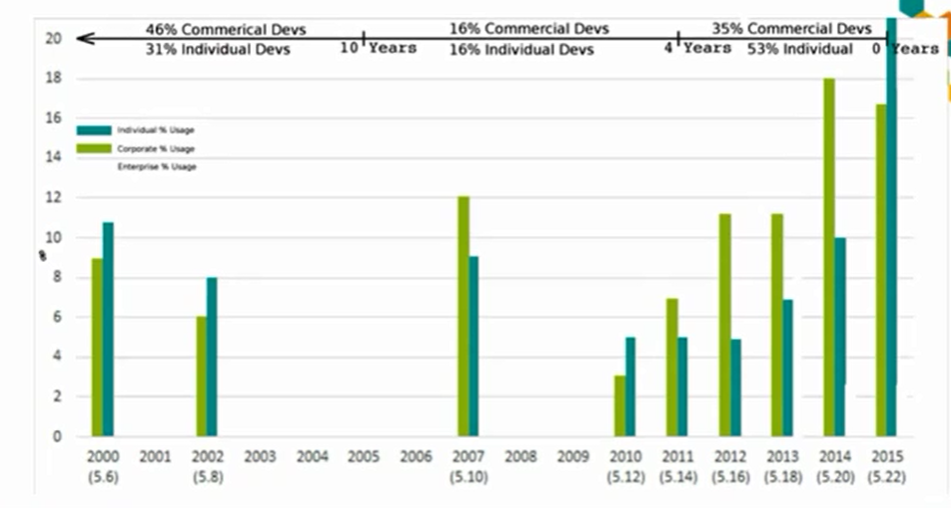







 Eugene Miya ,
Ex-Journal Editor, parallelism DB, committees and conferences, etc.
Answered Sep 9, 2014 · Author has 11.2k answers and 7.9m answer views Everyone cites
and overcites TAOCP.
Eugene Miya ,
Ex-Journal Editor, parallelism DB, committees and conferences, etc.
Answered Sep 9, 2014 · Author has 11.2k answers and 7.9m answer views Everyone cites
and overcites TAOCP.


 Corresponding
author. # Contributed equally. Received 2015 Nov 26; Accepted 2016 Jun 1.
Copyright © The Author(s) 2016
Corresponding
author. # Contributed equally. Received 2015 Nov 26; Accepted 2016 Jun 1.
Copyright © The Author(s) 2016
 Open in a separate window
 Open in a separate window
 Open in a separate window





 Earlier we discussed
the basics of how to write and execute a perl program using
Earlier we discussed
the basics of how to write and execute a perl program using  Written by

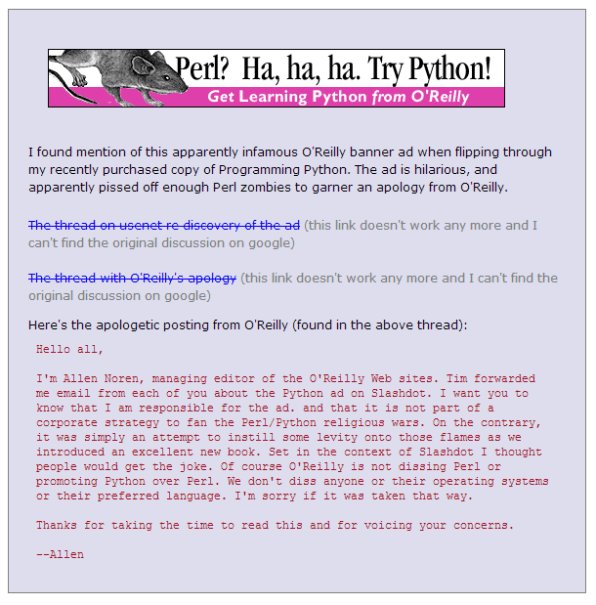

![[A series of scalar variables with arrows pointing to
other variables]](http://www.perl.com/pub/1999/09/graphics/refs.gif)
![[A scalar variable with an arrow pointing back to
itself]](http://www.perl.com/pub/1999/09/graphics/selfref.gif)
![[A picture of an anonymous hash having a flag set within it]](http://www.perl.com/pub/1999/09/graphics/blessing.gif)

 Teodor Zlatanov
 0
0